(Don’t need Bluetooth? Follow steps 1-2 and turn to page 3 for Hearing Aid Only Mode.)
RIGHT
EARBUD
LEFT
EARBUD
HEAR OTC
HEARING AID
We love that you are rocking JLab!
We take pride in our products and fully stand behind them.
YOUR WARRANTY
All warranty claims are subject to JLab authorization
and at our sole discretion. Retain your proof of
purchase to ensure warranty coverage.
CONTACT US
Reach out to us at [email protected]
or visit jlab.com/contact
REGISTER TODAY
jlab.com/register
Product updates | How-to tips
FAQs & more
L
I
M
I
T
E
D
T
W
O
Y
E
A
R
W
A
R
R
A
N
T
Y
S
U
P
P
O
R
T
T
E
A
M
#
T
E
A
M
J
L
A
B
1
3
2
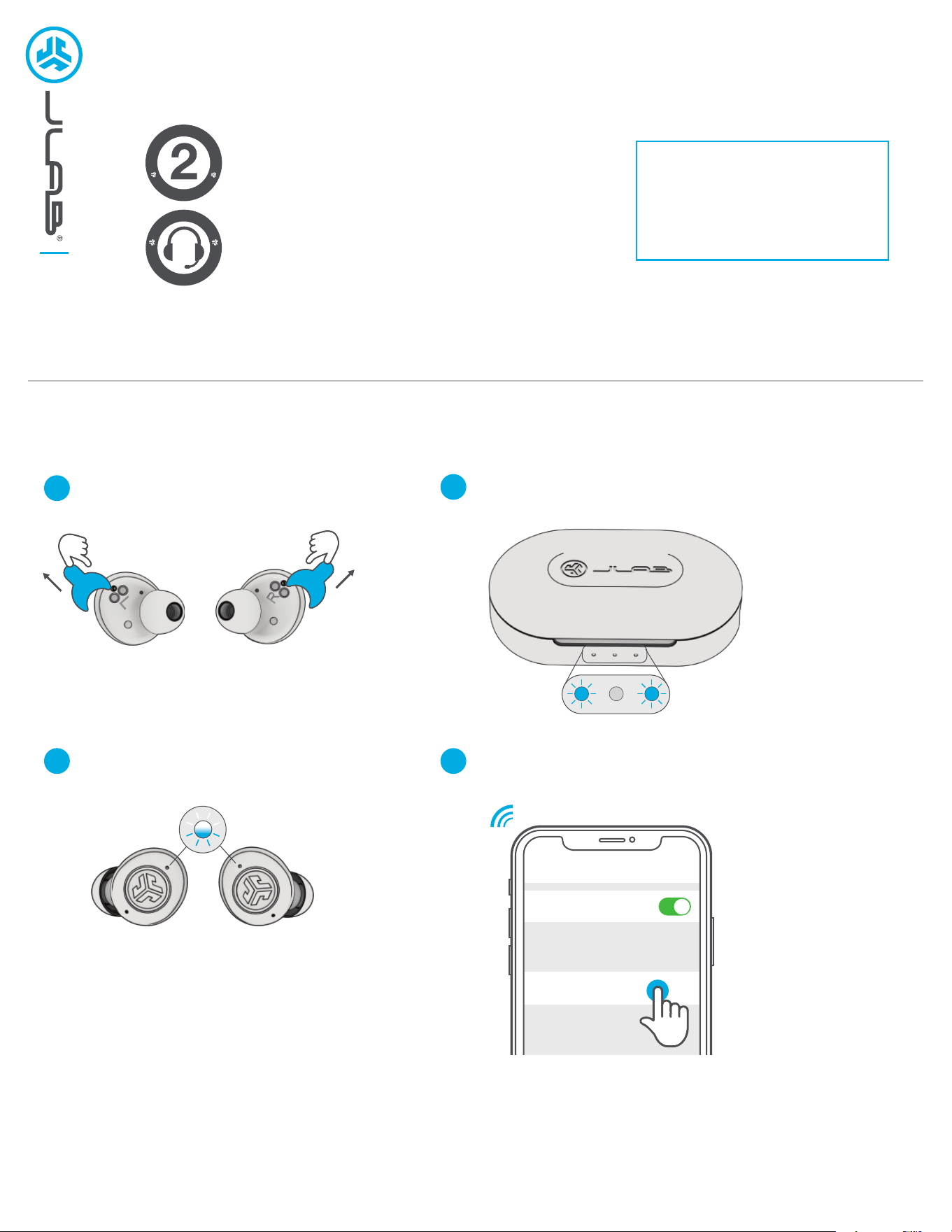
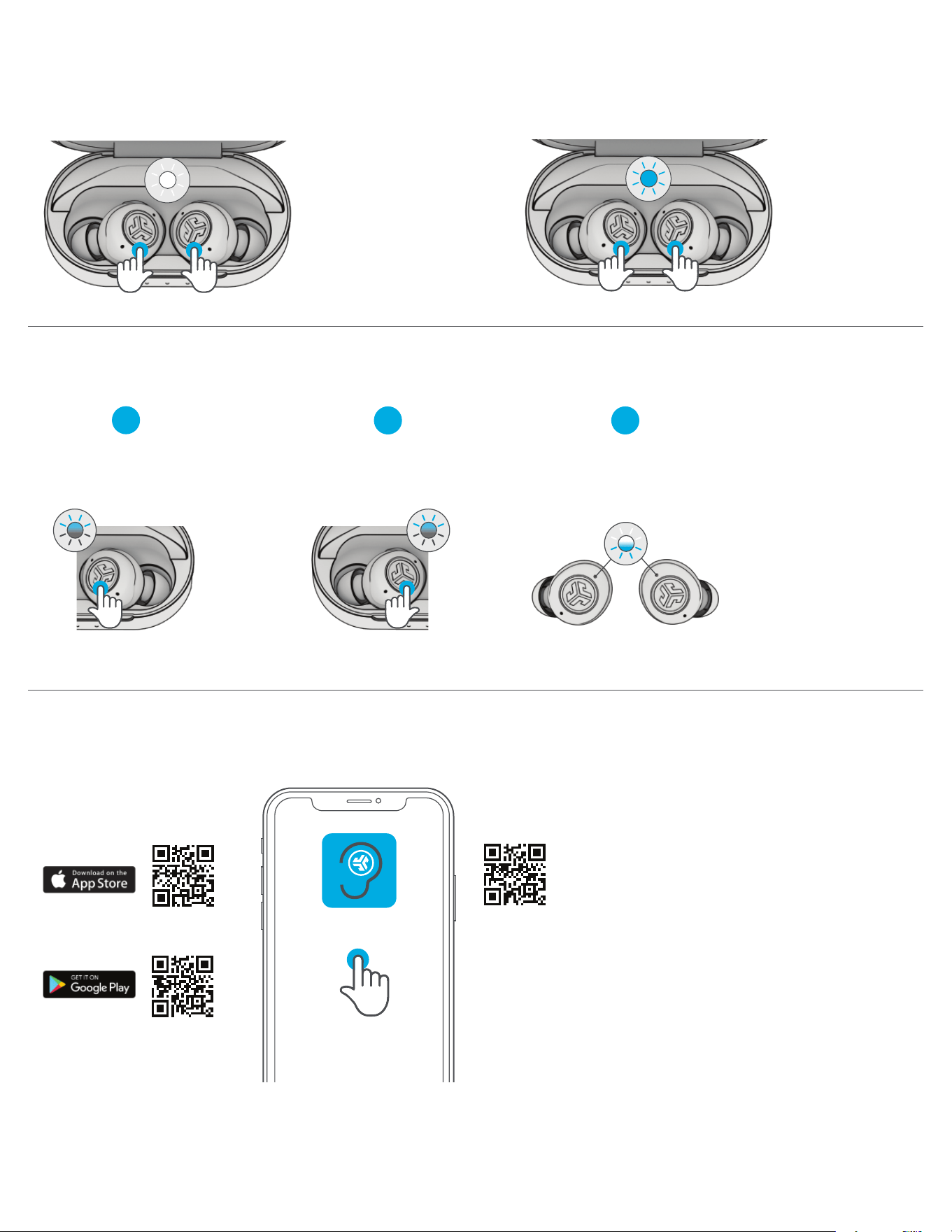
CONNECT YOUR DEVICE
Remove earbuds from case. One earbud
blinks blue/white = Ready to Pair
4
Select “JLab Hear” in your Bluetooth device settings.
Blue lights on case indicate charging.
Remove stickers. Place earbuds
back in case and close door.
Bluetooth
Settings
JLab Hear
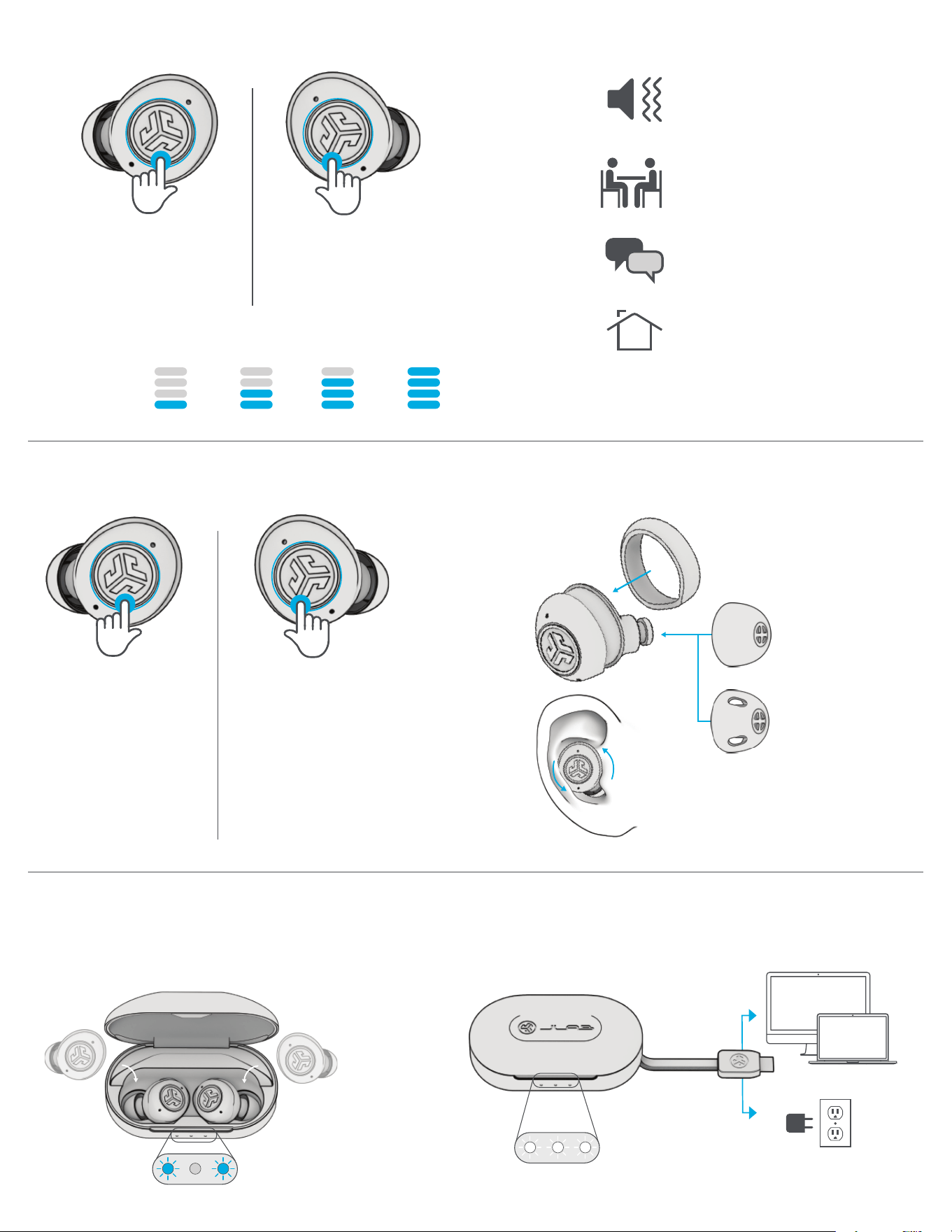
CONTROLS: HEARING AID
CONTROLS: BLUETOOTH MEDIA
CHARGING EARBUDS CHARGING CASE
Connect charging cable to computer or USB-C charging device.
OR
PLAY/PAUSE:
1x Press
VOLUME DOWN:
Press Hold
TRACK BACK:
2x Press
ANSWER/HANG UP:
2X Press
PLAY/PAUSE:
1x Press
VOLUME DOWN:
Press Hold
TRACK BACK:
2x Press
ANSWER/HANG UP:
2X Press
VOLUME
1 2 3 4
SOUND
MODES
QUIET ENVIRONMENT
Enhances all noises to clearly
hear surroundings and voices.
LOUD ENVIRONMENT
Decreases surrounding noise and
white noise to reduce ear fatigue.
RESTAURANT
Decreases background noises
in crowded environments.
CONVERSATION
Enhances voices facing you.
Earbuds will power OFF and start charging
when placed in case. Blue lights = Earbuds charging
RIGHT
EARBUD
LEFT
EARBUD
LEFT VOLUME CHANGE:
Press Hold
SOUND MODE CHANGE:
2x Press
RIGHT VOLUME CHANGE:
Press Hold
SOUND MODE CHANGE:
2x Press
FITTING
Cush Fin™
Open Ear Tips
Lets all sounds in for
more natural sound
Closed Ear Tips
Seals for a more
focused sound
LEDs pulse white when
charging and turn solid
white when fully charged.
JLAB.COM
DOWNLOAD THE APP
Customize JLab Hear and update to the latest software. Download the JLab Hearing Health App in Apple/Google Play Store.
WATCH THE VIDEO
Scan the QR code below for an interactive video
HEARING AID ONLY MODE
TROUBLESHOOTING CONNECTION (FACTORY RESET)
Press Hold 3+ seconds in case
Earbuds will blink blue
(Does not connect to Bluetooth and improves battery life)
BLUETOOTH + HEARING MODE
(Connects to Bluetooth out of the case)
Press Hold 3+ seconds in case
Earbuds will blink white
JLab Hearing Health
When earbuds are in charging case,
quick 7x tap on one earbud.
Earbud blinks blue.
Quick 7x tap on other earbud.
Earbud blinks blue.
Remove earbuds from case.
One earbud blinks
blue/white = Ready to Pair
7x tap
1
2 3
7x tap