V1.0-2024.01
USER MANUAL
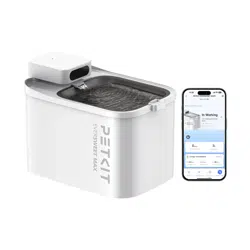
PETKIT EVERSWEET MAX (CORDLESS)
Please read the User Manual
carefully before using the product
and keep it properly.

-3-
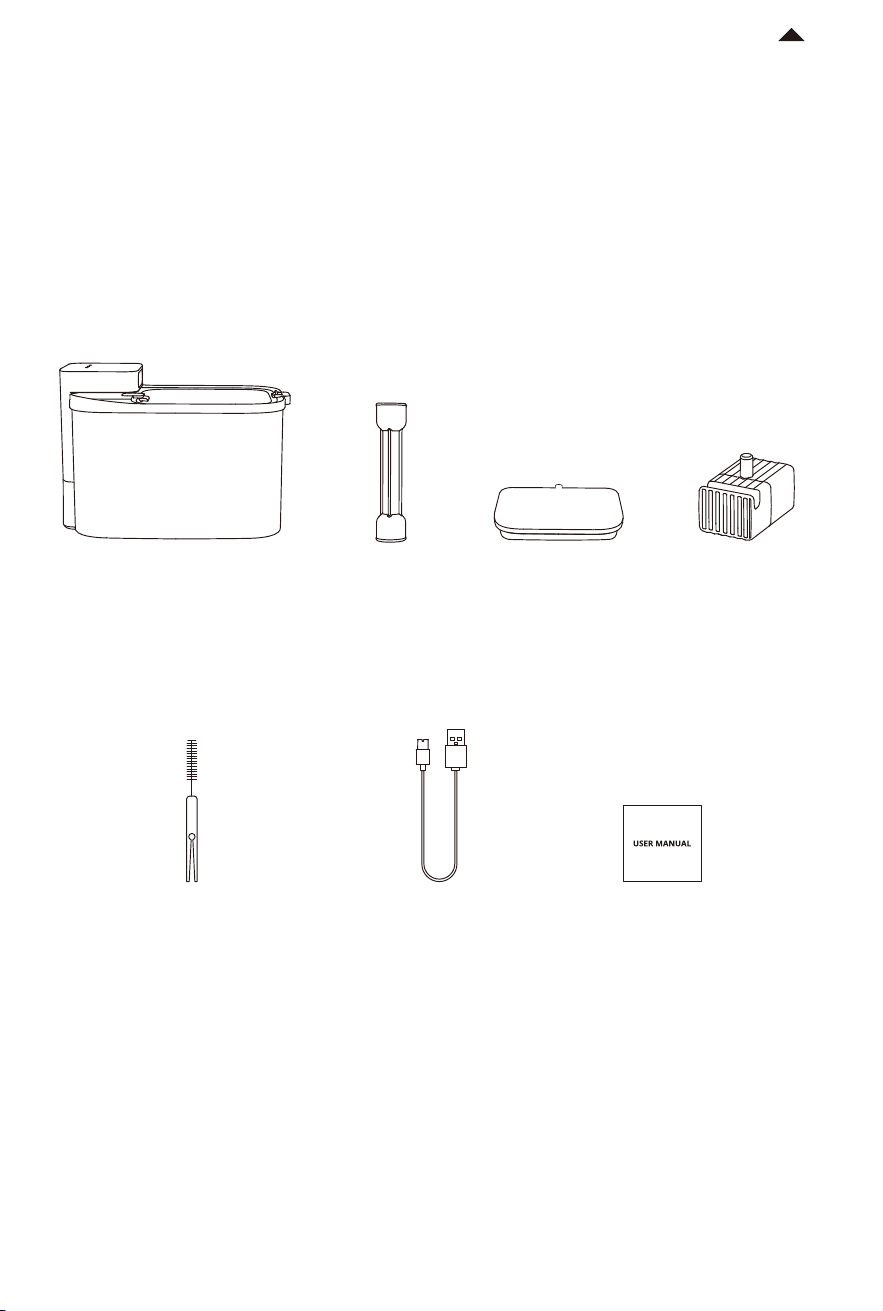
PRODUCT LIST01
RETURN TO
CONTENTS
* Note: In order to enhance the user experience, periodic product improvements may be
implemented. The product images shown are for illustrative purposes only. The actual product
may vary from the image displayed on the packaging. For any inconsistencies, please refer to the
actual product.
* Please ensure that all accessories are present before installation and use.
Note:
① The water pump works continuously in normal mode. The service life of the water pump may
vary depending on different usage and maintenance. Replace the water pump with a new one if
necessary.
2 in 1
Cleaning Brush
User ManualPower Cord
Outlet PipeMain Unit Filter
Wireless
Water Pump
①
-5-
RETURN TO
CONTENTS
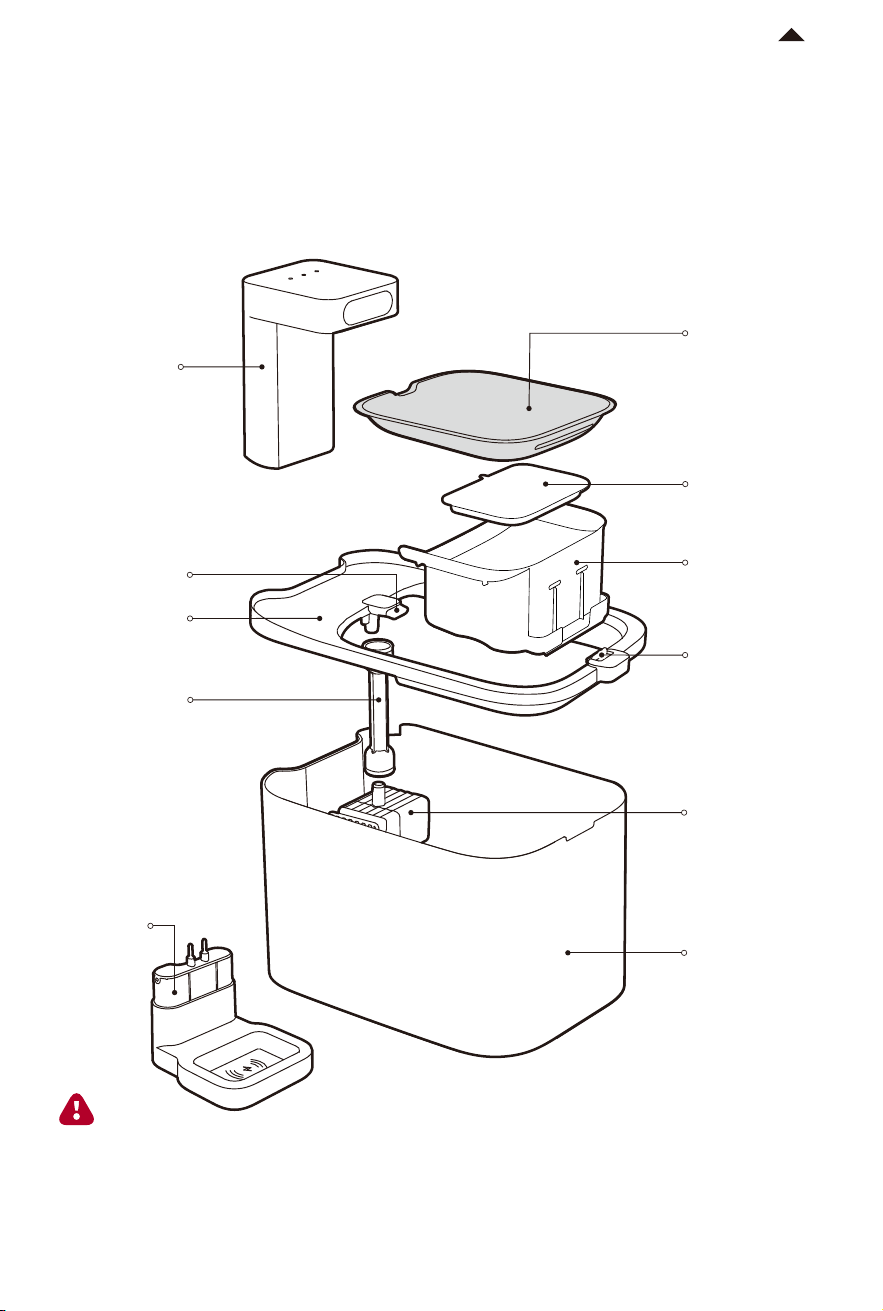
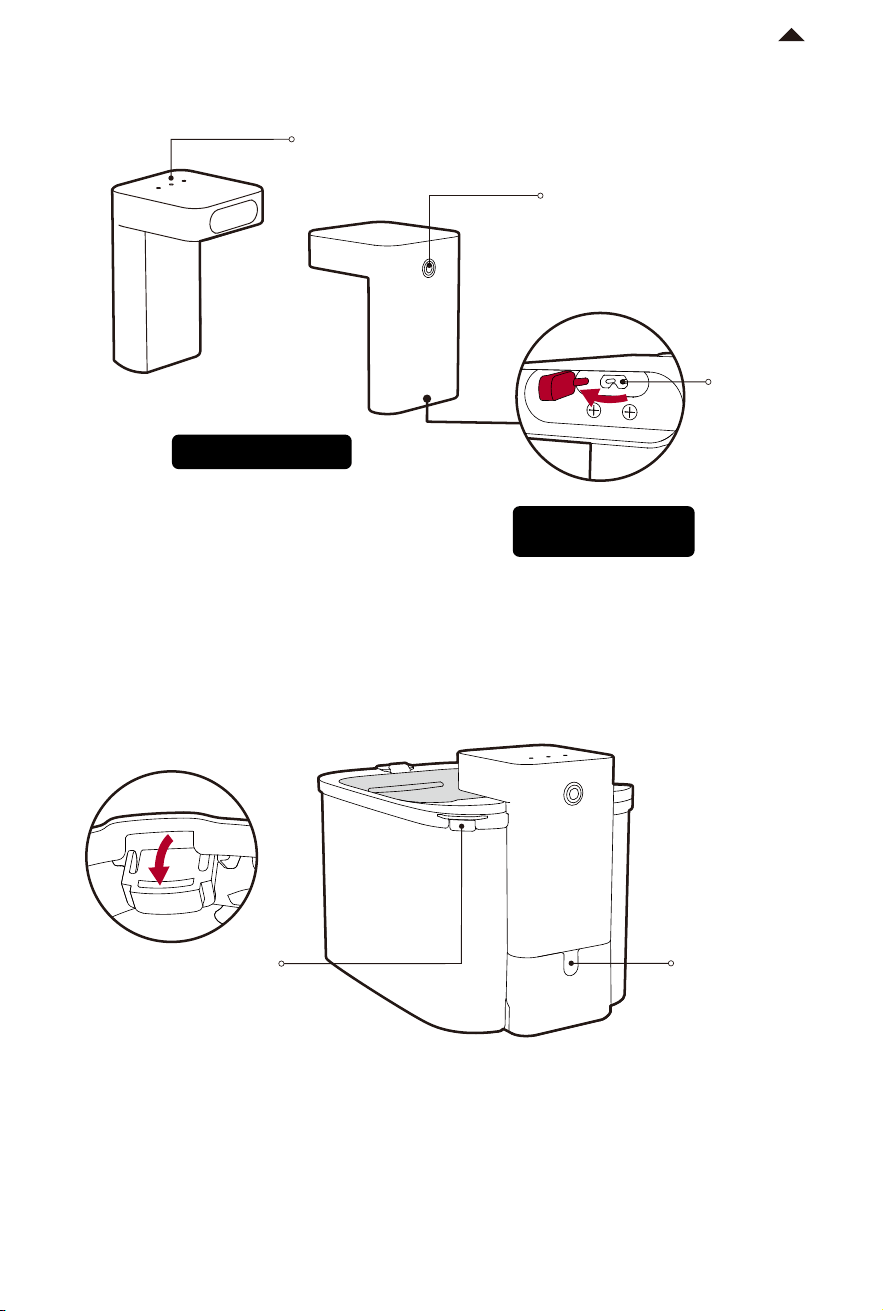
Power Cord
Connector
Button
Notch for Power
Cord
Bottom of
Control Module
Control Module
(Open the dust
plug before
using)
Status
Indicator Light
Turn on/off: Long press it for 3 seconds
until the light flashes in blue, green and
red in sequence, indicating a successful
setup.
Notch for Water Heater
* Take off the lid and open the
cover before use.
03
-6-
RETURN TO
CONTENTS
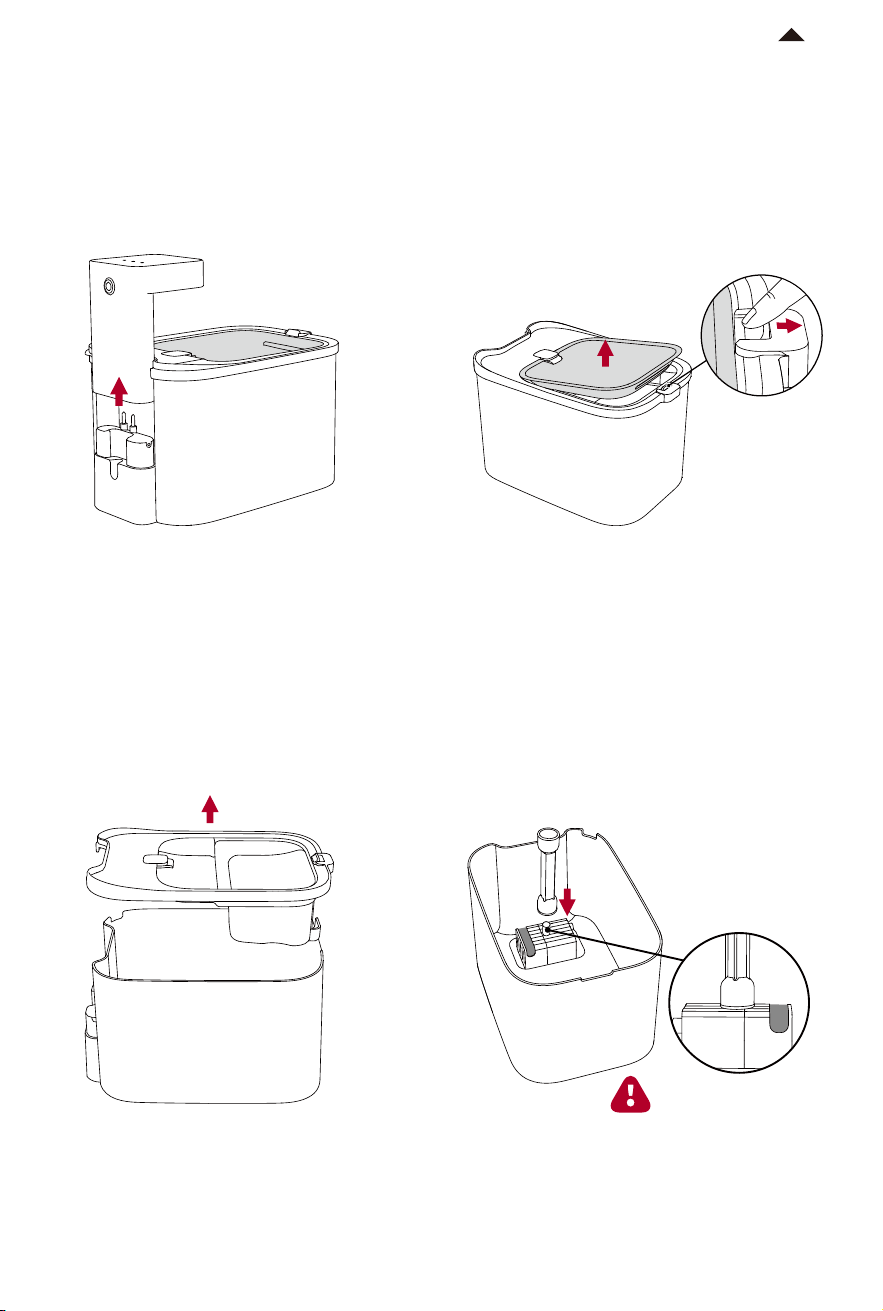
① Take out the control module vertically
upwards.
② Unlock the latch and take out the
stainless steel water tray.
④ Put the water pump into the groove
in the water tank, and then insert the
outlet pipe into the water outlet above
the wireless water pump.
③ Take out the lid and filter holder.
Note: Make sure the
outlet pipe is installed
to the end.
PRODUCT INSTALLATION
-7-
MAX
RETURN TO
CONTENTS
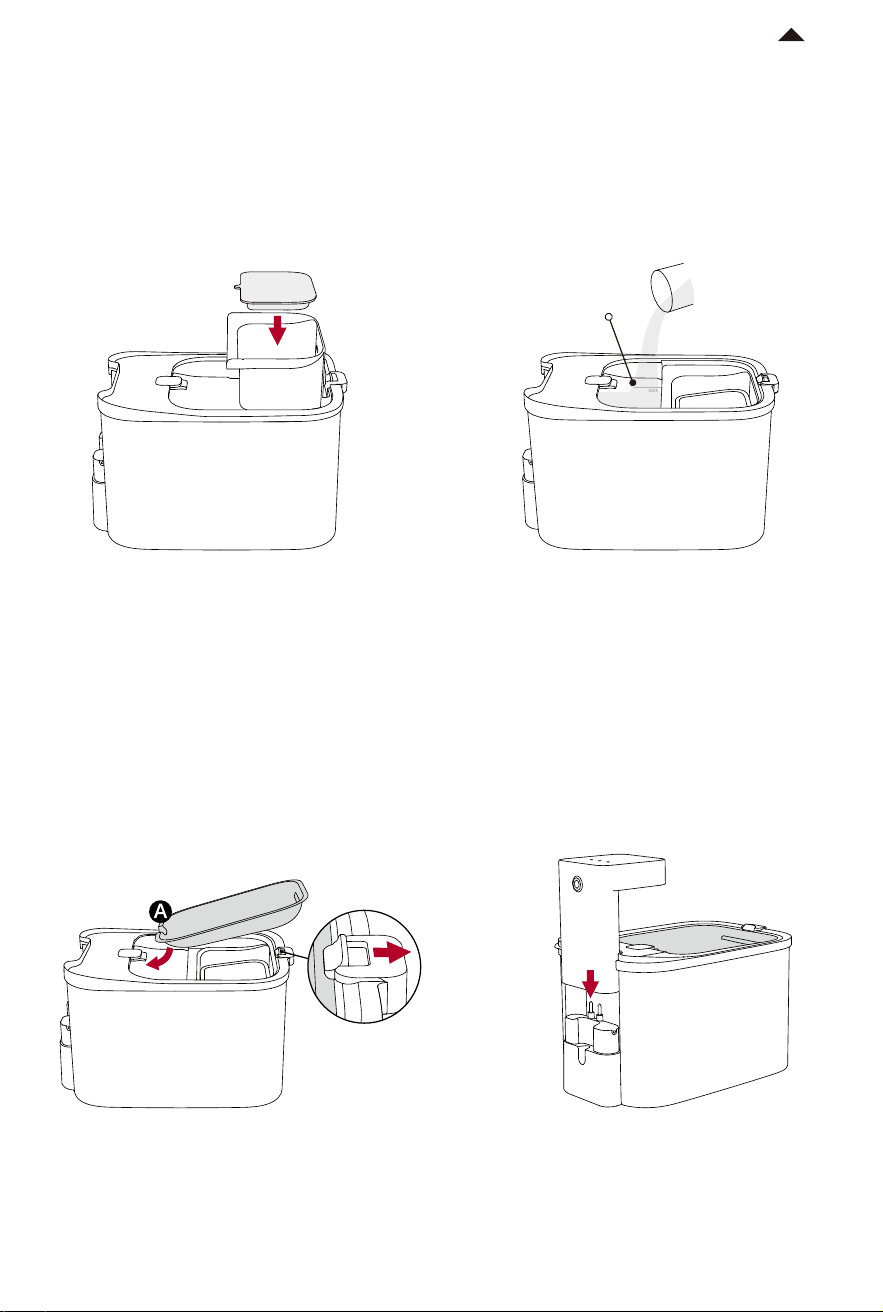
⑤ Put the lid, place filter holder as
shown in the picture, and put the filter
in its holder.
⑥ Add water to the water tank up to the
position of the MAX line.
(* Before using the filter, please read the
instructions on the filter package
carefully.)
MAX line
⑦ Insert point A of the water tray under
the outlet, and pull the latch outward to
secure the other side of the water tray.
⑧ Insert the control module vertically
into the base, and the installation is
complete.
04
-8-
RETURN TO
CONTENTS
HOW TO USE
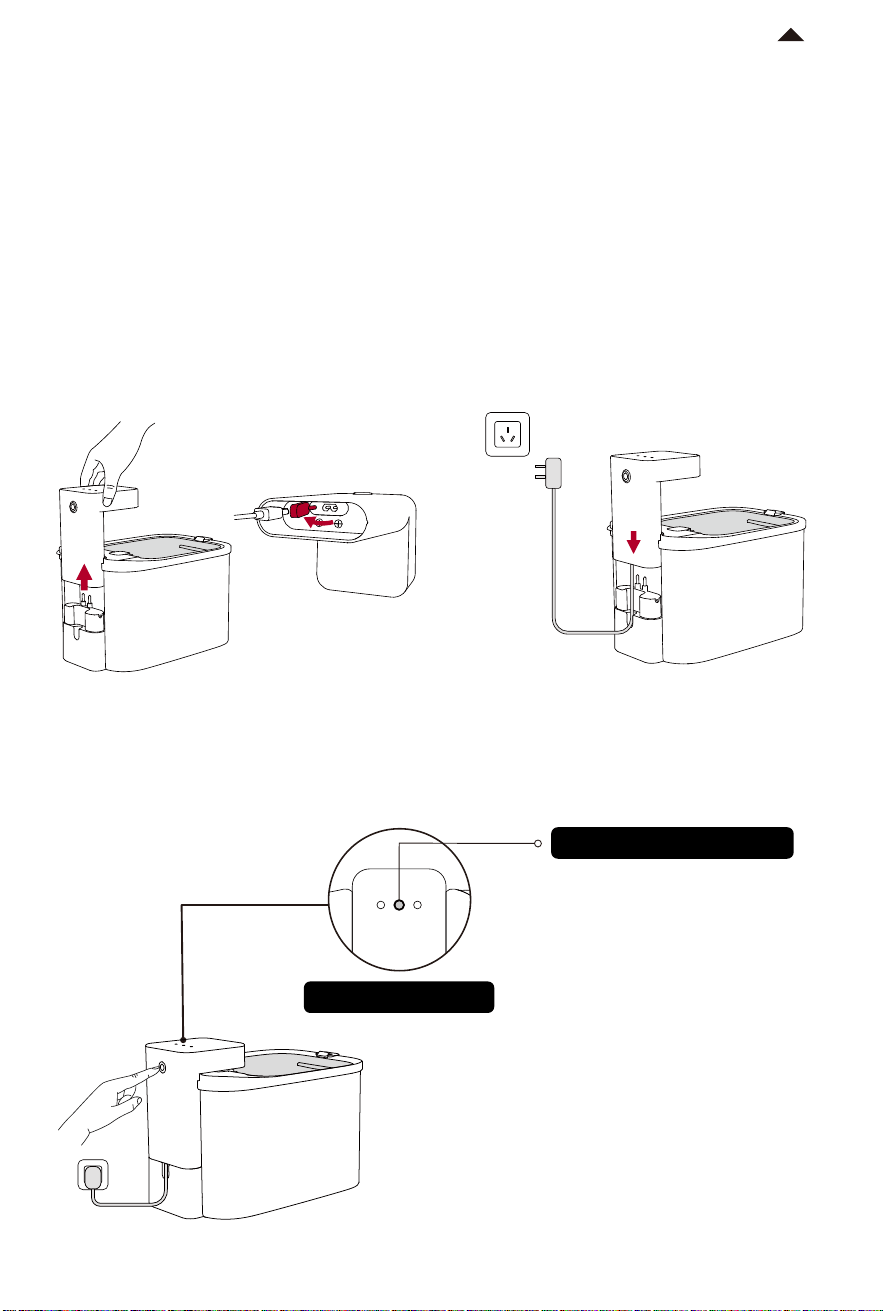
① Normal Mode
Solid blue: Continuous flow
② Intermittent Mode
Solid green: Intermittent flow
(Customize water dispensing frequency
in the App. The default setting is to
dispense water for 3 minutes and stop
for 3 minutes. )
Top of Main Unit
① Remove the control module, open
the silicone plug, and insert the power
cord into the power input at the bottom
of the control module.
③ Press the button to switch water dispensing modes.
② Vertically insert the control module
back to its base and plug in.
* This product offers two power supply options, and you can choose according
to your needs.
4.1 Usage Modes
4.1.1 Plug it in
Status indicator light
-9-
RETURN TO
CONTENTS
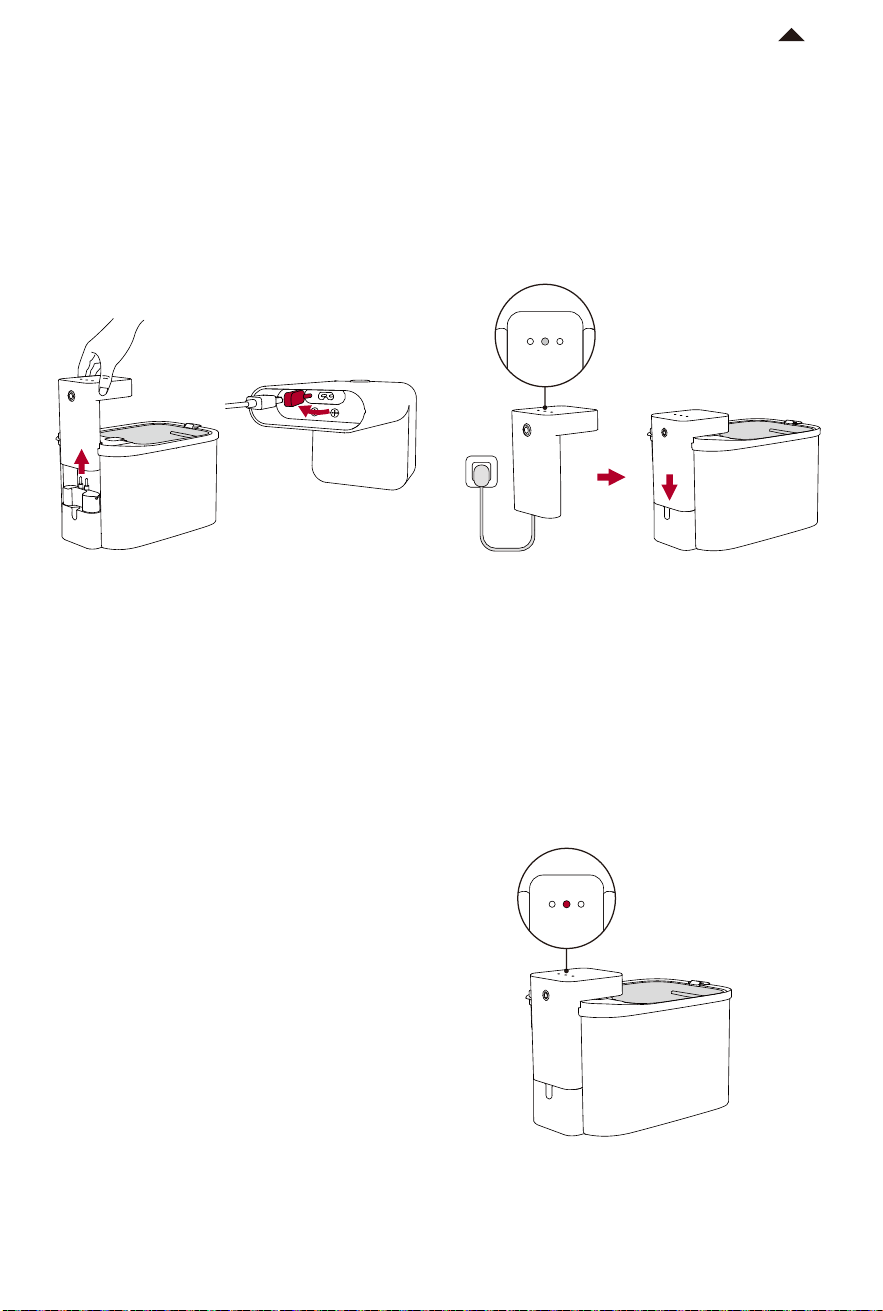
① Remove the control module, and plug
the power cord into its connector to
charge the control module.
③ Switching water dispensing mode is
not available in battery mode.
(To preserve the battery’s service life,
the water is pumped for 25 seconds per
hour by default.)
② The solid blue or green light indicates
full charging. Unplug it, cover the silicone
plug, and insert the control module into
the base vertically.
4.1.2 Unplug (powered by built-in battery)
* Water dispense frequency can be set by clicking
“Energy management” in the PETKIT App. Please note
that high frequency of pumping water will shorten
the battery life. To provide you with the best possible
user experience, unscheduled optimization will be
performed on software and its functions. Please refer
to the real features in the App.
④ The case that the status indicator
light flashes in red shows low battery
power. Please plug in to charge the
control module.
Fully Charged
The status indicator
light is solid.
Low battery
The indicator light
is flashing
-10-
RETURN TO
CONTENTS
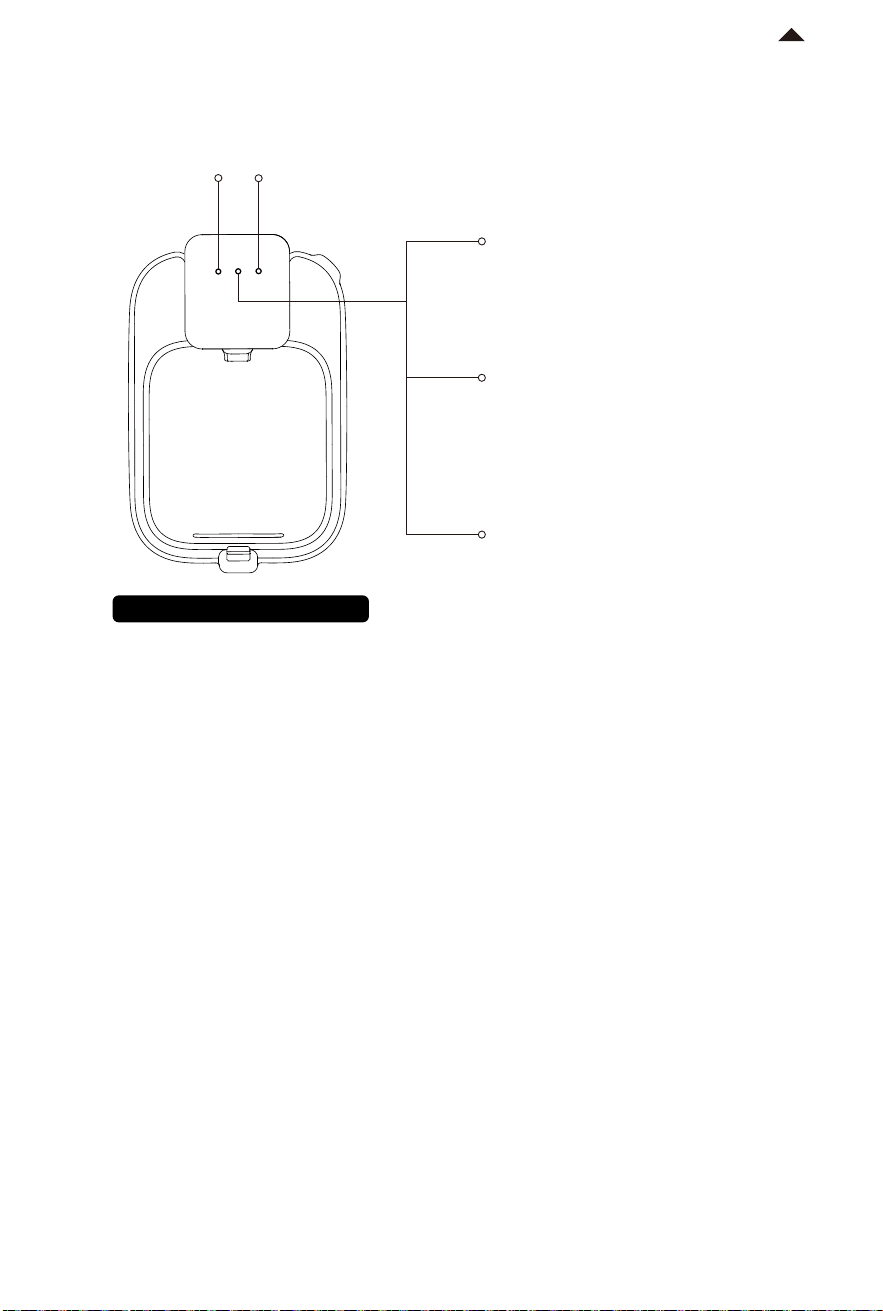
Fully charged: Solid blue or green
Charging: Flashing blue or green
The green light is on for 15 seconds
and then goes off.
(In this way, the working time is extended.)
Low battery: Flashing red
Top view of the device
4.2 Indicator Description
① Flashing red means that the filter needs to be replaced. Please reset in the App
after replacement, then the indicator will go off.
(Water fountain in normal operation)
② Flashing red means water shortage. The indicator will go off after refilling water.
(Water fountain in normal operation)
Filter Indicator
①
Water Shortage Indicator
②
* When the control module is removed, indicator lights of filter and water
shortage are solid red. When the control module is reassembled, the two lights
will go off.
Plug in
Unplug
Main Unit Failure
* The light color depends on the water dispensing
mode.
The light flashes blue and green
alternately.
-11-
Download on the
App Store
Device
电量:100%
0h 8h 16h 24h
小佩智能猫牌
进食次数
5
下次出粮时间:19:30
智能双子星喂食
器
0h 8h 16h 24h
9:41
Hello, PETKIT
RETURN TO
CONTENTS
* Note: To enhance user experience, product firmware
will be upgraded periodically. Please update the firmware
timely in the App. The actual App interface prevails.
4.3 Device Binding
① Download and Install PETKIT App:
Download the PETKIT App
in the App Store or Google Play
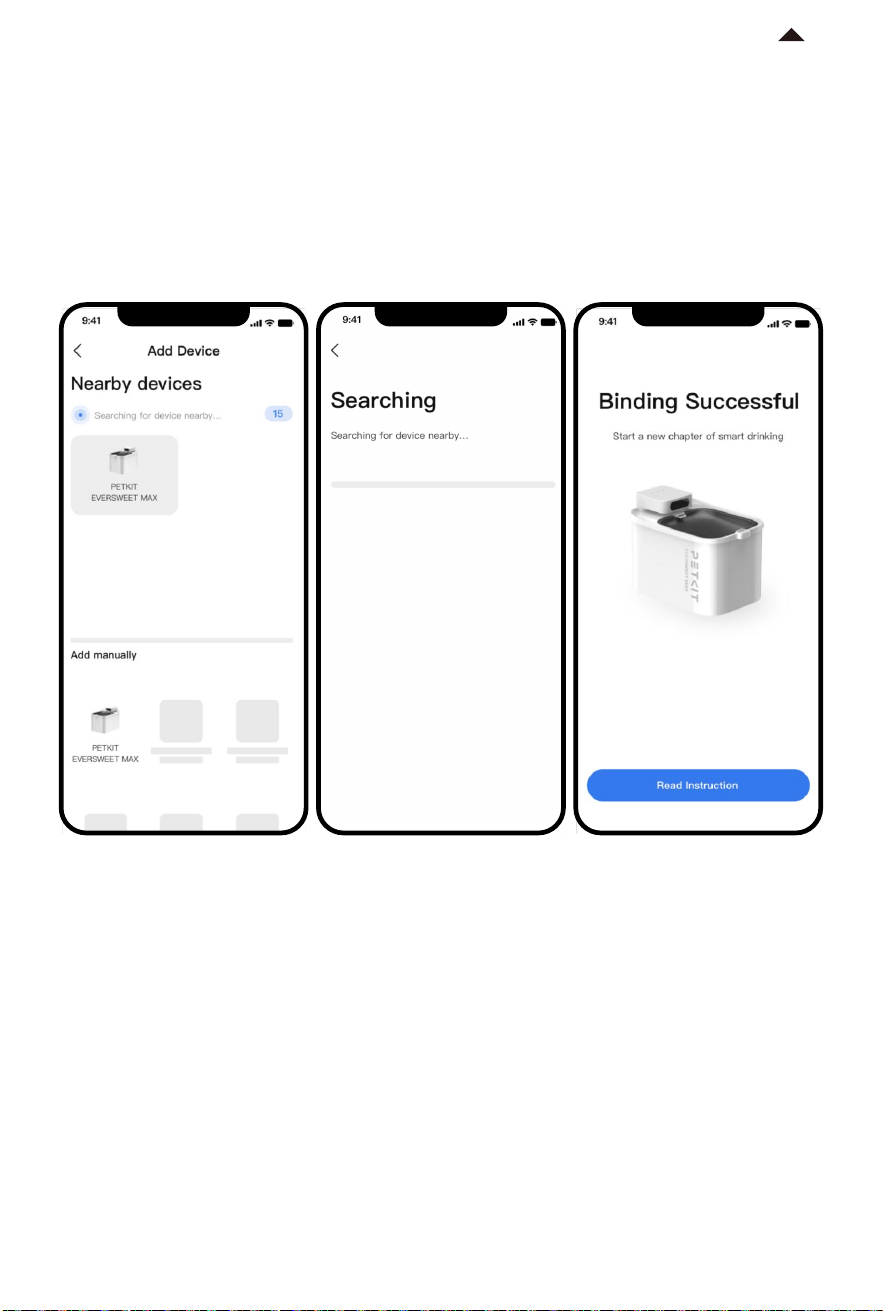
② Add the device
Open the PETKIT App and click “+” in the top right corner to add
“PETKIT EVERSWEET MAX (CORDLESS)”.
GET IT ON
Google Play
FUNCTION DESCRIPTION
05
-13-
5.1 Power Supply Options
This device has two power supply options.
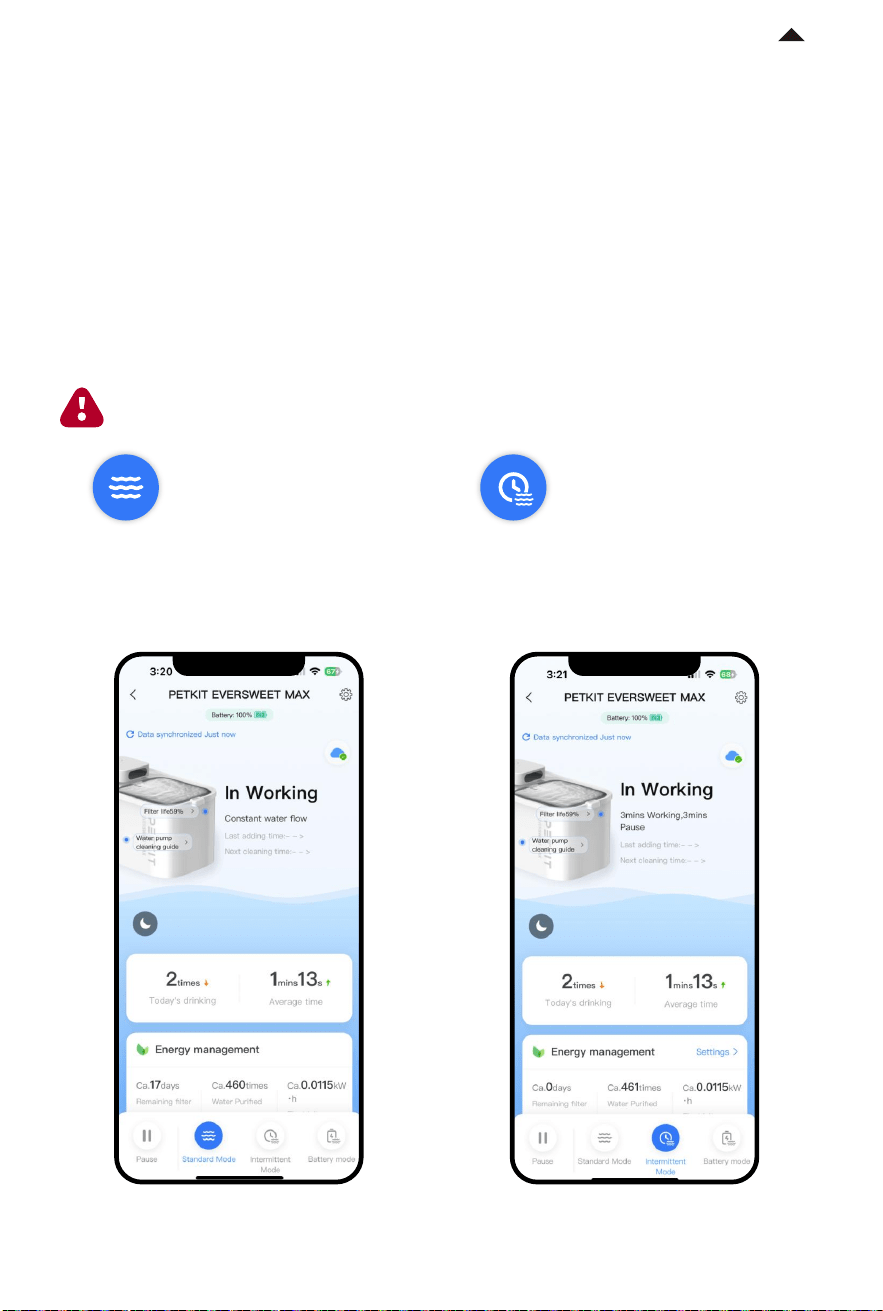
Plug it in: Continuous flow and intermittent flow are optional.
Unplug (battery-powered): Switching water outlet modes is not available.
RETURN TO
CONTENTS
* Note: To enhance user experience, product firmware will be upgraded periodically. Please update the firmware timely in
the App. The actual App interface prevails.
The device dispenses water continuously.
(This mode is only supported when plugging in)
The device dispenses water intermittently.
The water dispensing frequency can be
modified through energy management.
(This mode is only supported when plugging in)
① Plug it in
After connecting the device via Bluetooth, you can switch between the two modes
according to your needs. You can also pause water dispensing on the App.
Note: The device will automatically resume work after a 10-minute pause to
ensure water is always available for your pets.
Standard Mode
Intermittent Mode
-14-
RETURN TO
CONTENTS
* Note: To enhance user experience, product firmware
will be upgraded periodically. Please update the firmware
timely in the App. The actual App interface prevails.
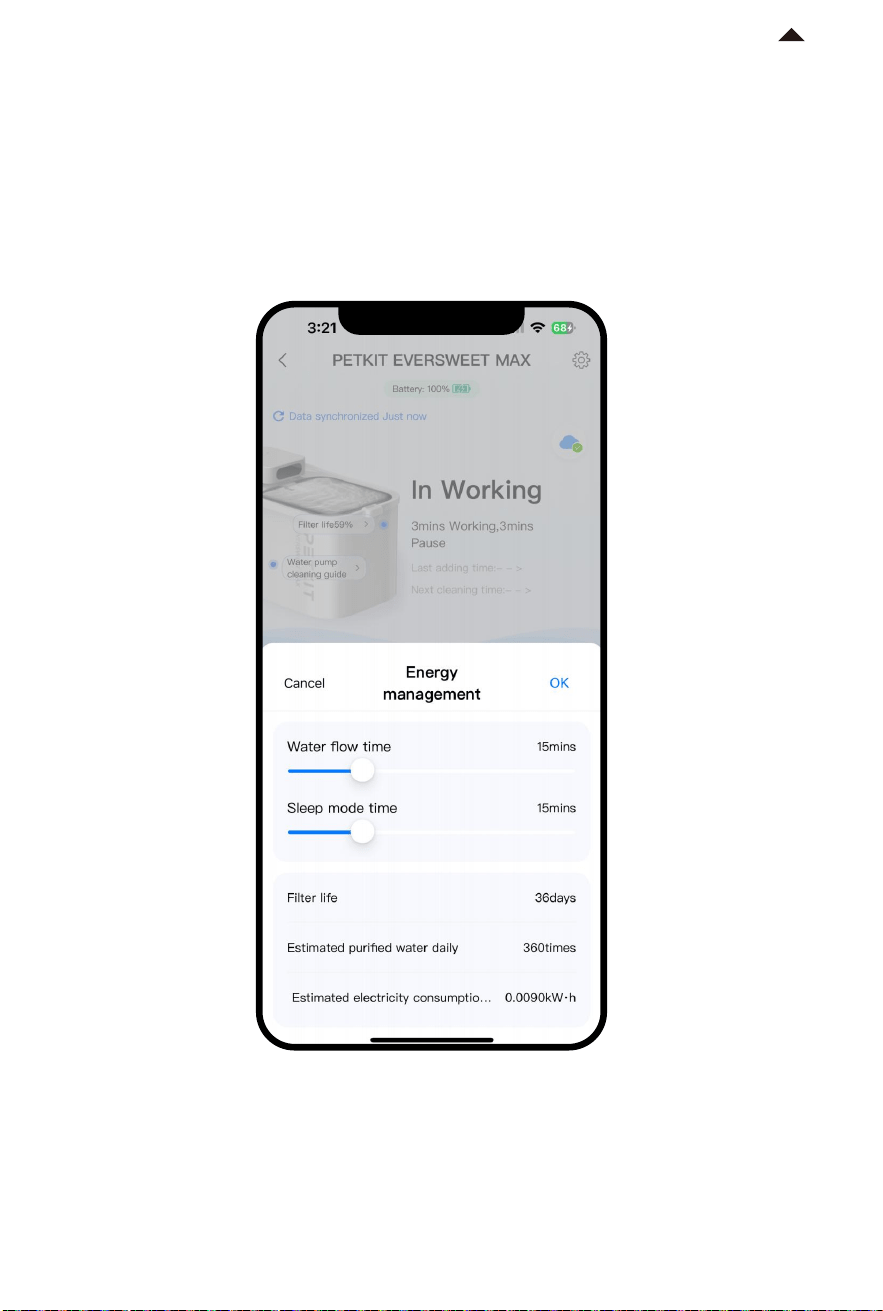
Once unplugged, the device will be powered by the built-in battery. The default setting
is to dispense water for 25s and stop for one hour, and you can modify the frequency
in energy management as needed. The battery life will be affected by the frequency
of water dispensing.
② Unplug (battery-powered)
5.2 Homepage of Device
-15-
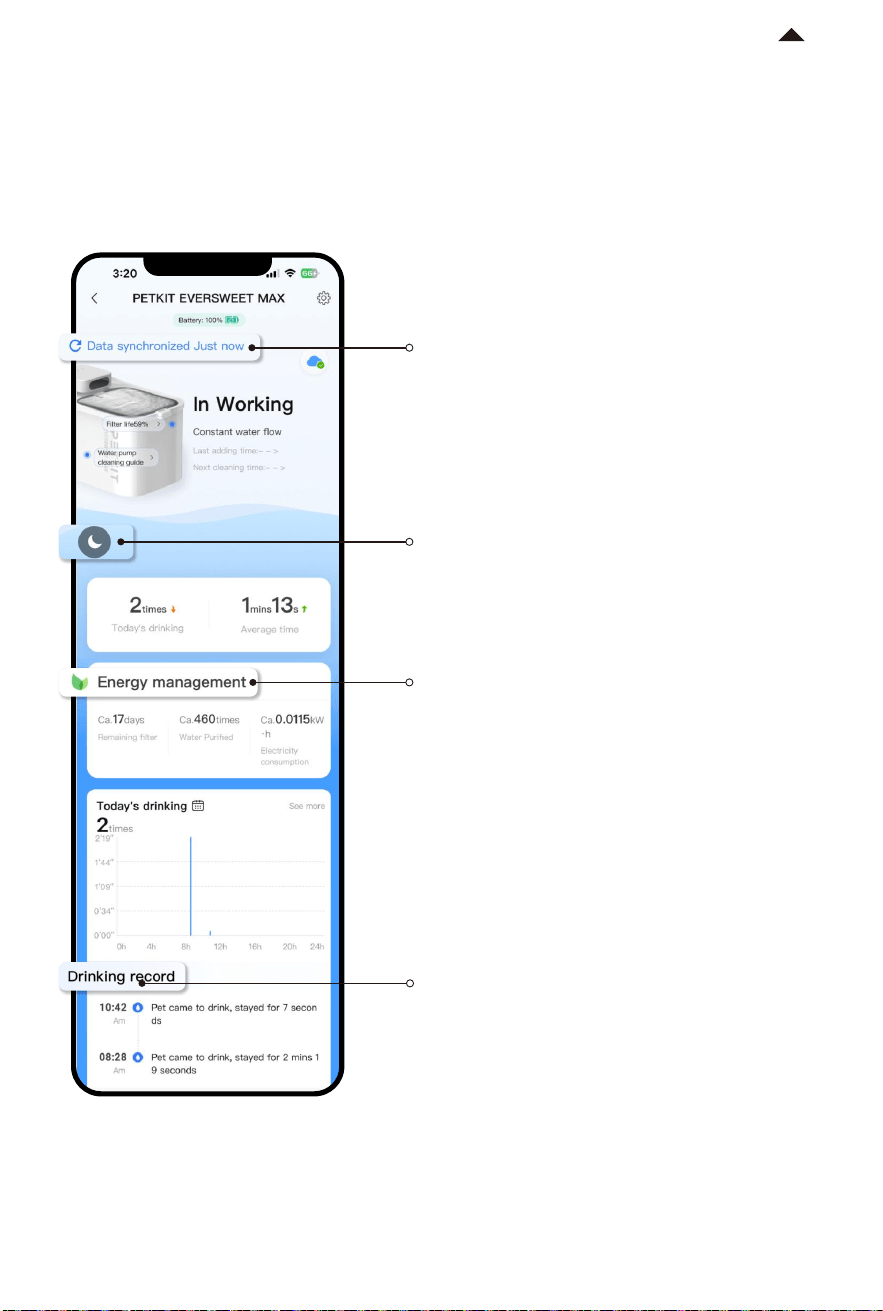
① Data Synchronization
Refresh it to obtain real-time data.
② Do Not Disturb
③ Energy Management
On the homepage, you can view the number of times and average duration of
drinking that day, as well as online status of device, filter life, energy management,
etc.
④ Drinking Records
RETURN TO
CONTENTS
* Note: To enhance user experience, product firmware
will be upgraded periodically. Please update the firmware
timely in the App. The actual App interface prevails.
The device will not dispense water
when you enable it.
Note: Please ensure that the App and
the device are connected via Bluetooth,
and stay close to the device during
synchronization. If you need to obtain
real-time data remotely, see 5.3
Interconnection for more details.
View the filter life, purification times,
and power consumption. These
parameters will change according to
the water dispensing duration and
interval duration for reference.
View pet’s drinking records by date.
-16-
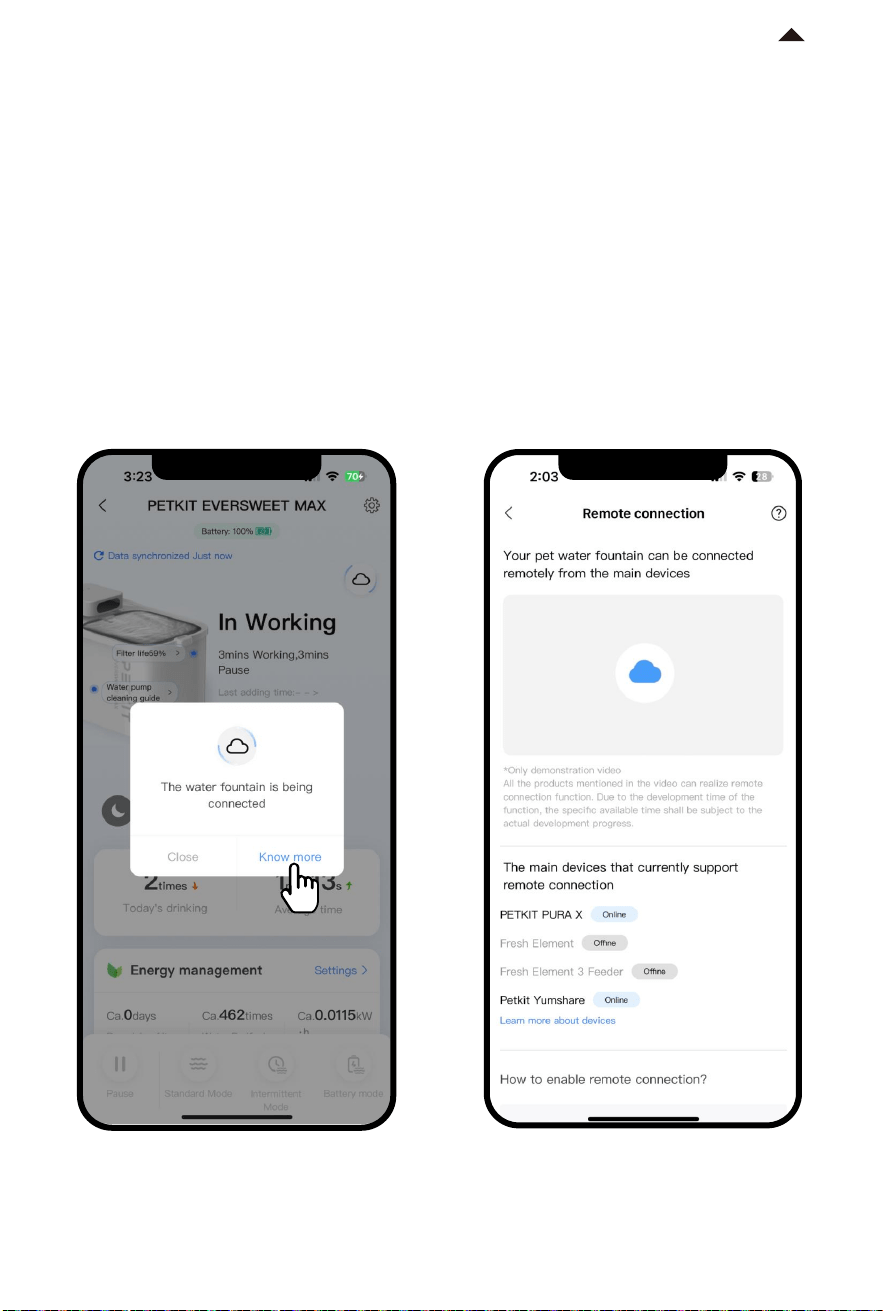
5.3 Interconnection
Through the interconnection, you can remotely control the device, receive water
shortage notification, etc, so that you can know the working status of the device
at any time.
How to interconnect
This device can be connected to a master device via Bluetooth. When connecting,
make sure that the distance between the device and the master device is within
8 meters and no obstacles are blocking the signal. Additionally, the master device
must be updated to the latest version.
The master device that supports interconnection: PETKIT self-cleaning cat litter box series and
PETKIT smart feeder series.
The master device that doesn’t support interconnection: PETKIT FRESH ELEMENT smart pet feeder
(model is P512 ), PETKIT FRESH ELEMENT Mini smart pet feeder (model is P530).
RETURN TO
CONTENTS
* Note: To enhance user experience, product firmware
will be upgraded periodically. Please update the firmware
timely in the App. The actual App interface prevails.
-17-
06
RETURN TO
CONTENTS
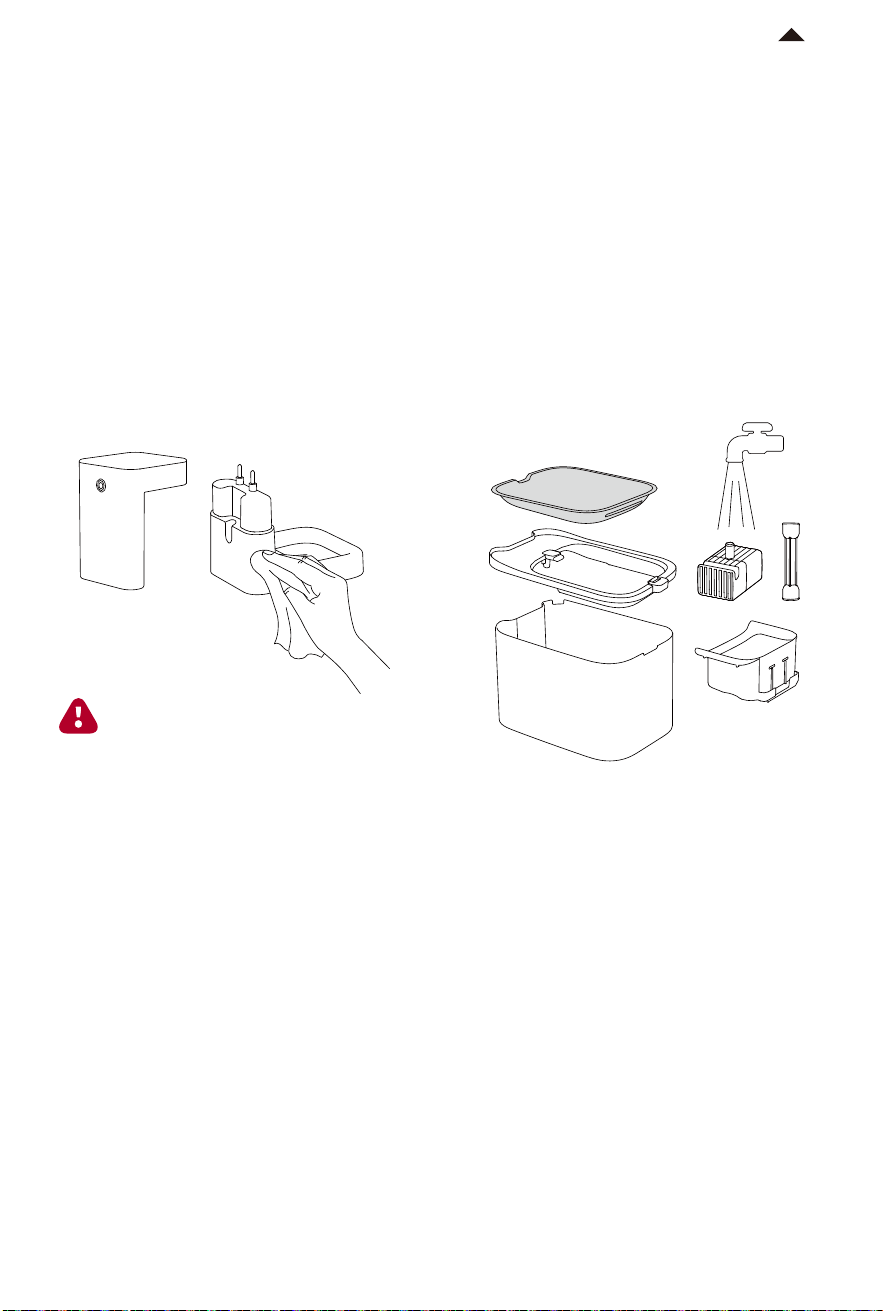
Caution: There are components inside
the wireless base and control module.
Do not rinse or soak them.
CLEANING AND MAINTENANCE
The cleaning frequency is based on pet's habits and water quality. To ensure healthy
drinking water for pets, it is recommended to clean the water tank at least once a
week and clean thoroughly once a month.
(View 06 for the video about cleaning and maintenance)
① Remove the control module and the
wireless base, and wipe them with a dry
cloth or slightly damp cloth. Please do
not immerse them in water.
② Clean the lid, water tray, filter holder,
water tank, outlet pipe, and wireless
water pump.


08
-19-
RETURN TO
CONTENTS
BASIC SPECIFICATIONS
Name
Model
PETKIT EVERSWEET MAX (CORDLESS)
P4115
Material
ABS, 304 Stainless Steel
Weight
Connection
Rated Input
About 1.2kg (2.6lb)
Bluetooth
5V 1A
Scope of Application Cats and small-breed dogs
265*171*191mm (10.4*6.7*7.5in)
Dimensions
Capacity 3L (101oz)
Disposal
The European directive 2012 / 19 / CE on Waste Electrical and Electronic Equipment
(WEEE), requires that old household electrical appliances must not be disposed in the
normal unsorted municipal waste stream. Old appliances must be collected separately
in order to optimize the recovery and recycling of the materials they contain and
reduce the impact on human health and the environment. The crossed out
"wheeled bin" symbol on the product reminds you of your obligation,that when you
dispose of the appliance it must be separately collected. Consumers should contact
their local authority or retailer for information concerning the correct disposal of
their old appliance.

10
-20-
09
RETURN TO
CONTENTS
· Thank you for choosing the PETKIT EVERSWEET MAX (CORDLESS).
·
It is important to read and follow the User Manual before using the product.
Once installed or used, it means that you have carefully read and accepted the
following safety instructions.
·
PETKIT is not liable for any accidents or injuries resulting from improper use
of the product.
·
PETKIT reserves the rights of interpretation and revision.
A MESSAGE TO OUR
VALUED CUSTOMERS
* Failure to follow the safety guides outlined below can result in product
malfunction or other unforeseen mishaps.
USER SAFETY GUIDE
· Please install and use the product as instructed in the User Manual.
·
Pets under three months of age are not recommended to use this product.
·
The product is for indoor use only. Avoid direct sunlight exposure and keep it
away from open flames.
·
Use only the original adapter to avoid device damage or safety hazards.
·
Place the device on a level surface. Do not knock over the device, otherwise it
will not work properly or spill water.
·
Do not rinse or soak the base and the control module.
·
Avoid damage to the pump during daily cleaning and maintenance. The case
that you drop it accidentally may cause the internal ceramic shaft to break,
resulting in product damage.
·
Please note that this product operates on safe low voltage, but pets chewing on
the wires may still pose a risk of electrical leakage. We recommend taking
measures to prevent this, such as securing and hiding the power cord when using
the product. If you find your pets chewing the cord, please stop them promptly.
·
Please handle it with care, otherwise it may cause damage to the product.
·
If you are not using or moving the product for an extended period, it is
recommended to unplug the power cord.
·
Children should use this product under the supervision and guidance of adults.
·
Repairs should only be performed by professionals to avoid safety hazards.
·
Before leaving for an extended period, ensure that there is sufficient water in
the water tank.
·
If you encounter any issues with the product, please contact our customer
service for assistance.

-21-
RETURN TO
CONTENTS
This device complies with part 15 of the FCC Rules. Operation is subject to the following two conditions:
(1) This device may not cause harmful interference, and ;(2) this device must accept any interference
received, including interference that may cause undesired operation.
FCC warning:
Any Changes or modifications not expressly approved by the party responsible for compliance could
void the user's authority to operate the equipment.
Note: This equipment has been tested and found to comply with the limits for a Class B digital device,
pursuant to part 15 of the FCC Rules.
These limits are designed to provide reasonable protection against harmful interference in a residential
installation. This equipment generates uses and can radiate radio frequency energy and, if not installed
and used in accordance with the instructions, may cause harmful interference to radio communications.
However, there is no guarantee that interference will not occur in a particular installation.
If this equipment does cause harmful interference to radio or television reception, which can be
determined by turning the equipment off and on, the user is encouraged to try to correct the interference
by one or more of the following measures:
-Reorient or relocate the receiving antenna.
-Increase the separation between the equipment and receiver.
-Connect the equipment into an outlet on a circuit different from that to which the receiver is connected.
-Consult the dealer or an experienced radio/TV technician for help.
ThedevicehasbeenevaluatedtomeetgeneralRFexposurerequirement.
This equipment complies with FCC radiation exposure limits set forth for an uncontrolled environment.
This equipment should be installed and operated with minimum distance 20cm between the radiator
& your body.
IC warning
- English:
This device complies with Industry Canada licence-exempt RSS standard(s). Operation is subject to the
following two conditions:
(1) This device may not cause interference, and
(2) This device must accept any interference, including interference that may cause undesired operation
of the device.
- French:
Le présentappareilestconforme aux CNR d'Industrie Canada applicables aux appareils radio exempts
de licence.
L'exploitationestautorisée aux deux conditions suivantes:
(1) l'appareil ne doit pas produire de brouillage, et
(2) l'utilisateur de l'appareildoit accepter tout brouillageradioélectriquesubi, mêmesi le brouillageest
susceptible d'encompromettre le fonctionnement.