V 1.1 (Firmware 0.3.110) - May 2024
User Manual
UB-Xa
Classic Analog 16-Voice Multi-Timbral Polyphonic Synthesizer with
8 Vintage Modes, Dual VCFs and 61-Key Poly After-Touch Keyboard

2 UB-Xa User Manual
Table of Contents
Welcome to your UB-Xa –
Getting Started .................................................4
Features .............................................................5
Recalling a preset or
saved patch, creating a
new patch, storing your patches ......................5
Manual Controls ................................................6
Rear Panel .......................................................20
Preset Patches .................................................20
Glossary ...........................................................31
FEDERAL COMMUNICATIONS
COMMISSION COMPLIANCE
INFORMATION .................................................33
3 UB-Xa User Manual
Terminals marked with this symbol carry
electrical current of sucient magnitude
to constitute risk of electric shock.
Use only high-quality professional speaker cables with
¼" TS or twist-locking plugs pre-installed. Allother
installation or modication should be performed only
by qualiedpersonnel.
This symbol, wherever it appears,
alertsyou to the presence of uninsulated
dangerous voltage inside the
enclosure-voltage that may be sucient to constitute a
risk ofshock.
This symbol, wherever it appears,
alertsyou to important operating and
maintenance instructions in the
accompanying literature. Please read the manual.
Caution
To reduce the risk of electric shock, donot
remove the top cover (or the rear section).
No user serviceable parts inside. Refer servicing to
qualied personnel.
Caution
To reduce the risk of re or electric shock,
do not expose this appliance to rain and
moisture. The apparatus shall not be exposed to dripping
or splashing liquids and no objects lled with liquids,
suchas vases, shall be placed on the apparatus.
Caution
These service instructions are for use
by qualied service personnel only.
Toreduce the risk of electric shock do not perform any
servicing other than that contained in the operation
instructions. Repairs have to be performed by qualied
servicepersonnel.
1. Read these instructions.
2. Keep these instructions.
3. Heed all warnings.
4. Follow all instructions.
5. Do not use this apparatus near water.
6. Clean only with dry cloth.
7. Do not block any ventilation openings. Install in
accordance with the manufacturer’s instructions.
8. Do not install near any heat sources such as
radiators, heat registers, stoves, or other apparatus
(including ampliers) that produce heat.
9. Do not defeat the safety purpose of the polarized
or grounding-type plug. A polarized plug has two blades
with one wider than the other. A grounding-type plug
has two blades and a third grounding prong. The wide
blade or the third prong are provided for your safety. Ifthe
provided plug does not t into your outlet, consult an
electrician for replacement of the obsolete outlet.
10. Protect the power cord from being walked on or
pinched particularly at plugs, convenience receptacles,
and the point where they exit from the apparatus.
11. Use only attachments/accessories specied by
themanufacturer.
12. Use only with the
cart, stand, tripod, bracket,
or table specied by the
manufacturer, orsold with
the apparatus. When a cart
is used, use caution when
moving the cart/apparatus
combination to avoid
injury from tip-over.
13. Unplug this apparatus during lightning storms or
when unused for long periods of time.
14. Refer all servicing to qualied service personnel.
Servicing is required when the apparatus has been
damaged in any way, such as power supply cord or plug
is damaged, liquid has been spilled or objects have fallen
into the apparatus, the apparatus has been exposed
to rain or moisture, does not operate normally, or has
beendropped.
15. The apparatus shall be connected to a MAINS socket
outlet with a protective earthing connection.
16. Where the MAINS plug or an appliance coupler is
used as the disconnect device, the disconnect device shall
remain readily operable.
17. Correct disposal of this
product: This symbol indicates that
this product must not be disposed
of with household waste,
according to the WEEE Directive
(2012/19/EU) and your national
law. This product should be taken
to a collection center licensed for
the recycling of waste electrical and electronic equipment
(EEE). The mishandling of this type of waste could have a
possible negative impact on the environment and human
health due to potentially hazardous substances that are
generally associated with EEE. At the same time, your
cooperation in the correct disposal of this product will
contribute to the ecient use of natural resources.
For more information about where you can take your
waste equipment for recycling, please contact your local
city oce, or your household waste collection service.
18. Do not install in a conned space, such as a book
case or similar unit.
19. Do not place naked ame sources, such as lighted
candles, on the apparatus.
20. Please keep the environmental aspects of battery
disposal in mind. Batteries must be disposed-of at a
battery collection point.
21.
This apparatus may be used in tropical and moderate
climates up to 45°C.
Music Tribe accepts no liability for any loss which may
be suered by any person who relies either wholly or in
part upon any description, photograph, or statement
contained herein. Technical specications, appearances
and other information are subject to change without
notice. All trademarks are the property of their
respective owners. Midas, Klark Teknik, Lab Gruppen,
Lake, Tannoy, Turbosound, TC Electronic, TC Helicon,
Behringer, Bugera, Aston Microphones and Coolaudio
are trademarks or registered trademarks of Music
Tribe Global Brands Ltd. © Music Tribe Global Brands
Ltd. 2024 All rights reserved.
For the applicable warranty terms and conditions
and additional information regarding Music Tribe’s
Limited Warranty, please see complete details online at
community.musictribe.com/support.
Important Safety
Instructions
LEGAL DISCLAIMER
LIMITED WARRANTY

4 UB-Xa User Manual
Welcome to your UB-Xa –
Getting Started
Thank you for purchasing the Behringer UB-Xa – the legendary 1980s polysynth
brought up to date with a host of new features.
Unpacking
Carefully unpack your UB-Xa. Then, inspect it carefully for any signs of damage
that may have occurred during transit and notify the courier immediately if you
discover any.
Check the contents of your UB-Xa equipment package. If there are any parts
missing, incorrect or faulty, please contact your local distributor or MUSIC Tribe
support.
Inside this box, you should nd the following items:
• UB-Xa
• IEC power cable
• Quick Start Guide
Please retain the original packing in case you should need to return the
equipment to the manufacturer or supplier or transport the unit later.
Installation
Before installing and operating this equipment, make sure it is correctly
connected to the protective earth conductor of the mains voltage supply socket
outlet through the mains lead.
Ideally a cool area is preferred, away from power distribution equipment or other
potential sources of interference.
Do not install the equipment in places of poor ventilation. Do not install this
equipment in a location subjected to excessive heat, dust or mechanical
vibration.
Allow for adequate ventilation around the equipment, making sure that its fans
and vents are not obstructed.
Whenever possible, keep the equipment out of direct sunlight.
Power
The internal power supplies are of the switch mode type that automatically
senses the incoming mains voltage and will work where the nominal voltage is in
the range 100V~ to 240V~, 50 Hz or 60 Hz.
The correct leads for connection in the area to which the unit was shipped are
supplied with the unit.
The equipment should only be plugged into the mains outlets using the supplied
leads.
Make sure the plug tted on the supplied mains cable is securely tted to the
mains IEC connector on the unit.
When tting or removing a plug, always hold the plug itself and never use the
cable, as this may damage it.
Never insert or remove an electric plug with wet hands.
New features with rmware 0.3.110
• • Atrophy proles can now be saved on a program by program basis rather
than globally.
• • The Atrophy parameters to adjust lter frequency, lter modulation, lter
pedal, pulse width, VCO and VCF modulation from the LFO have been
removed from the Atrophy proles and are now stored within each patch.
• • Filter resonance can now be precision edited.
• • Performance control settings can now be stored as part of a patch.
• • Performance transpose can be disabled when a patch is loaded.
• • New envelope modulation modes have been added.
• • Additional oscillator transpose options have been added.
• • Filter keyboard tracking range can now be adjusted.
• • Attack, Decay and Release curves have been added to Atrophy proles.
• • Four new destinations (VCO tuning drift amount, VCF tuning drift, VCO
tuning drift speed, VCF tuning drift speed) and three new sources (VCO1
drift, VCO 2 drift, VCF drift) have been added to the Modulation Matrices.
• • Global transpose is now available from the MIDI menu.
• • A shortcut has been added for Initial patch.
• • LFO sync for dotted notes has been improved.
• • VCA Uni Oset value has been changed in all Atrophy proles.
• • SysEx Rx and Tx will be indicated on the Assignable Preset LEDs when in
operation.
WARM UP TIME
We recommend leaving 15 minutes or more time for the UB-Xa to warm up
before recording or live performance. (Longer if it has been brought in from the
cold.) This will allow the precision circuits time to reach their normal operating
temperature and tuned performance.
Connect the UB-Xa to your mixing desk or amplier before powering up. Power
up the UB-Xa rst, with the volume at minimum. Power up your mixer or
amplier after powering up the UB-Xa. Always increase volume levels slowly.
If it is necessary to tune the UB-Xa to another instrument use the Master Tune
control once the UB-Xa has warmed up and internally tuned. The Master Tune
control has a dead zone at 12 o’clock which is set at A 440Hz standard tuning.
SOFTWARE SETUP
The UB-Xa is a USB Class Compliant MIDI device, and so no driver installation
is required. The UB-Xa does not require any additional drivers to work with
Windows and MacOS.
FIRMWARE UPDATE
Please check the behringer.com website regularly for any updates to
the Behringer SYNTH TRIBE app.
5 UB-Xa User Manual
Features
• • 16 voice bi-timbral with two analog oscillators per voice
• • Switchable 2-pole (12 dB/oct slope) or 4-pole (24dB/oct slope) VCF
• • Two ADSR envelopes for VCF and VCA
• • Six waveform LFO
• • Unison mode
• • Keyboard split and doubling
• • Programmable sequencer
• • Versatile arpeggiator
• • Comprehensive modulation options
• • 512 patch memories
• • 35 Split keyboard programs
• • 35 Doubled programs
• • 64 step sequences in every patch memory
• • Vibrato and Filter footpedal options (pedals not included)
• • Stereo outputs
• • MIDI control over DIN and USB
• • Separate MPE pitchbend, lter and matrix control over lower and upper
keyboard
Recalling a preset or saved patch,
creating a new patch, storing your
patches
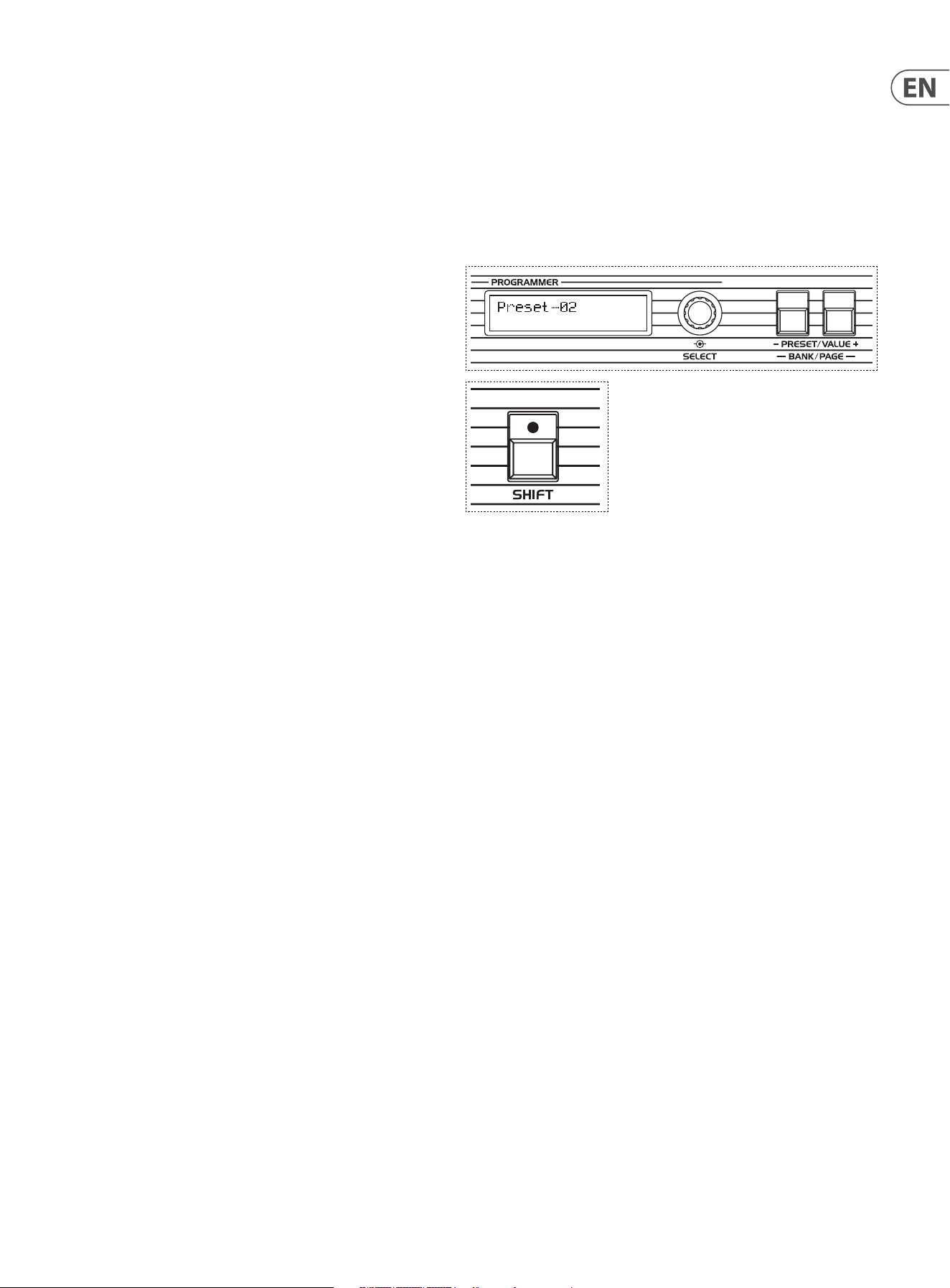
To recall a preset patch, or one that you have created yourself, press the Shift
button (LED on), then the Bank/Page buttons to select the required patch bank
(A – D). Then press the shift button again (LED o) and use the Preset Value
+/- buttons or select control to scroll through the patches in your selected bank.
Patches are loaded as you scroll. On power-up the last used patch will be loaded.
Once loaded a patch can be modied using the top panel controls. Please note
that the physical position of the controls on the panel will not equate to the
level of that control in the stored patch until the control setting is altered. The
programmer display will show the name and value of the parameter being edited
in real time. You can also create patches from scratch by switching the UB-Xa into
Manual mode and using the top panel controls to build your patch.
When you are happy with your modications or new creations you can write
them to a memory by pressing the Write button and using the +/- buttons to
select a memory location. Pressing the rotary encoder writes the settings to your
selected patch slot. Pressing the Write button twice instantly saves the patch to
the current location under its existing name.
If you wish to save into a dierent bank then press Shift (LED on) and scroll to
your required bank using the Bank/Page buttons. Then press Shift again (LED
o) and use the +/- buttons to select your required slot.
If you change to a dierent patch without writing then your edits will not be
saved.
6 UB-Xa User Manual
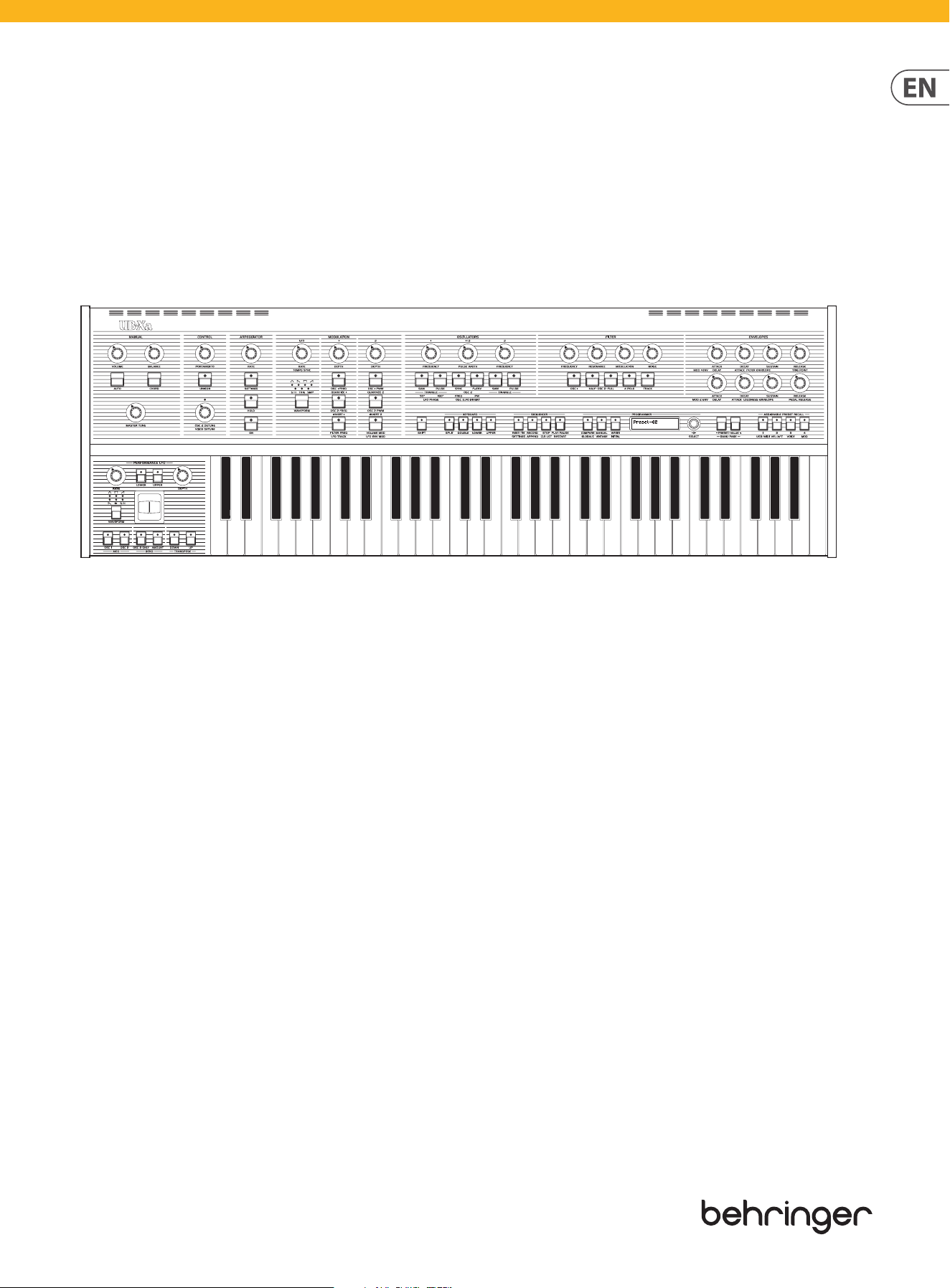
Manual Controls
The settings of these controls are universal and are not stored as part of any
programmed or preset patch, with the exception of patch volume (1).
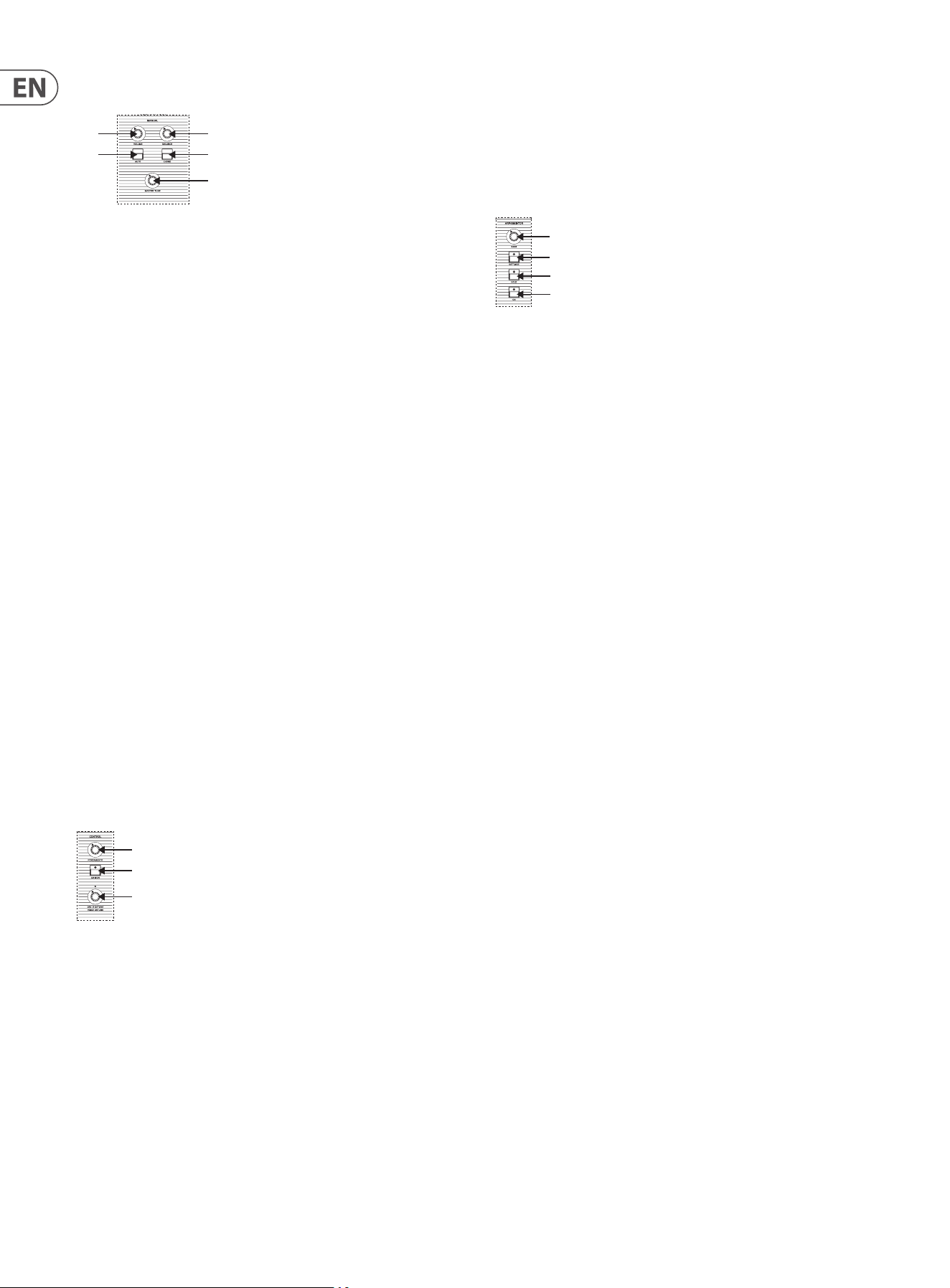
(1) VOLUME – controls the overall level of the UB-Xa to your amplier or
mixing desk. Care should be taken when changing patches, as some stored
patches will be louder than others. It is recommended that the UB-Xa is
powered up with the volume at its minimum and before the amplier or
mixing desk that it is connected to.
(2) BALANCE – when using a split or double program the Balance control
adjusts the level between the two patches associated with the program.
When using a split program (one where the keyboard is split into lower
and upper, each with its own patch) turning the Balance control to
the left emphasizes the lower keyboard; to the right the upper. When
using a double program (one in which there are two patches playing
simultaneously) turning to the left emphasizes the patch associated with
the lower keyboard; right the upper. More on Split and Double programs
below.
(3) AUTO – the UB-Xa will run an auto calibration routine in the background
(depending on the settings in the Globals>Misc menu). Pressing the Auto
button shows the current calibration state. Holding the button keeps the
routine running.
(4) CHORD – holding a chord on the keyboard and pressing the Chord button
allows you to play that chord using any key on the keyboard, with the
chord being transposed to the selected key. Pressing Chord again switches
o the function. This function can also use used in conjunction with the
Hold button (see Arpeggiator). Note priority can be set in the Vel>Aft
menu.
(5) MASTER TUNE – allows you to adjust the overall tuning of the UB-Xa to
ensure that it is in tune with other instruments.
Control Section
(6) PORTAMENTO – this control aects the speed at which the pitch glides
between notes. Portamento is polyphonic, so each note will glide at a
dierent rate until its new pitch is reached. Portamento also works in
Unison mode (see below). When the control is set fully left (CCW) there
will be no portamento eect and notes will change instantly. When set
fully to the right (CW) the maximum time possible will be taken to glide
between pitches.
(7) UNISON – turns the UB-Xa into a monophonic synthesiser. In Unison
mode hold the Shift button and use the Unison button to select between
1 – 16 voices or 16 voices per key. In split mode Unison can be selected
independently for lower and upper keyboard; so, for example, you could
have the lower keyboard as normal to play chords, while setting the upper
keyboard to Unison for lead patches.
(8) OSC 2 DETUNE – this control allows you to set the oscillator 2 voices
to be slightly sharp or at relative to oscillator 1, giving a fatter sound,
particularly in Unison mode. Turning the control to the left (CCW) attens
oscillator 2 by around 50 cents, right (CW) sharpens it by the same amount.
An LED above the control indicates whether oscillator 2 is detuned. When
the LED is not lit then then oscillators are in tune.
Arpeggiator (Arp)
(9) RATE – controls the rate at which the arpeggiator and internal sequencer
(see below) run when Internal Sync is selected using the Settings Menu
(see below). Rate can be adjusted between 40 and 240 bpm.
(10) SETTINGS – allows access to the settings menu. There are ve options,
which can be scrolled through with the rotary encoder (62):
1. Arp Mode
2. Arp Time
3. Arp Gate Time
4. Sync
5. Octave
Pressing the rotary encoder allows access to the sub-menu options:
Arp Mode
a - Up – notes held play upwards from lowest to highest (default).
b - Down – notes held play downwards from highest to lowest.
c - Inclusive – notes held play upwards from lowest then downwards
from highest with repeats (1 / 2 / 3 / 4 / 4 / 3 / 2 / 1 / 1 etc).
d - Exclusive – notes held play upwards from lowest then downwards
from highest without repeats (1 / 2 / 3 / 4 / 3 / 2 / 1 etc).
e - Random – notes held play randomly.
f - Order – notes play back in the order that they are held (so holding
C1 and C4 then adding C2 would give C1, C4, C2).
g - Up x 2 – notes play upwards from lowest to highest, with each
being played twice (1 / 1 / 2 / 2 / 3 / 3 / 4 / 4).
h -Down x 2 - notes play downwards from highest to lowest, with
each being played twice (4 / 4 / 3 / 3 / 2 / 2 / 1 / 1).
i – Up x 3 - notes play upwards from lowest to highest, with each
being played three times (1 / 1 / 1 / 2 / 2 / 2 / 3 / 3 / 3 / 4 / 4 / 4).
j – Down x 3 - notes play downwards from highest to lowest, with
each being played twice (4 / 4 / 4 / 3 / 3 / 3 / 2 / 2 / 2 / 1 / 1 /1).
k – Up x2/x3 – notes play upwards from lowest to highest, with each
being played twice on even time settings and three times on triplet
settings.
l – Down x2/x3 – notes play downwards from highest to lowest,
with each being played twice on even time settings and three times
on triplet settings.
(5)
(1)
(3)
(4)
(2)
(6)
(8)
(7)
(9)
(12)
(10)
(11)
7 UB-Xa User Manual
Arp Time
a - ¼ notes
b - 1/8 notes
c - 1/16 notes (default)
d - 1/32 notes
e - ¼ triplets
f - 1/8 triplets
g - 1/16 triplets
Arp Gate Time
Continuously adjustable between 0 and 99; gate is open for longer at
higher settings (default is 50).
Sync
a - Global – adding a new note to the notes being held will only add
the new note on the next applicable time interval.
b - Retrigger – adding a new note to the notes being held restarts
the arpeggio from the rst note.
Octave
Continuously adjustable between 1 and 6. If any value between 2
and 6 is selected then the notes held will be repeated up through
the number of selected octaves. On higher settings if the notes held
would go out of the UB-Xa’s range then low octaves will be played at
the end of the sequence (default is 1).
Pressing the rotary encoder when in one of the sub-menus returns to the
main options menu.
(11) HOLD – the Hold button allows an arpeggio to continue to play without
keeping the selected keys pressed. To use it hold down the keys on the
keyboard that you want to create an arpeggio from then press the button.
The arpeggio will continue to play until either the Hold button is switched
o or new notes are played; new notes will arpeggiate until the Hold
button is switched o or a further set of new notes is played.
When the arpeggiator is not running the Hold button will apply an innite
sustain at the level of the loudness sustain control (47) to any notes being
played when it is activated. Other notes can be played on top of the held
notes and will be subject to the loudness envelope settings.
(12) ON – switches the arpeggiator on and o.
Low Frequency Oscillator (LFO)
The LFO is used for modulation and runs at frequencies that are largely below
human hearing. The LFO has two controls:
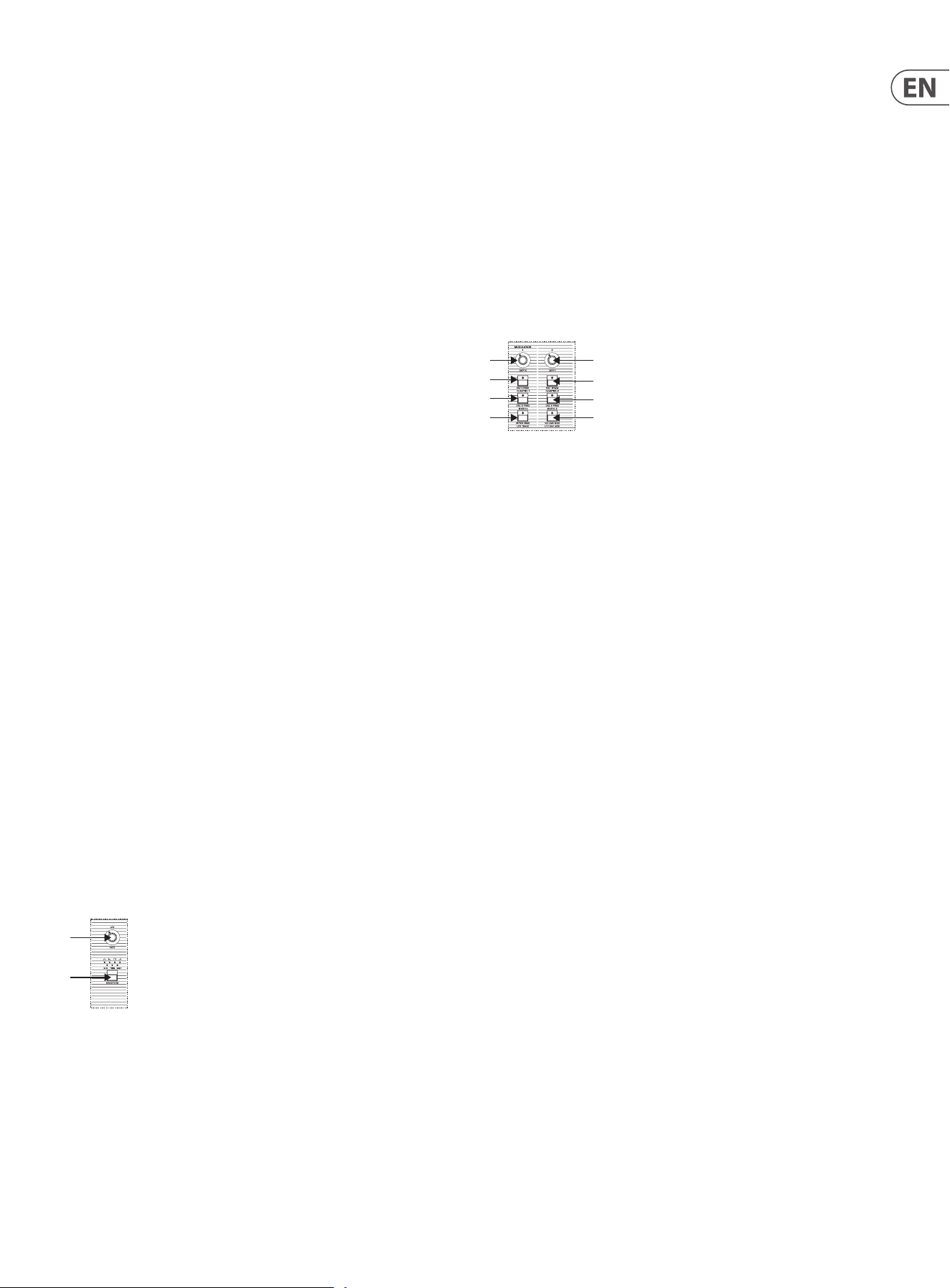
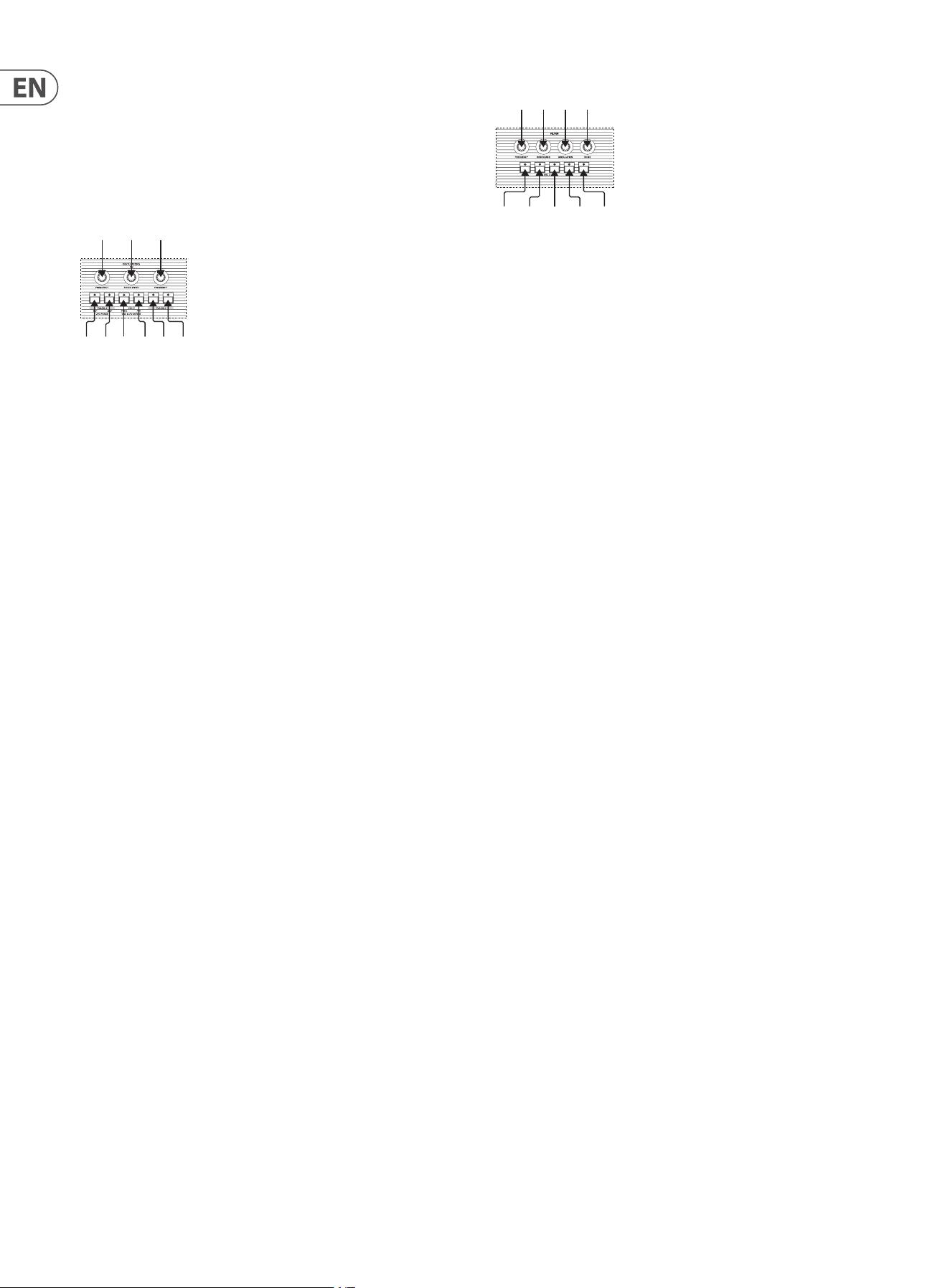
(13) RATE – controls the frequency at which the LFO is running. The minimum
is 0.06 Hz (approximately one cycle every 17 seconds); and the maximum is
50Hz (50 cycles per second).
(14) WAVEFORM – there are six modulation waveforms available:
• • Sine – a smooth rising and falling curve.
• • Sawtooth – a wave with a smooth downcycle followed by a rapid rise.
• • Square – alternating high and low states with no transition.
• • Ramp – the reverse of Sawtooth: a smooth rise followed by a rapid fall.
• • S&H – a random voltage derived from taking a sample of white noise at
the top of each LFO cycle.
• • SMP – samples the waveform from the separate LFO on the
performance panel to the left of the keyboard in the same way as S&H
samples white noise.
Pressing and holding the Waveform button for two seconds or more will put
the LFO into re-trigger mode (Trig LED lit); in this mode the LFO will start a new
waveform cycle for each new key played. This will not change the previously
selected waveform.
Modulation Section
The modulation section controls the routing of the LFO to allow modulation of
other sections of the UB-Xa.
(15) DEPTH –controls the amount of LFO modulation that will be sent to each
of the three selectable sources. When the control is fully to the left (CCW)
there is no modulation, regardless of routing - when fully right (CW) the
full output of the LFO will be routed.
(16) OSC 1 Frequency – routes the LFO to oscillator 1 at the selected depth
to produce a vibrato eect (frequency modulation). Pressing and holding
the OSC1 Frequency button for more than two seconds allows the LFO
amount to be adjusted. Press the Select encoder (62) to access, then use
the encoder to adjust the amount. Range is 6 semitones to 63 semitones
(default 12). Press the encoder again to store.
(17) OSC2 Frequency – routes the LFO to oscillator 2 at the selected depth
to produce a vibrato eect (frequency modulation). Pressing and holding
the OSC2 Frequency button for more than two seconds allows the LFO
amount to be adjusted. Press the Select encoder (62) to access, then use
the encoder to adjust the amount. Range is 6 semitones to 63 semitones
(default 12).
(18) FILTER – routes the LFO to the lter, which will cause the lter to open
and close above the base set using its frequency control. Pressing and
holding the Filter button for more than two seconds allows the LFO
amount to be adjusted. Press the Select encoder (62) to access, then use
the encoder to adjust the amount. Range is 48 semitones to 175 semitones
(default 88). Press the encoder again to store.
(19) Pulse Width Depth – allows the LFO to modulate the width of the pulse
wave (see Oscillator section below) by varying amounts. When the control
is fully to the left (CCW) there is no modulation, regardless of routing -
when fully right (CW) the full output of the LFO will be routed.
(20) OSC 1 PWM – routes the LFO to oscillator 1’s pulse width. Pressing and
holding the OSC1 PWM button for more than two seconds allows the LFO
amount to be adjusted. Press the Select encoder (62) to access, then use
the encoder to adjust the amount. Range is 0% to 100% (default 70.59%).
Press the encoder again to store.
(21) OSC 2 PWM – routes the LFO to oscillator 2’s pulse width. Pressing and
holding the OSC2 PWM button for more than two seconds allows the LFO
amount to be adjusted. Press the Select encoder (62) to access, then use
the encoder to adjust the amount. Range is 0% to 100% (default 70.59%).
Press the encoder again to store.
(
13
)
(14)
(15)
(
18)
(
17)
(16)
(19)
(21)
(20)
(22)
8 UB-Xa User Manual
(22) VOLUME MOD – routes the LFO to the Voltage Controlled Amplier (VCA)
(see below) to produce a tremolo eect at the selected depth. Pressing and
holding the Volume Mod button for more than two seconds allows the LFO
amount to be adjusted. Press the Select encoder (62) to access, then use
the encoder to adjust the amount. Range is 0% to 100% (default 100%).
Press the encoder again to store.
Oscillators Section
The Voltage Controlled Oscillators (VCOs) produce the basic sound of the UB-Xa.
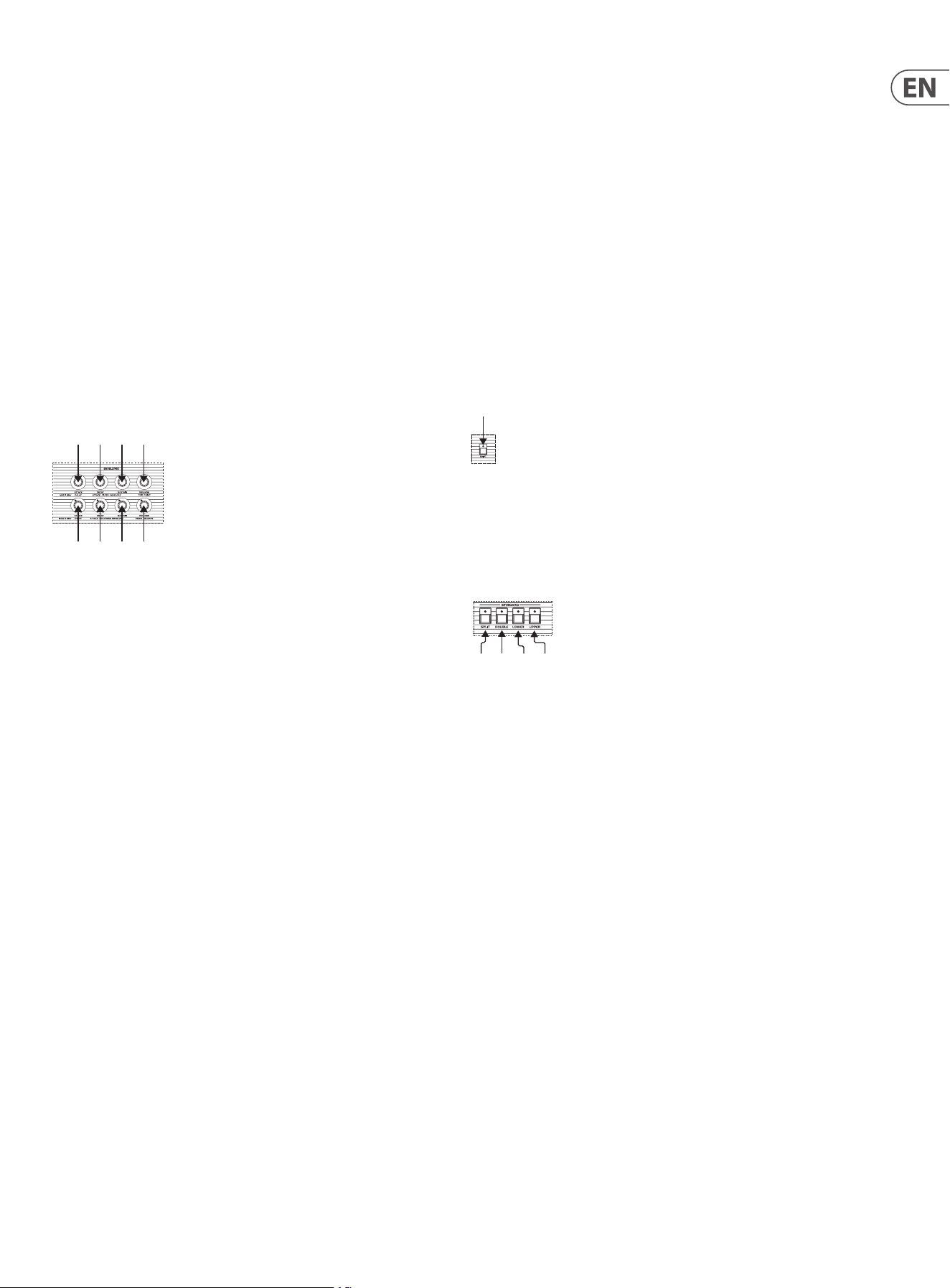
(23) OSC 1 FREQUENCY – controls the base frequency of oscillator 1, in four
steps of one octave.
(24) SAW – switches on Sawtooth waveform for oscillator 1 (Saw LED on).
Pressing and holding the Saw button for more than two seconds and
use the Select encoder (62) to access the Frequency Quantization menu,
which allows the oscillator’s frequency control to be quantized in Octaves,
Semitones, free running with additional options for adjustment up or
down (+/-). Press the encoder again to select.
(25) PULSE – switches on Pulse waveform for oscillator 1 (Pulse LED on), which
can be treated further by Pulse Width Modulation.
Switching on neither (both LEDs o) selects a Triangle waveform.
(26) OSC 1+2 PULSE WIDTH – sets the width of the pulse when the Pulse
wave is selected on either or both VCOs. When fully to the left (CCW) a
square wave is produced where the up and down cycles are equal. Turning
the control further to the right (CW) decreases the amount of the up cycle,
producing a thinner eect. At all levels below the maximum Pulse Width
Modulation will vary the waveform.
Holding the Pulse button (25 or 31) for either Osc 1 or Osc 2 allows the
pulse width control 26 to aect each oscillator separately.
(27) SYNC – causes the wave of oscillator 2 to reset at the same time as that
of oscillator 1; giving a harmonically rich but sometimes glitchy eect,
particularly when used in conjunction with F-env.
(28) F-ENV – allows the lter envelope (see below) to change the pitch
of oscillator 2, producing a distinctive eect as oscillator 2 attempts
to synchronize with oscillator 1. The depth is controlled by the Filter
Modulation control.
(29) OSC 2 FREQUENCY – sets the base frequency of oscillator 2 in semitone
steps over ve octaves. This allows oscillator 2 to be oset against
oscillator 1.
(30) SAW – switches on Sawtooth waveform for oscillator 2 (Saw LED on).
Pressing and holding the Saw button for more than two seconds and
use the Select encoder (62) to access the Frequency Quantization menu,
which allows the oscillator’s frequency control to be quantized in Octaves,
Semitones, free running with additional options for adjustment up or
down (+/-). Press the encoder again to select.
(31) PULSE – switches on Pulse waveform for oscillator 2 (Pulse LED on).
Switching on neither (both LEDs o) selects Triangle waveform.
Filter Section
The lter is the way that the UB-Xa shapes the sound produced by the VCOs to
control their timbre. The UB-Xa has two switchable Low Pass Filters (LPF): a
24 dB/octave 4-pole lter which gives a fuller sound, and a 12 dB/octave 2-pole
which gives a smoother sound.
(32) FREQUENCY – controls the amount of high frequencies that are allowed
through the lter. When the control is fully to the left (CCW) no sound
will pass (subject to modulation – see below). As the frequency control is
turned to the right (CW) an increasing amount of high frequency is passed,
until once the control is fully to the right (CW) there is no ltering at all;
and all frequencies can be heard.
(33) RESONANCE – also known as ‘Q’ or Emphasis, Resonance increases the
prominence of frequencies centered around the position of the Frequency
control. In 2-pole mode the overall patch will get louder; in 4-pole mode
it will reduce in volume. The lter will self-oscillate in either mode,
depending on the Atrophy settings in the Voice menu.
(34) MODULATION – controls the amount of modulation from the Filter
Envelope that is applied to the lter. This control also controls the amount
of Filter Envelope that is applied to oscillator 2 when the F-Env button is
used.
(35) NOISE – allows the output of the Noise Generator to be routed to the lter.
When the control is fully to the left (CCW) no noise will be heard. Turning
the control to the right (CW) increases the amount of noise heard until the
control is fully to the right (CW) where the noise is at its highest level.
(36) OSC 1 – allows the signal from oscillator 1 to be routed to the lter at full
volume. Pressing and holding the OSC1 button for more than two seconds
accesses a sub-menu which allows the range of the lter frequency control
and lter pedal control to be set. Select which is to be adjusted using the
Select encoder (62), then use the encoder to adjust the values. The range is
48 semitones to 175 semitones for the frequency control (default 88); and
0 semitones to 96 semitones for the pedal (default 72). Press the encoder
to store your chosen value.
(37) OSC2 Half – allows the signal from oscillator 2 to be routed to the lter
at approximately half the level of oscillator 1 (- 6 dB). Pressing and holding
the OSC2 Half button for more than two seconds allows the lter resonance
to be ne-tuned. Press the Select encoder (62) to access, then use the
encoder to adjust the amount. There are two values displayed, with the
right hand one incrementing once for every 63 increments of the left value.
Range is 0/0 to 1683/255 (default 0/0). Press the encoder again to store.
(38) OSC2 Full – allows the signal from oscillator 2 to be routed to the lter
at the same level as that of oscillator 1. Pressing and holding the OSC2
Full button for more than two seconds allows the adjustment of the
lter modulation envelope range. Press the Select encoder (62) to access
the parameter, then use the encoder to adjust the value. Range is 48
semitones to 175 semitones (default 120). Press the encoder to store your
chosen value.
(39) 4 POLE – when this switch is on (LED lit) the lter is working in 4-pole
mode, as described above. When it is o then 2-pole is used. Pressing
and holding the 4-Pole button for more than two seconds accesses the
envelope modulation options sub-menus. Use the Select encoder (62)
to select lter envelope or loudness envelope, then press to enter. The
options for each menu are:
(23)
(24)(25)(27)(28)(30)(31)
(26) (29)
(32) (33) (34) (35)
(36) (37) (38) (39) (40)
9 UB-Xa User Manual
• • Flip – inverts the envelope polarity.
• • Retrigger – envelope modulation will re-trigger with each key press.
• • Repeat – the envelope will re-trigger at the end of the Repeat phase.
• • Loop – the Attack and Decay phases will loop until the key is released,
when the Release phase will be triggered.
• • Legato – the envelope will not re-trigger if a key is already pressed.
The default for each option is O. Press the encoder again to store.
(40) TRACK – when this switch is on the keyboard voltage is applied to the
lter, resulting in higher notes sounding brighter, particularly if the
frequency control is set low. Pressing and holding the Track button for
more than two seconds allows adjustment of the lter tracking amount.
Press the Select encoder (62) then use it to adjust the value. Range is -4
semitones to +4 semitones. Default is +1 semitone. Press the encoder
again to store.
Envelope Section
The UB-Xa has two envelope generators, which allow the patch of the lter
and the amplitude of the Voltage Controlled Amplier to be contoured. Both
Envelope Generators feature four stages of contouring.
Filter Envelope
The Filter Envelope controls the contour of the lter when in use. Its eect will
be more obvious if the frequency control is set low. There are four controls
associated with this Envelope Generator:
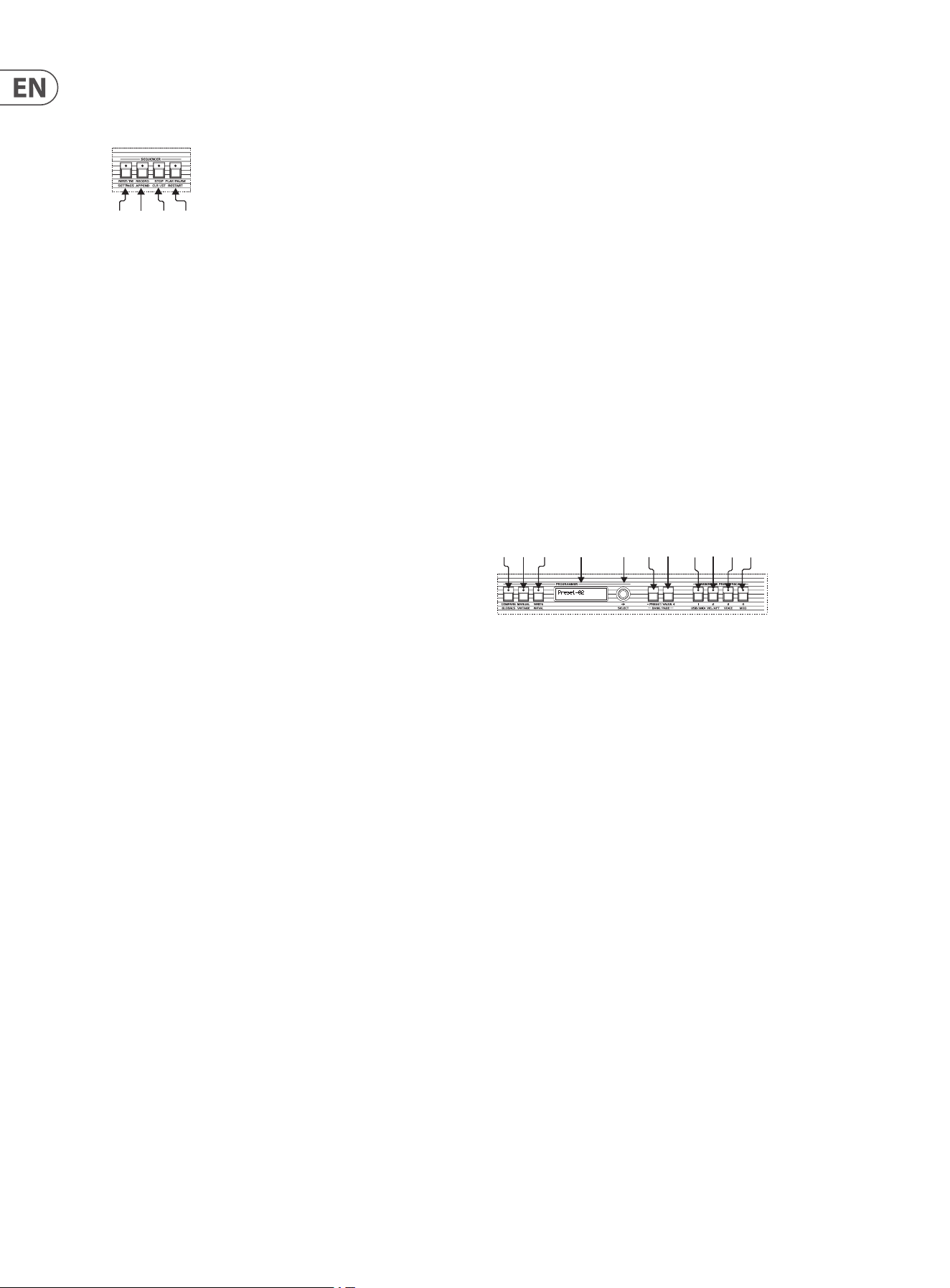
(41) ATTACK – controls the time taken for the envelope generator’s level to rise
from zero to maximum. The UB-Xa’s attack is adjustable between 7ms and
13 seconds.
(42) DECAY – controls the time taken for the envelope generator’s level to fall
from maximum to the level set by the Sustain control (see below) once the
Attack stage has nished, and providing that keys are being held. The time
is adjustable between a minimum of 9ms and a maximum of 16.5 seconds.
(43) SUSTAIN- controls the level at which the lter will be held once the Decay
cycle has completed and providing that keys are still being held. There
is no time limit to Sustain. It should be noted that a high Sustain setting
(above 50%) will cause the Decay stage to have little or no eect.
(44) RELEASE – controls the rate at which the envelope generator’s level drops
to zero once keys are released. It should be noted that if Sustain is set to
minimum the Release control will have no eect if keys are held down; but
if keys are released during Attack or Decay then Release will still aect the
lter. Release time can be adjusted between a minimum of 50ms and a
maximum of 20 seconds.
The Filter Envelope also aects the pitch of oscillator 2 when the OSC2
F-Env switch is active.
Loudness Envelope
The Loudness Envelope controls the level of the UB-Xa’s output (subject to the
position of the Volume control). Like the Filter Envelope it has four controls:
(45) ATTACK – controls the time taken for the envelope generator’s level to rise
from zero to maximum. The shorter the attack, the punchier the patch.
The UB-Xa’s attack is adjustable between 7ms and 13 seconds.
(46) DECAY – controls the time taken for the envelope generator’s level to fall
from maximum to the level set by the Sustain control (see below) once
the Attack stage has nished, and providing that keys are being held. As
with Attack the shorter the decay, the punchier the patch. The time is
adjustable between a minimum of 9ms and a maximum of 16.5 seconds.
(47) SUSTAIN – controls the level at which the VCA will be held once the Decay
cycle has completed and providing that keys are still being held. There
is no time limit to Sustain. It should be noted that a high Sustain setting
(above 50%) will cause the Decay stage to have little or no eect.
(48) RELEASE – controls the rate at which the envelope generator’s level drops
to zero once keys are released. It should be noted that if Sustain is set to
minimum the Release control will have no eect if keys are held down; but
if keys are released during Attack or Decay then Release will still aect the
VCA. Release time can be adjusted between a minimum of 50ms and a
maximum of 20 seconds.
Other Controls
(49) SHIFT – Allows access to the UB-Xa’s additional functions. A short press
will latch the shift functions on; holding the button allows access to shift
functions until the button is released.
Keyboard Section
(50) SPLIT – allows the UB-Xa’s keyboard to be split at any point, which
enables the playing of dierent patches on the lower and upper keyboards.
To use the Split function press the Split button to enter Split mode, then
press and hold down the Split button and press the key that you would like
to be the lowest note on the upper keyboard.
Pressing the Split key again without pressing any keys on the keyboard
exits Split mode.
It should be noted that Split mode halves the UB-Xa’s polyphony for
each keyboard; so you will only be able to play a maximum of eight
notes simultaneously on either. Split mode also allows the UB-Xa to be
controlled from external sources on two MIDI channels simultaneously.
To recall a stored Split program enter Split mode and use the rotary
encoder (62) to scroll through the stored programs. Programs are
automatically loaded, so no further action is needed.
Up to 35 Split programs can be stored.
(51) DOUBLE – allows the UB-Xa to play two patches simultaneously, either
using its own keyboard or on two incoming MIDI channels. Please note that
performance settings stored as part of a split or double program will take
precedence over those stored in the individual programs used to make up
the split or double program.
To recall a stored Double program enter Double mode and use the
rotary encoder (62) to scroll through the stored programs. Programs are
automatically loaded, so no further action is needed.
Up to 35 Double programs can be stored.
(52) LOWER – allows selection of the patch to be used for the Lower part of the
keyboard in Split mode; or the patch balanced to the left in Double mode.
(41) (42) (43) (44)
(45) (46) (47) (48)
(49)
(50) (51) (52) (53)
10 UB-Xa User Manual
(53) UPPER – allows selection of the patch to be used for the Upper part of the
keyboard in Split mode; or the patch balanced to the right in Double mode.
Sequencer Section
The UB-Xa stores a 64 step polyphonic sequence in each patch. The sequencer
shares the Arpeggiator’s Rate control. There are four controls associated with the
sequencer, which also have additional functions when using the Shift button.
To start recording a sequence press the Record button (55). This resets the step
count to the rst step. The LED in the Record button will start ashing.
Any notes or chords that you play will be recorded into the sequence, and the
position marker will advance by one. The +/- buttons can be used to navigate
through steps that have been recorded. Steps are indicated on the display.
When you have nished recording press the Record button again, or press Stop
(56).
To play back the sequence press Play (57). Pressing Play again will pause the
sequence and the button’s LED will ash. A further press resumes playback from
the pause point.
To store your sequence press the Write button, then the Rotary encoder (Enter) to
complete the write procedure. This writes the patch including the sequence.
If an error is made while programming a sequence then the Clr Last (Shift and
Stop) button can be used to erase the last note.
To load a sequence from another patch into the current patch press Record and
use the rotary encoder to select the patch whose sequence you wish to use. Use
Shift and Select to change banks.
Pressing any key on the keyboard while a sequence is playing will instantly
transpose the sequence.
(54) REST/TIE – pressing this button while holding a note or chord will extend
(tie) the note(s) across more than one step of the sequence. Pressing it
without holding any notes will insert a rest at that point in the sequence.
(55) RECORD – puts the sequencer into Record mode, as described above.
(56) STOP – when a sequence is running pressing the stop button stops the
sequence and resets it to the rst position.
(57) PLAY/PAUSE – if a sequence is not running then pressing this button
starts it. A further press will pause the sequence, but unlike the use of the
Stop button will not reset to rst position. Pressing the button a third time
will restart the sequence from the point that it was paused.
Using the Shift button with the four sequencer buttons adds additional
functions:
Note that when the UB-Xa is acting as synchronization master for other
MIDI equipment a short press of the play/pause or stop buttons will only
enable or disable the UB-Xa’s own sequencer. To control the external
equipment as well use a double press or a long press.
Shift & 54 – Settings – accesses sequencer settings menu, which can be
scrolled using the rotary encoder (62)
1. Seq Time
a - ¼ notes
b - 1/8 notes
c - 1/16 notes
d - 1/32 notes
(54) (55) (56) (57)
e - ¼ note triplet
f - 1/8 note triplets
g - 1/16 note triplets
2. Seq Gate Time
Continuously adjustable between 0 and 99. Higher settings keep the
gate open longer. Default is 50.
3. Sync
a - Global – adding a new note to the sequence will only add the new
note on the next applicable time interval.
b - Retrigger – adding a new note to the notes being held restarts
the sequence from the rst note.
Shift & 55 – Append – sets the playhead to the end of the sequence,
allowing extra steps to be added, to the maximum allowed by the
keyboard settings.
Shift & 56 – Clr Lst – Clear Last allows steps to be erased from the
sequence, starting with the last step recorded. Pressing and holding Clear
Last will erase the whole sequence.
Shift & 57 – Restart – when a sequence is running pressing Shift and 57
restarts it from the rst step.
Programmer Section
The Programmer Section allows stored patches to be recalled, edited, compared
to the original and written/re-written.
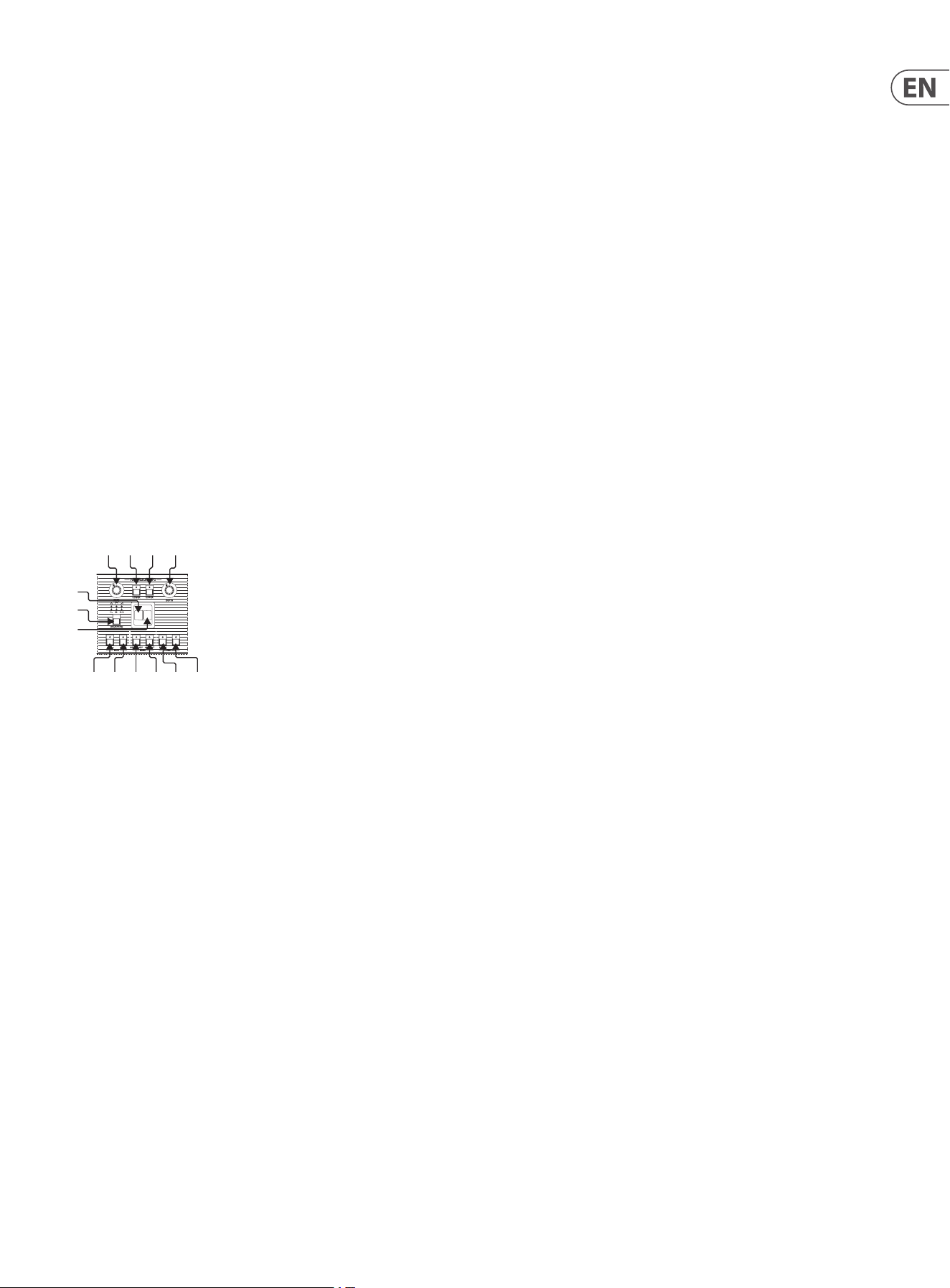
(58) COMPARE – when editing a patch it is often useful to compare your edited
version to the original. If you select Compare while editing the display
will show you the stored value and edited value of the current control you
are using, with an arrow to indicate whether you are above or below the
stored value.
(59) MANUAL – puts the current state of all controls into the programming
buer, allowing the creation of new patches from the current control
positions. The patch name will reset to ‘preset’.
(60) WRITE – allows you to store new and edited patches. Press the Write
button and use the +/- to select the memory slot that you want to write
to. Press the rotary encoder to conrm. To name your patch use the
encoder to scroll through the available letters and numbers, the Value
+/- buttons move through the name. Pressing the encoder again stores
the name with the patch. A maximum of 16 characters can be used. Patch
must be re-written after name has been changed, otherwise the new
name will not be saved.
To store a Split or Double program enter Split or Double Mode. Hold down
the Write button and use the +/- to scroll through the available memories
(these are assigned the numbers 1-9 and the letters A-Z). Press Enter to
store when you have reached the desired location. Turning the rotary
encoder allows the write operation to be cancelled.
(61) DISPLAY – 32 character display. Normally this shows the name and
location of the current patch.
• • When a rotary control’s position is changed display momentarily shows
the new value of that control.
• • When programming a sequence the display shows which sequence is
being programmed, how many steps the sequence contains, and what
the current step is.
(58)
(59) (60) (61) (62)
(63) (64) (65)(66)(67) (68)
11 UB-Xa User Manual
• • When using one of the settings menus the display shows the menu
options.
(62) SELECT – rotary encoder used for selection memory locations. Pressing
the encoder acts as an Enter button, with the option to complete or
conrm.
(63) Preset/Value (-) – decreases a value by 1 unit for each press.
(64) Preset/Value (+) – increases a value by 1 unit for each press.
65, 66, 67, 68 - Assignable Preset Recall
The UB-Xa has four buttons that can be used to recall up to fteen
favourite/most used patches, including split and double patches. The
buttons can be used in any of the following combinations:
1 / 2 / 3 / 4 / 12 / 13 / 14 / 23 / 24 / 34 / 123 / 124 / 134 / 234 / 1234
To assign a patch to a button combination rst recall the patch as
described in Getting Started. Hold down the button combination that you
wish to use. Press the Write button.
Once a patch has been assigned to a specic button combination it can
quickly be recalled by pressing that combination.
Patches can be single, double or split; and are global.
Performance Section
The performance section is located to the left of the keyboard. It contains a
separate LFO to the main one described above. It should be noted that the
Modulation Panel controls are not stored in patches, but are stored in Split or
Double programs.
(69) RATE – controls the rate at which the LFO cycles. Adjustable from 0.06Hz
(approximately 17 seconds) when the control is fully to the left (CCW) to
50Hz when the control is fully to the right (CW).
(70) LOWER – when this button is pressed LFO modulation and pitchbend will
be applied to the Lower keyboard when in Split or Double mode.
(71) UPPER – when this button is pressed LFO modulation and pitchbend will
be applied to the Upper keyboard when in Split or Double mode.
When both buttons are pressed equal amounts of LFO modulation will be
applied to both Lower and Upper keyboards. These controls do not work
outside these modes.
(72) DEPTH – controls the amount of continuous modulation to be applied.
Lower settings (control to the left) produce a more subtle modulation;
while more extreme modulation can be obtained by turning the control to
the right (CW). The level of this control is summed with the modulation
lever (75) and the vibrato footpedal, when in use.
(73) WAVEFORM –selects the waveform to be used for performance section
modulation. There are six waveforms available:
• • Triangle
• • Square
• • Ramp
• • Sawtooth
• • Noise
• • Sample & Hold
(74) Pitchbend Lever – this control bends the pitch of any notes being played
when it is being applied. Pulling the lever towards the front of the case
bends the pitch up; pushing it towards the body of the UB-Xa bends down
(this can be changed - see Globals menu below). The maximum bend is
controlled by the Amount button (79) described below. The lever is spring
loaded and returns to center when released.
(75) Modulation Lever – the Modulation Lever is spring loaded and returns
to center when released. Pushing the lever up increases the amount of
modulation applied. This will be summed to any modulation being applied
by the Depth control and/or Footpedal. The action of the downward and
upward motion of the lever can also be individually used as a Modulation
Matrix source.
(76) OSC1 – applies LFO modulation, according to settings for Depth, Lever and
Footpedal to oscillator 1.
(77) OSC 2 – applies LFO modulation, according to settings for Depth, Lever and
Footpedal to oscillator 2.
When both buttons are pressed equal amounts of modulation are applied
to both oscillators. These controls are deactivated during Auto tuning to
ensure tuning accuracy.
(78) OSC 2 ONLY – applies pitchbend only to oscillator 2. When used in
conjunction with the Sync and F-Env controls described in the Oscillator
section very expressive timbral eects can be created. When the control is
not active pitchbend will be applied to both oscillators equally.
(79) AMOUNT – this control sets the range of the pitchbend lever. When
it is not applied (LED o) the lever will bend the pitch up or down by a
maximum of one whole note (EG ‘C’ up to ‘D’ or down to ‘Bb’). When it is
applied (LED on) the lever will bend through a selected range up or down.
To select the bend range hold the amount button and press any key on the
keyboard, then release the button. Default on power-up is one octave.
(80) TRANSPOSE DOWN – shifts the register of the keyboard down by one
octave on rst press (solid LED on) or two octaves on second press (LED
ashing). This can be reversed using Transpose Up (81), or by pressing both
buttons together.
(81) TRANSPOSE UP – shifts the register of the keyboard up one octave on rst
press (solid LED on) or two octaves on second press (LED ashing). This
can be reversed using Transpose Down (80), or by pressing both buttons
together.
If the LEDs in 80 and 81 are not lit then the keyboard is in its normal range.
If the Shift button (49) is active then transposition takes place in semitone
steps. Transposition also takes place when the UB-Xa is being controlled by
an external MIDI source
(69) (70) (71) (72)
(74)
(73)
(75)
(76) (77) (78) (79) (80) (81)
12 UB-Xa User Manual
Shift Functions
Many of the UB-Xa’s controls, both rotary and button, have second functions,
mostly indicated in grey type below the main legend in white. These are
described below, except for those associated with the sequencer, which were
discussed in the sequencer section.
Shift & 6 (Portamento Control) – Porta Glide – if Porta Glide is switched
on in the Velocity and Aftertouch menu then holding Shift and adjusting the
Portamento control will adjust the glide rate from -32 to +31.
Shift & 7 (Unison) – Poly Modes – switches between Poly (default) where
between 1 and 8 voices can be selected (default is 2) and Unison where between
1 and 16 voices can be selected (default is 1).
Shift & 8 (Osc 2 Detune) – Voice Detune – allows the individual voices to be
detuned, upwards only, from each other, with a dead band between 0 and 25 and
a maximum setting of 255. This function is particularly eective in Unison mode.
Shift & 13 (LFO Rate) – LFO Sync – holding the Shift button and turning the
LFO rate control syncs the LFO to whatever clock is being used by the sequencer
and arpeggiator. The options are:
• 4 Bar
• 2 Bar
• 1 Bar
• ½ Note
• ¼ Note
• Dotted ¼ Note
• ¼ Note Triplet
• 1/8 Note
• Dotted 1/8 Note
• 1/8 Note Triplet
• 1/16 Note
• Dotted 1/16 Note
• 1/16 Note Triplet
• 1/32 Note
• Dotted 1/32 Note
• 1/32 Note Triplet
Moving the rate control without shifting returns the LFO to free running.
Shift & 16 – Quantize 1 – quantizes the LFO waveform when applied to the
rst modulation channel (Frequency).
Shift & 20 – Quantize 2 – quantizes the LFO waveform when applied to the
second modulation channel (Pulse Width).
Shift & 17 – Invert 1 – inverts the modulation envelope for mod channel 1.
Shift & 21 – Invert 2 – inverts the modulation envelope for mod channel 2.
Shift & 18 – LFO Track – increases or decreases the speed that the LFO is
running at in relation to the most recent key pressed – the higher the note the
faster the LFO will run. This function does not disable the rate control, but works
in conjunction with it.
Shift & 22 – LFO Env Mod – allows the lter envelope to modulate the LFO
depth.
Shift & 24 – LFO Phase 90˚ - changes the phase of the LFO to 90˚out from its
normal phase.
Shift & 25 – LFO Phase 180˚- changes the phase of the LFO to 180˚out from its
normal phase.
Pressing Shift and buttons 24 & 25 changes the phase of the LFO to 270˚out from
its normal phase.
Shift & 27 – OSC1 LFO Invert Freq – inverts the LFO frequency modulation to
oscillator 1 only.
Shift & 28 – OSC1 LFO Invert PW – inverts the LFO Pulse Width Modulation to
oscillator 1 only.
Shift & 41 – Mod 1 Delay – delays the introduction of frequency modulation to
modulation channel 1.
Shift & 42 – Mod 1 Attack – applies an attack envelope to the depth of
modulation to modulation channel 1.
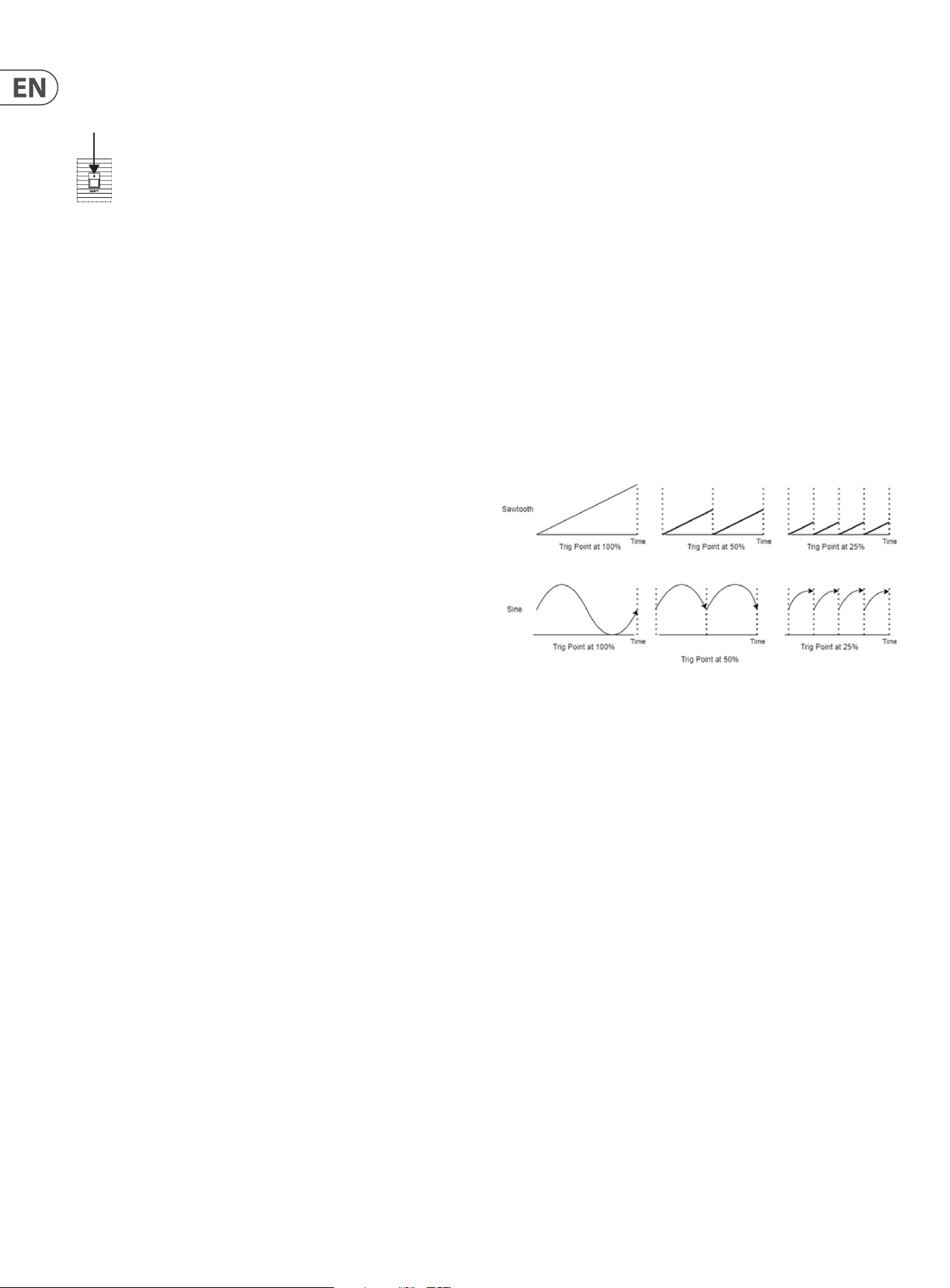
Shift & 44 – LFO Trigger Point – controls the trigger point of the LFO
waveform, from no trigger to full wave cycle, as illustrated below:
Shift & 45 – Mod 2 Delay – delays the introduction of pulse width modulation
to modulation channel 2.
Shift & 46 – Mod 2 Attack - applies an attack envelope to the depth of
modulation to modulation channel 2.
Shift & 48 – Pedal Release – used in conjunction with the ‘Sustain’ footpedal
input (90) allows a dierent release time to the one selected on the loudness
envelope to be selected by the switch.
Shift & 58 – Globals – accesses the Global Settings Menu. Options can be
scrolled with the rotary encoder (62) and accessed by pressing it to Enter
Miscellaneous
1. Atrophy Lock – locks the editing of atrophy parameters, to prevent
accidental editing. Options are Read Only (default) or Edit Advanced.
2. Side Panel – controls how the performance controls panel settings are saved
and loaded:
a - Save Patch – selects whether performance control settings will be saved
with the patch. Default is No.
b – Load Transp – selects whether saved transposition settings will be
re-loaded when a patch is recalled. Default is Yes.
c – Transp MIDI – selects whether transposition aects the notes at MIDI
Out. Default is No.
3. Contrast – adjusts to contrast of the display (61) from 0 to 32.
4. Backgrnd Cal – allows background calibration to be Enabled, Disabled or
Only Auto, where the UB-Xa will only calibrate while the Auto button (3) is
pressed.
5. Knob Dead Zones – changes how controls react in Atrophy:
(49)

13 UB-Xa User Manual
a – Purism – controls work in the range 9 o’clock to 3 o’clock.
b – Extended (default) - controls work over full range of travel.
6. Disable – allows the following functions to be disabled:
a – Assign Preset – disables the use of the assign preset recall button
combinations.
b – LEDSegues – disables LED segues between settings.
c – Pulse Revert – disables an original bug where the oscillators would
revert to pulse waveform on power down.
7. Levers – allows inversion of the pitchbend lever (left lever) (74) . Use the +/-
buttons to switch between normal and inverted.
When pitchbend is inverted (indicated by [X]) then pushing the lever
towards the body of the UB-Xa will bend the pitch down rather than up, and
vice versa.
Also allows the levers to be swapped, so that pitchbend becomes modulation
and vice versa.
8. Fan – allows the fan to be enabled (default), temperature controlled or
disabled.
Pedal Settings
1. Sustain Assign – allows the sustain pedal footswitch input (Back Panel 90
below) to be reassigned. Options are:
a – Patch Up – steps up through the patches in the currently selected bank.
After patch 128 returns to patch 1.
b – Patch Down – steps down through the patches in the currently selected
bank. After patch 1 returns to patch 128.
c – Program Up – steps up through the stored Split or Double programs
when in Split or Double mode.
d – Program Down - steps down through the stored Split or Double
programs when in Split or Double mode.
e - Sustain (default) – switches between the Release time set by Control 48
and the Pedal Release time set by Shift & Control 48.
f – Hold – duplicates the action of the Hold button (11) on the top panel.
g – Sostenuto – pressing the pedal while holding notes on the keyboard
causes the Pedal Release time set by Shift & Control 48 to be activated.
Releasing the pedal reverts to the Release Time set by Control 48.
2. Sustain Action – switches between Negative (default) where pressing
the footswitch causes the selected action to take place; Positive where the
selected action takes place until the footswitch is pressed and Disabled.
3. Sustain Latch – switches between Unlatched (default) where releasing
the footswitch causes the selected action to stop; and Latched where the
selected action will continue until the footswitch is pressed again.
4. Program Assign - allows the program advance footswitch input (Back
Panel 91 below) to be reassigned. Options are:
a – Patch Up (default) – steps up through the patches in the currently
selected bank. After patch 128 returns to patch 1.
b – Patch Down – steps down through the patches in the currently selected
bank. After patch 1 returns to patch 128.
c – Program Up - steps up through the stored Split or Double programs when
in Split or Double mode.
d – Program Down - steps down through the stored Split or Double
programs when in Split or Double mode.
e - Sustain – switches between the Release time set by Control 48 and the
Pedal Release time set by Shift & Control 48.
f – Hold – duplicates the action of the Hold button (11) on the top panel.
g – Sostenuto – pressing the pedal while holding notes on the keyboard
causes the Pedal Release time set by Shift & Control 48 to be activated.
Releasing the pedal reverts to the Release Time set by Control 48.
5. Program Action - switches between Negative (default) where pressing
the footswitch causes the selected action to take place; Positive where the
selected action takes place until the footswitch is pressed and Disabled.
6. Program Latch – switches between Unlatched (default) where pressing
the footswitch causes the selected action to take place and Latched where
the selected action will continue until the footswitch is pressed again.
7. Hold Assign - allows the hold pedal footswitch input (Back Panel 92 below)
to be reassigned. Options are:
a – Patch Up – steps up through the patches in the currently selected bank.
After patch 128 returns to patch 1.
b – Patch Down – steps down through the patches in the currently selected
bank. After patch 1 returns to patch 128.
c – Program Up - steps up through the stored Split or Double programs when
in Split or Double mode.
d – Program Down - steps down through the stored Split or Double
programs when in Split or Double mode.
e - Sustain – switches between the Release time set by Control 48 and the
Pedal Release time set by Shift & Control 48.
f – Hold (default) – duplicates the action of the Hold button (11) on the top
panel.
g – Sostenuto – pressing the pedal while holding notes on the keyboard
causes the Pedal Release time set by Shift & Control 48 to be activated.
Releasing the pedal reverts to the Release Time set by Control 48.
8. Hold Action - switches between Negative (default) where pressing the
footswitch causes the selected action to take place; Positive where the
selected action takes place until the footswitch is pressed and Disabled.
9. Hold Latch - switches between Unlatched (default) where releasing
the footswitch causes the selected action to stop and Latched where the
selected action will continue until the footswitch is pressed again.
10. Vibrato Assign – allows the vibrato footpedal input (Back Panel 88 below)
to be reassigned. Options are:
a – Filter – the footpedal will control the lter cuto frequency, with a range
between the current lter frequency setting set by control 32 and the lter
being fully opened.
b – Vibrato (default) – the footpedal will control the amount of vibrato from
the performance section LFO to whichever destinations have been selected
with buttons 76 & 77. The modulation lever 74 will still be active.
c – Attack – the footpedal will alter the loudness Attack time, overriding
control 45, to the maximum of 14 seconds.
d – Release – the footpedal will alter the loudness Release time, overriding
control 48, to the maximum of 20 seconds
e – Decay – the footpedal will alter the loudness Decay time, overriding
control 46, to the maximum of 10 seconds.
f – General 1 CC16 – the footpedal will aect continuous controller #16,
which can be assigned through the Modulation Matrices.

14 UB-Xa User Manual
g – General 2 CC17 – the footpedal will aect continuous controller #17,
which can be assigned through the Modulation Matrices.
h – General 3 CC18 – the footpedal will aect continuous controller #18,
which can be assigned through the Modulation Matrices.
i – General 4 CC19 – the footpedal will aect continuous controller #19,
which can be assigned through the Modulation Matrices.
11. Vibrato Action – switches between Negative (default) where pressing the
footpedal decreases the eect; Positive where the footpedal action increases
the eect and Disabled.
12. Vibrato Trim L – allows trimming of the vibrato pedal eect in the left
channel. Continuously variable between 0 (default) and 255.
13. Vibrato Trim R – allows trimming of the vibrato pedal eect in the Right
channel. Continuously variable between 0 and 255 (default).
14. Filter Assign – allows the lter footpedal input (Back Panel 89 below) to be
reassigned. Options are:
a – Filter (default) – the footpedal will control the lter cuto frequency,
with a range between the current lter frequency setting set by control 32
and the lter being fully opened.
b – Vibrato – the footpedal will control the amount of vibrato from the
performance section LFO to whichever destinations have been selected with
buttons 76 & 77. The modulation lever 74 will still be active.
c – Attack – the footpedal will alter the loudness Attack time, overriding
control 45, to the maximum of 14 seconds.
d – Release – the footpedal will alter the loudness Release time, overriding
control 48, to the maximum of 20 seconds.
e – Decay – the footpedal will alter the loudness Decay time, overriding
control 46, to the maximum of 10 seconds
f – General 1 CC16 – the footpedal will aect continuous controller #16,
which can be assigned through the Modulation Matrices.
g – General 2 CC17 – the footpedal will aect continuous controller #17,
which can be assigned through the Modulation Matrices.
h – General 3 CC18 – the footpedal will aect continuous controller #18,
which can be assigned through the Modulation Matrices.
i – General 4 CC19 – the footpedal will aect continuous controller #19,
which can be assigned through the Modulation Matrices.
15. Filter Action - switches between Negative (default) where pressing
the footpedal decreases the eect; Positive; where the footpedal action
increases the eect and Disabled.
16. Filter Trim L - allows trimming of the lter pedal eect in the left channel.
Continuously variable between 0 (default) and 255.
17. Filter Trim R - allows trimming of the lter pedal eect in the Right
channel. Continuously variable between 0 and 255 (default).
Sysex Data Dump
Controls transmission of System Exclusive data relating to the following areas:
a - Upper Patch – the patch being played by the upper keyboard in Split or
Double mode, or the current patch otherwise.
b - Lower Patch – the patch being played by the lower keyboard in Split or
Double mode.
c - Current Program – the current program settings (pointer to upper and
lower patch, keyboard split point).
d - Bank A / B / C / D – the content of the required patch bank.
e - Globals – contents of the Global Settings menu.
f - Split Double – the content of the Split and Double program memories.
g - Tuning 1-8 – the tuning settings of voices 1-8 (only required for
support).
h - Tuning 9-16 – the tuning setting of voices 9-16 (only required for
support).
i - Current Atrophy – the Atrophy settings of the current patch.
j - Proles – all of the Atrophy Proles stored on your UB-Xa.
Factory Defaults
Selectively erases stored data and replaces it with the defaults that the UB-Xa is
shipped with. You can select from:
a – Banks A – D Reset
b - Split/Double Programs Reset
c – Settings Reset
d – Atrophy Reset
e – Full Reset
It is suggested that care should be taken when using this option, as wipes cannot
be reversed. You will be prompted to cancel or conrm before the wipe takes
place.
Recover Last
Allows the last patch edited to be recovered, with edits, if the user accidentally
navigates away without writing.
Firmware version
Shows the current Firmware version. Firmware updates are available from
Behringer.com and can be installed with the SYNTHTRIBE app for Windows or
Mac. It is recommended that you keep your UB-Xa Firmware up to date in order
to access new features.
Keys Firmware
Shows the current Firmware version. Firmware updates are available from
Behringer.com and can be installed with the SYNTHTRIBE app for Windows or
Mac. It is recommended that you keep your UB-Xa Firmware up to date in order
to access new features.
Keys Firmware
Shows the current Firmware version. Firmware updates are available from
Behringer.com and can be installed with the SYNTHTRIBE app for Windows or
Mac. It is recommended that you keep your UB-Xa Firmware up to date in order
to access new features.
Recalibrate
Runs calibration routine. Can be cancelled during operation by pressing the
rotary encoder (62). Calibration typically takes around 2.5 minutes.
Inhibit
Please note that the Inhibit options are intended for repair and diagnostic use
and should not have their settings adjusted unless this becomes necessary.
Toggle 1 – 8 – allows voices 1 – 8 to be individually switched on or o
using the +/- buttons. Default is on.
Toggle 9 – 16- allows voices 9 – 16 to be individually switched on or o
using the +/- buttons. Default is on.
PWMCal1to8 – allows PWM calibration for voices 1 – 8 to be individually
inhibited using the +/- buttons. Default is on.
PWMCal9to16 – allows PWM calibration for voices 9 – 16 to be
individually inhibited using the +/- buttons. Default is on.

15 UB-Xa User Manual
VCOCal1to8 – allows VCO calibration for voices 1 – 8 to be individually
inhibited using the +/- buttons. Default is on.
VCOCal9to16 – allows VCO calibration for voices 9 – 16 to be individually
inhibited using the +/- buttons. Default is on.
VCFCal1to8 – allows VCF calibration for voices 1 – 8 to be individually
inhibited using the +/- buttons. Default is on.
VCFCal9to16 – allows VCF calibration for voices 9 – 16 to be individually
inhibited using the +/- buttons. Default is on.
Shift & 68 – Modulation Matrices
The allows any available source to be routed to any available destination
with a depth of 0 to 127 (normal) or 0 to -127 (inverted). Each patch has
eight matrices available, which can be selected when in the menu by
using the +/- buttons.
Shift & 59 – Vintage – accesses the Vintage Settings Menu (Atrophy). Options
can be scrolled with the rotary encoder (62) and are loaded automatically and
will be saved automatically if parameters are changed. Names of the Atrophy
Proles can be changed by the same method as is used for patches. The Factory
Defaults menu allows the original versions to be re-loaded. Press and hold the
Select encoder (62) for more than two seconds to save the current prole as part
of the current patch.
1. OB-Xa
2. OB-8
3. Creamy
4. Broken
5. Gnarly
6. Bright
7. Modern
8. Stereo
A note about Atrophy: over time the components used in electronic equipment
deteriorate, unless they are changed during a service. In synthesizers this has
the eect of changing the sound of the synthesizer over time, sometimes to the
point where the synthesizer becomes unusable owing to the instability that this
causes.
The UB-Xa has been designed to emulate the characteristics of a synthesizer
whose components have deteriorated without causing it to fail completely; and
these altered characteristics can be loaded through the Vintage options. Finer
adjustments can be made through the Voice menu options described below.
Presets can be overwritten if required.
Shift & 60 – Initial – reloads the default patch from memory, overwriting any
edits that have been made. Use the select control to conrm. Double pressing
Initial will initialize the current patch without asking for conrmation; and
cannot be cancelled.
Shift & 63 – Bank/Page Down – changes the current patch bank downwards
(D / C / B / A).
Shift & 64 – Bank/Page Up – changes the current patch bank upwards (A / B
/ C / D).
Shift & 65 – USB / MIDI – accesses the USB and MIDI settings
1. Transpose – applies a global MIDI transposition from -64 semitones to +63
semitones. Default is 0 semitones.
2. Channel In Upper – select channel 1-16, All to respond to all channels,
None to disable MIDI In. Default is 1. The channel selected here will also be
used in normal mode.
3. Channel In Lower – select channel 1-16, All to respond to all channels,
None to disable MIDI In. Default is 2.
4. Channel Out Upper – select channel 1-16 or RxChannel to duplicate MIDI
In channel. Default is 1. The channel selected here will also be used in
normal mode.
5. Channel Out Lower - select channel 1-16 or RxChannel to duplicate MIDI In
channel. Default is 2.
6. Device ID – select an ID number for the device from 1-16, in case multiple
units are to be used on the same MIDI connection, for Sysex.
7. Sync – synchronization for sequencer and arpeggiator. Select from:
a - Internal – sequencer and arpeggiator use rate set by control 9
b - USB – sequencer and arpeggiator use clock from external MIDI device
connected via the USB port. Control 9 has no eect.
c - DIN – sequencer and arpeggiator use clock from external MIDI device
connected to the MIDI In DIN socket. Control 9 has no eect.
8. Song – controls how the UB-Xa responds to Song information from an
external MIDI source on either USB or DIN. You can select response to:
a - Song Position Pointer (on (default) / o using +/- buttons).
b - Stop on Seek – sequencer pauses when SPP received (on / o (default)
using +/- buttons).
c - Stop all o – all notes o when sequencer is paused (on (default) / o
using +/- buttons).
d – Keystart Seq – allows a sequence to be restarted from Pause by pressing
a key on the keyboard (on (default) / o using +/- buttons). The sequence
will be transposed to the key used. When used with a split patch this
function will only operate if a sequence has been recorded for the zone that
they key is in.
e – Start EN Seq – MIDI Start, Stop and Continue commands can be used to
auto-arm the sequencer (on (default) / o using +/- buttons)
f – Start EN Arp – MIDI Start, Stop and Continue commands can be used to
auto-arm the arpeggiator (on / o (default) using the +/- buttons)
9. Forwarding – selects how MIDI data is forwarded between the DIN and
USB ports:
a – DIN to USB (on or o (default) using +/- buttons) – forwards incoming
MIDI data from the DIN MIDI In to USB MIDI OUT.
b – USB to DIN (on or o (default) using +/- buttons) – forwards incoming
MIDI data from the USB port to DIN MIDI OUT.
c – DIN to DIN (on or o (default) using +/- buttons) – forwards incoming
MIDI data from the DIN MIDI IN to the DIN MIDI OUT. Please note that this
option should not be selected if the same external source is connected to
both the DIN MIDI IN and the DIN MIDI OUT of the UB-Xa.
d – Rt to USB (on or o (default) using +/- buttons) – forwards System Real
Time data (start/stop/pause/continue) from the UB-Xa to the USB MIDI OUT.
e – Rt to DIN (on or o (default) using +/- buttons) – forwards System Real
Time data (start/stop/pause/continue) from the UB-Xa to the DIN MIDI OUT.
f – Clock to DIN (on or o (default) using +/- buttons) – sends clock data
received from USB MIDI IN to DIN MIDI OUT.
g – Clock to USB (on or o (default) using +/- buttons) – sends clock data
received from DIN MIDI In to USB MIDI OUT.
h – ArpSeq Sel (on or o (default) using +/- buttons) – sends the
arpeggiator and on-board sequencer to MIDI OUTs.

16 UB-Xa User Manual
10. Local Control – selects how the UB-Xa is controlled by and controls other
equipment:
a – Local Control – switches the UB-Xa’s keyboard on (default) or o using
+/- buttons.
b – DIN Rt – switches sending of System Real Time data. (start/stop/pause/
continue) from UB-Xa to DIN MIDI OUT (on (default) or o using +/- buttons).
c – DIN Clock – switches transmission of internal clock over DIN MIDI OUT (on
(default) or o using +/- buttons).
d – USB Rt – switches sending of System Real Time data (start/stop/
pause/continue) from UB-Xa to USB MIDI OUT (on (default) or o using +/-
buttons).
e – USB Clock – switches transmission of internal clock over USB (on
(default) or o using +/- buttons).
f – Program Change Rx – switches reception of program and bank change
messages over either DIN or USB (on or o (default) using +/- buttons).
g – Program Change Tx – switches transmission on program and bank
change messages over either DIN or USB (on or o (default) using +/-
buttons).
h – Surface NRPN – switches transmission of NRPN messages when
controls are adjusted on or o (default). When NRPN is o MIDI CCs will be
transmitted.
Note that when the UB-Xa is acting as synchronization master for other MIDI
equipment a short press of the play/pause or stop buttons will only enable
or disable the UB-Xa’s own sequencer. To control the external equipment as
well use a double press or a long press.
11. USB Control – selects how the UB-Xa responds to, and transmits, MIDI
messages over USB
a – NRPN Tx – switches transmission of Non-Registered Parameter Numbers
over USB for coarse and ne adjustment of parameters where allowed (on or
o (default) using +/- buttons).
b – NRPN Rx – switches reception of Non-Registered Parameter Numbers
over USB for coarse and ne adjustment of parameters where allows (on
(default) or o using +/- buttons).
c – CC Tx – switches transmission of continuous controller data over USB (on
(default) or o using +/- buttons).
d – CC Rx – switches reception of continuous controller data over USB (on
(default) or o using +/- buttons).
12. DIN Control - selects how the UB-Xa responds to, and transmits, MIDI
messages over DIN
a – NRPN Tx – switches transmission of Non-Registered Parameter Numbers
over DIN for coarse and ne adjustment of parameters where allowed (on or
o (default) using +/- buttons.
b – NRPN Rx – switches reception of Non-Registered Parameter Numbers
over DIN for coarse and ne adjustment of parameters where allow (on
(default) or o using +/- buttons).
c – CC Tx – switches transmission of continuous controller data over DIN (on
(default) or o using +/- buttons).
d – CC Rx – switches reception of continuous controller data over DIN (on
(default) or o using +/- buttons).
13. MPE Pitch Lower – controls the sensitivity of MPE control of pitch bend for
the lower keyboard, from 0 to 96. Default is 48.
14. MPE Pitch Upper – controls the sensitivity of MPE control of pitch bend for
the upper keyboard, from 0 to 96. Default is 48.
15. MPE Prole – selects the MPE prole. Single allocates fteen channels
of MPE control to the spread of the keyboard, with channel 1 as the base
channel; or Zones which allocates 7 channels each to upper and lower
keyboards, with channel 1 as the lower base channel and channel 16 as the
upper. MPE can also be disabled in this option. Default is Disabled. Note
that the MIDI Rx channels selected in options 1 & 2 are disabled when in MPE
mode.
Please see the MPE chapter later in the manual for a full explanation of how MPE
works, and specically how it works with the UB-Xa.
Shift & 66 – Velocity & Aftertouch
1. Porta Modes – allows selection of dierent portamento types:
a – Match – matches the portamento speed of each note so that they arrive
at their destination simultaneously (on or o (default) using +/- buttons).
b – Quantize –switches between a standard smooth portamento curve
and one where notes glissade through semitones between notes (on or o
(default) using +/- buttons).
c – Bend – switches between a standard portamento and one where there
is always a bend from highest to lowest note when playing the same chord
repeatedly (on or o (default) using +/- buttons).
d – Exponential – all voices will take the same length of time to reach their
new note (on or o (default) using +/- buttons).
2. Unison Priority – switches between Below (default), Above and Last note
priority when in Unison mode.
3. Chord Priority - switches between Below (default), Above and Last note
priority when in Chord mode.
4. Aftertouch Out – switches between Channel Pressure and Polyphonic
Aftertouch (default) on MIDI OUTs.
5. AT Curve – sets intensity of Aftertouch Curve. Options are Soft, Medium
(default) and Hard.
6. Aftertouch Flt – sets the amount of aftertouch aecting the lter from 0 (no
aect) to 127 (full aect). Default is 63
7. Vel Curve – sets the intensity of the Velocity Curve. Options are Soft,
Medium (default) and Hard.
8. Vel Scale – sets the velocity response level from 0 (minimum) to 127
(maximum). Default is 63.
Shift & 67 – Voice Menu
Save Location – selects whether Atrophy settings are stored as an Atrophy Prole
(default), or as part of the current patch.
Atrophy – allows alteration of Atrophy settings for the current prole.
1. 2pole Floor – adjusts the minimum point of the Filter Frequency
control (32) when the lter is in 2-pole mode; from 8.18 Hz to 130.81
Hz.
2. 4pole Floor – adjusts the minimum point of the Filter Frequency
control (32) when the lter is in 4-pole mode; from 8.18 Hz to 130.81
Hz.
3. ltrLFO Depth – adjusts the range of the LFO’s lter modulation when
selected by button 18 and Depth control (15); from 48 semitones to
175 semitones.
4. Res 2pCV Cap – caps the maximum level of the Resonance control
(33) when the lter is in 2-pole mode; from 50.20 % to 100.00 %. At
settings below 97.00 % the lter will not self-oscillate.

17 UB-Xa User Manual
5. Res 4pCV Cap – caps the maximum level of the Resonance control
(33) when the lter is in 4-pole mode; from 0.00 % to 100.00 %. At
settings below 48.00 % the lter will not self-oscillate.
6. Filter Drift – adds a random voltage to the lter frequency cuto.
Ranges from 0.00 cent to 400.00 cent with the eect becoming more
pronounced at higher settings. Default is 0.00 cent in all proles.
7. FVPO Error – adds a xed error to the tracking of the lter, resulting
in a attening below the frequency set by FInit Freq (option 11) and
a sharpening above, from – 50.79 cent per octave to 49.21 cent per
octave.
8. FVPO Drift – sets the randomization range of the lter’s tracking as it
moves away from the initial frequency set in option 11, from 0.00 cent
per octave to 50.00 cent per octave. Default is 0.00 cent per octave in
all proles.
9. FInitFreq – sets the starting frequency for FVPO Drift and FVPO Error,
from 8.18 Hz to 12543.86 Hz.
10. FDrift Speed – sets the rate at which the lter drift changes, from 0.00
% per second (no drift) to 61.50 % per second.
11. FTrack Oset – adds a negative oset to lter keyboard tracking,
adjusted in semitones from 0.00 semitones to -63.00 semitones.
Default is -20.00 semitones in all proles.
12. VCFEnvChaos – adjusts the amount of randomization to the lter
envelope parameters from 0.00 env units to 64.00 env units. Default
is 0.00 env units in all proles.
13. VCFEnv ACurve – adjusts the curve of the VCF envelope attack from
-1.00% to +1.00%. Default is -0.68% in all proles.
14. VCFEnv DCurve – adjusts the curve of the VCF envelope decay and
release from -1.00% to +1.00%. Default is -0.23% in all proles.
15. Ftrack Oset – adds a negative oset to lter keyboard tracking,
adjusted in semitones from 0.00 semitones to -63.00 semitones.
Default is -20.00 semitones in all proles. Default is -20.00 semitones
in all proles.
16. OSC Drift – introduces a chaotic detuning of voices relative to the
central pitch from 0.00 cents to 100.00 cents.
17. OscVPOError – adjusts the volt per octave tracking of the VCOs,
resulting in lower notes being slightly attened and higher notes
being slightly sharpened, from -6.25 cents per octave to 5.86 cents per
octave. Default is 0.00 cents per octave in all proles. Only works in
Unison mode.
18. OSCVPO Drift – adds a randomization to the tracking of the VCOs,
from 0.00 cents per octave to 12.50 cents per octave from the initial
frequency set in option 19. Only works in Unison mode.
19. OSCInitFreq – osets the initial frequency of the VCOs in Hz so that a
specied note will be accurate when VPO error or chaos is introduced,
from 8.18 Hz to 12543.86 Hz. Default is
20. ODrift Speed – adjusts the speed at which the OSCVPO Drift parameter
operates, from 0.00 % per second (no drift) to 61.50 % per second.
21. VCA 2p Bias – sets the attenuation of the VCA when the lter is in
2-pole mode; from 0.00 % to 100.00 %.
22. VCA Uni Bias – reduces the maximum level of the VCA when Unison
mode is on. From 0.00 % to 100.00 %. Default is 69.41% in all proles.
23. VCAEnvChaos – adjusts the amount of randomization to the lter
envelope parameters from 0.00 env units to to 64.00 env units.
Default is 0.00 env units in all proles.
24. VCAEnv ACurve – adjusts the curve of the VCF envelope attack from
-1.00% to +1.00%. Default is -0.81% in all proles.
25. VCAEnv DCurve – adjusts the curve of the VCF envelope decay and
release from -1.00% to +1.00%. Default is +0.94% in all proles.
26. Volume Bias – adjusts the maximum level of the VCA from 0.00 % to
100.00 %.
27. 01PWM Trim L – sets the maximum width of PWM control (19) on
oscillator 1 voices to the left from 0.00 % to 100.00 % of the duty
cycle. Default is 0.00 in all proles.
28. 01PWM TrimR – sets the maximum width of PWM control (19) on
oscillator 1 voices to the right from 0.00 % to 100.00 % of the duty
cycle.
29. 02PWM Trim L - sets the maximum width of PWM control (19) on
oscillator 2 voices to the left from 0.00 % to 100.00 % of the duty
cycle. Default is 0.00 in all proles.
30. 02PWM TrimR – sets the maximum width of PWM control (19) on
oscillator 1 voices to the right from 0.00 % to 100.00 % of the duty
cycle.
31. PWMLFO Shift – adds a xed oset to the LFO Pulse Width
Modulation, from -50.20 % to 49.80 %.
32. OB-8 Quirks – allows the phase of the LFO square wave and the VCF
modulation to be separately inverted.
33. ModLFO Limit – sets the upper limit of the LFO rate control (13) from
0.10 Hz to 60.00 Hz.
34. PerfLFO Limit – sets the upper limit of the Performance LFO rate
control (69) from 0.10 Hz to 60.00 Hz.
18 UB-Xa User Manual
The table below shows default settings for Atrophy controls where they dier between proles
Prole UB-Xa OB-8 Creamy Aged Gnarly Bright Modern Wider
2pole Floor 11.56 13.75 25.96 25.96 8.18 92.50 25.96 11.56
4pole Floor 13.75 16.35 34.65 34.65 8.18 65.41 34.65 13.75
Res 2pCV Cap 96.09 95.31 96.09 96.09 96.09 96.09 96.09 96.09
Res 4pCV Cap 60.00 32.94 60.00 60.00 100.00 60.39 60.00 60.00
Filter Drift 158.73 0.00 50.79 0.00 0.00 203.17 0.00 0.00
FVPO Error -25.40 -25.40 -12.70 49.21 -25.40 -50.79 0.00 -25.40
FVPO Drift 0.00 0.00 37.30 25.40 25.40 0.00 0.00 0.00
Finit Freq 329.63 329.63 329.63 329.63 2093.00 2093.00 329.63 329.63
Fdrift Speed 2.93 0.00 46.86 61.50 31.24 31.24 31.24 2.93
Ftrack Oset -16.00 -20.00 -20.00 -20.00 -20.00 -20.00 -20.00 -16.00
OSC Drift 1.59 0.00 7.94 12.70 3.17 1.59 0.00 1.59
Osc VPO Error 0.00 0.00 2.34 -1.17 -0.39 0.00 0.00 0.00
OSC VPO Drift 4.37 0.00 0.99 0.00 7.94 1.59 0.00 4.37
Osc Init Freq 329.63 329.63 329.63 8.18 440.00 8.18 8.18 329.63
Odrift Speed 0.98 0.00 61.50 61.50 61.50 61.50 61.50 0.98
VCA 2p Bias 100.00 100.00 90.98 90.98 90.98 90.98 90.98 91.37
Volume Bias 96.47 89.02 96.47 96.47 96.47 100.00 96.47 96.47
O1 PWM TrimR 87.06 100.00 90.98 90.98 90.98 90.98 90.98 87.06
O2 PWM TrimR 87.06 100.00 90.98 90.98 90.98 90.98 90.98 87.06
PWM Lfo Shift 6.27 5.10 0.78 0.78 0.78 0.78 0.78 6.27
OB-8 Quirks Both o Both on Both o Both o Both o Both o Both o Both o
ModLFO Limit 24.32 51.62 37.25 37.25 37.25 37.25 37.25 24.32
Perf LFO Limit 12.99 51.62 37.25 24.94 60.00 24.94 24.94 12.99
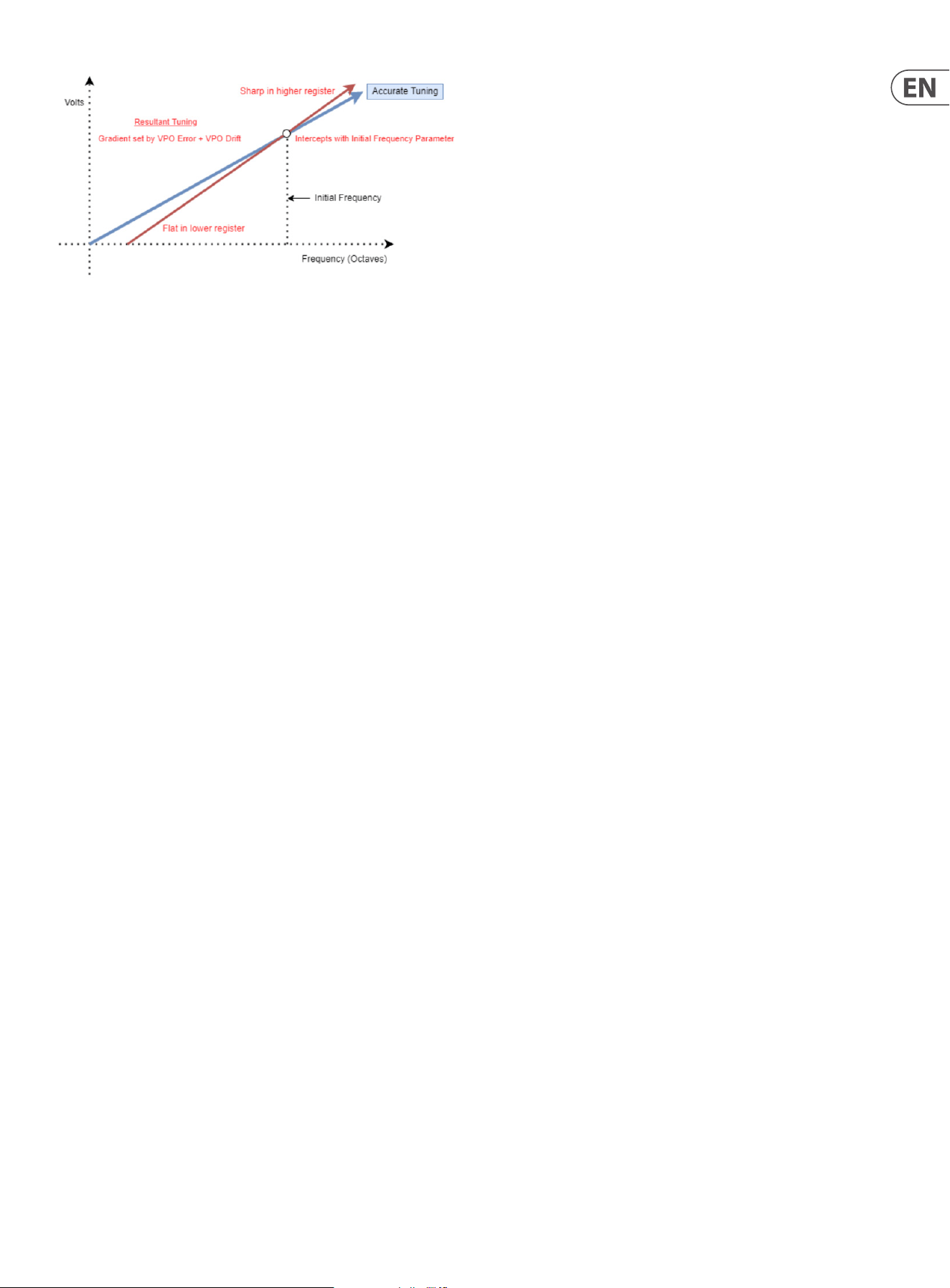
19 UB-Xa User Manual
The above graph applies to FVPO Error, FVPO Drift, FDrift Speed and FInitFreq
in relation to the lter where frequency is in relation to the frequency of the
resonant peak of the lter; OSCVPO Error, OSCVPO Drift, ODrift Speed and
OSCInitFreq where frequency is in relation to the pitch of the oscillators. These
parameters allow the tuning of the lter to be adjusted emulating volts per
octave calibration tuning error in vintage synthesizers.
The VPO Error is a constant scaling to the gradient of the volts per octave relative
to the Initial Frequency, the Initial Frequency is precise and accurate. VPO Drift is
a small amount of random factor independent to each voice added to this factor.
The speed that the VPO Drift is changing is set by the respective drift speed
parameters.
Panning – sets the position of each voice, individually, in the stereo eld using
the rotary encoder to scroll through the voices then pressing to enter the voice.
The encoder can then be used to pan the selected voice through the stereo
eld: -127 is fully panned to the left; 0 is central; 127 is fully panned to the right.
Default is 0 for all voices. Hard pan to the left or right can be set instantly with
the value +/- buttons.
Sources
Can be selected by scrolling through the available options using the rotary
encoder (62) then pressing enter, or by moving/pressing the relevant control
on the top panel where available. Enter cycles through Source; Destination and
Amount. A matrix can be cleared by selecting it then pressing and holding the
rotary encoder for one second. Available sources are:
Empty (no source selected)
ATMono (monophonic aftertouch)
ATPoly (polyphonic aftertouch)
Breath (Incoming Continuous Controller #2 (Breath))
CH1Env (Modulation Channel 1 envelope)
CH2 Env (Modulation Channel 2 envelope)
CH1Mod (Modulation Channel 1 (frequency))
CH2Mod (Modulation Channel 2 (pulse width modulation))
Express (Incoming Continuous Controller #11 (Expression))
Filter (Aggregate of all lter controls)
FtrEnv (Filter Envelope)
KyMono (Monophonic keyboard tracking using last note played)
KyPoly (Polyphonic keyboard tracking)
LdnEnv (Loudness Envelope)
LFOMod (Modulation LFO)
LFOPrf (Performance LFO)
Noise (White Noise Generator)
ModLvr (Modulation Lever (74))
OSC1Fr (Oscillator 1 Frequency control (23))
OSC2Fr (Oscillator 2 Frequency control (29))
OSC1PW (Oscillator 1 Pulse Width depth)
OSC2PW (Oscillator 2 Pulse Width depth)
PchBnd (Pitch Bend Lever (75))
Resnce (Filter Resonance control (33))
Portam (Portamento control (6))
PerfCh (Aggregate of all Performance LFO controls)
VCA L (Left hand output VCA level)
VCA R (Right hand output VCA level)
Velcty (Keyboard velocity)
Butter (modulation increases in a linear manner per voice. Last voice
played gets full level)
#16 (Continuous Controller #16, assignable to either footpedal, or from
external device)
#17 (Continuous Controller #17, assignable to either footpedal, or from
external device)
#18 (Continuous Controller #18, assignable to either footpedal, or from
external device)
#19 (Continuous Controller #19, assignable to either footpedal, or from
external device)
MLvrUp (Modulation level upward motion)
MLvrDn (Modulation level downward motion)
MPETbr (MIDI MPE Timbre (up and down action))
MPEPb (MIDI MPE Pitchbend (left to right action))
MPEPrs (MIDI MPE Pressure)
8L*8R (8 voices are panned hard left, 8 panned hard right)
Flip LR (Odd numbered voice pan left, even pan right)
Spiral (voice alternately pan L/R with each new voice panning further
from centre)
Drift1 (randomized drift factor applied to VCO1)
Drift2 ((randomized drift factor applied to VCO2)
Drift F (randomized drift factor applied to the VCF)
Destinations
These destinations can have a modulation source assigned to them:
Empty (no destination selected)
Churn (multiplies the Butter modulation)
FltDriftA (VCF tuning drift amount)
FltDriftS (VCF tuning drift speed)
FltrAttk (increases or decreases the lter envelope attack, in conjunction
with Filter Attack control (41))
FltrDecy (increases or decreases the lter envelope decay, in conjunction
with Filter Decay control (42))
FltrFreq (adds or subtracts from the lter frequency as set by control 32
and selected modulation sources such as lter envelope and LFO)
FltrMod (increases or decreases the amount of lter modulation, in
conjunction with the Filter Modulation control (34))

20 UB-Xa User Manual
FltrNoise (increases white noise content to the lter input, in conjunction
with Noise Level control 35)
FltrRels (increases or decreases the lter envelope release, in conjunction
with the Filter Release control (44))
FltrRsnce (increases or decreases the amount of lter resonance, in
conjuntion with the Filter Resonance control (33))
FltrSust (increases or decreases the sustain level of the lter envelope, in
conjunction with the Sustain control (43))
LdnssAttk (increases or decreases the loudness envelope attack, in
conjunction with Loudness Attack control (45))
LdnssDecy (increases or decreases the loudness envelope decay, in
conjunction with Loudness Decay control (46))
LdnssRels (increases or decreases the loudness envelope release, in
conjunction with Loudness Release control (48))
LdnssSust (increases or decreases the loudness sustain level, in
conjunction with Loudness Sustain control (47))
ModCh1Amt (increases or decreases the depth of Channel 1 modulation
(frequency) in conjunction with the depth control (15))
ModCh2Amt (increases or decreases the depth of Channel 2 modulation
(PWM) in conjunction with the depth control (19))
ModLFOPhs (changes the phase of the modulation LFO)
ModLFORte (increases or decreases the rate of the modulation LFO in
conjunction with Rate control (13))
O1 PWAmnt (increases or decreases the amount of Pulse Width
Modulation to Oscillator 1, in conjunction with the depth control (19))
O1 Trnsps (transposes Oscillator 1 in conjunction with Frequency control
(23))
O2 Detune (increases or decreases the detuning of Oscillator 2 against
Oscillator 1 in conjunction with the Detune control (8))
O2 PWAmnt (increases or decreases the amount of Pulse Width
Modulation to Oscillator 1, in conjunction with the depth control (19))
O2 Trnsps (transposes Oscillator 2 in conjunction with Frequency control
(29))
OSC Drift A (VCO tuning drift amount)
OSC Drift A (VCO tuning drift speed)
Panning (the modulation source controls the panning of the voices from
left to right)
Porta (increases or decreases the Portamento time, in conjunction with
control (6))
PrfLFOAmnt (increases or decreases the depth of the Performance LFO,
in conjunction with Depth control (72))
PrfLFORte (increases or decreases the rate of the performance LFO, in
conjunction with Rate control (69))
Tuning (raises or lowers the Master Tuning of the UB-Xa, in conjunction
with Master Tune control (5))
V Detune (increases or decreases the amount of voice detuning, in
conjunction with Voice Detune control (Shift & 8))
Volume (increases or decreases the overall level of the UB-Xa)
Shift & 69 (LFO Rate) – Performance LFO Sync – holding the Shift button
and turning the Performance LFO rate control syncs the LFO to whatever clock is
being used by the sequencer and arpeggiator. The options are:
• • 4 Bar
• • 2 Bar
• • 1 Bar
• • ½ Note
• • ¼ Note
• • Dotted ¼ Note
• • ¼ Note Triplet
• • 1/8 Note
• • Dotted 1/8 Note
• • 1/8 Note Triplet
• • 1/16 Note
• • Dotted 1/16 Note
• • 1/16 Note Triplet
• • 1/32 Note
• • Dotted 1/32 Note
• • 1/32 Note Triplet
Moving the rate control without shifting returns the LFO to free running.
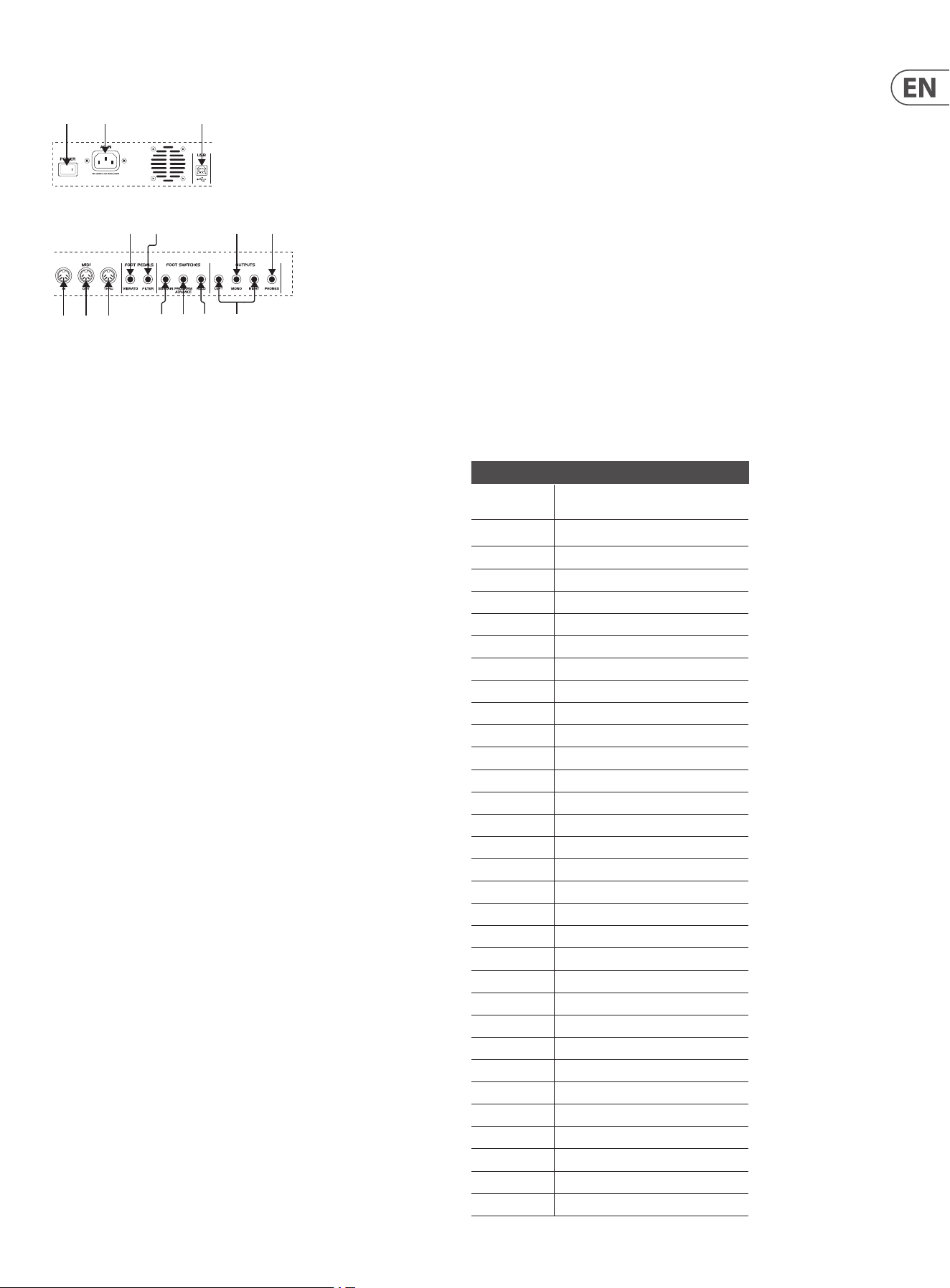
21 UB-Xa User Manual
Rear Panel
The rear panel of your UB-Xa contains the connections for power, peripherals and
communication. It also contains a fan and air vents for cooling. It is important
that there is enough space behind your UB-Xa to allow free air ow, otherwise
damage may occur.
(82) Power Switch – switches the UB-Xa on and o.
(83) AC IN – should be used only with the IEC lead supplied with your UB-Xa.
Will work with any AC mains source in the range 100v – 240v.
(84) USB – A USB type B connector which allows control of the UB-Xa from
external MIDI sources via a standard USB lead. The USB port is also used to
update the rmware of the UB-Xa where necessary.
(85) MIDI IN – allows the UB-Xa to be controlled from an external source, such
as a DAW, via standard 5 pin MIDI leads.
(86) MIDI OUT – transmits MIDI data generated from using the UB-Xa for use
by external equipment or recording into a DAW.
(87) MIDI THRU – mirrors the MIDI messages received via the MIDI In socket
for use by other equipment.
(88) VIBRATO – allows the use of an external pedal, such as the Behringer
FC600, to control the vibrato of the UB-Xa. When a pedal is being used it
will be summed with the Depth (72) and Modulation Lever (75) controls
until the maximum value is reached. Taking the pedal back to its
minimum will over-ride Depth and Lever.
The action of the Vibrato pedal can be re-assigned using the Global
Settings menu.
(89) FILTER – allows the use of an external pedal, such as the Behringer FC600,
to open and close the lter of the UB-Xa. The pedal’s output over-rides
frequency control (32).
The action of the Filter pedal can be re-assigned using the Global Settings
menu.
(90) SUSTAIN – input for a footswitch, such as the Behringer FS112B, to delay
the Loudness Envelope reaching its Release time. A non-latching pedal
should be used, as the latching action can be altered in the Global Settings
menu.
The action of the Sustain pedal can be re-assigned using the Global
Settings menu.
(91) PROGRAM ADVANCE – input for a footswitch, such as the Behringer
FS112B, to move the UB-Xa on to its next numerical program within the
current bank.
The action of the Program Advance pedal can be re-assigned using the
Global Settings menu.
(92) HOLD – duplicates the action of the Hold button (9) on the top panel.
The action of the Hold pedal can be re-assigned using the Global Settings
menu.
(93) LEFT/RIGHT – balanced outputs for stereo use. TRS leads should be used
for balanced use.
(94) MONO – monophonic output derived from summing left and right
outputs.
(95) PHONES – stereo output for use with suitable headphones.
Preset Patches
Your UB-Xa is supplied with 403 preset patches loaded into Banks A-D. These can
be edited and overwritten, or replaced by your own creations.
Patches can be stored into any of the UB-Xa’s four patch banks and can be backed
up using any Sysex librarian. Factory supplied presets can be restored on a bank
by bank basis.
Bank A – Classic Patches
Number Patch
1 Brass Ensemble
2 Clavinet
3 Low Strings
4 Electric Piano
5 Rotary Organ
6 Flutes
7 Harpsichord
8 Rock Unison
9 French Horns
10 Celeste
11 High Strings
12 RMI Piano
13 Pipe Organ
14 Xa Chorus
15 Harp
16 Calliope
17 Trumpet Ensemble
18 Harmonica
19 Strings 1
20 Accordion
21 Filter Drone
22 Bagpipes
23 Banjo
24 Rush Rezz
25 Trumpets
26 Mellow Wow
27 Slow Strings
28 Resonance Sweep
29 Combo Organ
30 Double Reed
31 Farr’s Funk
32 Pizzicato
(82) (83) (84)
(85) (86) (87)
(88) (89)
(90) (91) (92) (93)
(94) (95)
(82) (83) (84)
(85) (86) (87)
(88) (89)
(90) (91) (92) (93)
(94) (95)
22 UB-Xa User Manual
Number Patch
33 Modern Horns
34 Bass 1
35 Four Pole
36 Reed Piano
37 Perc Organ
38 Sax
39 Harp 2
40 Oriental Unison
41 Tropical Horns
42 Rubber Clav
43 Strings 2
44 Edge Piano
45 Hymn Organ
46 Recorder
47 Long Chimes
48 Unison Fear
49 Comp Horns
50 Bells
51 Strings 3
52 Soft Piano
53 Reed Organ
54 Vocal Wow
55 Marimba
56 Terror
57 F-Env Horns
58 S/H in Fifths
58 Polyphonic Porta
60 Steel Drums
61 Square Wave
62 Comp Synth
63 Unison Portamento
64 Delayed Mod
65 Tenth Decay
66 Sitar
67 Fiddle
68 Pulse Comp
69 PW Rezz
70 Comedy Comp
71 Jazz Solo
72 Earthquake
73 S/H Port
74 Conga
75 Strings 4
76 Funk Keys
77 Organ
78 Tremolo Rezz
79 Box O’Pups
80 Martian Hop
81 Claps
82 Carillion
Number Patch
83 Solo Strings
84 Tuned Bees
85 Rezz Reeds
86 Three Way
87 Percussion
88 Chopper
89 Io
90 S/H PW
91 Strings 5
92 Clarinet
93 Bright Drone
94 Rock Solo
95 Claves
96 Jet
97 Water Wiggle
98 Water Piano
99 Slower Strings
100 Flanged Piano
101 Space Bugs
102 Taped Voices
103 Thunder
104 Pong
23 UB-Xa User Manual
MIDI Continuous Controllers
Your UB-Xa is supplied with 403 preset patches loaded into Banks A-D. These can
be edited and overwritten, or replaced by your own creations.
Patches can be stored into any of the UB-Xa’s four patch banks and can be backed
up using any Sysex librarian. Factory supplied presets can be restored on a bank
by bank basis.
CC No CC Name NRPN Equivalent
1 Mod Lever (Up)
2 Breath Controller MSB PerformanceBreathControl
3 Undened 1 MSB ManualMastertune
5 Portamento Time MSB ControlPortamentoAmount
7 Volume MSB ManualVolume
8 Balance MSB ManualBalance
9 Undened 2 MSB ControlDetune
10 Pan MSB ControlPanning
11 Expression Controller MSB PerformanceExpression
15 Undened 4 MSB ModulationLFORate
16 General Purpose 1 MSB PerformanceGeneralPurpose1
17 General Purpose 2 MSB PerformanceGeneralPurpose2
18 General Purpose 3 MSB PerformanceGeneralPurpose3
19 General Purpose 4 MSB PerformanceGeneralPurpose4
20 Undened 5 MSB ModulationChannel1Amount
21 Undened 6 MSB ModulationChannel2Amount
22 Undened 7 MSB OscillatorsOSC1Transpose
23 Undened 8 MSB OscillatorsOSC1PWAmount
24 Undened 9 MSB OscillatorsOSC2Transpose
25 Undened 10 MSB OscillatorsOSC2PWAmount
26 Undened 11 MSB FilterFrequency
27 Undened 12 MSB FilterResonance
28 Undened 13 MSB FilterModulation
29 Undened 14 MSB FilterNoise
31 Mod Lever (Down)
34 Breath Controller LSB PerformanceBreathControl
35 Undened 1 LSB ManualMastertune
37 Portamento Time LSB ControlPortamentoAmount
39 Volume LSB ManualVolume
40 Balance LSB ManualBalance
41 Undened 2 LSB ControlDetune
42 Pan LSB ControlPanning
43 Expression Controller LSB PerformanceExpression
47 Undened 4 LSB ModulationLFORate
48 General Purpose 1 LSB PerformanceGeneralPurpose1
49 General Purpose 2 LSB PerformanceGeneralPurpose2
50 General Purpose 3 LSB PerformanceGeneralPurpose3
51 General Purpose 4 LSB PerformanceGeneralPurpose4
52 Undened 5 LSB ModulationChannel1Amount
53 Undened 6 LSB ModulationChannel2Amount
54 Undened 7 LSB OscillatorsOSC1Transpose
55 Undened 8 LSB OscillatorsOSC1PWAmount
56 Undened 9 LSB OscillatorsOSC2Transpose
57 Undened 10 LSB OscillatorsOSC2PWAmount
CC No CC Name NRPN Equivalent
58 Undened 11 LSB FilterFrequency
59 Undened 12 LSB FilterResonance
60 Undened 13 LSB FilterModulation
61 Undened 14 LSB FilterNoise
64 Damper Pedal FootSwitchDamper
66 Sostenuto FootSwitchSostenuto
69 Hold Pedal FootSwitchHold
71 Sound Control 2 Timbre FilterResonance
72 Sound Control 3 Release EnvelopesLoudnessR
73 Sound Control 4 Attack EnvelopesLoudnessA
74 Sound Control 5 Brightness PerformanceFilter
75 Sound Control 6 Decay EnvelopesLoudnessD
76 Sound Control 7 Vibrato Rate PerformanceLFORate
77 Sound Control 8 Vibrato Depth PerformanceVibrato
78 Performance LFO Amount PerformanceAmount
84 Portamento Control ControlPortamentoAmount
85 Undened 17 EnvelopesFilterA
86 Undened 18 EnvelopesFilterD
87 Undened 19 EnvelopesFilterS
88 Undened 20 EnvelopesFilterR
89 Undened 21 EnvelopesLoudnessA
90 Undened 22 EnvelopesLoudnessD
102 Undened 23 EnvelopesLoudnessS
103 Undened 24 EnvelopesLoudnessR
105 Undened 26 ModMatrixBus1Amount
106 Undened 27 ModMatrixBus2Amount
107 Undened 28 ModMatrixBus3Amount
108 Undened 29 ModMatrixBus4Amount
109 Undened 30 ModMatrixBus5Amount
110 Undened 31 ModMatrixBus6Amount
111 Undened 32 ModMatrixBus7Amount
112 Undened 33 ModMatrixBus8Amount
24 UB-Xa User Manual
MIDI NRPNs
MSB LSB 14-bit Parameter Name Range Scope Notes
0 0 0 ControlPortamentoAmount 0~16383 patch
0 1 1 ControlPortamentoBend 0~16383 patch
0 2 2 ControlDetune 0~16383 patch Signed Number, Midpoint is 8192.
0 3 3 ControlVoiceDetune 0~16383 patch
0 4 4 ControlUnison 0~1 patch
0 5 5 ControlPolyphonicVoiceCount 1~8 patch
0 6 6 ControlUnisonVoiceCount 1~16 patch
0 7 7 ControlPortamentoSettings 0~15 patch Bitmask: Match (0001) Quantize (0010) Bend (0100) Exponential (1000)
0 8 8 ControlAftertouchSmoother 0~127 global
0 9 9 ControlUnisonNotePriority 0~2 global Enumeration: Below (0), Above (1), Last (2),
0 10 10 ControlChordModeNotePriority 0~2 global Enumeration: Below (0), Above (1), Last (2),
0 11 11 ControlPortamentoSpread 0~255 patch
0 12 12 ControlPortamentoRange 0~255 patch
1 0 128 PerformanceVolume 0~16383 patch
1 1 129 PerformanceSettings 0~63 program Bitmask: Bend Osc2 only~Bend Osc1 & Osc2 (000001) Custom bend~Bend
+/- 2 (000010) OSC1 (000100) OSC2 (001000) Upper (010000) Lower (100000)
1 2 130 PerformancePitchBendSensitivity 0~16383 program
1 3 131 PerformanceTranspose 0~16383 program Signed Number, Midpoint is 8192.
1 4 132 PerformanceLFORate 0~16383 program
1 5 133 PerformanceLFOShapes 0~7 program Enumeration: Sine (0), Saw (1), Square (2), InverseSaw (3), SH (4), Triangle (5),
Sample Hold (6), Noise (7),
1 6 134 PerformanceLFOChannelAmount 0~16383 program
1 7 135 PerformanceLFOMods 0~15 program Bitmask: Track (0001) Envelope (0010) TempoLock (0100) LFOTrig (1000)
1 8 136 PerformanceMpePitchLowerSen
sitivity
0~96 global
1 9 137 PerformanceMpePitchUpperSen
sitivity
0~96 global
1 10 138 PerformanceLFOTrim 0~255 global+patch
2 0 256 ModulationLFOTrigPoint 0~16383 patch
2 1 257 ModulationLFORate 0~16383 patch
2 2 258 ModulationLFOPhase 0~16383 patch
2 3 259 ModulationChannel1Amount 0~16383 patch
2 4 260 ModulationChannel2Amount 0~16383 patch
2 5 261 ModulationLFOMods 0~15 patch Bitmask: LFO Track on~LFO Track o (0001) LFOEnv2 Rate on~LFOEnv2 Rate
o (0010) TempoLock (0100) LFOTrig (1000)
2 6 262 ModulationLFOShapes 0~7 patch Enumeration: Sine (0), Saw (1), Square (2), InverseSaw (3), SH (4), Triangle (5),
Sample Hold (6), Noise (7),
2 7 263 ModulationChannel1Sends 0~7 patch Bitmask: C1 OSC1 LFO on~C1 OSC1 LFO o (001) C1 OSC2 LFO on~C1 OSC2 LFO
o (010) C1 Flt LFO on~C1 Flt LFO o (100)
2 8 264 ModulationChannel1Mods 0~3 patch Bitmask: C1 Quant on~C1 Quant o (01) LFOEnv1 Inv on~LFOEnv1 Inv o (10)
2 9 265 ModulationChannel2Sends 0~7 patch Bitmask: C2 PWM1 LFO on~C2 PWM1 LFO o (001) C2 PWM2 LFO on~C2
PWM2 LFO o (010) C2 Vol LFO on~C2 Vol LFO o (100)
2 10 266 ModulationChannel2Mods 0~3 patch Bitmask: C2 Quant on~C2 Quant o (01) LFOEnv2 Inv on~LFOEnv2 Inv o (10)
2 11 267 ModulationLFOTrim 0~255 global+patch
2 12 268 ModulationQuirks 0~3 global+patch Bitmask: FlipSquare (01) FlipVCFMod (10)
3 0 384 EnvelopesFilterA 0~16383 patch
3 1 385 EnvelopesFilterD 0~16383 patch
3 2 386 EnvelopesFilterS 0~16383 patch
3 3 387 EnvelopesFilterR 0~16383 patch
3 4 388 EnvelopesLoudnessA 0~16383 patch
3 5 389 EnvelopesLoudnessD 0~16383 patch
25 UB-Xa User Manual
MSB LSB 14-bit Parameter Name Range Scope Notes
3 6 390 EnvelopesLoudnessS 0~16383 patch
3 7 391 EnvelopesLoudnessR 0~16383 patch
3 8 392 EnvelopesModChannel1A 0~16383 patch
3 9 393 EnvelopesModChannel1Delay 0~16383 patch
3 10 394 EnvelopesModChannel2A 0~16383 patch
3 11 395 EnvelopesModChannel2Delay 0~16383 patch
3 12 396 EnvelopesPedalR 0~16383 patch
3 13 397 EnvelopesFilterMods 0~31 patch Bitmask: Flip (00001) Repeat (00010) Retrig (00100) Loop (01000) Legato
(10000)
3 14 398 EnvelopesLoudnessMods 0~31 patch Bitmask: Flip (00001) Repeat (00010) Retrig (00100) Loop (01000) Legato
(10000)
4 0 512 OscillatorsOSC1PWAmount 0~16383 patch
4 1 513 OscillatorsOSC1Transpose 0~16383 patch Signed Number, Midpoint is 8192.
4 2 514 OscillatorsOSC2PWAmount 0~16383 patch
4 3 515 OscillatorsOSC2Transpose 0~16383 patch Signed Number, Midpoint is 8192.
4 4 516 OscillatorsMode 0~3 patch Bitmask: OSC2 sync on~OSC2 sync o (01) OSC2 f-env on~OSC2 f-env o (10)
4 5 517 OscillatorsOSC1State 0~7 patch Bitmask: OSC1 full~OSC1 o (001) OSC1 VCO LFO 180~OSC1 VCO LFO 0 (010)
OSC1 PWM LFO 180~OSC1 PWM LFO 0 (100)
4 6 518 OscillatorsOSC1Shapes 0~2 patch Enumeration: Osc1 pulse (0), Osc1 saw (1), Osc1 tri (2),
4 7 519 OscillatorsOSC2State 0~2 patch Enumeration: Osc2 half (0), Osc2 full (1), Osc2 o (2),
4 8 520 OscillatorsOSC2Shapes 0~2 patch Enumeration: Osc2 pulse (0), Osc2 saw (1), Osc2 tri (2),
4 9 521 OscillatorsOSC1PWTrimL 0~255 global+patch
4 10 522 OscillatorsOSC1PWTrimR 127~255 global+patch
4 11 523 OscillatorsOSC2PWTrimL 0~255 global+patch
4 12 524 OscillatorsOSC2PWTrimR 127~255 global+patch
4 13 525 OscillatorsModDepth 6~63 patch
4 14 526 OscillatorsPWMDepth 0~255 patch
4 15 527 OscillatorsPWMOsetShift 0~255 global+patch
4 16 528 OscillatorsChaos 0~63 global+patch
4 17 529 OscillatorsVPOError 0~31 global+patch
4 18 530 OscillatorsDriftSpeed 0~63 global+patch
4 19 531 OscillatorsVPOErrorChaos 0~63 global+patch
4 20 532 OscillatorsOscAutoInitF 0~127 global+patch
4 21 533 OscillatorsFEnvRange 1~63 patch
4 22 534 OscillatorsModDepth2 6~63 patch
4 23 535 OscillatorsOSC1Quantization 0~5 patch Enumeration: Octaves (0), Semitones (1), Free (2), +/- Octaves (3), +/-
Semitones (4), +/- Free (5),
4 24 536 OscillatorsOSC2Quantization 0~5 patch Enumeration: Octaves (0), Semitones (1), Free (2), +/- Octaves (3), +/-
Semitones (4), +/- Free (5),
4 25 537 OscillatorsPWMDepth2 0~255 patch
4 26 538 ControlRFU 0~127 global
5 0 640 FilterFrequency 0~16383 patch
5 1 641 FilterResonance 0~16383 patch
5 2 642 FilterModulation 0~16383 patch
5 3 643 FilterNoise 0~16383 patch
5 4 644 FilterModes 0~3 patch Bitmask: Filter track on~Filter track o (01) 4 pole lter~2 pole lter (10)
5 5 645 FilterResonanceTrim 0~255 global+patch
5 6 646 FilterResonanceTrim4Pole 0~255 global+patch
5 7 647 FilterFrequencyRange 0~127 patch
5 8 648 FilterZero2pOset 0~48 global+patch
5 9 649 FilterZero4pOset 0~48 global+patch
5 10 650 FilterModulationRange 0~127 patch
26 UB-Xa User Manual
MSB LSB 14-bit Parameter Name Range Scope Notes
5 12 652 FilterEnvChaos 0~31 global+patch
5 13 653 FilterLFORange 0~127 patch
5 14 654 FilterChaos 0~63 global+patch
5 15 655 FilterDriftSpeed 0~63 global+patch
5 16 656 FilterTrackOset 0~63 global+patch
5 17 657 FilterPedalRange 0~96 patch
5 18 658 FilterVPOError 0~63 global+patch
5 19 659 FilterVPOErrorChaos 0~63 global+patch
5 20 660 FilterInitFreq 0~127 global+patch
5 24 664 FilterTrackAmount 0~64 patch
5 25 665 FilterEnvAttackLinearity 0~31 global+patch
5 26 666 FilterEnvDecayLinearity 0~31 global+patch
6 0 768 ModMatrixBus1Amount 0~16383 patch Signed Number, Midpoint is 8192.
6 1 769 ModMatrixBus2Amount 0~16383 patch Signed Number, Midpoint is 8192.
6 2 770 ModMatrixBus3Amount 0~16383 patch Signed Number, Midpoint is 8192.
6 3 771 ModMatrixBus4Amount 0~16383 patch Signed Number, Midpoint is 8192.
6 4 772 ModMatrixBus5Amount 0~16383 patch Signed Number, Midpoint is 8192.
6 5 773 ModMatrixBus6Amount 0~16383 patch Signed Number, Midpoint is 8192.
6 6 774 ModMatrixBus7Amount 0~16383 patch Signed Number, Midpoint is 8192.
6 7 775 ModMatrixBus8Amount 0~16383 patch Signed Number, Midpoint is 8192.
6 8 776 ModMatrixBus1Source 0~44 patch Enumeration: Empty (0), ChannelPressure (1), PolyAftertouch (2),
BreathControl (3), ModChannel1Envelope (4), ModChannel2Envelope (5),
ModChannel1 (6), ModChannel2 (7), Expression (8), Cutto (9), FilterEnvelope
(10), KeyTrack (11), KeyTrackPoly (12), LoudnessEnvelope (13), MainLFO
(14), SecondaryLFO (15), Noise (16), ModWheel (17), Oscillator1 (18),
Oscillator2 (19), PulseWidth1 (20), PulseWidth2 (21), PitchBendAmount (22),
Resonance (23), VoiceSlewer (24), PerformanceChannel (25), PanningLeft
(26), PanningRight (27), KeyVelocity (28), SpreadFtn (29), GeneralPurpose1
(30), GeneralPurpose2 (31), GeneralPurpose3 (32), GeneralPurpose4 (33),
ModWheelUp (34), ModWheelDown (35), MPETimbre (36), MPEPitch (37),
MPEPressure (38), EightLEightR (39), FlipFlop (40), Spiral (41), Osc1Drift (42),
Osc2Drift (43), FilterDrift (44),
6 9 777 ModMatrixBus1Destination 0~33 patch Enumeration: Empty (0), ButterInput (1), EnvelopesFilterA (2),
EnvelopesFilterD (3), FilterFrequency (4), FilterModulation (5), FilterNoise
(6), EnvelopesFilterR (7), FilterResonance (8), EnvelopesFilterS (9),
EnvelopesLoudnessA (10), EnvelopesLoudnessD (11), EnvelopesLoudnessR
(12), EnvelopesLoudnessS (13), ModulationChannel1Amount
(14), ModulationChannel2Amount (15), ModulationLFOPhase
(16), ModulationLFORate (17), OscillatorsOSC1PWAmount
(18), OscillatorsOSC1Transpose (19), ControlDetune (20),
OscillatorsOSC2PWAmount (21), OscillatorsOSC2Transpose
(22), ControlPanning (23), ControlPortamentoAmount (24),
PerformanceLFOChannelAmount (25), PerformanceLFORate (26),
ManualMastertune (27), ControlVoiceDetune (28), PerformanceVolume
(29), CuttoLfo (30), Oscillator1Modulation (31), Oscillator1Fenv (32),
Oscillator2Modulation (33), Oscillator2Fenv (34), PulseWidth1Modulation
(35), PulseWidth2Modulation (36), PanningLeftModulation (37),
PanningRightModulation (38), OscillatorsDriftAmount (39),
OscillatorsDriftSpeed (40), FilterDriftAmount (41), FilterDriftSpeed (42),
6 10 778 ModMatrixBus2Source 0~44 patch Enumeration: Empty (0), ChannelPressure (1), PolyAftertouch (2),
BreathControl (3), ModChannel1Envelope (4), ModChannel2Envelope (5),
ModChannel1 (6), ModChannel2 (7), Expression (8), Cutto (9), FilterEnvelope
(10), KeyTrack (11), KeyTrackPoly (12), LoudnessEnvelope (13), MainLFO
(14), SecondaryLFO (15), Noise (16), ModWheel (17), Oscillator1 (18),
Oscillator2 (19), PulseWidth1 (20), PulseWidth2 (21), PitchBendAmount (22),
Resonance (23), VoiceSlewer (24), PerformanceChannel (25), PanningLeft
(26), PanningRight (27), KeyVelocity (28), SpreadFtn (29), GeneralPurpose1
(30), GeneralPurpose2 (31), GeneralPurpose3 (32), GeneralPurpose4 (33),
ModWheelUp (34), ModWheelDown (35), MPETimbre (36), MPEPitch (37),
MPEPressure (38), EightLEightR (39), FlipFlop (40), Spiral (41), Osc1Drift (42),
Osc2Drift (43), FilterDrift (44),
27 UB-Xa User Manual
MSB LSB 14-bit Parameter Name Range Scope Notes
6 11 779 ModMatrixBus2Destination 0~33 patch Enumeration: Empty (0), ButterInput (1), EnvelopesFilterA (2),
EnvelopesFilterD (3), FilterFrequency (4), FilterModulation (5), FilterNoise
(6), EnvelopesFilterR (7), FilterResonance (8), EnvelopesFilterS (9),
EnvelopesLoudnessA (10), EnvelopesLoudnessD (11), EnvelopesLoudnessR
(12), EnvelopesLoudnessS (13), ModulationChannel1Amount
(14), ModulationChannel2Amount (15), ModulationLFOPhase
(16), ModulationLFORate (17), OscillatorsOSC1PWAmount
(18), OscillatorsOSC1Transpose (19), ControlDetune (20),
OscillatorsOSC2PWAmount (21), OscillatorsOSC2Transpose
(22), ControlPanning (23), ControlPortamentoAmount (24),
PerformanceLFOChannelAmount (25), PerformanceLFORate (26),
ManualMastertune (27), ControlVoiceDetune (28), PerformanceVolume
(29), CuttoLfo (30), Oscillator1Modulation (31), Oscillator1Fenv (32),
Oscillator2Modulation (33), Oscillator2Fenv (34), PulseWidth1Modulation
(35), PulseWidth2Modulation (36), PanningLeftModulation (37),
PanningRightModulation (38), OscillatorsDriftAmount (39),
OscillatorsDriftSpeed (40), FilterDriftAmount (41), FilterDriftSpeed (42),
6 12 780 ModMatrixBus3Source 0~44 patch Enumeration: Empty (0), ChannelPressure (1), PolyAftertouch (2),
BreathControl (3), ModChannel1Envelope (4), ModChannel2Envelope (5),
ModChannel1 (6), ModChannel2 (7), Expression (8), Cutto (9), FilterEnvelope
(10), KeyTrack (11), KeyTrackPoly (12), LoudnessEnvelope (13), MainLFO
(14), SecondaryLFO (15), Noise (16), ModWheel (17), Oscillator1 (18),
Oscillator2 (19), PulseWidth1 (20), PulseWidth2 (21), PitchBendAmount (22),
Resonance (23), VoiceSlewer (24), PerformanceChannel (25), PanningLeft
(26), PanningRight (27), KeyVelocity (28), SpreadFtn (29), GeneralPurpose1
(30), GeneralPurpose2 (31), GeneralPurpose3 (32), GeneralPurpose4 (33),
ModWheelUp (34), ModWheelDown (35), MPETimbre (36), MPEPitch (37),
MPEPressure (38), EightLEightR (39), FlipFlop (40), Spiral (41), Osc1Drift (42),
Osc2Drift (43), FilterDrift (44),
6 13 781 ModMatrixBus3Destination 0~33 patch Enumeration: Empty (0), ButterInput (1), EnvelopesFilterA (2),
EnvelopesFilterD (3), FilterFrequency (4), FilterModulation (5), FilterNoise
(6), EnvelopesFilterR (7), FilterResonance (8), EnvelopesFilterS (9),
EnvelopesLoudnessA (10), EnvelopesLoudnessD (11), EnvelopesLoudnessR
(12), EnvelopesLoudnessS (13), ModulationChannel1Amount
(14), ModulationChannel2Amount (15), ModulationLFOPhase
(16), ModulationLFORate (17), OscillatorsOSC1PWAmount
(18), OscillatorsOSC1Transpose (19), ControlDetune (20),
OscillatorsOSC2PWAmount (21), OscillatorsOSC2Transpose
(22), ControlPanning (23), ControlPortamentoAmount (24),
PerformanceLFOChannelAmount (25), PerformanceLFORate (26),
ManualMastertune (27), ControlVoiceDetune (28), PerformanceVolume
(29), CuttoLfo (30), Oscillator1Modulation (31), Oscillator1Fenv (32),
Oscillator2Modulation (33), Oscillator2Fenv (34), PulseWidth1Modulation
(35), PulseWidth2Modulation (36), PanningLeftModulation (37),
PanningRightModulation (38), OscillatorsDriftAmount (39),
OscillatorsDriftSpeed (40), FilterDriftAmount (41), FilterDriftSpeed (42),
6 14 782 ModMatrixBus4Source 0~44 patch Enumeration: Empty (0), ChannelPressure (1), PolyAftertouch (2),
BreathControl (3), ModChannel1Envelope (4), ModChannel2Envelope (5),
ModChannel1 (6), ModChannel2 (7), Expression (8), Cutto (9), FilterEnvelope
(10), KeyTrack (11), KeyTrackPoly (12), LoudnessEnvelope (13), MainLFO
(14), SecondaryLFO (15), Noise (16), ModWheel (17), Oscillator1 (18),
Oscillator2 (19), PulseWidth1 (20), PulseWidth2 (21), PitchBendAmount (22),
Resonance (23), VoiceSlewer (24), PerformanceChannel (25), PanningLeft
(26), PanningRight (27), KeyVelocity (28), SpreadFtn (29), GeneralPurpose1
(30), GeneralPurpose2 (31), GeneralPurpose3 (32), GeneralPurpose4 (33),
ModWheelUp (34), ModWheelDown (35), MPETimbre (36), MPEPitch (37),
MPEPressure (38), EightLEightR (39), FlipFlop (40), Spiral (41), Osc1Drift (42),
Osc2Drift (43), FilterDrift (44),
6 15 783 ModMatrixBus4Destination 0~33 patch Enumeration: Empty (0), ButterInput (1), EnvelopesFilterA (2),
EnvelopesFilterD (3), FilterFrequency (4), FilterModulation (5), FilterNoise
(6), EnvelopesFilterR (7), FilterResonance (8), EnvelopesFilterS (9),
EnvelopesLoudnessA (10), EnvelopesLoudnessD (11), EnvelopesLoudnessR
(12), EnvelopesLoudnessS (13), ModulationChannel1Amount
(14), ModulationChannel2Amount (15), ModulationLFOPhase
(16), ModulationLFORate (17), OscillatorsOSC1PWAmount
(18), OscillatorsOSC1Transpose (19), ControlDetune (20),
OscillatorsOSC2PWAmount (21), OscillatorsOSC2Transpose
(22), ControlPanning (23), ControlPortamentoAmount (24),
PerformanceLFOChannelAmount (25), PerformanceLFORate (26),
ManualMastertune (27), ControlVoiceDetune (28), PerformanceVolume
(29), CuttoLfo (30), Oscillator1Modulation (31), Oscillator1Fenv (32),
Oscillator2Modulation (33), Oscillator2Fenv (34), PulseWidth1Modulation
(35), PulseWidth2Modulation (36), PanningLeftModulation (37),
PanningRightModulation (38), OscillatorsDriftAmount (39),
OscillatorsDriftSpeed (40), FilterDriftAmount (41), FilterDriftSpeed (42),
28 UB-Xa User Manual
MSB LSB 14-bit Parameter Name Range Scope Notes
6 16 784 ModMatrixBus5Source 0~44 patch Enumeration: Empty (0), ChannelPressure (1), PolyAftertouch (2),
BreathControl (3), ModChannel1Envelope (4), ModChannel2Envelope (5),
ModChannel1 (6), ModChannel2 (7), Expression (8), Cutto (9), FilterEnvelope
(10), KeyTrack (11), KeyTrackPoly (12), LoudnessEnvelope (13), MainLFO
(14), SecondaryLFO (15), Noise (16), ModWheel (17), Oscillator1 (18),
Oscillator2 (19), PulseWidth1 (20), PulseWidth2 (21), PitchBendAmount (22),
Resonance (23), VoiceSlewer (24), PerformanceChannel (25), PanningLeft
(26), PanningRight (27), KeyVelocity (28), SpreadFtn (29), GeneralPurpose1
(30), GeneralPurpose2 (31), GeneralPurpose3 (32), GeneralPurpose4 (33),
ModWheelUp (34), ModWheelDown (35), MPETimbre (36), MPEPitch (37),
MPEPressure (38), EightLEightR (39), FlipFlop (40), Spiral (41), Osc1Drift (42),
Osc2Drift (43), FilterDrift (44),
6 17 785 ModMatrixBus5Destination 0~33 patch Enumeration: Empty (0), ButterInput (1), EnvelopesFilterA (2),
EnvelopesFilterD (3), FilterFrequency (4), FilterModulation (5), FilterNoise
(6), EnvelopesFilterR (7), FilterResonance (8), EnvelopesFilterS (9),
EnvelopesLoudnessA (10), EnvelopesLoudnessD (11), EnvelopesLoudnessR
(12), EnvelopesLoudnessS (13), ModulationChannel1Amount
(14), ModulationChannel2Amount (15), ModulationLFOPhase
(16), ModulationLFORate (17), OscillatorsOSC1PWAmount
(18), OscillatorsOSC1Transpose (19), ControlDetune (20),
OscillatorsOSC2PWAmount (21), OscillatorsOSC2Transpose
(22), ControlPanning (23), ControlPortamentoAmount (24),
PerformanceLFOChannelAmount (25), PerformanceLFORate (26),
ManualMastertune (27), ControlVoiceDetune (28), PerformanceVolume
(29), CuttoLfo (30), Oscillator1Modulation (31), Oscillator1Fenv (32),
Oscillator2Modulation (33), Oscillator2Fenv (34), PulseWidth1Modulation
(35), PulseWidth2Modulation (36), PanningLeftModulation (37),
PanningRightModulation (38), OscillatorsDriftAmount (39),
OscillatorsDriftSpeed (40), FilterDriftAmount (41), FilterDriftSpeed (42),
6 18 786 ModMatrixBus6Source 0~44 patch Enumeration: Empty (0), ChannelPressure (1), PolyAftertouch (2),
BreathControl (3), ModChannel1Envelope (4), ModChannel2Envelope (5),
ModChannel1 (6), ModChannel2 (7), Expression (8), Cutto (9), FilterEnvelope
(10), KeyTrack (11), KeyTrackPoly (12), LoudnessEnvelope (13), MainLFO
(14), SecondaryLFO (15), Noise (16), ModWheel (17), Oscillator1 (18),
Oscillator2 (19), PulseWidth1 (20), PulseWidth2 (21), PitchBendAmount (22),
Resonance (23), VoiceSlewer (24), PerformanceChannel (25), PanningLeft
(26), PanningRight (27), KeyVelocity (28), SpreadFtn (29), GeneralPurpose1
(30), GeneralPurpose2 (31), GeneralPurpose3 (32), GeneralPurpose4 (33),
ModWheelUp (34), ModWheelDown (35), MPETimbre (36), MPEPitch (37),
MPEPressure (38), EightLEightR (39), FlipFlop (40), Spiral (41), Osc1Drift (42),
Osc2Drift (43), FilterDrift (44),
6 19 787 ModMatrixBus6Destination 0~33 patch Enumeration: Empty (0), ButterInput (1), EnvelopesFilterA (2),
EnvelopesFilterD (3), FilterFrequency (4), FilterModulation (5), FilterNoise
(6), EnvelopesFilterR (7), FilterResonance (8), EnvelopesFilterS (9),
EnvelopesLoudnessA (10), EnvelopesLoudnessD (11), EnvelopesLoudnessR
(12), EnvelopesLoudnessS (13), ModulationChannel1Amount
(14), ModulationChannel2Amount (15), ModulationLFOPhase
(16), ModulationLFORate (17), OscillatorsOSC1PWAmount
(18), OscillatorsOSC1Transpose (19), ControlDetune (20),
OscillatorsOSC2PWAmount (21), OscillatorsOSC2Transpose
(22), ControlPanning (23), ControlPortamentoAmount (24),
PerformanceLFOChannelAmount (25), PerformanceLFORate (26),
ManualMastertune (27), ControlVoiceDetune (28), PerformanceVolume
(29), CuttoLfo (30), Oscillator1Modulation (31), Oscillator1Fenv (32),
Oscillator2Modulation (33), Oscillator2Fenv (34), PulseWidth1Modulation
(35), PulseWidth2Modulation (36), PanningLeftModulation (37),
PanningRightModulation (38), OscillatorsDriftAmount (39),
OscillatorsDriftSpeed (40), FilterDriftAmount (41), FilterDriftSpeed (42),
6 20 788 ModMatrixBus7Source 0~44 patch Enumeration: Empty (0), ChannelPressure (1), PolyAftertouch (2),
BreathControl (3), ModChannel1Envelope (4), ModChannel2Envelope (5),
ModChannel1 (6), ModChannel2 (7), Expression (8), Cutto (9), FilterEnvelope
(10), KeyTrack (11), KeyTrackPoly (12), LoudnessEnvelope (13), MainLFO
(14), SecondaryLFO (15), Noise (16), ModWheel (17), Oscillator1 (18),
Oscillator2 (19), PulseWidth1 (20), PulseWidth2 (21), PitchBendAmount (22),
Resonance (23), VoiceSlewer (24), PerformanceChannel (25), PanningLeft
(26), PanningRight (27), KeyVelocity (28), SpreadFtn (29), GeneralPurpose1
(30), GeneralPurpose2 (31), GeneralPurpose3 (32), GeneralPurpose4 (33),
ModWheelUp (34), ModWheelDown (35), MPETimbre (36), MPEPitch (37),
MPEPressure (38), EightLEightR (39), FlipFlop (40), Spiral (41), Osc1Drift (42),
Osc2Drift (43), FilterDrift (44),
29 UB-Xa User Manual
MSB LSB 14-bit Parameter Name Range Scope Notes
6 21 789 ModMatrixBus7Destination 0~33 patch Enumeration: Empty (0), ButterInput (1), EnvelopesFilterA (2),
EnvelopesFilterD (3), FilterFrequency (4), FilterModulation (5), FilterNoise
(6), EnvelopesFilterR (7), FilterResonance (8), EnvelopesFilterS (9),
EnvelopesLoudnessA (10), EnvelopesLoudnessD (11), EnvelopesLoudnessR
(12), EnvelopesLoudnessS (13), ModulationChannel1Amount
(14), ModulationChannel2Amount (15), ModulationLFOPhase
(16), ModulationLFORate (17), OscillatorsOSC1PWAmount
(18), OscillatorsOSC1Transpose (19), ControlDetune (20),
OscillatorsOSC2PWAmount (21), OscillatorsOSC2Transpose
(22), ControlPanning (23), ControlPortamentoAmount (24),
PerformanceLFOChannelAmount (25), PerformanceLFORate (26),
ManualMastertune (27), ControlVoiceDetune (28), PerformanceVolume
(29), CuttoLfo (30), Oscillator1Modulation (31), Oscillator1Fenv (32),
Oscillator2Modulation (33), Oscillator2Fenv (34), PulseWidth1Modulation
(35), PulseWidth2Modulation (36), PanningLeftModulation (37),
PanningRightModulation (38), OscillatorsDriftAmount (39),
OscillatorsDriftSpeed (40), FilterDriftAmount (41), FilterDriftSpeed (42),
6 22 790 ModMatrixBus8Source 0~44 patch Enumeration: Empty (0), ChannelPressure (1), PolyAftertouch (2),
BreathControl (3), ModChannel1Envelope (4), ModChannel2Envelope (5),
ModChannel1 (6), ModChannel2 (7), Expression (8), Cutto (9), FilterEnvelope
(10), KeyTrack (11), KeyTrackPoly (12), LoudnessEnvelope (13), MainLFO
(14), SecondaryLFO (15), Noise (16), ModWheel (17), Oscillator1 (18),
Oscillator2 (19), PulseWidth1 (20), PulseWidth2 (21), PitchBendAmount (22),
Resonance (23), VoiceSlewer (24), PerformanceChannel (25), PanningLeft
(26), PanningRight (27), KeyVelocity (28), SpreadFtn (29), GeneralPurpose1
(30), GeneralPurpose2 (31), GeneralPurpose3 (32), GeneralPurpose4 (33),
ModWheelUp (34), ModWheelDown (35), MPETimbre (36), MPEPitch (37),
MPEPressure (38), EightLEightR (39), FlipFlop (40), Spiral (41), Osc1Drift (42),
Osc2Drift (43), FilterDrift (44),
6 23 791 ModMatrixBus8Destination 0~33 patch Enumeration: Empty (0), ButterInput (1), EnvelopesFilterA (2),
EnvelopesFilterD (3), FilterFrequency (4), FilterModulation (5), FilterNoise
(6), EnvelopesFilterR (7), FilterResonance (8), EnvelopesFilterS (9),
EnvelopesLoudnessA (10), EnvelopesLoudnessD (11), EnvelopesLoudnessR
(12), EnvelopesLoudnessS (13), ModulationChannel1Amount
(14), ModulationChannel2Amount (15), ModulationLFOPhase
(16), ModulationLFORate (17), OscillatorsOSC1PWAmount
(18), OscillatorsOSC1Transpose (19), ControlDetune (20),
OscillatorsOSC2PWAmount (21), OscillatorsOSC2Transpose
(22), ControlPanning (23), ControlPortamentoAmount (24),
PerformanceLFOChannelAmount (25), PerformanceLFORate (26),
ManualMastertune (27), ControlVoiceDetune (28), PerformanceVolume
(29), CuttoLfo (30), Oscillator1Modulation (31), Oscillator1Fenv (32),
Oscillator2Modulation (33), Oscillator2Fenv (34), PulseWidth1Modulation
(35), PulseWidth2Modulation (36), PanningLeftModulation (37),
PanningRightModulation (38), OscillatorsDriftAmount (39),
OscillatorsDriftSpeed (40), FilterDriftAmount (41), FilterDriftSpeed (42),
7 0 896 UIPatchNameA 0~16383 patch
7 1 897 UIPatchNameB 0~16383 patch
7 2 898 UIPatchNameC 0~16383 patch
7 3 899 UIPatchNameD 0~16383 patch
7 4 900 UIPatchNameE 0~16383 patch
7 5 901 UIPatchNameF 0~16383 patch
7 6 902 UIPatchNameG 0~16383 patch
7 7 903 UIPatchNameH 0~16383 patch
7 8 904 UIVintageKnobs 0~1 global Enumeration: Extended (0), Purism (1),
7 9 905 UILastUpperPatchNumber 0~127 global
7 10 906 UILastUpperPatchBank 0~3 global
7 11 907 UILastSplitProgramNumber 0~35 global
7 12 908 UILastDoubleProgramNumber 0~35 global
7 13 909 UIAtrophyProleNumber 0~7 global
7 14 910 UILastPatch 0~15 global Bitmask: Upper (0001) Lower (0010) Combo (0100) Split (1000)
7 15 911 UIDisable 0~7 global Bitmask: Assign Prset (001) LED Segues (010) Pulse revert (100)
7 16 912 UIAtrophyMode 0~1 global Enumeration: Read Only (0), Edit Advanced (1),
7 17 913 AtrophyProle 0~1 patch Enumeration: Atrophy Prole (0), Current Patch (1),
8 0 1024 ArpeggiatorEnabled 0~1 patch
30 UB-Xa User Manual
MSB LSB 14-bit Parameter Name Range Scope Notes
8 1 1025 ArpeggiatorMode 0~11 patch Enumeration: Up (0), Down (1), Inclusive (2), Exclusive (3), Random (4), Order
(5), Up x2 (6), Down x2 (7), Up x3 (8), Down x3 (9), Up x2/x3 (10), Down x2/
x3 (11),
8 2 1026 ArpeggiatorHold 0~1 patch
8 3 1027 ArpeggiatorTime 0~6 patch Enumeration: 1/4 notes (0), 1/8 notes (1), 1/16 notes (2), 1/32 notes (3), 1/4
triplets (4), 1/8 triplets (5), 1/16 triplets (6),
8 4 1028 ArpeggiatorGatetime 0~99 patch
8 5 1029 ArpeggiatorSync 0~1 patch Enumeration: Global (0), Retrigger (1),
8 6 1030 ArpeggiatorOctave 1~6 patch
8 7 1031 ArpeggiatorSwing 0~10 patch
8 8 1032 ArpeggiatorRepeat 0~10 patch
9 0 1152 MidiTranspose 0~127 patch
9 1 1153 MidiPatchTempo 40~240 patch
9 2 1154 MidiTempo 40~240 global
9 3 1155 MidiSync 0~2 global Enumeration: Internal (0), USB (1), DIN (2),
9 4 1156 MidiSong 0~31 global Bitmask: Position In (00001) Stop on Seek (00010) Stop all o (00100) Start En
Seq (01000) Start En Arp (10000)
9 5 1157 MidiChannelUpperRx 0~17 global Enumeration: Channel 1 (0), Channel 2 (1), Channel 3 (2), Channel 4 (3),
Channel 5 (4), Channel 6 (5), Channel 7 (6), Channel 8 (7), Channel 9 (8),
Channel 10 (9), Channel 11 (10), Channel 12 (11), Channel 13 (12), Channel 14
(13), Channel 15 (14), Channel 16 (15), All (16), None (17),
9 6 1158 MidiChannelLowerRx 0~17 global Enumeration: Channel 1 (0), Channel 2 (1), Channel 3 (2), Channel 4 (3),
Channel 5 (4), Channel 6 (5), Channel 7 (6), Channel 8 (7), Channel 9 (8),
Channel 10 (9), Channel 11 (10), Channel 12 (11), Channel 13 (12), Channel 14
(13), Channel 15 (14), Channel 16 (15), All (16), None (17),
9 7 1159 MidiChannelUpperTX 0~16 global Enumeration: Channel 1 (0), Channel 2 (1), Channel 3 (2), Channel 4 (3),
Channel 5 (4), Channel 6 (5), Channel 7 (6), Channel 8 (7), Channel 9 (8),
Channel 10 (9), Channel 11 (10), Channel 12 (11), Channel 13 (12), Channel 14
(13), Channel 15 (14), Channel 16 (15), RxChannel (16),
9 8 1160 MidiChannelLowerTX 0~16 global Enumeration: Channel 1 (0), Channel 2 (1), Channel 3 (2), Channel 4 (3),
Channel 5 (4), Channel 6 (5), Channel 7 (6), Channel 8 (7), Channel 9 (8),
Channel 10 (9), Channel 11 (10), Channel 12 (11), Channel 13 (12), Channel 14
(13), Channel 15 (14), Channel 16 (15), RxChannel (16),
9 9 1161 MidiLocalControl 0~255 global Bitmask: Local Ctrl (00000001) Din Rt (00000010) Din Clock (00000100) USB
Rt (00001000) USB Clock (00010000) ProgChngeRx (00100000) ProgChngeTx
(01000000) NRPNTx (10000000)
9 10 1162 MidiForwarding 0~255 global Bitmask: Din to Usb (00000001) Usb to Din (00000010) Din to Din (00000100)
Rt to Usb (00001000) Rt to Din (00010000) Clk to Din (00100000) Clk to Usb
(01000000) ArpSeq Sel (10000000)
9 11 1163 MidiUSBControl 0~15 global Bitmask: USB NRPN TX (0001) USB NRPN RX (0010) USB CC TX (0100) USB CC
RX (1000)
9 12 1164 MidiDinControl 0~15 global Bitmask: DIN NRPN TX (0001) DIN NRPN RX (0010) DIN CC TX (0100) DIN CC RX
(1000)
9 13 1165 MidiMpeProle 0~2 global Enumeration: Disabled (0), Single (1), Zones (2),
9 14 1166 MidiGlobalTranspose 0~127 global
10 0 1280 KeyboardSplitPoint 0~127 program
10 1 1281 KeyboardVelocityCurviness 0~2 global Enumeration: Soft (0), Medium (1), Hard (2),
10 2 1282 KeyboardVelocityScaling 0~127 global
10 3 1283 KeyboardAftertouchAssignment 0~1 global Enumeration: ChannelPressure (0), PolyAftertouch (1),
10 4 1284 KeyboardAftertouchCurviness 0~2 global Enumeration: Soft (0), Medium (1), Hard (2),
11 0 1408 PedalSustainAssignment 0~6 global Enumeration: Patch Up (0), Patch Down (1), Program Up (2), Program Down
(3), Sustain (4), Hold (5), Sostenuto (6),
11 1 1409 PedalSustainPolarity 0~2 global Enumeration: Negative (0), Positive (1), Disabled (2),
11 2 1410 PedalSustainInternalLatch 0~1 global Enumeration: Unlatched (0), Latched (1),
11 3 1411 PedalProgramAssignment 0~6 global Enumeration: Patch Up (0), Patch Down (1), Program Up (2), Program Down
(3), Sustain (4), Hold (5), Sostenuto (6),
11 4 1412 PedalProgramPolarity 0~2 global Enumeration: Negative (0), Positive (1), Disabled (2),
11 5 1413 PedalProgramInternalLatch 0~1 global Enumeration: Unlatched (0), Latched (1),
31 UB-Xa User Manual
MSB LSB 14-bit Parameter Name Range Scope Notes
11 6 1414 PedalHoldAssignment 0~6 global Enumeration: Patch Up (0), Patch Down (1), Program Up (2), Program Down
(3), Sustain (4), Hold (5), Sostenuto (6),
11 7 1415 PedalHoldPolarity 0~2 global Enumeration: Negative (0), Positive (1), Disabled (2),
11 8 1416 PedalHoldInternalLatch 0~1 global Enumeration: Unlatched (0), Latched (1),
11 9 1417 PedalVibratoAssignment 0~8 global Enumeration: Filter (0), Vibrato (1), Attack (2), Release (3), Decay (4), General1
cc16 (5), General2 cc17 (6), General3 cc18 (7), General4 cc19 (8),
11 10 1418 PedalVibratoPolarity 0~2 global Enumeration: Negative (0), Positive (1), Disabled (2),
11 11 1419 PedalVibratoLower 0~255 global
11 12 1420 PedalVibratoUpper 0~255 global
11 13 1421 PedalFilterAssignment 0~8 global Enumeration: Filter (0), Vibrato (1), Attack (2), Release (3), Decay (4), General1
cc16 (5), General2 cc17 (6), General3 cc18 (7), General4 cc19 (8),
11 14 1422 PedalFilterPolarity 0~2 global Enumeration: Negative (0), Positive (1), Disabled (2),
11 15 1423 PedalFilterLower 0~255 global
11 16 1424 PedalFilterUpper 0~255 global
12 0 1536 SysexDeviceId 0~15 global Enumeration: Channel 1 (0), Channel 2 (1), Channel 3 (2), Channel 4 (3),
Channel 5 (4), Channel 6 (5), Channel 7 (6), Channel 8 (7), Channel 9 (8),
Channel 10 (9), Channel 11 (10), Channel 12 (11), Channel 13 (12), Channel 14
(13), Channel 15 (14), Channel 16 (15),
13 0 1664 VoiceToggle1to8 0~255 global Bitmask: Voice 1 (00000001) Voice 2 (00000010) Voice 3 (00000100) Voice 4
(00001000) Voice 5 (00010000) Voice 6 (00100000) Voice 7 (01000000) Voice
8 (10000000)
13 1 1665 VoiceToggle9to16 0~255 global Bitmask: Voice 9 (00000001) Voice 10 (00000010) Voice 11 (00000100) Voice
12 (00001000) Voice 13 (00010000) Voice 14 (00100000) Voice 15 (01000000)
Voice 16 (10000000)
13 2 1666 VoiceIgnorePWMCalibration1to8 0~255 global Bitmask: Voice 1 (00000001) Voice 2 (00000010) Voice 3 (00000100) Voice 4
(00001000) Voice 5 (00010000) Voice 6 (00100000) Voice 7 (01000000) Voice
8 (10000000)
13 3 1667 VoiceIgnorePWMCalibration9to16 0~255 global Bitmask: Voice 9 (00000001) Voice 10 (00000010) Voice 11 (00000100) Voice
12 (00001000) Voice 13 (00010000) Voice 14 (00100000) Voice 15 (01000000)
Voice 16 (10000000)
13 4 1668 VoiceIgnoreVCOCalibration1to8 0~255 global Bitmask: Voice 1 (00000001) Voice 2 (00000010) Voice 3 (00000100) Voice 4
(00001000) Voice 5 (00010000) Voice 6 (00100000) Voice 7 (01000000) Voice
8 (10000000)
13 5 1669 VoiceIgnoreVCOCalibration9to16 0~255 global Bitmask: Voice 9 (00000001) Voice 10 (00000010) Voice 11 (00000100) Voice
12 (00001000) Voice 13 (00010000) Voice 14 (00100000) Voice 15 (01000000)
Voice 16 (10000000)
13 6 1670 VoiceIgnoreVCFCalibration1to8 0~255 global Bitmask: Voice 1 (00000001) Voice 2 (00000010) Voice 3 (00000100) Voice 4
(00001000) Voice 5 (00010000) Voice 6 (00100000) Voice 7 (01000000) Voice
8 (10000000)
13 7 1671 VoiceIgnoreVCFCalibration9to16 0~255 global Bitmask: Voice 9 (00000001) Voice 10 (00000010) Voice 11 (00000100) Voice
12 (00001000) Voice 13 (00010000) Voice 14 (00100000) Voice 15 (01000000)
Voice 16 (10000000)
14 0 1792 SurfaceBrightness 0~32 global
14 1 1793 SurfaceContrast 0~32 global
14 2 1794 SurfaceLeverSettings 0~7 global Bitmask: Invert Left (001) Invert Right (010) Swap Levers (100)
14 3 1795 SurfaceFan 0~2 global Enumeration: Enabled (0), TempCtrl (1), Disabled (2),
15 0 1920 BackgroundCalibrationSettings 0~2 global Enumeration: Enabled (0), Only Auto (1), Disabled (2),
16 1 2049 AmplierOset2P 0~255 global+patch
16 2 2050 AmplierOsetUni 0~255 global+patch
16 3 2051 AmplierOsetMaster 0~255 global+patch
16 5 2053 AmplierEnvChaos 0~31 global+patch
16 6 2054 AmplierEnvAttackLinearity 0~31 global+patch
16 7 2055 AmplierEnvDecayLinearity 0~31 global+patch
16 8 2056 AmplierLFORange 0~127 patch
17 0 2176 PanningVoice1 0~255 global+patch
17 1 2177 PanningVoice2 0~255 global+patch
17 2 2178 PanningVoice3 0~255 global+patch
17 3 2179 PanningVoice4 0~255 global+patch
32 UB-Xa User Manual
MSB LSB 14-bit Parameter Name Range Scope Notes
17 4 2180 PanningVoice5 0~255 global+patch
17 5 2181 PanningVoice6 0~255 global+patch
17 6 2182 PanningVoice7 0~255 global+patch
17 7 2183 PanningVoice8 0~255 global+patch
17 8 2184 PanningVoice9 0~255 global+patch
17 9 2185 PanningVoice10 0~255 global+patch
17 10 2186 PanningVoice11 0~255 global+patch
17 11 2187 PanningVoice12 0~255 global+patch
17 12 2188 PanningVoice13 0~255 global+patch
17 13 2189 PanningVoice14 0~255 global+patch
17 14 2190 PanningVoice15 0~255 global+patch
17 15 2191 PanningVoice16 0~255 global+patch
18 0 2304 AtrophyProleNameA 32~255 global+patch
18 1 2305 AtrophyProleNameB 32~255 global+patch
18 2 2306 AtrophyProleNameC 32~255 global+patch
18 3 2307 AtrophyProleNameD 32~255 global+patch
18 4 2308 AtrophyProleNameE 32~255 global+patch
18 5 2309 AtrophyProleNameF 32~255 global+patch
19 0 2432 SequencerStepCount 0~128 patch
19 1 2433 SequencerTime 0~6 patch Enumeration: 1/4 notes (0), 1/8 notes (1), 1/16 notes (2), 1/32 notes (3), 1/4
triplets (4), 1/8 triplets (5), 1/16 triplets (6),
19 2 2434 SequencerGatetime 0~99 patch
19 3 2435 SequencerSync 0~1 patch Enumeration: Global (0), Retrigger (1),
20 0 2560 ProgramPerformancePanelOpts 0~7 global Bitmask: Save Patch (001) Load Transp (010) Transp MIDI (100)
MPE
MIDI Polyphonic Expression (also known as Multidimensional Polyphonic Expression) is a MIDI extension adopted by the MIDI Manufacturers Association in 2018. It
allows much greater control of selected parameters than that available in the original MIDI spec by allocating a new MIDI channel to each note played (up to a limit of
15 notes) and therefore allowing each note to have parameters adjusted without aecting the other notes being played. A base channel is reserved for common MIDI
messages.
The UB-Xa has two ways of using MPE. The Single option uses channel 1 as the base channel, then uses the other fteen for MPE. However if a Split or Double Program
is in use it is possible to switch to the Zones mode, where two base channels, channel 1 for the lower keyboard and channel 16 for the upper, with channels 2 – 8 used
for lower keyboard MPE and channels 9 – 15 for the upper keyboard. The selection is option 14 in the MIDI/USB Menu (Shift & 65), where MPE can also be disabled,
which is the default option, as activating MPE deselects the MIDI Rx channels selected in options 1 and 2 of the same menu.
Typically MPE controllers output three parameters: Pitchbend, Timbre (Filter Cuto – MIDI CC #74) and Channel Pressure. The UB-Xa responds only to Pitchbend and
Timbre as standard; but all three controllers can be used as sources in the Modulation Matrices and can therefore be applied to any allowable destination. Note on and
o are also allocated to MPE channels in order that the notes are individually aected. If more than fteen (or seven plus seven) notes are played then two or more
notes will be allocated to one channel dynamically as necessary.
Pitchbend sensitivity for the upper and lower keyboards can be individually set by options 12 and 13 of the MIDI/USB Menu.

33 UB-Xa User Manual
Glossary
ADSR – Envelope generator with four stages: Attack, Decay, Sustain and Release.
Amplitude – The volume of a sound.
Aftertouch – MIDI data sent when pressure is applied to the keyboard after keys
have been played, but while they are still being held.
Arpeggiator – a part of the synthesizer which causes the notes of a chord to be
played individually as an arpeggio according to settings.
Atrophy - To degrade or to get worse. The sound of Vintage synthesizers changes
over time, a model fresh from production line would not sound the same after 30
years, Indeed our beta tester's original synthesizers all sound slightly dierent.
This is because the physical electronic components inside will 'atrophy'. The
atrophy menu is to be able to give the user options to be able to make small
tweaks to the voice engine, so the sound becomes not perfect and to make it
sound more like what they expect an OB-Xa to sound like.
Attack Time – The rst stage of the envelope. Specied as the time taken for the
envelope to reach maximum level when keys are played.
Attenuate – To reduce the level of a signal or modulation source.
Bank – A collection of a number of patches.
Cent – Unit of measurement for tuning. One semitone is divided into 100 cents.
Cuto Frequency – The point at which the lter starts to cut frequencies.
Decay Time – The second stage of the envelope. Specied as the time taken for
the sound level to drop from maximum to the sustain level while the played keys
are being held.
Digital Audio Workstation (DAW) – A computer based software package that
allows the recording, editing and playing back of audio and/or MIDI data.
Envelope Generator – Envelope generators can be used to contour the sound.
Most commonly used to aect the amplitude (volume) of the sound they can also
be used on lters and to aect pitch.
Filter – Filters attenuate the frequencies above or below their cuto point, thus
aecting the timbre of the sound.
Frequency Modulation (FM) – The use of one frequency to modulate another.
Typically the use of a low frequency from a low frequency oscillator to add
vibrato or tremolo to a sound, but could also be the use of one audio level
frequency to modulate another, which would cause a change in timbre.
Frequency – The number of cycles per second (Hz) that an oscillator runs at.
Global – parameters that aect all patches.
Hertz (Hz) – Unit of measurement for frequencies. 1 Hz is one cycle per second.
Invert – change to the opposite, so a positive becomes negative for example.
Keyboard Tracking – Use of the notes played on the keyboard to adjust another
parameter, for example.
KiloHertz (kHz) – Common abbreviation for one thousand Hz.
Low Frequency Oscillator (LFO) – An oscillator that runs at a low speed and is
used to modulate other parts of the synthesiser.
MPE – MIDI Polyphonic Expression (also known as Multidimensional Polyphonic
Expression). Please see the MPE chapter for a full explanation of MPE.
Musical Instrument Digital Interface (MIDI) – a protocol that allows musical
instruments, other peripherals and DAWs to pass data according to a dened
standard.
MIDI Clock – a timing signal that is sent as part of the MIDI data.
MIDI Message – data transmitted from one MIDI device to another that
constitutes an instruction.
Mix – The balance between two or more signals.
Modulation – The use of sources to control a parameter of a destination.
Monophonic – Only allowing one note to be played at a time.
Noise – A random sound comprising of all frequencies.
Note Priority – Determines which note is played when the maximum number is
exceeded. Typically lowest, highest or last.
Octave – A measure of pitch.
Oscillator (Osc or VCO) – The basic sound source of the synthesizer.
Oscillator Sync – The process by which the cycle of one oscillator is synchronized
to the cycle of another.
Output – Can refer both to the signal sent out from one part of the synthesizer to
another, or to the physical sockets used to connect to external equipment.
Parameter – A setting whose value can be changed.
Patch – A stored combination of parameters that make up a sound.
Phase – The measurement in degrees of the time dierence between two
waveforms or a waveform and a xed reference point.
Pitch Bend – Changing the pitch of a note up or down while it is being played.
Polyphonic – Capable of playing more than one note at a time, expressed as a
number of voices.
Portamento – The eect of ‘gliding’ the pitch between notes rather than
changing instantly.
Pulse Wave – A wave similar to a square wave, but whose symmetry can be
changed.
Pulse Width Modulation – The modulation of the symmetry of a pulse wave.
Rate – The speed at which an action takes place.
Release Time – The nal stage of the envelope. Specied as the time taken for
the envelope to reach zero once keys have been released.
Resonance – The emphasis of frequencies centered on the cuto frequency.
Sample & Hold (S&H) – the sampling of a waveform, typically that of an LFO or
noise source, to provide a series of voltages at a set rate.
Sawtooth – A waveform resembling the teeth of a saw, with an instantaneous
leading edge followed by a gradual decline to zero point.
Self Oscillation – The point at which a lter starts to produce a sine wave output
owing to excessive use of resonance.
Semitone – A measure of pitch. Each octave contains 12 semitones.
Sequencer – A part of the synthesizer which can be programmed with a series of
notes and/or chords which are then repeated back at a selected tempo.
Signal Flow – The path of a signal from one part of the synthesizer to another.
Sine Wave – A smooth waveform that contains only the fundamental frequency
with no harmonics.
Square Wave – a symmetrical waveform which changes instantaneously from
zero state to full.
Sustain Level – The third stage of the envelope. This is the level that the
envelope holds at after decay until keys are released.
Synchronization (Sync) – Co-ordinating the timing of devices where one is the
master and the other(s) are synchronized to it.

34 UB-Xa User Manual
Trigger – The activation of a function, for example pressing a key to start the
Envelope cycle.
Tune – The adjustment of the pitch of an instrument to be the same as that of
another instrument; or the adjustment of one oscillator to be in tune with the
other.
Unison – Two or more voices played together on the same key(s).
Universal Serial Bus (USB) – An interface that can be used to connect your
synthesizer to a DAW, or to receive rmware updates.
Velocity – The strength at which the keyboard is played, which can be used as a
modulation source.
Voltage Controlled Amplier (VCA) – An amplier whose level can be adjusted by
control voltages, for example from an envelope generator.
35 UB-Xa User Manual
FEDERAL COMMUNICATIONS
COMMISSION COMPLIANCE
INFORMATION
Responsible Party Name: Music Tribe Commercial NV Inc.
Address: 122 E. 42nd St.1,
8th Floor NY, NY 10168,
United States
Email Address: legal@musictribe.com
This equipment has been tested and found to comply with the limits for a Class B
digital device, pursuant to part 15 of the FCC Rules. These limits are designed
to provide reasonable protection against harmful interference in a residential
installation. This equipment generates, uses and can radiate radio frequency
energy and, if not installed and used in accordance with the instructions, may cause
harmful interference to radio communications. However, there is no guarantee that
interference will not occur in a particular installation. If this equipment does cause
harmful interference to radio or television reception, which can be determined
by turning the equipment o and on, the user is encouraged to try to correct the
interference by one or more of the following measures:
• • Reorient or relocate the receiving antenna.
• • Increase the separation between the equipment and receiver.
• • Connect the equipment into an outlet on a circuit dierent from that to which the
receiver is connected.
• • Consult the dealer or an experienced radio/TV technician for help.
This equipment complies with Part 15 of the FCC rules. Operation is subject to the
following two conditions:
(1) this device may not cause harmful interference, and
(2) this device must accept any interference received, including interference that may
cause undesired operation.
Important information:
Changes or modications to the equipment not expressly approved by Music Tribe
can void the user’s authority to use the equipment.
Hereby, Music Tribe declares that this product is in compliance with Directive
2014/35/EU,Directive 2014/30/EU, Directive 2011/65/EU and Amendment 2015/863/
EU, Directive 2012/19/EU, Regulation 519/2012 REACH SVHC and Directive
1907/2006/EC.
Full text of EU DoC is available at https://community.musictribe.com/
EU Representative: Music Tribe Brands DK A/S
Address: Gammel Strand 44, DK-1202 København K, Denmark
UK Representative: Music Tribe Brands UK Ltd.
8th Floor, 20 Farringdon Street London EC4A 4AB, United Kingdom
Behringer
UB-Xa
UB-Xa

We Hear You