User Manual
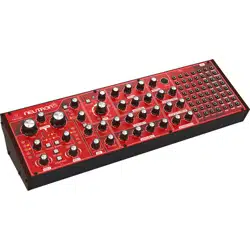
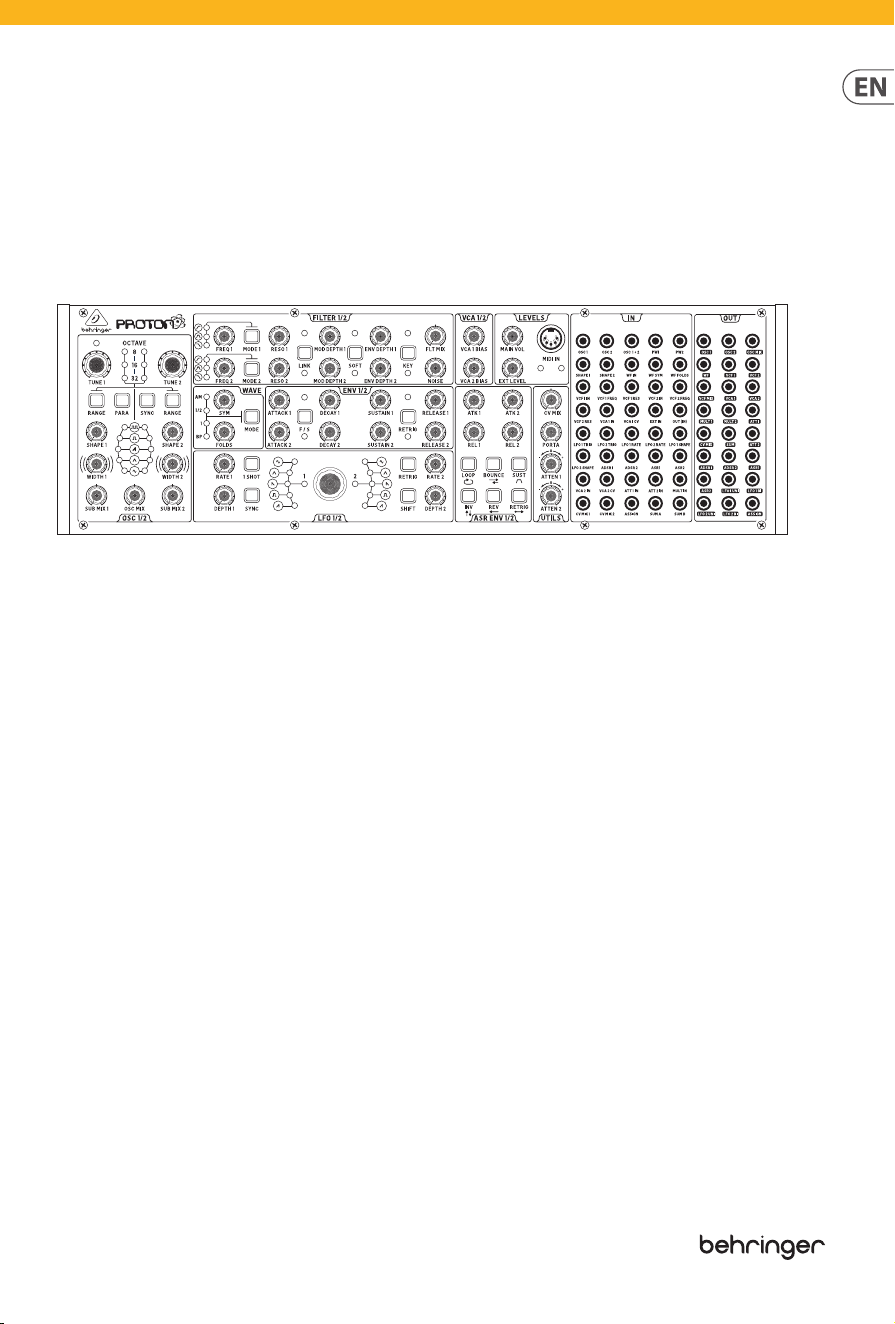
PROTON
Analog Paraphonic Semi-Modular Synthesizer with 2 VCOs,
2 Multi-Mode VCFs and 2 VCAs, 4 Envelopes and Wave Folder in Eurorack Format
V 0.0

2 PROTON User Manual
Table of Contents
Important Safety Instructions ......................... 4
Instrucciones de seguridad ............................. 5
Consignes de sécurité ....................................... 6
Wichtige Sicherheitshinweise ......................... 7
Instruções de Segurança Importantes ........... 8
Informazioni importanti .................................. 9
Belangrijke veiligheidsvoorschriften .......... 10
Viktiga säkerhetsanvisningar ....................... 11
Ważne informacje o bezpieczeństwie .......... 12
安全にお使いいただくために ................................ 13
重要的安全须知 ................................................... 14
1. About the Proton ........................................ 16
2. Getting Started .......................................... 16
3. Oscillators ................................................... 17
3.1 Tuning ................................................................. 17
3.2 Range ..................................................................17
3.3 Sub-Oscillators ................................................18
3.4 Width ................................................................... 18
3.5 Sync ...................................................................... 18
3.6 Paraphonic Mode ...........................................18
4. Wavefolder .................................................. 19
4.1 1/2 ......................................................................... 19
4.2 1 .............................................................................19
4.3 Bypass .................................................................20
4.4 Modulation .......................................................20
5. Filters ............................................................................................. 20
5.1 Mode ....................................................................20
5.2 Frequency ..........................................................20
5.3 Resonance .........................................................20
5.4 Link .......................................................................20
5.5 Modulation Depth..........................................21
5.6 Soft ....................................................................... 21
5.7 Key ........................................................................ 21
5.8 Filter Mix.............................................................21
5.9 Noise .................................................................... 21
6. Voltage Controlled Ampliers .................. 21
7. Levels ........................................................... 21
7.1 Main Volume .....................................................21
7.2 External Level ................................................... 21
7.3 MIDI In ................................................................. 21
8. ADSR Envelope Generators ....................... 22
8.1 Attack ..................................................................22
8.2 Decay...................................................................22
8.3 Sustain ................................................................22
8.4 Release ................................................................ 22
8.5 Fast/Slow ...........................................................22
8.6 Retrigger ............................................................22
9. Low Frequency Oscillators ........................ 23
9.1 Rate .......................................................................23
9.2 Depth ..................................................................23
9.3 Shift ...................................................................... 23
9.4 Waveform ..........................................................23
9.5 1-Shot ..................................................................24
9.6 Sync ...................................................................... 24
9.7 Retrigger ............................................................24
9.8 Key Tracking ......................................................24
10. ASR Envelope Generators ....................... 25
10.1 Attack ................................................................25
10.2 Release .............................................................25
10.3 Loop ..................................................................25
10.4 Bounce .............................................................. 25
10.5 Sustain ..............................................................25
10.6 Invert .................................................................25
10.7 Reverse .............................................................25
10.8 Retrigger .......................................................... 25
11. Utilities ...................................................... 26
11.1 CV Mix ................................................................26
11.2 Portamento ..................................................... 26
11.3 Attentuverters ...............................................26
12. In Patchbay ...............................................26
12.1 Oscillators ........................................................26
12.2 Wavefolder ......................................................26
12. 3 Filters .................................................................26
12.4 Voltage Controlled Ampliers ................. 26
12.5 External Audio ...............................................26
12.6 Low Frequency Oscillators ........................27
12.7 Envelope Generators ..................................27
12.8 Attenuverters .................................................27
12.9 Multiple In .......................................................27
12.10 CV Mix ............................................................. 27
12.11 Assign In ......................................................... 27
12.12 Sum .................................................................. 27

3 PROTON User Manual
13. Out Patchbay ............................................27
13.1 Oscillators ........................................................ 27
13.2 Wavefolder ......................................................27
13.3 Filters .................................................................27
13.4 Voltage Controller Ampliers ..................27
13.5 Multiples .......................................................... 27
13.6 Attenuverters ................................................. 27
13.7 CV Mix ............................................................... 28
13.8 Sum .................................................................... 28
13.9 Envelope Generators ..................................28
13.10 Low Frequency Oscillators ......................28
13.11 Assign .............................................................. 28
14. Rear Panel .................................................28
14.1 Input ..................................................................28
14.2 Output ..............................................................28
14.3 Phones .............................................................. 28
14.4 MIDI channel select .....................................28
14.5 MIDI Thru ......................................................... 28
14.6 USB ..................................................................... 28
14.7 Power ................................................................28
15. Extra Panel Functions .............................. 29
16. Factory Restore ........................................30
17. Polychaining .............................................30
18. Poly Chain Function ................................. 31
19. MIDI CCs..................................................... 32
20. SysEx .......................................................... 32
21. Glossary .....................................................36
4 PROTON User Manual
Terminals marked with
this symbol carry
electrical current of
sucient magnitude to constitute risk
of electric shock. Use only high-quality
professional speaker cables with ¼" TS
or twist-locking plugs pre-installed.
Allother installation or modication
should be performed only by
qualiedpersonnel.
This symbol, wherever it
appears, alerts you to the
presence of uninsulated
dangerous voltage inside the enclosure
- voltage that may be sucient to
constitute a risk ofshock.
This symbol, wherever it
appears, alerts you to
important operating and
maintenance instructions in the
accompanying literature. Please read
themanual.
Caution
To reduce the risk of
electric shock, do not
remove the top cover (or the rear
section). No user serviceable parts inside.
Refer servicing to qualiedpersonnel.
Caution
To reduce the risk of
re or electric shock, do
not expose this appliance to rain and
moisture. Theapparatus shall not
be exposed to dripping or splashing
liquids and no objects lled with
liquids, such as vases, shall be placed
on the apparatus.
Caution
These service instructions
are for use by qualied
service personnel only. Toreduce
the risk of electric shock do not
perform any servicing other than that
contained in the operation instructions.
Repairshave to be performed by
qualied servicepersonnel.
Warning
Please refer to the
information on the
exterior of bottom enclosure for
electrical and safety information before
installing or operating the device.
1. Please read and follow all
instructions and warnings.
2. Keep the apparatus away from
water (except for outdoor products).
3. Clean only with dry cloth.
4. Do not block ventilation openings.
Do not install in a conned space.
Install only according to manufacturer's
instructions.
5. Protect the power cord from
damage, particularly at plugs and
appliance socket.
6. Do not install near any heat
sources such as radiators, heat
registers, stoves or other apparatus
(including ampliers) that
produce heat.
7. Do not defeat the safety purpose
of the polarized or grounding-type
plug. A polarized plug has two blades
with one wider than the other (only
for USA and Canada). A grounding-
type plug has two blades and a third
grounding prong. The wide blade or
the third prong are provided for your
safety. If the provided plug does not t
into your outlet, consult an electrician
for replacement of the obsolete outlet.
8. Protect the power cord from
damage, particularly at plugs and
appliance socket.
9. Use only attachments and
accessories recommended by the
manufacturer.
10. Use only
specied carts,
stands, tripods,
brackets, or tables.
Use caution to
prevent tip-over
when moving the cart/apparatus
combination.
11. Unplug during storms, or if not in
use for a long period.
12. Only use qualied personnel for
servicing, especially after damage.
13. The apparatus with protective
earthing terminal shall be connected to
a MAINS socket outlet with a protective
earthing connection.
14. Where the MAINS plug or an
appliance coupler is used as the
disconnect device, the disconnect
device shall remain readily operable.
15.
Avoid installing in conned spaces
like bookcases.
16. Do not place naked ame
sources, such as lighted candles, on the
apparatus.
17. Operating temperature range 5°
to 45°C (41° to 113°F).
Music Tribe accepts no liability for
any loss which may be suered by
any person who relies either wholly
or in part upon any description,
photograph, or statement contained
herein. Technical specications,
appearances and other information
are subject to change without notice.
All trademarks are the property
of their respective owners. Midas,
Klark Teknik, Lab Gruppen, Lake,
Tannoy, Turbosound, TC Electronic,
TC Helicon, Behringer, Bugera, Aston
Microphones and Coolaudio are
trademarks or registered trademarks
of Music Tribe Global Brands Ltd.
© Music Tribe Global Brands Ltd.
2024 All rights reserved.
For the applicable warranty terms and
conditions and additional information
regarding Music Tribe’s Limited
Warranty, please see complete details
online at community.musictribe.
com/support.
LEGAL DISCLAIMER
Important Safety
Instructions
LIMITED WARRANTY
5 PROTON User Manual
Las terminales marcadas
con este símbolo
transportan corriente
eléctrica de magnitud suciente como
para constituir un riesgo de descarga
eléctrica. Utilicesolo cables de altavoz
profesionales y de alta calidad con
conectores TS de 6,3 mm o de bayoneta
prejados. Cualquier otra instalación o
modicación debe ser realizada
únicamente por un técnicocualicado.
Este símbolo, siempre que
aparece, leadvierte de la
presencia de voltaje
peligroso sin aislar dentro de la caja;
estevoltaje puede ser suciente para
constituir un riesgo dedescarga.
Este símbolo, siempre que
aparece, leadvierte sobre
instrucciones operativas y
de mantenimiento que aparecen en la
documentación adjunta. Por favor,
leaelmanual.
Atención
Para reducir el riesgo de
descarga eléctrica, no
quite la tapa (olaparte posterior).
Nohay piezas en el interior del equipo
que puedan ser reparadas por el
usuario. Sies necesario, póngase en
contacto con personal cualicado.
Atención
Para reducir el riesgo
de incendio o descarga
eléctrica, no exponga este aparato a la
lluvia, humedad o alguna otra fuente
que pueda salpicar o derramar algún
líquido sobre el aparato. Nocoloque
ningún tipo de recipiente para líquidos
sobre elaparato.
Atención
Las instrucciones
de servicio deben
llevarlas a cabo exclusivamente
personal cualicado. Paraevitar el
riesgo de una descarga eléctrica,
no realice reparaciones que no se
encuentren descritas en el manual de
operaciones. Lasreparaciones deben
ser realizadas exclusivamente por
personalcualicado.
Advertencia
Consulte la información
en el exterior del recinto
inferior para obtener información
eléctrica y de seguridad antes de
instalar u operar el dispositivo.
1. Por favor, lea y siga todas las
instrucciones y advertencias.
2. Mantenga el aparato alejado
del agua (excepto para productos
diseñados para uso en exteriores).
3. Limpie solo con un paño seco.
4. No obstruya las aberturas de
ventilación. No instale en un espacio
connado. Instale solo de acuerdo con
las instrucciones del fabricante.
5. Proteja el cable de alimentación
contra daños, especialmente en
los enchufes y en el tomacorriente
del aparato.
6. No lo instale cerca de fuentes
de calor como radiadores, rejillas de
calefacción, estufas u otros aparatos
(incluyendo amplicadores) que
generen calor.
7. No anule el propósito de
seguridad del enchufe polarizado o del
tipo con toma de tierra. Un enchufe
polarizado tiene dos clavijas, una más
ancha que la otra (solo para EE. UU. y
Canadá). Un enchufe con toma de tierra
tiene dos clavijas y una tercera clavija
de toma de tierra. La clavija ancha o la
tercera clavija se proporcionan para su
seguridad. Si el enchufe suministrado
no encaja en su toma de corriente,
consulte a un electricista para
reemplazar la toma obsoleta.
8. Proteja el cable de alimentación
contra daños, especialmente en los
enchufes y en el tomacorriente del
aparato.
9. Utilice solo accesorios y accesorios
recomendados por el fabricante.
10. Utilice solo
carritos, soportes,
trípodes, soportes
o mesas
especicados.
Tenga cuidado
para evitar que el carro/ combinación
de aparatos se vuelque al moverlo.
11. Desenchufe durante tormentas
o si no se utiliza durante un largo
período.
12. Solo utilice personal cualicado
para el servicio, especialmente después
de daños.
13. El aparato con terminal de puesta
a tierra protectora debe conectarse
a un tomacorriente de red con una
conexión de puesta a tierra protectora.
14. Cuando se utilice el enchufe
de red o un acoplador de aparatos
como dispositivo de desconexión, el
dispositivo de desconexión debe seguir
siendo fácilmente operable.
15. Evite la instalación en espacios
connados como estanterías.
16. No coloque fuentes de llama
desnuda, como velas encendidas, en
el aparato.
17. Rango de temperatura de
funcionamiento de 5°a 45°C
(41°a 113°F).
Music Tribe no admite ningún tipo
de responsabilidad por cualquier
daño o pérdida que pudiera sufrir
cualquier persona por conar total
o parcialmente en la descripciones,
fotografías o armaciones
contenidas en este documento.
Las especicaciones técnicas,
imágenes y otras informaciones
contenidas en este documento están
sujetas a modicaciones sin previo
aviso. Todas las marcas comerciales
que aparecen aquí son propiedad
de sus respectivos dueños. Midas,
Klark Teknik, Lab Gruppen, Lake,
Tannoy, Turbosound, TC Electronic,
TC Helicon, Behringer, Bugera, Aston
Microphones y Coolaudio son marcas
comerciales o marcas registradas
de Music Tribe Global Brands Ltd.
Instrucciones de
seguridad
NEGACIÓN LEGAL
6 PROTON User Manual
© Music Tribe Global Brands Ltd.
2024 Reservados todos los derechos.
Si quiere conocer los detalles y
condiciones aplicables de la garantía
así como información adicional sobre
la Garantía limitada de Music Tribe,
consulte online toda la información
en la web community.musictribe.
com/support.
Les points repérés par ce
symbole portent une
tension électrique
susante pour constituer un risque
d’électrocution. Utilisez uniquement
des câbles d’enceintes professionnels
de haute qualité avec ches Jack mono
6,35 mm ou ches à verrouillages déjà
installées. Touteautre installation ou
modication doit être eectuée
uniquement par un personnel qualié.
Ce symbole avertit de la
présence d’une tension
dangereuse et non isolée à
l’intérieur de l’appareil - elle peut
provoquer des chocs électriques.
Attention
Ce symbol signale les
consignes d’utilisation
et d'entretien importantes dans la
documentation fournie. Lisez les
consignes de sécurité du manuel
d’utilisation de l’appareil.
Attention
Pour éviter tout risque
de choc électrique,
ne pas ouvrir le capot de l’appareil
ni démonter le panneau arrière.
L’intérieur de l’appareil ne possède
aucun élément réparable par
l’utilisateur. Laissertoute réparation à
un professionnelqualié.
Attention
Pour réduire les risques
de feu et de choc
électrique, n’exposez pas cet appareil
à la pluie, à la moisissure, auxgouttes
ou aux éclaboussures. Ne posez pas
de récipient contenant un liquide sur
l’appareil (unvase par exemple).
Attention
Ces consignes de
sécurité et d’entretien
sont destinées à un personnel
qualié. Pour éviter tout risque de
choc électrique, n’eectuez aucune
réparation sur l’appareil qui ne soit
décrite par le manuel d’utilisation.
Les éventuelles réparations doivent
être eectuées uniquement par un
technicienspécialisé.
Avertissement
Veuillez vous référer aux
informations situées à
l'extérieur du boîtier inférieur pour
obtenir les renseignements électriques
et de sécurité avant d'installer ou
d'utiliser l'appareil.
1. Veuillez lire et suivre toutes les
instructions et avertissements.
2. Éloignez l'appareil de l'eau (sauf
pour les produits conçus pour une
utilisation en extérieur).
3. Nettoyez uniquement avec un
chion sec.
4. Ne bloquez pas les ouvertures
de ventilation. N'installez pas dans un
espace conné. Installez uniquement
selon les instructions du fabricant.
5. Protégez le cordon d'alimentation
contre les dommages, en particulier
au niveau des ches et de la prise de
l'appareil.
6. N'installez pas près de sources de
chaleur telles que radiateurs, registres
de chaleur, cuisinières ou autres
appareils (y compris les amplicateurs)
qui produisent de la chaleur.
7. Ne contrecarrez pas le but de
sécurité de la che polarisée ou de type
mise à la terre. Une che polarisée a
deux lames, l'une plus large que l'autre
(uniquement pour les États-Unis et le
Canada). Une che de type mise à la
terre a deux lames et une troisième
broche de mise à la terre. La lame large
ou la troisième broche sont fournies
pour votre sécurité. Si la che fournie
ne s'adapte pas à votre prise, consultez
un électricien pour remplacer la prise
obsolète.
8. Protégez le cordon d'alimentation
contre les dommages, en particulier
au niveau des ches et de la prise de
l'appareil.
9. Utilisez uniquement des
accessoires et des pièces recommandés
par le fabricant.
10. Utilisez
uniquement des
chariots, des
supports, des
trépieds, des
supports ou des
tables spéciés. Faites attention pour
éviter le renversement lors du
déplacement de la combinaison
chariot/appareil.
11.
Débranchez pendant les tempêtes
ou si l'appareil n'est pas utilisé pendant
une longue période.
12. Utilisez uniquement du personnel
qualié pour l'entretien, surtout après
des dommages.
13. L'appareil avec une borne de mise
à la terre protectrice doit être connecté
à une prise secteur avec une connexion
de mise à la terre protectrice.
14. Lorsque la che secteur ou un
coupleur d'appareil est utilisé comme
dispositif de déconnexion, le dispositif
de déconnexion doit rester facilement
utilisable.
15. Évitez l'installation dans
des espaces connés comme des
bibliothèques.
16. Ne placez pas de sources de
amme nue, telles que des bougies
allumées, sur l'appareil.
17. Plage de température de
fonctionnement de 5°à 45°C
(41°à 113°F).
Consignes de sécurité
GARANTÍA LIMITADA
7 PROTON User Manual
Music Tribe ne peut être tenu pour
responsable pour toute perte pouvant
être subie par toute personne se
ant en partie ou en totalité à
toute description, photographie
ou armation contenue dans ce
document. Les caractéristiques,
l’apparence et d’autres informations
peuvent faire l’objet de modications
sans notication. Toutes les marques
appartiennent à leurs propriétaires
respectifs. Midas, Klark Teknik,
Lab Gruppen, Lake, Tannoy,
Turbosound, TC Electronic, TC Helicon,
Behringer, Bugera, Aston Microphones
et Coolaudio sont des marques ou
marques déposées de Music Tribe
Global Brands Ltd. © Music Tribe Global
Brands Ltd. 2024 Tous droits réservés.
Pour connaître les termes et conditions
de garantie applicables, ainsi que
les informations supplémentaires et
détaillées sur la Garantie Limitée de
Music Tribe, consultez le site Internet
community.musictribe.com/support.
Vorsicht
Die mit dem Symbol
markierten Anschlüsse
führen so viel Spannung, dassdie
Gefahr eines Stromschlags besteht.
Verwenden Sie nur hochwertige,
professionelle Lautsprecherkabel
mit vorinstallierten 6,35 mm
MONO-Klinkensteckern oder
Lautsprecherstecker mit
Drehverriegelung. Alle anderen
Installationen oder Modikationen
sollten nur von qualiziertem
Fachpersonal ausgeführt werden.
Dieses Symbol weist Sie
immer dann darauf hin,
wenn es erscheint, dass im
Inneren des Gehäuses gefährliche
unisolierte Spannung vorhanden ist
– eine Spannung, die ausreichend sein
kann, um ein Stromschlagrisiko
darzustellen.
Dieses Symbol weist Sie an
jeder Stelle, an der es
erscheint, auf wichtige
Betriebs- und Wartungsanweisungen in
der beiliegenden Literatur hin. Bitte
lesen Sie die Bedienungsanleitung.
Achtung
Um eine Gefährdung
durch Stromschlag
auszuschließen, darf die
Geräteabdeckung bzw.
Geräterückwandnicht abgenommen
werden. ImInnern des Geräts benden
sich keine vom Benutzer reparierbaren
Teile. Reparaturarbeiten dürfen
nur von qualiziertem Personal
ausgeführtwerden.
Achtung
Um eine Gefährdung
durch Feuer bzw.
Stromschlag auszuschließen, darf
dieses Gerät weder Regen oder
Feuchtigkeit ausgesetzt werden
noch sollten Spritzwasser oder
tropfende Flüssigkeiten in das Gerät
gelangen können. Stellen Sie keine
mit Flüssigkeit gefüllten Gegenstände,
wie z. B. Vasen, aufdasGerät.
Achtung
Die Service-Hinweise sind
nur durch qualiziertes
Personal zu befolgen. Umeine
Gefährdung durch Stromschlag zu
vermeiden, führen Sie bitte keinerlei
Reparaturen an dem Gerät durch,
dienicht in der Bedienungsanleitung
beschrieben sind. Reparaturen
sind nur von qualiziertem
Fachpersonaldurchzuführen.
Achtung
Bitte beachten Sie
die Informationen
auf der Außenseite der unteren
Abdeckung bezüglich elektrischer
und sicherheitstechnischer Hinweise,
bevor Sie das Gerät installieren oder in
Betrieb nehmen.
1. Bitte lesen Sie alle Anweisungen
und Warnhinweise sorgfältig durch
und befolgen Sie diese.
2. Halten Sie das Gerät von Wasser
fern (außer bei Produkten für den
Außenbereich).
3. Reinigen Sie nur mit einem
trockenen Tuch.
4. Blockieren Sie nicht die
Belüftungsönungen. Installieren Sie
das Gerät nicht in einem engen Raum
und nur gemäß den Anweisungen
des Herstellers.
5. Schützen Sie das Netzkabel vor
Beschädigungen, insbesondere an
Steckern und Gerätebuchsen.
6. Installieren Sie das Gerät nicht
in der Nähe von Wärmequellen wie
Heizkörpern, Heizregistern, Öfen
oder anderen Geräten (einschließlich
Verstärkern), die Wärme erzeugen.
7. Heben Sie nicht den
Sicherheitszweck des polarisierten oder
geerdeten Steckers auf. Ein polarisierter
Stecker hat zwei Klingen, von denen
eine breiter ist als die andere (nur für
USA und Kanada). Ein geerdeter Stecker
hat zwei Klingen und einen dritten
Erdungszapfen. Die breite Klinge
oder der dritte Zapfen dienen Ihrer
Sicherheit. Wenn der mitgelieferte
Stecker nicht in Ihre Steckdose passt,
konsultieren Sie einen Elektriker,
um die veraltete Steckdose zu ersetzen.
8. Schützen Sie das Netzkabel vor
Beschädigungen, insbesondere an
Steckern und Gerätebuchsen.
9.
Verwenden Sie nur vom Hersteller
empfohlene Anbaugeräte und
Zubehörteile.
10. Verwenden
Sie nur
spezizierte
Wagen, Ständer,
Stative,
Halterungen oder
Tische. Achten Sie darauf, dass der
Wagen/Geräte-Kombination beim
Bewegen nicht umkippt.
11. Ziehen Sie bei Gewittern oder bei
längerer Nichtbenutzung den Stecker.
DÉNI LÉGAL
GARANTIE LIMITÉE
Wichtige
Sicherheitshinweise
8 PROTON User Manual
12. Lassen Sie nur qualiziertes
Personal für Wartungsarbeiten
arbeiten, besonders nach
Beschädigungen.
13. Das Gerät mit schützendem
Erdungsterminal muss an eine
Steckdose mit schützender
Erdungsverbindung
angeschlossen werden.
14. Wenn der Netzstecker
oder ein Gerätekuppler als
Trennvorrichtung verwendet wird,
muss die Trennvorrichtung leicht
bedienbar bleiben.
15. Vermeiden Sie die Installation in
engen Räumen wie Bücherregalen.
16. Platzieren Sie keine oenen
Flammenquellen, wie brennende
Kerzen, auf dem Gerät.
17. Betriebstemperaturbereich von
5°C bis 45°C (41°F bis 113°F).
Music Tribe übernimmt keine Haftung
für Verluste, die Personen entstanden
sind, die sich ganz oder teilweise auf
hier enthaltene Beschreibungen,
Fotos oder Aussagen verlassen haben.
Technische Daten, Erscheinungsbild
und andere Informationen können
ohne vorherige Ankündigung geändert
werden. Alle Warenzeichen sind
Eigentum der jeweiligen Inhaber.
Midas, Klark Teknik, Lab Gruppen, Lake,
Tannoy, Turbosound, TC Electronic,
TC Helicon, Behringer, Bugera, Aston
Microphones und Coolaudio sind
Warenzeichen oder eingetragene
Warenzeichen der Music Tribe Global
Brands Ltd. © Music Tribe Global Brands
Ltd. 2024 Alle Rechte vorbehalten.
Die geltenden Garantiebedingungen
und zusätzliche Informationen
bezüglich der von Music Tribe
gewährten beschränkten Garantie
nden Sie online unter community.
musictribe.com/support.
Aviso!
Terminais marcados
com o símbolo carregam
corrente elétrica de magnitude
suciente para constituir um risco de
choque elétrico. Use apenas cabos
de alto-falantes de alta qualidade
com plugues TS de ¼" ou plugues
com trava de torção pré-instalados.
Todas as outras instalações e
modicações devem ser efetuadas por
pessoasqualicadas.
Este símbolo, onde quer
que apareça, alerta para a
presença de tensão
perigosa não isolada dentro do
invólucro - uma tensão que pode ser
suciente para constituir um risco
de choque.
Este símbolo, onde quer
que o encontre, alerta-o
para a leitura das
instruções de manuseamento que
acompanham o equipamento. Por favor
leia o manual deinstruções.
Atenção
De forma a diminuir
o risco de choque
eléctrico, nãoremover a cobertura
(ouasecção de trás). Não existem peças
substituíveis por parte do utilizador no
seu interior. Para esse efeito recorrer a
um técnicoqualicado.
Atenção
Para reduzir o risco de
incêndios ou choques
eléctricos o aparelho não deve ser
exposto à chuva nem à humidade.
Alémdisso, não deve ser sujeito a
salpicos, nem devem ser colocados em
cima do aparelho objectos contendo
líquidos, taiscomojarras.
Atenção
Estas instruções de
operação devem ser
utilizadas, emexclusivo, por técnicos
de assistência qualicados. Para evitar
choques eléctricos não proceda a
reparações ou intervenções, que
não as indicadas nas instruções
de operação, salvo se possuir as
quali-cações necessárias. Para evitar
choques eléctricos não proceda a
reparações ou intervenções, que
não as indicadas nas instruções de
operação. Só o deverá fazer se possuir
as qualicaçõesnecessárias.
Aviso
Consulte as informações
na parte externa
do invólucro inferior para obter
informações elétricas e de segurança
antes de instalar ou operar o
dispositivo.
1. Por favor, leia e siga todas as
instruções e advertências.
2. Mantenha o aparelho longe da
água (exceto para produtos destinados
a uso externo).
3. Limpe apenas com um pano seco.
4. Não obstrua as aberturas de
ventilação. Não instale em espaços
connados. Instale apenas de acordo
com as instruções do fabricante.
5. Proteja o cabo de alimentação
contra danos, especialmente nos plugs
e na tomada do aparelho.
6. Não instale próximo a fontes
de calor, como radiadores, registros
de calor, fogões ou outros aparelhos
(incluindo amplicadores) que
produzam calor.
7. Não desfaça a nalidade de
segurança da tomada polarizada ou do
tipo com aterramento. Uma tomada
polarizada possui duas lâminas, sendo
uma mais larga que a outra (apenas
para EUA e Canadá). Uma tomada com
aterramento possui duas lâminas e
uma terceira ponta de aterramento.
A lâmina larga ou a terceira ponta são
fornecidas para sua segurança. Se o
plug fornecido não se encaixar na sua
tomada, consulte um eletricista para
substituir a tomada obsoleta.
8. Proteja o cabo de alimentação
contra danos, especialmente nos plugs
e na tomada do aparelho.
HAFTUNGSAUSSCHLUSS
BESCHRÄNKTE GARANTIE
Instruções de
Segurança Importantes
9 PROTON User Manual
9. Use apenas acessórios e
equipamentos recomendados pelo
fabricante.
10. Use apenas
carrinhos,
suportes, tripés,
suportes ou mesas
especicados.
Tenha cuidado
para evitar tombamentos ao mover a
combinação carrinho/aparelho.
11. Desconecte durante tempestades
ou se não estiver em uso por um longo
período.
12. Use apenas pessoal qualicado
para serviços, especialmente após
danos.
13. O aparelho com terminal de
aterramento protetor deve ser
conectado a uma tomada de corrente
com conexão de aterramento protetor.
14. Quando o plugue de corrente ou
um acoplador de aparelho é usado
como dispositivo de desconexão,
o dispositivo de desconexão deve
permanecer prontamente operável.
15. Evite instalar em espaços
connados, como estantes.
16. Não coloque fontes de chama nua,
como velas acesas, no aparelho.
17. Faixa de temperatura de operação
de 5°C a 45°C (41°F a 113°F).
O Music Tribe não se responsabiliza
por perda alguma que possa ser
sofrida por qualquer pessoa que
dependa, seja de maneira completa
ou parcial, de qualquer descrição,
fotograa, ou declaração aqui
contidas. Dados técnicos, aparências
e outras informações estão sujeitas
a modicações sem aviso prévio.
Todas as marcas são propriedade
de seus respectivos donos. Midas,
Klark Teknik, Lab Gruppen, Lake, Tannoy,
Turbosound, TC Electronic, TC Helicon,
Behringer, Bugera
, Aston Microphones
e Coolaudio são marcas ou marcas
registradas do Music Tribe Global Brands
Ltd. © Music Tribe Global Brands Ltd.
2024 Todos direitos reservados.
Para obter os termos de garantia
aplicáveis e condições e informações
adicionais a respeito da garantia
limitada do Music Tribe, favor vericar
detalhes na íntegra através do website
community.musictribe.com/support.
Attenzione
I terminali contrassegnati
con il simbolo conducono
una corrente elettrica suciente a
costituire un rischio di scossa elettrica.
Usareunicamente cavi per altoparlanti
(Speaker) d’elevata qualità con
connettori jack TS da ¼"pre-installati.
Ognialtra installazione o modica deve
essere eettuata esclusivamente da
personale tecnico qualicato.
Attenzione
Questo simbolo, ovunque
appaia, avverte della
presenza di una tensione pericolosa
non isolata all'interno dello chassis,
tensione che può essere suciente per
costituire un rischio di scossa elettrica.
Attenzione
Questo simbolo,
ovunque appaia, segnala
importanti istruzioni operative e di
manutenzione nella documentazione
allegata. Si invita a leggere il manuale.
Attenzione
Per ridurre il rischio di
scosse elettriche, non
rimuovere il coperchio superiore (o la
sezione posteriore). All'interno non ci
sono parti riparabili dall'utente. Per la
manutenzione rivolgersi a personale
qualicato.
Attenzione
Per ridurre il rischio di
incendi o scosse elettriche,
non esporre questo apparecchio a
pioggia e umidità. L'apparecchio non
deve essere esposto a gocciolio o schizzi
di liquidi e nessun oggetto contenente
liquidi, come vasi, deve essere collocato
sull'apparecchio.
Attenzione
Queste istruzioni di
servizio sono destinate
esclusivamente a personale qualicato.
Per ridurre il rischio di scosse
elettriche non eseguire interventi
di manutenzione diversi da quelli
contenuti nel manuale di istruzioni. Le
riparazioni devono essere eseguite da
personale di assistenza qualicato.
Attenzione
Consultare le informazioni
sulla parte esterna
dell'involucro inferiore per ottenere
informazioni elettriche e di sicurezza
prima di installare o utilizzare il
dispositivo.
1. Si prega di leggere e seguire tutte
le istruzioni e gli avvertimenti.
2. Mantenere l'apparecchio lontano
dall'acqua (tranne che per i prodotti
destinati all'uso all'aperto).
3. Pulire solo con un panno asciutto.
4. Non ostruire le aperture di
ventilazione. Non installare in spazi
ristretti. Installare solo secondo le
istruzioni del produttore.
5. Proteggere il cavo di
alimentazione dai danni,
soprattutto alle spine e alla presa
dell'elettrodomestico.
6. Non installare vicino a fonti di
calore come termosifoni, bocchette
di calore, fornelli o altri apparecchi
(compresi gli amplicatori) che
producono calore.
7. Non eludere lo scopo di sicurezza
della spina polarizzata o della spina con
messa a terra. Una spina polarizzata ha
due lame di cui una più larga dell'altra
(solo per USA e Canada). Una spina con
messa a terra ha due lame e una terza
spina di messa a terra. La lama larga o
la terza spina sono fornite per la vostra
sicurezza. Se la spina fornita non si
adatta alla vostra presa, consultare un
elettricista per la sostituzione della
presa obsoleta.
Informazioni importanti
LEGAL RENUNCIANTE
GARANTIA LIMITADA
10 PROTON User Manual
8. Proteggere il cavo di
alimentazione dai danni,
soprattutto alle spine e alla presa
dell'elettrodomestico.
9. Utilizzare solo accessori e
attrezzature raccomandati dal
produttore.
10. Utilizzare
solo carrelli,
supporti,
treppiedi, stae o
tavoli specicati.
Prestare
attenzione per evitare il ribaltamento
durante lo spostamento della
combinazione carrello/apparecchio.
11. Scollegare durante le tempeste
o se non viene utilizzato per un lungo
periodo.
12. Utilizzare solo personale
qualicato per la manutenzione,
specialmente dopo danni.
13. L'apparecchio con terminale di
messa a terra protettiva deve essere
collegato a una presa di corrente
con connessione di messa a terra
protettiva.
14. Se la spina di rete o un
accoppiatore dell'elettrodomestico
viene utilizzato come dispositivo
di disconnessione, il dispositivo
di disconnessione deve rimanere
facilmente utilizzabile.
15. Evitare l'installazione in spazi
ristretti come librerie.
16. Non posizionare fonti di
amma nuda, come candele accese,
sull'apparecchio.
17. Intervallo di temperatura
di funzionamento da 5°C a 45°C
(da 41°F a 113°F).
Music Tribe non si assume alcuna
responsabilità per eventuali danni
che possono essere subiti da chiunque
si adi in tutto o in parte a qualsiasi
descrizione, fotograa o dichiarazione
contenuta qui. Speciche tecniche,
aspetti e altre informazioni sono
soggette a modiche senza preavviso.
Tutti i marchi sono di proprietà
dei rispettivi titolari. Midas, Klark
Teknik, Lab Gruppen, Lake, Tannoy,
Turbosound, TC Electronic, TC Helicon,
Behringer, Bugera, Aston Microphones
e Coolaudio sono marchi o marchi
registrati di Music Tribe Global Brands
Ltd. © Music Tribe Global Brands Ltd.
2024 Tutti i diritti riservati.
Per i termini e le condizioni di garanzia
applicabili e le informazioni aggiuntive
relative alla garanzia limitata di Music
Tribe, consultare online i dettagli
completi su community.musictribe.
com/support.
Waarschuwing
Aansluitingen die
gemerkt zijn met
het symbool voeren een zodanig
hoge spanning dat ze een risico
vormen voor elektrische schokken.
Gebruikuitsluitend kwalitatief
hoogwaardige, in de handel
verkrijgbare luidsprekerkabels die
voorzien zijn van ¼"TS stekkers.
Laatuitsluitend gekwaliceerd
personeel alleoverige installatie- of
modicatiehandelingenuitvoeren.
Dit symbool waarschuwt
u, waar het ook verschijnt,
voor de aanwezigheid van
ongeïsoleerde gevaarlijke spanning
binnenin de behuizing - spanning die
voldoende kan zijn om een risico op
elektrische schokken te vormen.
Dit symbool wijst u altijd
op belangrijke bedienings
- en
onderhoudsvoorschriften in de
bijbehorende documenten. Wijvragen
u dringend de handleiding te lezen.
Attentie
Verwijder in geen
geval de bovenste
afdekking (vanhet achterste gedeelte)
anders bestaat er gevaar voor een
elektrische schok. Hetapparaat bevat
geen te onderhouden onderdelen.
Reparatiewerkzaamheden mogen
uitsluitend door gekwaliceerd
personeel uitgevoerdworden.
Attentie
Om het risico op brand
of elektrische schokken
te beperken, dient u te voorkomen
dat dit apparaat wordt blootgesteld
aan regen en vocht. Hetapparaat
mag niet worden blootgesteld aan
neerdruppelend of opspattend water
en er mogen geen met water gevulde
voorwerpen – zoals een vaas – op het
apparaat wordengezet.
Attentie
Deze
onderhoudsinstructies
zijn uitsluitend bedoeld voor
gekwaliceerd onderhoudspersoneel.
Omelektrische schokken te
voorkomen, mag u geen andere
onderhoudshandelingen
verrichten dan in de
bedieningsinstructies vermeld staan.
Reparatiewerkzaamheden
mogen alleen uitgevoerd worden door
gekwaliceerd onderhoudspersoneel.
Waarschuwing
Raadpleeg de informatie
op de buitenkant van de
onderste behuizing voor elektrische
en veiligheidsinformatie voordat u het
apparaat installeert of bedient.
1. Gelieve alle instructies en
waarschuwingen zorgvuldig te lezen
en op te volgen.
2. Houd het apparaat uit de buurt
van water (behalve voor producten
bedoeld voor gebruik buitenshuis).
3. Reinig alleen met een droge doek.
4. Blokkeer de ventilatieopeningen
niet. Installeer niet in een afgesloten
ruimte. Installeer alleen volgens de
instructies van de fabrikant.
5. Bescherm de voedingskabel
tegen schade, vooral bij stekkers en het
DISCLAIMER LEGALE
GARANZIA LIMITATA
Belangrijke
veiligheidsvoorschriften
11 PROTON User Manual
stopcontact van het apparaat.
6. Installeer niet in de buurt van
warmtebronnen zoals radiatoren,
warmte registers, fornuizen of andere
apparaten (inclusief versterkers) die
warmte produceren.
7. Hef het veiligheidsdoel van de
gepolariseerde of geaarde stekker
niet op. Een gepolariseerde stekker
heeft twee pennen waarvan één
breder is dan de andere (alleen
voor de VS en Canada). Een geaarde
stekker heeft twee pennen en een
derde aardingspen. De brede pen of
de derde pen zijn voor uw veiligheid.
Als de meegeleverde stekker niet in
uw stopcontact past, raadpleeg dan
een elektricien om het verouderde
stopcontact te vervangen.
8. Bescherm de voedingskabel
tegen schade, vooral bij stekkers en het
stopcontact van het apparaat.
9. Gebruik alleen accessoires en
apparatuur die door de fabrikant
worden aanbevolen.
10. Gebruik
alleen
gespeciceerde
karren, stands,
statieven, beugels
of tafels. Wees
voorzichtig om kantelen te voorkomen
bij het verplaatsen van de kar/
apparaatcombinatie.
11. Trek de stekker uit tijdens stormen
of als het apparaat gedurende lange
tijd niet wordt gebruikt.
12. Gebruik alleen gekwaliceerd
personeel voor onderhoud, vooral na
schade.
13. Het apparaat met een
beschermende aardingsaansluiting
moet worden aangesloten op een
stopcontact met een beschermende
aardingsverbinding.
14. Als de stekker van het stopcontact
of een apparaatkoppeling als het
ontkoppelingsapparaat wordt gebruikt,
moet het ontkoppelingsapparaat
gemakkelijk bedienbaar blijven.
15. Vermijd installatie in afgesloten
ruimtes zoals boekenkasten.
16. Plaats geen open vlambronnen,
zoals brandende kaarsen, op
het apparaat.
17. Bedrijfstemperatuurbereik van
5°C tot 45°C (41°F tot 113°F).
Music Tribe aanvaardt geen
aansprakelijkheid voor enig verlies
dat kan worden geleden door een
persoon die geheel of gedeeltelijk
vertrouwt op enige beschrijving,
foto of verklaring hierin. Technische
specicaties, verschijningen en
andere informatie kunnen zonder
voorafgaande kennisgeving worden
gewijzigd. Alle handelsmerken zijn
eigendom van hun respectievelijke
eigenaren. Midas, Klark Teknik, Lab
Gruppen, Lake, Tannoy, Turbosound,
TC Electronic, TC Helicon, Behringer,
Bugera, Aston Microphones en
Coolaudio zijn handelsmerken of
gedeponeerde handelsmerken
van Music Tribe Global Brands Ltd.
© Music Tribe Global Brands Ltd.
2024 Alle rechten voorbehouden.
Voor de toepasselijke
garantievoorwaarden en aanvullende
informatie met betrekking tot de
beperkte garantie van Music Tribe,
zie de volledige details online op
community.musictribe.com/support.
Varning
Uttag markerade med
symbolen leder elektrisk
strömstyrka som är tillräckligt stark för
att utgöra en risk för elchock. Använd
endast högkvalitativa, kommersiellt
tillgängliga högtalarkablar med
förhandsinstallerade ¼"TS-
kontakter. Allannan installering eller
modikation bör endast utföras av
kompetentpersonal.
Denna symbol, var den än
förekommer, varnar för
närvaron av farlig,
oisolerad spänning inuti höljet -
spänning som kan vara tillräcklig för att
utgöra en risk för stöt.
Den här symbolen
hänvisar till viktiga
punkter om användning
och underhåll i den medfölljande
dokumentationen. Varvänlig och läs
bruksanvisningen.
Försiktighet
Minska risken för
elektriska stötar genom
att aldrig ta av höljet upptill på
apparaten (ellerta av baksidan).
Inuti apparaten nns det inga delar
som kan repareras av användaren.
Endastkvalicerad personal får
genomföra reparationer.
Försiktighet
För att minska risken
för brand och elektriska
stötar ska apparaten skyddas mot
regn och fukt. Apparaten går inte
utsättas för dropp eller spill och
inga vattenbehållare som vaser etc.
fårplaceras på den.
Försiktighet
Serviceinstruktionen
är enbart avsedd
för kvalicerad servicepersonal.
Föratt undvika risker genom
elektriska stötar, genomför inga
reparationer på apparaten, vilka inte
är beskrivna i bruksanvisningen.
Endast kvalicerad fackpersonal får
genomförareparationerna.
Varning
Vänligen se informationen
på utsidan av bottenhöljet
för elektrisk och säkerhetsinformation
innan du installerar eller använder
enheten.
1. Vänligen läs och följ alla
instruktioner och varningar noggrant.
2. Håll apparaten borta från vatten
(utom för utomhusprodukter).
3. Rengör endast med en torr trasa.
WETTELIJKE ONTKENNING
Viktiga
säkerhetsanvisningar
BEPERKTE GARANTIE
12 PROTON User Manual
4. Blockera inte
ventilationsöppningarna. Installera
inte i trånga utrymmen. Installera
endast enligt tillverkarens anvisningar.
5. Skydda nätkabeln från
skador, särskilt vid kontakter och
apparatkontakten.
6. Installera inte nära värme källor
som element, värmeregistrar, spisar
eller andra apparater (inklusive
förstärkare) som producerar värme.
7. Förstör inte säkerhetsfunktionen
hos den polariserade eller jordade
kontakten. En polariserad kontakt har
två blad varav ett är bredare än det
andra (endast för USA och Kanada).
En jordad kontakt har två blad och
en tredje jordningsstift. Det breda
bladet eller det tredje stiftet är till för
din säkerhet. Om den medföljande
kontakten inte passar i ditt uttag,
kontakta en elektriker för att byta ut
det föråldrade uttaget.
8. Skydda nätkabeln från
skador, särskilt vid kontakter och
apparatkontakten.
9. Använd endast tillbehör och
tillbehör som rekommenderas av
tillverkaren.
10. Använd
endast
specicerade
vagnar, ställ, stativ,
fästen eller bord.
Var försiktig för att
förhindra vältningsrisk när du yttar
vagnen/apparatkombinationen.
11. Koppla ur under åskväder eller
om enheten inte används under en
längre tid.
12. Använd endast kvalicerad
personal för service, särskilt efter
skador.
13. Apparaten med
skyddsjordanslutning ska
anslutas till ett vägguttag med
skyddsjordanslutning.
14. Om nätkontakten eller en
apparatkoppling används som
frånkopplingsanordning måste
frånkopplingsanordningen vara lätt
åtkomlig.
15. Undvik installation i trånga
utrymmen som bokhyllor.
16. Placera inte öppna lågor, som
tända ljus, på apparaten.
17. Driftstemperaturområde 5°C till
45°C (41°F till 113°F).
Music Tribe tar inget ansvar för någon
förlust som kan drabbas av någon
person som helt eller delvis förlitar
sig på någon beskrivning, fotogra
eller uttalande som nns här.
Tekniska specikationer, utseenden
och annan information kan ändras
utan föregående meddelande. Alla
varumärken tillhör respektive ägare.
Midas, Klark Teknik, Lab Gruppen,
Lake, Tannoy, Turbosound, TC
Electronic, TC Helicon, Behringer,
Bugera, Aston Microphones och
Coolaudio är varumärken eller
registrerade varumärken som tillhör
Music Tribe Global Brands Ltd.
© Music Tribe Global Brands Ltd.
2024 Alla Rättigheter reserverade.
För tillämpliga garantivillkor och
ytterligare information om Music
Tribes begränsade garanti, se
fullständig information online på
community.musictribe.com/support.
Uwaga
Terminale oznaczone
symbolem przenoszą
wystarczająco wysokie napięcie
elektryczne, aby stworzyć ryzyko
porażenia prądem. Używaj
wyłącznie wysokiej jakości
fabrycznie przygotowanych kabli
z zainstalowanymi wtyczkami
¼"TS. Wszystkie inne instalacje lub
modykacje powinny być wykonywane
wyłącznie przez wykwalikowany
personel techniczny.
Ten symbol, gdziekolwiek
się pojawi, informuje Cię o
obecności nieizolowanego
niebezpiecznego napięcia wewnątrz
obudowy - napięcia, które może
stanowić ryzyko porażenia.
Ten symbol informuje o
ważnych wskazówkach
dotyczących obsługi i
konserwacji urządzenia w dołączonej
dokumentacji. Proszę przeczytać
stosowne informacje w instrukcji
obsługi.
Uwaga
W celu wyeliminowania
zagrożenia porażenia
prądem zabrania się zdejmowania
obudowy lub tylnej ścianki urządzenia.
Elementyznajdujące się we wnętrzu
urządzenia nie mogą być naprawiane
przez użytkownika. Naprawymogą
być wykonywane jedynie przez
wykwalikowanypersonel.
Uwaga
W celu wyeliminowania
zagrożenia porażenia
prądem lub zapalenia się urządzenia
nie wolno wystawiać go na działanie
deszczu i wilgotności oraz dopuszczać
do tego, aby do wnętrza dostała się
woda lub inna ciecz. Nie należy stawiać
na urządzeniu napełnionych cieczą
przedmiotów takich jak np. wazony
lub szklanki.
Uwaga
Prace serwisowe mogą
być wykonywane jedynie
przez wykwalikowany personel.
Wcelu uniknięcia zagrożenia porażenia
prądem nie należy wykonywać
żadnych manipulacji, które nie
są opisane w instrukcji obsługi.
Naprawywykonywane mogą być
jedynie przez wykwalikowany
personeltechniczny.
Ostrzeżenie
Przed zainstalowaniem
lub uruchomieniem
urządzenia prosimy zajrzeć do
informacji umieszczonej na
Ważne informacje o
bezpieczeństwie
BEGRÄNSAD GARANTI
FRISKRIVNINGSKLAUSUL
13 PROTON User Manual
zewnętrznej części dolnej obudowy
dotyczącej informacji elektrycznych i
bezpieczeństwa.
1. Proszę przeczytać i ścisłe
przestrzegać wszystkich instrukcji i
ostrzeżeń.
2. Trzymaj urządzenie z dala
od wody (z wyjątkiem produktów
przeznaczonych do użytku na
zewnątrz).
3. Czyść tylko suchą szmatką.
4. Nie blokuj otworów
wentylacyjnych. Nie instaluj w
zamkniętym miejscu. Instaluj tylko
zgodnie z instrukcjami producenta.
5. Zabezpiecz przewód zasilający
przed uszkodzeniem, zwłaszcza przy
wtyczkach i gnieździe urządzenia.
6. Nie instaluj w pobliżu
źródeł ciepła, takich jak grzejniki,
rejestratory ciepła, kuchenki lub inne
urządzenia (w tym wzmacniacze),
które generują ciepło.
7. Nie unieważniaj celu
bezpieczeństwa wtyczki
spolaryzowanej lub wtyczki z
uziemieniem. Wtyczka spolaryzowana
ma dwie wtyczki, z których jedna
jest szersza niż druga (tylko dla USA
i Kanady). Wtyczka z uziemieniem
ma dwie wtyczki i trzeci bolc
uziemiający. Szeroka wtyczka lub
trzeci bolc są dostarczone dla Twojego
bezpieczeństwa. Jeśli dostarczona
wtyczka nie pasuje do Twojej
gniazdka, skonsultuj się z elektrykiem
w celu wymiany przestarzałego
gniazdka.
8. Zabezpiecz przewód zasilający
przed uszkodzeniem, zwłaszcza przy
wtyczkach i gnieździe urządzenia.
9. Używaj tylko akcesoriów
i dodatków zalecanych przez
producenta.
10. Używaj
tylko określonych
wózków, stojaków,
statywów,
uchwytów lub
stolików. Uważaj,
aby uniknąć przewrócenia wózka/
kombinacji urządzenia podczas
przemieszczania.
11. Odłączaj w czasie burz lub jeśli
urządzenie nie jest używane przez
długi okres.
12. Korzystaj tylko z
kwalikowanego personelu do
serwisowania, zwłaszcza po
uszkodzeniach.
13. Urządzenie z zabezpieczonym
terminalem uziemiającym powinno
być podłączone do gniazdka
sieciowego z połączeniem
ochronnym.
14. Jeśli wtyczka sieciowa lub
złącze urządzenia jest używane jako
urządzenie odłączające, urządzenie
odłączające powinno pozostać łatwo
dostępne.
15. Unikaj instalacji w zamkniętych
miejscach, takich jak biblioteczki.
16. Nie umieszczaj źródeł otwartego
ognia, takich jak palące się świeczki,
na urządzeniu.
17. Zakres temperatury pracy od 5°C
do 45°C (od 41°F do 113°F).
Music Tribe nie ponosi
odpowiedzialności za jakiekolwiek
straty, które mogą ponieść osoby,
które polegają w całości lub w
części na jakimkolwiek opisie,
fotograi lub oświadczeniu
zawartym w niniejszym dokumencie.
Specykacje techniczne, wygląd i
inne informacje mogą ulec zmianie
bez powiadomienia. Wszystkie
znaki towarowe są własnością ich
odpowiednich właścicieli. Midas,
Klark Teknik, Lab Gruppen, Lake,
Tannoy, Turbosound, TC Electronic,
TC Helicon, Behringer, Bugera, Aston
Microphones i Coolaudio są znakami
towarowymi lub zastrzeżonymi
znakami towarowymi rmy Music
Tribe Global Brands Ltd. © Music Tribe
Global Brands Ltd. 2024 Wszystkie
prawa zastrzeżone.
Aby zapoznać się z obowiązującymi
warunkami gwarancji i dodatkowymi
informacjami dotyczącymi
ograniczonej gwarancji Music Tribe,
zapoznaj się ze wszystkimi szczegółami
w trybie online pod adresem
community.musictribe.com/support.
注意
感電の.恐れがあり
ますので、カバーやその他の
部品を取り外したり、開けた
りしないでください。高品質
なプロ用スピーカーケーブル
(
¼" TS 標準ケーブルおよびツイ
スト ロッキング プラグケーブ
ル) を使用してください。
このシンボルは、ど
こに現れても、筐体
内部に絶縁のない危
険な電圧が存在しており、こ
れは感電の危険性を構成する
可能性があることを示してい
ます。
注意
火事および感電の危
険を防ぐため、本装置を水分
や湿気のあるところには設置
しないで下さい。装置には決
して水分がかからないように
注意し、花瓶など水分を含ん
だものは、装置の上には置か
ないようにしてください。
注意
このマークが表示さ
れている箇所には、内部に高圧
電流が生じています。手を触れ
ると感電の恐れがあります。
ZASTRZEŻENIA PRAWNE
OGRANICZONA GWARANCJA
安全にお使いいただくために
14 PROTON User Manual
注意
取り扱いとお手入れ
の方法についての重要な説明
が付属の取扱説明書に記載さ
れています。ご使用の前に良
くお読みください。
注意
これらのサービス指
示は、有資格のサー
ビス担当者のみが使用するた
めのものです。操作説明書に
含まれているもの以外のサー
ビスを行わないでください。
修理は有資格のサービス担当
者によって行われなければな
りません。
警告
デバイスの取り付け
または操作を行う前
に、電気および安全に関する
情報については、底部の外装
に記載されている情報を参照
してください。
1. すべての指示と警告を
注意深く読み、従ってくだ
さい。
2. 装 置 を 水 か ら離してくださ
い( 屋 外 用 の 製 品 を 除 く ) 。
3. 乾いた布でしか清掃しない
でください。
4. 換 気口を塞がないでくだ
さ い 。密 閉 さ れ た ス ペ ー ス に は
取 り 付 け な い で く だ さ い 。必 ず
製 造 元 の 指 示 に 従って 取り付 け
てください 。
5. 電 源コードを特にプラグや
アプライアンスの差込口で損傷
から守ってください 。
6. 暖 房 器 、ヒ ー タ ー 、ス ト ー
ブ 、ア ン プ な ど 発 熱 す る 機 器
の近くには 取り付け ないでく
ださい。
7. 偏光または接地型プラグ
の安全目的を妨げないでくださ
い 。偏 光 プ ラ グ は 片 方 が も う 一
方 よ り 幅 が 広 い も の で す( ア メ
リカとカナダ専用)。接地型プラ
グは 二 本 の刃と三本目のアース
プ ラ グ が つ い て い ま す 。幅 の 広
い刃または三本目のプラグは安
全のために設けられています。
提供されたプラグがコンセント
に合わない場合は、電気技師に
相 談して 陳 腐化したコンセント
を交 換してください 。
8. 電 源コードを特にプラグや
アプライアンスの差込口で損傷
から守ってください 。
9. 製 造 元が 推 奨するアタッチ
メントやアクセサリーだけを 使
用してください 。
10. 指定され
たカート、スタ
ン ド 、三 脚 、ブ
ラ ケ ッ ト 、ま た
はテ ーブルだけ
を 使 用してくだ
さい。カート/装置の組み合わ
せを移動する際には倒れないよ
うに注 意してください 。
11. 嵐時や長期間使用しな
い場合はプラグを抜いてくだ
さい。
12. 特 に 損 傷 後 は 、修 理 に は
資 格 のあ る 専 門 家 を 利 用してく
ださい。
13. 保 護 アース端 子 のある装
置 は 、保 護 ア ー ス 接 続 の あ る メ
インの電源コンセントに接続し
てください 。
14. メインプラグまたはアプ
ライアンスコプラが切断装置
と し て 使 用 さ れ る 場 合 、切 断 装
置は操作可能でなければなり
ません。
15. 書棚などの密閉された空
間には設 置しないでください。
16. ろうそくなどの明火を装置
に置かないでください。
17. 動作温度範囲は 5°C か
ら 45°C までです (41°F から
113°F)。
ここに含まれる記述、写真、
意見の全体または一部に依拠
して、いかなる人が損害を生じ
させた場合にも、
Music Tribe は
一切の賠償責任を負いませ
ん。技術仕様、外観およびそ
の他の情報は予告なく変更
になる場合があります。商
標はすべて、それぞれの所有
者に帰属します。Midas、Klark
Teknik
、 Lab Gruppen、Lake、Tannoy、
Turbosound、TC Electronic、TC Helicon、
Behringer、Bugera、Aston Microphones
および Coolaudio は Music Tribe
Global Brands Ltd.
の商標または‑登
録商標です。© Music Tribe Global
Brands Ltd. 2024
無断転用禁止。
適用される保証条件と
Music Tribe の限定保証に関する
概 要 に つ い て は 、オ ン ラ イ ン 上
community.musictribe.com/support
にて詳 細をご確 認ください。
产品输出端子带有此
标志表示此端子具有
大电流, 存在触电危
险。 仅限使用带有 ¼" TS 或扭锁
式插头的高品质专业扬声器线。
与这些端子连接的外部导线需
要由经过指导的人员来安装和
使用厂家提供的导线或指定的
导线。
此标志提醒您, 产品
内存在未绝缘的危险
电压,
有触电危险。
此标志提醒您查阅所
附的重要的使用及维
修说明。 请阅读有关
手册。
限定保証
法的放棄
重要的安全须知
15 PROTON User Manual
小心
为避免着火或触电危
险, 请勿将此产品置
于雨淋或潮湿中。 此产品也不可
受液体滴溅, 盛有液体的容器也
不可置于其上, 如花瓶等。
小心
维修说明仅是给合格
的专业维修人员使用
的。 为避免触电危险, 除了使用
说明书提到的以外, 请勿进行任
何其他维修。 所有维修均须由合
格的专业人员进行操作。
1. 请阅读, 保存, 遵守所有的
说明, 注意所有的警示。
2. 请勿在靠近水的地方使用
本产品。
3. 请用干布清洁本产品。
4. 请勿堵塞通风孔, 安装本产
品时请遵照厂家的说明, 通风孔
不要覆盖诸如报纸, 桌布和窗帘
等物品而妨碍通风。
5. 请勿将本产品安装在热源附
近, 如暖气片, 炉子或其它产生
热量的设备 (包括功放器)。 产品
上不要放置裸露的火焰源, 如点
燃的蜡烛。
6. 如果产品附带接地插头, 请
勿移除接地插头的安全装置, 接
地插头是由火线和零线两个插
片及一个接地插片构成。 如随货
提供的插头不适合您的插座, 请
找电工更换一个合适的插座。
7. 妥善保护电源线, 使其不被
践踏或刺破, 尤其注意电源插头,
多用途插座接设备连接处。
8. 请只使用厂家指定的附属设
备和配件。
9. 请只使用厂
家指定的或随
货销售的手推
车, 架子, 三角
架, 支架和桌子
等。 若使用手推
车来搬运设备, 请注意安全放置
设备, 以避免手推车和设备倾倒
而受伤。
10. 遇闪电雷鸣或长期不使用本
设备时, 请拔出电源插头。
11. 如果电源线或电源插头受
损, 液体流入或异物落入设备内,
设备遭雨淋或受潮, 设备不能正
常运作或被摔坏等, 设备受损需
进行维修时, 所有维修均须由合
格的维修人员进行维修。
12. 如果产品附带接地插头, 本
产品应当连接到带保护接地连
接的电网电源输出插座上, 确
保连接电源时一定有可靠的接
地保护。
13. 若电源插头或器具耦合器
用作为断路装置, 应当保证它们
处于随时可方便操作状态。
14. 本产品仅适合
用于海拔 2000 米以
下和非热带气候条
件下的地区。
对于任何因在此说明书提到
的全部或部份描述、 图片或
声明而造成的损失,
Music Tribe
不负任何责任。 技术参数和外
观若有更改, 恕不另行通知。
所有的商标均为其各自所有者
的财产。 Midas, Klark Teknik, Lab
Gruppen, Lake, Tannoy, Turbosound,
TC Electronic, TC Helicon, Behringer,
Bugera, Aston Microphones
和
Coolaudio
是 Music Tribe Global
Brands Ltd.
公司的商标或注册商
标。 © Music Tribe Global Brands Ltd.
2024
版权所有。
有关音乐集团保修的适用条
款及其它相关信息, 请登陆
community.musictribe.com/support
网站查看完整的详细信息。
法律声明
保修条款

16 PROTON User Manual
1. About the Proton
• • Analog synthesizer with dual VCO design for insanely fat
music creation
• • Paraphonic mode allows both oscillators to be
independently controlled for multi-timbral sounds
• • Semi-modular design requires no patching for
immediateperformance
• • Pure analog signal path based on authentic VCO, VCF and
VCA designs
• • Dual oscillators with 5 waveforms, oscillator sync,
pulsewidth modulation and individual sub-oscillators
• • Oscillator waveform control blends seamlessly between
5shapes (tone mod, pulse, sawtooth, triangle and sine)
• • 2 self-oscillating, multi-mode VCFs can be congured in
parallel or series with linkable CVs
• • 2 ASR envelopes with reverse/inverse/loop/bounce options
to control VCAs and wave folder
• • 2 analog ADSR generators for modulating the VCFs for
unique sound performance
• • Multi-mode wave folder adds rich harmonic content and
massive exibility to the LFOs
• • 2 exible LFOs with 5 waveforms, MIDI clock sync, key sync,
phase and depth controls
• • Noise generator dramatically expands waveform generation
• • External audio can be summed into one or both VCFs to
massively enhance sound generation
• • Utility functions include attenuverters, multiples, signal/CV
mixer and summer for creative patching
• • External audio input with level control and soft clipping
circuit for processing external sound sources
• • 64 patch points for advanced modular connection and
integration with external equipment
• • 68 controls give you direct and real-time access to all
important parameters
• • Complete Eurorack solution –main module can be
transferred to a standard Eurorack case
• • Comprehensive MIDI implementation with MIDI channel
and Voice Priority selection
2. Getting Started
Your Proton was carefully packaged in the factory to guarantee
safe transport. Nevertheless please check the packaging for any
sign of physical damage before opening; and, after opening,
please also check the contents before use. If the packaging or the
Proton are damaged in any way please return to the dealer for
replacement. This does not aect your warrantyrights.
Please ensure that your Proton is used in a suitable environment
that is within its recommended operating temperature range
(5°C to 40°C, 41°F to 104°F), is not over humid and is out of
directsunlight.
Please only use the supplied power adaptor to connect your
Proton to the mains.
This manual is designed to be used alongside the Quick Start Guide
included in your package and goes into your Proton’s features in
much greater depth.
Please ensure that your Proton is powered up before powering up
mixers, ampliers etc. to ensure that your loudspeakers are not
damaged. Switch o your amplier rst at the end of the session.
Your Proton can be controlled from a suitable keyboard or
DAW over 5-pin DIN or USB MIDI, and by CV and gate via its
comprehensive patchbay. It is advised to only use one control
source to avoid unexpected results.
Your Proton is a class compliant USB device and requires no
drivers to work with either Mac OS™or Microsoft Windows™.
It is recommended that you use the SynthTribe app, which is
available as a free download from Behringer.com to check for
rmware updates, as well as for easy access to your Proton’s
additionalfeatures.
The MIDI channel of the Proton can be set using the 4 dip switches
on the rear panel, or, if these are not available (eg when using a
Eurorack case) via the Synthtribe app.
Your Proton can be used as a standalone desktop synth, removed
from its case and mounted in a Eurorack case (see Quick Start
Guide for the correct procedure for achieving this) or mounted
in a standard 19" rack, usingBehringer Model D rack ears
(suppliedseparately).
Throughout your Proton a red LED indicates that the rst of any
dual item is being controlled where controls are shared, with a
white LED indicating that the second is under control. In some
instances there are separate LEDs where both can be controlled
together or individually.
Throughout this manual the use of the abbreviation CW indicates
clockwise motion; CCW indicates counter-clockwise.
17 PROTON User Manual
3. Oscillators
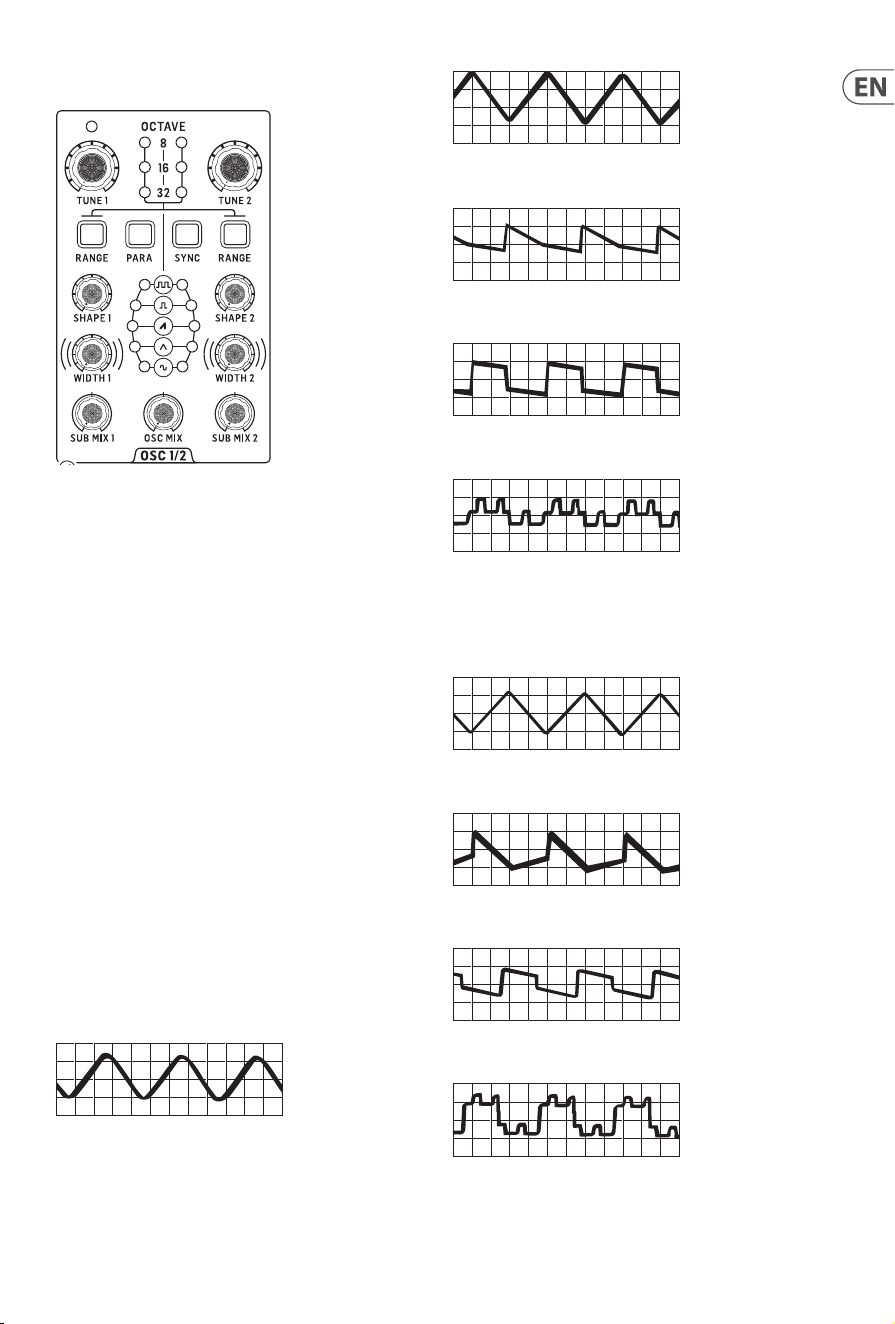
Your Proton has two analog VCOs, whose pitch can be controlled
by MIDI (5-pin DIN or USB) or from a suitable CV source in the
range -5 V to +5 V. The VCOs are capable of producing frequencies
between 0.7 Hz to 50 kHz. Each VCO has its own controls for
tuning, range, shape, pulse width and sub mix. In addition there is
an Oscillator mix control and buttons to select Oscillator sync and
paraphonic mode.
3.1 Tuning
The two VCOs can be individually tuned by 13 semitones up or
down.
3.2 Range
The two VCOs can have their range set to either 32’, 16’ or 8’, which
is indicated by the LEDs on the front panel. The ranges can be
stepped through using the range buttons, from 8’ down to 32’.
When all three LEDs are let on either VCO it is in ten octave mode
and will respond to the full note range.
Shape
The Proton VCOs have ve waveshapes, which can either be
switched or blended using the SynthTribe app or according to the
second panel settings. Press Range (Osc 1 or 2) for two seconds
and, once it is ashing, use the para button to toggle between
switched and blended for the selected oscillator. Press Range
again for two seconds to exit second panel.
The basic shapes are:
Sine
Triangle
Sawtooth
Square/Pulse
Tone Mod
When the blending option is selected then adjacent waves blend
into one another, with the more dominate wave’s LED showing
brighter. Thesewaveforms are:
Sine/Triangle
Triangle/Sawtooth
Sawtooth/Square
Square/Tone Mod

18 PROTON User Manual
3.3 Sub-Oscillators
Each oscillator has its own sub-oscillator, whose waveform is
independent of the main one selected, and whose pitch is one
octave below that of the oscillator. To change the sub-oscillator
waveform press and hold the relevant VCO’s range button for
more than two seconds, until it starts ashing. Then use the LFO
encoder to select the required wave. Pressthe range button again
to return to main panel functions. Alternatively the waveform can
be selected using the SynthTribe app. The choice of waveforms
is: square, sawtooth, triangle or sine. Please note that although
the LFOs have a ramp wave as an option this is not available as a
sub-oscillator choice.
The main and sub-oscillators can be mixed using the sub mix
control. Atthe central position they are at equal levels, turning
the control clockwise (CW) emphasizes the main VCO; counter-
clockwise (CCW) emphasizes the sub.
3.4 Width
On each oscillator the square and tone mod waveforms can
have their pulse width altered by means of the width controls.
Therange is 10% duty to 90% duty.
3.5 Sync
The waveform cycle of Osc 2 can be synchronized to Osc 1 by
pressing the sync button. The further that Osc 2 is tuned away
from Osc 1 the more dramatic the eect. Modulation of Osc 2
from an envelope generator produces a classic eect. This can be
achieved by mixing an incoming CV from a keyboard, such as the
Behringer Swing with the output of an ASR envelope generator
using the CV mixer in the utilities section.
3.6 Paraphonic Mode
Pressing the para button puts the Proton into paraphonic mode,
where playing two notes will assign one to each oscillator.
The note priority can be set dierently for normal mode and
paraphonic mode. To select the note priority for normal mode
press and hold the sync button for more than two seconds, until it
ashes, then use the VCF 1 mode button to select: LPF = lowest
note priority; HPF = highest note priority and BPF = latest note
priority. For paraphonic selection use VCF 2 mode to select: LPF =
Osc 1 will play the lowest note, Osc 2 the highest; HPF = Osc 1 will
play the highest note, Osc 2 the lowest; BPF = Osc 1 will play the
rst note, Osc 2 the second. Pressing the para button again saves
your selection. This can also be done using the SynthTribe app.
19 PROTON User Manual
4. Wavefolder
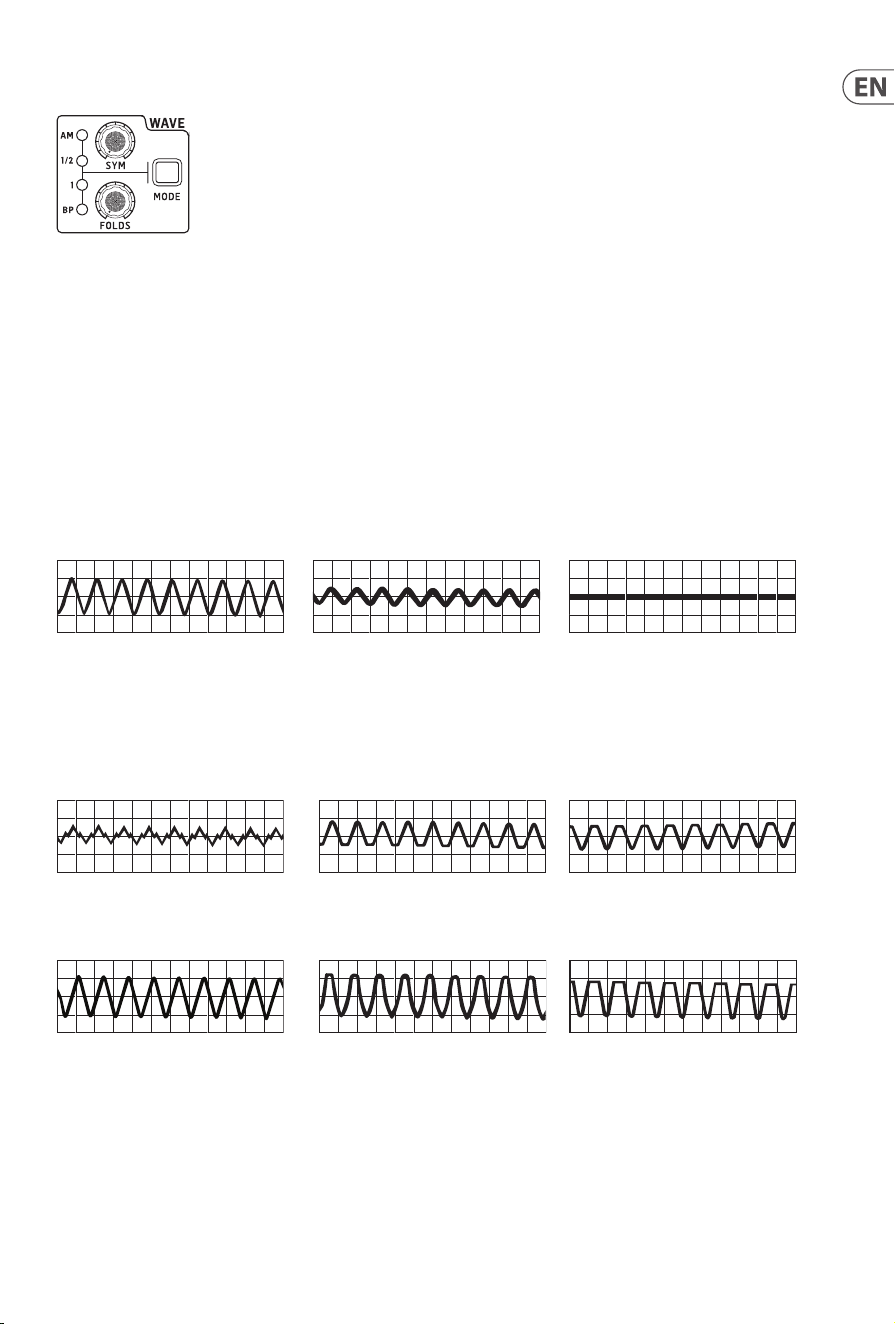
The wavefolder works by ‘folding’ a waveform back onto itself to create complex harmonics. The Proton wavefolder has two controls and
fourmodes.
4.6.1 Folds
The folds control sets the level of folding that the wavefolder performs, turning it CW increases the number of folds. Turning it fully CCW
has the eect of cancelling the input altogether.
4.6.2 Symmetry
The Sym(metry) control causes the top of the waveform to be folded in a dierent way to the bottom, thus altering the timbre further.
Amplitude Modulation
When the wavefolder is set to AM (amplitude modulation) mode the sym control has no eect, and the folds control alters the amplitude
of the waveform. When it is turned fully CCW the waveform is cancelled altogether; turning it CW brings the wave back in until at full CW
the waveform is unaltered.
Folds fully CW Folds midway Folds fully CCW
4.1 1/2
½ mode allows both controls to work on the waveform, but at half intensity. As with the AM mode turning the folds control fully CCW
cancels out the incoming waveform, regardless of where the sym control is set.
Therefore, with the folds control at the midway point altering the sym control gives the following results:
Sym fully CCW Sym midway Sym fully CW
And with the folds control fully CW:
Sym fully CCW Sym midway Sym fully CW
4.2 1
With the mode set to 1 the wavefolder controls work to their full intensity. As it the other modes turning folds fully CCW cancels
theinput.
Therefore, with the folds control at the midway point altering the sym control gives the following results:
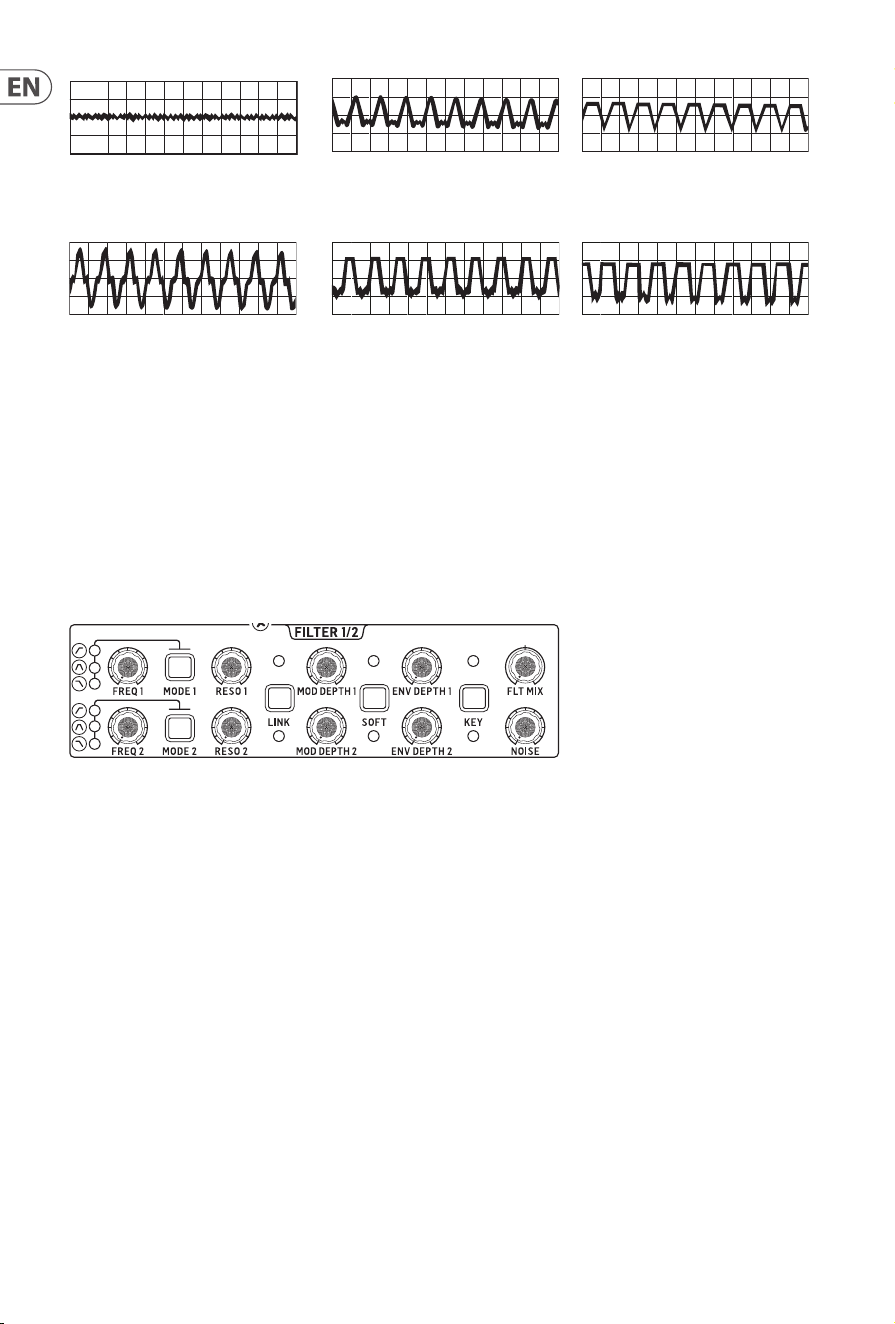
20 PROTON User Manual
Sym fully CCW Sym midway Sym fully CW
And with the folds control fully CW:
Sym fully CCW Sym midway Sym fully CW
4.3 Bypass
When the wavefolder is in BP (bypass) mode neither of the controls have any eect, and the incoming waveform is passed to the VCFs
unaltered. Please note that when the wavefolder is used to process an external signal, which can be done using its in and out sockets on
the patchbay, setting the mode to BP will allow the internal oscillator mix to feed into the VCFs.
4.4 Modulation
Both folds and sym can be modulated by any modulation source, unipolar or bipolar in the range -5 V to +5 V via the dedicated
sockets on the In patchbay. The modulation source(s) are summed with the internal controls and can be used to produce even more
pronouncedeects.
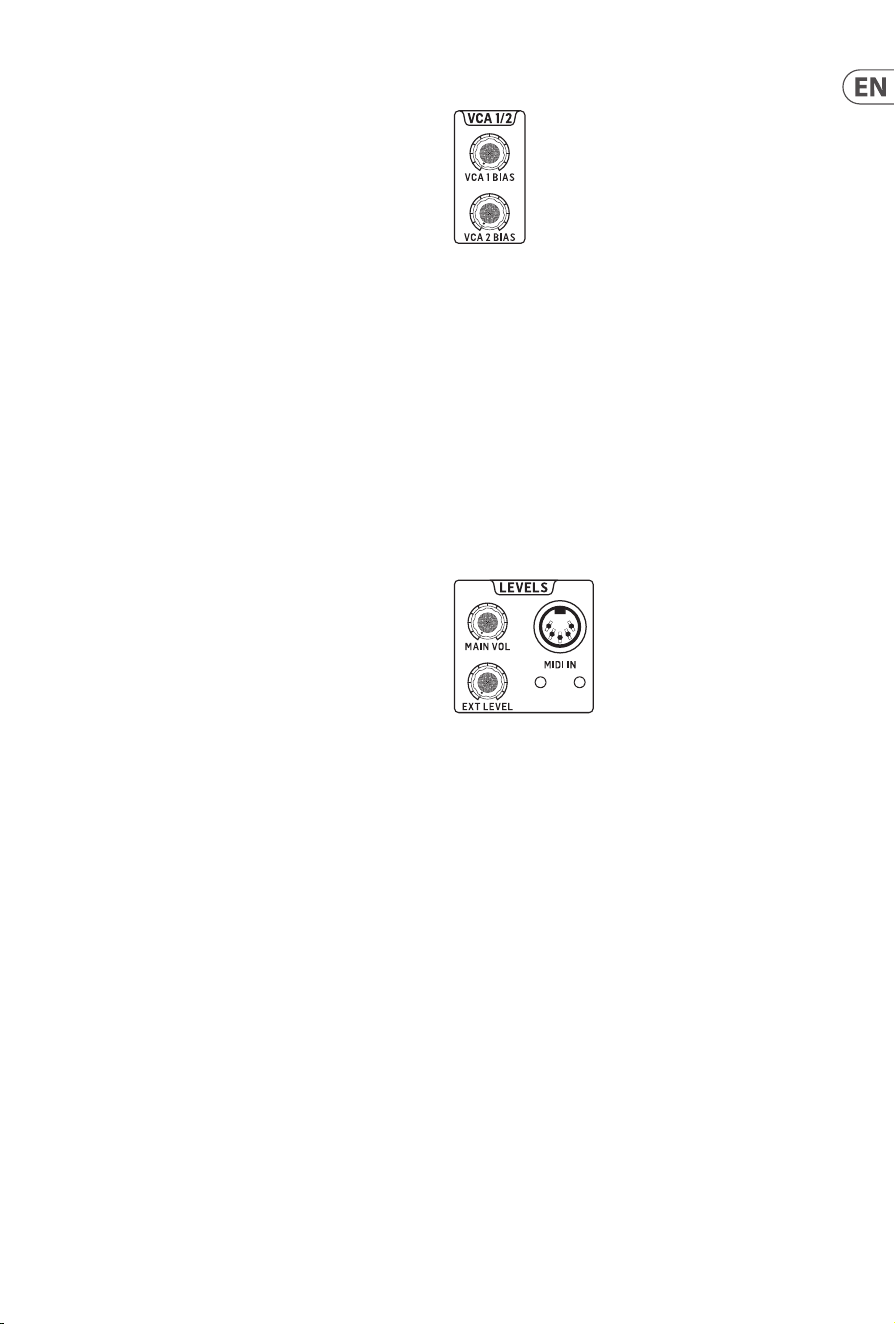
5. Filters
The Proton has two, independent, 12 dB/octave VCFs, which can also have some of their functions linked together.
5.1 Mode
Each of the lters can be switched into either low pass, band pass or high pass mode. The current mode is indicated by an LED next to the
appropriate panel graphic.
5.2 Frequency
The lters’ cuto frequencies can be set using the freq 1 and 2 controls and can also be externally controlled by a voltage in the range -5V
to +5 V via the In patchbay. Both have a range of 10 Hz to 15 kHz. The frequency of each lter can also be modulated by a voltage in the
range -5 V to +5 V via the In patchbay, which will replace LFO 1 as the modulation source.
5.3 Resonance
The resonance of the lters can be adjusted using the reso 1 and 2 controls, and can also be externally controlled by a voltage in the range
-5 V to +5 V via the In patchbay. Increasing the resonance emphasizes a band of frequencies around the lter cuto frequency, until at
the highest settings the lter will self-oscillate.
5.4 Link
The link button has dierent eects, according to whether the red or the white LED is lit. When neither is lit it has no eect.
Red: VCF 2 will be modulated by the VCF 1 modulation source rather than that of VCF 2.
White: VCF 2 will be modulated by an inversion of the VCF 1 modulation source.
21 PROTON User Manual
5.5 Modulation Depth
These controls determine the level of modulation depth to each
of the lters. When link is not in use then VCF 1 is modulated by
LFO 1 or a source patched via the pacthbay; and VCF 2 by LFO 2
or a source patched via the patchbay. When they are linked then
the modulation is as described above, but the controls are still
eective for their respective lters.
There is a second modulation available, which can be set up
using the SynthTribe app, or by using the second panel functions.
Toaccess this press and hold the mode button for the required
lter for two seconds. When it starts to ash use the LFO encoder
to select one of the following modulation sources:
Sine: no source (default)
Triangle: MIDI velocity
Sawtooth: MIDI mod wheel CC #1)
Square: MIDI aftertouch
Pressing the shift button then allows the LFO encoder to set the
modulation depth for the selected source.
5.6 Soft
The soft button softens the resonance of the selected lter.
Ifneither LED is lit then then resonance is not softened, red means
that only VCF 1 is softened, white VCF 2 and both LEDs mean that
both are aected.
Envelope Depth
The envelope depth controls set the amount of ADSR envelope
modulation to each lter from ADSR 1.
5.7 Key
The key button selects whether either, both or neither lter tracks
the keyboard input. If neither LED is let then neither lter is
tracking, red means the VCF 1 tracks, white VCF 2 and both means
that both track.
5.8 Filter Mix
The setting of this control determines how much of the output
of each lter is fed to 1VCAs. At the center point both lters are
fed equally, turning the control CCW biases towards VCF 1; CW to
VCF 2.
5.9 Noise
The noise control sets the level of white noise that is fed into the
lters alongside the VCOs. When it is fully CCW then no noise
is present, fully CW then the noise is of equal volume to the
oscillatormix.
6. Voltage Controlled Ampliers
The Proton has two parallel VCAs. Each has an independent bias
control that will allow a level of signal through regardless of what
the control source is doing. When the bias controls are fully CCW
then the VCAs are entirely under the control of their respective
sources, when they are fully CW then the sources are overridden.
Under normal operation VCA 1 receives the output of the lter
mix and VCA 2 receives the output of VCF 2. Both are controlled
by ADSR 2. However either or both can be send a dierent input,
and/or be controlled from a dierent source using the relevant
sockets on the In patchbay. VCA 1 feeds into the Proton’s main
and headphone outputs, but also have their own outputs on the
Out patchbay, which do not break the connection to main and
headphone.
7. Levels
7.1 Main Volume
The levels section contains the volume control for the main line
level output (the volume control for the headphone output is on
the rear panel).
7.2 External Level
The level control for external signals to be processed by the
Proton’s VCFs, whose input socket is also on the rear panel.
7.3 MIDI In
The Proton’s 5-pin DIN MIDI in is also situated on the front
panel. The MIDI input channel can be selected either by the four
dip switches on the rear panel or by using the SynthTribe app.
TheMIDI in socket is accompanied by two LEDs which light when a
MIDI note is received on the selected channel.
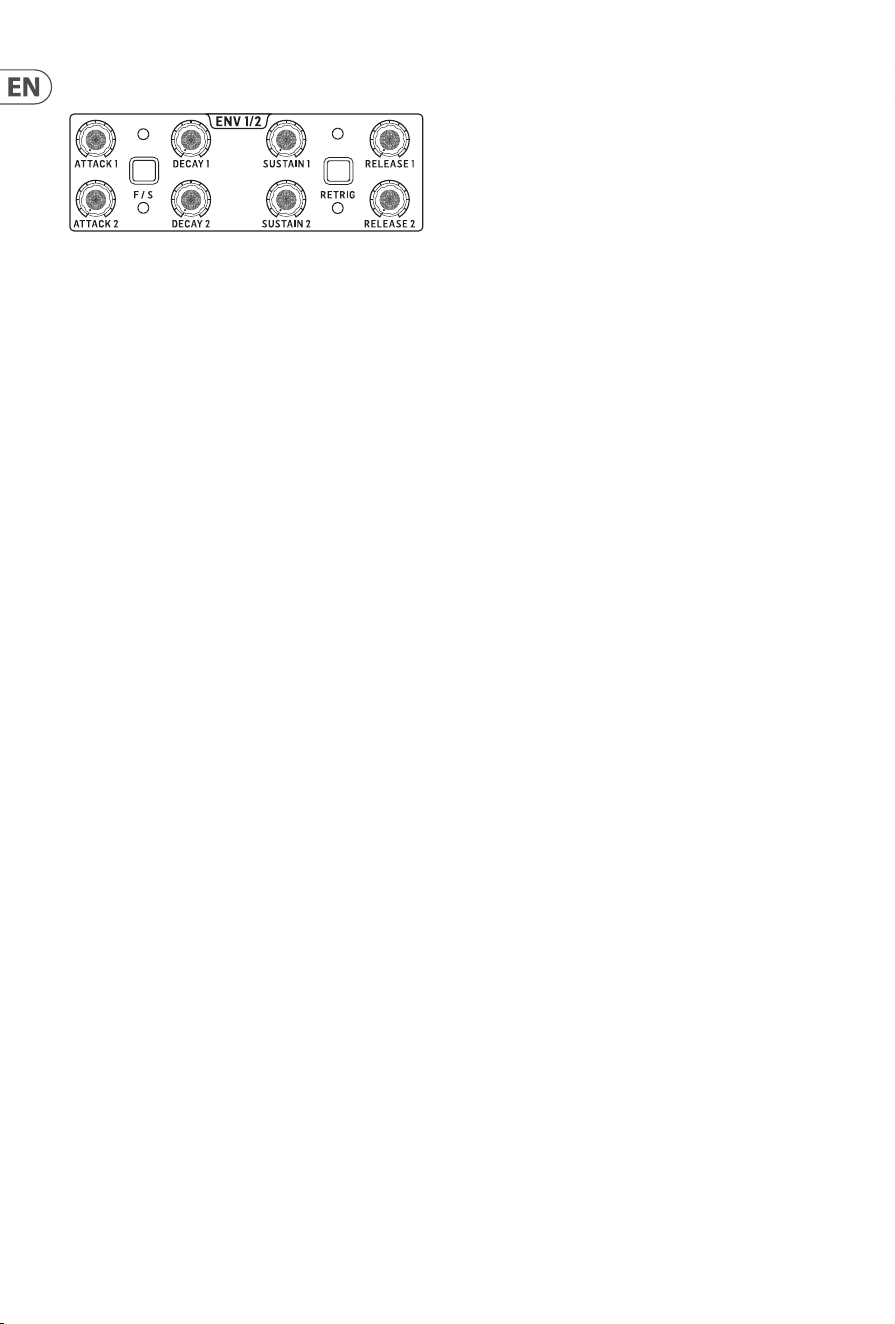
22 PROTON User Manual
8. ADSR Envelope Generators
The Proton has two entirely independent ADSR envelope generators, which are individually triggered via the In patchbay. ADSR 1 is
normally used to modulate the lters, while ADSR 2 is connected to the VCAs, although this connection can be broken using the In
patchbay; and the ADSR curves are also available to patch into other destinations on the Out patchbay.
8.1 Attack
Each ADSR envelope has an attack time from around 300 µs when the control is fully CCW to 7 s when the control is fully CW, in fast mode.
In slow mode the maximum time increases to 42 s.
8.2 Decay
Each ADSR envelope has a decay time from 2.4 ms when the control is fully CCW to 20 s when the control is fully CW, in fast mode. In slow
mode the maximum time increases to 1 m 56 s.
8.3 Sustain
The sustain level can be adjusted to give no sustain at all when the control is fully CCW to full sustain at whatever level decay falls to when
the control is fully CW, until the key is released.
8.4 Release
Each ADSR envelope has a release time from 1.5 ms when the control is fully CCW to 24 s when the control is fully CW, in fast mode.
Inslow mode the maximum time increases to 2 m. Please note that is sustain is fully CCW then release will not function.
8.5 Fast/Slow
The F/S button allows the ADSR envelope generators to be switched from their normal (fast) mode to slow mode, where times are
extended signicantly. The associated LEDs light to indicate whether either, neither or both ADSRs are in slow mode.
8.6 Retrigger
When retrig is o, which is its default state, any new notes played while a note is held will not cause the envelope generator(s) to break
their cycle. Switching retrig on will cause any new note played to start a new envelope cycle, regardless of whether another note is being
held. Please note that retrigger only works when the Proton is under MIDI control.
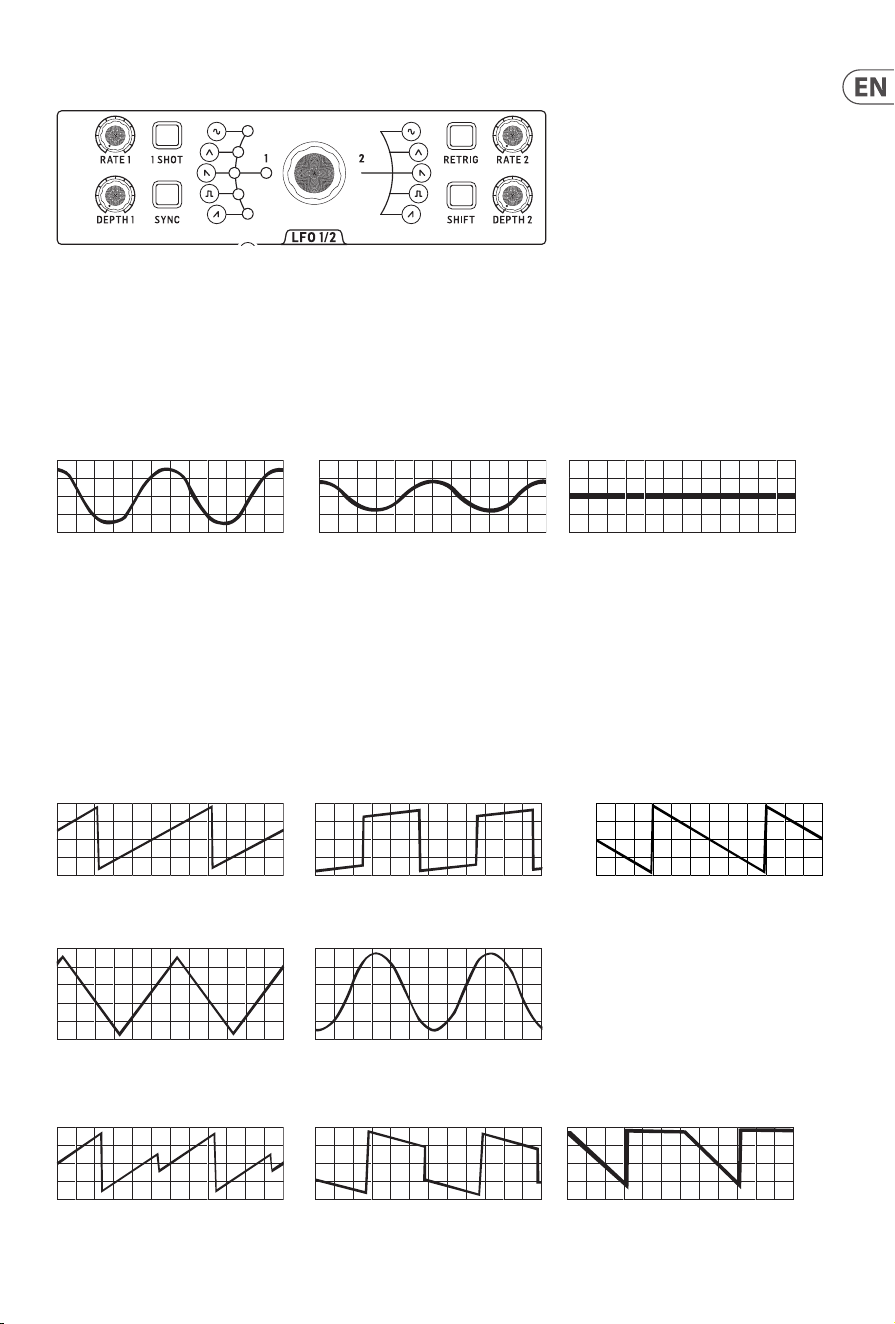
23 PROTON User Manual
9. Low Frequency Oscillators
The Proton has two independent LFOs. Owing to space considerations some controls are shared between the two, which is achieved by
use of the shiftbutton.
9.1 Rate
Each LFO has its own rate control, with a range from 0.01 Hz at full CCW to 200 Hz at full CW.
9.2 Depth
Each LFO has its own depth control, which allows full amplitude when turned CW, with the amplitude reducing to zero as it is turned CCW.
100% depth 50% depth 0% depth
9.3 Shift
The shift button is used to select which LFO is aected by shared controls. When it is lit in red then LFO 1 is aected, white for LFO 2.
Theshift control is also used to select which ASR envelope is aected by their shared buttons.
9.4 Waveform
Each LFO can have its own waveform selected from ramp, square, sawtooth, triangle and sine. These waveforms can also be set to blend
rather than being switched, either by using the SynthTribe app, or by the second panel function. Press 1-shot for two seconds and, once it
is ashing, use the para button to toggle between switched and blend for LFO 1. Press 1-shot again for two seconds to exit second panel.
For LFO 2 press the LFO retrig button for two seconds, then para. Press retrig again to exit second panel.
Ramp Square Sawtooth
Triangle Sine
The waveform blending is a continuous process, so there are many possible blends of adjacent waveforms
Ramp / Square Square / Sawtooth Sawtooth / Triangle
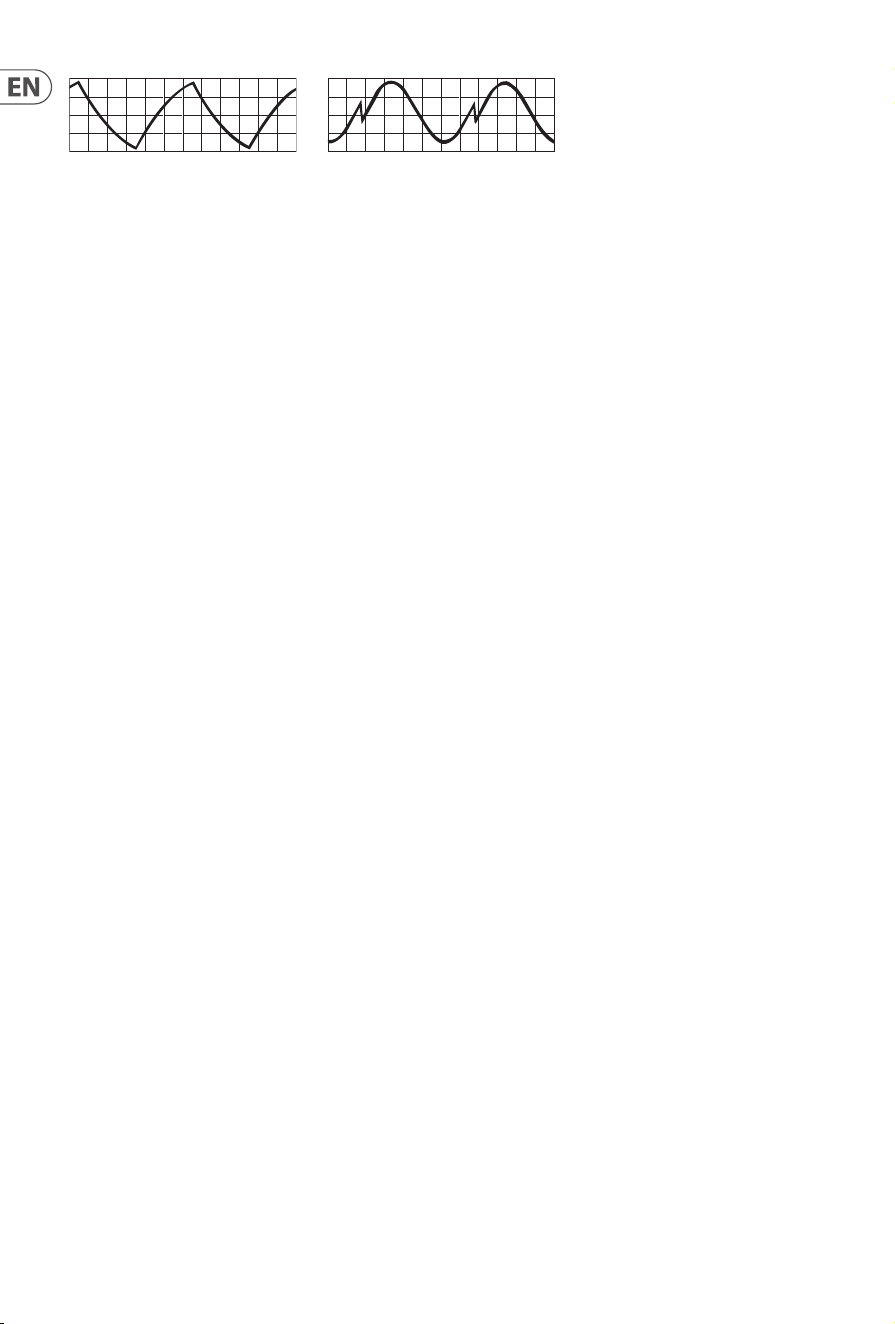
24 PROTON User Manual
Triangle / Sine Sine / Ram
9.5 1-Shot
When 1-shot is selected a trigger or gate received at the relevant LFO’s trigger in on the In patchbay will cause that LFO’s waveform to
reset to the start of its cycle.
9.6 Sync
Sync synchronizes the selected LFO to incoming MIDI clock. In order for sync to work the relevant LFO must have had sync selected using
the SynthTribe app or using the second panel functions. For LFO 1 press the 1-shot button for two seconds until it ashes, then press sync,
then press 1-shot again to exit. For LFO 2 use the retrig button.
9.7 Retrigger
LFO retrigger resets the LFO’s cycle to the start on the when a key is pressed, regardless of whether another key is already being held
(dependent on note priority). Please note that retrigger will only work correctly when LFO sync is selected, and with a MIDI source.
CV/gate control will work in the same way as 1-shot.
9.8 Key Tracking
Either LFO can have a variable depth key tracking enabled. This can either be done using the SynthTribe app or by using the second panel
functions. For LFO 1 press and hold the 1-shot button for two seconds until it starts ashing, then use the LFO encoder to adjust the
depth. Then press 1-shot again to exit second panel. For LFO 2 use the retrig button.
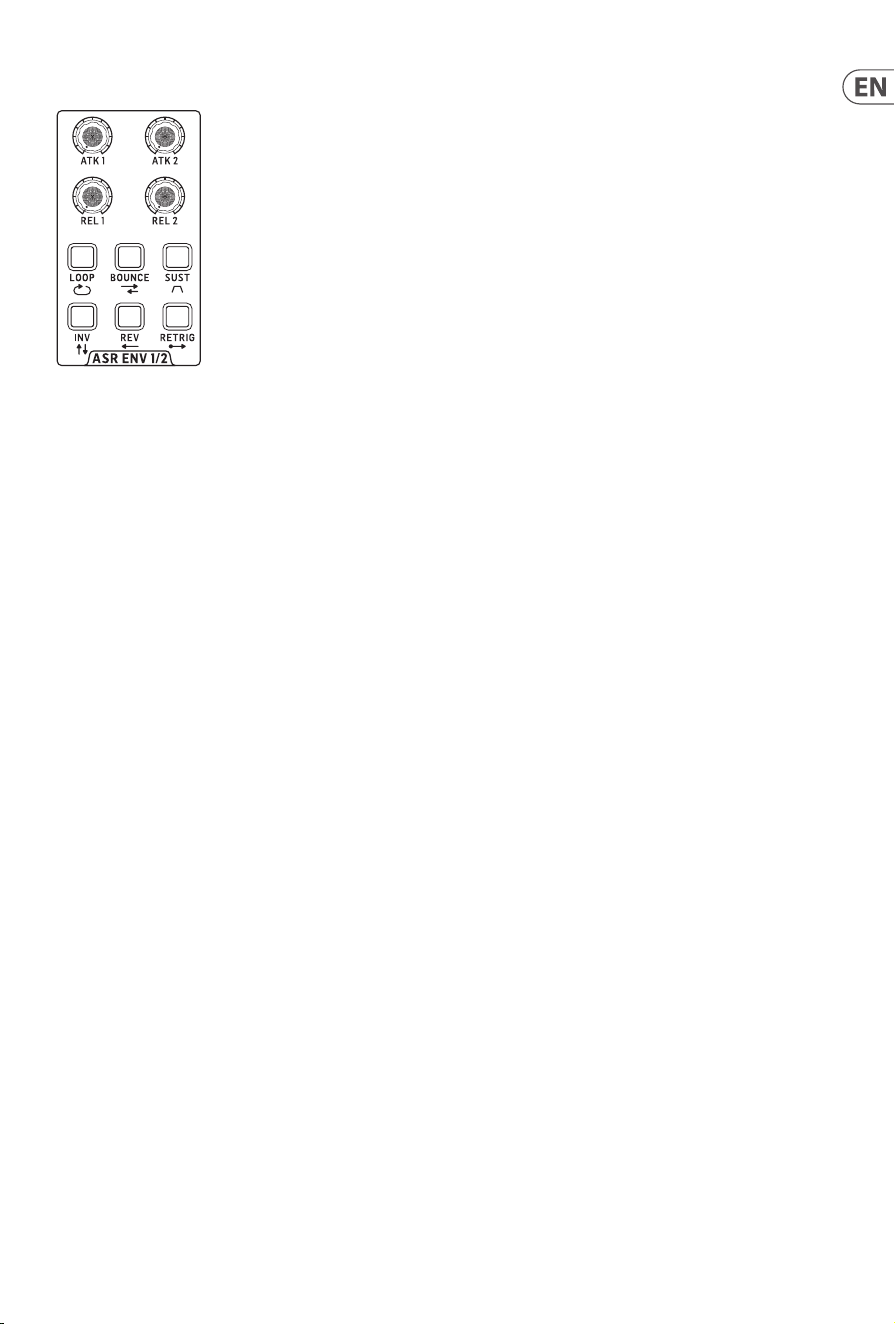
25 PROTON User Manual
10. ASR Envelope Generators
The Proton has two ASR envelope generators, which can be
individually triggered from the In patchbay. Because the buttons
are shared between the two the shift button in the LFO section
should be used to toggle between the two. Buttons light up in red
when they are selected for ASR 1, white for ASR 2.
10.1 Attack
Each ASR envelope generator has an attack time which is
adjustable between 0 ms when the control is fully CCW and 8 s
when it is fully CW.
10.2 Release
Each ASR envelope generator has a release time which is
adjustable between 0 ms when the control is fully CCW and 31 s
when it is fully CW.
10.3 Loop
When loop is selected the relevant ASR envelope generator will
repeat its attack/release cycle for as long as a gate is present at
its input. If sustain is selected then the loop function will not
work, as the envelope will sustain for as long as the gate is present
before releasing.
10.4 Bounce
When bounce is selected the relevant ASR envelope generator will
go through its attack/release cycle, then reverse it so that release
becomes attack and attack release for as long as a gate is present
at its input.
10.5 Sustain
Selecting sustain adds a sustain element to the envelope curve.
10.6 Invert
Selecting invert causes the envelope curve to change from a
positive going 0 V to + 10 V to 0 V to – 10 V.
10.7 Reverse
Selecting reverse turns the release into attack and attack into
release on the selected ASR.
10.8 Retrigger
When retrigger is selected the relevant ASR envelope generator
will start a new cycle every time it receives a new gate.
All of the buttons can be used in any combination. Please note
that some button combinations do not necessarily give the desired
aect, so it is worth checking which combinations are best for
your work.
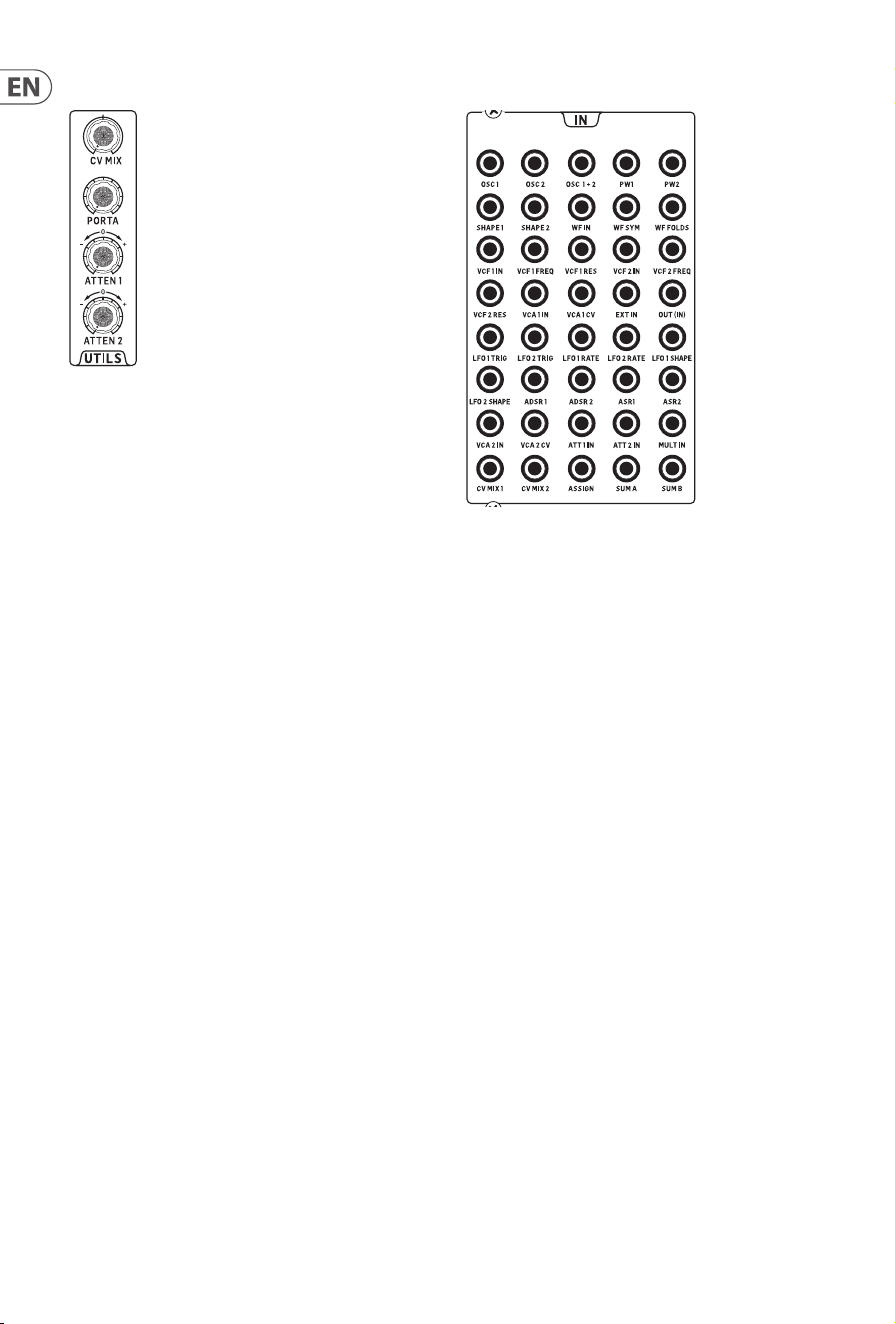
26 PROTON User Manual
11. Utilities
The Proton has four patchable utilities
11.1 CV Mix
The CV mix allow two voltage sources to be mixed together. Ifno
plugs are inserted into the In patchbay then the two sources are
LFO 1 and LFO 2. When the control is at midway both sources are
equally represented, turning it CCW emphasizes source 1; CW
source 2.
11.2 Portamento
The portamento control introduces a glide eect between
notes, with the glide time increasing as the control is turned
CW. Thisonly works when the Proton is under MIDI control.
Hold the rst note while playing the second to activate the
portamentoeect.
11.3 Attentuverters
The Proton has two independent attenuverters, which accept a
CV from the In patchbay and output to the Out patchbay. In each
case when the control is at midway no voltage is passed, turning
the control fully CW passes the voltage unaltered; turning it CCW
passes an inverted voltage.
12. In Patchbay
The Proton features a forty input patchbay that allows CV and
audio sources to be routed as signals or controls to the various
sections, whether these are sourced internally from the Out
patchbay or externally. CVs are in the range -5 V to +5 V,
unlessotherwise stated.
12.1 Oscillators
Osc 1 CV; osc 2 CV; osc 1 and 2 combined CV; osc 1 pulse width;
osc2 pulse width; osc 1 shape; osc 2 shape.
12.2 Wavefolder
Wavefolder audio in, which overrides the internal feed from osc
mix; folds CV; symmetry CV.
12.3 Filters
VCF 1 audio in, which overrides the internal feed from the
wavefolder; VCF 1 frequency CV; VCF 1 resonance CV; VCF 2 audio
in, which overrides the internal feed from the wavefolder; VCF 2
frequency CV; VCF 2 resonance CV.
12.4 Voltage Controlled Ampliers
VCA 1 audio in, which overrides the internal feed from lter mix;
VCA 1 CV; VCA 2 audio in, which overrides the internal feed from
VCF 2; VCA 2 CV.
12.5 External Audio
Ext in sends and external audio signal whose level is controlled
by the Ext Level control into the Proton VCFs (this is a duplicate of
the socket on the rear panel); Out (in) overrides the internal signal
ow and sends an external audio signal whose level is not aected
by the Ext Level control direct to the Proton’s main output on the
rear panel.
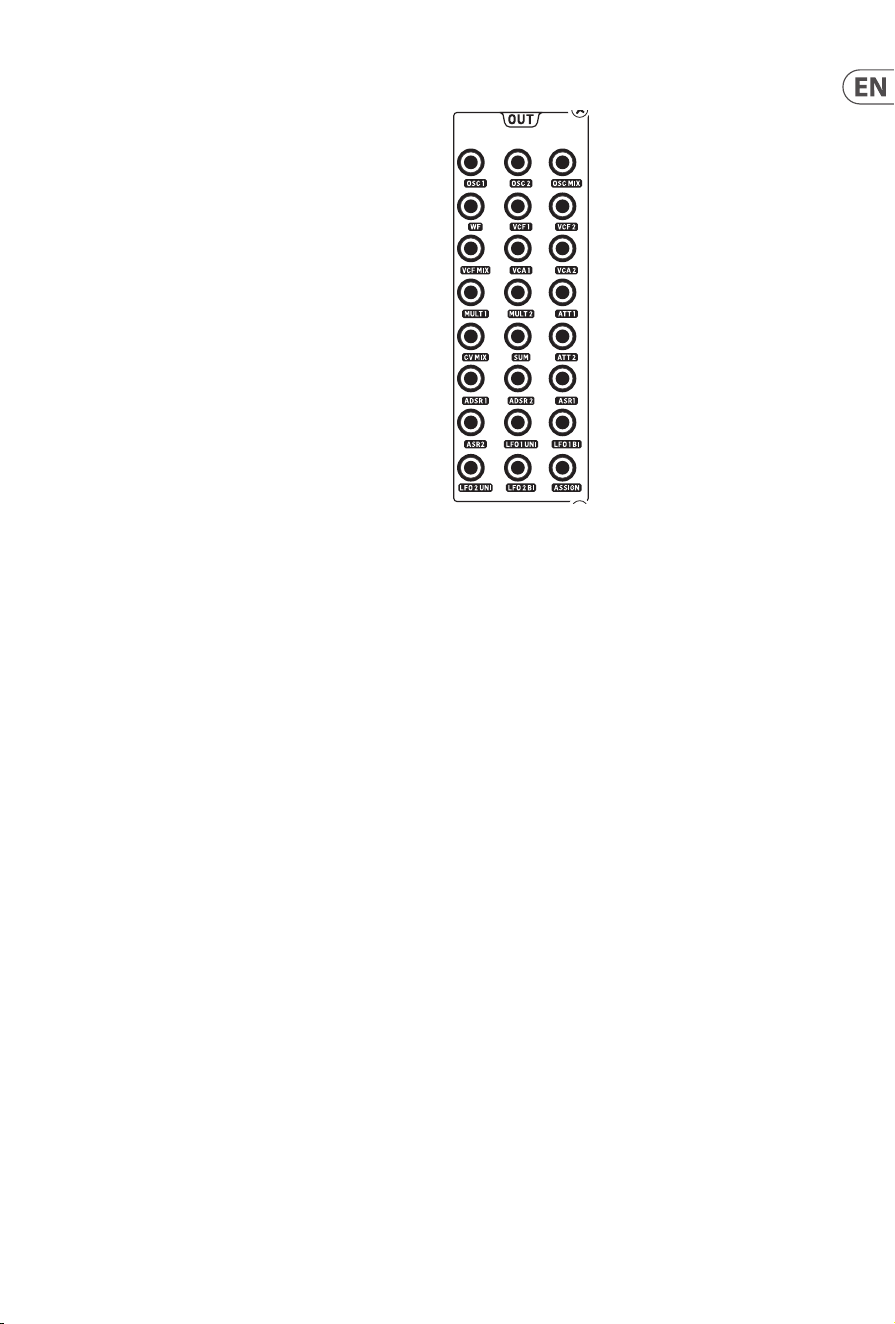
27 PROTON User Manual
12.6 Low Frequency Oscillators
LFO 1 trigger and LFO 2 trigger, which cause the LFOs 1-shot and
retrigger to occur if selected when a suitable voltage trigger is
received (any voltage over 0 V will usually work); LFO 1 rate CV;
LFO 2 rate CV; LFO 1 shape CV; LFO 2 shape CV.
12.7 Envelope Generators
ADSR 1 gate/trigger; ADSR 2 gate/trigger; ASR 1 gate/trigger; ASR
2 gate/trigger.
12.8 Attenuverters
Attenuverter 1 in; attenuverter 2 in.
12.9 Multiple In
Allows an signal or voltage to be split and fed to two outputs on
the Out patchbay.
12.10 CV Mix
Input 1; input 2.
12.11 Assign In
Assignable CV input which can be set to feed either nothing
(default), osc 1, osc 2, osc 1 & 2, VCF 1, VCF 2 or VCF 1 & 2. This can
be set up using the SynthTribe app, or through the second panel by
pressing and holding the wavefolder mode button for two seconds
until it ashes then using the LFO encoder to scroll through the
options. Pressing the LFO shift button allows the encoder to
be used to set the depth from 0% to 100%. Pressing the mode
button again exits second panel.
12.12 Sum
Sum A; sum B where two CVs are summed together a fed to the
sum out socket on the Out patchbay.
13. Out Patchbay
The Proton features a twenty four output patchbay, which allows
signals and control voltages to be routed to external processors,
orre-routed internally. Taking a feed from the Out patchbay will
not aect internal routing, unless specically noted.
13.1 Oscillators
Osc 1; Osc 2; Osc mix – audio feeds from the oscillators.
13.2 Wavefolder
Audio feed from the wavefolder output.
13.3 Filters
VCF 1; VCF 2; VCF mix – audio feeds from the VCFs.
13.4 Voltage Controller Ampliers
VCA 1; VCA 2 – audio feeds from the VCAs.
13.5 Multiples
Multiple 1; multiple 2 – split of a signal or CV fed into the multiple
in on the In patchbay. If there is no cable plugged into Multiple In
then Multiples 1 and 2 can be assigned using SynthTribe.
13.6 Attenuverters
Attenuverter 1; attenuverter 2 – outputs from the attenuverters
fed from the In patchbay. If there is no input on attenuverter 1
then the output will be ADSR 1. If there is no input on attenuverter
2 then the output will be LFO 1 (bipolar).
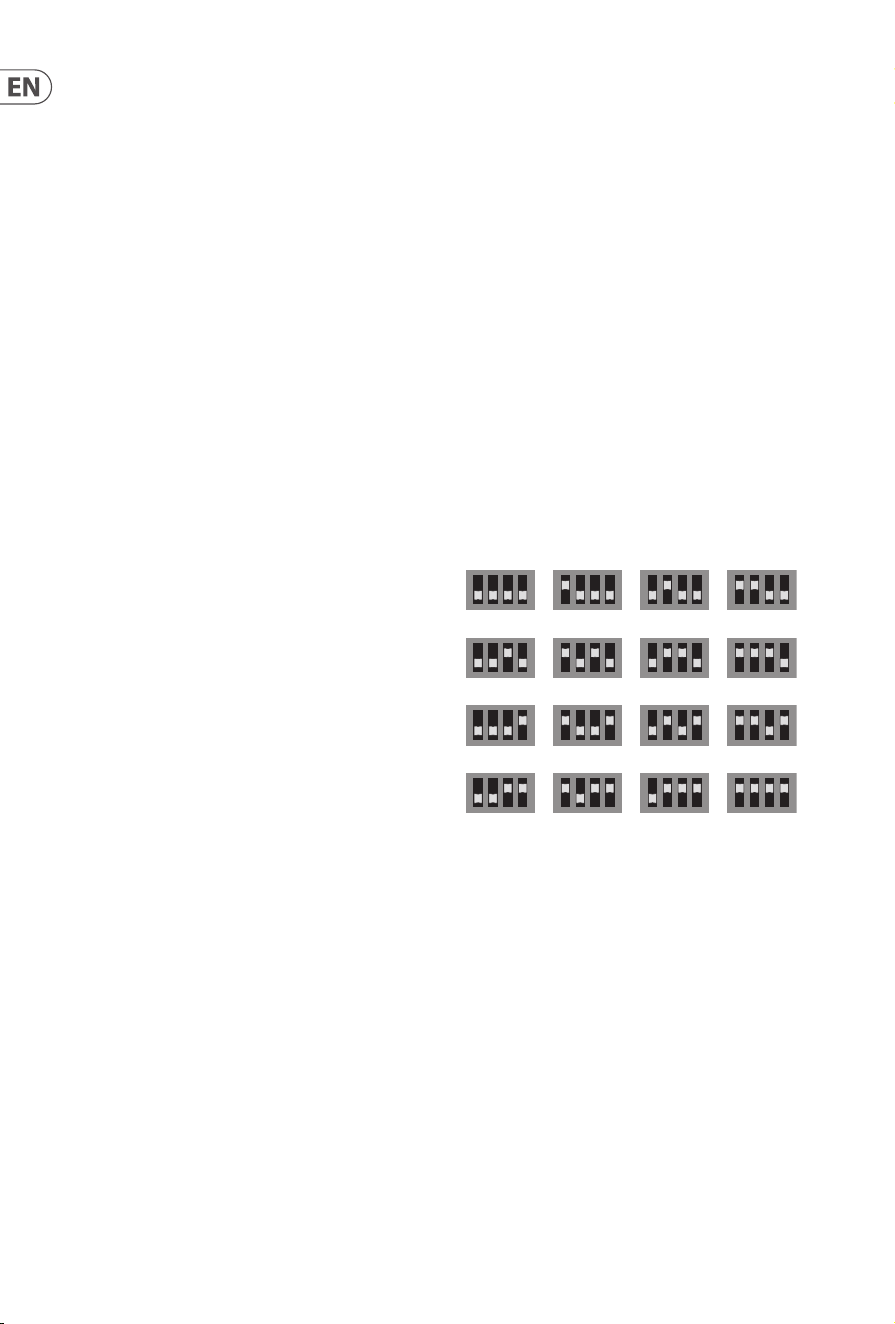
28 PROTON User Manual
13.7 CV Mix
Output of the CV mix fed from the In patchbay and mixed with the
CV mix utility. If there are no inputs to the CV mix then the mix
will be of LFO 1 and 2 (bipolar).
13.8 Sum
Output of the two CVs fed into the sum inputs on the In patchbay.
If there are no inputs then the output will be a mix of sub
oscillators 1 and 2.
13.9 Envelope Generators
ADSR 1; ADSR 2; ASR 1; ASR 2 – CV outputs of the envelope
generators’ curves.
13.10 Low Frequency Oscillators
LFO 1 uni; LFO 1 bi; LFO 2 uni; LFO 2 bi – CV outputs from the LFOs,
where the uni outputs give a unipolar response from 0 V to +5 V
and the bi outputs give a bipolar response from -5 V to + 5 V.
13.11 Assign
Assignable output whose source can be selected from osc 1 CV,
osc 2 CV, velocity (MIDI only), mod wheel (MIDI only), aftertouch
(MIDI only). This can be selected using the SynthTribe app or from
the second panel by pressing the osc sync button for two seconds
until it ashes, then using the LFO encoder to scroll through the
options. Pressing osc sync again exits second panel.
14. Rear Panel
Please note that if the Proton is removed from its supplied case
and mounted in a Eurorack case (see Quick Start Guide for details
on how to do this) then the rear panel will no longer be available.
14.1 Input
The input socket is a TS 6.35 mm jack which duplicates the 3.5 mm
jack on the In patchbay and feeds an external audio signal into the
Proton’s lters.
14.2 Output
The output socket is a TS 6.35 mm jack which sends the VCA
output as adjusted by the output level control to external mixers,
ampliers etc.
14.3 Phones
The phones out is a TRS 6.35 mm jack socket suitable for use with
any standard headphones. It is independent of the output level
control, and has its own dedicated level control adjacent.
14.4 MIDI channel select
Use these four dip switches to set the MIDI in channel of the
Proton as illustrated:
Please note that this setting can be overridden using the
SynthTribe app.
14.5 MIDI Thru
This 5-pin DIN socket can be used to mirror incoming MIDI
messages received on the front panel MIDI In socket.
14.6 USB
This USB 2.0 Type B socket can be used to control the Proton over
MIDI, for example direct from a DAW, and to alter settings and
update the rmware via the SynthTribe app.
14.7 Power
The Proton comes supplied with a 12 V 1000 mA PSU. This is
the only PSU that should be used, unless the Proton is Eurorack
mounted. The adjacent switch can be used to switch the Proiton
on and o as required.
1 2 3 4
5 6 7 8
9 10 11 12
13 14 15 16
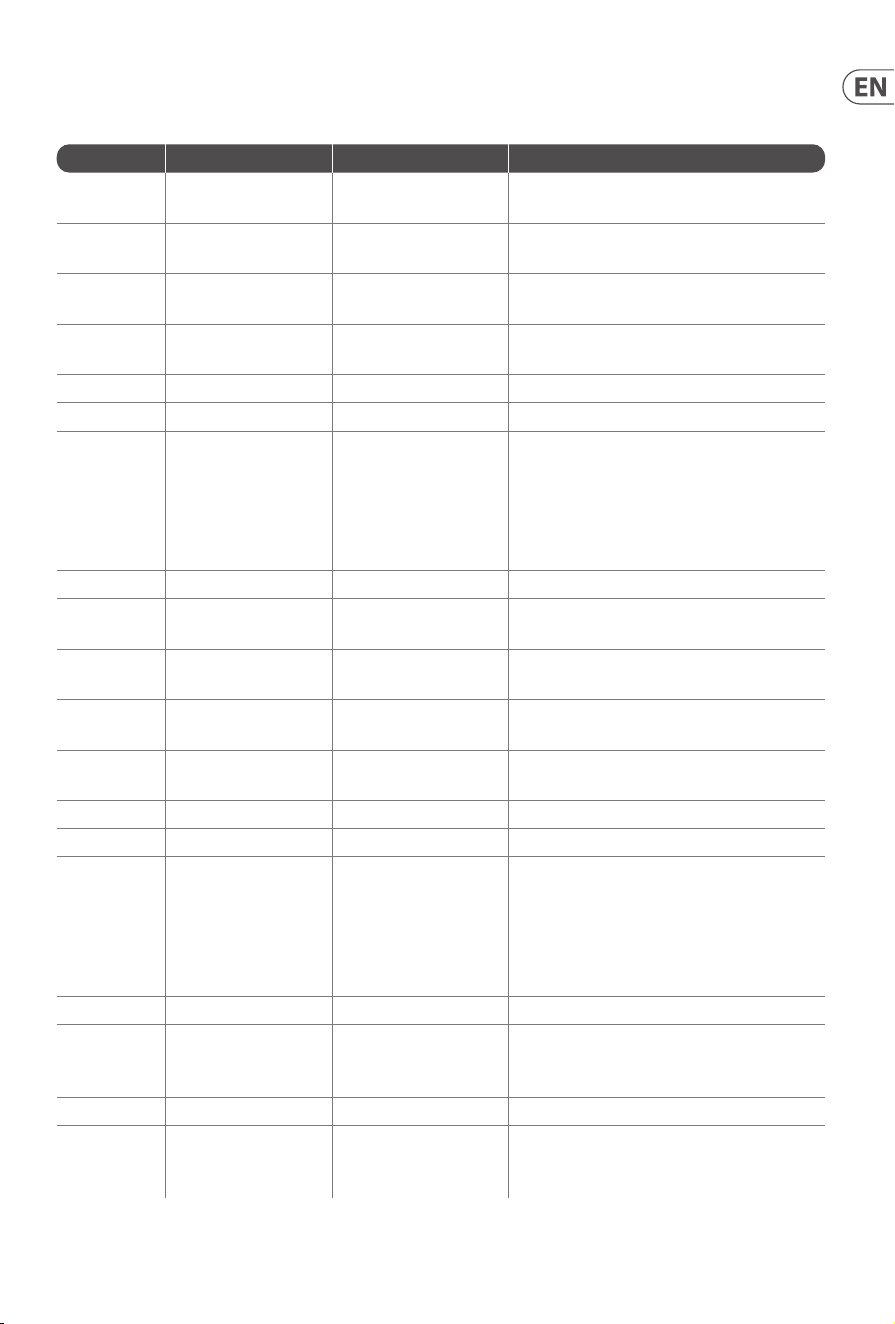
29 PROTON User Manual
15. Extra Panel Functions
Below is a summary of the control combinations required to access and adjust the extra panel functions. The extra panel functions can be
switched on or o using SynthTribe, which makes these functions only adjustable using the app.
First Second Third Action
Osc 1 Range LFO Encoder
Selects the waveform for Osc 1 sub oscillator,
from the LFO options.
Para
Selects whether the Osc 1 waveform is
switched (default) or blended.
Osc Sync
Selects whether the Osc 1 tuning control is
enabled (default) or disabled.
Wave Mode
Switches Osc 1 frequency input from
exponential to linear
F/S Switches Osc 1 frequency input to exponential
Env Retrig Disables MIDI control of Osc 1.
MIDI Note VCF 1 Mode
Sets the key split point, for paraphonic
behavior in Last Note Priority mode: when
a split point is set then Osc 1 will sound the
note below the split point, and Osc 2 the one
above. Otherwise the last note will be played
by both Oscs.
MIDI Note LFO 1 Shot Sets the base note for LFO 1 key tracking
Osc 2 Range LFO Encoder
Selects the waveform for Osc 2 sub oscillator,
from the LFO options.
Para
Selects whether the Osc 2 waveform is
switched (default) or blended.
Osc Sync
Selects whether the Osc 2 tuning control is
enabled (default) or disabled.
Wave Mode
Switches Osc 2 frequency input from
exponential to linear
F/S Switches Osc 2 frequency input to exponential
Env Retrig Disables MIDI control of Osc 2.
MIDI Note VCF 2 Mode
Sets the key split point, for paraphonic
behavior in Last Note Priority mode: when
a split point is set then Osc 1 will sound the
note below the split point, and Osc 2 the one
above. Otherwise the last note will be played
by both Oscs.
MIDI Note LFO 1 Shot Sets the base note for LFO 2 key tracking.
VCF 1 Mode LFO Encoder
Selects the modulation source for VCF 1 from:
none, MIDI velocity, Mod Wheel (MIDI CC #1),
Aftertouch.
LFO Shift LFO Encoder Sets the VCF 1 modulation depth.
VCF 2 Mode LFO Encoder
Selects the modulation source for VCF 2 from:
none, MIDI velocity, Mod Wheel (MIDI CC #1),
Aftertouch.
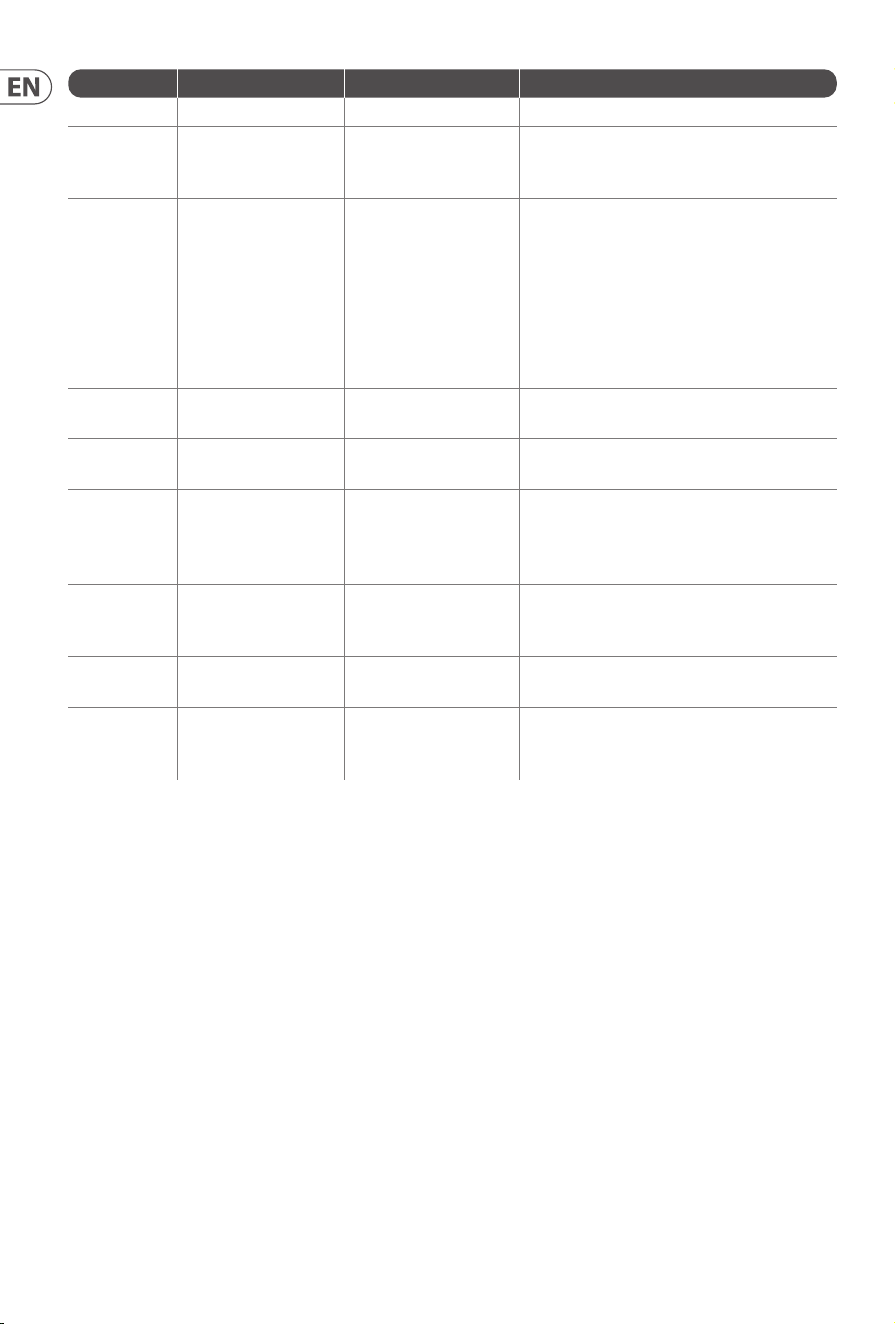
30 PROTON User Manual
First Second Third Action
LFO Shift LFO Encoder Sets the VCF 2 modulation depth.
Osc Sync VCF 1 Mode
Sets the note priority for both oscillators
when in mono mode: HPF – highest, BPF –
last, LPF – lowest.
VCF 2 Mode
Set the note priority for paraphonic mode.
Osc 1 will play the rst priority note, Osc 2
the second. Reaction to a third note will be
governed by the setting: HPF – highest, BPF
– last, LPF – lowest.
LFO Encoder
Selects the source for Assign Out on the
patchbay, from: Osc 1 CV, Osc 2 CV, velocity,
Mod Wheel, Aftertouch.
Para
Switches Polychaining on or o: 0 = o,
1 = on.
LFO Sync
Switches MIDI clock forwarding on or o 0
= o, 1 = on
Env Retrig
Selects the mode for ASR retriggering, from:
Neutron (default) – new notes will retrigger
the ASRs or Proton – notes will not retrigger
the ASRs while at least one note is held.
Wave
Mode
LFO Encoder
Selects the destination for Assign In, from:
None (default), Osc 1, Osc 2, Osc 1&2, VCF 1,
VCF 2, VCF 1&2.
LFO Shift LFO Encoder
Adjusts the depth of the Assign In, from 0%
to 100%.
Osc Para ASR Retrig
Pressing Osc Para and ASR Retrig for more
than two seconds will recalibrate the
Proton.
16. Factory Restore
If it becomes necessary to restore the Proton to its factory settings press and hold the Osc Para and Osc Sync buttons while powering up.
17. Polychaining
If you have multiple Proton units, you can connect them in a ‘Poly Chain’ to produce polyphonic sounds. The Proton works by sending
unhandled notes to the next in the chain. When the chain runs out, subsequent notes are not played. The rst Proton plays the rst played
note, the second plays the second, thethird plays the third etc. Note that a Proton in Paraphonic mode will handle 2 notes. Each Proton
must have the same MIDI channel number set using the rear panel switches or SynthTribe app. The Poly Chain connections are shown in
the diagram. Set the Poly Chain ON for all Protons. The last Proton in the chain can either be set to Poly Chain on or o depending on how
you would like the MIDI information to be handled. If Poly Chain is on, the last Proton will act as if it is sending the next played note over
the maximum number of notes played to the next device in the chain, and the note will not be heard or dropped. If Poly chain is o for the
last Proton, the next played note over the maximum number of notes will steal the last played note from the last Proton. To toggle Poly
Chain mode, press and hold the OSC SYNC button for 2 seconds. The LED will repeatedly ash (once when in mono mode - twice when in
duo mode). Ashort press on the PARA button will still toggle the PARA/MONO mode. Hold PARA to exit. If you are only using one Proton,
make sure the PolyChain is OFF.
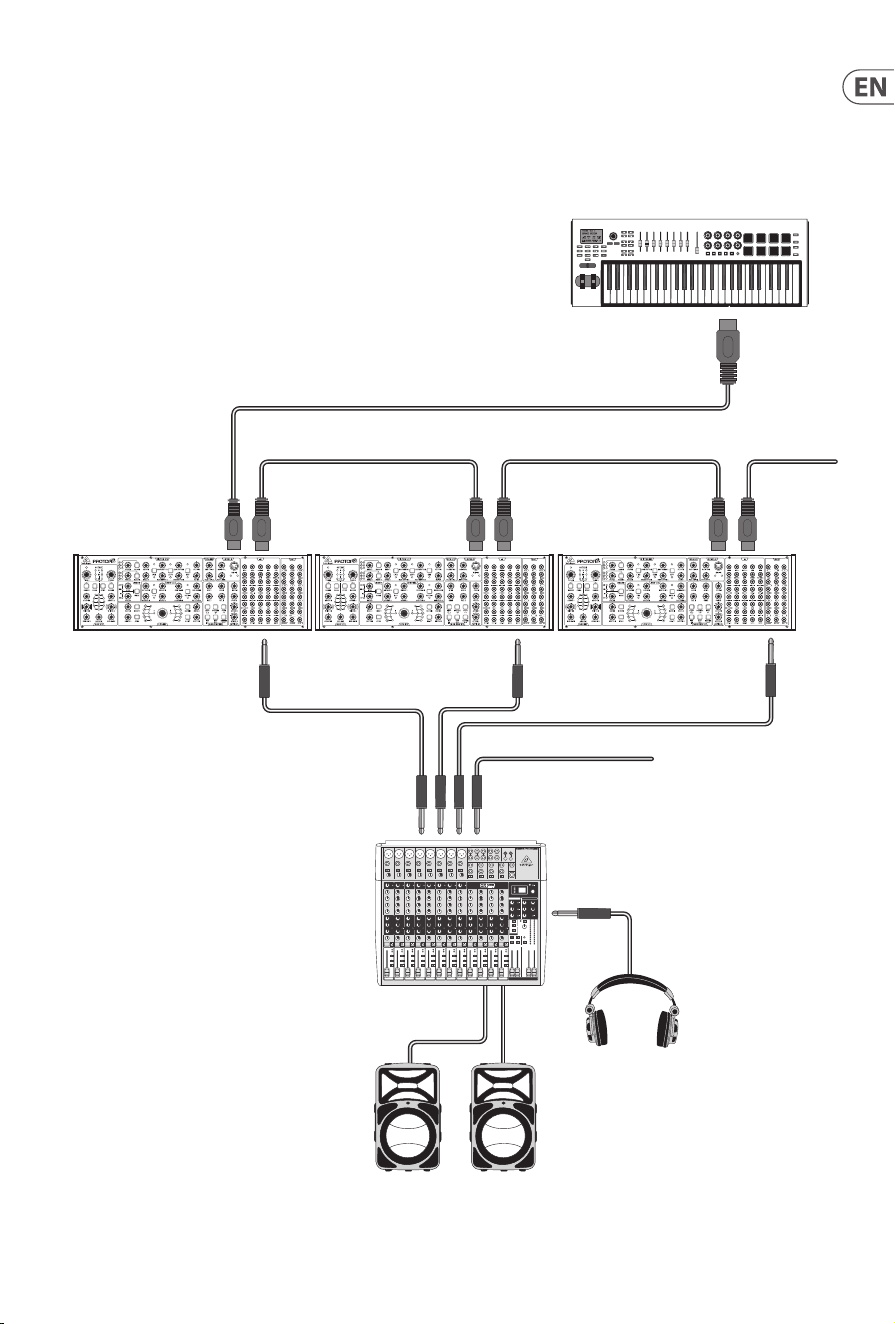
31 PROTON User Manual
18. Poly Chain Function
MIDI INMIDI IN MIDI THRUMIDI THRU MIDI THRU
From next Proton
To next Proton
MIDI Keyboard
Mixing console
Active Loudspeakers
Headphones
MIDI IN
MIDI OUT
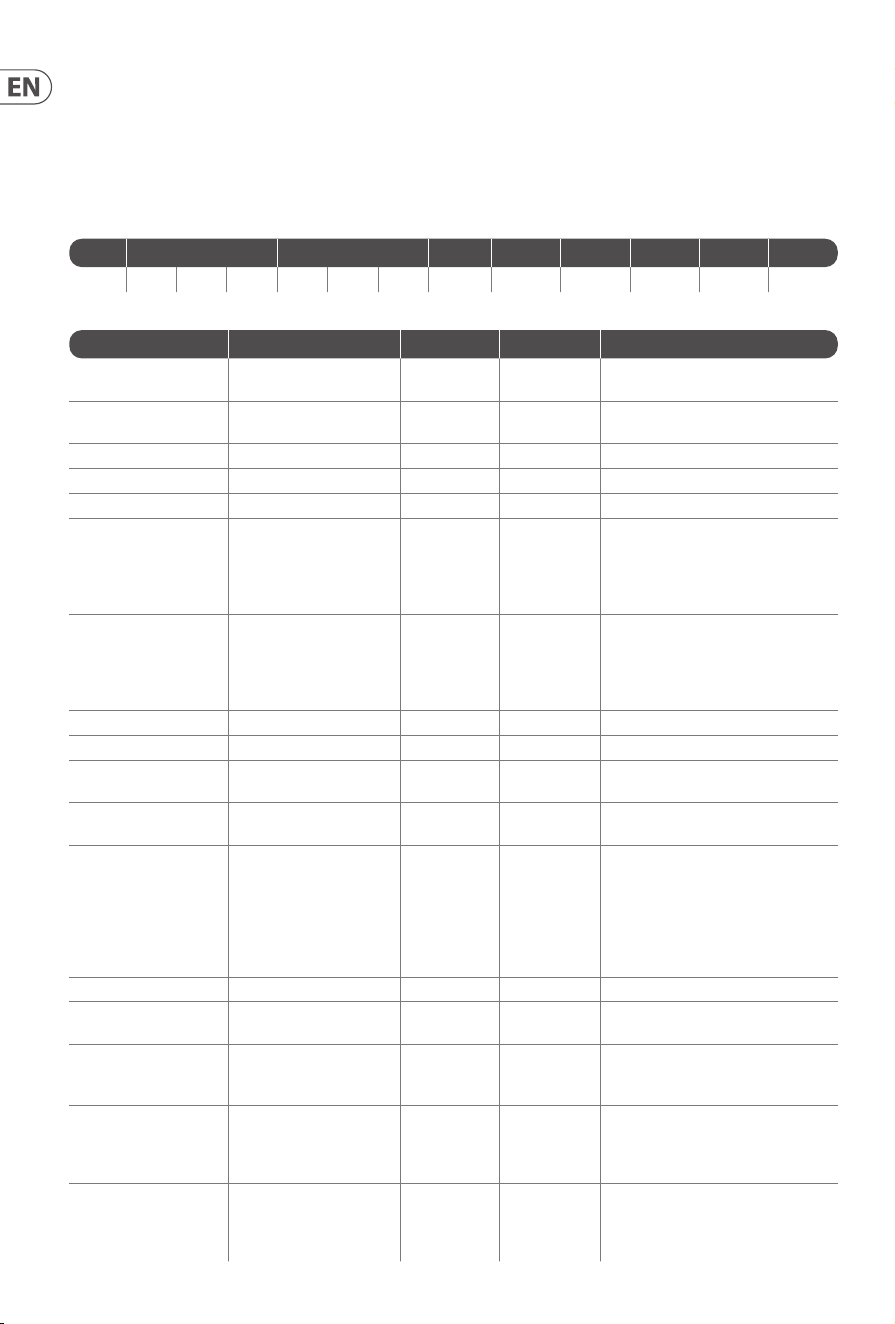
32 PROTON User Manual
19. MIDI CCs
The Proton responds to two MIDI CCs:
Modulation Wheel (MIDI CC #1 (MSB) and CC #33 (LSB)) which can also be assigned to the Assign Out using the Synthtribe App;
Sustain Pedal (MIDI CC #64).
20. SysEx
The Proton can be controlled using the System Exclusive protocol. The format of Proton SysEx messages is as follows:
Lead Manufacturer ID Model ID Dev PKT SPKT SSPKT Value End
F0 00 20 32 00 01 25 00 0x74 0x10 F7
The following table shows the SSPKT numbers and their associated values
SSPKT Function Value Range Default Value Description
0x0F Polychain enable/disable 0-1 0
0 = disabled;
1 = enabled
0x10 Dipswitch enable/disable 0-1 0
0 = dipswitch MIDI channel;
1 = software MIDI channel
0x11 Software MIDI Channel 0-15 0
0x13 Mono key priority 0-2 2 0 = low; 1 = high; 2 = last
0x14 Paraphonic key priority 0-2 2 0 = low; 1 = high; 2 = last
0X17 Assign out 1 0-4 0
0 = Osc 1 CV;
1 = Osc 2 CV;
2 = velocity;
3 = mod wheel;
4 = aftertouch
0x18 Assign out 2 0-4 0
0 = Osc 1 CV;
1 = Osc 2 CV;
2 = velocity;
3 = mod wheel;
4 = aftertouch
0x19 Minimum MIDI note 0C – 60 0C 0C = MIDI C0
0x1A Maximum MIDI note 0C – 60 60 60 = MIDI C7
0x1B Mute out of range notes 0-1 0
0 = disabled;
1 = mute out of range notes
0x1D Forward clock 0-1 1
0 = disabled;
1 = enabled
0x1E Assign in destination 0-6 0
0 = none;
1 = Osc 1;
2 = Osc 2;
3 = Osc 1&2;
4 = VCF 1;
5 = VCF 2;
6 = VCF 1&2
0x1F Assign in depth 0-65 65
0x21 Local control on/o 0-1 1
0 = second panel enabled;
1 = second panel disabled
0x23 VCF link 0-2 0
0 = no link;
1 = mod link;
2 = inverse mod link
0x24 VCF soft 0-3 0
0 = disabled;
1 = VCF1 enabled;
2 = VCF2 enabled;
3 = both enabled
0x25 VCF Key tracking 0-3 0
0 = disabled;
1 = VCF1 enabled;
2 = VCF2 enabled;
3 = both enabled
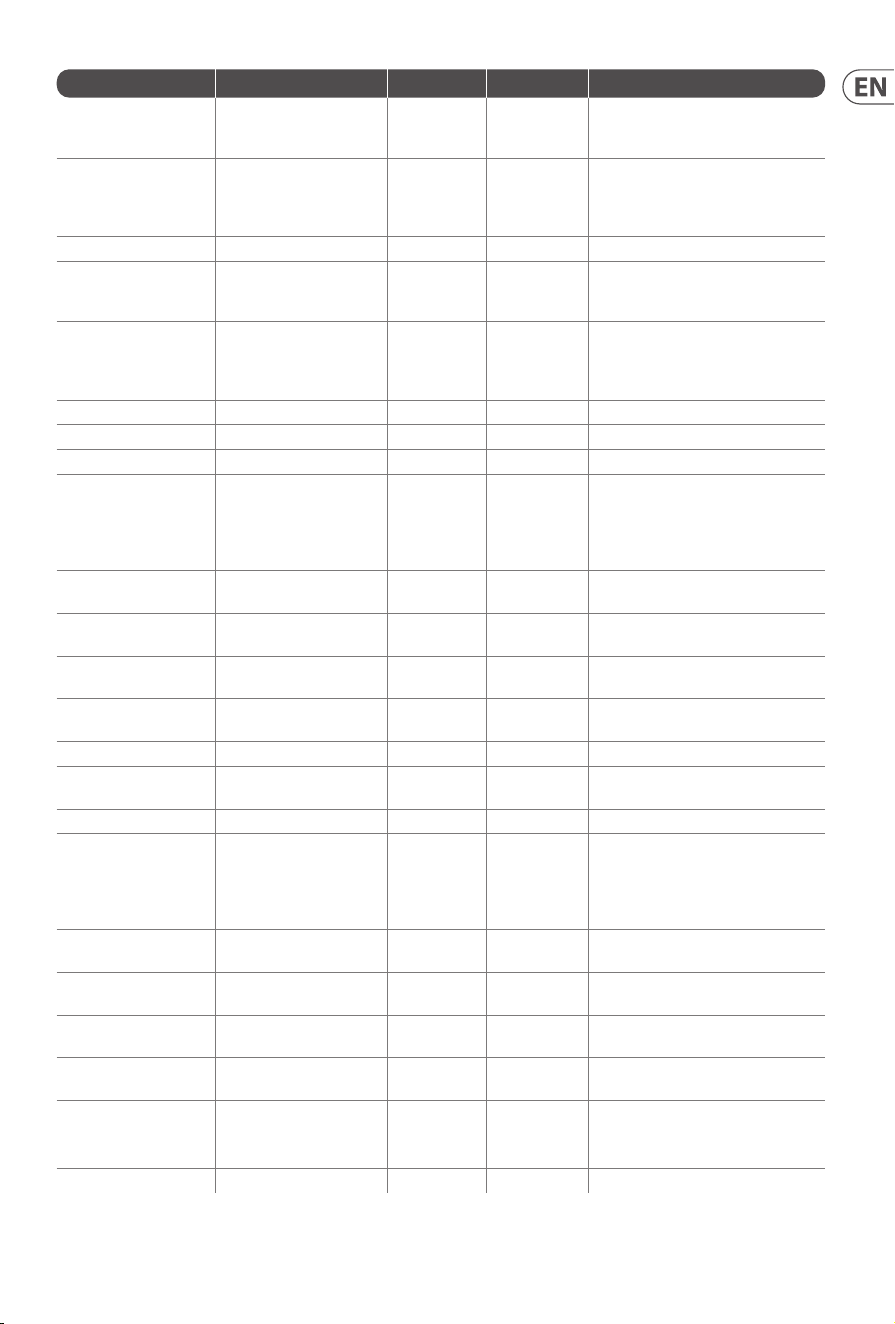
33 PROTON User Manual
SSPKT Function Value Range Default Value Description
0x26 VCF1 mode 0-2 2
0 = high pass;
1 = band pass;
2 = low pass
0x27 VCF1 modulation source 0-3 0
0 = none;
1 = velocity;
2 = mod wheel;
3 = aftertouch
0x28 VCF1 modulation depth 0-FC 0
0x2A VCF2 mode 0-2 2
0 = high pass;
1 = band pass;
2 = low pass
0x2B VCF2 modulation source 0-3 0
0 = none;
1 = velocity;
2 = mod wheel;
3 = aftertouch
0x2C VCF2 modulation depth 0-FC 0
0x2E LFO1 key track base note 0C- 60 0C 0C = MIDI C0
0x2F LFO1 shape mix 0-FF 0
0x30 LFO1 shape 0-4 0
0 = sine;
1 = triangle;
2 = sawtooth;
3 = square;
4 = ramp
0x31 LFO1 blend 0-1 1
0 = blended;
1 = switched
0x32 LFO1 one shot 0-1 0
0 = disabled;
1 = one shot on
0x33 LFO1 retrigger 0-1 0
0 = disabled;
1 = retrigger on
0x34 LFO1 key sync 0-1 0
0 = disabled;
1 = key sync on
0x35 LFO1 key track depth 0-65 0
0x36 LFO1 MIDI clock sync 0-1 0
0 = disabled;
1 = clock sync on
0x39 LFO2 shape mix 0-FF 0
0x3A LFO2 shape 0-4 0
0 = sine;
1 = triangle;
2 = sawtooth;
3 = square;
4 = ramp
0x3B LFO2 blend 0-1 1
0 = blended;
1 = switched
0x3C LFO2 one shot 0-1 0
0 = disabled;
1 = one shot on
0x3D LFO2 retrigger 0-1 0
0 = disabled;
1 = retrigger on
0x3E LFO2 key sync 0-1 0
0 = disabled;
1 = key sync on
0x3F LFO2 key track depth 0-65 0
0x40 LFO2 MIDI clock sync 0-1 0
0 = disabled;
1 = clock sync on
0x43 LFO2 key track base note 0C-60 0C 0C = MIDI C0

34 PROTON User Manual
SSPKT Function Value Range Default Value Description
0x44 Wavefolder mode 0-3 3
0 = AM;
1 = half;
2 = 1;
3 = bypass
0x46 Osc sync 0-1 0
0 = not synced;
1 = Osc 2 synced to Osc 1
0x47 Osc paraphony 0-1 0
0 = mono;
1 = paraphonic
0x48 Osc key split 0 or 0C-60 0
0 = no split;
0C-60 = split at this note
0x49 Sub Osc shape 0-3 0
0 = pulse;
1 = sawtooth;
2 = triangle;
3 = sine
0x4A Osc 1 range 0-3 2
0 = 8’;
1 = 16’;
2 = 32’;
3 = free
0x4B Osc 1 mute 0-1 0
0 = unmuted;
1 = muted
0x4C Sub Osc 1 mute 0-1 0
0 = unmuted;
1 = muted
0x50 Osc 1 linear FM 0-1 0
0 = disabled;
1 = enabled
0x51 Osc 1 waveform blend 0-1 1
0 = blended;
1 = switched
0x52 Osc 1 tuning control 0-1 0
0 = enabled;
1 = disabled
0x53 Osc 1 CV modulation 0-1 0
0 = enabled;
1 = disabled
0x54 Osc 1 MIDI 0-1 0
0 = enabled;
1 = disabled
0x55 Osc 1 portamento 0-18 0C
0 = 12 semitone glide;
18 = greater than 12 semitone glide;
0C = no glide
0x56 Osc 2 range 0-3 2
0 = 8’;
1 = 16’;
2 = 32’;
3 = free
0x57 Osc 2 mute 0-1 0
0 = unmuted;
1 = muted
0x58 Sub Osc 2 mute 0-1 0
0 = unmuted;
1 = muted
0x5C Osc 2 linear FM 0-1 0
0 = disabled;
1 = enabled
0x5D Osc 2 waveform blend 0-1 1
0 = blended;
1 = switched
0x5E Osc 2 tuning control 0-1 0
0 = enabled;
1 = disabled
0x5F Osc 2 CV modulation 0-1 0
0 = enabled;
1 = disabled
0x60 Osc 2 MIDI 0-1 0
0 = enabled;
1 = disabled

35 PROTON User Manual
SSPKT Function Value Range Default Value Description
0x61 Osc 2 portamento 0-18 0C
0 = 12 semitone glide;
18 = greater than 12 semitone glide;
0C = no glide
0x63 Envelope fast/slow 0-1 0
0 = fast;
1 = slow
0x64 Envelope retrigger 0-1 0
0 = disabled;
1 = enabled
0x65 Envelope retrigger mode 0-1 0
0 = Neutron mode;
1 = Proton mode
0x67 ASR Envelope 1 loop 0-1 0
0 = disabled;
1 = enabled
0x68 ASR Envelope 1 bounce 0-1 0
0 = disabled;
1 = enabled
0x69 ASR Envelope 1 sustain 0-1 0
0 = disabled;
1 = enabled
0x6A ASR Envelope 1 inverse 0-1 0
0 = disabled;
1 = enabled
0x6B ASR Envelope 1 reverse 0-1 0
0 = disabled;
1 = enabled
0x6C ASR Envelope 1 retrigger 0-1 0
0 = disabled;
1 = enabled
0x6D ASR Envelope 1 Decay 0-1 0
0 = disabled;
1 = enabled
0x6E ASR Envelope 2 loop 0-1 0
0 = disabled;
1 = enabled
0x6F ASR Envelope 2 bounce 0-1 0
0 = disabled;
1 = enabled
0x70 ASR Envelope 2 sustain 0-1 0
0 = disabled;
1 = enabled
0x71 ASR Envelope 2 inverse 0-1 0
0 = disabled;
1 = enabled
0x72 ASR Envelope 2 reverse 0-1 0
0 = disabled;
1 = enabled
0x73 ASR Envelope 2 retrigger 0-1 0
0 = disabled;
1 = enabled
0x74 ASR Envelope 2 Decay 0-1 0
0 = disabled;
1 = enabled
There is a further special SysEx command, which resets all parameters to factory default and restarts the Proton: F0 00 20 32 00 01 25 00
7D F7.

36 PROTON User Manual
21. Glossary
ADSR – Envelope generator with four stages: Attack, Decay, Sustain and Release.
A(S)R – Envelope generator with two or three stages: Attack, (Sustain) and Release.
Amplitude – The volume of a sound.
Arpeggiator – a part of the synthesizer which causes the notes of a chord to be played individually as an arpeggio according to settings.
Attack Time – The rst stage of the envelope. Specied as the time taken for the envelope to reach maximum level when keys
areplayed.
Attenuate – To reduce the level of a signal or modulation source.
Cent – Unit of measurement for tuning. One semitone is divided into 100 cents.
Cuto Frequency – The point at which the lter starts to cut frequencies.
Decay Time – The second stage of the envelope. Specied as the time taken for the sound level to drop from maximum to the sustain
level while the played keys are being held.
Digital Audio Workstation (DAW) – A computer based software package that allows the recording, editing and playing back of audio
and/or MIDI data.
Envelope Generator – Envelope generators can be used to contour the sound. Most commonly used to aect the amplitude (volume)
of the sound they can also be used on lters and to aect pitch.
Filter – Filters attenuate the frequencies above or below their cuto point, thus aecting the timbre of the sound.
Frequency – The number of cycles per second (Hz) that an oscillator runs at.
Hertz (Hz) – Unit of measurement for frequencies. 1 Hz is one cycle per second.
Invert – change to the opposite, so a positive becomes negative for example.
Keyboard Tracking – Use of the notes played on the keyboard to adjust another parameter, for example.
KiloHertz (kHz) – Common abbreviation for one thousand Hz.
Low Frequency Oscillator (LFO) – An oscillator that runs at a low speed and is used to modulate other parts of the synthesiser.
Musical Instrument Digital Interface (MIDI) – a protocol that allows musical instruments, other peripherals and DAWs to pass data
according to a dened standard.
MIDI Clock – a timing signal that is sent as part of the MIDI data.
MIDI Message – data transmitted from one MIDI device to another that constitutes an instruction.
Mix – The balance between two or more signals.
Modulation – The use of sources to control a parameter of a destination.
Monophonic – Only allowing one note to be played at a time.
Noise – A random sound comprising of all frequencies.
Note Priority – Determines which note is played when the maximum number is exceeded. Typically lowest, highest or last.
Octave – A measure of pitch.
Oscillator (Osc or VCO) – The basic sound source of the synthesizer.
Oscillator Sync – The process by which the cycle of one oscillator is synchronized to the cycle of another.
Output – Can refer both to the signal sent out from one part of the synthesizer to another, or to the physical sockets used to connect to
external equipment.
Parameter – A setting whose value can be changed.
Paraphony – When two or more oscillators are playing dierent notes, but feeding into the same lter(s), VCAs (etc) this is known as
paraphony.
Phase – The measurement in degrees of the time dierence between two waveforms or a waveform and a xed reference point.
Pitch Bend – Changing the pitch of a note up or down while it is being played.
Polychain – The linking of two or more monophonic synthesizers via MIDI to share note input polyphonically.
Portamento – The eect of ‘gliding’ the pitch between notes rather than changing instantly.
Pulse Wave – A wave similar to a square wave, but whose symmetry can be changed.
Pulse Width Modulation – The modulation of the symmetry of a pulse wave.
Rate – The speed at which an action takes place.

37 PROTON User Manual
Release Time – The nal stage of the envelope. Specied as the time taken for the envelope to reach zero once keys have been released.
Resonance – The emphasis of frequencies centered on the cuto frequency.
Sample & Hold (S&H) – the sampling of a waveform, typically that of an LFO or noise source, to provide a series of voltages at a set rate.
Sawtooth – A waveform resembling the teeth of a saw, with an instantaneous leading edge followed by a gradual decline to zero point.
Self Oscillation – The point at which a lter starts to produce a sine wave output owing to excessive use of resonance.
Semitone – A measure of pitch. Each octave contains 12 semitones.
Sequencer – A part of the synthesizer which can be programmed with a series of notes and/or chords which are then repeated back at a
selected tempo.
Signal Flow – The path of a signal from one part of the synthesizer to another.
Sine Wave – A smooth waveform that contains only the fundamental frequency with no harmonics.
Square Wave – a symmetrical waveform which changes instantaneously from zero state to full.
Sustain Level – The third stage of the envelope. This is the level that the envelope holds at after decay until keys are released.
Synchronization (Sync) – Co-ordinating the timing of devices where one is the master and the other(s) are synchronized to it.
Trigger – The activation of a function, for example pressing a key to start the Envelope cycle.
Tune – The adjustment of the pitch of an instrument to be the same as that of another instrument; or the adjustment of one oscillator to
be in tune with the other.
Unison – Two or more voices played together on the same key(s).
Universal Serial Bus (USB) – An interface that can be used to connect your synthesizer to a DAW, or to receive rmware updates.
Velocity – The strength at which the keyboard is played, which can be used as a modulation source.
Voltage Controlled Amplier (VCA) – An amplier whose level can be adjusted by control voltages, for example from an
envelopegenerator.
Wavefolder – A circuit that allows a wave to be folded back onto itself, producing dierent harmonic content.
38 PROTON User Manual
FEDERAL COMMUNICATIONS
COMMISSION COMPLIANCE
INFORMATION
Behringer
PROTON
Responsible Party Name: Music Tribe Commercial NV Inc.
Address: 122 E. 42nd St.1,
8th Floor NY, NY 10168,
United States
Email Address: [email protected]
PROTON
This equipment has been tested and found to comply with
the limits for a Class B digital device, pursuant to part
15 of the FCC Rules. These limits are designed to provide
reasonable protection against harmful interference in
a residential installation. This equipment generates,
uses and can radiate radio frequency energy and, if not installed
and used in accordance with the instructions, may cause harmful
interference to radio communications. However, there is no
guarantee that interference will not occur in a particular installation.
If this equipment does cause harmful interference to radio or
television reception, which can be determined by turning the
equipment o and on, the user is encouraged to try to correct the
interference by one or more of the following measures:
• • Reorient or relocate the receiving antenna.
• • Increase the separation between the equipment and receiver.
• • Connect the equipment into an outlet on a circuit dierent
from that to which the receiver is connected.
• • Consult the dealer or an experienced radio/TV
technician for help.
• • Consult the dealer or an experienced
radio/TV technician for help.
This equipment complies with Part 15 of the FCC rules. Operation
is subject to the following two conditions:
(1) this device may not cause harmful interference, and
(2) this device must accept any interference received, including
interference that may cause undesired operation.
Important information:
Changes or modications to the equipment not expressly
approved by Music Tribe can void the user’s authority to
use the equipment.
Hereby, Music Tribe declares that this product is in compliance with
Directive 2014/35/EU, Directive 2014/30/EU, Directive 2011/65/EU and
Amendment 2015/863/EU, Directive 2012/19/EU, Regulation 519/2012
REACH SVHC and Directive 1907/2006/EC.
Full text of EU DoC is available at https://community.musictribe.com/
EU Representative: Music Tribe Brands DK A/S
Address: Gammel Strand 44, DK-1202 København K, Denmark
UK Representative: Music Tribe Brands UK Ltd.
Address: 8th Floor, 20 Farringdon Street London EC4A 4AB,
UnitedKingdom
Correct disposal of this product: This symbol
indicates that this product must not be disposed
of with household waste, according to the WEEE
Directive (2012/19/EU) and your national law.
Thisproduct should be taken to a collection center
licensed for the recycling of waste electrical and
electronic equipment (EEE). Themishandling of
this type of waste could have a possible negative impact on the
environment and human health due to potentially hazardous
substances that are generally associated with EEE. At the same
time, your cooperation in the correct disposal of this product will
contribute to the ecient use of natural resources. For more
information about where you can take your waste equipment for
recycling, please contact your local city oce, or your household
waste collection service.

We Hear You