
Technical Support and E-Warranty Certificate
www.vevor.com/support
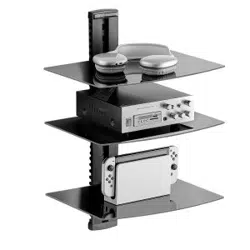
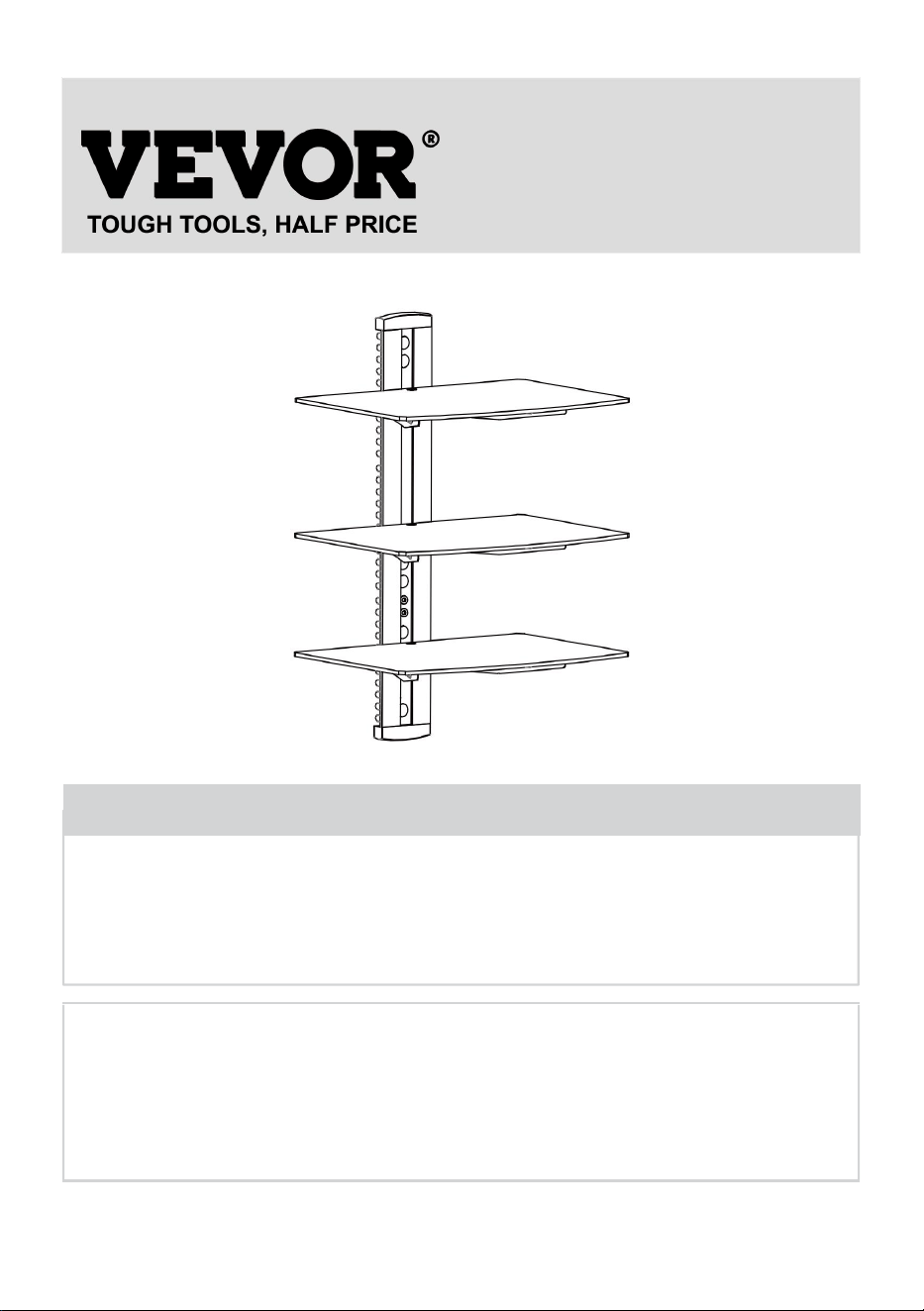
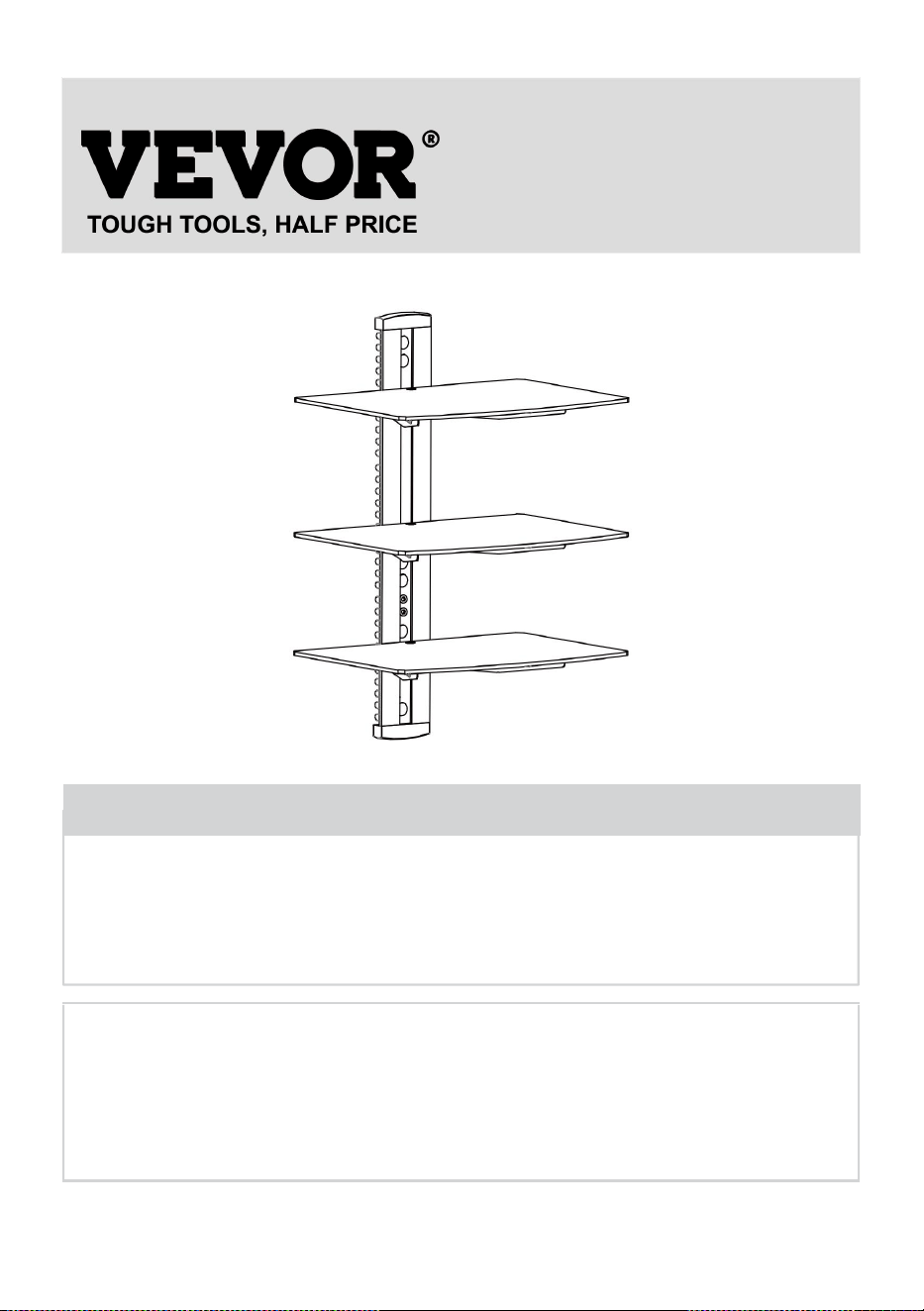
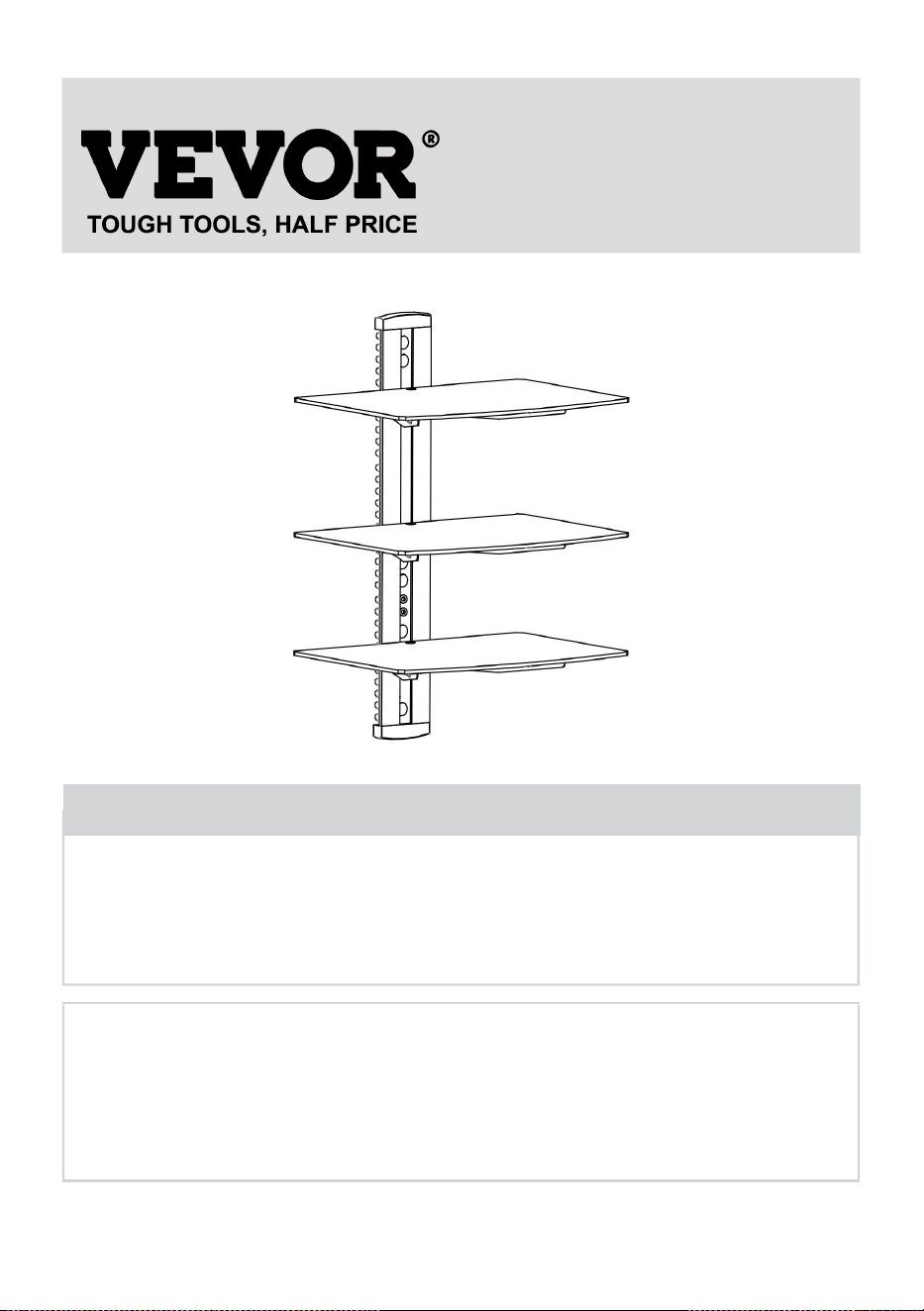
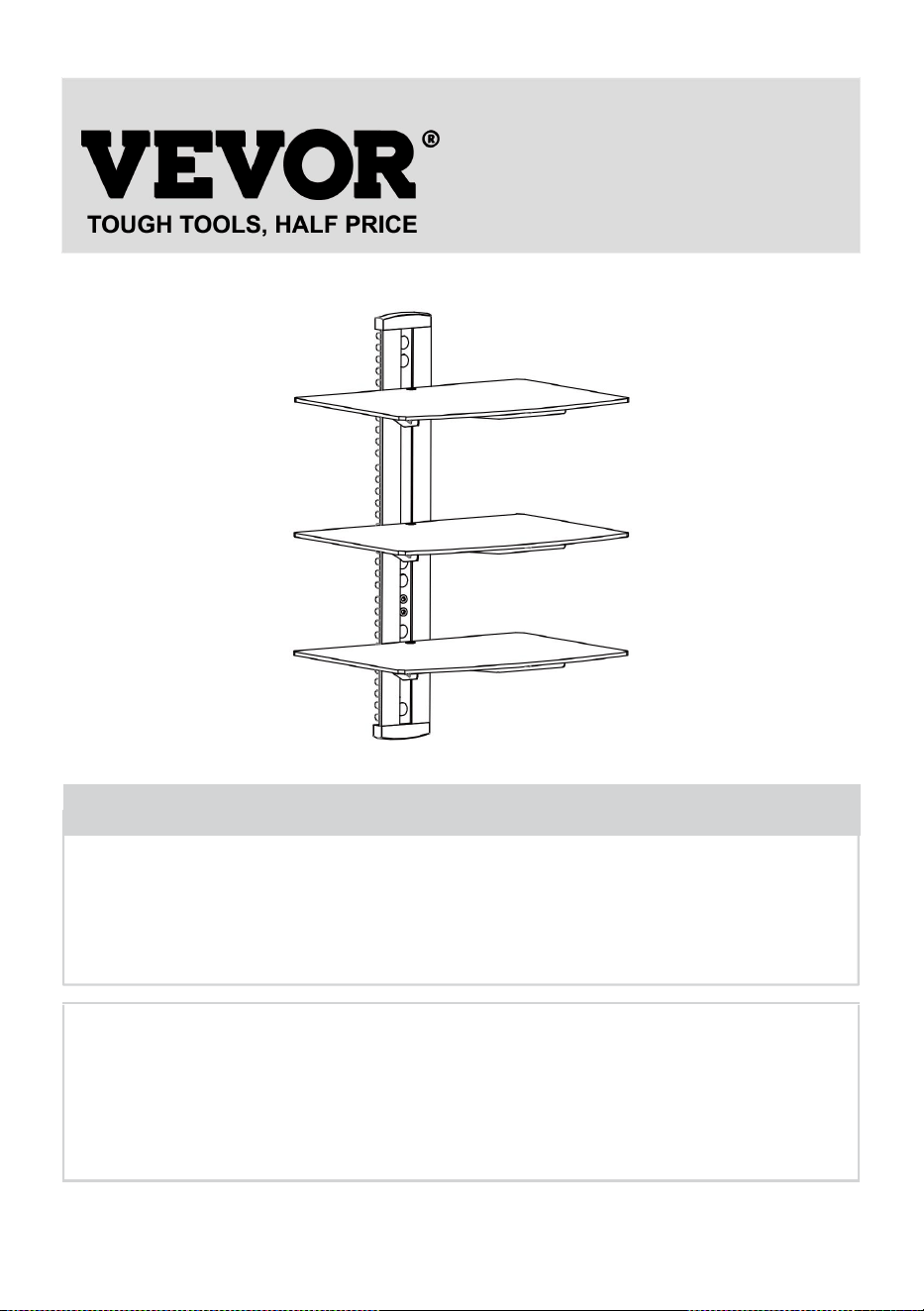
AUDIO COMPONENT STAND
USER MANUAL
MODEL NO.: CS303
We continue to be committed to provide you tools with competitive price.
"Save Half", "Half Price" or any other similar expressions used by us only represents an
estimate of savings you might benefit from buying certain tools with us compared to the major
top brands and does not necessarily mean to cover all categories of tools offered by us. You
are kindly reminded to verify carefully when you are placing an order with us if you are
actually saving half in comparison with the top major brands.

1
MODEL NO.: CS303
Have product questions? Need technical support? Please feel free to
contact us:
Technical Support and E-Warranty Certificate
www.vevor.com/support
NEED HELP? CONTACT US!
This is the original instruction, please read all manual instructions
carefully before operating. VEVOR reserves a clear interpretation of our
user manual. The appearance of the product shall be subject to the
product you received. Please forgive us that we won't inform you again if
there are any technology or software updates on our product.
Audio Component Stand

2
WARNING:
Please read this manual carefully before using the product. Failure to
do so may result in serious injury.
ASSEMBLY PRECAUTIONS
Do not install the product until you have read and understood the
instructions and warnings provided in this installation sheet. If you
have any questions regarding any of the instructions or warnings,
please contact your local distributor.
Please refer to the installation guide for recommended distances from
the wall to avoid the risk of property damage.
This product should only be installed by someone with good
mechanical aptitude, experience in basic construction, and a full
understanding of the installation process.
Make sure that the supporting surface will safely support the combined
load of the equipment and all attached hardware and components.
If mounting to wood wall studs, make sure that mounting screws are
anchored into the center of the studs. Use of an “edge to edge” stud
finder is highly recommended.
Always use an assistant or mechanical lifting equipment to safely lift
and position equipment.
Tighten screws firmly, but do not overtighten. Over tightening can
damage the items, greatly reducing their holding power.
This product intended for indoor use only. Using this product outdoors
could lead to product failure and personal injury.
Never exceed the maximum load capacity.
SAVE THE INSTRUCTIONS
3
USE PRECAUTIONS
TO PREVENT SERIOUS INJURY AND DEATH FROM TIPPING:
1. This product is not a toy. Keep children away from this item.
2. Do not exceed weight capacities before moving.
3. Use only on a flat, hard and smooth surface capable of safely
supporting a fully loaded Audio Component Stand.
4. Use as intended only. Inspect before every use and do not use if parts
are loose or damaged.
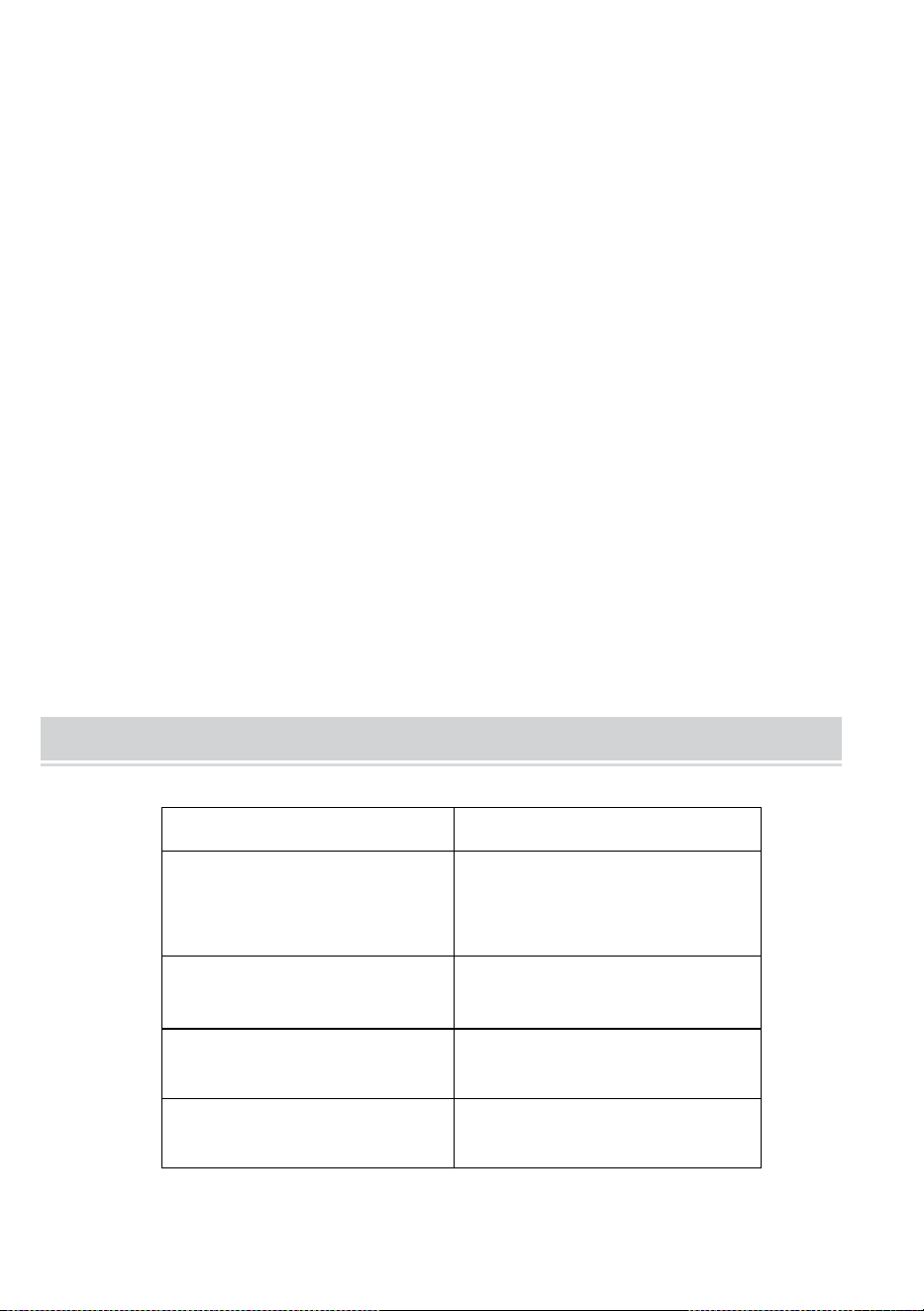
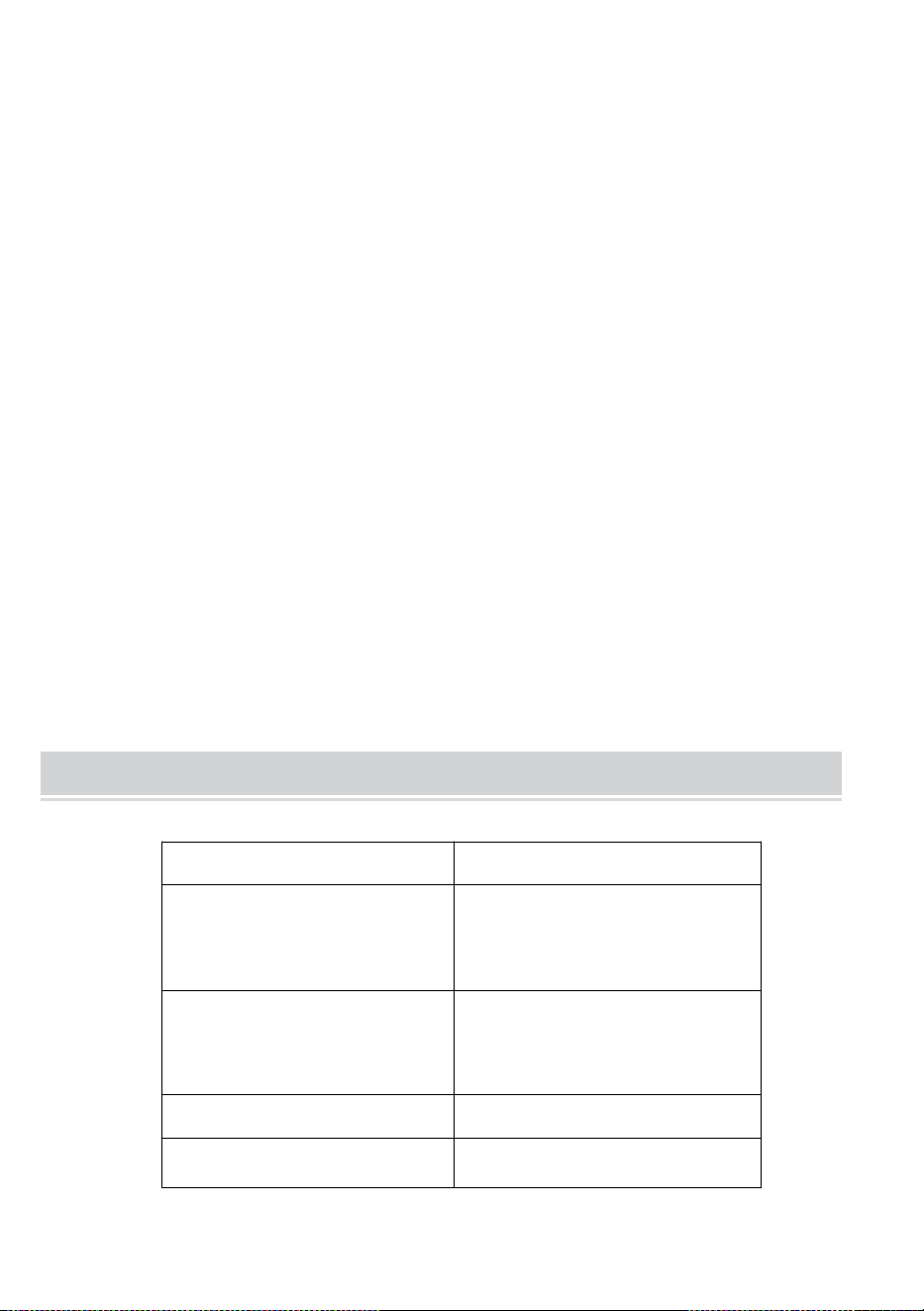
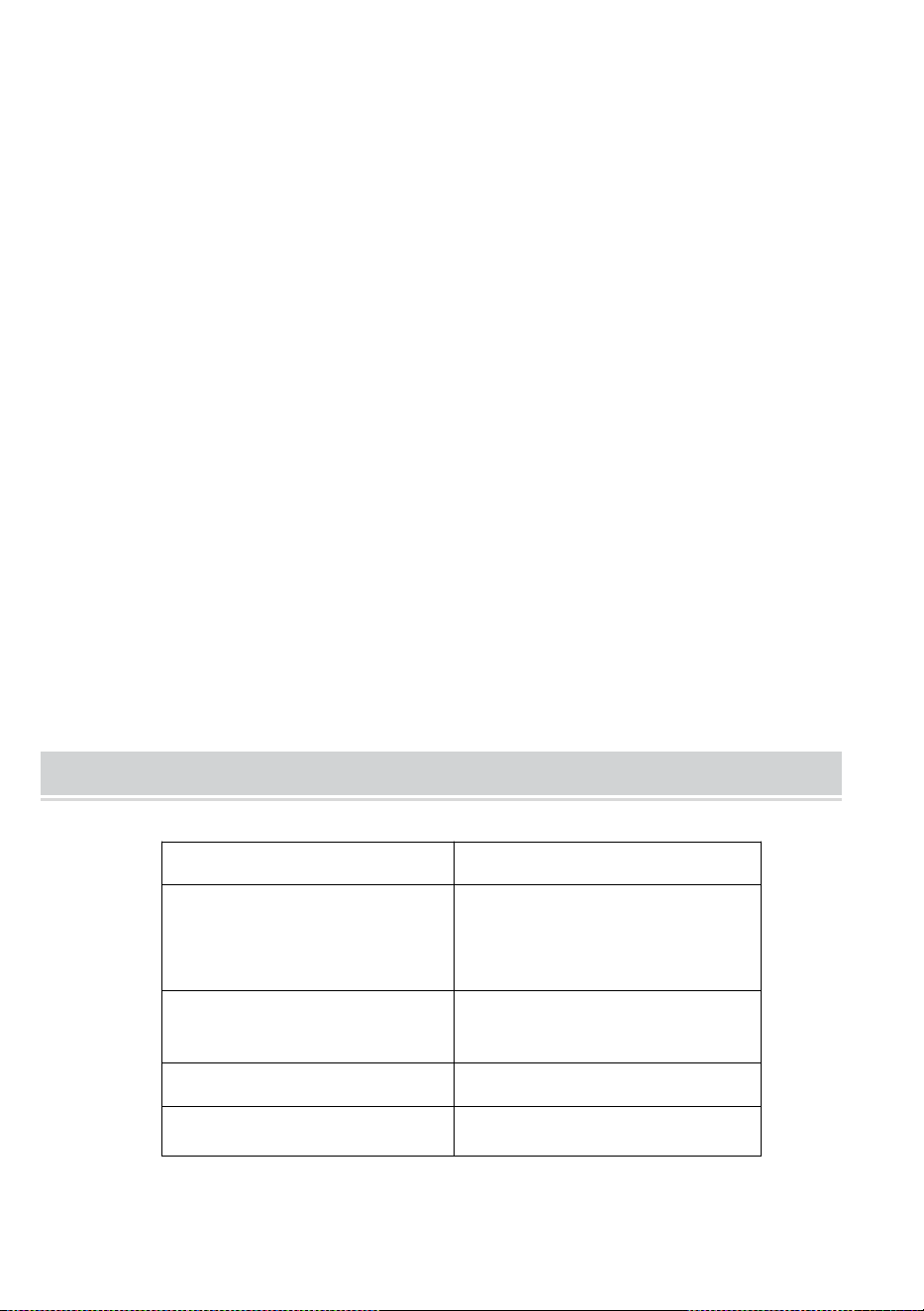
TECHNICAL SPECIFICATIONS
Model
CS303
Product Dimensions
(LxWxH)(mm)
430*210*315
Packing
Size(LxWxH)(mm)
417*295*63
Net Weight(kg)
About 4
Gross Weight(kg)
About 4.4
*Products such as specifications, appearance, and design are
subject to modification without prior notice.
4
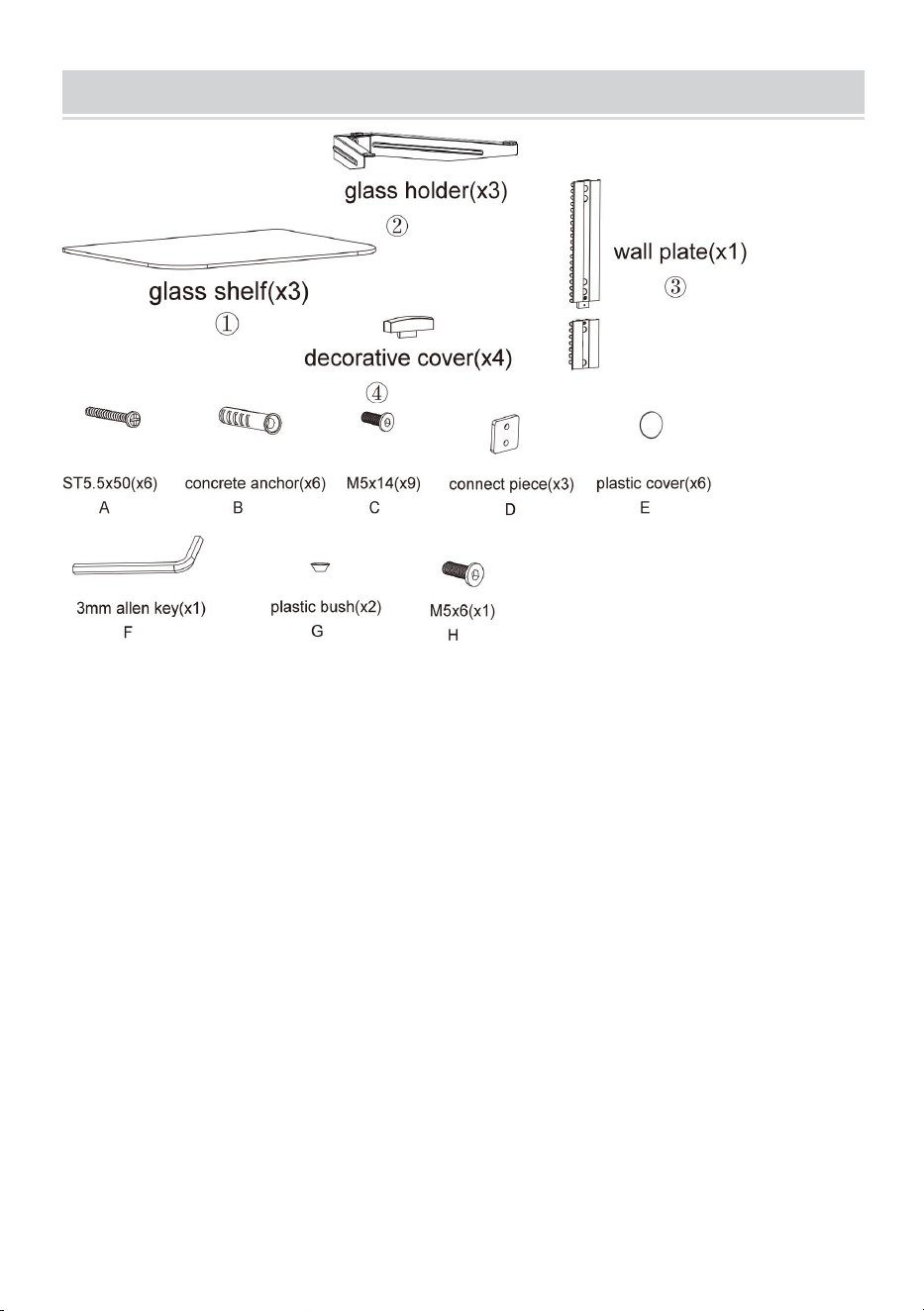
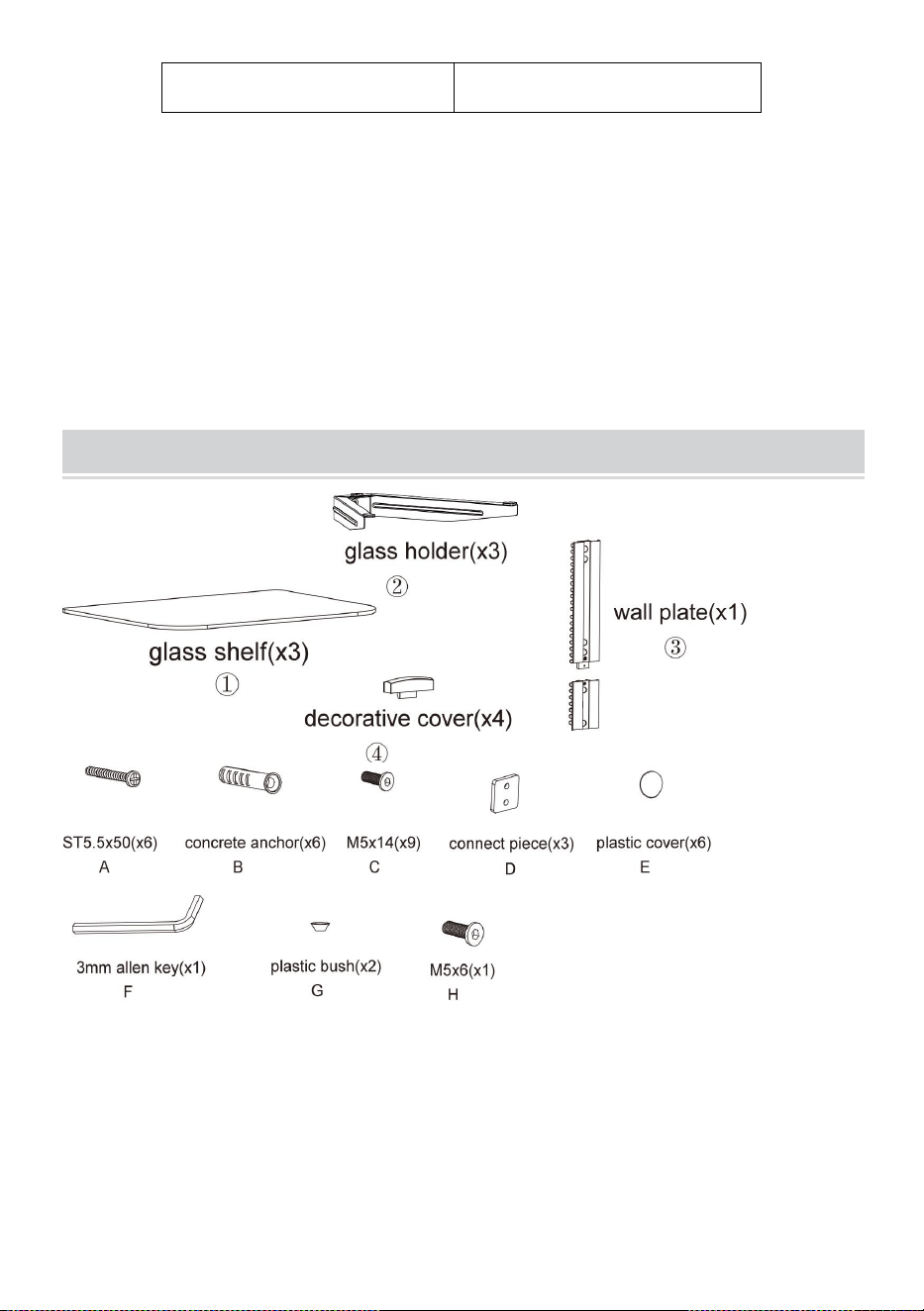
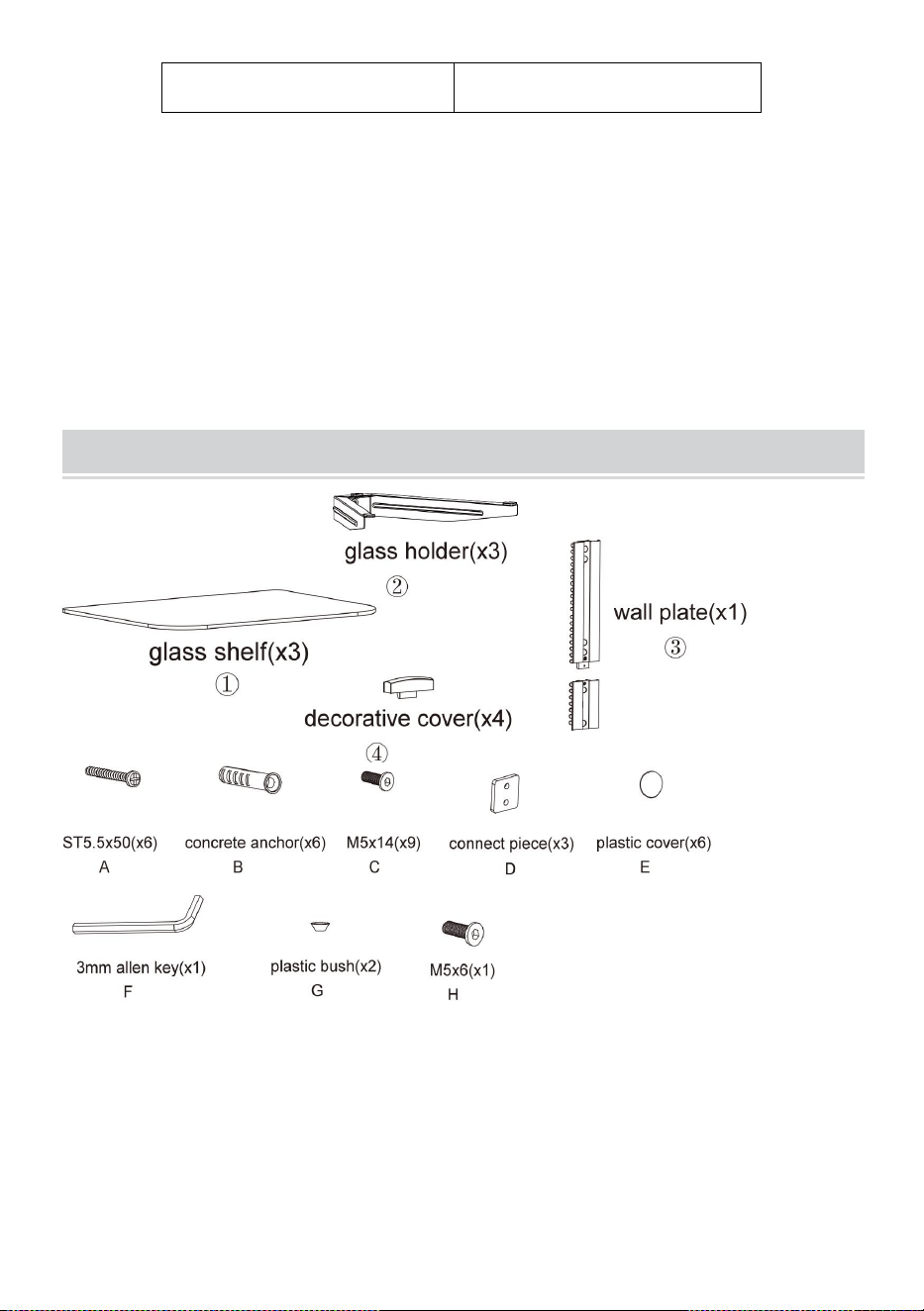
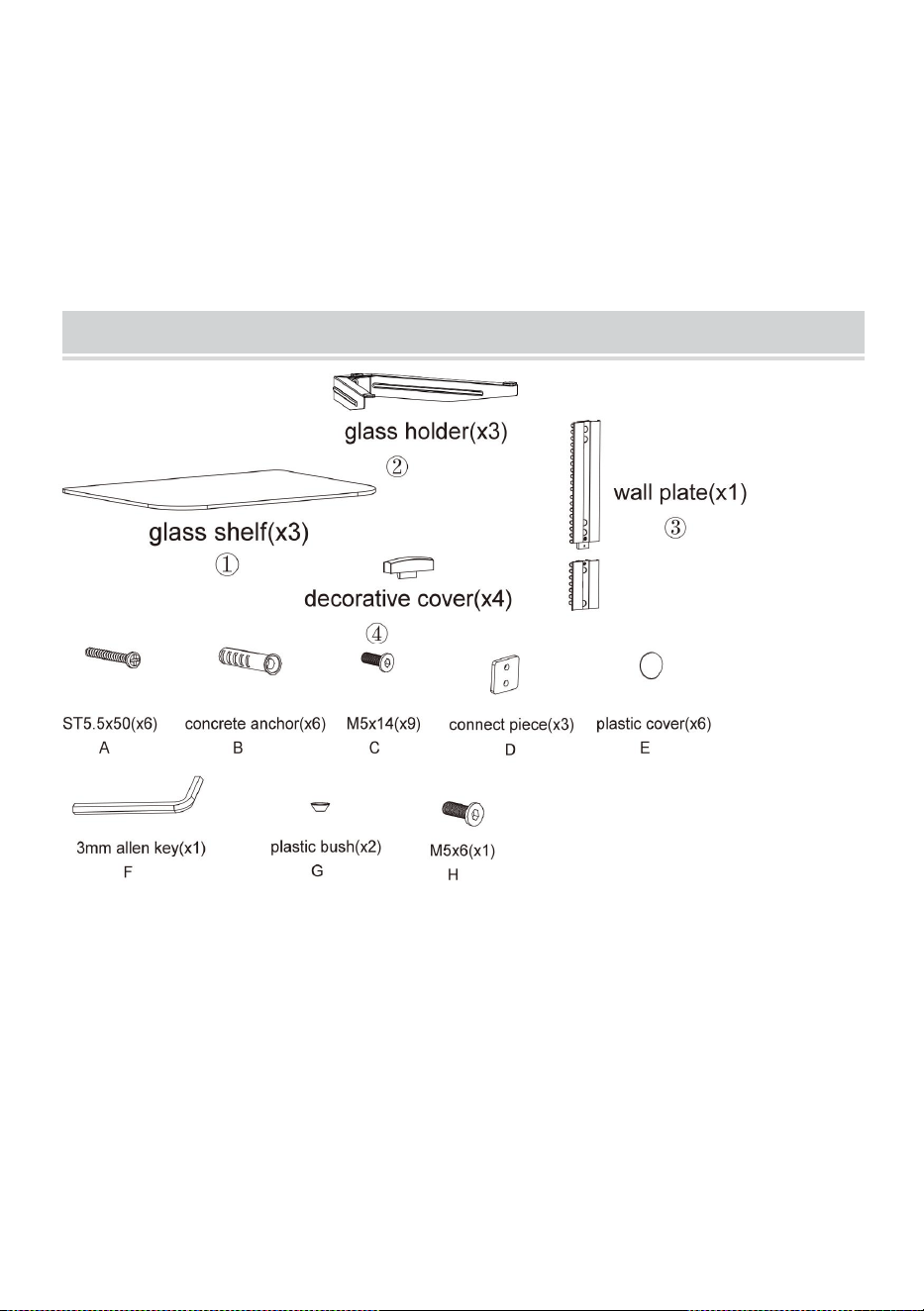
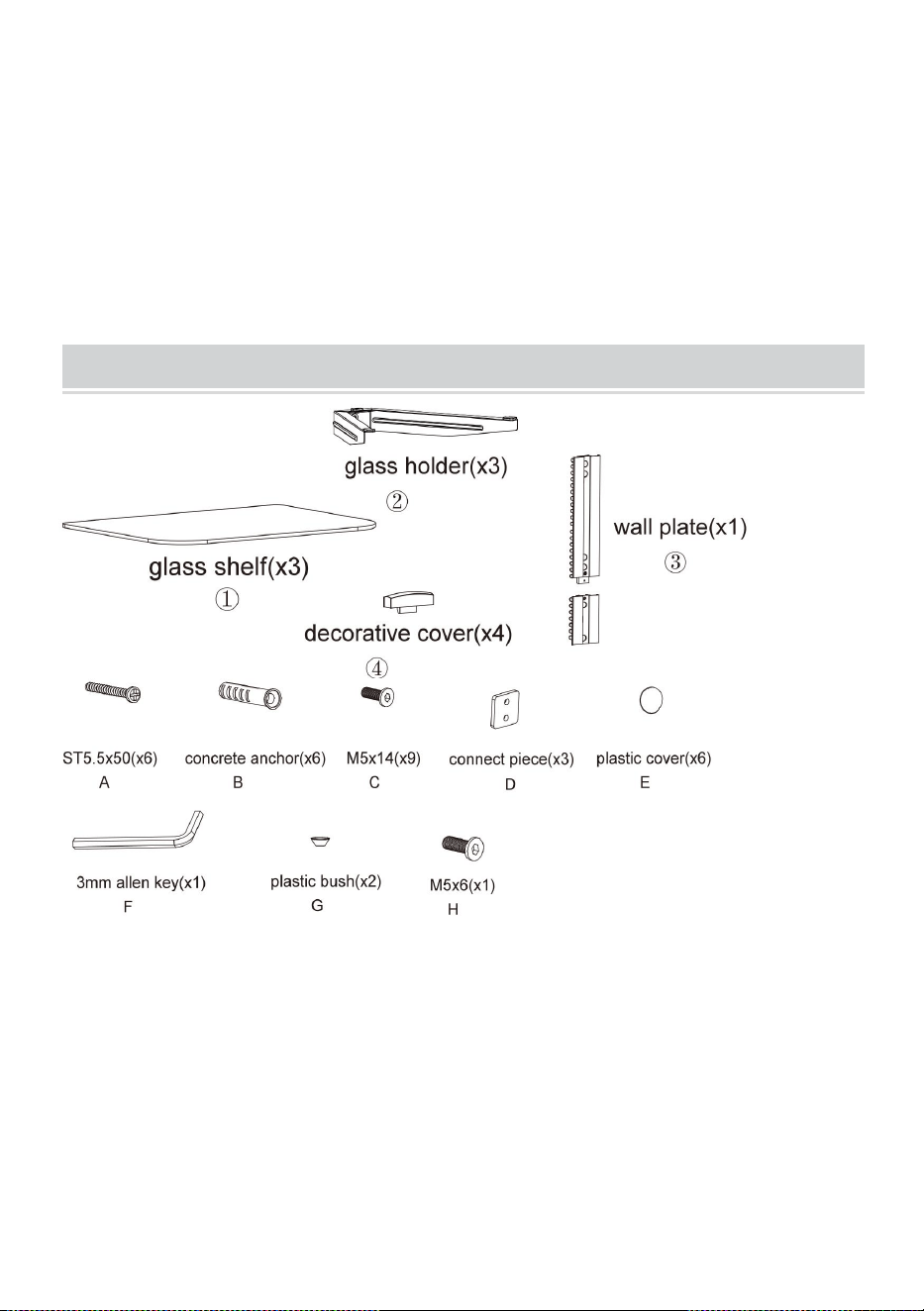
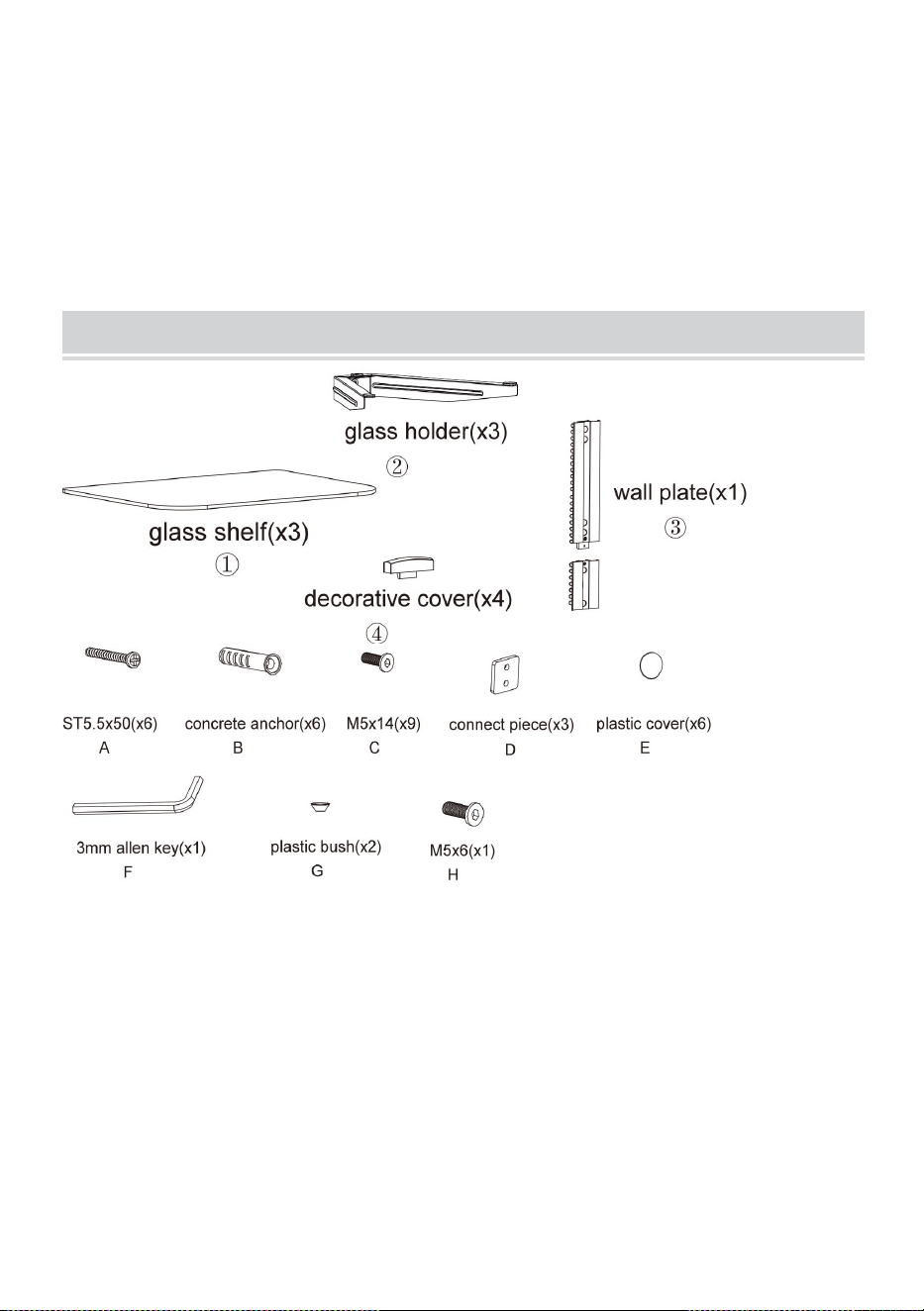
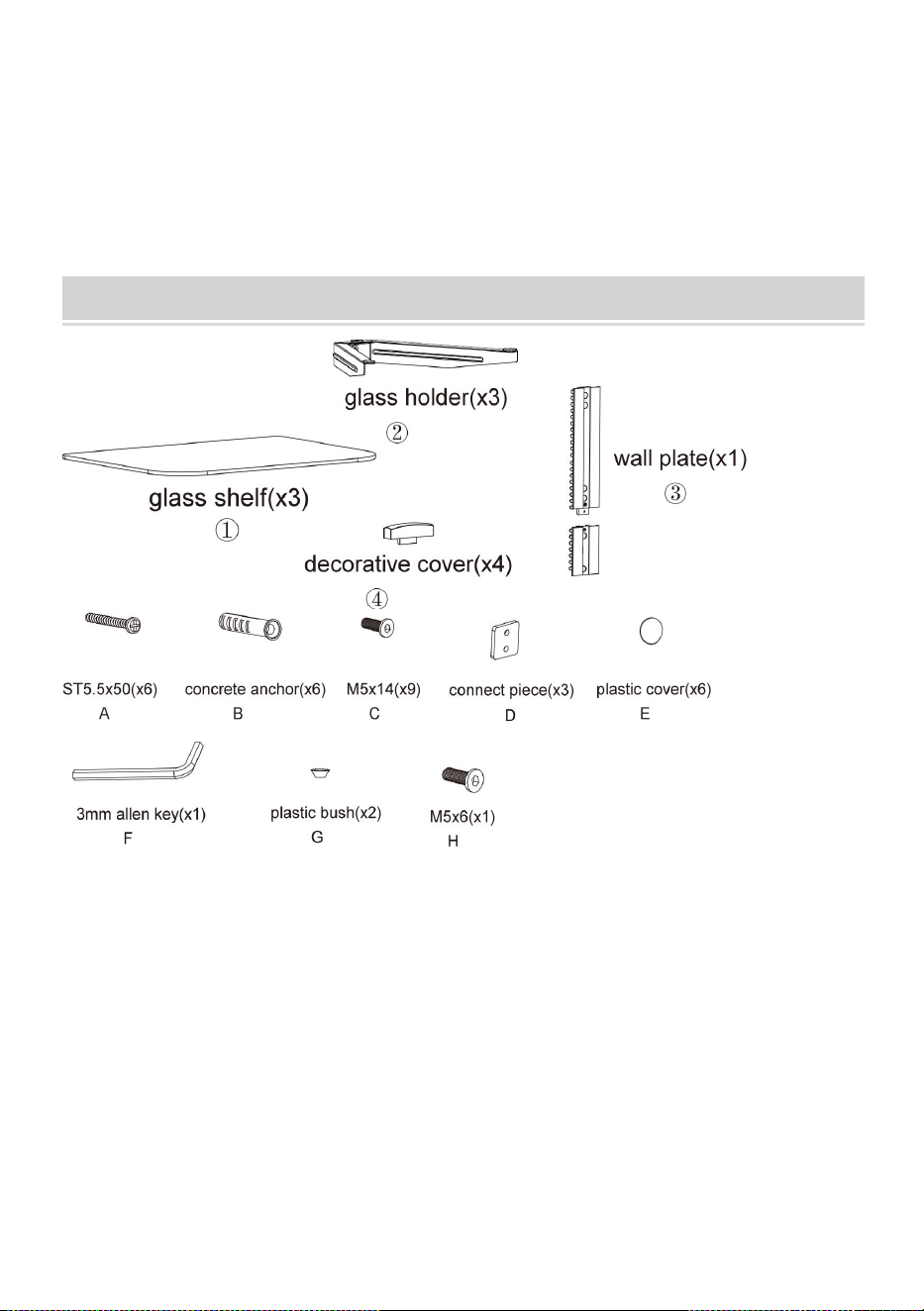
PACKAGE CONTENTS
Tools required
Phillips Head Screw Driver (Length: 200mm (Excluding the
Handle) )
Electric Drill and 8mm Masonry Bit for Concrete Wall Installation
Marking Pen
Hammer
5
ASSEMBLY STEPS
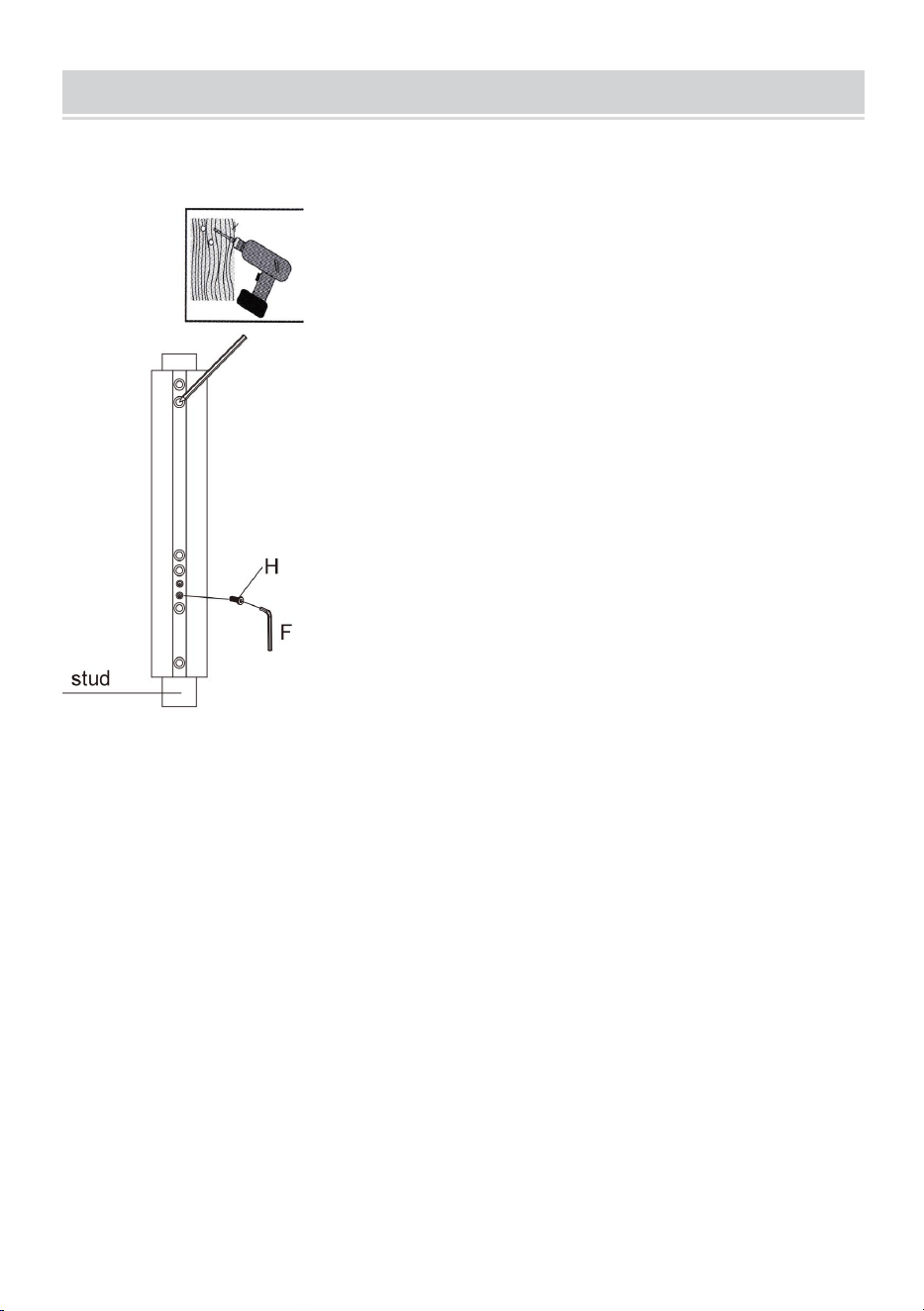
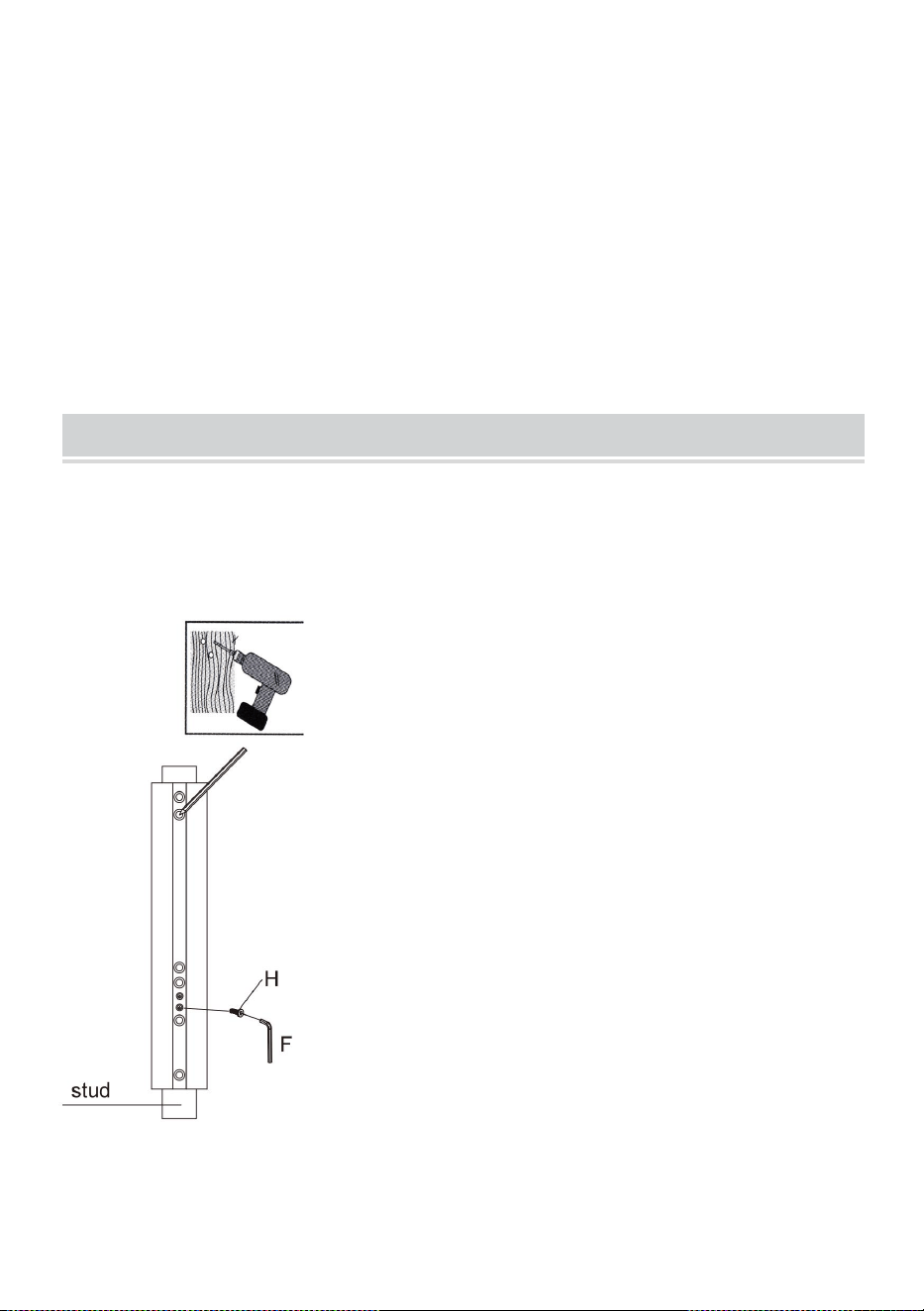
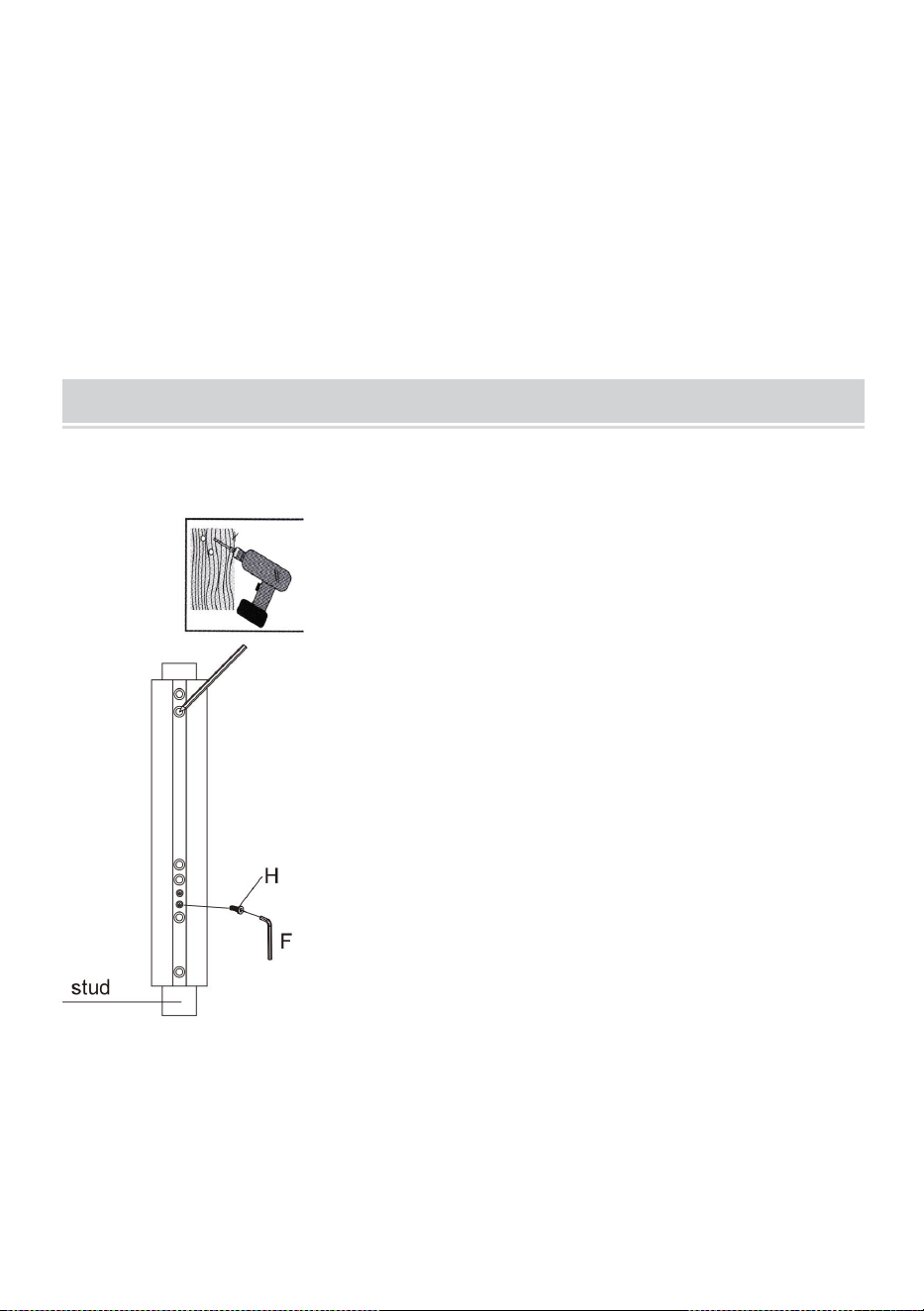
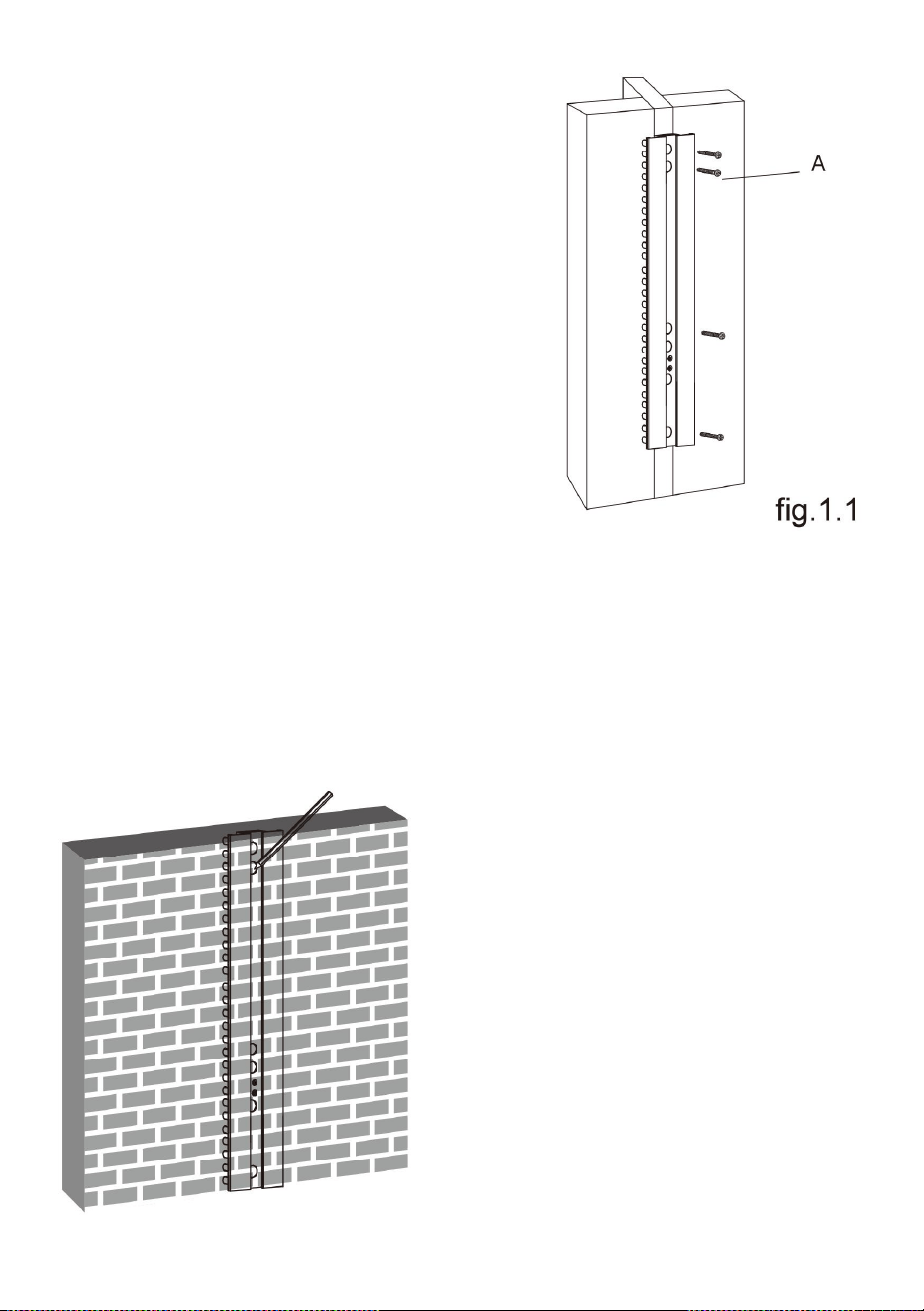
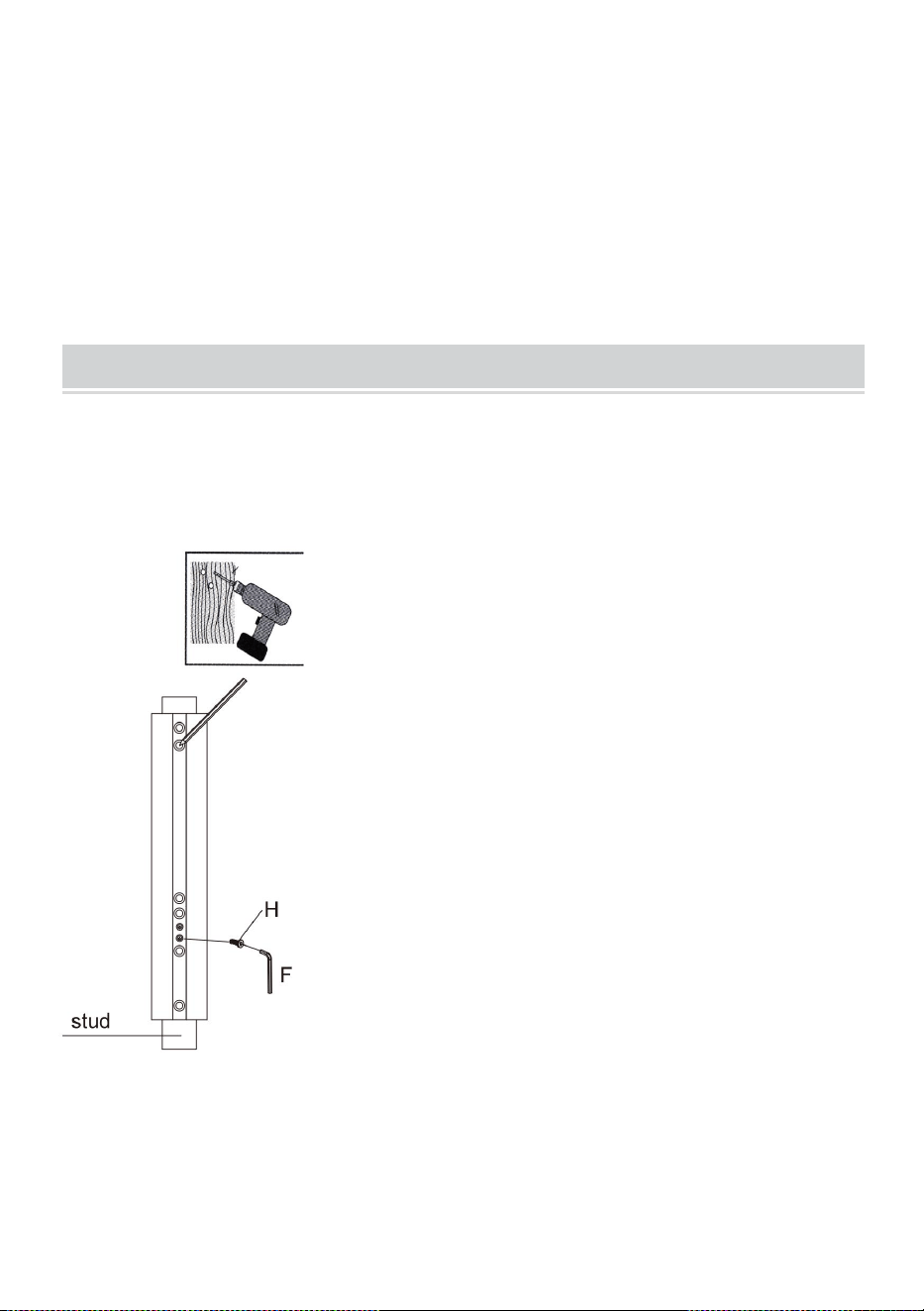
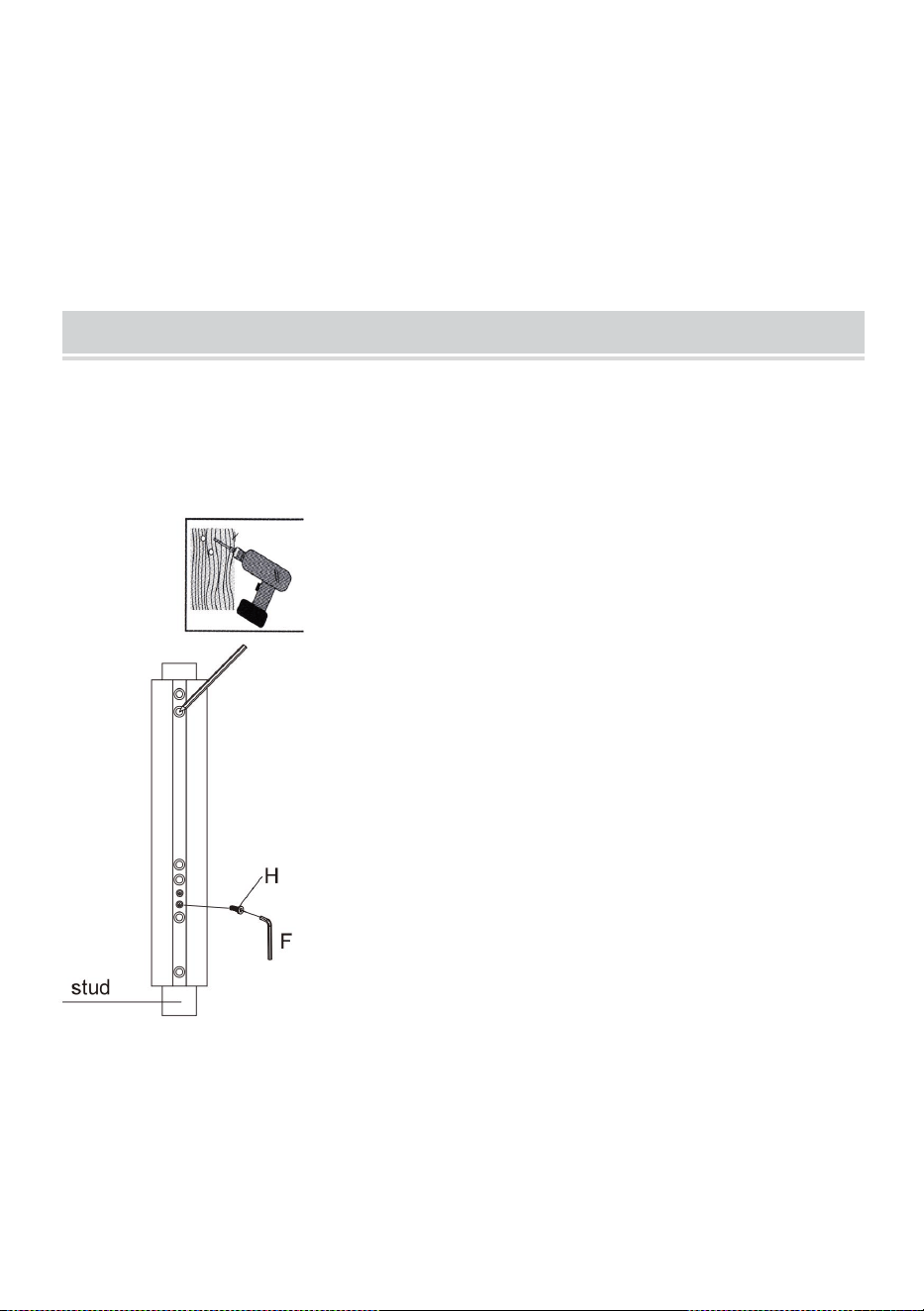
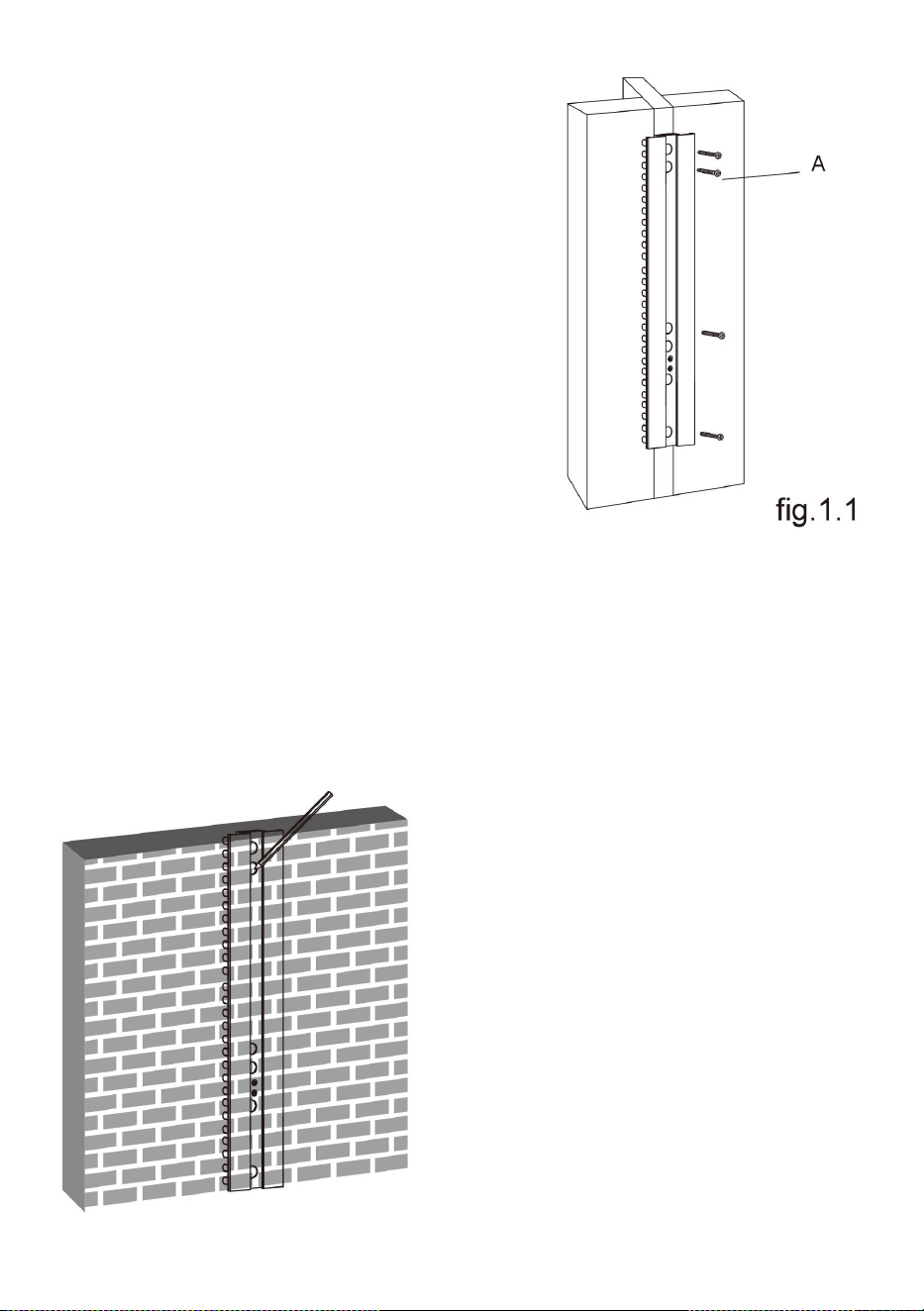
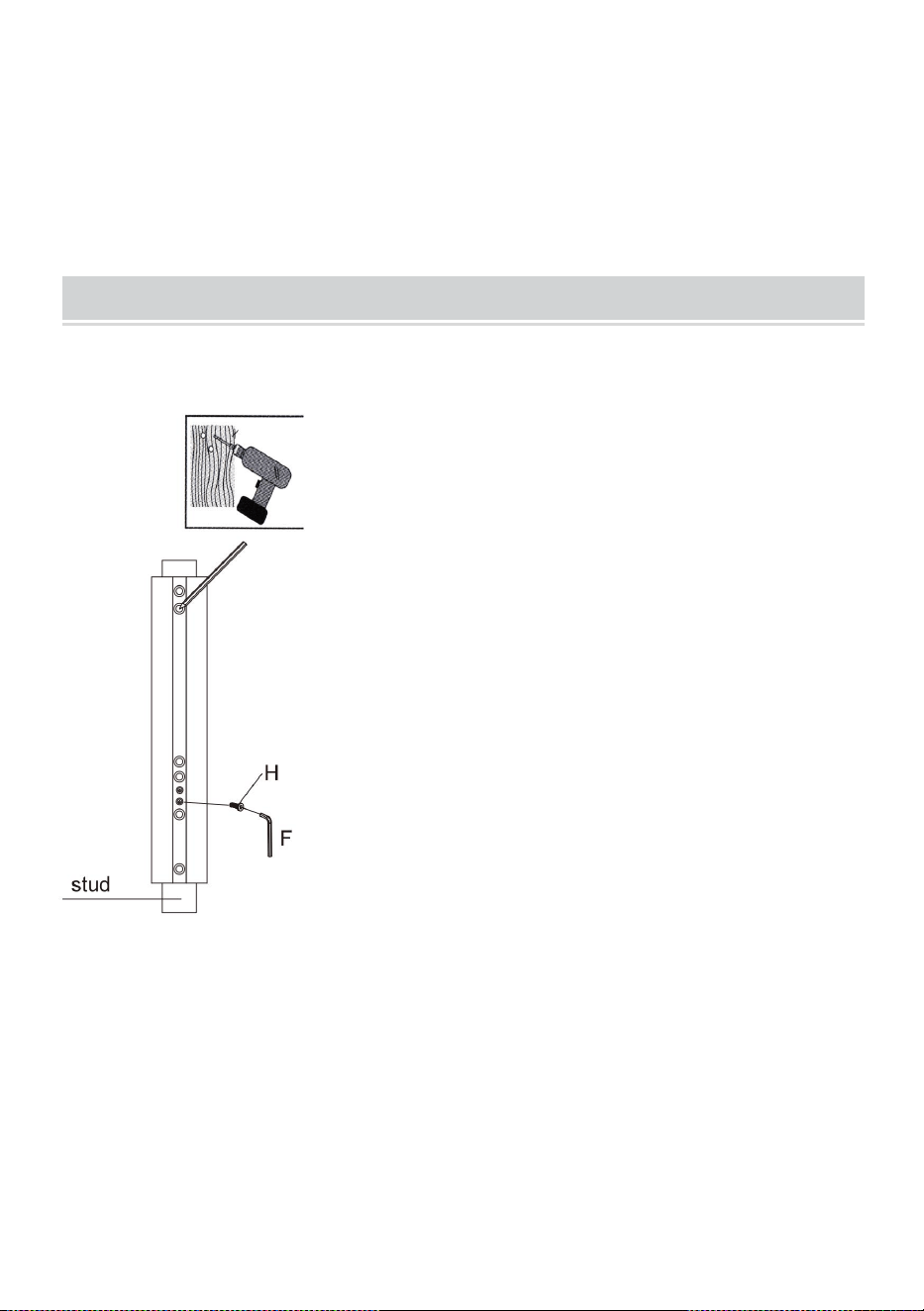
STEP1-a: WOOD STUD WALL MOUNTING:
● Use a stud finder to locate the
edges of the studs. It is highly
recommended to use an
edge-to-edge stud finder. Draw a
vertical line down the center of
each stud based on their edges.
● Place wall plate on wall as a
template and mark the center
of the four mounting holes. Make
sure that the mounting holes are
on the centerline of stud.
6
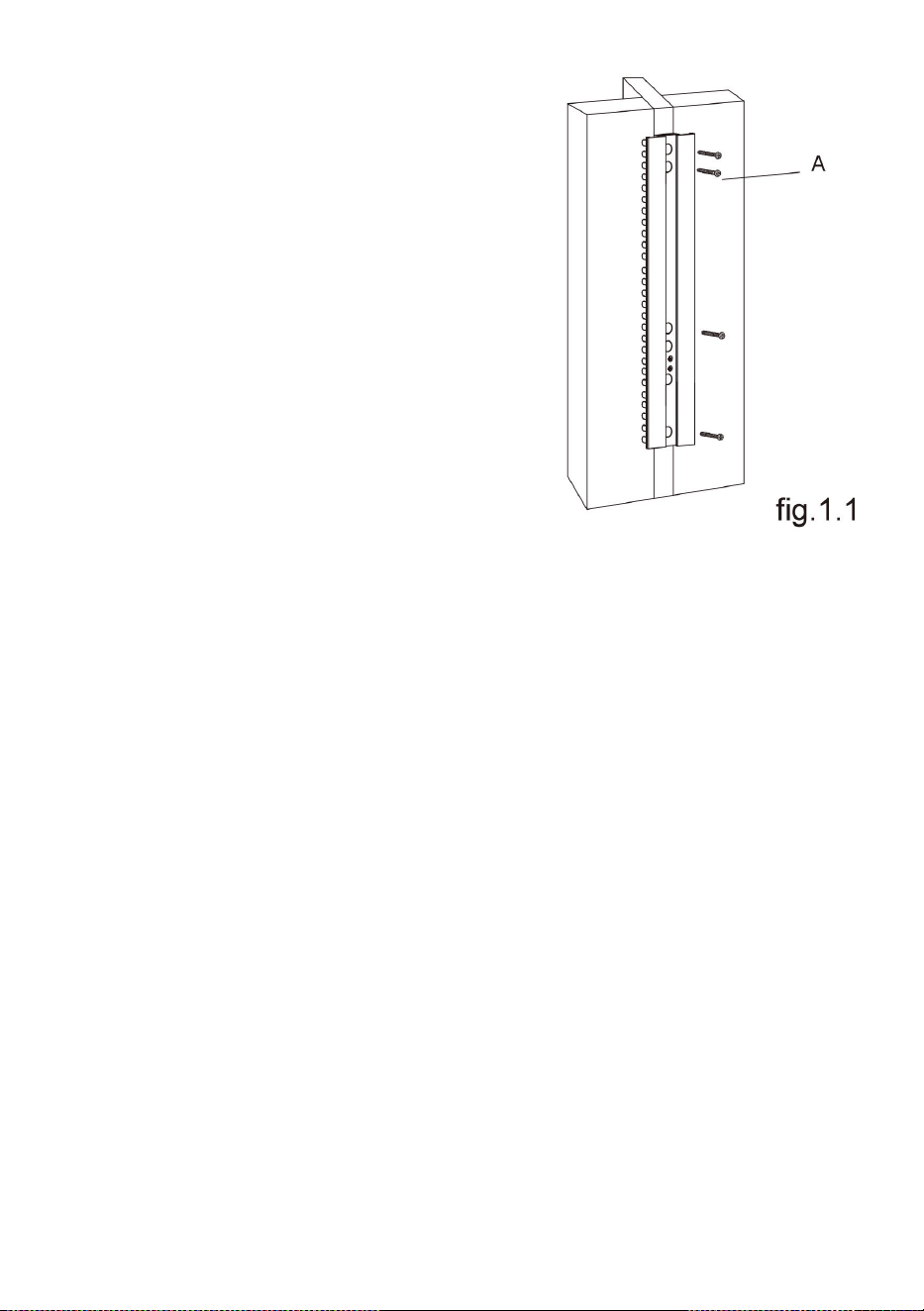
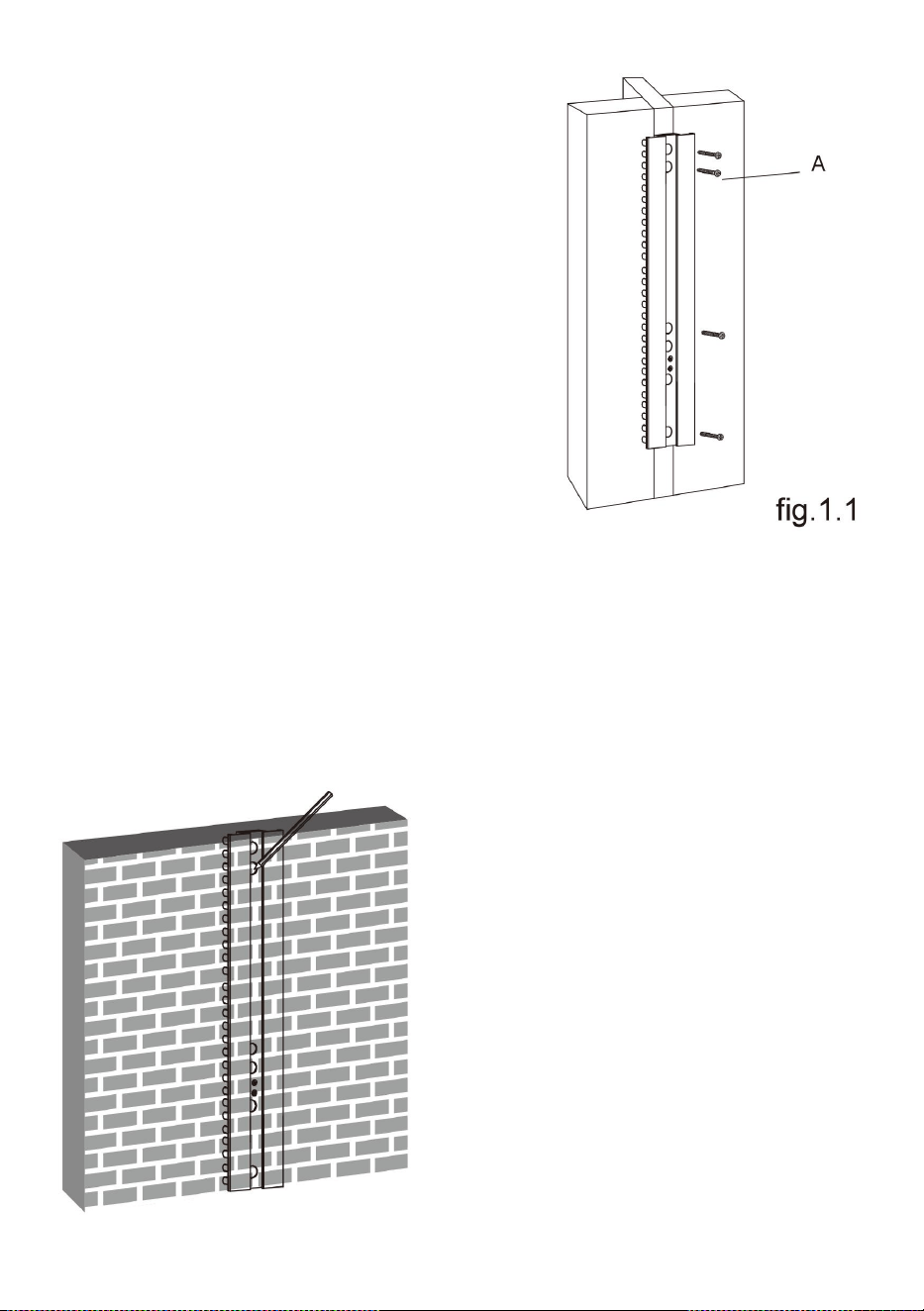
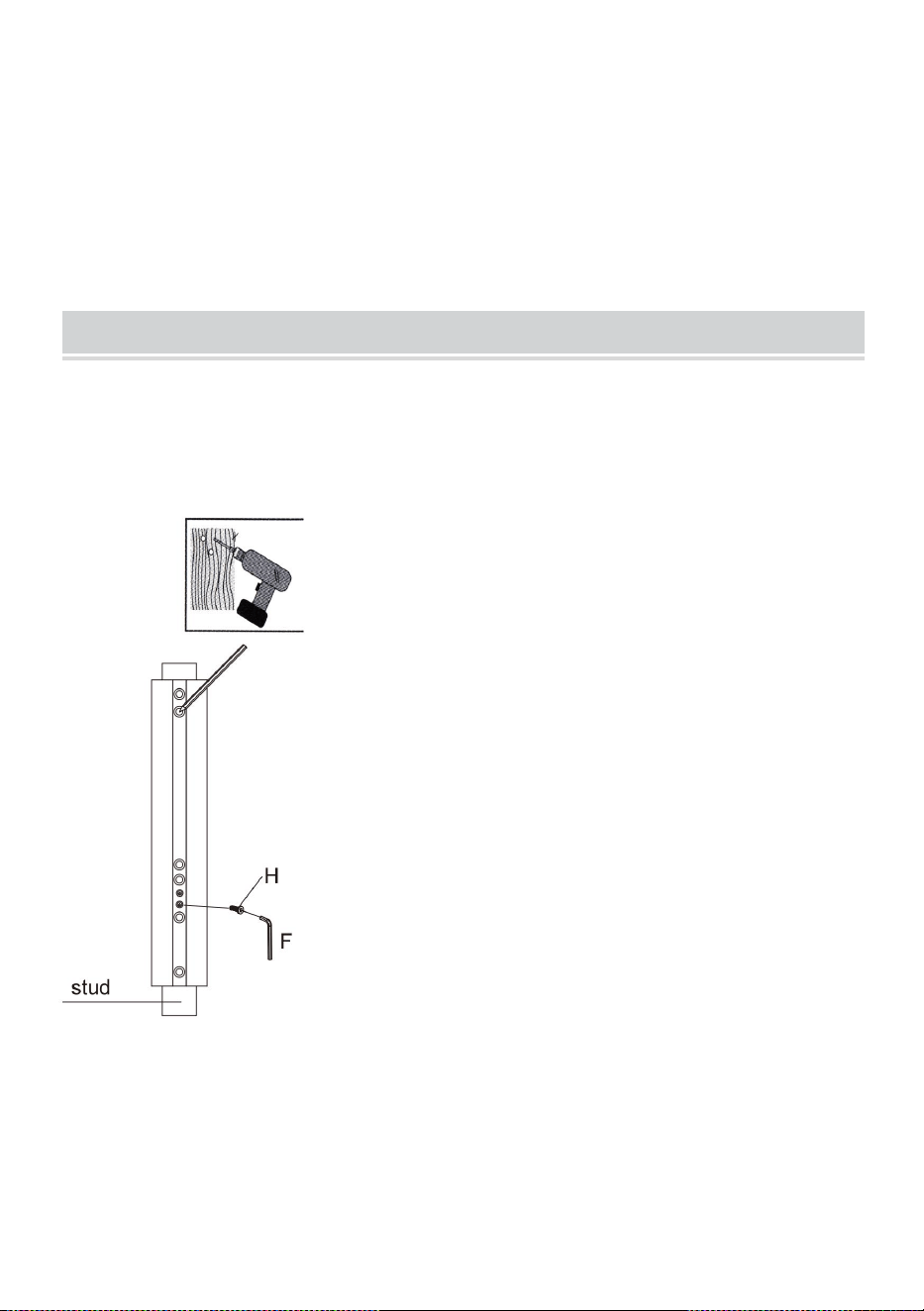
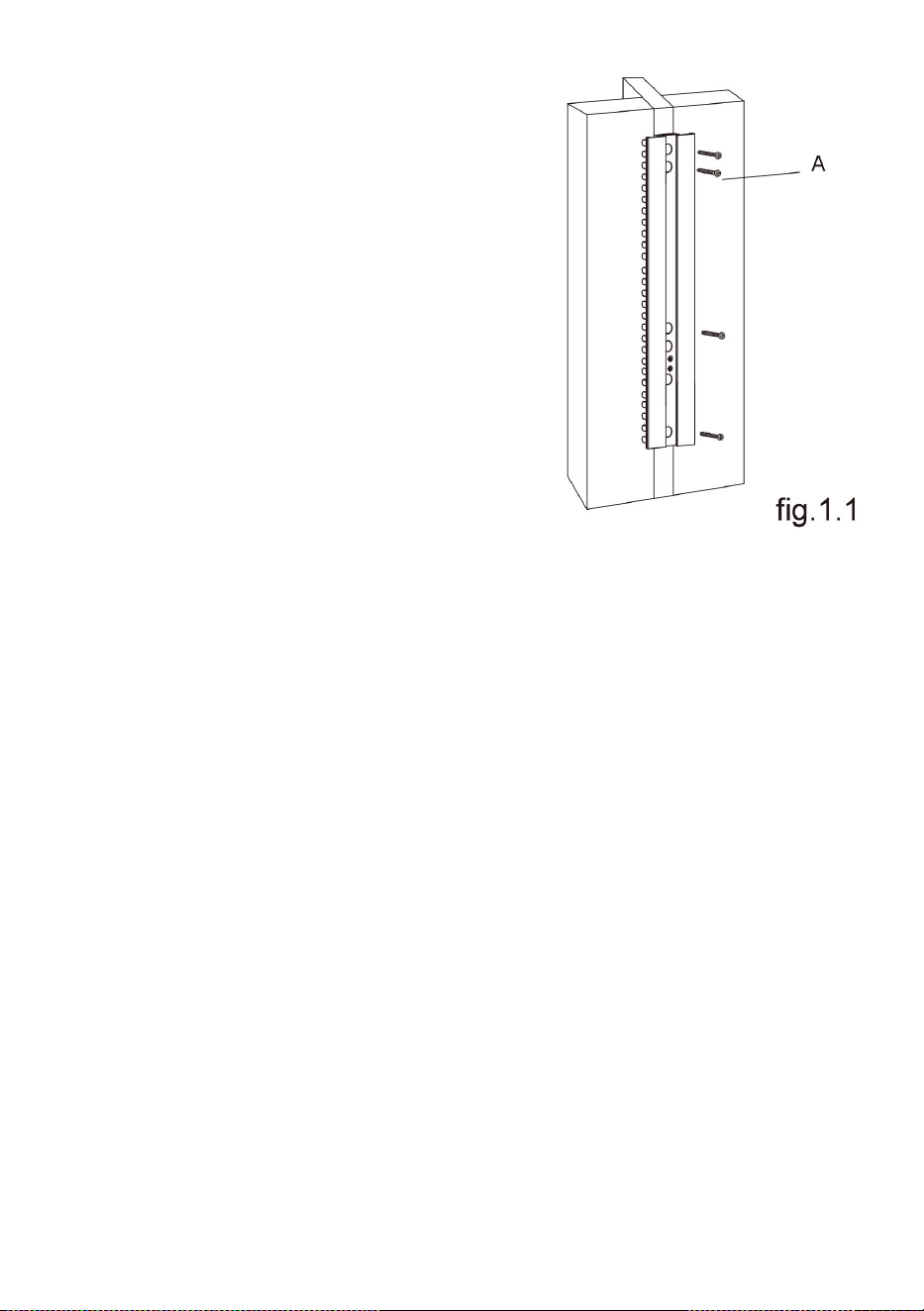
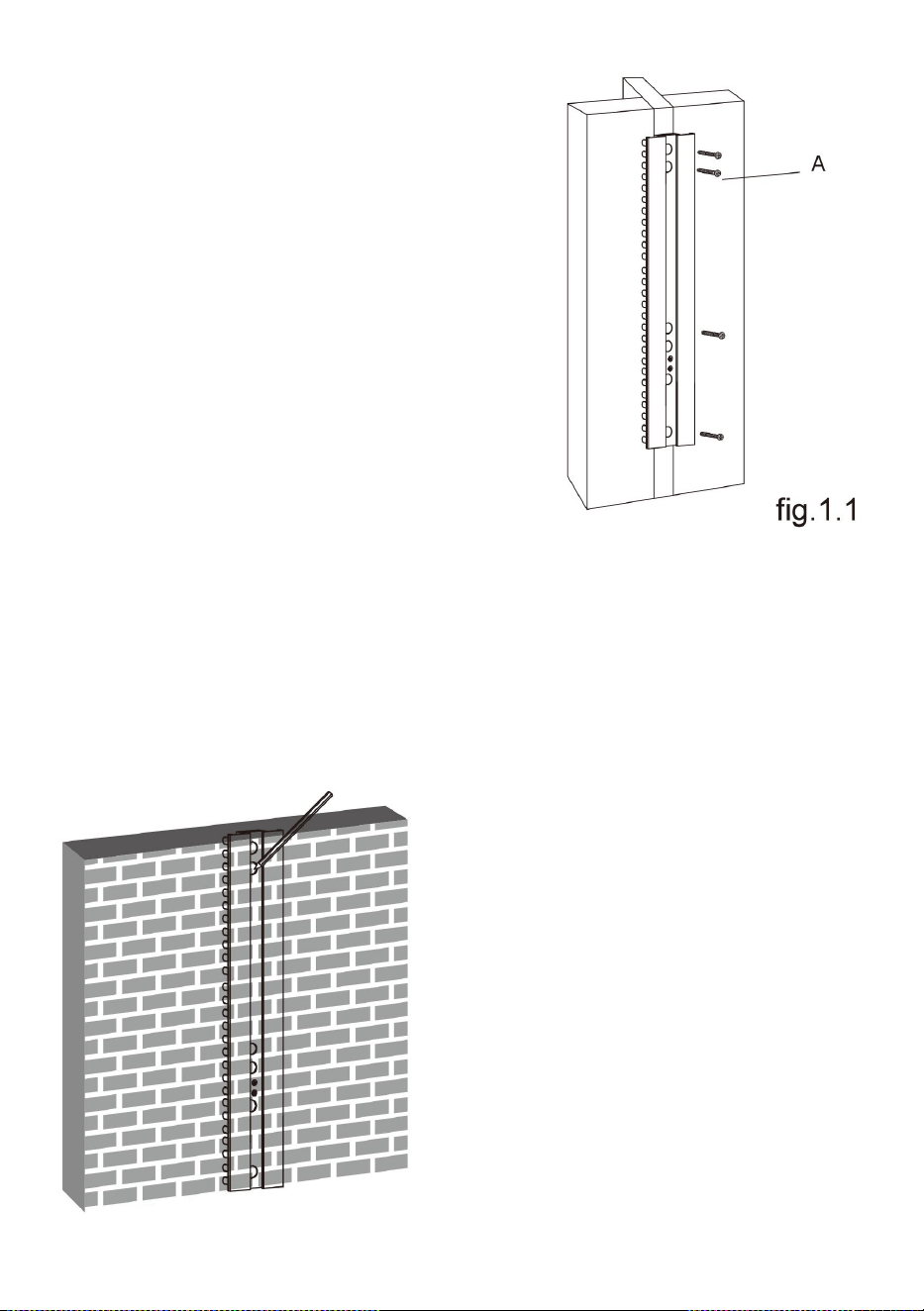
STEP1-b: SOLID BRICK AND CONCRETE BLOCK
MOUNTING:
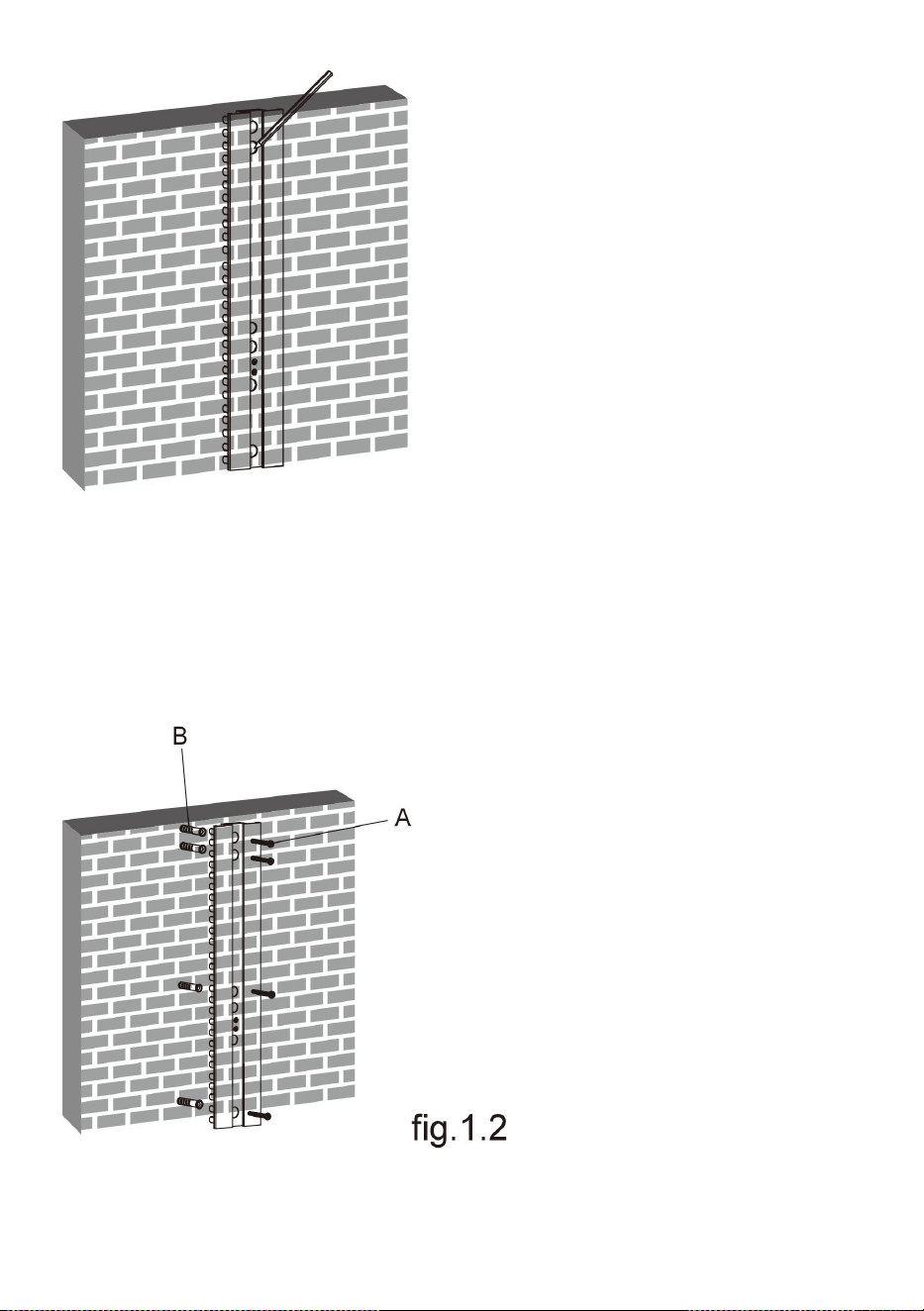
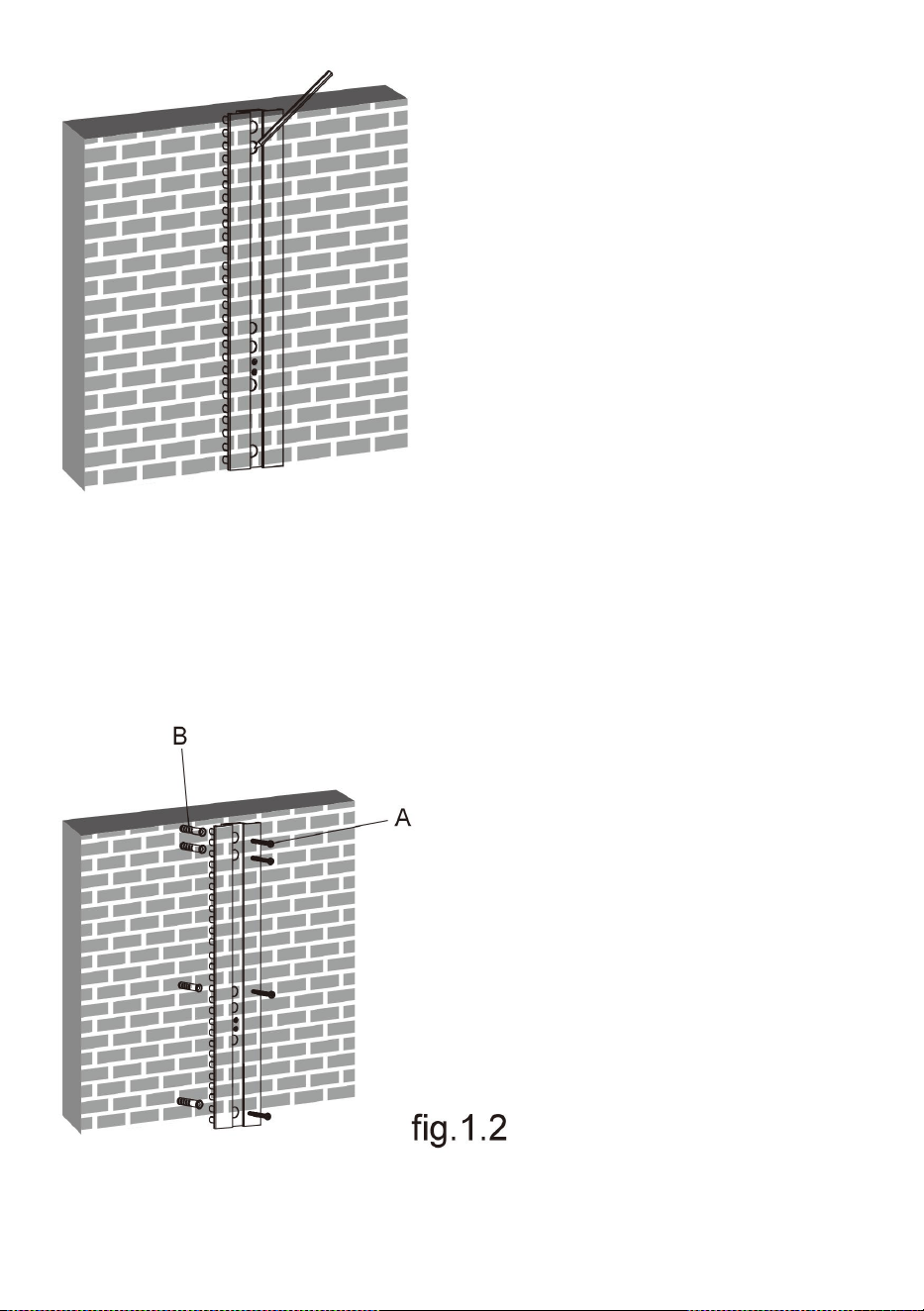
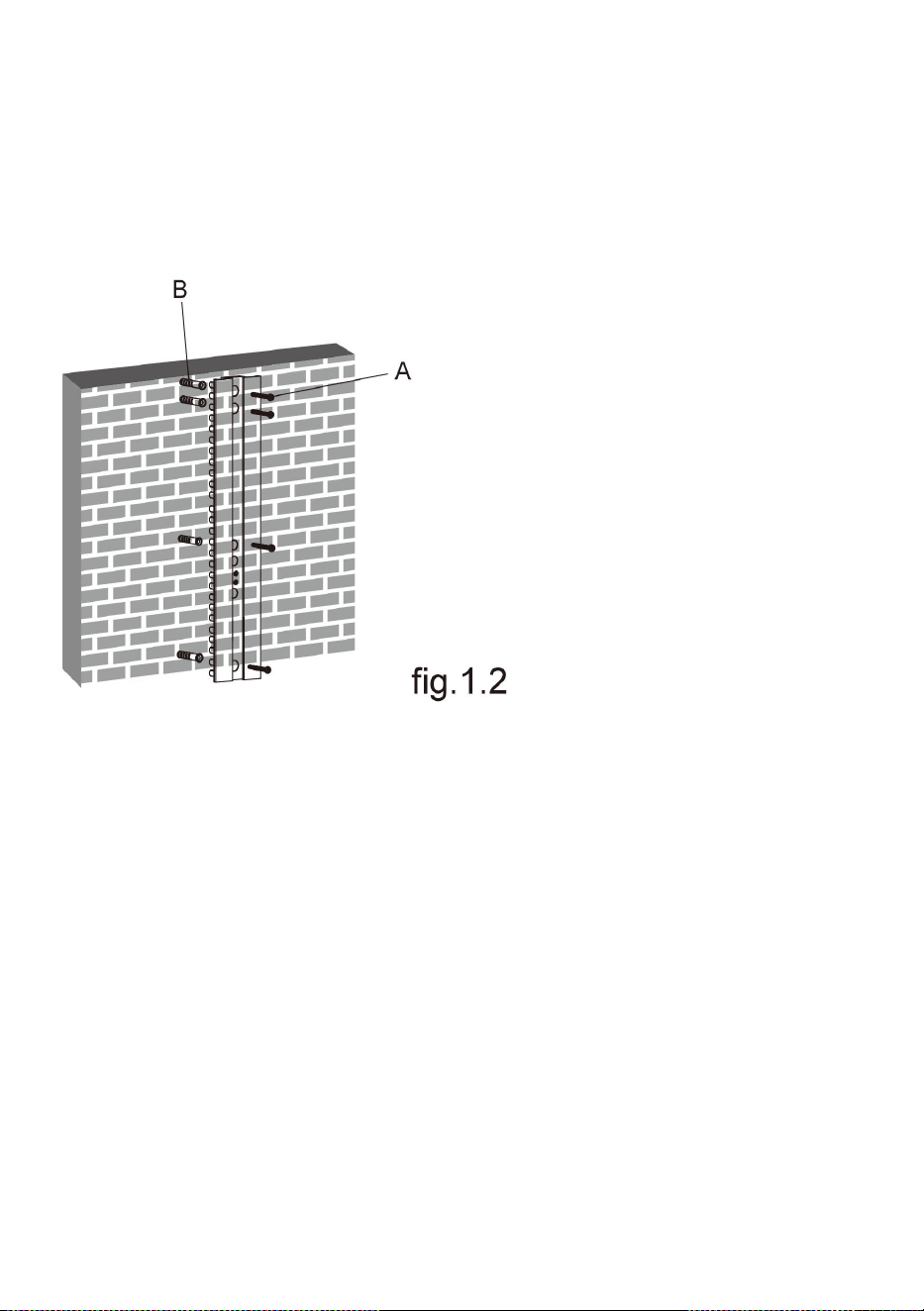
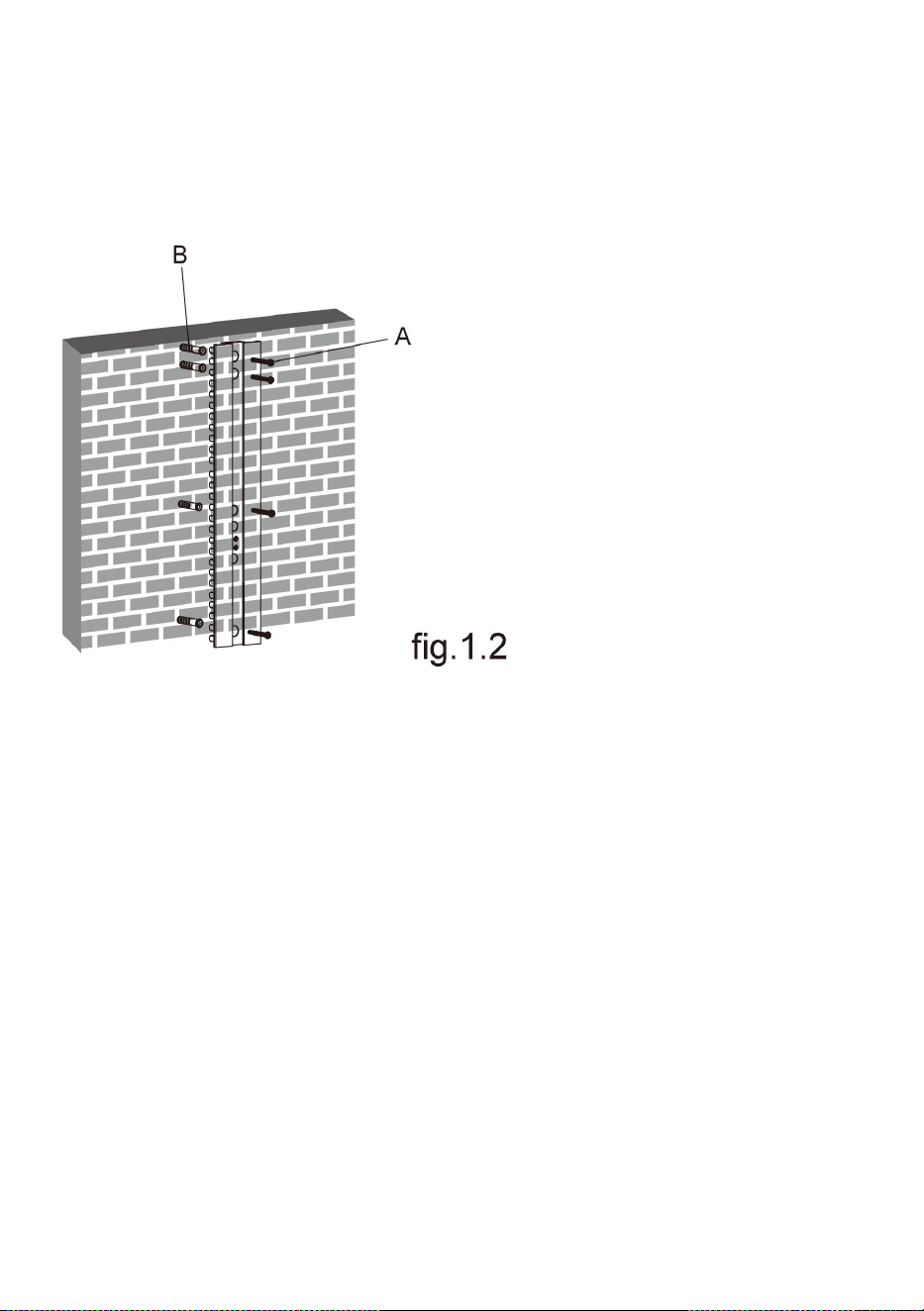
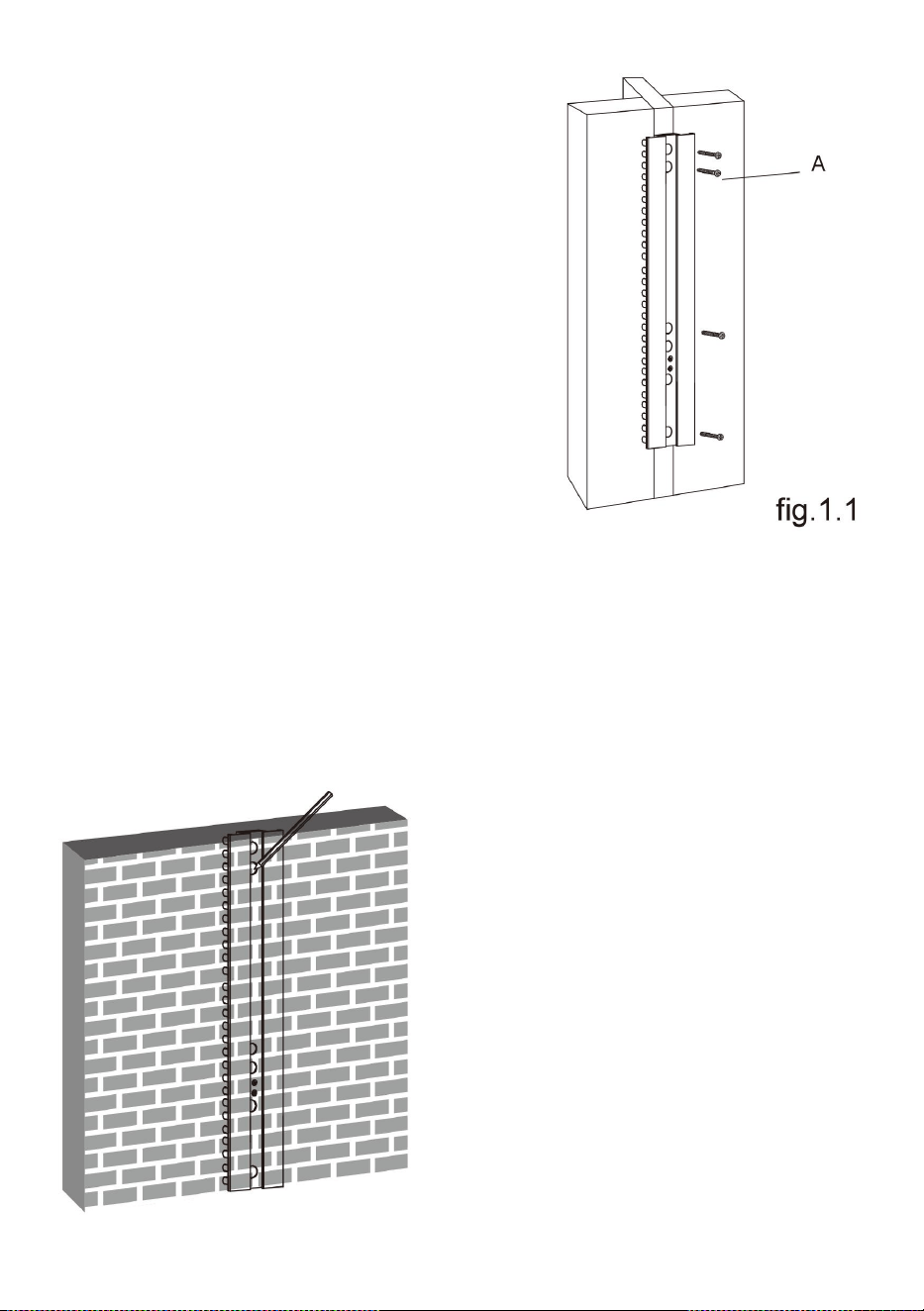
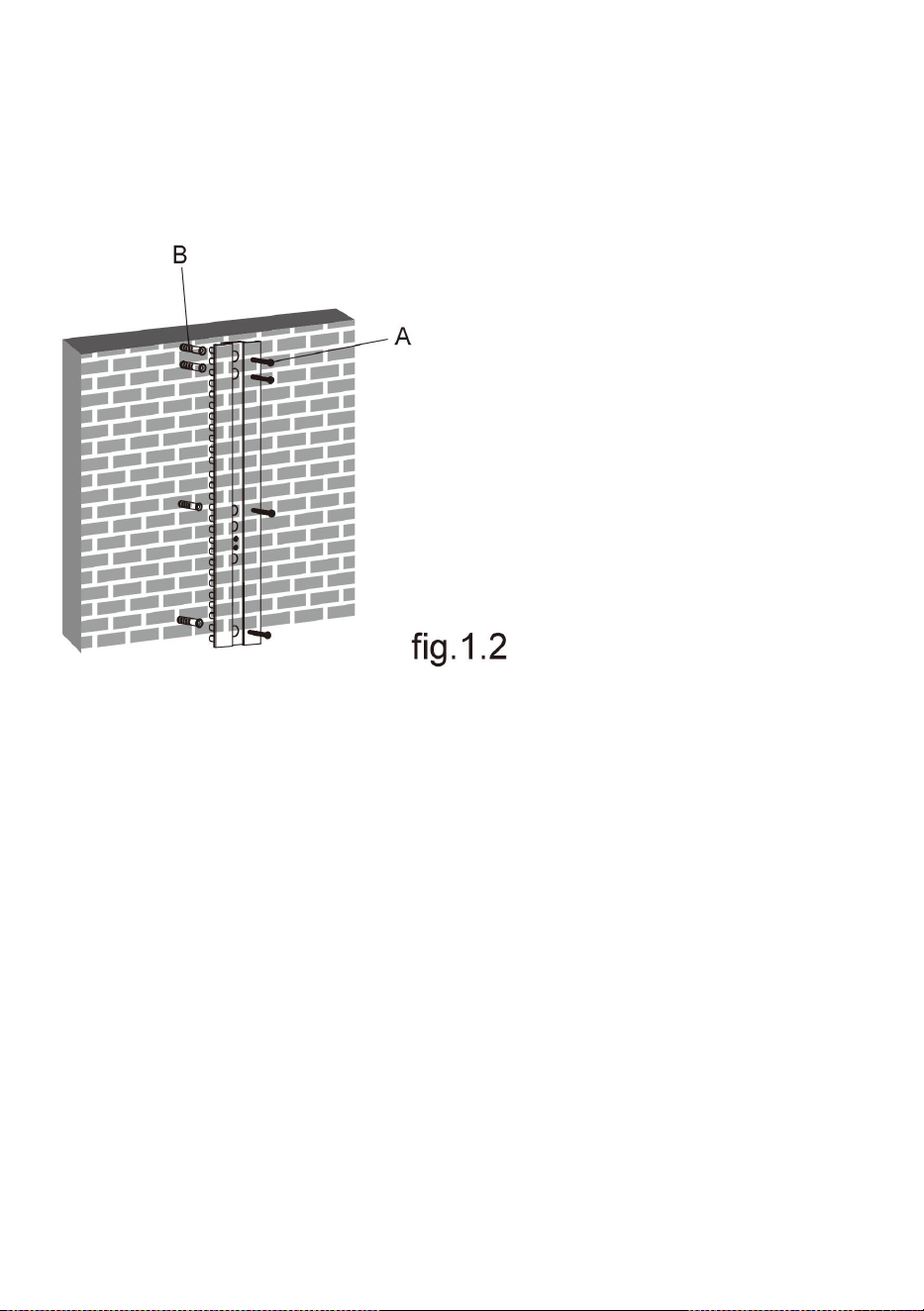
● Use the wall plate as a template to mark locations of four holes on
the wall as shown in fig.1.2.
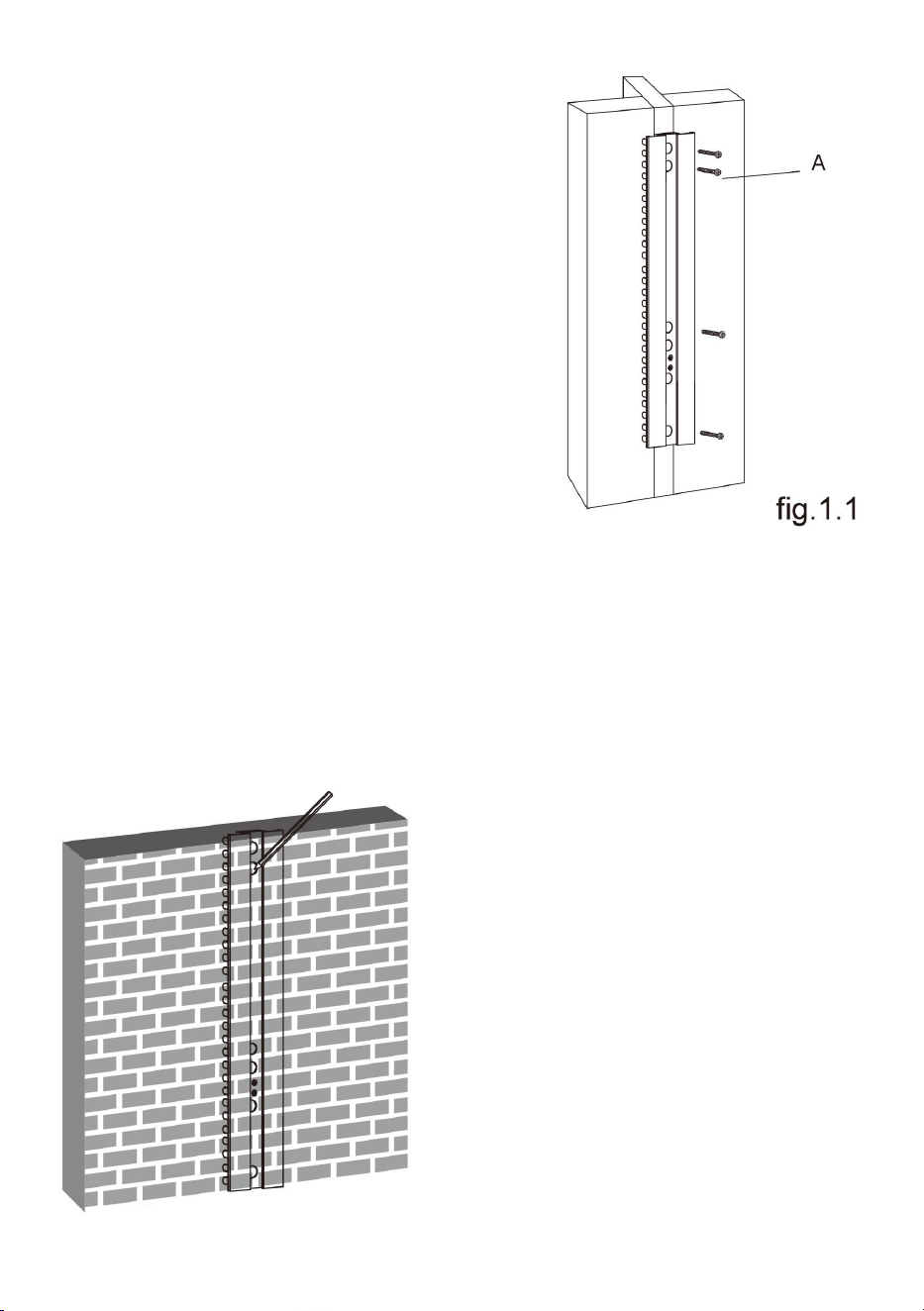
● Drill four 1/8” (3mm)
diameter holes 1.2” (30mm)
deep. Secure it using four
screws(A), make sure that
the wall plate is level as
shown in fig.1.1.
7
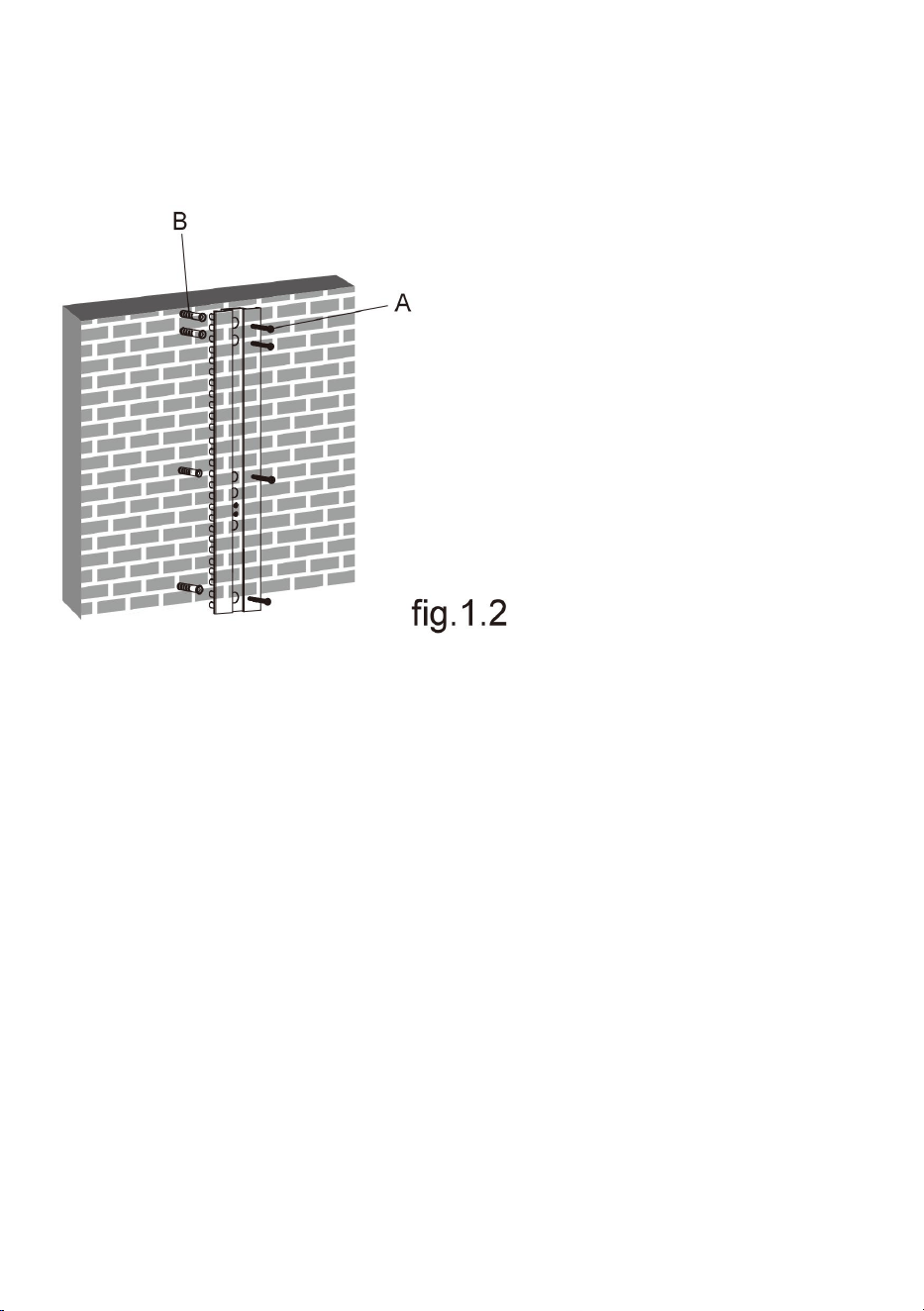
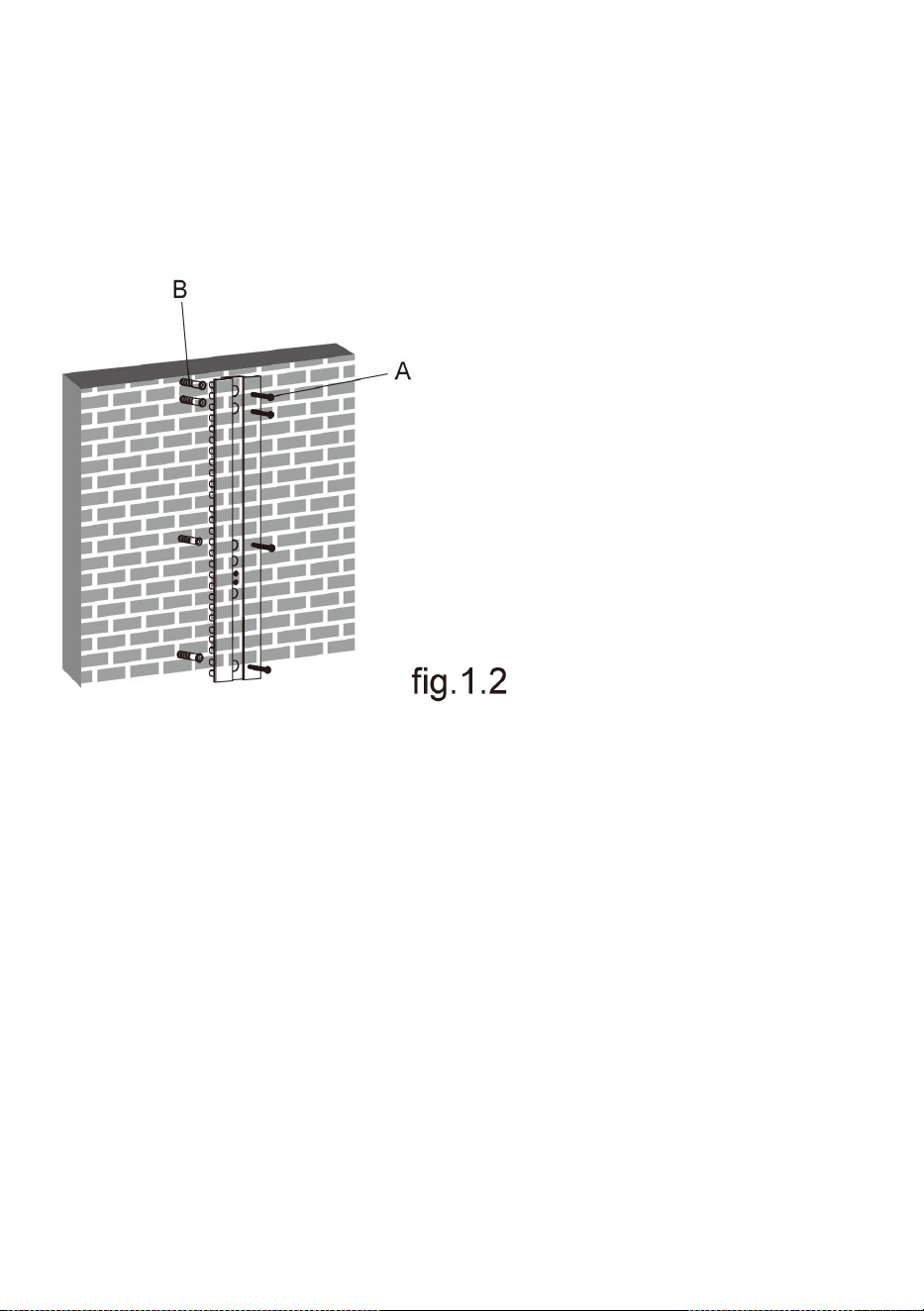
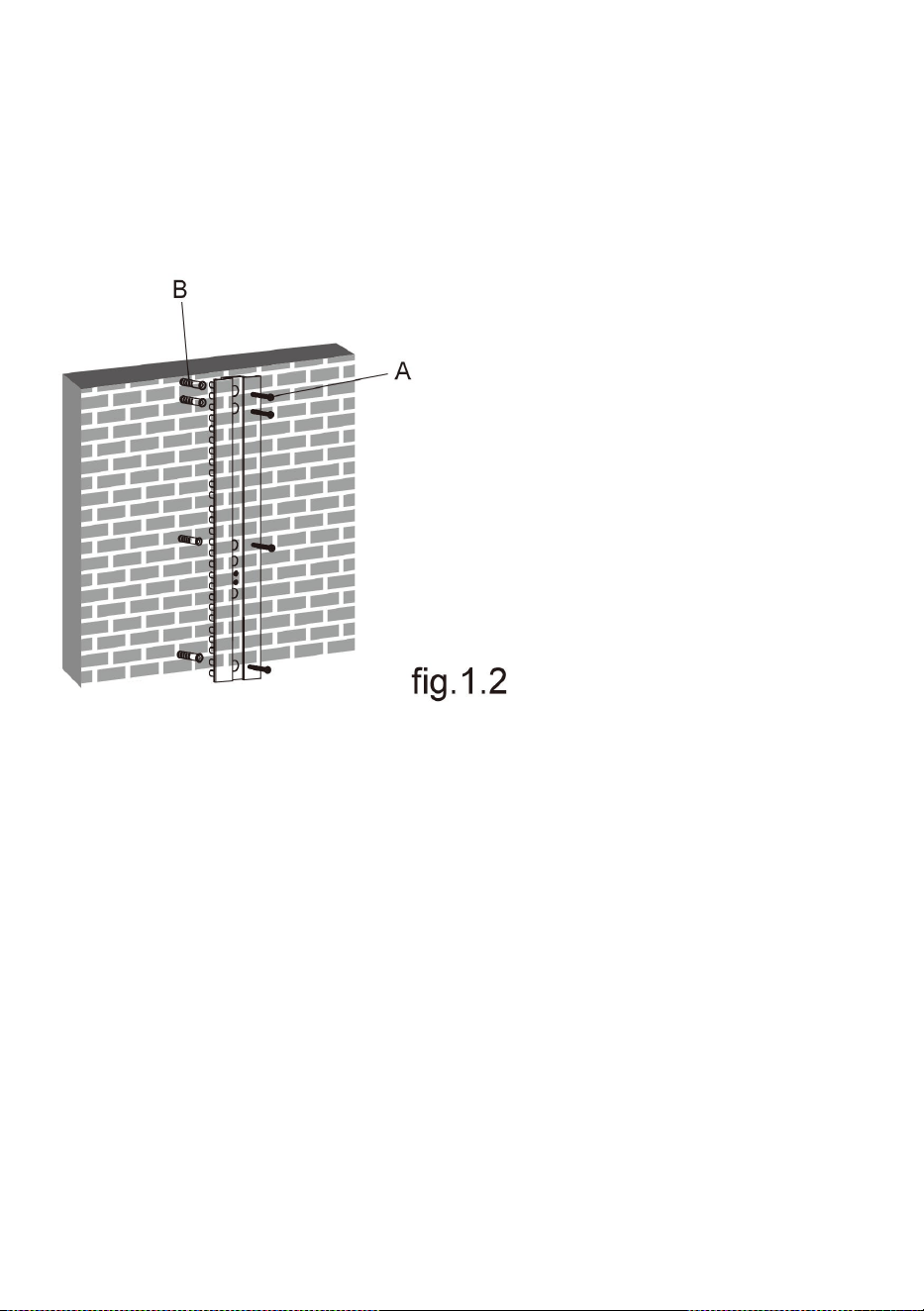
● Pre-drill these holes with a 8mm masonry bit , ensuring a depth of
at least 50mm. Insert a Concrete Anchor(B) into each of these holes.
● Attach the wall plate to the wall using two screws(A), make sure
that the wall plate is level as shown in fig.1.2.
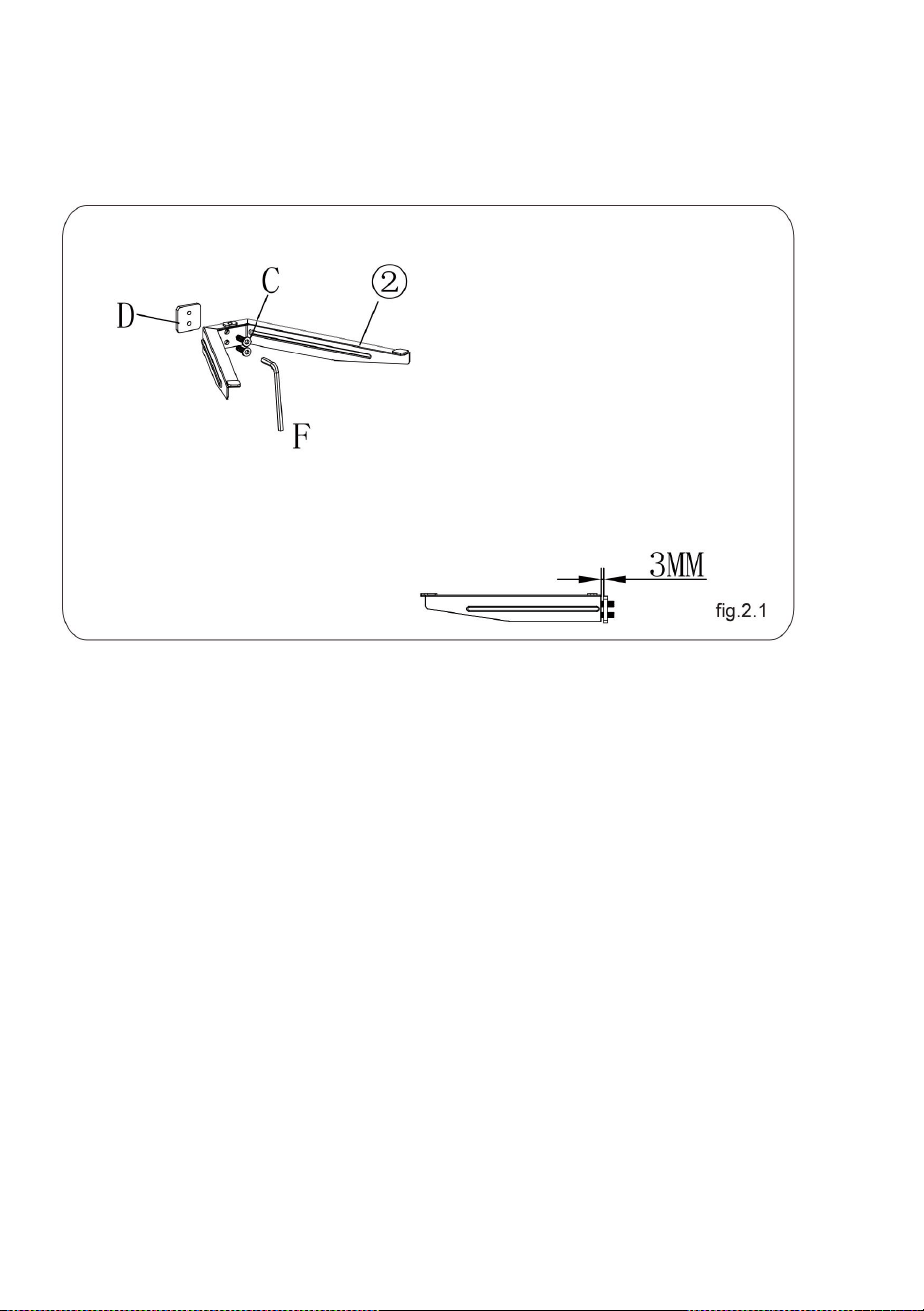
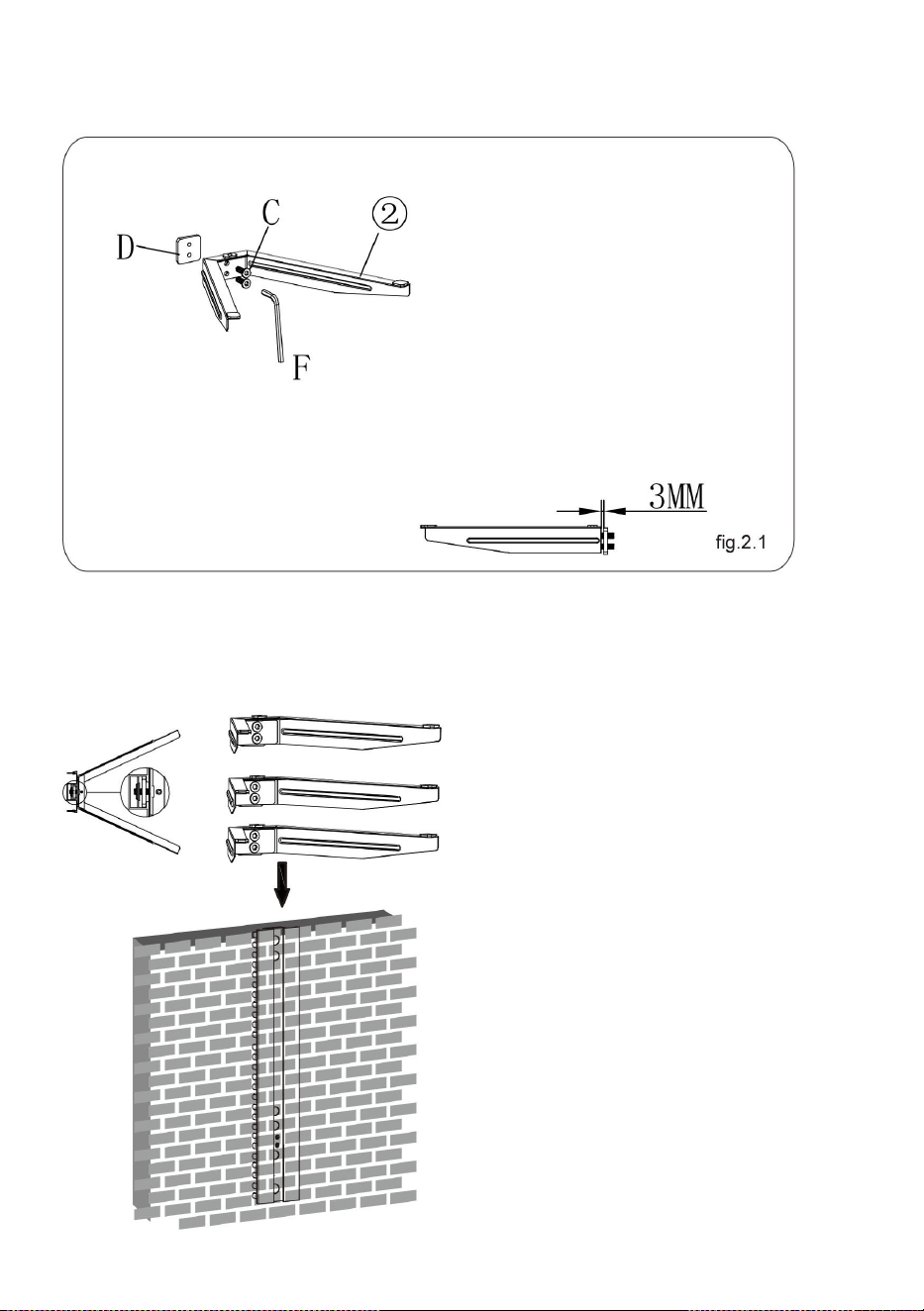
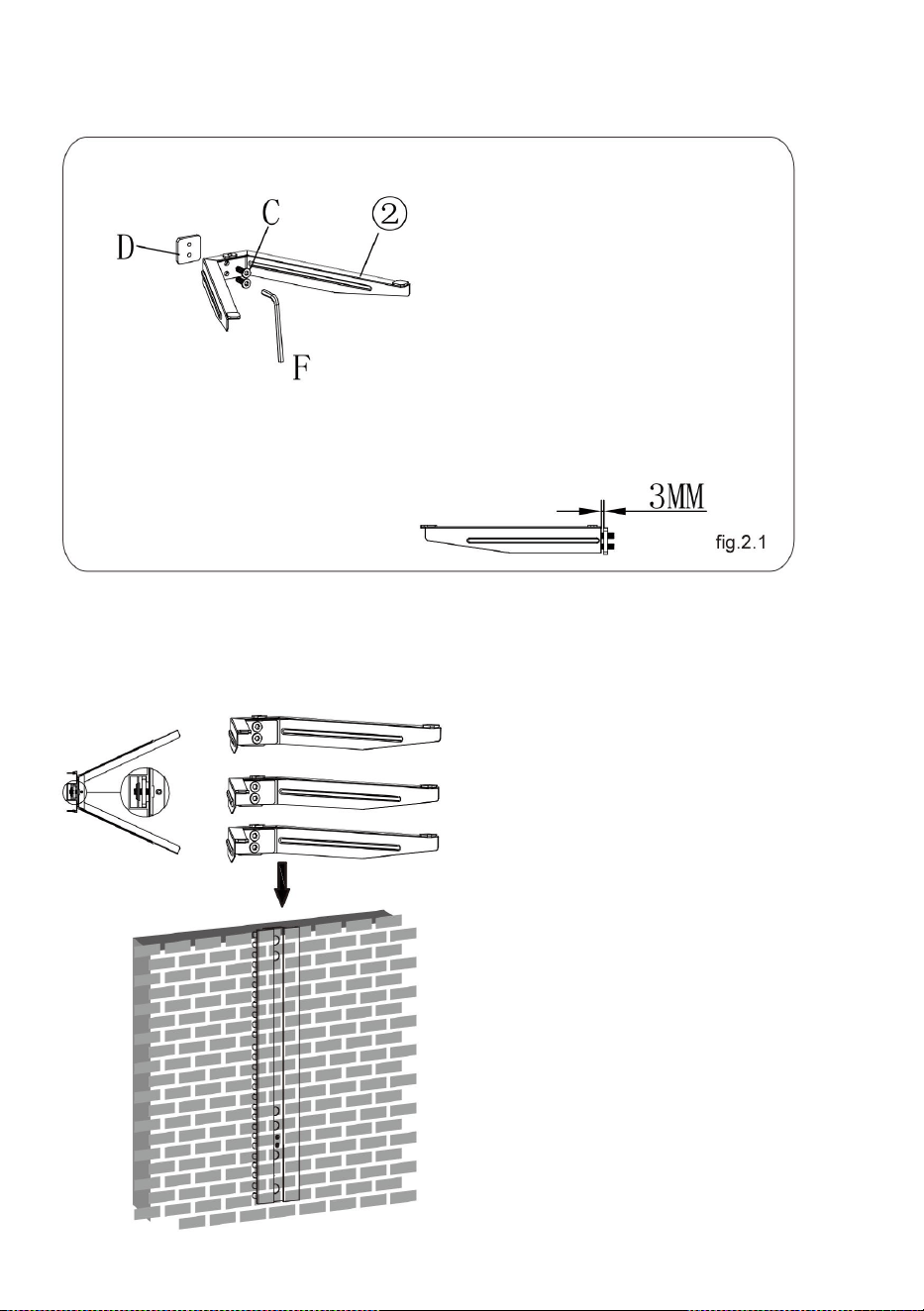
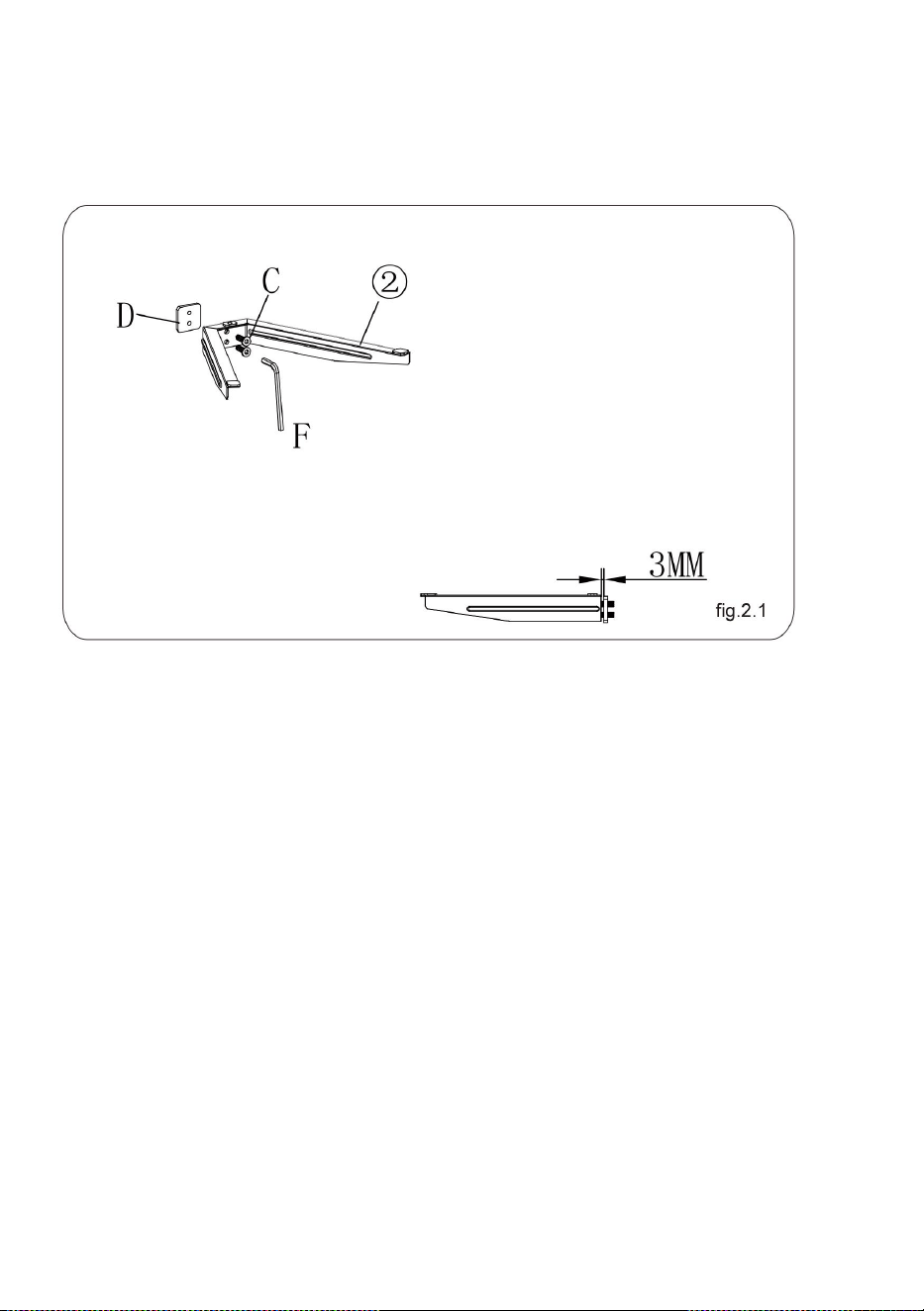
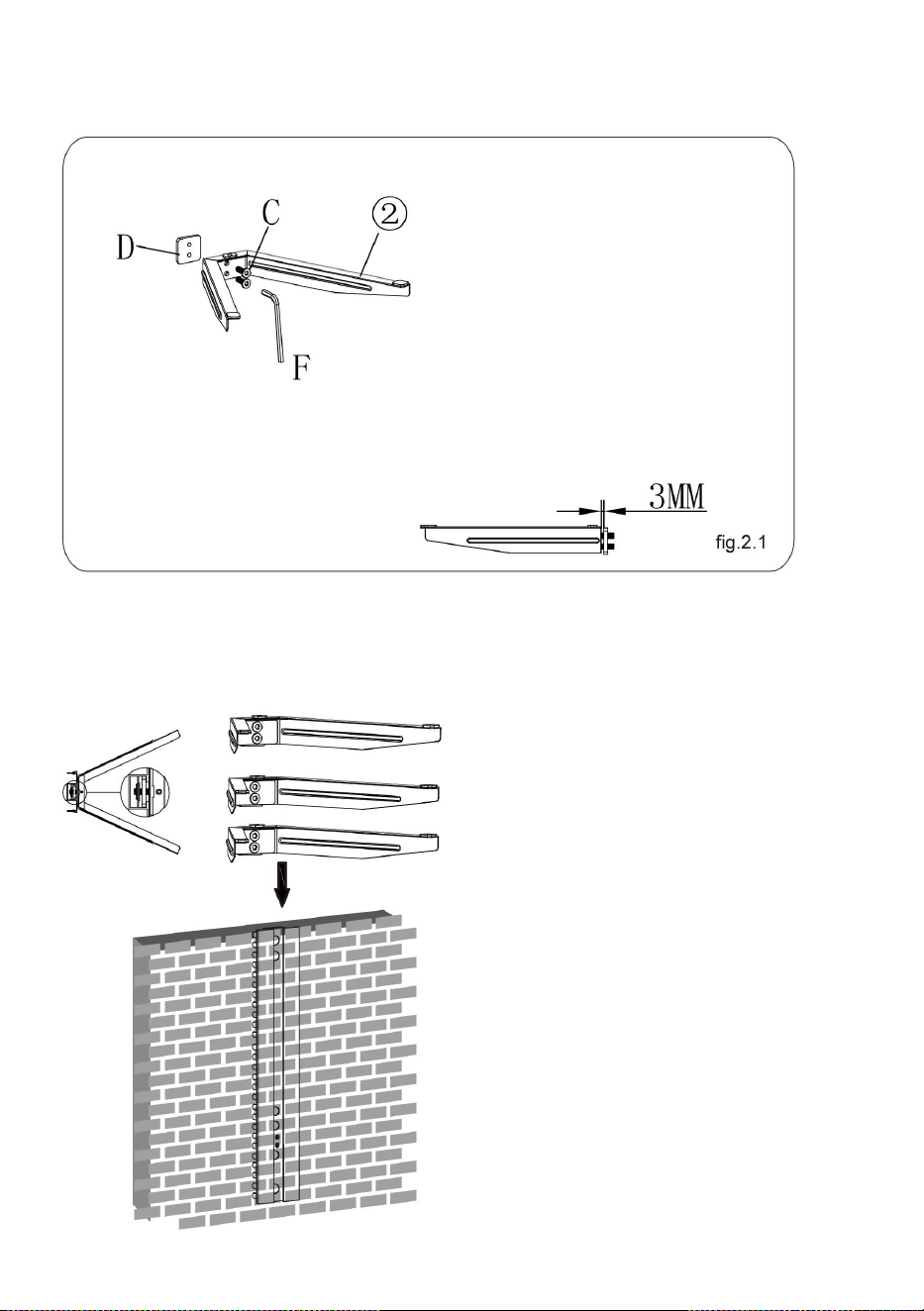
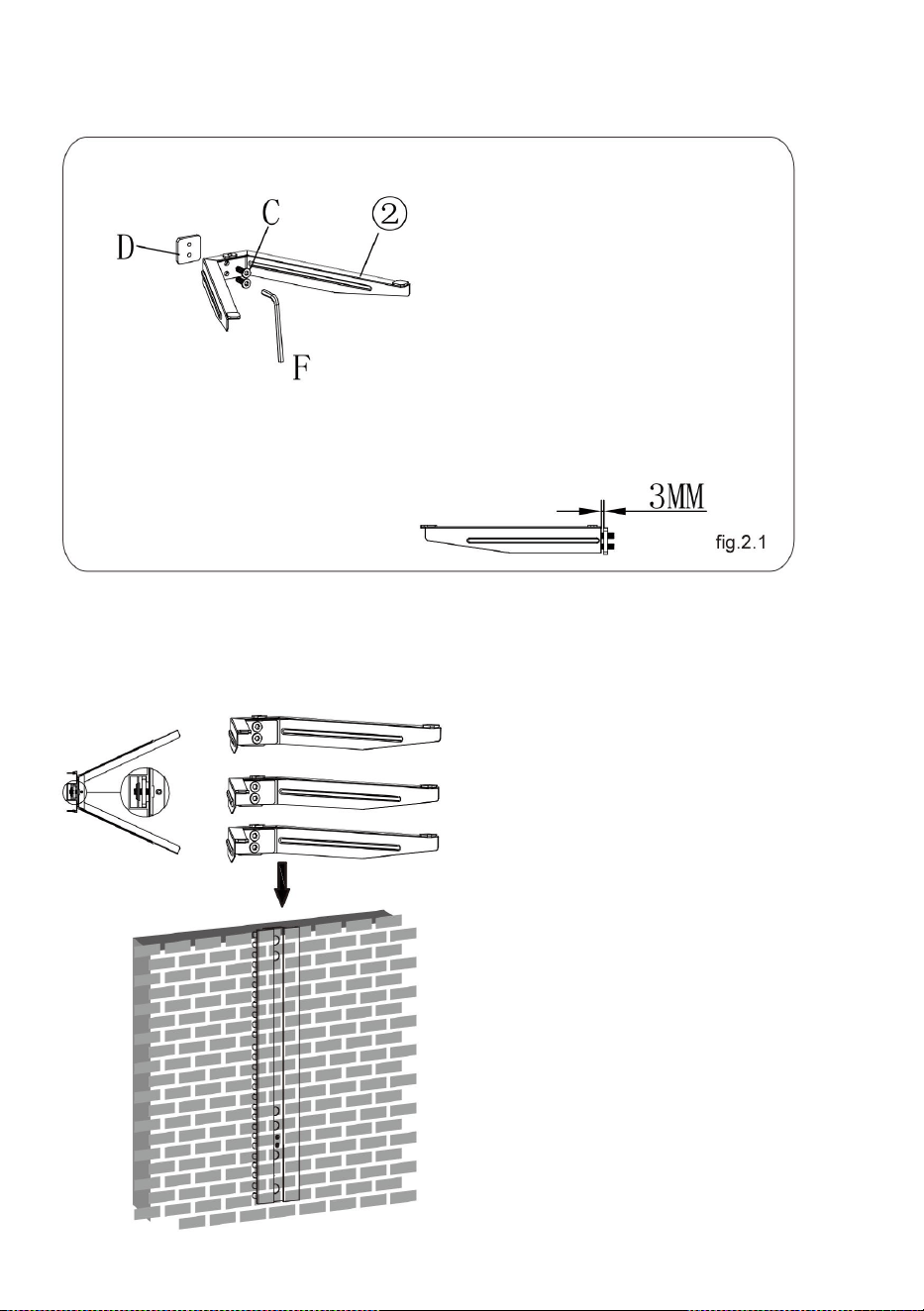
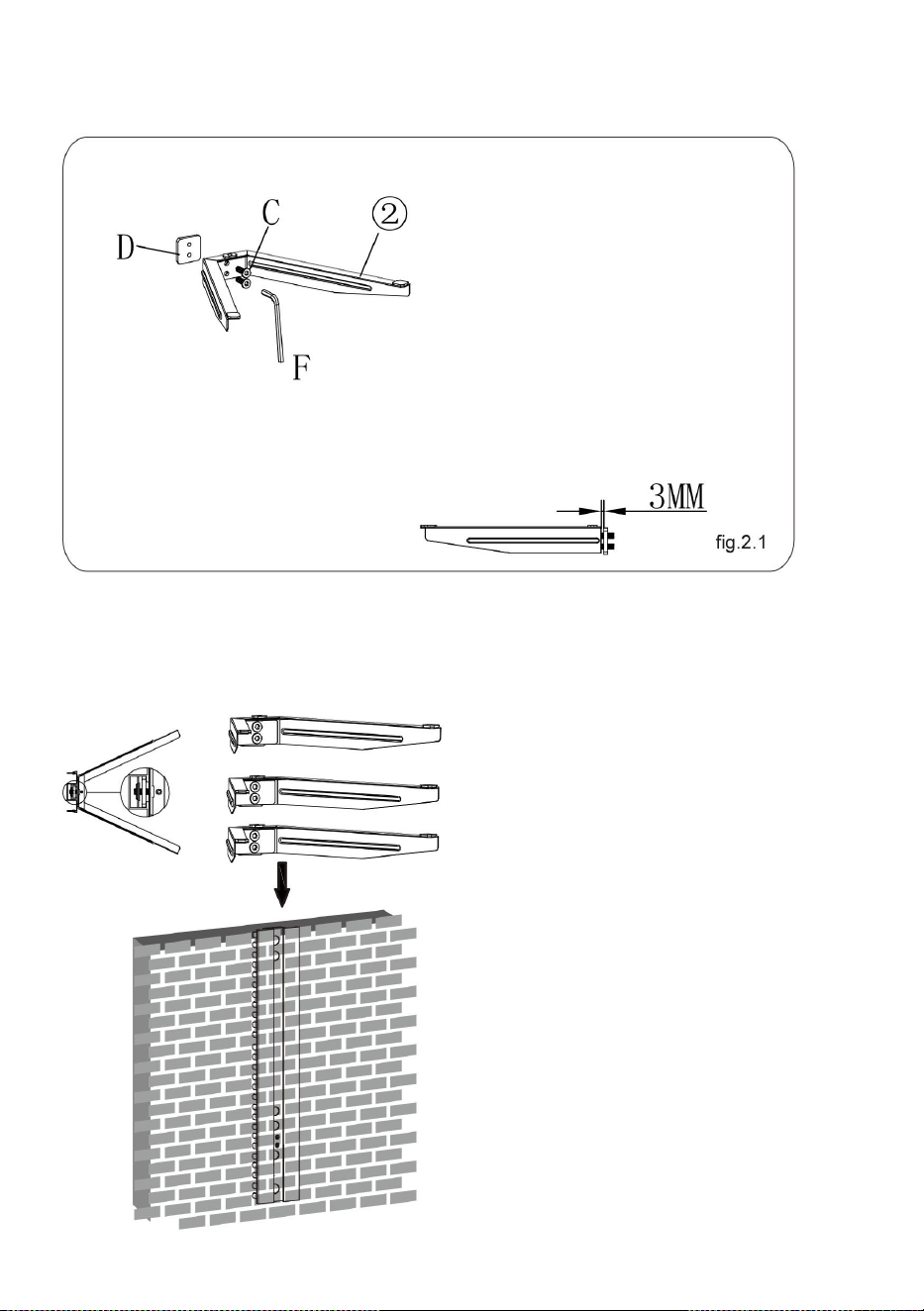
STEP2: ASSEMBLING THE GLASS HOLDER
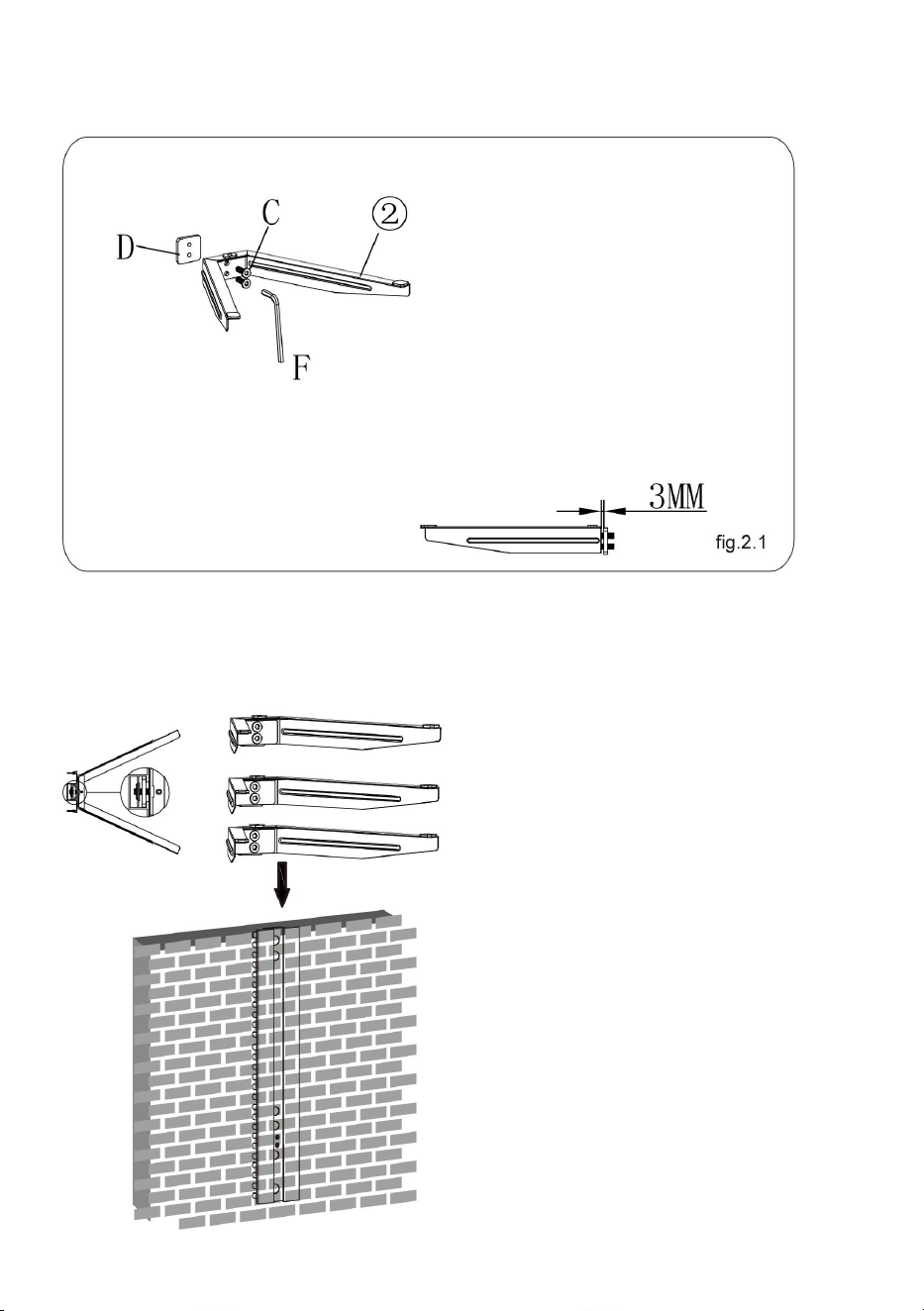
● Attach the connect piece to the glass holder using two screws,
leaving a 3mm space as shown in fig.2.1.
8
● Repeat the same method to assemble the other glass
holder.
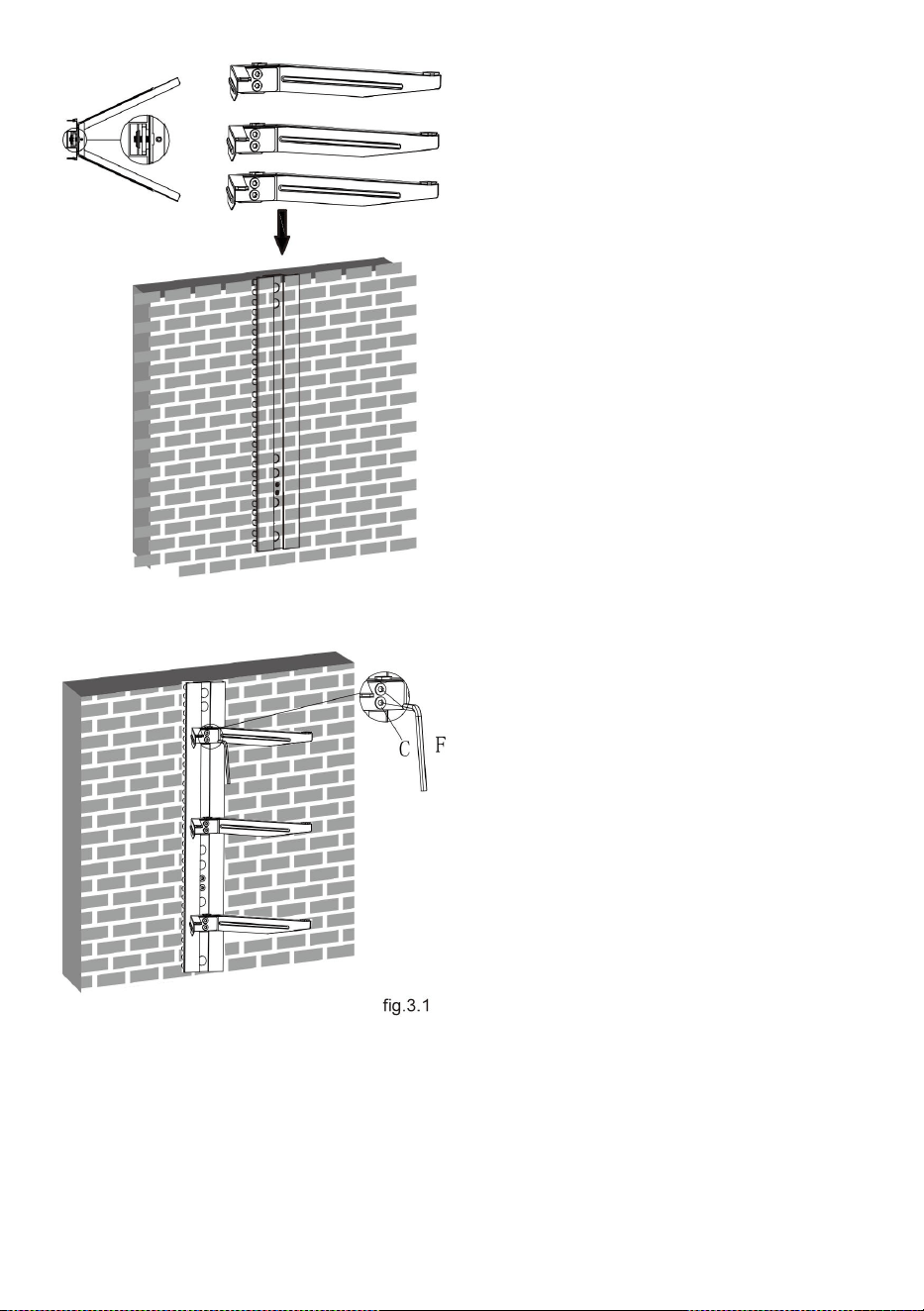
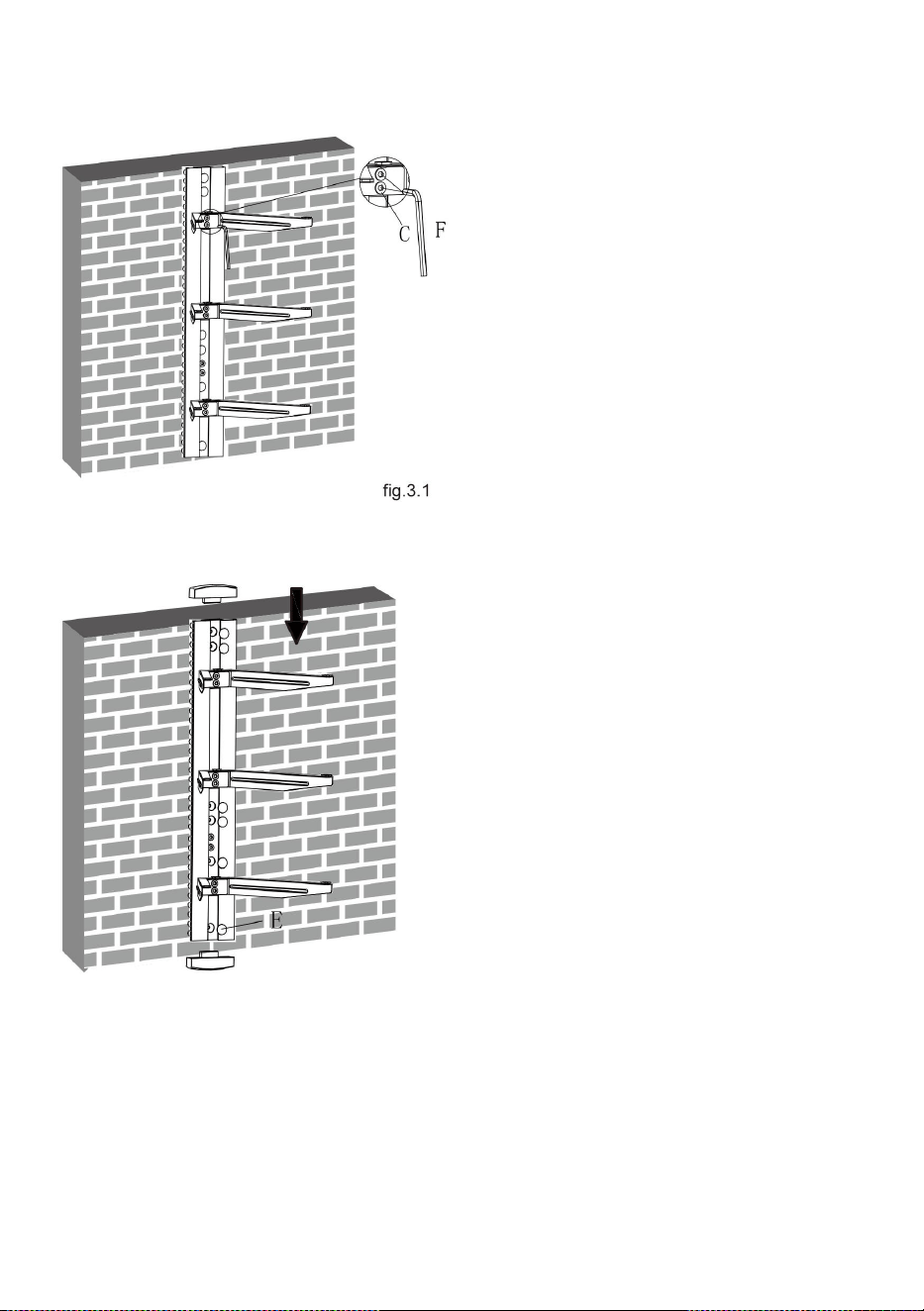
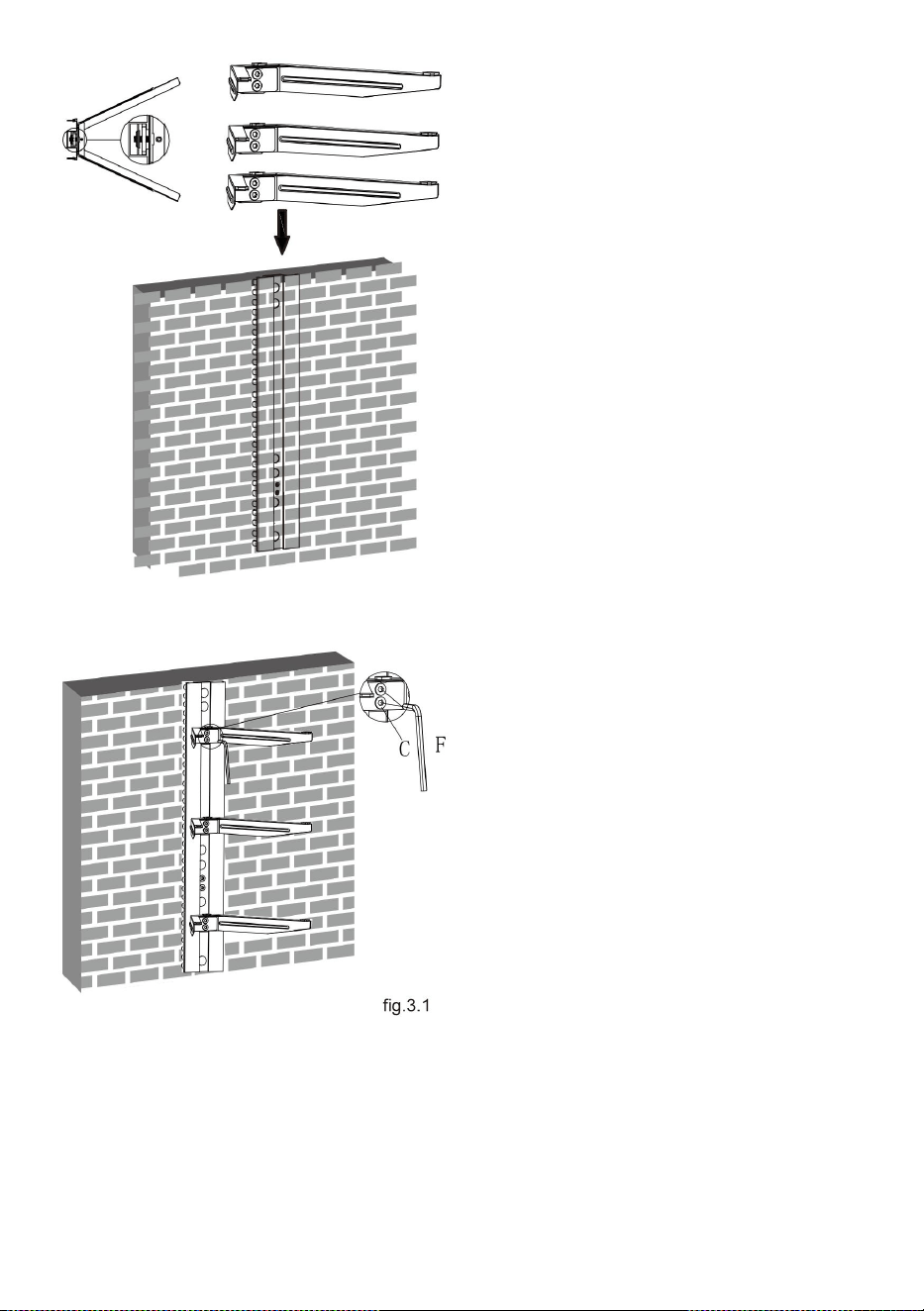
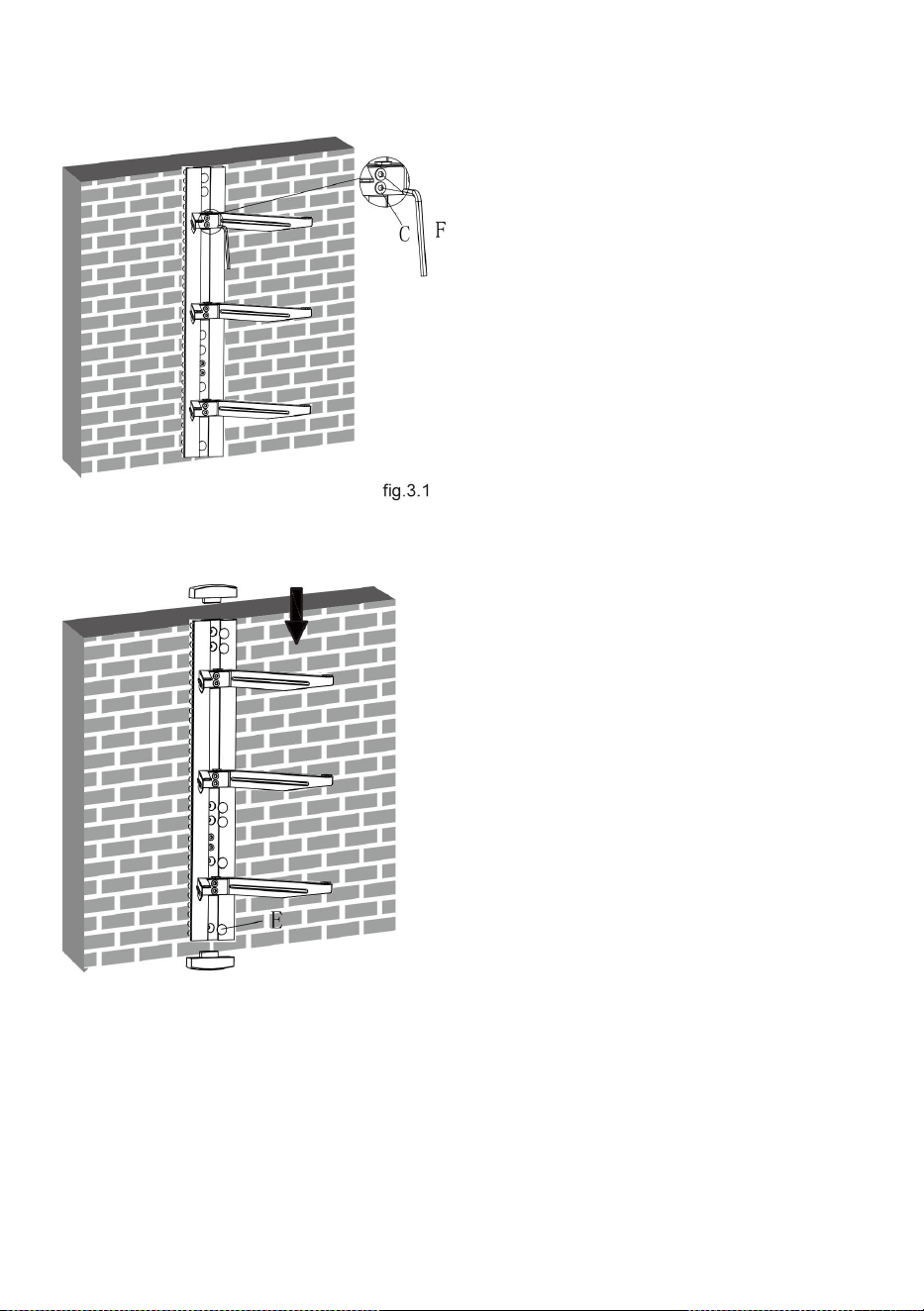
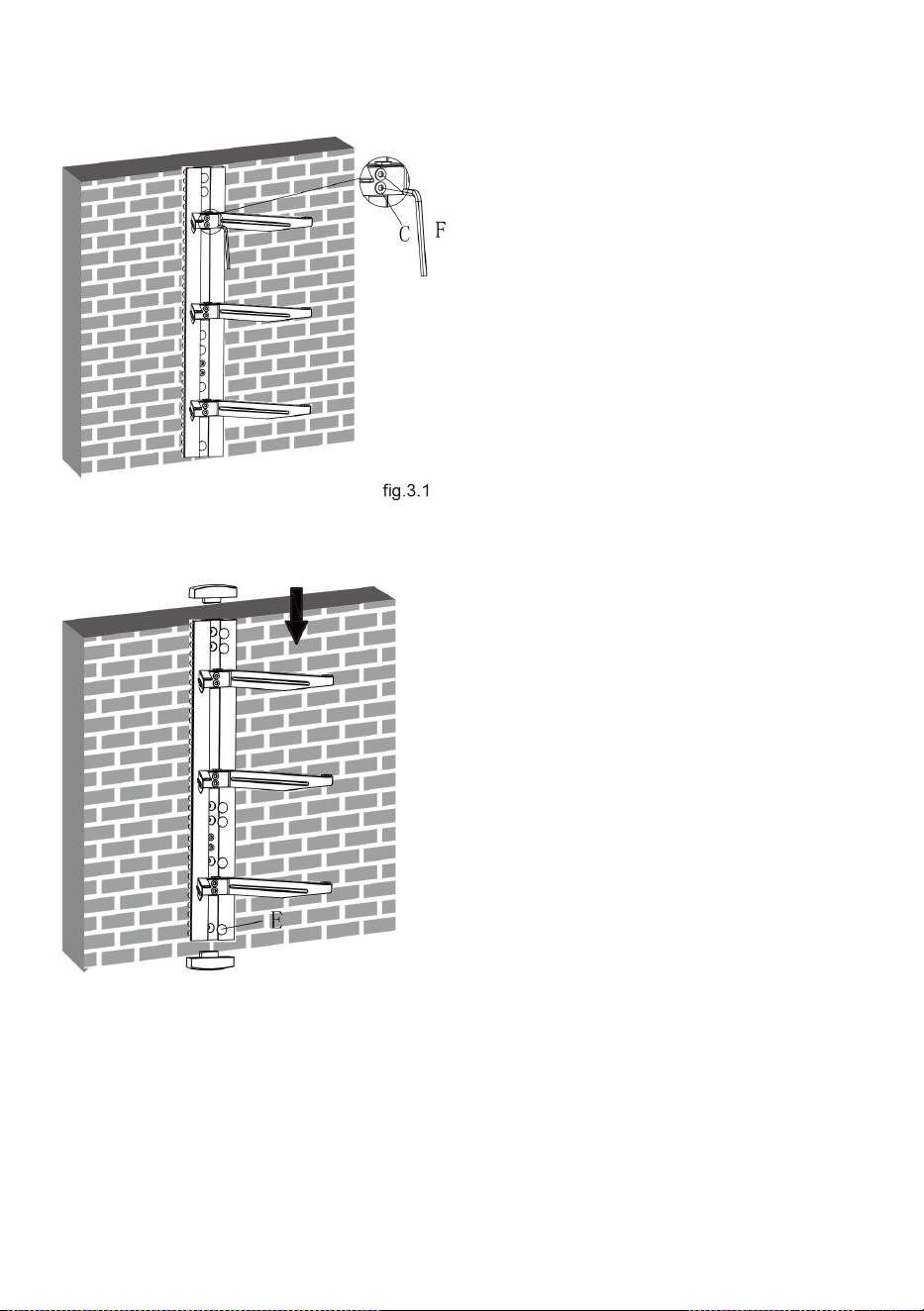
STEP3: INSTALLING THE GLASS HOLDER
● Insert the three glass
holders into the wall
plate along the wall plate
rail at the desired height
respectively.
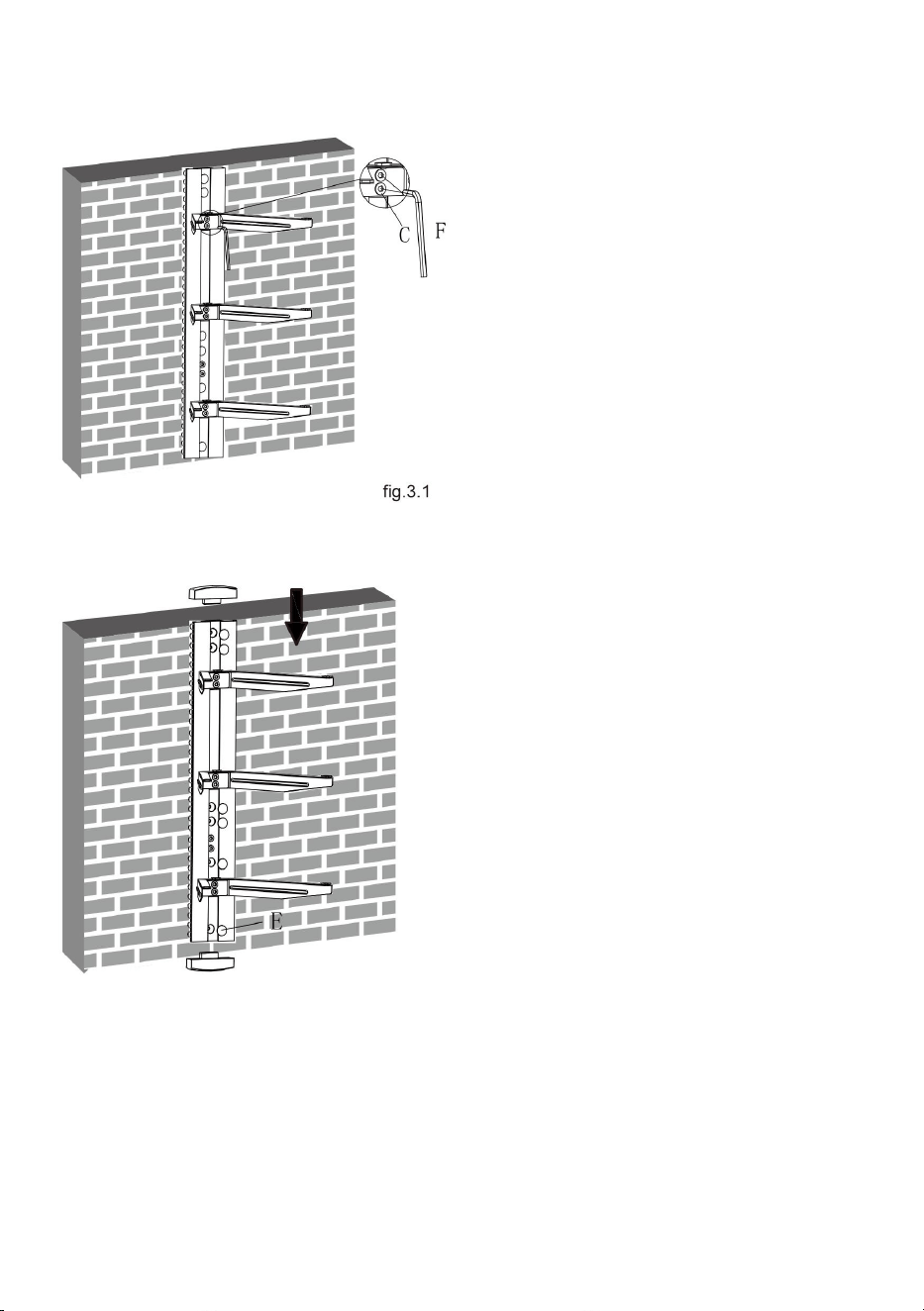
9
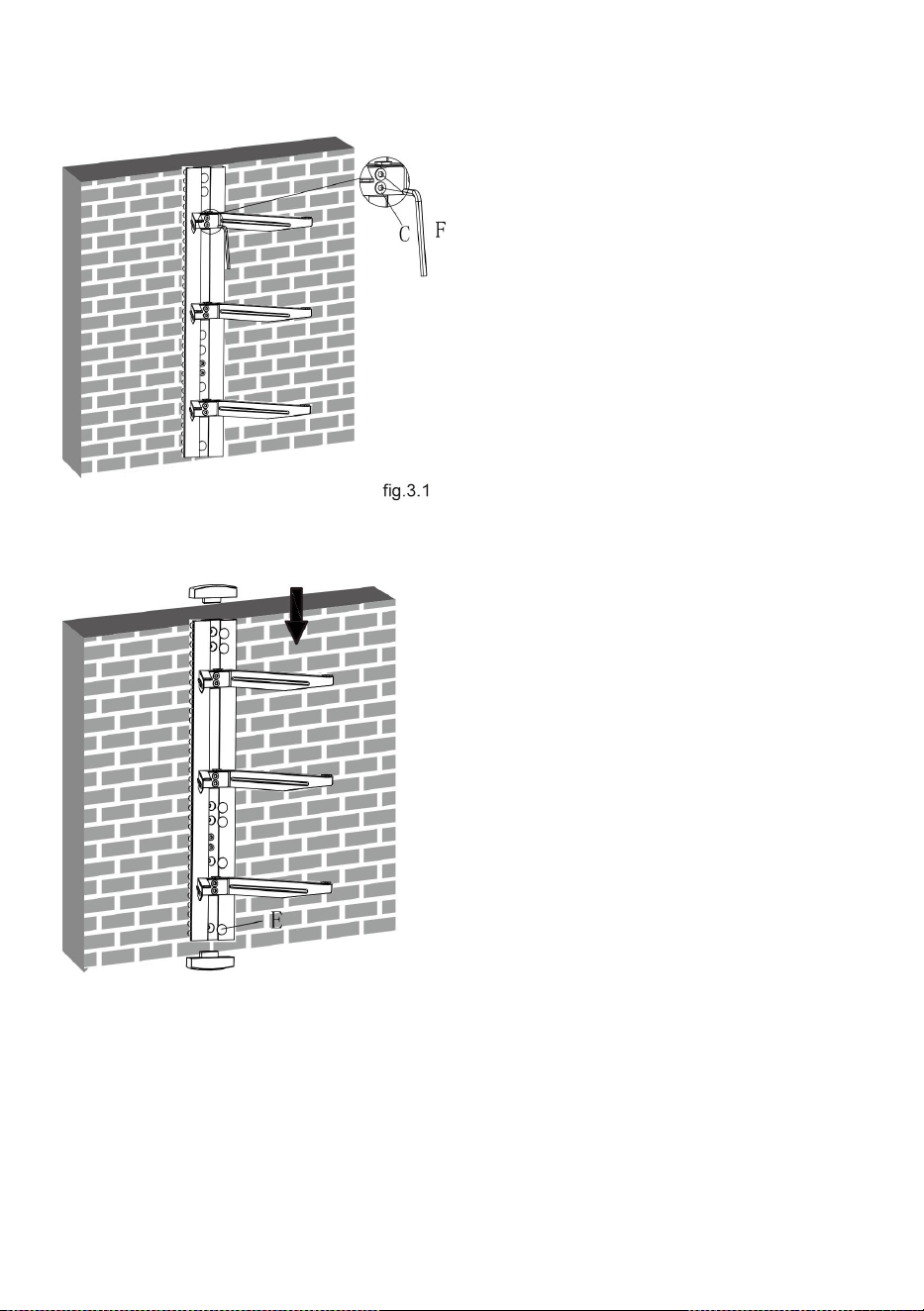
● Then tighten four
screws with a 3mm
Allen key as shown in
fig.3.1 to avoid wobbly
situation.
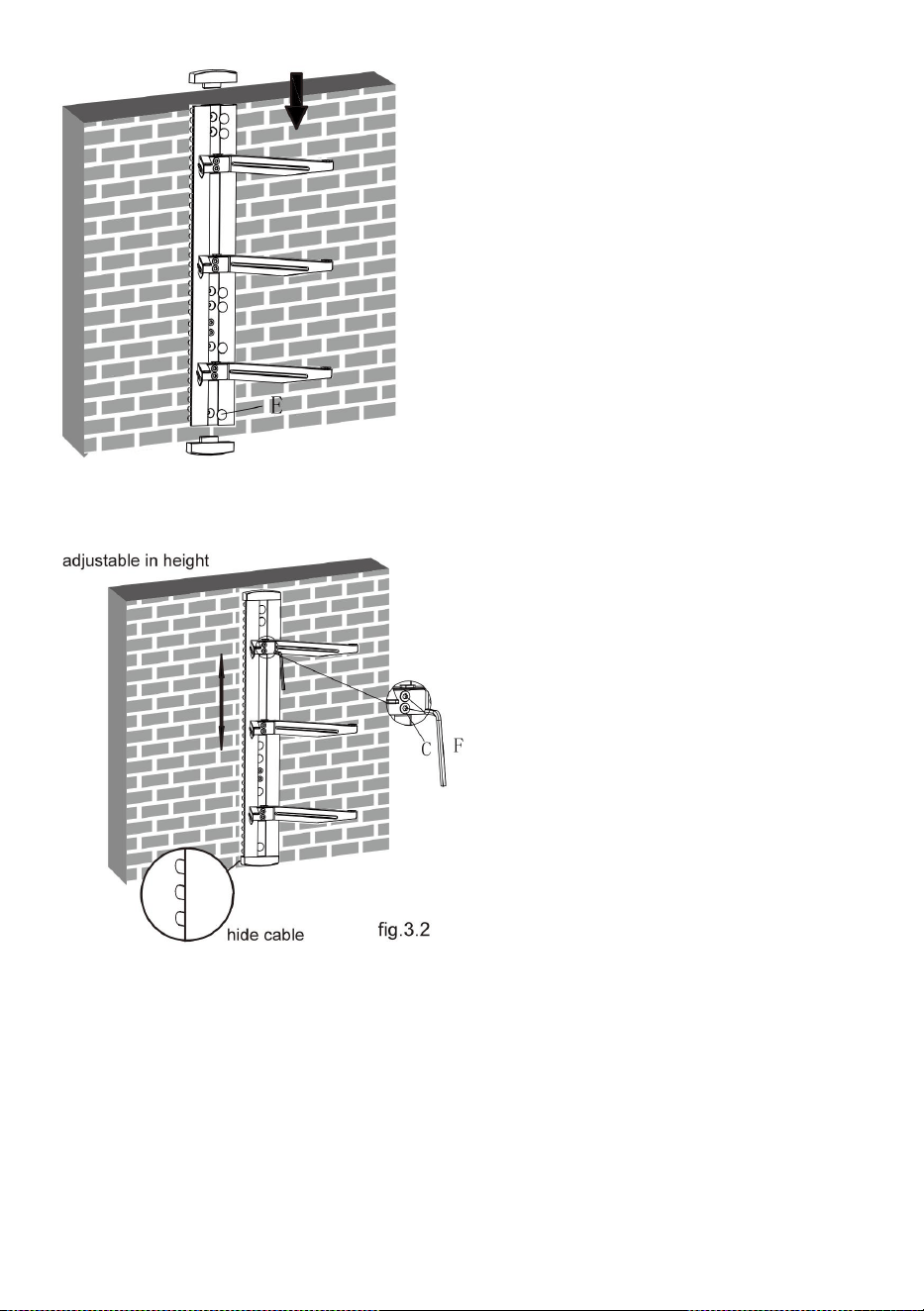
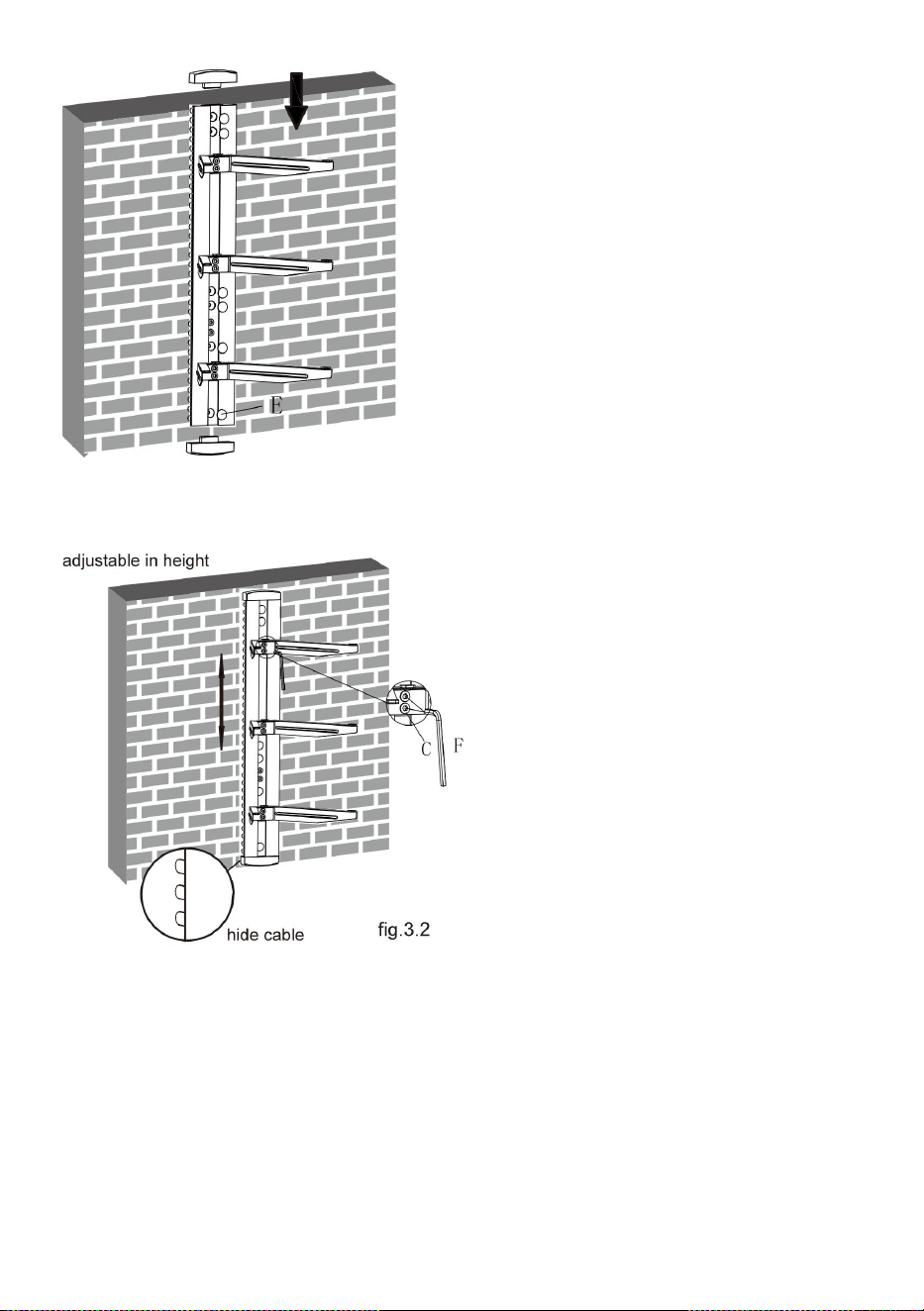
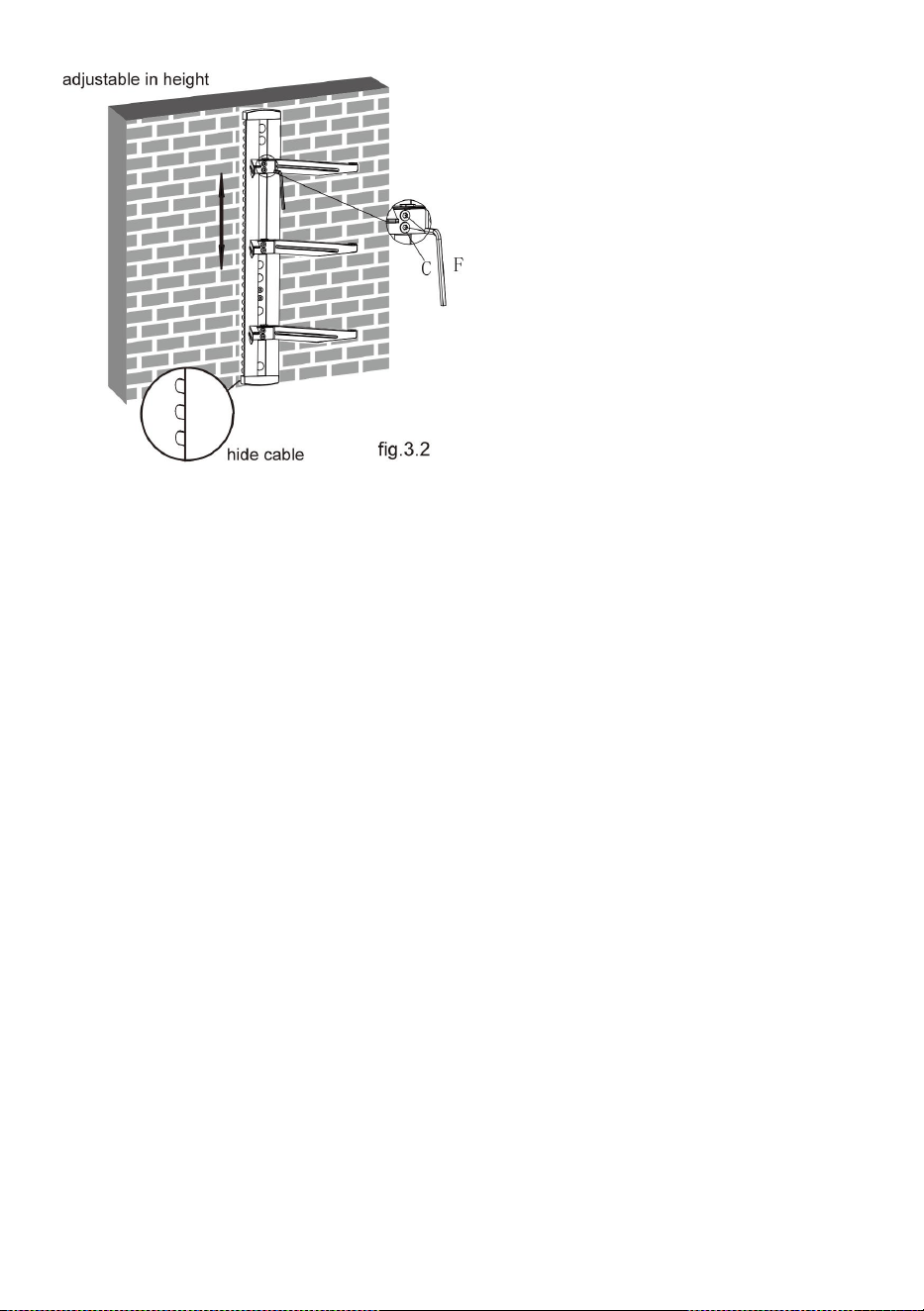
● Insert two decorative covers
to the top and bottom of wall
plate respectively and install
six plastic covers.
10
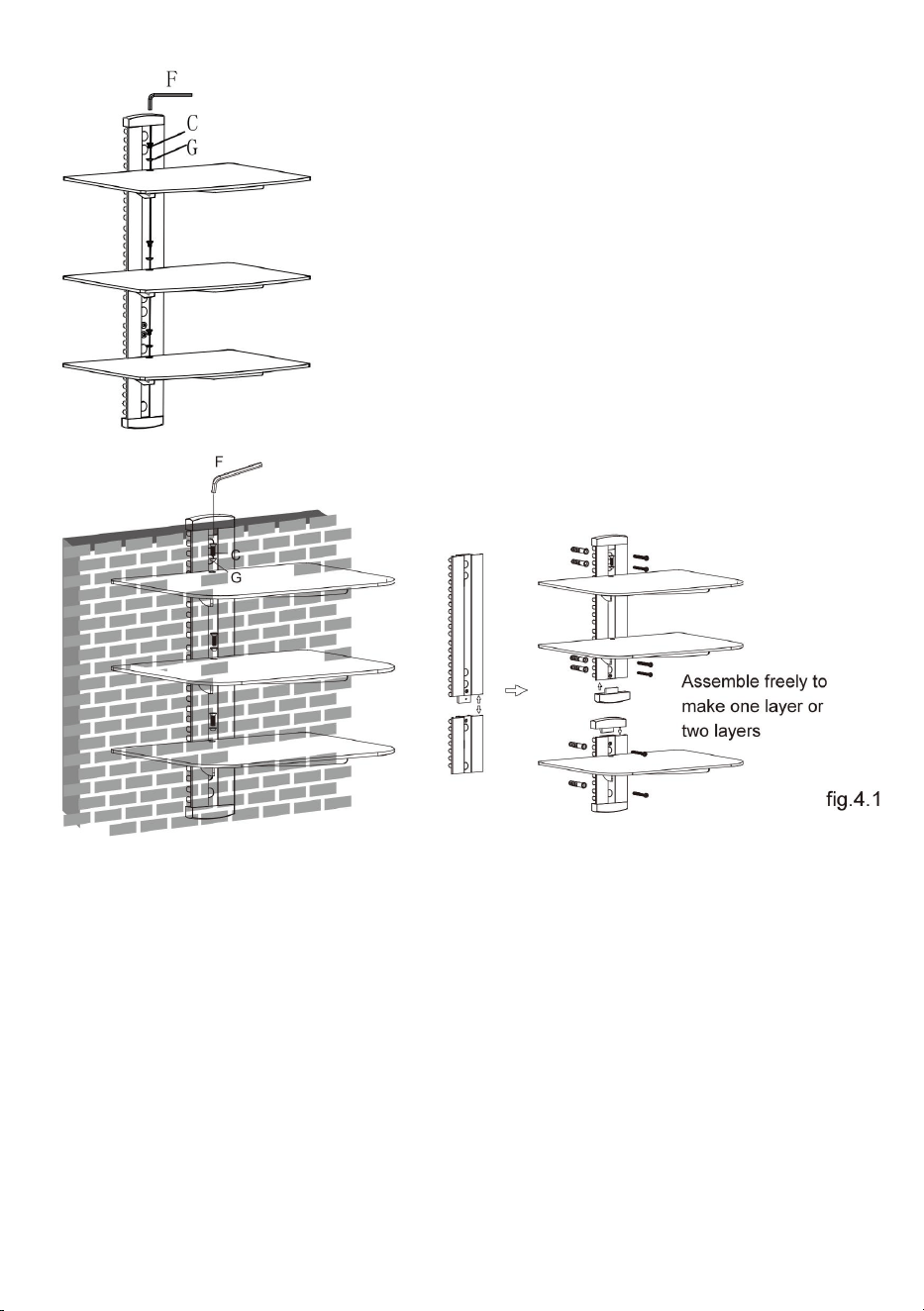
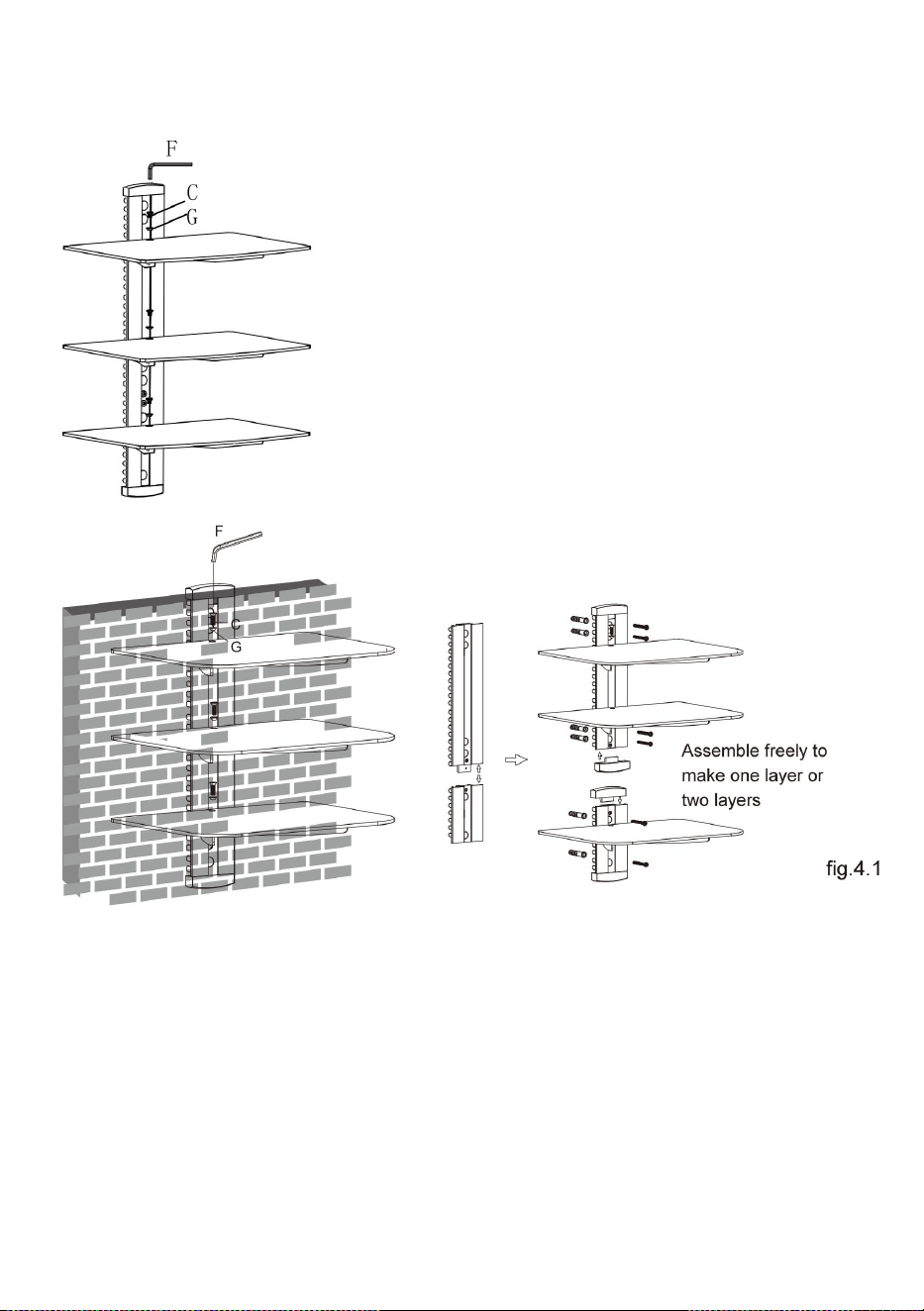
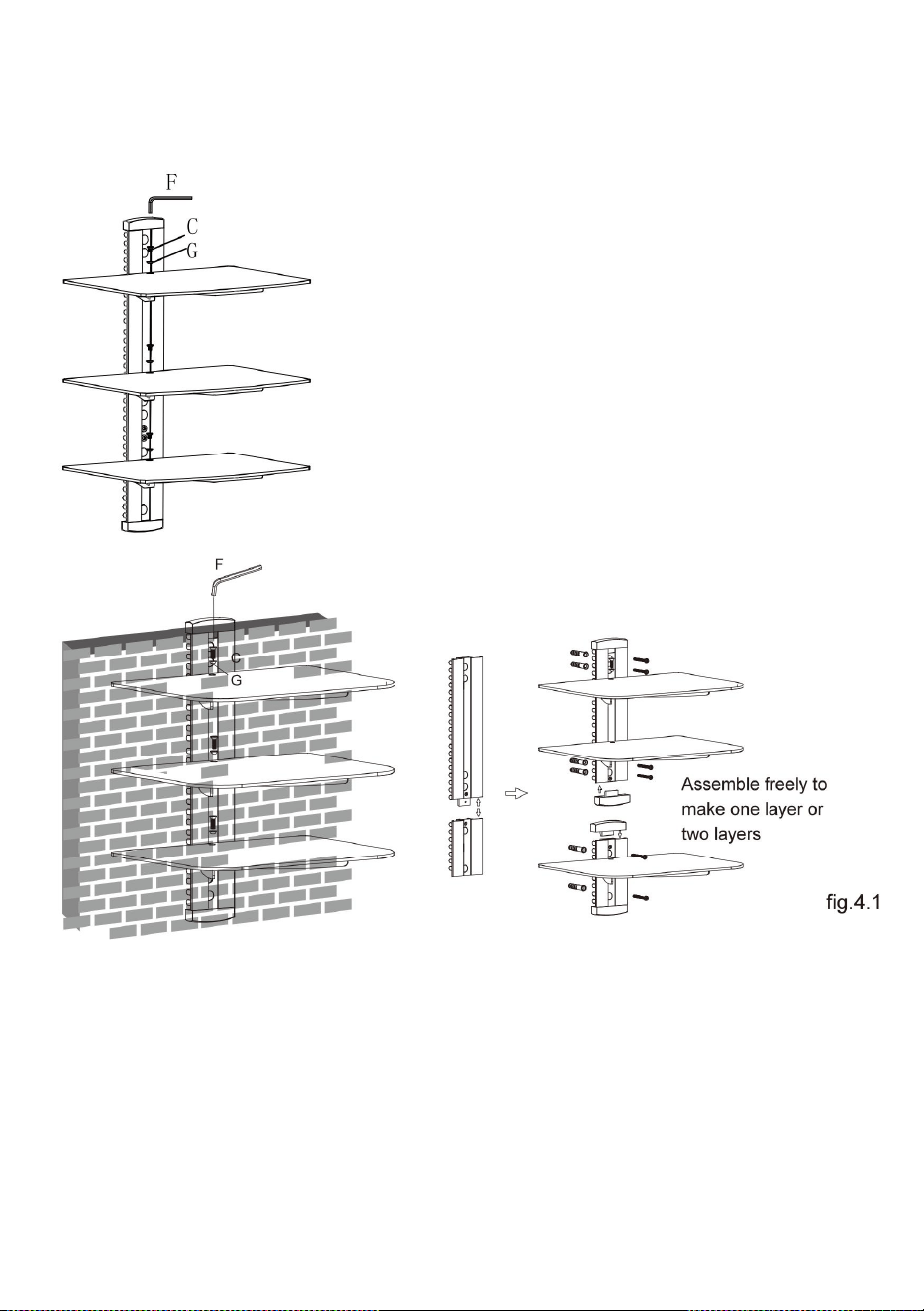
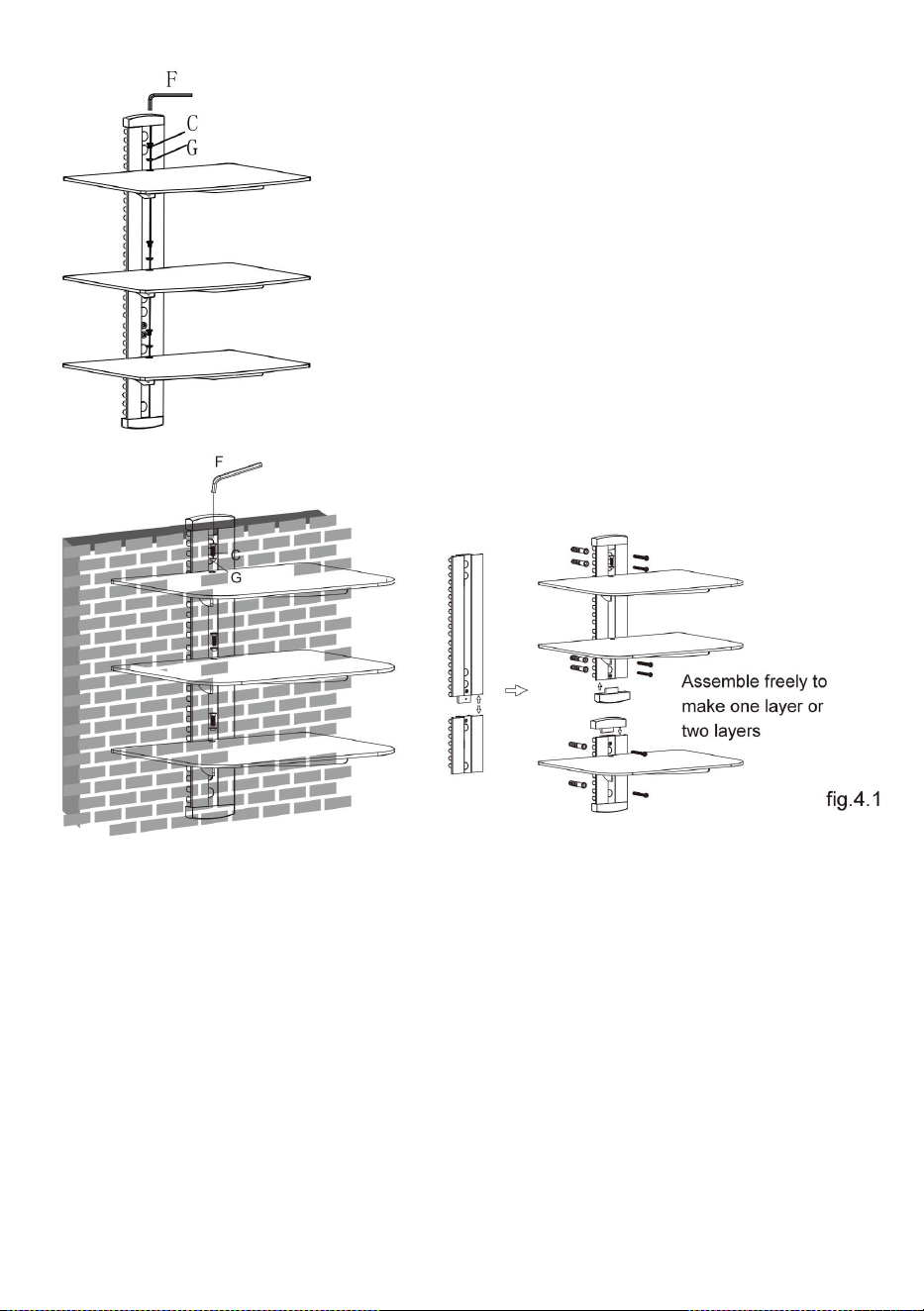
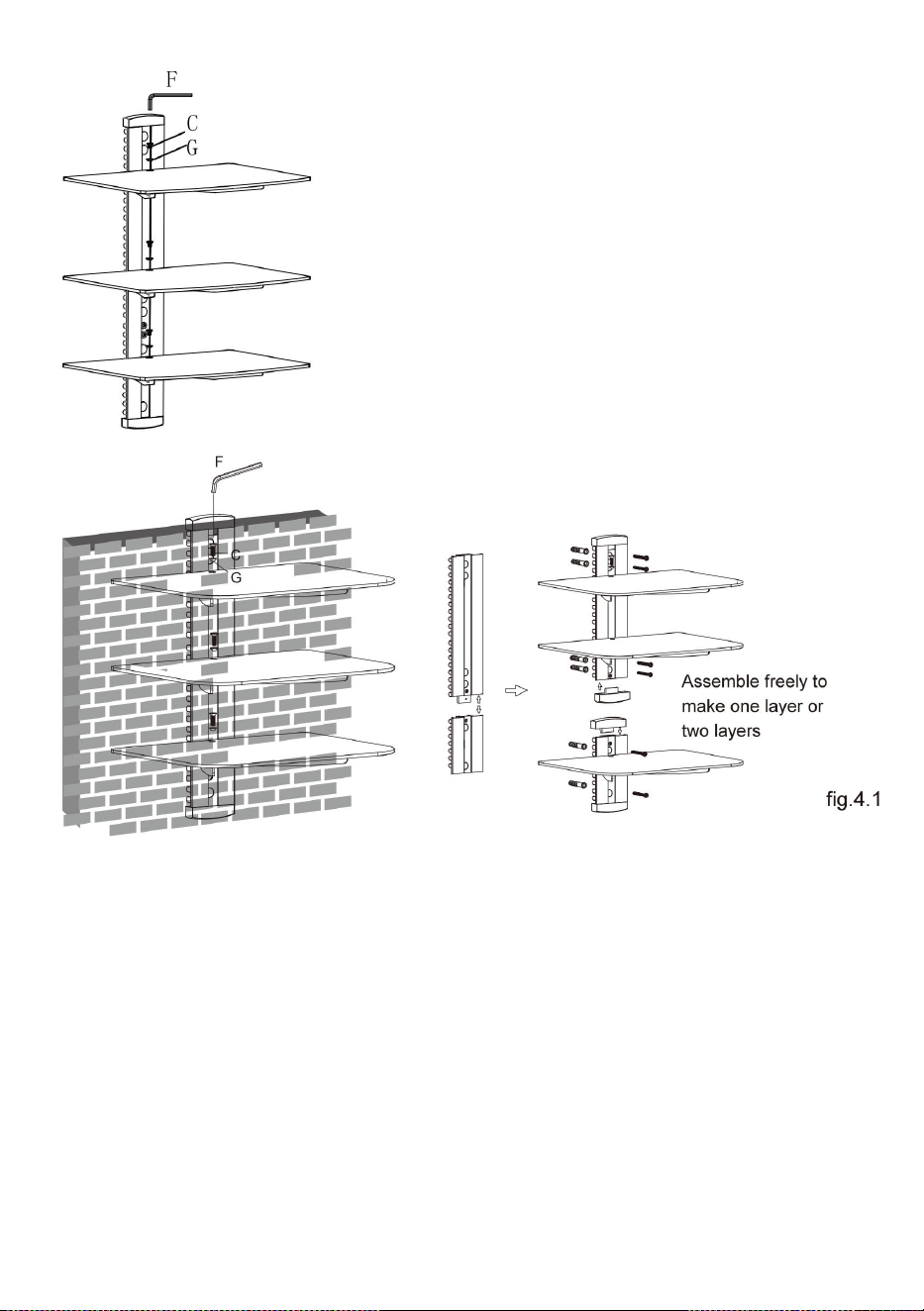
STEP4: INSTALLING THE GLASS SHELF
Place the three glass shelf gently on the three glass holders
respectively. Attach the glass shelves to the glass holders using
screws and plastic bushes, tightening screws with a 3mm Allen key
but not tighten completely at this time. Center the glass shelves over
holes, securely tighten screws with a 3mm Allen key as shown in
fig.4.1.
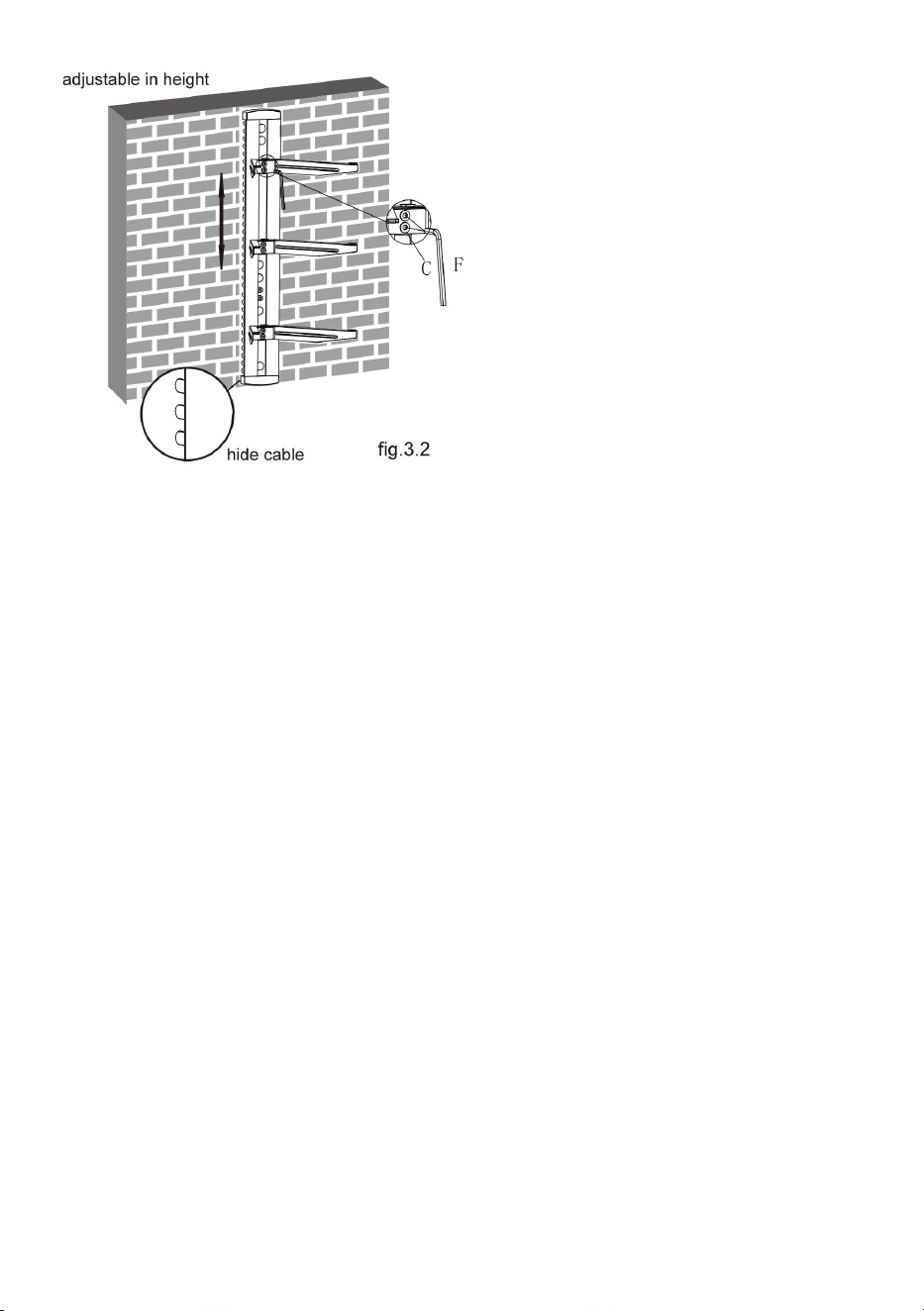
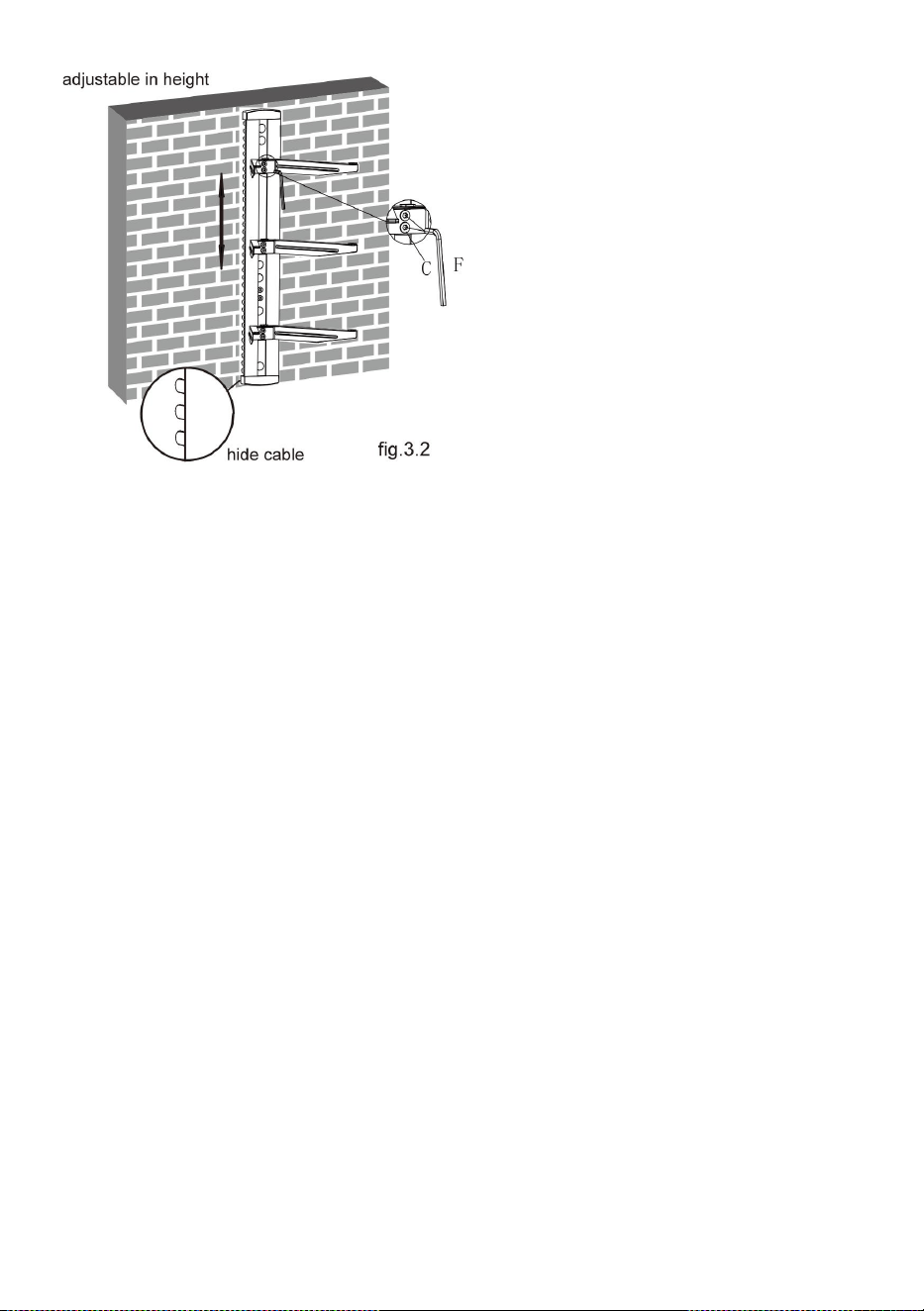
● You can adjust the height
of the glass holders as
needed. Loosen the screws
with a 3mm Allen key(but
not remove) to adjust the
glass holders at the desired
height and then tighten
screws with a 3mm Allen
key as shown in fig.3.2.
11
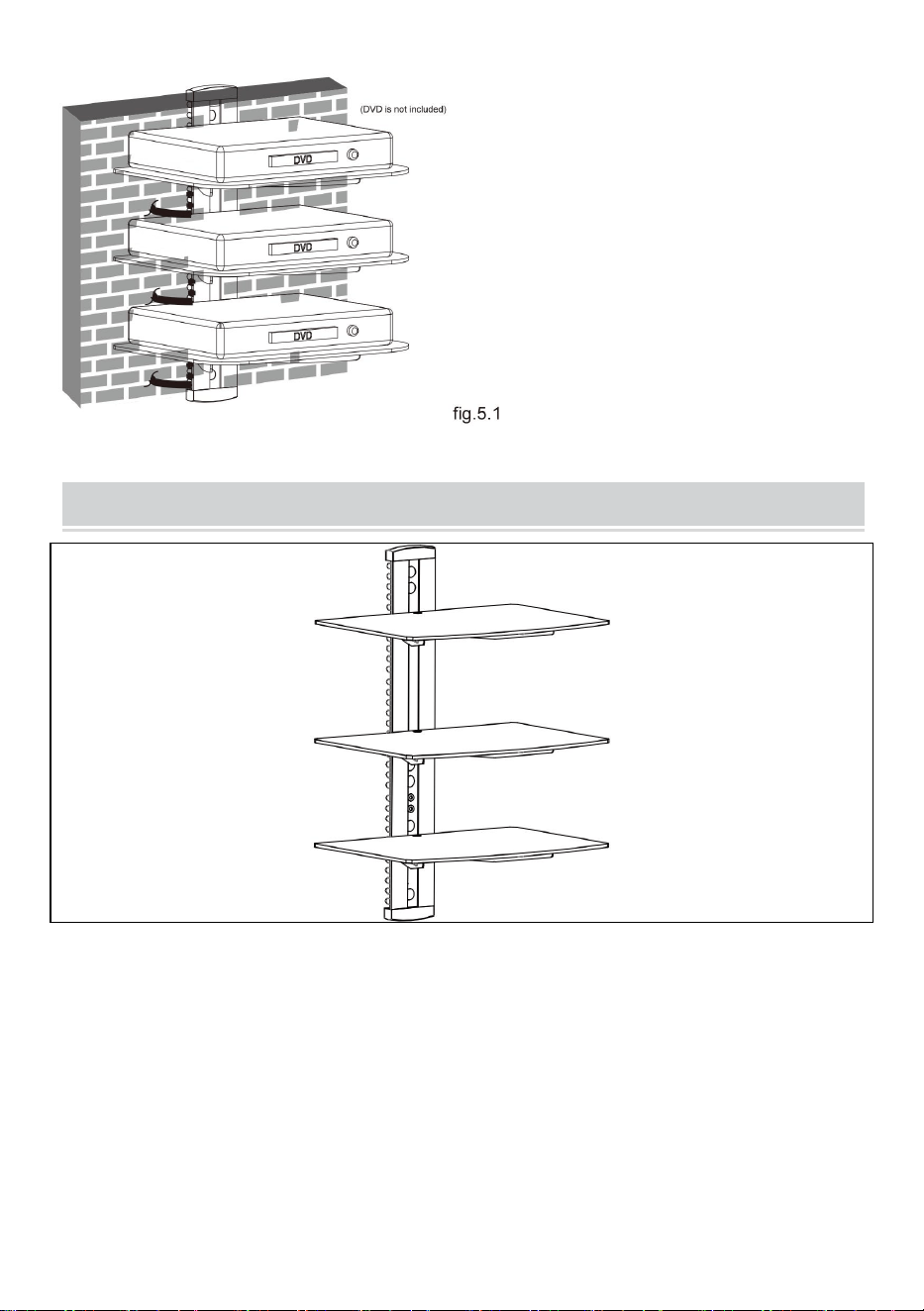
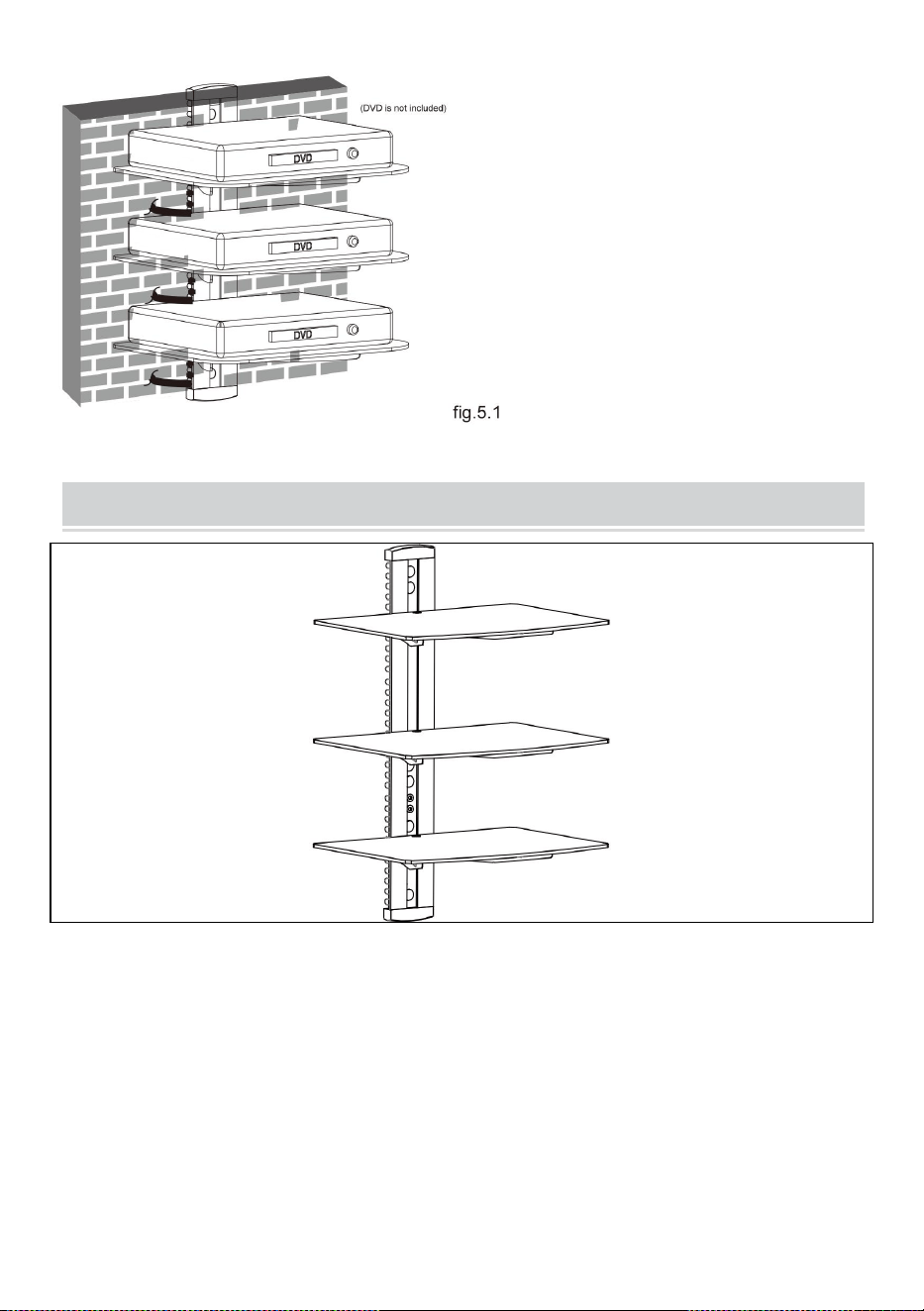
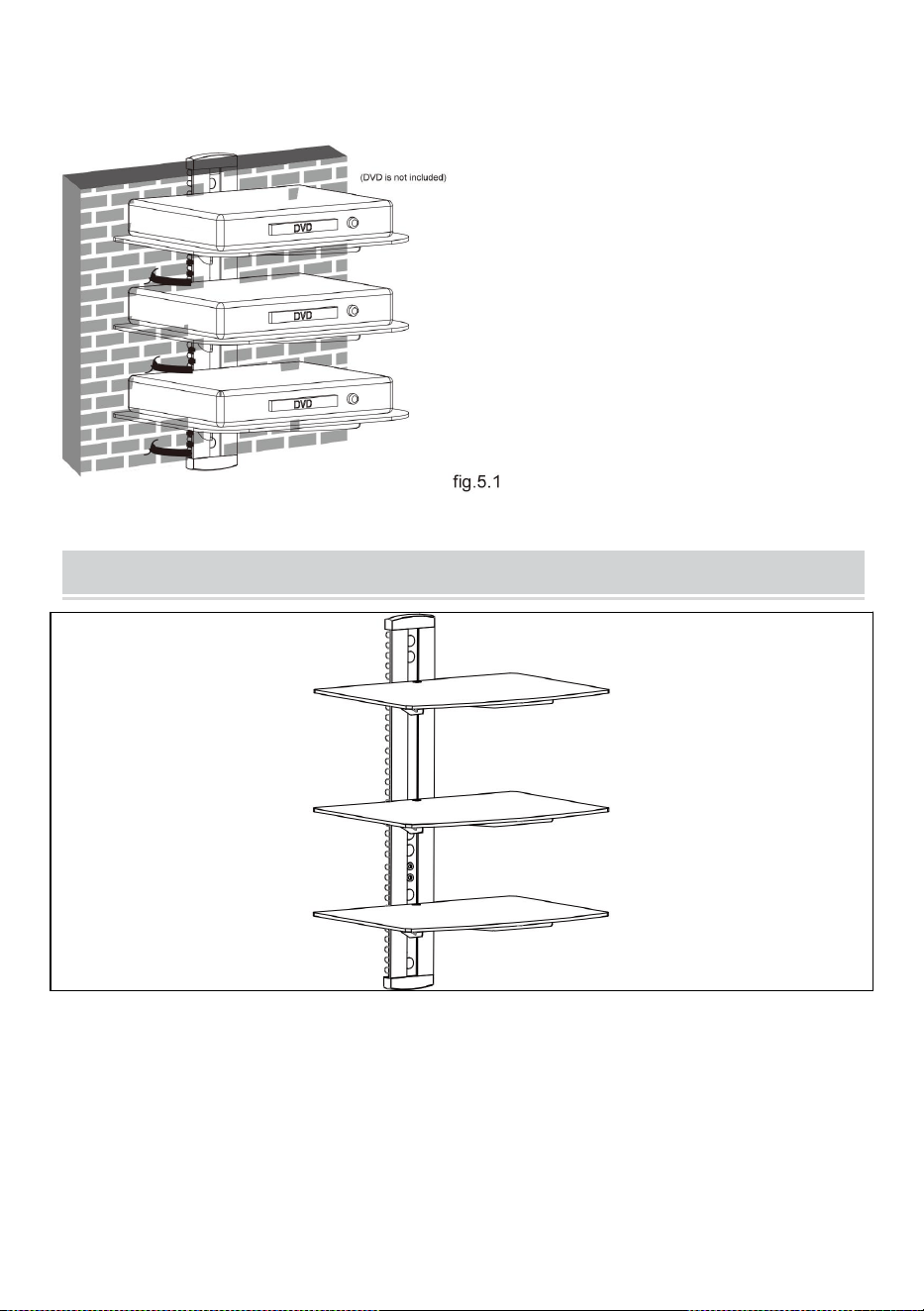
STEP5: CABLE MANAGEMENT
After installing the DVD wall mount, place DVD gently on the
mounted glass shelves. Pull out the cable clip. Insert the cable into
any of the opening of the clip, with one end of the cable inserted in
the clip. Insert the clip into the main pole. Take out the other head of
the cable from another opening of the clip, then push the clip until the
end of the main pole.
12
COMPLETION
Maintenance
● Once you have mounted the DVD
bracket, ensure that it is securely
fastened and safe to use. Check the
tightness of screws every two months.
● If you have any doubts regarding
the installation, please consult our
retailer or service department for
details.

13
Address: Shuangchenglu 803nong11hao1602A-1609shi, baoshanqu,
shanghai 200000 CN.
Imported to AUS: SIHAO PTY LTD, 1 ROKEVA STREETEASTWOOD
NSW 2122 Australia
Imported to USA: Sanven Technology Ltd., Suite 250, 9166 Anaheim
Place, Rancho Cucamonga, CA 91730
REP
EC
E-CrossStu GmbH
Mainzer Landstr.69, 60329 Frankfurt am Main.
REP
UK
YH CONSULTING LIMITED.
C/O YH Consulting Limited Office 147, Centurion House,
London Road, Staines-upon-Thames, Surrey, TW18 4AX


15
Technique Assistance et certificat de garantie électronique
www.vevor.com/support
SUPPORT DE COMPOSANT AUDIO
MANUEL DE L' UTILISATEUR
N° DE MODÈLE : CS303
We continue to be committed to provide you tools with competitive price.
"Save Half", "Half Price" or any other similar expressions used by us only represents an
estimate of savings you might benefit from buying certain tools with us compared to the major
top brands and does not necessarily mean to cover all categories of tools offered by us. You
are kindly reminded to verify carefully when you are placing an order with us if you are
actually saving half in comparison with the top major brands.

1
N° DE MODÈLE : CS303
Have product questions? Need technical support? Please feel free to
contact us:
Technical Support and E-Warranty Certificate
www.vevor.com/support
NEED HELP? CONTACT US!
This is the original instruction, please read all manual instructions
carefully before operating. VEVOR reserves a clear interpretation of our
user manual. The appearance of the product shall be subject to the
product you received. Please forgive us that we won't inform you again if
there are any technology or software updates on our product.
Audio Component Stand

2
AVERTISSEMENT:
Veuillez lire attentivement ce manuel avant d'utiliser le produit. Ne
pas le faire pourrait entraîner des blessures graves.
PRÉCAUTIONS DE MONTAGE
N'installez pas le produit avant d'avoir lu et compris les instructions et
les avertissements fournis dans cette fiche d'installation. Si vous avez
des questions concernant les instructions ou les avertissements,
veuillez contacter votre distributeur local.
Veuillez vous référer au guide d'installation pour connaître les
distances recommandées par rapport au mur afin d'éviter tout risque
de dommages matériels.
Ce produit ne doit être installé que par une personne possédant de
bonnes aptitudes en mécanique, une expérience en construction de
base et une compréhension complète du processus d'installation.
Assurez-vous que la surface d’appui supportera en toute sécurité la
charge combinée de l’équipement et de tout le matériel et
composants attachés.
En cas de montage sur des montants muraux en bois, assurez-vous
que les vis de montage sont ancrées au centre des montants. L’
utilisation d’un détecteur de montants « bord à bord » est fortement
recommandée.
Utilisez toujours un assistant ou un équipement de levage mécanique
pour soulever et positionner l'équipement en toute sécurité.
Serrez fermement les vis, mais sans trop serrer. Un serrage excessif
peut endommager les articles, réduisant considérablement leur
pouvoir de maintien.
Ce produit est destiné à un usage intérieur uniquement. L'utilisation de

3
ce produit à l'extérieur pourrait entraîner une défaillance du produit et
des blessures.
Ne dépassez jamais la capacité de charge maximale.
CONSERVEZ LES INSTRUCTIONS
PRÉCAUTIONS D'UTILISATION
POUR ÉVITER DES BLESSURES GRAVES ET LA MORT PAR
BASCULEMENT :
5. Ce produit n'est pas un jouet . Gardez les enfants loin de cet article.
6. Ne dépassez pas les capacités de poids avant de déménager.
7. Utilisez uniquement sur une surface plane, dure et lisse capable de
supporter en toute sécurité un support de composant audio entièrement
chargé.
8. Utiliser uniquement comme prévu. Inspectez avant chaque utilisation et
ne pas utiliser si les pièces sont desserrées ou endommagées.
TECHNICAL SPECIFICATIONS
Modèle
CS303
dimensions du produit
(LxlxH)(mm)
430*210*315
Taille d'emballage
(LxlxH)(mm)
417*295*63
Poids net / kg)
Environ 4
4
Poids brut (kg)
Environ 4,4
*Les produits tels que les spécifications, l'apparence et la conception
sont sujets à modification sans préavis.
PACKAGE CONTENTS
Outils nécessaires
Phillips Head S équipage D rivière (Longueur : 200 mm ( à l'
exclusion de la poignée ))
Perceuse électrique et mèche à maçonnerie de 8 mm pour l'
installation de murs en béton
Stylo de marquage
5
Marteau
ASSEMBLY STEPS
ÉTAPE 1-a : MONTAGE MURAL SUR MONTANTS EN
BOIS :
● Use a stud finder to locate the
edges of the studs. It is highly
recommended to use an
edge-to-edge stud finder. Draw a
vertical line down the center of
each stud based on their edges.
● Place wall plate on wall as a
template and mark the center
of the four mounting holes. Make
sure that the mounting holes are
on the centerline of stud.
6
ÉTAPE 1-b : BRIQUE SOLIDE ET BLOC DE BÉTON
MONTAGE:
● Utilisez la plaque murale comme modèle pour marquer les
emplacements de quatre trous sur le mur, ainsi que montré sur la
fig.1.2.
● Drill four 1/8” (3mm)
diameter holes 1.2” (30mm)
deep. Secure it using four
screws(A), make sure that
the wall plate is level as
shown in fig.1.1.
7
● Pré-percez ces trous avec une mèche à maçonnerie de 8 mm , en
veillant à une profondeur d'au moins 50 mm. Insérez une ancre à
béton (B) dans chacun de ces trous.
● Fixez la plaque murale au mur à l'aide de deux vis (A),
assurez-vous que la plaque murale est de niveau comme montré sur
la fig.1.2.
ÉTAPE 2 : ASSEMBLAGE DU PORTE-VERRE
8
● Fixez la pièce de connexion au support de verre à l'aide de deux
vis , en laissant un espace de 3 mm comme indiqué sur la fig.2.1.
● Répétez la même méthode pour assembler l'autre
porte-verre.
ÉTAPE 3 : INSTALLATION DU PORTE-VERRE
9
● Insert the three glass
holders into the wall
plate along the wall plate
rail at the desired height
respectively.
● Then tighten four
screws with a 3mm
Allen key as shown in
fig.3.1 to avoid wobbly
situation.
10
ÉTAPE 4 : INSTALLATION DE L'ÉTAGÈRE EN VERRE
Placez délicatement les trois étagères en verre sur les trois supports
en verre. Fixez les étagères en verre aux supports en verre à l'aide
de vis et de douilles en plastique, serrez les vis avec une clé Allen de
3 mm, mais ne serrez pas complètement pour le moment. Centrer le
● Insert two decorative covers
to the top and bottom of wall
plate respectively and install
six plastic covers.
● You can adjust the height
of the glass holders as
needed. Loosen the screws
with a 3mm Allen key(but
not remove) to adjust the
glass holders at the desired
height and then tighten
screws with a 3mm Allen
key as shown in fig.3.2.
11
placez les étagères en verre sur les trous, serrez fermement les vis
avec une clé Allen de 3 mm, comme indiqué sur la fig.4.1.
ÉTAPE 5 : GESTION DES CÂBLES
Après avoir installé le support mural pour DVD, placez délicatement
le DVD sur les étagères en verre montées. Retirez le serre-câble .
Insérez le câble dans l'une des ouvertures du clip, avec une
extrémité du câble insérée dans le clip . J'insère le clipsez-le sur le
poteau principal . Sortez l'autre tête du câble d'une autre ouverture
du clip, puis poussez le clip jusqu'à l'extrémité du poteau principal.
12
COMPLETION
Maintenance
● Once you have mounted the DVD
bracket, ensure that it is securely
fastened and safe to use. Check the
tightness of screws every two months.
● If you have any doubts regarding
the installation, please consult our
retailer or service department for
details.

13
Adresse : Shuangchenglu 803nong11hao1602A-1609shi, baoshanqu,
Shanghai 200000 CN.
Importé en Australie : SIHAO PTY LTD, 1 ROKEVA STREETASTWOOD
NSW 2122 Australie
Importé aux États-Unis : Sanven Technology Ltd., Suite 250, 9166
Anaheim Place, Rancho Cucamonga, CA 91730
REP
EC
E-CrossStu GmbH
Mainzer Landstr.69, 60329 Frankfurt am Main.
REP
UK
YH CONSULTING LIMITED.
C/O YH Consulting Limited Office 147, Centurion House,
London Road, Staines-upon-Thames, Surrey, TW18 4AX



16
We continue to be committed to provide you tools with competitive price.
"Save Half", "Half Price" or any other similar expressions used by us only represents an
estimate of savings you might benefit from buying certain tools with us compared to the major
top brands and does not necessarily mean to cover all categories of tools offered by us. You
are kindly reminded to verify carefully when you are placing an order with us if you are
actually saving half in comparison with the top major brands.

1
MODELL NR.: CS303
Have product questions? Need technical support? Please feel free to
contact us:
Technical Support and E-Warranty Certificate
www.vevor.com/support
NEED HELP? CONTACT US!
This is the original instruction, please read all manual instructions
carefully before operating. VEVOR reserves a clear interpretation of our
user manual. The appearance of the product shall be subject to the
product you received. Please forgive us that we won't inform you again if
there are any technology or software updates on our product.
Audio Component Stand

2
WARNUNG:
Bitte lesen Sie dieses Handbuch vor der Verwendung des Produkts
sorgfältig durch. Andernfalls kann es zu schweren Verletzungen
kommen.
VORSICHTSMASSNAHMEN BEI DER
MONTAGE
Installieren Sie das Produkt erst, wenn Sie die Anweisungen und
Warnungen in diesem Installationsblatt gelesen und verstanden haben.
Wenn Sie Fragen zu den Anweisungen oder Warnungen haben,
wenden Sie sich bitte an Ihren Händler vor Ort.
Um Sachschäden zu vermeiden, beachten Sie die empfohlenen
Abstände zur Wand in der Installationsanleitung.
Dieses Produkt sollte nur von jemandem installiert werden, der über
gute mechanische Fähigkeiten, Erfahrung im Grundbau und ein
umfassendes Verständnis des Installationsvorgangs verfügt.
Stellen Sie sicher, dass die Standfläche die Gesamtlast des Geräts
und aller angeschlossenen Hardware und Komponenten sicher trägt.
Bei der Montage an Holzwandpfosten achten Sie darauf, dass die
Befestigungsschrauben in der Mitte der Pfosten verankert sind. Die
Verwendung eines „ Rand-zu-Rand “ -Pfostensuchers wird dringend
empfohlen.
Verwenden Sie zum sicheren Anheben und Positionieren von Geräten
immer einen Assistenten oder ein mechanisches Hebezeug.
Ziehen Sie die Schrauben fest an, aber nicht zu fest. Zu festes
Anziehen kann die Teile beschädigen und ihre Haltekraft stark
verringern.
Dieses Produkt ist nur für den Gebrauch in Innenräumen vorgesehen.
Bei Verwendung im Freien kann es zu Produktfehlern und
Verletzungen kommen.
Überschreiten Sie niemals die maximale Tragfähigkeit.

3
BEWAHREN SIE DIE ANLEITUNG AUF
VORSICHTSMASSNAHMEN BEIM
GEBRAUCH
UM SCHWERE VERLETZUNGEN UND TOD DURCH KIPPEN ZU
VERMEIDEN:
9. Dieses Produkt ist kein Spielzeug . Halten Sie Kinder von diesem Artikel
fern.
10. Überschreiten Sie nicht die Gewichtskapazität vor dem Umzug.
11. Nur auf einer flachen, harten und glatten Oberfläche verwenden, die
einen voll beladenen Audiokomponentenständer sicher tragen kann.
12. Nur bestimmungsgemäß verwenden. Vor jedem Gebrauch prüfen und
nicht verwenden , wenn Teile lose oder beschädigt sind.
TECHNICAL SPECIFICATIONS
Modell
CS303
Technische Daten
(L x B x H) (mm)
430*210*315
Verpackungsgröße (L x
B x H) (mm)
417*295*63
Nettogewicht / kg)
Über 4
4
Bruttogewicht (kg)
Über 4.4
*Produkte wie Spezifikationen, Aussehen und Design können ohne
vorherige Ankündigung geändert werden.
PACKAGE CONTENTS
Werkzeuge benötigt
Phillips Head S Crew D Fluss (Länge: 200 mm ( ohne Griff ) )
Elektrische Bohrmaschine und 8 - mm - Steinbohrer für die
Installation von Betonwänden
Markierstift
Hammer
5
ASSEMBLY STEPS
SCHRITT 1-a: HOLZSTÄNDER-WANDMONTAGE:
● Use a stud finder to locate the
edges of the studs. It is highly
recommended to use an
edge-to-edge stud finder. Draw a
vertical line down the center of
each stud based on their edges.
● Place wall plate on wall as a
template and mark the center
of the four mounting holes. Make
sure that the mounting holes are
on the centerline of stud.
6
SCHRITT 1-b: MASSIVE ZIEGEL UND BETONBLOCK
MONTAGE:
● Verwenden Sie die Wandplatte als Schablone, um die Positionen
der vier Löcher an der Wand zu markieren. dargestellt in Abb. 1.2.
● Drill four 1/8” (3mm)
diameter holes 1.2” (30mm)
deep. Secure it using four
screws(A), make sure that
the wall plate is level as
shown in fig.1.1.
7
● Bohren Sie diese Löcher mit einem 8-mm- Steinbohrer vor und
achten Sie auf eine Tiefe von mindestens 50 mm. Setzen Sie in
jedes dieser Löcher einen Betonanker (B) ein.
● Befestigen Sie die Wandplatte Befestigen Sie die Wandplatte mit
zwei Schrauben (A) an der Wand. Stellen Sie sicher, dass die
Wandplatte waagerecht ausgerichtet ist. als dargestellt in Abb. 1.2.
SCHRITT 2: MONTAGE DES GLASHALTERS
● Befestigen Sie das Verbindungsstück mit zwei Schrauben am
Glashalter und lassen Sie dabei einen Abstand von 3 mm, wie in Abb.
2.1 gezeigt.
8
● Wiederholen Sie dieselbe Methode, um den anderen Glashalter
zusammenzubauen.
SCHRITT 3: INSTALLATION DES GLASHALTERS
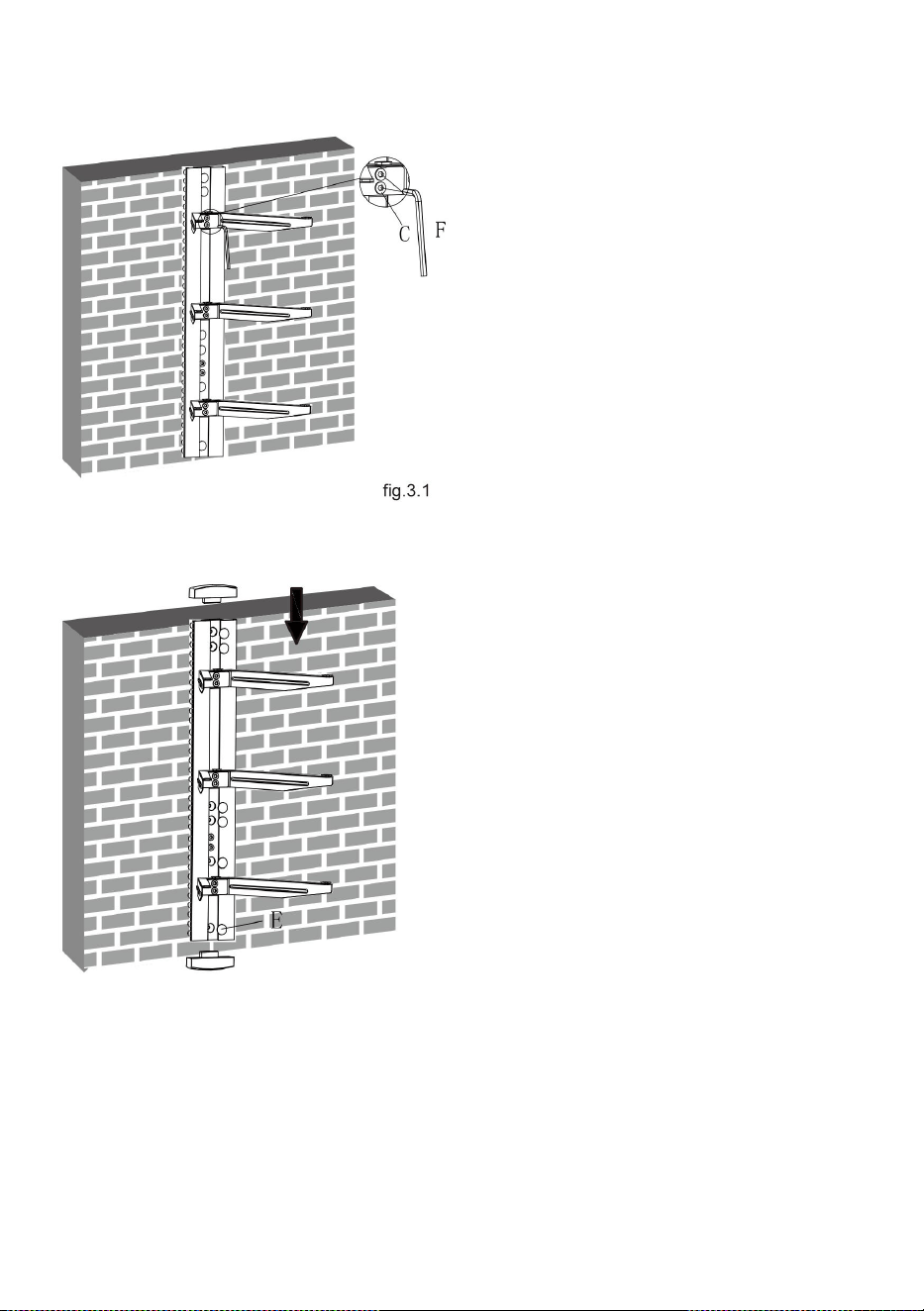
● Insert the three glass
holders into the wall
plate along the wall plate
rail at the desired height
respectively.
9
● Then tighten four
screws with a 3mm
Allen key as shown in
fig.3.1 to avoid wobbly
situation.
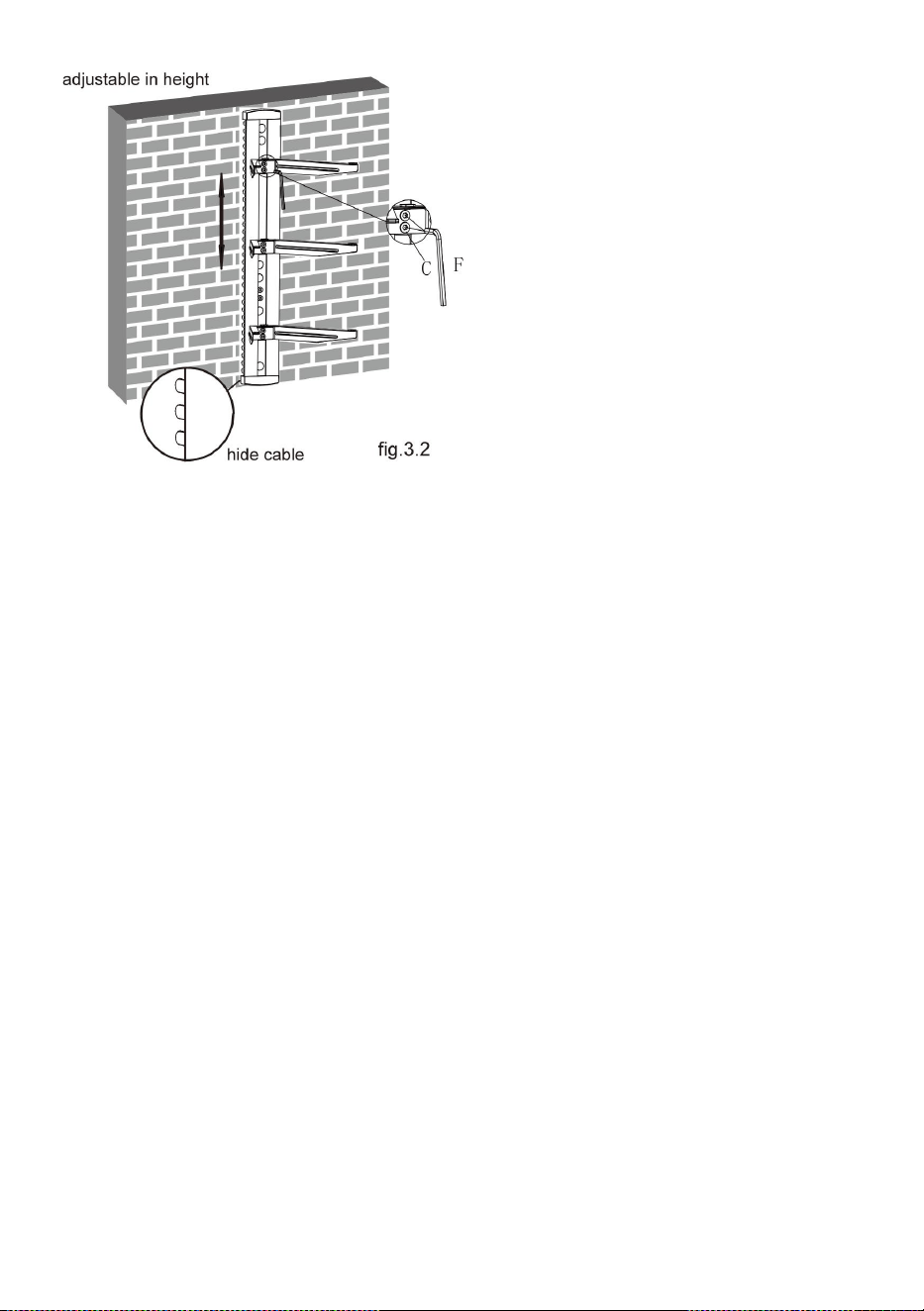
● Insert two decorative covers
to the top and bottom of wall
plate respectively and install
six plastic covers.
10
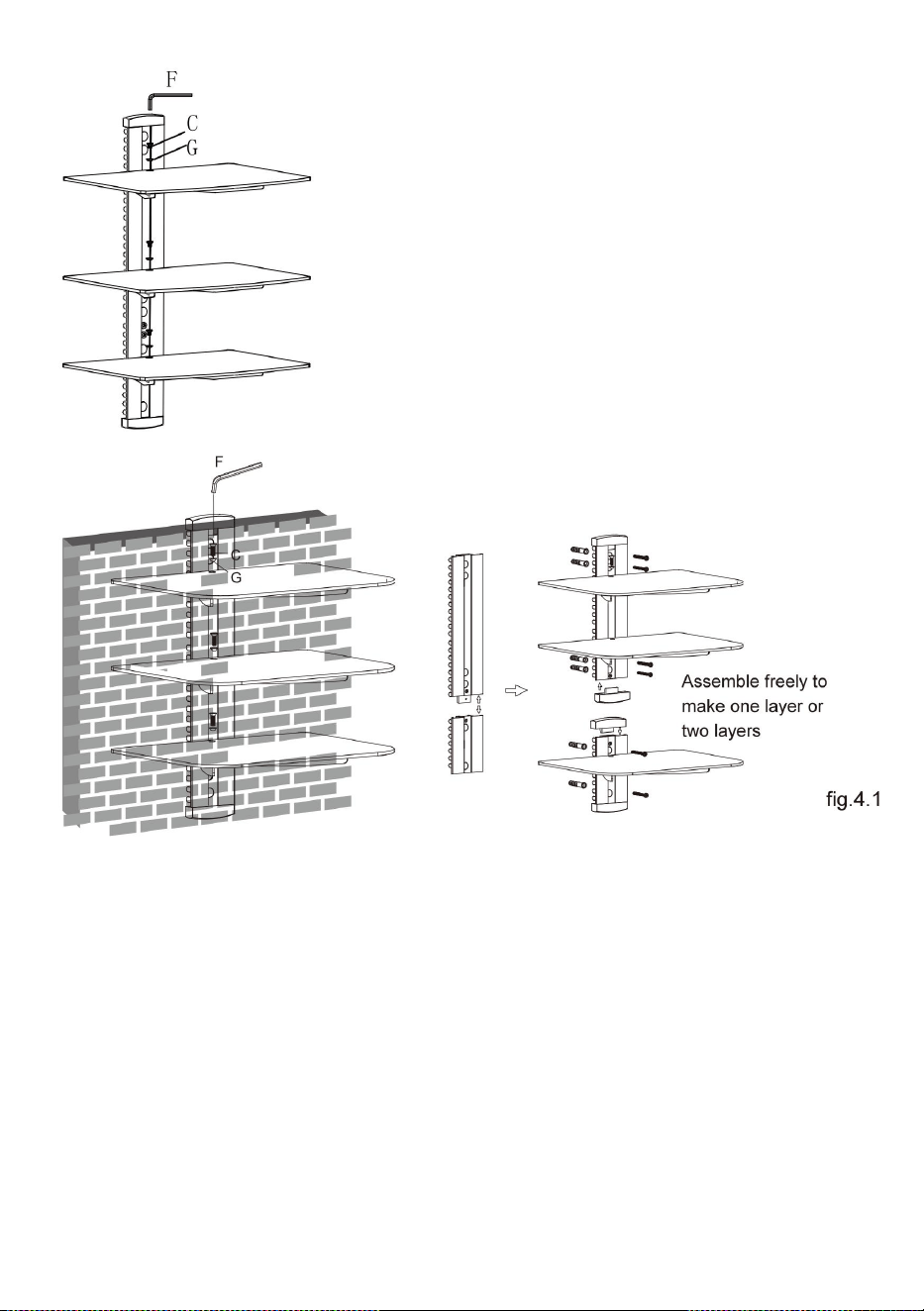
SCHRITT 4: INSTALLATION DES GLASREGAL
Legen Sie die drei Glasregale vorsichtig auf die drei Glashalter.
Befestigen Sie die Glasregale an den Glashaltern Verwenden Sie
Schrauben und Kunststoffbuchsen. Ziehen Sie die Schrauben mit
einem 3-mm-Inbusschlüssel fest , aber ziehen Sie sie noch nicht
vollständig an. Zentrieren Sie die Glasböden über den Löchern und
ziehen Sie die Schrauben mit einem 3-mm-Inbusschlüssel fest an,
wie in Abb. 4.1 gezeigt.
● You can adjust the height
of the glass holders as
needed. Loosen the screws
with a 3mm Allen key(but
not remove) to adjust the
glass holders at the desired
height and then tighten
screws with a 3mm Allen
key as shown in fig.3.2.
11
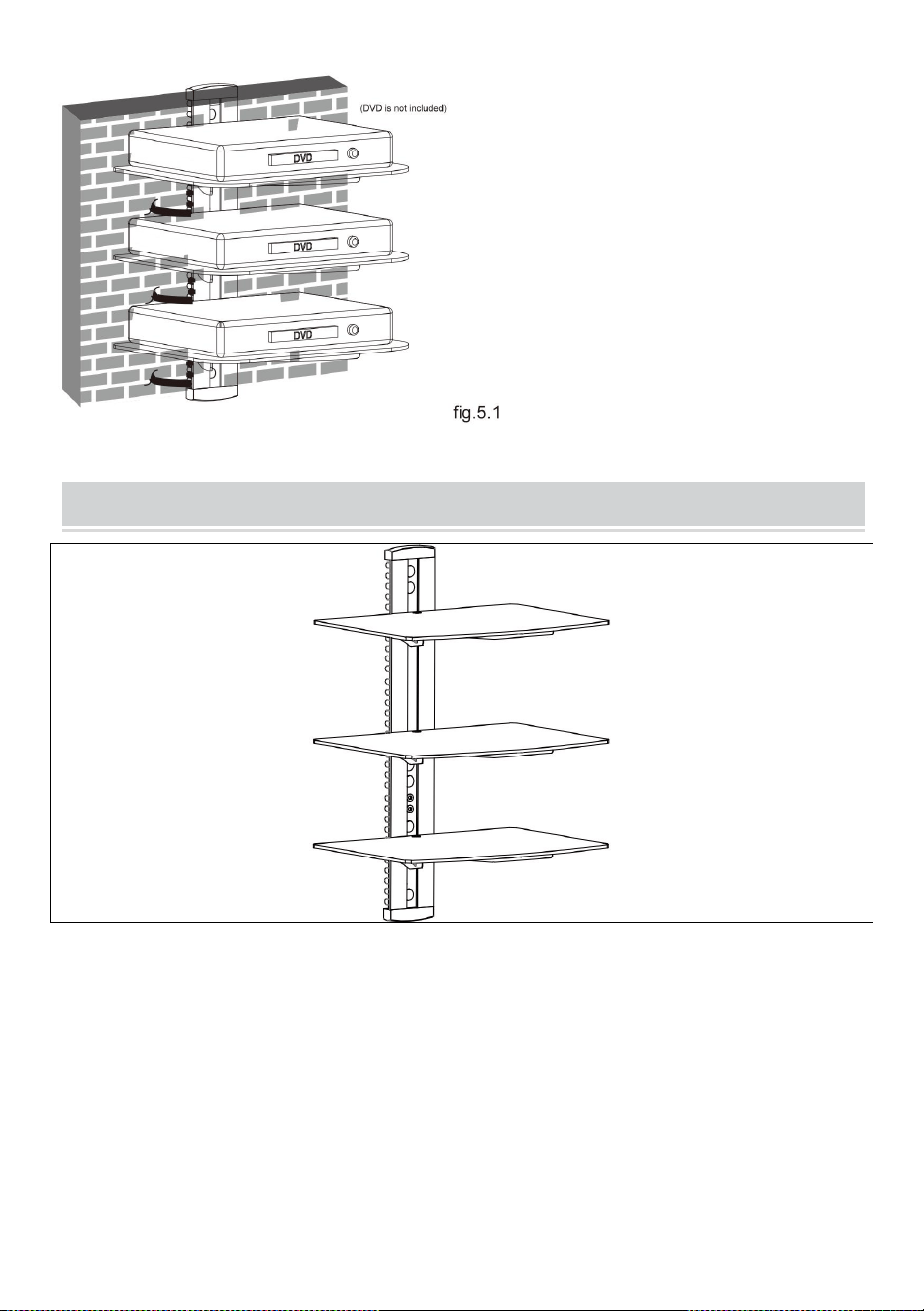
SCHRITT 5: KABELMANAGEMENT
Nach der Montage der DVD-Wandhalterung legen Sie die DVD
vorsichtig auf die montierten Glasablagen. Ziehen Sie den Kabelclip
heraus . Führen Sie das Kabel in eine beliebige Öffnung des Clips
ein, wobei ein Ende des Kabels im Clip steckt . Zum Einklipsen in die
Hauptstange . Nehmen Sie den anderen Kabelkopf aus einer
anderen Öffnung des Clips und drücken Sie dann den Clip bis zum
Ende der Hauptstange.
12
COMPLETION
Maintenance
● Once you have mounted the DVD
bracket, ensure that it is securely
fastened and safe to use. Check the
tightness of screws every two months.
● If you have any doubts regarding
the installation, please consult our
retailer or service department for
details.

13
Adresse : Shuangchenglu 803nong11hao1602A-1609shi, Baoshanqu,
Shanghai 200000 CN.
Nach AUS importiert: SIHAO PTY LTD, 1 ROKEVA
STREETEASTWOOD NSW 2122 Australien
Importiert in die USA: Sanven Technology Ltd., Suite 250, 9166 Anaheim
Place, Rancho Cucamonga, CA 91730
REP
EC
E-CrossStu GmbH
Mainzer Landstr.69, 60329 Frankfurt am Main.
REP
UK
YH CONSULTING LIMITED.
C/O YH Consulting Limited Office 147, Centurion House,
London Road, Staines-upon-Thames, Surrey, TW18 4AX


15
Tecnico Supporto e certificato di garanzia elettronica
www.vevor.com/support
SUPPORTO PER COMPONENTI AUDIO
MANUALE D' USO
MODELLO N.: CS303
We continue to be committed to provide you tools with competitive price.
"Save Half", "Half Price" or any other similar expressions used by us only represents an
estimate of savings you might benefit from buying certain tools with us compared to the major
top brands and does not necessarily mean to cover all categories of tools offered by us. You
are kindly reminded to verify carefully when you are placing an order with us if you are
actually saving half in comparison with the top major brands.

1
MODELLO N.: CS303
Have product questions? Need technical support? Please feel free to
contact us:
Technical Support and E-Warranty Certificate
www.vevor.com/support
NEED HELP? CONTACT US!
This is the original instruction, please read all manual instructions
carefully before operating. VEVOR reserves a clear interpretation of our
user manual. The appearance of the product shall be subject to the
product you received. Please forgive us that we won't inform you again if
there are any technology or software updates on our product.
Audio Component Stand

2
AVVERTIMENTO:
Si prega di leggere attentamente questo manuale prima di utilizzare il
prodotto. In caso contrario, si potrebbero causare lesioni gravi.
PRECAUZIONI DI MONTAGGIO
Non installare il prodotto prima di aver letto e compreso le istruzioni e
le avvertenze fornite in questa scheda di installazione. In caso di
domande riguardanti istruzioni o avvertenze, contattare il distributore
locale.
Fare riferimento alla guida di installazione per le distanze consigliate
dalla parete per evitare il rischio di danni materiali.
Questo prodotto deve essere installato solo da qualcuno con buone
attitudini meccaniche, esperienza nella costruzione di base e una
piena comprensione del processo di installazione.
Assicurarsi che la superficie di supporto supporti in modo sicuro il
carico combinato dell'apparecchiatura e di tutto l'hardware e i
componenti collegati.
Se si effettua il montaggio su montanti a parete in legno, assicurarsi
che le viti di montaggio siano ancorate al centro dei montanti. Si
consiglia vivamente l'uso di un rilevatore di perni “ da bordo a bordo ” .
Utilizzare sempre un assistente o un'attrezzatura di sollevamento
meccanica per sollevare e posizionare l'attrezzatura in sicurezza.
Stringere saldamente le viti, ma non stringerle eccessivamente. Un
serraggio eccessivo può danneggiare gli articoli, riducendo
notevolmente la loro capacità di tenuta.
Questo prodotto è destinato esclusivamente all'uso interno. L'utilizzo
di questo prodotto all'aperto potrebbe causare guasti al prodotto e
lesioni personali.
Non superare mai la capacità di carico massima.
CONSERVARE LE ISTRUZIONI
3
USARE LE PRECAUZIONI
PER PREVENIRE LESIONI GRAVI E MORTE DOVUTE AL
RIBALTAMENTO:
13. Questo prodotto non è un giocattolo . Tenere i bambini lontani da
questo oggetto.
14. Non superare le capacità di peso prima di spostarsi.
15. Utilizzare solo su una superficie piana, dura e liscia in grado di
supportare in modo sicuro un supporto per componenti audio
completamente carico.
16. Utilizzare solo come previsto. Ispezionare prima di ogni utilizzo e non
utilizzare se le parti sono allentate o danneggiate.
TECHNICAL SPECIFICATIONS
Modello
CS303
Dimensioni del prodotto
(LxLxA)(mm)
430*210*315
Dimensioni imballo
(LxLxA) (mm)
417*295*63
Peso netto
(chilogrammo)
Circa 4
Peso lordo
(chilogrammo)
Circa 4.4
*Prodotti quali specifiche, aspetto e design sono soggetti a modifiche
4
senza preavviso.
PACKAGE CONTENTS
Strumenti richiesti
Phillips Head S equipaggio D fiume (Lunghezza: 200 mm
( esclusa la maniglia ))
Trapano elettrico e B it per muratura da 8 mm per l' installazione
di pareti in cemento
Pennarello
Martello
5
ASSEMBLY STEPS
FASE1-a: MONTAGGIO A PARETE CON BORDI IN
LEGNO:
● Use a stud finder to locate the
edges of the studs. It is highly
recommended to use an
edge-to-edge stud finder. Draw a
vertical line down the center of
each stud based on their edges.
● Place wall plate on wall as a
template and mark the center
of the four mounting holes. Make
sure that the mounting holes are
on the centerline of stud.
6
FASE1-b: MATTONI PIENI E BLOCCHI DI CEMENTO
MONTAGGIO:
● Utilizzare la piastra a muro come modello per contrassegnare le
posizioni dei quattro fori sul muro mostrato in fig.1.2.
● Drill four 1/8” (3mm)
diameter holes 1.2” (30mm)
deep. Secure it using four
screws(A), make sure that
the wall plate is level as
shown in fig.1.1.
7
● Preforare questi fori con una punta da muratura da 8 mm ,
garantendo una profondità di almeno 50 mm. Inserisci un'ancora di
cemento (B) in ciascuno di questi fori.
● Attaccare la piastra a muro al muro utilizzando due viti (A),
assicurarsi che la piastra a muro sia a livello COME mostrato in
fig.1.2.
STEP2: MONTAGGIO DEL SUPPORTO IN VETRO
● Fissare il pezzo di connessione al supporto del vetro utilizzando
due viti , lasciando uno spazio di 3 mm come mostrato in fig.2.1.
8
● Ripetere lo stesso metodo per assemblare l'altro
portabicchiere.
STEP3: INSTALLAZIONE DEL SUPPORTO IN VETRO
● Insert the three glass
holders into the wall
plate along the wall plate
rail at the desired height
respectively.
9
● Then tighten four
screws with a 3mm
Allen key as shown in
fig.3.1 to avoid wobbly
situation.
● Insert two decorative covers
to the top and bottom of wall
plate respectively and install
six plastic covers.
10
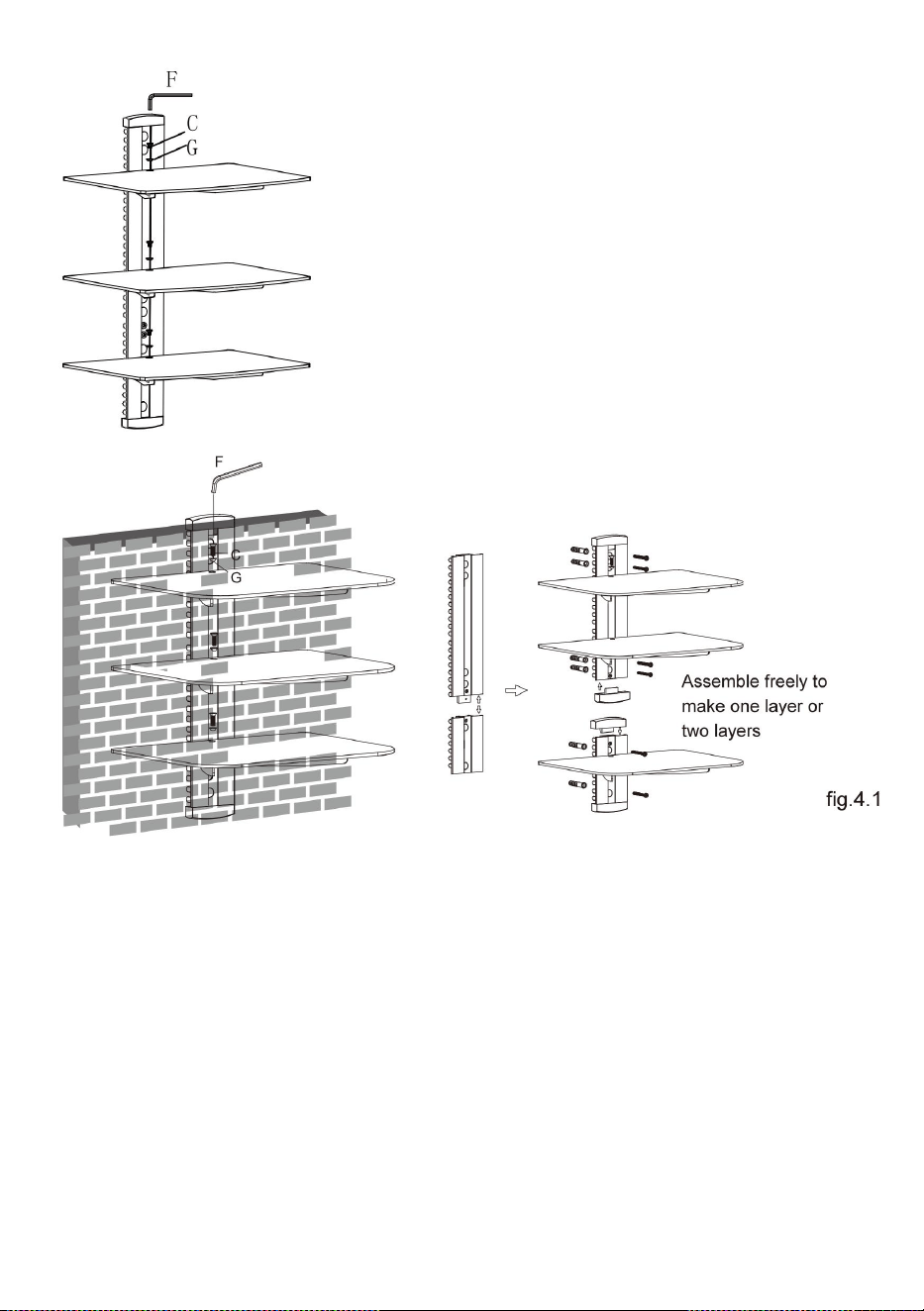
PASSO 4: INSTALLAZIONE DEL RIPIANO IN VETRO
Posizionare delicatamente i tre ripiani in vetro rispettivamente sui tre
portabicchieri. Fissare i ripiani in vetro ai portabicchieri utilizzando
viti e boccole in plastica, serrando le viti con una chiave a brugola da
3 mm ma non serrarle completamente in questo momento. Centrare
il ripiani in vetro sopra i fori, serrare saldamente le viti con una
chiave a brugola da 3 mm come mostrato in fig.4.1.
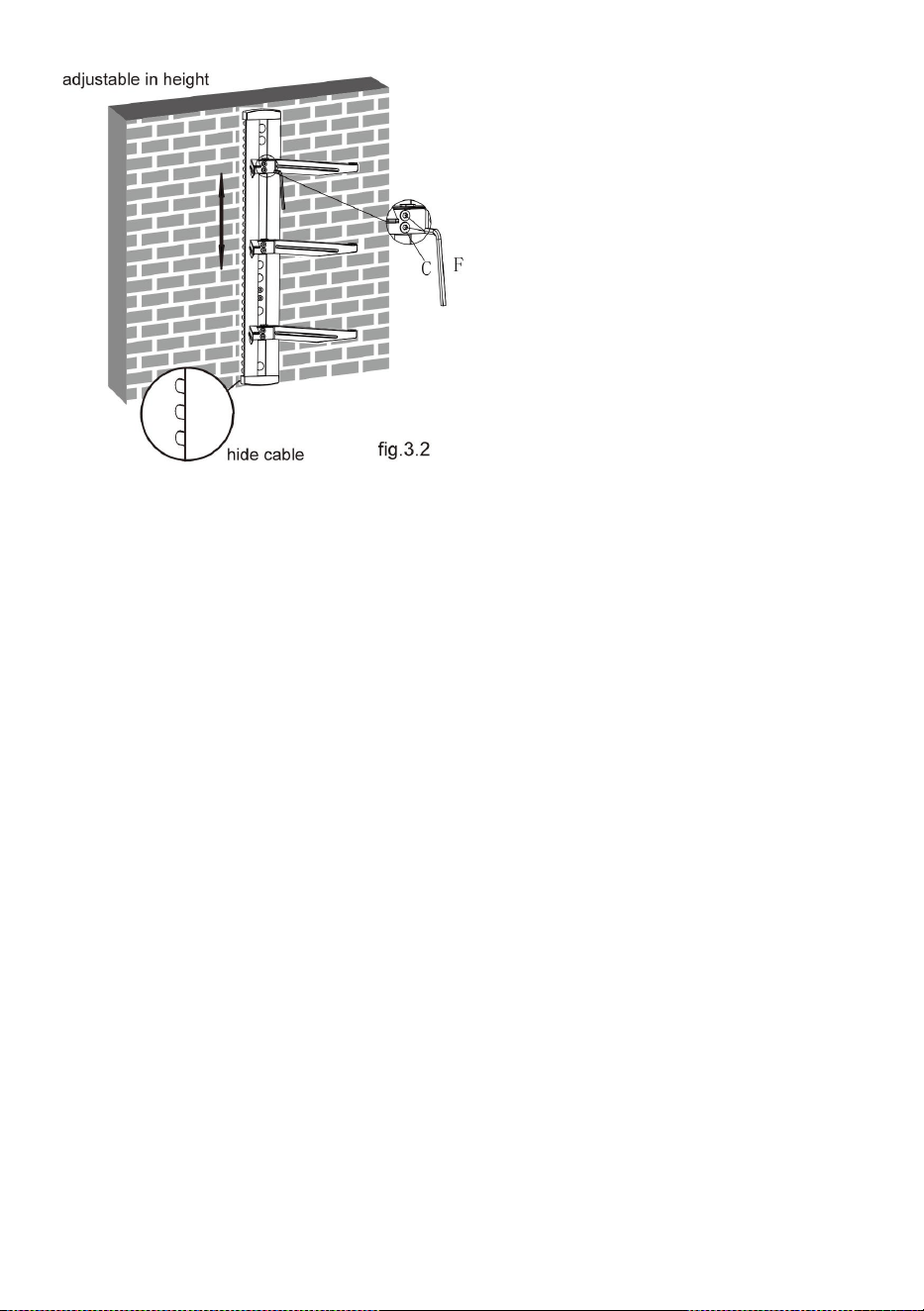
● You can adjust the height
of the glass holders as
needed. Loosen the screws
with a 3mm Allen key(but
not remove) to adjust the
glass holders at the desired
height and then tighten
screws with a 3mm Allen
key as shown in fig.3.2.
11
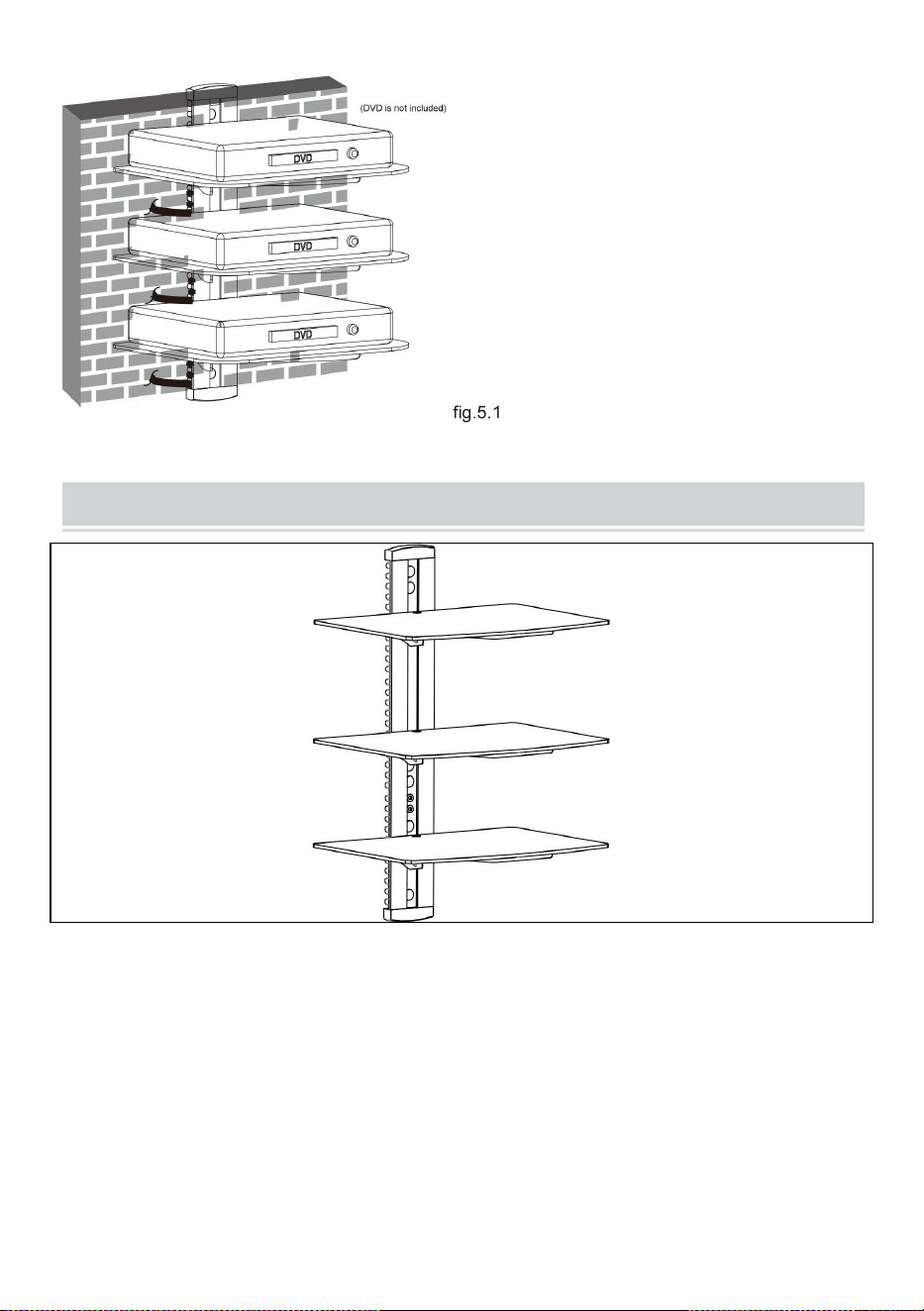
PASSO 5: GESTIONE DEI CAVI
Dopo aver installato il supporto a parete per DVD, posizionare
delicatamente il DVD sui ripiani in vetro montati. Estrarre il
fermacavo . Inserire il cavo in una qualsiasi delle aperture della clip,
con un'estremità del cavo inserita nella clip . inserisco il agganciarlo
al palo principale . Estrarre l'altra estremità del cavo da un'altra
apertura della clip, quindi spingere clip fino alla fine del palo
principale.
12
COMPLETION
Maintenance
● Once you have mounted the DVD
bracket, ensure that it is securely
fastened and safe to use. Check the
tightness of screws every two months.
● If you have any doubts regarding
the installation, please consult our
retailer or service department for
details.

13
Indirizzo : Shuangchenglu 803nong11hao1602A-1609shi, baoshanqu,
shanghai 200000 CN.
Importato in AUS: SIHAO PTY LTD, 1 ROKEVA STREETEASTWOOD
NSW 2122 Australia
Importato negli Stati Uniti: Sanven Technology Ltd., Suite 250, 9166
Anaheim Place, Rancho Cucamonga, CA 91730
REP
EC
E-CrossStu GmbH
Mainzer Landstr.69, 60329 Frankfurt am Main.
REP
UK
YH CONSULTING LIMITED.
C/O YH Consulting Limited Office 147, Centurion House,
London Road, Staines-upon-Thames, Surrey, TW18 4AX



16
We continue to be committed to provide you tools with competitive price.
"Save Half", "Half Price" or any other similar expressions used by us only represents an
estimate of savings you might benefit from buying certain tools with us compared to the major
top brands and does not necessarily mean to cover all categories of tools offered by us. You
are kindly reminded to verify carefully when you are placing an order with us if you are
actually saving half in comparison with the top major brands.

1
NÚMERO DE MODELO: CS303
Have product questions? Need technical support? Please feel free to
contact us:
Technical Support and E-Warranty Certificate
www.vevor.com/support
NEED HELP? CONTACT US!
This is the original instruction, please read all manual instructions
carefully before operating. VEVOR reserves a clear interpretation of our
user manual. The appearance of the product shall be subject to the
product you received. Please forgive us that we won't inform you again if
there are any technology or software updates on our product.
Audio Component Stand

2
ADVERTENCIA:
Lea atentamente este manual antes de utilizar el producto. De lo
contrario, podrían producirse lesiones graves.
PRECAUCIONES DE MONTAJE
No instale el producto hasta que haya leído y comprendido las
instrucciones y advertencias proporcionadas en esta hoja de
instalación. Si tiene alguna pregunta sobre cualquiera de las
instrucciones o advertencias, comuníquese con su distribuidor local.
Consulte la guía de instalación para conocer las distancias
recomendadas desde la pared para evitar el riesgo de daños a la
propiedad.
Este producto sólo debe ser instalado por alguien con buenas
aptitudes mecánicas, experiencia en construcción básica y un
conocimiento completo del proceso de instalación.
Asegúrese de que la superficie de soporte soporte de manera segura
la carga combinada del equipo y todos los herrajes y componentes
adjuntos.
Si lo monta en montantes de pared de madera, asegúrese de que los
tornillos de montaje estén anclados en el centro de los montantes. Se
recomienda encarecidamente el uso de un detector de vigas de
“ borde a borde ” .
Utilice siempre un asistente o un equipo de elevación mecánico para
levantar y colocar el equipo de forma segura.
Apriete los tornillos firmemente, pero no los apriete demasiado.
Apretar demasiado puede dañar los artículos, reduciendo en gran
medida su poder de sujeción.
Este producto está destinado únicamente para uso en interiores. El
uso de este producto al aire libre podría provocar fallas en el producto
y lesiones personales.
Nunca exceda la capacidad de carga máxima.
3
GUARDE LAS INSTRUCCIONES
PRECAUCIONES DE USO
PARA EVITAR LESIONES GRAVES Y LA MUERTE POR VUELCO:
17. Este producto no es un juguete . Mantenga a los niños alejados de
este artículo.
18. No exceda las capacidades de peso antes de moverse.
19. Úselo únicamente sobre una superficie plana, dura y lisa capaz de
soportar de manera segura un soporte para componentes de audio
completamente cargado.
20. Úselo únicamente según lo previsto. Inspeccione antes de cada uso y
no lo utilice si las piezas están sueltas o dañadas.
TECHNICAL SPECIFICATIONS
Modelo
CS303
Dimensiones del
producto
(LxAnxAl)(mm)
430*210*315
Tamaño del embalaje
(largo x ancho x alto)
(mm)
417*295*63
Peso neto / kg)
alrededor de 4
Peso bruto (kg)
Acerca de 4.4
4
*Productos como especificaciones, apariencia y diseño están
sujetos a modificaciones sin previo aviso.
PACKAGE CONTENTS
Herramientas necesarias
Phillips Head S tripulación D río (Longitud: 200 mm ( excluyendo
el mango H ))
Taladro eléctrico y broca de mampostería de 8 mm para
instalación de paredes de hormigón
Rotulador
Martillo
5
ASSEMBLY STEPS
PASO 1-a: MONTAJE EN LA PARED DE MONTANTES
DE MADERA:
● Use a stud finder to locate the
edges of the studs. It is highly
recommended to use an
edge-to-edge stud finder. Draw a
vertical line down the center of
each stud based on their edges.
● Place wall plate on wall as a
template and mark the center
of the four mounting holes. Make
sure that the mounting holes are
on the centerline of stud.
6
PASO 1-b: LADRILLO SÓLIDO Y BLOQUE DE
HORMIGÓN
MONTAJE:
● Utilice la placa de pared como plantilla para marcar las
ubicaciones de los cuatro orificios en la pared como se muestra en
la figura 1.2.
● Drill four 1/8” (3mm)
diameter holes 1.2” (30mm)
deep. Secure it using four
screws(A), make sure that
the wall plate is level as
shown in fig.1.1.
7
● Pretaladre estos agujeros con una broca para mampostería de 8
mm , asegurando una profundidad de al menos 50 mm. Inserte un
anclaje para concreto (B) en cada uno de estos orificios.
● Coloque la placa de pared a la pared usando dos tornillos (A),
asegúrese de que la placa de pared esté nivelada como se muestra
en la figura 1.2.
PASO 2: MONTAJE DEL SOPORTE DE VIDRIO
8
● Fije la pieza de conexión al soporte de vidrio usando dos tornillos ,
dejando un espacio de 3 mm como se muestra en la figura 2.1.
● Repita el mismo método para montar el otro soporte para
vasos.
PASO 3: INSTALACIÓN DEL SOPORTE DE VIDRIO
9
● Insert the three glass
holders into the wall
plate along the wall plate
rail at the desired height
respectively.
● Then tighten four
screws with a 3mm
Allen key as shown in
fig.3.1 to avoid wobbly
situation.
10
PASO 4: INSTALACIÓN DEL ESTANTE DE VIDRIO
Coloque los tres estantes de vidrio con cuidado sobre los tres
soportes de vidrio respectivamente. Fije los estantes de vidrio a los
soportes de vidrio. Usando tornillos y casquillos de plástico, apriete
los tornillos con una llave Allen de 3 mm, pero no apriete
● Insert two decorative covers
to the top and bottom of wall
plate respectively and install
six plastic covers.
● You can adjust the height
of the glass holders as
needed. Loosen the screws
with a 3mm Allen key(but
not remove) to adjust the
glass holders at the desired
height and then tighten
screws with a 3mm Allen
key as shown in fig.3.2.
11
completamente en este momento. Centrar el estantes de vidrio
sobre los orificios, apriete firmemente los tornillos con una llave
Allen de 3 mm como se muestra en la figura 4.1.
PASO 5: GESTIÓN DE CABLES
Después de instalar el soporte de pared para DVD, coloque el DVD
con cuidado sobre los estantes de vidrio montados. Saque el clip del
cable . Inserte el cable en cualquiera de las aberturas del clip, con
un extremo del cable insertado en el clip . Insertar el clip en el poste
12
principal . Saque la otra cabeza del cable de otra abertura del clip,
luego empuje el clip hasta el final del poste principal.
COMPLETION
Maintenance
● Once you have mounted the DVD
bracket, ensure that it is securely
fastened and safe to use. Check the
tightness of screws every two months.
● If you have any doubts regarding
the installation, please consult our
retailer or service department for
details.

13

14
Dirección : Shuangchenglu 803nong11hao1602A-1609shi, baoshanqu,
shanghai 200000 CN.
Importado a AUS: SIHAO PTY LTD, 1 ROKEVA STREETEASTWOOD
NSW 2122 Australia
Importado a EE. UU.: Sanven Technology Ltd., Suite 250, 9166 Anaheim
Place, Rancho Cucamonga, CA 91730
REP
EC
E-CrossStu GmbH
Mainzer Landstr.69, 60329 Frankfurt am Main.
REP
UK
YH CONSULTING LIMITED.
C/O YH Consulting Limited Office 147, Centurion House,
London Road, Staines-upon-Thames, Surrey, TW18 4AX


16
Techniczny Certyfikat wsparcia i e-gwarancji
www.vevor.com/support
STOJAK NA KOMPONENTY AUDIO
INSTRUKCJA OBSŁUGI
NR MODELU: CS303
We continue to be committed to provide you tools with competitive price.
"Save Half", "Half Price" or any other similar expressions used by us only represents an
estimate of savings you might benefit from buying certain tools with us compared to the major
top brands and does not necessarily mean to cover all categories of tools offered by us. You
are kindly reminded to verify carefully when you are placing an order with us if you are
actually saving half in comparison with the top major brands.

1
NR MODELU: CS303
Have product questions? Need technical support? Please feel free to
contact us:
Technical Support and E-Warranty Certificate
www.vevor.com/support
NEED HELP? CONTACT US!
This is the original instruction, please read all manual instructions
carefully before operating. VEVOR reserves a clear interpretation of our
user manual. The appearance of the product shall be subject to the
product you received. Please forgive us that we won't inform you again if
there are any technology or software updates on our product.
Audio Component Stand

2
OSTRZEŻENIE:
Przed użyciem produktu prosimy o dokładne zapoznanie się z
niniejszą instrukcją. Niezastosowanie się do tego może spowodować
poważne obrażenia.
ŚRODKI OSTROŻNOŚCI PRZY MONTAŻU
Nie instaluj produktu, dopóki nie przeczytasz i nie zrozumiesz
instrukcji i ostrzeżeń zawartych w tym arkuszu instalacyjnym. Jeśli
masz jakiekolwiek pytania dotyczące jakichkolwiek instrukcji lub
ostrzeżeń, skontaktuj się z lokalnym dystrybutorem.
Aby uniknąć ryzyka uszkodzenia mienia, zapoznaj się z instrukcją
montażu, aby zapoznać się z zalecanymi odległościami od ściany.
Ten produkt powinien być instalowany wyłącznie przez osobę
posiadającą dobre zdolności mechaniczne, doświadczenie w
podstawowej konstrukcji i pełne zrozumienie procesu instalacji.
Upewnij się, że powierzchnia nośna bezpiecznie utrzyma łączne
obciążenie sprzętu oraz całego podłączonego sprzętu i komponentów.
W przypadku montażu na drewnianych kołkach ściennych należy
upewnić się, że śruby montażowe są zakotwiczone w środku kołków.
Zdecydowanie zaleca się użycie wykrywacza kołków „ od krawędzi do
krawędzi ” .
Aby bezpiecznie podnosić i ustawiać sprzęt, zawsze używaj asystenta
lub mechanicznego sprzętu do podnoszenia.
Dokręć mocno śruby, ale nie przekręcaj. Nadmierne dokręcenie może
uszkodzić elementy, znacznie zmniejszając ich siłę trzymania.
Ten produkt jest przeznaczony wyłącznie do użytku w
pomieszczeniach zamkniętych. Używanie tego produktu na zewnątrz
może prowadzić do awarii produktu i obrażeń ciała.
Nigdy nie przekraczaj maksymalnego udźwigu.
ZACHOWAJ INSTRUKCJĘ
3
STOSOWAĆ ŚRODKI OSTROŻNOŚCI
ABY ZAPOBIEC POWAŻNYM OBRAŻeniom LUB ŚMIERCI W
PRZYPADKU WYWROTU:
21. Ten produkt nie jest dostępny w oy . Trzymaj dzieci z daleka od tego
przedmiotu.
22. Nie przekraczaj udźwigu przed przeprowadzką.
23. Używaj wyłącznie na płaskiej, twardej i gładkiej powierzchni, która
może bezpiecznie utrzymać w pełni obciążony stojak na komponenty
audio.
24. Używaj wyłącznie zgodnie z przeznaczeniem. Przed każdym użyciem
sprawdź urządzenie i nie używaj, jeśli części są luźne lub uszkodzone.
TECHNICAL SPECIFICATIONS
Model
CS303
wymiary produktu
(DxSxW) (mm)
430*210*315
Rozmiar opakowania (dł.
x szer. x wys.) (mm)
417*295*63
Masa netto (kg)
Około 4
Waga brutto (kg)
Około 4,4
*Produkty takie jak dane techniczne, wygląd i konstrukcja mogą
4
podlegać modyfikacjom bez wcześniejszego powiadomienia.
PACKAGE CONTENTS
Wymagane narzędzia
Rzeka Phillips Head S, załoga D (Długość: 200 mm ( bez
rączki ) )
Wiertarka elektryczna i mur o grubości 8 mm B do montażu
ścian betonowych
Znakowanie piórem
Młotek
5
ASSEMBLY STEPS
KROK 1-a: MONTAŻ NA ŚCIANIE NA KOSTKACH
DREWNIANYCH:
● Use a stud finder to locate the
edges of the studs. It is highly
recommended to use an
edge-to-edge stud finder. Draw a
vertical line down the center of
each stud based on their edges.
● Place wall plate on wall as a
template and mark the center
of the four mounting holes. Make
sure that the mounting holes are
on the centerline of stud.
6
KROK 1-b: CEGŁA LITA I BLOK BETONOWY
MONTOWANIE:
● Użyj płytki ściennej jako szablonu do zaznaczenia lokalizacji
czterech otworów na ścianie pokazano na rys.1.2.
● Drill four 1/8” (3mm)
diameter holes 1.2” (30mm)
deep. Secure it using four
screws(A), make sure that
the wall plate is level as
shown in fig.1.1.
7
● Nawierć te otwory wiertłem do muru o średnicy 8 mm ,
zapewniając głębokość co najmniej 50 mm. Włóż kotwę do betonu
(B) w każdy z tych otworów.
● Przymocuj płytę ścienną do ściany za pomocą dwóch śrub (A),
upewnij się, że płyta ścienna jest wypoziomowana Jak pokazano na
rys.1.2.
KROK 2: MONTAŻ UCHWYTU NA SZKŁO
● Przymocuj element łączący do szklanego uchwytu za pomocą
dwóch śrub , pozostawiając 3 mm odstęp, jak pokazano na rys. 2.1.
8
● Powtórz tę samą metodę, aby zamontować drugi uchwyt na
szklankę.
KROK 3: MONTAŻ UCHWYTU NA SZKŁO
● Insert the three glass
holders into the wall
plate along the wall plate
rail at the desired height
respectively.
9
● Then tighten four
screws with a 3mm
Allen key as shown in
fig.3.1 to avoid wobbly
situation.
● Insert two decorative covers
to the top and bottom of wall
plate respectively and install
six plastic covers.
10
KROK 4: MONTAŻ SZKLANEJ PÓŁKI
Delikatnie umieść trzy szklane półki na trzech szklanych uchwytach.
Przymocuj szklane półki do szklanych uchwytów za pomocą śrub i
tulejek z tworzywa sztucznego dokręcić śruby kluczem imbusowym
3 mm , ale nie dokręcać jeszcze całkowicie. Wyśrodkuj półki szklane
nad otworami, mocno dokręć śruby kluczem imbusowym 3mm jak
pokazano na rys.4.1.
● You can adjust the height
of the glass holders as
needed. Loosen the screws
with a 3mm Allen key(but
not remove) to adjust the
glass holders at the desired
height and then tighten
screws with a 3mm Allen
key as shown in fig.3.2.
11
KROK 5: ZARZĄDZANIE KABLAMI
Po zainstalowaniu uchwytu ściennego DVD, delikatnie umieść DVD
na zamontowanych szklanych półkach. Wyciągnij zacisk kabla .
Wsuwam kabel do dowolnego otworu zacisku, tak aby jeden koniec
kabla był włożony do zacisku . Wstawiam przypiąć do głównego
słupa . Wyjmij drugą końcówkę kabla z innego otworu zacisku, a
następnie wciśnij ją zaczep do końca głównego słupa.
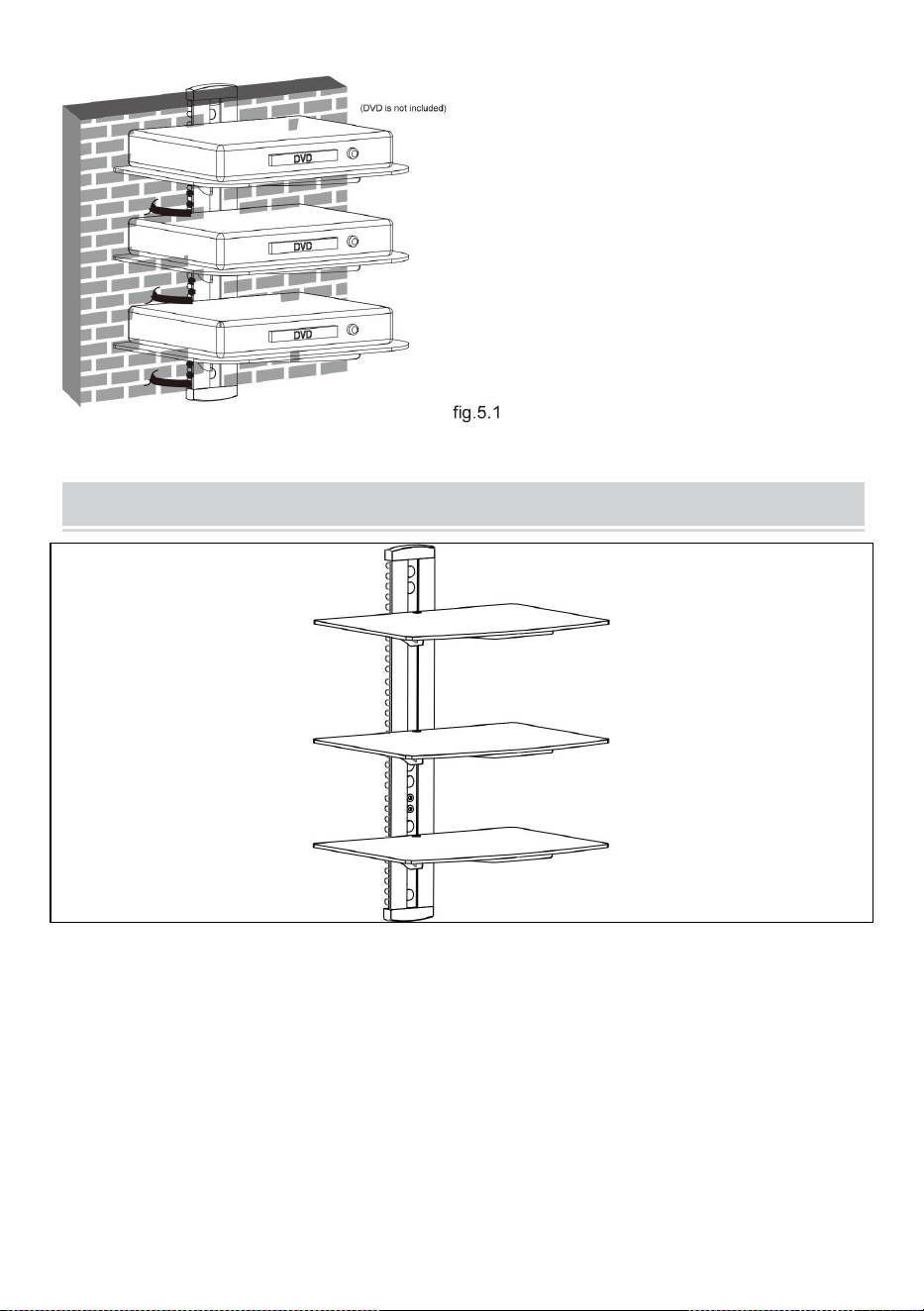
12
COMPLETION
Maintenance
● Once you have mounted the DVD
bracket, ensure that it is securely
fastened and safe to use. Check the
tightness of screws every two months.
● If you have any doubts regarding
the installation, please consult our
retailer or service department for
details.

13
Adres : Shuangchenglu 803nong11hao1602A-1609shi, baoshanqu,
szanghaj 200000 CN.
Import do AUS: SIHAO PTY LTD, 1 ROKEVA STREETEASTWOOD NSW
2122 Australia
Import do USA: Sanven Technology Ltd., Suite 250, 9166 Anaheim Place,
Rancho Cucamonga, CA 91730
REP
EC
E-CrossStu GmbH
Mainzer Landstr.69, 60329 Frankfurt am Main.
REP
UK
YH CONSULTING LIMITED.
C/O YH Consulting Limited Office 147, Centurion House,
London Road, Staines-upon-Thames, Surrey, TW18 4AX



16
We continue to be committed to provide you tools with competitive price.
"Save Half", "Half Price" or any other similar expressions used by us only represents an
estimate of savings you might benefit from buying certain tools with us compared to the major
top brands and does not necessarily mean to cover all categories of tools offered by us. You
are kindly reminded to verify carefully when you are placing an order with us if you are
actually saving half in comparison with the top major brands.

1
MODELNR.: CS303
Have product questions? Need technical support? Please feel free to
contact us:
Technical Support and E-Warranty Certificate
www.vevor.com/support
NEED HELP? CONTACT US!
This is the original instruction, please read all manual instructions
carefully before operating. VEVOR reserves a clear interpretation of our
user manual. The appearance of the product shall be subject to the
product you received. Please forgive us that we won't inform you again if
there are any technology or software updates on our product.
Audio Component Stand

2
WAARSCHUWING:
Lees deze handleiding zorgvuldig door voordat u het product
gebruikt. Als u dit niet doet, kan dit leiden tot ernstig letsel.
MONTAGEVOORZORGSMAATREGELEN
Installeer het product pas nadat u de instructies en waarschuwingen in
dit installatieblad hebt gelezen en begrepen. Als u vragen heeft over
een van de instructies of waarschuwingen, neem dan contact op met
uw plaatselijke distributeur.
Raadpleeg de installatiehandleiding voor de aanbevolen afstanden tot
de muur om het risico op materiële schade te voorkomen.
Dit product mag alleen worden geïnstalleerd door iemand met goede
mechanische vaardigheden, ervaring in de basisconstructie en een
volledig begrip van het installatieproces.
Zorg ervoor dat het ondersteunende oppervlak de gecombineerde
belasting van de apparatuur en alle aangesloten hardware en
componenten veilig kan dragen.
Zorg er bij montage op houten muurstijlen voor dat de
montageschroeven in het midden van de stijlen zijn verankerd. Het
gebruik van een “ rand tot rand ” stud finder wordt ten zeerste
aanbevolen.
Gebruik altijd een assistent of mechanische hefapparatuur om
apparatuur veilig op te tillen en te positioneren.
Draai de schroeven stevig vast, maar niet te vast. Te vast aandraaien
kan de voorwerpen beschadigen, waardoor hun houdkracht
aanzienlijk wordt verminderd.
Dit product is uitsluitend bedoeld voor gebruik binnenshuis. Als u dit
product buitenshuis gebruikt, kan dit leiden tot productstoringen en
persoonlijk letsel.
Overschrijd nooit het maximale draagvermogen.
BEWAAR DE INSTRUCTIES

3
GEBRUIK VOORZORGSMAATREGELEN
OM ERNSTIG LETSEL EN DE DOOD DOOR KANTELEN TE
VOORKOMEN:
25. Dit product is niet bij oy . Houd kinderen uit de buurt van dit artikel.
26. Overschrijd de gewichtscapaciteiten niet voordat u gaat verhuizen.
27. Alleen gebruiken op een vlak, hard en glad oppervlak dat een volledig
geladen audiocomponentstandaard veilig kan ondersteunen.
28. Alleen gebruiken zoals bedoeld. Inspecteer het apparaat vóór elk
gebruik en gebruik het niet als er onderdelen loszitten of beschadigd zijn.
TECHNICAL SPECIFICATIONS
Model
CS303
Productafmetingen
(LxBxH)(mm)
430*210*315
Verpakkingsgrootte
(LxBxH) (mm)
417*295*63
Netto gewicht / kg)
Ongeveer 4
Bruto gewicht (kg)
Ongeveer 4.4
*Producten zoals specificaties, uiterlijk en ontwerp kunnen zonder
voorafgaande kennisgeving worden gewijzigd.
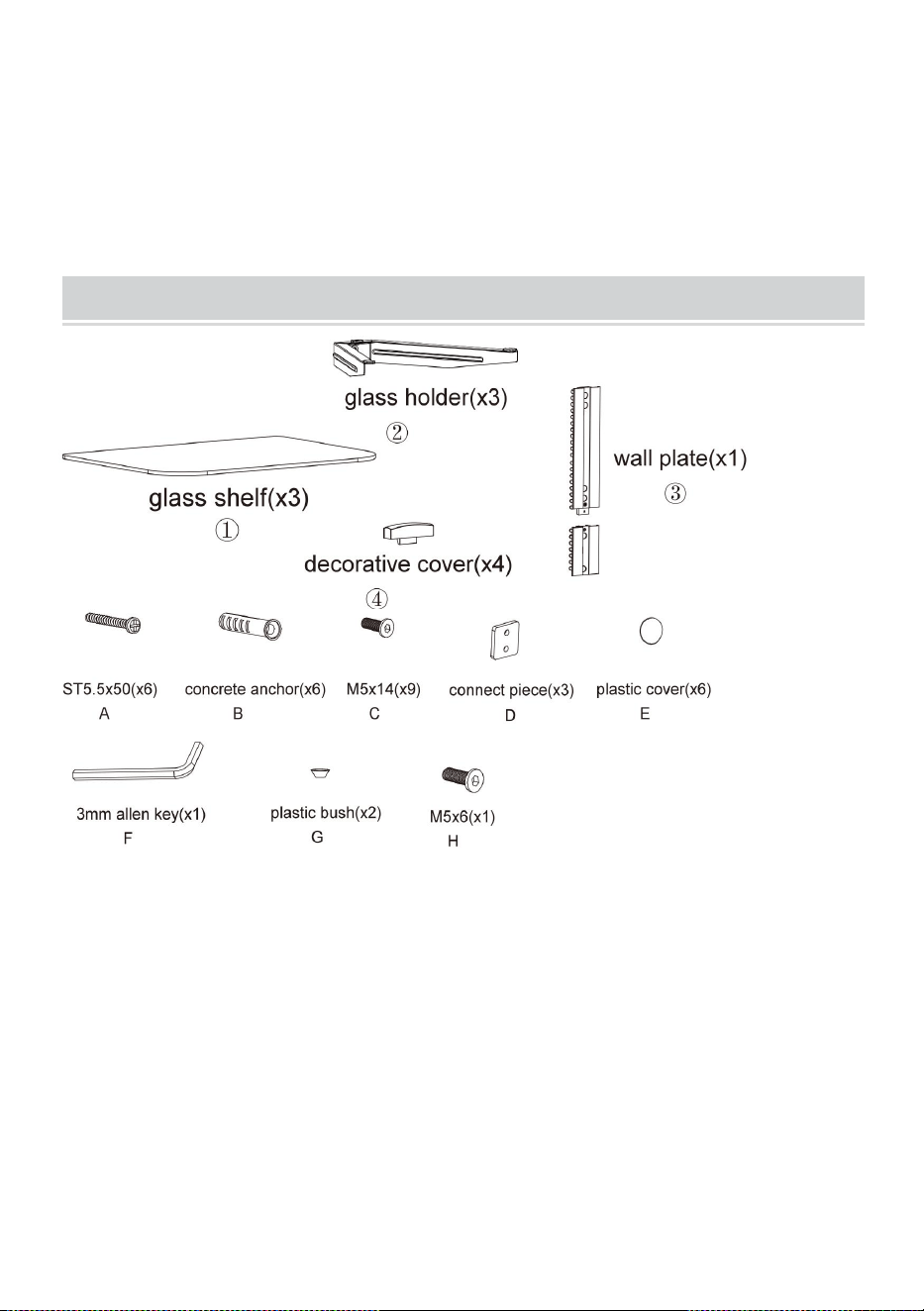
4
PACKAGE CONTENTS
Benodigde gereedschappen
Phillips Head S bemanning D- rivier (Lengte: 200 mm ( exclusief
de handgreep ))
Elektrische boor en 8 mm metselwerk B it voor installatie van
betonnen muren
Markeerpen
Hamer
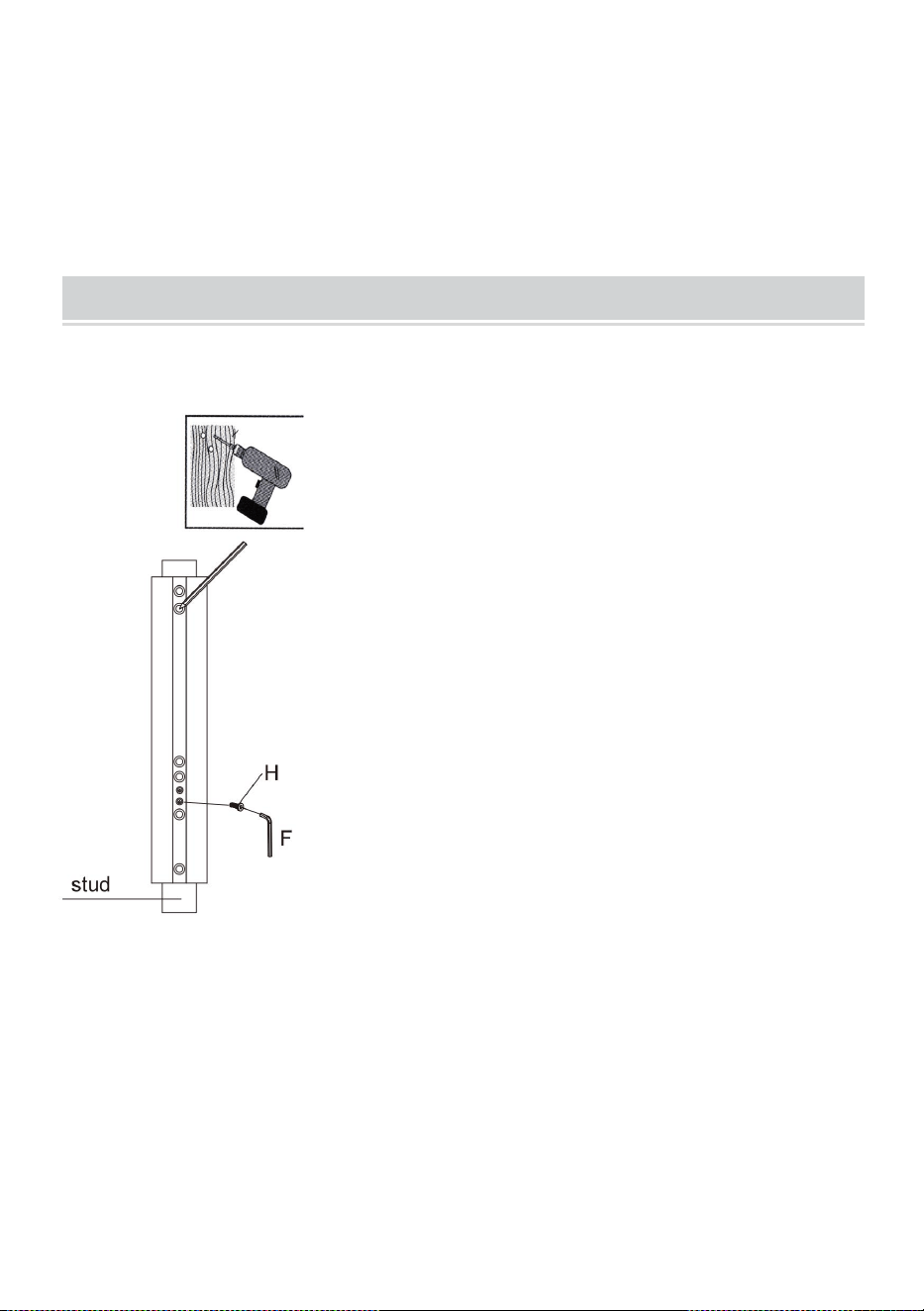
5
ASSEMBLY STEPS
STAP1-a: WOOD STUD MUURBEVESTIGING:
● Use a stud finder to locate the
edges of the studs. It is highly
recommended to use an
edge-to-edge stud finder. Draw a
vertical line down the center of
each stud based on their edges.
● Place wall plate on wall as a
template and mark the center
of the four mounting holes. Make
sure that the mounting holes are
on the centerline of stud.
6
STAP1-b: MASSIEF BAKSTENEN EN BETONBLOK
MONTAGE:
● Gebruik de muurplaat als sjabloon om de locaties van vier gaten
op de muur te markeren getoond in figuur 1.2.
● Drill four 1/8” (3mm)
diameter holes 1.2” (30mm)
deep. Secure it using four
screws(A), make sure that
the wall plate is level as
shown in fig.1.1.
7
● Boor deze gaten voor met een steenboor van 8 mm en zorg voor
een diepte van minimaal 50 mm. Steek een betonanker (B) in elk
van deze gaten.
● Bevestig de muurplaat aan de muur met twee schroeven (A), zorg
ervoor dat de muurplaat waterpas staat als getoond in figuur 1.2.
STAP2: MONTEREN VAN DE GLAZENHOUDER
● Bevestig het verbindingsstuk aan de glashouder met behulp van
twee schroeven en laat een ruimte van 3 mm vrij, zoals
weergegeven in fig.2.1.
8
● Herhaal dezelfde methode om de andere glashouder te
monteren.
STAP3: DE GLAZENHOUDER INSTALLEREN
● Insert the three glass
holders into the wall
plate along the wall plate
rail at the desired height
respectively.
9
● Then tighten four
screws with a 3mm
Allen key as shown in
fig.3.1 to avoid wobbly
situation.
● Insert two decorative covers
to the top and bottom of wall
plate respectively and install
six plastic covers.
10
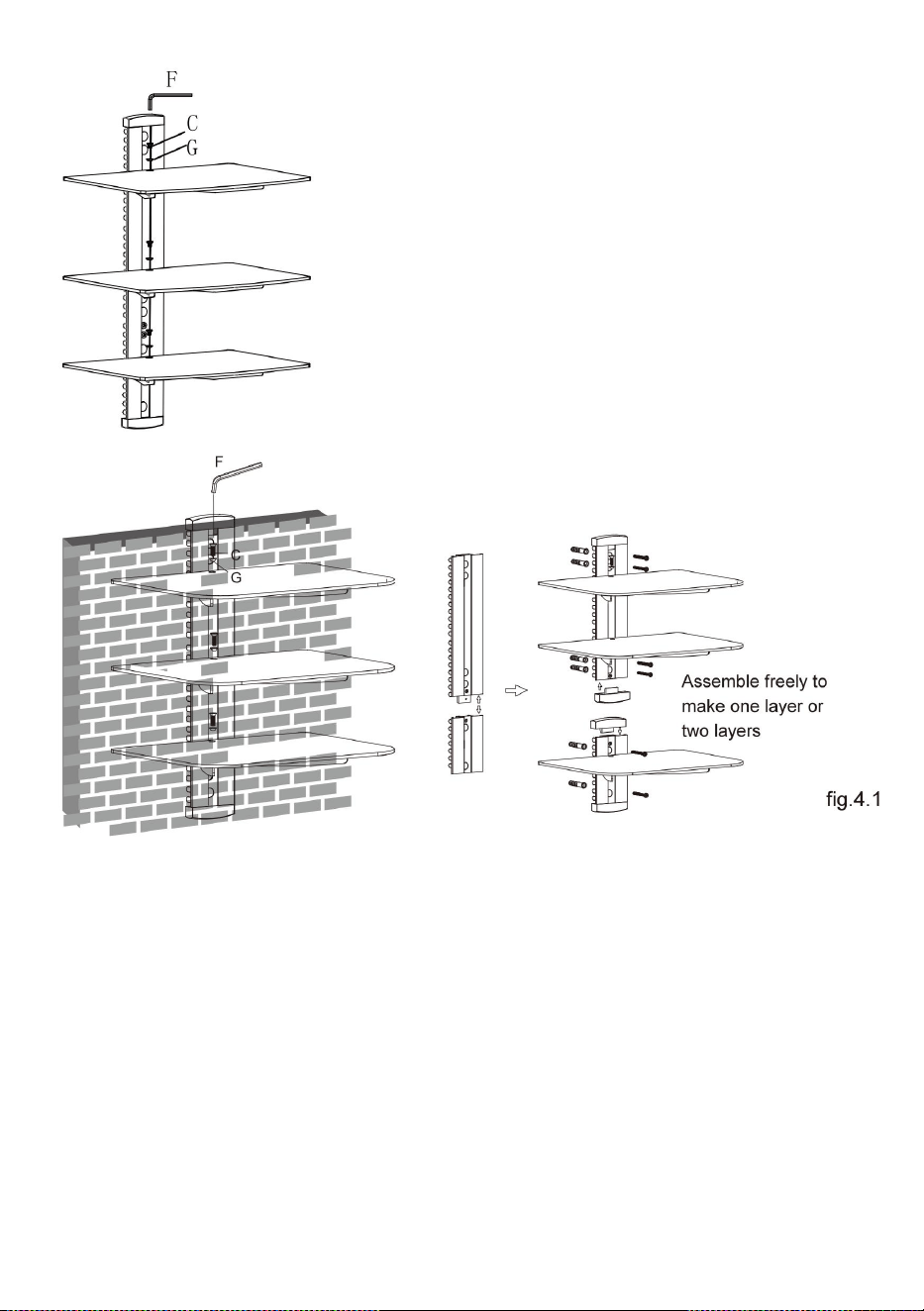
STAP4: HET INSTALLEREN VAN DE GLAZEN PLANK
Plaats de drie glasplaten voorzichtig op respectievelijk de drie
glashouders. Bevestig de glasplanken aan de glashouders gebruik
schroeven en plastic bussen en draai de schroeven vast met een
inbussleutel van 3 mm, maar draai ze nu nog niet helemaal vast.
Centreer de glazen planken over de gaten, draai de schroeven
stevig vast met een inbussleutel van 3 mm, zoals weergegeven in
afb. 4.1.
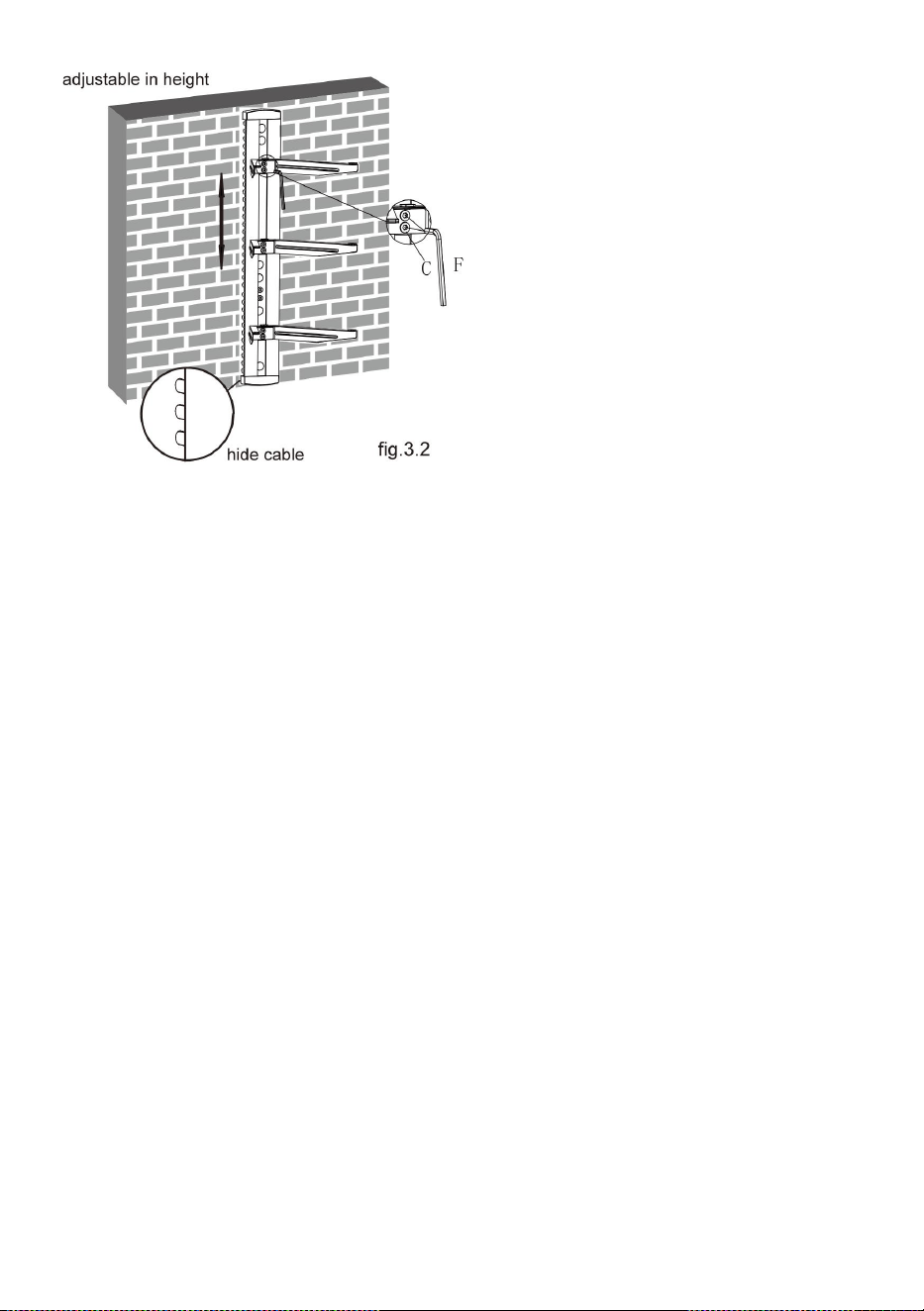
● You can adjust the height
of the glass holders as
needed. Loosen the screws
with a 3mm Allen key(but
not remove) to adjust the
glass holders at the desired
height and then tighten
screws with a 3mm Allen
key as shown in fig.3.2.
11
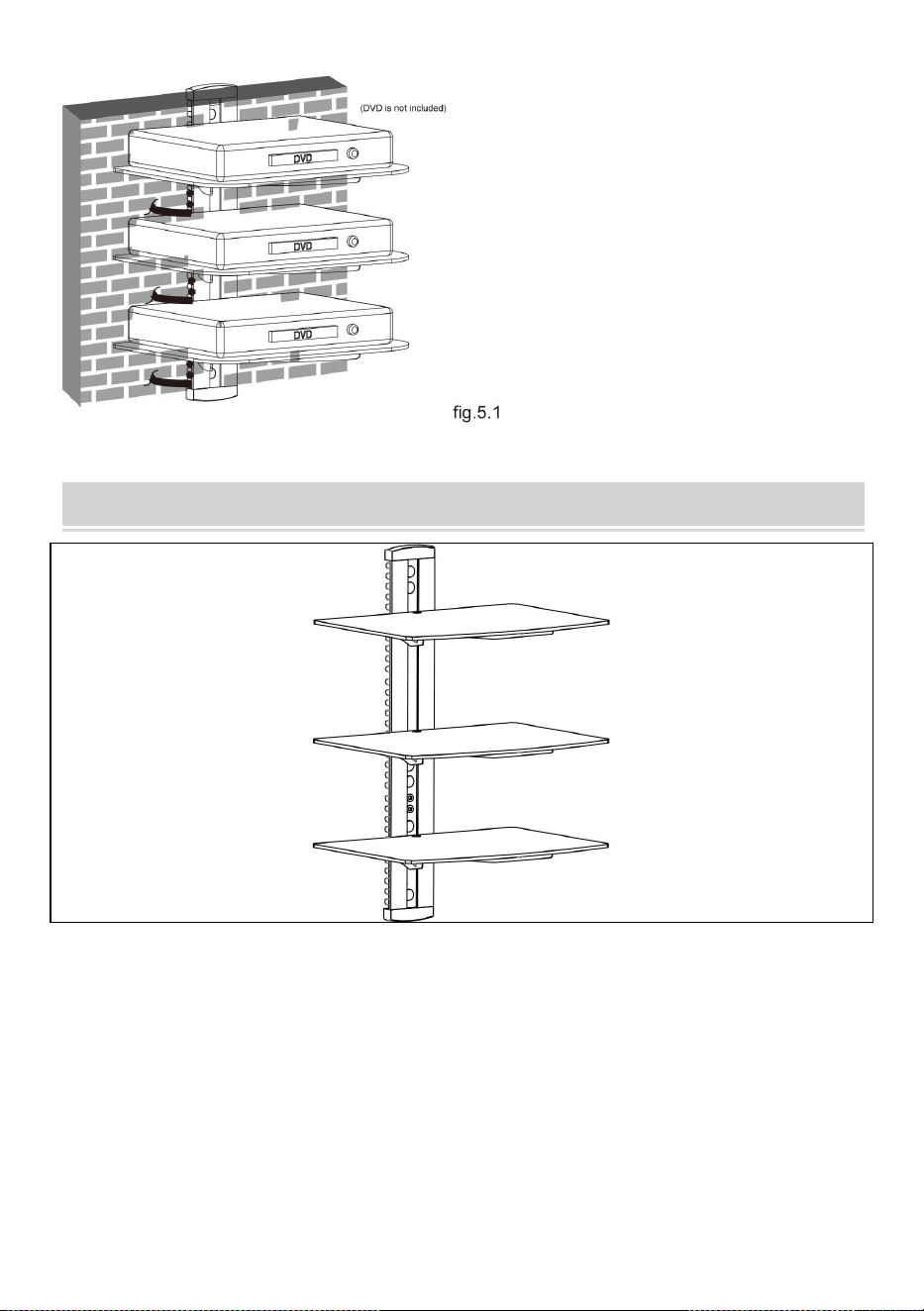
STAP5: KABELBEHEER
Nadat u de dvd-wandhouder hebt geïnstalleerd, plaatst u de dvd
voorzichtig op de gemonteerde glazen planken. Trek de kabelclip
eruit . Steek de kabel in een van de openingen van de clip, waarbij
het ene uiteinde van de kabel in de clip wordt gestoken . Steek de
clip in de hoofdpaal . Haal de andere kop van de kabel uit een
andere opening van de clip en druk vervolgens op de knop clip tot
het einde van de hoofdpaal.
12
COMPLETION
Maintenance
● Once you have mounted the DVD
bracket, ensure that it is securely
fastened and safe to use. Check the
tightness of screws every two months.
● If you have any doubts regarding
the installation, please consult our
retailer or service department for
details.

13
Adres : Shuangchenglu 803nong11hao1602A-1609shi, baoshanqu,
shanghai 200000 CN.
Geïmporteerd naar AUS: SIHAO PTY LTD, 1 ROKEVA
STREETEASTWOOD NSW 2122 Australië
Geïmporteerd naar de VS: Sanven Technology Ltd., Suite 250, 9166
Anaheim Place, Rancho Cucamonga, CA 91730
REP
EC
E-CrossStu GmbH
Mainzer Landstr.69, 60329 Frankfurt am Main.
REP
UK
YH CONSULTING LIMITED.
C/O YH Consulting Limited Office 147, Centurion House,
London Road, Staines-upon-Thames, Surrey, TW18 4AX



16
We continue to be committed to provide you tools with competitive price.
"Save Half", "Half Price" or any other similar expressions used by us only represents an
estimate of savings you might benefit from buying certain tools with us compared to the major
top brands and does not necessarily mean to cover all categories of tools offered by us. You
are kindly reminded to verify carefully when you are placing an order with us if you are
actually saving half in comparison with the top major brands.

1
MODELLNR: CS303
Have product questions? Need technical support? Please feel free to
contact us:
Technical Support and E-Warranty Certificate
www.vevor.com/support
NEED HELP? CONTACT US!
This is the original instruction, please read all manual instructions
carefully before operating. VEVOR reserves a clear interpretation of our
user manual. The appearance of the product shall be subject to the
product you received. Please forgive us that we won't inform you again if
there are any technology or software updates on our product.
Audio Component Stand

2
VARNING:
Läs denna bruksanvisning noggrant innan du använder produkten.
Underlåtenhet att göra det kan leda till allvarliga skador.
FÖRSIKTIGHETSÅTGÄRDER FÖR
MONTERING
Installera inte produkten förrän du har läst och förstått instruktionerna
och varningarna i detta installationsblad. Om du har några frågor
angående någon av instruktionerna eller varningarna, kontakta din
lokala distributör.
Se installationsguiden för rekommenderade avstånd från väggen för
att undvika risken för egendomsskador.
Denna produkt bör endast installeras av någon med god mekanisk
förmåga, erfarenhet av grundläggande konstruktion och full förståelse
för installationsprocessen.
Se till att den stödjande ytan säkert kan bära den kombinerade
belastningen av utrustningen och all ansluten hårdvara och
komponenter.
Om du monterar på väggreglar i trä, se till att monteringsskruvarna är
förankrade i mitten av reglarna. Användning av en " kant till kant "
dubbsökare rekommenderas starkt.
Använd alltid en assistent eller mekanisk lyftutrustning för att säkert
lyfta och positionera utrustning.
Dra åt skruvarna ordentligt, men dra inte åt för hårt. För hårt
åtdragning kan skada föremålen, vilket avsevärt minskar deras
hållkraft.
Denna produkt är endast avsedd för inomhusbruk. Användning av
denna produkt utomhus kan leda till produktfel och personskada.
Överskrid aldrig den maximala lastkapaciteten.
SPARA INSTRUKTIONERNA

3
ANVÄND FÖRSIKTIGHETSÅTGÄRDER
FÖR ATT FÖRHINDRA ALLVARLIGA SKADA OCH DÖDSFALL VID
VÄLLNING:
29. Denna produkt är inte på oy . Håll barn borta från detta föremål.
30. Överskrid inte viktkapaciteten innan du flyttar.
31. Använd endast på en plan, hård och slät yta som säkert kan stödja ett
fullt laddat ljudkomponentstativ.
32. Använd endast som avsett. Inspektera före varje användning och
använd inte om delar är lösa eller skadade.
TECHNICAL SPECIFICATIONS
Modell
CS303
Produktens mått
(LxBxH)(mm)
430*210*315
Förpackningsstorlek(LxB
xH)(mm)
417*295*63
Nettovikt (kg)
Ungefär 4
Bruttovikt (kg)
Cirka 4,4
*Produkter som specifikationer, utseende och design kan ändras
utan föregående meddelande.
4
PACKAGE CONTENTS
Verktyg krävs
Phillips Head S crew D river (Längd: 200 mm ( exklusive H
andle ))
Elektrisk borr och 8 mm M asonry B it för installation av
betongvägg
Markeringspenna
Hammare
5
ASSEMBLY STEPS
STEG1-a: VÄGGMONTERING Trärebb:
● Use a stud finder to locate the
edges of the studs. It is highly
recommended to use an
edge-to-edge stud finder. Draw a
vertical line down the center of
each stud based on their edges.
● Place wall plate on wall as a
template and mark the center
of the four mounting holes. Make
sure that the mounting holes are
on the centerline of stud.
6
STEG1-b: SOLID TEGE OCH BETONGBLOCK
MONTERING:
● Använd väggplåten som mall för att markera placeringen av fyra
hål på väggen visas i fig.1.2.
● Drill four 1/8” (3mm)
diameter holes 1.2” (30mm)
deep. Secure it using four
screws(A), make sure that
the wall plate is level as
shown in fig.1.1.
7
● Förborra dessa hål med en 8 mm borrkrona för att säkerställa ett
djup på minst 50 mm. Sätt in ett betongankare (B) i vart och ett av
dessa hål.
● Fäst väggplattan till väggen med hjälp av två skruvar(A), se till att
väggplattan är jämn som visas i fig.1.2.
STEG 2: MONTERING AV GLASHÅLLARE
● Fäst anslutningsstycket till glashållaren med två skruvar , lämna ett
3 mm utrymme som visas i fig.2.1.
8
● Upprepa samma metod för att montera den andra
glashållaren.
STEG 3: INSTALLERA GLASHÅLLARE
● Insert the three glass
holders into the wall
plate along the wall plate
rail at the desired height
respectively.
9
● Then tighten four
screws with a 3mm
Allen key as shown in
fig.3.1 to avoid wobbly
situation.
● Insert two decorative covers
to the top and bottom of wall
plate respectively and install
six plastic covers.
10
STEG 4: INSTALLERA GLASHYLLAN
Placera treglashyllan försiktigt på de tre respektive glashållarna.
Fäst glashyllorna på glashållarna Använd skruvar och
plastbussningar, dra åt skruvarna med en 3 mm insexnyckel men
dra inte åt helt just nu. Centrera glashyllor över hålen, dra åt
skruvarna ordentligt med en 3 mm insexnyckel som visas i fig.4.1.
● You can adjust the height
of the glass holders as
needed. Loosen the screws
with a 3mm Allen key(but
not remove) to adjust the
glass holders at the desired
height and then tighten
screws with a 3mm Allen
key as shown in fig.3.2.
11
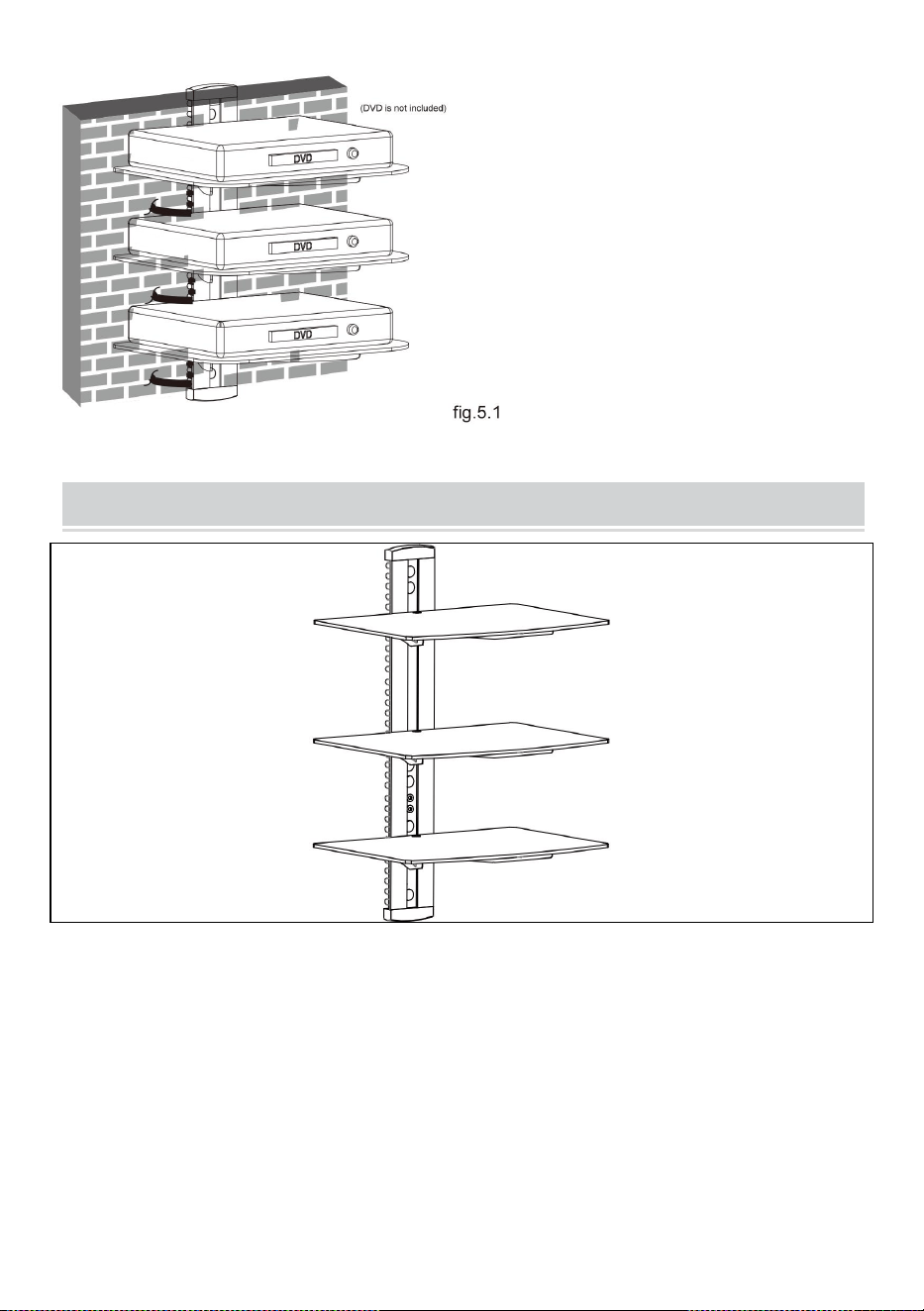
STEG 5: KABELHANTERING
När du har installerat DVD-väggfästet, placera DVD-skivan försiktigt
på de monterade glashyllorna. Dra ut kabelklämman . Jag sätter in
kabeln i någon av öppningarna på klämman, med ena änden av
kabeln insatt i klämman . Jag sätter in klämma fast i huvudstolpen .
Ta ut det andra huvudet på kabeln från en annan öppning i klämman
och tryck sedan på den klämma till slutet av huvudstolpen.
12
COMPLETION
Maintenance
● Once you have mounted the DVD
bracket, ensure that it is securely
fastened and safe to use. Check the
tightness of screws every two months.
● If you have any doubts regarding
the installation, please consult our
retailer or service department for
details.

Adress : Shuangchenglu 803nong11hao1602A-1609shi, baoshanqu,
shanghai 200000 CN.
Importerad till AUS: SIHAO PTY LTD, 1 ROKEVA STREETEASTWOOD
NSW 2122 Australien
Importerad till USA: Sanven Technology Ltd., Suite 250, 9166 Anaheim
Place, Rancho Cucamonga, CA 91730
REP
EC
E-CrossStu GmbH
Mainzer Landstr.69, 60329 Frankfurt am Main.
REP
UK
YH CONSULTING LIMITED.
C/O YH Consulting Limited Office 147, Centurion House,
London Road, Staines-upon-Thames, Surrey, TW18 4AX