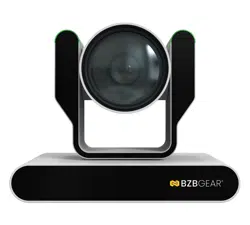
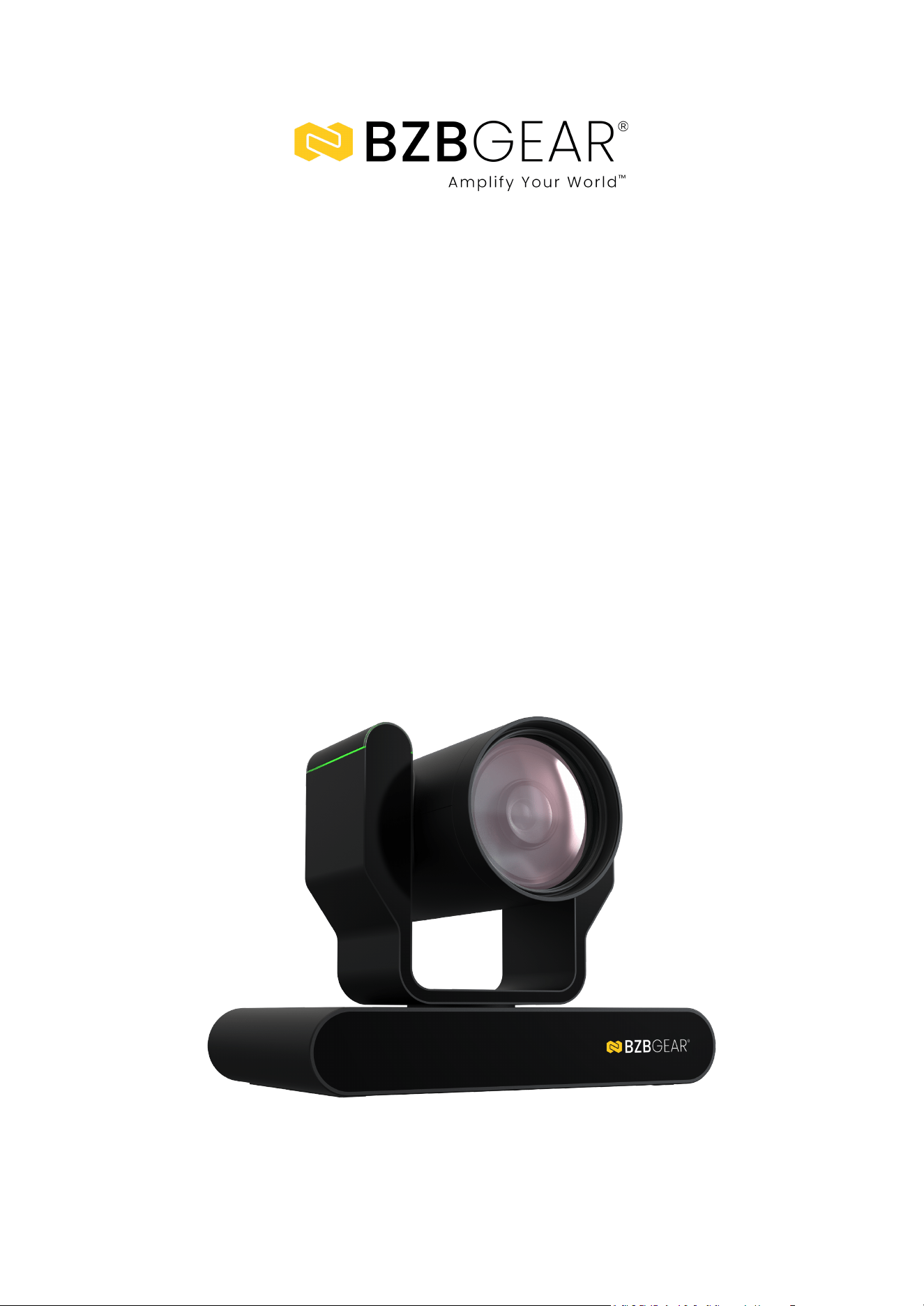
BG-ADAMO-4K
4K UHD AUTO TRACKING HDMI 2.0/12G-SDI/USB 2.0/USB 3.0 Live Streaming
PTZ Camera with Tally Lights
User Manual
BZBGEAR BG-ADAMO-4K PRODUCT MANUAL
Address: 830 National Drive #140, Sacramento, CA 95834, USA · Tel: +1(888)499-9906 · Email: support@bzbgear.com 2
BZBGEAR BG-ADAMO-4K PRODUCT MANUAL
Table of Contents
Statement 4
Safety Precaution 4
Introduction 5
Features 5
Packing List 6
Specifications 6
Installation and Handling Caution 8
Camera Interface 8
RS-232 Interface 9
VISCA Networking 10
Mounting 10
Wall Mounting 10
Ceiling Mounting 11
Operating Instructions 12
Power on and Self-check 12
Remote 13
Remote Buttons Introduction 13
Network Connection 17
Initial Web Client Login 19
Preview 20
SD Card Recording 21
Auto-Tracking Configuration 21
Zone Tracking Setup 22
General Configuration 23
Audio Configure 24
Video Encode and Streaming 24
Video Encode 24
Video Stream Capture 25
Live Stream Publish 26
Multicast/Unicast 27
Video Parameters 28
Video OSD and OSD Font 32
Video Out 33
Network Configure 33
Network Port 33
Ethernet 34
DNS 34
GB28181, SRT, and RTSP Authentication 35
System Configure 36
System Attribute, System Time, & System User 36
Auto Reboot 37
Operation System 38
Address: 830 National Drive #140, Sacramento, CA 95834, USA · Tel: +1(888)499-9906 · Email: support@bzbgear.com 3
BZBGEAR BG-ADAMO-4K PRODUCT MANUAL
Update, Default, & Reboot 38
Serial Port Communication and Control 39
VISCA Protocol List 39
VISCA Protocol Return Command 39
VISCA Protocol Control Commands 39
VISCA Protocol Inquiry Commands 43
Pelco-D Protocol Command List 46
Pelco-P Protocol Command List 47
Maintenance and Troubleshooting 48
Tech Support 49
Limited Product Warranty Terms 50
Mission Statement 51
Copyright 52
Statement
Please read these instructions carefully before connecting, operating, or configuring this
product. Please save this manual for future reference.
Safety Precaution
● To prevent damaging this product, avoid heavy pressure, strong vibration, or immersion
during transportation, storage, and installation.
● The housing of this product is made of organic materials. Do not expose to any liquid,
gas, or solids which may corrode the shell.
● Do not expose the product to rain or moisture.
● To prevent the risk of electric shock, do not open the case. Installation and maintenance
should only be carried out by qualified technicians.
● Do not use the product beyond the specified temperature, humidity, or power supply
specifications.
● Wipe the lens with a soft, dry cloth when cleaning. Wipe it gently with a mild detergent if
needed. Do not use strong or corrosive detergents to avoid scratching the lens and
affecting the image.
● This product does not contain parts that can be maintained or repaired by users.
Damage caused by dismantling the product without authorization from BZBGEAR is not
covered under the warranty policy.
● Installation and use of this product must strictly comply with local electrical safety
standards. The power supply of the product is ±12V, and the max electrical current is
2A.
● Electromagnetic fields at specific frequencies may affect the video image.
Address: 830 National Drive #140, Sacramento, CA 95834, USA · Tel: +1(888)499-9906 · Email: support@bzbgear.com 4
BZBGEAR BG-ADAMO-4K PRODUCT MANUAL
Introduction
The BZBGEAR BG-ADAMO-4K is an ultra-high-definition PTZ camera that delivers 4K
resolution video at 60fps Available with either the 12x optical zoom lens with an 80.4°
wide-angle, or the 25x optical zoom lens with a 59° wide-angle. Featuring USB 2.0, USB
3.0, LAN, HDMI, and 12G-SDI video connections. The 3D noise reduction technology
combined with the low-noise CMOS sensor ensures impeccable image clarity. The
innovative auto-tracking software is intuitively designed for ease-of-use with two modes
(presenter and zone) for exceptional results.
Features
● 4K UHD Resolution: The SONY CMOS sensor captures images in resolutions up to
3840x1260 with a frame rate of up to 60fps.
● Interfaces / Multiple Simultaneous Streaming Outputs: With a variety of outputs
such as HDMI 2.0, 12G-SDI, USB3.0, USB 2.0, and LAN, the ADAMO can
simultaneously broadcast multiple streams to multiple outputs.
● Optical Zoom Lens: The ADAMO features either a 12X optical zoom 80.4°wide-angle
lens or 25X optical zoom 59°wide-angle lens.
● Multiple Audio/Video Compression Standards: H.264/H.265 video compression is
supported by the LAN interface, USB 3.0 supports YUY2, and USB 2.0 supports MJPG,
H.264, YUY2, NV12, H.265. USB 3.0 supports YUY2. The A-IN supports AAC audio
compression coding.
● Advanced Auto Focusing Algorithm: The lens promptly snaps into focus with
dependable accuracy and stability.
● Low Noise and High SNR: A high SNR (Signal to Noise Ratio) image is achieved using
low noise CMOS sensors. The sophisticated 2D and 3D noise reduction technology
further reduces the noise while ensuring high image clarity, even in low light.
● Supported Network Protocol: ONVIF, GB/T28181, RTSP, RTMP.
● Control Options: RS232, RS485, LAN, or IR remote control. Protocols include VISCA,
PELCO-P/D, ONVIF, and VISCA over IP.
● Multiple Presets: Configure up to 255 presents using the Web GUI, or 10 presents via
the IR remote control.
● Two Mode Auto-Tracking Software: Presenter mode continuously tracks keeping the
subject perfectly framed. Zone mode holds the frame in predetermined zones. The
camera tracks and moves only when the subject has left one zone and entered the next,
then holds the frame in the new zone.
Address: 830 National Drive #140, Sacramento, CA 95834, USA · Tel: +1(888)499-9906 · Email: support@bzbgear.com 5
BZBGEAR BG-ADAMO-4K PRODUCT MANUAL
Packing List
• 1 x BG-ADAMO-4K
• 1 x IR Remote Control
• 1 x 12V/1.5A Power Supply
• 1 x RS232 Control Cable
• 1 x User Manual
Specifications
Camera Parameters
Optical Zoom
12X
f=3.85 mm~ 43.06 mm ±5%
25X
f=6.91 mm~ 214.64 mm ±5%
View Angle
Horizontal: 7.59˚(N)~ 80.4˚(W)
Vertical: 4.6˚(N)~ 50.0˚(W)
Horizontal: 1.98˚(N)~ 59˚(W)
Vertical: 1.12˚(N)~ 34.14˚(W)
Iris Value
F1.8(Wide) ~ F3.56(Tele) ±5%
F1.35(Wide) ~ F4.6(Tele) ±5%
Sensor
1/2.5 inch SONY CMOS sensor
1/1.8 inch SONY CMOS sensor
Effective Pixels
8.51M megapixel 16:9
Video Format
HDMI:
3840*2160P60/50/30/25/59.94/29.97;1080P60/50/ 30/25/59.94/29.97;1080I60/50/59.94;
720P60/50/59.94
SDI:
3840*2160P60/50/30/25/59.94/29.97;1080P60/50/ 30/25/59.94/29.97;1080I60/50/59.94;
720P60/50/59.94
USB 2.0:
MJPG:3840*2160/1920*1080/1280*720 /1024*768
/1024*576/800*600/720*576/720*480/704*576/640*480 /640*360 /352*288/320*240P30
H264:3840*2160/1920*1080/1280*720 /1024*768
/1024*576/800*600/720*576/720*480/704*576/640*480 /640*360 /352*288/320*240P30
H.265:1920*1080/1280*720 /1024*768
/1024*576/800*600/720*576/720*480/704*576/640*480 /640*360 /352*288/320*240P30;
YUY2:800*448 /720*480P25; 640*360 /432*240P30
NV12:800*448P25; 640*480 /640*360 /432*240P30
USB 3.0:
YUY2:1920*1080 /1280*720P60/50/30/25; 960*540 /800*600P30; 720*576P50;
720*480P60;640*480P30;
Supported SMPTE Protocols
SMPTE 259M (270Mbps / 360Mpbs)
SMPTE 292M / HDTV (1.485 & 1.485/1.001Gbps)
SMPTE 424/425M (2.97 & 2.97/1.001Gbps)
SMPTE ST-2081 (5.94 & 5.94/1.001Gbps)
SMPTE ST-2082 (11.88 & 11.88/1.001Gbps)
Minimum Illumination
0.5Lux (F1.8, AGC ON)
DNR
3D DNR
White Balance
Auto / Manual/ One Push/ Specified Temperature
Focus
Auto/Manual/One Push Focus
Exposure Mode
Auto/Manual/Shutter priority/Aperture priority/brightness priority
Address: 830 National Drive #140, Sacramento, CA 95834, USA · Tel: +1(888)499-9906 · Email: support@bzbgear.com 6
BZBGEAR BG-ADAMO-4K PRODUCT MANUAL
Aperture
F1.8 ~ F11 CLOSE
Shutter Speed
1/25~1/10000
BLC
ON/OFF
Video Adjustment
Brightness, Color, Saturation, Contrast, Sharpness, B/W mode, Gamma curve
SNR
≥50dB
Interface
Product Interfaces
HDMI, 12G-SDI, LAN (supports PoE), USB 2.0, A-IN, USB 3.0, SD (FAT32), RS232-IN,
RS232-OUT, RS422 (compatible with RS485), DC12V, Power Switch
Video Compression Format
LAN Interface: H.264, H.265
USB 2.0 Interface: MJPG, H264, YUY2, NV12
USB 3.0 Interface: YUY2
Audio Input Interface
Stereo 3.5mm AUX
Audio Output Interface
HDMI, LAN, 12G-SDI, USB 2.0, USB 3.0
Audio Compression Format
AAC
Network Interface
10M/100M/1000M adaptive Ethernet port, PoE power supply, audio and video output
Network Protocols
RTSP, RTMP, ONVIF, GB/T28181; VISCA IP control protocol
Control Interface
RS232-IN, RS232-OUT, RS422 compatible with RS485, LAN
Serial Communication Protocol
VISCA/Pelco-D/Pelco-P;
Baud Rate: 115200/38400/9600/4800/2400
USB Communication Protocol
UVC (Video)
Power Interface
HEC3800 outlet (DC12V), PoE
Supply Adapter
AC110V~AC220V to DC12V/2.5A
Input Voltage
DC12V±10%
Input Current
<1.5A
Power Consumption
<12W
PTZ Parameters
Pan Rotation
-170°~+170°
Tilt Rotation
-30°~90°
Pan Control Speed
0.1°/s ~100°/s
Tilt Control Speed
0.1°/s ~70°/s
Preset Speed
Pan: 78.8°/s, Tilt: 31.7°/s
Preset Number
255 presets via Web GUI (10 presets using remote control)
Other Parameters
Stored Temperature
14°F ~ 140°F / -10°C ~ +60°C
Storage Humidity
20%~95%
Working Temperature
14°F ~ 122°F / -10°C ~ +50°C
Working Humidity
20%~80%
Dimension (L x W x H)
8.7" x 5.9" x 7" [220mm x 150.2mm x 177.5mm]
Weight
~4 Lbs [~1.8kg]
Application
Indoor
Address: 830 National Drive #140, Sacramento, CA 95834, USA · Tel: +1(888)499-9906 · Email: support@bzbgear.com 7
BZBGEAR BG-ADAMO-4K PRODUCT MANUAL
Installation and Handling Caution
● Do not manually rotate the camera head as it could cause mechanical failure.
● Place the camera on a stable table or horizontal surface. Installing on a slanted surface will
result in a slanted image.
● Do not place obstacles within the camera’s rotation circumference.
● For proper operation and synchronization, do not power the camera on until the cable
installation has been completed.
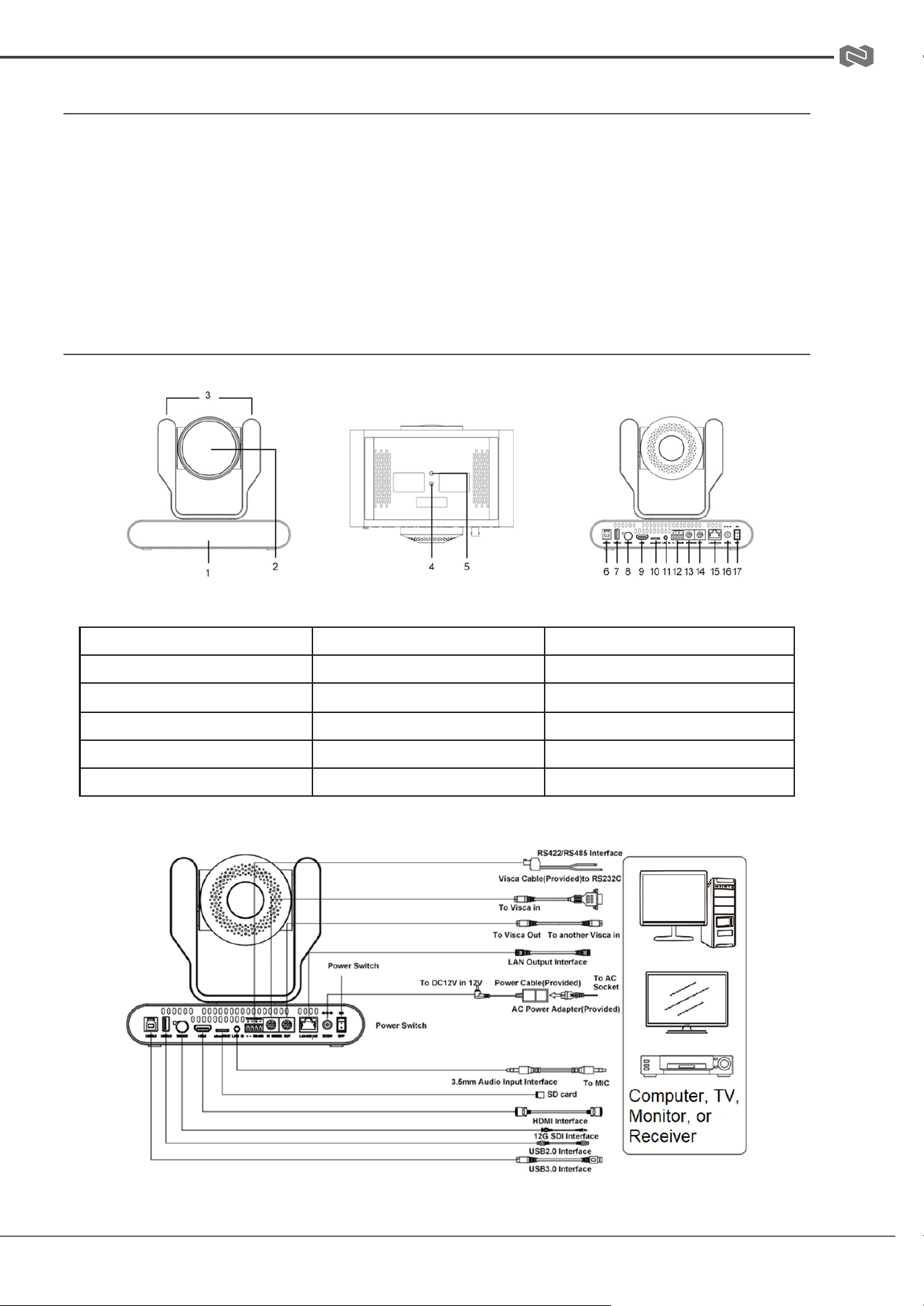
Camera Interface
1. Remote-control IR Indicator
7. USB 2.0
13. RS232 Control Interface (In)
2. Camera Lens
8. 12G-SDI Output
14. RS232 Control Interface (Out)
3. Tally Lights
9. HDMI Output
15. LAN/PoE
4. Mounting Hole
10. Micro SD slot
16. DC12V Power Input
5. Screw Hole for Tripod
11. Audio Input
17. Power Switch
6. USB 3.0
12. RS422/RS485 Interface
Address: 830 National Drive #140, Sacramento, CA 95834, USA · Tel: +1(888)499-9906 · Email: support@bzbgear.com 8
BZBGEAR BG-ADAMO-4K PRODUCT MANUAL
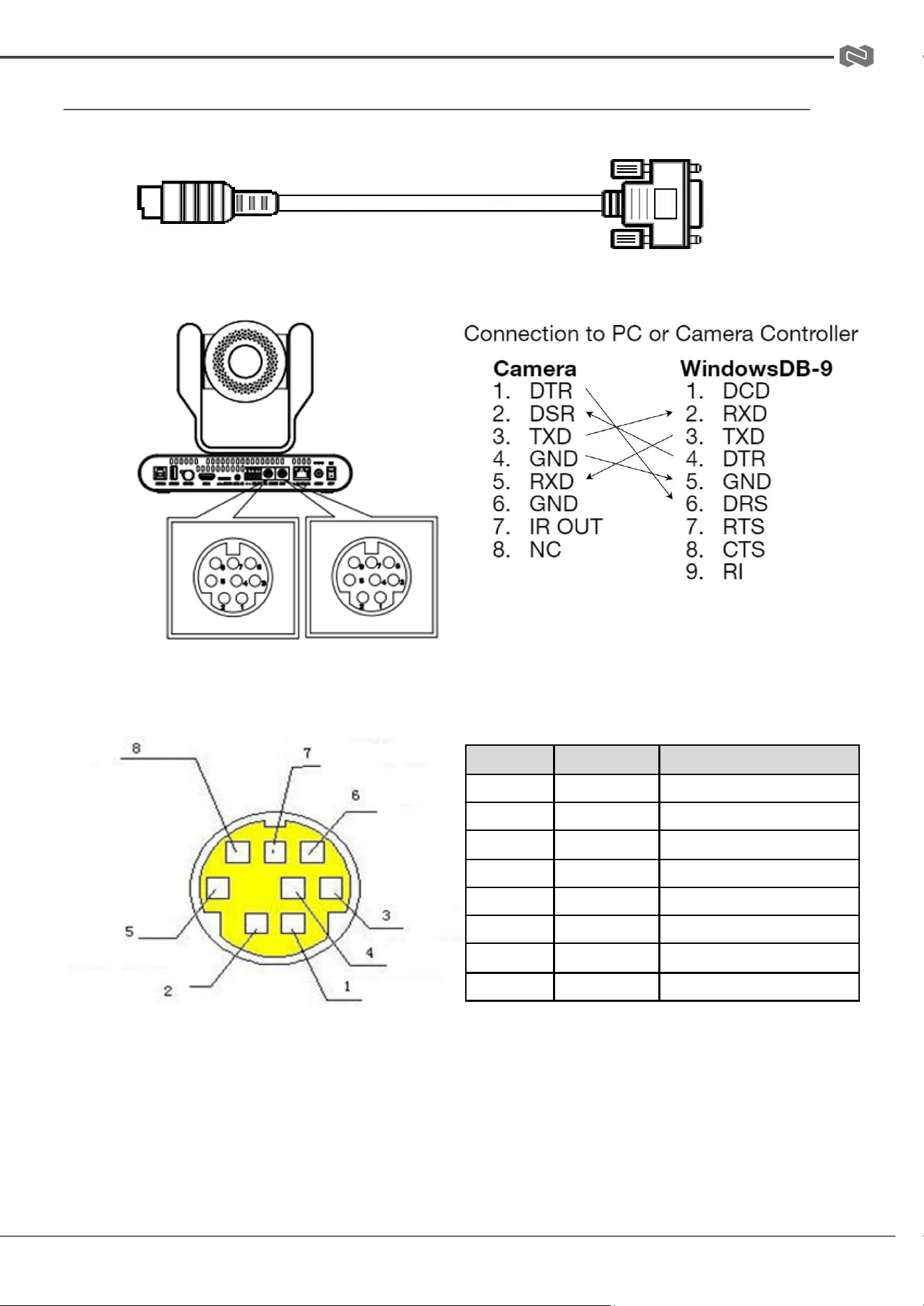
RS-232 INTERFACE
Camera
RS232 In
PC / Camera
Controller
RS232
Interface
RS-232 Mini-DIN 8-pin Port Definition
NO.
Port
Definition
1
DTR
Data Terminal Ready
2
DSR
Data Set Ready
3
TXD
Transmit Data
4
GND
Signal Ground
5
RXD
Receive Data
6
GND
Signal Ground
7
IR OUT
IR Commander Signal
8
NC
No Connection
Address: 830 National Drive #140, Sacramento, CA 95834, USA · Tel: +1(888)499-9906 · Email: support@bzbgear.com 9
BZBGEAR BG-ADAMO-4K PRODUCT MANUAL
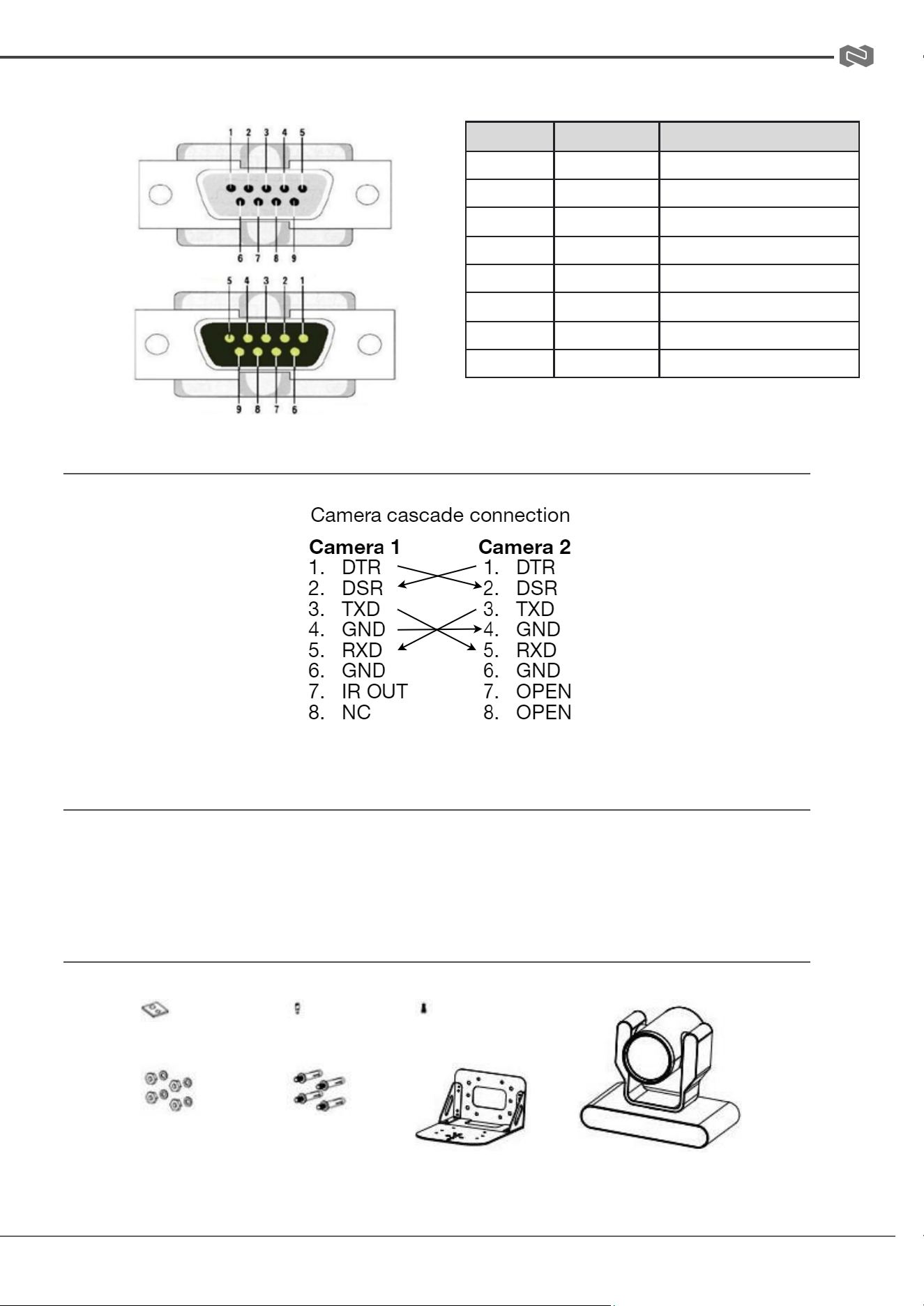
RS-232 (BD9) Port Connections
NO.
Port
Definition
1
DCD
Definition
2
RXD
Data Carrier Detect
3
TXD
Receive Data
4
DTR
Transmit Data
5
GND
Data Terminal Ready
6
DSR
System Ground
7
RTS
Data Set Ready
8
CTS
Request to Send
VISCA Networking
Mounting
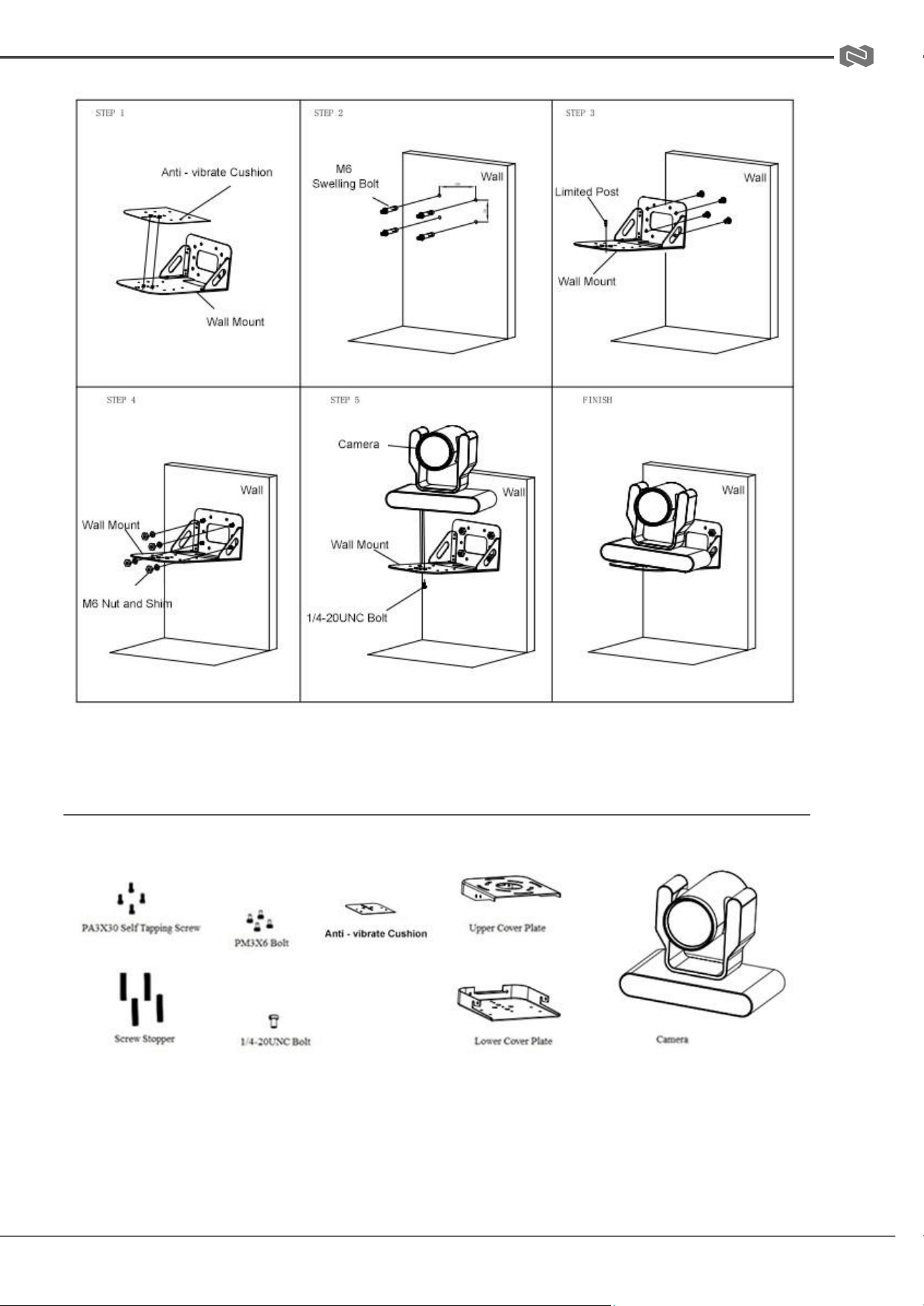
Note: Ceiling or wall mounting brackets should be mounted to a wooden or concrete wall.
Mounting to plasterboard is not recommended for safety reasons.
Wall Mounting
Anti-vibrate Cushion
Limited Post
1/4-20UNC Bolt
Camera
M6 Nut and Shim
M6 Swelling Bolts
Wall Mounting Bracket
Address: 830 National Drive #140, Sacramento, CA 95834, USA · Tel: +1(888)499-9906 · Email: support@bzbgear.com 10
BZBGEAR BG-ADAMO-4K PRODUCT MANUAL
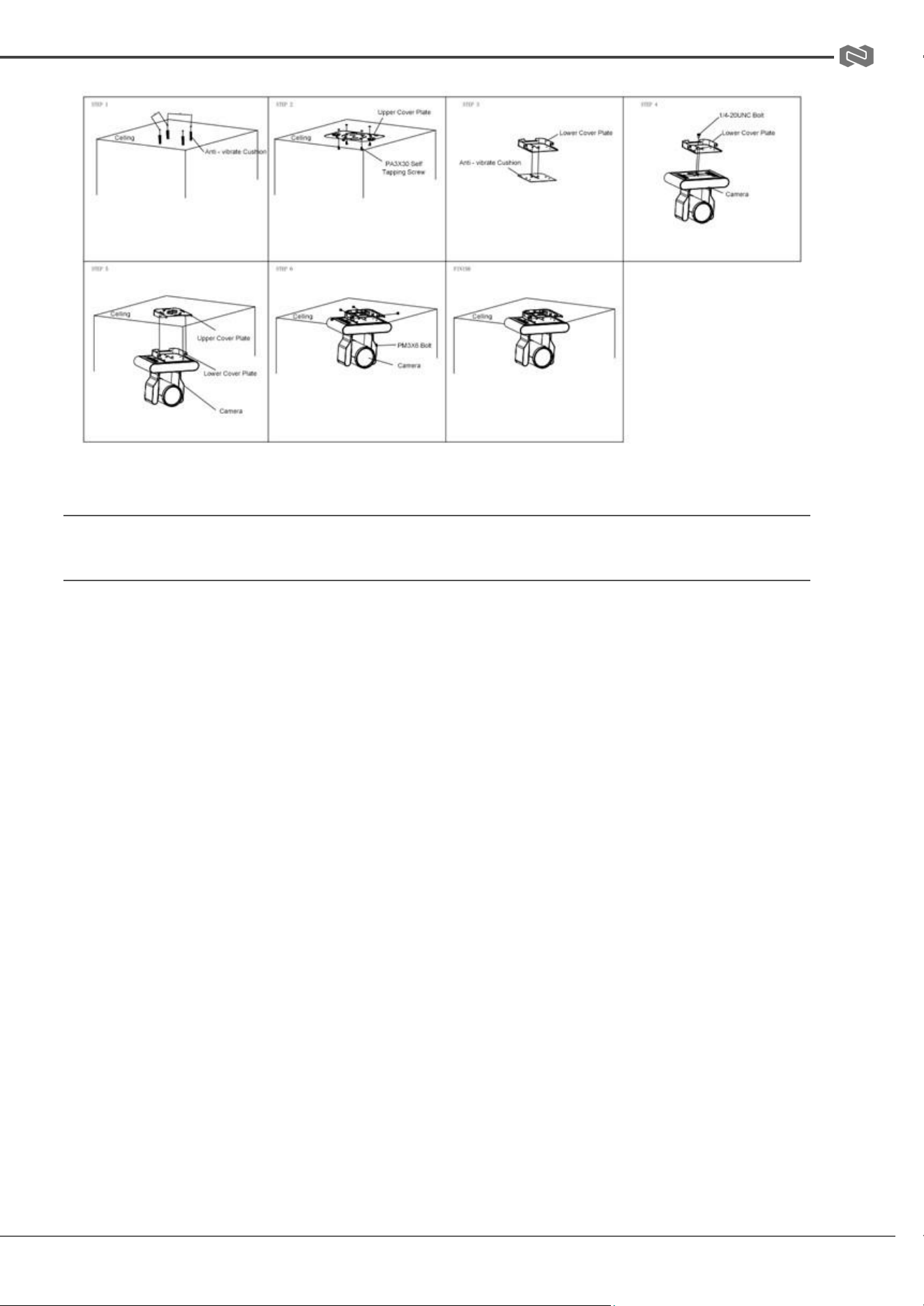
Ceiling Mounting
Address: 830 National Drive #140, Sacramento, CA 95834, USA · Tel: +1(888)499-9906 · Email: support@bzbgear.com 11
BZBGEAR BG-ADAMO-4K PRODUCT MANUAL
Operating Instructions
POWER ON AND SELF-CHECK
1. Power-on: Connect the DC12V power adaptor to the power supply socket on the back of
the camera. or connect to a PoE enabled network switch using a category cable.
2. Camera Self-check: The remote-control IR indicator and tally lights will flash when
powered on. The camera will pan-tilt to the lowest left position, then return to the HOME
position (both the horizontal and vertical positions are in the middle). The lens/zoom will
move through its complete range. Once the remote-control IR indicator and tally lights stop
flashing, the self-check has been completed.
Notes:
1. After the power-on and self-check, the camera will automatically return to the preset 0
position.
2. The factory default address for the IR remote-control is #1.
Address: 830 National Drive #140, Sacramento, CA 95834, USA · Tel: +1(888)499-9906 · Email: support@bzbgear.com 12
BZBGEAR BG-ADAMO-4K PRODUCT MANUAL
REMOTE
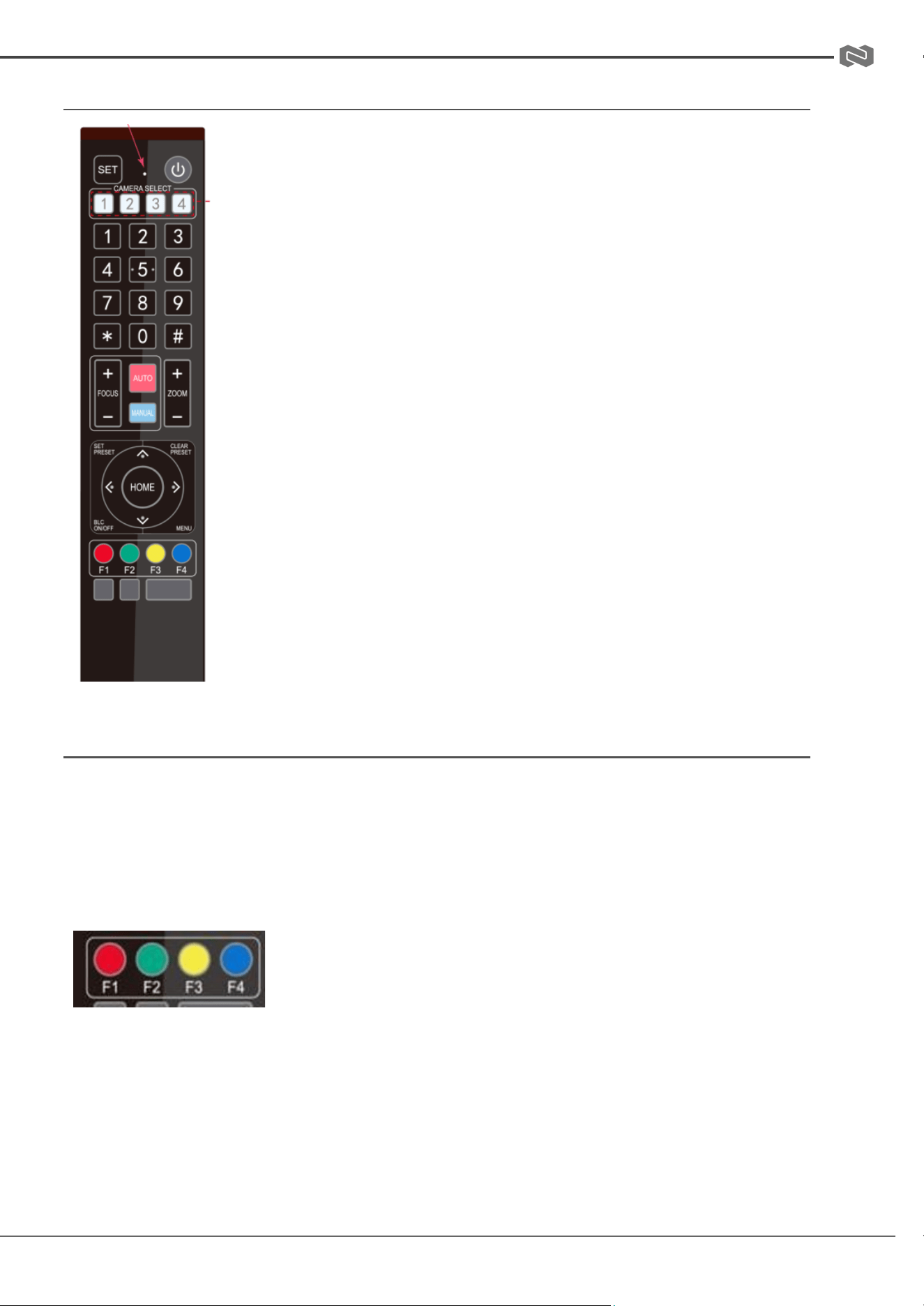
One-to-One Code Matching:
Out of the box the remote is automatically paired with the camera.
Should the camera need to be re-pair with the remote, perform the
steps below.
1. Press the "set" and " * " keys combined for 3 seconds. The
LED indicator will start flashing.
2. The camera will receive the signal and power on if not already
on.
3. The LED indicator will turn off if the code matching is
successful.
If the one-to-one code matching has failed, the LED indicator will
flash for 20 seconds and turn off. The camera will stop code
matching and go into sleep mode. Press any key to wake the camera
up and reattempt code matching.
REMOTE BUTTONS INTRODUCTION
In this manual, “press the button” means a click rather than a “press and hold”. Special
instructions will be given if pressing and holding the button for more than one second is required.
When a button-combination is required, perform the actions in sequence.
For example,【*】+【#】+【F1】 means press “【*】” first, then “【#】” and press “【F1】” last.
1. Camera Remote Control Address Setting
【*】+【#】+【F1】: Camera Address No.1
【*】+【#】+【F2】: Camera Address No. 2
【*】+【#】+【F3】: Camera Address No. 3
【*】+【#】+【F4】: Camera Address No. 4
Address: 830 National Drive #140, Sacramento, CA 95834, USA · Tel: +1(888)499-9906 · Email: support@bzbgear.com 13
BZBGEAR BG-ADAMO-4K PRODUCT MANUAL
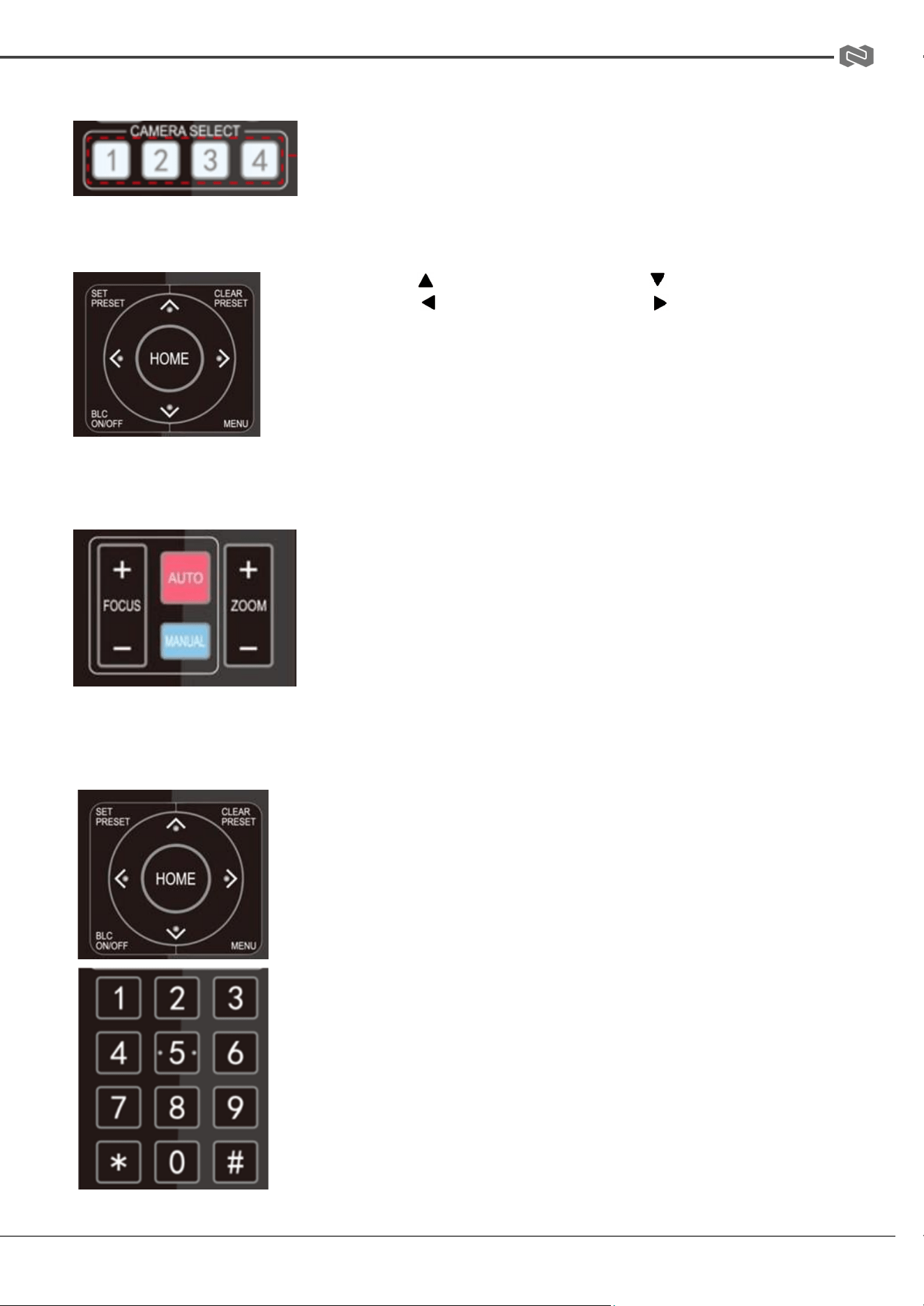
2. Camera Selection
Select the camera’s address to control it.
3. Pan/Tilt Control
Up: press Down: press
Left: press Right: press
Return to middle position: press 【HOME】
Press and hold the up, down, left, or right button to
pan/tilt the camera. The camera will continue to move in
the arrow direction until either the button is released or
the camera has reached its full range of motion.
4. Focus Control and Zoom
FOCUS + (near) : Press to adjust the lens focus.
FOCUS - (far) : Press to adjust the lens focus.
MANUAL : Press to enter manual focus mode.
AUTO : Press to return to auto focus mode.
ZOOM + : Press to zoom in.
ZOOM - : Press to zoom out.
5. Set and Clear Presets
Set Preset: Press the【SET PRESET】button, then press the number
buttons 0-9 to set the preset positions.
Note: 10 presets are available via remote control.
Call Preset: Press the 0-9 number buttons to call a preset
position.
Clear Preset: Press the【CLEAR PRESET】button, then press the
desired number button to clear its preset position.
BLC ON/OFF: Turn on/off the BLC.
Menu: Enter/Exit OSD menu or return to the previous menu.
Note: Pressing the【#】 key three times in a row will clear all
presets.
Address: 830 National Drive #140, Sacramento, CA 95834, USA · Tel: +1(888)499-9906 · Email: support@bzbgear.com 14
BZBGEAR BG-ADAMO-4K PRODUCT MANUAL
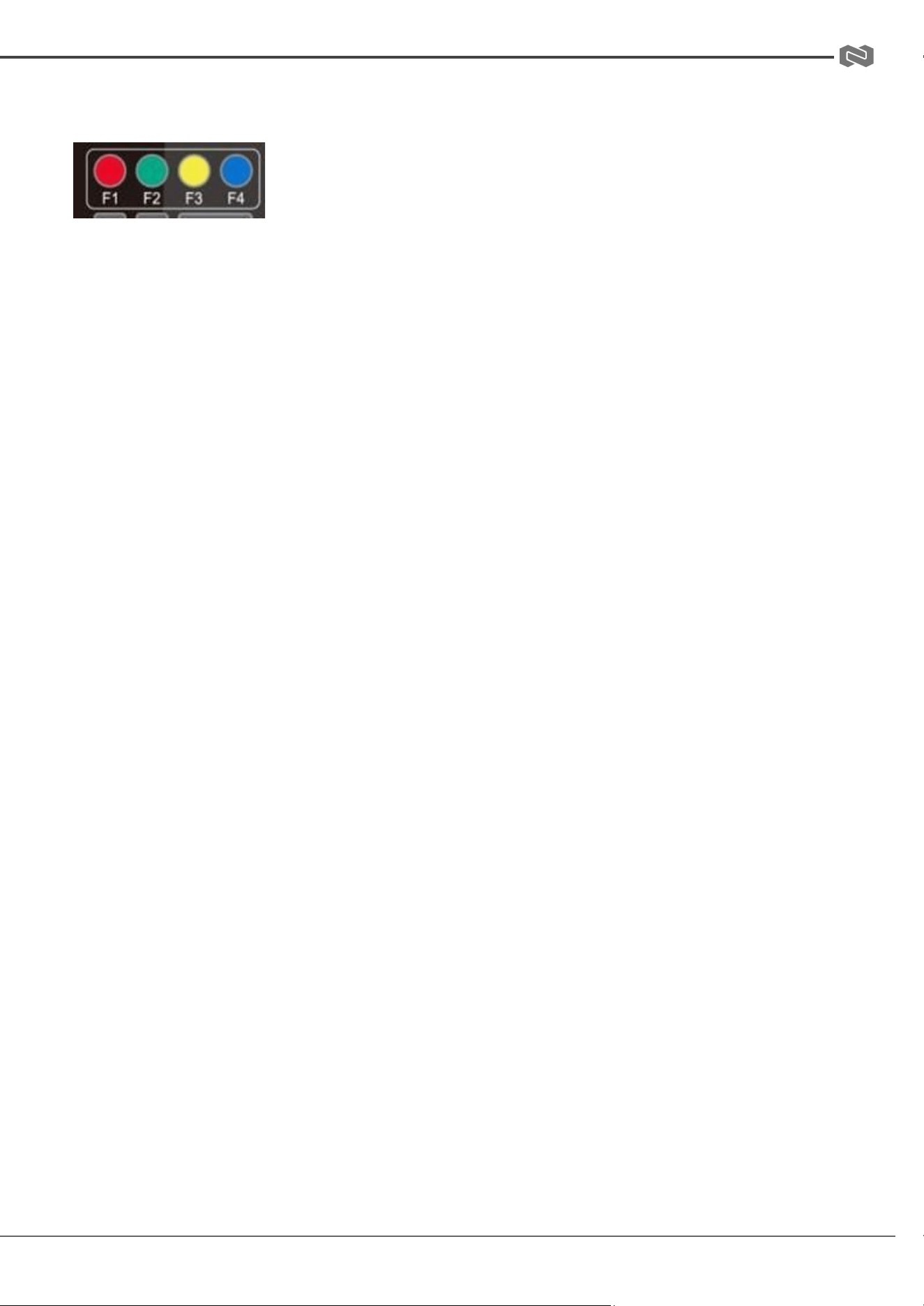
6. Auto Tracking Buttons
F1: Turn off auto tracking
F2: Turn on auto tracking
F3: Switch auto tracking modes
F4: Switch auto tracking to follow a different person
7. Key Combinations
【#】+【#】+【#】: Cancel all preset positions
【*】+【#】+【3】: The menu is set to Chinese
【*】+【#】+【9】: Toggle forward and backward
【#】+【*】+ 【Auto】: Stop demo mode
【#】+【#】+【0】: Switch video format 4KP60
【#】+【#】+【2】: Switch video format 4KP30
【#】+【#】+【4】: Switch video format 1080P60
【#】+【#】+【6】: Switch video format 1080I60
【#】+【#】+【8】: Switch video format 1080P30
【*】+【#】+【6】: Restore factory image defaults
【*】+【#】+【4】: The menu is set to English
【*】+【#】+【Auto】: Enter demo mode
【*】+【*】+【7】: Turn on green tally light
【*】+【*】+【8】: Turn on red tally light
【*】+【#】+ 【Manual】: IP, username, password restore to
default
【#】+【#】+【1】: Switch video format 4KP50
【#】+【#】+【3】: Switch video format 4KP25
【#】+【#】+【5】: Switch video format 1080P50
【#】+【#】+【7】: Switch video format 1080I50
【#】+【#】+【9】: Switch video format 1080P25
【*】+【*】+【1】: Enable DHCP
【*】+【*】+【2】: Disable DHCP
【*】+【*】+【3】: Display current IP address
【*】+【*】+【4】: Reboot camera
【*】+【*】+【5】: Start recording to SD card
【*】+【*】+【6】:Stop recording to SD card
【*】+【*】+【9】: Turn off tally light
Address: 830 National Drive #140, Sacramento, CA 95834, USA · Tel: +1(888)499-9906 · Email: support@bzbgear.com 15
BZBGEAR BG-ADAMO-4K PRODUCT MANUAL
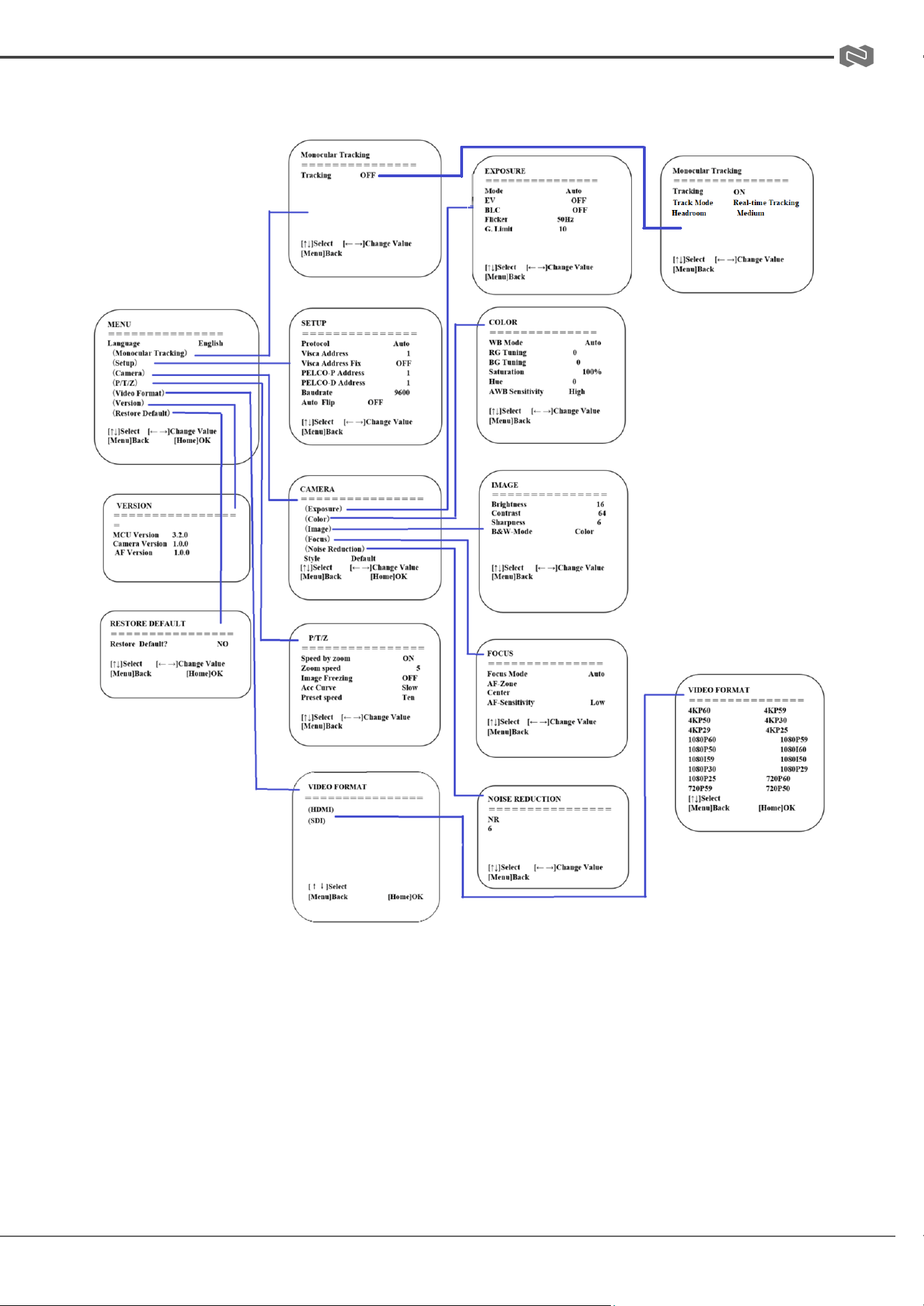
8. Main Menu
Address: 830 National Drive #140, Sacramento, CA 95834, USA · Tel: +1(888)499-9906 · Email: support@bzbgear.com 16
BZBGEAR BG-ADAMO-4K PRODUCT MANUAL
Network Connection
Connection Mode
● Direct Connection: Connect the camera directly to the computer using an ethernet cable.
● Internet Connection: Connect the camera and computer to a router or switch and access
via the local area network (LAN).
Note: Ensure power and network connections are secured to prevent video issues caused
by poor connection quality.
The computer must be on the same subnet as the camera to connect successfully. The device will
not be accessible otherwise. The camera’s default IP address is 192.168.5.163, therefore the
computer must be connected to the 192.168.5.x subnet.
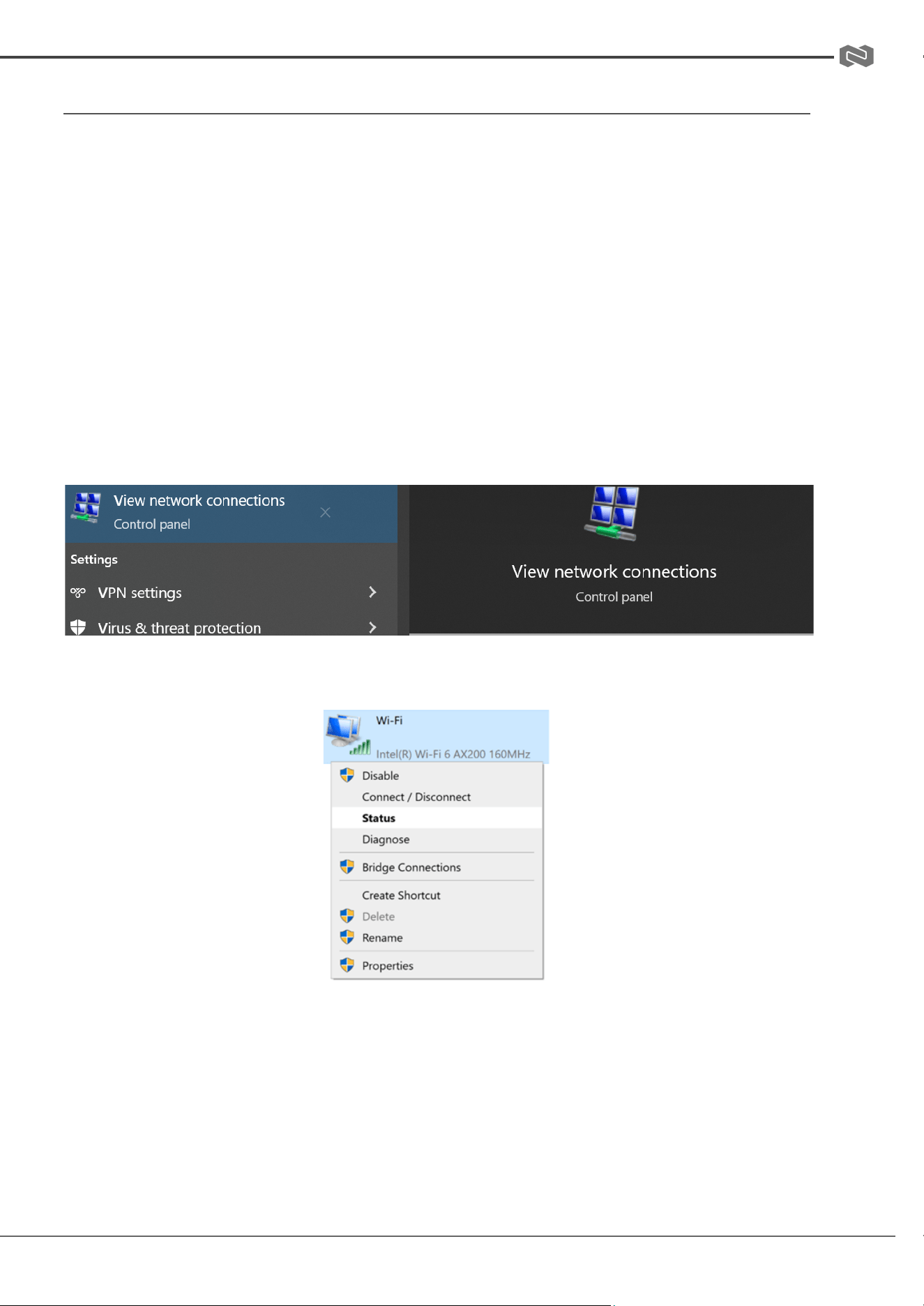
● To connect to the camera, open the Local Area Connection Properties on the computer.
● For Windows 10/11 users in the Start menu type/search for “View Network Connections”
● Right-click on your connection and select “Status".
Then click “Details…” Take note of your current IPv4 Address and Default Gateway as you
will need this information later. Close the “Details” and “Status” windows.
Address: 830 National Drive #140, Sacramento, CA 95834, USA · Tel: +1(888)499-9906 · Email: support@bzbgear.com 17
BZBGEAR BG-ADAMO-4K PRODUCT MANUAL
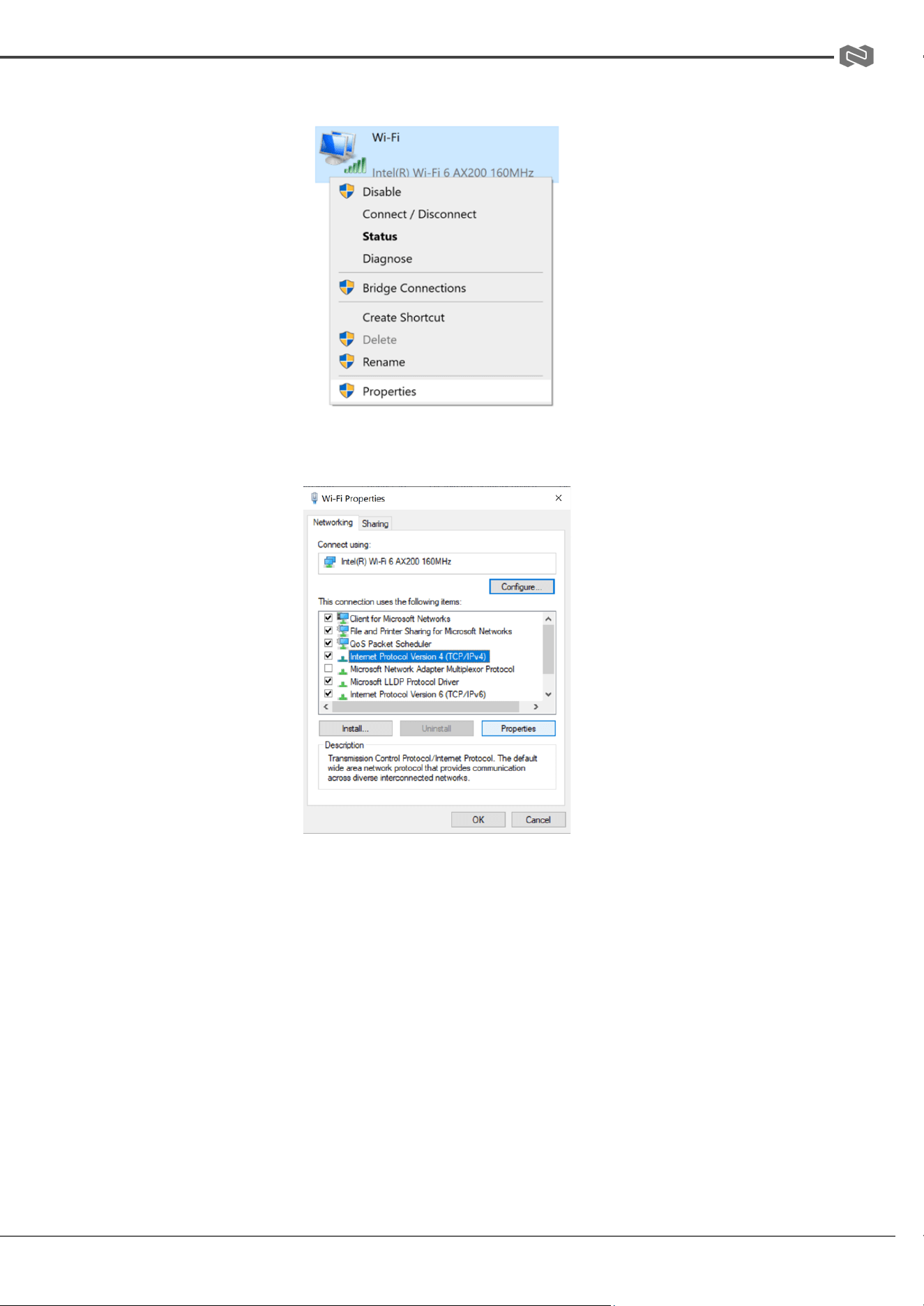
● Right-click on your adapter again (Wi-Fi or Ethernet) and select “Properties”.
● Select “Internet protocol version 4 (TCP/IPv4” as shown below and click “Properties”.
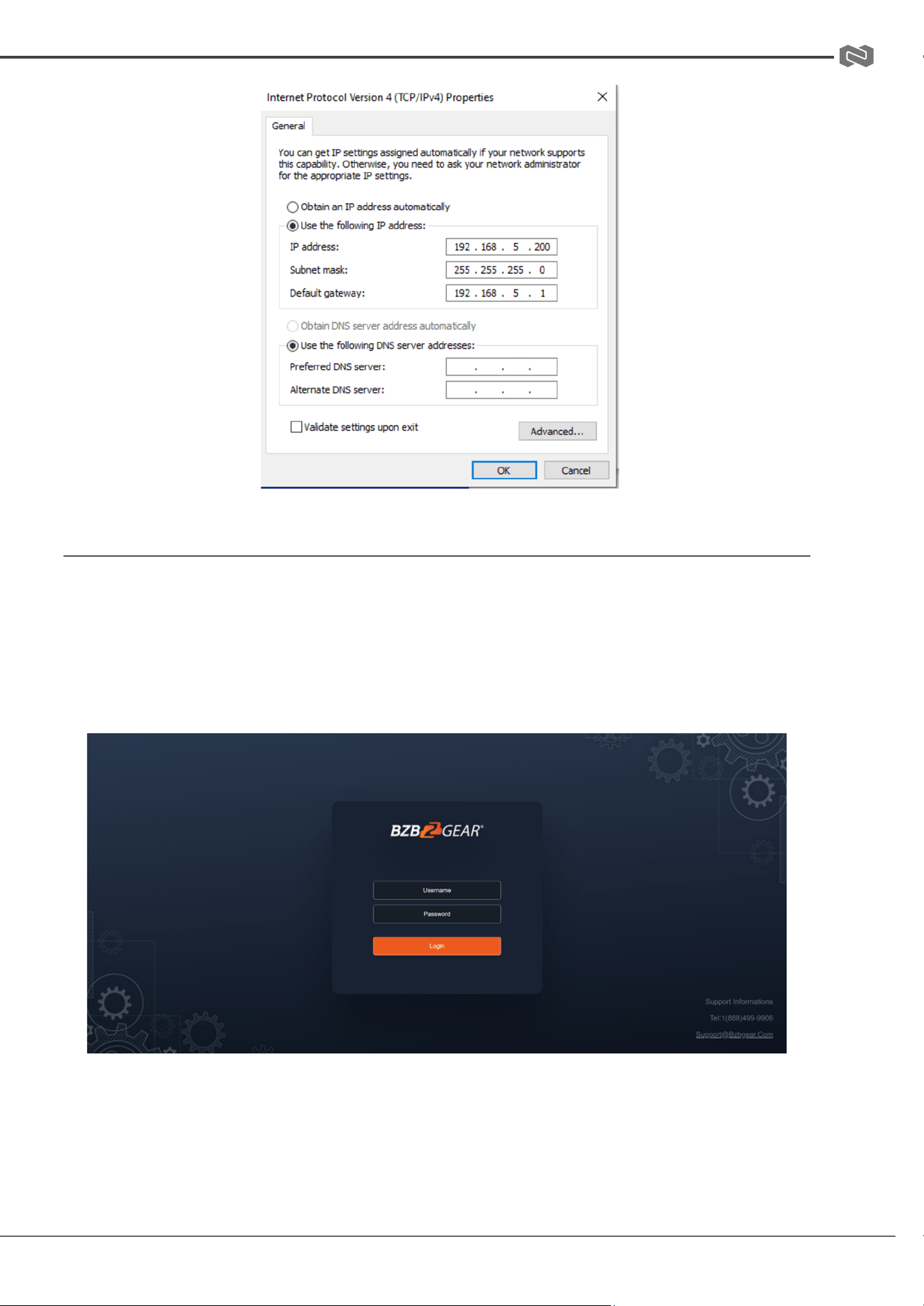
For the following steps refer to the diagram below.
● Click on the bubble for “Use the following IP address”
● In the IP address field, enter a non-conflicting IP address on the same subnet as the
camera. If there is another device with the same IP address, you will not be able to
connect. In the example below uses 192.168.5.200
● In the Subnet mask field enter 255.255.255.0
● In the Default gateway field type 192.168.5.1
● Leave the DNS fields blank.
● Click “OK” to apply the settings.
Address: 830 National Drive #140, Sacramento, CA 95834, USA · Tel: +1(888)499-9906 · Email: support@bzbgear.com 18
BZBGEAR BG-ADAMO-4K PRODUCT MANUAL
Initial Web Client Login
● Enter 192.168.5.163 in the address bar of your internet browser and click “Enter”. Login as
the administrator (Default Username/Password: admin). Users can preview and configure
in the Web Client.
● When logged in as a normal user (Default Username/Password: user1 or user2), users can
only preview with no options for configuration.
Address: 830 National Drive #140, Sacramento, CA 95834, USA · Tel: +1(888)499-9906 · Email: support@bzbgear.com 19
BZBGEAR BG-ADAMO-4K PRODUCT MANUAL
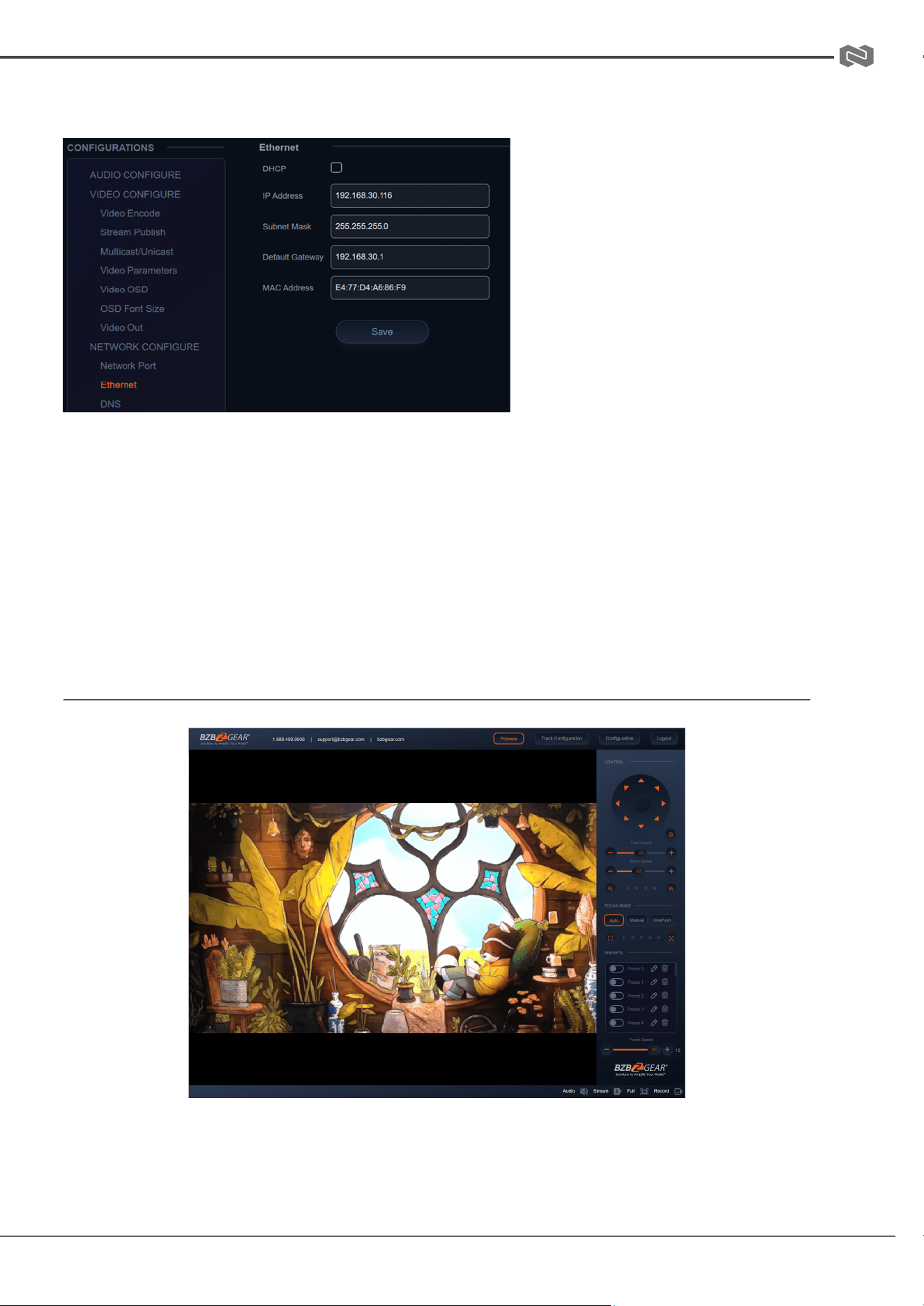
● Navigate to Configuration in the top left corner of the screen. Click “Ethernet” on the
left-hand side.
● Enter an unused IP address
on your network.
Note: You should have your specific
network information from the
“Status” and “Details” pages of your
internet connection noted above.
● In this example we will use
192.168.30.116
● Change the Subnet Mask to
255.255.255.0
● Default gateway of your network
● Click “Save”
● Reboot the Camera
● Once you have completed the camera network setup, repeat the steps on your computer
to adjust the “Internet Protocol Version 4 (TCP/IPV4) Properties.” Select the bubbles to
“Obtain an IP address automatically” and “Obtain DNS server address automatically.”
Preview
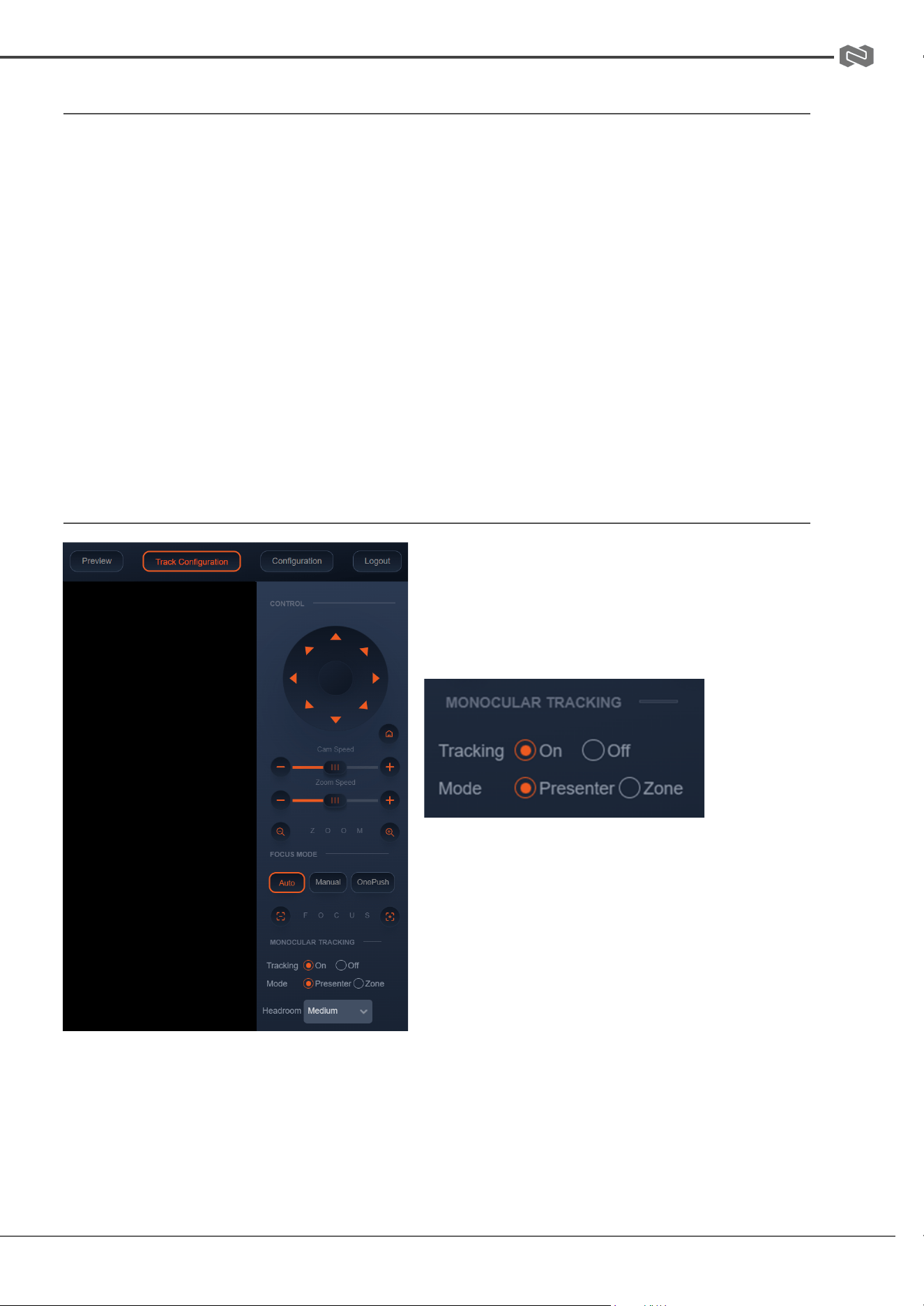
After successfully logging into the management interface, the web portal will enter the “Preview”
tab. In Preview, users can control pan/tilt, zoom, focus, video capture, sound, focus, full screen
preview, as well as set and recall preset positions and configure the “Home” preset position.
Address: 830 National Drive #140, Sacramento, CA 95834, USA · Tel: +1(888)499-9906 · Email: support@bzbgear.com 20
BZBGEAR BG-ADAMO-4K PRODUCT MANUAL
SD Card Recording
● The recording option will appear in the bottom right corner of the “Preview Screen” after a
compatible SD card is inserted into the camera.
○ The BG-ADAMO line of cameras currently only supports FAT32 format at this time.
Before recording, ensure the SD card has been formatted properly.
● The BG-ADAMO is capable of using micro SD cards up to 1Tb when properly formatted.
○ Note: If your SD card does not allow you to format it to FAT32 a program such as
“rufus-3.21.exe” may be required.
○ Note: FAT32 only allows for file sizes up to 4Gb so longer/higher resolution
recordings may be broken up into several files.
● Recording parameters are changed by editing the Video Encode “Main Stream” settings.
● Synchronize the camera time before recording as file names will be generated based on
system time.
● WARNING! Be careful when inserting a Micro SD card into the unit as there is an air gap
above the SD socket and it may be possible to push a SD card into the housing if not
properly inserted.
Auto-Tracking Configuration
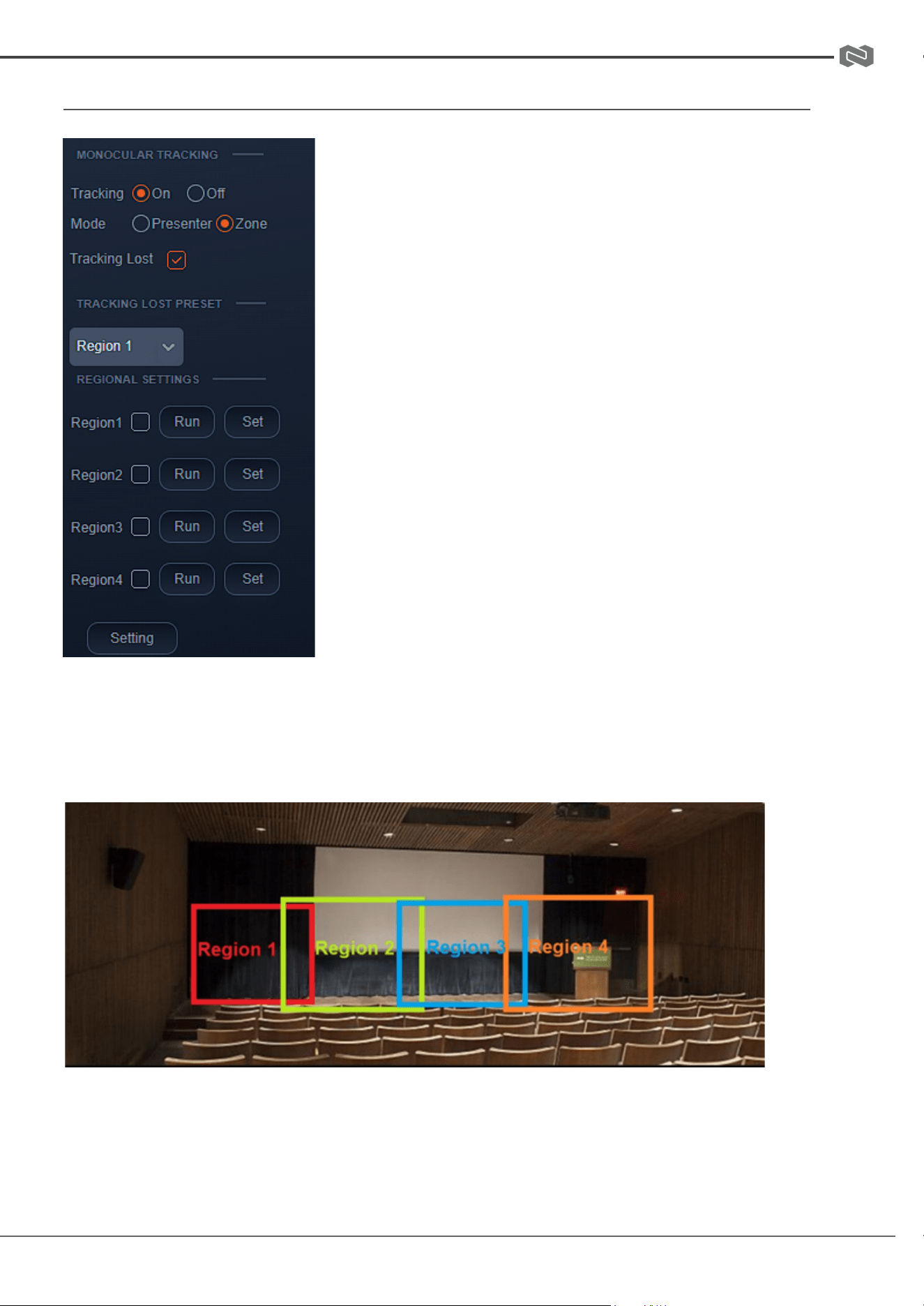
To set up or enable auto-tracking, select “Track
Configuration” on the top right corner.
Select “On” under the option for Monocular
Tracking.
You have 2 modes for tracking:
Presenter: The camera will continuously follow the
subject until either the subject moves beyond the
camera’s physical range of motion, a new more
prominent target is in frame, or the tracking is
disabled.
Headroom: Select from Low, Medium (default), or
High settings to adjust space the tracking subject
(only available in Presenter mode)
Zone: The camera holds its frame in predetermined zones. The camera tracks and moves only
when the subject has left one zone and entered the next, then holds the frame in the new zone. If
the subject exits the preset zones entirely, the camera will reset to the first zone or the Tracking
Lost Preset if it was configured. The minimum zone allowance is 2 and the maximum is 4 zones.
The zone size limits are -170°~+170° horizontal, and -30°~+90° vertical. See the next section
“Zone Tracking Setup” for instructions.
Address: 830 National Drive #140, Sacramento, CA 95834, USA · Tel: +1(888)499-9906 · Email: support@bzbgear.com 21
BZBGEAR BG-ADAMO-4K PRODUCT MANUAL
ZONE TRACKING SETUP
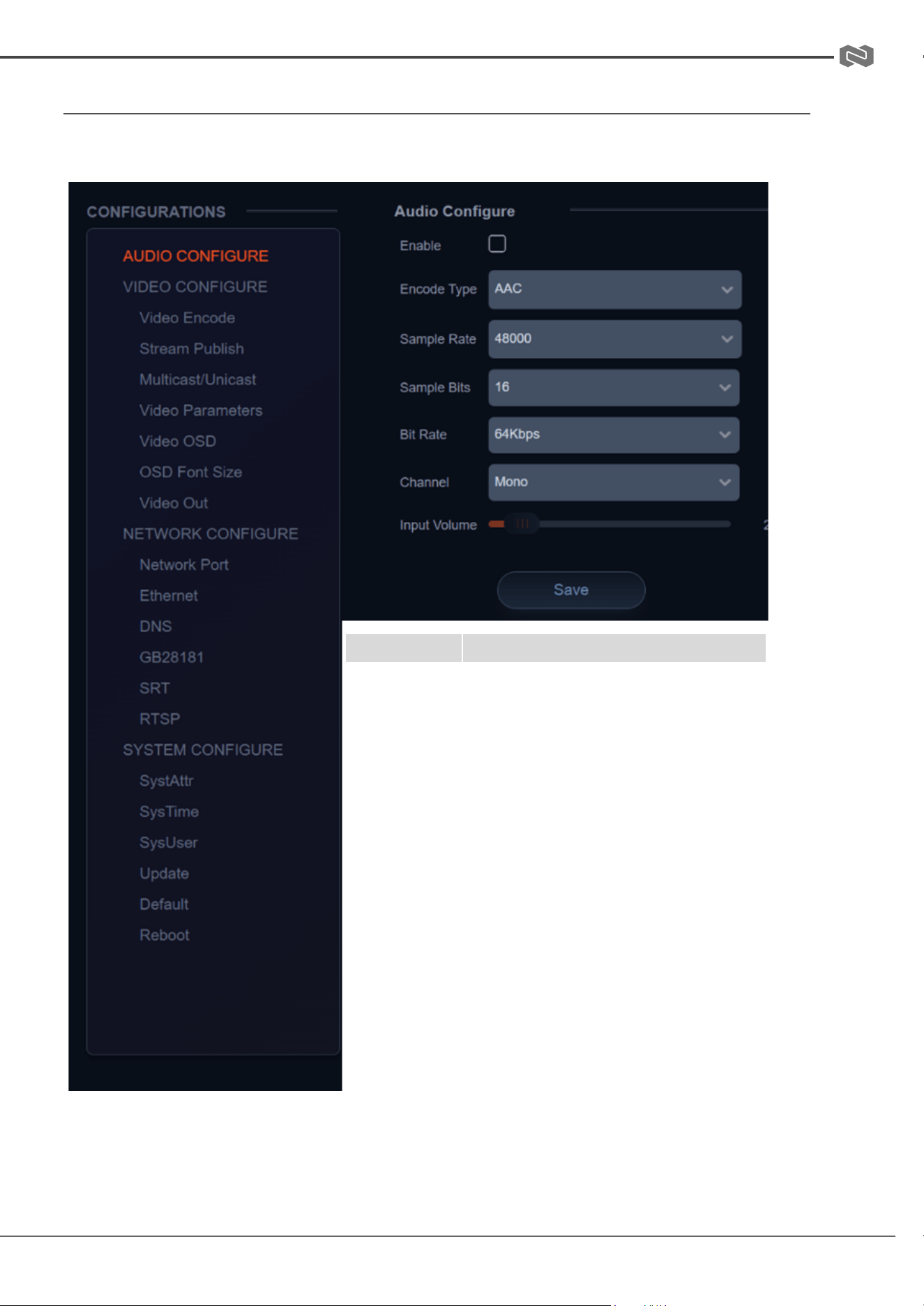
● Zone tracking must be set up using the web interface.
However, it can be activated using the remote once the setup
process has been completed.
● Using either the remote or web interface, adjust the
camera to the desired shot.
● Select “Set” to save the shot on the desired region.
● Preset images will be shown below the preview image.
● Click the Check box on the region to enable tracking for
the new zone and to save the preset.
● For zone tracking to work perform the steps again for at
least 1 more region up to a total of 4.
● Use the “Tracking Lost Preset” to configure which
region or Home position the camera will return to if tracking is
lost.
Note: Each preset preview image must be continuous from left to right and overlap when setting
the tracking regions. See the picture below for an example:
Address: 830 National Drive #140, Sacramento, CA 95834, USA · Tel: +1(888)499-9906 · Email: support@bzbgear.com 22
BZBGEAR BG-ADAMO-4K PRODUCT MANUAL
General Configuration
To access system settings select “Configuration” in the top left corner of the web interface.
Menu
Explanation
Audio
Configure
Includes audio compression formats,
sampling frequency, sampling
precision, compressing code rate
settings etc.
Video
Configure
Includes video encoding, video
parameters, character-overlapping,
character size, video output setting
etc.
Network
Configure
Includes Network Ports for video
formats, Ethernet static or DHCP,
DNS, GB28181, SRT, and RTSP
System
Configure
Includes system attributes (device
name/ID), system time, auto reboot
scheduler, user management,
firmware update, reboot, and restore
factory defaults
Address: 830 National Drive #140, Sacramento, CA 95834, USA · Tel: +1(888)499-9906 · Email: support@bzbgear.com 23
BZBGEAR BG-ADAMO-4K PRODUCT MANUAL
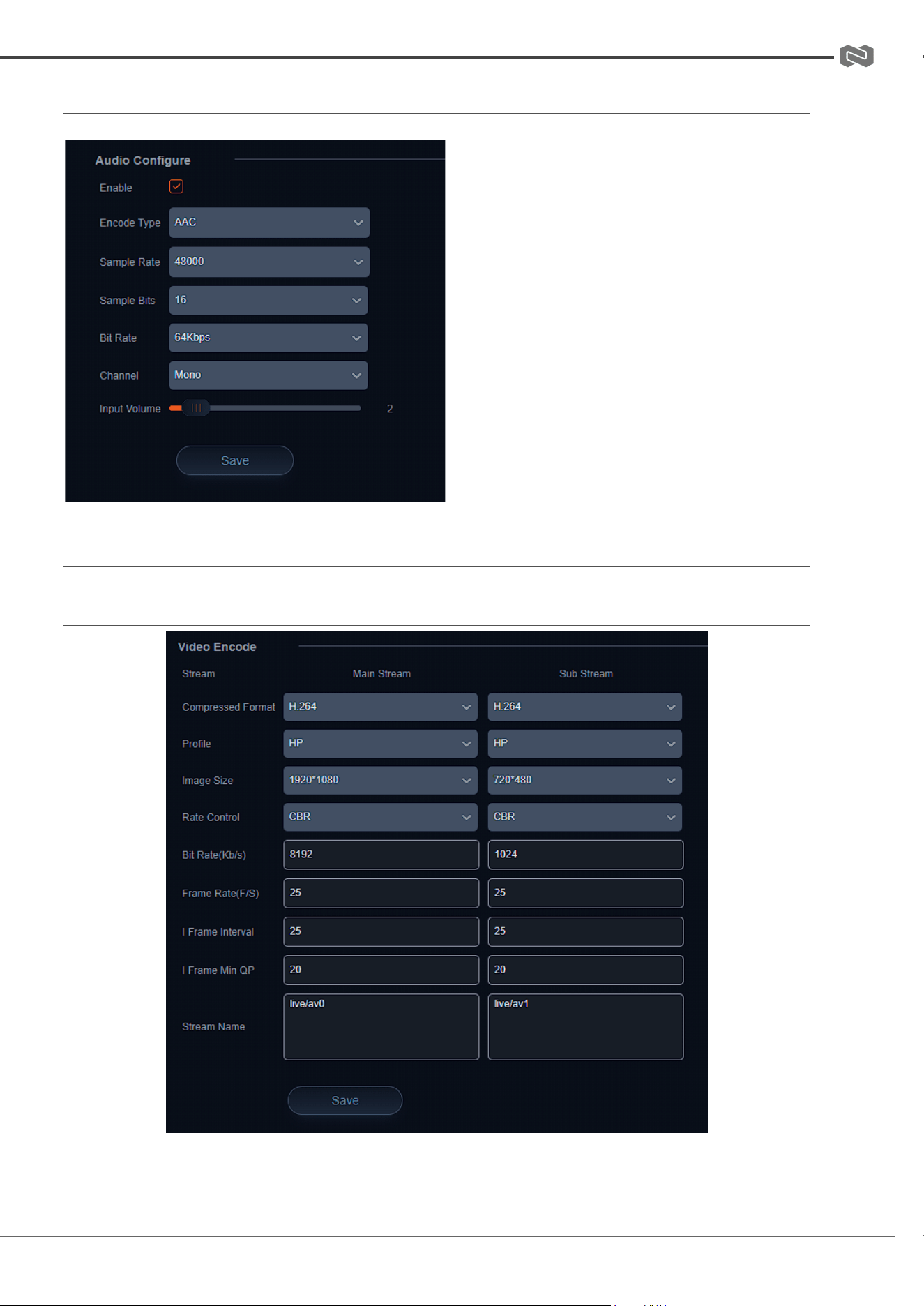
Audio Configure
● Enable: Check the Enable box to
turn on embedded audio into the camera
stream.
● Encode Type: Select the audio
format (AAC only at this time).
● Sample Rate: 48kHz (not editable)
● Sample Bits: 16bit (not editable)
● Bit Rate: 32Kbps - 128Kbps
● Channel: Mono or Stereo
● Input Volume: Change the input
volume from the source device to avoid
distortion.
Video Encode and Streaming
Video Encode
Covered by one or more claims of the HEVC patents listed at patentlist.accessadvance.com
Address: 830 National Drive #140, Sacramento, CA 95834, USA · Tel: +1(888)499-9906 · Email: support@bzbgear.com 24
BZBGEAR BG-ADAMO-4K PRODUCT MANUAL
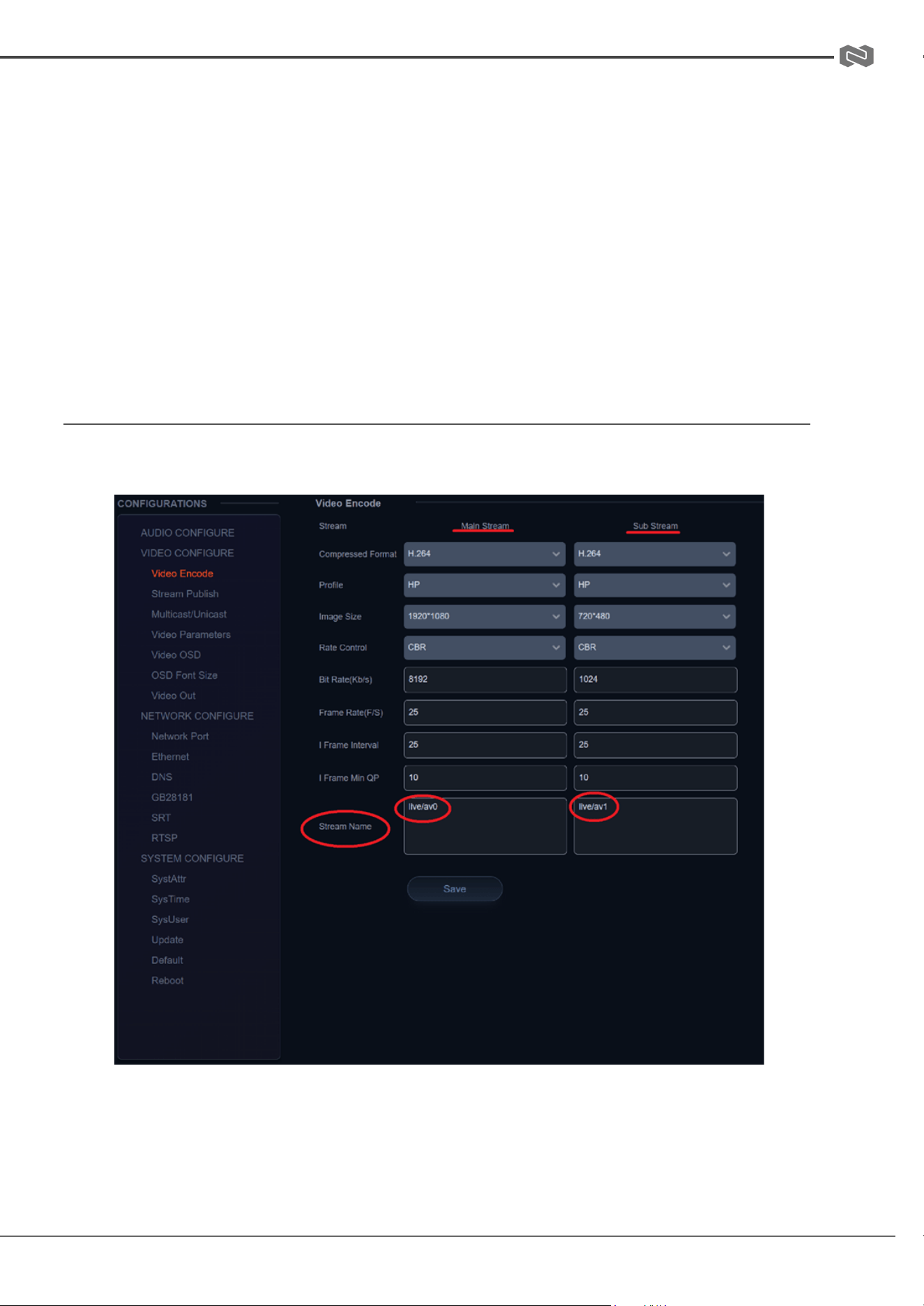
From the Video Encode tab users can edit the following parameters for the main and sub
streams:
Compressed Format: H.264 (default) or H.265
Profile: HP or MP
Image Size: 1280x720 - 3840x2160 (Main Stream) 320x240 - 720x480 (Sub Stream)
Rate Control: CBR (Constant bit rate) or VBR (Variable Bit Rate)
Bit Rate: Default 8192 Kb/s (recommended for 3840x2160)
Frame Rate (F/S): Default is 25
I Frame Interval: Default is 25
I Frame Min QP: Default is 20
Stream Name: Default is “live/av0” or “live/av1”
VIDEO STREAM CAPTURE
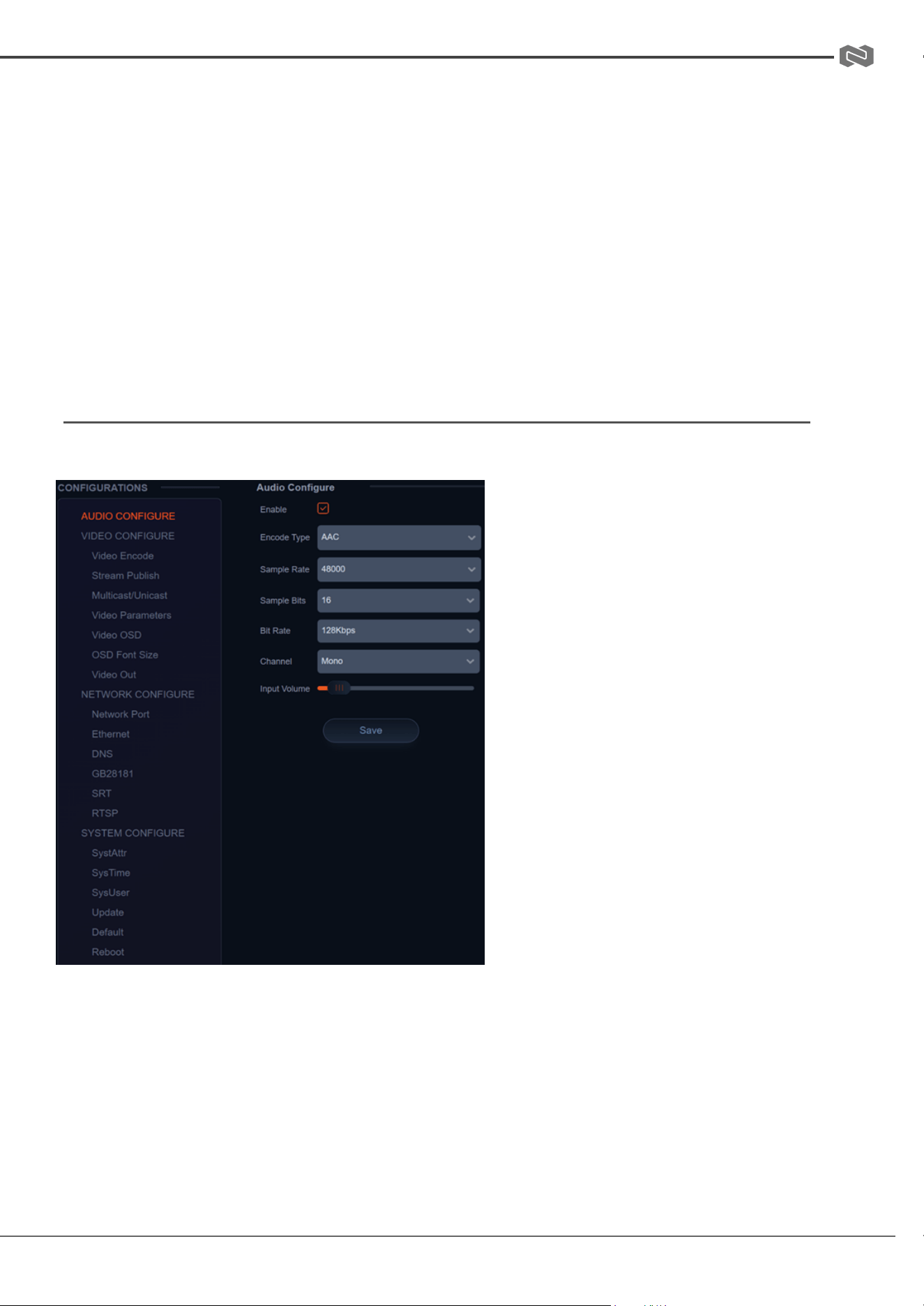
Navigate to Configuration -> Video Encode
Configure the parameters according to your network environment.
Note: stream name - live/av0 (live/ XXX)
Address: 830 National Drive #140, Sacramento, CA 95834, USA · Tel: +1(888)499-9906 · Email: support@bzbgear.com 25
BZBGEAR BG-ADAMO-4K PRODUCT MANUAL
For example:
The default IP address of the camera is 192.168.5.163. To obtain the RTSP video stream, see
below:
rtsp://192.168.5.163:554/live/av0(av0 main stream)
rtsp://192.168.5.163:554/live/av1(av1 sub stream)
The default IP address of the camera is 192.168.5.163. To obtain the RTMP video stream, see
below:
rtmp://192.168.5.163:1935/live/av0(av0 main stream)
rtmp://192.168.5.163:1935/live/av1(av1 sub stream)
LIVE STREAM PUBLISH
Navigate to Configuration -> Audio Configure
Ensure the check box next to “Enable” is
toggled.
● Select AAC as the “Encode Type.”
● Change “Bit Rate” to 128Kbps to
ensure the highest audio quality.
● Click Save and Reboot the
camera.
Note: It may be necessary to adjust the
“Image Size” under “Video Encode” to
1920x1080 or below to live stream due to
bandwidth limitations on certain platforms.
Address: 830 National Drive #140, Sacramento, CA 95834, USA · Tel: +1(888)499-9906 · Email: support@bzbgear.com 26
BZBGEAR BG-ADAMO-4K PRODUCT MANUAL
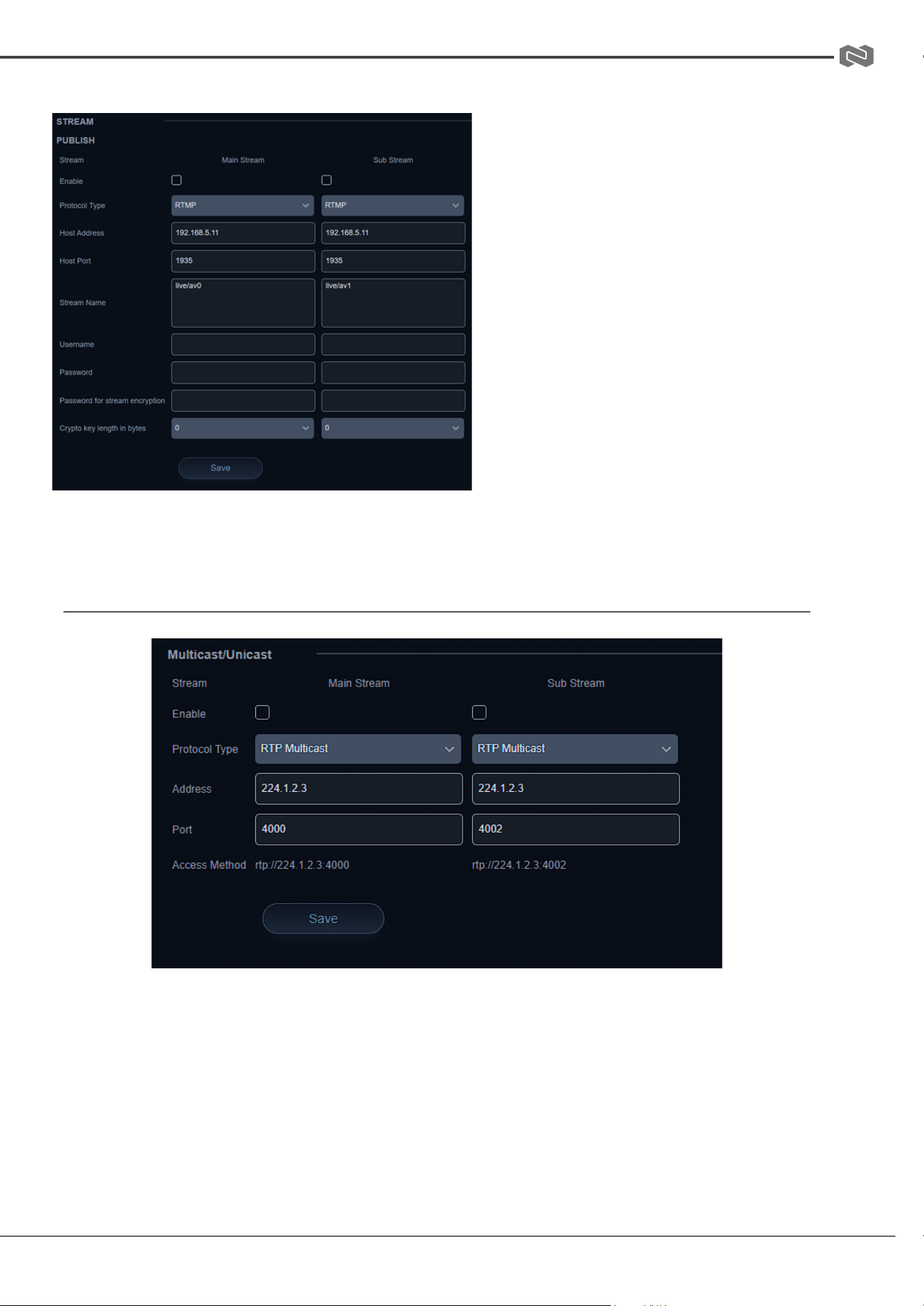
Navigate to Configuration -> Stream Publish
● To push an RTMP stream to a public
network, such as Facebook or
YouTube, the camera must be
connected to a network otherwise it
will fail to connect to a server.
● Host Address: Server address,
domain name, or an IP address.
● Host Port: Server default port
number (Facebook 443 / YouTube
1935).
● Stream Name: Stream key provided
by streaming platform.
● Username and Password: Leave
blank as they are set by the server.
● Click “Save”
Multicast/Unicast
Use the Multicast / Unicast tab to control the following settings:
Enable: Check the box to enable or disable the Main or Sub streams
Protocol Type: Select the Multicast or Unicast protocol (RTP Multicast, TS Multicast,
UDP Unicast, TCP Unicast)
Address: Set the IP address for the stream.
Port: Set the port for the stream
Access Method: Displays the full link that can be used to access the stream when
enabled.
Address: 830 National Drive #140, Sacramento, CA 95834, USA · Tel: +1(888)499-9906 · Email: support@bzbgear.com 27
BZBGEAR BG-ADAMO-4K PRODUCT MANUAL
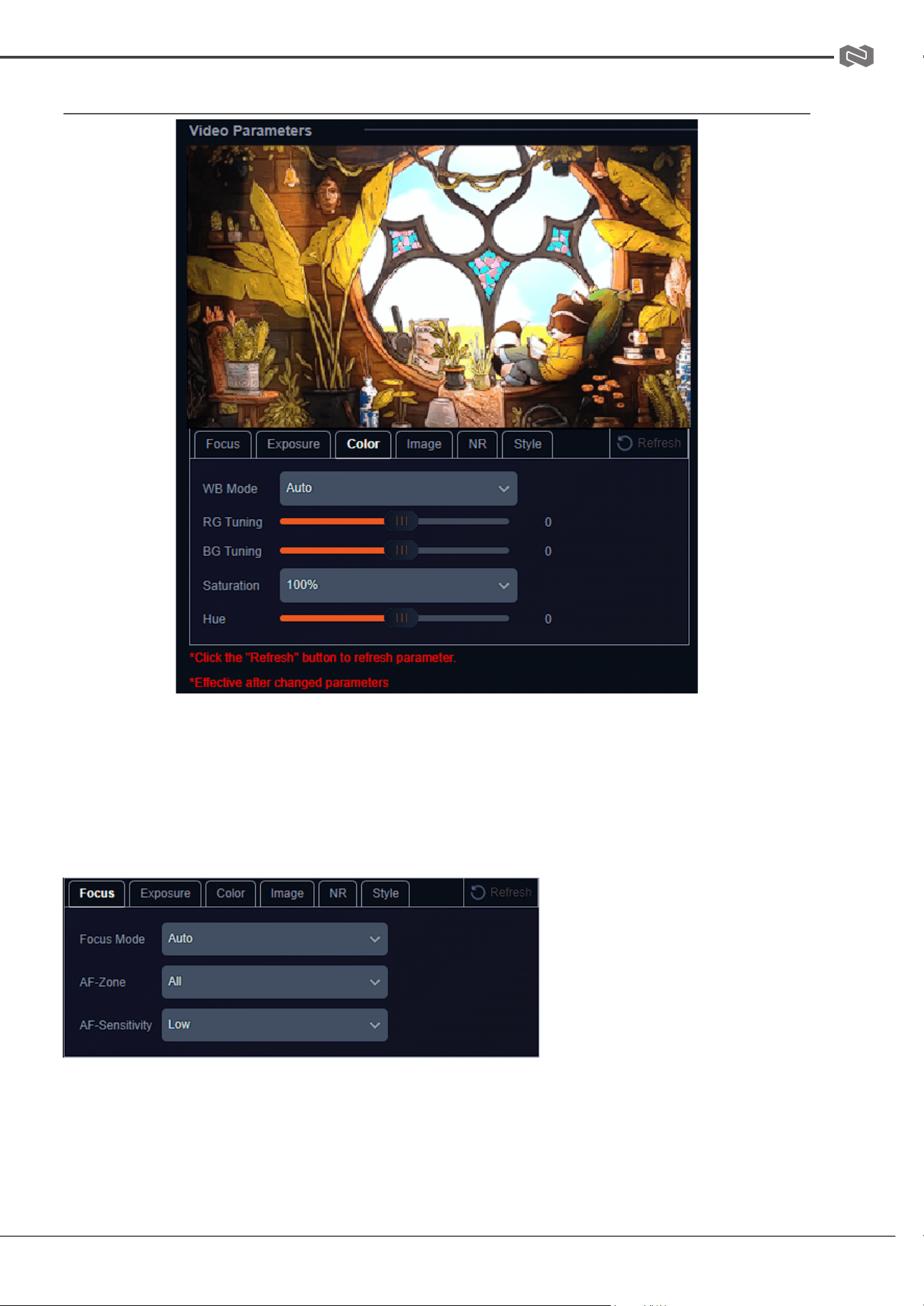
Video Parameters
From the Video Parameters tab users have several options to manually control the image
captured from the camera. Controls are broken into 6 sub sections: Focus, Exposure,
Color, Image, NR, and Style. A preview image is shown above the settings so users can
see their changes in real time.
Focus
Focus Mode: Auto, Manual,
OnePush
AF-Zone: Top, Center,
Bottom, or All tells the camera
which area of the shot is the
primary point of focus.
AF-Sensitivity: Low, Middle,
High changes how often the
camera attempts to refocus when the mode is set to Auto.
Address: 830 National Drive #140, Sacramento, CA 95834, USA · Tel: +1(888)499-9906 · Email: support@bzbgear.com 28
BZBGEAR BG-ADAMO-4K PRODUCT MANUAL
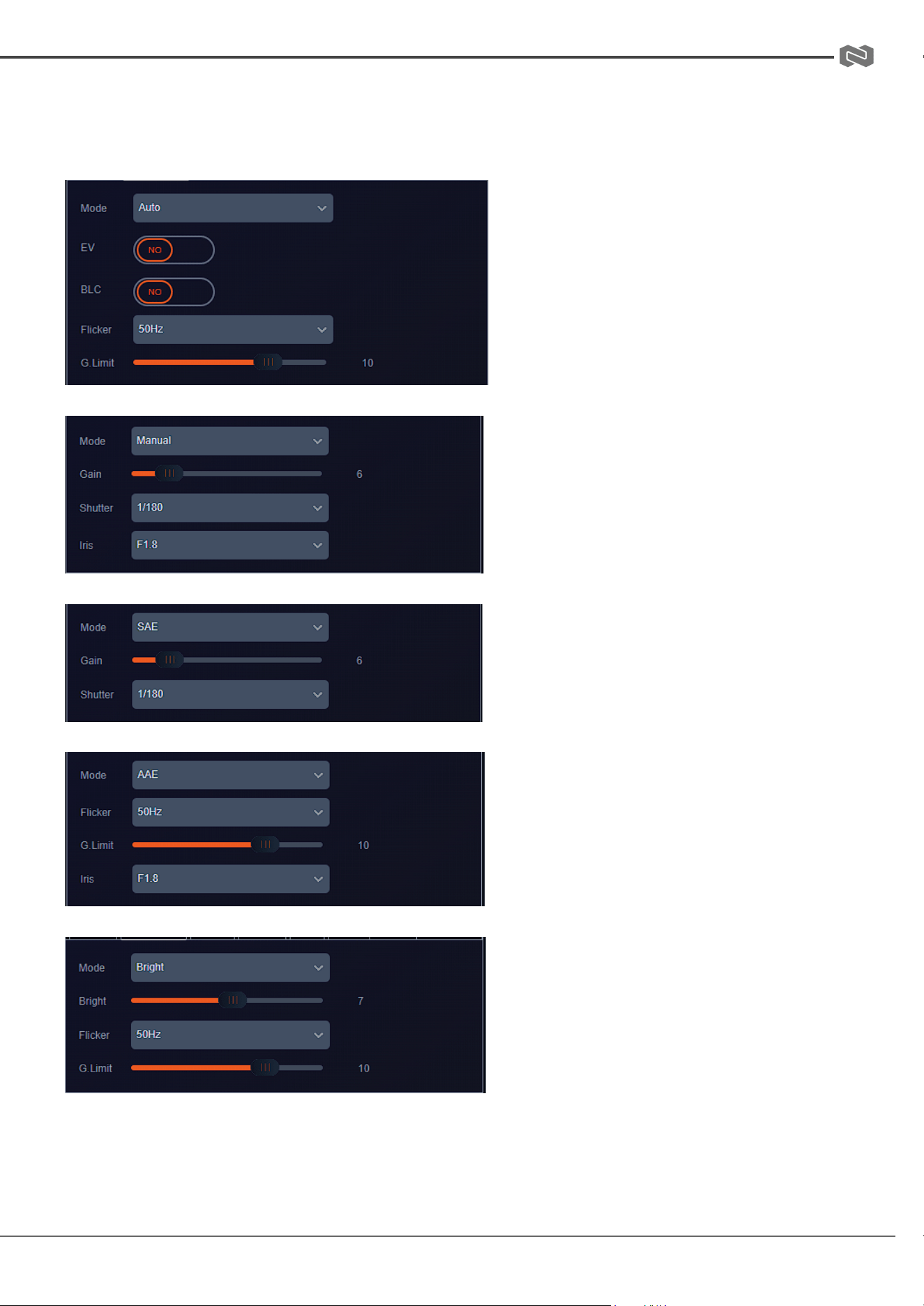
Exposure
Depending on the Exposure mode selected different control options will be displayed as
shown below:
Auto
Manual
SAE
AAE
Bright
Address: 830 National Drive #140, Sacramento, CA 95834, USA · Tel: +1(888)499-9906 · Email: support@bzbgear.com 29
BZBGEAR BG-ADAMO-4K PRODUCT MANUAL
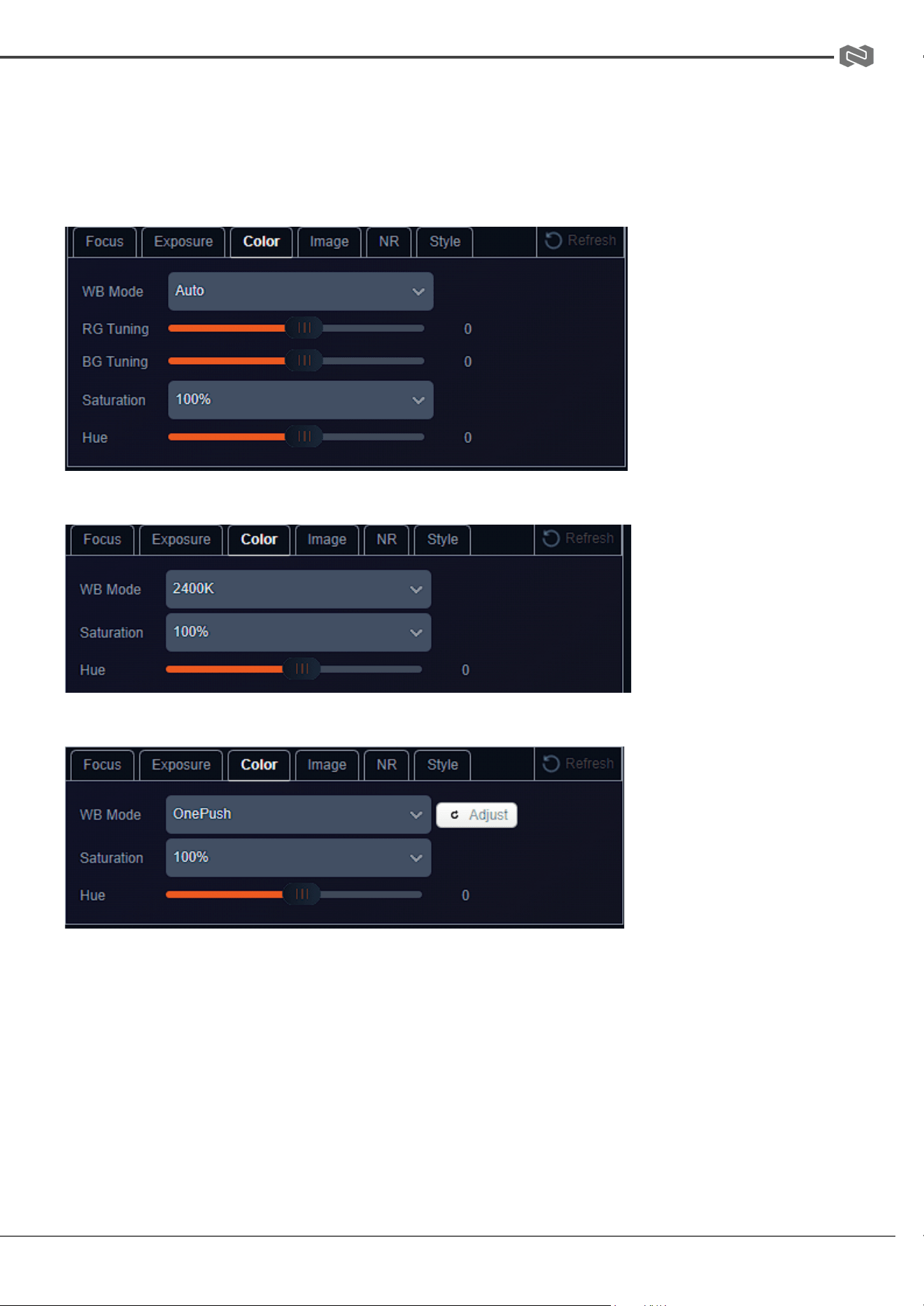
Color
By default the WB Mode (White Balance) is set to Auto. Color temperatures from 2400K -
7100K, Manual, or OnePush are selectable. Options will change depending on the mode
selected as shown below:
Auto and Manual
Color Temperature 2400K - 7100K
OnePush
Press the “Adjust” button to lock in new white balance settings. This setting is useful
when a white balance card is used.
Address: 830 National Drive #140, Sacramento, CA 95834, USA · Tel: +1(888)499-9906 · Email: support@bzbgear.com 30
BZBGEAR BG-ADAMO-4K PRODUCT MANUAL
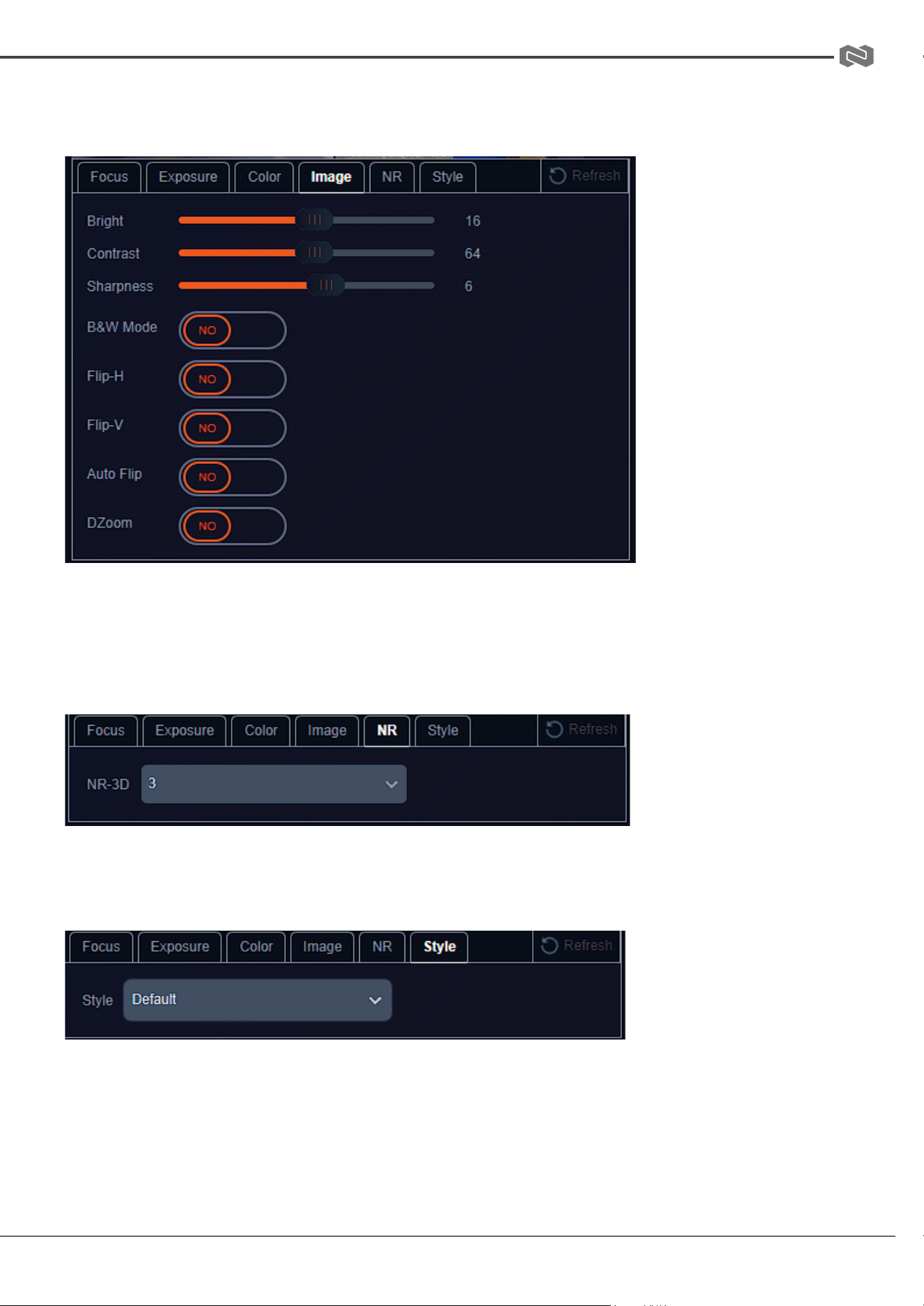
Image
From the Image tab users can control settings such as image Brightness, Contrast,
Sharpness, B&W Mode (Black and white). Flip-H, Flip-V, Auto Flip, DZoom (digital zoom).
Note: Flip-H and Flip-V are only available when Auto Flip is disabled. DZoom allows the
camera to digitally zoom in on a shot past the standard optical zoom range but may
reduce image quality.
NR
The NR-3D setting are intended to aid in reducing “noise” in an image caused by lighting.
Style
Style is used to select a preset configuration of camera parameters. Options include:
Default, Meeting, Clarity, Bright, and Soft.
Address: 830 National Drive #140, Sacramento, CA 95834, USA · Tel: +1(888)499-9906 · Email: support@bzbgear.com 31
BZBGEAR BG-ADAMO-4K PRODUCT MANUAL
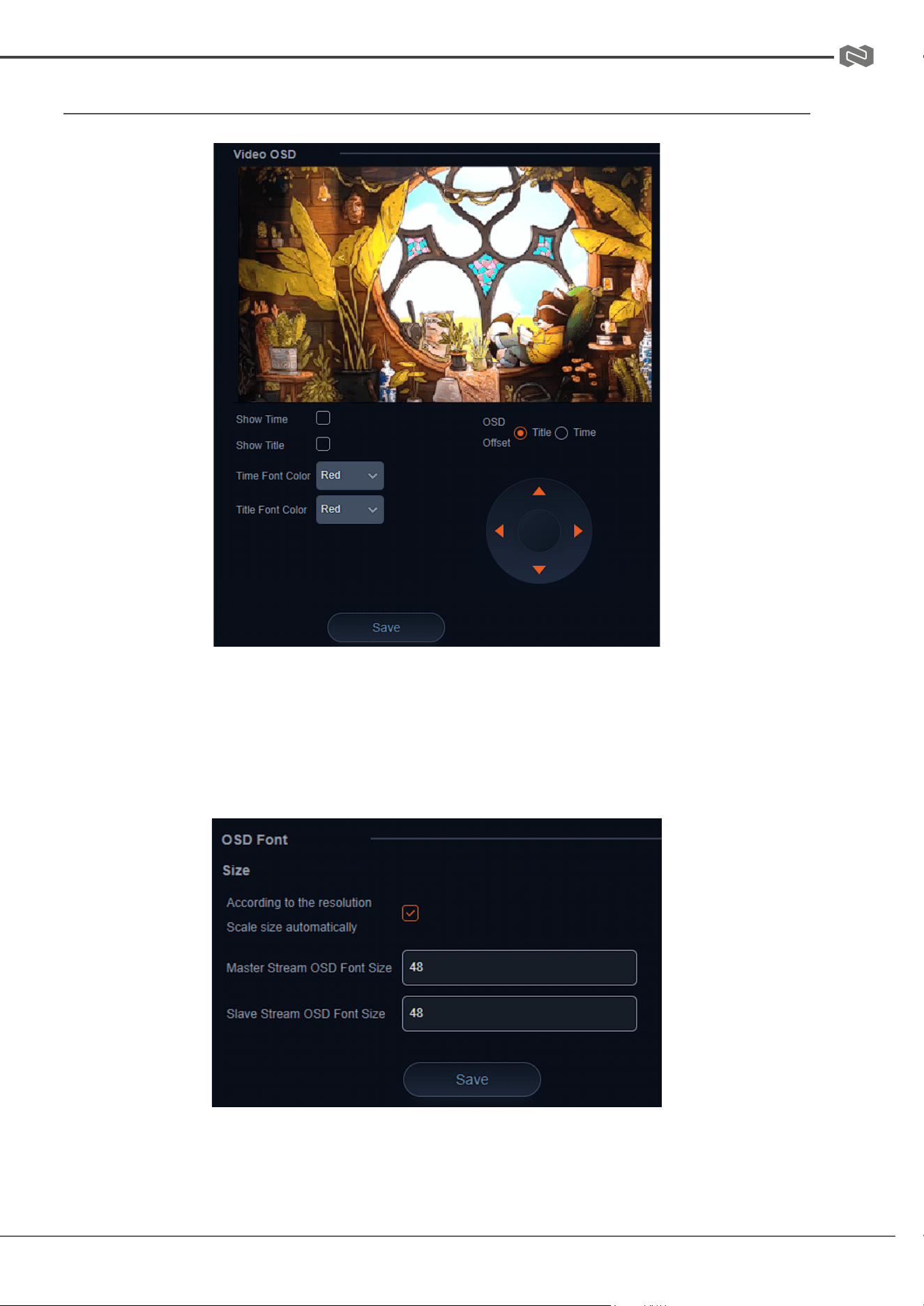
Video OSD and OSD Font
Video OSD or On Screen Display gives users the option to display the Device Name,
Date, and Time, on the stream of the camera. This can be useful in easily identifying
cameras when multiple are in use simultaneously in a production or security type setup.
Font colors and text locations can be edited using the drop downs and control options.
Time and Title will appear once the options are enabled and saved.
OSD Font is used to adjust the size of the OSD text.
Address: 830 National Drive #140, Sacramento, CA 95834, USA · Tel: +1(888)499-9906 · Email: support@bzbgear.com 32
BZBGEAR BG-ADAMO-4K PRODUCT MANUAL
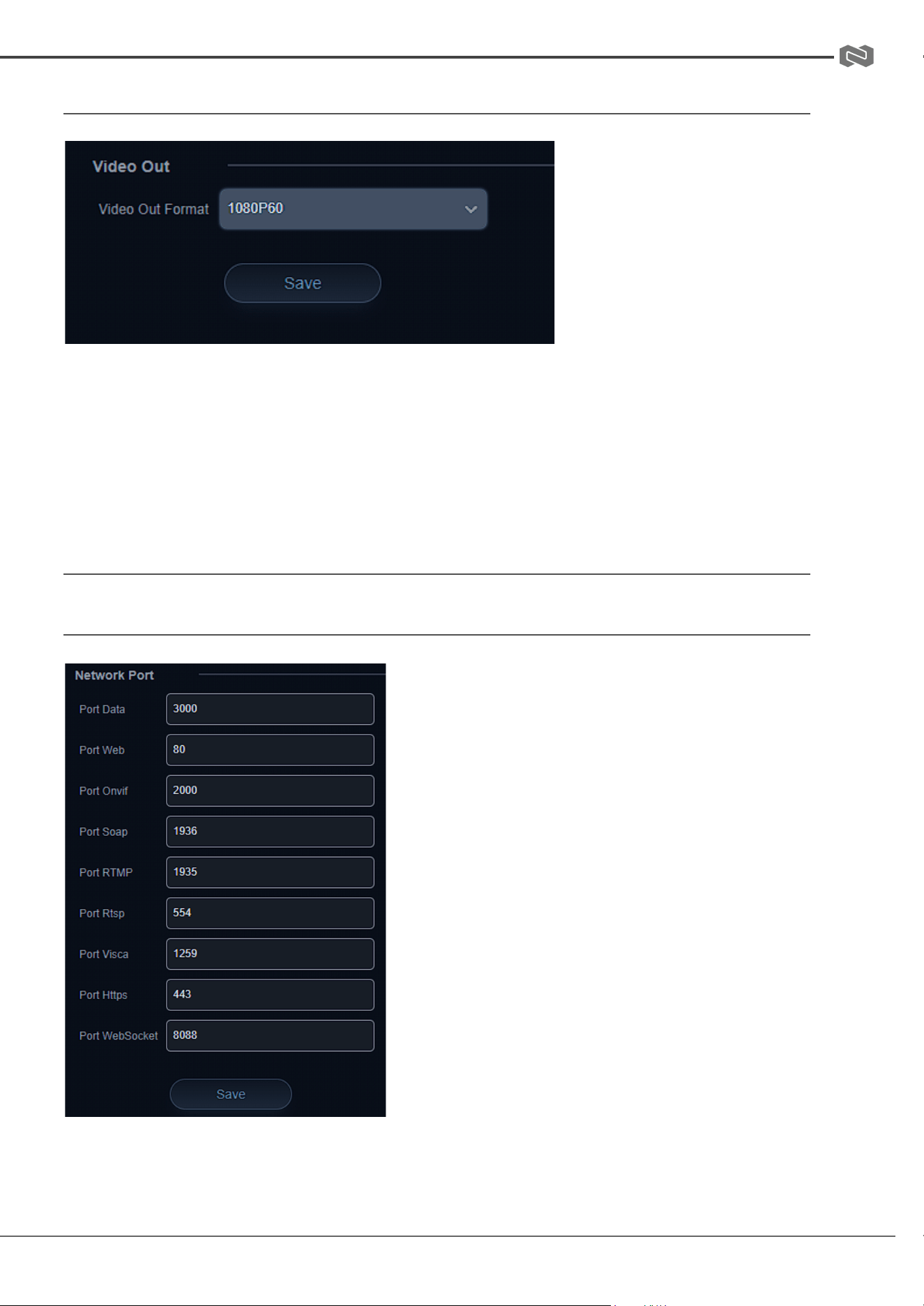
Video Out
Video Out is used to adjust output resolution of the camera to its physical HDMI and SDI
outputs.
Note: To adjust NDI, Dante, RTSP stream, USB, and SD Capture resolutions, use the
Video Encode Main or Sub stream setting “Image Size.”
Network Configure
Network Port
Network Port allows users to modify port settings
for various camera streams. The port follows the
IP address but before stream specific information
when connecting to various stream types.
Example: rtsp://192.168.5.163:554/live/av0
:554 is the port
Depending on your network configuration some
ports may be blocked, unavailable, or
unreachable. It may be necessary to contact your
network administrator to resolve these types of
issues.
Address: 830 National Drive #140, Sacramento, CA 95834, USA · Tel: +1(888)499-9906 · Email: support@bzbgear.com 33
BZBGEAR BG-ADAMO-4K PRODUCT MANUAL
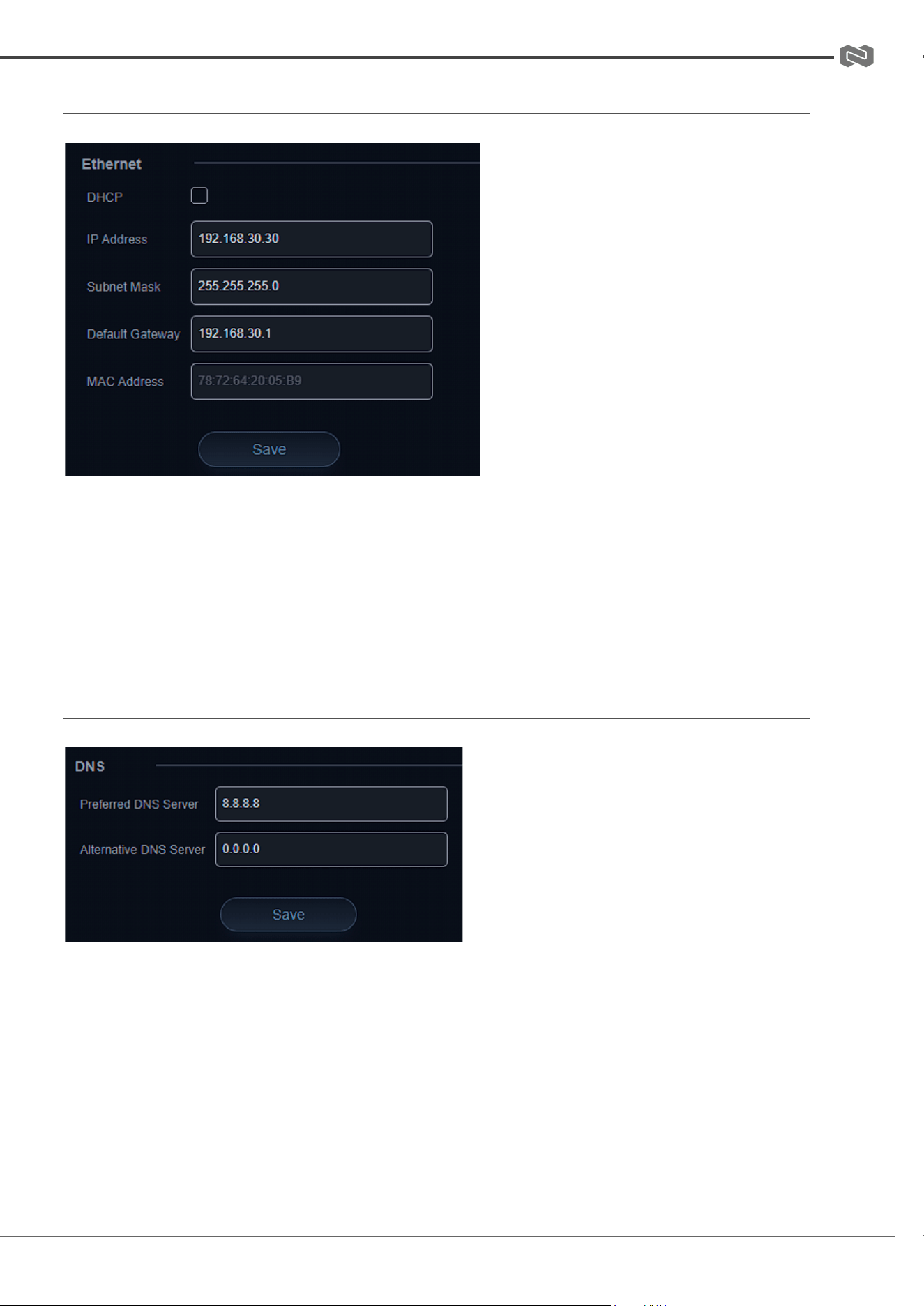
Ethernet
Ethernet settings allow users to
change or modify how the camera is
accessed on the network.
DHCP
If the DHCP box is enabled, the local
network will automatically assign an
IP address to the camera the next
time it is rebooted. This feature can
also be enabled using the remote by
pressing * + * + 1 or disabled by
pressing * + * + 2.
The current IP address of the camera
is displayed on start up when
connected to an external display via HDMI or SDI. It can also be displayed using the
remote by pressing * + * + 3.
NOTE: It is highly recommended to turn DHCP off once an IP address is obtained from
the network so the camera remains at a static, predictable, IP address for use with PTZ
controllers, apps, and other devices.
DNS
Allows users to change the Prefered
and Alternate DNS server settings of the
camera to a specific DNS server of their
choice if required by their network.
Address: 830 National Drive #140, Sacramento, CA 95834, USA · Tel: +1(888)499-9906 · Email: support@bzbgear.com 34
BZBGEAR BG-ADAMO-4K PRODUCT MANUAL
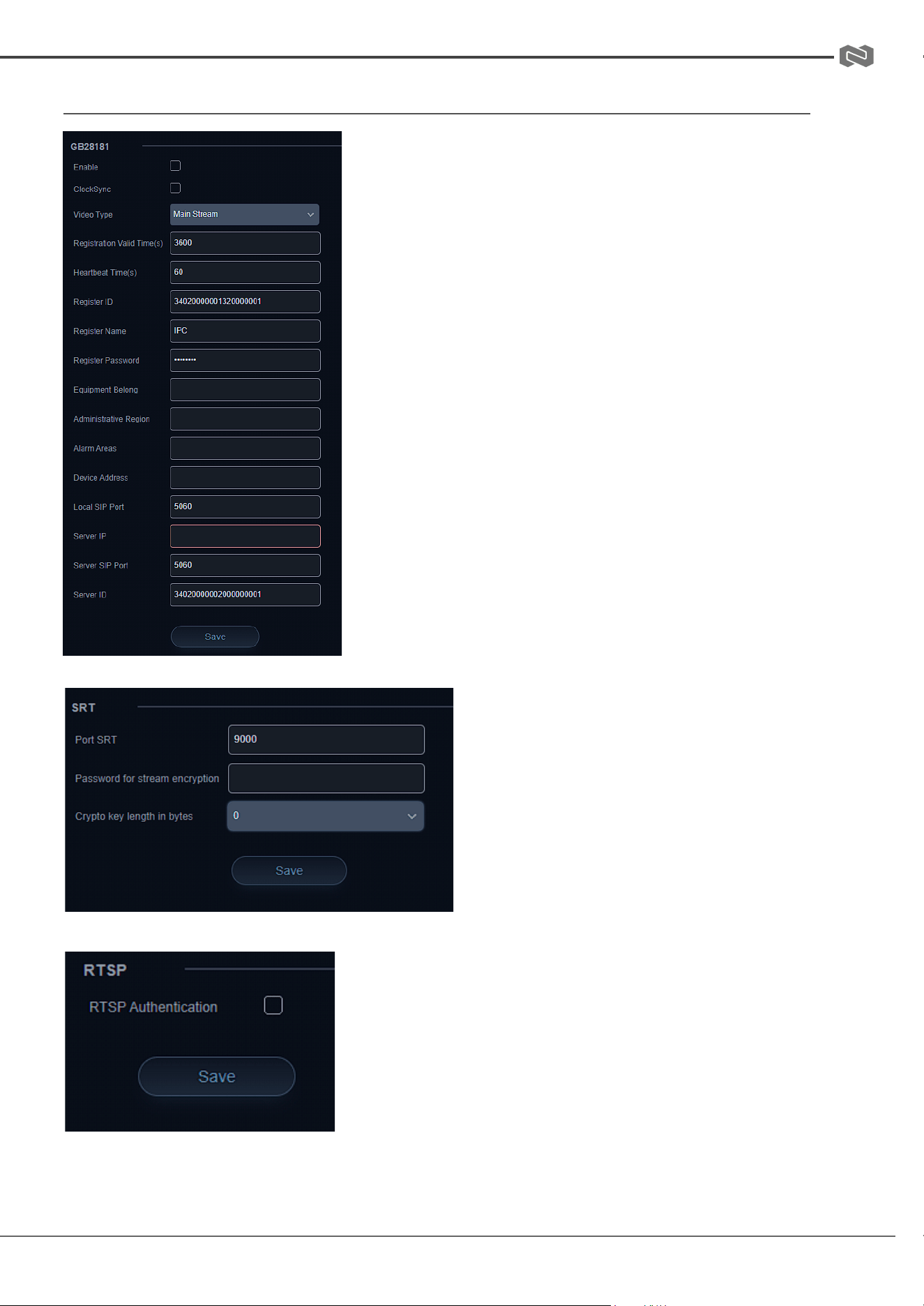
GB28181, SRT, and RTSP Authentication
GB28181 is a camera protocol similar to ONVIF but
uses Session Initiation Protocol (SIP).
These settings are typically used by particularly
government entities and can be largely ignored by the
standard user.
SRT is an alternative to standard RTSP
streams. SRT can recover from packet
loss of up to 15%. This provides a better
video stream on substandard or
congested networks. It also helps keep
streams secure and easily travers
firewalls.
RTSP Authentication when enabled required users to
enter the camera’s login credentials directly into the
RTSP stream URL to gain access as shown:
rtsp://USER:PASS@{IP}:port/stream info.
Default settings example:
rtsp://admin:[email protected]:554/live/av0
Address: 830 National Drive #140, Sacramento, CA 95834, USA · Tel: +1(888)499-9906 · Email: support@bzbgear.com 35
BZBGEAR BG-ADAMO-4K PRODUCT MANUAL
System Configure
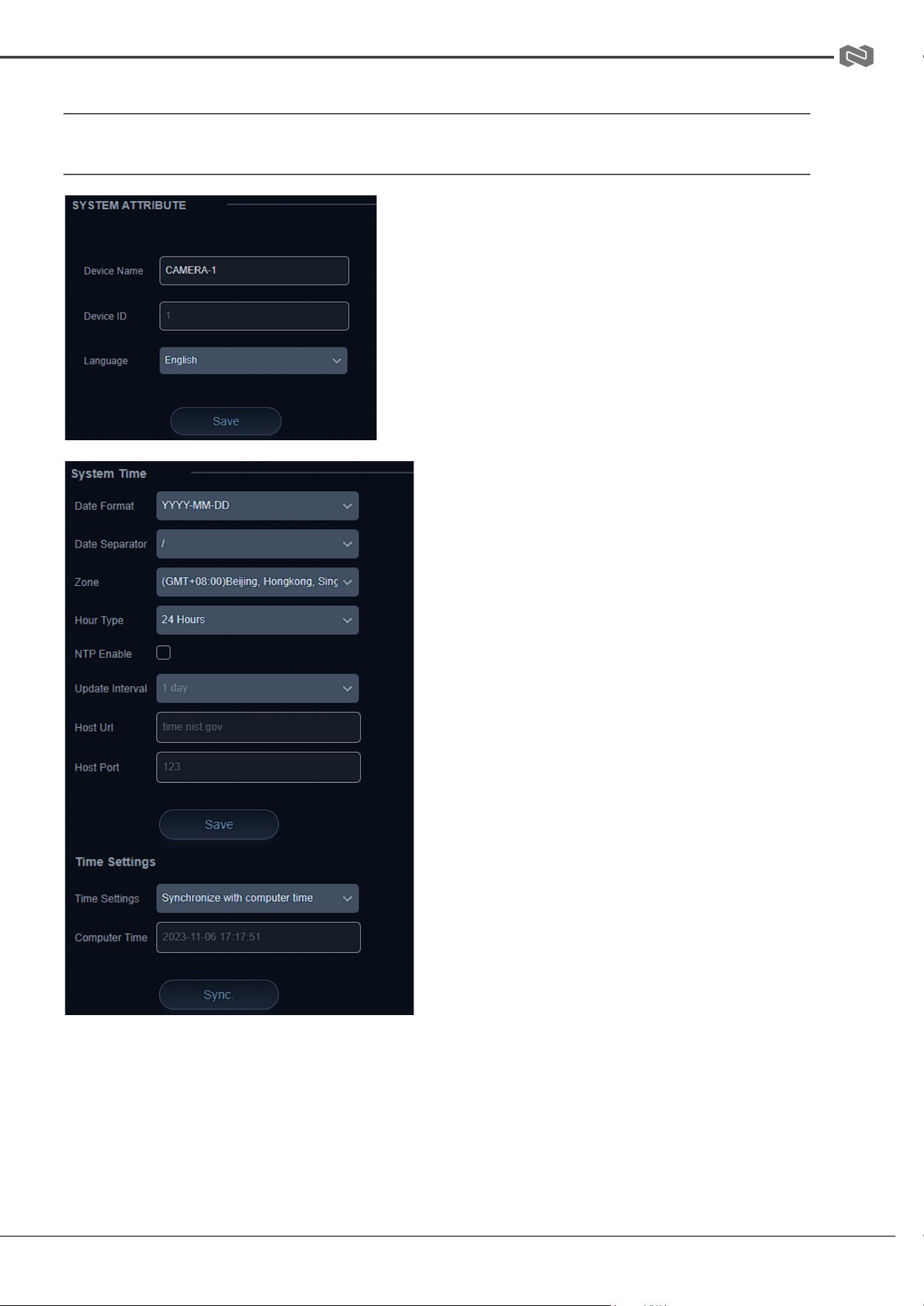
System Attribute, System Time, & System User
System Attribute allows users to edit the Device
Name of the camera which can be helpful when
identifying devices through enterprise level
networks.
System Time allows users to edit date and
hour formats, time zones, hour type
(24hr/12hr), if an NTP server is used or if the
camera syncs to the connected computer via
the web interface.
Camera time should be synchronized prior to
using Auto Reboot to ensure accuracy.
System User allows Admin level users to edit usernames and passwords for up to 3
different users and set their authority level. Standard Users do not have access to any
configuration settings. Admins have full control over the camera.
Address: 830 National Drive #140, Sacramento, CA 95834, USA · Tel: +1(888)499-9906 · Email: support@bzbgear.com 36
BZBGEAR BG-ADAMO-4K PRODUCT MANUAL
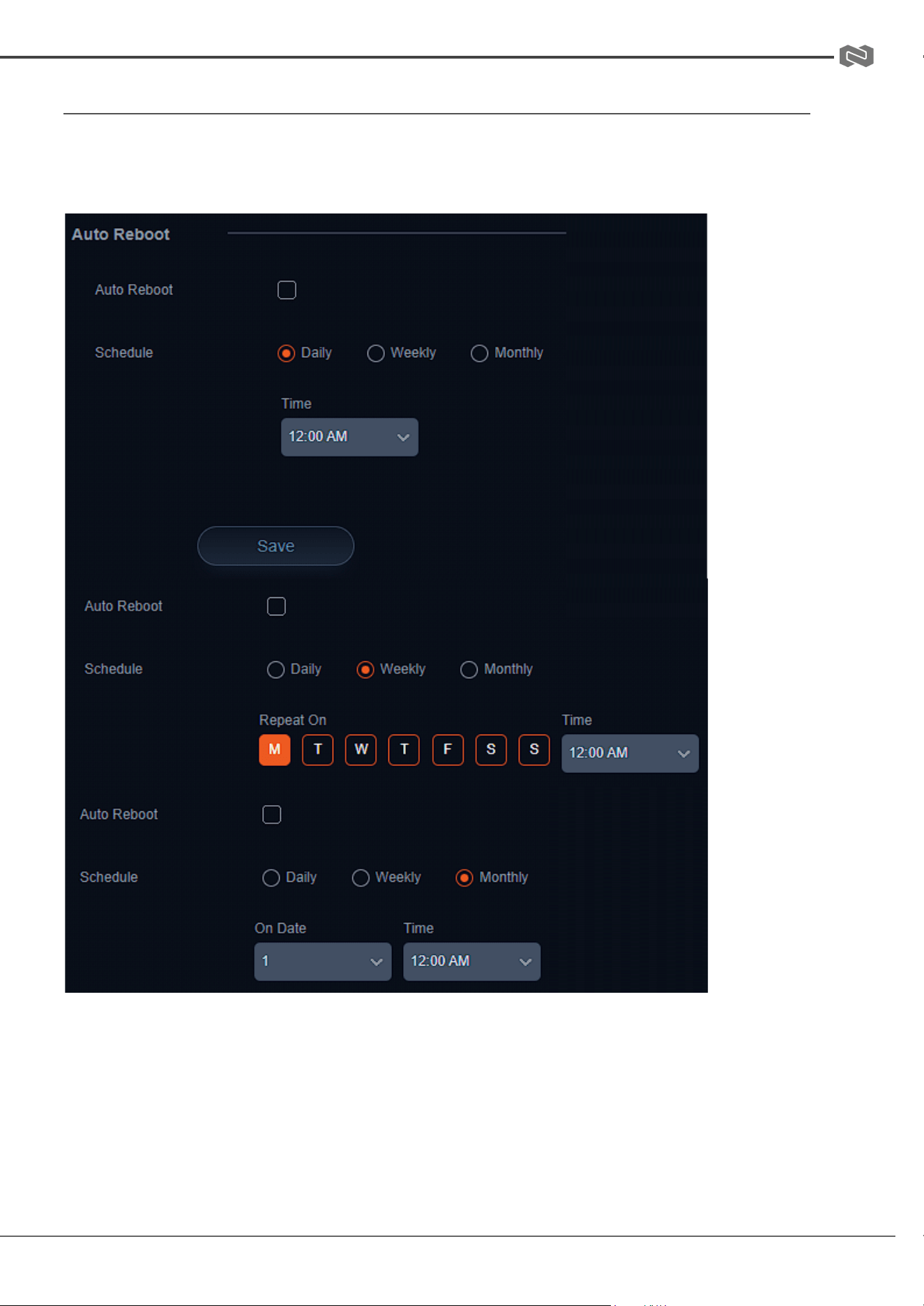
Auto Reboot
Auto Reboot allows users to schedule the camera to automatically reboot on a certain
time daily, once per week, or once per month. This is useful when the camera remains on
constantly and helps to alleviate random system problems that may occur over time,
Address: 830 National Drive #140, Sacramento, CA 95834, USA · Tel: +1(888)499-9906 · Email: support@bzbgear.com 37
BZBGEAR BG-ADAMO-4K PRODUCT MANUAL
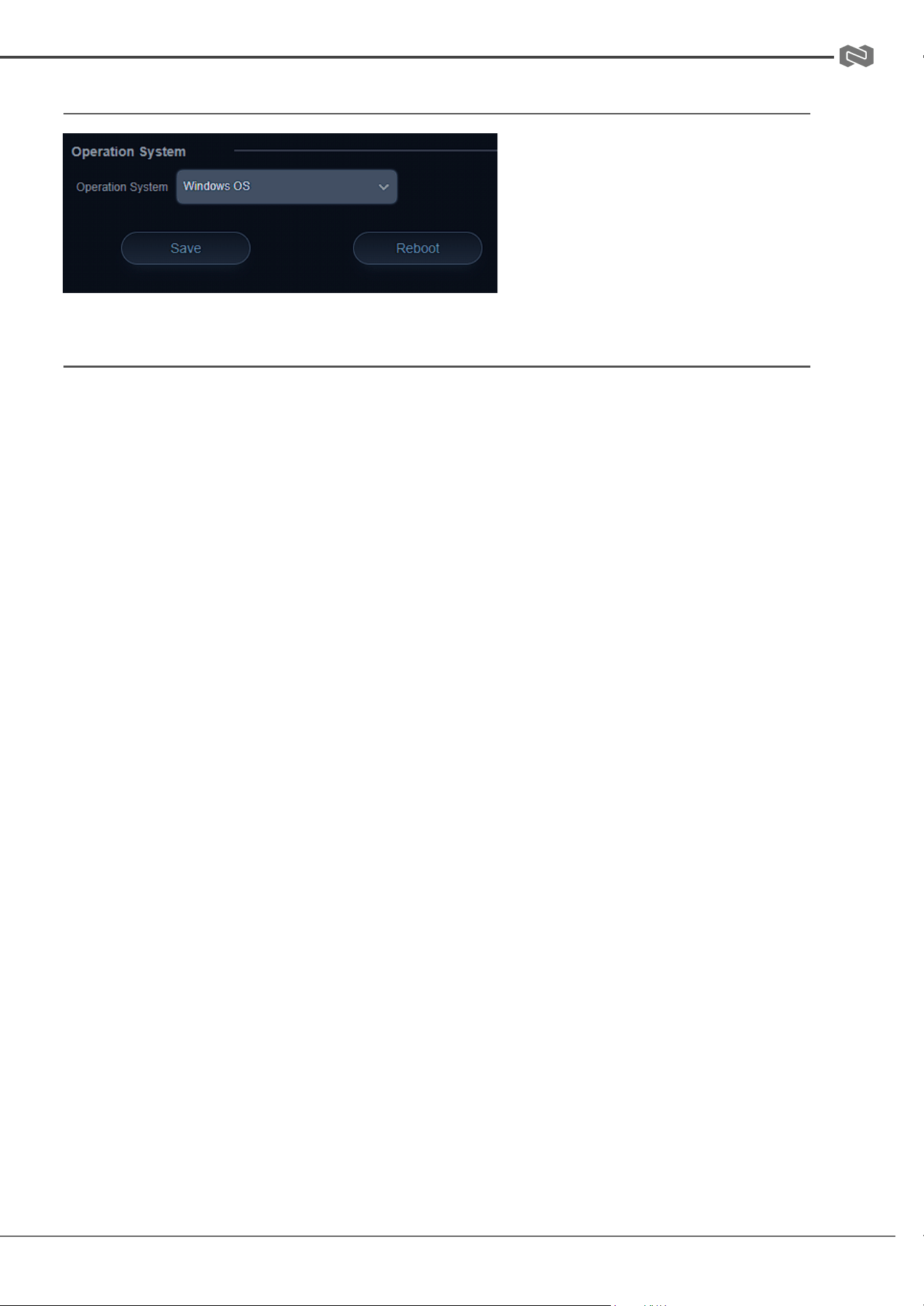
Operation System
Operation System is used to
control and limit the USB output
resolution and refresh rate when
connecting to Windows OS or MAC
OS platforms to ensure the best
possible performance.
Update, Default, & Reboot
Update shows the camera's current firmware information and also allows users to upload
new firmware to the camera.
Default is used to restore the camera to its factory default settings. This includes all
network settings, image parameters, presets, etc.
Reboot is used to power cycle the camera via the web interface without having to unplug
any cables or use the physical power switch on the back of the device.
Address: 830 National Drive #140, Sacramento, CA 95834, USA · Tel: +1(888)499-9906 · Email: support@bzbgear.com 38
BZBGEAR BG-ADAMO-4K PRODUCT MANUAL
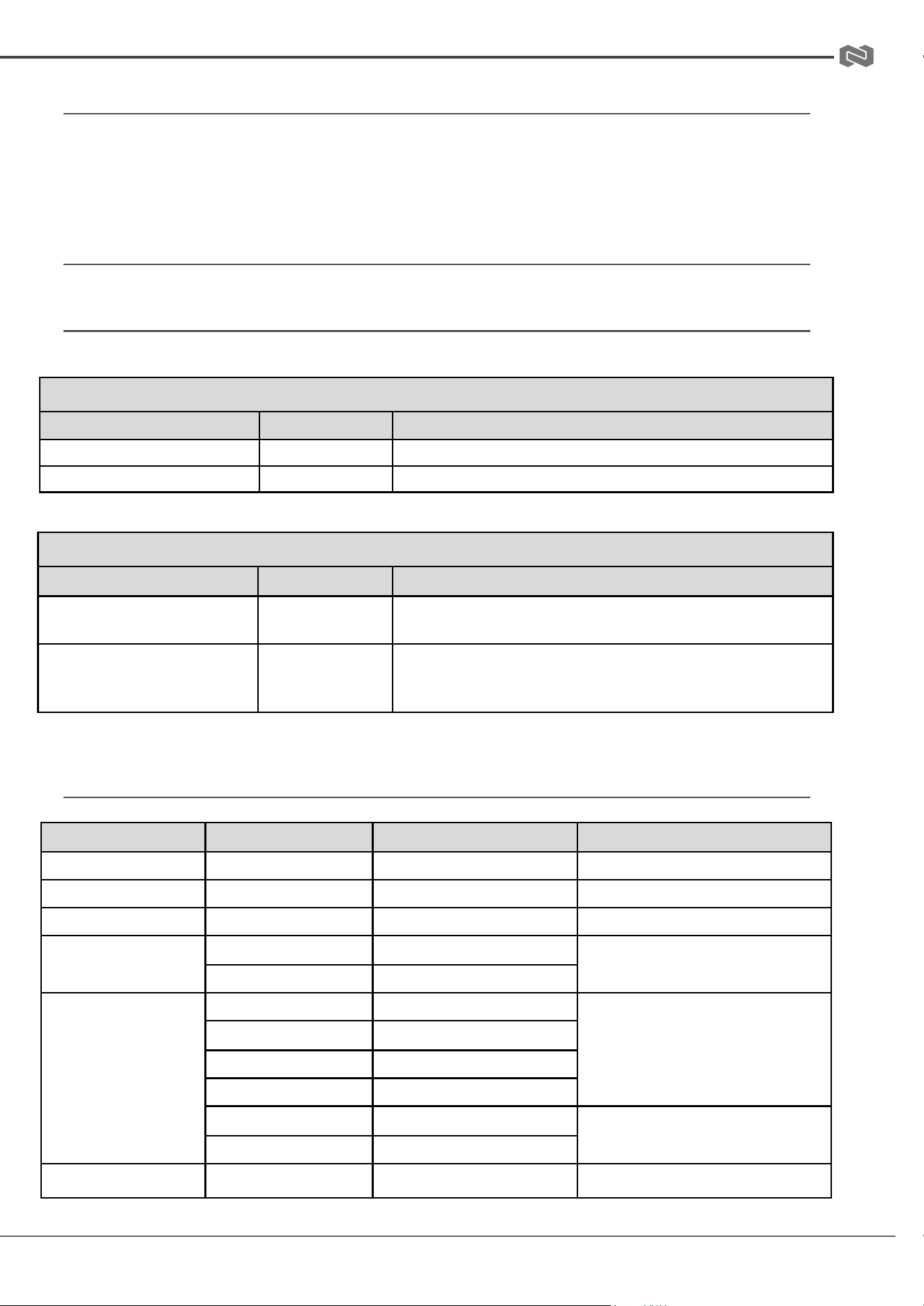
Serial Port Communication and Control
The camera can be controlled through an RS232/RS485 interface. RS232C serial parameters are
as follows: Baud rate: 2400/4800/9600/115200 bits / sec; Start bit: 1; data bits: 8; Stop bit: 1;
Parity: None
VISCA Protocol List
VISCA PROTOCOL RETURN COMMAND
Ack/Completion Message
Command packet
Note
ACK
z0 41 FF
Returned when the command is accepted.
Completion
z0 51 FF
Returned when the command has been executed.
z= camera address + 8
Error Messages
Command packet
Note
Syntax Error
z0 60 02 FF
Returned when the command format is different or when a command
with illegal command parameters is accepted
Command Not Executable
z0 61 41 FF
Returned when a command cannot be executed due to current
conditions. For example, when commands controlling the focus
manually are received during auto focus.
VISCA PROTOCOL CONTROL COMMANDS
Command
Function
Command packet
Note
AddressSet
Broadcast
88 30 0p FF
p:Address setting
IF_Clear
Broadcast
88 01 00 01 FF
I/F Clear
CommandCancel
8x 21 FF
CAM_Power
On
8x 01 04 00 02 FF
Power ON/OFF
Off
8x 01 04 00 03 FF
CAM_Zoom
Stop
8x 01 04 07 00 FF
Tele(Standard)
8x 01 04 07 02 FF
Wide(Standard)
8x 01 04 07 03 FF
Tele(Variable)
8x 01 04 07 2p FF
Wide(Variable)
8x 01 04 07 3p FF
p = 0(low) - F(high)
Direct
8x 01 04 47 0p 0q 0r 0s FF
CAM _Focus
Stop
8x 01 04 07 00 FF
Address: 830 National Drive #140, Sacramento, CA 95834, USA · Tel: +1(888)499-9906 · Email: support@bzbgear.com 39
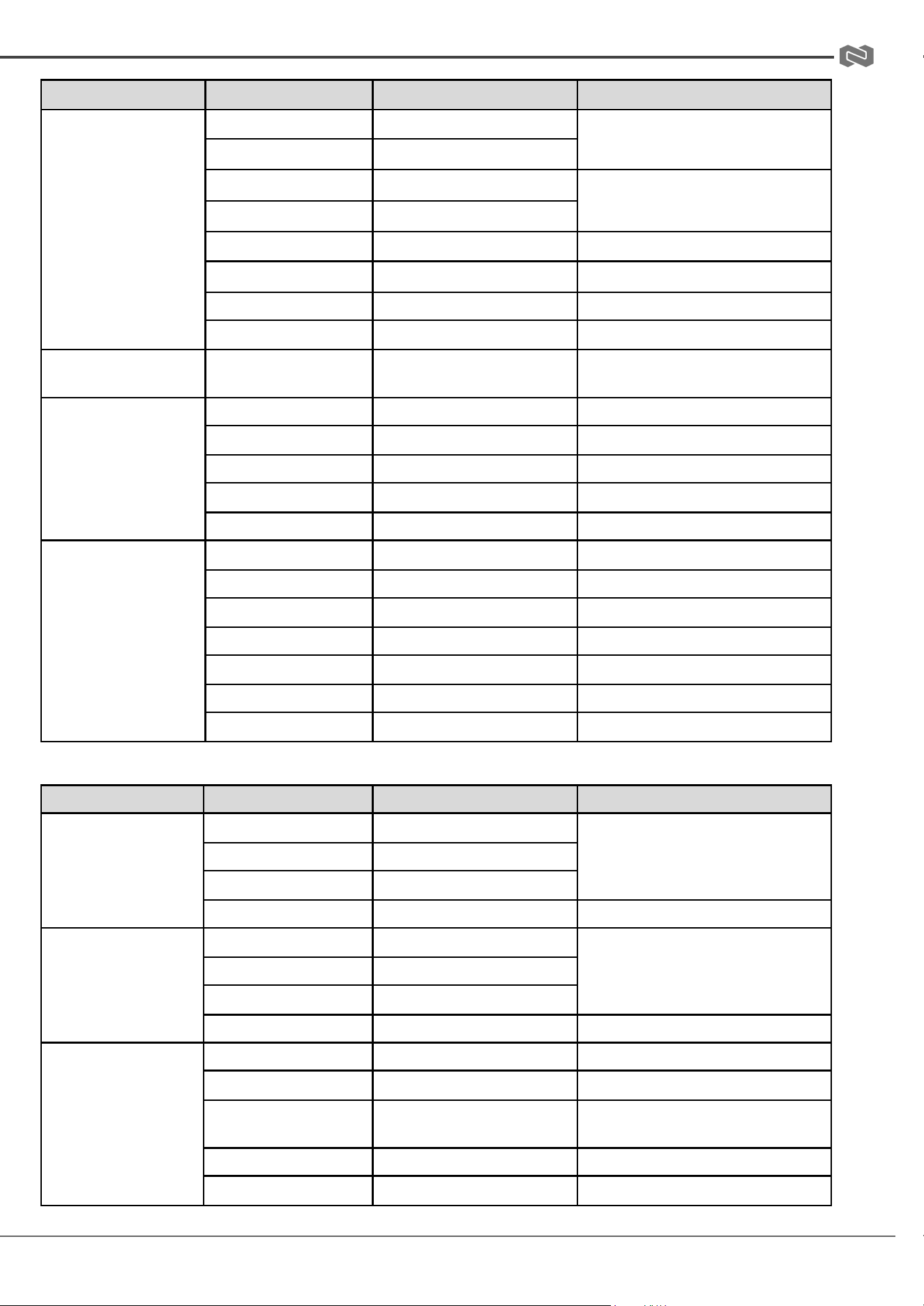
BZBGEAR BG-ADAMO-4K PRODUCT MANUAL
Command
Function
Command packet
Note
Far(Standard)
8x 01 04 08 00 FF
Near(Standard)
8x 01 04 08 02 FF
Far(Variable)
8x 01 04 08 03 FF
p = 0(low) - F(high)
Near (Variable)
8x 01 04 08 2p FF
Direct
8x 01 04 08 3p FF
pqrs: Focus Position
Auto Focus
8x 01 04 48 0p 0q 0r 0s FF
Manual Focus
8x 01 04 38 03 FF
One Push mode
8x 01 04 38 04 FF
CAM _Zoom Focus
Direct
8x 01 04 47 0p 0q 0r 0s
0t 0u 0v 0w FF
pqrs: Zoom Position
tuvw: Focus Position
CAM_WB
Auto
8x 01 04 35 00 FF
3000K
8x 01 04 35 01 FF
4000k
8x 01 04 35 02 FF
One Push mode
8x 01 04 35 03 FF
5000k
8x 01 04 35 04 FF
CAM_WB (cont.)
Manual
8x 01 04 35 05 FF
6500k
8x 01 04 35 06 FF
3500K
8x 01 04 35 07 FF
4500K
8x 01 04 35 08 FF
5500K
8x 01 04 35 09 FF
6000K
8x 01 04 35 0A FF
7000K
8x 01 04 35 0B FF
Command
Function
Command packet
Note
CAM _RGain
Reset
8x 01 04 03 00 FF
Manual Control of R Gain
Up
8x 01 04 03 02 FF
Down
8x 01 04 03 03 FF
Direct
8x 01 04 43 00 00 0p 0q FF
pq: R Gain
CAM_ Bgain
Reset
8x 01 04 04 00 FF
Manual Control of B Gain
Up
8x 01 04 04 02 FF
Down
8x 01 04 04 03 FF
Direct
8x 01 04 44 00 00 0p 0q FF
pq: B Gain
CAM_AE
Full Auto
8x 01 04 39 00 FF
Automatic Exposure mode
Manual
8x 01 04 39 03 FF
Manual Control mode
Shutter priority
8x 01 04 39 0A FF
Shutter Priority Automatic Exposure
mode
Iris priority
8x 01 04 39 0B FF
Iris Priority Automatic Exposure mode
Bright
8x 01 04 39 0D FF
Bright mode
Address: 830 National Drive #140, Sacramento, CA 95834, USA · Tel: +1(888)499-9906 · Email: support@bzbgear.com 40
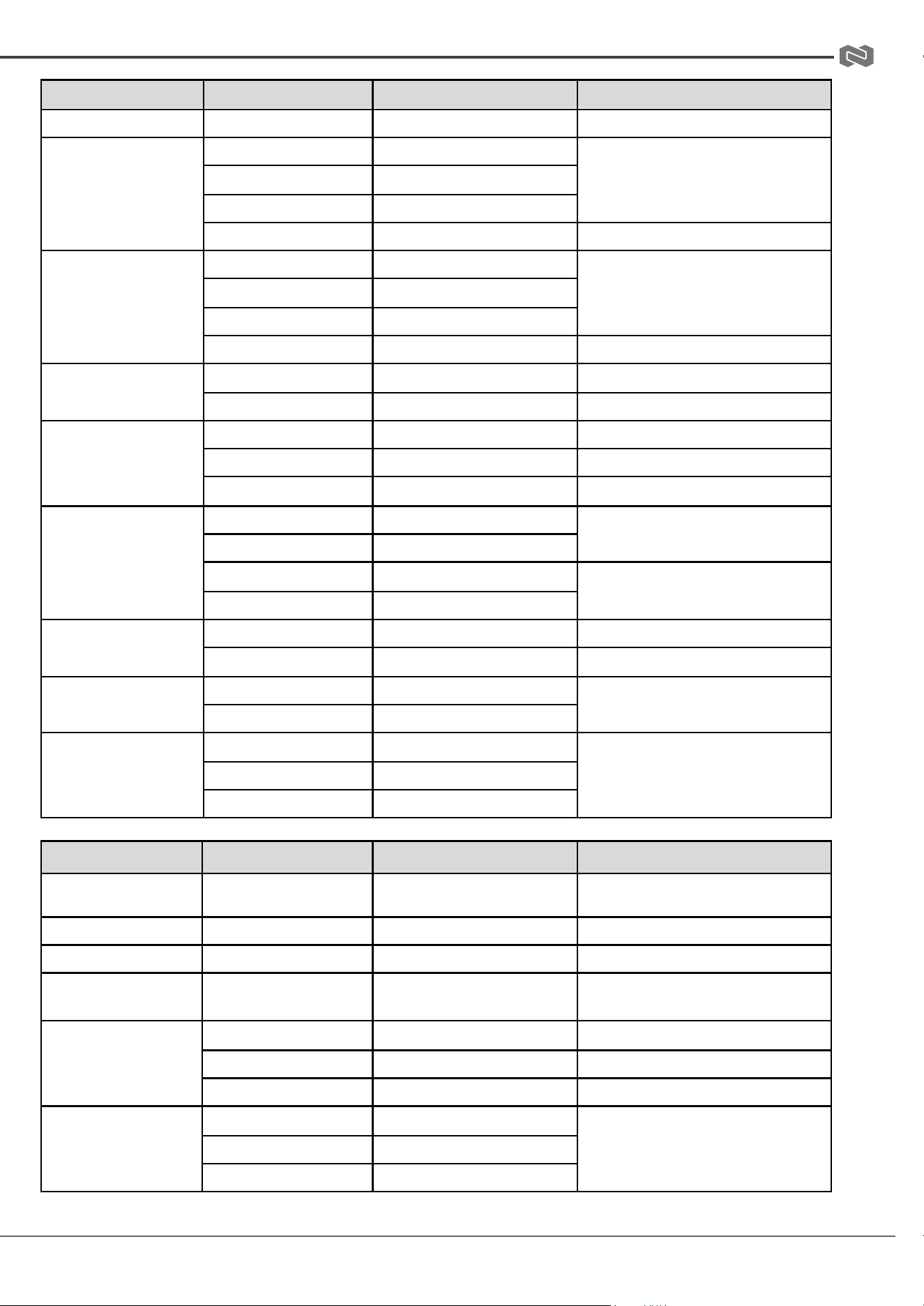
BZBGEAR BG-ADAMO-4K PRODUCT MANUAL
Command
Function
Command packet
Note
Full Auto
8x 01 04 39 00 FF
Automatic Exposure mode
CAM_Shutter
Reset
8x 01 04 0A 00 FF
Shutter Setting
Up
8x 01 04 0A 02 FF
Down
8x 01 04 0A 03 FF
Direct
8x 01 04 4A 00 00 0p 0q FF
pq: Shutter Position
CAM_Iris
Reset
8x 01 04 0B 00 FF
Iris Setting
Up
8x 01 04 0B 02 FF
Down
8x 01 04 0B 03 FF
Direct
8x 01 04 4B 00 00 0p 0q FF
pq: Iris Position
CAM_Gain Limit
Gain Limit
8x 01 04 2C 0p FF
p: Gain Position
Reset
8x 01 04 0D 00 FF
CAM_Bright
Up
8x 01 04 0D 02 FF
Down
8x 01 04 0D 03 FF
Bright Setting
Direct
8x 01 04 4D 00 00 0p 0q FF
pq: Bright Position
CAM_ExpComp
On
8x 01 04 3E 02 FF
Exposure Compensation ON/OFF
Off
8x 01 04 3E 03 FF
Reset
8x 01 04 0E 00 FF
Exposure Compensation Amount
Setting
Up
8x 01 04 0E 02 FF
CAM_ExpComp
Down
8x 01 04 0E 03 FF
Direct
8x 01 04 4E 00 00 0p 0q FF
pq: ExpComp Position
CAM_Back Light
On
8x 01 04 33 02 FF
Back Light Compensation
Off
8x 01 04 33 03 FF
CAM_WDRStrength
Reset
8x 01 04 21 00 FF
WDR Level Setting
Up
8x 01 04 21 02 FF
Down
8x 01 04 21 03 FF
Command
Function
Command packet
Note
CAM_WDRStrength
(cont.)
Direct
8x 01 04 51 00 00 00 0p FF
p: WDR Level Position
CAM_NR(2D)
8x 01 04 53 0p FF
P=0-7 0:OFF
CAM_NR(3D)
8x 01 04 54 0p FF
P=0-8 0:OFF
CAM_Gamma
8x 01 04 5B 0p FF
p = 0 – 4 0: Default 1:0.45 2:0.50
3:0.55 4:0.63
CAM_Flicker
OFF
8x 01 04 23 00 FF
OFF
50HZ
8x 01 04 23 01 FF
50HZ
60HZ
8x 01 04 23 02 FF
60HZ
CAM_Aperture
Reset
8x 01 04 02 00 FF
Aperture Control
Up
8x 01 04 02 02 FF
Down
8x 01 04 02 03 FF
Address: 830 National Drive #140, Sacramento, CA 95834, USA · Tel: +1(888)499-9906 · Email: support@bzbgear.com 41
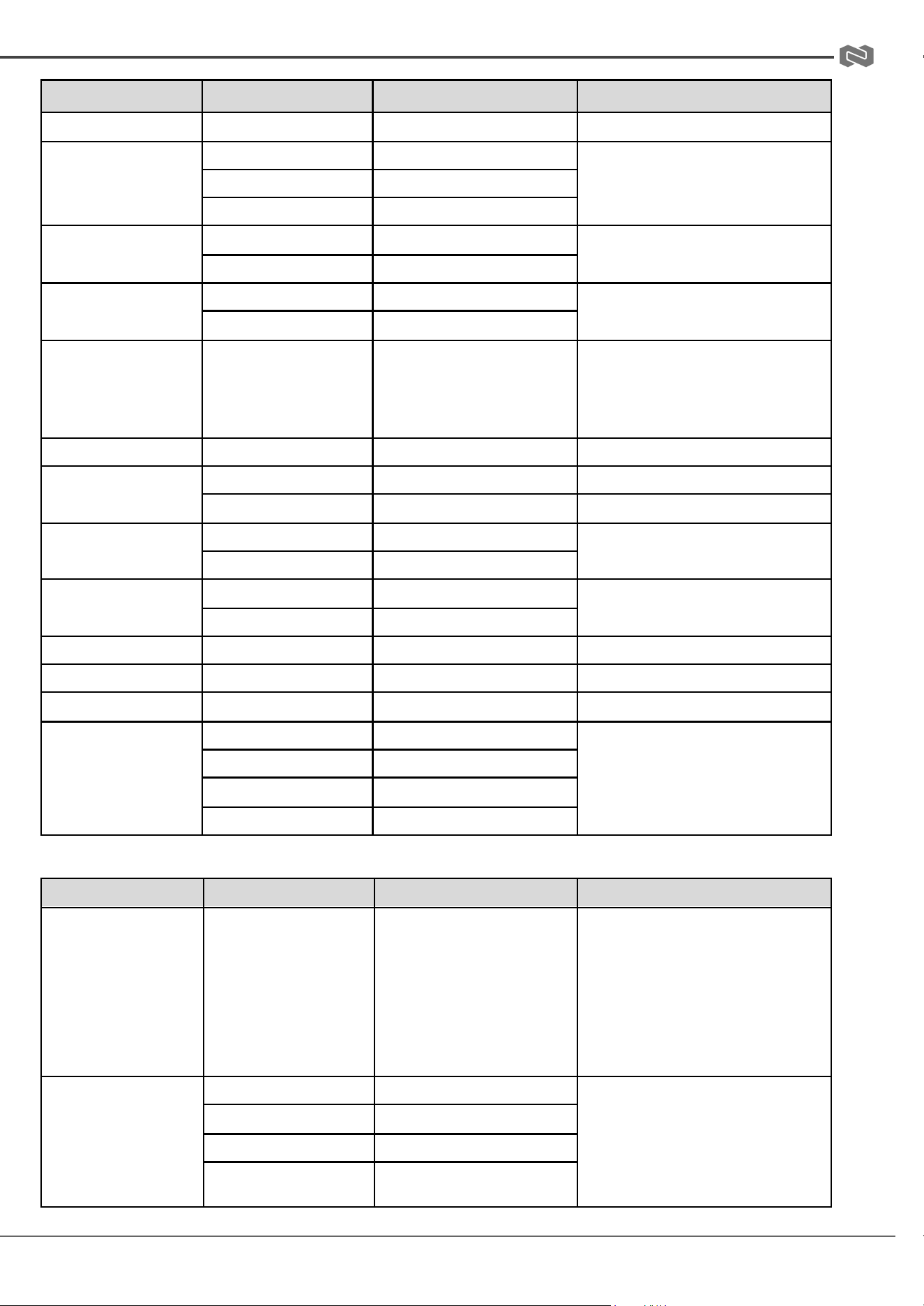
BZBGEAR BG-ADAMO-4K PRODUCT MANUAL
Command
Function
Command packet
Note
Direct
8x 01 04 42 00 00 0p 0q FF
pq: Aperture Gain
CAM_Memory
Reset
8x 01 04 3F 00 pq FF
pq: Memory Number(=0 to 254)
Corresponds to 0 to 9 on the Remote
Commander
Set
8x 01 04 3F 01 pq FF
Recall
8x 01 04 3F 02 pq FF
CAM_LR_Reverse
On
8x 01 04 61 02 FF
Image Flip Horizontal ON/OFF
Off
8x 01 04 61 03 FF
CAM_PictureFlip
On
8x 01 04 66 02 FF
Image Flip Vertical ON/OFF
Off
8x 01 04 66 03 FF
CAM_ColorSaturation
Direct
8x 01 04 49 00 00 00 0p FF
P=0-E
0:60% 1:70% 2:80% 3:90% 4:100%
5:110% 6:120% 7:130% 8:140%
9:150% 10:160% 11:160%
12:180% 13:190% 14:200%
CAM_IDWrite
8x 01 04 22 0p 0q 0r 0s FF
pqrs: Camera ID (=0000 to FFFF)
SYS_Menu
ON
8x 01 04 06 06 02 FF
Turn on the menu screen
OFF
8x 01 04 06 06 03 FF
Turn off the menu screen
IR_Receive
ON
8x 01 06 08 02 FF
IR(remote commander)receive On/Off
OFF
8x 01 06 08 03 FF
IR_ReceiveReturn
On
8x 01 7D 01 03 00 00 FF
IR(remote commander)receive
message via
Off
8x 01 7D 01 13 00 00 FF
IR_ReceiveReturn
Reset
8x 01 04 A0 10 FF
Reset Factory Setting
CAM_Brightness
Direct
8x 01 04 A1 00 00 0p 0q FF
pq: Brightness Position
CAM_Contrast
Direct
8x 01 04 A2 00 00 0p 0q FF
pq: Contrast Position
CAM_Flip
OFF
8x 01 04 A4 00 FF
Single Command For Video Flip
Flip-H
8x 01 04 A4 01 FF
Flip-V
8x 01 04 A4 02 FF
Flip-HV
8x 01 04 A4 03 FF
Command
Function
Command packet
Note
CAM_VideoSystem
Set camera video system
8x 01 06 35 00 0p FF
P: 0~E Video format
0:1080P60 8:720P30
1:1080P50 9:720P25
2:1080i60 A:1080P59.94
3:1080i50 B:1080i59.94
4:720P60 C:720P59.94
5:720P50 D:1080P29.97
6:1080P30 E:720P29.97
7:1080P25
Pan_tiltDrive
Up
8x 01 06 01 VV WW 03 01 FF
VV: Pan speed 0x01 (low speed) to
0x18 (high speed)
WW: Tilt speed 0x01 (low speed) to
0x14 (high speed)
YYYY: Pan Position ZZZZ: Tilt Position
Down
8x 01 06 01 VV WW 03 02 FF
Left
8x 01 06 01 VV WW 01 03 FF
Right
8x 01 06 01 VV WW 02 03 FF
Address: 830 National Drive #140, Sacramento, CA 95834, USA · Tel: +1(888)499-9906 · Email: support@bzbgear.com 42
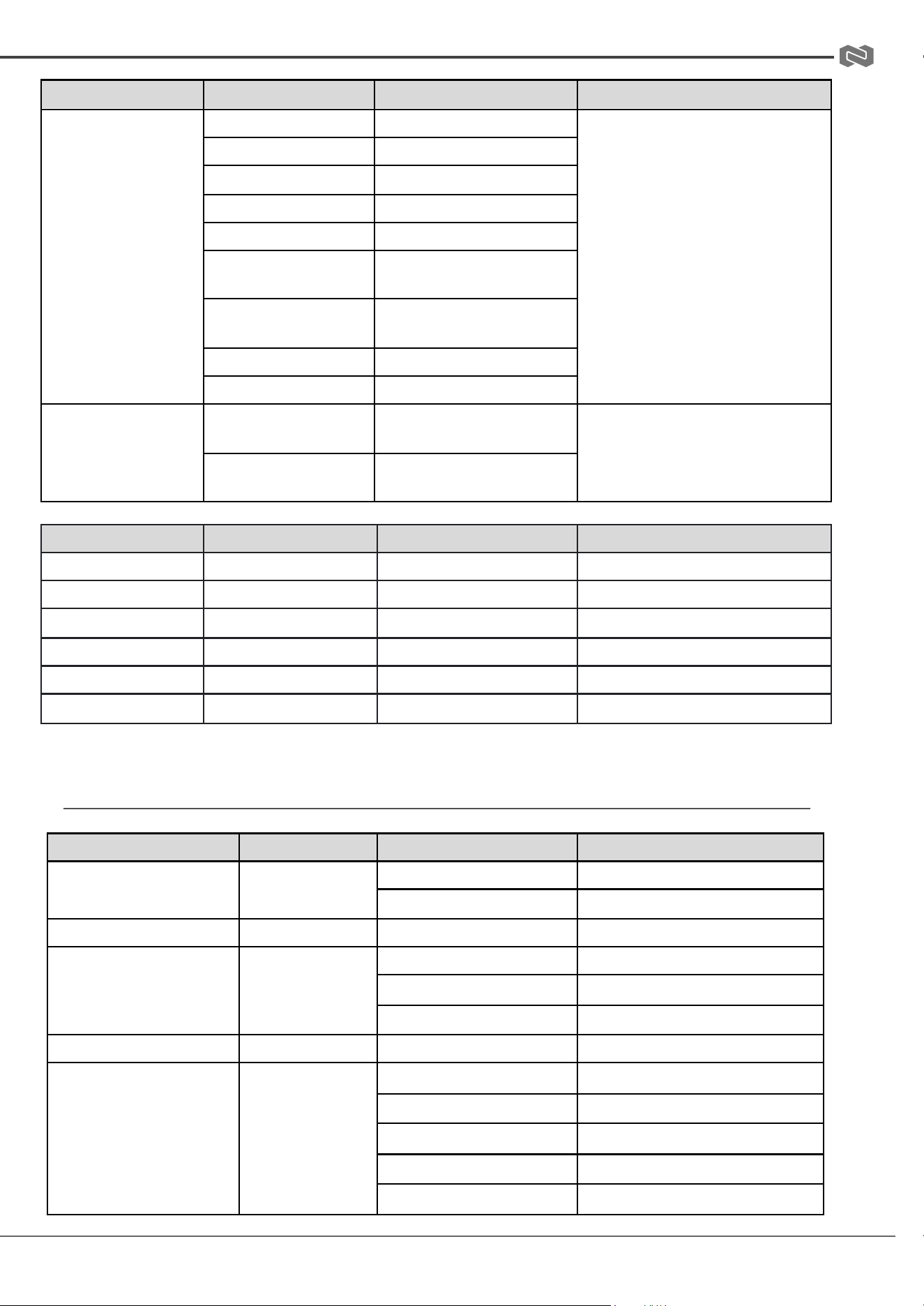
BZBGEAR BG-ADAMO-4K PRODUCT MANUAL
Command
Function
Command packet
Note
Upleft
8x 01 06 01 VV WW 01 01 FF
Upright
8x 01 06 01 VV WW 02 01 FF
DownLeft
8x 01 06 01 VV WW 01 02 FF
DownRight
8x 01 06 01 VV WW 02 02 FF
Stop
8x 01 06 01 VV WW 03 03 FF
AbsolutePosition
8x 01 06 02 VV WW
0Y 0Y 0Y 0Y 0Z 0Z 0Z 0Z FF
RelativePosition
8x 01 06 03 VV WW
0Y 0Y 0Y 0Y 0Z 0Z 0Z 0Z FF
Home
8x 01 06 04 FF
Reset
8x 01 06 04 FF
Pan-tiltLimitSet
Set
8x 01 06 07 00 0W
0Y 0Y 0Y 0Y 0Z 0Z 0Z 0Z FF
8x 01 06 07 01 0W
07 0F 0F 0F 07 0F 0F 0F FF
Clear
8x 01 06 07 01 0W
07 0F 0F 0F 07 0F 0F 0F FF
Command
Function
Command packet
Note
Red On
Tally Light On
81 01 7E 01 0A 00 02 00 FF
Red Tally Light On
Red Off
Tally Light Off
81 01 7E 01 0A 00 03 00 FF
Red Tally Light Off
Green On
Tally Light On
81 01 7E 01 0A 00 00 02 FF
Green Tally Light On
Green Off
Tally Light Off
81 01 7E 01 0A 00 00 03 FF
Green Tally Light Off
Auto Tracking On
Auto Tracking Mode On
8x 0A 01 32 00 00 02 00 FF
Tracking Mode On
Auto Tracking Off
Auto Tracking Mode Off
8x 0A 01 32 00 00 03 00 FF
Tracking Mode Off
VISCA PROTOCOL INQUIRY COMMANDS
Command
Command Packet
Return Packet
Note
CAM_PowerInq
8x 09 04 00 FF
y0 50 02 FF
On
y0 50 03 FF
Off(Standby)
CAM_ZoomPosInq
8x 09 04 47 FF
y0 50 0p 0q 0r 0s FF
pqrs: Zoom Position
CAM_FocusAFModeInq
8x 09 04 38 FF
y0 50 02 FF
Auto Focus
y0 50 03 FF
Manual Focus
y0 50 04 FF
One Push mode
CAM_FocusPosInq
8x 09 04 48 FF
y0 50 0p 0q 0r 0s FF
pqrs: Focus Position
CAM_WBModeInq
8x 09 04 35 FF
y0 50 00 FF
Auto
y0 50 01 FF
3000K
y0 50 02 FF
4000K
y0 50 03 FF
One Push Mode
y0 50 04 FF
5000K
Address: 830 National Drive #140, Sacramento, CA 95834, USA · Tel: +1(888)499-9906 · Email: support@bzbgear.com 43
BZBGEAR BG-ADAMO-4K PRODUCT MANUAL
Command
Command Packet
Return Packet
Note
y0 50 05 FF
Manual
y0 50 00 FF
6500K
y0 50 06 FF
6500K
y0 50 07 FF
3500K
y0 50 08 FF
4500K
y0 50 09 FF
5500K
y0 50 0A FF
6000K
CAM_RGainInq
8x 09 04 43 FF
y0 50 0B FF
7000K
CAM_BGainInq
8x 09 04 44 FF
y0 50 00 00 0p 0q FF
pq: B Gain
CAM_AEModeInq
8x 09 04 39 FF
y0 50 00 FF
Full Auto
y0 50 03 FF
Manual
y0 50 0A FF
Shutter priority
y0 50 0B FF
Iris priority
CAM_ShutterPosInq
8x 09 04 4A FF
y0 50 00 00 0p 0q FF
pq: Shutter Position
CAM_IrisPosInq
8x 09 04 4B FF
y0 50 00 00 0p 0q FF
pq: Iris Position
CAM_Gain LimitInq
8x 09 04 2C FF
y0 50 0p FF
p: Gain Position
CAM_ BrightPosiInq
8x 09 04 4D FF
y0 50 00 00 0p 0q FF
pq: Bright Position
CAM_ExpCompModeInq
8x 09 04 3E FF
y0 50 02 FF
On
y0 50 03 FF
Off
CAM_ExpCompPosInq
8x 09 04 4E FF
y0 50 00 00 0p 0q FF
pq: ExpComp Position
CAM_BacklightModeInq
8x 09 04 33 FF
y0 50 02 FF
On
y0 50 03 FF
Off
CAM_WDRStrengthInq
8x 09 04 51 FF
y0 50 00 00 00 0p FF
p: WDR Strength
CAM_NRLevel(2D) Inq
8x 09 04 53 FF
y0 50 0p FF
P: 2DNRLevel
CAM_NRLevel(3D) Inq
8x 09 04 54 FF
y0 50 0p FF
P:3D NRLevel
CAM_FlickerModeInq
8x 09 04 55 FF
y0 50 0p FF
p: Flicker Settings(0: OFF, 1: 50Hz,
2:60Hz)
CAM_ApertureInq
8x 09 04 42 FF
y0 50 00 00 0p 0q FF
pq: Aperture Gain
CAM_PictureEffectModeInq
8x 09 04 63 FF
y0 50 00 FF
Off
y0 50 04 FF
B&W
CAM_MemoryInq
8x 09 04 3F FF
y0 50 0p FF
p: Memory number last operated.
Address: 830 National Drive #140, Sacramento, CA 95834, USA · Tel: +1(888)499-9906 · Email: support@bzbgear.com 44
BZBGEAR BG-ADAMO-4K PRODUCT MANUAL
Command
Command Packet
Return Packet
Note
SYS_MenuModeInq
8x 09 06 06 FF
y0 50 02 FF
On
y0 50 03 FF
Off
CAM_LR_ReverseInq
8x 09 04 61 FF
y0 50 02 FF
On
y0 50 03 FF
Off
CAM_PictureFlipInq
8x 09 04 66 FF
y0 50 02 FF
On
y0 50 03 FF
Off
CAM_ColorSaturationInq
8x 09 04 49 FF
y0 50 00 00 00 0p FF
p: Color Gain setting 0h (60%) to Eh
(130%)
CAM_IDInq
8x 09 04 22 FF
y0 50 0p FF
p: Gamma ID
IR_ReceiveInq
8x 09 06 08 FF
y0 50 02 FF
On
y0 50 03 FF
Off
IR_ReceiveReturn
y0 07 7D 01 04 00 FF
Power ON/OFF
y0 07 7D 01 04 07 FF
Zoom tele/wide
y0 07 7D 01 04 38 FF
AF ON/OFF
y0 07 7D 01 04 33 FF
Camera _Backlight
y0 07 7D 01 04 3F FF
Camera _Memery
y0 07 7D 01 06 01 FF
Pan_titleDriver
CAM_BrightnessInq
8x 09 04 A1 FF
y0 50 00 00 0p 0q FF
pq: Brightness Position
CAM_ContrastInq
8x 09 04 A2 FF
y0 50 00 00 0p 0q FF
pq: Contrast Position
CAM_FlipInq
8x 09 04 A4 FF
y0 50 00 FF
Off
y0 50 01 FF
Flip-H
y0 50 02 FF
Flip-V
y0 50 03 FF
Flip-HV
CAM_GammaInq
8x 09 04 5B FF
y0 50 0p FF
p: Gamma setting
CAM_VersionInq
8x 09 00 02 FF
y0 50 ab cd
mn pq rs tu vw FF
ab cd : vender ID ( 0220 )
mn pq : model ID ST ( 0510 ) 、
U2( 0512 )、U3 ( 0513 )
rs tu : ARM Version vw : reserve
VideoSystemInq
8x 09 06 23 FF
y0 50 0p FF
P: 0~E Video format 0:1080P60
8:720P30
1:1080P50
9:720P25
2:1080i60 A:1080P59.94
3:1080i50 B:1080i59.94
4:720P60 C:720P59.94
5:720P50 D:1080P29.97
6:1080P30 E:720P29.97
7:1080P25
Pan-tiltMaxSpeedInq
8x 09 06 11 FF
y0 50 ww zz FF
ww: Pan Max Speed zz: Tilt
Max Speed
Pan-tiltPosInq
8x 09 06 12 FF
y0 50 0w 0w 0w 0w 0z 0z 0z 0z FF
wwww: Pan Position zzzz: Tilt
Position
Note: [X] in the above table indicates the camera address to be operated, 【y】=【x + 8】.
Address: 830 National Drive #140, Sacramento, CA 95834, USA · Tel: +1(888)499-9906 · Email: support@bzbgear.com 45
BZBGEAR BG-ADAMO-4K PRODUCT MANUAL
PELCO-D PROTOCOL COMMAND LIST
Function
Byte1
Byte2
Byte3
Byte4
Byte5
Byte6
Byte7
Up
0xFF
Address
0x00
0x08
Pan Speed
Tilt Speed
SUM
Down
0xFF
Address
0x00
0x10
Pan Speed
Tilt Speed
SUM
Left
0xFF
Address
0x00
0x04
Pan Speed
Tilt Speed
SUM
Right
0xFF
Address
0x00
0x02
Pan Speed
Tilt Speed
SUM
Upleft
0xFF
Address
0x00
0x0C
Pan Speed
Tilt Speed
SUM
Upright
0xFF
Address
0x00
0x0A
Pan Speed
Tilt Speed
SUM
DownLeft
0xFF
Address
0x00
0x14
Pan Speed
Tilt Speed
SUM
DownRight
0xFF
Address
0x00
0x12
Pan Speed
Tilt Speed
SUM
Zoom In
0xFF
Address
0x00
0x20
0x00
0x00
SUM
Zoom Out
0xFF
Address
0x00
0x40
0x00
0x00
SUM
Focus Far
0xFF
Address
0x00
0x80
0x00
0x00
SUM
Focus Near
0xFF
Address
0x01
0x00
0x00
0x00
SUM
Stop
0xFF
Address
0x00
0x00
0x00
0x00
SUM
Set Preset
0xFF
Address
0x00
0x03
0x00
Preset ID
SUM
Clear Preset
0xFF
Address
0x00
0x05
0x00
Preset ID
SUM
Call Preset
0xFF
Address
0x00
0x07
0x00
Preset ID
SUM
Query Pan Position
0xFF
Address
0x00
0x51
0x00
0x00
SUM
Query Pan Position
Response
0xFF
Address
0x00
0x59
Value High
Byte
Value Low
Byte
SUM
Query Tilt Position
0xFF
Address
0x00
0x53
0x00
0x00
SUM
Query Tilt Position
Response
0xFF
Address
0x00
0x5B
Value High
Byte
Value Low
Byte
SUM
Query Zoom Position
0xFF
Address
0x00
0x55
0x00
0x00
SUM
Query Zoom Position
Response
0xFF
Address
0x00
0x5D
Value High
Byte
Value Low Byte
SUM
Address: 830 National Drive #140, Sacramento, CA 95834, USA · Tel: +1(888)499-9906 · Email: support@bzbgear.com 46
BZBGEAR BG-ADAMO-4K PRODUCT MANUAL
PELCO-P PROTOCOL COMMAND LIST
Function
Byte1
Byte2
Byte3
Byte4
Byte5
Byte6
Byte7
Query Zoom Position
Response
0xFF
Address
0x00
0x5D
Value High
Byte
Value Low Byte
SUM
Up
0xA0
Address
0x00
0x08
Pan Speed
Tilt Speed
0xAF
Down
0xA0
Address
0x00
0x10
Pan Speed
Tilt Speed
0xAF
Left
0xA0
Address
0x00
0x04
Pan Speed
Tilt Speed
0xAF
Right
0xA0
Address
0x00
0x02
Pan Speed
Tilt Speed
0xAF
Upleft
0xA0
Address
0x00
0x0C
Pan Speed
Tilt Speed
0xAF
Upright
0xA0
Address
0x00
0x0A
Pan Speed
Tilt Speed
0xAF
DownLeft
0xA0
Address
0x00
0x14
Pan Speed
Tilt Speed
0xAF
DownRight
0xA0
Address
0x00
0x12
Pan Speed
Tilt Speed
0xAF
Zoom In
0xA0
Address
0x00
0x20
0x00
0x00
0xAF
Zoom Out
0xA0
Address
0x00
0x40
0x00
0x00
0xAF
Stop
0xA0
Address
0x00
0x00
0x00
0x00
0xAF
Focus Far
0xA0
Address
0x01
0x00
0x00
0x00
0xAF
Focus Near
0xA0
Address
0x02
0x00
0x00
0x00
0xAF
Set Preset
0xA0
Address
0x00
0x03
0x00
Preset ID
0xAF
Clear Preset
0xA0
Address
0x00
0x05
0x00
Preset ID
0xAF
Call Preset
0xA0
Address
0x00
0x07
0x00
Preset ID
0xAF
Query Pan Position
0xA0
Address
0x00
0x51
0x00
0x00
0xAF
Query Pan Position
Response
0xA0
Address
0x00
0x59
Value High
Byte
Value Low Byte
0xAF
Query Tilt Position
0xA0
Address
0x00
0x53
0x00
0x00
0xAF
Query Tilt Position
Response
0xA0
Address
0x00
0x5B
Value High
Byte
Value Low Byte
0xAF
Query Zoom Position
0xA0
Address
0x00
0x55
0x00
0x00
0xAF
Query Zoom Position
Response
0xA0
Address
0x00
0x5D
Value High
Byte
Value Low Byte
0xAF
Address: 830 National Drive #140, Sacramento, CA 95834, USA · Tel: +1(888)499-9906 · Email: support@bzbgear.com 47
BZBGEAR BG-ADAMO-4K PRODUCT MANUAL
Maintenance and Troubleshooting
Maintenance
● Turn the camera off and disconnect the power adapter when not in use for an extended
period.
● Use a soft cloth or tissue to clean the camera cover.
● Wipe the camera lens with a soft, dry cloth when cleaning. Gently wipe the lens with a mild
detergent if needed. Do not spray the lens directly. Do not use strong or corrosive
detergents to avoid scratching the lens and affecting the video quality.
Troubleshooting
No video output:
● Check whether the camera power supply is connected, the voltage is normal, and the
power indicator is lit.
● If using PoE ensure PoE is enabled on the port and switch has required power available.
● Check whether the camera can perform a self-test after restart.
● Verify that the output cable and display monitor are working properly.
Image cuts out or appears abnormal:
● Check whether the video output or video display is functioning correctly.
Image distorts while came is moving or appears shaky:
● Ensure the camera is installed in a solid position.
● Ensure there are no objects near the camera that can be transmitting vibration.
Remote control does not work:
● Check the remote control batteries.
● Verify the remote control address is set to 1.
● Verify the camera is in normal operating mode.
● Verify camera is not in the on-screen menu as the camera cannot be controlled in this
mode.
Serial Port is not working:
● Verify that the camera serial device protocol, baud rate, and address are all correct.
● Check that the control cable is connected properly.
● Check whether the camera is in normal operating mode.
Cannot connect to the web interface:
● Check if the camera will output to a screen directly.
● Ensure the network cable is connected properly (green/yellow lights should be visible on
the port and flashing indicating network activity)
● Verify you are connected to the same subnet as the camera and are not attempting to use
the same IP address.
Address: 830 National Drive #140, Sacramento, CA 95834, USA · Tel: +1(888)499-9906 · Email: support@bzbgear.com 48

BZBGEAR BG-ADAMO-4K PRODUCT MANUAL
Tech Support
Have technical questions? We may have answered them already!
Please visit BZBGEAR’s support page (bzbgear.com/support) for helpful information and tips
regarding our products. Here you will find our Knowledge Base (bzbgear.com/knowledge-base)
with detailed tutorials, quick start guides, and step-by-step troubleshooting instructions. Or
explore our YouTube channel, BZB TV (youtube.com/c/BZBTVchannel), for help setting up,
configuring, and other helpful how-to videos about our gear.
Need more in-depth support? Connect with one of our technical specialists directly:
Phone
1.888.499.9906
Email
support@bzbgear.com
Live Chat
bzbgear.com
Limited Product Warranty Terms
Pro Line: 5-year warranty from the date of purchase for AV/Broadcasting products bought on or
after August 1, 2024.
Essential Line: 3-year warranty from the date of purchase for AV/Broadcasting products bought on
or after August 1, 2024.
Cables: Lifetime Limited Product Warranty.
For complete warranty information, please visit bzbgear.com/warranty.
For questions, please call 1.888.499.9906 or email support@bzbgear.com.
Address: 830 National Drive #140, Sacramento, CA 95834, USA · Tel: +1(888)499-9906 · Email: support@bzbgear.com 49
BZBGEAR BG-ADAMO-4K PRODUCT MANUAL
Mission Statement
BZBGEAR is a breakthrough manufacturer of high-quality, innovative audiovisual equipment
ranging from AVoIP, professional broadcasting, conferencing, home theater, to live streaming
solutions. We pride ourselves on unparalleled customer support and services. Our team offers
system design consultation, and highly reviewed technical support for all the products in our
catalog. BZBGEAR delivers quality products designed with users in mind.
Copyright
All the contents in this manual and its copyright are owned by BZBGEAR. No one is allowed to
imitate, copy, or translate this manual without BZBGEAR’s permission. This manual contains no
guarantee, standpoint expression or other implies in any form. Product specification and
information in this manual is for reference only and subject to change without notice.
All rights reserved. No reproducing is allowed without acknowledgement.
Address: 830 National Drive #140, Sacramento, CA 95834, USA · Tel: +1(888)499-9906 · Email: support@bzbgear.com 50
