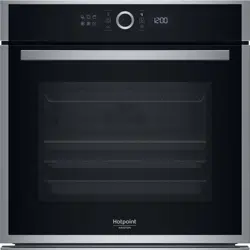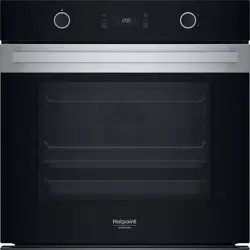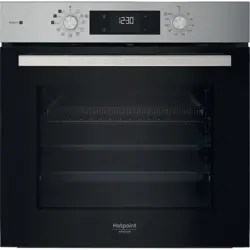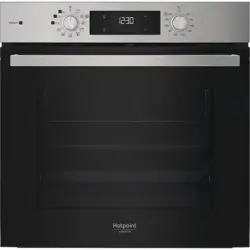
EN
1
Owner’s Manual
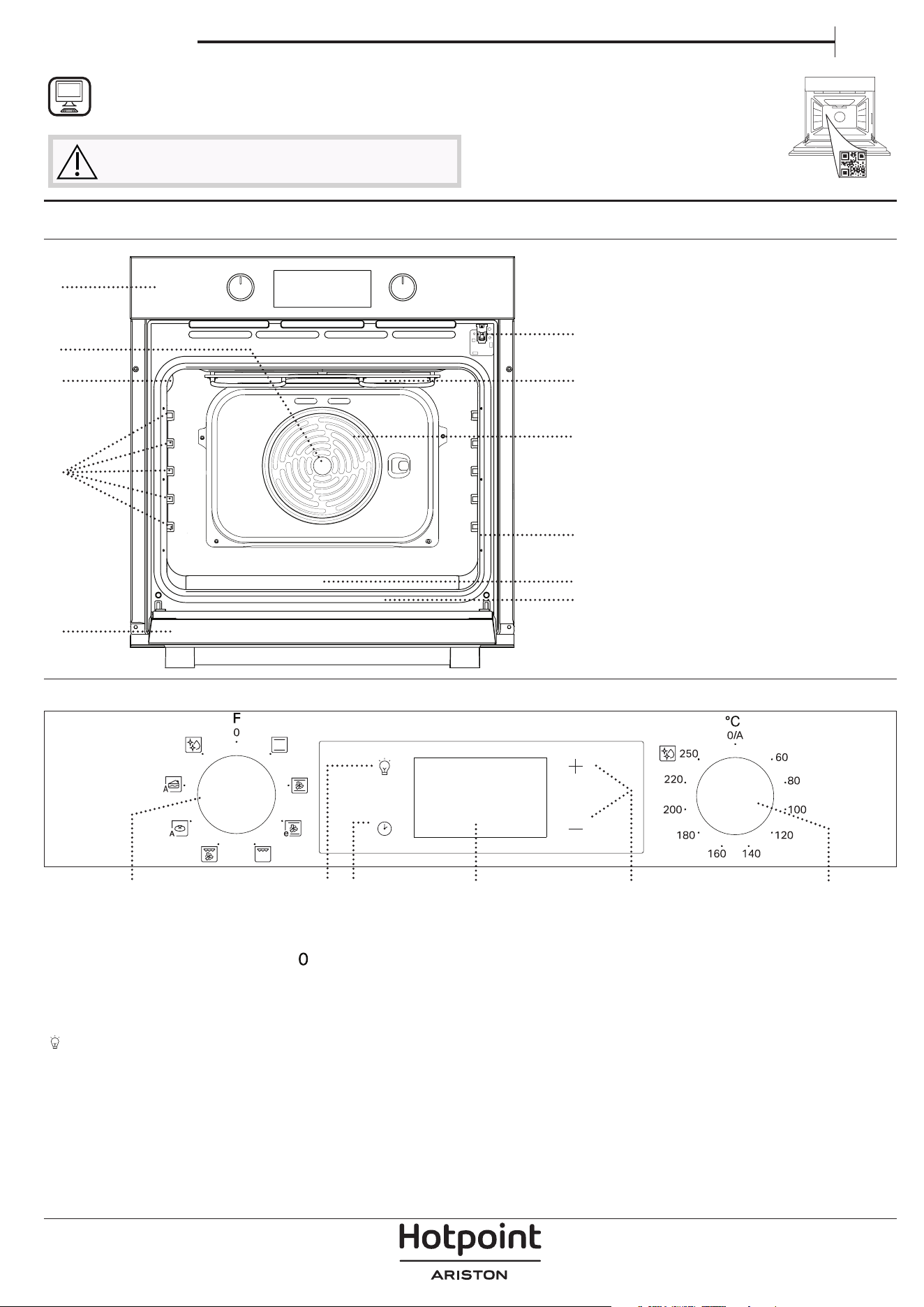
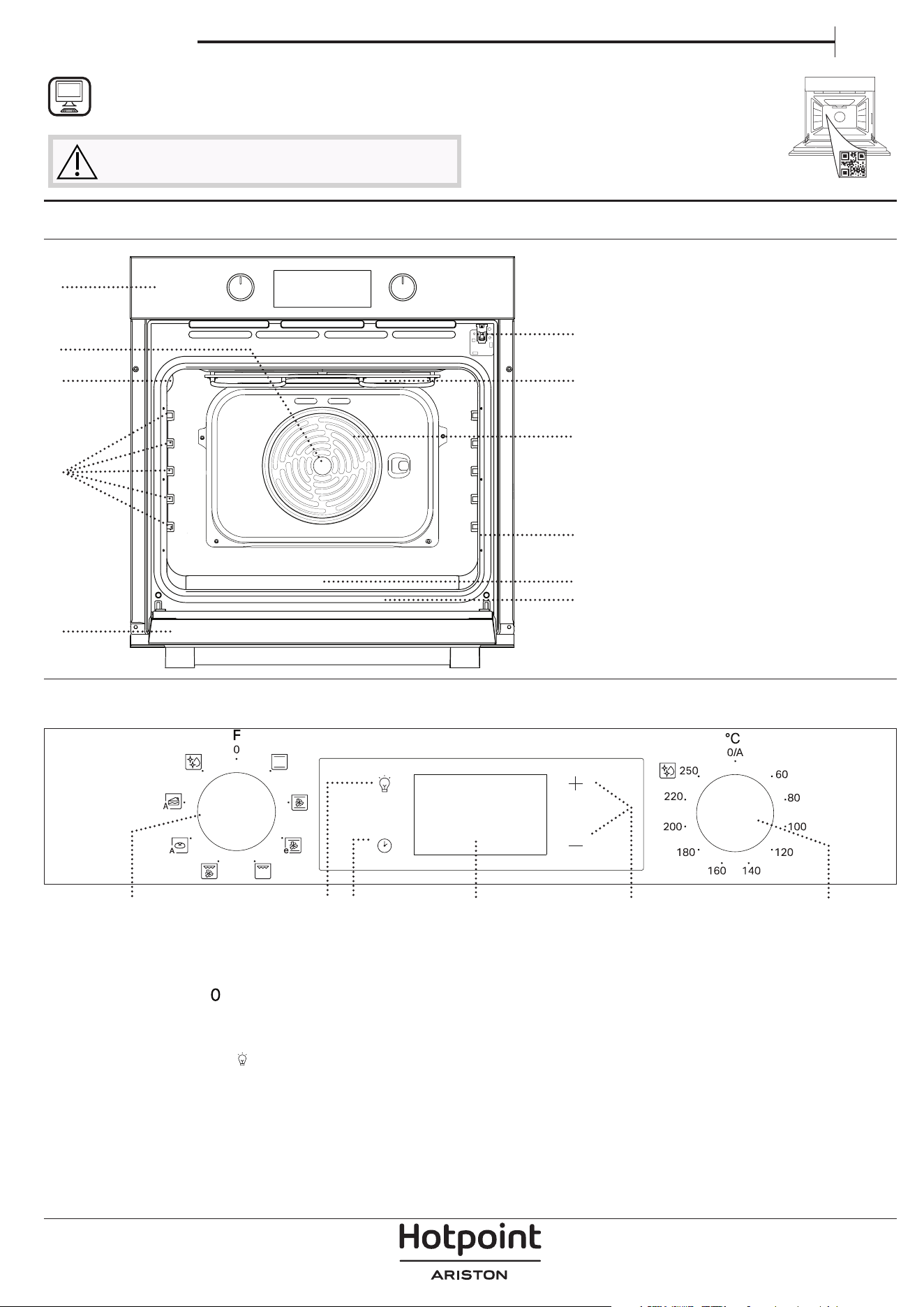
PRODUCT DESCRIPTION
1
2
8
3
5
7
10
11
4
6
9
1. Control panel
2. Fan
3. Lamp
4. Shelf guides (the level is
indicated on the wall of the
cooking compartment)
5. Door
6. Door lock (locks the door while
automatic cleaning is in progress
and afterwards)
7. Upper heating element/grill
8. Circular heating element (not
visible)
9. Identification plate (do not
remove)
10. Embossing for drinking water
11. Bottom heating element (not
visible)
CONTROL PANEL DESCRIPTION
1 32 4 5 6
1. SELECTION KNOB
For switching the oven on by
selecting a function. Turn to the
position to switch the oven off.
2. LIGHT
With the oven switched on, press
to turn the oven compartment
lamp on or off.
3. SETTING THE TIME
For accessing the cooking time
settings, delayed start and timer.
For displaying the time when the
oven is off.
4. DISPLAY
5. ADJUSTMENT BUTTONS
For changing the cooking time
settings.
6. THERMOSTAT KNOB
Turn to select the temperature you
require when activating manual
functions.
THANK YOU FOR BUYING A HOTPOINT-ARISTON
PRODUCT
In order to receive a more complete assistance, please
register your product on www . register10 . eu
PLEASE SCAN THE QR CODE ON
YOUR APPLIANCE IN ORDER TO
REACH MORE INFORMATION
Before using the appliance carefully read the Safety
Instruction.
Please note: Type of knob may vary from model type. If the knobs are push-activated, push down on the center of the knob to
release it from seating.
2
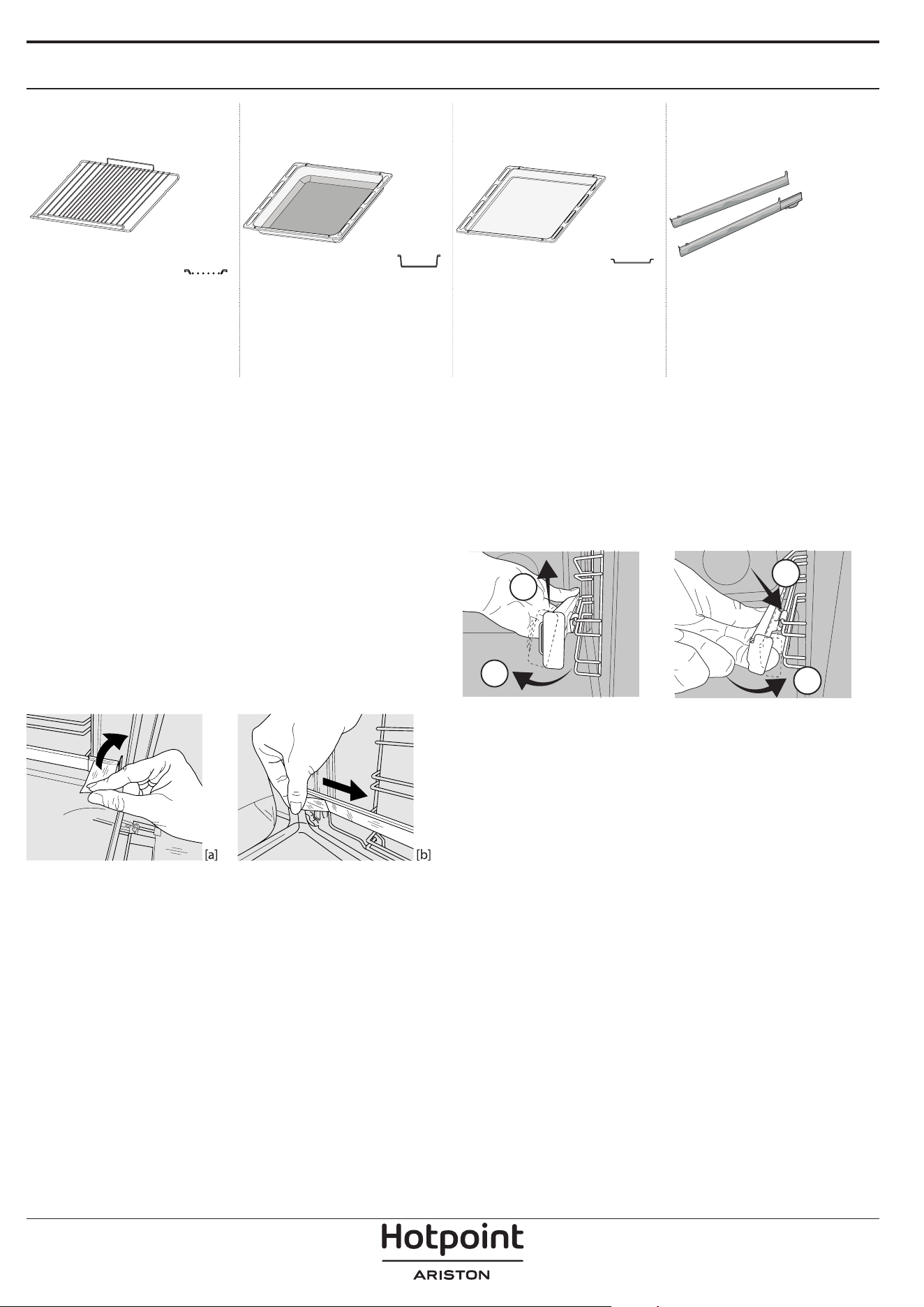
ACCESSORIES
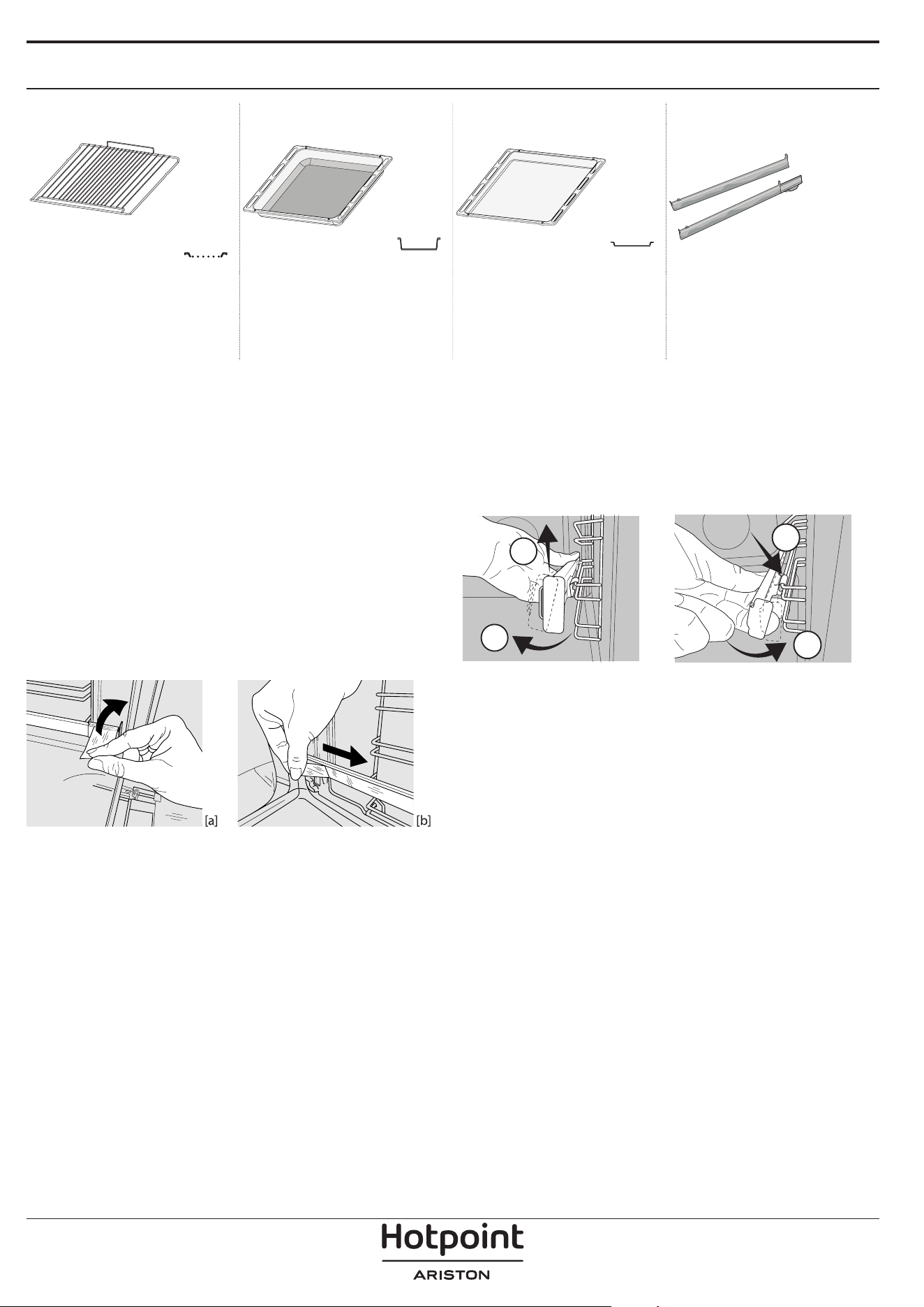
WIRE SHELF DRIP TRAY * BAKING TRAY * SLIDING RUNNERS *
Use to cook food or as a
support for pans, cake tins and
other ovenproof items of
cookware.
Use as an oven tray for
cooking meat, sh, vegetables,
focaccia, etc. or position
underneath the wire shelf to
collect cooking juices.
Use for cooking all bread and
pastry products, but also for
roasts, sh en papillotte, etc.
To facilitate inserting or
removing accessories.
* Availble only on certain models
The number and the type of accessories may vary depending on which model is purchased.
Other accessories can be purchased separately from the After-sales Service.
INSERTING THE WIRE SHELF AND OTHER ACCESSORIES
Insert the wire shelf onto the level you require by
holding it tilted slightly upwards and resting the
raised rear side (pointing upwards) down first.
Then slide it horizontally along the runners as far as possible.
Other accessories, like the baking tray, are to be
inserted horizontally, letting them slide on the
runners.
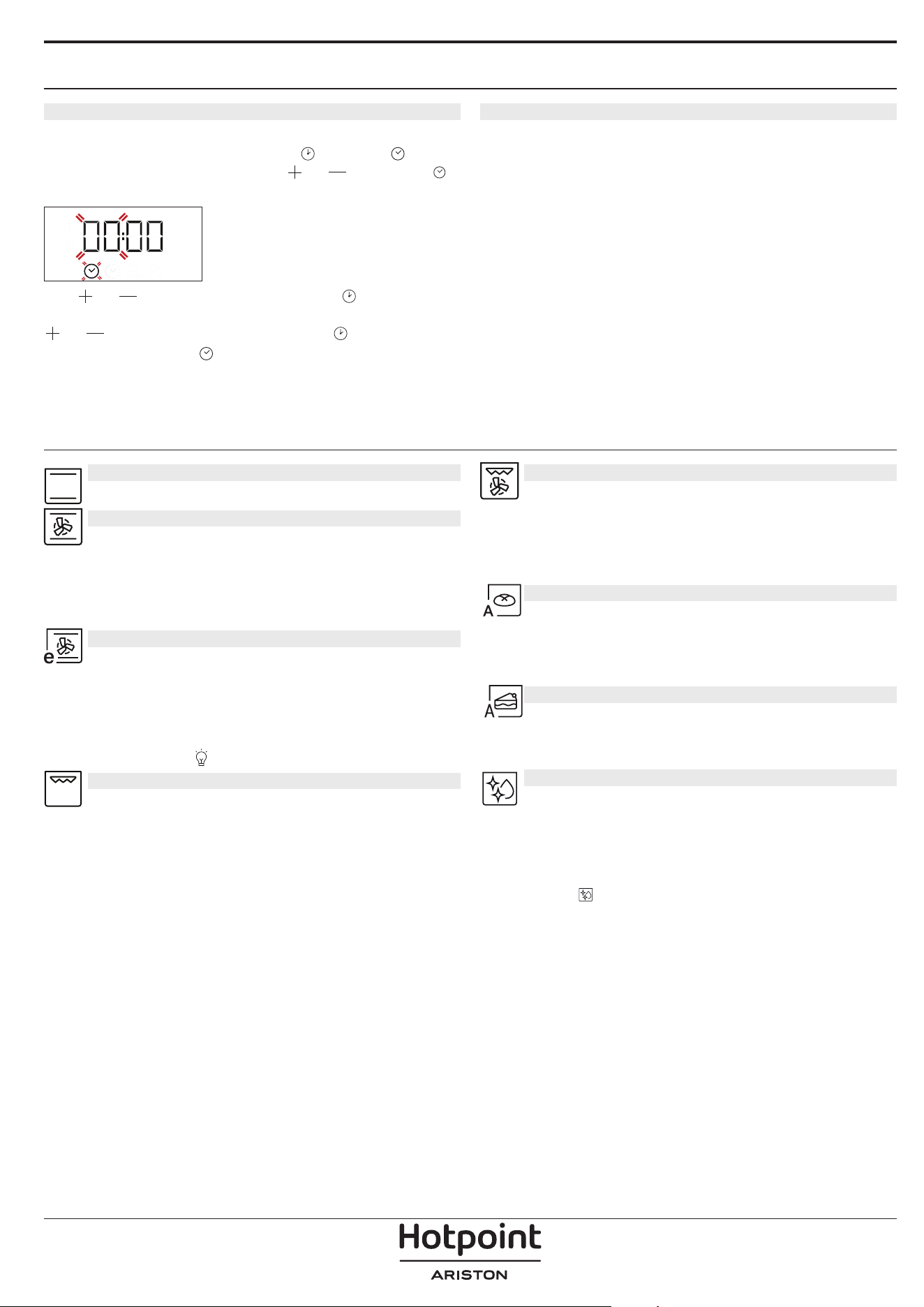
SLIDING SHELVES AND SHELF GUIDES
Before using the oven remove the protective tape
[a] and then remove the protective foil [b] from the
sliding runners.
REMOVING THE SLIDING RUNNERS [c]
Pull the lower part of the sliding runner to uncouple
the lower hooks (1) and pull the the sliding runners
upwards, removing them from the upper hooks (2).
REFITTING THE SLIDING RUNNERS [d]
Hook the upper hooks on the shelf guides (1) then
press the lower part of the sliding runners against the
shelf guides, until the lower hooks are clicking (2).
1
2
1
2
[c] [d]
REMOVING AND REFITTING THE SHELF GUIDES
1. To remove the shelf guides, firmly grip the external
part of the guide, and pull it towards you to
extract the support and the two internal pins from
the lodging.
2. To reposition the shelf guides, position them near
the cavity and initially insert the two pins into
their lodgings. Next, position the external part
near its lodging, insert the support, and firmly
press towards the wall of the cavity to make sure
the shelf guide is properly secured.
3
FIRST TIME USE
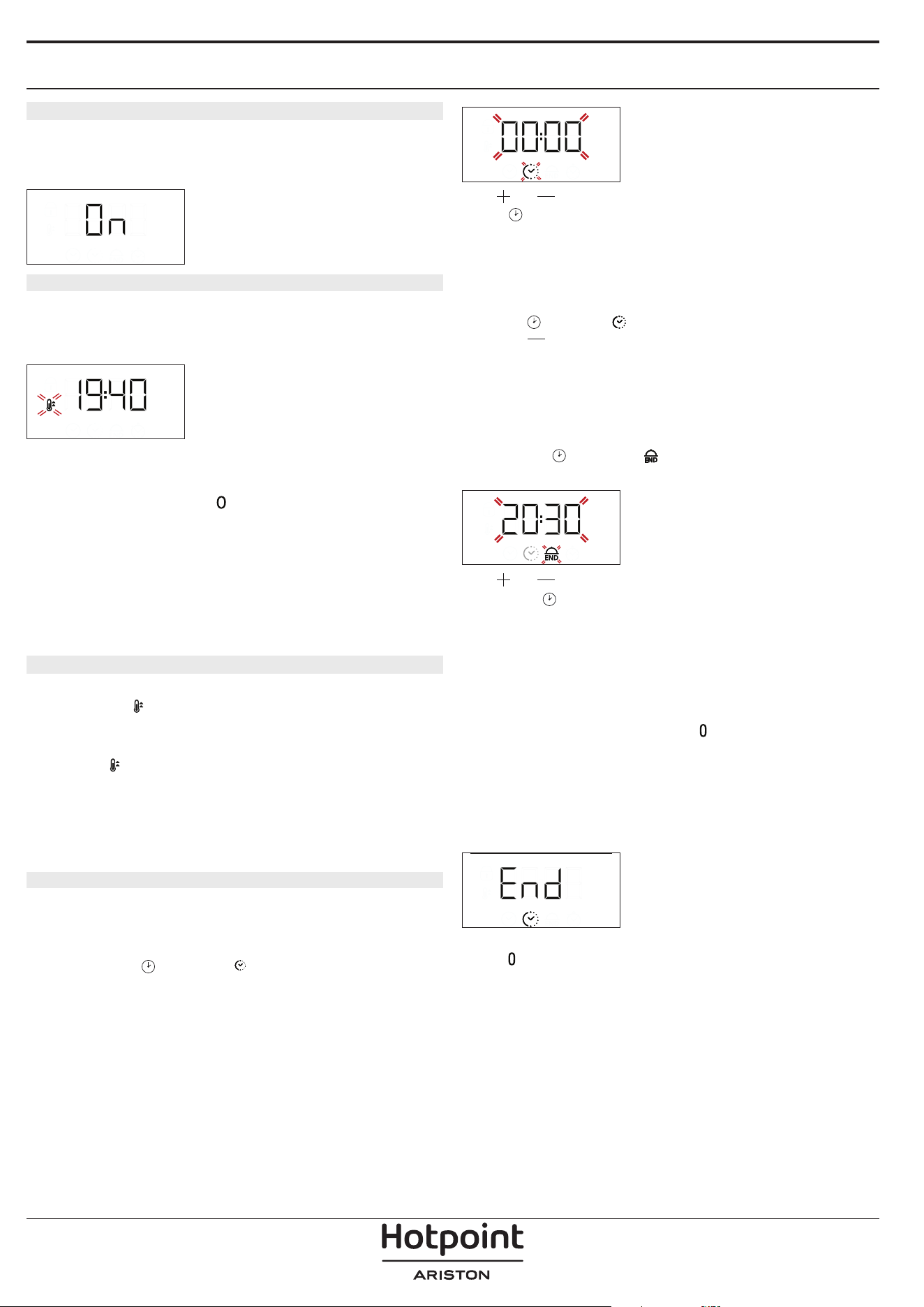
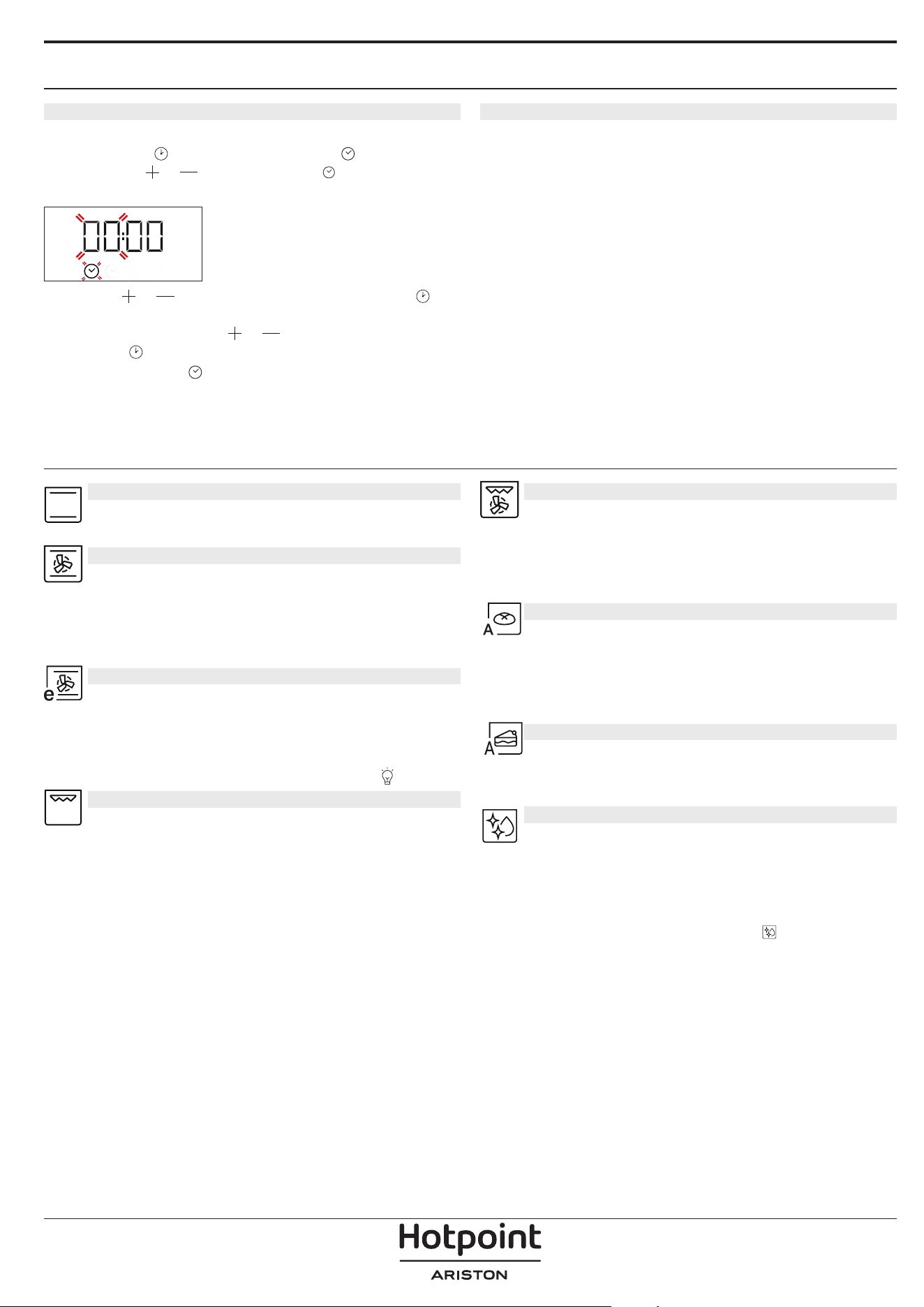
3. SETTING THE TIME
You will need to set the time when you switch on the
appliance for the first time: Press
until the icon
and the two digits for the hour
or and clock
start flashing on the display.
Use or to set the hour and press to confirm.
The two digits for the minutes will start flashing. Use
or to set the minutes and press to confirm.
Please note: When the icon is ashing, for example
following lengthy power outages, you will need to reset the
time.
4. HEAT THE OVEN
A new oven may release odours that have been left
behind during manufacturing: this is completely
normal.
Before starting to cook food, we therefore
recommend heating the oven with it empty in order
to remove any possible odours.
Remove any protective cardboard or transparent
film from the oven and remove any accessories from
inside it.
Heat the oven to 250 °C for about one hour. The oven
must be empty during this time.
Please note: It is advisable to air the room after using the
appliance for the rst time.
FUNCTIONS
CONVENTIONAL
For cooking any kind of dish on one shelf only.
CONVECTION BAKE
For cooking different foods that require
the same cooking temperature on several shelves
(maximum three) at the same time. This function can
be used to cook different foods without odours being
transferred from one food to another.
ECO CONVECTION BAKE
For cooking roasts and stuffed roasting joints
on a single shelf. Food is prevented from drying out
excessively by gentle, intermittent air circulation.
When this ECO function is in use, the light will remain
switched off during cooking but can be switched on
again by pressing
.
GRILL
For grilling steaks, kebabs and sausages,
cooking vegetables au gratin or toasting bread.
When grilling meat, we recommend using a dripping
pan to collect the cooking juices: position the pan on
any of the levels below the wire shelf and add 200 ml
of drinking water.
TURBO GRILL
For roasting large joints of meat (legs, roast
beef, chicken). We recommend using a dripping pan
to collect the cooking juices: position the pan on any
of the levels below the wire shelf and add 200 ml of
drinking water.
BREAD AUTO
This function automatically selects the ideal
temperature and baking time for bread. For best
results, carefully follow the recipe. Activate the
function when oven is cold.
PASTRY AUTO
This function automatically selects the ideal
temperature and baking time for cakes. Activate the
function when oven is cold.
DIAMOND CLEAN
The action of the steam released during this
special low-temperature cleaning cycle allows dirt
and food residues to be removed with ease. Pour 100-
120 ml of drinking water on the bottom of the oven
then turn the selection knob and the thermostat
knob to the
icon. It is best to use the function for
35 minutes.
Activate the function when the oven is cold and let
it cool down for 15 minutes once the cycle ends.
The position of the icon does not correspond to the
temperature reached during the cleaning cycle.
4
DAILY USE
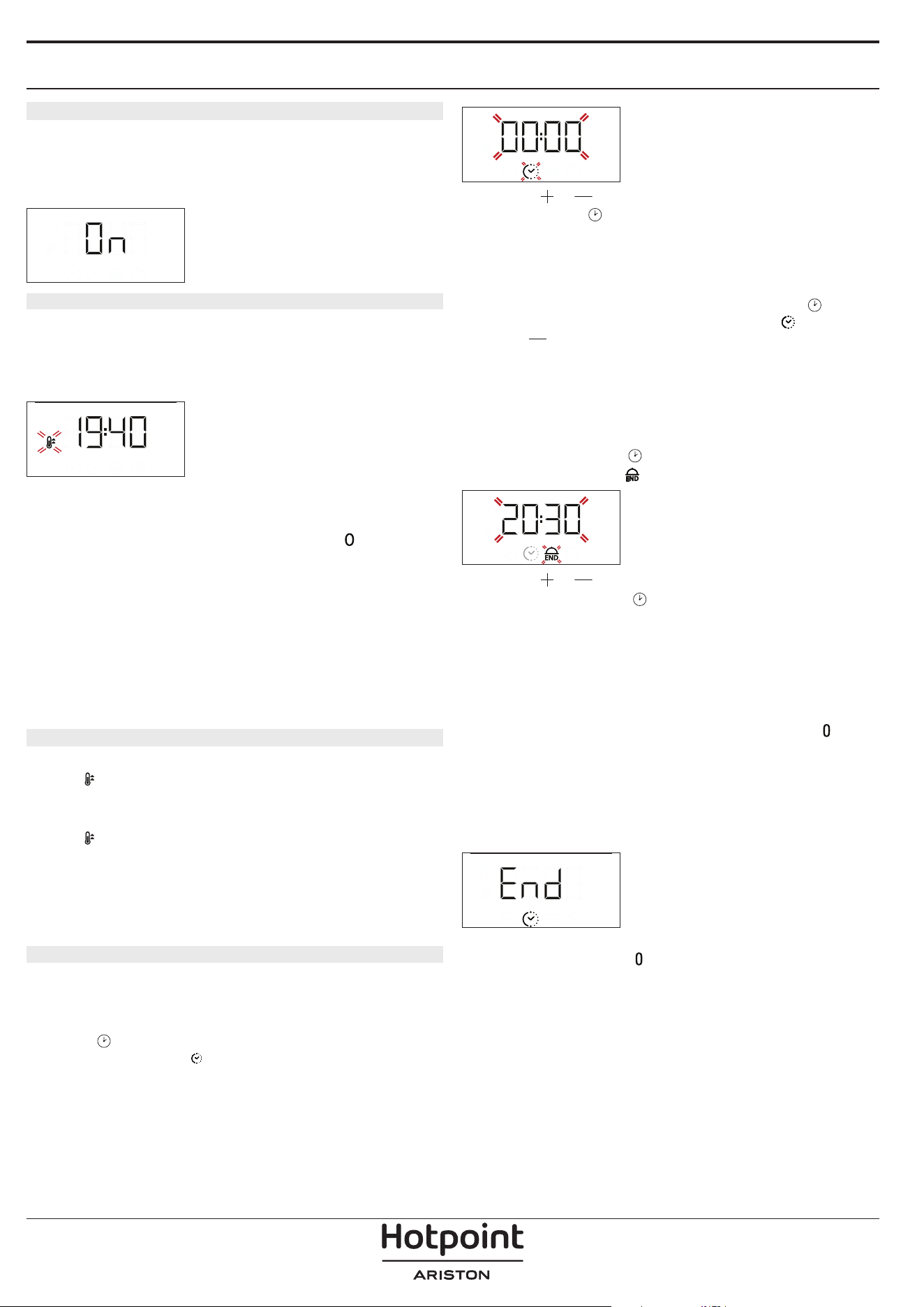
1. SELECT A FUNCTION
To select a function, turn the selection knob to the
symbol for the function you require: the display will
light up and an audible signal will sound.
2. ACTIVATE A FUNCTION
MANUAL
To start the function you have selected, turn the
thermostat knob to set the temperature you require.
Please note: During cooking you can change the function by
turning the selection knob or adjust the temperature by
turning the thermostat knob. The function will not start if the
thermostat knob will be on you can set the cooking time,
cooking end time (only if you set a cooking time) and a timer.
RISING
To start the “Rising” function, turn the thermostat
knob to the relevant symbol; if the oven is set to a
different temperature, the function will not start.
Please note: You can set the cooking time, cooking end time
(only if you set a cooking time) and a timer.
3. PREHEATING
Once the function starts, an audible signal and a
flashing icon
on the display indicate that the
preheating phase has been activated.
At the end of this phase, an audible signal and the
fixed icon
on the display will indicate that the oven
has reached the set temperature: at this point, place
the food inside and proceed with cooking.
Please note: Placing the food in the oven before preheating
has nished may have an adverse eect on the nal cooking
result.
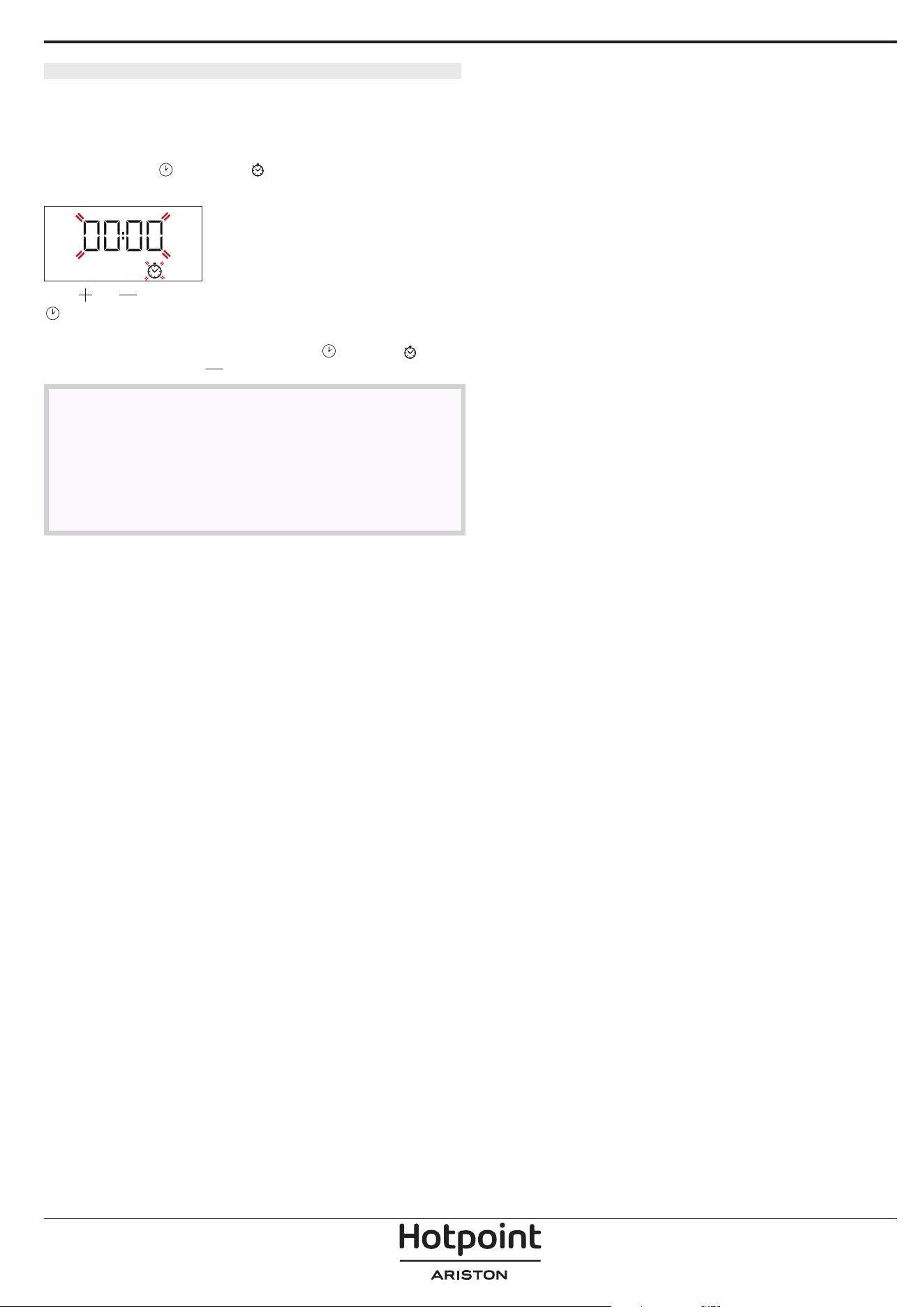
4. PROGRAMMING COOKING
You will need to select a function before you can start
programming cooking.
DURATION
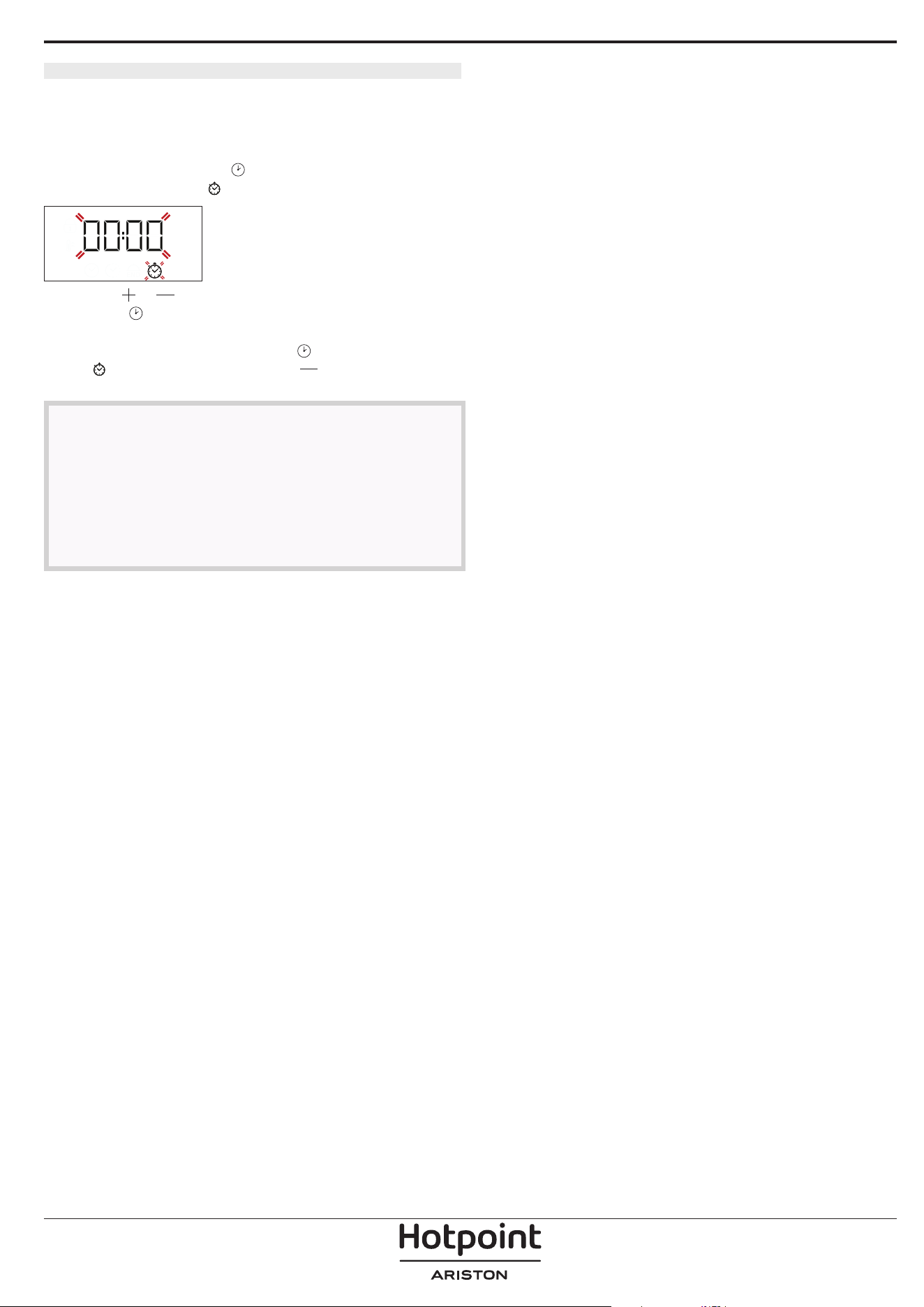
Keep pressing until the icon and “00:00” start
flashing on the display.
Use or to set the cooking time you require, then
press
to confirm.
Activate the function by turning the thermostat knob
to the temperature you require: an audible signal will
sound and the display will indicate that cooking is
complete.
Please note: To cancel the cooking time you have set, keep
pressing until the icon starts flashing on the display,
then use to reset the cooking time to “00:00”. This
cooking time includes a preheating phase.
PROGRAMMING THE END COOKING TIME/
DELAYED START
After a cooking time has been set, starting the
function can be delayed by programming its end
time: press
until the icon and the current time
start flashing on the display.
Use or to set the time you want cooking to end
and press
to confirm.
Activate the function by turning the thermostat
knob to the temperature you require: the function
will remain paused until it starts automatically after
the period of time that has been calculated in order
forcooking to finish at the time you have set.
Please note: To cancel the setting, switch the oven off by
turning the selection knob to the position.
Delay to start functionality is not available for Grill
and Turbo Grill functions.
END OF COOKING
An audible signal will sound and the display will
indicate that the function has finished.
Turn the selection knob to select a different function
or to
to switch the oven off.
Please note: If the timer is active, the display will show “END”
alternately with the remaining time.
5
5. SETTING THE TIMER
This option does not interrupt or program cooking
but allows you to use the display as a timer, either
during while a function is active or when the oven is
off.
Keep pressing
until the and “00:00” icon and
“00:00” start flashing on the display.
Use or to set the time you require and press
to confirm. An audible signal will sound once the
timer has finished counting down the selected time.
Notes: To cancel the timer, keep pressing until the icon
starts ashing, then use to reset the time to “00:00”.
NOTES
• Do not cover the inside of the oven with
aluminium foil.
• Never drag pots or pans across the bottom of the
oven as this could damage the enamel coating.
• Do not place heavy weights on the door and do
not hold on to the door.
6
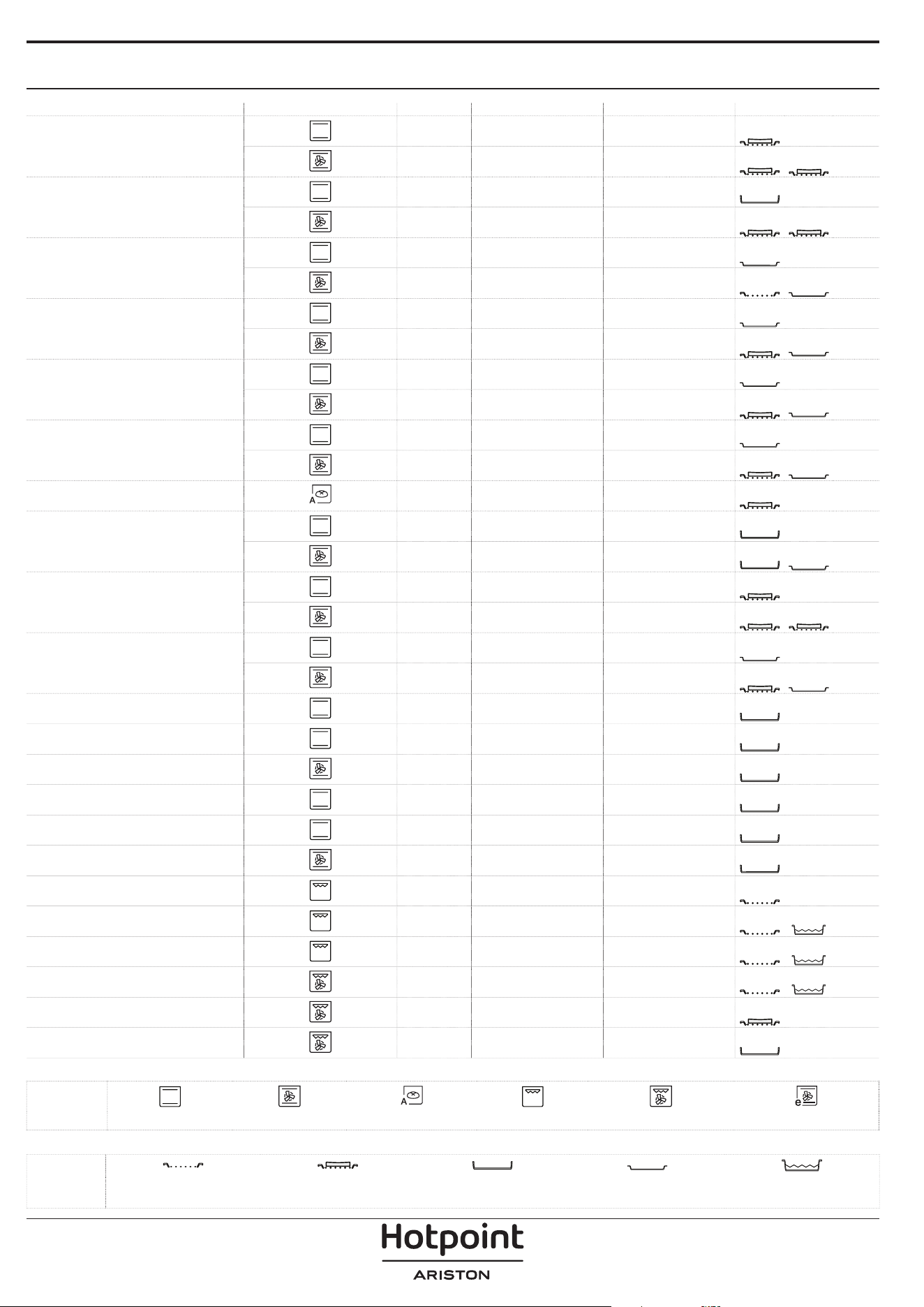
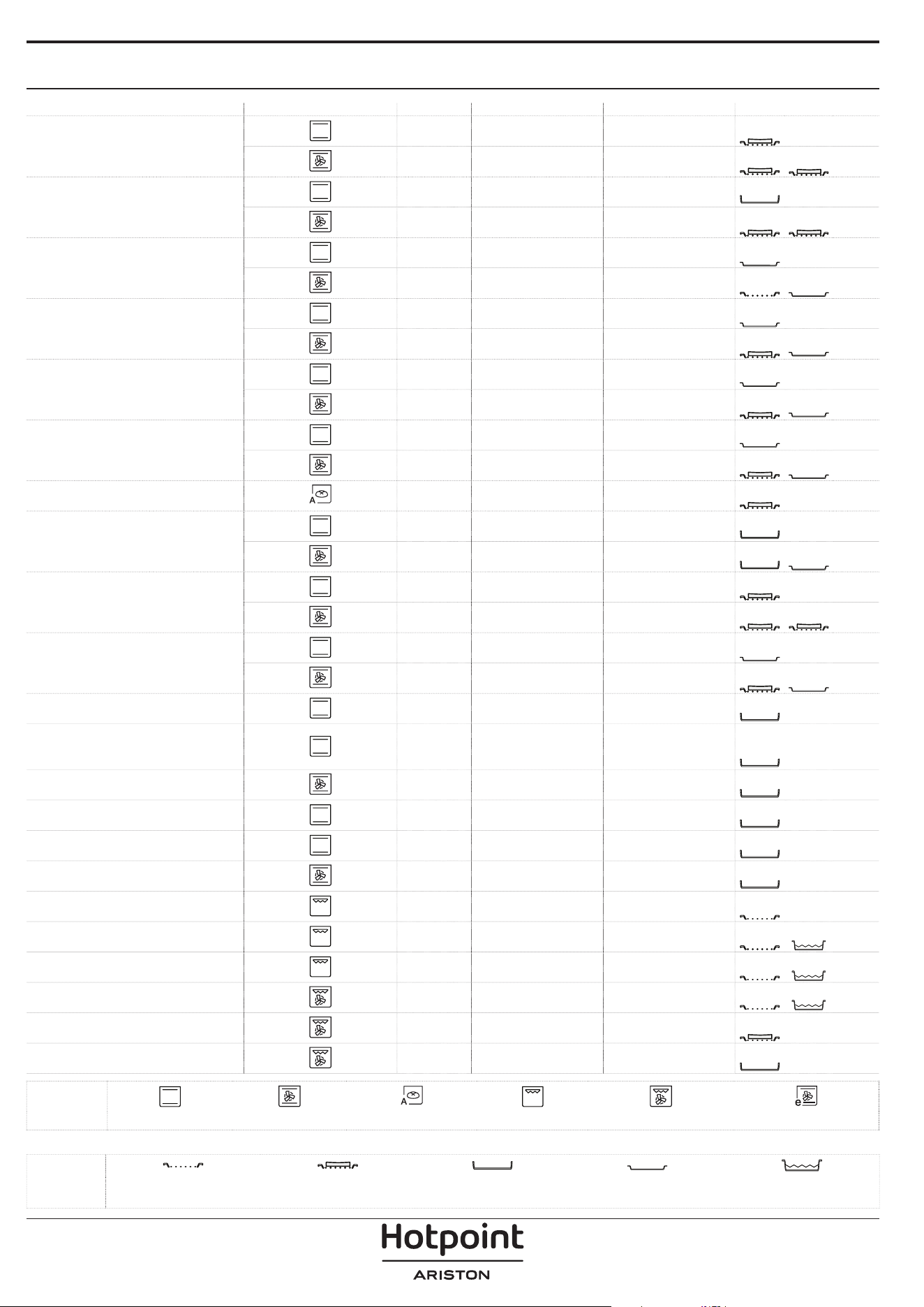
COOKING TABLE
RECIPE FUNCTION PREHEAT TEMPERATURE (°C) DURATION (Min) LEVEL AND ACCESSORIES
Leavened cakes
Yes 160-180 30 - 90
2/3
Yes 160-180 30 - 90 ***
4
1
Filled cake
(cheese cake, strudel, fruit pie)
Yes 160 - 200 35 - 90
2
Yes 160 - 200 35 - 90 ***
4
2
Biscuits / tartlets
Yes 170-180 15 - 45
3
Yes 160 -180 20 - 45 ***
4
2
Choux buns
Yes 180 - 220 30 - 40
3
Yes 180 - 190 35 - 45 ***
4
2
Meringues
Yes 90 150 - 200
3
Yes 90 140 - 200
4
2
Pizza / Focaccia
Yes 190 - 250 15 - 50
1 / 2
Yes 190 - 250 20 - 50 ***
4
2
Bread - - 60
2
Frozen pizza
Yes 250 10 - 15
3
Yes 250 10 - 20 ***
3
2
Salty cakes
(vegetable pie, quiche)
Yes 175 - 200 40 - 60
3
Yes 175 - 200 45 - 60 ***
4
2
Vols-au-vents / puff pastry crackers
Yes 190 - 200 20 - 30
3
Yes 180 - 190 15 - 40 ***
4
2
Lasagne / baked pasta /
canneloni / flans
Yes 190 - 200 45 - 65
2
Lamb / veal / beef / pork 1 kg Yes 190 - 200 80 - 110
3
Roast pork with crackling 2 kg Yes 180 - 190 110 - 150
2
Chicken / rabbit / duck 1 kg Yes 200 - 230 50 - 100
2
Turkey / goose 3 kg - 190 - 200 100 - 160
2
Stuffed vegetables
(tomatoes, courgettes, aubergines)
Yes 180 - 200 50 - 70
2
Toasted bread 5’ 250 2 - 6
5
Fish fillets / slices - 230 - 250 15 - 30 *
4
3
Sausages / kebabs /
spare ribs / hamburgers
- 250 15 - 30 *
5
4
Roast chicken 1-1.3 kg Yes 200 - 220 55 - 70 **
2
1
Roast beef rare 1 kg Yes 200 - 210 35 - 50 **
3
Leg of lamb / knuckle Yes 200 - 210 60 - 90 **
3
FUNCTIONS
Conventional Convection Bake Bread Auto Grill Turbo Grill
Eco Convection Bake
ACCESSORIES
Wire shelf
Baking dish or cake tin
on the wire shelf
Baking tray/Drip tray or
Baking dish on the wire shelf
Drip tray / Baking tray
Drip tray / Baking tray with
200 ml of water
7
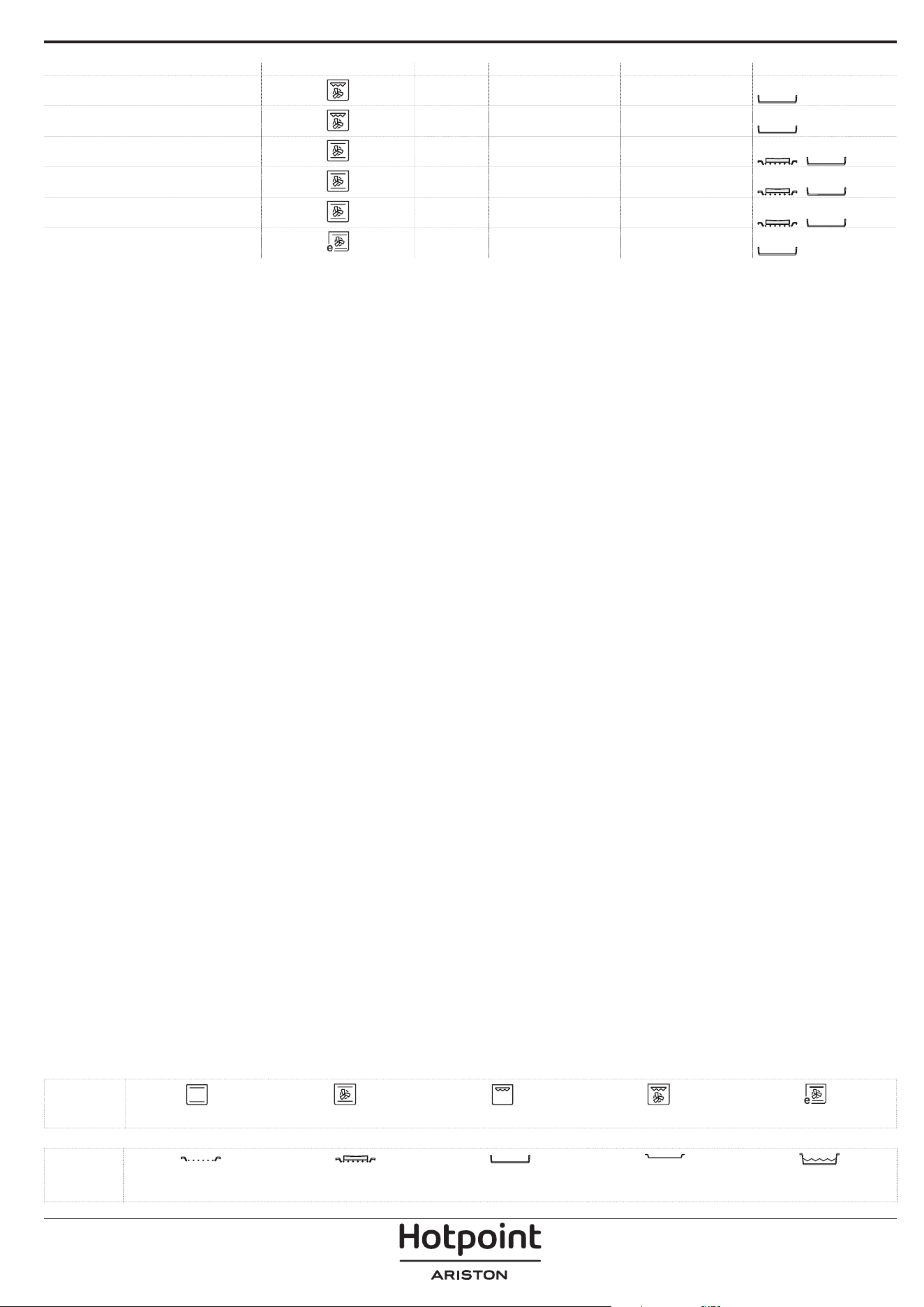
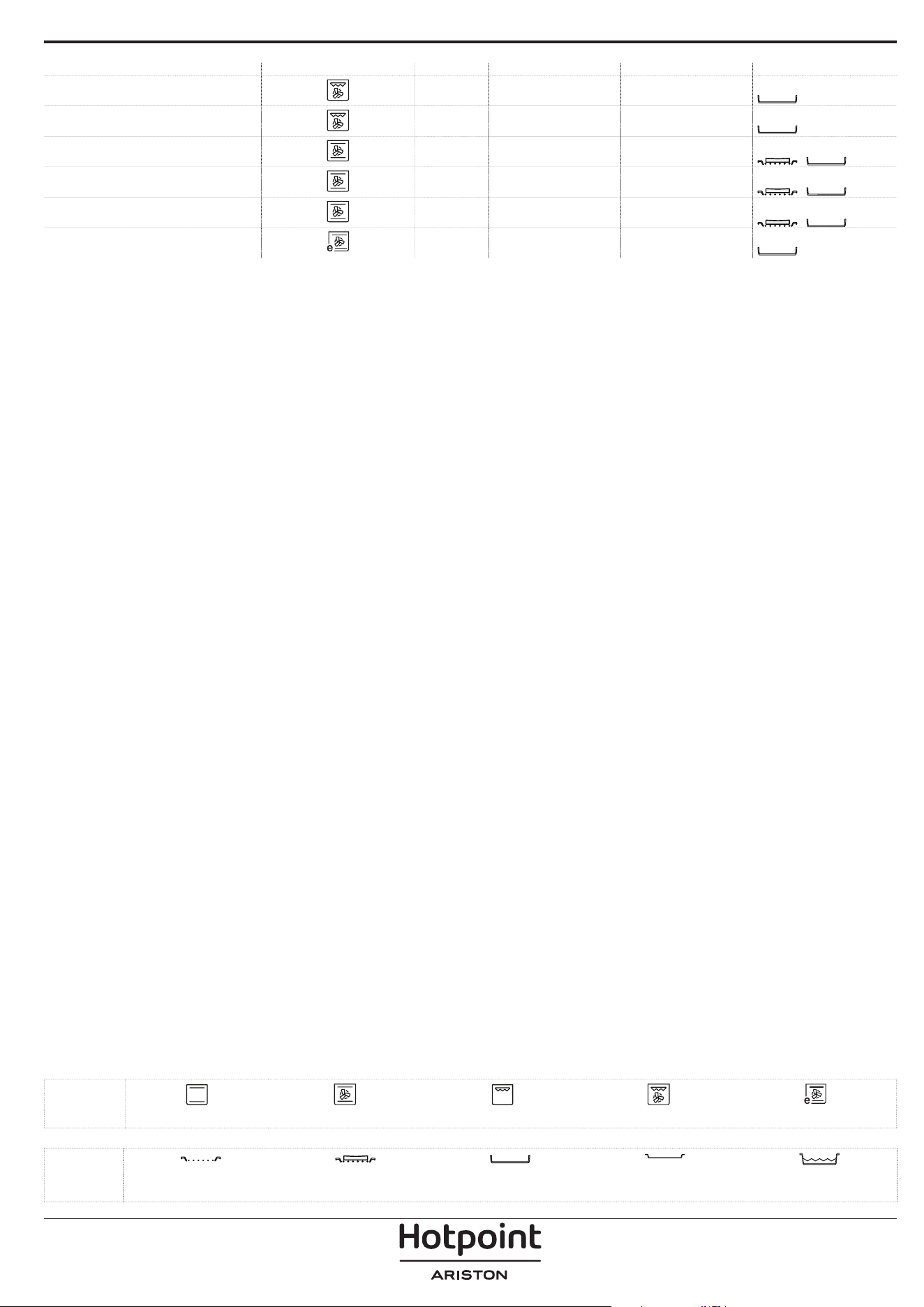
RECIPE FUNCTION PREHEAT TEMPERATURE (°C) DURATION (Min) LEVEL AND ACCESSORIES
Roast potatoes Yes 200 - 210 35 - 55**
3
Vegetable gratin - 200 - 210 25 - 55
3
Meat and potatoes Yes 190 - 200 45 - 100 ***
4
1
Fish and vegetables Yes 180 30 - 50 ***
4
1
Lasagne and meat Yes 200 50 - 100 ***
4
1
Roast meat / stuffed roasting joints - 170 - 180 100 - 150
2
* Turn food halfway through cooking
** Turn food two thirds of the way through cooking (if
necessary).
*** Estimated length of time: dishes can be removed from the
oven at dierent times depending on personal preference.
FUNCTIONS
Conventional Convection Bake Grill Turbo Grill Eco Convection Bake
ACCESSORIES
Wire shelf
Baking dish or cake tin
on the wire shelf
Baking tray/Drip tray or
Baking dish on the wire shelf
Drip tray / Baking tray
Drip tray / Baking tray with
200 ml of water
8
CLEANING AND MAINTENANCE
Make sure that the oven has
cooled down before carrying out
any maintenance or cleaning.
Do not use steam cleaners.
Do not use wire wool, abrasive
scourers or abrasive/corrosive
cleaning agents, as these could
damage the surfaces of the
appliance.
Wear protective gloves.
The oven must be disconnected
from the mains before carrying
out any kind of maintenance
work.
Make sure that the oven has
cooled down before carrying out
any maintenance or cleaning.
Do not use steam cleaners.
Do not use wire wool, abrasive
scourers or abrasive/corrosive
cleaning agents, as these could
damage the surfaces of the
appliance.
Wear protective gloves.
The oven must be disconnected
from the mains before carrying
out any kind of maintenance
work.
EXTERIOR SURFACES
Clean the surfaces with a damp microfibre cloth. If
they are very dirty, add a few drops of pH-neutral
detergent. Finish off with a dry cloth.
Do not use corrosive or abrasive detergents. If any of
these products inadvertently comes into contact with
the surfaces of the appliance, clean immediately with
a damp microfibre cloth.
INTERIOR SURFACES
• After every use, leave the oven to cool and then
clean it, preferably while it is still warm, to remove
any deposits or stains caused by food residues. To
dry any condensation that has formed as a result
of cooking foods with a high water content, leave
the oven to cool completely and then wipe it with
a cloth or sponge.
• If there is stubborn dirt on the interior surfaces,
we recommend running the automatic cleaning
function for optimal cleaning results. Avoid
activating the pyrolitic cycle cleaning in the
presence of limescale residues. Before activating,
perform limescale cleaning as described above.
• The door can be easily removed and refitted to
facilitate cleaning of the glass.
• Clean the glass in the door with a suitable liquid
detergent.
ACCESSORIES
Soak the accessories in a washing-up liquid solution
after use, handling them with oven gloves if they
are still hot. Food residues can be removed using a
washing-up brush or a sponge.
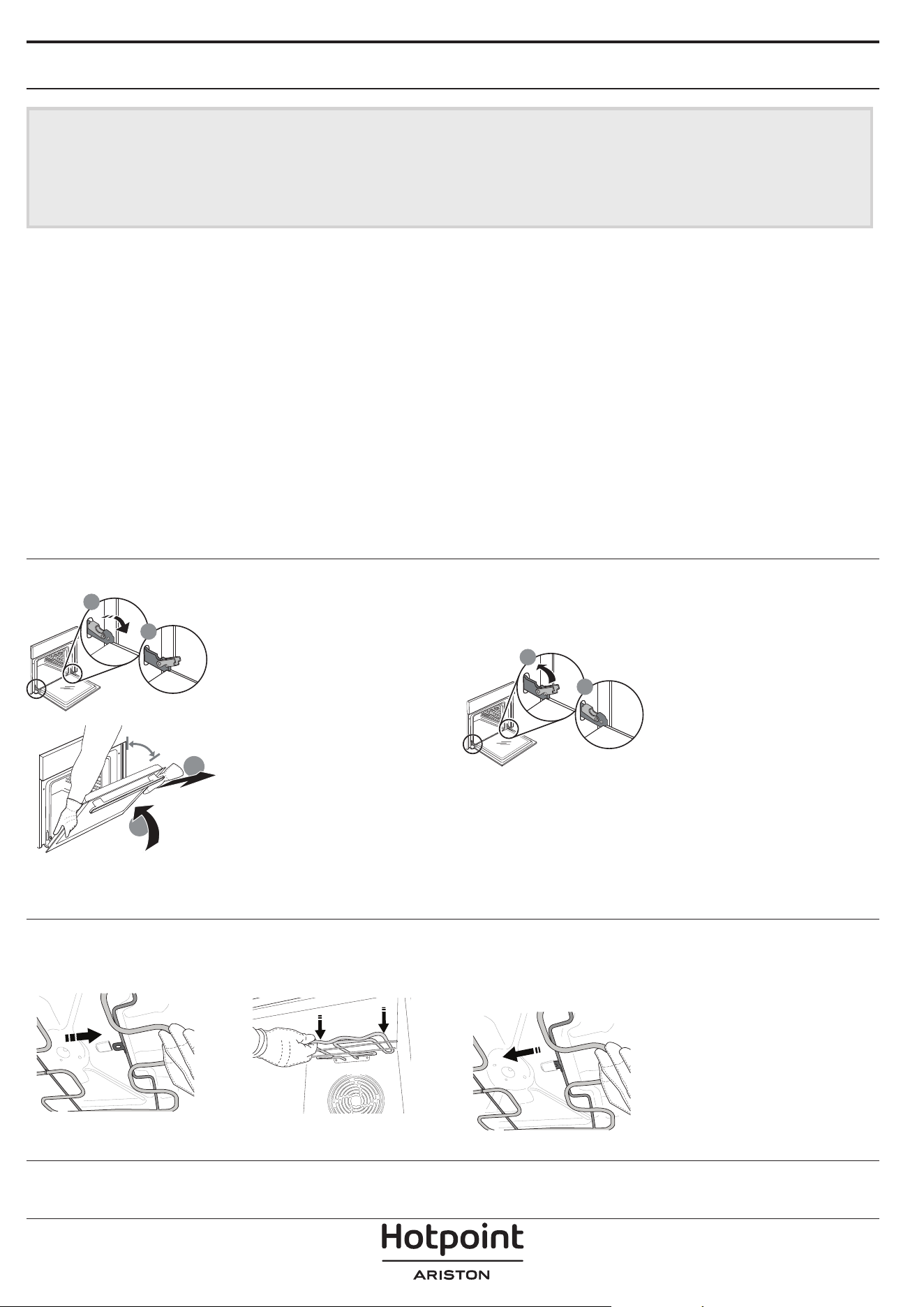
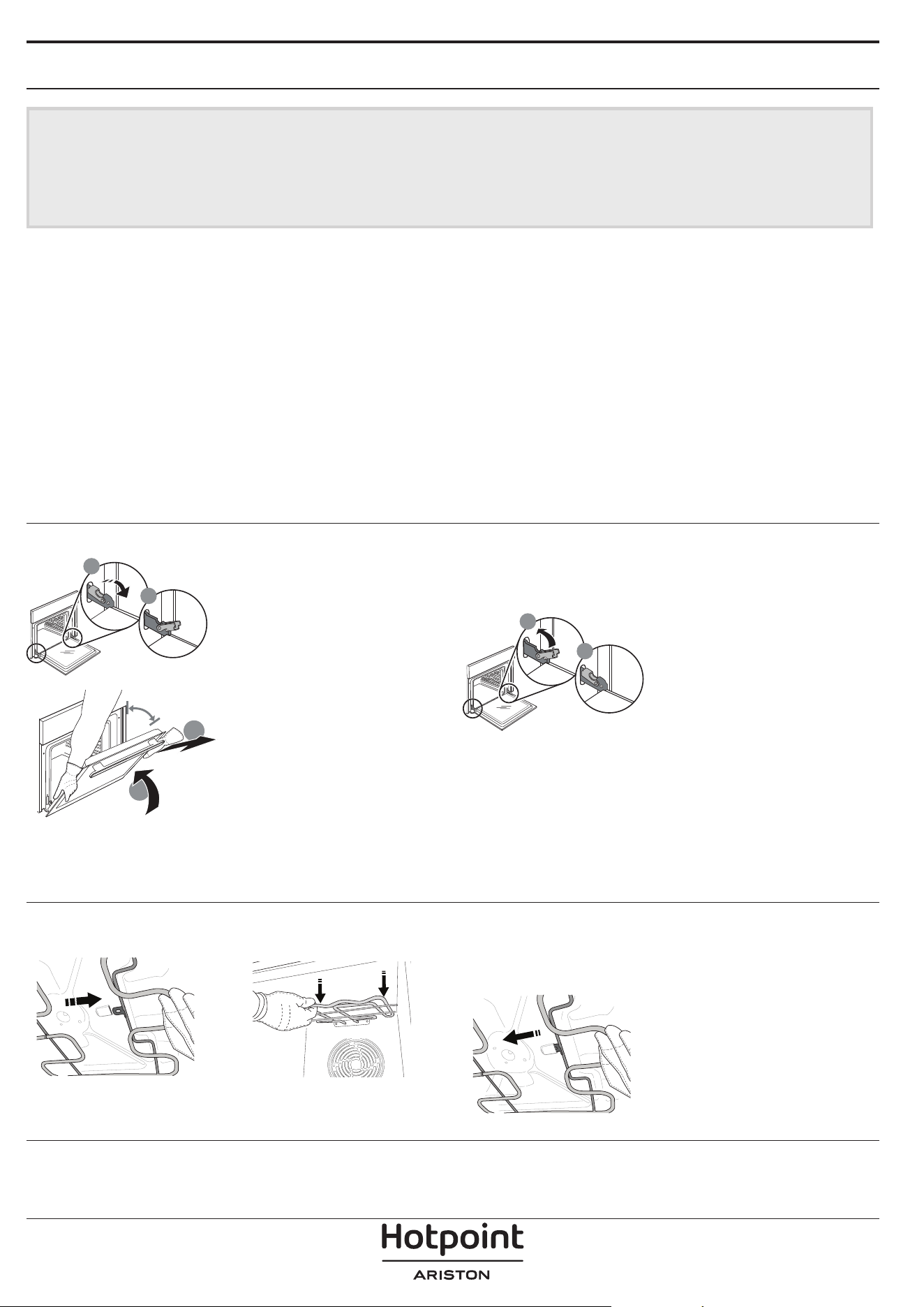
REMOVING AND REFITTING THE DOOR
b
a
1. To remove the door, open
it fully and lower the
catches until they are in the
unlock position.
a
b
~15°
2. Close the door as much
as you can. Take a firm hold
of the door with both hands
– do not hold it by the
handle. Simply remove the
door by continuing to close
it while pulling it upwards
at the same time until it is
released from its seating. Put the door to one side,
resting it on a soft surface.
3. Refit the door by moving it towards the oven,
aligning the hooks of the hinges with their seating
and securing the upper part onto its seating.
b
a
4. Lower the door and then
open it fully. Lower the
catches into their original
position: Make sure that
you lower them down
completely.
Apply gentle pressure to check that the catches are in
the correct position.
5. Try closing the door and check to make sure that it
lines up with the control panel. If it does not, repeat
the steps above: The door could become damaged if
it does not work properly.
LOWER THE UPPER HEATING ELEMENT
1. Extract the heating element from its seating, then
lower it.
2. To return the heating element to its position, lift it
up, pull it slightly towards you and make sure that the
tab support is in its proper seating.
9
REPLACING THE LAMP
1. Disconnect the oven from the power supply.
2. Unscrew the cover from the light, replace the bulb
and screw the cover back on the light.
3. Reconnect the oven to the power supply.
Please note: Use 25 W/230 V type G9, T300 °C halogen lamps.
The bulb used in the product is specically designed for
domestic appliances and is not suitable for general room
lighting within the home (EC Regulation 244/2009).
Light bulbs are available from our After-sales Service. - Do not
handle bulbs with your bare hands as your ngerprints could
damage them. Do not use the oven until the light cover has
been retted.
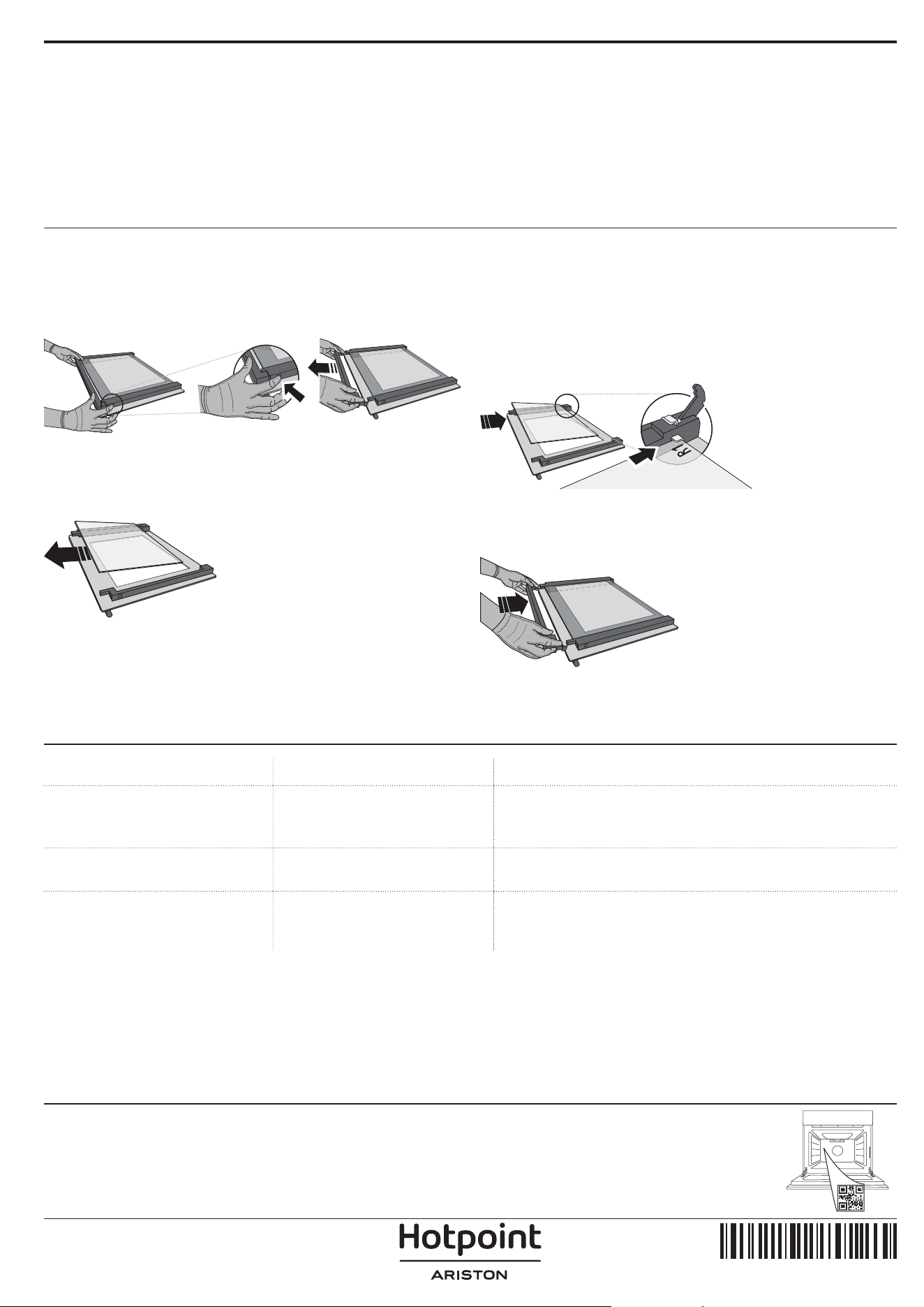
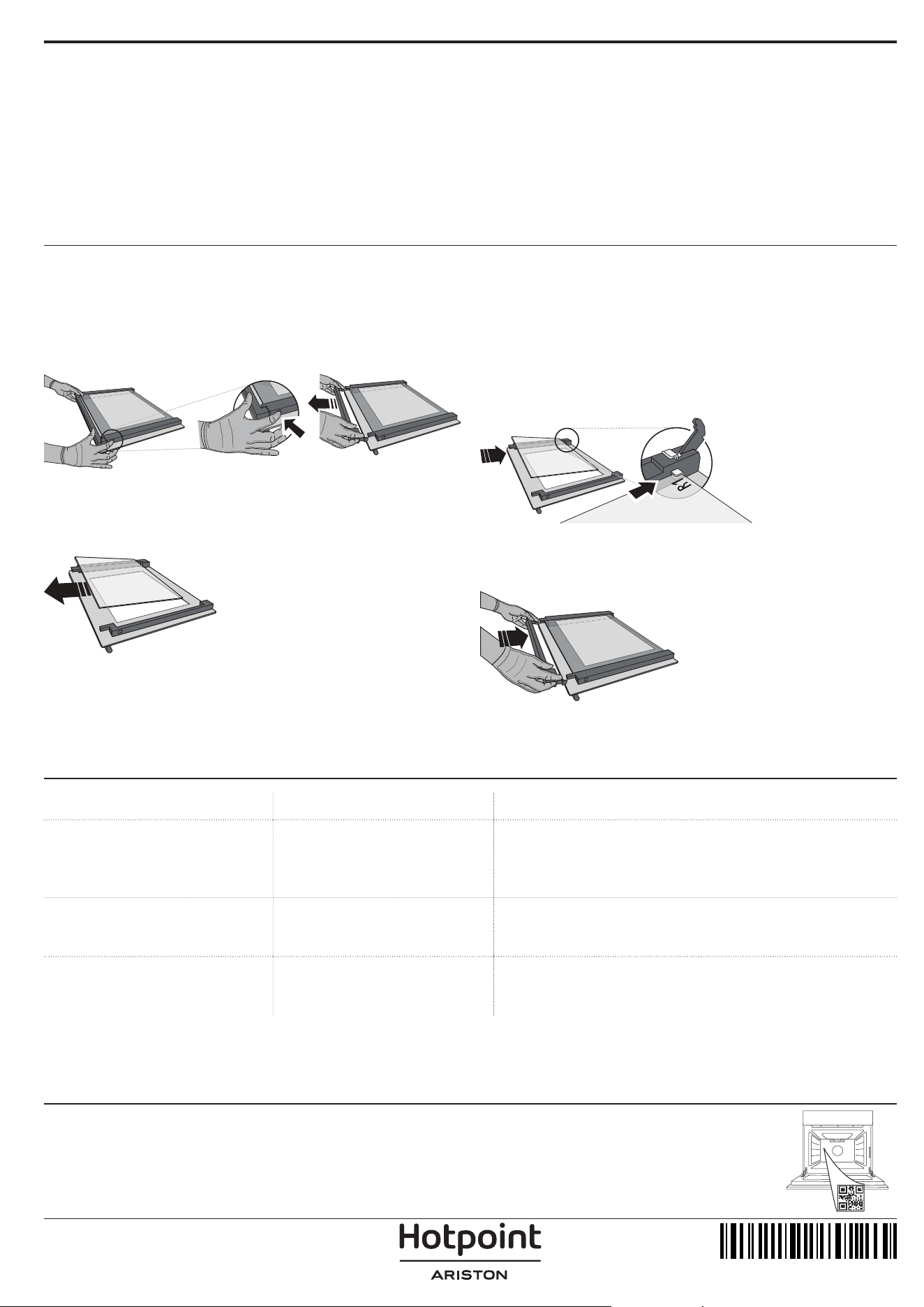
CLEANING THE DOOR GLASSES
1. After removing the door and resting it on a soft
surface with the handle downwards, simultaneously
press the two retaining clips and remove the upper
edge of the door by pulling it towards you.
2. Lift and firmly hold the inner glass with both
hands, remove it and place it on a soft surface before
cleaning it.
3. Refit the intermediate pane (marked with “1R”)
before refitting the inside pane: To position the panes
of glass correctly, make sure that the “R” mark can be
seen in the left-hand corner. First insert the long side
of the glass marked “R” into the support seats, then
lower it into position. Repeat this procedure for both
panes of glass.
4. Refit the upper edge: A click will indicate correct
positioning. Make sure the seal is secure before
refitting the door.
TROUBLESHOOTING
PROBLEM POSSIBLE CAUSE SOLUTION
The oven is not working.
Power cut.
Disconnection from the mains.
Check for the presence of mains electrical power and whether
the oven is connected to the electricity supply.
Turn off the oven and restart it to see if the fault persists.
The display shows the letter “F”
followed by a number or letter.
Oven failure.
Contact you nearest Client After-sales Service Centre and state
the number following the letter “F”.
The display is showing the
message “Hot” and the selected
function will not start.
Temperature too high.
Allow the oven to cool down before activating the function.
Select a different function.
400020013626
Policies, standard documentation and additional product information can be found by:
• Using the QR code in your appliance
• Visiting our website docs . hotpoint . eu
• Alternatively, contact our After-sales Service (See phone number in the warranty booklet). When contacting our After-
sales Service, please state the codes provided on your product's identication plate.
IT
1
Manuale d'uso
DESCRIZIONE DEL PRODOTTO
1
2
8
3
5
7
10
11
4
6
9
1. Pannello comandi
2. Ventola
3. Luce
4. Griglie laterali(il livello è
indicato sulla parete della cavità)
5. Porta
6. Blocco serratura (blocca la
porta durante e dopo la pulizia
automatica)
7. Resistenza superiore / grill
8. Resistenza circolare (non
visibile)
9. Targhetta matricola (da non
rimuovere)
10. Cavità per l'acqua potabile
11. Resistenza inferiore (non
visibile)
DESCRIZIONE DEL PANNELLO
COMANDI
1 32 4 5 6
1. MANOPOLA DI SELEZIONE
Per accendere il forno
selezionando una funzione.
Ruotare in posizione per
spegnere il forno.
2. LAMPADA
A forno acceso, premere per
accendere o spegnere la luce
interna del forno.
3. IMPOSTARE L'ORA
Per accedere alle impostazioni
della durata di cottura, dell'avvio
ritardato e del timer.
A forno spento, per visualizzare
l'ora.
4. DISPLAY
5. TASTI DI REGOLAZIONE
Per modificare le impostazioni di
durata.
6. MANOPOLA TERMOSTATO
Ruotare per selezionare la
temperatura desiderata attivando
le funzioni manuali.
GRAZIE PER AVERE ACQUISTATO UN PRODOTTO
HOTPOINT‑ARISTON
Per ricevere un'assistenza più completa, registrare il
prodotto su www . register10 . eu
SCANSIONARE IL CODICE QR
SUL PROPRIO APPARECCHIO
PER OTTENERE MAGGIORI
INFORMAZIONI
Prima di utilizzare l'apparecchio leggere attentamente
le istruzioni di sicurezza.
Note: Il tipo di manopola può variare a seconda del modello. Se le manopole sono attivate a pressione, spingere verso il basso il
centro della manopola per sbloccarla dalla relativa sede.
2
ACCESSORI
GRIGLIA LECCARDA* PIASTRA DOLCI * GUIDE DI
SCORRIMENTO *
Utilizzare per cuocere gli
alimenti o come supporto per
teglie, tortiere e altre pentole
da forno.
Utilizzare come teglia da forno
per cucinare carne, pesce,
verdure, focacce, ecc. o
posizionare sotto la griglia per
raccogliere i succhi di cottura.
Utilizzare per la cottura di tutti
i prodotti di panetteria e
pasticceria, ma anche per
arrosti, pesce en papillotte,
ecc.
Per facilitare l'inserimento o la
rimozione degli accessori.
* Disponibile solo su alcuni modelli
Il numero e il tipo di accessori possono variare a seconda del modello acquistato.
È possibile acquistare separatamente altri accessori presso il Servizio Assistenza Tecnica.
INSERIRE LA GRIGLIA E GLI ALTRI ACCESSORI
Inserire la griglia tenendola leggermente inclinata
verso l'alto, appoggiando dapprima il lato posteriore
rialzato - orientato verso l'alto - sul livello desiderato.
In seguito, farla scivolare orizzontalmente sulle guide no a
ne corsa.
. Gli altri accessori, per esempio la teglia, vanno
inseriti orizzontalmente facendoli scivolare sulle
guide.
GRIGLIE SCORREVOLI E GUIDE LATERALI
Prima di utilizzare il forno rimuovere il nastro di
protezione [a] e successivamente rimuovere la
pellicola protettiva [b] dalle guide di scorrimento.
RIMOZIONE DELLE GUIDE DI SCORRIMENTO [c]
Tirare la parte inferiore della guida di scorrimento
per sganciare i ganci inferiori (1) e tirare le guide
di scorrimento verso l'alto, rimuovendole dai ganci
superiori (2).
RIMONTAGGIO DELLE GUIDE DI SCORRIMENTO [d]
Agganciare i ganci superiori alle guide dei ripiani
(1), quindi premere la parte inferiore delle guide di
scorrimento contro le guide dei ripiani, fino a far
scattare i ganci inferiori (2).
1
2
1
2
[c] [d]
RIMUOVERE E RIMONTARE LE GRIGLIE LATERALI
1. Per rimuovere le griglie laterali, impugnare la
parte esterna della griglia e tirarla verso di sé
per estrarre il supporto e i due perni interni dai
rispettivi alloggiamenti.
2. Per riapplicare le griglie laterali, posizionarle vicino
alla parete interna del forno e inserire dapprima i
due perni nei rispettivi alloggiamenti. Posizionare
quindi la parte esterna vicino alla sua sede, inserire
il supporto e spingere con decisione verso la
parete del forno per fissare saldamente la griglia.
3
PRIMO UTILIZZO
3. IMPOSTARE L'ORA
Alla prima accensione, è necessario impostare
l'ora: Premere fino a quando l'icona e le due
cifre dell'ora o e dell'orologio iniziano a
lampeggiare sul display.
Utilizzare o per impostare l'ora e premere
per confermare. Le due cifre dei minuti iniziano a
lampeggiare. Utilizzare o per impostare i minuti
e premere per confermare.
Note: quando l’icona lampeggia, ad esempio dopo una
prolungata interruzione di corrente, è necessario impostare
l’ora.
4. RISCALDAMENTO DEL FORNO
Un nuovo forno può rilasciare degli odori dovuti alla
lavorazione di fabbrica: questo è normale.
Prima di cucinare gli alimenti è dunque
raccomandato di riscaldare a vuoto il forno per
rimuovere ogni odore.
Rimuovere protezioni di cartone o pellicole
trasparenti e togliere gli accessori dal forno.
Riscaldare il forno a 250 °C per circa un'ora. Durante
questa procedura il forno deve essere vuoto.
Note: si consiglia di arieggiare il locale dopo il primo utilizzo
dell'apparecchio.
FUNZIONI
STATICO
Per cuocere qualsiasi tipo di pietanza su un
solo ripiano.
VENTILATO
Per cuocere contemporaneamente su più
ripiani (massimo tre) alimenti diversi che richiedono
la medesima temperatura di cottura. Questa funzione
permette di eseguire la cottura senza trasmissione di
odori da un alimento all'altro.
ECO VENTILATO
Per cuocere arrosti e arrosti ripieni su uno
stesso ripiano. La circolazione intermittente dell'aria
impedisce un'eccessiva asciugatura degli alimenti.
In questa funzione ECO la luce rimane spenta durante
la cottura e può essere riaccesa premendo .
GRILL
Per grigliare bistecche, spiedini e salsicce,
cucinare verdure gratinate o tostare il pane.
Quando si griglia la carne, si consiglia di utilizzare
una leccarda per raccogliere i succhi di cottura:
posizionarla un livello sotto la griglia e aggiungere
200 ml di acqua potabile.
TURBO GRILL
Per arrostire grandi tagli di carne (cosce, roast
beef, pollo). Si consiglia di utilizzare una leccarda
per raccogliere i succhi di cottura: posizionarla un
livello sotto la griglia e aggiungere 200 ml di acqua
potabile.
PANE AUTO
Questa funzione seleziona automaticamente
temperatura e tempo ideali per la cottura del pane.
Per ottenere i migliori risultati seguire attentamente
la ricetta. Attivare la funzione quando il forno è
freddo.
TORTE DOLCI AUTO
Questa funzione seleziona automaticamente
temperatura e tempo ideali per la cottura dei dolci.
Attivare la funzione quando il forno è freddo.
DIAMOND CLEAN
L'azione del vapore rilasciato durante questo
speciale ciclo di pulizia a bassa temperatura permette
di rimuovere facilmente sporco e residui di cibo.
Versare 100-120 ml di acqua potabile sul fondo del
forno, quindi ruotare la manopola di selezione e la
manopola del termostato sull'icona . Si consiglia di
utilizzare la funzione per 35 minuti.
Attivare la funzione a forno freddo e lasciarlo
raffreddare per 15 minuti al termine del ciclo.
la posizione dell'icona non corrisponde alla
temperatura raggiunta durante il ciclo di pulizia.
4
USO QUOTIDIANO
1. SELEZIONARE UNA FUNZIONE
Per selezionare una funzione, ruotare la manopola
di selezione in corrispondenza del simbolo per la
funzione desiderata: il display si accende e il forno
emette un segnale acustico.
2. AVVIARE UNA FUNZIONE
MANUALE
Per avviare la funzione selezionata, ruotare la
manopola termostato per impostare la temperatura
desiderata.
Note: durante la cottura sarà possibile modicare la funzione
ruotando la manopola di selezione o regolare la temperatura
ruotando la manopola termostato. La funzione non si avvierà
no a quando la manopola termostato sarà su Sarà
possibile impostare durata di cottura, ora di ne cottura (solo
se è impostata una durata di cottura) e timer.
LIEVITAZIONE
Per avviare la funzione "Rising" (Lievitazione),
ruotare la manopola del termostato sul simbolo
corrispondente; se il forno è impostato su una
temperatura diversa, la funzione non si avvia.
Note: Sarà possibile impostare la durata, l'ora di ne cottura
(solo se è impostata una durata) e il timer.
3. PRERISCALDAMENTO
Una volta avviata la funzione, un segnale acustico e
l’icona lampeggiante sul display segnalano che si è
attivata la fase di preriscaldamento.
Al termine di questa fase, un segnale acustico e
l’icona fissa sul display indicheranno che il forno
ha raggiunto la temperatura impostata: a questo
punto, posizionare gli alimenti all'interno e procedere
con la cottura.
Note: inserire gli alimenti nel forno prima della ne del
preriscaldamento può compromettere i risultati di cottura.
4. PROGRAMMAZIONE DELLA COTTURA
Per programmare la cottura è necessario aver
selezionato precedentemente una funzione.
DURATA
Premere tante volte fino a che sul display
lampeggiano l’icona e “00:00”.
Utilizzare o per impostare la durata desiderata,
quindi premere per confermare.
Attivare la funzione ruotando la manopola termostato
in corrispondenza della temperatura desiderata
o necessaria: un segnale acustico e il display
avviseranno del termine della cottura.
Note: Per annullare la durata impostata, premere tante
volte fino a che sul display lampeggia l’icona , quindi
utilizzare per riportare la durata a “00:00”. La durata
impostata include la fase di preriscaldamento.
PROGRAMMARE L'ORA DI FINE COTTURA/
AVVIO RITARDATO
Una volta impostata una durata sarà possibile
posticipare l'avvio della funzione, programmandone
l'ora di fine: premere fino a che sul display non
lampeggiano l’icona e l’ora corrente.
Utilizzare o per impostare l’ora di fine cottura
desiderata e premere per confermare.
Attivare la funzione ruotando la manopola termostato
in corrispondenza della temperatura desiderata
o necessaria: la funzione resterà in pausa fino ad
avviarsi automaticamente dopo un periodo di tempo
calcolato per terminare la cottura all'orario impostato.
Note: per annullare l'impostazione, spegnere il forno
ruotando la manopola di selezione sulla posizione .
La funzionalità di ritardo di avvio non è disponibile
per le funzioni Grill e Turbo Grill.
FINE COTTURA
Un segnale acustico e il display avvisano del termine
della funzione.
Ruotare la manopola di selezione per selezionare una
funzione diversa o su per spegnere il forno.
Note: se attivo il timer, il display mostrerà la scritta “END” in
alternanza al tempo rimanente.
5
5. IMPOSTAZIONE DEL TIMER
Questa opzione non interrompe né programma la
cottura ma permette di utilizzare il display come
contaminuti, sia durante una funzione attiva che
quando il forno è spento.
Premere ripetutamente finché sul display
lampeggiano l'icona e "00:00".
Utilizzare o per impostare la durata desiderata
e premere per confermare. Un segnale acustico
avviserà del termine del conto alla rovescia.
Note: per disattivare il timer, premere tante volte no a che
l’icona lampeggia, quindi utilizzare per riportare la
durata a “00:00”.
NOTE
• Non coprire l'interno del forno con pellicola di
alluminio.
• Non trascinare pentole o tegami sul fondo del
forno, perché così facendo si potrebbe rovinare
lo smalto.
• Non posizionare oggetti pesanti sulla porta e
non aggrapparsi alla porta.
6
TABELLA DI COTTURA
RICETTA FUNZIONE PRERISC. TEMPERATURA (°C) DURATA (Min) LIVELLO E ACCESSORI
Torte lievitate
Sì 160-180 30 - 90
2/3
Sì 160-180 30 - 90 ***
4
1
Torte ripiene
(cheese cake, strudel, torte di frutta)
Sì 160 – 200 35 - 90
2
Sì 160 – 200 35 - 90 ***
4
2
Biscotti/Tortine
Sì 170-180 15 - 45
3
Sì 160 -180 20 - 45 ***
4
2
Bigné
Sì 180 - 220 30 - 40
3
Sì 180 - 190 35 - 45 ***
4 2
Meringhe
Sì 90 150 - 200
3
Sì 90 140 - 200
4 2
Pizza/Focaccia
Sì 190 - 250 15 - 50
1 / 2
Sì 190 - 250 20 - 50 ***
4 2
Pane - - 60
2
Pizza surgelata
Sì 250 10 - 15
3
Sì 250 10 - 20 ***
3 2
Torte salate
(torte di verdura, quiche)
Sì 175 - 200 40 - 60
3
Sì 175 - 200 45 - 60 ***
4 2
Vol-au-vent / Salatini di pasta
sfoglia
Sì 190 - 200 20 - 30
3
Sì 180 - 190 15 - 40 ***
4 2
Lasagne / Pasta al forno /
Cannelloni / Sformati
Sì 190 - 200 45 - 65
2
Agnello / Vitello / Manzo / Maiale
1 kg
Sì 190 - 200 80 - 110
3
Maiale arrosto con cotenna 2 kg Sì 180 - 190 110 - 150
2
Pollo / Coniglio / Anatra 1 kg Sì 200 - 230 50 - 100
2
Tacchino / Oca 3 kg - 190 - 200 100 - 160
2
Verdure ripiene
(pomodori, zucchine, melanzane)
Sì 180 - 200 50 - 70
2
Pane tostato 5’ 250 2 - 6
5
Filetti / tranci di pesce - 230 - 250 15 - 30 *
4 3
Salsicce / Spiedini /
Costine / Hamburger
- 250 15 - 30 *
5 4
Pollo arrosto 1-1,3 kg Sì 200 - 220 55 - 70 **
2 1
Roast beef al sangue 1 kg Sì 200 - 210 35 - 50 **
3
Cosciotto di agnello / Stinchi Sì 200 - 210 60 - 90 **
3
FUNZIONI
Statico Ventilato Pane Auto Grill Turbo Grill
Eco Ventilato
ACCESSORI
Griglia Teglia o tortiera su griglia
Teglia / Leccarda o teglia su
griglia
Leccarda / Teglia
Leccarda / teglia con
200 ml d'acqua
7
RICETTA FUNZIONE PRERISC. TEMPERATURA (°C) DURATA (Min) LIVELLO E ACCESSORI
Patate arrosto Sì 200 - 210 35 - 55**
3
Verdure gratinate - 200 - 210 25 - 55
3
Carne & Patate Sì 190 - 200 45 - 100 ***
4 1
Pesce & Verdure Sì 180 30 - 50 ***
4 1
Lasagne e carne Sì 200 50 - 100 ***
4 1
Arrosti / Arrosti ripieni - 170 - 180 100 - 150
2
* Ruotare il cibo a metà cottura
** Girare gli alimenti a due terzi di cottura se necessario.
*** Tempo di cottura approssimativo: i piatti possono essere
estratti dal forno in momenti diversi, a seconda delle
preferenze personali.
FUNZIONI
Statico Ventilato Grill Turbo Grill Eco Ventilato
ACCESSORI
Griglia Teglia o tortiera su griglia
Teglia / Leccarda o teglia su
griglia
Leccarda / Teglia
Leccarda / teglia con
200 ml d'acqua
8
PULIZIA E MANUTENZIONE
Assicurarsi che il forno si sia
raffreddato prima di effettuare
qualsiasi intervento di
manutenzione o pulizia.
Non utilizzare pulitori a vapore.
Non utilizzare lana metallica,
pagliette abrasive o detergenti
abrasivi/corrosivi, perché
potrebbero danneggiare le
superfici dell'apparecchio.
Indossare guanti protettivi.
Il forno deve essere scollegato
dalla rete elettrica prima di
effettuare qualsiasi tipo di
manutenzione.
Assicurarsi che il forno si sia
raffreddato prima di effettuare
qualsiasi intervento di
manutenzione o pulizia.
Non utilizzare pulitori a vapore.
Non utilizzare lana metallica,
pagliette abrasive o detergenti
abrasivi/corrosivi, perché
potrebbero danneggiare le
superfici dell'apparecchio.
Indossare guanti protettivi.
Il forno deve essere scollegato
dalla rete elettrica prima di
effettuare qualsiasi tipo di
manutenzione.
SUPERFICI ESTERNE
Pulire le superfici con un panno in microfibra umido.
Se molto sporche, aggiungere qualche goccia di
detergente con pH neutro. Asciugare con un panno.
Non utilizzare detergenti corrosivi o abrasivi. Se
inavvertitamente uno di questi prodotti dovesse
venire a contatto con le superfici, pulire subito con
un panno in microfibra umido.
SUPERFICI INTERNE
• Dopo ogni uso, lasciare raffreddare il forno e
pulirlo preferibilmente quando è ancora tiepido
per rimuovere incrostazioni e macchie dovute a
residui di cibo. per asciugare la condensa dovuta
alla cottura di alimenti ad alto contenuto di acqua,
usare a forno freddo un panno o una spugna.
• In caso di sporco tenace sulle superfici interne,
si raccomanda di utilizzare la funzione di pulizia
automatica. Non avviare il ciclo di pulizia pirolitica
se il forno presenta residui di calcare. Pulire prima i
residui di calcare come descritto in precedenza.
• Per facilitare la pulizia dei vetri è possibile
rimuovere e smontare la porta.
• Pulire i vetri della porta con detergenti liquidi specici.
ACCESSORI
Mettere a bagno gli accessori con detersivo per piatti
dopo l'uso, maneggiandoli con guanti da forno, se
ancora caldi. I residui di cibo possono essere rimossi
con una spazzola per piatti o con una spugna.
RIMOZIONE E MONTAGGIO DELLA PORTA
b
a
1. Per rimuovere la porta,
aprirla completamente e
abbassare i fermi fino alla
posizione di sblocco.
a
b
~15°
2. Chiudere la porta fino a
quando è possibile.
Prendere saldamente la
porta con entrambe le
mani, evitando di tenerla
per la maniglia. È sufficiente
rimuovere la porta
continuando a chiuderla e
tirandola contemporaneamente verso l'alto, finché
non si sgancia dalla propria sede. Togliere la porta e
appoggiarla su un piano morbido.
3. Per rimontare la porta, avvicinarla al forno
allineando i ganci delle cerniere alle proprie sedi e
ancorare la parte superiore agli alloggiamenti.
b
a
4. Abbassare la porta e poi
aprirla completamente.
Abbassare i fermi nella
posizione originale: fare
attenzione che siano
completamente abbassati.
Applicare una leggera pressione per verificare che i
fermi siano nella posizione corretta.
5. Provare a chiudere la porta, verificando che
sia allineata al pannello di controllo. Nel caso
non lo fosse, ripetere i passi sopra descritti: La
porta potrebbe danneggiarsi se non funziona
correttamente.
ABBASSAMENTO DELLA RESISTENZA SUPERIORE
1. estrarre la resistenza dalla sede e abbassarla. 2. Per reinserire la resistenza in posizione, sollevarla,
tirarla leggermente verso di sé e controllare che il
supporto sia posizionato correttamente.
9
SOSTITUZIONE DELLA LAMPADINA
1. Scollegare il forno dalla rete elettrica.
2. Svitare il coperchio dalla luce, sostituire la
lampadina e riavvitare il coperchio sulla luce.
3. Ricollegare il forno alla rete elettrica.
Note: Utilizzare lampadine alogene da 25 W/230 V di tipo G9,
T300 °C. La lampadina utilizzata nel prodotto è progettata
specicamente per gli apparecchi domestici e non è adatta
all'illuminazione generale degli ambienti domestici
(Regolamento CE 244/2009).
Le lampade sono disponibili presso il Servizio Assistenza
Tecnica. - Non maneggiare le lampadine a mani nude, perché
le impronte digitali potrebbero danneggiarle. Non far
funzionare il forno senza prima aver riposizionato il coperchio.
PULIZIA DEI VETRI DELLA PORTA
1. Dopo aver smontato la porta e averla appoggiata
su un ripiano morbido con la maniglia verso il
basso, premere contemporaneamente le due clip di
fissaggio ed estrarre il profilo superiore della porta
tirandolo verso di sé.
2. Sollevare e prendere saldamente il vetro interno
con due mani, rimuoverlo e appoggiarlo su un piano
morbido prima di eseguire la pulizia.
3. Prima di rimontare il vetro interno è necessario
riapplicare il vetro intermedio (contrassegnato
con “1R”): Per posizionare correttamente i vetri,
verificare che la marcatura "R" sia visibile nell'angolo
sinistro. Inserire dapprima il lato lungo del vetro
contrassegnato con "R" nelle sedi di sostegno, quindi
abbassarlo in posizione. Ripetere la procedura per
entrambi i vetri.
4. Rimontare il profilo superiore: Un clic indicherà il
posizionamento corretto. Verificare che la tenuta sia
salda prima di rimontare la porta.
RISOLUZIONE DEI PROBLEMI
PROBLEMA POSSIBILE CAUSA SOLUZIONE
Il forno non funziona.
Interruzione di corrente elettrica.
Disconnessione dalla rete
principale.
Verificare che ci sia tensione in rete e che il forno sia collegato
all'alimentazione elettrica.
Spegnere e riaccendere il forno e verificare se l'inconveniente
persiste.
Il display visualizza la lettera "F"
seguita da un numero o da una
lettera.
Errore forno.
Contattare il Servizio Assistenza Tecnica Clienti più vicino e
indicare il numero che segue la lettera "F".
Il display visualizza il messaggio
"Hot" (Caldo) e la funzione
selezionata non si avvia.
Temperatura troppo alta.
Lasciar raffreddare il forno prima di attivare la funzione.
Selezionare una funzione diversa.
400020013626
Per le linee guida, la documentazione standard e altre informazioni sui prodotti:
• Utilizzare il codice QR sul proprio apparecchio
• Visitare il sito web docs . hotpoint . eu
• Oppure, contattare il Servizio Assistenza Tecnica (al numero di telefono riportato sul libretto di garanzia). Prima di
contattare il Servizio Assistenza Clienti, prepararsi a fornire i codici riportati sulla targhetta matricola del prodotto.