
Product Name and Model Number User
Manual
Page | 1 Copyright©2020 ZKTECO CO., LTD. All rights reserved.
Thank you for choosing our product. Please read the instructions carefully
before operation. Follow these instructions to ensure that the product is
functioning properly. The images shown in this manual are for illustrative
purposes only.
For further details, please visit our Company’s website
www.zkteco.com.
USER MANUAL
TBL301
Version: 1.0
Date: December 2023
English

TLEB301 User Manual
Page | 1 Copyright©2023 ZKTECO CO., LTD. All rights reserved.
Copyright © 2023 ZKTECO CO., LTD. All rights reserved.
Without the prior written consent of ZKTeco, no portion of this manual can be copied or forwarded in
any way or form. All parts of this manual belong to ZKTeco and its subsidiaries (hereinafter the
"Company" or "ZKTeco").
Trademark
is a registered trademark of ZKTeco. Other trademarks involved in this manual are owned
by their respective owners.
Disclaimer
This manual contains information on the operation and maintenance of the ZKTeco equipment. The
copyright in all the documents, drawings, etc. in relation to the ZKTeco supplied equipment vests in
and is the property of ZKTeco. The contents hereof should not be used or shared by the receiver with
any third party without express written permission of ZKTeco.
The contents of this manual must be read as a whole before starting the operation and maintenance of
the supplied equipment. If any of the content(s) of the manual seems unclear or incomplete, please
contact ZKTeco before starting the operation and maintenance of the said equipment.
It is an essential pre-requisite for the satisfactory operation and maintenance that the operating and
maintenance personnel are fully familiar with the design and that the said personnel have received
thorough training in operating and maintaining the machine/unit/equipment. It is further essential for
the safe operation of the machine/unit/equipment that personnel has read, understood and followed
the safety instructions contained in the manual.
In case of any conflict between terms and conditions of this manual and the contract specifications,
drawings, instruction sheets or any other contract-related documents, the contract
conditions/documents shall prevail. The contract specific conditions/documents shall apply in priority.
ZKTeco offers no warranty, guarantee or representation regarding the completeness of any information
contained in this manual or any of the amendments made thereto. ZKTeco does not extend the
warranty of any kind, including, without limitation, any warranty of design, merchantability or fitness
for a particular purpose.
ZKTeco does not assume responsibility for any errors or omissions in the information or documents
which are referenced by or linked to this manual. The entire risk as to the results and performance
obtained from using the information is assumed by the user.
ZKTeco in no event shall be liable to the user or any third party for any incidental, consequential,
indirect, special, or exemplary damages, including, without limitation, loss of business, loss of profits,
business interruption, loss of business information or any pecuniary loss, arising out of, in connection
with, or relating to the use of the information contained in or referenced by this manual, even if ZKTeco
has been advised of the possibility of such damages.
This manual and the information contained therein may include technical, other inaccuracies or
typographical errors. ZKTeco periodically changes the information herein which will be incorporated

TLEB301 User Manual
Page | 2 Copyright©2023 ZKTECO CO., LTD. All rights reserved.
into new additions/amendments to the manual. ZKTeco reserves the right to add, delete, amend or
modify the information contained in the manual from time to time in the form of circulars, letters, notes,
etc. for better operation and safety of the machine/unit/equipment. The said additions or amendments
are meant for improvement /better operations of the machine/unit/equipment and such amendments
shall not give any right to claim any compensation or damages under any circumstances.
ZKTeco shall in no way be responsible (i) in case the machine/unit/equipment malfunctions due to any
non-compliance of the instructions contained in this manual (ii) in case of operation of the
machine/unit/equipment beyond the rate limits (iii) in case of operation of the machine and equipment
in conditions different from the prescribed conditions of the manual.
The product will be updated from time to time without prior notice. The latest operation procedures
and relevant documents are available on http://www.zkteco.com
.
If there is any issue related to the product, please contact us.
ZKTeco Headquarters
Address ZKTeco Industrial Park, No. 32, Industrial Road,
Tangxia Town, Dongguan, China.
Phone +86 769 - 82109991
Fax +86 755 - 89602394
For business related queries, please write to us at: sales@zkteco.com
.
To know more about our global branches, visit www.zkteco.com.

TLEB301 User Manual
Page | 3 Copyright©2023 ZKTECO CO., LTD. All rights reserved.
About the Company
ZKTeco is one of the world’s largest manufacturer of RFID and Biometric (Fingerprint, Facial, Finger-vein)
readers. Product offerings include Access Control readers and panels, Near & Far-range Facial
Recognition Cameras, Elevator/floor access controllers, Turnstiles, License Plate Recognition (LPR) gate
controllers and Consumer products including battery-operated fingerprint and face-reader Door Locks.
Our security solutions are multi-lingual and localized in over 18 different languages. At the ZKTeco
state-of-the-art 700,000 square foot ISO9001-certified manufacturing facility, we control manufacturing,
product design, component assembly, and logistics/shipping, all under one roof.
The founders of ZKTeco have been determined for independent research and development of
biometric verification procedures and the productization of biometric verification SDK, which was
initially widely applied in PC security and identity authentication fields. With the continuous
enhancement of the development and plenty of market applications, the team has gradually
constructed an identity authentication ecosystem and smart security ecosystem, which are based on
biometric verification techniques. With years of experience in the industrialization of biometric
verifications, ZKTeco was officially established in 2007 and now has been one of the globally leading
enterprises in the biometric verification industry owning various patents and being selected as the
National High-tech Enterprise for 6 consecutive years. Its products are protected by intellectual
property rights.
About the Manual
This manual introduces the operations of TLEB301.
All figures displayed are for illustration purposes only. Figures in this manual may not be exactly
consistent with the actual products.
Features and parameters with
★ are not available in all devices.
TLEB301 User Manual
Page | 4 Copyright©2023 ZKTECO CO., LTD. All rights reserved.
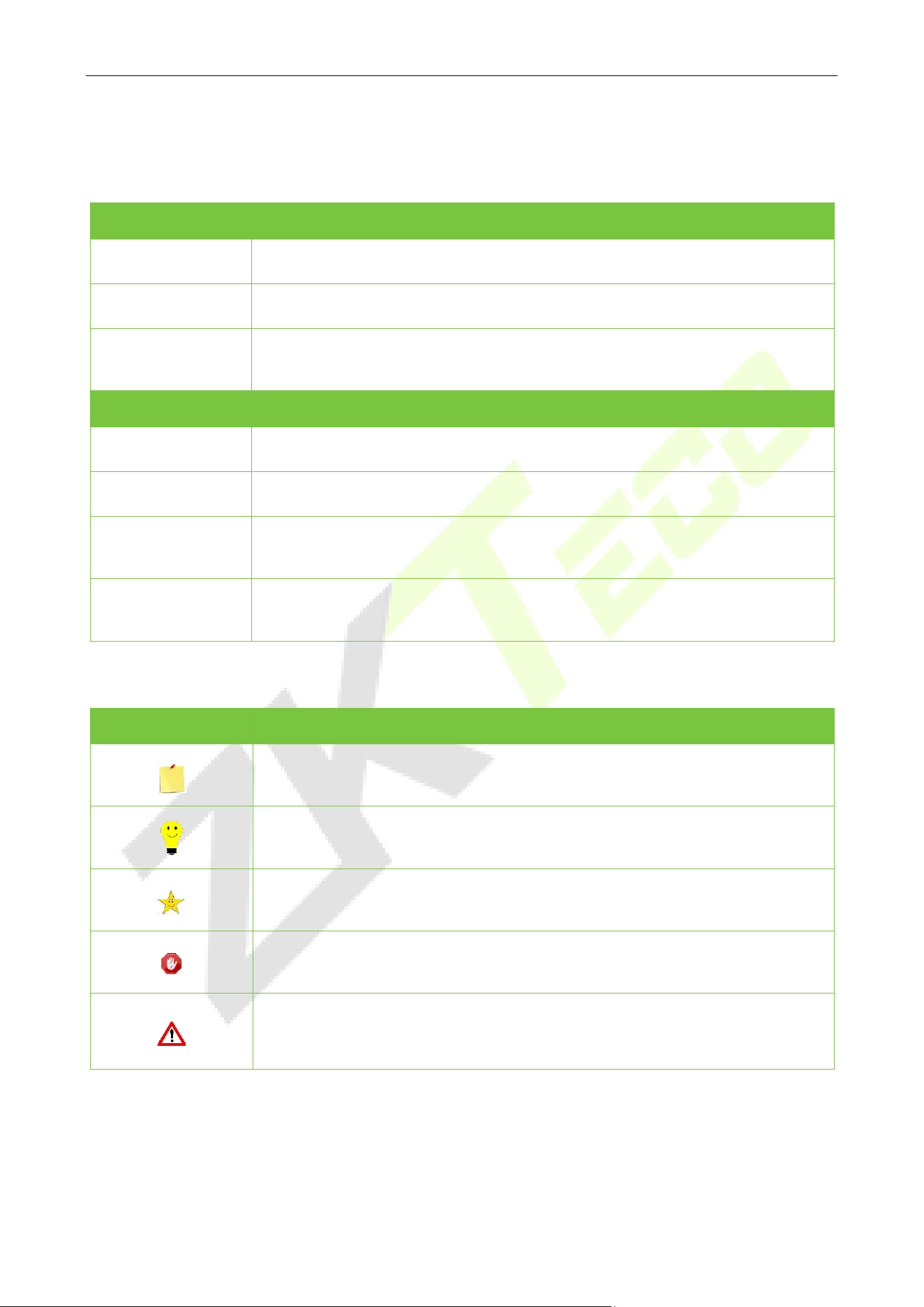
Document Conventions
Conventions used in this manual are listed below:
GUI Conventions
For Software
Convention Description
Bold font Used to identify software interface names e.g. OK, Confirm, Cancel.
>
Multi-level menus are separated by these brackets. For example, File > Create >
Folder.
For Device
Convention Description
< >
Button or key names for devices. For example, press <OK>.
[ ]
Window names, menu items, data table, and field names are inside square
brackets. For example, pop up the [New User] window.
/
Multi-level menus are separated by forwarding slashes. For example,
File/Create/Folder.
Symbols
Convention Description
This represents a note that needs to pay more attention to.
The general information which helps in performing the operations faster.
The information which is significant.
Care taken to avoid danger or mistakes.
The statement or event that warns of something or that serves as a cautionary
example.

TLEB301 User Manual
Page | 5 Copyright©2023 ZKTECO CO., LTD. All rights reserved.
TABLE OF CONTENTS
1 OVERVIEW .......................................................................................................................................... 6
PRODUCT OVERVIEW .................................................................................................................................................................................... 6
PRODUCT APPEARANCE ............................................................................................................................................................................... 6
PRODUCT FEATURES ..................................................................................................................................................................................... 6
SPECIFICATION .............................................................................................................................................................................................. 7
2 TERMINAL AND CABLE DESCRIPTION .............................................................................................. 8
TERMINAL BLOCK .......................................................................................................................................................................................... 8
CABLE DESCRIPTION ..................................................................................................................................................................................... 8
2.2.1 CONNECT TO THE POWER SUPPLY ........................................................................................................................................................ 8
2.2.2 CONNECT TO THE ACCESS CONTROL DEVICE .................................................................................................................................... 9
3 INSTALLATION ................................................................................................................................. 10
4 OPERATION INSTRUCTIONS ........................................................................................................... 11
REMOTE ALIGNMENT ................................................................................................................................................................................. 11
OPERATION INSTRUCTION ......................................................................................................................................................................... 12
TLEB301 User Manual
Page | 6 Copyright©2023 ZKTECO CO., LTD. All rights reserved.
1 Overview
Product Overview
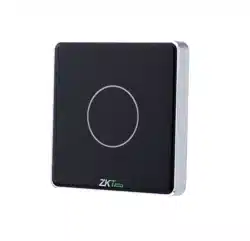
TLEB301 products are ZKTeco's intelligent touch switches, which use 2.5D tempered glass and a metal
frame design to create a basic fashion style, polished, and small device. The device features a touch
detecting module to enable light-touch door opening, and the remote control can be used to open the
door remotely, allowing for various usage situations.
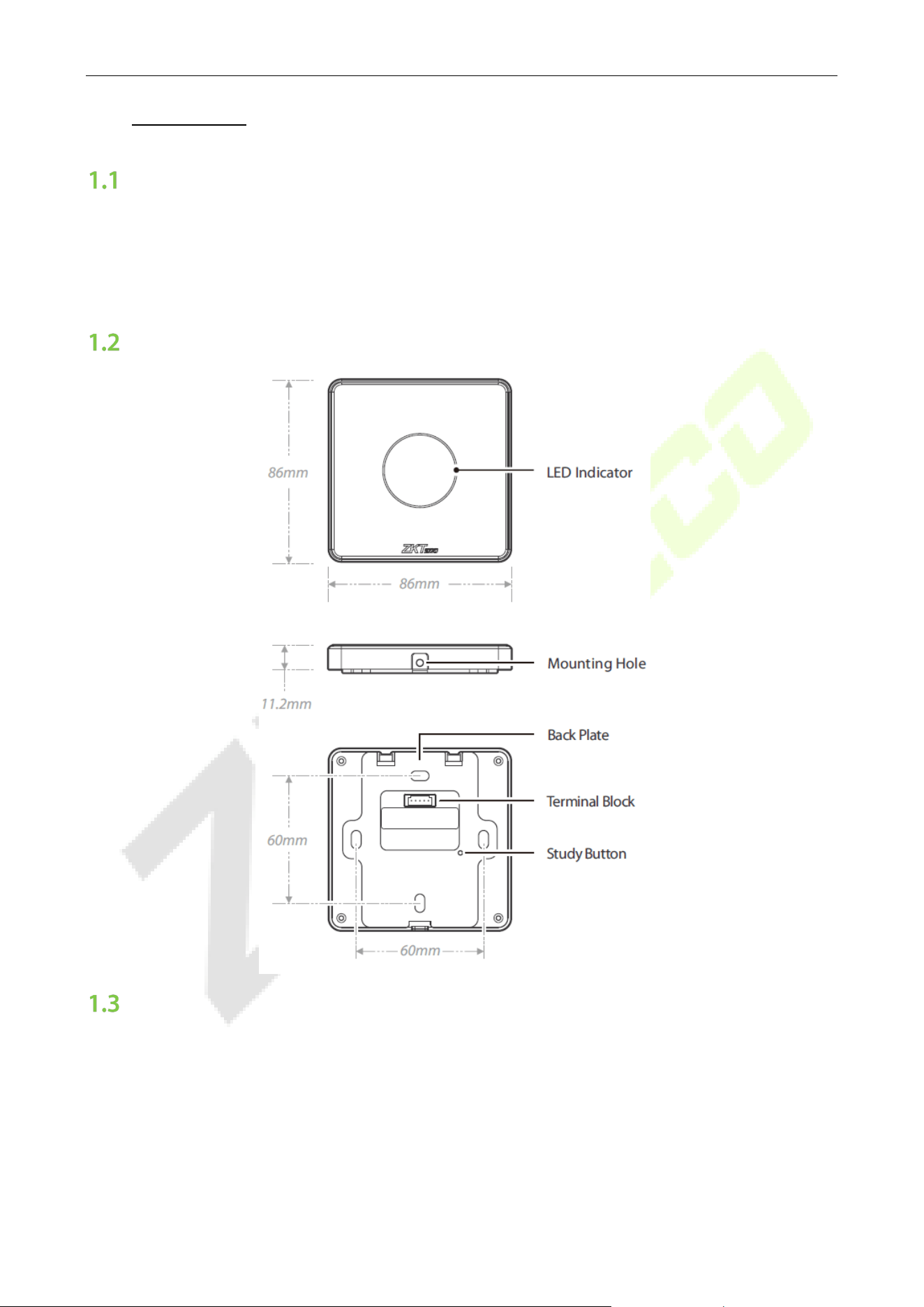
Product Appearance
Product Features
• 2.5D tempered glass and metal frame design.
• Light-touch to open the door.
• Asian gang boxes installed.
• Supports remote control to open doors.
• Pair up to 6 remote controls.

TLEB301 User Manual
Page | 7 Copyright©2023 ZKTECO CO., LTD. All rights reserved.
Specification
Specification Description
Product Model
TLEB301
Processor
CPU: Arm® Cortex®-M0 @ max. up to 48MHz
Casing Material
Aluminium Alloy
2.5D Tempered glass panel
Anti-static
Contact Discharge ± 6KV
Air discharge ± 8KV
Power
DC 12V 1A
Current Draw ≤200mA
Status Indicator
White: Standby
Green: Go / Allow to Proceed
Red: Stop / Do Not Proceed
Remote Control Communication
433 MHz
Remote Control Distance
15m
Number of Remote Control Support
Max. 6 remote control
(Optional; Separate purchases required)
Operating Temperature
0°C to 45°C
Operating Humidity
20% to 90% RH (Non-condensing)
Supported Panel
InBio Series, C3 Series, EC16
Ingress Protection Rating
IK04 (Vandal-Resistant)
Operating Environment
Indoor
Dimensions
86*86*11.2mm (L*W*D)
Mounting Method
Asian gang box
Color
Black & White
Certifications
ISO9001, ISO14001, CE, FCC
TLEB301 User Manual
Page | 8 Copyright©2023 ZKTECO CO., LTD. All rights reserved.
2 Terminal and Cable Description
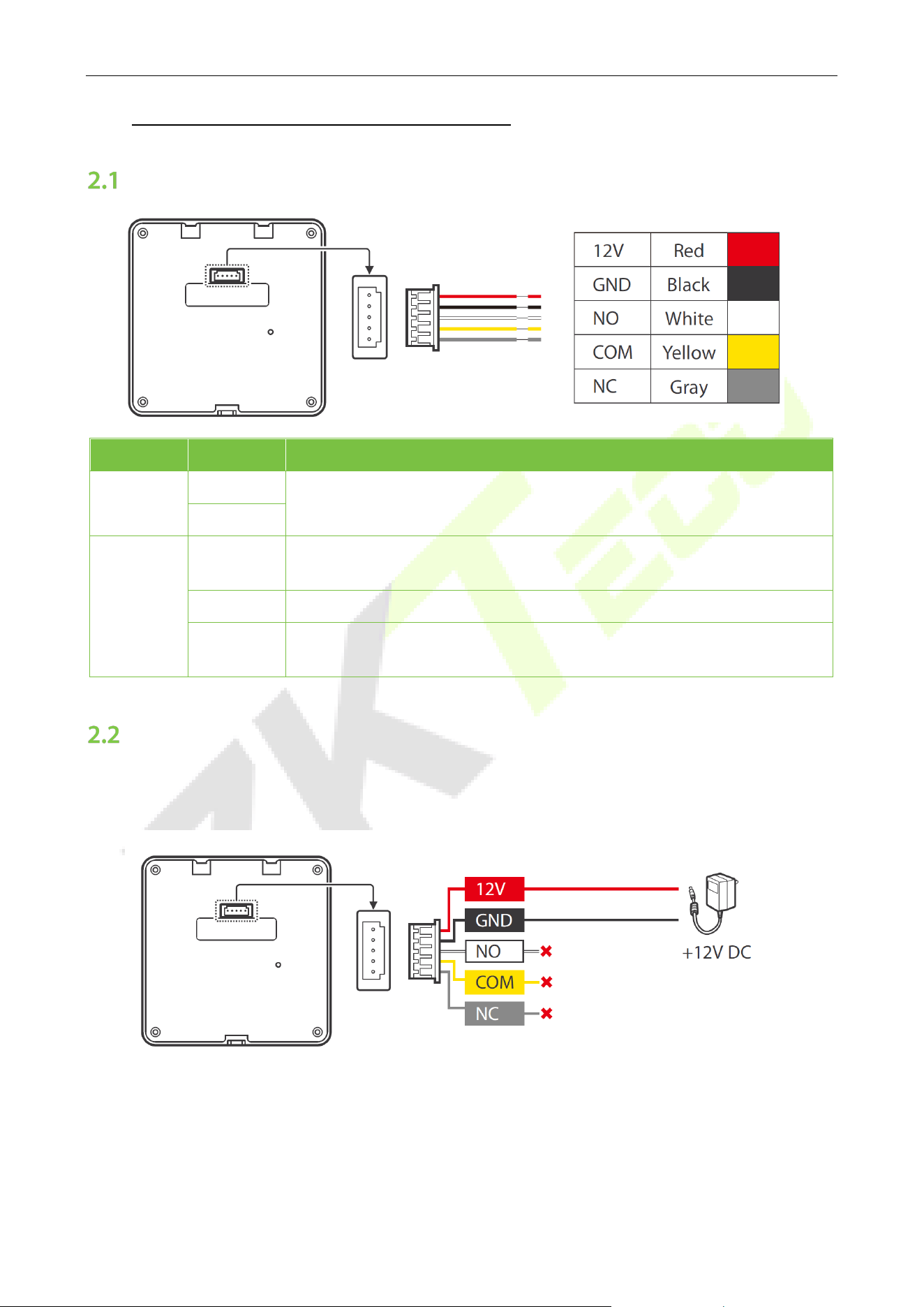
Terminal Block
Name Terminal Description
Power
12V
DC12V power supply.
GND
Output
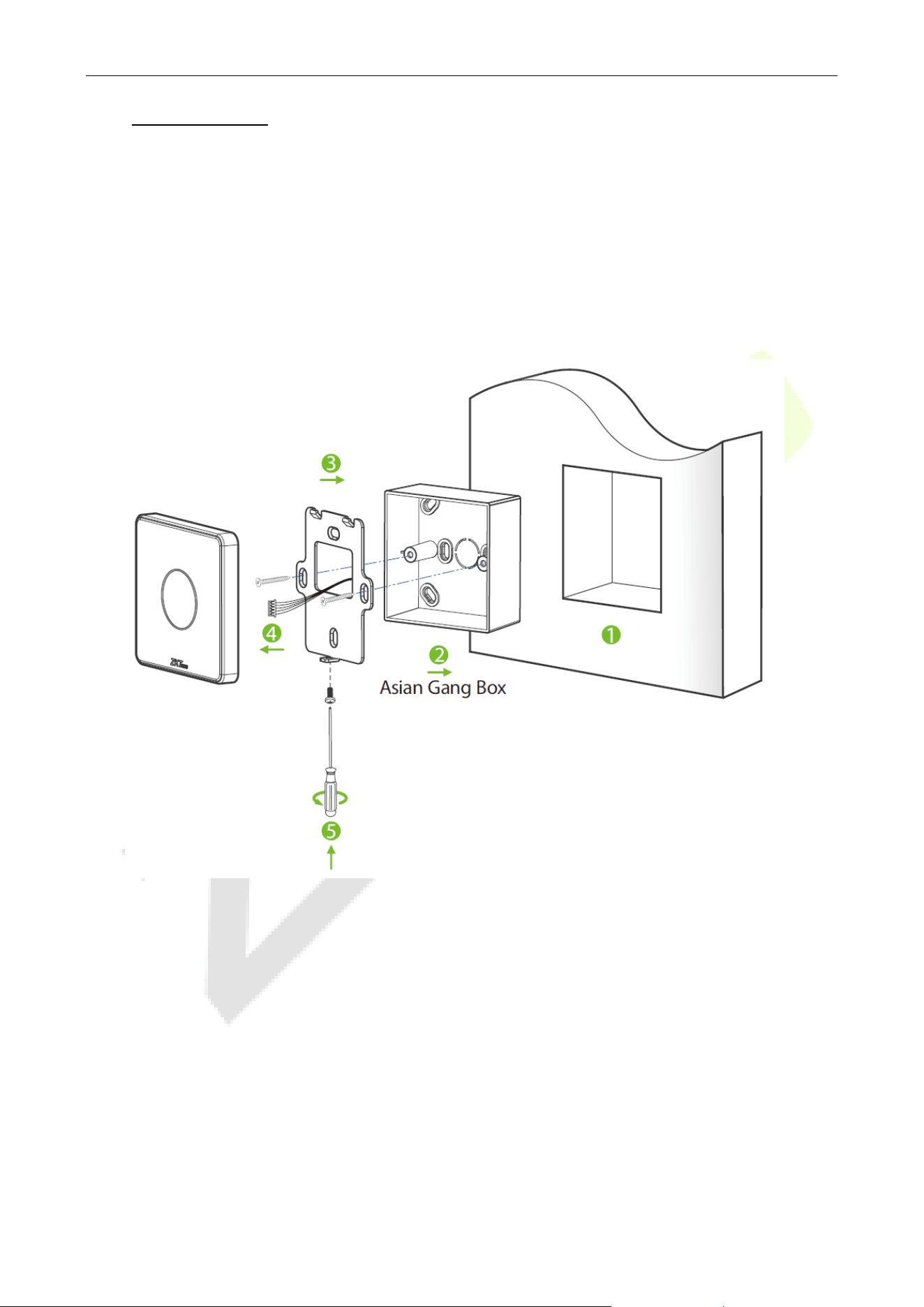
NO
The output interface of the door opening button (normally open), which is
connected to the GND port of the access control appliance.
COM Connect the BUTTON interface of the access control device.
NC
The output interface of the door opening button (normally close), which is
connected to the GND port of the access control appliance.
Cable Description
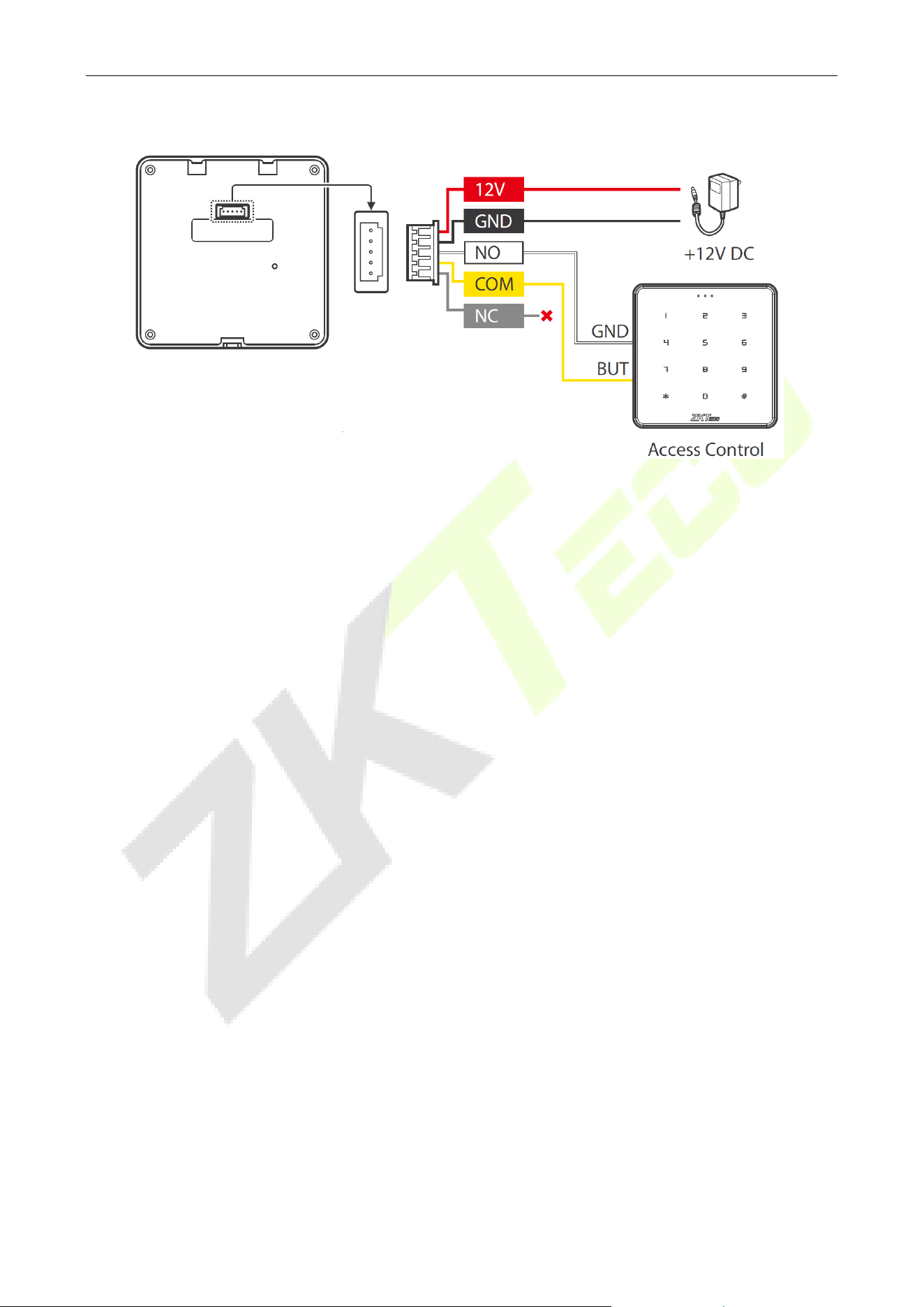
2.2.1 Connect to the Power Supply
Note: Please use the power adapter provided by the regular manufacturer according to the
recommended power supply. Recommended AC adapter: 12V, 1A.
TLEB301 User Manual
Page | 9 Copyright©2023 ZKTECO CO., LTD. All rights reserved.
2.2.2 Connect to the Access Control Device
TLEB301 User Manual
Page | 10 Copyright©2023 ZKTECO CO., LTD. All rights reserved.
3 Installation
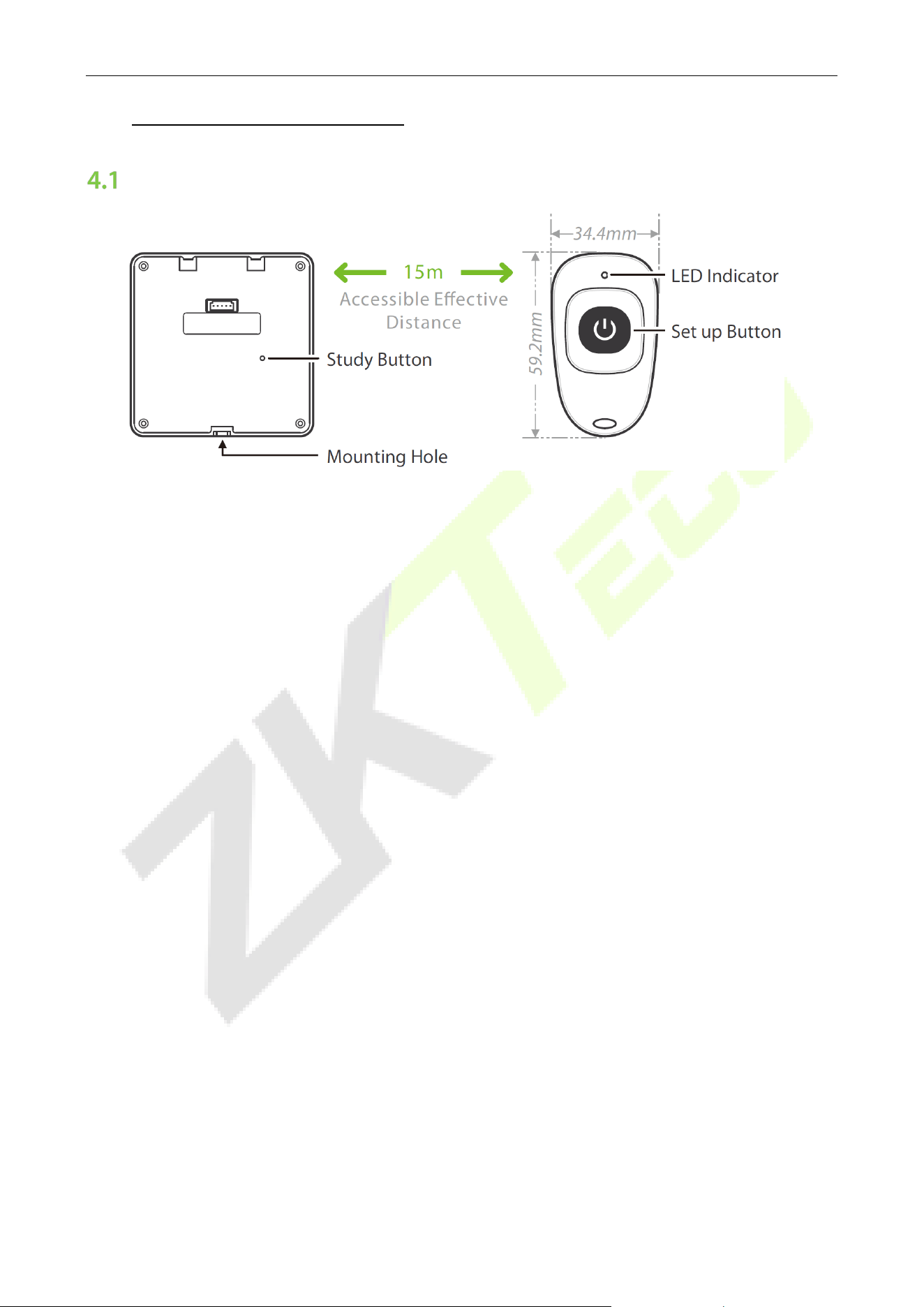
Mounting on the wall through Asian gang box:
1. Install the Asian gang box into the wall at a recommended height is 1.4 to 1.5 m above the ground,
which can be adjusted as necessary.
2. Fix the back plate onto the Asian gang box using two wall mounting screws.
3. Insert the cables through the wire hole.
4. Insert the device into back plate.
5. Use a security screw to fasten the device to the back plate.
TLEB301 User Manual
Page | 11 Copyright©2023 ZKTECO CO., LTD. All rights reserved.
4 Operation Instructions
Remote Alignment
Description:
1. The TLEB301 supports remote control. Users need to purchase 433MHz remote control to enable
remote opening functionality.
2. Set the code status indicator on the mainboard and observe its status through the mounting hole
at the bottom.
3. Users can also autonomously code the remote control by following steps (this series can code up
to 6 remote controls).
Alignment:
1. After the device is powered on, press and hold the Study Button for 3 seconds to enter the code
alignment study mode. When the code alignment status indicator turns off, press the button on
the remote control.
2. The studying time is 10 seconds. When the time expires, the device automatically exits the code
studying state, and you need to repeat the previous steps again.
Clear:
1. Press and hold the Study Button for at least 8 seconds. If the status indicator blinks three times, it
indicates that the code has been successfully cleared.
2. Note that all paired remote controls will be cleared.
Note: Remote control is not standard, please order separately if you need it.
TLEB301 User Manual
Page | 12 Copyright©2023 ZKTECO CO., LTD. All rights reserved.
Operation Instruction
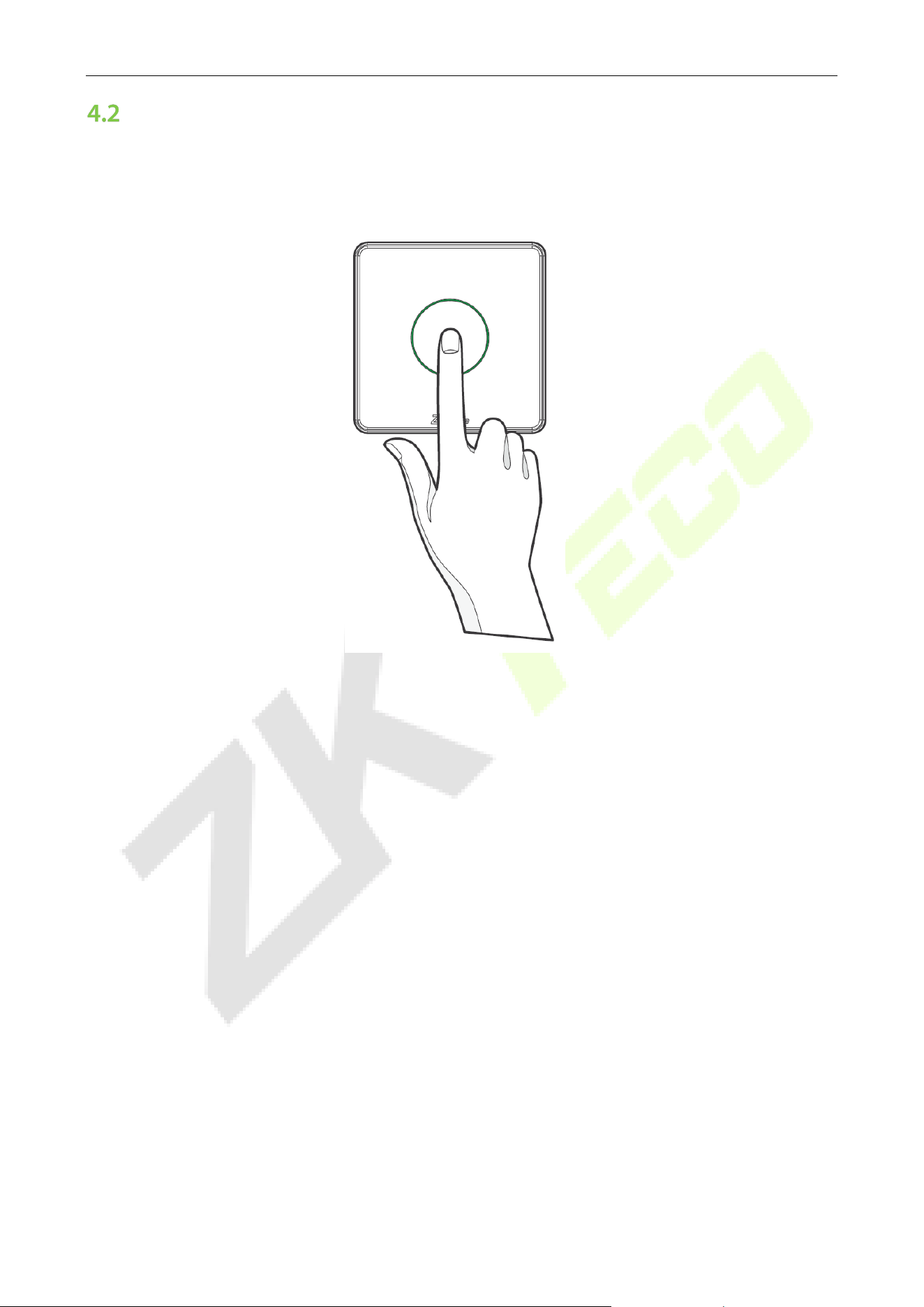
After correctly installing and connecting the device, the user only needs to touch the panel, and the
LED indicator turns green to open the door or press the remote control switch button within the
effective range to open the door remotely.

ZKTeco Industrial Park, No. 32, Industrial Road,
Tangxia Town, Dongguan, China.
Phone : +86 769 - 82109991
Fax : +86 755 - 89602394
www.zkteco.com
Copyright © 2023 ZKTECO CO., LTD. All Rights Reserved.