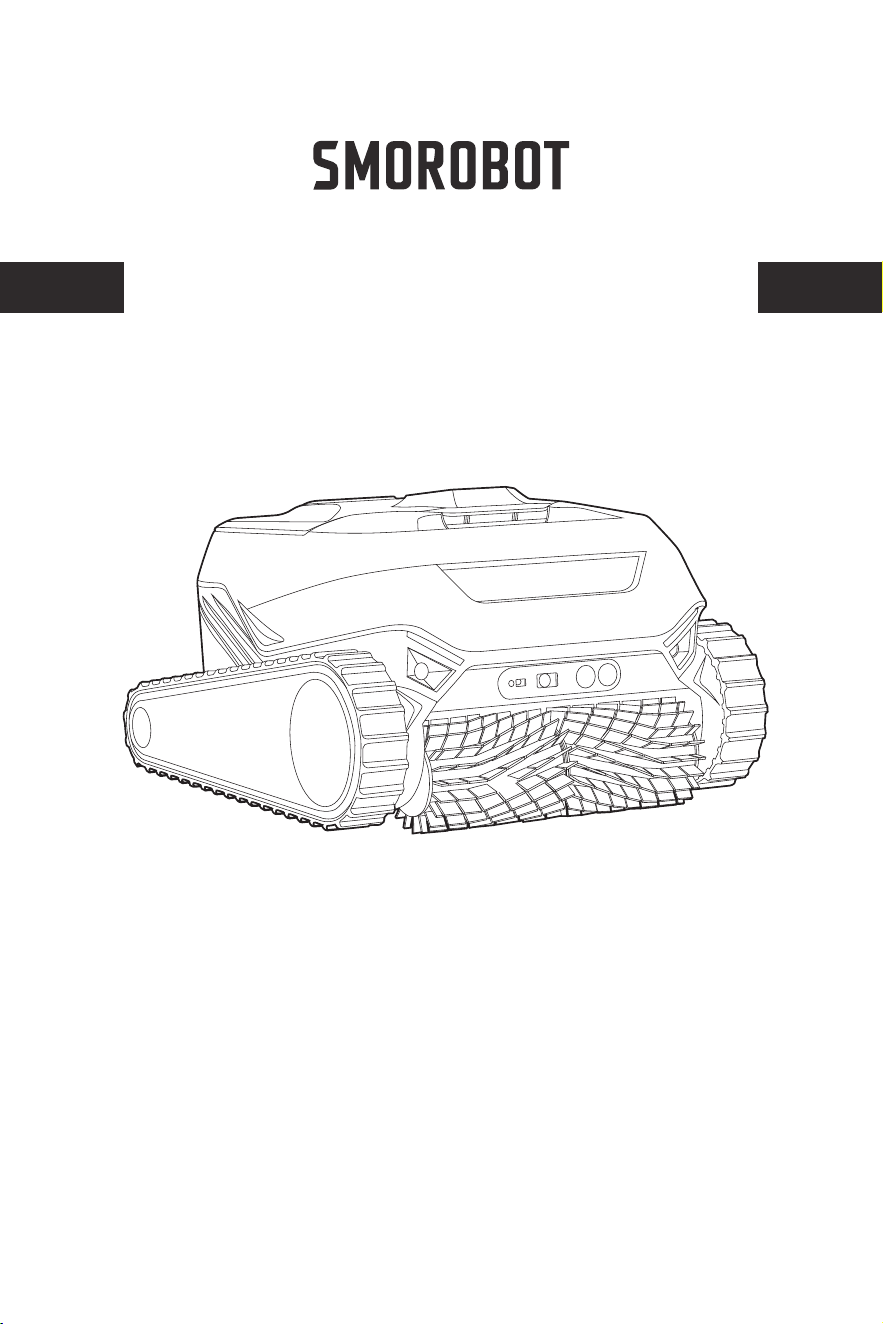
QUICK START GUIDE
INTELLIGENT ROBOTIC POOL CLEANER
Valor Series
Read through the User Manual prior to the first use of the cleaner and keep
the User Manual for future reference.
Chlorine: Max 4 ppm
PH: 7.0 - 8.8
NaCl: Max 5000 ppm
Temperature: 6 – 35°C (43 - 95°F)
Minimum depth: 0.5m/1.64ft. Maximum depth: 3m/9.84ft
Use the cleaner in the following water conditions only:
Warnings
Cautions
WARNINGS AND CAUTIONS
01
Use the original charging adaptor only. Do not use an extension cable in
any case. Keep a safe distance from combustibles when charging.
Do not charge or use the cleaner when any anomaly is noticed.
Please contact customer support.
Do not operate the cleaner when people or animals are in the pool.
This cleaner is not intended for use by persons (including children) with reduced physical, sensory
or mental capabilities, or lack of experience and knowledge, unless they have been given supervi-
sion or instruction concerning use of the cleaner by a person responsible for their safety.
Children should be supervised to ensure that they do not play with the cleaner.
If the supply cord is damaged, it must be replaced by the manufacturer, its service agent or
similarly qualified persons in order to avoid a hazard.
Dispose of all packaging materials properly. Keep away from children and pets.
This cleaner contains replaceable batteries.When the battery life ends, it shall be properly disposed
of. The battery must be removed from the cleaner before recycling or disposal.
The cleaner must be disconnected from the supply mains when removing the battery.
Please dispose or recycle used batteries according to local administrative regulations. Consult a
professional recycling agency when necessary.
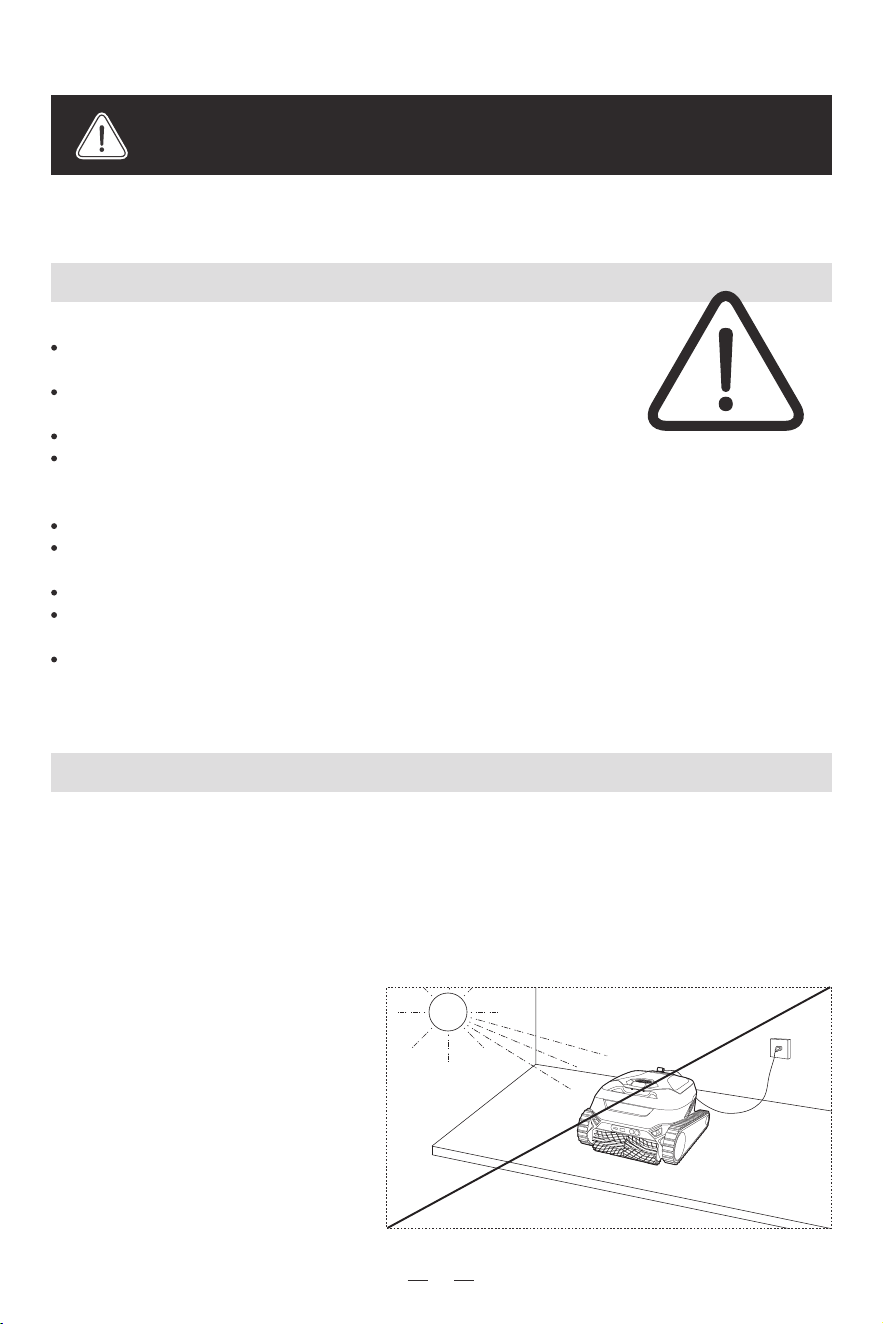
Select a charging location at
least 11.5 ft(3.5m) away from the
pool, out of direct sunlight.
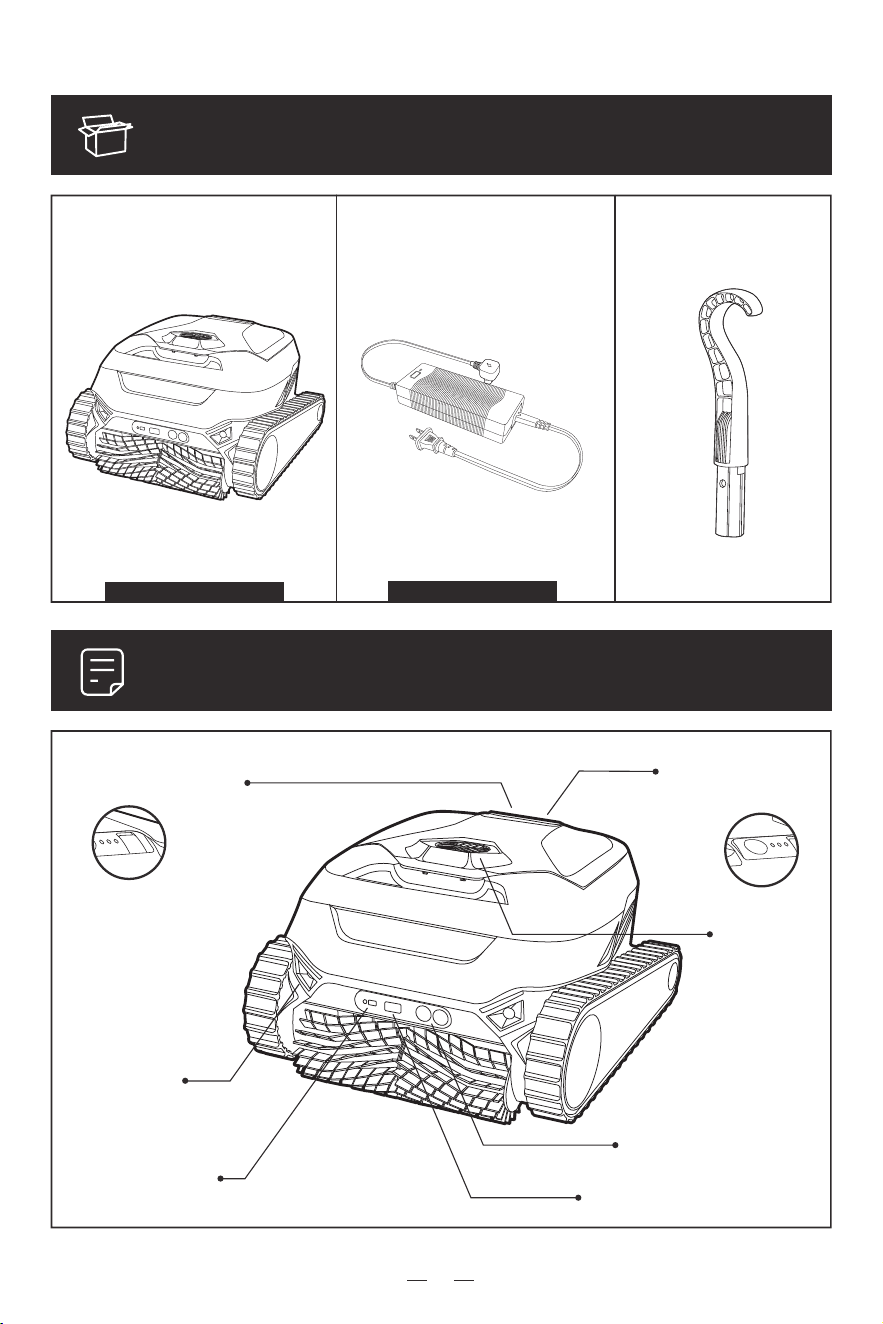
PACKING LIST
Cleaning Robot x 1 Charging Adaptor x 1 Hook x 1
PRODUCT OVERVIEW
LED Light
Laser Sensor
Charging Port
On/Off &
Mode Switch
Impeller
Ultrasonic Sensor
Camera
Plug type varies by country
With filter basket installed
02
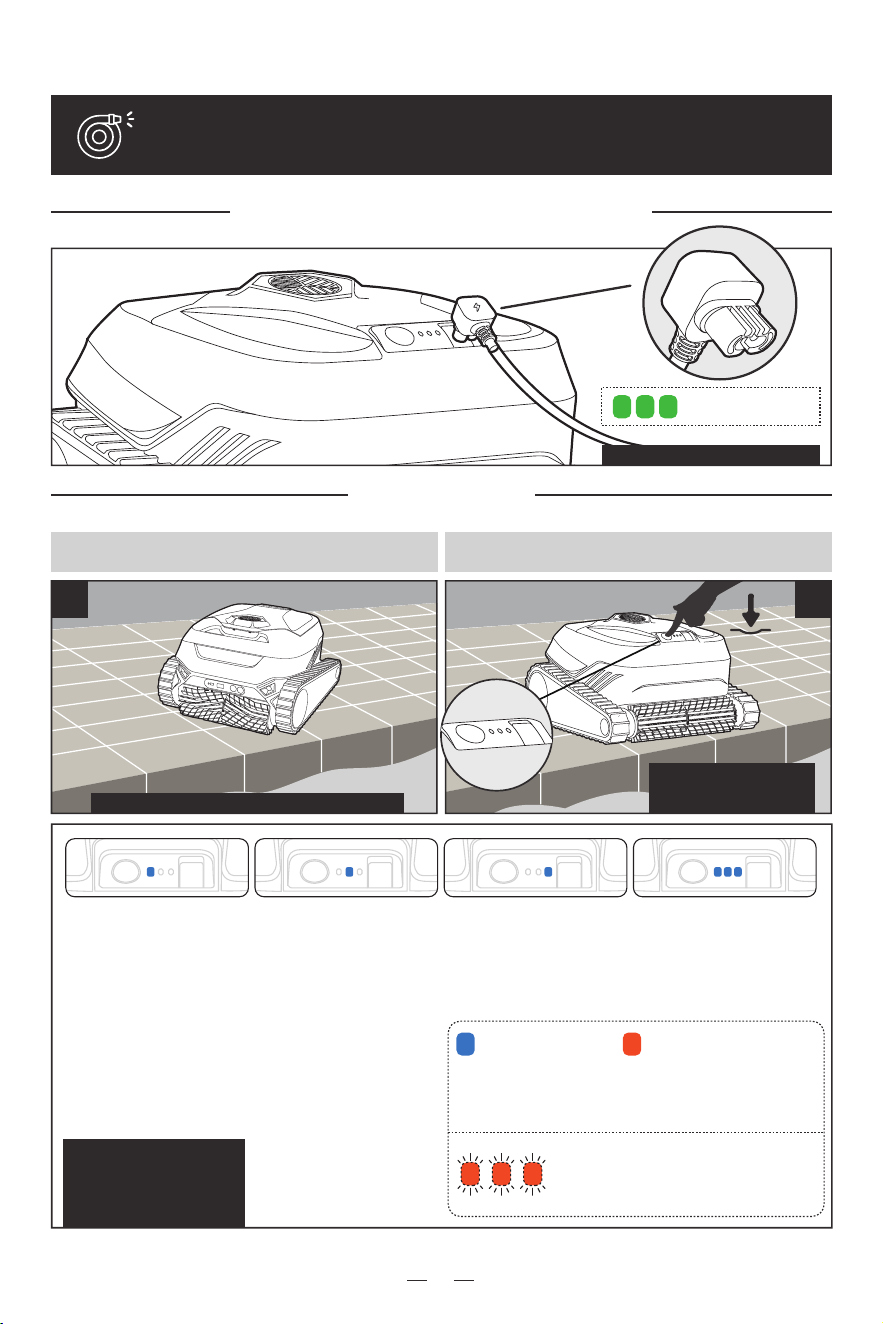
Charge your cleaner
USING THE CLEANER
1
2
Turn on
Keep it still on level ground Select cleaning mode
Make sure charging port is dry
Don't move the cleaner before the LED indicator is on.
Press On/Off button for 3
seconds to turn on. Short
press to switch mode.
We recommend the cleaner
not be used when battery is
low (selected mode indicator
on solid orange), especially
in Weekly and All modes.
Low Battery:
Selected mode indicator lit on
solid orange, indicating a
battery level between 15-80%.
(low battery will bring various
problems)
High Battery:
Selected mode indicator
lit on solid green when
battery is > 80%.
03
Vision/Smart/Quick
Mode
In this mode the robot cleans
the pool bottom and gentle
sloped areas, then returns to
the shallow end for pickup, ideal
for daily cleaning. (“Park at
waterline” can be selected from
the APP, and it will stop at the
waterline awaiting pickup. )
Wall-Waterline
Mode
This mode thoroughly cleans
dirt from vertical walls and
waterlines.
All
Mode
This mode thoroughly cleans the
bottom of the pool, gentle
slopes, vertical walls and
waterlines.
Weekly
Mode
This mode will quickly and
periodically clean the pool.
Select the preferred time
interval (in days) between
cleaning cycles on the APP. The
APP creates timestamp when
the first cycle starts, and
activates the device again at
the same time of a day at the
pre-set interval. This mode is
suitable for periodic cleaning of
a mildly dirty pool. No need to
remove cleaner from water
each time, and a single charge
can power 3-5 cycles.
Very Low Power:
When battery is below 15%, all 3 lights
blink in orange. The button can’t be
(de)selected, as a reminder to plug it in.
Full charged: 3 lights
turn Solid green
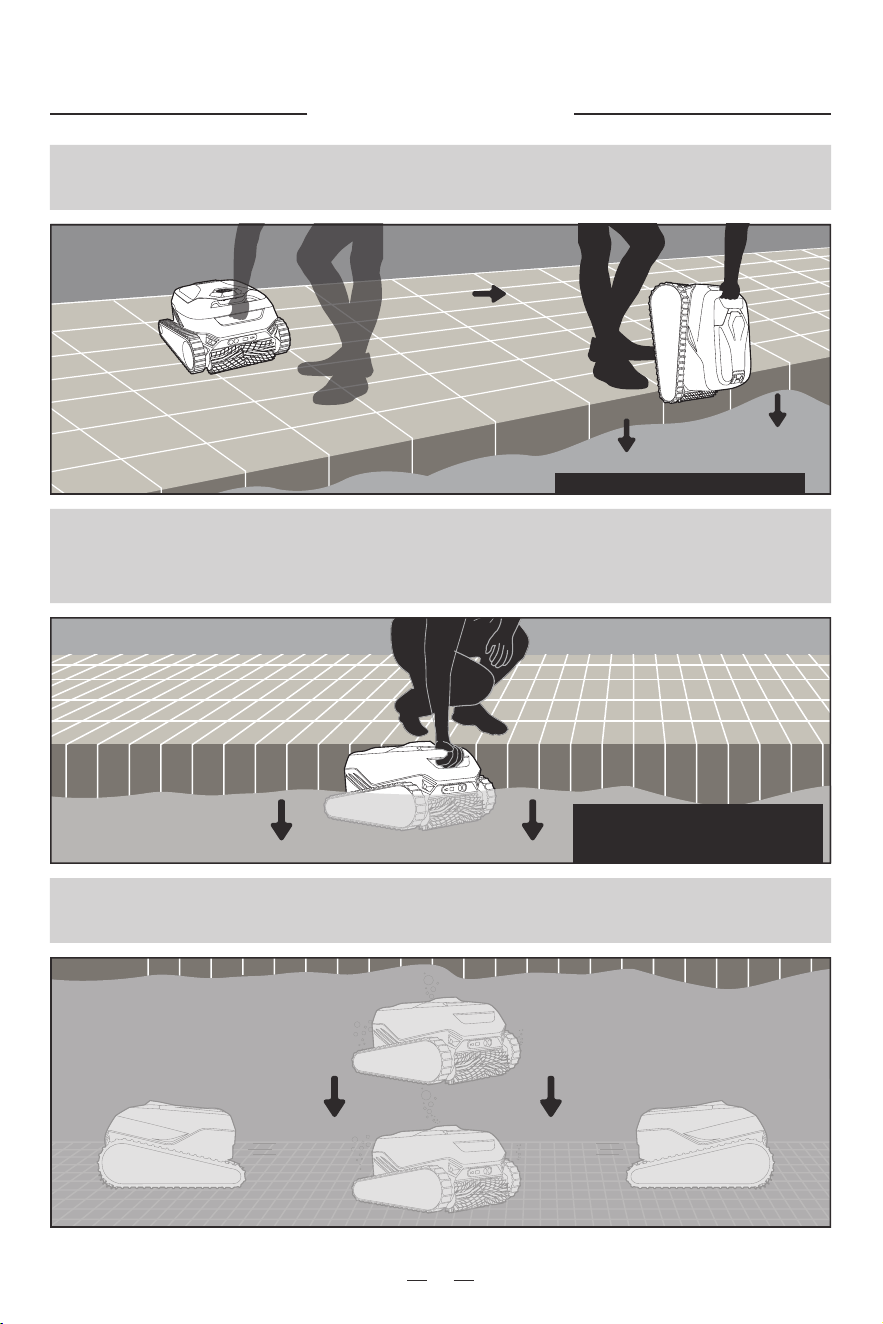
Once a cleaning mode is selected,
submerge the cleaner in the pool immediately.
Hold it in water for a few seconds as
it releases air trapped in it.
Keep it steady and do not tilt.
Release. It takes about 1-2 minutes to complete
the self-test and start the cycle.
Into the pool
Make sure charge cap is fully tightened
For the best cleaning performance, it is
recommended that the user place the
robot in the shallow end.
04
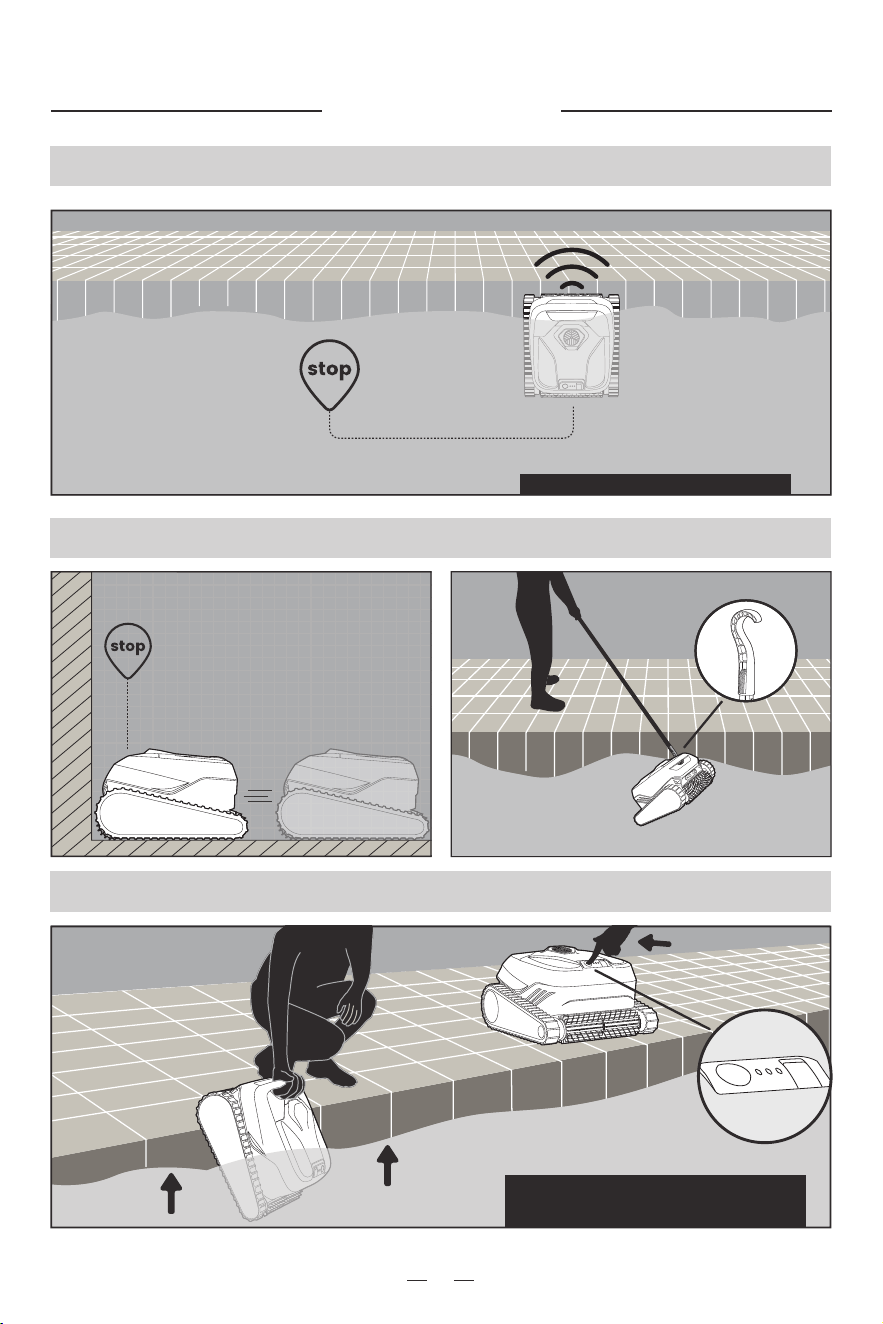
Automatically stop by the wall
Pick it up with hook
Take it out of the pool and turn off
Out of pool
05
Stop at waterline and send in-app reminder
Once removed from the pool after cleaning is
complete, the robot automatically shuts off after
5 minutes.
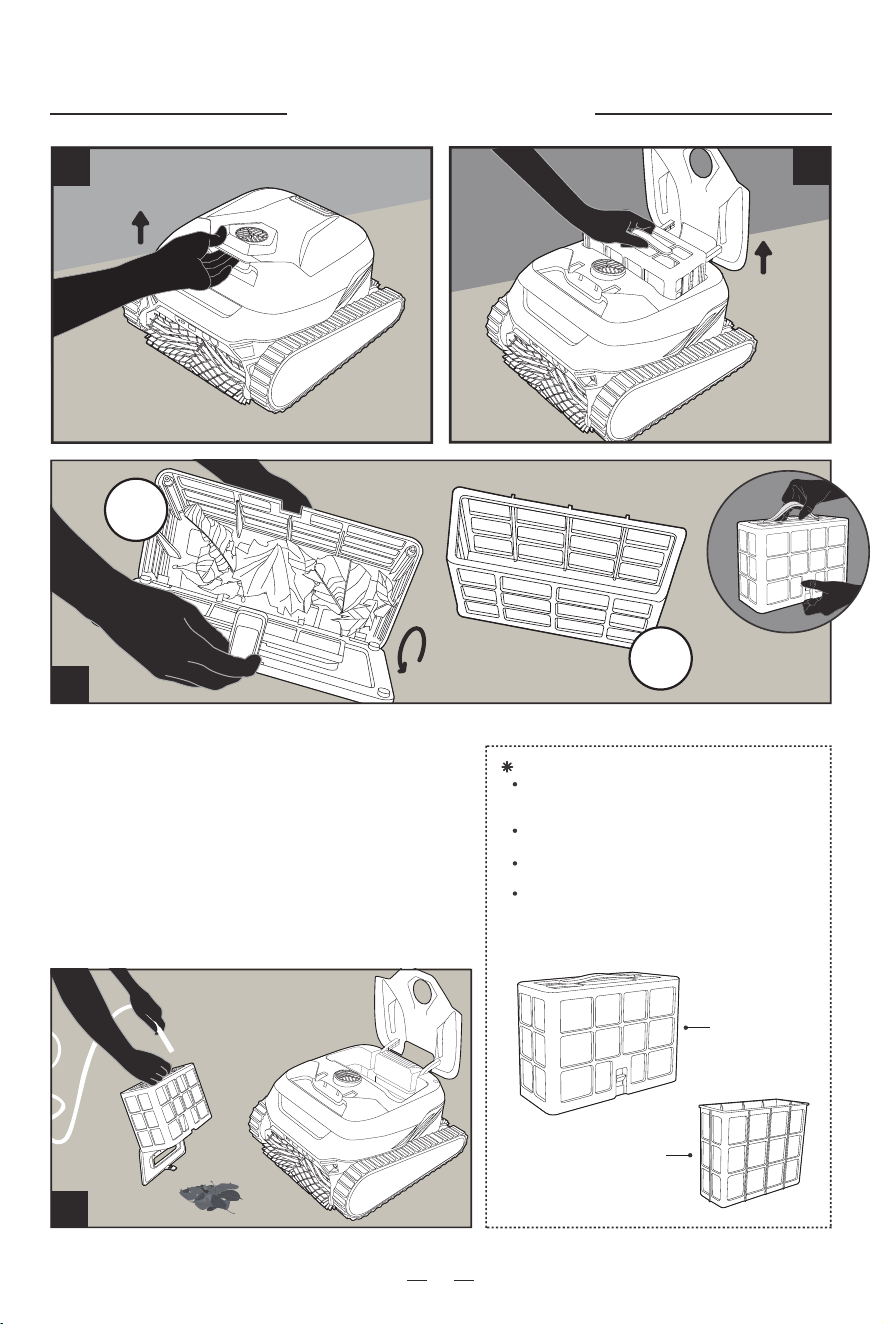
Clean the filter
06
3
open latch
take out
2
Note: Do not let the filter basket dry out before
cleaning. Clogged filters will affect the overall
cleaning performance of your cleaner by making it
difficult to create suction or keep dirt and debris in
the filter basket. Replace the filter basket when the
cleaning results are not satisfying and cleaning the
filter does not make a difference.
It is highly recommended to clean the
filter basket after each cleaning cycle.
4
1
Daily
filter
Fine
filter
Tips:
For Large Debris: Please remove the inner fine filter
basket and keep only the outer coarse filter basket.
Fine Debris: Please put on the inner fine filter basket.
Wash the filter basket after cleaning.
Pay particular attention to the inner fine filter basket;
if there is not much dirt in the basket and the
cleaning performance is poor, it is likely that the fine
filter has not been cleaned.
Fine filter basket
Ultra-fine filter basket
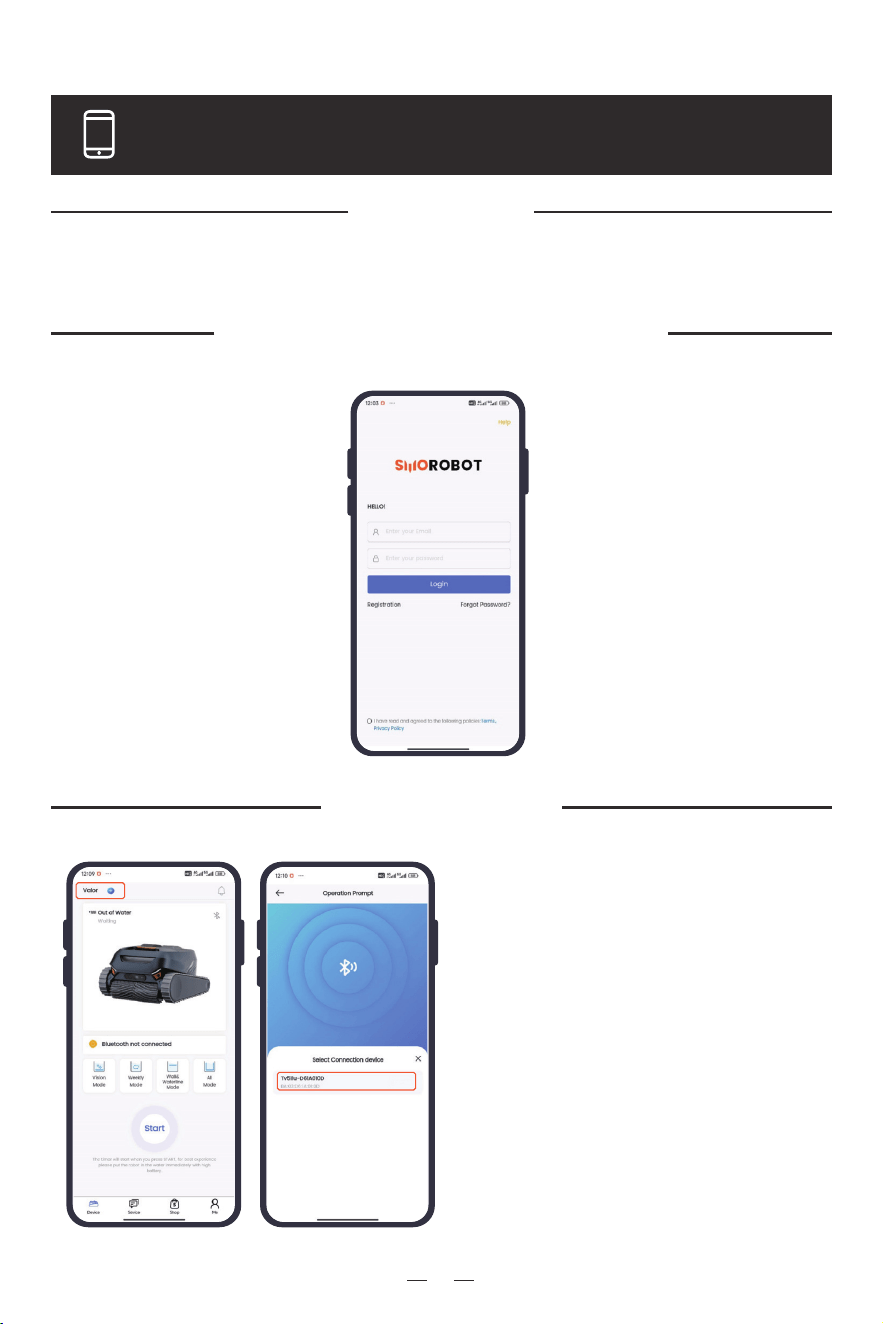
Log in to your account
Sign Up
APP Quick Guide
Add Device
07
1. Click Add Device;
2. Turn on the Bluetooth of your
phone;
3. Click Device on the home
page “→ + → Add Device”→: “,
click + to Add Device,” search
device to connect via Bluetooth;
4. Add a new device: Directly Add
New Device will replace the
previous device
Click Registration on the login page to set the login email and password.
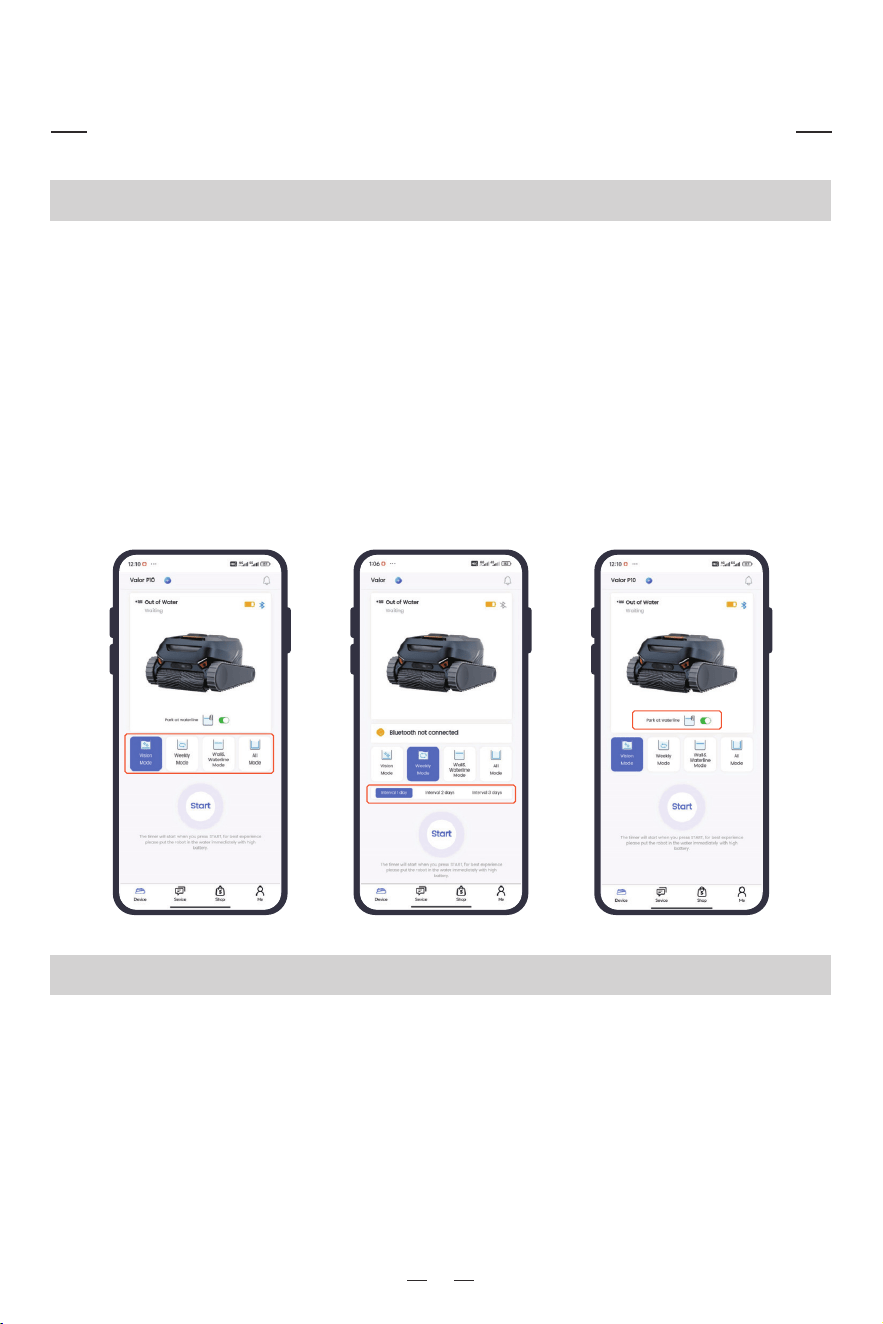
When the Bluetooth connection is in the state, select any of the four modes (Select the mode
through the device button or APP, and the indicator light display on the device will be synchronized
with the APP mode) → Press Start to display the running page;
When you select the Weekly Mode, you can further select the number of days between each
cleaning cycle (Interval of 1-3 days), and the robot will automatically start at the same time (at the
moment of the first start) to periodically clean your pool after the corresponding number of days.
Note: When you press Start, the machine will immediately enter the cleaning process and time it,
please put the machine into the water in time for a better experience.
The mode needs to be selected out of water, with the Bluetooth of the mobile phone is enabled.
By default, after the cleaning is completed, the robot will automatically go up to the waterline for
easy access and will send a message to the APP to notify you to pick it up. If this button is turned off,
the machine will dock to the edge of the pool floor after the cleaning is complete.
Note: Real-time notification requires you to keep the APP and Bluetooth connection turned on. To
reduce energy consumption and get a better user experience, the device will climb to the waterline
every once in a while depending on its power level and different pool environments.
Mode Selection and Operation Display
08
Mode Selection
Park at Waterline Button
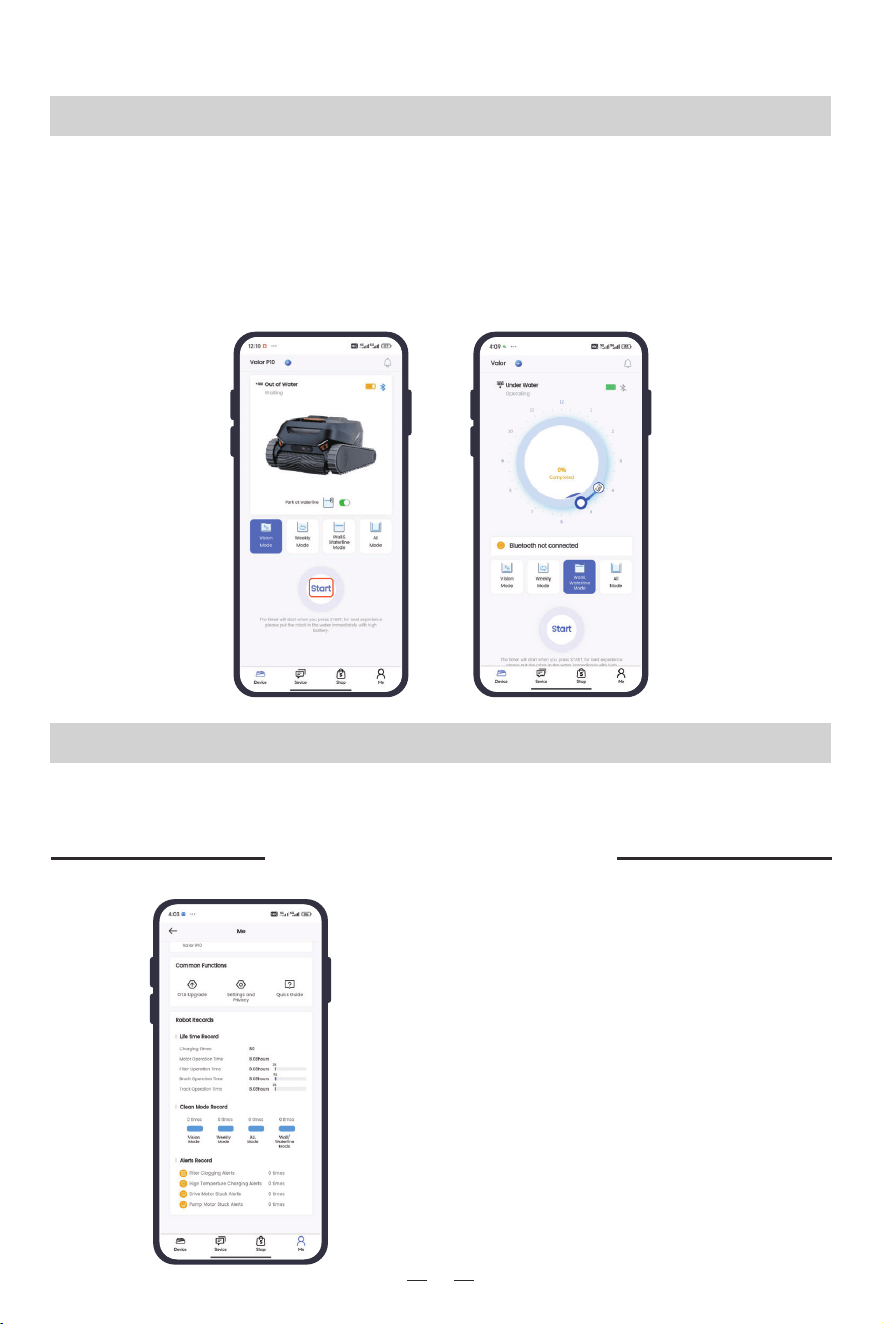
When Start is pressed, the page will enter the cleaning process and the remaining time will be
displayed.
Note: Cleaning time is an estimate calculated according to the mode selected, remaining battery,
and the specific pool environment. In some situations it cannot be completely accurate, but we
make sure that a reminder is sent after each cleaning is completed. Real-time notification requires
you to keep the APP and Bluetooth connection turned on.
09
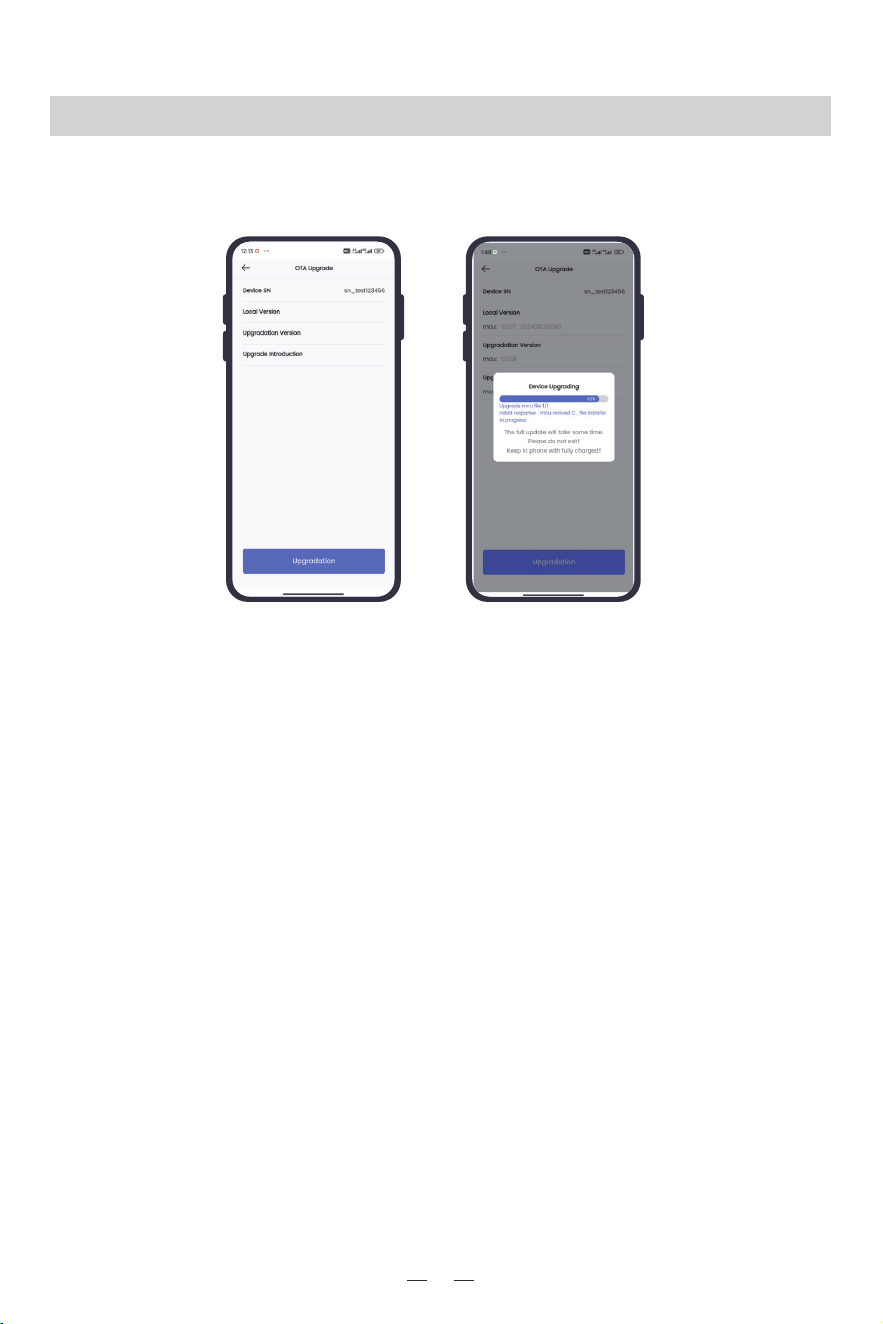
Me→ Robot Records
You can see the aggregate opera-
tion time of the product (motor,
filter, roller brush, track), the
number of times a cleaning mode
has been selected, and the alert
message record.
Operation Display
The equipment cleaning cycle is completed, and the equipment page displays a completion
reminder.
Operation completed
Device Recording
10
1.Me→ OTA Upgrade→Upgradation→ display the upgrade progress pop-up window, the progress is
completed, and the upgrade is successfu.
OTA Upgrade