
.
∣―
∣ ∣―
∣ ∣ ∣―
∣ ∣ ∣―
∣ ∣ ∣―
∣ ∣ ∣―
∣ ∣―
∣ ∣ ∣―
∣ ∣ ∣―
∣ ∣―
∣ ∣―
∣ ∣―
∣ ∣ ∣―
∣ ∣ ∣―
∣―
∣ ∣―
∣ ∣―
∣ ∣―
∣ ∣―
∣ ∣―
∣ ∣ ∣―
∣ ∣ ∣―
∣ ∣ ∣―
∣ ∣ ∣―
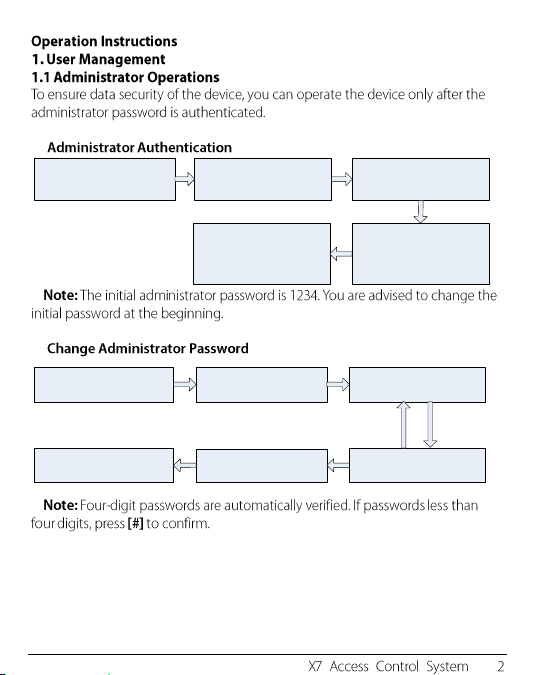
1. Press [*]
(The indicator is off and makes
a long beep.)
2. Press[#].
(You can authenticate the
password.)
3. Enter the administrator
password.
(The initial password is 1234.)
5. Exit.
(Press [*] or do not operate
the device within 20 seconds,
The indicator turns red and
makes a long beep, then
automatically exit.)
4. The authentication is
successful.
(The indicator turns green.)
1. The administrator password
is authenticated.
2. Press [8].
(You can change the
password.)
3. Enter a new administrator
password.
Yes
5. Succeeded.
(The indicator turns green
and makes a long beep.)
4. Enter the new administrator
password again for
authentication.
6. Exit.
(The indicator turns red and
makes a long beep.)
Failed.
(The indicator turns red
and makes three beeps.)
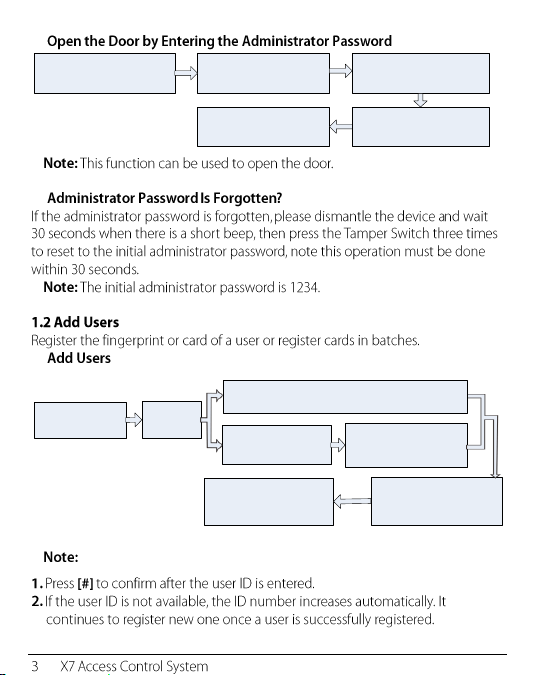
1. The administrator password
is authenticated.
2. Press [0] or [#].
(The indicator turns green
and makes a long beep.)
3. Press [0] or [#].
(The indicator turns green
and makes a long beep.)
5.Exit.
(The indicator turns red and
makes a long beep.)
4. The door is opened
(The indicator turns green and
makes a long beep.)
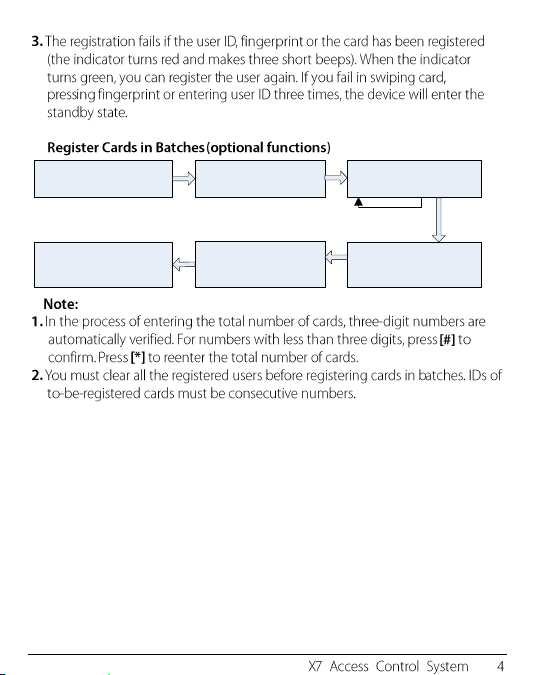
1. The
administrator is
authenticated.
2. Press [1].
6. Exit.
(Press [*], the indicator
turns red and makes a
long beep. )
5. Adding Users
successfully.
(The indicator turns green
and makes a long beep.)
3. Input user ID twice
(The indicator turns
green and makes a
long beep.)
4. Register fingerprint or
card. (Press fingers three
times or swipe the
card once.)
4. Register fingerprint or card.
(Press fingers three times or swipe the card once.)
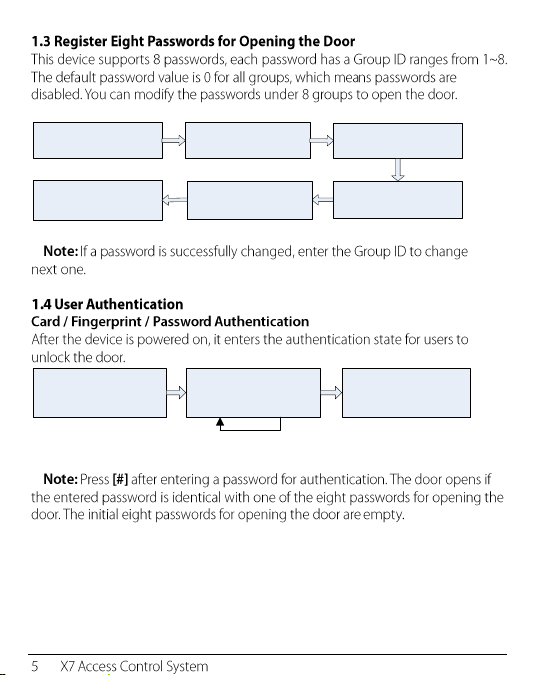
1. The administrator password
is authenticated.
2. Press [6].
(Registering cards in
batches)
3. Swipe the first card once.
5. Cards are successfully
registered in batches.
4. Enter the total number of
cards.
6. Exit.
(The indicator turns red and
makes a long beep, then
automatically exit.)
Failed.
(The indicator turns red
and makes three beeps.)
Yes
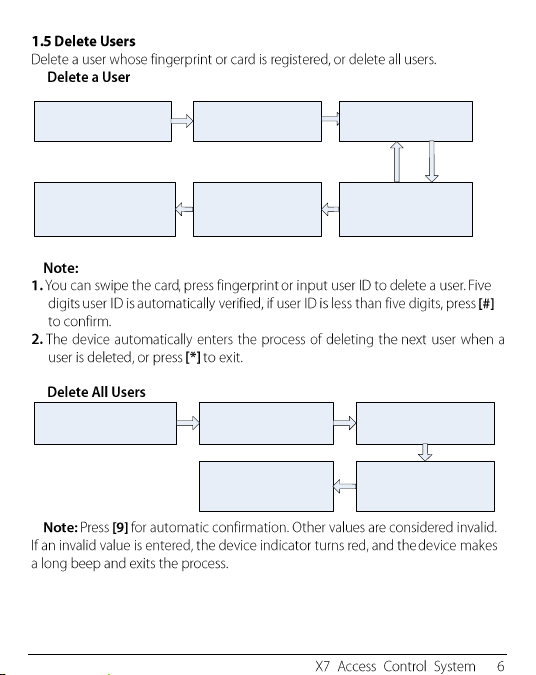
1. The administrator password
is authenticated.
2. Press [3]. (The indicator
turns green and makes a
long beep.)
3. Enter the group ID of
password.(Group IDs: 1 ~ 8.)
4. Enter the password twice.
(The password consists of
four digits.)
6. Register successfully.
(The indicator turns green
and makes a long beep.)
7. Exit. (Press [*], the indicator
turns red and makes a long
beep, then automatically exit)
1. The device is in the
authentication state.
2. Press the fingerprint, swipe
the card, or enterthe password.
Press [#] after entering the
password.
3. The authentication is
successful. (The indicator
turns green and makes a
long beep.)
Yes
Failed.
(The indicator turns red
and makes two beeps.)
1. The administrator password
is authenticated.
2. Press [2].
(The indicator turns green
and makes a long beep.)
3. Enter a user ID, press the
fingerprint, or swipe the card.
Yes
5. The user is deleted.
( The indicator turns green
and makes a long beep.)
4. Determine whether the user
is authentic. (The indicator
turns green and makes a long
beep.)
6. Exit.
(Press [*] or do not operate the
device within 20 seconds, the
indicator turns red and makes a
long beep.)
Failed.
(The indicator turns red
and makes three beeps.)
1. The administrator password
is authenticated.
2. Press [9].
(The indicator turns green
and makes a long beep.)
3. Press [9].
(The indicator turns green
and makes a long beep.)
5.Exit.
(The indicator turns red and
makes a long beep, then
automatically exit.)
4. Deleting All Users is
successful.
(The indicator turns green and
makes a long beep.)
1. The administrator password
is authenticated.
2. Press [4].
(The indicator turns green
and makes a long beep.)
3. Enter the unlocking
duration. (range: 1s to 10s)
5.Exit.
(The indicator turns red and
makes a long beep again.)
4. The unlocking duration is
modified.
(The indicator turns green and
makes a long beep.)
1. The administrator password
is authenticated.
2. Press [5].
(The indicator turns green
and makes a long beep.)
3. Enter the authentication
mode.
5.Exit.
(The indicator turns red and
makes a long beep.)
4.The configuration is
successful.
(The indicator turns green and
makes a long beep.)
1. The administrator password
is authenticated.
2. Press [0].
(The indicator turns green
and makes a long beep.)
3.Press [3].
(The indicator turns green and
makes a long beep.)
5. The configuration is
successful.
(The indicator turns green
and makes a long beep.)
4.Configure the concealed
mode
(0: enable; 1: disable).
6.Exit.
(The indicator turns red and
makes a long beep.)
●
●
●
1. The administrator password
is authenticated.
2. Press [0].
(The indicator turns green
and makes a long beep.)
3.Press [5].
(The indicator turns green and
makes a long beep.)
5. The configuration is
successful.
(The indicator turns green
and makes a long beep.)
4.Configure the door sensor
mode. (0: NO ;1: NC; 2: None)
6.Exit.
(The indicator turns red and
makes a long beep again)
1. The administrator password
is authenticated.
2. Press [0].
(The indicator turns green
and makes a long beep.)
3.Press [1].
(The indicator turns green and
makes a long beep.)
5. The configuration is
successful.
(The indicator turns green
and makes a long beep.)
4.Configure the alarm
setting.
(0: enable; 1: disable).
6.Exit.
(The indicator turns red and
makes a long beep again.)
1. The administrator password
is authenticated.
2. Press [0].
(The indicator turns green
and makes a long beep.)
3.Press [2].
(The indicator turns green and
makes a long beep.)
5. The configuration is
successful.
(The indicator turns green
and makes a long beep.)
4.Configure the error
operation-triggered alarm
switch.
(0: enable; 1: disable).
6.Exit.
(The indicator turns red and
makes a long beep again.)
1. The administrator password
is authenticated.
2. Press [7].
(The indicator turns green
and makes a long beep.)
3.Configure whether to enable
the tamper alarm.
(0: enable; 1: disable).
5. Exit.
(The indicator turns red and
makes a long beep.)
4. The configuration is
successful.
(The indicator turns green and
makes a long beep.)
1. The administrator password
is authenticated.
2. Press [0].
(The indicator turns green
and makes a long beep.)
3.Press [4].
(The indicator turns green and
makes a long beep.)
5. The configuration is
successful.
(The indicator turns green
and makes a long beep.)
4.Configure the alarm delay
(range: 1s to 254s).
6.Exit.
(The indicator turns red and
makes a long beep.)