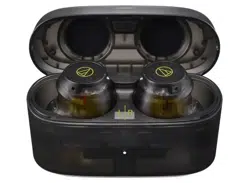

ATH-CKS50TW2
WirelessHeadphones
UserManual
English

1
Safetyprecautions
Althoughthisproductwasdesignedtobeusedsafely,failingtouseitcorrectlymayresultinanaccident.Toensure
safety,observeallwarningsandcautionswhileusingtheproduct.
Cautionsfortheheadphones
Donotusetheproductnearmedicalequipment.Radiowavesmayaffectcardiacpacemakersandmedicalelectronic
equipment.Donotusetheproductinsidemedicalfacilities.
Whenusingtheproductinaircraft,followairlineinstructions.
Donotusetheproductnearautomaticcontroldevicessuchasautomaticdoorsandfirealarms.Radiowavesmay
affectelectronicequipmentandcauseaccidentsduetomalfunction.
Donotdisassemble,modifyorattempttorepairtheproducttoavoidelectricshock,malfunctionorfire.
Donotsubjecttheproducttostrongimpacttoavoidelectricshock,malfunctionorfire.
Disconnecttheproductfromadeviceiftheproductbeginstomalfunction,producingsmoke,odor,heat,unwanted
noiseorshowingothersignsofdamage.Insuchacase,contactyourlocalAudio-Technicadealer.
Donotputforeignmattersuchascombustiblematerials,metal,orliquidintheproduct.
Donotcovertheproductwithaclothtoavoidfireorinjurybyoverheating.
Followapplicablelawsregardingmobilephoneandheadphoneuseifusingheadphoneswhiledriving.
Donotusetheproductinplaceswheretheinabilitytohearambientsoundpresentsaseriousrisk(suchasatrailroad
crossings,trainstations,andconstructionsites).
Theproducteffectivelyshieldsexternalsound,soyoumaynothearsoundaroundyouclearlywhilewearingthe
product.Adjustthevolumetoalevelwhereyoucanstillhearbackgroundsoundandmonitortheareaaroundyou
whilelisteningtomusic.
Storetheproductoutofthereachofsmallchildren.
Topreventdamagetoyourhearing,donotraisethevolumetoohigh.Listeningtoloudsoundforanextendedperiod
maycausetemporaryorpermanenthearingloss.
Discontinueuseifskinirritationresultsfromdirectcontactwiththeproduct.
Ifyoubegintofeelunwellwhileusingtheproduct,discontinueuseimmediately.
Whenremovingtheproductfromyourears,checktomakesuretheeartipsarestillattachedtothemainunit.Ifthe
eartipsbecomelodgedinyourearsandyouareunabletoremovethem,consultaphysicianatonce.
Ifyoudevelopanitchfromwearingtheproduct,discontinueuse.
Cautionsforchargingcase
Donotdisassemble,modifyorattempttorepairtheproducttoavoidelectricshock,malfunctionorfire.
Donotsubjecttheproducttostrongimpacttoavoidelectricshock,malfunctionorfire.
Donothandletheproductwithwethandstoavoidelectricshockorinjury.
Disconnecttheproductfromadeviceiftheproductbeginstomalfunction,producingsmoke,odor,heat,unwanted
noiseorshowingothersignsofdamage.Insuchacase,contactyourlocalAudio-Technicadealer.
Donotallowtheproducttogetwettoavoidelectricshockormalfunction.
Donotputforeignmattersuchascombustiblematerials,metal,orliquidintheproduct.
Donotcovertheproductwithaclothtoavoidfireorinjurybyoverheating.

Safetyprecautions
2
DonotchargetheproductifwaterorforeignmatterisinsidethebatteryjackorUSBchargingcable.Doingsomay
causecorrosion,heatgeneration,smoke,fire,orothermalfunctionorelectricshockinthebatteryjackorUSB
chargingcable.
DonotchargethebatteryiftheterminaloftheUSBchargingcableisbent,loose,ordamaged.Doingsomaycause
heatgeneration,smokeemission,fireorelectricshock.
Whencharging,makesuretousetheincludedUSBchargingcable.
Donotchargewithdevicesthathavequick-chargefunctionality(withavoltageof5Vormore).Doingsomaycause
theproducttomalfunction.
Donotstoretheproductindirectsunlight,nearheatingdevices,orinhot,humid,ordustyplacesbecausesuch
storagecouldcausemalfunctionordefect.
Donotputtheproductclosetofirebecausethatcouldcausedeformationormalfunction.
Donotusebenzine,paintthinnersandelectricalcontactcleaner,etc.becauseuseofsuchmaterialcouldcause
deformationormalfunction.
Cautionsforrechargeablebattery
Theheadphonesandchargingcaseareequippedwitharechargeablebattery(lithium-ionbattery).
Ifbatteryfluidgetsintoeyes,donotrubthem.Rinsethoroughlywithcleanwatersuchastapwaterandconsulta
doctorimmediately.
Ifbatteryfluidleaks,donottouchfluidwithbarehands.Iffluidremainsinsidetheproduct,itmaycausemalfunction.
Ifbatteryfluidleaks,contactyourlocalAudio-Technicadealer.
Iffluidgetsinyourmouth,garglethoroughlywithcleanwatersuchastapwaterandconsultadoctor
immediately.
Ifyourskinorclothingcomesincontactwithfluid,immediatelywashtheaffectedskinorclothingwithwater.If
youexperienceskinirritation,consultadoctor.
Toavoidleakage,generationofheatorexplosion:
Neverheat,disassembleormodifythebattery,nordisposeofitinafire.
Donotattempttopiercewithanail,hitwithahammerorsteponthebattery.
Donotdroptheproductorsubjectittostrongimpact.
Donotgetthebatterywet.
Donotuse,leaveorstorethebatteryinthefollowingplaces:
Areaexposedtodirectsunlightorhightemperaturesandhumidity
Insideofacarundertheblazingsun
Nearheatsourcessuchasheatregisters
ChargeonlywiththeincludedUSBcabletoavoidmalfunctionorfire.
Theinternalrechargeablebatteryofthisproductcannotbereplacedbytheuser.Thebatterymayhavereachedthe
endofitsservicelifeiftheusagetimebecomessignificantlyshorterevenafterthebatteryhasbeenfullycharged.If
thisisthecase,thebatteryneedstoberepaired.ContactyourlocalAudio-Technicadealerforrepairdetails.
Whentheproductisdisposedof,thebuilt-inrechargeablebatteryneedstobediscardedproperly.Contactyourlocal
Audio-Technicadealertolearnhowtoproperlydisposeofthebattery.

Safetyprecautions
3
ForcustomersintheUSA
FCCNotice
Warning
ThisdevicecomplieswithPart15oftheFCCRules.Operationissubjecttothefollowingtwoconditions:(1)Thisdevice
maynotcauseharmfulinterference,and(2)thisdevicemustacceptanyinterferencereceived,includinginterference
thatmaycauseundesiredoperation.
Caution
Youarecautionedthatanychangesormodificationsnotexpresslyapprovedinthismanualcouldvoidyourauthorityto
operatethisequipment.
Note:ThisequipmenthasbeentestedandfoundtocomplywiththelimitsforaClassBdigitaldevice,pursuanttopart
15oftheFCCRules.Theselimitsaredesignedtoprovidereasonableprotectionagainstharmfulinterferenceina
residentialinstallation.Thisequipmentgenerates,usesandcanradiateradiofrequencyenergyand,ifnotinstalledand
usedinaccordancewiththeinstructions,maycauseharmfulinterferencetoradiocommunications.However,thereis
noguaranteethatinterferencewillnotoccurinaparticularinstallation.Ifthisequipmentdoescauseharmful
interferencetoradioortelevisionreception,whichcanbedeterminedbyturningtheequipmentoffandon,theuseris
encouragedtotrytocorrecttheinterferencebyoneormoreofthefollowingmeasures:
–Reorientorrelocatethereceivingantenna.
–Increasetheseparationbetweentheequipmentandreceiver.
–Connecttheequipmenttoanoutletonacircuitdifferentfromthattowhichthereceiverisconnected.
–Consultthedealeroranexperiencedradio/TVtechnicianforhelp.
Thistransmittermustnotbeco-locatedoroperatedinconjunctionwithanyotherantennaortransmitterusedinother
systems.
RFExposureStatement
ThisdevicecomplieswithFCCradiationexposurelimitssetforthforanuncontrolledenvironmentandmeetstheFCC
radiofrequency(RF)ExposureGuidelines.ThisequipmenthasverylowlevelsofRFenergythatisdeemedtocomply
withouttestingofspecificabsorptionrate(SAR).
Contact
ResponsibleCompany:Audio-TechnicaU.S.,Inc.
Address:1221CommerceDrive,Stow,Ohio44224,USA
Tel:330-686-2600
ForcustomersinCanada
ISEDstatement
CANICES-003(B)/NMB-003(B)
Thisdevicecontainslicence-exempttransmitter(s)/receiver(s)thatcomplywithInnovation,ScienceandEconomic
DevelopmentCanada’slicence-exemptRSS(s).Operationissubjecttothefollowingtwoconditions:
(1)Thisdevicemaynotcauseinterference.

Safetyprecautions
4
(2)Thisdevicemustacceptanyinterference,includinginterferencethatmaycauseundesiredoperationofthedevice.
ThisdevicecomplieswithRSS-102radiationexposurelimitssetforthforanuncontrolledenvironment.

5
Notesonuse
Besuretoreadtheconnecteddevice’susermanualbeforeuse.
Audio-Technicawillnotbeliableinanywayforanylossofdataintheunlikelyeventthatsuchlossesshouldoccur
whileusingtheproduct.
Onpublictransportationorinotherpublicplaces,keepthevolumelowsoasnottodisturbotherpeople.
Minimizethevolumeonyourdevicebeforeconnectingtheproduct.
Whenusingtheproductinadryenvironment,youmayfeelatinglingsensationinyourears.Thisiscausedbystatic
electricityaccumulatedonyourbody,notbyproductmalfunction.
Donotsubjecttheproducttostrongimpact.
Donotstoretheproductindirectsunlight,nearheatingdevices,orinhot,humid,ordustyplaces.
Whentheproductisusedforalongtime,theproductmaybecomediscoloredduetoultravioletlight(especially
directsunlight)andwear.
IfthechargingcaseisplacedinabagwhiletheUSBchargingcableisstillconnected,theUSBchargingcablemay
becomecaught,severed,orbroken.
MakesuretoholdtheplugwhenconnectinganddisconnectingtheUSBchargingcable.TheUSBchargingcable
maybecomeseveredoranaccidentmayoccurifyoupullonthecableitself.
WhenyouarenotusingtheUSBchargingcable,disconnectitfromthechargingcase.
Whenyouarenotusingtheproduct,storeitintheincludedchargingcase.
IfyouuseeartipsotherthanthoseincludedorthosespecifiedbyAudio-Technica(soldseparately),theheadphones
maynotfitintothechargingcase,ormaynotcharge.Besuretousetheincludedeartipsoreartipsspecifiedby
Audio-Technica(soldseparately).
Whenusingtheproduct,selecttheeartipsthatfityourearsbestsotheproductcanbewornsecurely.
Thisproductcanbeusedtotalkonthephoneonlywhenusingamobiletelephonenetwork.Supportfortelephony
appsthatuseamobiledatanetworkisnotguaranteed.
Ifyouusetheproductnearanelectronicdeviceortransmitter(suchasamobilephone),unwantednoisemaybe
heard.Inthiscase,movetheproductawayfromtheelectronicdeviceortransmitter.
Ifyouusetheproductneararadioantenna,noisemaybeseenorheardinthetelevisionorradiosignal.Inthiscase,
movetheproductawayfromtheradioantenna.
Toprotectthebuilt-inrechargeablebattery,chargeitatleastonceevery6months.Iftoomuchtimepassesbetween
charges,thelifeoftherechargeablebatterymaybereduced,ortherechargeablebatterymaynolongerbeabletobe
charged.
Chargetheproductinawell-ventilatedplace(10to35°C(50to95°F))awayfromdirectsunlight.Otherwise,the
batterymaydeteriorate,possiblyresultinginshorterperiodsofcontinuoususeormayfailtocharge.
Iftheheadphonesarewet,wipethemwithadryclothbeforeplacingtheminthechargingcase.Thechargingcaseis
notwater-resistant(drip-proof).Donotchargetheproductiftheheadphonesarewet.
Thetalk-throughmodeorhear-throughmodeoftheproductallowsyoutohearthesoundsaroundyouthroughthe
built-inmicrophone.Dependingonthevolumeofthemusicbeingplayedback,thesurroundingsoundsmaybe
difficulttohear.Inthiscase,turndownthevolumeofthemusic.
Dependingonyoursurroundings,theambientsoundsmaybedifficulttohearevenwhenusingtheproduct’stalk-
throughmodeorhear-throughmode.Donotusetheproductinplacesthataredangerousifyoucannothearthe
surroundingsounds,suchasplaceswithheavytraffic.

6
Abouttheactivenoise-cancellingfunction
Theproductisdesignedtouseitsbuilt-inmicrophonetopickupnoisefromthesurroundingenvironment(noisefrom
vehicles,noisefromairconditioners,etc.)andtocanceloutthatnoisebyproducingsoundsinnegativephase.This
resultsinareductioninthesoundsinyourenvironment.
Theproduct’snoise-cancellingfunctionismainlyeffectiveagainstnoisesinthelowerfrequencyrange,butnotall
noisesarecancelled.
Dependingonthetypeofnoise(orinquietlocations),youmaynotnoticethenoise-cancellingeffect.
Aslighthummingsoundmaybeheardwhenusingthenoise-cancellingfunction.Thisisasoundgeneratedbythe
noise-cancellingfunction;itisnotamalfunction.
Thenoise-cancellingeffectmayvaryorableep(howling)mayoccurdependingonhowyouweartheproduct.In
thesecases,takeofftheproductandputtheproductinyourearsagaincorrectly.
Tomaximizethenoise-cancellingeffect,selecttheeartipsthatofferthebestsoundinsulationforeachsidetoblock
surroundingsound,andinserttheheadphonesintotheearscorrectly.
Whenyouusetheproductinatrainoravehiclesuchasbusortruck,noisemaybehearddependingonrail/street
conditions.

7
Waterproofanddustproofperformance
Thewaterproofperformanceoftheproductisdesignedtopreventtheingressofliquidsfromsweatingduring
operationandsimplewashing(equivalenttoIPX5).JIS/IECprotectiongradeIPX5meansthattheearphonesare
protectedagainstexposuretowaterjets.Theearphonescannotbeusedinhotandhumidplaces,suchas
bathrooms.
Theheadphonesarenotcompletelywaterproof.Donotintentionallysubmergeorusetheearphonesinwater.Also,
donotexposetheearphonestoliquidsotherthansweatandwater(suchassoapywater).
Thedustproofperformanceoftheproductisdesignedtopreventtheingressofdustanddirt(equivalenttoIP5X).
JIS/IECprotectiongradeIP5Xmeansthattheearphonesareprotectedagainsttheingressofdustthatwould
otherwisehinderoperation.
Thewaterproofanddustproofspecificationsofthisproductapplyonlytotheearphones.Thechargingcaseisnot
waterproofordustproof.
AlthoughtheearphoneshavewaterproofanddustproofcapabilitiesequivalenttoIP55,thepartwherethesound
comesfromisnotwaterproofordustproof.
Theheadphonesmaynotfunctionproperlyiftheybecomewet.Wipetheheadphoneswithadrycloth,shakethem
multipletimestoremoveanyexcesswater,andallowtheheadphonestodrythoroughlybeforeuse.
8
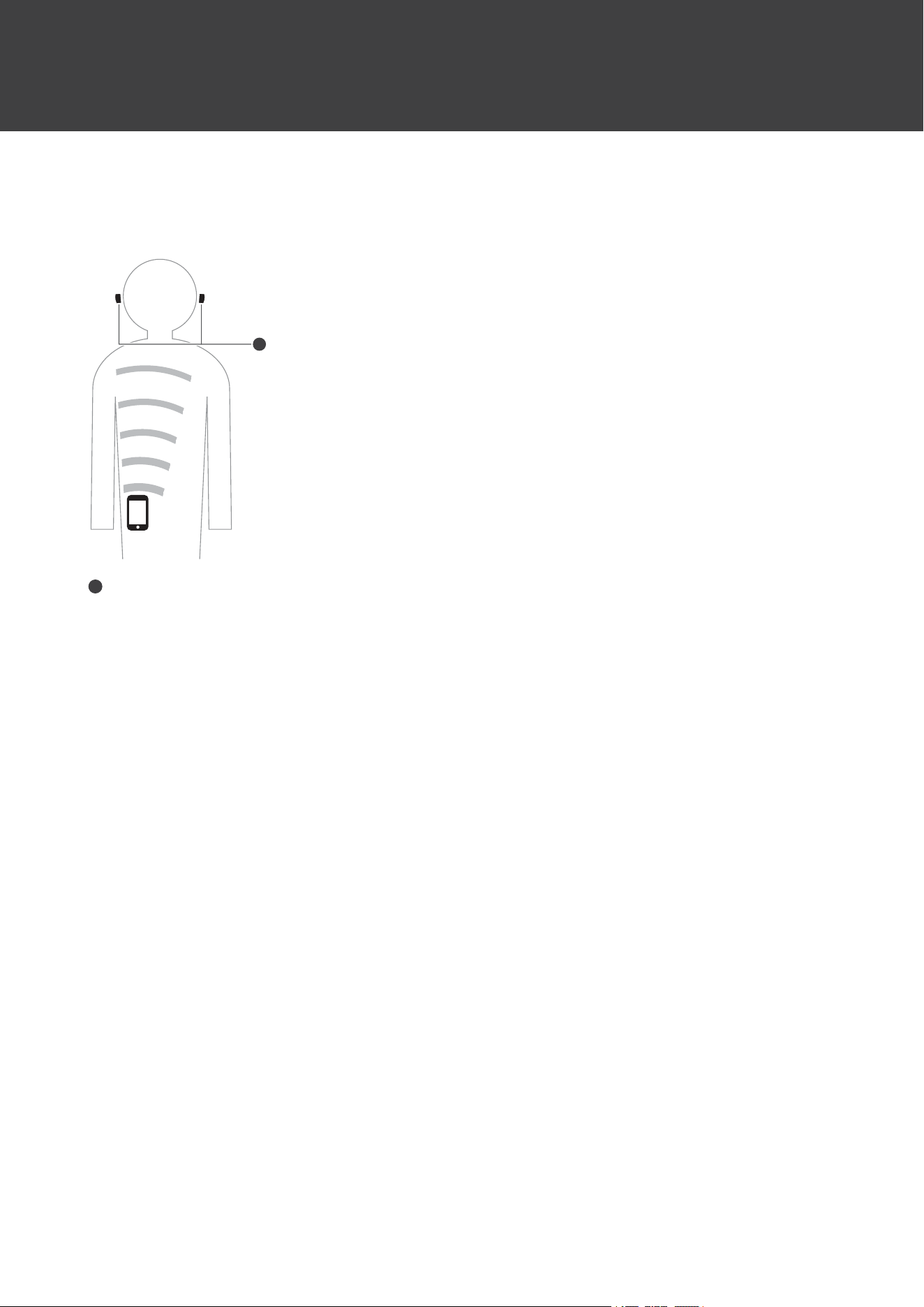
ForamorecomfortableBluetoothcommunication
experience
Theeffectivecommunicationrangeofthisproductvariesdependingonobstructionsandradiowaveconditions.Fora
moreenjoyableexperience,pleaseusetheproductascloseaspossibletotheBluetoothdevice.Tominimizenoiseand
sounddisruptions,avoidplacingyourbodyorotherobstaclesbetweentheproduct’santennaandtheBluetoothdevice.
1
1
Antennas
9
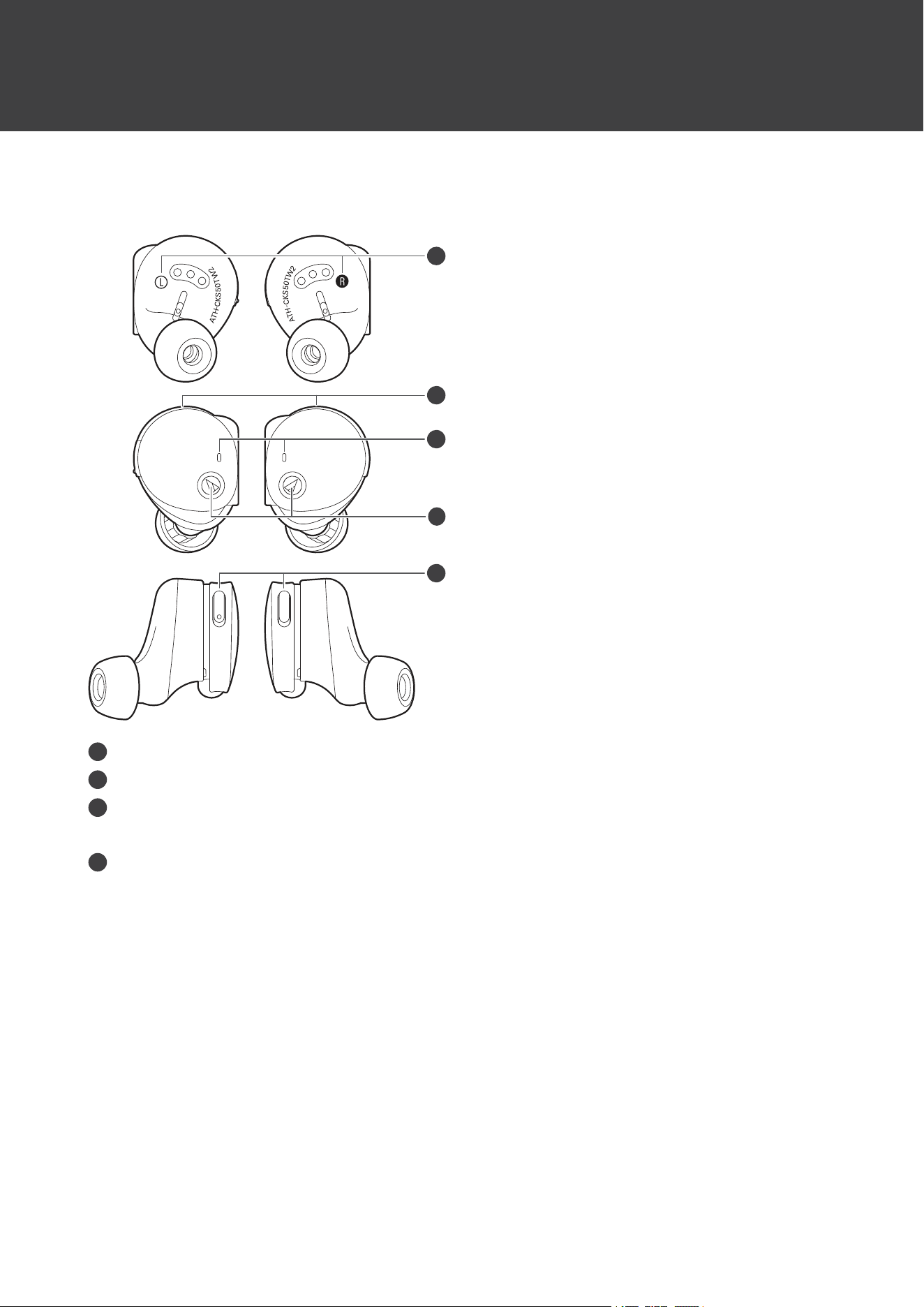
Partnamesandfunctions
Headphones
3
2
2
1
4
1
L/R(left/right)indicator
2
Microphone
3
Indicatorlamp
Displaystheoperatingstatusandbatteryleveloftheheadphones.
4
Multifunctionbutton
Usetoplay/pausemusicandanswerphonecalls.Alsousetoadjustthevolume(+/–).TheL(left)sidehasa
protrusionfordistinguishingbetweentheleftandright.
Partnamesandfunctions
10
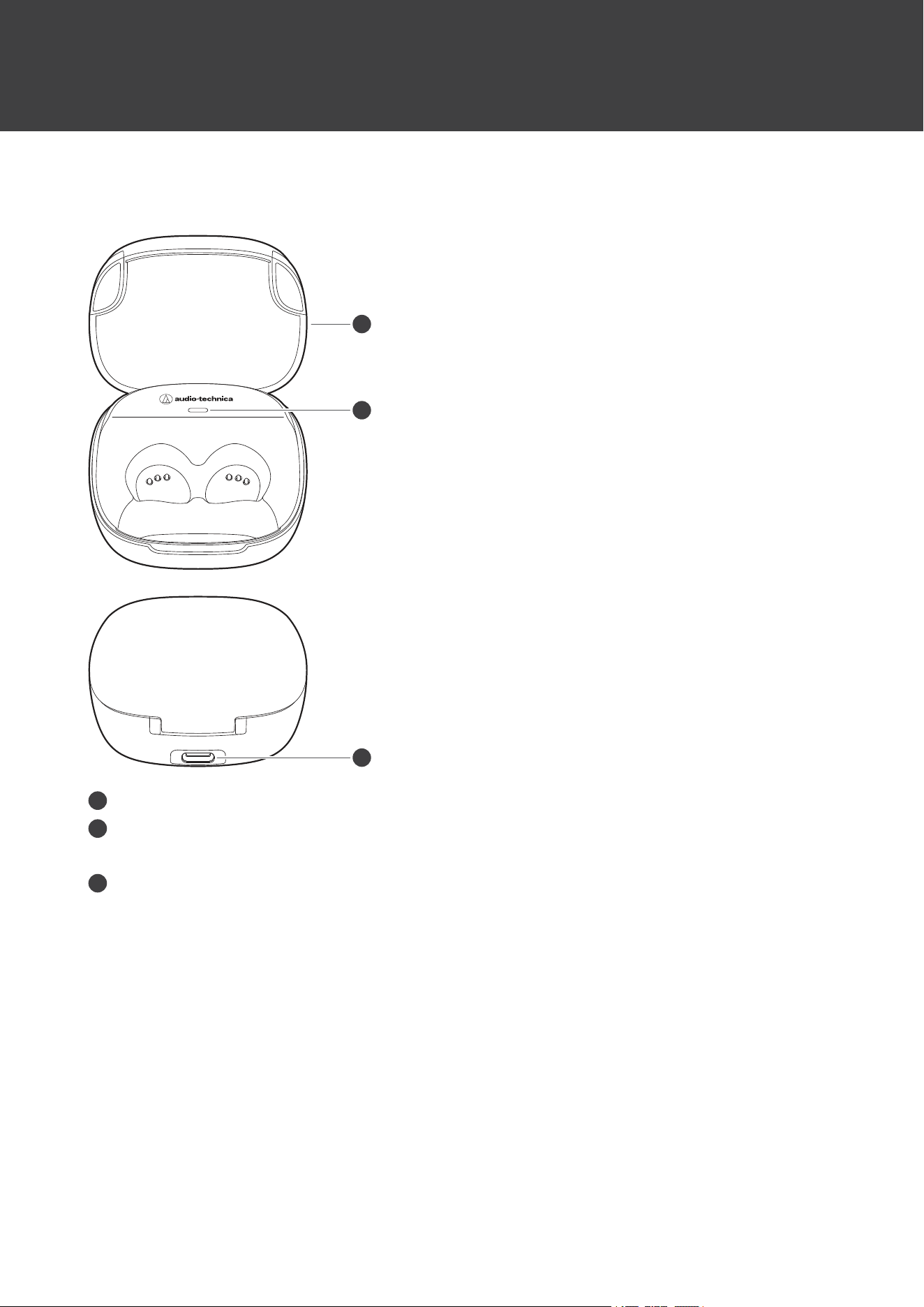
Chargingcase
1
2
3
1
Cover
2
Indicatorlamp
Lights/flasheswhenchargingthechargingcase.Alsodisplaysthebatterylevelofthechargingcase.
3
Batteryjack
UsetoconnecttheincludedUSBchargingcableandchargetheproduct.
Partnamesandfunctions
11
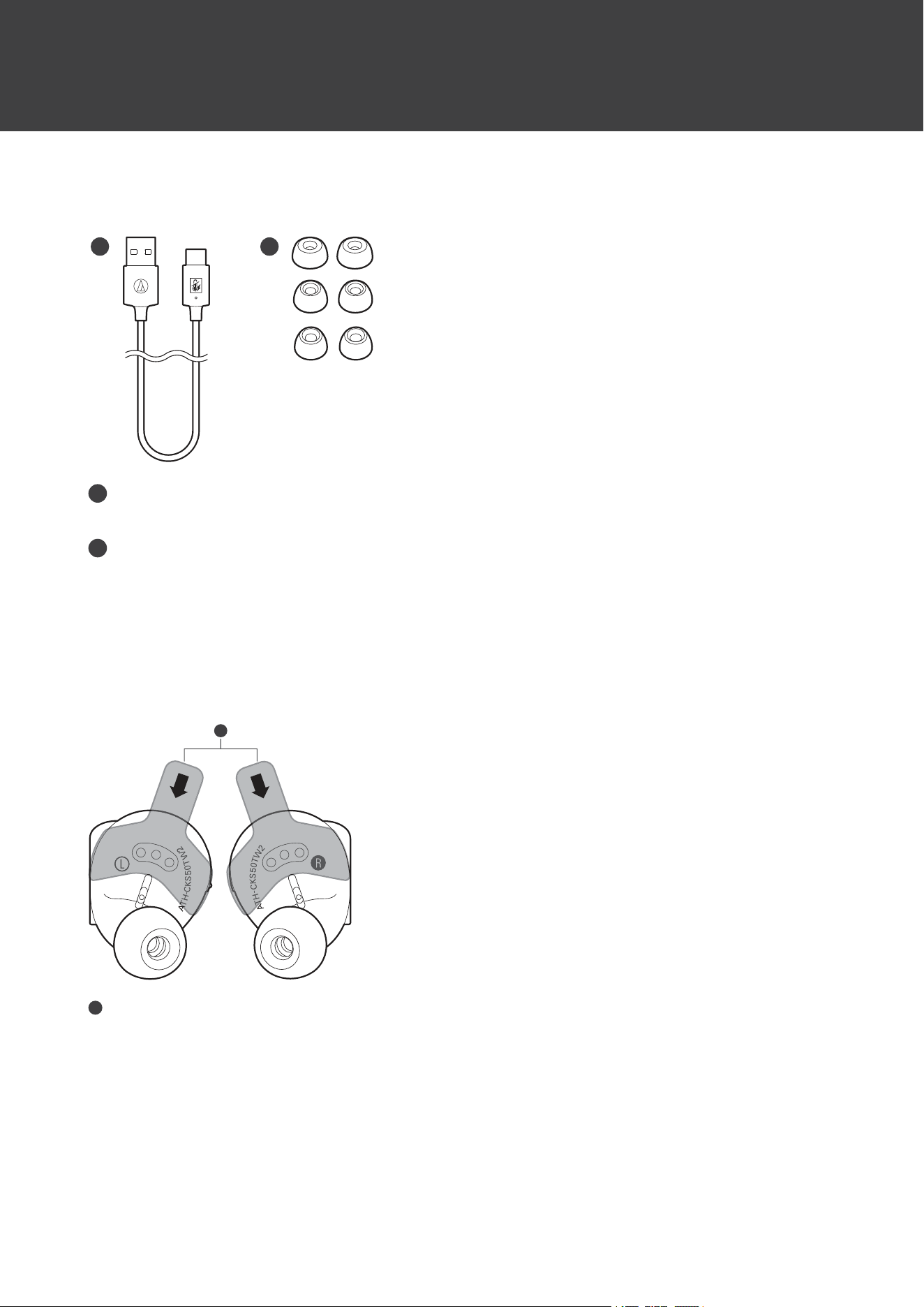
Accessories
1 2
1
USBchargingcable(50cm(20"),USBType-A/USBType-C
™
)
TheUSBchargingcableisequippedwithanoverheatprotectionfunction.
2
Eartip(XS,S,M,L)
Atthetimeofpurchase,theM-sizeeartipsareattachedtotheproduct.
Removingtheinsulationseals
Removetheinsulationsealsbeforeuse.
1
1
Insulationseal
12
Chargingthebattery
Fullychargethebatterywhenusingforthefirsttime.
Whentherechargeablebatteryisrunninglow,thevoiceguidancewillplaythemessage“Lowbattery”,andthe
indicatorlampwillflashinorange.Chargethebatteryassoonaspossible.
Ittakesabout2.5hourstofullychargetheheadphones,andabout4hourstofullychargethechargingcase.
(Chargingtimesmayvarydependingonusageconditions.)
Chargetheproductinawell-ventilatedplace(10to35°C(50to95°F))awayfromdirectsunlight.Chargingoutside
thenormalchargingtemperaturerangemayresultinfailuretochargeorlongerchargingtime.Inaddition,the
batterymaydeteriorate,possiblyresultinginshorterperiodsofcontinuoususeorfailuretocharge.
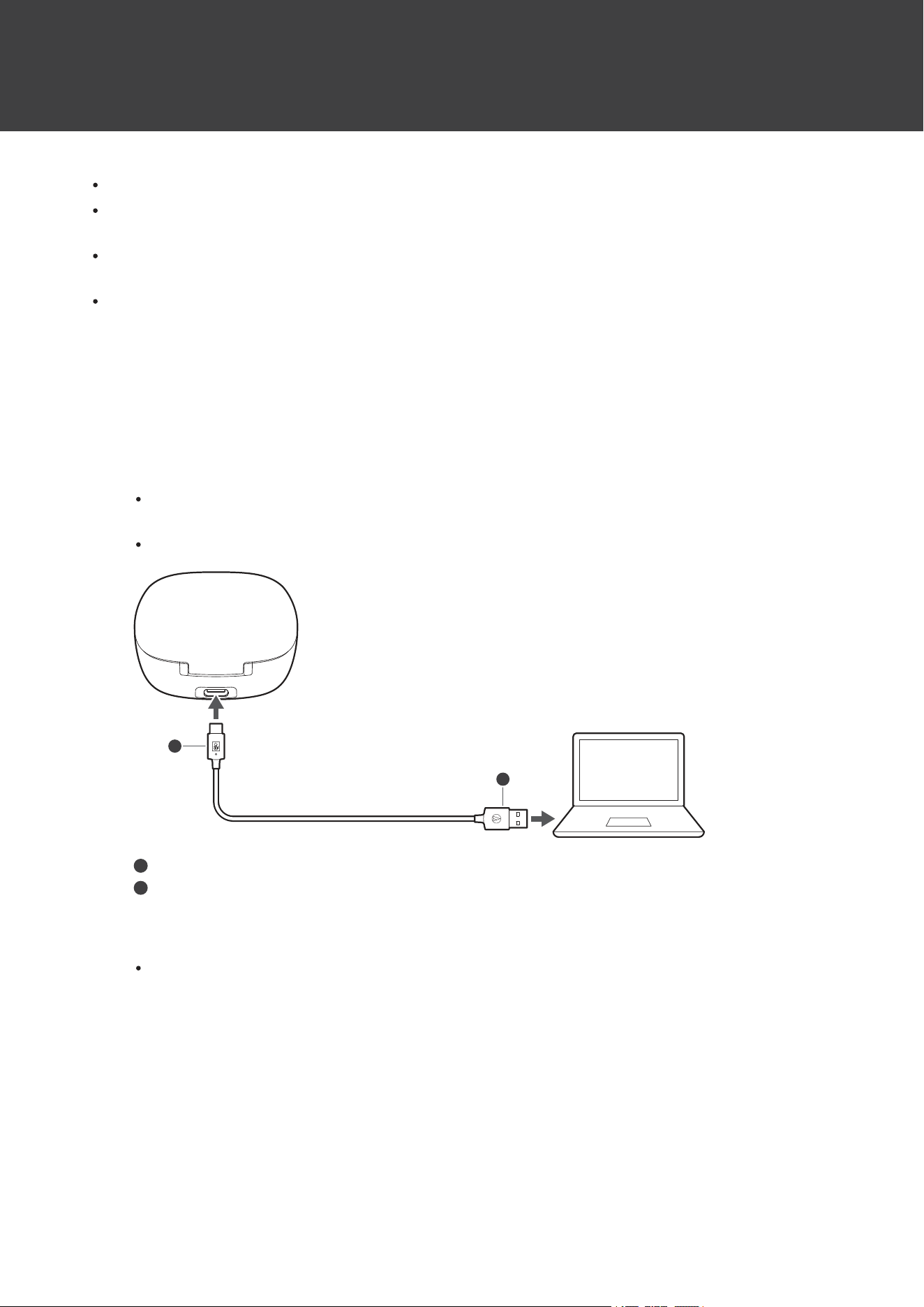
Chargingtheheadphonesandchargingcase
1
ConnecttheincludedUSBchargingcable(USBType-Cside)tothebatteryjackofthechargingcase.
TheincludedUSBchargingcableisdesignedforexclusiveusewiththeproduct.DonotuseanyotherUSB
chargingcable.
WheninsertingtheUSBchargingcableintotheUSBportorbatteryjack,insertitdirectly(horizontally).
2
1
1
USBType-C
2
USBType-A
2
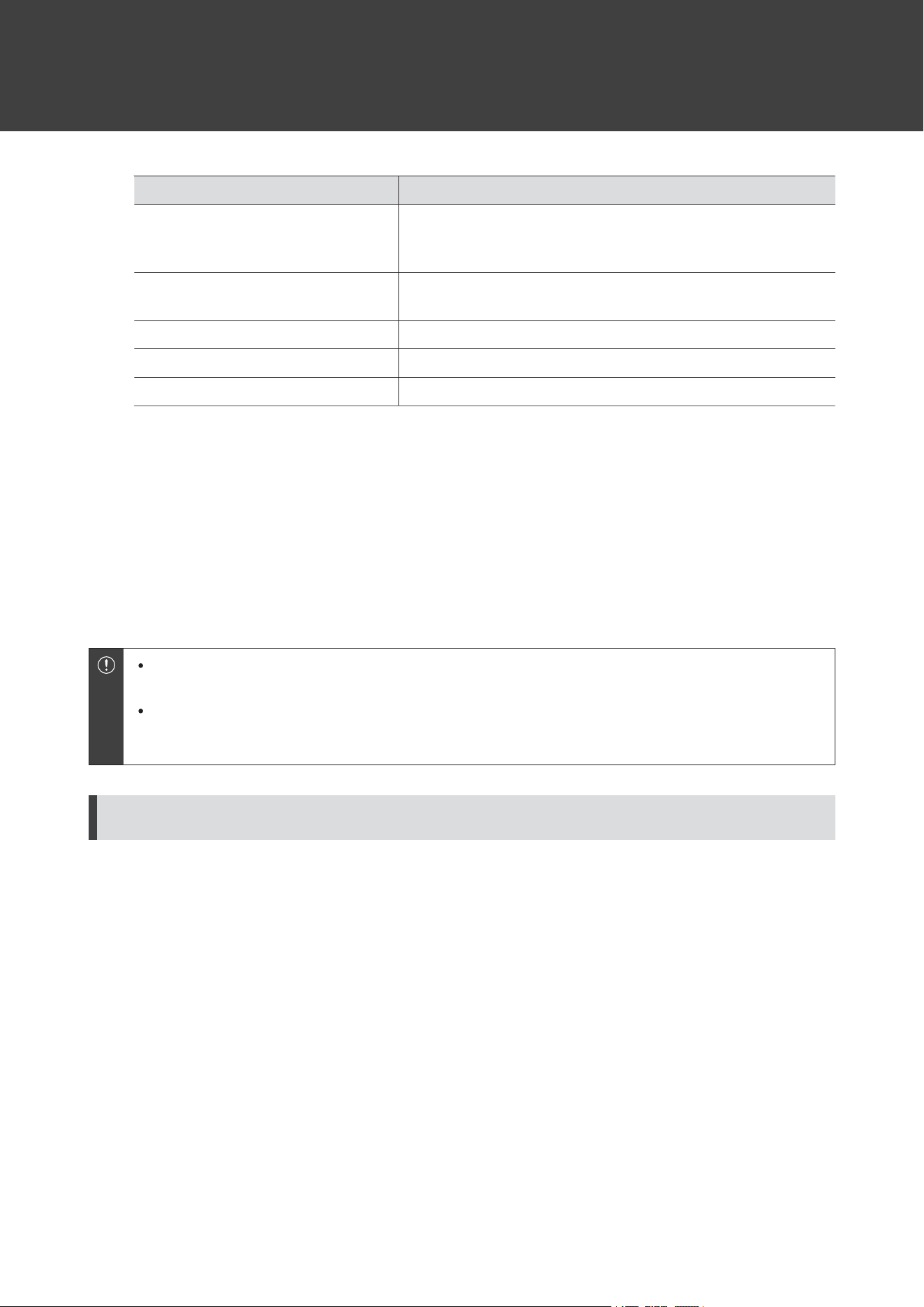
Placetheheadphonesinthechargingcase.
Whenchargingtheheadphones,makesuretheindicatorlampsontheheadphoneslightup.Iftheydonot
lightup,removetheheadphonesandplacetheminthecaseagain.
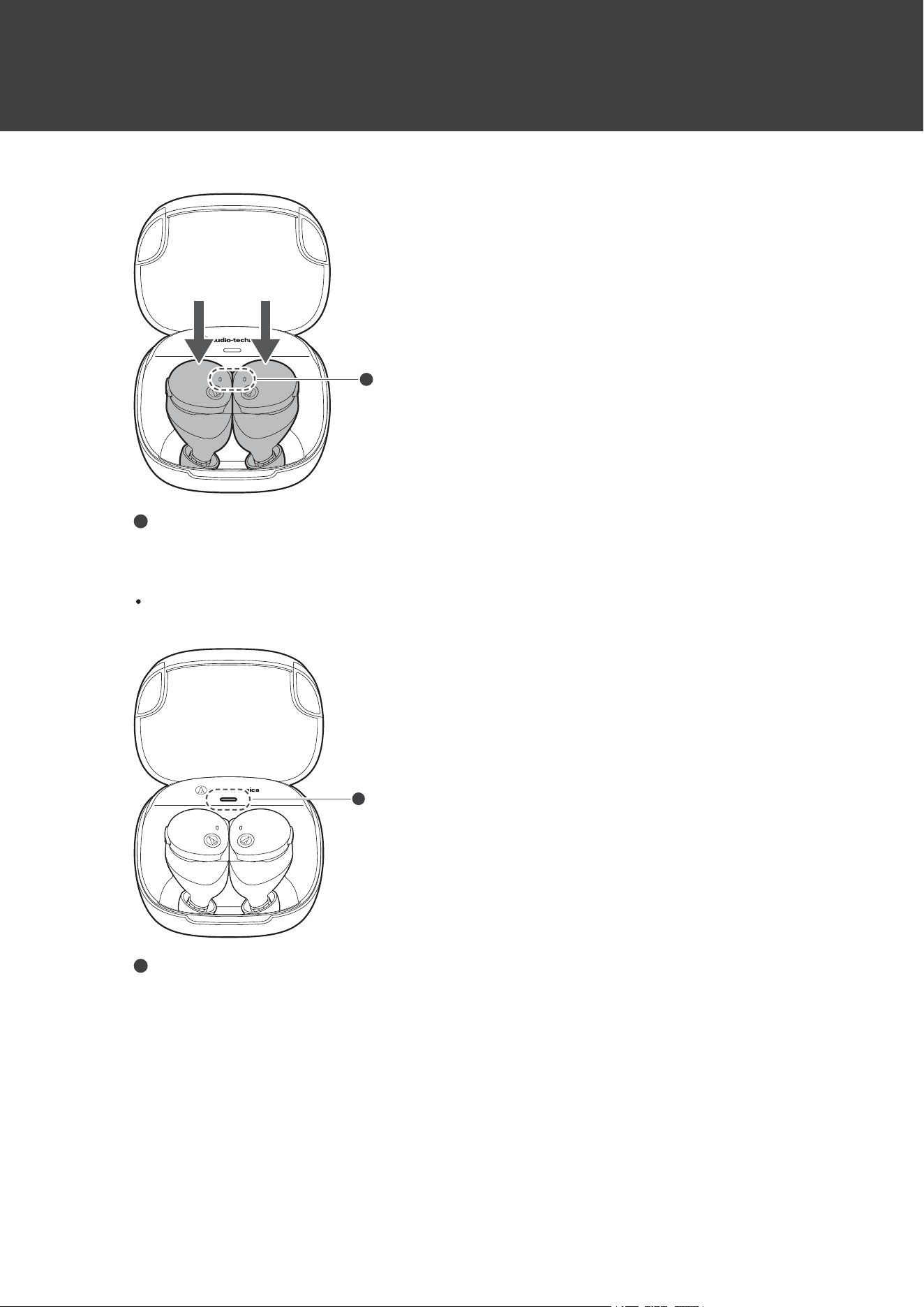
Chargingthebattery
13
1
1
Indicatorlamp
3
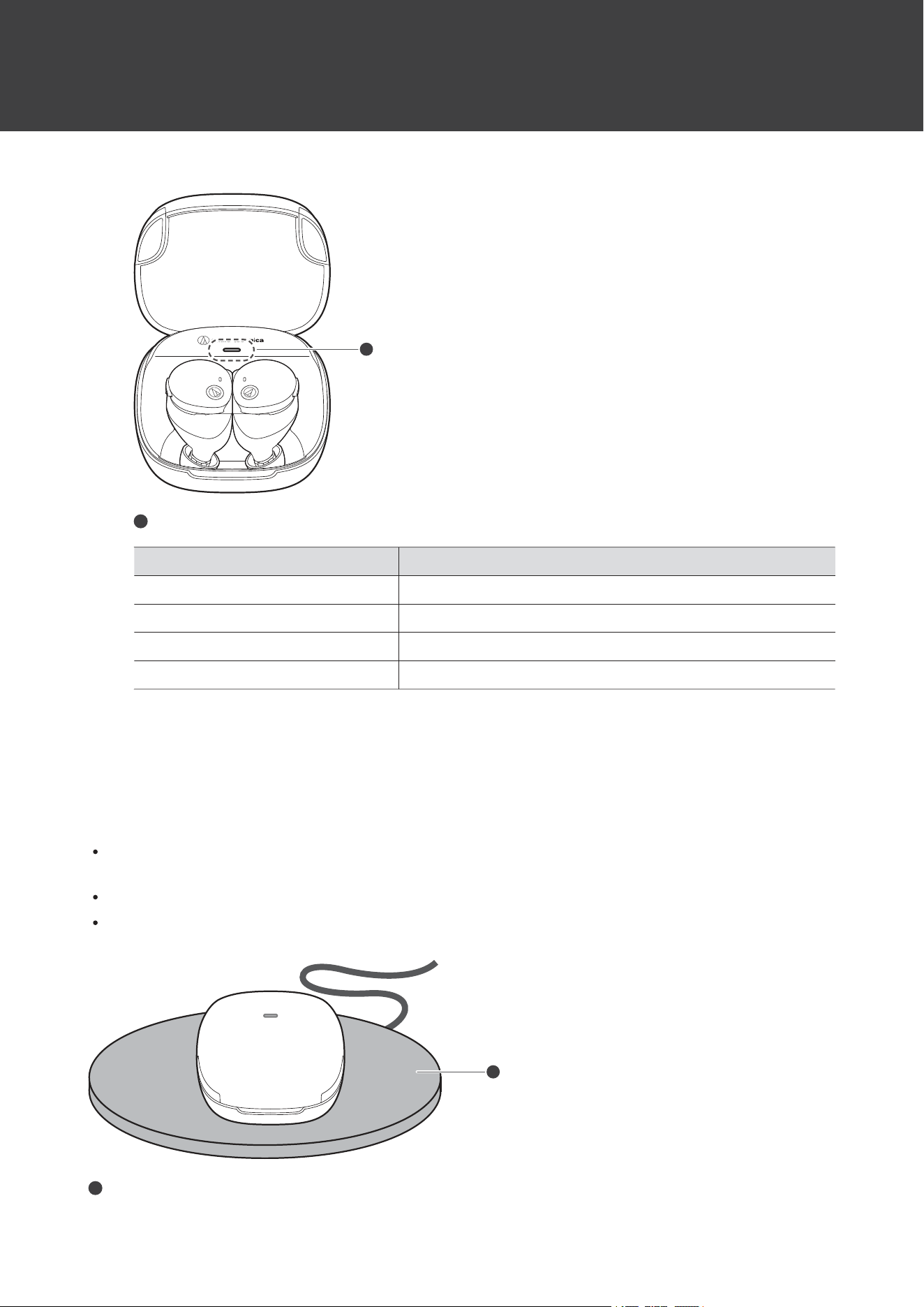
ConnecttheincludedUSBchargingcable(USBType-Aside)tothecomputertostartcharging.
Whilecharging,theindicatorlamponthechargingcaselights/flashesasfollows.(Itmaytakeseveralseconds
fortheindicatorlamptolight.)
1
1
Indicatorlamp
Chargingthebattery
14
IndicatorlampStatus
Flashingorange->Flashingyellow->
Flashinggreen
Charging
(Theindicatorlampflashesorangewhenthebatterylevelislow
andchangestoyellowthengreenasthebatterylevelincreases.)
Lightsingreenfor7seconds,andthen
turnsoff
Chargingcomplete
FlashingorangequicklyChargingerror
[1]
FlashingyellowForeignmatterdetectedinsidebatteryjack
[2]
FlashingredErrordetected
[3]
[1]Thechargingcaseorheadphonesmaybehot.Allowthetemperatureoftheproducttocoolsufficientlybeforecharginginawell-ventilated
place(10to35°C(50to95°F))awayfromdirectsunlight.
[2]Stopusingtheproductandcheckforanyforeignmatterinsidethechargingcasebatteryjack.
[3]DiscontinueuseoftheproductandcontactyourlocalAudio-Technicadealerforrepair.
4
Whenchargingiscomplete,disconnecttheUSBchargingcable(USBType-Aside)fromthe
computer.
5
DisconnecttheUSBchargingcable(USBType-Cside)fromthebatteryjackonthechargingcase.
Whencharging,makesuretousetheincludedUSBchargingcable.Theproductmaynotchargewith
cablesotherthantheincludedUSBchargingcable.
Alwaysmakesuretheheadphonesarenotwetbeforecharging.Theheadphonesmaynotoperatecorrectly
ormaynotturnoniftheyarewet.Wipetheheadphoneswithadrycloth,shakethemmultipletimesto
removeanyexcesswater,andallowtheheadphonestodrythoroughlybeforecharging.
USBchargingcable
TheincludedUSBchargingcableisequippedwithanoverheatprotectionfunction.Chargingwillstopifabnormalheat
generationisdetectedduetochargingbeingperformedwithwaterorforeignmatterinsidethechargingcasebattery
jackorUSBchargingcable.Topreventelectricshockormalfunctionsduetoreasonssuchasheatgeneration,smoke
emissionandfire,makesuretousetheincludedUSBchargingcablewhenchargingtheproduct.
ChargingheadphoneswithouttheUSBchargingcable
Arechargeablebatteryisbuiltintothechargingcase.Ifyouhavechargedthechargingcase,youcanchargethe
headphoneswithoutusingtheUSBchargingcable.
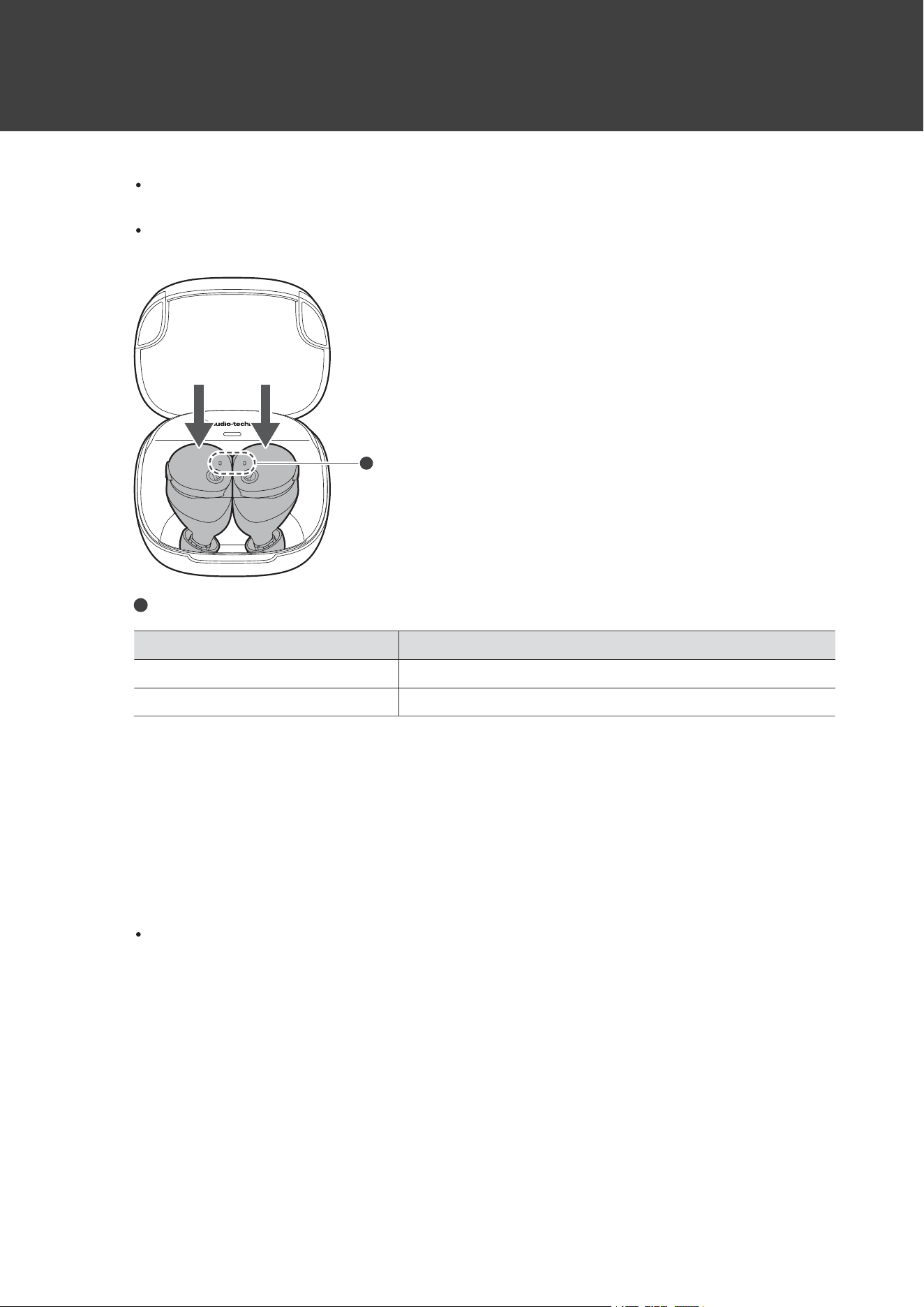
1
Placetheheadphonesinthechargingcase.
Chargingthebattery
15
Whilecharging,theheadphoneindicatorlampslightasfollows.(Itmaytakeseveralsecondsfortheindicator
lampstolight.)
Whenchargingtheheadphones,makesuretheindicatorlampsontheheadphoneslightup.Iftheydonot
lightup,removetheheadphonesandplacetheminthecaseagain.
1
1
Indicatorlamp
IndicatorlampStatus
LightsinwhiteCharging
OffChargingcomplete/Chargingcasebatteryhasnopower
Checkingthebatterylevelofthechargingcase
Whenopening/closingthecoverofthechargingcase,theindicatorlampflashestoindicatethebatterylevelofthe
chargingcase.
1
Open/closethechargingcasecover.
Theindicatorlampflashesasfollows.Thecoloroftheindicatorlampindicatesthebatterylevel.
Chargingthebattery
16
1
1
Indicatorlamp
IndicatorlampStatus
Flashingorangeslowly(once)Batterylevellow
Flashingyellowslowly(once)Batterylevelmedium
Flashinggreenslowly(once)Batterylevelhigh
Flashingorangequickly(twice)Batteryisdischarged.Chargethechargingcase.
Wirelesscharging
WirelesschargingispossibleusingcommerciallyavailableQiwirelesschargers.
Awirelesschargerisnotincluded.Pleasepurchaseoneseparately.
Closethechargingcasecoverandplacethechargingcaseonthewirelesscharger.Theindicatorlampofthe
chargingcaselightsandflashesinthesamemanneraswhenchargingwithaUSBchargingcable.
Whencharging,refertotheusermanualforthewirelesschargertoconfirmthecorrectplacementmethod.
Themaximumpowerthatcanbereceivedbythisproductis2.5W.
1
1
Wirelesscharger

Chargingthebattery
17
ChargingsimultaneouslywithawirelesschargerandUSBchargingcableisnotpossible.
Donotallowanyobjectsbetweenthechargingcaseandthewirelesschargerwhencharging.Fordetails,
refertotheusermanualofyourwirelesscharger.
18
PowersupplyON/OFF
Turningontheproduct
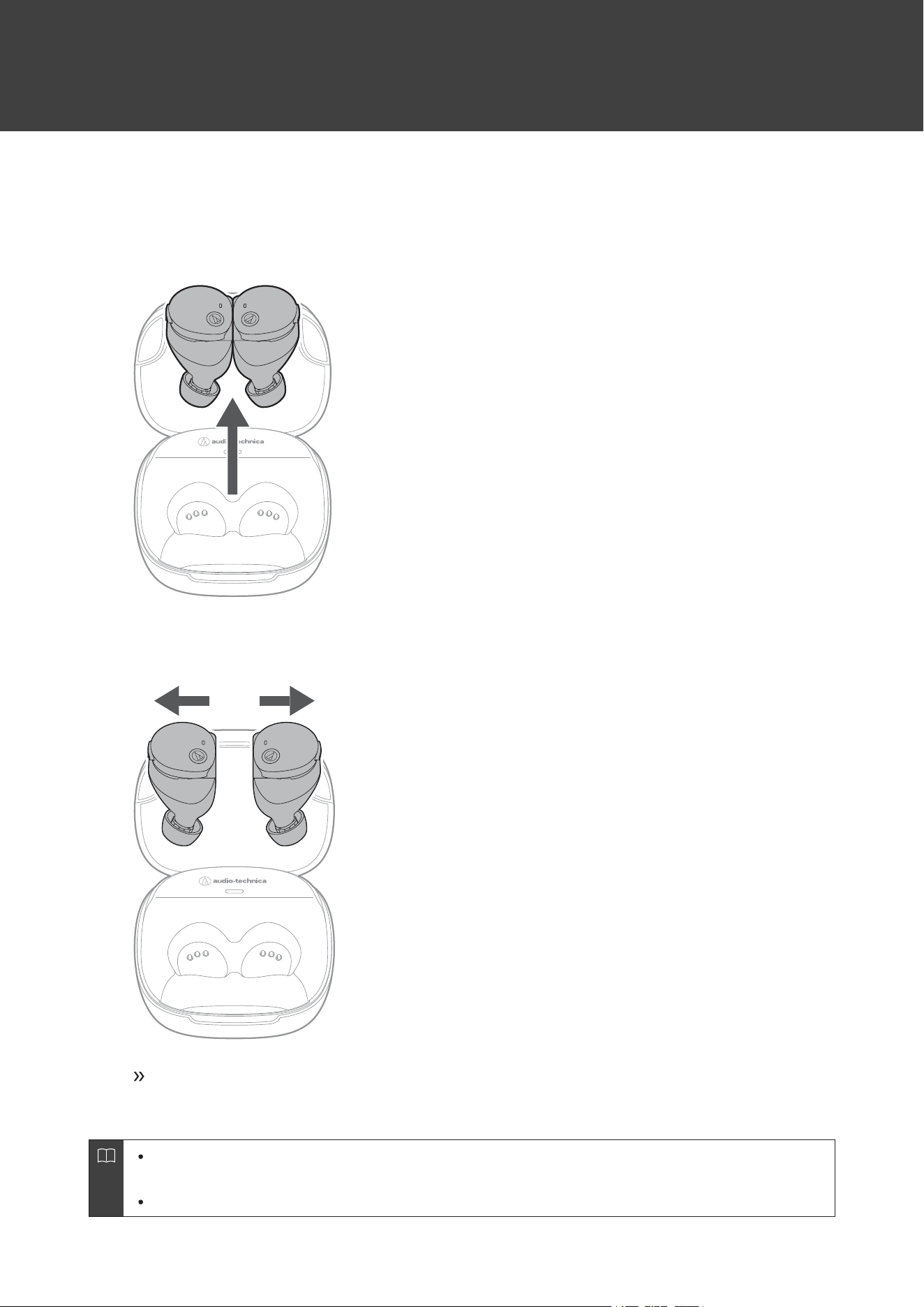
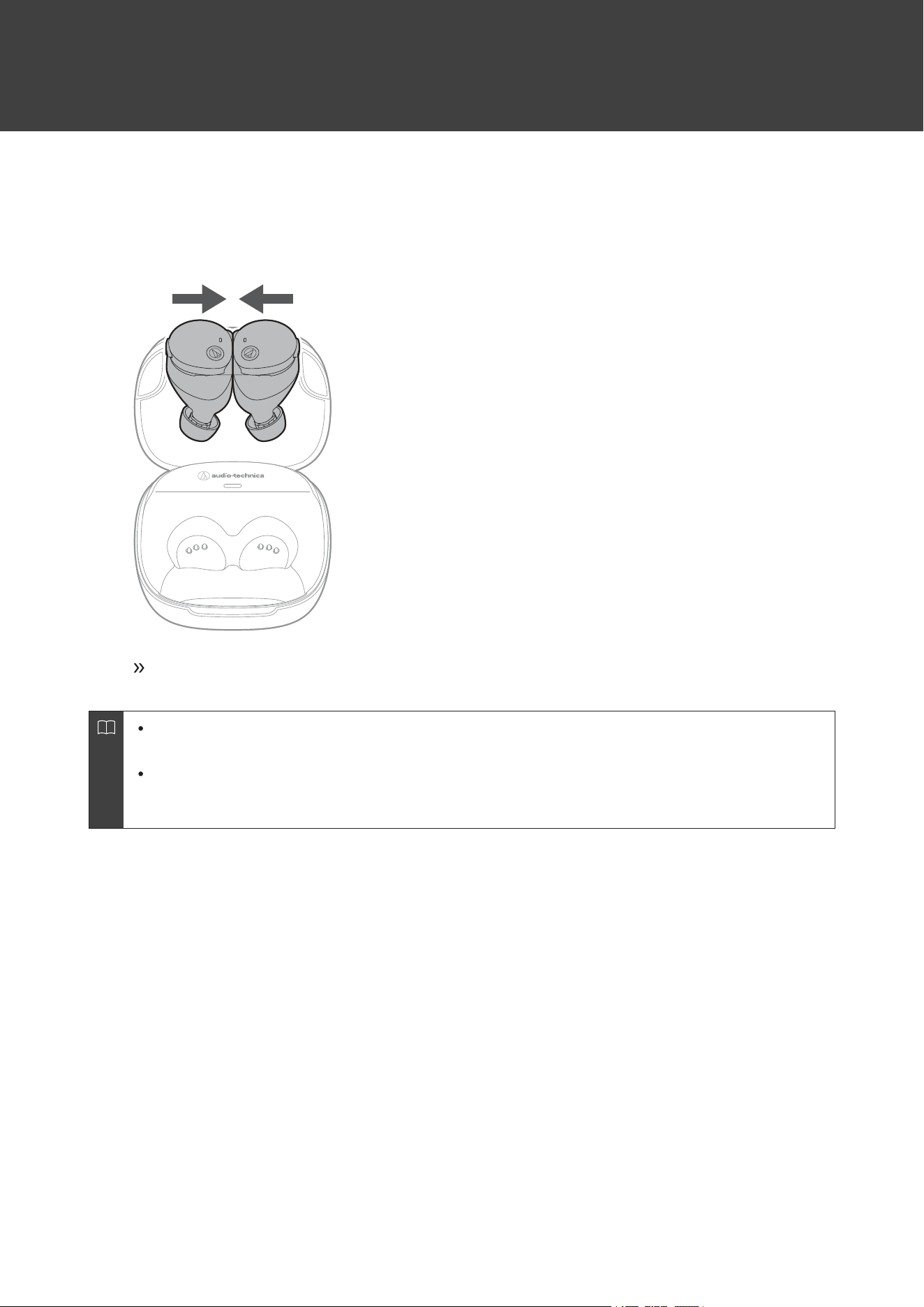
1
Removetheheadphonesfromthechargingcase.
2
Separatetheleft(L)andright(R)sideheadphones.
Thepowerwillturnonautomaticallyandtheindicatorlampsontheheadphoneswilllightinwhite
andthenflash.
Toturnthepoweronmanually,pressandhold(forabout1second)themultifunctionbuttonswhilekeeping
theleft(L)andright(R)sideheadphonesseparated.
Itmaytakeseveralsecondsfortheindicatorlampstolight.
PowersupplyON/OFF
19
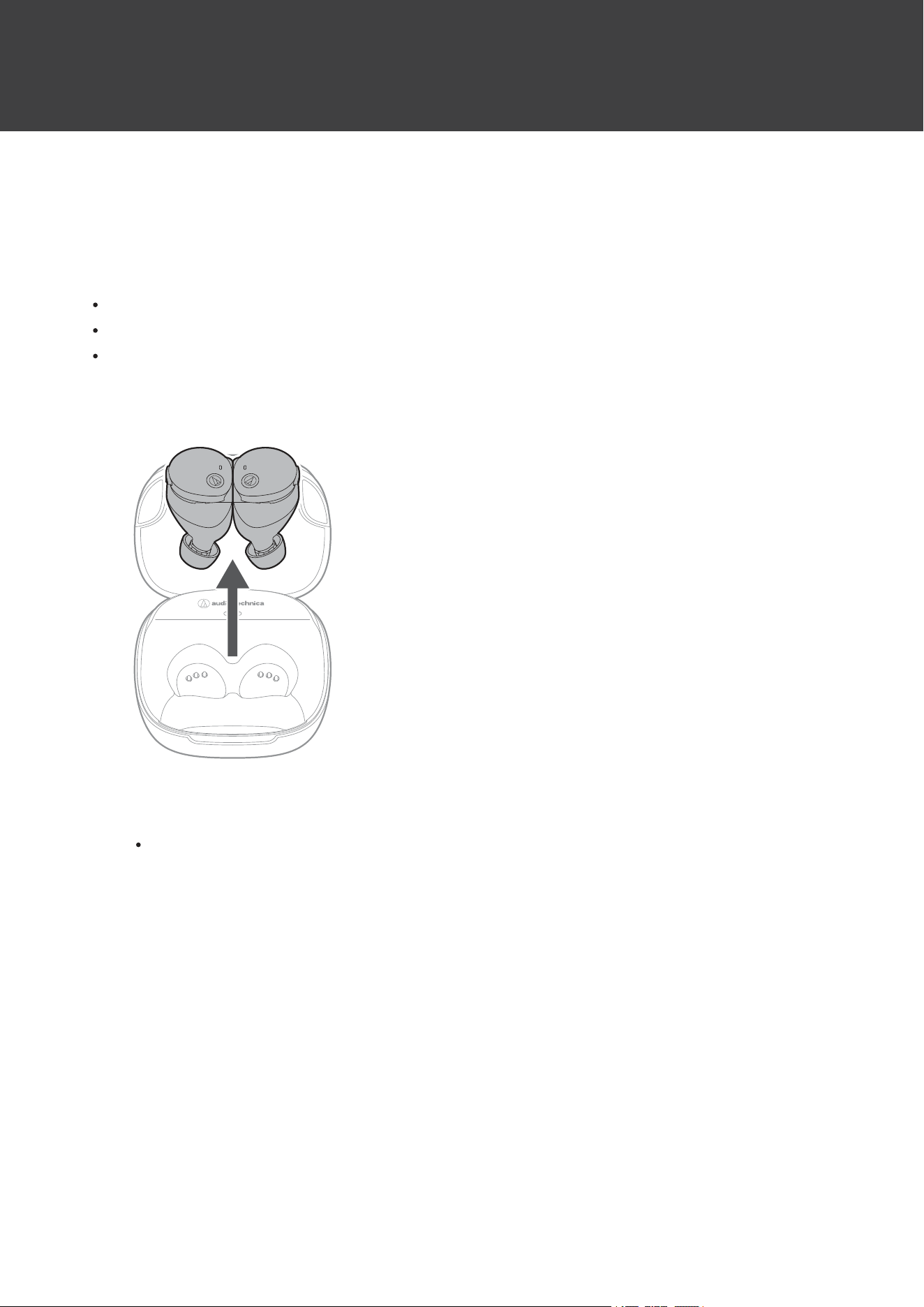
Turningofftheproduct
1
Connecttheleft(L)andright(R)sideheadphones.
Thepowerwillturnoffautomatically.
Thepowerwillalsoturnoffautomaticallywhentheheadphonesareplacedinsidethechargingcase(e.g.,
whentheheadphonesareplacedinthechargingcaseoneatatime).
Toturnthepoweroffmanually,pressandhold(forabout4seconds)themultifunctionbuttonswhile
keepingtheleft(L)andright(R)sideheadphonesseparated.(Whilepressingandholdingthemultifunction
buttons,youwillhearaconfirmationtone,butkeeppressingandholdinguntilthepoweristurnedoff.)
20
ConnectingviaBluetooth
ToconnecttheproducttoaBluetoothdevice,theproductneedstopair(register)withthedevice.
PairingaBluetoothdevice
ReadtheusermanualfortheBluetoothdevice.
PlacetheBluetoothdevicewithin1m(3.3')oftheproducttoperformpairingcorrectly.
Weartheproducttohearvoiceguidanceduringpairing.
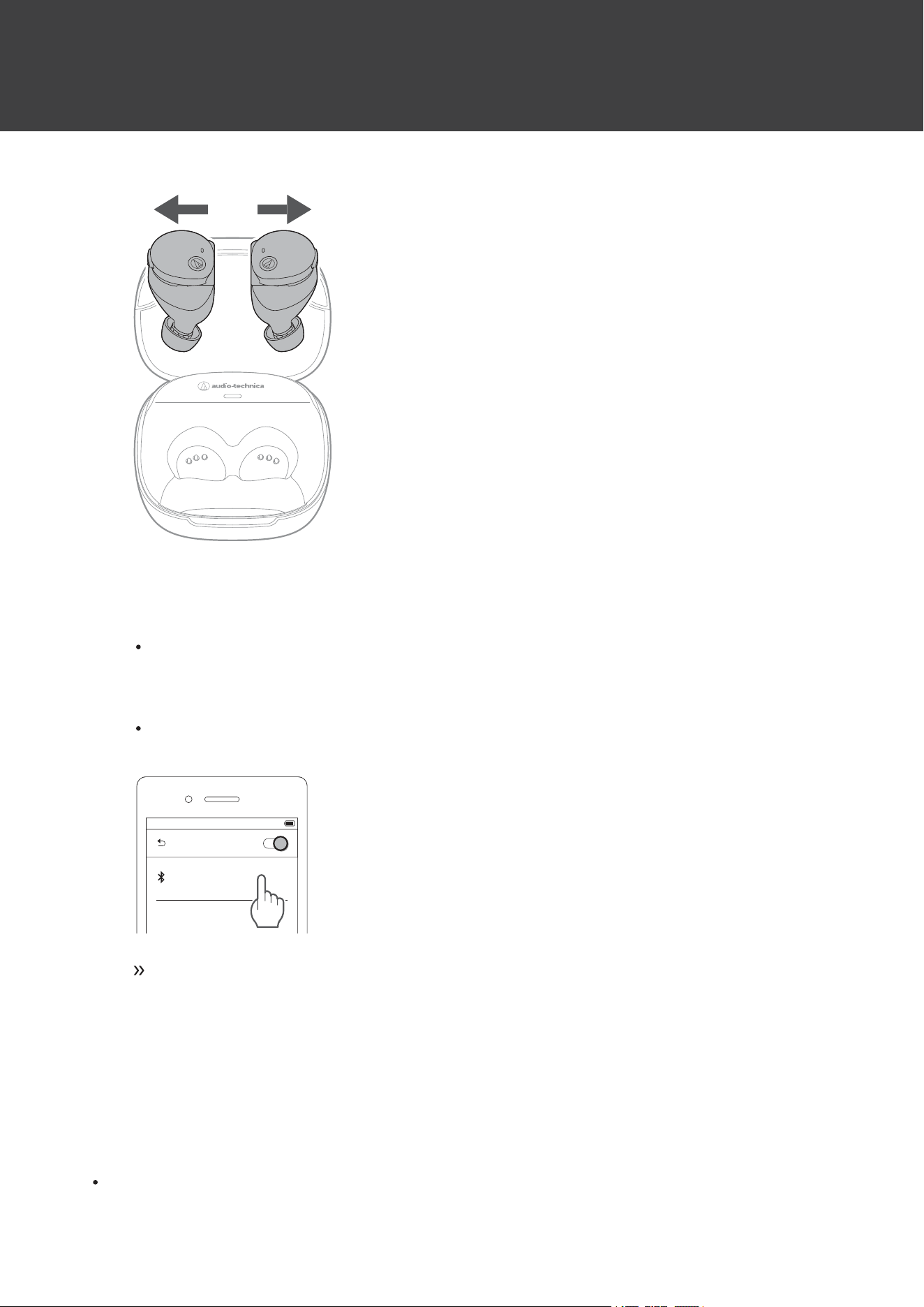
1
Removetheheadphones(L(left)andR(right))fromthechargingcase.
2
Separatetheleft(L)andright(R)sideheadphones.
Theindicatorlampsontheheadphoneswilllightinwhite,andthenflash.
ConnectingviaBluetooth
21
3
UseyourBluetoothdevicetobeginthepairingprocessandsearchfortheproduct.Whenyour
Bluetoothdevicefindstheproduct,“ATH-CKS50TW2”willbedisplayedonthedevice.
ForinformationaboutusingyourBluetoothdevice,refertothedevice’susermanual.
4
Select“ATH-CKS50TW2”topairtheproductandyourBluetoothdevice.
Somedevicesmayaskforapasskey.Inthiscase,enter“0000”.Thepasskeymayalsobecalledapasscode,
PINcode,PINnumber,orpassword.
Bluetooth ON
ATH-CKS50TW2
Thevoiceguidancewillplaythemessage“Connected”,andtheheadphoneindicatorlampswill
turnoff.Thisindicatespairingwasperformedcorrectlyandisnowcomplete.
Aboutpairing
WhenconnectinganewBluetoothdevice,youneedtopairitwiththeproduct.OncetheBluetoothdeviceandthe
productarepaired,youdonotneedtopairthemagain.Theproductsupportsmultipairing,inwhichaconnectionhistory
issaved.However,inthefollowingcasesyouwillneedtopairagaineveniftheBluetoothdevicewaspairedonce:
IftheproductisdeletedfromtheBluetoothdevice’sconnectionhistory

ConnectingviaBluetooth
22
Iftheproductissentoutforrepair
Iftheproductisreset
Multipointfunction
Theproductsupportsmultipoint,whichallowstwoBluetoothdevicestobeconnectedatthesametime.Whileyouare
listeningtomusicwithonedevice,youcanansweracallthatcomesinfromtheotherdevice.Itisconvenientifyouhave
twosmartphones,forexample.
Audio-TechnicadoesnotguaranteetheoperationofallcombinationsofBluetoothdevices.
Connectingusingmultipoint
1
PairwiththefirstBluetoothdevice.
2
Afterpairingwiththefirstdevice,turnoffitsBluetoothfeature.
3
PairwiththesecondBluetoothdevice.
4
TurnontheBluetoothfeatureofthefirstBluetoothdevice.
Iftheproductdoesnotconnect,restartitspower.
UptotwoBluetoothdevicescanbeconnectedatthesametimewithmultipoint.Toconnectathird
Bluetoothdevice,disconnectoneoftheconnecteddevices.
Musiccannotbeplayedfromtwodevicesatthesametime.IfmusicisplayingonthefirstBluetoothdevice,
playbackwillnotbeswitchedevenifmusicisplayedontheseconddevice.Themusicplayingonthefirst
devicemustbestoppedtoplaymusicfromtheseconddevice.
23
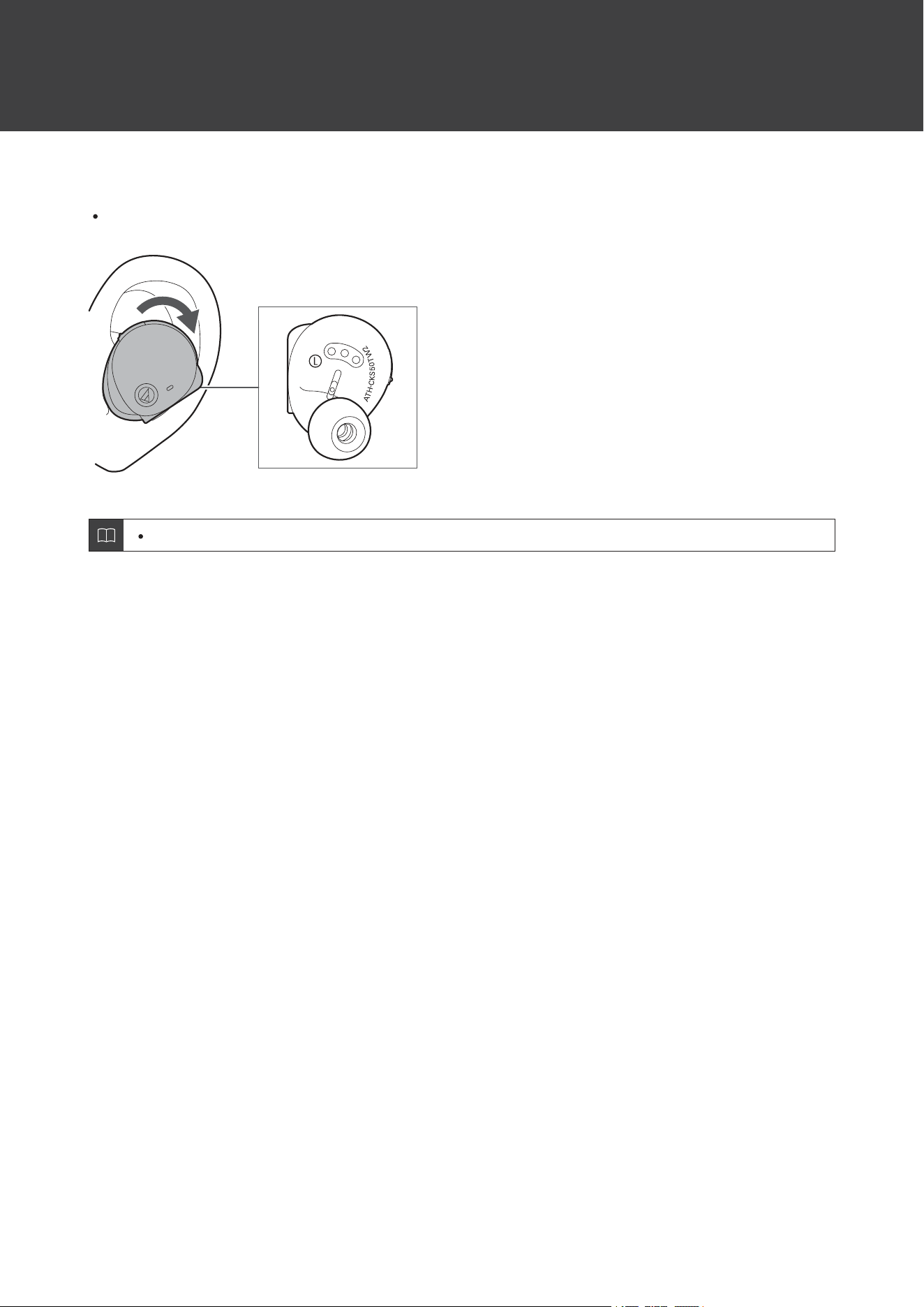
Wearingtheproduct
Insertthesideoftheproductmarked“L”(left)intotheleftearandthesidemarked“R”(right)intotherightear.
Ifyouhavedifficultyinsertingtheheadphones,adjustthepositionasdesiredbyrotatingtheheadphonesbackward.
Whenusingtheproduct,selecttheeartipsthatfityourearsbest,andweartheproductsecurely.
24
Usingtheproduct
TheproductcanuseBluetoothwirelesstechnologytoconnecttoyourdeviceandplaymusic,receivephonecalls,etc.
Usetheproductforwhicheverofthesepurposessuitsyourneeds.NotethatAudio-Technicacannotguaranteethe
operationofdisplays,suchasthebatteryleveldisplay,orapplicationsviaBluetoothdevices.
Listeningtomusic
Toconnectforthefirsttime,pairtheproductandyourdeviceviaBluetoothwirelesstechnology.Ifyouhavealready
pairedtheproductandyourBluetoothdevice,turnontheBluetoothdevice’sBluetoothconnectionbeforeturningon
theproduct.
UseyourBluetoothdevicetostartplayback,referringtothedevice’susermanualasnecessary.
1
Removetheheadphonesfromthechargingcaseandplacetheminyourears.
2
StartplaybackonyourBluetoothdevice.
3
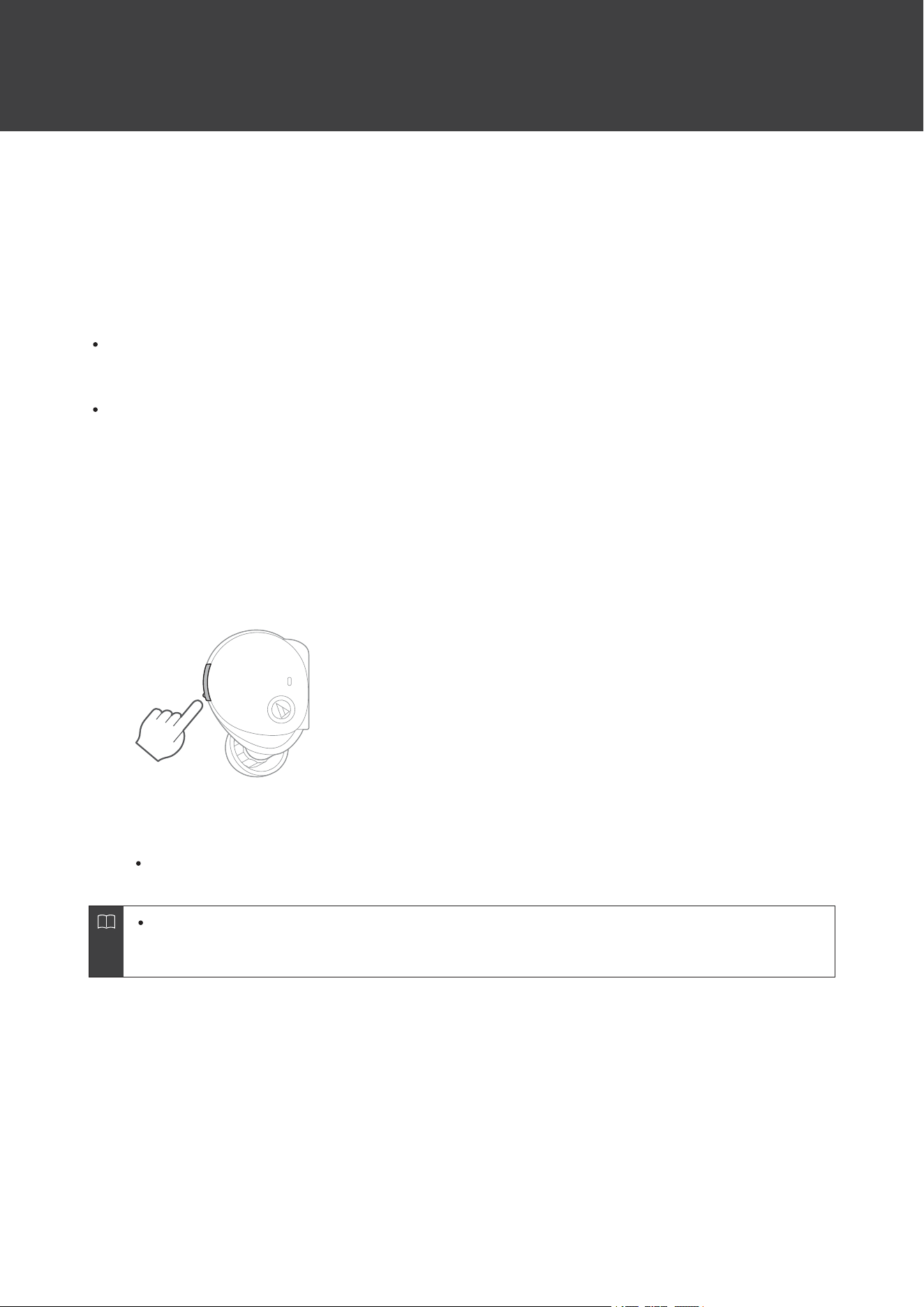
PressthemultifunctionbuttonontheL(left)sideheadphoneonceortwiceinarowtoadjustthe
volume(upordown).
4
Topausemusic,pressthemultifunctionbuttonontheR(right)sideheadphone.
Playbackwillbestartedorpausedwitheverypress.
Listeningtomusicisalsopossiblewithonlyoneheadphonebyturningitonandputtingitinyourear.When
youuseonlyoneheadphone,somefunctionsarenotavailabledependingonwhichsideisworn.Usethe
Bluetoothdeviceforoperationinsuchcases.
Usingtheproduct
25
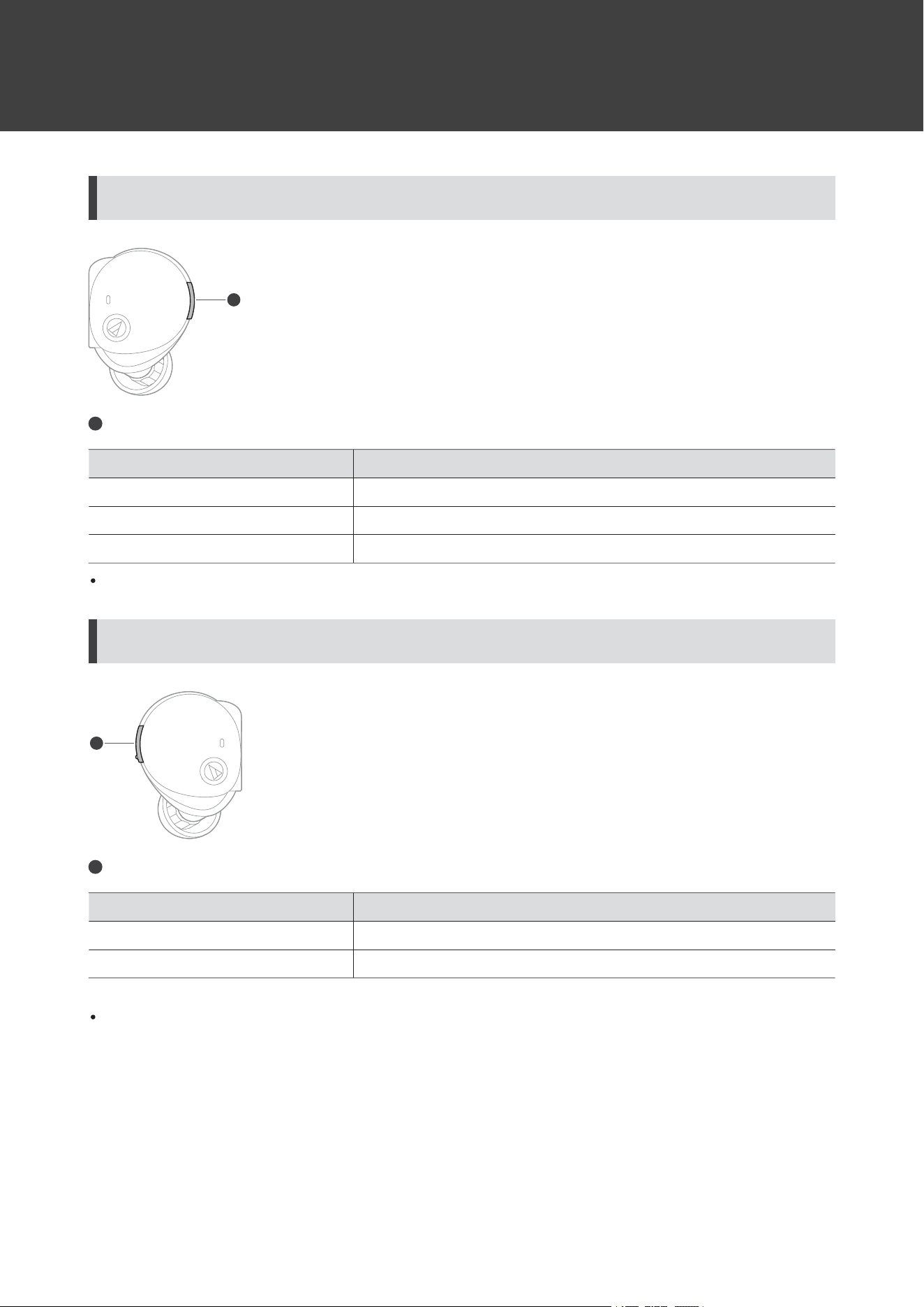
R(right)sideheadphonemultifunction-buttonoperation
1
1
Multifunctionbutton
OperationFunction
PressStartsorpausesplayback.
Press(twice)Playsthenexttrack.
Press(threetimes)Playstheprevioustrack/returnstothestartofthetrack.
Thecontrolsexplainedabovemaynotbeavailableonsomesmartphones.
L(left)sideheadphonemultifunction-buttonoperation
1
1
Multifunctionbutton
OperationFunction
PressIncreasesthevolumeby1level.
[1]
Press(twice)Decreasesthevolumeby1level.
[1]
[1]ThevolumecontrolofsomeBluetoothdevicesmaynotworkwellwiththeproduct.
Thecontrolsexplainedabovemaynotbeavailableonsomesmartphones.
Talkingonthephone
IfyourBluetoothdevicesupportstelephonefeatures,youcanusetheproducttotalkonthephone.
Usingtheproduct
26
1
Removetheheadphonesfromthechargingcaseandplacetheminyourears.
2
Make/receivecallswithyourBluetoothdevice.
WhenyourBluetoothdevicereceivesaphonecall,theproductsoundsaringtone.
Ifacallisreceivedwhileyouarelisteningtomusic,musicplaybackispaused.
3
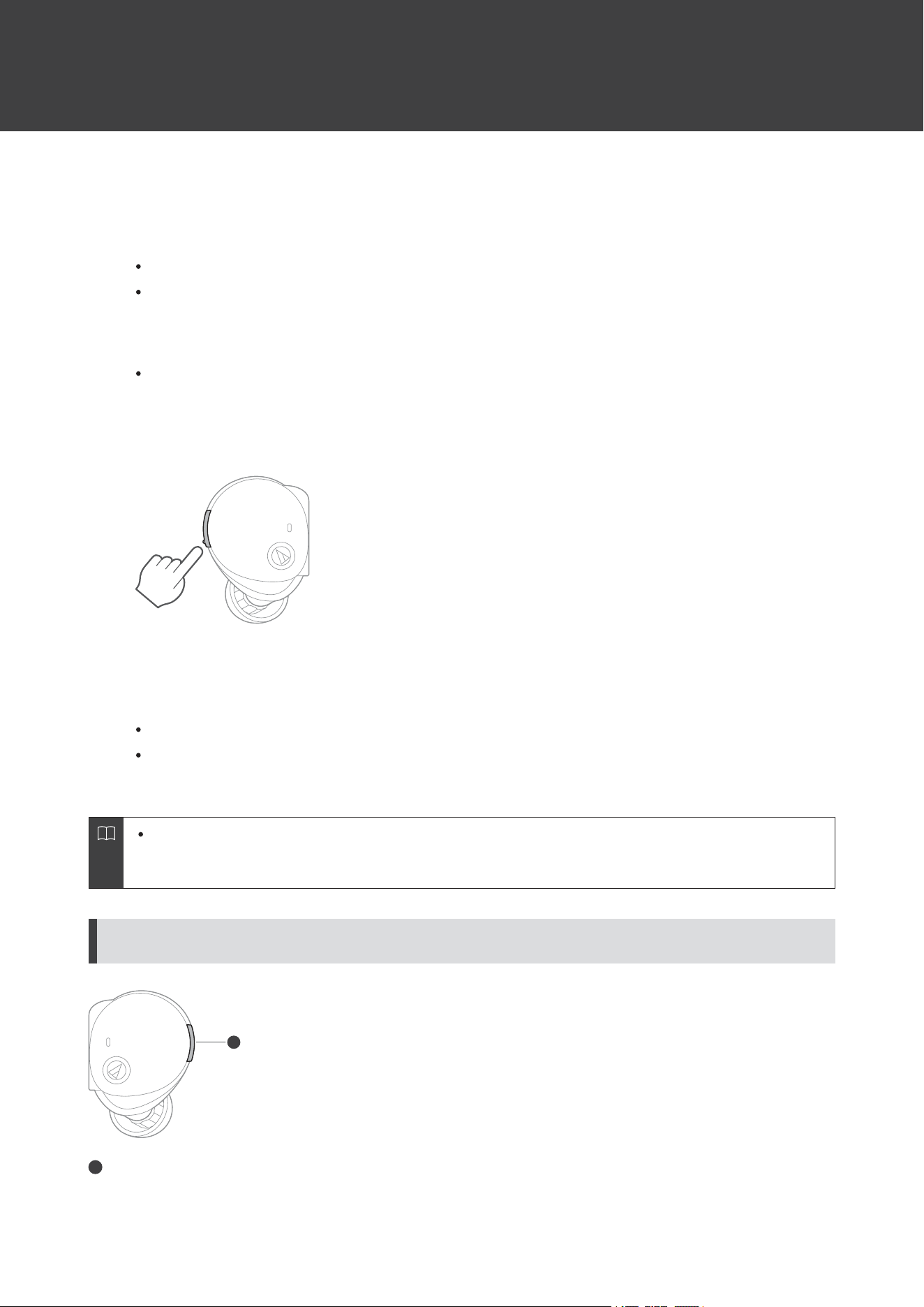
Toreceiveacall,pressthemultifunctionbuttonontheL(left)orR(right)sideheadphone.
CallscanbeansweredfromeithertheL(left)orR(right)sideheadphone.
4
PressthemultifunctionbuttonontheL(left)sideheadphoneonceortwiceinarowtoadjustthe
volume(upordown).
5
Toendthecall,pressandhold(forabout2seconds)themultifunctionbuttonontheR(right)side
headphone.
Ifthecallwasreceivedwhilelisteningtomusic,playbackisresumed.
MusicplaybackmaynotberesumedonsomeBluetoothdevices.Inthiscase,musicplaybackmustbestarted
manually.
Talkingonthephoneisalsopossiblewithonlyoneheadphonebyturningitonandputtingitinyourear.
Whenyouuseonlyoneheadphone,somefunctionsarenotavailabledependingonwhichsideisworn.Use
theBluetoothdeviceforoperationinsuchcases.
R(right)sideheadphonemultifunction-buttonoperation
1
1
Multifunctionbutton
Usingtheproduct
27
OperationFunction
PressReceivingacall:Answersthecall.
Press(twice)Mutesandunmutesthemicrophone.
[1]
Pressandhold(forabout2seconds)
Receivingacall:Rejectsthecall.
Makingacall:Cancelsthecall.
Duringacall:Endsthecall.
[1]ThemuteoperationusingthemultifunctionbuttononlymutestheheadphonesanddoesnotactivatethemutefunctionontheBluetoothdevice.
Thecontrolsexplainedabovemaynotbeavailableonsomesmartphones.
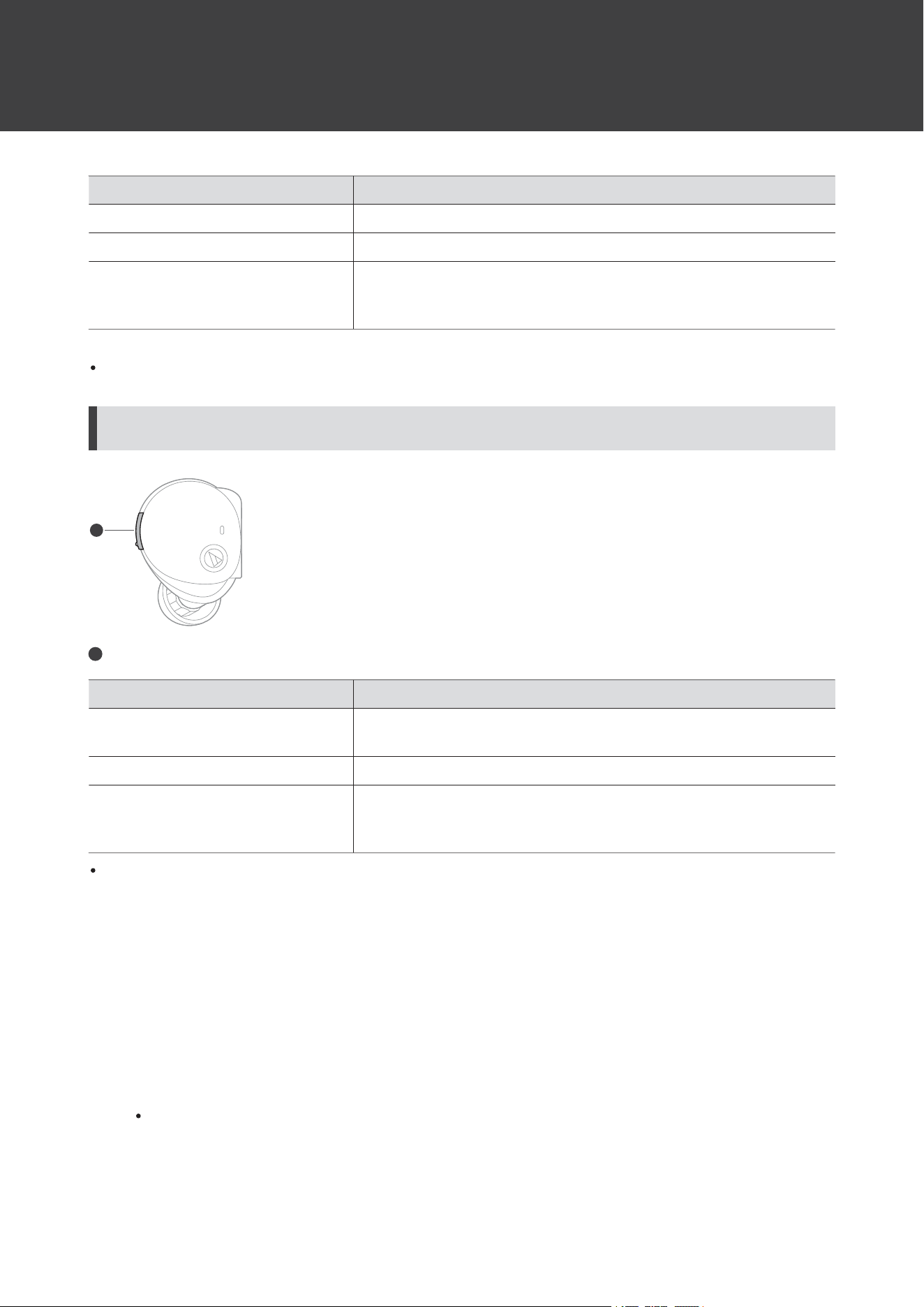
L(left)sideheadphonemultifunction-buttonoperation
1
1
Multifunctionbutton
OperationFunction
Press
Receivingacall:Answersthecall.
Duringacall:Increasesthecallvolumeby1level.
Press(twice)Duringacall:Decreasesthecallvolumeby1level.
Pressandhold(forabout2seconds)
Switchesbetweenthenoise-cancellingfunctionandhear-through
function(ambiencecontrol).Thefunctionscanbeswitchedfromoff
(default),tohear-through,ornoise-cancelling.
Thecontrolsexplainedabovemaynotbeavailableonsomesmartphones.
Talk-throughfunction
Thisfunctionenhancesexternalsoundbyfocusingonpeople’svoices.Thevolumeofmusicbeingplayedback
decreasesautomatically.Itisusefulforwhenyouwanttolistentopublictransportationannouncementsorpeople’s
voices.
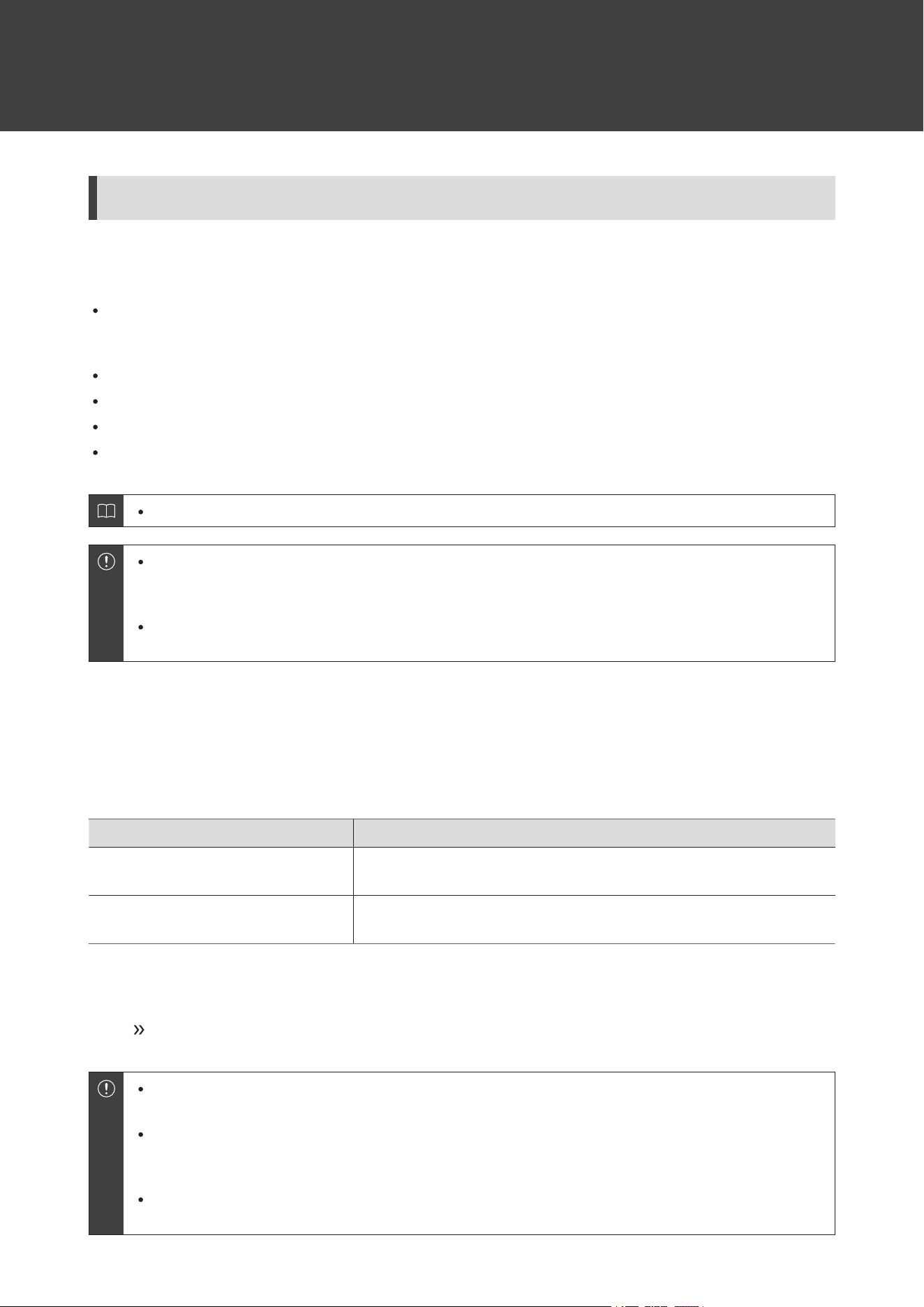
1
Pressandhold(forabout2seconds)themultifunctionbuttonontheR(right)sideheadphone.
Thevoiceguidancewillplaythemessage“Talk-through”.Toturnoffthetalk-throughfunction,pressandhold
themultifunctionbutton(forabout2seconds)again.
Usingtheproduct
28
Conditionsforturningoffthetalk-throughfunction
Inadditiontotheaboveprocedure,thetalk-throughfunctionturnsoffwhenthefollowingoperationsandactionsare
performed.
WhenthemultifunctionbuttonontheL(left)orR(right)sideheadphoneispressed.(Ifmusicisbeingplayedback,
pressingthemultifunctionbuttononceontheR(right)sidewillpausethemusic.Thetalk-throughfunctionwillnot
turnoff.Pressthemultifunctionbuttonagaintoturnoffthetalk-throughfunction.)
Whenyouaremakingacall/receivingacall
WhenthevolumeisadjustedfromaconnectedBluetoothdevice
Whenoneheadphoneisoff
Whenbothheadphonesareoff
Thetalk-throughfunctioncannotbeusedduringacall.
Dependingonyoursurroundings,theambientsoundsmaybedifficulttohearevenwhenusingthe
product’stalk-throughfunction.Donotusetheproductinplacesthataredangerousifyoucannothearthe
surroundingsounds,suchasplaceswithheavytraffic.
Whenthetalk-throughfunctionisturnedON,donotcoverthemicrophonewithyourhand.Ifyoudoso,a
loudsound(howling)willbeemitted,anditmayadverselyaffectyourhearingability.
Ambiencecontrol
Theproductincludesanambiencecontrolfunctionforswitchingbetweenthenoise-cancellingfunctionandhear-
throughfunction.Thefunctionscanbeswitchedfromoff(default),tohear-through,ornoise-cancelling.
FunctionDescription
Hear-throughfunction
Thisfunctionallowsyoutohearsurroundingsoundviathebuilt-in
microphonewhileyoulistentomusic.
Noise-cancellingfunction
Themicrophonebuiltintotheproductdetectsambientnoiseandoutputs
asound-cancellingsignaltoeffectivelyreducenoise.
1
Pressandhold(forabout2seconds)themultifunctionbuttonontheL(left)sideheadphone.
Thefunctionscanbeswitchedfromoff(default),tohear-through,ornoise-cancelling.
Dependingonthevolumeofthemusicbeingplayedback,thesurroundingsoundsmaybedifficulttohear.
Inthiscase,turndownthevolumeofthemusic.
Dependingonyoursurroundings,theambientsoundsmaybedifficulttohearevenwhenusingthe
product’shear-throughfunction.Donotusetheproductinplacesthataredangerousifyoucannothearthe
surroundingsounds,suchasplaceswithheavytraffic.
Whenthehear-throughfunctionisturnedON,donotcoverthemicrophonewithyourhand.Ifyoudoso,a
loudsound(howling)willbeemitted,anditmayadverselyaffectyourhearingability.

Usingtheproduct
29
Autopowerofffunction
Theheadphonesautomaticallyturnoffafter5minutesofnotbeingconnectedtoaBluetoothdevice.
Appforsmartphones
Thisproductiscompatiblewithour“CONNECT”app.Theappgivesyouconvenientaccesstovariousfunctions.Italso
allowsyoutoupdatetheproduct’sfirmware.
https://app.at-globalsupport.com
Whatyoucandowiththeapp
Theappallowsyoutousethefollowingfunctions.Fordetails,refertotheappscreen.

Usingtheproduct
30
FunctionDescription
AmbienceControlYoucanswitchbetweenthenoise-cancellingandhear-throughfunctions.
Talk-Through
Youcanturnthetalk-throughfunctiononoroffandadjustthemusic
playbackvolumefortalk-through.
EqualizerYoucanconfiguretheequalizersettings.
Soundscape
Youcandownloadandplayrelaxingnaturesoundsdesignedfor
improvingsleepandcalmness,maskingnoisestoenhanceconcentration,
andhealingsoundsforrefreshingyourmindandbodyormeditating.
LowLatencyMode
Limitplaybacksounddelaywhileplayinggamesorwatchingvideos.
Bluetoothcommunicationcanbeeasilyaffectedbyobstaclesandradio
waveconditions.Turnthismodeoffinsuchsituations.
VolumeAdjustmentLevelYoucanchangethenumberofvolumeadjustmentsteps.
L/RBalanceAdjustmentYoucanadjusttheleft-rightvolumebalance.
CallMicrophone
Youcanturnonandoffthefunctionforsuppressingunwantednoise
duringcallsandcapturingonlyvoices.
PrivateTimer
Whenthetimerisset,analarmsoundsfromtheheadphonestonotifyyou.
Itrunswhenthepowersupplyison.
KeyAssignYoucansetthefunctionassignedtothemultifunctionbutton.
ButtonOperationSpeedYoucanadjustthespeedforcontinuousmultifunctionbuttonoperation.
MagneticSwitch
Youcansettheoperationperformedwhentheleft(L)andright(R)side
headphonesareconnected.
AutoPowerOff
[1]
Youcanturntheautopowerofffunctiononoroffandsetthetimeuntil
theheadphonesareturnedoff.
VoiceGuidance
Youcanchangetheproduct’svoiceguidancetoaconfirmationtone,or
switchthevoiceguidancelanguage.
ConnectedDeviceManagement
YoucanswitchtheconnectionbyselectingtheBluetoothdeviceyouwant
toconnectfromthelistofBluetoothdevicesyouhaveconnectedtosofar.
OutofRangeAlert
YoucanreceivealertsiftheBluetooth-connectedheadphonesare
separatedfromtheBluetoothdevice.Youcanalsoreceivenotifications
whentheleftandrightheadphonesarefarapart.
[1]ThisfunctionisenabledwhentheheadphonesareconnectedtoaBluetoothdevice.Regardlessofthesettingsforthisfunction,theheadphones
automaticallyturnoffafter5minutesofnotbeingconnectedtoaBluetoothdevice.

31
Indicatorlampsontheheadphones
Pairing
StatusIndicatorlampdisplaypattern
Searchingfordevices
○-○-○・・・
Flashingwhite(graduallylightingup)
Connecting
StatusIndicatorlampdisplaypattern
Connecting
------------・・・
Off
Batterylevel
StatusIndicatorlampdisplaypattern
BatterylevelislowTheindicatorlampturnsfromwhitetoorange.

32
Voiceguidance
TheproductplaysEnglishvoiceguidanceinthefollowingsituations.
Usethe“CONNECT”apptochangethevoiceguidancelanguage.
SituationVoiceguidance
BluetoothisconnectedConnected
BluetoothisdisconnectedDisconnected
Hear-throughfunctionon
(ambiencecontrol)
Hear-through
Noise-cancellingfunctionon
(ambiencecontrol)
Noise-cancelling
Off(ambiencecontrol)Off
Talk-throughfunctiononTalk-through
LowlatencymodeonLowlatency
LowlatencymodeoffLowlatencyoff
MaximumvolumeMax
MinimumvolumeMinimum
Microphonemuteon(duringacall)Micoff
Microphonemuteoff(duringacall)Micon
BatterylevelislowLowbattery
NopowerduetodeadbatteryPleaserecharge
33
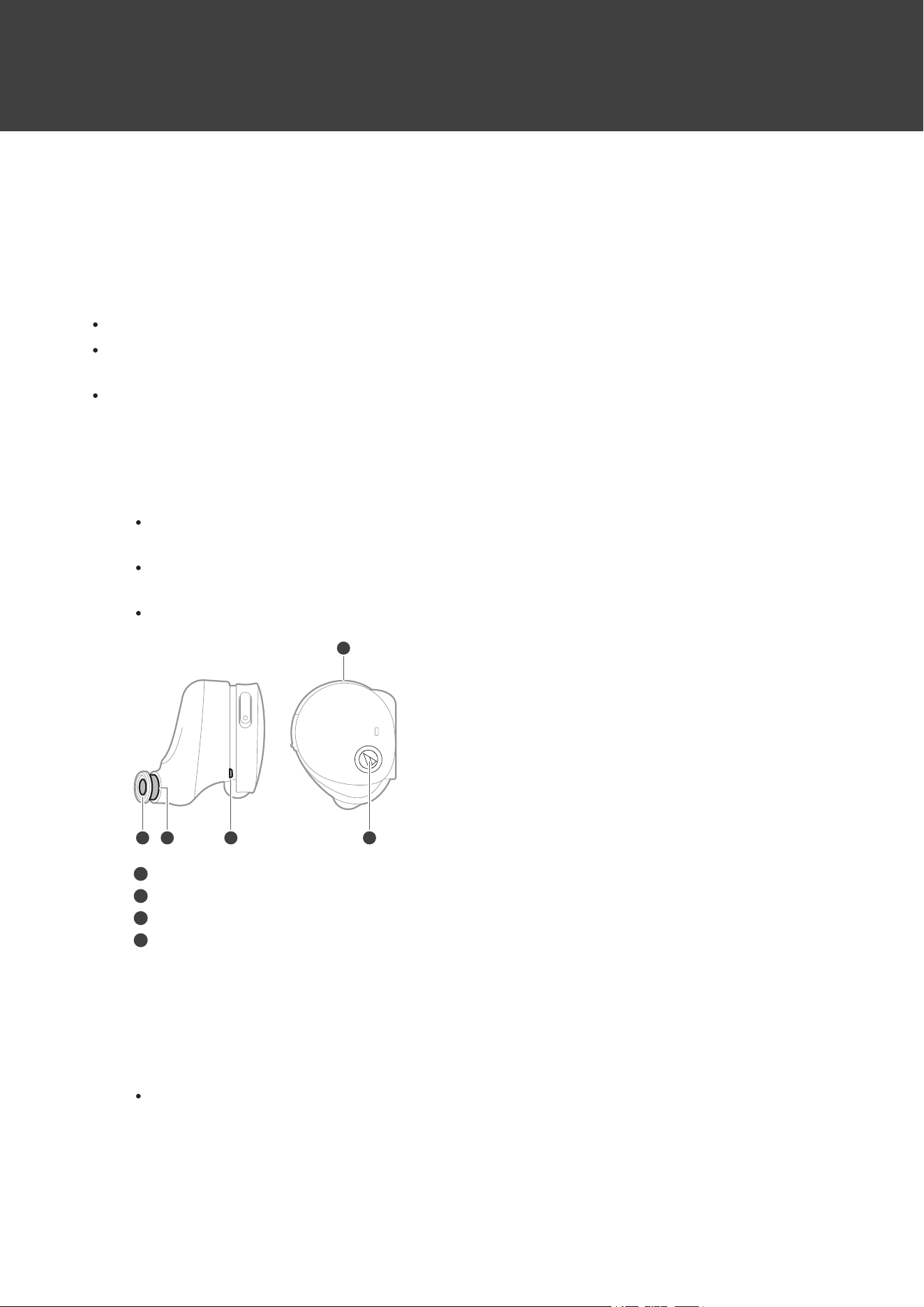
Cleaning
Getintothehabitofregularlycleaningtheproducttoensurethatitwilllastforalongtime.Donotusealcohol,paint
thinners,orothersolventsforcleaningpurposes.
Headphones
Removetheeartipswhencleaningtheheadphones.
Theheadphonesmaynotfunctionproperlyiftheybecomewet.Wipetheheadphoneswithadrycloth,shakethem
multipletimestoremoveanyexcesswater,andallowtheheadphonestodrythoroughlybeforeuse.
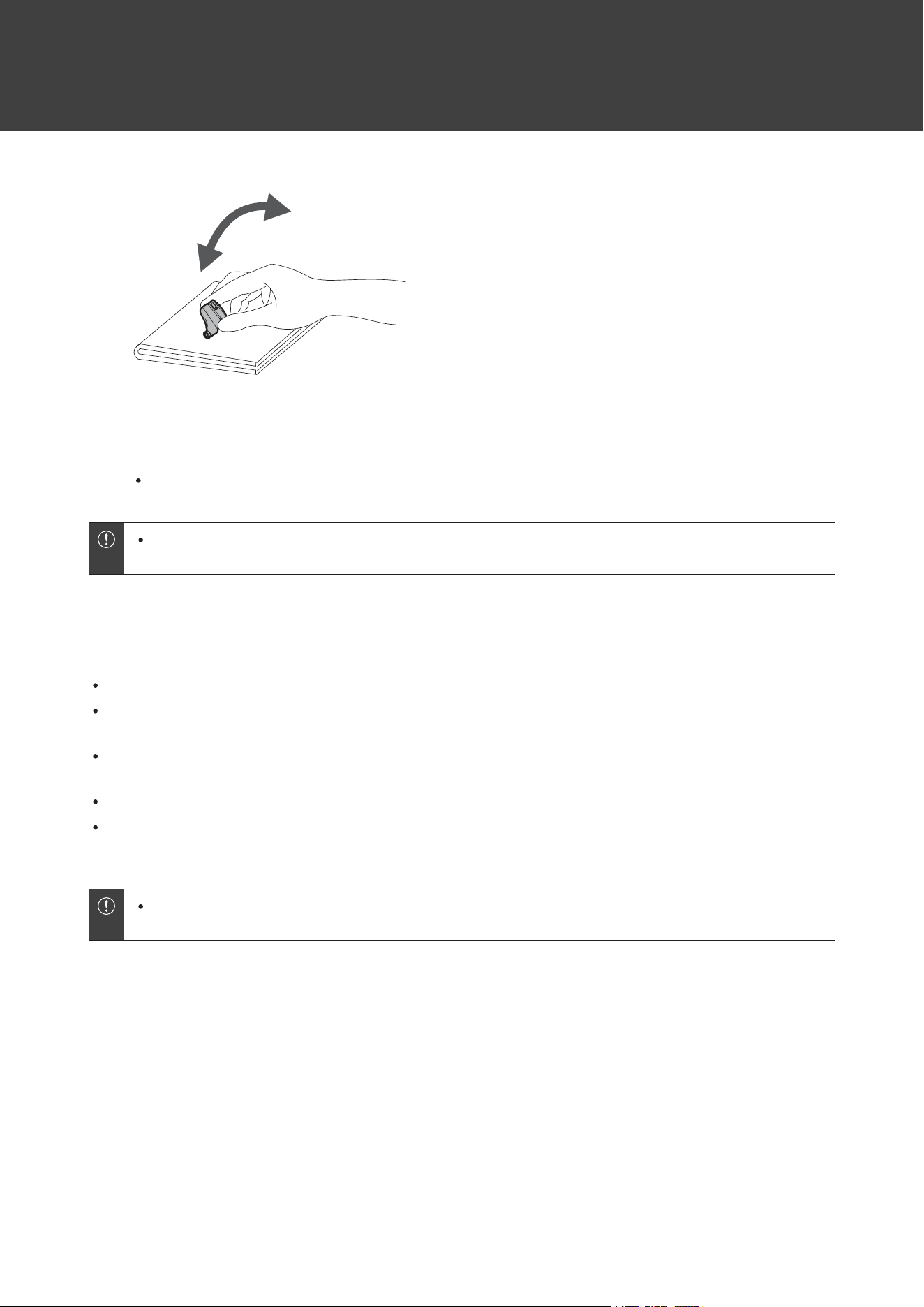
Naturaloilsfromtheskinareparticularlylikelytobuildupontheeartipattachmentparts(seefigure).Iftheseareas
arenotcleaned,theeartipscanbecomedetached.Cleanthemregularly.Donottouchtheareaswheresoundis
producedastheyaredelicate.Doingsomayresultinmalfunction.
1
Removetheeartipsandwashtheheadphoneswithwater.
Donotusesoapywater.Washinfreshwateratnormaltemperature(10to35°C(50to95°F))oragentleflow
oftapwater.
Whenwashing,takecaretopreventwaterfromsprayingdirectlyontothesoundreproductionpart,
microphone,orvent.
Donotwashwithabrushorsponge.Washbyhand.
1 32 4
4
1
Soundreproductionpart
2
Eartipattachmentpart
3
Vent
4
Microphone
2
Afterwashing,wipeanysurfacemoisturethoroughlywithadry,clean,andsoftcloth.
3
Holdtheheadphonefirmly,pressitagainstadrycloth,andthenshakeituntilnomorewater
dropletscomeoff.
AlthoughtheheadphoneshaveawaterproofratingequivalenttoIPX5,thesoundreproductionpartsand
microphonesarenotwaterresistant.Ifanywaterenterstheinterioroftheheadphones,nosoundwillbe
reproduced,orsoundsmaybedifficulttohear.Insuchcases,presstheheadphoneagainstadrycloth,and
thenshakeitapproximately20timeswiththesoundreproductionpartandmicrophonepositioned
downward.
Cleaning
34
4
Wipeoffanywaterthatremainsinthegapbetweenthesoundreproductionpartandthe
microphonebygentlypressingtheheadphonesagainstadry,clean,andsoftcloth.
Donotwipeoffanywaterinthegapwithacottonswab,etc.
Iftheproductwillnotbeusedforanextendedperiodoftime,storeitinawell-ventilatedplacefreefrom
hightemperaturesandhumidity.
Chargingcase/USBchargingcable/eartips
Wipeanydirtoffthechargingcasewithadrycloth.
Immediatelywipeoffanymoisturesuchassweatthathassplashedontothechargingcasebatteryjack,the
chargingterminals,etc.Failuretodosomayresultinamalfunctionduetocorrosion.
WipeawayanyperspirationordirtfromtheUSBchargingcablewithadryclothimmediatelyafteruse.Failureto
cleanthecablemaycauseittodeteriorateandhardenovertime,resultinginmalfunction.
IftheUSBterminalofthechargingcableisdirty,wipeitoffwithadrycloth.
Cleantheeartipsbyremovingthemfromtheheadphonesandmanuallycleaningthemwithadilutedmilddetergent.
Aftercleaning,drybeforeusingagain.
Iftheproductwillnotbeusedforanextendedperiodoftime,storeitinawell-ventilatedplacefreefrom
hightemperaturesandhumidity.
35
Eartips
Eartipsize
Theproductincludessiliconeeartipsin4sizes(XS,S,M,andL).Atthetimeofpurchase,theM-sizesiliconeeartipsare
attached.Toensurethebestsoundquality,selecttheeartipsizethatisbestsuitedforyou,andadjusttheeartipsinside
yourearsforasnugfit.Itmaybedifficulttohearbasssoundsiftheeartipsdonotfitsnuglyinyourears.
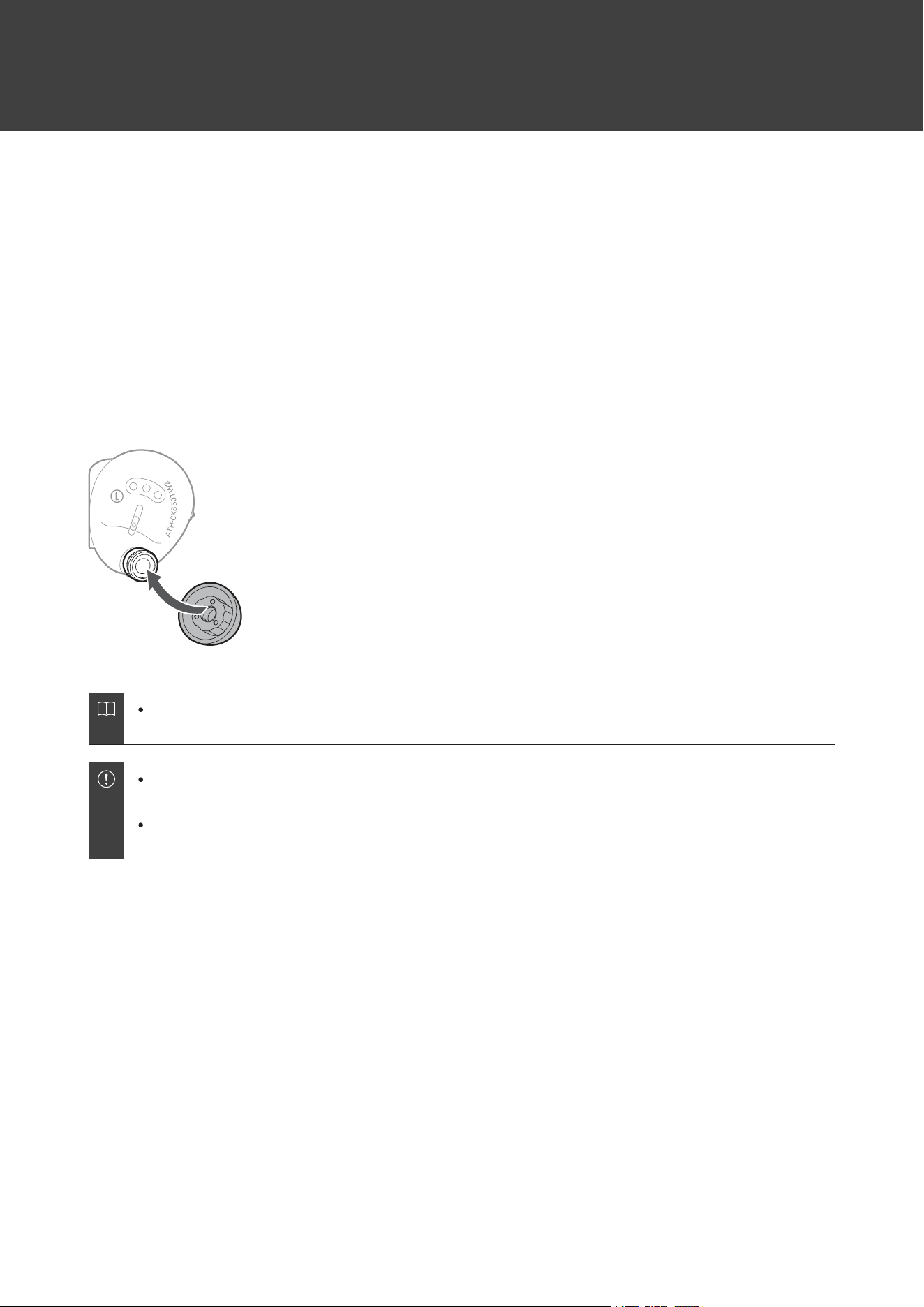
Replacingtheeartips
Removetheoldeartipandattachtheneweartipbypushingitontotheheadphoneatanangle.Pushfirmlyontheeartip
sothattheinsideoftheeartipexpands,andpushtheeartipontothepostasfarasitwillgo.
Eartipsareconsumablepartsthatdegradethroughstorageanduse.Iftheeartipsarelooseandeasily
removedoriftheyappeartohavedegraded,purchasereplacements.
Periodicallyremoveandcleantheeartipsastheybecomedirtyeasily.Usingdirtyeartipsmaycausethe
headphonesthemselvestobecomedirty,resultingindeterioratedsoundquality.
Whenreattachingeartipsthatwerepreviouslyremoved,besuretocheckthattheyaresecurelyattached.
Injuryorillnessmayoccuriftheeartipsbecomedetachedandareleftinsidetheear.

36
Forcedpairingmode/reset
Iftheproductdoesnotconnecttoadevice(forcedpairing
mode)
Ifpairingcannotbecancelledorisnotsuccessful,youcanuseforcedpairingmodetoperformpairingagain.
1
Oncetheindicatorlampsturnonafterbothheadphones(L(left)andR(right)sides)areplacedinthe
chargingcase(withbatteryremaining),pressthemultifunctionbuttonsofbothheadphonestwicein
arow.
2
Theindicatorlampsonbothheadphoneslightinorangeandthenreturntowhite.Removethe
headphonesfromthechargingcaseandseparatetheL(left)andR(right)sides.
Theproductwillswitchtothe“searchingfordevices”(pairingmode)stateandyouwillbeableto
pairitwithyourdesiredBluetoothdevice.
Iftheprocedurecannotbecompletedasexpected,repeattheprocedureagainfromthebeginning.
Iftheproductoperatesabnormally(reset)
Resettheproduct.
1
Oncetheindicatorlampsturnonafterbothheadphones(L(left)andR(right)sides)areplacedinthe
chargingcase(withbatteryremaining),pressandhold(forabout4seconds)themultifunction
buttonsofbothheadphones.
2
Makesuretheindicatorlampsonbothheadphoneslightinorangeandthenturnwhitebefore
releasingyourfingers.RemovetheheadphonesfromthechargingcaseandseparatetheL(left)and
R(right)sides.
Resetiscomplete.
3
RemovetheproductfromthelistofregistereddevicesonyourBluetoothdevice,andperformpairing
again.
Iftheprocedurecannotbecompletedasexpected,repeattheprocedureagainfromthebeginning.

37
Troubleshooting
Powerisnotsupplied
Chargetheproduct.
Unabletopair
ConfirmthattheBluetoothdevicecommunicatesusingVer.2.1+EDRorhigher.
PlacetheproductandtheBluetoothdevicewithin1m(3.3')ofeachother.
SettheprofilesfortheBluetoothdevice.Forproceduresonhowtosetprofiles,refertotheBluetooth
device’susermanual.
RemovethepairinginformationfortheBluetoothdevicethenpairtheproductwiththisdeviceagain.
Placetheheadphonesinthechargingcaseandclosethecover,thenremovetheheadphonesandperform
theoperationagain.
MakesureyouarenotconnectedtoanyotherpreviouslyconnectedBluetoothdevice.Ifso,disconnectthe
productusingthepreviouslyconnectedBluetoothdevice,andthenselecttheproductontheBluetooth
devicebeingconnectedto.Useforcedpairingmodeifyouareunabletodisconnectfromapreviously
connectedBluetoothdevice.Fordetails,referto"Iftheproductdoesnotconnecttoadevice(forcedpairing
mode)"(p.36).
Resettheproductifitcannotbeunpaired,connected,ordoesnotoperateasexpectedevenaftertryingall
othersolutions.Fordetails,referto"Iftheproductoperatesabnormally(reset)"(p.36).
Nosoundisheard/Soundisfaint
TurnonthepoweroftheproductandtheBluetoothdevice.
TurnupthevolumeontheproductandtheBluetoothdevice.
MakesurethattheproductandBluetoothdeviceareconnectedbytheA2DP(oraudioconnection).
DisablepairingfortheproductandtheBluetoothdevice,thenpairtheproductwiththisdeviceagain.
MoveawayfromobstaclesbetweentheproductandtheBluetoothdevice,suchaspeople,metal,orwalls,
andplacetheproductanddeviceclosertogether.
SwitchthesoundoutputoftheBluetoothdevicetotheproduct.
Checkwhetherthetalk-throughfunctionisturnedon/off.Ifthetalk-throughfunctionison,thevolumeof
musicbeingplayedbackwilldecreaseautomatically.Fordetailsonoperatingthetalk-throughfunction,refer
to"Talk-throughfunction"(p.27).
Soundonlycomesoutofoneheadphone
Makesurethereisbatterylevelremaining.
Placetheheadphonesinthechargingcaseandclosethecover,thenremovetheheadphonesandperform
theoperationagain.

Troubleshooting
38
Soundisdistorted/Noiseisheard/Soundcutsout
TurndownthevolumeontheproductandtheBluetoothdevice.
Keeptheproductawayfromdevicesthatemitradiowavessuchasmicrowavesandwirelessrouters.
KeeptheproductawayfromTVs,radios,anddeviceswithbuilt-intuners.Thesedevicescanalsobeaffected
bytheproduct.
TurnofftheequalizersettingsoftheBluetoothdevice.
RemoveobstaclesbetweentheproductandtheBluetoothdeviceandplacethemclosertogether.For
details,referto"ForamorecomfortableBluetoothcommunicationexperience"(p.8).
YoumaybeabletoimprovetheconnectionstatusbyswitchingtheconnectioncodectoSBC.Youcan
changeitwithoursmartphoneapp.Ifyouareusingaconnecteddevicesuchasasmartphoneoraudio
playerthatcanchangetheconnectioncodec,youmaybeabletosettoSBConthatconnecteddevice.For
detailsaboutthesettingprocedure,refertotheusermanualofyourconnecteddevice.
Noiseisgeneratedwhenusingthenoise-cancellingfunction
Aslighthummingsoundmaybeheardwhenusingthenoise-cancellingfunction.Thisisasoundgenerated
bythenoise-cancellingfunction;itisnotamalfunction.
Thenoise-cancellingeffectmayvaryorableep(howling)mayoccurdependingonhowyouwearthe
product.Inthesecases,takeofftheproductandputtheproductinyourearsagaincorrectly.
Tomaximizethenoise-cancellingeffect,selecttheeartipsthatofferthebestsoundinsulationforeachsideto
blocksurroundingsound,andinserttheheadphonesintotheearscorrectly.
Whenyouusetheproductinatrainoravehiclesuchasbusortruck,noisemaybehearddependingon
rail/streetconditions.
Cannothearthevoiceofthecaller/Voiceofthecalleristooquiet
TurnonthepoweroftheproductandtheBluetoothdevice.
TurnupthevolumeontheproductandtheBluetoothdevice.
ConfirmthattheproductandBluetoothdeviceareconnectedviaHFP(orphoneconnection).
DisablepairingfortheproductandtheBluetoothdevice,thenpairtheproductwiththisdeviceagain.
SwitchthesoundoutputoftheBluetoothdevicetotheproduct.
Chargingcasecannotbecharged
SecurelyconnecttheincludedUSBchargingcableandchargetheproduct.
Thechargingcaseorheadphonesmaybehot.Allowthetemperatureoftheproducttocoolsufficiently
beforecharginginawell-ventilatedplace(10to35°C(50to95°F))awayfromdirectsunlight.
Troubleshooting
39
Thechargingcasegetsunusuallyhotduringwirelesscharging
Makesurenoobjectsarecaughtbetweenthechargingcaseandthewirelesscharger.Donotallowany
objectsbetweenthechargingcaseandthewirelesschargerwhenusingwirelesscharging.Fordetails,refer
totheusermanualofyourwirelesscharger.
Headphonescannotbecharged
Makesurethattheproductisplacedinthechargingcasecorrectly.
Chargethechargingcase.
Wipedirtoffthechargingterminalwithadrycloth.
Thechargingcaseorheadphonesmaybehot.Allowthetemperatureoftheproducttocoolsufficiently
beforecharginginawell-ventilatedplace(10to35°C(50to95°F))awayfromdirectsunlight.
Thechargingcaseindicatorlampflashesinyellow
Foreignmatterisdetectedinsidethechargingcasebatteryjack.Stopusingtheproductandcheckforany
foreignmatterinsidethechargingcasebatteryjack.
Bassisinsufficient
Selecttheeartipsthatbestfityourears,andweartheproductsecurely.Itmaybedifficulttohearbass
soundsiftheeartipsdonotfitsnuglyinyourears.
Usethe“CONNECT”apptochangetheequalizerfunctionsetting.Changethesettingsothatthedesired
soundqualityisapplied.
FordetailsabouthowtooperateyourBluetoothdevice,refertothedevice’susermanual.

40
Specifications
Headphones
Type
Dynamic
Driver
9mm(0.35")
Sensitivity
110dB/mW
Frequencyresponse
5to20,000Hz
Impedance
20ohms
Microphones
Type
MEMStype
Polarpattern
Omnidirectional
Sensitivity
-38dB(1V/Pa,at1kHz)
Frequencyresponse
100to8,000Hz
Communicationspecifications
Communicationsystem
Bluetoothversion5.3
MaximumRFoutput
10mWEIRP
Maximumcommunication
range
Lineofsight-approx.10m(33')
Frequencyband
2.402GHzto2.480GHz
Modulationmethod
GFSK,Pi/4DQPSK,8DPSK
Spreadspectrummethod
FHSS
CompatibleBluetoothprofiles
A2DP,AVRCP,HFP
Supportedcodec
AAC,SBC
Supportedcontentprotection
method
SCMS-T
Supportedsamplerates
44.1kHz,48kHz
Supportedbitdepth
16bit
Transmissionband
20to20,000Hz

Specifications
41
Other
Powersupply
Headphones:DC3.85Vlithiumionbattery
Chargingcase:DC3.85Vlithiumionbattery
Chargingtime
Headphones:Approx.2.5hours
[1]
Chargingcase:Approx.4.0hours(USBcharging)
[1]
,Approx.7.5hours
(wirelesscharging)
[1]
Operatingtime
Continuoustransmissiontime(musicplayback,noise-cancellingoff):
Max.approx.25hours
[1]
(headphones)
Max.approx.65hours
[1]
(ifchargingcaseisusedincombination)
Continuoustransmissiontime(musicplayback,noise-cancellingon):
Max.approx.15hours
[1]
(headphones)
Max.approx.40hours
[1]
(ifchargingcaseisusedincombination)
Weight
Headphones:Approx.7.2g(0.25oz)(Lside),approx.7.2g(0.25oz)(Rside)/
Chargingcase:approx.51.5g(1.8oz)
Waterproofanddustproof
performance
IP55
[2]
Operatingtemperature
5°Cto40°C(41°Fto104°F)
Accessories
USBchargingcable(50cm(20"),USBType-A/USBType-C),Eartips(XS,S,
M,L)
Soldseparately
Eartips(XS,S,M,L)
[1]Thefiguresabovedependonoperatingconditions.
[2]Headphonesonly.
Forproductimprovement,theproductissubjecttomodificationwithoutnotice.

42
Trademarks
TheBluetooth
®
wordmarkandlogosareregisteredtrademarksownedbyBluetoothSIG,Inc.,andanyuseofsuch
marksbyAudio-TechnicaCorporationisunderlicense.Othertrademarksandtradenamesarethoseoftheir
respectiveowners.
USBType-C
™
isatrademarkofUSBImplementersForum.

株式会社オーディオテクニカ
〒194-8666東京都町田市西成瀬2-46-1
www.audio-technica.co.jp
Audio-TechnicaCorporation
2-46-1Nishi-naruse,Machida,Tokyo194-8666,Japan
www.audio-technica.com
©2024Audio-TechnicaCorporation
GlobalSupportContact:www.at-globalsupport.com
351717220-02-01ver.12024.10.15