Manual de instrucciones
Instruction manual
Manuel d’instructions
Bedienungsanleitung
Manuale di istruzioni
Manual de instruções
Handleiding
Instrukcja obsługi
Návod k použití
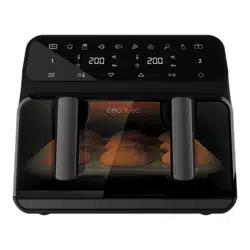
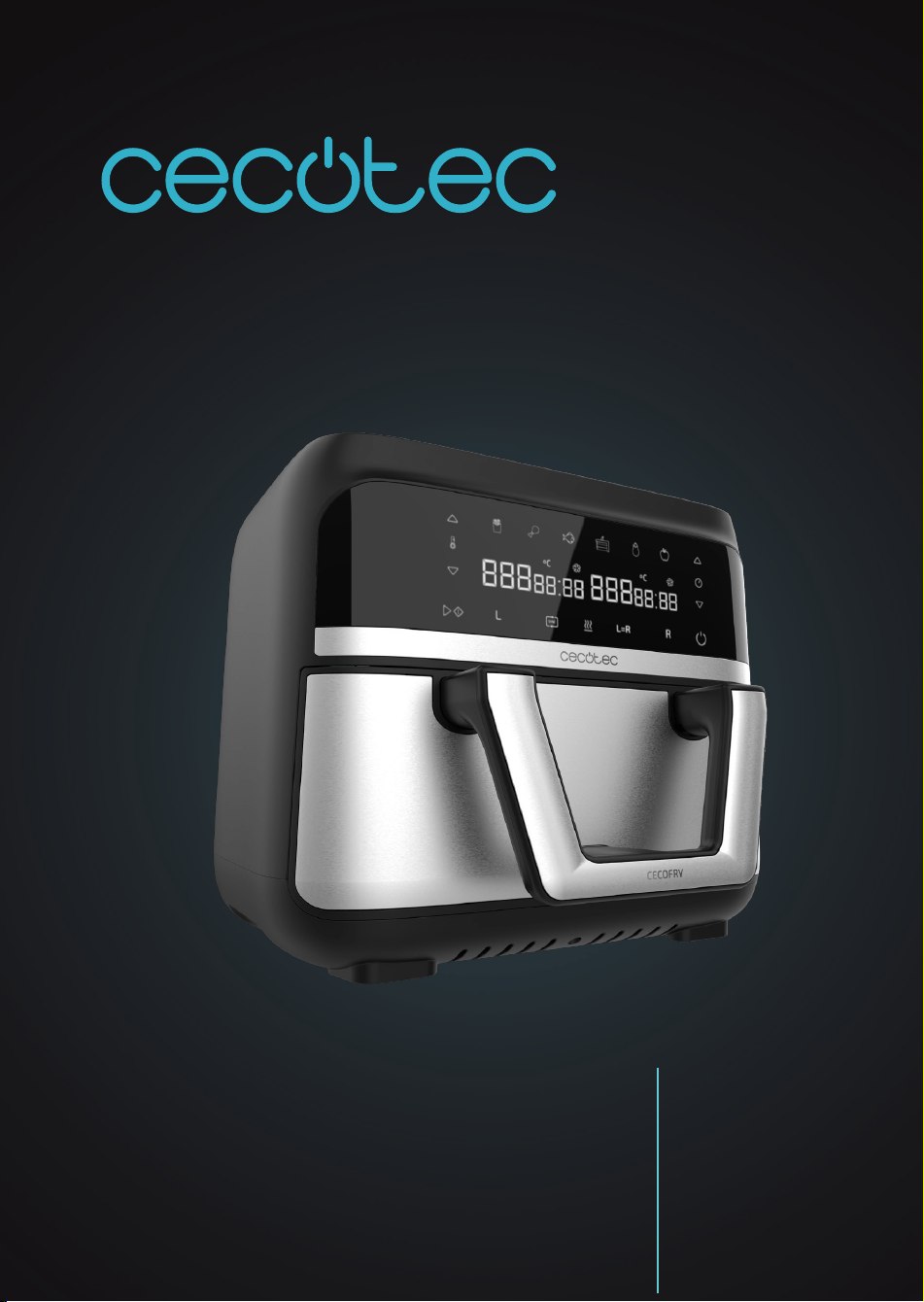
CECOFRY DUAL 9000
Freidora dietética / Air fryer
04996_Cecofry Dual 9000_IM_01221202.indd 104996_Cecofry Dual 9000_IM_01221202.indd 1 7/12/22 13:077/12/22 13:07

CECOFRY DUAL 9000
48
ENGLISH
1. PARTS AND COMPONENTS
Air fryer
Fig. 1
1. Housing
2. Control panel
3. Basket handle
4. Basket
5. Grille
6. Ventilation grille
7. Power cord
Control panel
Fig. 2
8. Power icon
9. Frying-time increase/decrease icons
10. Default programmes
11. Frying temperature increase/decrease icons
12. Start/Pause icon
13. Left-hand single basket compartment icon
14. Cooking sync icon
15. Preheating icon
16. Dual setting icon
17. Right-hand single basket compartment icon
18. Left-hand single basket compartment display
19. Right-hand single basket compartment display
NOTE:
The graphics in this manual are schematic representations and may not exactly match the
product.
2. BEFORE USE
- This product includes a safety package to protect it during transport. Unpack the device
and keep the original packaging and materials in a safe place. It will help prevent any
damage if the product needs to be transported in the future. In case the original packaging
is disposed of, make sure all packaging materials are recycled accordingly.
- Make sure all parts and components are included and in good conditions. If there is any
piece missing or in bad conditions, contact the ocial Cecotec Technical Support Service
immediately.
04996_Cecofry Dual 9000_IM_01221202.indd 4804996_Cecofry Dual 9000_IM_01221202.indd 48 7/12/22 13:077/12/22 13:07

CECOFRY DUAL 9000
49
ENGLISH
- Clean the interior and the exterior of the device with a damp cloth. Do not wet the heating
elements.
- Clean the basket and grilles thoroughly with hot water, washing-up liquid, and a
non-abrasive sponge. (Fig. 3)
- Place the racks properly in the single basket compartments and place the basket again in
the device to be able to use it. (Fig. 4)
- Do not ll the device with oil or any other liquid.
3. OPERATION
With this device you can cook in both baskets at the same time with dierent temperatures
and times, saving time when making your favourite recipes. This device includes a recipe book
with several recipes which you will be able to cook easily.
1. Place the device on a at, even and waterproof surface. Never place it on a glass-ceramic
hob.
2. Plug the power cord to the electric circuit.
3. Press the power icon (8) to turn the device on.
4. Remove the basket and place the food on the corresponding racks. The device has a larger
basket separated in the middle by a metal plate that prevents odours and avours to
transfer from one single basket compartment to the other. Each single basket compartment
has a separate rack to place the food to be cooked on.
5. Carefully align the metal divider plate and the mark on the fryer body to place it to its
original position.
6. Select the whole basket (16) or the single basket compartment (13/17) to be used and
select a programme or set the cooking time and temperature manually.
7. Press the Start/Pause icon (12) for the device to start cooking.
8. When the device nishes cooking, it will emit an acoustic alert to warn you.
9. Check if the ingredients are cooked as desired. Otherwise, put the basket back inside the
device and set the timer for a few more minutes.
10. Once the food is cooked to your liking, remove the basket and place it on a heat-resistant
surface. Depending on the type of ingredients, steam may be released, so be careful when
removing the basket.
11. Empty the basket into a bowl or plate. Use tongs to remove the ingredients. Be careful not
to burn yourself. Do not place the basket upside down to remove the food.
12. You can use the device again just after having used it.
Note
- The device has a safety system preventing operation if the basket isn’t correctly placed.
- It is recommended not to exceed 4 cm in height in the basket with food, as this could
negatively aect the nal result of the cooked food.
04996_Cecofry Dual 9000_IM_01221202.indd 4904996_Cecofry Dual 9000_IM_01221202.indd 49 7/12/22 13:077/12/22 13:07
CECOFRY DUAL 9000
50
ENGLISH
- The fan may continue working after cooking, even if the device is o. This is normal, as the
fan is cooling down the device.
- Do not touch the basket nor the inferior of the air fryer during or after its use, as it reaches
high temperatures. Hold the basket by the handle.
Control panel
Fig. 2
8. Power icon
- When the basket and rack are correctly placed in the device, the power icon (8) will light up.
If you press this icon (8), the icons for the left-hand single basket compartment (13), dual
setting, (16) and right-hand single basket compartment (17) will automatically light up.
- To switch o the device, press this icon (8) until only the icon (8) itself is on.
- To cancel cooking, press this icon (8) once and "Cool" will automatically be showed on the
display, followed by the word "End" after a few seconds. To resume cooking with the same
settings, press the icon (8) again: the previous icons will light up and cooking will resume.
9. Frying-time increase/decrease icons
- With both icons (9), placed above and below the watch icon, you can increase or decrease
the frying time as desired.
- However, to set the time, you must rst select one single basket compartment (13 or 17) or
the whole basket (16).
10. Default programmes
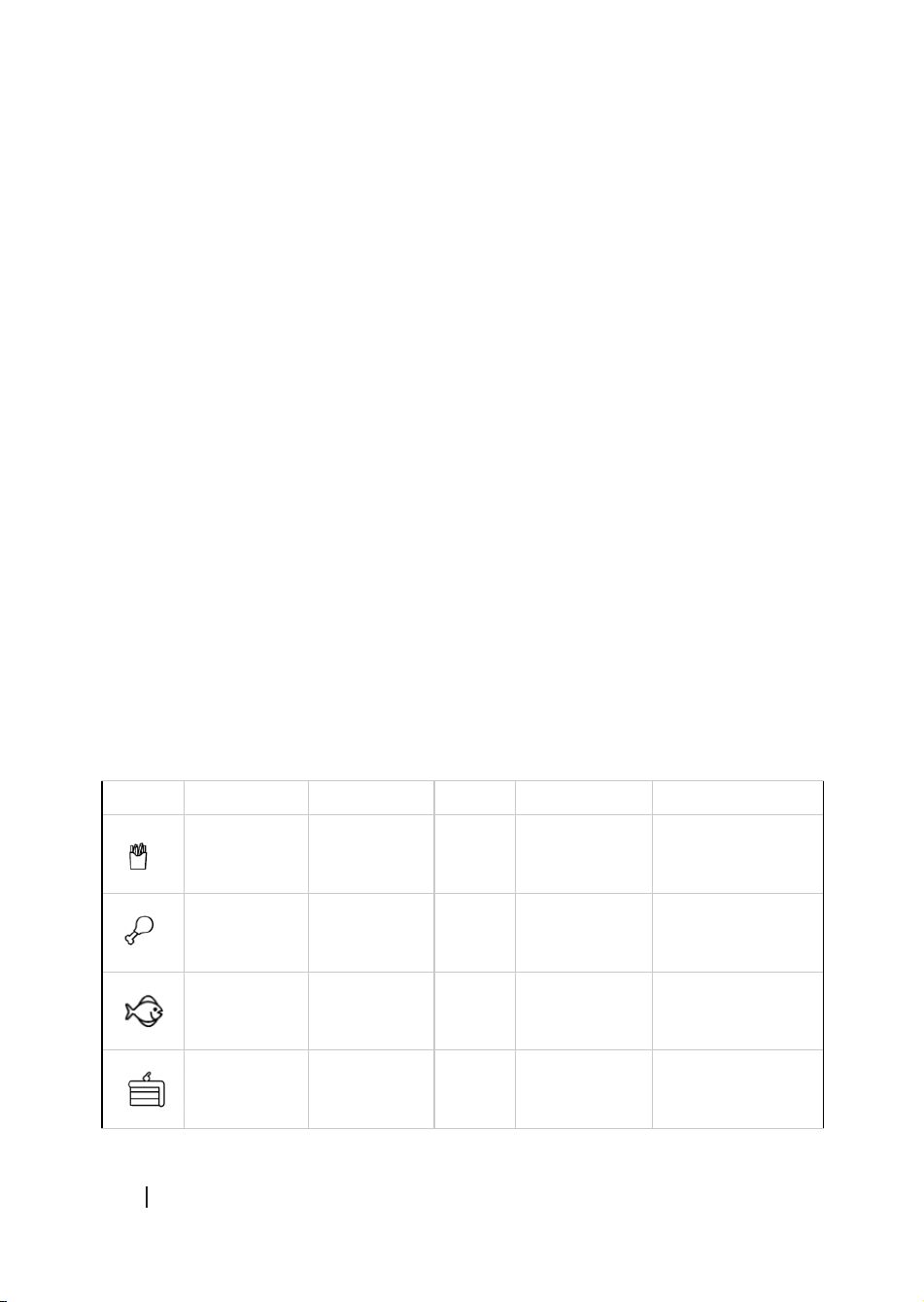
This air fryer features 6 programmes with pre-set temperature and time (10), you can check
them in this table:
Icon Programme Temperature Time Amount Shake
Frozen chips 200 ºC 20 min 400-500
grams approx.
Yes
Chicken
wings
200 ºC 25 min Basket surface Not necessary
Fish 180 ºC 10 min 250 grams
approx.
Not necessary
Dessert 170 ºC 12 min - Not necessary
04996_Cecofry Dual 9000_IM_01221202.indd 5004996_Cecofry Dual 9000_IM_01221202.indd 50 7/12/22 13:077/12/22 13:07

CECOFRY DUAL 9000
51
ENGLISH
Vegetables 160 ºC 16 min - Depends on the
type of vegetable
Dehydrate 60ºC 8 hrs Basket surface Not necessary
Note
This information is indicative, as ingredients dier in origin, size, shape and brand, we cannot
guarantee the best setting for the ingredients that you are using.
Tips
- Smaller ingredients require shorter preparation time than the larger ones.
- A larger quantity of ingredients only requires a slightly longer preparation time, and a
smaller quantity of ingredients only requires a slightly shorter preparation time.
- Stirring small ingredients during the frying process optimises the result and can help
prevent unevenly cooked ingredients. To do so, remove the basket and shake it.
- Add some oil to raw chips for a crispier result.
- The optimal amount for preparing crispy fries is 400 grams.
- Do not use the device to fry greasy food (such as sausages).
- Food that can be cooked in an oven can also be cooked with the device.
- Pre-made dough requires a shorter preparation time than home-made dough.
- You can also use the device to reheat ingredients. To do so, set the temperature at 150ºC
for 5-10 minutes.
11. Frying temperature increase/decrease icons
- With both icons (11), placed above and below the thermometer, you can increase or
decrease the frying temperature as desired.
- However, to set the temperature, you must rst select one single basket compartment (13
or 17) or the whole basket (16).
12. Start/Pause
This icon (12) will allow you to start or pause the selected cooking.
- If you press this icon (12) after selecting the programme (10) or temperature (11) and time
(9), the device will start cooking.
- If you press this icon (12) when there is a cooking in process, you will pause it. To restart it,
press it again (12).
13. Left-hand single basket compartment
This icon (13) is used to set the left-hand single basket compartment only. Press the icon (13),
select the desired time (9) and temperature (11) or programme (10). Next, press the Start/
Pause icon (12) to start cooking.
04996_Cecofry Dual 9000_IM_01221202.indd 5104996_Cecofry Dual 9000_IM_01221202.indd 51 7/12/22 13:077/12/22 13:07

CECOFRY DUAL 9000
52
ENGLISH
14. Synchronisation
- This function is useful when dierent cooking times have been set for the single basket
compartments and you want frying to end at the same time. With this function, if you have
selected 20 min for the left-hand single basket compartment and 10 min for the right-
hand one, frying in the right-hand single basket compartment will start 10 minutes later to
allow frying in both compartments to nish simultaneously.
- To programme this function, rst select the left (13) or right-and single basket compartment
(17), then select the desired programme (10) or enter the desired time (9) and temperature
(11). Press the ‘Sync’ icon (14) for it to stop ashing. The other single basket compartment
will start ashing: select the desired programme (10) or enter the desired time (9) and
temperature (11). Press the start/pause icon (12) to start cooking.
- When this function is activated, the single basket compartment with the shorter
programmed time will enter Standby mode and "Hold" will appear on the display until there
is no time dierence. Then, frying will start and both compartments will be left with the
same remaining cooking time.
Note
If you remove the basket, "Out" will be displayed for both single basket compartments. If it takes
more than 90 seconds but less than 5 minutes to place the basket, the sync function will be
deactivated. When the basket is reinserted, a countdown for both single basket compartments
will start.
15. Preheating
- With this function, preheating will start in the single basket compartment of choice, i.e., the
left-hand compartment, the right-hand one or both.
- To select this function, rst select the compartment or basket (13, 16 or 17) to be used, then
select the preheating function (15) and set the desired preheating temperature (11). The
preheating time is 5 minutes by default, but if you wish to cancel it at any time, press the
power icon (8).
- Once preheating has nished, press the icons 13 or 17, depending on the preheated single
basket compartment, and press the programme (10) or set the desired time (9) and
temperature (11) manually and next, press the Start/Pause icon (12).
16. Dual setting (L=R)
- This function is used to apply the same setting to both single basket compartments, that
is, if you press this icon and then the “chips” programme, this setting will be applied to both
compartments.
- To use it, rst select one of the compartments (13 or 17) and set the desired time (9) and
temperature (11) or programme (10) and then press this function (16). Next, press the
Start/Pause icon (12) to start cooking.
04996_Cecofry Dual 9000_IM_01221202.indd 5204996_Cecofry Dual 9000_IM_01221202.indd 52 7/12/22 13:077/12/22 13:07

CECOFRY DUAL 9000
53
ENGLISH
17. Right-hand single basket compartment
This icon is used to set the right-hand single basket compartment only. Press the icon (17),
select the desired time (9) and temperature (11) or programme (10). Then, press the Start/
Pause icon (12) to start cooking.
4. CLEANING AND MAINTENANCE
Cleaning
- Always clean the device after each use.
- Disconnect the device from the power supply and allow it to cool down before cleaning.
- Do not use metallic tools or abrasive products to clean the basket and racks.
- Use a soft, damp cloth to clean the product exterior surface.
- Do not immerse the device in water or other liquids.
- Do not use abrasive cleaners or scouring pads to clean the product.
- Clean the basket thoroughly with hot water, detergent, and a non-abrasive sponge. Rinse
them well and dry it before introducing them again in the device.
- Do not insert the basket into the main body if wet or damp.
- The use of a degreasing liquid is recommended to remove any remains.
- If there is dirt stuck in the basket and rack, we recommend lling the basket with hot water
and detergent and then clean it with a non-abrasive sponge.
- Clean the heating element with a soft cleaning brush to remove any food residue. Be
careful not to damage the heating element.
Tip
Remove the basket to let the appliance cool down more quickly.
Warning
The basket and racks are not dishwasher safe.
Storage
- Unplug the device and allow it to cool down.
- Make sure all parts are clean and dry when you store the device.
- Wring the power cord.
04996_Cecofry Dual 9000_IM_01221202.indd 5304996_Cecofry Dual 9000_IM_01221202.indd 53 7/12/22 13:077/12/22 13:07

CECOFRY DUAL 9000
54
ENGLISH
5. TROUBLESHOOTING
Problem Possible cause Possible solution
The device does
not work.
The product is not plugged in. Plug the appliance in.
You have not set the timer. Press the power icon (8) and start a
programme.
The ingredients
inside the device
are not fried.
There are too many
ingredients inside the basket.
Place smaller pieces inside the
basket so they are cooked more
evenly.
The temperature used is too
low.
Increase temperature.
The preparation time is not
enough.
Increase the time.
The ingredients are
cooked unevenly in
the air fryer.
Some types of food need to
be sautéed during the cooking
process.
Ingredients that lie on top of or
across each other (e.g. chips or
nuggets) need to be stirred during
the preparation time.
Fried food is not
crispy when they
come out the
device.
You used a type of food that
is meant to be prepared in a
traditional deep fryer.
Oil the food a little bit to get a
crispier result.
The temperature used is too
low
Increase temperature.
The basket cannot
t in the gap in the
device.
There are too many
ingredients inside the basket.
Do not ll the device with food over
the ‘Max’ mark.
The basket is not inserted
correctly.
Place the basket until it clicks into
place.
White smoke
comes out of the
device.
You are preparing greasy
ingredients.
When greasy food is cooked, a
large amount of oil will leak into the
container. Cooking oil causes white
smoke to come out of the device and
it gets hotter than normal. This does
not aect the device or the result.
The basket is still greasy from
previous uses.
White smoke is caused by heating
up oil in the basket. Make sure you
clean the basket properly after each
use.
04996_Cecofry Dual 9000_IM_01221202.indd 5404996_Cecofry Dual 9000_IM_01221202.indd 54 7/12/22 13:077/12/22 13:07
CECOFRY DUAL 9000
55
ENGLISH
Chips are cooked
unevenly in the
device.
The right kind of potato is not
being used.
Use fresh potatoes and make sure
they stay consistent while being
cooked.
If you use frozen chips, use chips
that are special for oven cooking.
You did not rinse the chips
properly before you cooked
them.
Rinse the potato sticks properly to
remove the starch.
Fried food is not
crispy when they
come out the
device.
Make sure you dry the potato
sticks properly before adding
the oil.
Make sure you dry the potato sticks
properly before adding the oil.
Cut the potato sticks on smaller
pieces for crispier results.
Add a little bit more of oil for a
crispier result.
6. TECHNICAL SPECIFICATIONS
Product reference: 04996
Product: Cecofry Dual 9000 air fryer
Power: 2850 W
Voltage: 220-240 V~
Frequency: 50/60 Hz
Maximum operating capacity: 4.5 l per single basket compartment
Temperature setting: 80 ºC - 200 ºC
Timer: 0-60 min.
Technical specications may change without prior notication to improve product quality.
Made in China | Designed in Spain
7. DISPOSAL OF OLD ELECTRICAL AND ELECTRONIC APPLIANCES
This symbol indicates that, according to the applicable regulations, the
product and/or batteries must be disposed of separately from household
waste. When this product reaches the end of its shelf life, you should dispose
of the batteries/accumulators and take them to a collection point designated
by the local authorities.
Consumers must contact their local authorities or retailer for information
04996_Cecofry Dual 9000_IM_01221202.indd 5504996_Cecofry Dual 9000_IM_01221202.indd 55 7/12/22 13:077/12/22 13:07

CECOFRY DUAL 9000
56
ENGLISH
concerning the correct disposal of old appliances and/or their batteries.
Compliance with the above guidelines will help protecting the environment.
8. TECHNICAL SUPPORT AND WARRANTY
Cecotec shall be liable to the end user or consumer for any lack of conformity that exists at the
time of delivery of the product under the terms, conditions, and deadlines established by the
applicable regulations.
It is recommended that repairs be carried out by qualied personnel.
If at any moment you detect any problem with your product or have any doubt, do not hesitate
to contact the ocial Cecotec Technical Support Service at +34 963 210 728.
9. COPYRIGHT
The intellectual property rights over the texts in this manual belong to CECOTEC INNOVACIONES,
S.L. All rights reserved. The contents of this publication may not, in whole or in part, be
reproduced, stored in a retrieval system, transmitted, or distributed by any means (electronic,
mechanical, photocopying, recording or similar) without the prior authorization of CECOTEC
INNOVACIONES, S.L.
04996_Cecofry Dual 9000_IM_01221202.indd 5604996_Cecofry Dual 9000_IM_01221202.indd 56 7/12/22 13:077/12/22 13:07
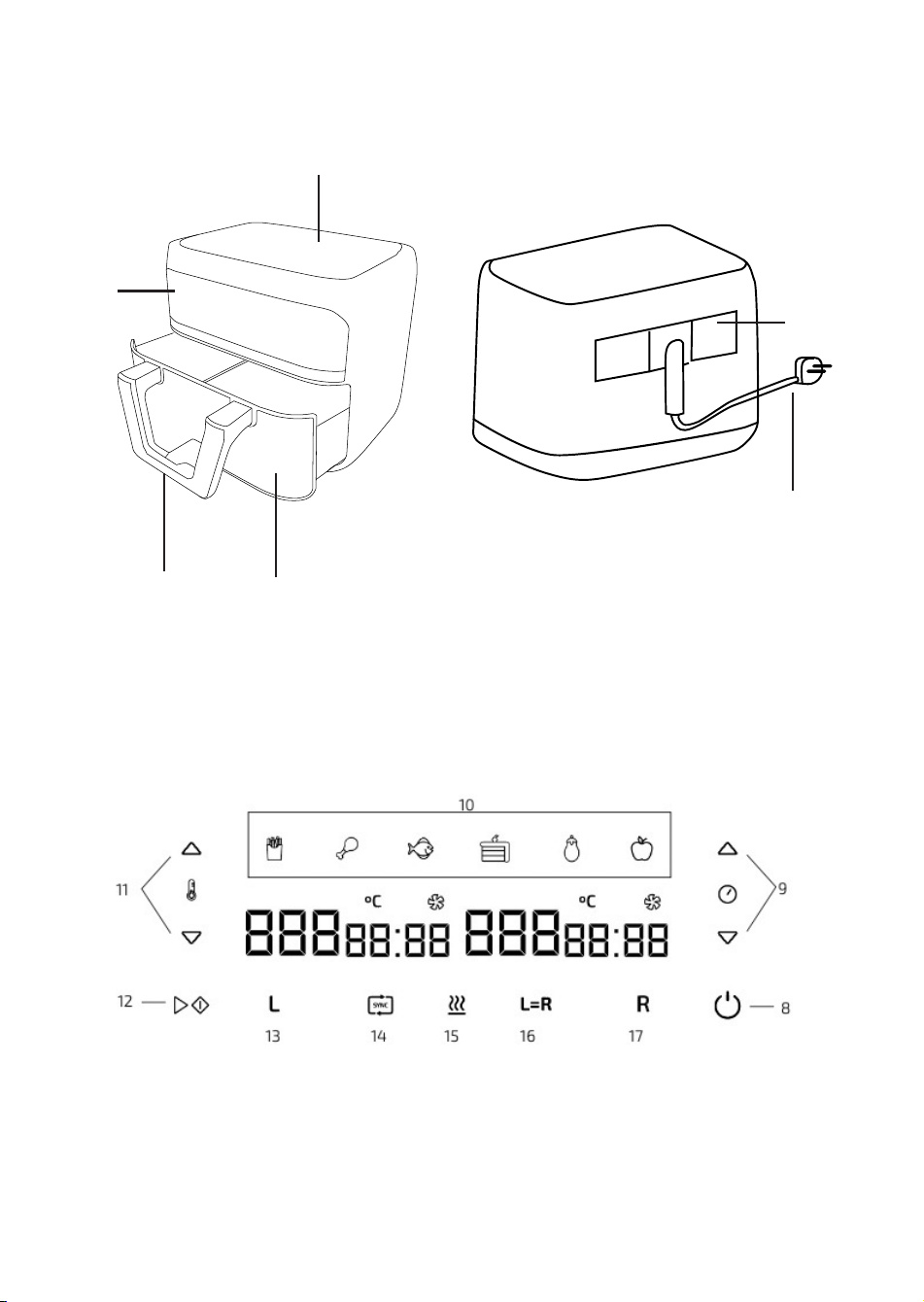
Fig./Img./Abb./Afb./ Rys./Obr. 1
Fig./Img./Abb./Afb./ Rys./Obr. 2
1
2
3 4
7
6
04996_Cecofry Dual 9000_IM_01221202.indd 12604996_Cecofry Dual 9000_IM_01221202.indd 126 7/12/22 13:077/12/22 13:07
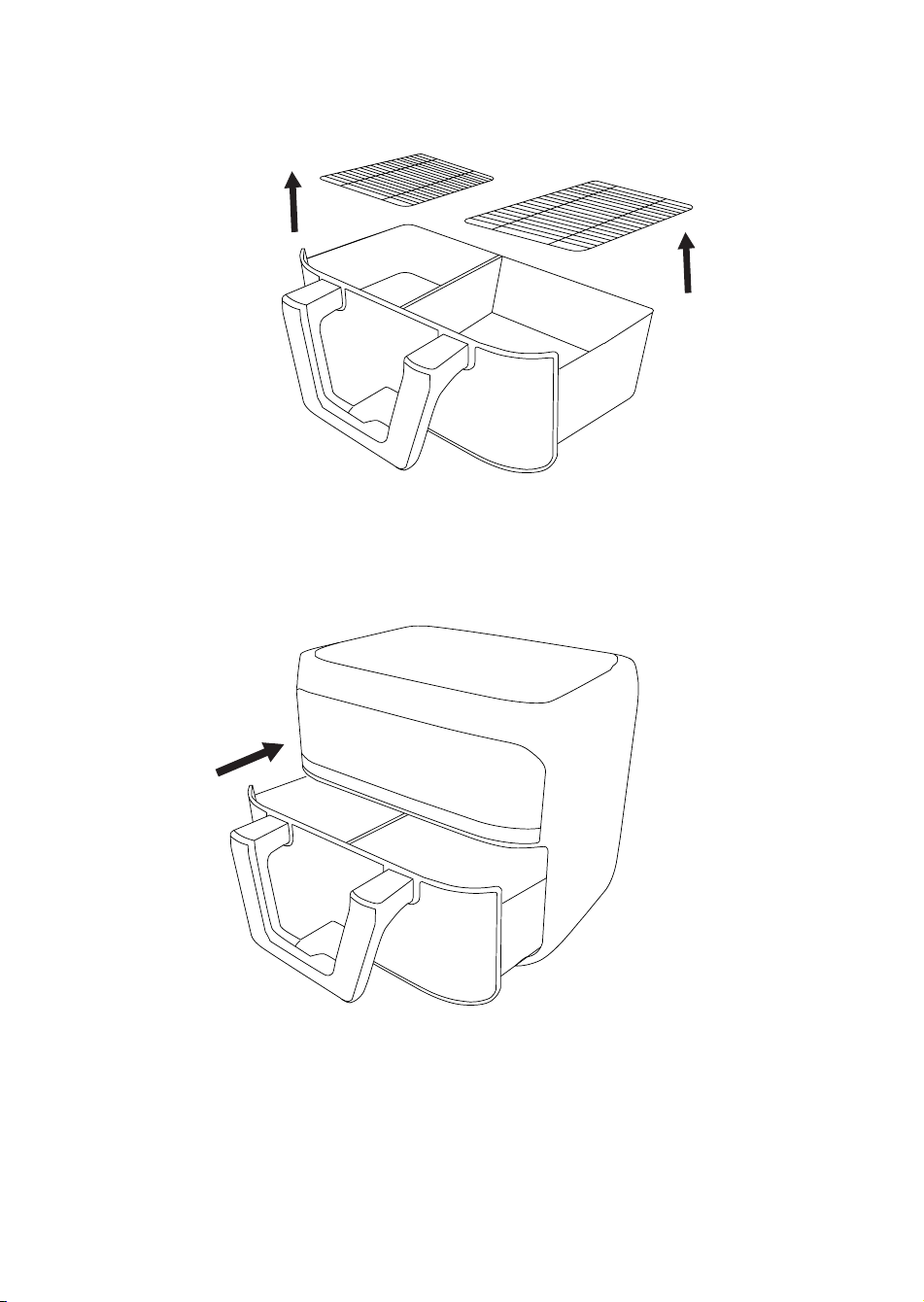
Fig./Img./Abb./Afb./ Rys./Obr. 3
Fig./Img./Abb./Afb./ Rys./Obr. 4
04996_Cecofry Dual 9000_IM_01221202.indd 12704996_Cecofry Dual 9000_IM_01221202.indd 127 7/12/22 13:077/12/22 13:07

www.cecotec.es
Cecotec Innovaciones S.L.
C/ de la Pinadeta s/n, 46930
Quart de Poblet, Valencia (Spain)
YV01220825
04996_Cecofry Dual 9000_IM_01221202.indd 12804996_Cecofry Dual 9000_IM_01221202.indd 128 7/12/22 13:077/12/22 13:07