
L:80xW:80 (mm)
猛犸二代
80克书纸
尺寸
品名
材料
工艺
印刷工艺
语种
备注
4开8页风折琴
单色双面印刷
英文
V.2.3.4
HOW TO EMAIL QUICKLY?
Please scan QR code and email to us .
Manufacture: Shen zhen ZhiQi Technology Co., Ltd.
Address: B902 Baochengtai Square, No.38 Qinfu road, Liuyue
Community, Henggang Street,Longgang District,Shenzhen. China
V.2.3.4
II
Series:
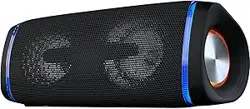
WATERPROOF WIRELESS
SPEAKER
FEATURES:
● Stereo Sound
● Wireless 5.0
● True Wireless Stereo
● Colorful Party Light
● TF Card & AUX Audio
● IP67 Waterproof
Dear customers, please read this manual carefully before using the product and keep it properly.
PREFACE
PACKAGE CONTENT
OPERATION INSTRUCTION
●1*Men mart II Main device
● 1* Type-C cable
● 1* 3.5mm Aux in cable
● 1* User Manual
①
③
②
⑪
⑪
⑫
⑫
④
⑤
①
③
②
④
⑤
⑥
⑥
⑬
⑬
⑭
⑭
⑩
⑩
⑦
⑧
⑨
⑦
⑧
⑨
1. Bluetooth mode
1. Turn on speaker enter into bluetooth mode,the bluetooth light starts to flash.Turn on the
bluetooth on your device search for “Men mart II” and connect to your speaker, If it’s connected
successfully,you will hear a prompt tone that“device paired ”. The bluetooth light is always on,
now you can play music on your device by bluetooth.
2. When the bluetooth is connected successfully and you make calls with phone, the voice will
automatically enter into the bluetooth hands-free mode.Short press “ ”key to answer
incoming call,Long press to reject call.
2. AUX in mode
Please insert TF card into speaker, the speaker will switch mode automatically with a prompt tone
“TF card mode”, the speaker will play music saved in card automatically, TF card memory
maximum is 32G.
(This mode is only apply to some models, please consult local dealer for details.)
Power: Long press Turn on/off Short press Play/Pause
Bluetooth/Phone:Long press force to disconnect Bluetooth connection
Short press switch Bluetooth/Aux in mode Answer/Hang off phone call
Plus: Short press to increase volume Long press to next track
Minus: Short press to decrease volume Long press to previous track
3D: Long press to turn on/off ight mode Short press to turn 3D sound on/off
TWS pairing: Short press on/cancel TWS connection
Long press to clear away TWS pairing
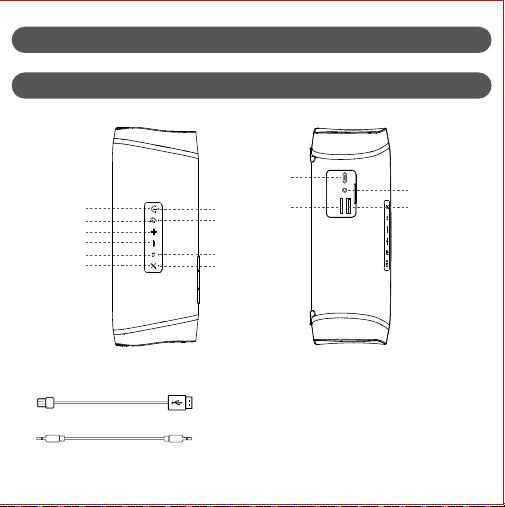
Type-C interface
AUX interface
TF card slot
Power bank output interface/USB flash disk interface
Charging light/Power bank light/Low power indicator
Bluetooth light
3D sound indicator
TWS light
KEY FUNCTION DEFINITION
Please connect one end of the 3.5mm audio cable to the headphone output port of the mobile
phone / computer, and the other end to the audio. The audio will automatically switch and prompt
“external sound source mode" to play music.
※Due to the lower power supply capability,most computer’s USB interface can not meet speaker’s
operational requirements.It is not recommended to use the computer’s USB for charging
synchronously when you play music in the AUX in mode while connecting computer.
3. TF card play
+
Switch on and enter the light effect mode before shutdown, Long press the “ " key to turn
On/off the light effect.Short press to switch to 3D sound.
※The USB and Type C interfaces of the same charing line are forbidden to be inserted into the
speaker simultaneously.
1. USB-A OUTPUT : 5V 1A(Power bank function only works when speaker is turned on).
2.Turn on speaker insert the standard USB cable into the output interface of power bank, connect
the other end to the mobile. At this time the power bank indicator is green, the green indicator
will be off after mobile being fully charged.
3. Turn off speaker in the process of using speaker to charge the mobile,speaker will stand by,
power bank function works normally, and speaker can be awakened by long press the power key.
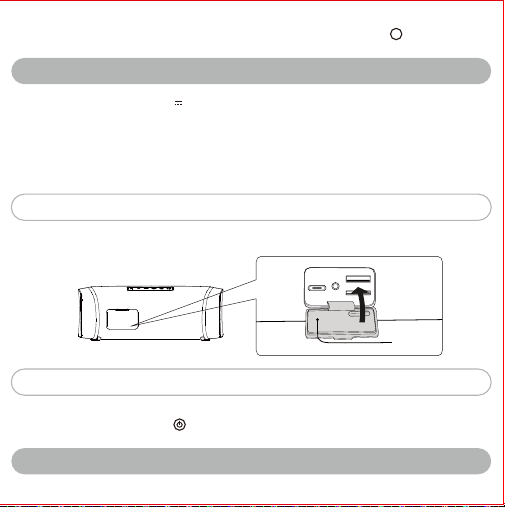
Protective
cover
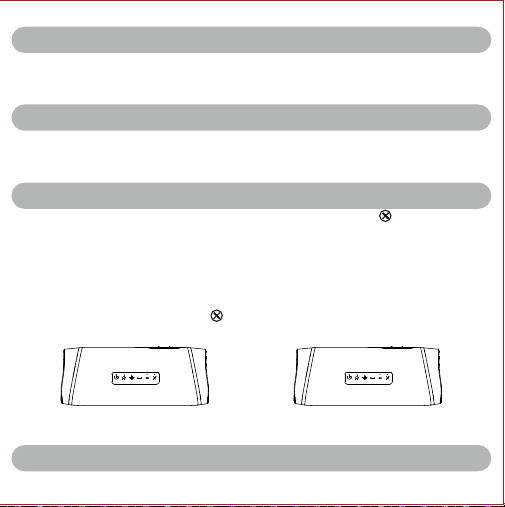
Turn on two Men mart II speakers enter into bluetooth mode. Short press “ ”botton of one
speaker. TWS light starts to flash, the speaker will automatically search the other for TWS
connection,if they connected successfully, two speakers will switch into left and right channels
automatically. Repeat the bluetooth connection operation and connect to phone, If they connected
succesffully ,music will play on the speaker shows dual stereo sound effect.
Note:
This function requires two Men mart II speakers,make sure both are turned on and in the bluetooth
mode.
No bluetooth connection to any other devices before TWS paring.
When TWS is connected, short press“ ”key of one speaker to cancel the interconnection.
After clearing TWS pairing, power on will not automatically connect back to TWS.
Left channel(Main Speaker) Right channel(Auxiliary Speaker)
The speaker will automatically shut down to save power under below circumstances.
1. In bluetooth mode,after 20 minutes waiting for no device pairing.
2. In any modes, short press “ ”key pause for 20 minutes without any operation the speaker
will shut down automatically, Please long press the power key to turn it on again.
3D
4. USB flash disk playback mode
Insert the USB flash disk with music files into the audio USB interface, The audio automatically
switches to USB flash disk mode and voice prompts "USB flash disk mode" to automatically play
music in USB flash disk,The memory supports 32gu disk at most.
(This mode is only apply to some models, please consult local dealer for details.)
5. TWS stereo sound play
6. Cool party lights
7. Type-C Quick charge
※Do not use power adapter that has not been certificated by safety certification.
※Power adapter with output 5V 2A is recommended for charging.
1.Audio voice prompt “Out of battery",and the red light of the charging prompt light flashes.
Please charge speaker as quickly as possible.
2. This speaker supports self-adaption charging . It’s able to choose charging current automatically
according to the external rated power of the adapter, When charging by USB interface on computer,
the current is smaller and it takes longer time to complete charging.
3. When speaker is charging, the power light is red and always on. When speaker is fully charged,
the power light is green and always on.
Handle the protective cover carefully. The protective cover plays an important role in keeping
waterproof and dustproof performance It is of great importance.
Kindly tips:
Energy saving:
8. Power bank output
TECHNICAL PARAMETERS
Bluetooth version: Battery capacity:
Charging voltage:
Rated power:
Product weight:
5.0 7200mAh
5V 2A
40W
900g
1.Can not connect to bluetooth or no sound when playing music?
Please make sure the speaker is in bluetooth mode,and also make sure your device supports
bluetooth function and bluetooth has already been turned on searching for devices. Check if there
are too many bluetooth devices around ,which might bring difficulties of the searching process.
Please turn off other bluetooth device.
2.What if TF card/USB flash disk doesn’t respond ?
Please make sure TF card/USB flash disk is in good quality,and check whether the audio file is
MP3 playing format,If all problems above are excluded , it might be TF card/USB flash disk
compatibility issue, you can consider of formating TF card/USB flash disk to FAT32 or change a
different TF card/USB flash disk.
TROUBLE SHOOTING
MEN MART
L:80xW:80 (mm)
猛犸二代
80克书纸
尺寸
品名
材料
工艺
印刷工艺
语种
备注
4开8页风折琴
单色双面印刷
英文
V.2.3.4
HOW TO EMAIL QUICKLY?
Please scan QR code and email to us .
Manufacture: Shen zhen ZhiQi Technology Co., Ltd.
Address: B902 Baochengtai Square, No.38 Qinfu road, Liuyue
Community, Henggang Street,Longgang District,Shenzhen. China
V.2.3.4
II
Series:
WATERPROOF WIRELESS
SPEAKER
FEATURES:
● Stereo Sound
● Wireless 5.0
● True Wireless Stereo
● Colorful Party Light
● TF Card & AUX Audio
● IP67 Waterproof
Dear customers, please read this manual carefully before using the product and keep it properly.
PREFACE
PACKAGE CONTENT
OPERATION INSTRUCTION
●1*Men mart II Main device
● 1* Type-C cable
● 1* 3.5mm Aux in cable
● 1* User Manual
①
③
②
⑪
⑪
⑫
⑫
④
⑤
①
③
②
④
⑤
⑥
⑥
⑬
⑬
⑭
⑭
⑩
⑩
⑦
⑧
⑨
⑦
⑧
⑨
1. Bluetooth mode
1. Turn on speaker enter into bluetooth mode,the bluetooth light starts to flash.Turn on the
bluetooth on your device search for “Men mart II” and connect to your speaker, If it’s connected
successfully,you will hear a prompt tone that“device paired ”. The bluetooth light is always on,
now you can play music on your device by bluetooth.
2. When the bluetooth is connected successfully and you make calls with phone, the voice will
automatically enter into the bluetooth hands-free mode.Short press “ ”key to answer
incoming call,Long press to reject call.
2. AUX in mode
Please insert TF card into speaker, the speaker will switch mode automatically with a prompt tone
“TF card mode”, the speaker will play music saved in card automatically, TF card memory
maximum is 32G.
(This mode is only apply to some models, please consult local dealer for details.)
Power: Long press Turn on/off Short press Play/Pause
Bluetooth/Phone:Long press force to disconnect Bluetooth connection
Short press switch Bluetooth/Aux in mode Answer/Hang off phone call
Plus: Short press to increase volume Long press to next track
Minus: Short press to decrease volume Long press to previous track
3D: Long press to turn on/off ight mode Short press to turn 3D sound on/off
TWS pairing: Short press on/cancel TWS connection
Long press to clear away TWS pairing
Type-C interface
AUX interface
TF card slot
Power bank output interface/USB flash disk interface
Charging light/Power bank light/Low power indicator
Bluetooth light
3D sound indicator
TWS light
KEY FUNCTION DEFINITION
Please connect one end of the 3.5mm audio cable to the headphone output port of the mobile
phone / computer, and the other end to the audio. The audio will automatically switch and prompt
“external sound source mode" to play music.
※Due to the lower power supply capability,most computer’s USB interface can not meet speaker’s
operational requirements.It is not recommended to use the computer’s USB for charging
synchronously when you play music in the AUX in mode while connecting computer.
3. TF card play
+
Switch on and enter the light effect mode before shutdown, Long press the “ " key to turn
On/off the light effect.Short press to switch to 3D sound.
※The USB and Type C interfaces of the same charing line are forbidden to be inserted into the
speaker simultaneously.
1. USB-A OUTPUT : 5V 1A(Power bank function only works when speaker is turned on).
2.Turn on speaker insert the standard USB cable into the output interface of power bank, connect
the other end to the mobile. At this time the power bank indicator is green, the green indicator
will be off after mobile being fully charged.
3. Turn off speaker in the process of using speaker to charge the mobile,speaker will stand by,
power bank function works normally, and speaker can be awakened by long press the power key.
Protective
cover
Turn on two Men mart II speakers enter into bluetooth mode. Short press “ ”botton of one
speaker. TWS light starts to flash, the speaker will automatically search the other for TWS
connection,if they connected successfully, two speakers will switch into left and right channels
automatically. Repeat the bluetooth connection operation and connect to phone, If they connected
succesffully ,music will play on the speaker shows dual stereo sound effect.
Note:
This function requires two Men mart II speakers,make sure both are turned on and in the bluetooth
mode.
No bluetooth connection to any other devices before TWS paring.
When TWS is connected, short press“ ”key of one speaker to cancel the interconnection.
After clearing TWS pairing, power on will not automatically connect back to TWS.
Left channel(Main Speaker) Right channel(Auxiliary Speaker)
The speaker will automatically shut down to save power under below circumstances.
1. In bluetooth mode,after 20 minutes waiting for no device pairing.
2. In any modes, short press “ ”key pause for 20 minutes without any operation the speaker
will shut down automatically, Please long press the power key to turn it on again.
3D
4. USB flash disk playback mode
Insert the USB flash disk with music files into the audio USB interface, The audio automatically
switches to USB flash disk mode and voice prompts "USB flash disk mode" to automatically play
music in USB flash disk,The memory supports 32gu disk at most.
(This mode is only apply to some models, please consult local dealer for details.)
5. TWS stereo sound play
6. Cool party lights
7. Type-C Quick charge
※Do not use power adapter that has not been certificated by safety certification.
※Power adapter with output 5V 2A is recommended for charging.
1.Audio voice prompt “Out of battery",and the red light of the charging prompt light flashes.
Please charge speaker as quickly as possible.
2. This speaker supports self-adaption charging . It’s able to choose charging current automatically
according to the external rated power of the adapter, When charging by USB interface on computer,
the current is smaller and it takes longer time to complete charging.
3. When speaker is charging, the power light is red and always on. When speaker is fully charged,
the power light is green and always on.
Handle the protective cover carefully. The protective cover plays an important role in keeping
waterproof and dustproof performance It is of great importance.
Kindly tips:
Energy saving:
8. Power bank output
TECHNICAL PARAMETERS
Bluetooth version: Battery capacity:
Charging voltage:
Rated power:
Product weight:
5.0 7200mAh
5V 2A
40W
900g
1.Can not connect to bluetooth or no sound when playing music?
Please make sure the speaker is in bluetooth mode,and also make sure your device supports
bluetooth function and bluetooth has already been turned on searching for devices. Check if there
are too many bluetooth devices around ,which might bring difficulties of the searching process.
Please turn off other bluetooth device.
2.What if TF card/USB flash disk doesn’t respond ?
Please make sure TF card/USB flash disk is in good quality,and check whether the audio file is
MP3 playing format,If all problems above are excluded , it might be TF card/USB flash disk
compatibility issue, you can consider of formating TF card/USB flash disk to FAT32 or change a
different TF card/USB flash disk.
TROUBLE SHOOTING
MEN MART

L:80xW:80 (mm)
猛犸二代
80克书纸
尺寸
品名
材料
工艺
印刷工艺
语种
备注
4开8页风折琴
单色双面印刷
英文
V.2.3.4
HOW TO EMAIL QUICKLY?
Please scan QR code and email to us .
Manufacture: Shen zhen ZhiQi Technology Co., Ltd.
Address: B902 Baochengtai Square, No.38 Qinfu road, Liuyue
Community, Henggang Street,Longgang District,Shenzhen. China
V.2.3.4
II
Series:
WATERPROOF WIRELESS
SPEAKER
FEATURES:
● Stereo Sound
● Wireless 5.0
● True Wireless Stereo
● Colorful Party Light
● TF Card & AUX Audio
● IP67 Waterproof
Dear customers, please read this manual carefully before using the product and keep it properly.
PREFACE
PACKAGE CONTENT
OPERATION INSTRUCTION
●1*Men mart II Main device
● 1* Type-C cable
● 1* 3.5mm Aux in cable
● 1* User Manual
①
③
②
⑪
⑪
⑫
⑫
④
⑤
①
③
②
④
⑤
⑥
⑥
⑬
⑬
⑭
⑭
⑩
⑩
⑦
⑧
⑨
⑦
⑧
⑨
1. Bluetooth mode
1. Turn on speaker enter into bluetooth mode,the bluetooth light starts to flash.Turn on the
bluetooth on your device search for “Men mart II” and connect to your speaker, If it’s connected
successfully,you will hear a prompt tone that“device paired ”. The bluetooth light is always on,
now you can play music on your device by bluetooth.
2. When the bluetooth is connected successfully and you make calls with phone, the voice will
automatically enter into the bluetooth hands-free mode.Short press “ ”key to answer
incoming call,Long press to reject call.
2. AUX in mode
Please insert TF card into speaker, the speaker will switch mode automatically with a prompt tone
“TF card mode”, the speaker will play music saved in card automatically, TF card memory
maximum is 32G.
(This mode is only apply to some models, please consult local dealer for details.)
Power: Long press Turn on/off Short press Play/Pause
Bluetooth/Phone:Long press force to disconnect Bluetooth connection
Short press switch Bluetooth/Aux in mode Answer/Hang off phone call
Plus: Short press to increase volume Long press to next track
Minus: Short press to decrease volume Long press to previous track
3D: Long press to turn on/off ight mode Short press to turn 3D sound on/off
TWS pairing: Short press on/cancel TWS connection
Long press to clear away TWS pairing
Type-C interface
AUX interface
TF card slot
Power bank output interface/USB flash disk interface
Charging light/Power bank light/Low power indicator
Bluetooth light
3D sound indicator
TWS light
KEY FUNCTION DEFINITION
Please connect one end of the 3.5mm audio cable to the headphone output port of the mobile
phone / computer, and the other end to the audio. The audio will automatically switch and prompt
“external sound source mode" to play music.
※Due to the lower power supply capability,most computer’s USB interface can not meet speaker’s
operational requirements.It is not recommended to use the computer’s USB for charging
synchronously when you play music in the AUX in mode while connecting computer.
3. TF card play
+
Switch on and enter the light effect mode before shutdown, Long press the “ " key to turn
On/off the light effect.Short press to switch to 3D sound.
※The USB and Type C interfaces of the same charing line are forbidden to be inserted into the
speaker simultaneously.
1. USB-A OUTPUT : 5V 1A(Power bank function only works when speaker is turned on).
2.Turn on speaker insert the standard USB cable into the output interface of power bank, connect
the other end to the mobile. At this time the power bank indicator is green, the green indicator
will be off after mobile being fully charged.
3. Turn off speaker in the process of using speaker to charge the mobile,speaker will stand by,
power bank function works normally, and speaker can be awakened by long press the power key.
Protective
cover
Turn on two Men mart II speakers enter into bluetooth mode. Short press “ ”botton of one
speaker. TWS light starts to flash, the speaker will automatically search the other for TWS
connection,if they connected successfully, two speakers will switch into left and right channels
automatically. Repeat the bluetooth connection operation and connect to phone, If they connected
succesffully ,music will play on the speaker shows dual stereo sound effect.
Note:
This function requires two Men mart II speakers,make sure both are turned on and in the bluetooth
mode.
No bluetooth connection to any other devices before TWS paring.
When TWS is connected, short press“ ”key of one speaker to cancel the interconnection.
After clearing TWS pairing, power on will not automatically connect back to TWS.
Left channel(Main Speaker) Right channel(Auxiliary Speaker)
The speaker will automatically shut down to save power under below circumstances.
1. In bluetooth mode,after 20 minutes waiting for no device pairing.
2. In any modes, short press “ ”key pause for 20 minutes without any operation the speaker
will shut down automatically, Please long press the power key to turn it on again.
3D
4. USB flash disk playback mode
Insert the USB flash disk with music files into the audio USB interface, The audio automatically
switches to USB flash disk mode and voice prompts "USB flash disk mode" to automatically play
music in USB flash disk,The memory supports 32gu disk at most.
(This mode is only apply to some models, please consult local dealer for details.)
5. TWS stereo sound play
6. Cool party lights
7. Type-C Quick charge
※Do not use power adapter that has not been certificated by safety certification.
※Power adapter with output 5V 2A is recommended for charging.
1.Audio voice prompt “Out of battery",and the red light of the charging prompt light flashes.
Please charge speaker as quickly as possible.
2. This speaker supports self-adaption charging . It’s able to choose charging current automatically
according to the external rated power of the adapter, When charging by USB interface on computer,
the current is smaller and it takes longer time to complete charging.
3. When speaker is charging, the power light is red and always on. When speaker is fully charged,
the power light is green and always on.
Handle the protective cover carefully. The protective cover plays an important role in keeping
waterproof and dustproof performance It is of great importance.
Kindly tips:
Energy saving:
8. Power bank output
TECHNICAL PARAMETERS
Bluetooth version: Battery capacity:
Charging voltage:
Rated power:
Product weight:
5.0 7200mAh
5V 2A
40W
900g
1.Can not connect to bluetooth or no sound when playing music?
Please make sure the speaker is in bluetooth mode,and also make sure your device supports
bluetooth function and bluetooth has already been turned on searching for devices. Check if there
are too many bluetooth devices around ,which might bring difficulties of the searching process.
Please turn off other bluetooth device.
2.What if TF card/USB flash disk doesn’t respond ?
Please make sure TF card/USB flash disk is in good quality,and check whether the audio file is
MP3 playing format,If all problems above are excluded , it might be TF card/USB flash disk
compatibility issue, you can consider of formating TF card/USB flash disk to FAT32 or change a
different TF card/USB flash disk.
TROUBLE SHOOTING
MEN MART
L:80xW:80 (mm)
猛犸二代
80克书纸
尺寸
品名
材料
工艺
印刷工艺
语种
备注
4开8页风折琴
单色双面印刷
英文
V.2.3.4
HOW TO EMAIL QUICKLY?
Please scan QR code and email to us .
Manufacture: Shen zhen ZhiQi Technology Co., Ltd.
Address: B902 Baochengtai Square, No.38 Qinfu road, Liuyue
Community, Henggang Street,Longgang District,Shenzhen. China
V.2.3.4
II
Series:
WATERPROOF WIRELESS
SPEAKER
FEATURES:
● Stereo Sound
● Wireless 5.0
● True Wireless Stereo
● Colorful Party Light
● TF Card & AUX Audio
● IP67 Waterproof
Dear customers, please read this manual carefully before using the product and keep it properly.
PREFACE
PACKAGE CONTENT
OPERATION INSTRUCTION
●1*Men mart II Main device
● 1* Type-C cable
● 1* 3.5mm Aux in cable
● 1* User Manual
①
③
②
⑪
⑪
⑫
⑫
④
⑤
①
③
②
④
⑤
⑥
⑥
⑬
⑬
⑭
⑭
⑩
⑩
⑦
⑧
⑨
⑦
⑧
⑨
1. Bluetooth mode
1. Turn on speaker enter into bluetooth mode,the bluetooth light starts to flash.Turn on the
bluetooth on your device search for “Men mart II” and connect to your speaker, If it’s connected
successfully,you will hear a prompt tone that“device paired ”. The bluetooth light is always on,
now you can play music on your device by bluetooth.
2. When the bluetooth is connected successfully and you make calls with phone, the voice will
automatically enter into the bluetooth hands-free mode.Short press “ ”key to answer
incoming call,Long press to reject call.
2. AUX in mode
Please insert TF card into speaker, the speaker will switch mode automatically with a prompt tone
“TF card mode”, the speaker will play music saved in card automatically, TF card memory
maximum is 32G.
(This mode is only apply to some models, please consult local dealer for details.)
Power: Long press Turn on/off Short press Play/Pause
Bluetooth/Phone:Long press force to disconnect Bluetooth connection
Short press switch Bluetooth/Aux in mode Answer/Hang off phone call
Plus: Short press to increase volume Long press to next track
Minus: Short press to decrease volume Long press to previous track
3D: Long press to turn on/off ight mode Short press to turn 3D sound on/off
TWS pairing: Short press on/cancel TWS connection
Long press to clear away TWS pairing
Type-C interface
AUX interface
TF card slot
Power bank output interface/USB flash disk interface
Charging light/Power bank light/Low power indicator
Bluetooth light
3D sound indicator
TWS light
KEY FUNCTION DEFINITION
Please connect one end of the 3.5mm audio cable to the headphone output port of the mobile
phone / computer, and the other end to the audio. The audio will automatically switch and prompt
“external sound source mode" to play music.
※Due to the lower power supply capability,most computer’s USB interface can not meet speaker’s
operational requirements.It is not recommended to use the computer’s USB for charging
synchronously when you play music in the AUX in mode while connecting computer.
3. TF card play
+
Switch on and enter the light effect mode before shutdown, Long press the “ " key to turn
On/off the light effect.Short press to switch to 3D sound.
※The USB and Type C interfaces of the same charing line are forbidden to be inserted into the
speaker simultaneously.
1. USB-A OUTPUT : 5V 1A(Power bank function only works when speaker is turned on).
2.Turn on speaker insert the standard USB cable into the output interface of power bank, connect
the other end to the mobile. At this time the power bank indicator is green, the green indicator
will be off after mobile being fully charged.
3. Turn off speaker in the process of using speaker to charge the mobile,speaker will stand by,
power bank function works normally, and speaker can be awakened by long press the power key.
Protective
cover
Turn on two Men mart II speakers enter into bluetooth mode. Short press “ ”botton of one
speaker. TWS light starts to flash, the speaker will automatically search the other for TWS
connection,if they connected successfully, two speakers will switch into left and right channels
automatically. Repeat the bluetooth connection operation and connect to phone, If they connected
succesffully ,music will play on the speaker shows dual stereo sound effect.
Note:
This function requires two Men mart II speakers,make sure both are turned on and in the bluetooth
mode.
No bluetooth connection to any other devices before TWS paring.
When TWS is connected, short press“ ”key of one speaker to cancel the interconnection.
After clearing TWS pairing, power on will not automatically connect back to TWS.
Left channel(Main Speaker) Right channel(Auxiliary Speaker)
The speaker will automatically shut down to save power under below circumstances.
1. In bluetooth mode,after 20 minutes waiting for no device pairing.
2. In any modes, short press “ ”key pause for 20 minutes without any operation the speaker
will shut down automatically, Please long press the power key to turn it on again.
3D
4. USB flash disk playback mode
Insert the USB flash disk with music files into the audio USB interface, The audio automatically
switches to USB flash disk mode and voice prompts "USB flash disk mode" to automatically play
music in USB flash disk,The memory supports 32gu disk at most.
(This mode is only apply to some models, please consult local dealer for details.)
5. TWS stereo sound play
6. Cool party lights
7. Type-C Quick charge
※Do not use power adapter that has not been certificated by safety certification.
※Power adapter with output 5V 2A is recommended for charging.
1.Audio voice prompt “Out of battery",and the red light of the charging prompt light flashes.
Please charge speaker as quickly as possible.
2. This speaker supports self-adaption charging . It’s able to choose charging current automatically
according to the external rated power of the adapter, When charging by USB interface on computer,
the current is smaller and it takes longer time to complete charging.
3. When speaker is charging, the power light is red and always on. When speaker is fully charged,
the power light is green and always on.
Handle the protective cover carefully. The protective cover plays an important role in keeping
waterproof and dustproof performance It is of great importance.
Kindly tips:
Energy saving:
8. Power bank output
TECHNICAL PARAMETERS
Bluetooth version: Battery capacity:
Charging voltage:
Rated power:
Product weight:
5.0 7200mAh
5V 2A
40W
900g
1.Can not connect to bluetooth or no sound when playing music?
Please make sure the speaker is in bluetooth mode,and also make sure your device supports
bluetooth function and bluetooth has already been turned on searching for devices. Check if there
are too many bluetooth devices around ,which might bring difficulties of the searching process.
Please turn off other bluetooth device.
2.What if TF card/USB flash disk doesn’t respond ?
Please make sure TF card/USB flash disk is in good quality,and check whether the audio file is
MP3 playing format,If all problems above are excluded , it might be TF card/USB flash disk
compatibility issue, you can consider of formating TF card/USB flash disk to FAT32 or change a
different TF card/USB flash disk.
TROUBLE SHOOTING
MEN MART
L:80xW:80 (mm)
猛犸二代
80克书纸
尺寸
品名
材料
工艺
印刷工艺
语种
备注
4开8页风折琴
单色双面印刷
英文
V.2.3.4
HOW TO EMAIL QUICKLY?
Please scan QR code and email to us .
Manufacture: Shen zhen ZhiQi Technology Co., Ltd.
Address: B902 Baochengtai Square, No.38 Qinfu road, Liuyue
Community, Henggang Street,Longgang District,Shenzhen. China
V.2.3.4
II
Series:
WATERPROOF WIRELESS
SPEAKER
FEATURES:
● Stereo Sound
● Wireless 5.0
● True Wireless Stereo
● Colorful Party Light
● TF Card & AUX Audio
● IP67 Waterproof
Dear customers, please read this manual carefully before using the product and keep it properly.
PREFACE
PACKAGE CONTENT
OPERATION INSTRUCTION
●1*Men mart II Main device
● 1* Type-C cable
● 1* 3.5mm Aux in cable
● 1* User Manual
①
③
②
⑪
⑪
⑫
⑫
④
⑤
①
③
②
④
⑤
⑥
⑥
⑬
⑬
⑭
⑭
⑩
⑩
⑦
⑧
⑨
⑦
⑧
⑨
1. Bluetooth mode
1. Turn on speaker enter into bluetooth mode,the bluetooth light starts to flash.Turn on the
bluetooth on your device search for “Men mart II” and connect to your speaker, If it’s connected
successfully,you will hear a prompt tone that“device paired ”. The bluetooth light is always on,
now you can play music on your device by bluetooth.
2. When the bluetooth is connected successfully and you make calls with phone, the voice will
automatically enter into the bluetooth hands-free mode.Short press “ ”key to answer
incoming call,Long press to reject call.
2. AUX in mode
Please insert TF card into speaker, the speaker will switch mode automatically with a prompt tone
“TF card mode”, the speaker will play music saved in card automatically, TF card memory
maximum is 32G.
(This mode is only apply to some models, please consult local dealer for details.)
Power: Long press Turn on/off Short press Play/Pause
Bluetooth/Phone:Long press force to disconnect Bluetooth connection
Short press switch Bluetooth/Aux in mode Answer/Hang off phone call
Plus: Short press to increase volume Long press to next track
Minus: Short press to decrease volume Long press to previous track
3D: Long press to turn on/off ight mode Short press to turn 3D sound on/off
TWS pairing: Short press on/cancel TWS connection
Long press to clear away TWS pairing
Type-C interface
AUX interface
TF card slot
Power bank output interface/USB flash disk interface
Charging light/Power bank light/Low power indicator
Bluetooth light
3D sound indicator
TWS light
KEY FUNCTION DEFINITION
Please connect one end of the 3.5mm audio cable to the headphone output port of the mobile
phone / computer, and the other end to the audio. The audio will automatically switch and prompt
“external sound source mode" to play music.
※Due to the lower power supply capability,most computer’s USB interface can not meet speaker’s
operational requirements.It is not recommended to use the computer’s USB for charging
synchronously when you play music in the AUX in mode while connecting computer.
3. TF card play
+
Switch on and enter the light effect mode before shutdown, Long press the “ " key to turn
On/off the light effect.Short press to switch to 3D sound.
※The USB and Type C interfaces of the same charing line are forbidden to be inserted into the
speaker simultaneously.
1. USB-A OUTPUT : 5V 1A(Power bank function only works when speaker is turned on).
2.Turn on speaker insert the standard USB cable into the output interface of power bank, connect
the other end to the mobile. At this time the power bank indicator is green, the green indicator
will be off after mobile being fully charged.
3. Turn off speaker in the process of using speaker to charge the mobile,speaker will stand by,
power bank function works normally, and speaker can be awakened by long press the power key.
Protective
cover
Turn on two Men mart II speakers enter into bluetooth mode. Short press “ ”botton of one
speaker. TWS light starts to flash, the speaker will automatically search the other for TWS
connection,if they connected successfully, two speakers will switch into left and right channels
automatically. Repeat the bluetooth connection operation and connect to phone, If they connected
succesffully ,music will play on the speaker shows dual stereo sound effect.
Note:
This function requires two Men mart II speakers,make sure both are turned on and in the bluetooth
mode.
No bluetooth connection to any other devices before TWS paring.
When TWS is connected, short press“ ”key of one speaker to cancel the interconnection.
After clearing TWS pairing, power on will not automatically connect back to TWS.
Left channel(Main Speaker) Right channel(Auxiliary Speaker)
The speaker will automatically shut down to save power under below circumstances.
1. In bluetooth mode,after 20 minutes waiting for no device pairing.
2. In any modes, short press “ ”key pause for 20 minutes without any operation the speaker
will shut down automatically, Please long press the power key to turn it on again.
3D
4. USB flash disk playback mode
Insert the USB flash disk with music files into the audio USB interface, The audio automatically
switches to USB flash disk mode and voice prompts "USB flash disk mode" to automatically play
music in USB flash disk,The memory supports 32gu disk at most.
(This mode is only apply to some models, please consult local dealer for details.)
5. TWS stereo sound play
6. Cool party lights
7. Type-C Quick charge
※Do not use power adapter that has not been certificated by safety certification.
※Power adapter with output 5V 2A is recommended for charging.
1.Audio voice prompt “Out of battery",and the red light of the charging prompt light flashes.
Please charge speaker as quickly as possible.
2. This speaker supports self-adaption charging . It’s able to choose charging current automatically
according to the external rated power of the adapter, When charging by USB interface on computer,
the current is smaller and it takes longer time to complete charging.
3. When speaker is charging, the power light is red and always on. When speaker is fully charged,
the power light is green and always on.
Handle the protective cover carefully. The protective cover plays an important role in keeping
waterproof and dustproof performance It is of great importance.
Kindly tips:
Energy saving:
8. Power bank output
TECHNICAL PARAMETERS
Bluetooth version: Battery capacity:
Charging voltage:
Rated power:
Product weight:
5.0 7200mAh
5V 2A
40W
900g
1.Can not connect to bluetooth or no sound when playing music?
Please make sure the speaker is in bluetooth mode,and also make sure your device supports
bluetooth function and bluetooth has already been turned on searching for devices. Check if there
are too many bluetooth devices around ,which might bring difficulties of the searching process.
Please turn off other bluetooth device.
2.What if TF card/USB flash disk doesn’t respond ?
Please make sure TF card/USB flash disk is in good quality,and check whether the audio file is
MP3 playing format,If all problems above are excluded , it might be TF card/USB flash disk
compatibility issue, you can consider of formating TF card/USB flash disk to FAT32 or change a
different TF card/USB flash disk.
TROUBLE SHOOTING
MEN MART

L:80xW:80 (mm)
猛犸二代
80克书纸
尺寸
品名
材料
工艺
印刷工艺
语种
备注
4开8页风折琴
单色双面印刷
英文
V.2.3.4
HOW TO EMAIL QUICKLY?
Please scan QR code and email to us .
Manufacture: Shen zhen ZhiQi Technology Co., Ltd.
Address: B902 Baochengtai Square, No.38 Qinfu road, Liuyue
Community, Henggang Street,Longgang District,Shenzhen. China
V.2.3.4
II
Series:
WATERPROOF WIRELESS
SPEAKER
FEATURES:
● Stereo Sound
● Wireless 5.0
● True Wireless Stereo
● Colorful Party Light
● TF Card & AUX Audio
● IP67 Waterproof
Dear customers, please read this manual carefully before using the product and keep it properly.
PREFACE
PACKAGE CONTENT
OPERATION INSTRUCTION
●1*Men mart II Main device
● 1* Type-C cable
● 1* 3.5mm Aux in cable
● 1* User Manual
①
③
②
⑪
⑪
⑫
⑫
④
⑤
①
③
②
④
⑤
⑥
⑥
⑬
⑬
⑭
⑭
⑩
⑩
⑦
⑧
⑨
⑦
⑧
⑨
1. Bluetooth mode
1. Turn on speaker enter into bluetooth mode,the bluetooth light starts to flash.Turn on the
bluetooth on your device search for “Men mart II” and connect to your speaker, If it’s connected
successfully,you will hear a prompt tone that“device paired ”. The bluetooth light is always on,
now you can play music on your device by bluetooth.
2. When the bluetooth is connected successfully and you make calls with phone, the voice will
automatically enter into the bluetooth hands-free mode.Short press “ ”key to answer
incoming call,Long press to reject call.
2. AUX in mode
Please insert TF card into speaker, the speaker will switch mode automatically with a prompt tone
“TF card mode”, the speaker will play music saved in card automatically, TF card memory
maximum is 32G.
(This mode is only apply to some models, please consult local dealer for details.)
Power: Long press Turn on/off Short press Play/Pause
Bluetooth/Phone:Long press force to disconnect Bluetooth connection
Short press switch Bluetooth/Aux in mode Answer/Hang off phone call
Plus: Short press to increase volume Long press to next track
Minus: Short press to decrease volume Long press to previous track
3D: Long press to turn on/off ight mode Short press to turn 3D sound on/off
TWS pairing: Short press on/cancel TWS connection
Long press to clear away TWS pairing
Type-C interface
AUX interface
TF card slot
Power bank output interface/USB flash disk interface
Charging light/Power bank light/Low power indicator
Bluetooth light
3D sound indicator
TWS light
KEY FUNCTION DEFINITION
Please connect one end of the 3.5mm audio cable to the headphone output port of the mobile
phone / computer, and the other end to the audio. The audio will automatically switch and prompt
“external sound source mode" to play music.
※Due to the lower power supply capability,most computer’s USB interface can not meet speaker’s
operational requirements.It is not recommended to use the computer’s USB for charging
synchronously when you play music in the AUX in mode while connecting computer.
3. TF card play
+
Switch on and enter the light effect mode before shutdown, Long press the “ " key to turn
On/off the light effect.Short press to switch to 3D sound.
※The USB and Type C interfaces of the same charing line are forbidden to be inserted into the
speaker simultaneously.
1. USB-A OUTPUT : 5V 1A(Power bank function only works when speaker is turned on).
2.Turn on speaker insert the standard USB cable into the output interface of power bank, connect
the other end to the mobile. At this time the power bank indicator is green, the green indicator
will be off after mobile being fully charged.
3. Turn off speaker in the process of using speaker to charge the mobile,speaker will stand by,
power bank function works normally, and speaker can be awakened by long press the power key.
Protective
cover
Turn on two Men mart II speakers enter into bluetooth mode. Short press “ ”botton of one
speaker. TWS light starts to flash, the speaker will automatically search the other for TWS
connection,if they connected successfully, two speakers will switch into left and right channels
automatically. Repeat the bluetooth connection operation and connect to phone, If they connected
succesffully ,music will play on the speaker shows dual stereo sound effect.
Note:
This function requires two Men mart II speakers,make sure both are turned on and in the bluetooth
mode.
No bluetooth connection to any other devices before TWS paring.
When TWS is connected, short press“ ”key of one speaker to cancel the interconnection.
After clearing TWS pairing, power on will not automatically connect back to TWS.
Left channel(Main Speaker) Right channel(Auxiliary Speaker)
The speaker will automatically shut down to save power under below circumstances.
1. In bluetooth mode,after 20 minutes waiting for no device pairing.
2. In any modes, short press “ ”key pause for 20 minutes without any operation the speaker
will shut down automatically, Please long press the power key to turn it on again.
3D
4. USB flash disk playback mode
Insert the USB flash disk with music files into the audio USB interface, The audio automatically
switches to USB flash disk mode and voice prompts "USB flash disk mode" to automatically play
music in USB flash disk,The memory supports 32gu disk at most.
(This mode is only apply to some models, please consult local dealer for details.)
5. TWS stereo sound play
6. Cool party lights
7. Type-C Quick charge
※Do not use power adapter that has not been certificated by safety certification.
※Power adapter with output 5V 2A is recommended for charging.
1.Audio voice prompt “Out of battery",and the red light of the charging prompt light flashes.
Please charge speaker as quickly as possible.
2. This speaker supports self-adaption charging . It’s able to choose charging current automatically
according to the external rated power of the adapter, When charging by USB interface on computer,
the current is smaller and it takes longer time to complete charging.
3. When speaker is charging, the power light is red and always on. When speaker is fully charged,
the power light is green and always on.
Handle the protective cover carefully. The protective cover plays an important role in keeping
waterproof and dustproof performance It is of great importance.
Kindly tips:
Energy saving:
8. Power bank output
TECHNICAL PARAMETERS
Bluetooth version: Battery capacity:
Charging voltage:
Rated power:
Product weight:
5.0 7200mAh
5V 2A
40W
900g
1.Can not connect to bluetooth or no sound when playing music?
Please make sure the speaker is in bluetooth mode,and also make sure your device supports
bluetooth function and bluetooth has already been turned on searching for devices. Check if there
are too many bluetooth devices around ,which might bring difficulties of the searching process.
Please turn off other bluetooth device.
2.What if TF card/USB flash disk doesn’t respond ?
Please make sure TF card/USB flash disk is in good quality,and check whether the audio file is
MP3 playing format,If all problems above are excluded , it might be TF card/USB flash disk
compatibility issue, you can consider of formating TF card/USB flash disk to FAT32 or change a
different TF card/USB flash disk.
TROUBLE SHOOTING
MEN MART
L:80xW:80 (mm)
猛犸二代
80克书纸
尺寸
品名
材料
工艺
印刷工艺
语种
备注
4开8页风折琴
单色双面印刷
英文
V.2.3.4
HOW TO EMAIL QUICKLY?
Please scan QR code and email to us .
Manufacture: Shen zhen ZhiQi Technology Co., Ltd.
Address: B902 Baochengtai Square, No.38 Qinfu road, Liuyue
Community, Henggang Street,Longgang District,Shenzhen. China
V.2.3.4
II
Series:
WATERPROOF WIRELESS
SPEAKER
FEATURES:
● Stereo Sound
● Wireless 5.0
● True Wireless Stereo
● Colorful Party Light
● TF Card & AUX Audio
● IP67 Waterproof
Dear customers, please read this manual carefully before using the product and keep it properly.
PREFACE
PACKAGE CONTENT
OPERATION INSTRUCTION
●1*Men mart II Main device
● 1* Type-C cable
● 1* 3.5mm Aux in cable
● 1* User Manual
①
③
②
⑪
⑪
⑫
⑫
④
⑤
①
③
②
④
⑤
⑥
⑥
⑬
⑬
⑭
⑭
⑩
⑩
⑦
⑧
⑨
⑦
⑧
⑨
1. Bluetooth mode
1. Turn on speaker enter into bluetooth mode,the bluetooth light starts to flash.Turn on the
bluetooth on your device search for “Men mart II” and connect to your speaker, If it’s connected
successfully,you will hear a prompt tone that“device paired ”. The bluetooth light is always on,
now you can play music on your device by bluetooth.
2. When the bluetooth is connected successfully and you make calls with phone, the voice will
automatically enter into the bluetooth hands-free mode.Short press “ ”key to answer
incoming call,Long press to reject call.
2. AUX in mode
Please insert TF card into speaker, the speaker will switch mode automatically with a prompt tone
“TF card mode”, the speaker will play music saved in card automatically, TF card memory
maximum is 32G.
(This mode is only apply to some models, please consult local dealer for details.)
Power: Long press Turn on/off Short press Play/Pause
Bluetooth/Phone:Long press force to disconnect Bluetooth connection
Short press switch Bluetooth/Aux in mode Answer/Hang off phone call
Plus: Short press to increase volume Long press to next track
Minus: Short press to decrease volume Long press to previous track
3D: Long press to turn on/off ight mode Short press to turn 3D sound on/off
TWS pairing: Short press on/cancel TWS connection
Long press to clear away TWS pairing
Type-C interface
AUX interface
TF card slot
Power bank output interface/USB flash disk interface
Charging light/Power bank light/Low power indicator
Bluetooth light
3D sound indicator
TWS light
KEY FUNCTION DEFINITION
Please connect one end of the 3.5mm audio cable to the headphone output port of the mobile
phone / computer, and the other end to the audio. The audio will automatically switch and prompt
“external sound source mode" to play music.
※Due to the lower power supply capability,most computer’s USB interface can not meet speaker’s
operational requirements.It is not recommended to use the computer’s USB for charging
synchronously when you play music in the AUX in mode while connecting computer.
3. TF card play
+
Switch on and enter the light effect mode before shutdown, Long press the “ " key to turn
On/off the light effect.Short press to switch to 3D sound.
※The USB and Type C interfaces of the same charing line are forbidden to be inserted into the
speaker simultaneously.
1. USB-A OUTPUT : 5V 1A(Power bank function only works when speaker is turned on).
2.Turn on speaker insert the standard USB cable into the output interface of power bank, connect
the other end to the mobile. At this time the power bank indicator is green, the green indicator
will be off after mobile being fully charged.
3. Turn off speaker in the process of using speaker to charge the mobile,speaker will stand by,
power bank function works normally, and speaker can be awakened by long press the power key.
Protective
cover
Turn on two Men mart II speakers enter into bluetooth mode. Short press “ ”botton of one
speaker. TWS light starts to flash, the speaker will automatically search the other for TWS
connection,if they connected successfully, two speakers will switch into left and right channels
automatically. Repeat the bluetooth connection operation and connect to phone, If they connected
succesffully ,music will play on the speaker shows dual stereo sound effect.
Note:
This function requires two Men mart II speakers,make sure both are turned on and in the bluetooth
mode.
No bluetooth connection to any other devices before TWS paring.
When TWS is connected, short press“ ”key of one speaker to cancel the interconnection.
After clearing TWS pairing, power on will not automatically connect back to TWS.
Left channel(Main Speaker) Right channel(Auxiliary Speaker)
The speaker will automatically shut down to save power under below circumstances.
1. In bluetooth mode,after 20 minutes waiting for no device pairing.
2. In any modes, short press “ ”key pause for 20 minutes without any operation the speaker
will shut down automatically, Please long press the power key to turn it on again.
3D
4. USB flash disk playback mode
Insert the USB flash disk with music files into the audio USB interface, The audio automatically
switches to USB flash disk mode and voice prompts "USB flash disk mode" to automatically play
music in USB flash disk,The memory supports 32gu disk at most.
(This mode is only apply to some models, please consult local dealer for details.)
5. TWS stereo sound play
6. Cool party lights
7. Type-C Quick charge
※Do not use power adapter that has not been certificated by safety certification.
※Power adapter with output 5V 2A is recommended for charging.
1.Audio voice prompt “Out of battery",and the red light of the charging prompt light flashes.
Please charge speaker as quickly as possible.
2. This speaker supports self-adaption charging . It’s able to choose charging current automatically
according to the external rated power of the adapter, When charging by USB interface on computer,
the current is smaller and it takes longer time to complete charging.
3. When speaker is charging, the power light is red and always on. When speaker is fully charged,
the power light is green and always on.
Handle the protective cover carefully. The protective cover plays an important role in keeping
waterproof and dustproof performance It is of great importance.
Kindly tips:
Energy saving:
8. Power bank output
TECHNICAL PARAMETERS
Bluetooth version: Battery capacity:
Charging voltage:
Rated power:
Product weight:
5.0 7200mAh
5V 2A
40W
900g
1.Can not connect to bluetooth or no sound when playing music?
Please make sure the speaker is in bluetooth mode,and also make sure your device supports
bluetooth function and bluetooth has already been turned on searching for devices. Check if there
are too many bluetooth devices around ,which might bring difficulties of the searching process.
Please turn off other bluetooth device.
2.What if TF card/USB flash disk doesn’t respond ?
Please make sure TF card/USB flash disk is in good quality,and check whether the audio file is
MP3 playing format,If all problems above are excluded , it might be TF card/USB flash disk
compatibility issue, you can consider of formating TF card/USB flash disk to FAT32 or change a
different TF card/USB flash disk.
TROUBLE SHOOTING
MEN MART

L:80xW:80 (mm)
猛犸二代
80克书纸
尺寸
品名
材料
工艺
印刷工艺
语种
备注
4开8页风折琴
单色双面印刷
英文
V.2.3.4
HOW TO EMAIL QUICKLY?
Please scan QR code and email to us .
Manufacture: Shen zhen ZhiQi Technology Co., Ltd.
Address: B902 Baochengtai Square, No.38 Qinfu road, Liuyue
Community, Henggang Street,Longgang District,Shenzhen. China
V.2.3.4
II
Series:
WATERPROOF WIRELESS
SPEAKER
FEATURES:
● Stereo Sound
● Wireless 5.0
● True Wireless Stereo
● Colorful Party Light
● TF Card & AUX Audio
● IP67 Waterproof
Dear customers, please read this manual carefully before using the product and keep it properly.
PREFACE
PACKAGE CONTENT
OPERATION INSTRUCTION
●1*Men mart II Main device
● 1* Type-C cable
● 1* 3.5mm Aux in cable
● 1* User Manual
①
③
②
⑪
⑪
⑫
⑫
④
⑤
①
③
②
④
⑤
⑥
⑥
⑬
⑬
⑭
⑭
⑩
⑩
⑦
⑧
⑨
⑦
⑧
⑨
1. Bluetooth mode
1. Turn on speaker enter into bluetooth mode,the bluetooth light starts to flash.Turn on the
bluetooth on your device search for “Men mart II” and connect to your speaker, If it’s connected
successfully,you will hear a prompt tone that“device paired ”. The bluetooth light is always on,
now you can play music on your device by bluetooth.
2. When the bluetooth is connected successfully and you make calls with phone, the voice will
automatically enter into the bluetooth hands-free mode.Short press “ ”key to answer
incoming call,Long press to reject call.
2. AUX in mode
Please insert TF card into speaker, the speaker will switch mode automatically with a prompt tone
“TF card mode”, the speaker will play music saved in card automatically, TF card memory
maximum is 32G.
(This mode is only apply to some models, please consult local dealer for details.)
Power: Long press Turn on/off Short press Play/Pause
Bluetooth/Phone:Long press force to disconnect Bluetooth connection
Short press switch Bluetooth/Aux in mode Answer/Hang off phone call
Plus: Short press to increase volume Long press to next track
Minus: Short press to decrease volume Long press to previous track
3D: Long press to turn on/off ight mode Short press to turn 3D sound on/off
TWS pairing: Short press on/cancel TWS connection
Long press to clear away TWS pairing
Type-C interface
AUX interface
TF card slot
Power bank output interface/USB flash disk interface
Charging light/Power bank light/Low power indicator
Bluetooth light
3D sound indicator
TWS light
KEY FUNCTION DEFINITION
Please connect one end of the 3.5mm audio cable to the headphone output port of the mobile
phone / computer, and the other end to the audio. The audio will automatically switch and prompt
“external sound source mode" to play music.
※Due to the lower power supply capability,most computer’s USB interface can not meet speaker’s
operational requirements.It is not recommended to use the computer’s USB for charging
synchronously when you play music in the AUX in mode while connecting computer.
3. TF card play
+
Switch on and enter the light effect mode before shutdown, Long press the “ " key to turn
On/off the light effect.Short press to switch to 3D sound.
※The USB and Type C interfaces of the same charing line are forbidden to be inserted into the
speaker simultaneously.
1. USB-A OUTPUT : 5V 1A(Power bank function only works when speaker is turned on).
2.Turn on speaker insert the standard USB cable into the output interface of power bank, connect
the other end to the mobile. At this time the power bank indicator is green, the green indicator
will be off after mobile being fully charged.
3. Turn off speaker in the process of using speaker to charge the mobile,speaker will stand by,
power bank function works normally, and speaker can be awakened by long press the power key.
Protective
cover
Turn on two Men mart II speakers enter into bluetooth mode. Short press “ ”botton of one
speaker. TWS light starts to flash, the speaker will automatically search the other for TWS
connection,if they connected successfully, two speakers will switch into left and right channels
automatically. Repeat the bluetooth connection operation and connect to phone, If they connected
succesffully ,music will play on the speaker shows dual stereo sound effect.
Note:
This function requires two Men mart II speakers,make sure both are turned on and in the bluetooth
mode.
No bluetooth connection to any other devices before TWS paring.
When TWS is connected, short press“ ”key of one speaker to cancel the interconnection.
After clearing TWS pairing, power on will not automatically connect back to TWS.
Left channel(Main Speaker) Right channel(Auxiliary Speaker)
The speaker will automatically shut down to save power under below circumstances.
1. In bluetooth mode,after 20 minutes waiting for no device pairing.
2. In any modes, short press “ ”key pause for 20 minutes without any operation the speaker
will shut down automatically, Please long press the power key to turn it on again.
3D
4. USB flash disk playback mode
Insert the USB flash disk with music files into the audio USB interface, The audio automatically
switches to USB flash disk mode and voice prompts "USB flash disk mode" to automatically play
music in USB flash disk,The memory supports 32gu disk at most.
(This mode is only apply to some models, please consult local dealer for details.)
5. TWS stereo sound play
6. Cool party lights
7. Type-C Quick charge
※Do not use power adapter that has not been certificated by safety certification.
※Power adapter with output 5V 2A is recommended for charging.
1.Audio voice prompt “Out of battery",and the red light of the charging prompt light flashes.
Please charge speaker as quickly as possible.
2. This speaker supports self-adaption charging . It’s able to choose charging current automatically
according to the external rated power of the adapter, When charging by USB interface on computer,
the current is smaller and it takes longer time to complete charging.
3. When speaker is charging, the power light is red and always on. When speaker is fully charged,
the power light is green and always on.
Handle the protective cover carefully. The protective cover plays an important role in keeping
waterproof and dustproof performance It is of great importance.
Kindly tips:
Energy saving:
8. Power bank output
TECHNICAL PARAMETERS
Bluetooth version: Battery capacity:
Charging voltage:
Rated power:
Product weight:
5.0 7200mAh
5V 2A
40W
900g
1.Can not connect to bluetooth or no sound when playing music?
Please make sure the speaker is in bluetooth mode,and also make sure your device supports
bluetooth function and bluetooth has already been turned on searching for devices. Check if there
are too many bluetooth devices around ,which might bring difficulties of the searching process.
Please turn off other bluetooth device.
2.What if TF card/USB flash disk doesn’t respond ?
Please make sure TF card/USB flash disk is in good quality,and check whether the audio file is
MP3 playing format,If all problems above are excluded , it might be TF card/USB flash disk
compatibility issue, you can consider of formating TF card/USB flash disk to FAT32 or change a
different TF card/USB flash disk.
TROUBLE SHOOTING
MEN MART
