PC/Mobile
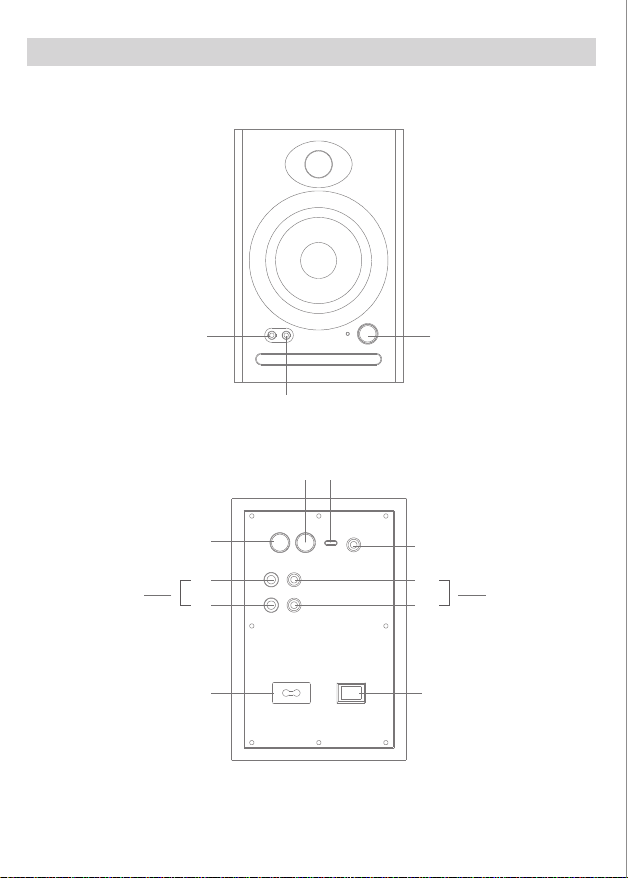
Bass
Adjustment
Treble
Adjustment
AC Input 100V~240V
Power Switch
R
TRS RCA
L
R
L
Balanced Input
Unbalanced Input
Left Speaker
Output Interface
C7
CAUTION
Balanced
1 = ground
2 = +
3 = -
2 3 1
Risk of electric shock
Do not open
Monitor
Speaker
说明书 材质:128G双铜+风琴折 尺寸:140*100MM
Safety Instructions
Safety Warning
Specification
Button Configuration
Warranty card
(please keep this card for warranty purposes)
Product Inspection certificate
Warranty
Speaker connection diagram Function description Wireless connections
Notice
Product Information
Cleaning
Package Contents
1. Please read this manual carefully before using
2. Save the manual for future reference.
3. Pay attention to all warnings in the manual
4. Please stay away from ammable and explosive items
5. Do not use near water or humid places
6. Use a dry cloth when cleaning and follow the manufacturer's manual
7. Do not block any vents and install according to manufacturer's manual
8. Do not install near any heat source, such as a radiator, stove, or other device that generates heat.
9. Do not damage the positive and negative poles of the speakers power supply:
10. Protect the power cable from being walked on or pinched, especially plugs, receptacles, and where
they exit from the speaker.
11. Only use accessories specied by the manufacturer
12. In thundery weather or when not in use for a long time, please unplug the power plug to avoid
damaging the product.
13. When the product is damaged in any way, it needs to be repaired by a professional
14. The power cable or plug is damaged, objects have been dropped into the speaker, or it has been
exposed to rain or moisture, so it does not work properly. maintenance is required
15. Working temperature range 0 - 40 degrees
16. This product is nota toy and children under 14 years old should use under adult supervision
17. Do not open or move the casing without authorization for maintenance or cleaning.
18. Before operation, please ensure that the operating voltage is the same as the local power supply
voltage. The operating voltage is displayed on the product nameplate.
1: The speaker volume adjustment is not synchronized with the Bluetooth/USB-Type-c/AUX/TRS
/RCA audio source volume.
2: Does not support Bluetooth calls, but supports USB-Type-C calls. A 4-section headset with a
microphone is required for calls.
3: AUX does not support inserting a 4-section audio cable as an input signal
4: After shutting down, there will be a certain cache time before it is completely shut down, and the
indicator light will go out in about 10 seconds.
5: Default Bluetooth mode at startup
6: AUX/PC/TRS/RCA rear plug-in priority
1: Turn on the power and switch to Bluetooth mode
2: Turn on Bluetooth on your phone/tablet/computer and search for C7, click Connect
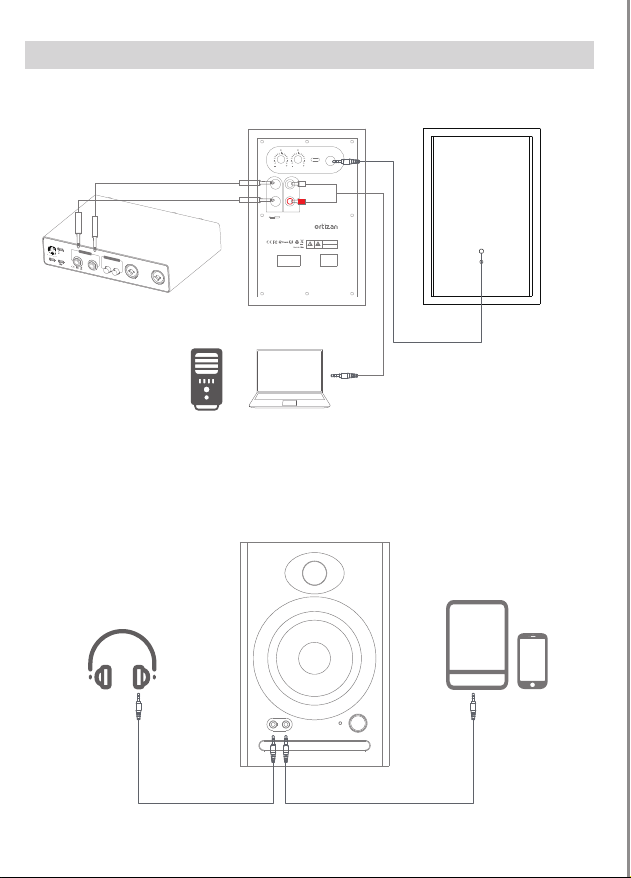
Wired connection
1: Turn on the power
2: Use TYPE-C data cable, insert it into the PC/mobile phone logo socket, and automatically switch
to PC mode
3: Use three sections of 3.5MM audio cable to plug into the front AUX interface
4: The rear TRS input is a three-stage balanced jack with a diameter of 6.35MM, used to connect a
6.35MM balanced output Audio equipment, such as professional computer audio interfaces,
mixers and audio production equipment, etc.
1: Due to product iteration and upgrading, there may be some dierences in packaging and
appearance technology. Please refer to the actual product.
2: During the product sales process, our company gradually optimizes the product to enhance the
product experience. Will do the product part for function and parameter adjustment, please refer
to the actual product.
3: Some models of our products have multiple versions and multiple congurations. Please choose
the corresponding product according to your needs. Details can be found in Customer Service.
Dispose of discarded electronic products correctly and do not dispose of electrical
and electronic equipment, components, and batteries together with other househ
-old waste throw away. Prevent these items that may contain harmful substances
from polluting the natural environment and causing harm to the human body, and
promise to recycle resources, please use waste recycling or local disposal laws and
regulations to recycle this product,or contact this product's sta.
Trouble shooting
Reminders
1: What should I do if Bluetooth cannot connect or there is no sound when playing music?
1: Please conrm whether the speaker is in Bluetooth mode rst.
2: Conrm whether your Bluetooth device audio source supports Bluetooth function and turn it on.
3: Check whether the speaker is in Bluetooth search state.
4: If there are too many Bluetooth devices around, it may cause diculty in searching. Please turn o
other Bluetooth devices.
2: What should I do if AUX playback does not respond?
1: Please conrm whether the AUX audio cable is intact.
2: Make sure AUX is plugged in correctly.
3: What should I do if only one speaker has sound?
1: First, please check whether the connecting cables between the speakers are connected properly.
2: Secondly, you can try to connect other audio source devices. If the speaker can produce sound
normally, please check your previous audio source.
If the speaker is still not working properly, please contact customer service
4: The speaker is silent, what should I do?
1: Please check whether the power supply is plugged in and whether the power switch is turned on.
2: Please check whether the audio source and connecting cable are normal.
3: Please check whether the audio signal output is normal.
4: Please check whether the volume of the speaker or audio source has been adjusted to the minimum.
5: Please disconnect the power supply of the speaker and then turn it on again.
5: Speaker noise problem
The speakers have the characteristics of low noise oor. The noise of some sound sources themselves
will be several times higher than that of the speakers, so when checking
you should unplug the audio cable and turn up the volume. The sound from the speaker should be
barely audible from 1 meter away.
Before cleaning, turn o the product and unplug it from the power source.
Use a dry rag to wipe it gently, or use a neutral solution or water to soak it and wring it out to wipe
the surface of the speaker.
After wiping with clean water or neutral solvent, you must wait until the water dries before plugging
in the power supply.
This symbol indicates that this product is suitable for indoor environments only.
This symbol alerts the user to the presence of uninsulated hazardous voltages inside the
product's enclosure, which can cause electric shock and is a live hazard.
This symbol reminds users not to disassemble the casing of the product. There are no user
-replaceable parts inside. If repairs are needed, please go to a qualied repair shop for repairs.
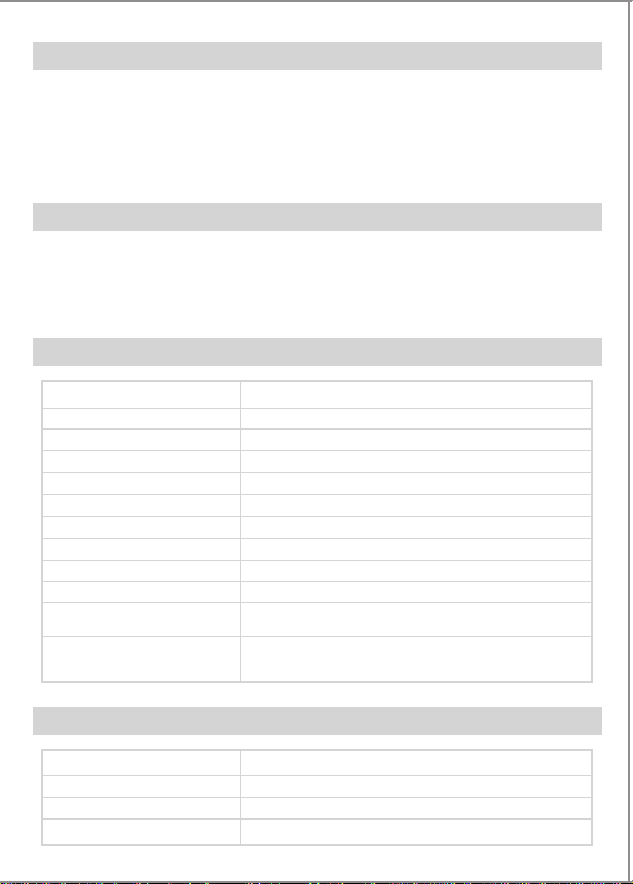
2*Desktop monitor speakers
1*Active main speaker
1*Passive auxiliary speaker
1*AC power cable
1*Data Charging cable
1*3.5MM double-ended audio cable
1*Manual
1*RCA to 3.5mm cable
Model:
Bluetooth Version:
DSP:
Audio Input:
Balanced Input:
Low frequency trumpet:
Mid-high frequency trumpet:
Audio input:
Indicator light:
Sound channel:
Items Weight
Dimension
Monitor
Bass Adjustment
L
R
L
R
AC input
100V-240V
Power Switch
Unbalanced:
RCA Unbalanced
input Unbalanced
Balanced:
TRS balanced
input Balanced
Treble Adjustment PC/Mobile
Left speaker output
interface
AUX
Mode Switch
Peak power:
Bluetooth Range:
Frequency range:
Signal-to-Noise Ratio:
40W+40W
≥15M
60hz-20khz
≥85db @ 1KHZ
C7
5.3
Supports
Type-C
6.35MM TRS
30W4Ω 3.5 inch
10W6Ω 1 inch
TRS balanced, Type-C, Aux, Bluetooth,RCA unbalanced
Blue light and red light
2.0
Right Side 1.8 Kg
left Side 1.42 Kg
Main:L130*W150*H195(MM)
Auxiliary:L130*W150*H195(MM)
·Unless otherwise noted, from the date of purchase, if the product purchased by the user has quality
problems (not product software failure), the return period that the user can choose is 7 days; the
exchange period is 15 days; the warranty period is 12 months;
User prole
Product Inspection:
Inspectors:
Coding:
Implementation Standards:
Quantity:
Coding:
User Name:
Mailing Address:
Contact Number:
Description & Specication:
Dealer signature:
______dd______mm______yy
·If users encounter product quality problems, they can request three-guarantee service from the service
department designated by our company. If transportation is required, the user shall bear the
transportation and other related costs;
·When users require three-guarantee service, they must proactively provide this valid warranty service
certicate and invoice
·Additional services beyond the product's three-guarantee service will be charged in accordance with
relevant regulations. The warranty period of the product after paid repair is 3 months from the date of
pickup or shipment;
·The three-guarantee service provided by our company is limited to products with quality problems,
and does not include compensation for losses caused by accidental loss of interests of the buyer and
any other indirect or direct losses;
·Users should take the initiative to ll in this voucher as required at the seller where they purchased it.
Our company is not responsible for the consequences of not lling in this voucher as required, nor is it
responsible for the seller's commitment to users beyond the warranty service regulations.
Power switch
TRS
RCA
Power o
- Power on: A prompt sound (Bluetooth) and blue light ashing appear
after power on Default Bluetooth mode at startup
Treble knob
Clockwise, the treble increases by up to 10db
Counterclockwise, treble attenuation, minimum -10db
When the knob is in the middle, the treble gain is 0db
Bass knob
Clockwise, bass increases, up to 10db
Counterclockwise: Bass attenuation, minimum -10db
When the knob is in the middle, the bass gain is 0db
Mode knob
Turn clockwise to increase the volume (maximum volume level 16)
Turn counterclockwise, the volume decreases (minimum volume level 0)
Long press to switch mode, BT/AUX /PC /TRS
Short press: mute/unmute (the mute red light ashes slowly)
Double-click to disconnect Bluetooth (blue and red lights ash)
Monitor
Insert 3 pieces of 3.5MM headphones, the speaker will be muted; the
headphones will produce sound
When the 4-section 3.5MM headset is inserted, the speaker is played
externally, and the microphone sound is synchronized with the speaker
sound.
AUX:
1. 3.5MM input in front of the external audio source device; (the blue light
is always on, the red light is o);
2. Rear 6.35MM three-stage balanced socket,
For connecting devices with 6.35MM balanced audio output
PC/mobile phone
Use USB to Type-c to plug into the computer (blue light stays on)
Use Type-c to plug in your phone (blue light stays on)
BT:
Bluetooth volume not syncing with Bluetooth device
Does not support call function
C7
Monitor Speakers
User Manual
Please read this manual carefully before using
www.ortizan.com
Email:support@ortizan.com
R
IGHT
MONI
T
OR
O
UT
UNBALANCED OUT
CHAN
NEL2
CHANNEL1
INP
U
T
2
D
C 5V
IN
PUT1
LEFT
RIGH
T
LEFT
FCC Caution:
This device complies with part 15 of the FCC Rules. Operation is subject to the following two conditions:?(1) this device may not cause harmful interference, and (2) this device must accept any interference received, including interference that may cause undesired operation.
Any changes or modifications not expressly approved by the party responsible for compliance could void the user's authority to operate the equipment.
NOTE: This equipment has been tested and found to comply with the limits for a Class B digital device, pursuant to Part 15 of the FCC Rules. These limits are designed to provide reasonable protection against harmful interference in a residential installation. This equipment generates,
uses and can radiate radio frequency energy and, if not installed and used in accordance with the instructions, may cause harmful interference to radio communications. However, there is no guarantee that interference will not occur in a particular installation.
If this equipment does cause harmful interference to radio or television reception,which can be determined by turning the equipment off and on, the user is encouraged to try to correct the interference by one or more of the following measures:
-- Reorient or relocate the receiving antenna.
-- Increase the separation between the equipment and receiver.
-- Connect the equipment into an outlet on a circuit different
from that to which the receiver is connected.
-- Consult the dealer or an experienced radio/TV technician for help.
To maintain compliance with FCC’s RF Exposure guidelines, This equipment should be installed and operated with minimum distance between 20cm the radiator your body: Use only the supplied antenna.

PC/Mobile
Bass
Adjustment
Treble
Adjustment
AC Input 100V~240V
Power Switch
R
TRS RCA
L
R
L
Balanced Input
Unbalanced Input
Left Speaker
Output Interface
C7
CAUTION
Balanced
1 = ground
2 = +
3 = -
2 3 1
Risk of electric shock
Do not open
Monitor
Speaker
说明书 材质:128G双铜+风琴折 尺寸:140*100MM
Safety Instructions
Safety Warning
Specification
Button Configuration
Warranty card
(please keep this card for warranty purposes)
Product Inspection certificate
Warranty
Speaker connection diagram Function description Wireless connections
Notice
Product Information
Cleaning
Package Contents
1. Please read this manual carefully before using
2. Save the manual for future reference.
3. Pay attention to all warnings in the manual
4. Please stay away from ammable and explosive items
5. Do not use near water or humid places
6. Use a dry cloth when cleaning and follow the manufacturer's manual
7. Do not block any vents and install according to manufacturer's manual
8. Do not install near any heat source, such as a radiator, stove, or other device that generates heat.
9. Do not damage the positive and negative poles of the speakers power supply:
10. Protect the power cable from being walked on or pinched, especially plugs, receptacles, and where
they exit from the speaker.
11. Only use accessories specied by the manufacturer
12. In thundery weather or when not in use for a long time, please unplug the power plug to avoid
damaging the product.
13. When the product is damaged in any way, it needs to be repaired by a professional
14. The power cable or plug is damaged, objects have been dropped into the speaker, or it has been
exposed to rain or moisture, so it does not work properly. maintenance is required
15. Working temperature range 0 - 40 degrees
16. This product is nota toy and children under 14 years old should use under adult supervision
17. Do not open or move the casing without authorization for maintenance or cleaning.
18. Before operation, please ensure that the operating voltage is the same as the local power supply
voltage. The operating voltage is displayed on the product nameplate.
1: The speaker volume adjustment is not synchronized with the Bluetooth/USB-Type-c/AUX/TRS
/RCA audio source volume.
2: Does not support Bluetooth calls, but supports USB-Type-C calls. A 4-section headset with a
microphone is required for calls.
3: AUX does not support inserting a 4-section audio cable as an input signal
4: After shutting down, there will be a certain cache time before it is completely shut down, and the
indicator light will go out in about 10 seconds.
5: Default Bluetooth mode at startup
6: AUX/PC/TRS/RCA rear plug-in priority
1: Turn on the power and switch to Bluetooth mode
2: Turn on Bluetooth on your phone/tablet/computer and search for C7, click Connect
Wired connection
1: Turn on the power
2: Use TYPE-C data cable, insert it into the PC/mobile phone logo socket, and automatically switch
to PC mode
3: Use three sections of 3.5MM audio cable to plug into the front AUX interface
4: The rear TRS input is a three-stage balanced jack with a diameter of 6.35MM, used to connect a
6.35MM balanced output Audio equipment, such as professional computer audio interfaces,
mixers and audio production equipment, etc.
1: Due to product iteration and upgrading, there may be some dierences in packaging and
appearance technology. Please refer to the actual product.
2: During the product sales process, our company gradually optimizes the product to enhance the
product experience. Will do the product part for function and parameter adjustment, please refer
to the actual product.
3: Some models of our products have multiple versions and multiple congurations. Please choose
the corresponding product according to your needs. Details can be found in Customer Service.
Dispose of discarded electronic products correctly and do not dispose of electrical
and electronic equipment, components, and batteries together with other househ
-old waste throw away. Prevent these items that may contain harmful substances
from polluting the natural environment and causing harm to the human body, and
promise to recycle resources, please use waste recycling or local disposal laws and
regulations to recycle this product,or contact this product's sta.
Trouble shooting
Reminders
1: What should I do if Bluetooth cannot connect or there is no sound when playing music?
1: Please conrm whether the speaker is in Bluetooth mode rst.
2: Conrm whether your Bluetooth device audio source supports Bluetooth function and turn it on.
3: Check whether the speaker is in Bluetooth search state.
4: If there are too many Bluetooth devices around, it may cause diculty in searching. Please turn o
other Bluetooth devices.
2: What should I do if AUX playback does not respond?
1: Please conrm whether the AUX audio cable is intact.
2: Make sure AUX is plugged in correctly.
3: What should I do if only one speaker has sound?
1: First, please check whether the connecting cables between the speakers are connected properly.
2: Secondly, you can try to connect other audio source devices. If the speaker can produce sound
normally, please check your previous audio source.
If the speaker is still not working properly, please contact customer service
4: The speaker is silent, what should I do?
1: Please check whether the power supply is plugged in and whether the power switch is turned on.
2: Please check whether the audio source and connecting cable are normal.
3: Please check whether the audio signal output is normal.
4: Please check whether the volume of the speaker or audio source has been adjusted to the minimum.
5: Please disconnect the power supply of the speaker and then turn it on again.
5: Speaker noise problem
The speakers have the characteristics of low noise oor. The noise of some sound sources themselves
will be several times higher than that of the speakers, so when checking
you should unplug the audio cable and turn up the volume. The sound from the speaker should be
barely audible from 1 meter away.
Before cleaning, turn o the product and unplug it from the power source.
Use a dry rag to wipe it gently, or use a neutral solution or water to soak it and wring it out to wipe
the surface of the speaker.
After wiping with clean water or neutral solvent, you must wait until the water dries before plugging
in the power supply.
This symbol indicates that this product is suitable for indoor environments only.
This symbol alerts the user to the presence of uninsulated hazardous voltages inside the
product's enclosure, which can cause electric shock and is a live hazard.
This symbol reminds users not to disassemble the casing of the product. There are no user
-replaceable parts inside. If repairs are needed, please go to a qualied repair shop for repairs.
2*Desktop monitor speakers
1*Active main speaker
1*Passive auxiliary speaker
1*AC power cable
1*Data Charging cable
1*3.5MM double-ended audio cable
1*Manual
1*RCA to 3.5mm cable
Model:
Bluetooth Version:
DSP:
Audio Input:
Balanced Input:
Low frequency trumpet:
Mid-high frequency trumpet:
Audio input:
Indicator light:
Sound channel:
Items Weight
Dimension
Monitor
Bass Adjustment
L
R
L
R
AC input
100V-240V
Power Switch
Unbalanced:
RCA Unbalanced
input Unbalanced
Balanced:
TRS balanced
input Balanced
Treble Adjustment PC/Mobile
Left speaker output
interface
AUX
Mode Switch
Peak power:
Bluetooth Range:
Frequency range:
Signal-to-Noise Ratio:
40W+40W
≥15M
60hz-20khz
≥85db @ 1KHZ
C7
5.3
Supports
Type-C
6.35MM TRS
30W4Ω 3.5 inch
10W6Ω 1 inch
TRS balanced, Type-C, Aux, Bluetooth,RCA unbalanced
Blue light and red light
2.0
Right Side 1.8 Kg
left Side 1.42 Kg
Main:L130*W150*H195(MM)
Auxiliary:L130*W150*H195(MM)
·Unless otherwise noted, from the date of purchase, if the product purchased by the user has quality
problems (not product software failure), the return period that the user can choose is 7 days; the
exchange period is 15 days; the warranty period is 12 months;
User prole
Product Inspection:
Inspectors:
Coding:
Implementation Standards:
Quantity:
Coding:
User Name:
Mailing Address:
Contact Number:
Description & Specication:
Dealer signature:
______dd______mm______yy
·If users encounter product quality problems, they can request three-guarantee service from the service
department designated by our company. If transportation is required, the user shall bear the
transportation and other related costs;
·When users require three-guarantee service, they must proactively provide this valid warranty service
certicate and invoice
·Additional services beyond the product's three-guarantee service will be charged in accordance with
relevant regulations. The warranty period of the product after paid repair is 3 months from the date of
pickup or shipment;
·The three-guarantee service provided by our company is limited to products with quality problems,
and does not include compensation for losses caused by accidental loss of interests of the buyer and
any other indirect or direct losses;
·Users should take the initiative to ll in this voucher as required at the seller where they purchased it.
Our company is not responsible for the consequences of not lling in this voucher as required, nor is it
responsible for the seller's commitment to users beyond the warranty service regulations.
Power switch
TRS
RCA
Power o
- Power on: A prompt sound (Bluetooth) and blue light ashing appear
after power on Default Bluetooth mode at startup
Treble knob
Clockwise, the treble increases by up to 10db
Counterclockwise, treble attenuation, minimum -10db
When the knob is in the middle, the treble gain is 0db
Bass knob
Clockwise, bass increases, up to 10db
Counterclockwise: Bass attenuation, minimum -10db
When the knob is in the middle, the bass gain is 0db
Mode knob
Turn clockwise to increase the volume (maximum volume level 16)
Turn counterclockwise, the volume decreases (minimum volume level 0)
Long press to switch mode, BT/AUX /PC /TRS
Short press: mute/unmute (the mute red light ashes slowly)
Double-click to disconnect Bluetooth (blue and red lights ash)
Monitor
Insert 3 pieces of 3.5MM headphones, the speaker will be muted; the
headphones will produce sound
When the 4-section 3.5MM headset is inserted, the speaker is played
externally, and the microphone sound is synchronized with the speaker
sound.
AUX:
1. 3.5MM input in front of the external audio source device; (the blue light
is always on, the red light is o);
2. Rear 6.35MM three-stage balanced socket,
For connecting devices with 6.35MM balanced audio output
PC/mobile phone
Use USB to Type-c to plug into the computer (blue light stays on)
Use Type-c to plug in your phone (blue light stays on)
BT:
Bluetooth volume not syncing with Bluetooth device
Does not support call function
C7
Monitor Speakers
User Manual
Please read this manual carefully before using
www.ortizan.com
Email:support@ortizan.com
R
IGHT
MONI
T
OR
O
UT
UNBALANCED OUT
CHAN
NEL2
CHANNEL1
INP
U
T
2
D
C 5V
IN
PUT1
LEFT
RIGH
T
LEFT
FCC Caution:
This device complies with part 15 of the FCC Rules. Operation is subject to the following two conditions:?(1) this device may not cause harmful interference, and (2) this device must accept any interference received, including interference that may cause undesired operation.
Any changes or modifications not expressly approved by the party responsible for compliance could void the user's authority to operate the equipment.
NOTE: This equipment has been tested and found to comply with the limits for a Class B digital device, pursuant to Part 15 of the FCC Rules. These limits are designed to provide reasonable protection against harmful interference in a residential installation. This equipment generates,
uses and can radiate radio frequency energy and, if not installed and used in accordance with the instructions, may cause harmful interference to radio communications. However, there is no guarantee that interference will not occur in a particular installation.
If this equipment does cause harmful interference to radio or television reception,which can be determined by turning the equipment off and on, the user is encouraged to try to correct the interference by one or more of the following measures:
-- Reorient or relocate the receiving antenna.
-- Increase the separation between the equipment and receiver.
-- Connect the equipment into an outlet on a circuit different
from that to which the receiver is connected.
-- Consult the dealer or an experienced radio/TV technician for help.
To maintain compliance with FCC’s RF Exposure guidelines, This equipment should be installed and operated with minimum distance between 20cm the radiator your body: Use only the supplied antenna.
PC/Mobile
Bass
Adjustment
Treble
Adjustment
AC Input 100V~240V
Power Switch
R
TRS RCA
L
R
L
Balanced Input
Unbalanced Input
Left Speaker
Output Interface
C7
CAUTION
Balanced
1 = ground
2 = +
3 = -
2 3 1
Risk of electric shock
Do not open
Monitor
Speaker
说明书 材质:128G双铜+风琴折 尺寸:140*100MM
Safety Instructions
Safety Warning
Specification
Button Configuration
Warranty card
(please keep this card for warranty purposes)
Product Inspection certificate
Warranty
Speaker connection diagram Function description Wireless connections
Notice
Product Information
Cleaning
Package Contents
1. Please read this manual carefully before using
2. Save the manual for future reference.
3. Pay attention to all warnings in the manual
4. Please stay away from ammable and explosive items
5. Do not use near water or humid places
6. Use a dry cloth when cleaning and follow the manufacturer's manual
7. Do not block any vents and install according to manufacturer's manual
8. Do not install near any heat source, such as a radiator, stove, or other device that generates heat.
9. Do not damage the positive and negative poles of the speakers power supply:
10. Protect the power cable from being walked on or pinched, especially plugs, receptacles, and where
they exit from the speaker.
11. Only use accessories specied by the manufacturer
12. In thundery weather or when not in use for a long time, please unplug the power plug to avoid
damaging the product.
13. When the product is damaged in any way, it needs to be repaired by a professional
14. The power cable or plug is damaged, objects have been dropped into the speaker, or it has been
exposed to rain or moisture, so it does not work properly. maintenance is required
15. Working temperature range 0 - 40 degrees
16. This product is nota toy and children under 14 years old should use under adult supervision
17. Do not open or move the casing without authorization for maintenance or cleaning.
18. Before operation, please ensure that the operating voltage is the same as the local power supply
voltage. The operating voltage is displayed on the product nameplate.
1: The speaker volume adjustment is not synchronized with the Bluetooth/USB-Type-c/AUX/TRS
/RCA audio source volume.
2: Does not support Bluetooth calls, but supports USB-Type-C calls. A 4-section headset with a
microphone is required for calls.
3: AUX does not support inserting a 4-section audio cable as an input signal
4: After shutting down, there will be a certain cache time before it is completely shut down, and the
indicator light will go out in about 10 seconds.
5: Default Bluetooth mode at startup
6: AUX/PC/TRS/RCA rear plug-in priority
1: Turn on the power and switch to Bluetooth mode
2: Turn on Bluetooth on your phone/tablet/computer and search for C7, click Connect
Wired connection
1: Turn on the power
2: Use TYPE-C data cable, insert it into the PC/mobile phone logo socket, and automatically switch
to PC mode
3: Use three sections of 3.5MM audio cable to plug into the front AUX interface
4: The rear TRS input is a three-stage balanced jack with a diameter of 6.35MM, used to connect a
6.35MM balanced output Audio equipment, such as professional computer audio interfaces,
mixers and audio production equipment, etc.
1: Due to product iteration and upgrading, there may be some dierences in packaging and
appearance technology. Please refer to the actual product.
2: During the product sales process, our company gradually optimizes the product to enhance the
product experience. Will do the product part for function and parameter adjustment, please refer
to the actual product.
3: Some models of our products have multiple versions and multiple congurations. Please choose
the corresponding product according to your needs. Details can be found in Customer Service.
Dispose of discarded electronic products correctly and do not dispose of electrical
and electronic equipment, components, and batteries together with other househ
-old waste throw away. Prevent these items that may contain harmful substances
from polluting the natural environment and causing harm to the human body, and
promise to recycle resources, please use waste recycling or local disposal laws and
regulations to recycle this product,or contact this product's sta.
Trouble shooting
Reminders
1: What should I do if Bluetooth cannot connect or there is no sound when playing music?
1: Please conrm whether the speaker is in Bluetooth mode rst.
2: Conrm whether your Bluetooth device audio source supports Bluetooth function and turn it on.
3: Check whether the speaker is in Bluetooth search state.
4: If there are too many Bluetooth devices around, it may cause diculty in searching. Please turn o
other Bluetooth devices.
2: What should I do if AUX playback does not respond?
1: Please conrm whether the AUX audio cable is intact.
2: Make sure AUX is plugged in correctly.
3: What should I do if only one speaker has sound?
1: First, please check whether the connecting cables between the speakers are connected properly.
2: Secondly, you can try to connect other audio source devices. If the speaker can produce sound
normally, please check your previous audio source.
If the speaker is still not working properly, please contact customer service
4: The speaker is silent, what should I do?
1: Please check whether the power supply is plugged in and whether the power switch is turned on.
2: Please check whether the audio source and connecting cable are normal.
3: Please check whether the audio signal output is normal.
4: Please check whether the volume of the speaker or audio source has been adjusted to the minimum.
5: Please disconnect the power supply of the speaker and then turn it on again.
5: Speaker noise problem
The speakers have the characteristics of low noise oor. The noise of some sound sources themselves
will be several times higher than that of the speakers, so when checking
you should unplug the audio cable and turn up the volume. The sound from the speaker should be
barely audible from 1 meter away.
Before cleaning, turn o the product and unplug it from the power source.
Use a dry rag to wipe it gently, or use a neutral solution or water to soak it and wring it out to wipe
the surface of the speaker.
After wiping with clean water or neutral solvent, you must wait until the water dries before plugging
in the power supply.
This symbol indicates that this product is suitable for indoor environments only.
This symbol alerts the user to the presence of uninsulated hazardous voltages inside the
product's enclosure, which can cause electric shock and is a live hazard.
This symbol reminds users not to disassemble the casing of the product. There are no user
-replaceable parts inside. If repairs are needed, please go to a qualied repair shop for repairs.
2*Desktop monitor speakers
1*Active main speaker
1*Passive auxiliary speaker
1*AC power cable
1*Data Charging cable
1*3.5MM double-ended audio cable
1*Manual
1*RCA to 3.5mm cable
Model:
Bluetooth Version:
DSP:
Audio Input:
Balanced Input:
Low frequency trumpet:
Mid-high frequency trumpet:
Audio input:
Indicator light:
Sound channel:
Items Weight
Dimension
Monitor
Bass Adjustment
L
R
L
R
AC input
100V-240V
Power Switch
Unbalanced:
RCA Unbalanced
input Unbalanced
Balanced:
TRS balanced
input Balanced
Treble Adjustment PC/Mobile
Left speaker output
interface
AUX
Mode Switch
Peak power:
Bluetooth Range:
Frequency range:
Signal-to-Noise Ratio:
40W+40W
≥15M
60hz-20khz
≥85db @ 1KHZ
C7
5.3
Supports
Type-C
6.35MM TRS
30W4Ω 3.5 inch
10W6Ω 1 inch
TRS balanced, Type-C, Aux, Bluetooth,RCA unbalanced
Blue light and red light
2.0
Right Side 1.8 Kg
left Side 1.42 Kg
Main:L130*W150*H195(MM)
Auxiliary:L130*W150*H195(MM)
·Unless otherwise noted, from the date of purchase, if the product purchased by the user has quality
problems (not product software failure), the return period that the user can choose is 7 days; the
exchange period is 15 days; the warranty period is 12 months;
User prole
Product Inspection:
Inspectors:
Coding:
Implementation Standards:
Quantity:
Coding:
User Name:
Mailing Address:
Contact Number:
Description & Specication:
Dealer signature:
______dd______mm______yy
·If users encounter product quality problems, they can request three-guarantee service from the service
department designated by our company. If transportation is required, the user shall bear the
transportation and other related costs;
·When users require three-guarantee service, they must proactively provide this valid warranty service
certicate and invoice
·Additional services beyond the product's three-guarantee service will be charged in accordance with
relevant regulations. The warranty period of the product after paid repair is 3 months from the date of
pickup or shipment;
·The three-guarantee service provided by our company is limited to products with quality problems,
and does not include compensation for losses caused by accidental loss of interests of the buyer and
any other indirect or direct losses;
·Users should take the initiative to ll in this voucher as required at the seller where they purchased it.
Our company is not responsible for the consequences of not lling in this voucher as required, nor is it
responsible for the seller's commitment to users beyond the warranty service regulations.
Power switch
TRS
RCA
Power o
- Power on: A prompt sound (Bluetooth) and blue light ashing appear
after power on Default Bluetooth mode at startup
Treble knob
Clockwise, the treble increases by up to 10db
Counterclockwise, treble attenuation, minimum -10db
When the knob is in the middle, the treble gain is 0db
Bass knob
Clockwise, bass increases, up to 10db
Counterclockwise: Bass attenuation, minimum -10db
When the knob is in the middle, the bass gain is 0db
Mode knob
Turn clockwise to increase the volume (maximum volume level 16)
Turn counterclockwise, the volume decreases (minimum volume level 0)
Long press to switch mode, BT/AUX /PC /TRS
Short press: mute/unmute (the mute red light ashes slowly)
Double-click to disconnect Bluetooth (blue and red lights ash)
Monitor
Insert 3 pieces of 3.5MM headphones, the speaker will be muted; the
headphones will produce sound
When the 4-section 3.5MM headset is inserted, the speaker is played
externally, and the microphone sound is synchronized with the speaker
sound.
AUX:
1. 3.5MM input in front of the external audio source device; (the blue light
is always on, the red light is o);
2. Rear 6.35MM three-stage balanced socket,
For connecting devices with 6.35MM balanced audio output
PC/mobile phone
Use USB to Type-c to plug into the computer (blue light stays on)
Use Type-c to plug in your phone (blue light stays on)
BT:
Bluetooth volume not syncing with Bluetooth device
Does not support call function
C7
Monitor Speakers
User Manual
Please read this manual carefully before using
www.ortizan.com
Email:support@ortizan.com
R
IGHT
MONI
T
OR
O
UT
UNBALANCED OUT
CHAN
NEL2
CHANNEL1
INP
U
T
2
D
C 5V
IN
PUT1
LEFT
RIGH
T
LEFT
FCC Caution:
This device complies with part 15 of the FCC Rules. Operation is subject to the following two conditions:?(1) this device may not cause harmful interference, and (2) this device must accept any interference received, including interference that may cause undesired operation.
Any changes or modifications not expressly approved by the party responsible for compliance could void the user's authority to operate the equipment.
NOTE: This equipment has been tested and found to comply with the limits for a Class B digital device, pursuant to Part 15 of the FCC Rules. These limits are designed to provide reasonable protection against harmful interference in a residential installation. This equipment generates,
uses and can radiate radio frequency energy and, if not installed and used in accordance with the instructions, may cause harmful interference to radio communications. However, there is no guarantee that interference will not occur in a particular installation.
If this equipment does cause harmful interference to radio or television reception,which can be determined by turning the equipment off and on, the user is encouraged to try to correct the interference by one or more of the following measures:
-- Reorient or relocate the receiving antenna.
-- Increase the separation between the equipment and receiver.
-- Connect the equipment into an outlet on a circuit different
from that to which the receiver is connected.
-- Consult the dealer or an experienced radio/TV technician for help.
To maintain compliance with FCC’s RF Exposure guidelines, This equipment should be installed and operated with minimum distance between 20cm the radiator your body: Use only the supplied antenna.
PC/Mobile
Bass
Adjustment
Treble
Adjustment
AC Input 100V~240V
Power Switch
R
TRS RCA
L
R
L
Balanced Input
Unbalanced Input
Left Speaker
Output Interface
C7
CAUTION
Balanced
1 = ground
2 = +
3 = -
2 3 1
Risk of electric shock
Do not open
Monitor
Speaker
说明书 材质:128G双铜+风琴折 尺寸:140*100MM
Safety Instructions
Safety Warning
Specification
Button Configuration
Warranty card
(please keep this card for warranty purposes)
Product Inspection certificate
Warranty
Speaker connection diagram Function description Wireless connections
Notice
Product Information
Cleaning
Package Contents
1. Please read this manual carefully before using
2. Save the manual for future reference.
3. Pay attention to all warnings in the manual
4. Please stay away from ammable and explosive items
5. Do not use near water or humid places
6. Use a dry cloth when cleaning and follow the manufacturer's manual
7. Do not block any vents and install according to manufacturer's manual
8. Do not install near any heat source, such as a radiator, stove, or other device that generates heat.
9. Do not damage the positive and negative poles of the speakers power supply:
10. Protect the power cable from being walked on or pinched, especially plugs, receptacles, and where
they exit from the speaker.
11. Only use accessories specied by the manufacturer
12. In thundery weather or when not in use for a long time, please unplug the power plug to avoid
damaging the product.
13. When the product is damaged in any way, it needs to be repaired by a professional
14. The power cable or plug is damaged, objects have been dropped into the speaker, or it has been
exposed to rain or moisture, so it does not work properly. maintenance is required
15. Working temperature range 0 - 40 degrees
16. This product is nota toy and children under 14 years old should use under adult supervision
17. Do not open or move the casing without authorization for maintenance or cleaning.
18. Before operation, please ensure that the operating voltage is the same as the local power supply
voltage. The operating voltage is displayed on the product nameplate.
1: The speaker volume adjustment is not synchronized with the Bluetooth/USB-Type-c/AUX/TRS
/RCA audio source volume.
2: Does not support Bluetooth calls, but supports USB-Type-C calls. A 4-section headset with a
microphone is required for calls.
3: AUX does not support inserting a 4-section audio cable as an input signal
4: After shutting down, there will be a certain cache time before it is completely shut down, and the
indicator light will go out in about 10 seconds.
5: Default Bluetooth mode at startup
6: AUX/PC/TRS/RCA rear plug-in priority
1: Turn on the power and switch to Bluetooth mode
2: Turn on Bluetooth on your phone/tablet/computer and search for C7, click Connect
Wired connection
1: Turn on the power
2: Use TYPE-C data cable, insert it into the PC/mobile phone logo socket, and automatically switch
to PC mode
3: Use three sections of 3.5MM audio cable to plug into the front AUX interface
4: The rear TRS input is a three-stage balanced jack with a diameter of 6.35MM, used to connect a
6.35MM balanced output Audio equipment, such as professional computer audio interfaces,
mixers and audio production equipment, etc.
1: Due to product iteration and upgrading, there may be some dierences in packaging and
appearance technology. Please refer to the actual product.
2: During the product sales process, our company gradually optimizes the product to enhance the
product experience. Will do the product part for function and parameter adjustment, please refer
to the actual product.
3: Some models of our products have multiple versions and multiple congurations. Please choose
the corresponding product according to your needs. Details can be found in Customer Service.
Dispose of discarded electronic products correctly and do not dispose of electrical
and electronic equipment, components, and batteries together with other househ
-old waste throw away. Prevent these items that may contain harmful substances
from polluting the natural environment and causing harm to the human body, and
promise to recycle resources, please use waste recycling or local disposal laws and
regulations to recycle this product,or contact this product's sta.
Trouble shooting
Reminders
1: What should I do if Bluetooth cannot connect or there is no sound when playing music?
1: Please conrm whether the speaker is in Bluetooth mode rst.
2: Conrm whether your Bluetooth device audio source supports Bluetooth function and turn it on.
3: Check whether the speaker is in Bluetooth search state.
4: If there are too many Bluetooth devices around, it may cause diculty in searching. Please turn o
other Bluetooth devices.
2: What should I do if AUX playback does not respond?
1: Please conrm whether the AUX audio cable is intact.
2: Make sure AUX is plugged in correctly.
3: What should I do if only one speaker has sound?
1: First, please check whether the connecting cables between the speakers are connected properly.
2: Secondly, you can try to connect other audio source devices. If the speaker can produce sound
normally, please check your previous audio source.
If the speaker is still not working properly, please contact customer service
4: The speaker is silent, what should I do?
1: Please check whether the power supply is plugged in and whether the power switch is turned on.
2: Please check whether the audio source and connecting cable are normal.
3: Please check whether the audio signal output is normal.
4: Please check whether the volume of the speaker or audio source has been adjusted to the minimum.
5: Please disconnect the power supply of the speaker and then turn it on again.
5: Speaker noise problem
The speakers have the characteristics of low noise oor. The noise of some sound sources themselves
will be several times higher than that of the speakers, so when checking
you should unplug the audio cable and turn up the volume. The sound from the speaker should be
barely audible from 1 meter away.
Before cleaning, turn o the product and unplug it from the power source.
Use a dry rag to wipe it gently, or use a neutral solution or water to soak it and wring it out to wipe
the surface of the speaker.
After wiping with clean water or neutral solvent, you must wait until the water dries before plugging
in the power supply.
This symbol indicates that this product is suitable for indoor environments only.
This symbol alerts the user to the presence of uninsulated hazardous voltages inside the
product's enclosure, which can cause electric shock and is a live hazard.
This symbol reminds users not to disassemble the casing of the product. There are no user
-replaceable parts inside. If repairs are needed, please go to a qualied repair shop for repairs.
2*Desktop monitor speakers
1*Active main speaker
1*Passive auxiliary speaker
1*AC power cable
1*Data Charging cable
1*3.5MM double-ended audio cable
1*Manual
1*RCA to 3.5mm cable
Model:
Bluetooth Version:
DSP:
Audio Input:
Balanced Input:
Low frequency trumpet:
Mid-high frequency trumpet:
Audio input:
Indicator light:
Sound channel:
Items Weight
Dimension
Monitor
Bass Adjustment
L
R
L
R
AC input
100V-240V
Power Switch
Unbalanced:
RCA Unbalanced
input Unbalanced
Balanced:
TRS balanced
input Balanced
Treble Adjustment PC/Mobile
Left speaker output
interface
AUX
Mode Switch
Peak power:
Bluetooth Range:
Frequency range:
Signal-to-Noise Ratio:
40W+40W
≥15M
60hz-20khz
≥85db @ 1KHZ
C7
5.3
Supports
Type-C
6.35MM TRS
30W4Ω 3.5 inch
10W6Ω 1 inch
TRS balanced, Type-C, Aux, Bluetooth,RCA unbalanced
Blue light and red light
2.0
Right Side 1.8 Kg
left Side 1.42 Kg
Main:L130*W150*H195(MM)
Auxiliary:L130*W150*H195(MM)
·Unless otherwise noted, from the date of purchase, if the product purchased by the user has quality
problems (not product software failure), the return period that the user can choose is 7 days; the
exchange period is 15 days; the warranty period is 12 months;
User prole
Product Inspection:
Inspectors:
Coding:
Implementation Standards:
Quantity:
Coding:
User Name:
Mailing Address:
Contact Number:
Description & Specication:
Dealer signature:
______dd______mm______yy
·If users encounter product quality problems, they can request three-guarantee service from the service
department designated by our company. If transportation is required, the user shall bear the
transportation and other related costs;
·When users require three-guarantee service, they must proactively provide this valid warranty service
certicate and invoice
·Additional services beyond the product's three-guarantee service will be charged in accordance with
relevant regulations. The warranty period of the product after paid repair is 3 months from the date of
pickup or shipment;
·The three-guarantee service provided by our company is limited to products with quality problems,
and does not include compensation for losses caused by accidental loss of interests of the buyer and
any other indirect or direct losses;
·Users should take the initiative to ll in this voucher as required at the seller where they purchased it.
Our company is not responsible for the consequences of not lling in this voucher as required, nor is it
responsible for the seller's commitment to users beyond the warranty service regulations.
Power switch
TRS
RCA
Power o
- Power on: A prompt sound (Bluetooth) and blue light ashing appear
after power on Default Bluetooth mode at startup
Treble knob
Clockwise, the treble increases by up to 10db
Counterclockwise, treble attenuation, minimum -10db
When the knob is in the middle, the treble gain is 0db
Bass knob
Clockwise, bass increases, up to 10db
Counterclockwise: Bass attenuation, minimum -10db
When the knob is in the middle, the bass gain is 0db
Mode knob
Turn clockwise to increase the volume (maximum volume level 16)
Turn counterclockwise, the volume decreases (minimum volume level 0)
Long press to switch mode, BT/AUX /PC /TRS
Short press: mute/unmute (the mute red light ashes slowly)
Double-click to disconnect Bluetooth (blue and red lights ash)
Monitor
Insert 3 pieces of 3.5MM headphones, the speaker will be muted; the
headphones will produce sound
When the 4-section 3.5MM headset is inserted, the speaker is played
externally, and the microphone sound is synchronized with the speaker
sound.
AUX:
1. 3.5MM input in front of the external audio source device; (the blue light
is always on, the red light is o);
2. Rear 6.35MM three-stage balanced socket,
For connecting devices with 6.35MM balanced audio output
PC/mobile phone
Use USB to Type-c to plug into the computer (blue light stays on)
Use Type-c to plug in your phone (blue light stays on)
BT:
Bluetooth volume not syncing with Bluetooth device
Does not support call function
C7
Monitor Speakers
User Manual
Please read this manual carefully before using
www.ortizan.com
Email:support@ortizan.com
R
IGHT
MONI
T
OR
O
UT
UNBALANCED OUT
CHAN
NEL2
CHANNEL1
INP
U
T
2
D
C 5V
IN
PUT1
LEFT
RIGH
T
LEFT
FCC Caution:
This device complies with part 15 of the FCC Rules. Operation is subject to the following two conditions:?(1) this device may not cause harmful interference, and (2) this device must accept any interference received, including interference that may cause undesired operation.
Any changes or modifications not expressly approved by the party responsible for compliance could void the user's authority to operate the equipment.
NOTE: This equipment has been tested and found to comply with the limits for a Class B digital device, pursuant to Part 15 of the FCC Rules. These limits are designed to provide reasonable protection against harmful interference in a residential installation. This equipment generates,
uses and can radiate radio frequency energy and, if not installed and used in accordance with the instructions, may cause harmful interference to radio communications. However, there is no guarantee that interference will not occur in a particular installation.
If this equipment does cause harmful interference to radio or television reception,which can be determined by turning the equipment off and on, the user is encouraged to try to correct the interference by one or more of the following measures:
-- Reorient or relocate the receiving antenna.
-- Increase the separation between the equipment and receiver.
-- Connect the equipment into an outlet on a circuit different
from that to which the receiver is connected.
-- Consult the dealer or an experienced radio/TV technician for help.
To maintain compliance with FCC’s RF Exposure guidelines, This equipment should be installed and operated with minimum distance between 20cm the radiator your body: Use only the supplied antenna.
PC/Mobile
Bass
Adjustment
Treble
Adjustment
AC Input 100V~240V
Power Switch
R
TRS RCA
L
R
L
Balanced Input
Unbalanced Input
Left Speaker
Output Interface
C7
CAUTION
Balanced
1 = ground
2 = +
3 = -
2 3 1
Risk of electric shock
Do not open
Monitor
Speaker
说明书 材质:128G双铜+风琴折 尺寸:140*100MM
Safety Instructions
Safety Warning
Specification
Button Configuration
Warranty card
(please keep this card for warranty purposes)
Product Inspection certificate
Warranty
Speaker connection diagram Function description Wireless connections
Notice
Product Information
Cleaning
Package Contents
1. Please read this manual carefully before using
2. Save the manual for future reference.
3. Pay attention to all warnings in the manual
4. Please stay away from ammable and explosive items
5. Do not use near water or humid places
6. Use a dry cloth when cleaning and follow the manufacturer's manual
7. Do not block any vents and install according to manufacturer's manual
8. Do not install near any heat source, such as a radiator, stove, or other device that generates heat.
9. Do not damage the positive and negative poles of the speakers power supply:
10. Protect the power cable from being walked on or pinched, especially plugs, receptacles, and where
they exit from the speaker.
11. Only use accessories specied by the manufacturer
12. In thundery weather or when not in use for a long time, please unplug the power plug to avoid
damaging the product.
13. When the product is damaged in any way, it needs to be repaired by a professional
14. The power cable or plug is damaged, objects have been dropped into the speaker, or it has been
exposed to rain or moisture, so it does not work properly. maintenance is required
15. Working temperature range 0 - 40 degrees
16. This product is nota toy and children under 14 years old should use under adult supervision
17. Do not open or move the casing without authorization for maintenance or cleaning.
18. Before operation, please ensure that the operating voltage is the same as the local power supply
voltage. The operating voltage is displayed on the product nameplate.
1: The speaker volume adjustment is not synchronized with the Bluetooth/USB-Type-c/AUX/TRS
/RCA audio source volume.
2: Does not support Bluetooth calls, but supports USB-Type-C calls. A 4-section headset with a
microphone is required for calls.
3: AUX does not support inserting a 4-section audio cable as an input signal
4: After shutting down, there will be a certain cache time before it is completely shut down, and the
indicator light will go out in about 10 seconds.
5: Default Bluetooth mode at startup
6: AUX/PC/TRS/RCA rear plug-in priority
1: Turn on the power and switch to Bluetooth mode
2: Turn on Bluetooth on your phone/tablet/computer and search for C7, click Connect
Wired connection
1: Turn on the power
2: Use TYPE-C data cable, insert it into the PC/mobile phone logo socket, and automatically switch
to PC mode
3: Use three sections of 3.5MM audio cable to plug into the front AUX interface
4: The rear TRS input is a three-stage balanced jack with a diameter of 6.35MM, used to connect a
6.35MM balanced output Audio equipment, such as professional computer audio interfaces,
mixers and audio production equipment, etc.
1: Due to product iteration and upgrading, there may be some dierences in packaging and
appearance technology. Please refer to the actual product.
2: During the product sales process, our company gradually optimizes the product to enhance the
product experience. Will do the product part for function and parameter adjustment, please refer
to the actual product.
3: Some models of our products have multiple versions and multiple congurations. Please choose
the corresponding product according to your needs. Details can be found in Customer Service.
Dispose of discarded electronic products correctly and do not dispose of electrical
and electronic equipment, components, and batteries together with other househ
-old waste throw away. Prevent these items that may contain harmful substances
from polluting the natural environment and causing harm to the human body, and
promise to recycle resources, please use waste recycling or local disposal laws and
regulations to recycle this product,or contact this product's sta.
Trouble shooting
Reminders
1: What should I do if Bluetooth cannot connect or there is no sound when playing music?
1: Please conrm whether the speaker is in Bluetooth mode rst.
2: Conrm whether your Bluetooth device audio source supports Bluetooth function and turn it on.
3: Check whether the speaker is in Bluetooth search state.
4: If there are too many Bluetooth devices around, it may cause diculty in searching. Please turn o
other Bluetooth devices.
2: What should I do if AUX playback does not respond?
1: Please conrm whether the AUX audio cable is intact.
2: Make sure AUX is plugged in correctly.
3: What should I do if only one speaker has sound?
1: First, please check whether the connecting cables between the speakers are connected properly.
2: Secondly, you can try to connect other audio source devices. If the speaker can produce sound
normally, please check your previous audio source.
If the speaker is still not working properly, please contact customer service
4: The speaker is silent, what should I do?
1: Please check whether the power supply is plugged in and whether the power switch is turned on.
2: Please check whether the audio source and connecting cable are normal.
3: Please check whether the audio signal output is normal.
4: Please check whether the volume of the speaker or audio source has been adjusted to the minimum.
5: Please disconnect the power supply of the speaker and then turn it on again.
5: Speaker noise problem
The speakers have the characteristics of low noise oor. The noise of some sound sources themselves
will be several times higher than that of the speakers, so when checking
you should unplug the audio cable and turn up the volume. The sound from the speaker should be
barely audible from 1 meter away.
Before cleaning, turn o the product and unplug it from the power source.
Use a dry rag to wipe it gently, or use a neutral solution or water to soak it and wring it out to wipe
the surface of the speaker.
After wiping with clean water or neutral solvent, you must wait until the water dries before plugging
in the power supply.
This symbol indicates that this product is suitable for indoor environments only.
This symbol alerts the user to the presence of uninsulated hazardous voltages inside the
product's enclosure, which can cause electric shock and is a live hazard.
This symbol reminds users not to disassemble the casing of the product. There are no user
-replaceable parts inside. If repairs are needed, please go to a qualied repair shop for repairs.
2*Desktop monitor speakers
1*Active main speaker
1*Passive auxiliary speaker
1*AC power cable
1*Data Charging cable
1*3.5MM double-ended audio cable
1*Manual
1*RCA to 3.5mm cable
Model:
Bluetooth Version:
DSP:
Audio Input:
Balanced Input:
Low frequency trumpet:
Mid-high frequency trumpet:
Audio input:
Indicator light:
Sound channel:
Items Weight
Dimension
Monitor
Bass Adjustment
L
R
L
R
AC input
100V-240V
Power Switch
Unbalanced:
RCA Unbalanced
input Unbalanced
Balanced:
TRS balanced
input Balanced
Treble Adjustment PC/Mobile
Left speaker output
interface
AUX
Mode Switch
Peak power:
Bluetooth Range:
Frequency range:
Signal-to-Noise Ratio:
40W+40W
≥15M
60hz-20khz
≥85db @ 1KHZ
C7
5.3
Supports
Type-C
6.35MM TRS
30W4Ω 3.5 inch
10W6Ω 1 inch
TRS balanced, Type-C, Aux, Bluetooth,RCA unbalanced
Blue light and red light
2.0
Right Side 1.8 Kg
left Side 1.42 Kg
Main:L130*W150*H195(MM)
Auxiliary:L130*W150*H195(MM)
·Unless otherwise noted, from the date of purchase, if the product purchased by the user has quality
problems (not product software failure), the return period that the user can choose is 7 days; the
exchange period is 15 days; the warranty period is 12 months;
User prole
Product Inspection:
Inspectors:
Coding:
Implementation Standards:
Quantity:
Coding:
User Name:
Mailing Address:
Contact Number:
Description & Specication:
Dealer signature:
______dd______mm______yy
·If users encounter product quality problems, they can request three-guarantee service from the service
department designated by our company. If transportation is required, the user shall bear the
transportation and other related costs;
·When users require three-guarantee service, they must proactively provide this valid warranty service
certicate and invoice
·Additional services beyond the product's three-guarantee service will be charged in accordance with
relevant regulations. The warranty period of the product after paid repair is 3 months from the date of
pickup or shipment;
·The three-guarantee service provided by our company is limited to products with quality problems,
and does not include compensation for losses caused by accidental loss of interests of the buyer and
any other indirect or direct losses;
·Users should take the initiative to ll in this voucher as required at the seller where they purchased it.
Our company is not responsible for the consequences of not lling in this voucher as required, nor is it
responsible for the seller's commitment to users beyond the warranty service regulations.
Power switch
TRS
RCA
Power o
- Power on: A prompt sound (Bluetooth) and blue light ashing appear
after power on Default Bluetooth mode at startup
Treble knob
Clockwise, the treble increases by up to 10db
Counterclockwise, treble attenuation, minimum -10db
When the knob is in the middle, the treble gain is 0db
Bass knob
Clockwise, bass increases, up to 10db
Counterclockwise: Bass attenuation, minimum -10db
When the knob is in the middle, the bass gain is 0db
Mode knob
Turn clockwise to increase the volume (maximum volume level 16)
Turn counterclockwise, the volume decreases (minimum volume level 0)
Long press to switch mode, BT/AUX /PC /TRS
Short press: mute/unmute (the mute red light ashes slowly)
Double-click to disconnect Bluetooth (blue and red lights ash)
Monitor
Insert 3 pieces of 3.5MM headphones, the speaker will be muted; the
headphones will produce sound
When the 4-section 3.5MM headset is inserted, the speaker is played
externally, and the microphone sound is synchronized with the speaker
sound.
AUX:
1. 3.5MM input in front of the external audio source device; (the blue light
is always on, the red light is o);
2. Rear 6.35MM three-stage balanced socket,
For connecting devices with 6.35MM balanced audio output
PC/mobile phone
Use USB to Type-c to plug into the computer (blue light stays on)
Use Type-c to plug in your phone (blue light stays on)
BT:
Bluetooth volume not syncing with Bluetooth device
Does not support call function
C7
Monitor Speakers
User Manual
Please read this manual carefully before using
www.ortizan.com
Email:support@ortizan.com
R
IGHT
MONI
T
OR
O
UT
UNBALANCED OUT
CHAN
NEL2
CHANNEL1
INP
U
T
2
D
C 5V
IN
PUT1
LEFT
RIGH
T
LEFT
FCC Caution:
This device complies with part 15 of the FCC Rules. Operation is subject to the following two conditions:?(1) this device may not cause harmful interference, and (2) this device must accept any interference received, including interference that may cause undesired operation.
Any changes or modifications not expressly approved by the party responsible for compliance could void the user's authority to operate the equipment.
NOTE: This equipment has been tested and found to comply with the limits for a Class B digital device, pursuant to Part 15 of the FCC Rules. These limits are designed to provide reasonable protection against harmful interference in a residential installation. This equipment generates,
uses and can radiate radio frequency energy and, if not installed and used in accordance with the instructions, may cause harmful interference to radio communications. However, there is no guarantee that interference will not occur in a particular installation.
If this equipment does cause harmful interference to radio or television reception,which can be determined by turning the equipment off and on, the user is encouraged to try to correct the interference by one or more of the following measures:
-- Reorient or relocate the receiving antenna.
-- Increase the separation between the equipment and receiver.
-- Connect the equipment into an outlet on a circuit different
from that to which the receiver is connected.
-- Consult the dealer or an experienced radio/TV technician for help.
To maintain compliance with FCC’s RF Exposure guidelines, This equipment should be installed and operated with minimum distance between 20cm the radiator your body: Use only the supplied antenna.
PC/Mobile
Bass
Adjustment
Treble
Adjustment
AC Input 100V~240V
Power Switch
R
TRS RCA
L
R
L
Balanced Input
Unbalanced Input
Left Speaker
Output Interface
C7
CAUTION
Balanced
1 = ground
2 = +
3 = -
2 3 1
Risk of electric shock
Do not open
Monitor
Speaker
说明书 材质:128G双铜+风琴折 尺寸:140*100MM
Safety Instructions
Safety Warning
Specification
Button Configuration
Warranty card
(please keep this card for warranty purposes)
Product Inspection certificate
Warranty
Speaker connection diagram Function description Wireless connections
Notice
Product Information
Cleaning
Package Contents
1. Please read this manual carefully before using
2. Save the manual for future reference.
3. Pay attention to all warnings in the manual
4. Please stay away from ammable and explosive items
5. Do not use near water or humid places
6. Use a dry cloth when cleaning and follow the manufacturer's manual
7. Do not block any vents and install according to manufacturer's manual
8. Do not install near any heat source, such as a radiator, stove, or other device that generates heat.
9. Do not damage the positive and negative poles of the speakers power supply:
10. Protect the power cable from being walked on or pinched, especially plugs, receptacles, and where
they exit from the speaker.
11. Only use accessories specied by the manufacturer
12. In thundery weather or when not in use for a long time, please unplug the power plug to avoid
damaging the product.
13. When the product is damaged in any way, it needs to be repaired by a professional
14. The power cable or plug is damaged, objects have been dropped into the speaker, or it has been
exposed to rain or moisture, so it does not work properly. maintenance is required
15. Working temperature range 0 - 40 degrees
16. This product is nota toy and children under 14 years old should use under adult supervision
17. Do not open or move the casing without authorization for maintenance or cleaning.
18. Before operation, please ensure that the operating voltage is the same as the local power supply
voltage. The operating voltage is displayed on the product nameplate.
1: The speaker volume adjustment is not synchronized with the Bluetooth/USB-Type-c/AUX/TRS
/RCA audio source volume.
2: Does not support Bluetooth calls, but supports USB-Type-C calls. A 4-section headset with a
microphone is required for calls.
3: AUX does not support inserting a 4-section audio cable as an input signal
4: After shutting down, there will be a certain cache time before it is completely shut down, and the
indicator light will go out in about 10 seconds.
5: Default Bluetooth mode at startup
6: AUX/PC/TRS/RCA rear plug-in priority
1: Turn on the power and switch to Bluetooth mode
2: Turn on Bluetooth on your phone/tablet/computer and search for C7, click Connect
Wired connection
1: Turn on the power
2: Use TYPE-C data cable, insert it into the PC/mobile phone logo socket, and automatically switch
to PC mode
3: Use three sections of 3.5MM audio cable to plug into the front AUX interface
4: The rear TRS input is a three-stage balanced jack with a diameter of 6.35MM, used to connect a
6.35MM balanced output Audio equipment, such as professional computer audio interfaces,
mixers and audio production equipment, etc.
1: Due to product iteration and upgrading, there may be some dierences in packaging and
appearance technology. Please refer to the actual product.
2: During the product sales process, our company gradually optimizes the product to enhance the
product experience. Will do the product part for function and parameter adjustment, please refer
to the actual product.
3: Some models of our products have multiple versions and multiple congurations. Please choose
the corresponding product according to your needs. Details can be found in Customer Service.
Dispose of discarded electronic products correctly and do not dispose of electrical
and electronic equipment, components, and batteries together with other househ
-old waste throw away. Prevent these items that may contain harmful substances
from polluting the natural environment and causing harm to the human body, and
promise to recycle resources, please use waste recycling or local disposal laws and
regulations to recycle this product,or contact this product's sta.
Trouble shooting
Reminders
1: What should I do if Bluetooth cannot connect or there is no sound when playing music?
1: Please conrm whether the speaker is in Bluetooth mode rst.
2: Conrm whether your Bluetooth device audio source supports Bluetooth function and turn it on.
3: Check whether the speaker is in Bluetooth search state.
4: If there are too many Bluetooth devices around, it may cause diculty in searching. Please turn o
other Bluetooth devices.
2: What should I do if AUX playback does not respond?
1: Please conrm whether the AUX audio cable is intact.
2: Make sure AUX is plugged in correctly.
3: What should I do if only one speaker has sound?
1: First, please check whether the connecting cables between the speakers are connected properly.
2: Secondly, you can try to connect other audio source devices. If the speaker can produce sound
normally, please check your previous audio source.
If the speaker is still not working properly, please contact customer service
4: The speaker is silent, what should I do?
1: Please check whether the power supply is plugged in and whether the power switch is turned on.
2: Please check whether the audio source and connecting cable are normal.
3: Please check whether the audio signal output is normal.
4: Please check whether the volume of the speaker or audio source has been adjusted to the minimum.
5: Please disconnect the power supply of the speaker and then turn it on again.
5: Speaker noise problem
The speakers have the characteristics of low noise oor. The noise of some sound sources themselves
will be several times higher than that of the speakers, so when checking
you should unplug the audio cable and turn up the volume. The sound from the speaker should be
barely audible from 1 meter away.
Before cleaning, turn o the product and unplug it from the power source.
Use a dry rag to wipe it gently, or use a neutral solution or water to soak it and wring it out to wipe
the surface of the speaker.
After wiping with clean water or neutral solvent, you must wait until the water dries before plugging
in the power supply.
This symbol indicates that this product is suitable for indoor environments only.
This symbol alerts the user to the presence of uninsulated hazardous voltages inside the
product's enclosure, which can cause electric shock and is a live hazard.
This symbol reminds users not to disassemble the casing of the product. There are no user
-replaceable parts inside. If repairs are needed, please go to a qualied repair shop for repairs.
2*Desktop monitor speakers
1*Active main speaker
1*Passive auxiliary speaker
1*AC power cable
1*Data Charging cable
1*3.5MM double-ended audio cable
1*Manual
1*RCA to 3.5mm cable
Model:
Bluetooth Version:
DSP:
Audio Input:
Balanced Input:
Low frequency trumpet:
Mid-high frequency trumpet:
Audio input:
Indicator light:
Sound channel:
Items Weight
Dimension
Monitor
Bass Adjustment
L
R
L
R
AC input
100V-240V
Power Switch
Unbalanced:
RCA Unbalanced
input Unbalanced
Balanced:
TRS balanced
input Balanced
Treble Adjustment PC/Mobile
Left speaker output
interface
AUX
Mode Switch
Peak power:
Bluetooth Range:
Frequency range:
Signal-to-Noise Ratio:
40W+40W
≥15M
60hz-20khz
≥85db @ 1KHZ
C7
5.3
Supports
Type-C
6.35MM TRS
30W4Ω 3.5 inch
10W6Ω 1 inch
TRS balanced, Type-C, Aux, Bluetooth,RCA unbalanced
Blue light and red light
2.0
Right Side 1.8 Kg
left Side 1.42 Kg
Main:L130*W150*H195(MM)
Auxiliary:L130*W150*H195(MM)
·Unless otherwise noted, from the date of purchase, if the product purchased by the user has quality
problems (not product software failure), the return period that the user can choose is 7 days; the
exchange period is 15 days; the warranty period is 12 months;
User prole
Product Inspection:
Inspectors:
Coding:
Implementation Standards:
Quantity:
Coding:
User Name:
Mailing Address:
Contact Number:
Description & Specication:
Dealer signature:
______dd______mm______yy
·If users encounter product quality problems, they can request three-guarantee service from the service
department designated by our company. If transportation is required, the user shall bear the
transportation and other related costs;
·When users require three-guarantee service, they must proactively provide this valid warranty service
certicate and invoice
·Additional services beyond the product's three-guarantee service will be charged in accordance with
relevant regulations. The warranty period of the product after paid repair is 3 months from the date of
pickup or shipment;
·The three-guarantee service provided by our company is limited to products with quality problems,
and does not include compensation for losses caused by accidental loss of interests of the buyer and
any other indirect or direct losses;
·Users should take the initiative to ll in this voucher as required at the seller where they purchased it.
Our company is not responsible for the consequences of not lling in this voucher as required, nor is it
responsible for the seller's commitment to users beyond the warranty service regulations.
Power switch
TRS
RCA
Power o
- Power on: A prompt sound (Bluetooth) and blue light ashing appear
after power on Default Bluetooth mode at startup
Treble knob
Clockwise, the treble increases by up to 10db
Counterclockwise, treble attenuation, minimum -10db
When the knob is in the middle, the treble gain is 0db
Bass knob
Clockwise, bass increases, up to 10db
Counterclockwise: Bass attenuation, minimum -10db
When the knob is in the middle, the bass gain is 0db
Mode knob
Turn clockwise to increase the volume (maximum volume level 16)
Turn counterclockwise, the volume decreases (minimum volume level 0)
Long press to switch mode, BT/AUX /PC /TRS
Short press: mute/unmute (the mute red light ashes slowly)
Double-click to disconnect Bluetooth (blue and red lights ash)
Monitor
Insert 3 pieces of 3.5MM headphones, the speaker will be muted; the
headphones will produce sound
When the 4-section 3.5MM headset is inserted, the speaker is played
externally, and the microphone sound is synchronized with the speaker
sound.
AUX:
1. 3.5MM input in front of the external audio source device; (the blue light
is always on, the red light is o);
2. Rear 6.35MM three-stage balanced socket,
For connecting devices with 6.35MM balanced audio output
PC/mobile phone
Use USB to Type-c to plug into the computer (blue light stays on)
Use Type-c to plug in your phone (blue light stays on)
BT:
Bluetooth volume not syncing with Bluetooth device
Does not support call function
C7
Monitor Speakers
User Manual
Please read this manual carefully before using
www.ortizan.com
Email:support@ortizan.com
R
IGHT
MONI
T
OR
O
UT
UNBALANCED OUT
CHAN
NEL2
CHANNEL1
INP
U
T
2
D
C 5V
IN
PUT1
LEFT
RIGH
T
LEFT
FCC Caution:
This device complies with part 15 of the FCC Rules. Operation is subject to the following two conditions:?(1) this device may not cause harmful interference, and (2) this device must accept any interference received, including interference that may cause undesired operation.
Any changes or modifications not expressly approved by the party responsible for compliance could void the user's authority to operate the equipment.
NOTE: This equipment has been tested and found to comply with the limits for a Class B digital device, pursuant to Part 15 of the FCC Rules. These limits are designed to provide reasonable protection against harmful interference in a residential installation. This equipment generates,
uses and can radiate radio frequency energy and, if not installed and used in accordance with the instructions, may cause harmful interference to radio communications. However, there is no guarantee that interference will not occur in a particular installation.
If this equipment does cause harmful interference to radio or television reception,which can be determined by turning the equipment off and on, the user is encouraged to try to correct the interference by one or more of the following measures:
-- Reorient or relocate the receiving antenna.
-- Increase the separation between the equipment and receiver.
-- Connect the equipment into an outlet on a circuit different
from that to which the receiver is connected.
-- Consult the dealer or an experienced radio/TV technician for help.
To maintain compliance with FCC’s RF Exposure guidelines, This equipment should be installed and operated with minimum distance between 20cm the radiator your body: Use only the supplied antenna.

PC/Mobile
Bass
Adjustment
Treble
Adjustment
AC Input 100V~240V
Power Switch
R
TRS RCA
L
R
L
Balanced Input
Unbalanced Input
Left Speaker
Output Interface
C7
CAUTION
Balanced
1 = ground
2 = +
3 = -
2 3 1
Risk of electric shock
Do not open
Monitor
Speaker
说明书 材质:128G双铜+风琴折 尺寸:140*100MM
Safety Instructions
Safety Warning
Specification
Button Configuration
Warranty card
(please keep this card for warranty purposes)
Product Inspection certificate
Warranty
Speaker connection diagram Function description Wireless connections
Notice
Product Information
Cleaning
Package Contents
1. Please read this manual carefully before using
2. Save the manual for future reference.
3. Pay attention to all warnings in the manual
4. Please stay away from ammable and explosive items
5. Do not use near water or humid places
6. Use a dry cloth when cleaning and follow the manufacturer's manual
7. Do not block any vents and install according to manufacturer's manual
8. Do not install near any heat source, such as a radiator, stove, or other device that generates heat.
9. Do not damage the positive and negative poles of the speakers power supply:
10. Protect the power cable from being walked on or pinched, especially plugs, receptacles, and where
they exit from the speaker.
11. Only use accessories specied by the manufacturer
12. In thundery weather or when not in use for a long time, please unplug the power plug to avoid
damaging the product.
13. When the product is damaged in any way, it needs to be repaired by a professional
14. The power cable or plug is damaged, objects have been dropped into the speaker, or it has been
exposed to rain or moisture, so it does not work properly. maintenance is required
15. Working temperature range 0 - 40 degrees
16. This product is nota toy and children under 14 years old should use under adult supervision
17. Do not open or move the casing without authorization for maintenance or cleaning.
18. Before operation, please ensure that the operating voltage is the same as the local power supply
voltage. The operating voltage is displayed on the product nameplate.
1: The speaker volume adjustment is not synchronized with the Bluetooth/USB-Type-c/AUX/TRS
/RCA audio source volume.
2: Does not support Bluetooth calls, but supports USB-Type-C calls. A 4-section headset with a
microphone is required for calls.
3: AUX does not support inserting a 4-section audio cable as an input signal
4: After shutting down, there will be a certain cache time before it is completely shut down, and the
indicator light will go out in about 10 seconds.
5: Default Bluetooth mode at startup
6: AUX/PC/TRS/RCA rear plug-in priority
1: Turn on the power and switch to Bluetooth mode
2: Turn on Bluetooth on your phone/tablet/computer and search for C7, click Connect
Wired connection
1: Turn on the power
2: Use TYPE-C data cable, insert it into the PC/mobile phone logo socket, and automatically switch
to PC mode
3: Use three sections of 3.5MM audio cable to plug into the front AUX interface
4: The rear TRS input is a three-stage balanced jack with a diameter of 6.35MM, used to connect a
6.35MM balanced output Audio equipment, such as professional computer audio interfaces,
mixers and audio production equipment, etc.
1: Due to product iteration and upgrading, there may be some dierences in packaging and
appearance technology. Please refer to the actual product.
2: During the product sales process, our company gradually optimizes the product to enhance the
product experience. Will do the product part for function and parameter adjustment, please refer
to the actual product.
3: Some models of our products have multiple versions and multiple congurations. Please choose
the corresponding product according to your needs. Details can be found in Customer Service.
Dispose of discarded electronic products correctly and do not dispose of electrical
and electronic equipment, components, and batteries together with other househ
-old waste throw away. Prevent these items that may contain harmful substances
from polluting the natural environment and causing harm to the human body, and
promise to recycle resources, please use waste recycling or local disposal laws and
regulations to recycle this product,or contact this product's sta.
Trouble shooting
Reminders
1: What should I do if Bluetooth cannot connect or there is no sound when playing music?
1: Please conrm whether the speaker is in Bluetooth mode rst.
2: Conrm whether your Bluetooth device audio source supports Bluetooth function and turn it on.
3: Check whether the speaker is in Bluetooth search state.
4: If there are too many Bluetooth devices around, it may cause diculty in searching. Please turn o
other Bluetooth devices.
2: What should I do if AUX playback does not respond?
1: Please conrm whether the AUX audio cable is intact.
2: Make sure AUX is plugged in correctly.
3: What should I do if only one speaker has sound?
1: First, please check whether the connecting cables between the speakers are connected properly.
2: Secondly, you can try to connect other audio source devices. If the speaker can produce sound
normally, please check your previous audio source.
If the speaker is still not working properly, please contact customer service
4: The speaker is silent, what should I do?
1: Please check whether the power supply is plugged in and whether the power switch is turned on.
2: Please check whether the audio source and connecting cable are normal.
3: Please check whether the audio signal output is normal.
4: Please check whether the volume of the speaker or audio source has been adjusted to the minimum.
5: Please disconnect the power supply of the speaker and then turn it on again.
5: Speaker noise problem
The speakers have the characteristics of low noise oor. The noise of some sound sources themselves
will be several times higher than that of the speakers, so when checking
you should unplug the audio cable and turn up the volume. The sound from the speaker should be
barely audible from 1 meter away.
Before cleaning, turn o the product and unplug it from the power source.
Use a dry rag to wipe it gently, or use a neutral solution or water to soak it and wring it out to wipe
the surface of the speaker.
After wiping with clean water or neutral solvent, you must wait until the water dries before plugging
in the power supply.
This symbol indicates that this product is suitable for indoor environments only.
This symbol alerts the user to the presence of uninsulated hazardous voltages inside the
product's enclosure, which can cause electric shock and is a live hazard.
This symbol reminds users not to disassemble the casing of the product. There are no user
-replaceable parts inside. If repairs are needed, please go to a qualied repair shop for repairs.
2*Desktop monitor speakers
1*Active main speaker
1*Passive auxiliary speaker
1*AC power cable
1*Data Charging cable
1*3.5MM double-ended audio cable
1*Manual
1*RCA to 3.5mm cable
Model:
Bluetooth Version:
DSP:
Audio Input:
Balanced Input:
Low frequency trumpet:
Mid-high frequency trumpet:
Audio input:
Indicator light:
Sound channel:
Items Weight
Dimension
Monitor
Bass Adjustment
L
R
L
R
AC input
100V-240V
Power Switch
Unbalanced:
RCA Unbalanced
input Unbalanced
Balanced:
TRS balanced
input Balanced
Treble Adjustment PC/Mobile
Left speaker output
interface
AUX
Mode Switch
Peak power:
Bluetooth Range:
Frequency range:
Signal-to-Noise Ratio:
40W+40W
≥15M
60hz-20khz
≥85db @ 1KHZ
C7
5.3
Supports
Type-C
6.35MM TRS
30W4Ω 3.5 inch
10W6Ω 1 inch
TRS balanced, Type-C, Aux, Bluetooth,RCA unbalanced
Blue light and red light
2.0
Right Side 1.8 Kg
left Side 1.42 Kg
Main:L130*W150*H195(MM)
Auxiliary:L130*W150*H195(MM)
·Unless otherwise noted, from the date of purchase, if the product purchased by the user has quality
problems (not product software failure), the return period that the user can choose is 7 days; the
exchange period is 15 days; the warranty period is 12 months;
User prole
Product Inspection:
Inspectors:
Coding:
Implementation Standards:
Quantity:
Coding:
User Name:
Mailing Address:
Contact Number:
Description & Specication:
Dealer signature:
______dd______mm______yy
·If users encounter product quality problems, they can request three-guarantee service from the service
department designated by our company. If transportation is required, the user shall bear the
transportation and other related costs;
·When users require three-guarantee service, they must proactively provide this valid warranty service
certicate and invoice
·Additional services beyond the product's three-guarantee service will be charged in accordance with
relevant regulations. The warranty period of the product after paid repair is 3 months from the date of
pickup or shipment;
·The three-guarantee service provided by our company is limited to products with quality problems,
and does not include compensation for losses caused by accidental loss of interests of the buyer and
any other indirect or direct losses;
·Users should take the initiative to ll in this voucher as required at the seller where they purchased it.
Our company is not responsible for the consequences of not lling in this voucher as required, nor is it
responsible for the seller's commitment to users beyond the warranty service regulations.
Power switch
TRS
RCA
Power o
- Power on: A prompt sound (Bluetooth) and blue light ashing appear
after power on Default Bluetooth mode at startup
Treble knob
Clockwise, the treble increases by up to 10db
Counterclockwise, treble attenuation, minimum -10db
When the knob is in the middle, the treble gain is 0db
Bass knob
Clockwise, bass increases, up to 10db
Counterclockwise: Bass attenuation, minimum -10db
When the knob is in the middle, the bass gain is 0db
Mode knob
Turn clockwise to increase the volume (maximum volume level 16)
Turn counterclockwise, the volume decreases (minimum volume level 0)
Long press to switch mode, BT/AUX /PC /TRS
Short press: mute/unmute (the mute red light ashes slowly)
Double-click to disconnect Bluetooth (blue and red lights ash)
Monitor
Insert 3 pieces of 3.5MM headphones, the speaker will be muted; the
headphones will produce sound
When the 4-section 3.5MM headset is inserted, the speaker is played
externally, and the microphone sound is synchronized with the speaker
sound.
AUX:
1. 3.5MM input in front of the external audio source device; (the blue light
is always on, the red light is o);
2. Rear 6.35MM three-stage balanced socket,
For connecting devices with 6.35MM balanced audio output
PC/mobile phone
Use USB to Type-c to plug into the computer (blue light stays on)
Use Type-c to plug in your phone (blue light stays on)
BT:
Bluetooth volume not syncing with Bluetooth device
Does not support call function
C7
Monitor Speakers
User Manual
Please read this manual carefully before using
www.ortizan.com
Email:support@ortizan.com
R
IGHT
MONI
T
OR
O
UT
UNBALANCED OUT
CHAN
NEL2
CHANNEL1
INP
U
T
2
D
C 5V
IN
PUT1
LEFT
RIGH
T
LEFT
FCC Caution:
This device complies with part 15 of the FCC Rules. Operation is subject to the following two conditions:?(1) this device may not cause harmful interference, and (2) this device must accept any interference received, including interference that may cause undesired operation.
Any changes or modifications not expressly approved by the party responsible for compliance could void the user's authority to operate the equipment.
NOTE: This equipment has been tested and found to comply with the limits for a Class B digital device, pursuant to Part 15 of the FCC Rules. These limits are designed to provide reasonable protection against harmful interference in a residential installation. This equipment generates,
uses and can radiate radio frequency energy and, if not installed and used in accordance with the instructions, may cause harmful interference to radio communications. However, there is no guarantee that interference will not occur in a particular installation.
If this equipment does cause harmful interference to radio or television reception,which can be determined by turning the equipment off and on, the user is encouraged to try to correct the interference by one or more of the following measures:
-- Reorient or relocate the receiving antenna.
-- Increase the separation between the equipment and receiver.
-- Connect the equipment into an outlet on a circuit different
from that to which the receiver is connected.
-- Consult the dealer or an experienced radio/TV technician for help.
To maintain compliance with FCC’s RF Exposure guidelines, This equipment should be installed and operated with minimum distance between 20cm the radiator your body: Use only the supplied antenna.

PC/Mobile
Bass
Adjustment
Treble
Adjustment
AC Input 100V~240V
Power Switch
R
TRS RCA
L
R
L
Balanced Input
Unbalanced Input
Left Speaker
Output Interface
C7
CAUTION
Balanced
1 = ground
2 = +
3 = -
2 3 1
Risk of electric shock
Do not open
Monitor
Speaker
说明书 材质:128G双铜+风琴折 尺寸:140*100MM
Safety Instructions
Safety Warning
Specification
Button Configuration
Warranty card
(please keep this card for warranty purposes)
Product Inspection certificate
Warranty
Speaker connection diagram Function description Wireless connections
Notice
Product Information
Cleaning
Package Contents
1. Please read this manual carefully before using
2. Save the manual for future reference.
3. Pay attention to all warnings in the manual
4. Please stay away from ammable and explosive items
5. Do not use near water or humid places
6. Use a dry cloth when cleaning and follow the manufacturer's manual
7. Do not block any vents and install according to manufacturer's manual
8. Do not install near any heat source, such as a radiator, stove, or other device that generates heat.
9. Do not damage the positive and negative poles of the speakers power supply:
10. Protect the power cable from being walked on or pinched, especially plugs, receptacles, and where
they exit from the speaker.
11. Only use accessories specied by the manufacturer
12. In thundery weather or when not in use for a long time, please unplug the power plug to avoid
damaging the product.
13. When the product is damaged in any way, it needs to be repaired by a professional
14. The power cable or plug is damaged, objects have been dropped into the speaker, or it has been
exposed to rain or moisture, so it does not work properly. maintenance is required
15. Working temperature range 0 - 40 degrees
16. This product is nota toy and children under 14 years old should use under adult supervision
17. Do not open or move the casing without authorization for maintenance or cleaning.
18. Before operation, please ensure that the operating voltage is the same as the local power supply
voltage. The operating voltage is displayed on the product nameplate.
1: The speaker volume adjustment is not synchronized with the Bluetooth/USB-Type-c/AUX/TRS
/RCA audio source volume.
2: Does not support Bluetooth calls, but supports USB-Type-C calls. A 4-section headset with a
microphone is required for calls.
3: AUX does not support inserting a 4-section audio cable as an input signal
4: After shutting down, there will be a certain cache time before it is completely shut down, and the
indicator light will go out in about 10 seconds.
5: Default Bluetooth mode at startup
6: AUX/PC/TRS/RCA rear plug-in priority
1: Turn on the power and switch to Bluetooth mode
2: Turn on Bluetooth on your phone/tablet/computer and search for C7, click Connect
Wired connection
1: Turn on the power
2: Use TYPE-C data cable, insert it into the PC/mobile phone logo socket, and automatically switch
to PC mode
3: Use three sections of 3.5MM audio cable to plug into the front AUX interface
4: The rear TRS input is a three-stage balanced jack with a diameter of 6.35MM, used to connect a
6.35MM balanced output Audio equipment, such as professional computer audio interfaces,
mixers and audio production equipment, etc.
1: Due to product iteration and upgrading, there may be some dierences in packaging and
appearance technology. Please refer to the actual product.
2: During the product sales process, our company gradually optimizes the product to enhance the
product experience. Will do the product part for function and parameter adjustment, please refer
to the actual product.
3: Some models of our products have multiple versions and multiple congurations. Please choose
the corresponding product according to your needs. Details can be found in Customer Service.
Dispose of discarded electronic products correctly and do not dispose of electrical
and electronic equipment, components, and batteries together with other househ
-old waste throw away. Prevent these items that may contain harmful substances
from polluting the natural environment and causing harm to the human body, and
promise to recycle resources, please use waste recycling or local disposal laws and
regulations to recycle this product,or contact this product's sta.
Trouble shooting
Reminders
1: What should I do if Bluetooth cannot connect or there is no sound when playing music?
1: Please conrm whether the speaker is in Bluetooth mode rst.
2: Conrm whether your Bluetooth device audio source supports Bluetooth function and turn it on.
3: Check whether the speaker is in Bluetooth search state.
4: If there are too many Bluetooth devices around, it may cause diculty in searching. Please turn o
other Bluetooth devices.
2: What should I do if AUX playback does not respond?
1: Please conrm whether the AUX audio cable is intact.
2: Make sure AUX is plugged in correctly.
3: What should I do if only one speaker has sound?
1: First, please check whether the connecting cables between the speakers are connected properly.
2: Secondly, you can try to connect other audio source devices. If the speaker can produce sound
normally, please check your previous audio source.
If the speaker is still not working properly, please contact customer service
4: The speaker is silent, what should I do?
1: Please check whether the power supply is plugged in and whether the power switch is turned on.
2: Please check whether the audio source and connecting cable are normal.
3: Please check whether the audio signal output is normal.
4: Please check whether the volume of the speaker or audio source has been adjusted to the minimum.
5: Please disconnect the power supply of the speaker and then turn it on again.
5: Speaker noise problem
The speakers have the characteristics of low noise oor. The noise of some sound sources themselves
will be several times higher than that of the speakers, so when checking
you should unplug the audio cable and turn up the volume. The sound from the speaker should be
barely audible from 1 meter away.
Before cleaning, turn o the product and unplug it from the power source.
Use a dry rag to wipe it gently, or use a neutral solution or water to soak it and wring it out to wipe
the surface of the speaker.
After wiping with clean water or neutral solvent, you must wait until the water dries before plugging
in the power supply.
This symbol indicates that this product is suitable for indoor environments only.
This symbol alerts the user to the presence of uninsulated hazardous voltages inside the
product's enclosure, which can cause electric shock and is a live hazard.
This symbol reminds users not to disassemble the casing of the product. There are no user
-replaceable parts inside. If repairs are needed, please go to a qualied repair shop for repairs.
2*Desktop monitor speakers
1*Active main speaker
1*Passive auxiliary speaker
1*AC power cable
1*Data Charging cable
1*3.5MM double-ended audio cable
1*Manual
1*RCA to 3.5mm cable
Model:
Bluetooth Version:
DSP:
Audio Input:
Balanced Input:
Low frequency trumpet:
Mid-high frequency trumpet:
Audio input:
Indicator light:
Sound channel:
Items Weight
Dimension
Monitor
Bass Adjustment
L
R
L
R
AC input
100V-240V
Power Switch
Unbalanced:
RCA Unbalanced
input Unbalanced
Balanced:
TRS balanced
input Balanced
Treble Adjustment PC/Mobile
Left speaker output
interface
AUX
Mode Switch
Peak power:
Bluetooth Range:
Frequency range:
Signal-to-Noise Ratio:
40W+40W
≥15M
60hz-20khz
≥85db @ 1KHZ
C7
5.3
Supports
Type-C
6.35MM TRS
30W4Ω 3.5 inch
10W6Ω 1 inch
TRS balanced, Type-C, Aux, Bluetooth,RCA unbalanced
Blue light and red light
2.0
Right Side 1.8 Kg
left Side 1.42 Kg
Main:L130*W150*H195(MM)
Auxiliary:L130*W150*H195(MM)
·Unless otherwise noted, from the date of purchase, if the product purchased by the user has quality
problems (not product software failure), the return period that the user can choose is 7 days; the
exchange period is 15 days; the warranty period is 12 months;
User prole
Product Inspection:
Inspectors:
Coding:
Implementation Standards:
Quantity:
Coding:
User Name:
Mailing Address:
Contact Number:
Description & Specication:
Dealer signature:
______dd______mm______yy
·If users encounter product quality problems, they can request three-guarantee service from the service
department designated by our company. If transportation is required, the user shall bear the
transportation and other related costs;
·When users require three-guarantee service, they must proactively provide this valid warranty service
certicate and invoice
·Additional services beyond the product's three-guarantee service will be charged in accordance with
relevant regulations. The warranty period of the product after paid repair is 3 months from the date of
pickup or shipment;
·The three-guarantee service provided by our company is limited to products with quality problems,
and does not include compensation for losses caused by accidental loss of interests of the buyer and
any other indirect or direct losses;
·Users should take the initiative to ll in this voucher as required at the seller where they purchased it.
Our company is not responsible for the consequences of not lling in this voucher as required, nor is it
responsible for the seller's commitment to users beyond the warranty service regulations.
Power switch
TRS
RCA
Power o
- Power on: A prompt sound (Bluetooth) and blue light ashing appear
after power on Default Bluetooth mode at startup
Treble knob
Clockwise, the treble increases by up to 10db
Counterclockwise, treble attenuation, minimum -10db
When the knob is in the middle, the treble gain is 0db
Bass knob
Clockwise, bass increases, up to 10db
Counterclockwise: Bass attenuation, minimum -10db
When the knob is in the middle, the bass gain is 0db
Mode knob
Turn clockwise to increase the volume (maximum volume level 16)
Turn counterclockwise, the volume decreases (minimum volume level 0)
Long press to switch mode, BT/AUX /PC /TRS
Short press: mute/unmute (the mute red light ashes slowly)
Double-click to disconnect Bluetooth (blue and red lights ash)
Monitor
Insert 3 pieces of 3.5MM headphones, the speaker will be muted; the
headphones will produce sound
When the 4-section 3.5MM headset is inserted, the speaker is played
externally, and the microphone sound is synchronized with the speaker
sound.
AUX:
1. 3.5MM input in front of the external audio source device; (the blue light
is always on, the red light is o);
2. Rear 6.35MM three-stage balanced socket,
For connecting devices with 6.35MM balanced audio output
PC/mobile phone
Use USB to Type-c to plug into the computer (blue light stays on)
Use Type-c to plug in your phone (blue light stays on)
BT:
Bluetooth volume not syncing with Bluetooth device
Does not support call function
C7
Monitor Speakers
User Manual
Please read this manual carefully before using
www.ortizan.com
Email:support@ortizan.com
R
IGHT
MONI
T
OR
O
UT
UNBALANCED OUT
CHAN
NEL2
CHANNEL1
INP
U
T
2
D
C 5V
IN
PUT1
LEFT
RIGH
T
LEFT
FCC Caution:
This device complies with part 15 of the FCC Rules. Operation is subject to the following two conditions:?(1) this device may not cause harmful interference, and (2) this device must accept any interference received, including interference that may cause undesired operation.
Any changes or modifications not expressly approved by the party responsible for compliance could void the user's authority to operate the equipment.
NOTE: This equipment has been tested and found to comply with the limits for a Class B digital device, pursuant to Part 15 of the FCC Rules. These limits are designed to provide reasonable protection against harmful interference in a residential installation. This equipment generates,
uses and can radiate radio frequency energy and, if not installed and used in accordance with the instructions, may cause harmful interference to radio communications. However, there is no guarantee that interference will not occur in a particular installation.
If this equipment does cause harmful interference to radio or television reception,which can be determined by turning the equipment off and on, the user is encouraged to try to correct the interference by one or more of the following measures:
-- Reorient or relocate the receiving antenna.
-- Increase the separation between the equipment and receiver.
-- Connect the equipment into an outlet on a circuit different
from that to which the receiver is connected.
-- Consult the dealer or an experienced radio/TV technician for help.
To maintain compliance with FCC’s RF Exposure guidelines, This equipment should be installed and operated with minimum distance between 20cm the radiator your body: Use only the supplied antenna.
PC/Mobile
Bass
Adjustment
Treble
Adjustment
AC Input 100V~240V
Power Switch
R
TRS RCA
L
R
L
Balanced Input
Unbalanced Input
Left Speaker
Output Interface
C7
CAUTION
Balanced
1 = ground
2 = +
3 = -
2 3 1
Risk of electric shock
Do not open
Monitor
Speaker
说明书 材质:128G双铜+风琴折 尺寸:140*100MM
Safety Instructions
Safety Warning
Specification
Button Configuration
Warranty card
(please keep this card for warranty purposes)
Product Inspection certificate
Warranty
Speaker connection diagram Function description Wireless connections
Notice
Product Information
Cleaning
Package Contents
1. Please read this manual carefully before using
2. Save the manual for future reference.
3. Pay attention to all warnings in the manual
4. Please stay away from ammable and explosive items
5. Do not use near water or humid places
6. Use a dry cloth when cleaning and follow the manufacturer's manual
7. Do not block any vents and install according to manufacturer's manual
8. Do not install near any heat source, such as a radiator, stove, or other device that generates heat.
9. Do not damage the positive and negative poles of the speakers power supply:
10. Protect the power cable from being walked on or pinched, especially plugs, receptacles, and where
they exit from the speaker.
11. Only use accessories specied by the manufacturer
12. In thundery weather or when not in use for a long time, please unplug the power plug to avoid
damaging the product.
13. When the product is damaged in any way, it needs to be repaired by a professional
14. The power cable or plug is damaged, objects have been dropped into the speaker, or it has been
exposed to rain or moisture, so it does not work properly. maintenance is required
15. Working temperature range 0 - 40 degrees
16. This product is nota toy and children under 14 years old should use under adult supervision
17. Do not open or move the casing without authorization for maintenance or cleaning.
18. Before operation, please ensure that the operating voltage is the same as the local power supply
voltage. The operating voltage is displayed on the product nameplate.
1: The speaker volume adjustment is not synchronized with the Bluetooth/USB-Type-c/AUX/TRS
/RCA audio source volume.
2: Does not support Bluetooth calls, but supports USB-Type-C calls. A 4-section headset with a
microphone is required for calls.
3: AUX does not support inserting a 4-section audio cable as an input signal
4: After shutting down, there will be a certain cache time before it is completely shut down, and the
indicator light will go out in about 10 seconds.
5: Default Bluetooth mode at startup
6: AUX/PC/TRS/RCA rear plug-in priority
1: Turn on the power and switch to Bluetooth mode
2: Turn on Bluetooth on your phone/tablet/computer and search for C7, click Connect
Wired connection
1: Turn on the power
2: Use TYPE-C data cable, insert it into the PC/mobile phone logo socket, and automatically switch
to PC mode
3: Use three sections of 3.5MM audio cable to plug into the front AUX interface
4: The rear TRS input is a three-stage balanced jack with a diameter of 6.35MM, used to connect a
6.35MM balanced output Audio equipment, such as professional computer audio interfaces,
mixers and audio production equipment, etc.
1: Due to product iteration and upgrading, there may be some dierences in packaging and
appearance technology. Please refer to the actual product.
2: During the product sales process, our company gradually optimizes the product to enhance the
product experience. Will do the product part for function and parameter adjustment, please refer
to the actual product.
3: Some models of our products have multiple versions and multiple congurations. Please choose
the corresponding product according to your needs. Details can be found in Customer Service.
Dispose of discarded electronic products correctly and do not dispose of electrical
and electronic equipment, components, and batteries together with other househ
-old waste throw away. Prevent these items that may contain harmful substances
from polluting the natural environment and causing harm to the human body, and
promise to recycle resources, please use waste recycling or local disposal laws and
regulations to recycle this product,or contact this product's sta.
Trouble shooting
Reminders
1: What should I do if Bluetooth cannot connect or there is no sound when playing music?
1: Please conrm whether the speaker is in Bluetooth mode rst.
2: Conrm whether your Bluetooth device audio source supports Bluetooth function and turn it on.
3: Check whether the speaker is in Bluetooth search state.
4: If there are too many Bluetooth devices around, it may cause diculty in searching. Please turn o
other Bluetooth devices.
2: What should I do if AUX playback does not respond?
1: Please conrm whether the AUX audio cable is intact.
2: Make sure AUX is plugged in correctly.
3: What should I do if only one speaker has sound?
1: First, please check whether the connecting cables between the speakers are connected properly.
2: Secondly, you can try to connect other audio source devices. If the speaker can produce sound
normally, please check your previous audio source.
If the speaker is still not working properly, please contact customer service
4: The speaker is silent, what should I do?
1: Please check whether the power supply is plugged in and whether the power switch is turned on.
2: Please check whether the audio source and connecting cable are normal.
3: Please check whether the audio signal output is normal.
4: Please check whether the volume of the speaker or audio source has been adjusted to the minimum.
5: Please disconnect the power supply of the speaker and then turn it on again.
5: Speaker noise problem
The speakers have the characteristics of low noise oor. The noise of some sound sources themselves
will be several times higher than that of the speakers, so when checking
you should unplug the audio cable and turn up the volume. The sound from the speaker should be
barely audible from 1 meter away.
Before cleaning, turn o the product and unplug it from the power source.
Use a dry rag to wipe it gently, or use a neutral solution or water to soak it and wring it out to wipe
the surface of the speaker.
After wiping with clean water or neutral solvent, you must wait until the water dries before plugging
in the power supply.
This symbol indicates that this product is suitable for indoor environments only.
This symbol alerts the user to the presence of uninsulated hazardous voltages inside the
product's enclosure, which can cause electric shock and is a live hazard.
This symbol reminds users not to disassemble the casing of the product. There are no user
-replaceable parts inside. If repairs are needed, please go to a qualied repair shop for repairs.
2*Desktop monitor speakers
1*Active main speaker
1*Passive auxiliary speaker
1*AC power cable
1*Data Charging cable
1*3.5MM double-ended audio cable
1*Manual
1*RCA to 3.5mm cable
Model:
Bluetooth Version:
DSP:
Audio Input:
Balanced Input:
Low frequency trumpet:
Mid-high frequency trumpet:
Audio input:
Indicator light:
Sound channel:
Items Weight
Dimension
Monitor
Bass Adjustment
L
R
L
R
AC input
100V-240V
Power Switch
Unbalanced:
RCA Unbalanced
input Unbalanced
Balanced:
TRS balanced
input Balanced
Treble Adjustment PC/Mobile
Left speaker output
interface
AUX
Mode Switch
Peak power:
Bluetooth Range:
Frequency range:
Signal-to-Noise Ratio:
40W+40W
≥15M
60hz-20khz
≥85db @ 1KHZ
C7
5.3
Supports
Type-C
6.35MM TRS
30W4Ω 3.5 inch
10W6Ω 1 inch
TRS balanced, Type-C, Aux, Bluetooth,RCA unbalanced
Blue light and red light
2.0
Right Side 1.8 Kg
left Side 1.42 Kg
Main:L130*W150*H195(MM)
Auxiliary:L130*W150*H195(MM)
·Unless otherwise noted, from the date of purchase, if the product purchased by the user has quality
problems (not product software failure), the return period that the user can choose is 7 days; the
exchange period is 15 days; the warranty period is 12 months;
User prole
Product Inspection:
Inspectors:
Coding:
Implementation Standards:
Quantity:
Coding:
User Name:
Mailing Address:
Contact Number:
Description & Specication:
Dealer signature:
______dd______mm______yy
·If users encounter product quality problems, they can request three-guarantee service from the service
department designated by our company. If transportation is required, the user shall bear the
transportation and other related costs;
·When users require three-guarantee service, they must proactively provide this valid warranty service
certicate and invoice
·Additional services beyond the product's three-guarantee service will be charged in accordance with
relevant regulations. The warranty period of the product after paid repair is 3 months from the date of
pickup or shipment;
·The three-guarantee service provided by our company is limited to products with quality problems,
and does not include compensation for losses caused by accidental loss of interests of the buyer and
any other indirect or direct losses;
·Users should take the initiative to ll in this voucher as required at the seller where they purchased it.
Our company is not responsible for the consequences of not lling in this voucher as required, nor is it
responsible for the seller's commitment to users beyond the warranty service regulations.
Power switch
TRS
RCA
Power o
- Power on: A prompt sound (Bluetooth) and blue light ashing appear
after power on Default Bluetooth mode at startup
Treble knob
Clockwise, the treble increases by up to 10db
Counterclockwise, treble attenuation, minimum -10db
When the knob is in the middle, the treble gain is 0db
Bass knob
Clockwise, bass increases, up to 10db
Counterclockwise: Bass attenuation, minimum -10db
When the knob is in the middle, the bass gain is 0db
Mode knob
Turn clockwise to increase the volume (maximum volume level 16)
Turn counterclockwise, the volume decreases (minimum volume level 0)
Long press to switch mode, BT/AUX /PC /TRS
Short press: mute/unmute (the mute red light ashes slowly)
Double-click to disconnect Bluetooth (blue and red lights ash)
Monitor
Insert 3 pieces of 3.5MM headphones, the speaker will be muted; the
headphones will produce sound
When the 4-section 3.5MM headset is inserted, the speaker is played
externally, and the microphone sound is synchronized with the speaker
sound.
AUX:
1. 3.5MM input in front of the external audio source device; (the blue light
is always on, the red light is o);
2. Rear 6.35MM three-stage balanced socket,
For connecting devices with 6.35MM balanced audio output
PC/mobile phone
Use USB to Type-c to plug into the computer (blue light stays on)
Use Type-c to plug in your phone (blue light stays on)
BT:
Bluetooth volume not syncing with Bluetooth device
Does not support call function
C7
Monitor Speakers
User Manual
Please read this manual carefully before using
www.ortizan.com
Email:support@ortizan.com
R
IGHT
MONI
T
OR
O
UT
UNBALANCED OUT
CHAN
NEL2
CHANNEL1
INP
U
T
2
D
C 5V
IN
PUT1
LEFT
RIGH
T
LEFT
FCC Caution:
This device complies with part 15 of the FCC Rules. Operation is subject to the following two conditions:?(1) this device may not cause harmful interference, and (2) this device must accept any interference received, including interference that may cause undesired operation.
Any changes or modifications not expressly approved by the party responsible for compliance could void the user's authority to operate the equipment.
NOTE: This equipment has been tested and found to comply with the limits for a Class B digital device, pursuant to Part 15 of the FCC Rules. These limits are designed to provide reasonable protection against harmful interference in a residential installation. This equipment generates,
uses and can radiate radio frequency energy and, if not installed and used in accordance with the instructions, may cause harmful interference to radio communications. However, there is no guarantee that interference will not occur in a particular installation.
If this equipment does cause harmful interference to radio or television reception,which can be determined by turning the equipment off and on, the user is encouraged to try to correct the interference by one or more of the following measures:
-- Reorient or relocate the receiving antenna.
-- Increase the separation between the equipment and receiver.
-- Connect the equipment into an outlet on a circuit different
from that to which the receiver is connected.
-- Consult the dealer or an experienced radio/TV technician for help.
To maintain compliance with FCC’s RF Exposure guidelines, This equipment should be installed and operated with minimum distance between 20cm the radiator your body: Use only the supplied antenna.

PC/Mobile
Bass
Adjustment
Treble
Adjustment
AC Input 100V~240V
Power Switch
R
TRS RCA
L
R
L
Balanced Input
Unbalanced Input
Left Speaker
Output Interface
C7
CAUTION
Balanced
1 = ground
2 = +
3 = -
2 3 1
Risk of electric shock
Do not open
Monitor
Speaker
说明书 材质:128G双铜+风琴折 尺寸:140*100MM
Safety Instructions
Safety Warning
Specification
Button Configuration
Warranty card
(please keep this card for warranty purposes)
Product Inspection certificate
Warranty
Speaker connection diagram Function description Wireless connections
Notice
Product Information
Cleaning
Package Contents
1. Please read this manual carefully before using
2. Save the manual for future reference.
3. Pay attention to all warnings in the manual
4. Please stay away from ammable and explosive items
5. Do not use near water or humid places
6. Use a dry cloth when cleaning and follow the manufacturer's manual
7. Do not block any vents and install according to manufacturer's manual
8. Do not install near any heat source, such as a radiator, stove, or other device that generates heat.
9. Do not damage the positive and negative poles of the speakers power supply:
10. Protect the power cable from being walked on or pinched, especially plugs, receptacles, and where
they exit from the speaker.
11. Only use accessories specied by the manufacturer
12. In thundery weather or when not in use for a long time, please unplug the power plug to avoid
damaging the product.
13. When the product is damaged in any way, it needs to be repaired by a professional
14. The power cable or plug is damaged, objects have been dropped into the speaker, or it has been
exposed to rain or moisture, so it does not work properly. maintenance is required
15. Working temperature range 0 - 40 degrees
16. This product is nota toy and children under 14 years old should use under adult supervision
17. Do not open or move the casing without authorization for maintenance or cleaning.
18. Before operation, please ensure that the operating voltage is the same as the local power supply
voltage. The operating voltage is displayed on the product nameplate.
1: The speaker volume adjustment is not synchronized with the Bluetooth/USB-Type-c/AUX/TRS
/RCA audio source volume.
2: Does not support Bluetooth calls, but supports USB-Type-C calls. A 4-section headset with a
microphone is required for calls.
3: AUX does not support inserting a 4-section audio cable as an input signal
4: After shutting down, there will be a certain cache time before it is completely shut down, and the
indicator light will go out in about 10 seconds.
5: Default Bluetooth mode at startup
6: AUX/PC/TRS/RCA rear plug-in priority
1: Turn on the power and switch to Bluetooth mode
2: Turn on Bluetooth on your phone/tablet/computer and search for C7, click Connect
Wired connection
1: Turn on the power
2: Use TYPE-C data cable, insert it into the PC/mobile phone logo socket, and automatically switch
to PC mode
3: Use three sections of 3.5MM audio cable to plug into the front AUX interface
4: The rear TRS input is a three-stage balanced jack with a diameter of 6.35MM, used to connect a
6.35MM balanced output Audio equipment, such as professional computer audio interfaces,
mixers and audio production equipment, etc.
1: Due to product iteration and upgrading, there may be some dierences in packaging and
appearance technology. Please refer to the actual product.
2: During the product sales process, our company gradually optimizes the product to enhance the
product experience. Will do the product part for function and parameter adjustment, please refer
to the actual product.
3: Some models of our products have multiple versions and multiple congurations. Please choose
the corresponding product according to your needs. Details can be found in Customer Service.
Dispose of discarded electronic products correctly and do not dispose of electrical
and electronic equipment, components, and batteries together with other househ
-old waste throw away. Prevent these items that may contain harmful substances
from polluting the natural environment and causing harm to the human body, and
promise to recycle resources, please use waste recycling or local disposal laws and
regulations to recycle this product,or contact this product's sta.
Trouble shooting
Reminders
1: What should I do if Bluetooth cannot connect or there is no sound when playing music?
1: Please conrm whether the speaker is in Bluetooth mode rst.
2: Conrm whether your Bluetooth device audio source supports Bluetooth function and turn it on.
3: Check whether the speaker is in Bluetooth search state.
4: If there are too many Bluetooth devices around, it may cause diculty in searching. Please turn o
other Bluetooth devices.
2: What should I do if AUX playback does not respond?
1: Please conrm whether the AUX audio cable is intact.
2: Make sure AUX is plugged in correctly.
3: What should I do if only one speaker has sound?
1: First, please check whether the connecting cables between the speakers are connected properly.
2: Secondly, you can try to connect other audio source devices. If the speaker can produce sound
normally, please check your previous audio source.
If the speaker is still not working properly, please contact customer service
4: The speaker is silent, what should I do?
1: Please check whether the power supply is plugged in and whether the power switch is turned on.
2: Please check whether the audio source and connecting cable are normal.
3: Please check whether the audio signal output is normal.
4: Please check whether the volume of the speaker or audio source has been adjusted to the minimum.
5: Please disconnect the power supply of the speaker and then turn it on again.
5: Speaker noise problem
The speakers have the characteristics of low noise oor. The noise of some sound sources themselves
will be several times higher than that of the speakers, so when checking
you should unplug the audio cable and turn up the volume. The sound from the speaker should be
barely audible from 1 meter away.
Before cleaning, turn o the product and unplug it from the power source.
Use a dry rag to wipe it gently, or use a neutral solution or water to soak it and wring it out to wipe
the surface of the speaker.
After wiping with clean water or neutral solvent, you must wait until the water dries before plugging
in the power supply.
This symbol indicates that this product is suitable for indoor environments only.
This symbol alerts the user to the presence of uninsulated hazardous voltages inside the
product's enclosure, which can cause electric shock and is a live hazard.
This symbol reminds users not to disassemble the casing of the product. There are no user
-replaceable parts inside. If repairs are needed, please go to a qualied repair shop for repairs.
2*Desktop monitor speakers
1*Active main speaker
1*Passive auxiliary speaker
1*AC power cable
1*Data Charging cable
1*3.5MM double-ended audio cable
1*Manual
1*RCA to 3.5mm cable
Model:
Bluetooth Version:
DSP:
Audio Input:
Balanced Input:
Low frequency trumpet:
Mid-high frequency trumpet:
Audio input:
Indicator light:
Sound channel:
Items Weight
Dimension
Monitor
Bass Adjustment
L
R
L
R
AC input
100V-240V
Power Switch
Unbalanced:
RCA Unbalanced
input Unbalanced
Balanced:
TRS balanced
input Balanced
Treble Adjustment PC/Mobile
Left speaker output
interface
AUX
Mode Switch
Peak power:
Bluetooth Range:
Frequency range:
Signal-to-Noise Ratio:
40W+40W
≥15M
60hz-20khz
≥85db @ 1KHZ
C7
5.3
Supports
Type-C
6.35MM TRS
30W4Ω 3.5 inch
10W6Ω 1 inch
TRS balanced, Type-C, Aux, Bluetooth,RCA unbalanced
Blue light and red light
2.0
Right Side 1.8 Kg
left Side 1.42 Kg
Main:L130*W150*H195(MM)
Auxiliary:L130*W150*H195(MM)
·Unless otherwise noted, from the date of purchase, if the product purchased by the user has quality
problems (not product software failure), the return period that the user can choose is 7 days; the
exchange period is 15 days; the warranty period is 12 months;
User prole
Product Inspection:
Inspectors:
Coding:
Implementation Standards:
Quantity:
Coding:
User Name:
Mailing Address:
Contact Number:
Description & Specication:
Dealer signature:
______dd______mm______yy
·If users encounter product quality problems, they can request three-guarantee service from the service
department designated by our company. If transportation is required, the user shall bear the
transportation and other related costs;
·When users require three-guarantee service, they must proactively provide this valid warranty service
certicate and invoice
·Additional services beyond the product's three-guarantee service will be charged in accordance with
relevant regulations. The warranty period of the product after paid repair is 3 months from the date of
pickup or shipment;
·The three-guarantee service provided by our company is limited to products with quality problems,
and does not include compensation for losses caused by accidental loss of interests of the buyer and
any other indirect or direct losses;
·Users should take the initiative to ll in this voucher as required at the seller where they purchased it.
Our company is not responsible for the consequences of not lling in this voucher as required, nor is it
responsible for the seller's commitment to users beyond the warranty service regulations.
Power switch
TRS
RCA
Power o
- Power on: A prompt sound (Bluetooth) and blue light ashing appear
after power on Default Bluetooth mode at startup
Treble knob
Clockwise, the treble increases by up to 10db
Counterclockwise, treble attenuation, minimum -10db
When the knob is in the middle, the treble gain is 0db
Bass knob
Clockwise, bass increases, up to 10db
Counterclockwise: Bass attenuation, minimum -10db
When the knob is in the middle, the bass gain is 0db
Mode knob
Turn clockwise to increase the volume (maximum volume level 16)
Turn counterclockwise, the volume decreases (minimum volume level 0)
Long press to switch mode, BT/AUX /PC /TRS
Short press: mute/unmute (the mute red light ashes slowly)
Double-click to disconnect Bluetooth (blue and red lights ash)
Monitor
Insert 3 pieces of 3.5MM headphones, the speaker will be muted; the
headphones will produce sound
When the 4-section 3.5MM headset is inserted, the speaker is played
externally, and the microphone sound is synchronized with the speaker
sound.
AUX:
1. 3.5MM input in front of the external audio source device; (the blue light
is always on, the red light is o);
2. Rear 6.35MM three-stage balanced socket,
For connecting devices with 6.35MM balanced audio output
PC/mobile phone
Use USB to Type-c to plug into the computer (blue light stays on)
Use Type-c to plug in your phone (blue light stays on)
BT:
Bluetooth volume not syncing with Bluetooth device
Does not support call function
C7
Monitor Speakers
User Manual
Please read this manual carefully before using
www.ortizan.com
Email:support@ortizan.com
R
IGHT
MONI
T
OR
O
UT
UNBALANCED OUT
CHAN
NEL2
CHANNEL1
INP
U
T
2
D
C 5V
IN
PUT1
LEFT
RIGH
T
LEFT
FCC Caution:
This device complies with part 15 of the FCC Rules. Operation is subject to the following two conditions:?(1) this device may not cause harmful interference, and (2) this device must accept any interference received, including interference that may cause undesired operation.
Any changes or modifications not expressly approved by the party responsible for compliance could void the user's authority to operate the equipment.
NOTE: This equipment has been tested and found to comply with the limits for a Class B digital device, pursuant to Part 15 of the FCC Rules. These limits are designed to provide reasonable protection against harmful interference in a residential installation. This equipment generates,
uses and can radiate radio frequency energy and, if not installed and used in accordance with the instructions, may cause harmful interference to radio communications. However, there is no guarantee that interference will not occur in a particular installation.
If this equipment does cause harmful interference to radio or television reception,which can be determined by turning the equipment off and on, the user is encouraged to try to correct the interference by one or more of the following measures:
-- Reorient or relocate the receiving antenna.
-- Increase the separation between the equipment and receiver.
-- Connect the equipment into an outlet on a circuit different
from that to which the receiver is connected.
-- Consult the dealer or an experienced radio/TV technician for help.
To maintain compliance with FCC’s RF Exposure guidelines, This equipment should be installed and operated with minimum distance between 20cm the radiator your body: Use only the supplied antenna.