
BGM1000 Series Barrier Gate (APP Version) User Manual
Page | 1 Copyright©2021 ZKTECO CO., LTD. All rights reserved.
Thank you for choosing our product. Please read the instructions carefully
before operation. Follow these instructions to ensure that the product is
functioning properly. The images shown in this manual are for illustrative
purposes only.
For further details, please visit our Company’s website
www.zkteco.com.
User Manual
BGM1000 Series Barrier Gate (APP Version)
Date: March 2024
Doc Version: 1.3
English

BGM1000 Series Barrier Gate (APP Version) User Manual
Page | 1 Copyright©2024 ZKTECO CO., LTD. All rights reserved.
Copyright © 2024 ZKTECO CO., LTD. All rights reserved.
Without the prior written consent of ZKTeco, no portion of this manual can be copied or
forwarded in any way or form. All parts of this manual belong to ZKTeco and its subsidiaries
(hereinafter the "Company" or "ZKTeco").
Trademark
is a registered trademark of ZKTeco. Other trademarks involved in this manual are
owned by their respective owners.
Disclaimer
This manual contains information on the operation and maintenance of the ZKTeco equipment.
The copyright in all the documents, drawings, etc. in relation to the ZKTeco supplied
equipment vests in and is the property of ZKTeco. The contents hereof should not be used or
shared by the receiver with any third party without the express written permission of ZKTeco.
The contents of this manual must be read as a whole before starting the operation and
maintenance of the supplied equipment. If any of the content(s) of the manual seems unclear
or incomplete, please contact ZKTeco before starting the operation and maintenance of the
said equipment.
It is an essential pre-requisite for the satisfactory operation and maintenance that the operating
and maintenance personnel are fully familiar with the design and that the said personnel have
received thorough training in operating and maintaining the machine/unit/equipment. It is
further essential for the safe operation of the machine/unit/equipment that personnel has read,
understood and followed the safety instructions contained in the manual.
In case of any conflict between terms and conditions of this manual and the contract
specifications, drawings, instruction sheets or any other contract-related documents, the
contract conditions/documents shall prevail. The contract specific conditions/documents shall
apply in priority.
ZKTeco offers no warranty, guarantee or representation regarding the completeness of any
information contained in this manual or any of the amendments made thereto. ZKTeco does
not extend the warranty of any kind, including, without limitation, any warranty of design,
merchantability or fitness for a particular purpose.
ZKTeco does not assume responsibility for any errors or omissions in the information or
documents which are referenced by or linked to this manual. The entire risk as to the results
and performance obtained from using the information is assumed by the user.

BGM1000 Series Barrier Gate (APP Version) User Manual
Page | 2 Copyright©2024 ZKTECO CO., LTD. All rights reserved.
ZKTeco in no event shall be liable to the user or any third party for any incidental,
consequential, indirect, special, or exemplary damages, including, without limitation, loss of
business, loss of profits, business interruption, loss of business information or any pecuniary
loss, arising out of, in connection with, or relating to the use of the information contained in or
referenced by this manual, even if ZKTeco has been advised of the possibility of such damages.
This manual and the information contained therein may include technical, other inaccuracies or
typographical errors. ZKTeco periodically changes the information herein which will be
incorporated into new additions/amendments to the manual. ZKTeco reserves the right to add,
delete, amend or modify the information contained in the manual from time to time in the
form of circulars, letters, notes, etc. for better operation and safety of the
machine/unit/equipment. The said additions or amendments are meant for improvement
/better operations of the machine/unit/equipment and such amendments shall not give any
right to claim any compensation or damages under any circumstances.
ZKTeco shall in no way be responsible (i) in case the machine/unit/equipment malfunctions
due to any non-compliance of the instructions contained in this manual (ii) in case of operation
of the machine/unit/equipment beyond the rate limits (iii) in case of operation of the machine
and equipment in conditions different from the prescribed conditions of the manual.
The product will be updated from time to time without prior notice. The latest operation
procedures and relevant documents are available on http://www.zkteco.com.
If there is any issue related to the product, please contact us.
ZKTeco Headquarters
Address ZKTeco Industrial Park, No. 32, Industrial Road,
Tangxia Town, Dongguan, China.
Phone +86 769 - 82109991
Fax +86 755 - 89602394
For business-related queries, please write to us at [email protected]om.
To know more about our global branches, visit www.zkteco.com.

BGM1000 Series Barrier Gate (APP Version) User Manual
Page | 3 Copyright©2024 ZKTECO CO., LTD. All rights reserved.
About the Company
ZKTeco is one of the world’s largest manufacturer of RFID and Biometric (Fingerprint, Facial,
Finger-vein) readers. Product offerings include Access Control readers and panels, Near & Far-
range Facial Recognition Cameras, Elevator/floor access controllers, Turnstiles, License Plate
Recognition (LPR) gate controllers and Consumer products including battery-operated
fingerprint and face-reader Door Locks. Our security solutions are multi-lingual and localized in
over 18 different languages. At the ZKTeco state-of-the-art 700,000 square foot ISO9001-
certified manufacturing facility, we control manufacturing, product design, component
assembly, and logistics/shipping, all under one roof.
The founders of ZKTeco have been determined for independent research and development of
biometric verification procedures and the productization of biometric verification SDK, which
was initially widely applied in PC security and identity authentication fields. With the
continuous enhancement of the development and plenty of market applications, the team has
gradually constructed an identity authentication ecosystem and smart security ecosystem,
which are based on biometric verification techniques. With years of experience in the
industrialization of biometric verifications, ZKTeco was officially established in 2007 and now
has been one of the globally leading enterprises in the biometric verification industry owning
various patents and being selected as the National High-tech Enterprise for 6 consecutive years.
Its products are protected by intellectual property rights.
About the Manual
This manual introduces the operations of BGM1000 Series Barrier Gate (APP Version).
All figures displayed are for illustration purposes only. Figures in this manual may not be exactly
consistent with the actual products.

BGM1000 Series Barrier Gate (APP Version) User Manual
Page | 4 Copyright©2024 ZKTECO CO., LTD. All rights reserved.
Document Conventions
Conventions used in this manual are listed below:
GUI Conventions
For Software
Convention Description
Bold font Used to identify software interface names e.g., OK, Confirm, Cancel.
>
Multi-level menus are separated by these brackets. For example, File >
Create > Folder.
For Device
Convention Description
< >
Button or key names for devices. For example, press <OK>.
[ ]
Window names, menu items, data table, and field names are inside
square brackets. For example, pop up the [New User] window.
/
Multi-level menus are separated by forwarding slashes. For example,
[File/Create/Folder].
Symbols
Convention Description
This represents a note that needs to pay more attention to.
The general information which helps in performing th
e operations
faster.
The information which is significant.
Care taken to avoid danger or mistakes.
The statement or event that warns of something or that serves as a
cautionary example.

BGM1000 Series Barrier Gate (APP Version) User Manual
Page | 5 Copyright©2024 ZKTECO CO., LTD. All rights reserved.
Table of Contents
1 OVERVIEW ........................................................................................................................... 7
2 FEATURES AND FUNCTIONALITIES ................................................................................... 7
3 APPEARANCE AND DIMENSIONS ...................................................................................... 8
4 SPECIFICATIONS ................................................................................................................. 8
5 INSTALLATION PROCEDURE .............................................................................................. 9
INSTALLATION PRECAUTIONS .....................................................................................................9 5.1
CABLE EMBEDDING ....................................................................................................................9 5.2
BOOM ARM INSTALLATION ...................................................................................................... 10 5.3
5.3.1
BOOM ARM INSTALLATION PROCEDURE ................................................................................................................... 10
6 LEFT AND RIGHT DIRECTIONS ......................................................................................... 11
7 MAINBOARD WIRING INSTRUCTIONS ............................................................................. 11
WIRE CONNECTION OF THE NEW MAINBOARD ......................................................................... 12 7.1
CONNECTION WITH LPR CAMERA ............................................................................................ 12 7.2
CONNECTION WITH UHF CONTROLLER .................................................................................... 13 7.3
CONNECTION WITH LOOP DETECTOR ....................................................................................... 13 7.4
CONNECTION WITH VR10 RADAR SENSOR ............................................................................... 14 7.5
CONNECTION WITH INFRARED/PHOTOCELL DETECTOR ............................................................. 15 7.6
8
FUNCTIONAL PARAMETER SETTINGS ............................................................................. 16
MAINBOARD PARAMETER SETTINGS ........................................................................................ 16 8.1
8.1.1
OPERATING PROCEDURE ................................................................................................................................................ 17
PARAMETER SETTINGS DESCRIPTION ....................................................................................... 17 8.2
ERROR CODE ........................................................................................................................... 24 8.3
REMOTE CONTROL PAIRING AND UNPAIRING ........................................................................... 25 8.4
8.4.1
PAIRING ................................................................................................................................................................................ 25
8.4.2 UNPAIRING .......................................................................................................................................................................... 25
SET DELAY FOR AUTOMATIC CLOSING AFTER OPENING THE BOOM ARM ................................... 25 8.5
9
BOOM ARM ADJUSTMENTS ............................................................................................. 26
DIMENSIONS ........................................................................................................................... 26 9.1
HORIZONTAL AND VERTICAL ANGLE ADJUSTMENT OF BOOM ARM (MECHANICAL ADJUSTMENT)9.2
26
DIRECTION INTERCHANGE OF THE BOOM ARM ......................................................................... 28 9.3

BGM1000 Series Barrier Gate (APP Version) User Manual
Page | 6 Copyright©2024 ZKTECO CO., LTD. All rights reserved.
SPRING ADJUSTMENT .............................................................................................................. 29 9.4
10
PRODUCT PACKING LIST ............................................................................................. 29
11 TROUBLESHOOTING .................................................................................................... 30
12 SAFETY PRECAUTIONS ................................................................................................ 31
13 TRANSPORTATION AND STORAGE ............................................................................. 31
14 WARRANTY................................................................................................................... 31

BGM1000 Series Barrier Gate (APP Version) User Manual
Page | 7 Copyright©2024 ZKTECO CO., LTD. All rights reserved.
1 Overview
BGM1000 series barrier gate is a high-performance barrier gate that adopts ZKTeco’s
interactive LED chassis design. It controls the flow of the traffic in and out of the premises
providing maximum security at a low cost. It adopts ARM7 embedded system control core,
brushless DC motor, and SCM421 material gear transmission structure to offer maximum
efficiency.
It has the advantages of high speed, efficiency, stable quality, user-friendly customization,
comprehensive performance, and so on. It can be used in real-time application areas such
as offices, hospitals, public places, residential areas to ease traffic issues.
2 Features and Functionalities
The operating speed is 1.5s, and the speed can be adjusted according to different
boom arm lengths.
Reversible left and right directions.
The transmission mechanism is simple, compact, and easy to install on-site.
Interactive and stylish chassis LED design.
Equipped with digital control monitoring, thus supports delay in automatic close,
automatic test, rise/fall output status display.
Supports automatic power-off, manual rise of the boom arm, anti-smash, and fire
linkage functions.
The angle of rise/fall of the arm can be adjusted, and the digital encoder is adopted to
limit the position automatically, thus replacing the traditional limiting procedure. The
position control is accurate.
24V backup battery can be used to ensure the normal operation of the barrier when
power is off.
The chassis is made of a 2.0mm metal sheet through an electrophoretic and powder
spraying process.
The boom will bounce back when it is blocked.
BGM1000 Series Barrier Gate (APP Version) User Manual
Page | 8 Copyright©2024 ZKTECO CO., LTD. All rights reserved.
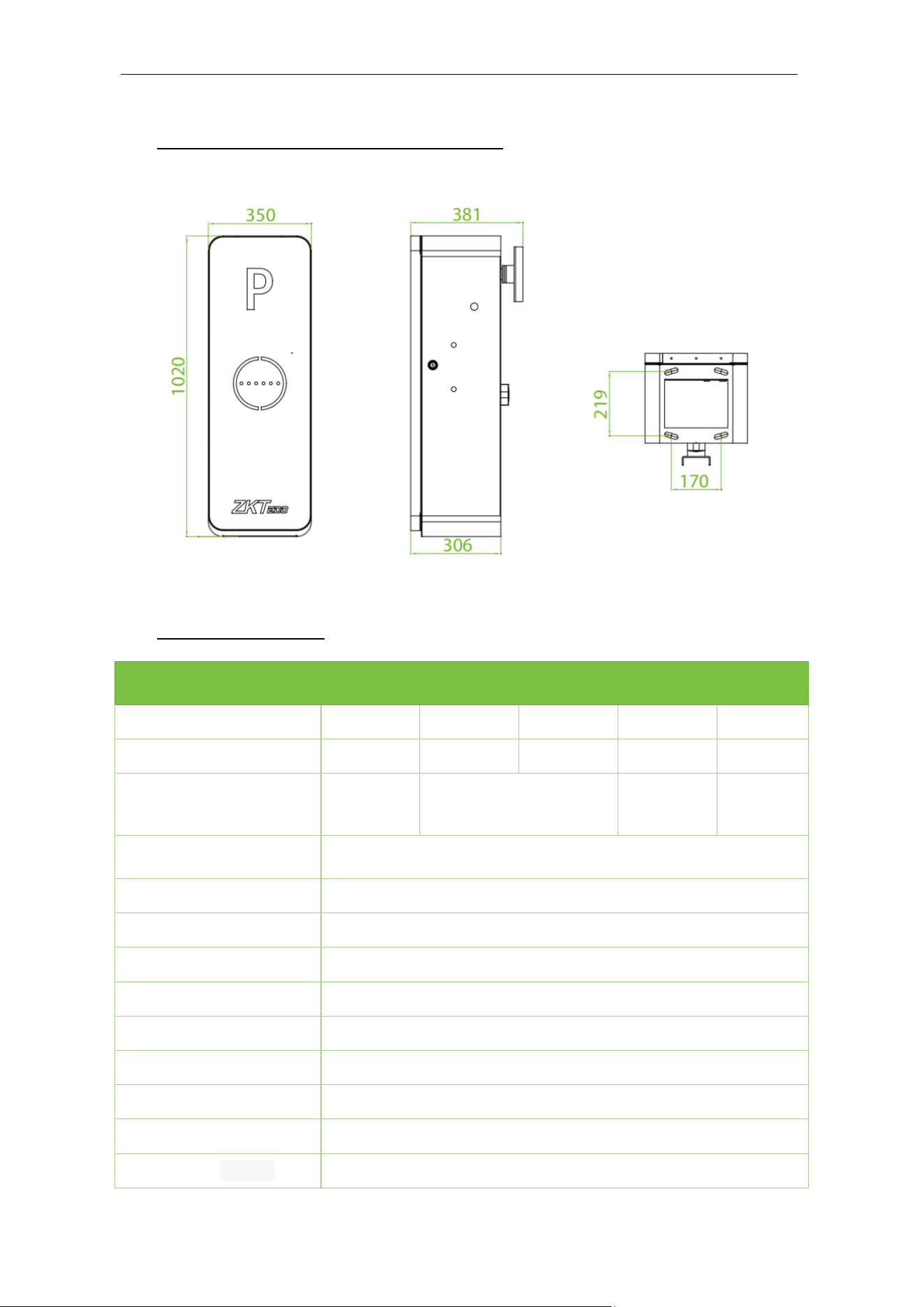
3 Appearance and Dimensions
4 Specifications
Model
BGM1030
L/R
BGM1045
L/R
BGM1060
L/R
BGM1045
L/R-LED
BGM1145
L/R-90
Operating Speed
1.5s 2.5s 5s 2.5s 2.5s
Boom Arm Length
3m 4.5m 6m 4.5m 4.5m
Boom Arm Type
Straight
boom
Telescopic boom
Straight
boom with
LED
Folding
boom
Chassis Dimension
(W*L*H)
350*300*1020 (mm)
Motor Type
DC 24V brushless motor
Output Power
120W
Rated Current
6A
Power Supply
AC 220V, 50Hz / AC 110V, 60Hz
Operating Temperature
-35°C to 70°C
Operating Humidity
<90%
Motor MCBF
3 million times
Remote Control Distance
≤30m
Chassis Weight
45kg
BGM1000 Series Barrier Gate (APP Version) User Manual
Page | 9 Copyright©2024 ZKTECO CO., LTD. All rights reserved.
5 Installation Procedure
Installation Precautions 5.1
1. Install the parking barrier on a flattened ground. A cement foundation is required
before installation if the ground is not solid and flat.
2. It is possible to reduce the length of the boom arm, but it cannot be increased. After
the boom arm has been cut, it is important to set the spring balance again to achieve
a new balance. The bottom of the spring contains two plastic nuts designed to adjust
the new balance.
3. When powered on, do not change the wire connection inside.
4. Connect the GND to the cabinet for ensured protection.
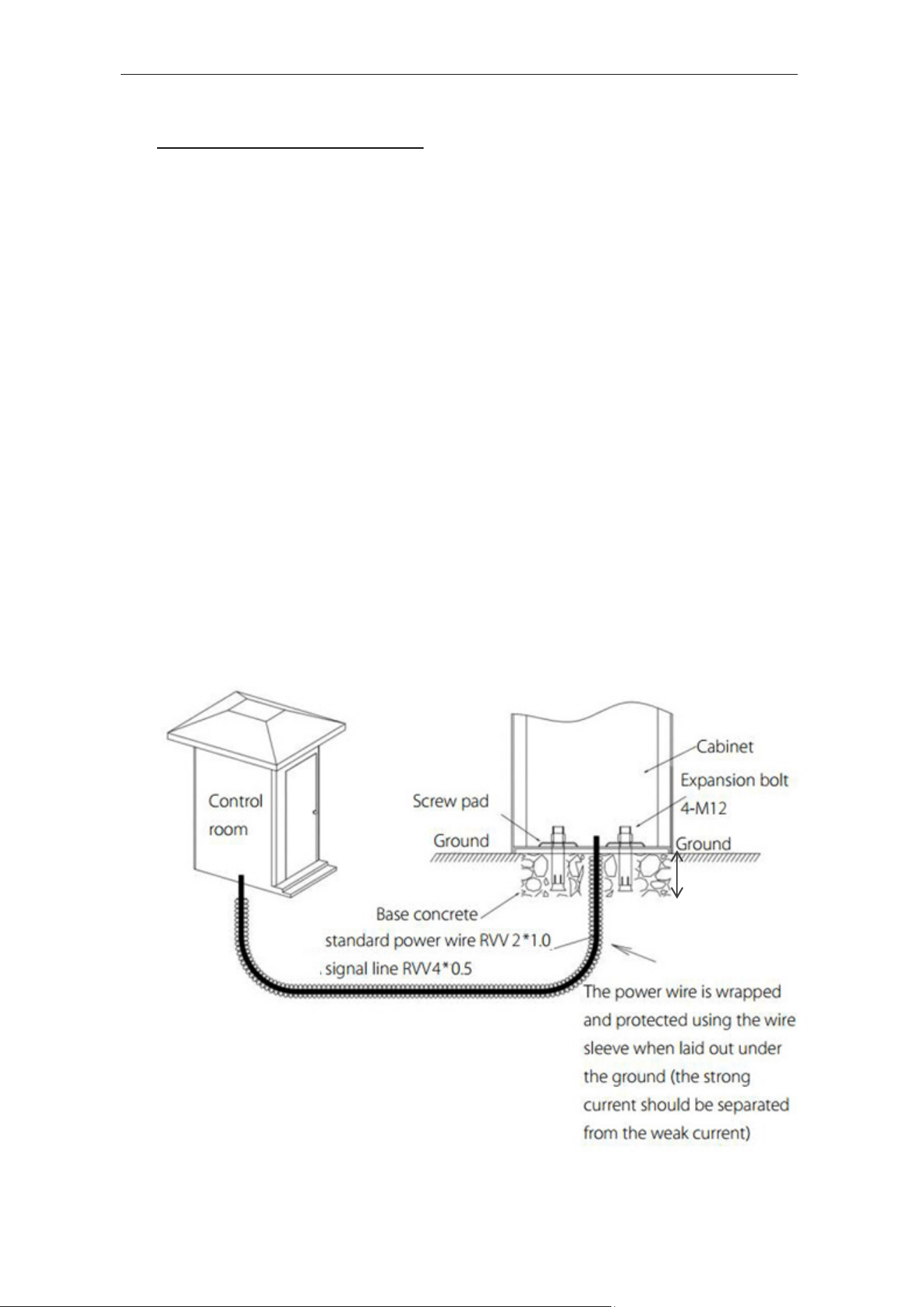
Cable Embedding 5.2
1. A φ25 protective sleeve and a cable are required.
2. The route cables must pass through the protective sleeves.
3. Use a tool to open the cable tray on the ground.
Minimum
depth:100mm
BGM1000 Series Barrier Gate (APP Version) User Manual
Page | 10 Copyright©2024 ZKTECO CO., LTD. All rights reserved.
Boom Arm Installation 5.3
5.3.1 Boom Arm Installation Procedure
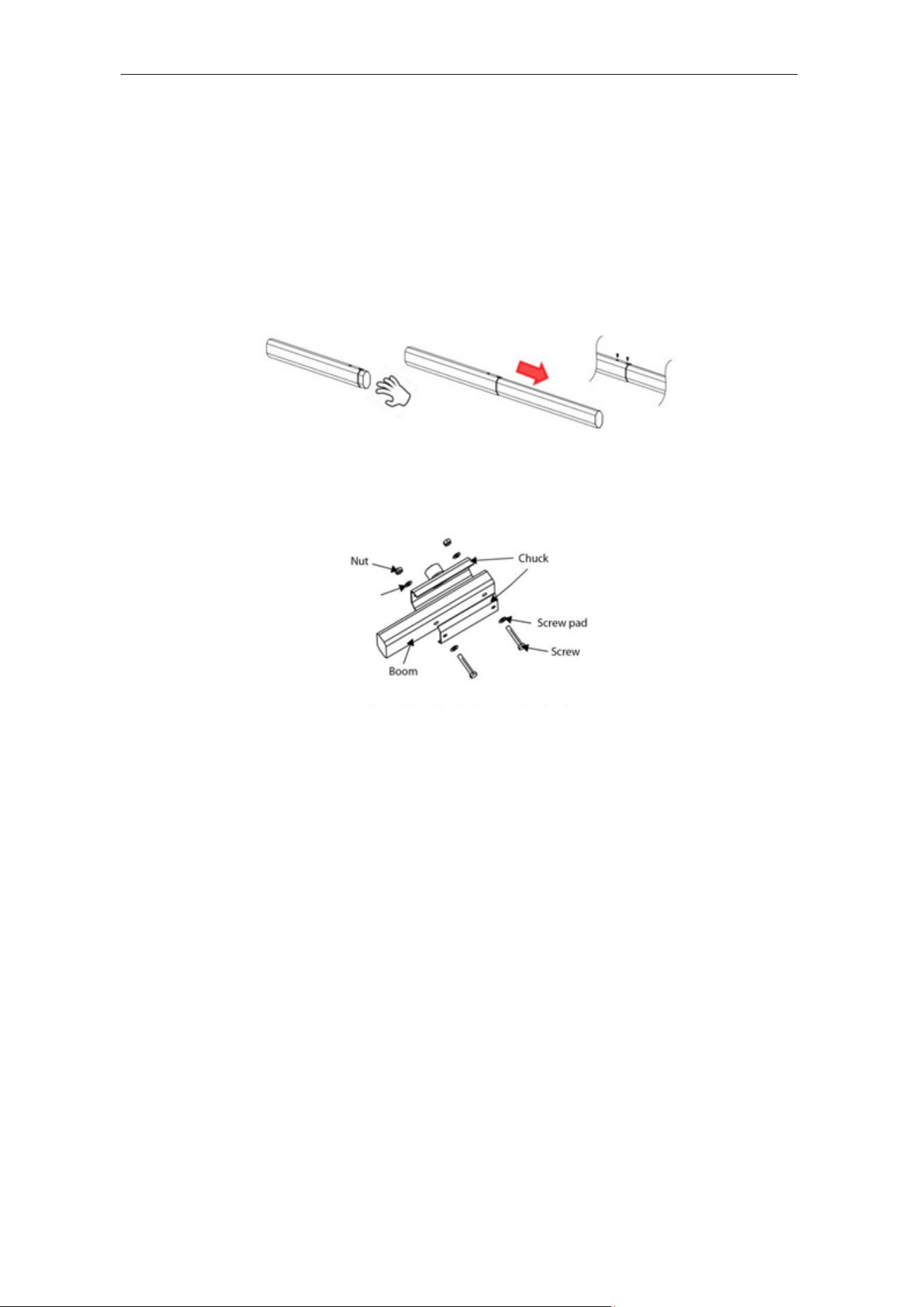
1. Separate the secondary boom arm from the upper boom arm and fasten it with two
screws., as shown in Figure 1.
2. The procedure of installing the boom arm to the chassis is shown in Figure 2.
Note:
1) Before the barrier is powered on to run the test process, be sure to install the barrier
boom arm of the corresponding length for the test. If the barrier boom arm is not
installed, please adjust and remove the spring under the guidance of a professional.
2) If the length of the barrier boom arm is cut and adjusted, the tightness of the spring
and the position of the hanging hole need to be adjusted accordingly to avoid the
abnormal working status that cannot drop the boom.
Figure 1 Connect the main boom arm with the Secondary arm together by 2 screws
Figure 2 Install the Boom Arm to the Chassis
BGM1000 Series Barrier Gate (APP Version) User Manual
Page | 11 Copyright©2024 ZKTECO CO., LTD. All rights reserved.
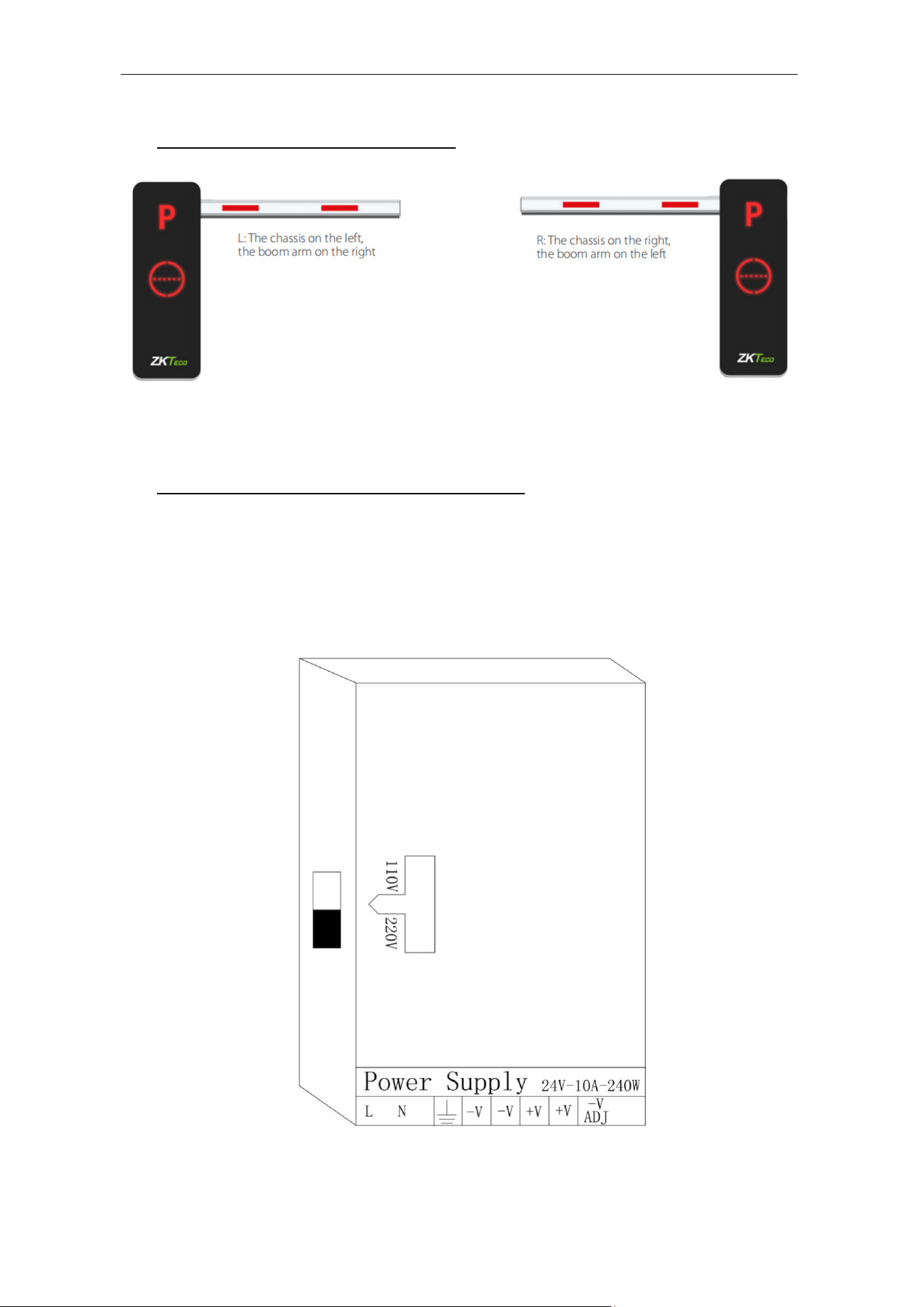
6 Left and Right Directions
7 Mainboard Wiring Instructions
1. Please disconnect the power supply before wiring.
2. To Please note that to change the input voltage, you must set the DIP switch to 110V
as shown in the below image:
3. Check carefully whether the terminals are tightened and whether the wiring is firm.
BGM1000 Series Barrier Gate (APP Version) User Manual
Page | 12 Copyright©2024 ZKTECO CO., LTD. All rights reserved.
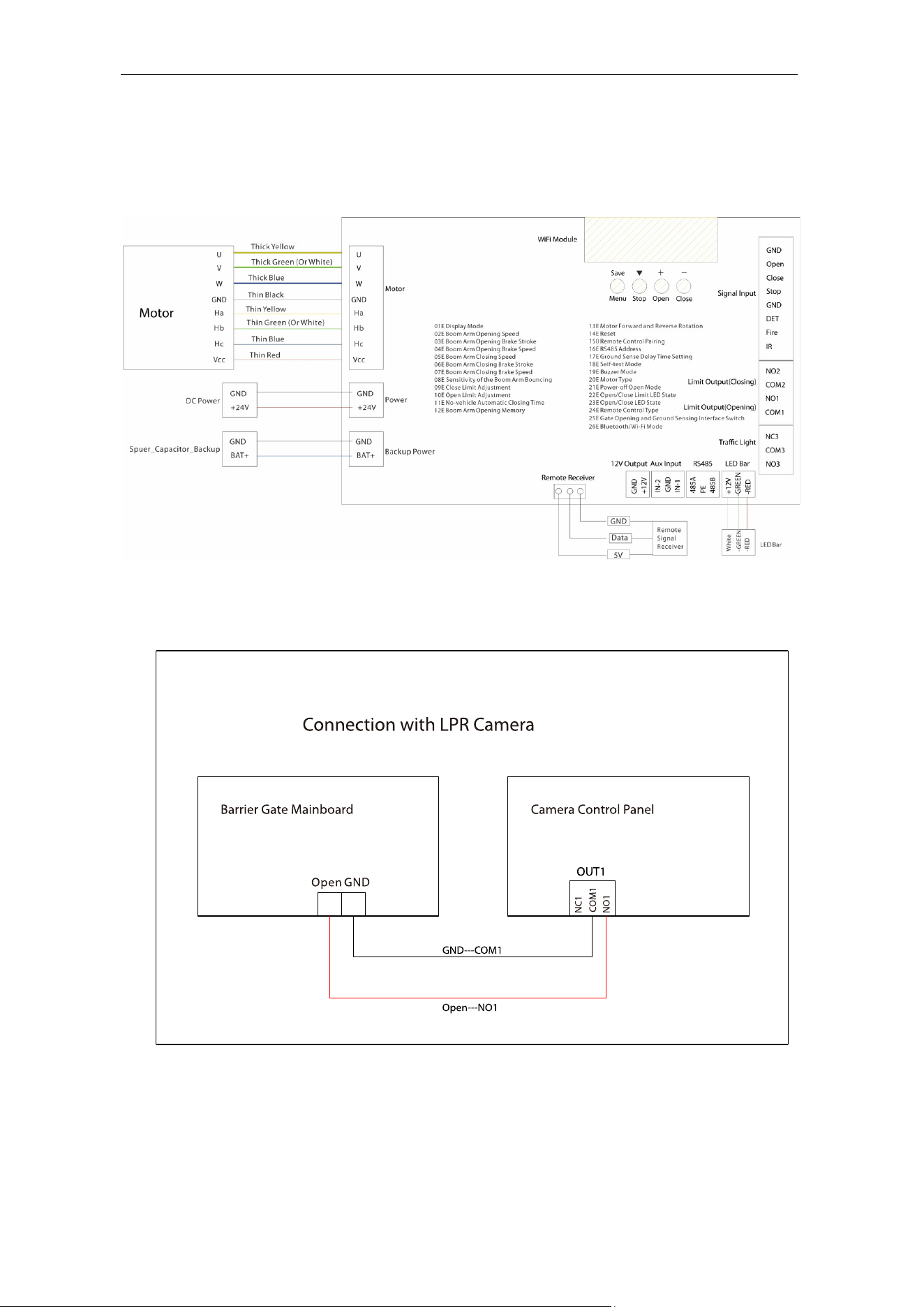
Wire Connection of the New Mainboard 7.1
Wiring diagram of new control board of the app version:
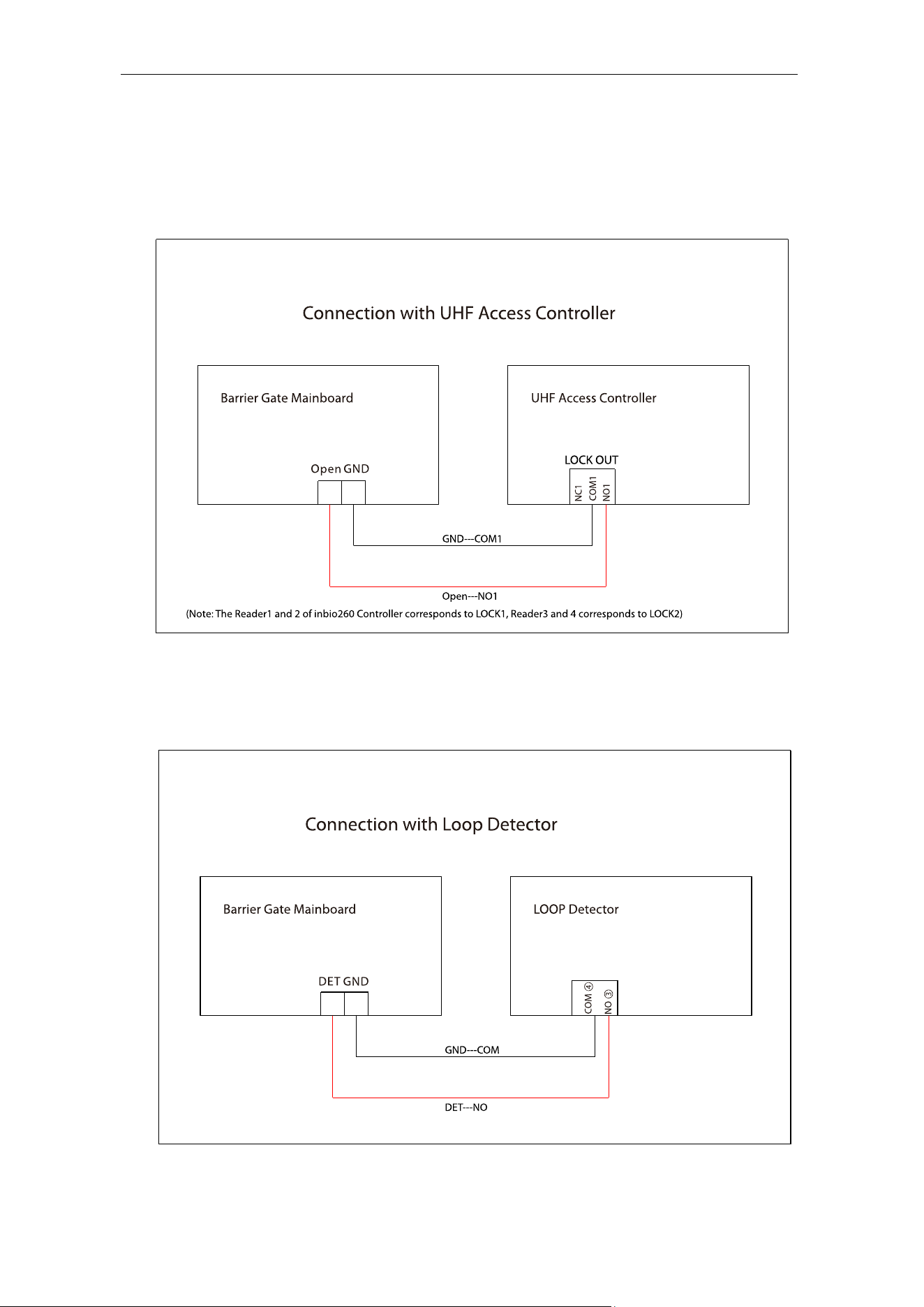
Connection with LPR Camera 7.2
BGM1000 Series Barrier Gate (APP Version) User Manual
Page | 13 Copyright©2024 ZKTECO CO., LTD. All rights reserved.
Connection with UHF Controller 7.3
(Note: The Reader1 and 2 of Inbio260 Controller corresponds to LOCK1, Reader3 and 4
corresponds to LOCK2)
Connection with Loop Detector 7.4
Anti-smash and Auto-close function
BGM1000 Series Barrier Gate (APP Version) User Manual
Page | 14 Copyright©2024 ZKTECO CO., LTD. All rights reserved.
Coil Circumference Coil Number
3m
Based on requirements, ensure that the inductance is
between 100μH and 200μH
3m to 6m
5 to 6 turns
6m to 10m
4 to 5 turns
10m to 25m
3 turns
25m
2 turns
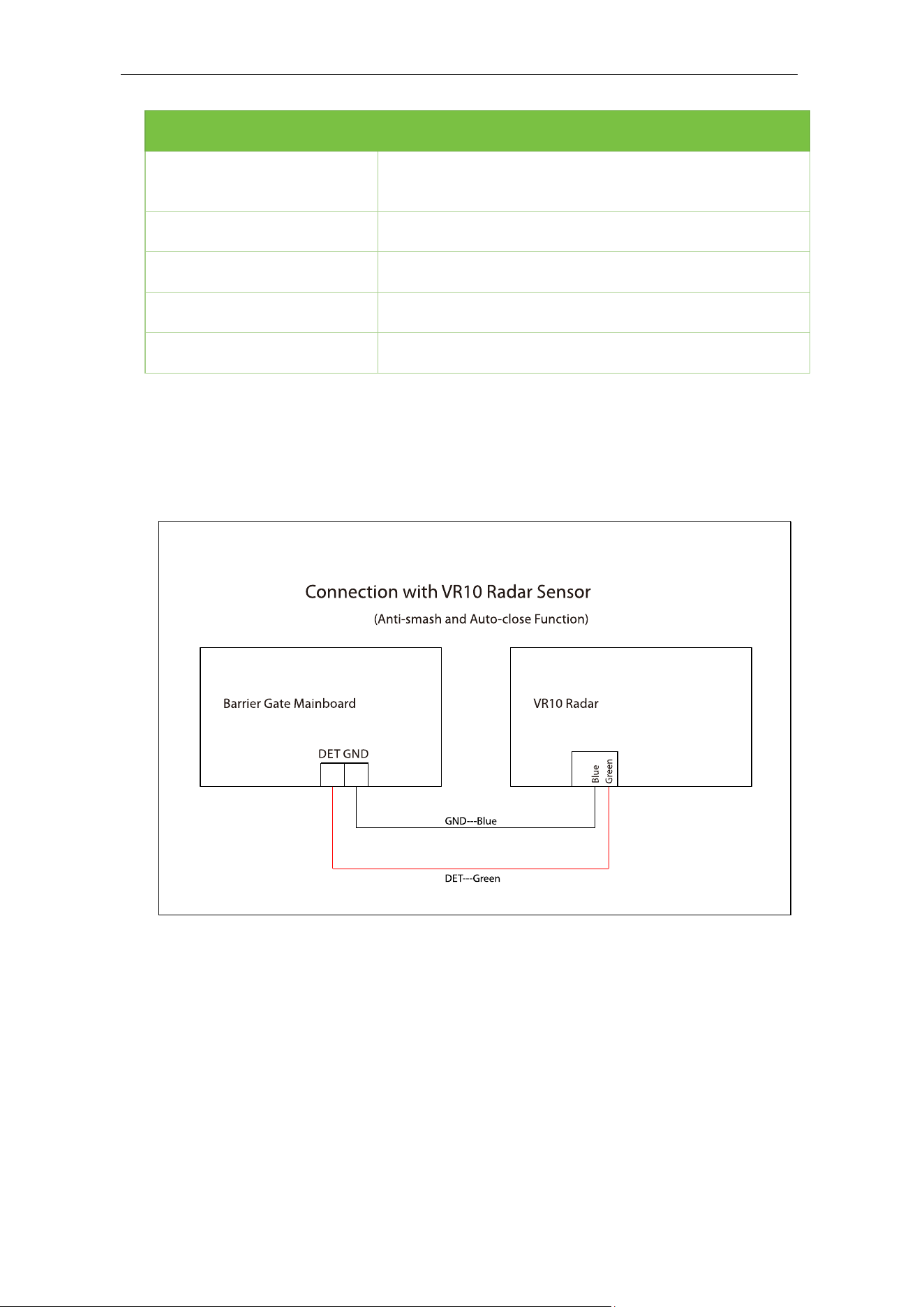
Connection with VR10 Radar Sensor 7.5
Anti-smash and Auto-close function
BGM1000 Series Barrier Gate (APP Version) User Manual
Page | 15 Copyright©2024 ZKTECO CO., LTD. All rights reserved.
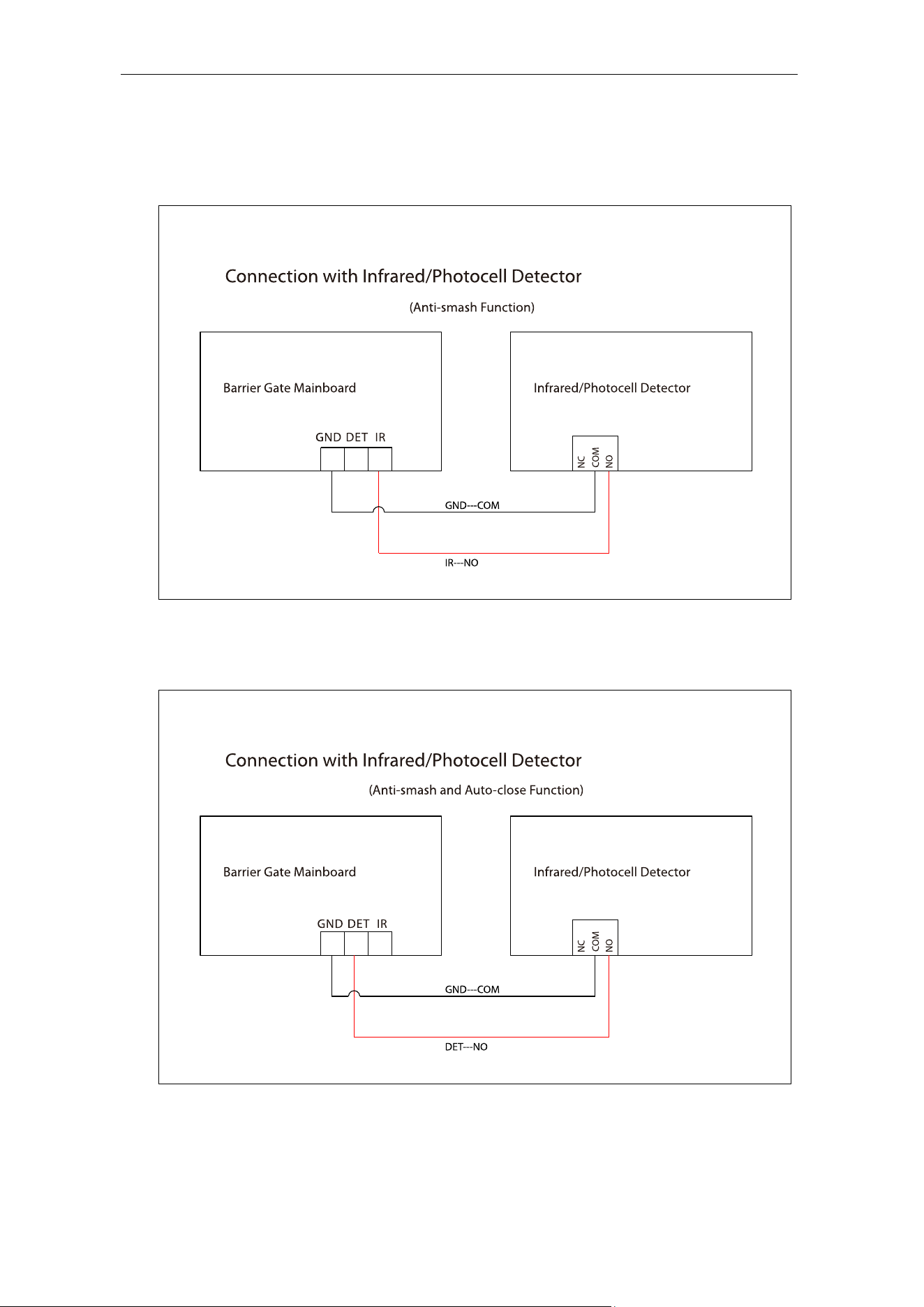
Connection with Infrared/Photocell Detector 7.6
Anti-smash function
Anti-smash and Auto-close function
BGM1000 Series Barrier Gate (APP Version) User Manual
Page | 16 Copyright©2024 ZKTECO CO., LTD. All rights reserved.
8 Functional Parameter Settings
After the initial installation, and first power-on, you must use the "Open" and "Close"
buttons on the mainboard to complete the self-check process and learn the description of
the menu.
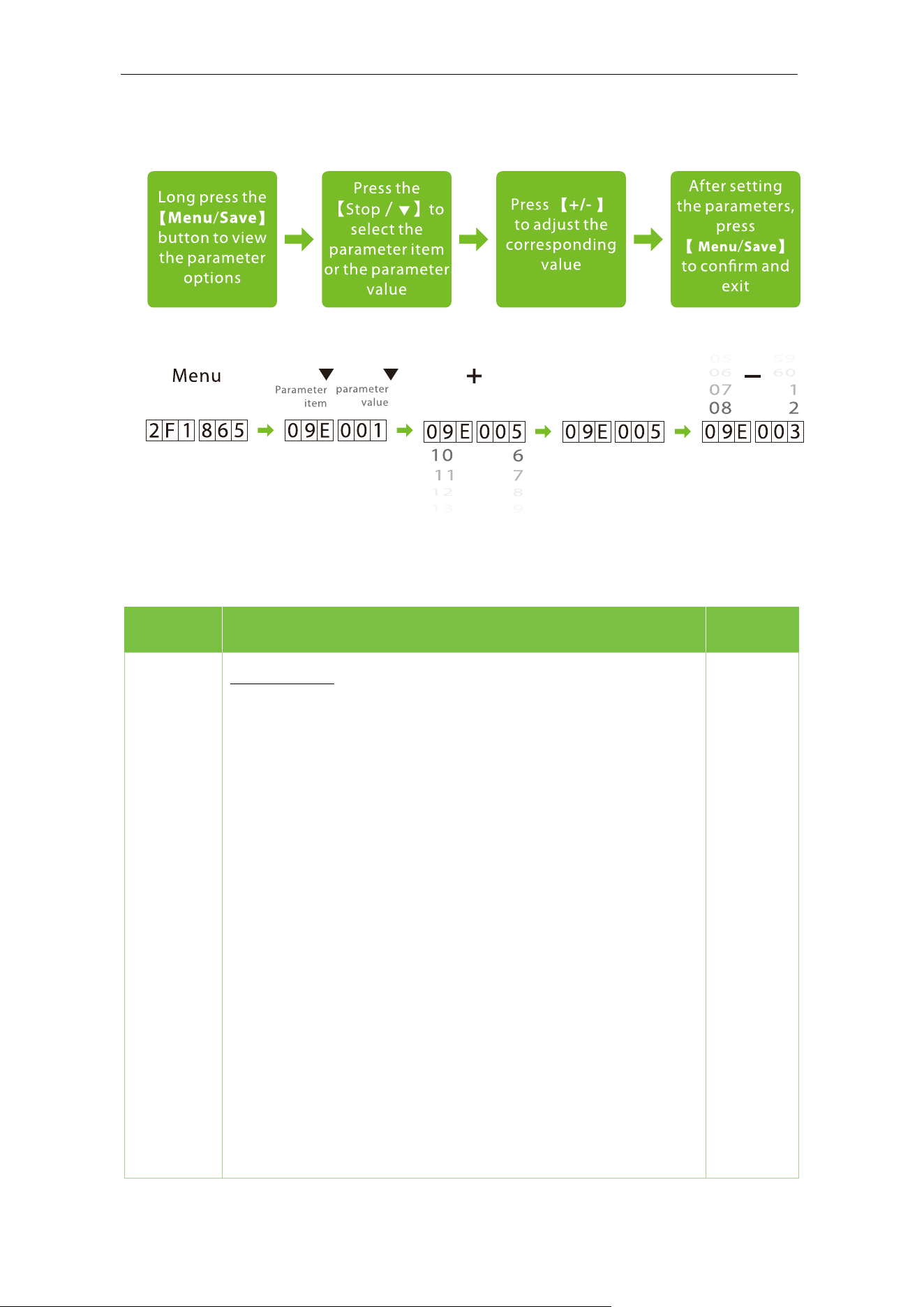
Mainboard Parameter Settings 8.1
Menu/Save: Menu options/Confirm and Save
Stop/
▼: Stop the boom arm /button to swich the menu item and the value item
Open/+: Increase parameter/value
Close/-: Decrease parameter/value
BGM1000 Series Barrier Gate (APP Version) User Manual
Page | 17 Copyright©2024 ZKTECO CO., LTD. All rights reserved.
8.1.1 Operating Procedure
Parameter Settings Description 8.2
Items Description Default
01E.***
Display Mode
01E.000: Displays current position of the boom arm
01E.001: Controls input signal (displays the status as
"*F*.***")
1F*.***: Opening position
2F*.***: Closing position
5F*.***: Opening
6F*.***: Closing
4F*.***: In the pause
0F*.***: Not self-tested
7F*.***: Not stop at the open/close limit
01E.002: Test mode
01E.003: Number of boom openings
01E.004: Version Information
01E.001

BGM1000 Series Barrier Gate (APP Version) User Manual
Page | 18 Copyright©2024 ZKTECO CO., LTD. All rights reserved.
02E.***
Boom Arm Opening Speed
Set the Boom Arm Opening Speed to open the gate. The larger
the number is set, the faster the speed. The Boom Arm Opening
Speed value can be set between 10 to 32 and the default value is
24.
02E.024
03E.***
Boom Arm Opening Brake Stroke
The larger the number, the greater the deceleration stroke.
The deceleration stroke is too large, which may cause the boom
arm to not open up to the limit.
The Boom Arm Opening Brake Stroke can be set between 0 to
100 and the default value is 30.
03E.030
04E.***
Boom Arm Opening Brake Speed
The smaller the number, the more pronounced the deceleration
effect.
If the deceleration speed is too small, it may cause the boom arm
to not open up to limit, and the digital display will show: E*0.032.
The Boom Arm Opening Brake Speed can be set between 0 to 100
and the default value is 10.
04E.010
05E.***
Boom Arm Closing Speed
Set the Boom Arm Closing Speed to close the gate. The larger the
number is set, the faster the speed. The Boom Arm Closing Speed
value can be set between 10 to 32 and the default value is 20.
05E.020
06E.***
Boom Arm Closing Brake Stroke
The larger the number, the greater the deceleration stroke.
The deceleration stroke is too large, which may cause the boom
arm to not close down to limit.
The Boom Arm Closing Brake Stroke can be set between 0 to 100
and the default value is 40.
06E.040

BGM1000 Series Barrier Gate (APP Version) User Manual
Page | 19 Copyright©2024 ZKTECO CO., LTD. All rights reserved.
07E.***
Boom Arm Closing Brake Speed
The smaller the number, the more pronounced the deceleration
effect.
If the deceleration speed is too small, it may cause the boom arm
to not close down to limit. If the boom doesn’t close to limit, it
will automatically bounce back to the open state (similar to
rebounding when encountering resistance). If the ground sensing
is triggered at this time, the barrier gate will continuously open
and close.
The Boom Arm Closing Brake Speed can be set between 0 to 100
and the default value is 10.
07E.010
08E.***
Sensitivity of the Boom Arm Bouncing
Sets the bounce sensitivity of the boom arm when it encounters
an obstacle. The higher the value, the lower the sensitivity, and
the longer it will take to bounce. When set to 100, this function
will be turned off and the boom arm
will not bounce when it
encounters an obstacle. It can be set between 20 and 100, the
default value is 40.
08E.040
09E.***
Close Limit Adjustment
It can be set between 0 to 60, the default value is 4.
09E.004
10E.***
Open Limit Adjustment
It can be set between 0 to 60, the default value is 4.
10E.004
11E.***
No-vehicle Automatic Closing Time
Set the time to automatically close the boom arm after successful
verification but no vehicle passes, the larger the number, the long
er it takes to close the boom arm. If the "
Boom Arm Opening
Memory" function is turned on, the gate will not be closed even
after the unmanned time when the button "Open" is pressed. The
Boom Arm Opening Memory function takes priority. It can be set
between 5s and 60s, the default value is 0. When set to "0", this
function is turned off.
11E.000

BGM1000 Series Barrier Gate (APP Version) User Manual
Page | 20 Copyright©2024 ZKTECO CO., LTD. All rights reserved.
12E.***
Boom Arm Opening Memory
12E.000: Close
12E.001: Open
When more than two legal access signals are given at the same
time (including the same direction and the opposite direction),
the system will remember all pass requests and complete each
pass in turn.
Memory opening is only available for use with external switch
buttons and ground sensors.
12E.000
13E.***
Motor Forward and Reverse Rotation
13E.000: Forward
13E.001: Reverse
When restoring the factory settings, this parameter will not be
restored to the default value.
13E.000
14E.***
Reset
14E.000: -Normal
14E.001: Reset
14E.002: Restore Bluetooth initial password: 12345678
Select [14E.001] will restore the default factory setting.
14E.000

BGM1000 Series Barrier Gate (APP Version) User Manual
Page | 21 Copyright©2024 ZKTECO CO., LTD. All rights reserved.
15*.***
Remote Control Pairing
150. ***: Normal
151. ***: Add
152. ***: Clear
Currently, it supports a maximum of 500 remote controls.
Note: The third digit is adjusted by pressing [+/-] to add or clear
remote control.
In normal mode, the last three digits
shows the number of
remotes that have been paired with the current device.
When restoring the factory settings, the remote control will not
be cleared if remote control type has not changed.
150. 000
16E.***
RS485 Address
The valid value is 0 to 250.
16E.000
17E.***
Ground Sense Delay Time Setting
Set the ground sense delay time by pressing [+/-]
button, the
larger the number set, the longer the delay time, the valid value is
0 to 251.
17E.000
18E.***
Self-test Mode
18E.000: Automatic self-test (After power on, the device
automatically performs self-test.)
18E.001: Manual self-test (It requires manual opening and
closing of the barrier gate for self check.)
18E.000

BGM1000 Series Barrier Gate (APP Version) User Manual
Page | 22 Copyright©2024 ZKTECO CO., LTD. All rights reserved.
19E.***
Buzzer Mode
19E.000: Old mainboard
19E.001: New mainboard
When the buzzer mode setting does not match the mainboard,
the device will beep continuously under normal circumstances.
When restoring the factory settings, this parameter will not be
restored to the default value.
19E.001
20E.***
Motor Type
20E.000: Forward
20E.001: Reverse
When the motor type is incorrect, the buzzer makes an sound
alarm, and the digital display will show: E*0.001.
20E.000
21E.***
Power-off Open Mode
21E.000: Disable
21E.001: Enable
21E.001
22E.***
Open/Close Limit LED State
22E.000: O
pen limit green light breathing, Close limit red
light breathing
22E.001: Open limit green light always on, Close limit red
light always on
22E.002: Open limit green light flashes, Close limit red light
breathing
22E.000
23E.***
Open/Close LED State
23E.000: The red light flashes during the whole process of
opening and closing the boom arm.
23E.001: The red light is always on during the whole process
of opening and closing the boom arm.
23E.000

BGM1000 Series Barrier Gate (APP Version) User Manual
Page | 23 Copyright©2024 ZKTECO CO., LTD. All rights reserved.
24E.***
Remote Control Type
24E.000: 433MHz frequency
24E.001: 430MHz frequency
When the remote control type changes, the remote control will
be cleared.
24E.000
25E.***
Gate Opening and Ground Sensing Interface Switch
25E.000: Normal interface status
25E.001:
Switch gate opening and ground sensing signal
interfaces
When this is set to "25E.001", the "IR / FIRE / DET / STOP / CLOSE /
OPEN" interface is disabled, and the gate opening and ground
sensing signal interfaces need to be connected to "IN2" and "IN1".
When the old main
board experiences signal interference and
automatically opens or cannot close after opening, change this
item to "25E.001".
25E.000
26E.***
Bluetooth/Wi-Fi Mode
26E.000: Bluetooth Mode (Enable)
26E.001: Bluetooth Mode (Disable)
26E.002: Wi-Fi Mode
Switching Bluetooth mode and Wi-
Fi mode will automatically
restart the device.
When restoring the factory settings, this parameter will not be
restored to the default value.
26E.000

BGM1000 Series Barrier Gate (APP Version) User Manual
Page | 24 Copyright©2024 ZKTECO CO., LTD. All rights reserved.
Error Code 8.3
Error Code Description Solve
EL0001
Power-on Self-test failure, Hall limit
detection error
Check if the boom is in a balanced
state at 30 to 60 degrees;
Check the 20E parameter.
EL0002 Hall limit detection error
Check the motor wiring or replace the
mainboard.
EL0003 Unable to detect motor or Hall error
Check if the motor type is set
incorrectly, if the motor wiring has
poor contact, and if the motor is in
good condition.
EL0004 Run timeout, motor rotates slowly
Check if it is a movement malfunction,
unplug the power cord and motor
cord, restart the machine, and shake
the boom by hand to see if there is too
much resistance.
EL0005
Caused by unstable 24V voltage
output from the power supply
EL0008
After closing to the limit, the boom
was illegally lifted for a long time by
human intervention
Release the boom lifting action and
restart to open and close the barrier
gate again until the device is in a
normal state.
EL016 Tamper alarm Release alarm signal.
EL032
Electric Motor Shaft Lock Protection
failure
Check if there are any objects blocking
the opening and closing of the barrier
gate;
Check if the boom is in a balanced
state at 30 to 60 degrees;
Check and adjust the 08E parameter.
BGM1000 Series Barrier Gate (APP Version) User Manual
Page | 25 Copyright©2024 ZKTECO CO., LTD. All rights reserved.
Remote Control Pairing and Unpairing 8.4
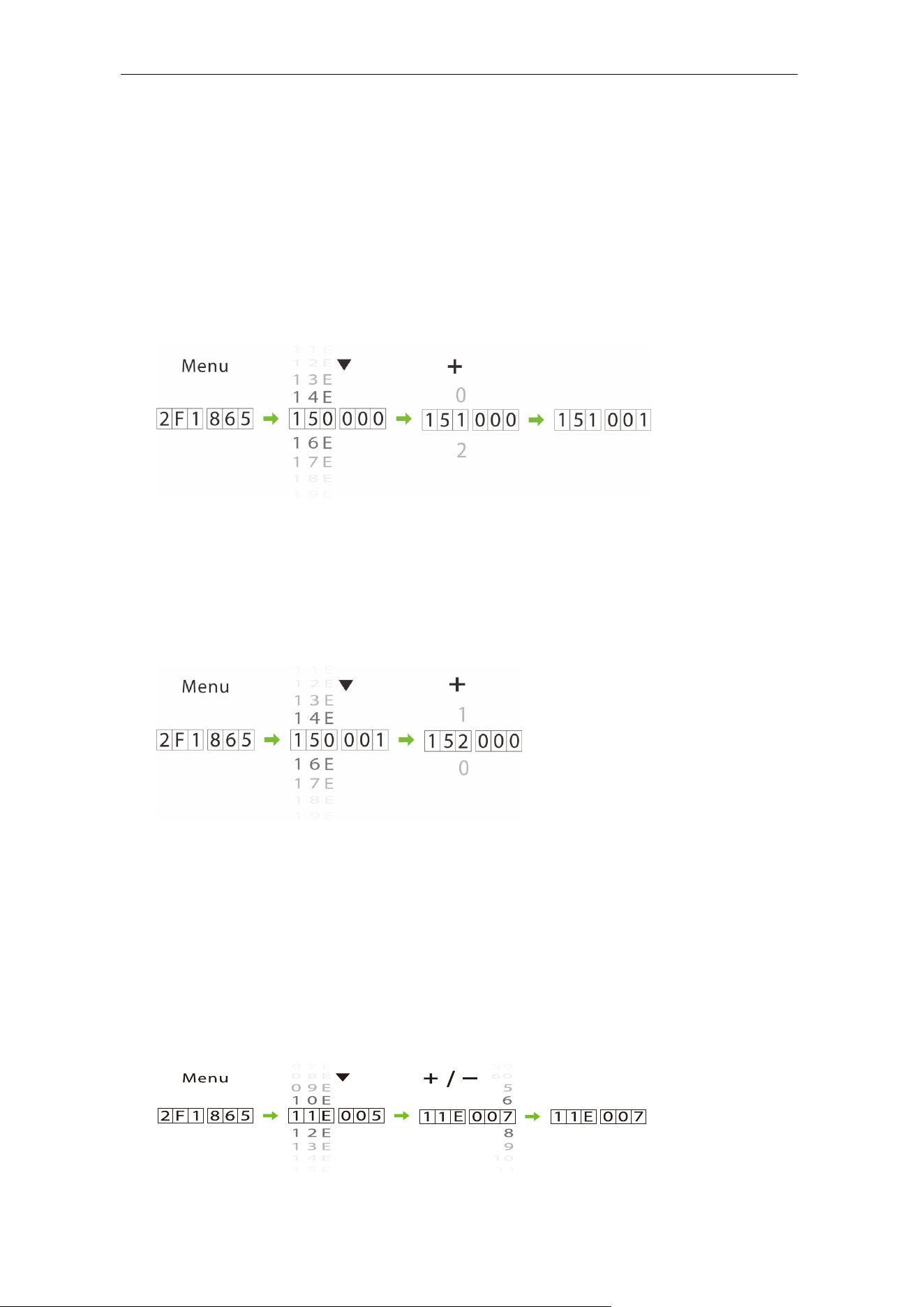
8.4.1 Pairing
Long press [Menu/save], then press [Stop/▼] flip down to [15*.***]. Press [+/-] to set the
parameter value to "151.***", and then press any button on the remote control until you
hear a beep sound from the Mainboard, it means the pairing is successful, and then press
[Menu/save] exit the menu.
8.4.2 Unpairing
Long press [Menu/save], then press [Stop/▼] flip down to [15*.***]. Press [+/-] to set the
parameter value to "152.***". Press [Menu/save] to save the setting and that all the
remote controls have been deleted.
Set Delay for Automatic Closing after Opening the 8.5
Boom Arm
Long press the [Menu/save] button, then press [Stop/▼ ] flip down to [11E.***]
parameter, and then press the [+/-] to set the delay value as per the requirements. Finally,
press [Menu/save] to exit the menu. For example, if it is set to "11E.007", the device will
automatically close after 7 seconds after opening the barrier gate.
BGM1000 Series Barrier Gate (APP Version) User Manual
Page | 26 Copyright©2024 ZKTECO CO., LTD. All rights reserved.
9 Boom Arm Adjustments
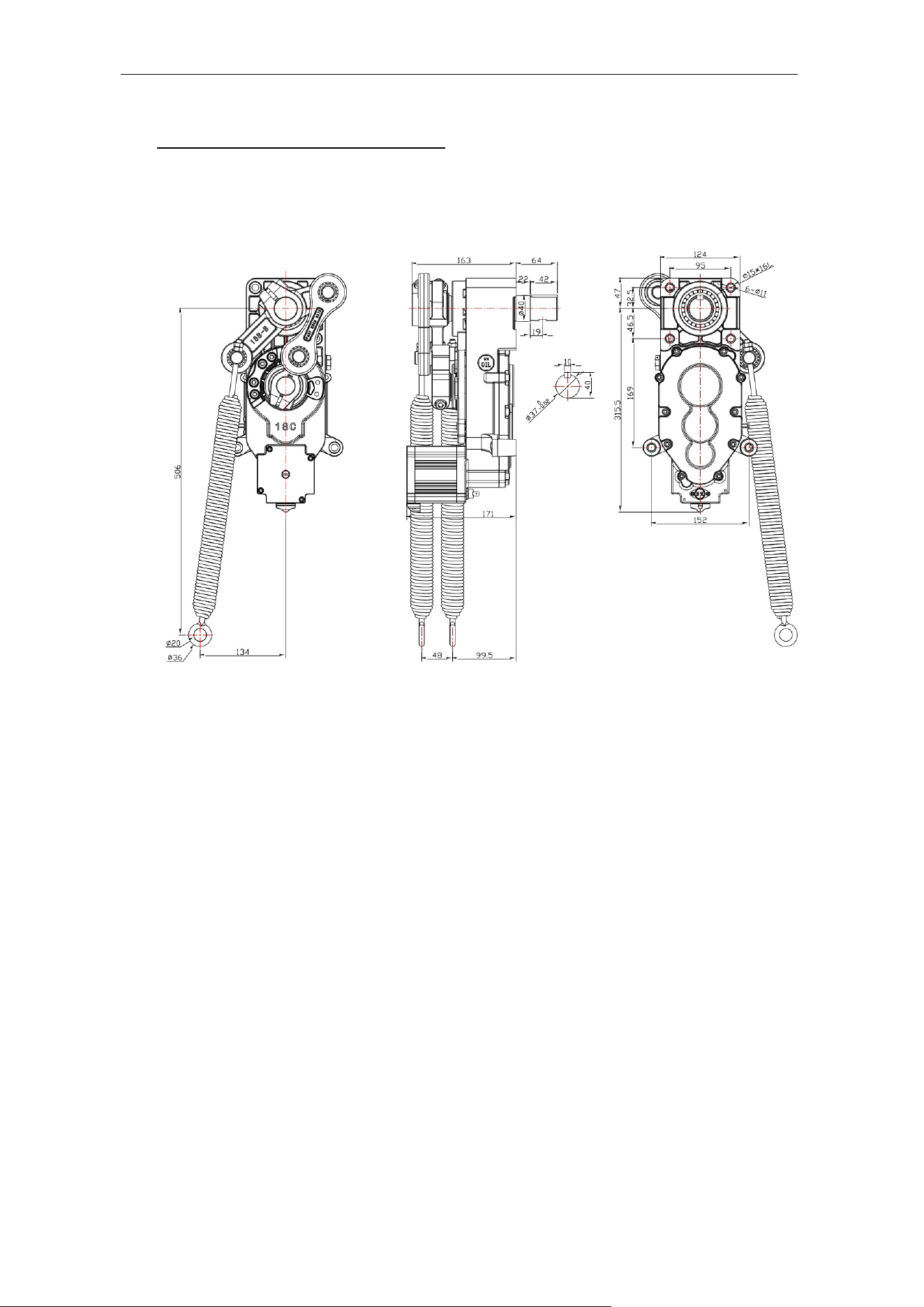
Dimensions 9.1
Horizontal and Vertical Angle Adjustment of Boom 9.2
Arm (Mechanical Adjustment)
Note: The horizontal and vertical angles of the boom arm have been adjusted before
leaving the factory. Please do not adjust them without the guidance of professionals to
avoid mechanical damage.
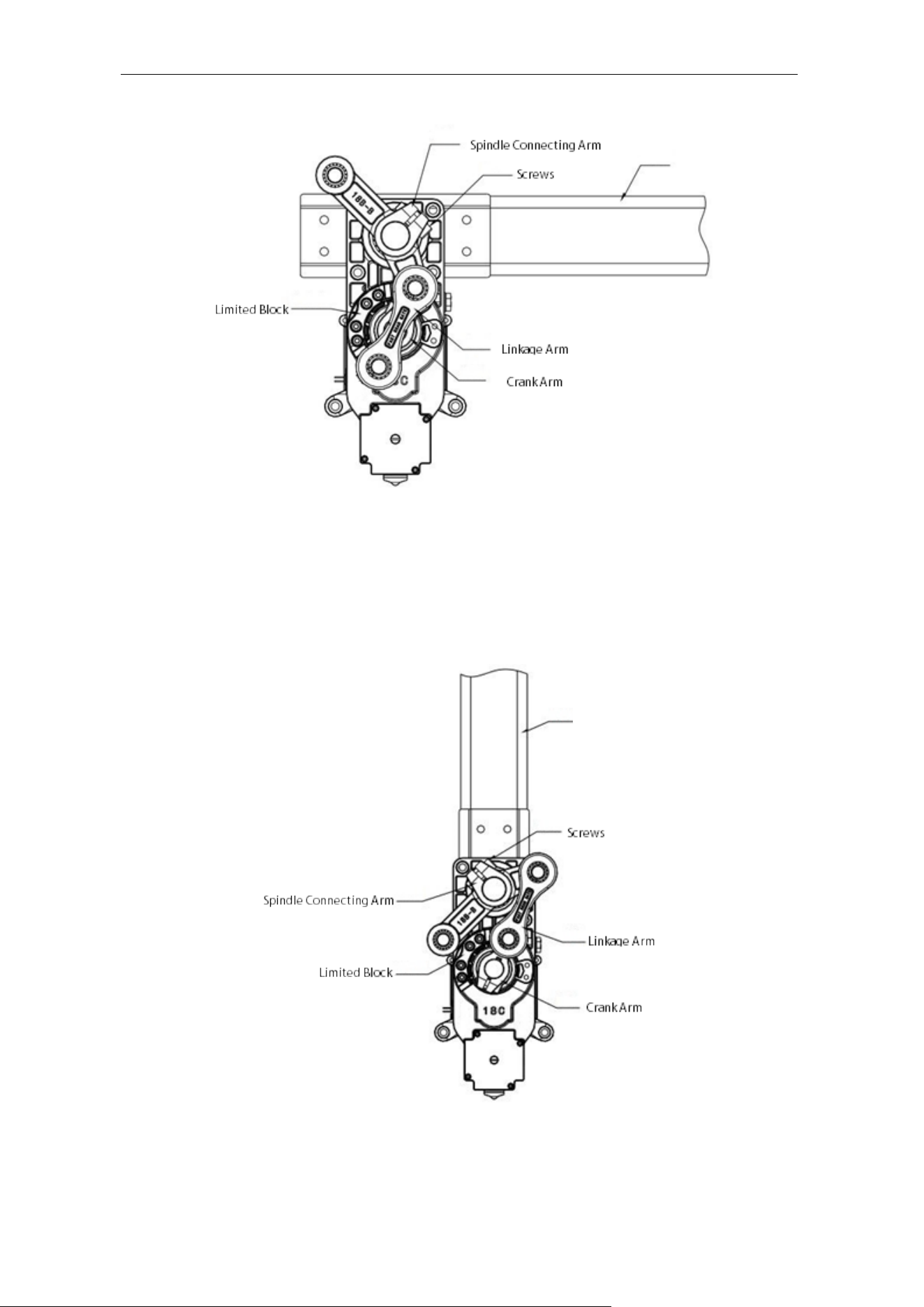
1. Adjust the horizontal position of the boom arm
The connecting boom crank will be an overlapping structure, with the connecting
boom arm's two rotation points coincident with the reducer's output shaft at three
points and a line. The boom arm is in this position horizontally. If the boom arm is not
level or inclined at this time, unscrew the two rocker (rocker-arm) screws, turn the
boom arm to the level, and tighten the screws.
BGM1000 Series Barrier Gate (APP Version) User Manual
Page | 27 Copyright©2024 ZKTECO CO., LTD. All rights reserved.
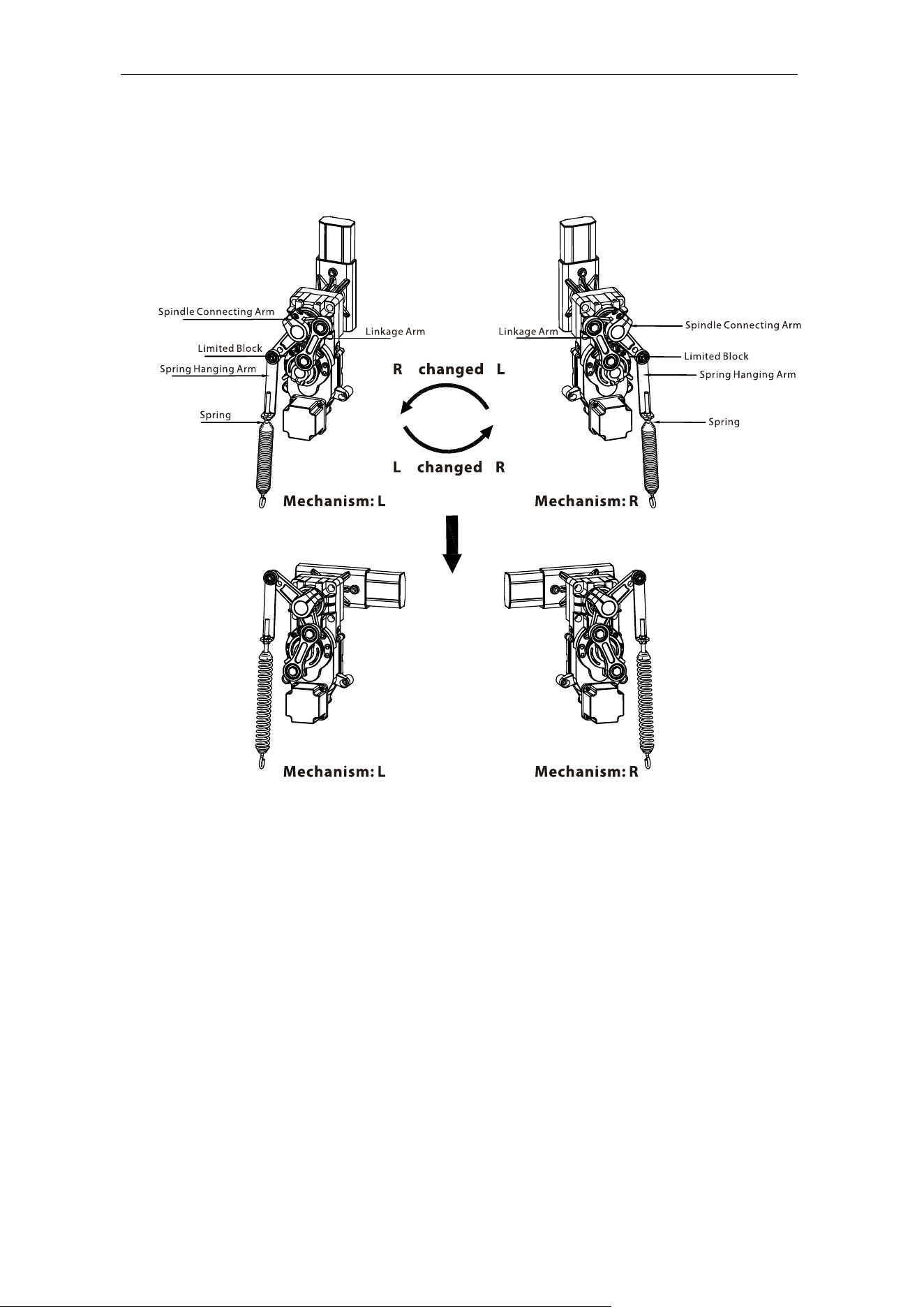
2. Adjust the vertical position of the boom arm (adjusted by mechanical structure)
The connecting boom arm crank is in an unfolded shape, and the connecting boom
arm's two rotation points and the reducer's output shaft are in an unfolded 3-point
line. This is the boom arm's vertical position. If the boom arm is not in the vertical
position and is inclined, unscrew the two screws on the rocker (rocker-arm), rotate the
boom arm to the vertical, and tighten the screws..
Boom Arm
Boom Arm
BGM1000 Series Barrier Gate (APP Version) User Manual
Page | 28 Copyright©2024 ZKTECO CO., LTD. All rights reserved.
Direction Interchange of the Boom Arm 9.3
The operation steps are as follows:
1. Before operation, please turn off the power. Remove the spring, spring hanging arm
and boom.
2. Change the direction of the Spindle Connecting Arm and linkage Arm.
3. Turn the Limited Block to the other direction.
4. After the mechanical operation, you need to set the movement parameter 13E Core
Component Position on the motherboard, such as changing from L to R, the value of
this parameter should be set from 1 to 0, or set the direction of the movement on the
app.
BGM1000 Series Barrier Gate (APP Version) User Manual
Page | 29 Copyright©2024 ZKTECO CO., LTD. All rights reserved.
Spring Adjustment 9.4
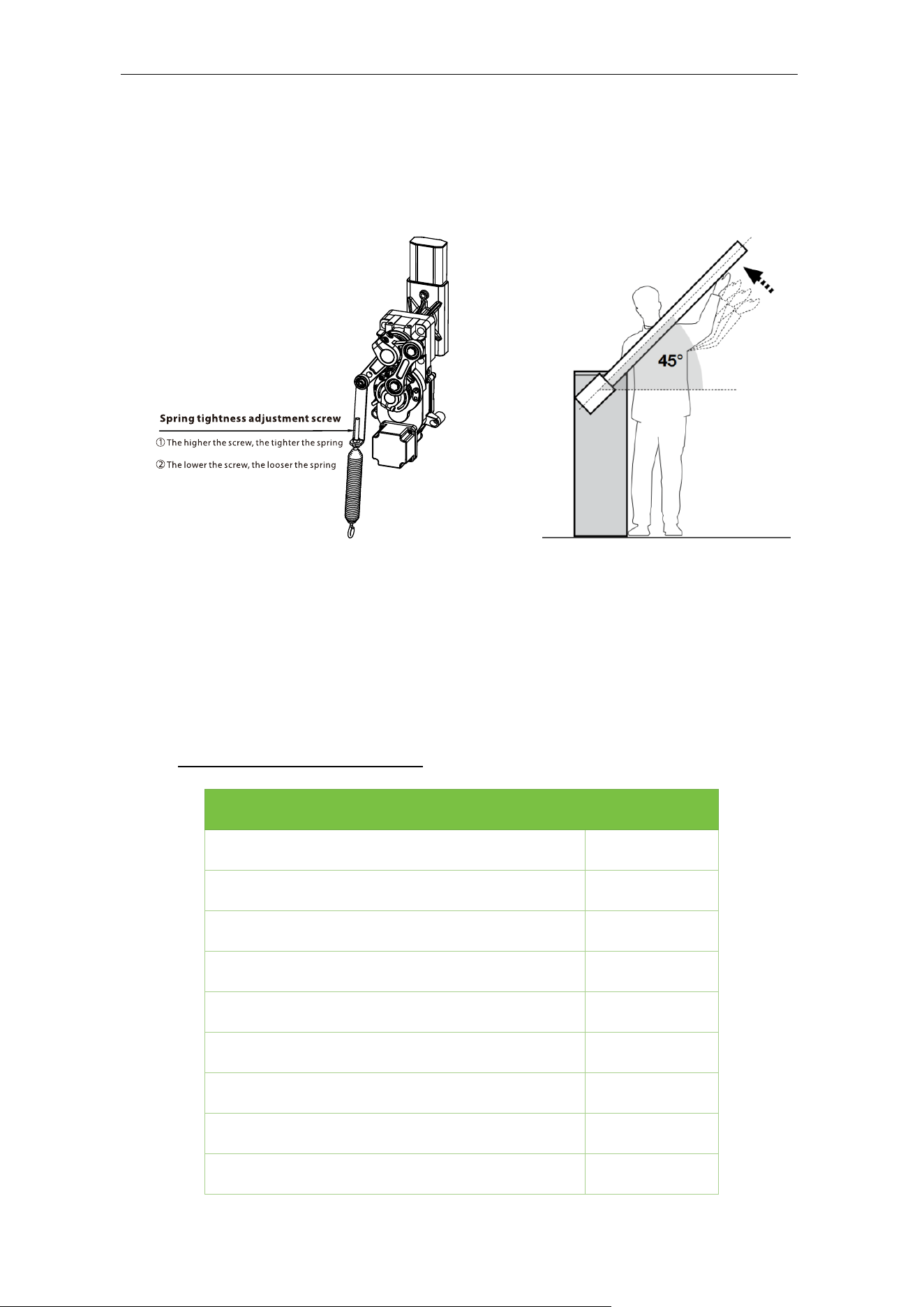
If the boom arm shakes when it rises, you can adjust the spring loosely, and if the boom
arm shakes when it falls, you can adjust the spring tightly.
Note:
1) When the barrier boom is at 45°, it is the best balance.
2) The spring wire diameter is adapted to different boom lengths: 3m boom with
φ4.5mm; 4.5m boom with φ5.5mm; 6m boom with φ6.5mm. (If the boom is too short
i.e., less than 2m, do not install the spring).
10 Product Packing List
Material Quantity
Chassis Explosion Screw M12X140
4
Keys
2
Barrier Boom
1
Boom Pressure Plate
1
Chassis Pressure Plate
2
Wireless Remote
2
Barrier Boom hexagon bolt M10X70
2
Machine
1
User manual
1

BGM1000 Series Barrier Gate (APP Version) User Manual
Page | 30 Copyright©2024 ZKTECO CO., LTD. All rights reserved.
11 Troubleshooting
Description: The Power Supply has a 24V output, but the mainboard power
indicator does not light up.
Cause
1. 24V output wiring might be reversed
2. The mainboard might work abnormally
3. Loose wiring
Solution
1. Swap the DC output wiring
2. Replace the Mainboard
3. Tighten the wiring
Description: The AC input is normal, but the power indicator is off.
Cause
1. The power fuse might be blown
2. Abnormal power supply
3. Loose wiring
Solution
1. Replace the fuse
2. Replace the power supply
3. Tighten the wiring
Description: The power indicator is on, the landing boom indicator is normal,
and the motor is not running.
Cause
1. The motor wiring might be wrongly connected, or the wiring is loose
2. The internal encoder of the motor may work abnormally
3. The motor stroke limit exceeds the position
Solution
1. Check the wiring according to the wiring diagram, and tighten the wiring if
required
2. Replace the motor
3. Re-adjust the motor limit parameters
Description: The remote-control buttons do not respond.
Cause:
1. The remote-control battery is completely discharged
2. There must be a signal interference with the same frequency and there might
be some obstacles too nearby
3. The remote-control frequency is not matched, or the receiver is damaged
Solution:
1. Replace the battery
2. Use manual button control

BGM1000 Series Barrier Gate (APP Version) User Manual
Page | 31 Copyright©2024 ZKTECO CO., LTD. All rights reserved.
3. Use in open areas
4. Replace the remote control to re-match or replace the receiver
Description: When the boom is closed halfway, it bounces back to the open
state.
Cause:
1. The barrier boom might not be installed
2. The spring is too tight, or the length of the barrier boom is changed, and the
spring is not properly adjusted
Solution:
1. Install the barrier boom
2. Adjust the spring according to the length of the barrier boom
12 Safety Precautions
It is strictly forbidden to hit the product with hard objects.
When using, please handle with care to avoid strong collision with hard objects.
Do not spill water or corrosive liquids on the surface of the product.
If smoke or a peculiar smell comes from the product, disconnect the power
immediately.
Note: If the product works abnormally, please contact the dealer in time. Please do not
try to repair it by yourself. If you handle it without authorization, the company is not
responsible for any damage.
13 Transportation and Storage
When loading and unloading the product, handle it with care.
During transportation and storage, place it in a dry and corrosive-free environment.
The product should be protected from moisture, rain, sun, and corrosion.
14 Warranty
This product promises a warranty period of 2 years. Upon normal use of the product,
damages are covered by the warranty. However, damages caused by the following
conditions are not covered by the warranty.
Damages caused by incorrect operation and violation of operating procedures.
Damages caused by repairing the product without authorization.
Abnormalities and damages caused by extremely harsh operating conditions and
operating environment beyond the machine's ability to withstand.
Damages caused by irresistible factors (such as earthquake, tsunami, typhoon).

ZKTeco Industrial Park, No. 32, Industrial Road,
Tangxia Town, Dongguan, China.
Phone : +86 769 - 82109991
Fax : +86 755 - 89602394
www.zkteco.com
Copyright © 2024 ZKTECO CO., LTD. All Rights Reserved.