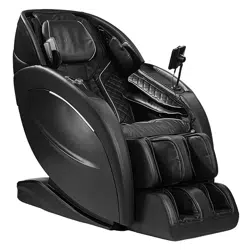

AURA
®
ELITE 4D
MASSAGE CHAIR
User Manual
Welcome to
Thank you and congratulations on purchasing an Infinity Massage Chair - you’ve made a
great choice.
With over a decade of experience designing, building and servicing massage chairs,
Infinity takes pride in every chair sold, including yours. We are here for you. The US-
based Customer Care team can be reached at (603) 910-5000 or visit us online at www.
infinitymassagechairs.com and find valuable self service resources under the SUPPORT tab,
including electronic copies of all documents and video tutorials.
Inside this manual, you will find everything you need to setup and safely enjoy your chair.
Please review the entire manual, including all safety information, before assembling or using
your chair. If you are assembling the chair yourself, please see the Assembly Guide next and
reference the online assembly video.
For convenience, we’ve also created a Quick Start Guide. We suggest you keep it near your
chair as a tool to get to know all the features of your new chair.
Get ready to sit back, relax and enjoy the Ultimate Massage Experience.
We know you can’t wait to sit in your new Infinity Massage chair! Take a picture of you enjoying the ultimate
massage experience and make sure to tag us on social media with the hashtag #infinitymassagechairs
Register your product at www.infinitymassagechairs.com/warranty
to ensure it is in our system. This will simplify the warranty process
should you ever need it.
Alternatively, scan the QR code to go directly to the URL above.
Before assembling your chair, watch an assembly video at:
www.infinitymassagechairs.com/assembly-tutorials
Alternatively, scan the QR code to go directly to the URL above.
THE ULTIMATE MASSAGE EXPERIENCE
@infinitymassagechairs@infinitymassagechairs
@infinity_chairs@infinity_chairs
@infinitymassagechairs@infinitymassagechairs
SCAN CODE
SCAN CODE
Warranty Registration
Assembly Video
Table of Contents
Your Chair
Chair Features
External Structure
4
5
3
Warning! Read important safety information
found on page 22 before using or operating chair.
WARNING
Before Getting Started
Chair Setup
Taking Control
Installation Site
Clearance Space for the Chair
Floor Protection
Move Methods
Connect to Power
6
6
6
7
7
Main Power Switch
Adjust Pillow
Increase Intensity of your Massage
TrueFit
®
Body Scanning
Getting Out of the Chair
Chair Entry & Exit Hazards
8
8
8
8
9
9
Auto Programs
Shoulder Position Adjustment
In-Use Display Screen
Auto Programs Descriptions
Manual Mode
Air Settings
Memory Programs
Adjustment
Quick Access Control Panel
Bluetooth
®
Wireless Charging Pad
Intelligent Voice Command + Control
Voice Commands List
10
10
11
12
14
15
15
16
17
18
18
19
20
System
Language
Voice Demo
Sleep Mode
Beep
Brightness
Time
Voice Volume
Bluetooth
®
Screen
21
21
21
21
21
21
21
21
21
21
Troubleshooting
Specifications
Frequently Asked Questions
Warranty
25
25
26
27
Staying Safe
Settings
Fixing Issues
22
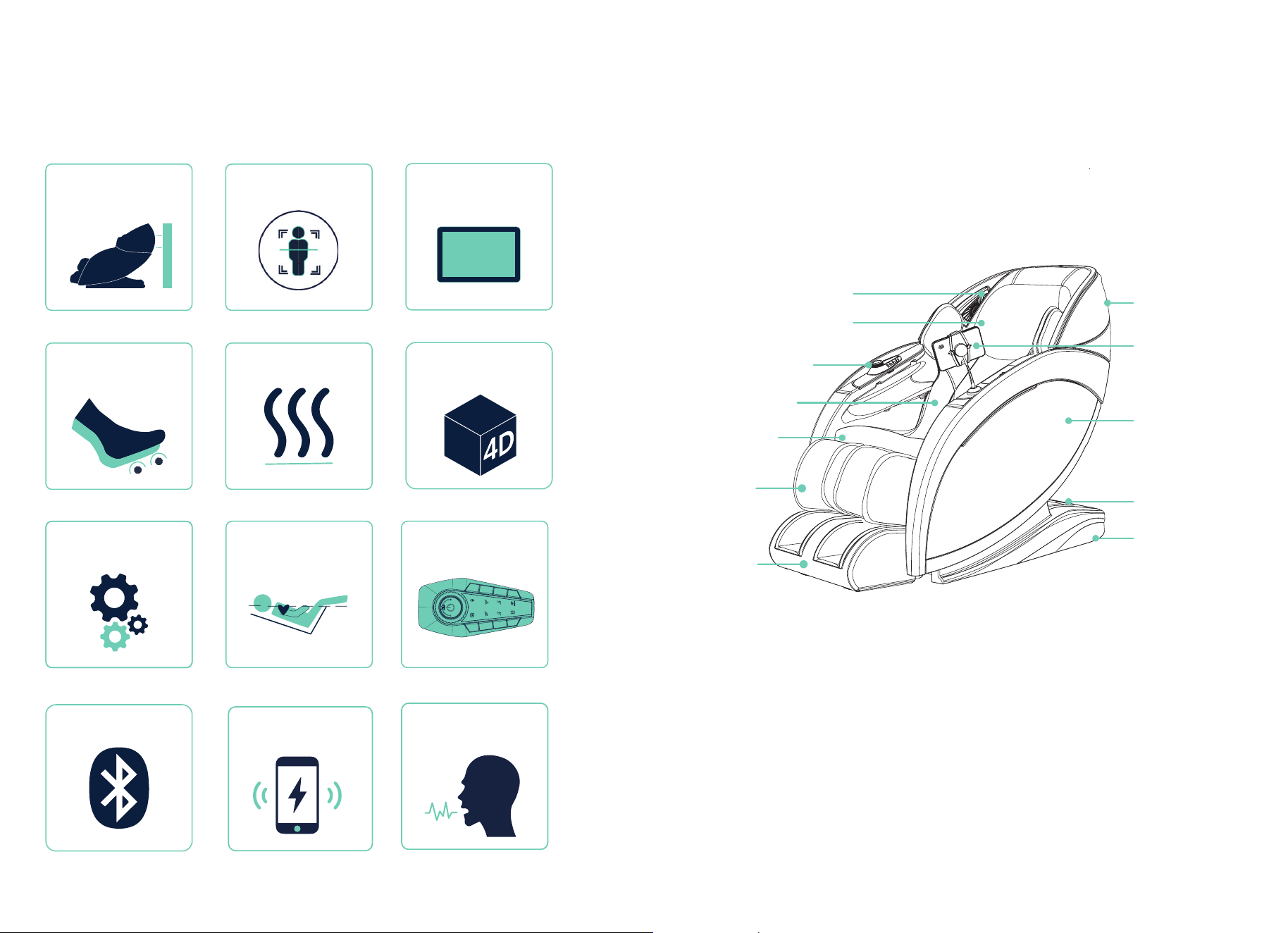
Dual Reflexology Foot
Rollers
See page 11
Chair Features
4
Your Chair
5
External Structure
Zero Wall Fit
®
Space-Saving Technology
See page 6
Manual Settings
See page 14
Bluetooth
®
Speakers
See page 18
Touchscreen
Tablet
See page 10
TrueFit
®
Body
Scanning
See page 8
Lumbar Heat
See page 11
Weightless Zero
Gravity Recline
See page 16
4D Back Massage
Mechanism
See page 11
Caster
Foot Rest
Leg Rest
Seat Cushion
Back Cushion
Quick Access
Control Panel
Pillow
Bluetooth Speakers
Power Box
Arm Panel
Back Cover
Tablet
Quick Access
Control Panel
See page 17
See page 19
Intelligent Voice
Command + Control
See page 18
Wireless Charging
USB-C Charging Port
6 7
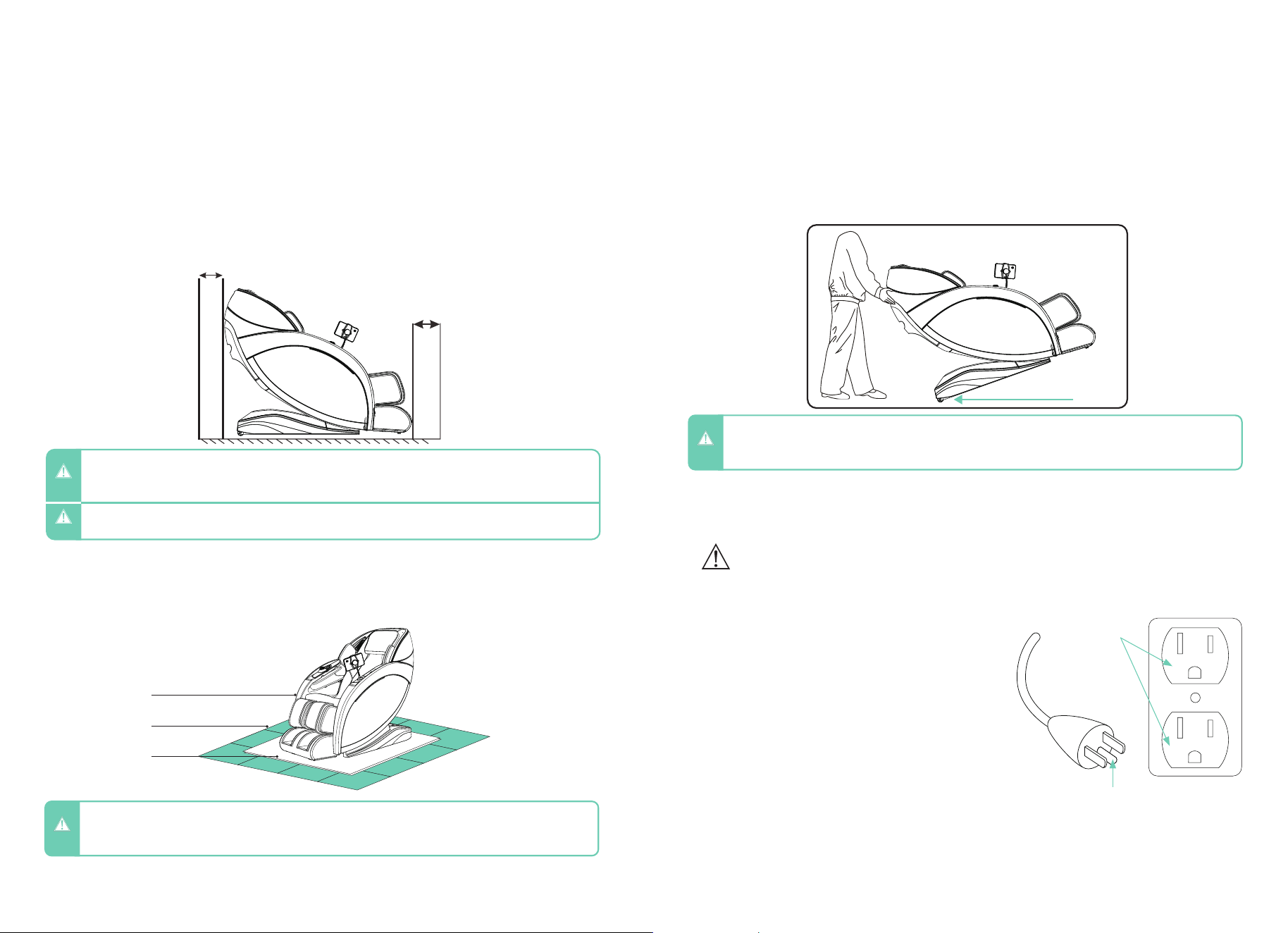
- 4” clearance for the recline of the backrest; 24” clearance for the extension of footrest and
sliding forward of the chair.
- Keep it 3 feet away from the TV, radio or other audio & video appliance to avoid signal
interference.
Clearance Space for the Chair
Installation Site
Before Getting Started
To protect ANY floor type, hard surface or carpeted, from scratches or other markings,
place the chair on a pad or mat that extends from under the footrest to the rear of the chair.
Floor Protection
- Do not use the massage chair in high moisture environment such as near a swimming pool or bathroom to
prevent electric shock accident.
- Please keep the massage chair away from heated surfaces to prevent fire hazard or damage to the product.
WARNING
- Keep the distance between the power socket and power switch within 60” to avoid damage of power cord
while massage chair sliding forward.
- Straighten the power cord while in use to avoid tangle or damage.
CAUTION
- To avoid serious injury or death, before sliding chair forward or backward check to make sure area is clear
of children, pets, or obstacles.
WARNING
Apply pressure to the back of the massage chair from behind to pivot on the Castors.
Have a second person up front to guide the Footrest until in the correct position. Maintain
clearances as mentioned above. Gently lower into place. Do not pull on the side arms.
Move Methods
Connect to Power
CAUTION
- Do not move the chair when there is user inside.
- Chair is heavy. Use caution and get assistance when lifting to avoid injury. Do NOT lift chair by footrest or
armrests to avoid damage to product.
Plug into a 120V grounded outlet.
WARNING – Improper connection of the equipment-
grounding conductor can result in a risk of electric shock. Check
with a qualified electrician or serviceman if you are in doubt as to
whether the product is properly grounded. Do not modify the plug
provided with the product – if it will not fit the outlet, have a proper
outlet installed by a qualified electrician.
This product is for use on a nominal 120-V circuit and has a
grounding plug that looks like the plug illustrated. Make sure that
the product is connected to an outlet having the same configuration
as the plug. No adapter should be used with this product.
Grounding
This massage chair is a Class 1 electrical appliance. Make sure to
use a grounded outlet to the grounded power supply circuit and a
properly installed earth grounding rod with ground connection, to
avoid electric shock.
Grounding Instructions
To avoid risk of electrical shock, turn power switch off before plugging unit into electrical outlet. Use only
with properly grounded outlet (3 prong). Do not plug into ungrounded outlet.
Grounded
outlet
Grounding pin
WARNING
Massage chair
Floor
Pad/mat
4”
24”
Casters
8 9
Getting Comfortable
Chair Setup
- When not in use for a long period of time, we recommend that the chair be covered, the power cord be coiled
and that the unit be placed in an environment free of dust and moisture.
- To avoid possible damage to product or injury to unsupervised children, always turn off power switch and
unplug massage chair from electrical outlet immediately after use.
CAUTION
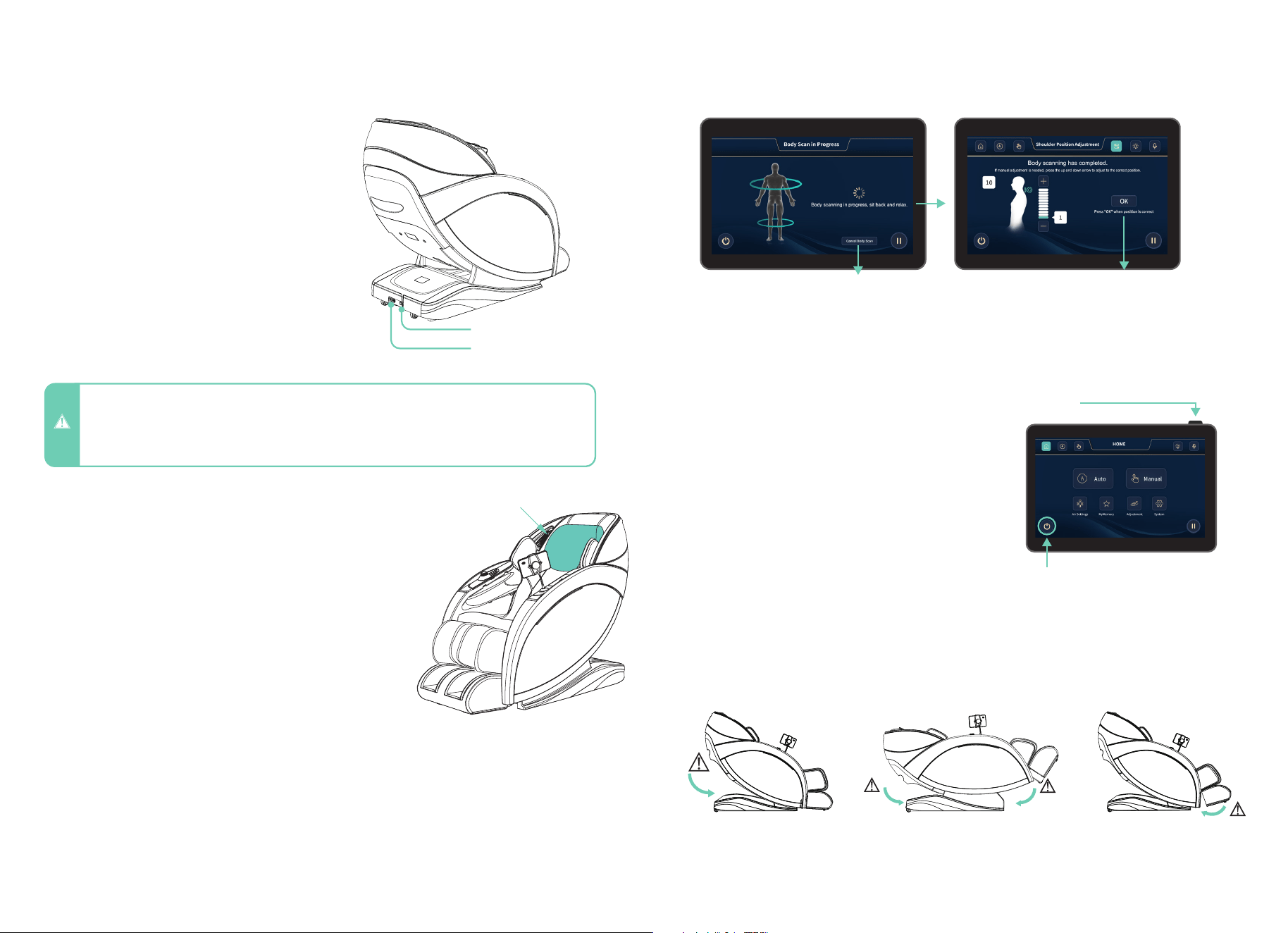
To power up the chair, flip the main power
switch located on the back of the base of
the chair to ON. Ensure the electrical cord
is connected to a 110V grounded outlet and
plugged into the power cord port located on
the back of the base of the chair.
Main Power Switch
TrueFit
®
Body Scanning
Select any auto program. The chair will automatically begin scanning your body, mapping your
back, shoulders, and neck. During this process it is important to remain seated back into the
chair without lifting your head.
The scan can be viewed on the tablet screen. If fine tuning is needed just after your body
scan, wait for the shoulder position adjustment to appear and then use the “+” and “-”
buttons to move the massage rollers up or down for the perfect shoulder kneading position.
9
To easily exit the chair at any time, tap the POWER
button on the bottom left of the screen, another
option is to press the power button on the top
right of the tablet to restore the chair to an upright
position. Alternatively, you can also press the power
button on the smart dial quick access control panel
found on the right arm panel to turn on/off the chair.
WARNING! Check to make sure children and pets are
clear of chair before tapping power button to return
chair to upright position.
Getting Out of The Chair
Chair Entry and Exit Hazards
WARNING! The areas under the footrest and behind the back rest are potentially dangerous for a child or
pet. The chair back is heavy and reclines with force. A small child or pet located behind the chair could be
crushed as chair is reclined resulting in serious injury or death. When chair is reclined, small children or pets
who have crawled under the leg rest may not be visible to the user and could be crushed when leg rest is
lowered or when chair is returned to upright position. To avoid serious injury or death, check these areas
carefully before reclining, lowering leg rest, or returning chair to upright position.
Make sure to check for children
or pets between the chair back
and the base of the chair before
entering zero gravity recline.
TrueFit
®
Body Scanning
Make sure to check for children or
pets underneath the footwell before
exiting zero gravity recline and
returning to upright position.
Make sure to check for
children or pets between the
footrest and the chair body
before lowering the legrest.
Tap OK to start massage.Cancel Body Scan will immediately stop the
scan. The massage selected will begin. The back
massager will run the entire length of the track
which may result in the massage nodes reaching
above your neck causing discomfort. We always
recommend a full body scan unless you are
exclusively using Point or Partial mode in Manual.
Power On/Off Button
Power On/Off Button
Power Cord Port
Main Power Switch
Take a seat in the chair and take note of where the pillow
rests on your neck. Adjust the pillow so that it rests
comfortably in the arch of your neck. Do this by adjusting the
pillow up, until it feels comfortable.
Adjust Pillow
Pillow
To make the massage more intense, remove the pillow
cushioning between you and the massage mechanism in the
seat back. To remove the pillow, simply unzip the zippers on
the pillow and place the pillow to the side.
Increase Intensity of your Massage - Manually
10 11
Taking Control
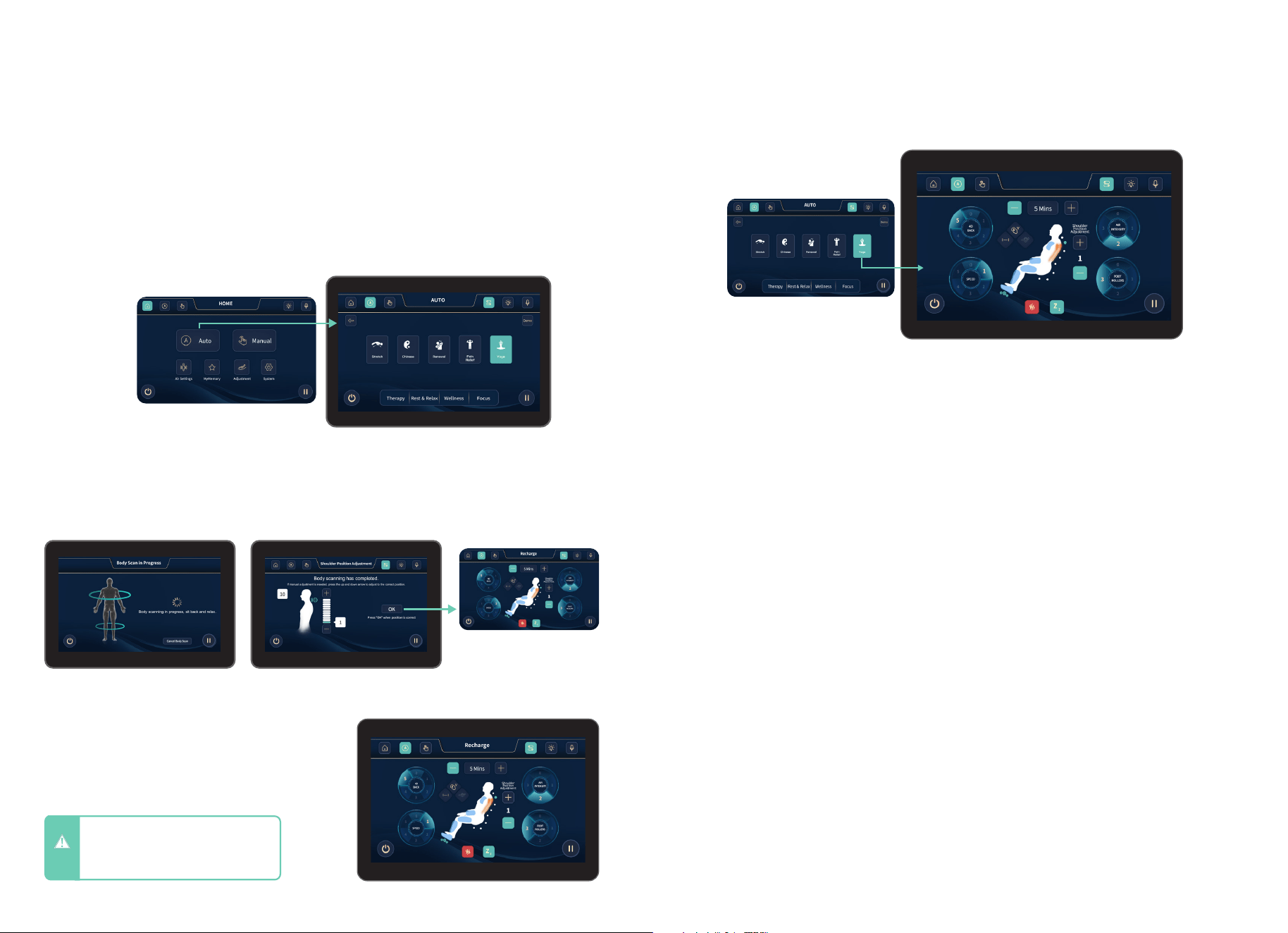
Auto Programs
From the home display, tap the AUTO button to enter Auto Program Menu. Choose from
Stretch, Chinese, Renewal, Pain Relief, Yoga, Recharge, Siesta, Rocking, Sleep, Fatigue
Recovery, Deep Relief, Revival, Easy Care, Gentle, Sports, Mental Wellness, Neck &
Shoulders, Back Relief, Hip & Waist, Leg & Foot, and Demo. To enter the program you
desire tap the screen. Selected program will show on the in-use screen.
After adjusting your shoulder height, you
will be taken to the In-use screen where you
can observe all current settings and session
information.
After a Massage program is selected, you will be taken to the Body Scanning screen. Here
you can use the arrows to adjust the back mechanism up and down to match your specific
shoulder height. After the countdown timer has elapsed, your massage will start.
In-Use Screen
Shoulder Position Adjustment
CAUTION
- Do not spill liquids on Tablet Remote
and avoid placing heavy objects on
Tablet Remote or power cord to
avoid damage or malfunction.
Press OK to start the massage
n
In-Use Screen
Tap Auto Program Button
Yoga
4D Intensity
Speed
Air Intensity
Foot Rollers
Shoulder Position Adjustment
Sleep Mode
Heat
Use this control to increase or decrease the maximum intensity of the 4D back mechanism
that works the neck and shoulder region. This setting will set the upper limit of the 4D
fluctuations throughout your massage. 0= off, 1= light, 5= firm. Tap screen to select setting.
Increase or decrease the speed of the back mechanism. 1= slow, 5= fast, or 0= off (massage
speed can be adjusted when in Manual mode). Tap screen to select setting.
Increase or decrease intensity of airbag massage. All auto massages are pre-programmed to
have varying levels of airbag intensity, this setting will set the upper limit of these fluctuations.
1= light, 3= firm, or 0= off. Tap screen to select setting.
Turn on Dual Foot Reflexology Rollers and choose your desired foot roller speed: 1= slow, 2,
3= fast, or off (deactivate foot rollers). Tap screen to select setting.
Fine-tune the shoulder position for optimal comfort by tapping the “+” or “–” buttons. With
eleven levels to choose from, you can easily find the setting that best aligns with your body.
Toggle your desired sleep mode option; when sleep mode is on, the chair will not reset to its
upright position. When sleep mode is off, the chair will reset to its upright position after the
auto or manual massage program ends.
Enjoy soothing warmth by activating the back heat feature and selecting your preferred
setting—either “On” for cozy comfort or “Off” to deactivate. Simply tap the screen to make
your selection.
12 13
Auto Programs - Descriptions
Stretch - Rejuvenating massage program that
gently elongates muscles, enhances flexibility,
and relieves tension.
Recharge - An energizing massage program
designed to boost vitality, alleviate fatigue,
and promote overall well-being.
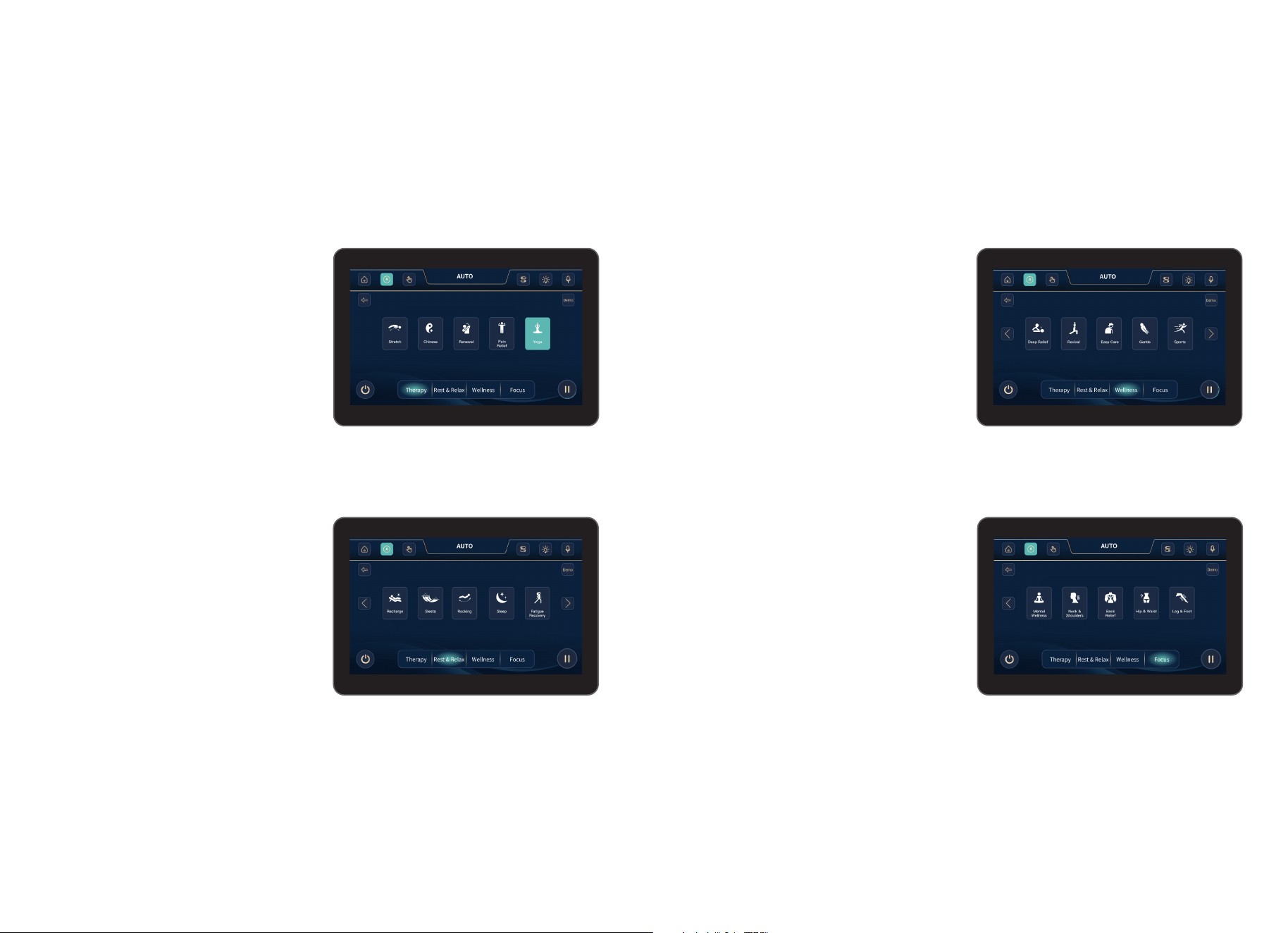
Within the auto program menu, the 20 auto programs are broken up into 4 categories to
help you find the best suited massage to your needs. The categories are: Therapy, Rest &
Relax, Wellness, and Focus. These categories are found at the bottom of the screen. To
select desired category tap the screen.
Chinese - Therapeutic massage program
using traditional techniques to restore
balance, improve circulation, and relax
muscles.
Siesta - Offers a calming, light massage
to refresh and rejuvenate you during an
afternoon break.
Renewal - Revitalizing massage program
designed to refresh your body, release
tension, and boost energy.
Rocking - Uses gentle, rhythmic
movements to soothe muscles, relieve
tension, and promote deep relaxation.
Pain Relief - Focuses on targeted pressure
techniques to alleviate discomfort, reduce inflammation, and promote relaxation.
Sleep - A calming massage program designed
to relax the mind, ease tension, and promote
restful sleep.
Yoga - Combines stretching and massage techniques to improve flexibility, align the body,
and calm the mind.
Fatigue Recovery - targets tired muscles, boosts energy, and revitalizes the body, helping
you feel restored.
Deep Relief - Uses intense pressure techniques to target deep muscle tension, offering
long-lasting relaxation and comfort.
Revival - Combines deep tissue techniques to restore energy, relieve muscle tightness, and
enhance overall well-being.
Easy Care - Gently targets muscle tension, providing soothing relief and promoting deep
relaxation for recovery.
Taking Control
Gentle - Offers a soft, relaxing massage designed to reduce stress, alleviate tension, and
soothe muscles.
Sports - Targets sore muscles and tension, aiding recovery, improving flexibility, and
enhancing athletic performance and mobility.
Mental Wellness - Combines relaxation
techniques to calm the mind, reduce stress,
and promote emotional balance.
Neck & Shoulders - Targets tension in
these areas, alleviating pain and promoting
relaxation and mobility.
Back Relief - Focuses on soothing muscle
tension, improving posture, and alleviating
discomfort in the back area.
Hip & Waist - Targets tension in these areas,
improving flexibility, circulation, and relieving
discomfort effectively.
Leg & Foot - Relieves tension, improves
circulation, and soothes fatigue, enhancing
overall leg and foot comfort.
Demo - Offers a brief, introductory massage
experience, showcasing techniques designed
to relax and refresh the body.
14 15
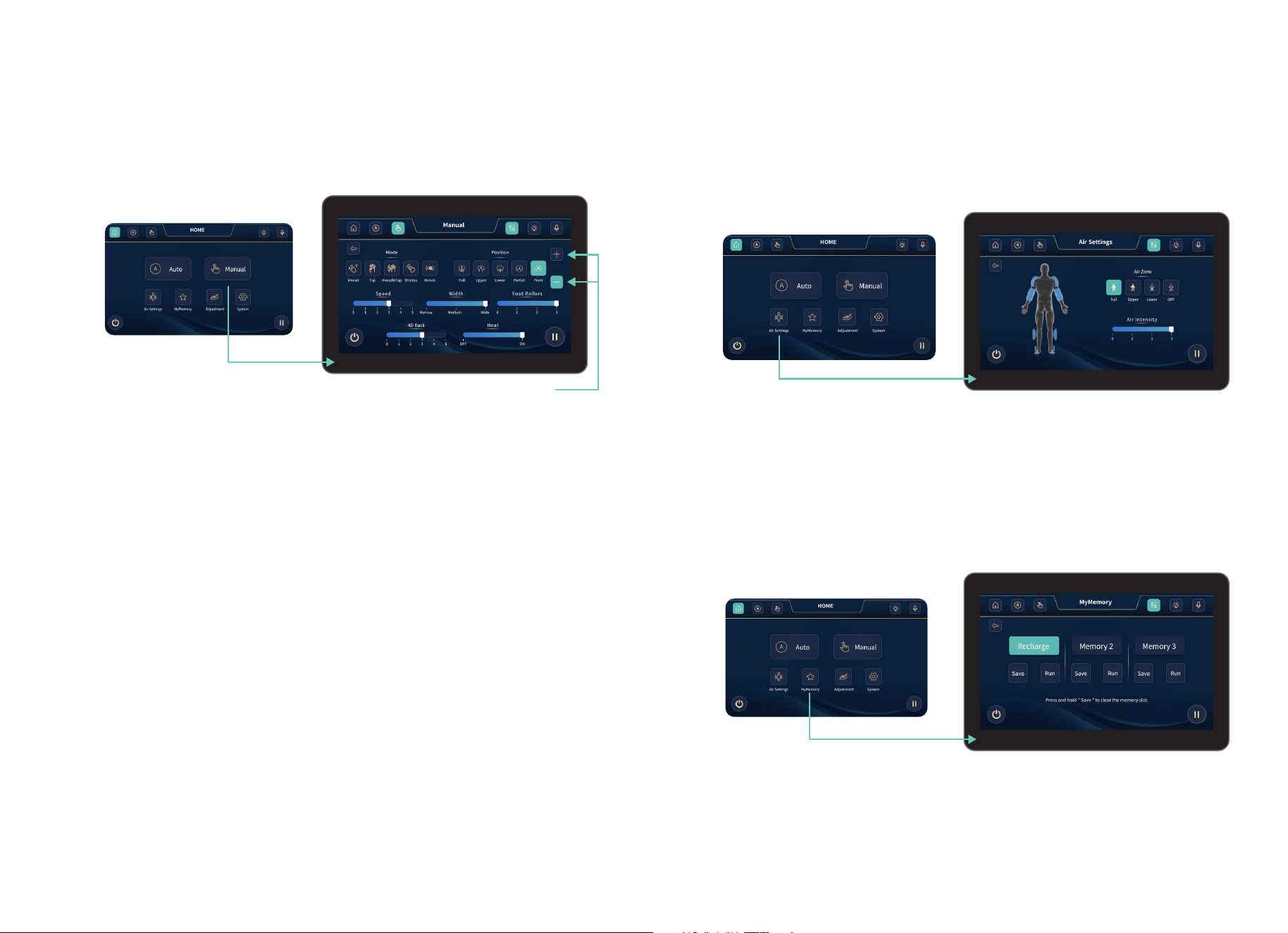
Manual Mode
There are 7 adjustable modules under the manual program: Mode, Position, Speed, Width,
Foot Rollers, 4D Back, and Heat.
Taking Control
Tap Manual
Note: You can only adjust the back
mechanism in Point mode using “+” & “-”
Mode - Controls the massage technique of the back mechanism. The options are: Kneading,
Tapping, Kneading & Tapping, Shiatsu, and Knocking. Tap screen to select setting.
Speed - Increase or decrease the speed of the back mechanism. 1= slow, 2,3,4, 5=fast
(note: massage speed can be adjusted when in Manual mode). Tap screen to select setting.
Width - Increase or decrease the width of the back mechanism, choose from: Narrow,
Medium, or Wide (note: width can only be adjusted in tapping, knocking, or shiatsu modes).
Foot Rollers - Turn on Foot Reflexology Rollers and choose your desired foot roller speed:
1= slow, 2, 3= fast, or off (deactivate foot rollers). Tap screen to select setting.
4D Back - Use this control to increase or decrease the maximum intensity of the 4D back
mechanism. This setting will set the upper limit of the 4D fluctuations throughout your
massage. 0= light, 2,3,4, 5=firm. Tap screen to select setting.
Heat - Activate lumbar heat and choose your desired heat setting “on” or “off” (deactivate
lumbar heat). Tap screen to select setting.
Position - Controls the range of motion of the back mechanism. Whole travels the entire
length of the track, Partial travels a short distance and reverses direction for focused relief,
Point stops on the track for targeted relief. Tap screen to select setting. Note: Point brings a
popup dialog with “+” and “-” which allows you to move the mechanism up or down.
Kneading - Circular motions to relieve muscle tension.
Tapping - Rhythmic tapping to simulate blood flow and relaxation.
Kneading & Tapping - A combination of both techniques for deeper relief.
Shiatsu - Deep-pressure massage mimicking traditional finger pressure therapy.
Knocking - Repetitive, firm motions that help loosen tight muscles.
Air Settings
Memory Programs
Configure the air settings to target specific areas by selecting Full Body, Upper, Lower, or
turning the airbags Off entirely. Adjust the air intensity to your preference, with levels ranging
from 0 (Off) to 3 (Firm) for a tailored compression massage.
Your chair has the ability to save your favorite customized massage programs to memory.
Tap Air Settings button
Tap MyMemory
®
button
Air Zone - Choose your desired airbag region/s: Full Body, Upper Body, Lower Body, or Off.
Selecting Full will override any selections and all airbags become active.
Air Intensity - Increase or decrease the intensity of the airbag massage. All auto massages
are pre-programmed to have varying levels of airbag intensity, this setting will set the upper
limit of these fluctuations. 0= off, 1= light, 2, 3=firm or 0=off. Tap screen to select setting.
Save - Save an auto program or manual massage just by tapping the ‘save’ button, there
are 3 save slots that you can choose from. If you would like to overwrite any saved program,
just tap and hold the ‘save’ button until the program is deleted and/or overwritten.
Run - Tap Run to launch your personalized massage program from the saved memory slot
and enjoy your custom session exactly the way you like it.
16 17
Taking Control
Adjustment
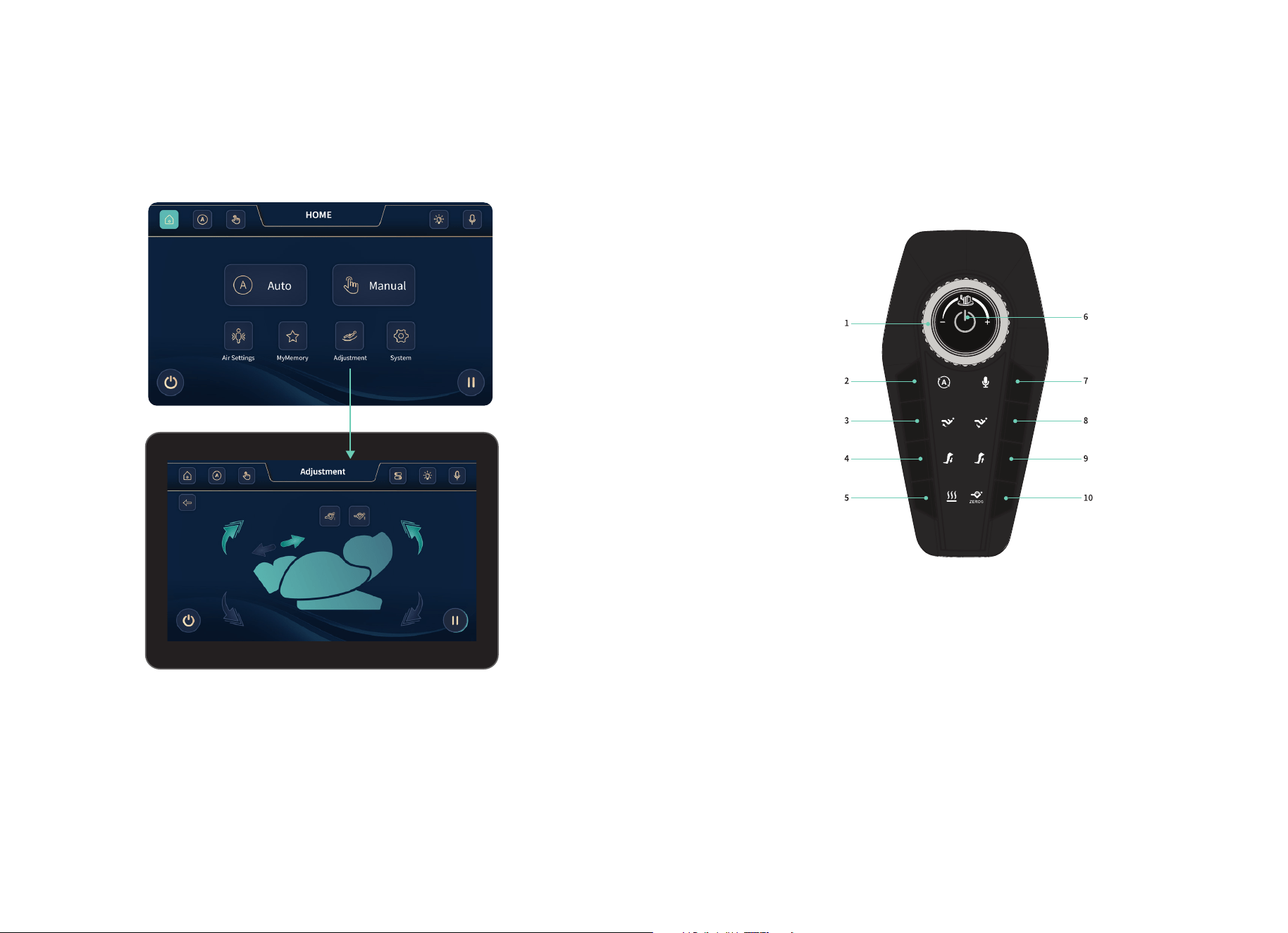
Toggle the adjustment button to set the chair’s recline and footrest settings.
Tap Adjustment button
Footrest Up/Down - Use this control to raise or lower the footrest. Tap and hold to lift the
footrest; release when it reaches your desired position. Tap and hold again to lower it.
Footrest In/Out - Use this control to extend or retract the footrest. Tap and hold to slide the
footrest outward; release to stop. Tap and hold again to bring it back in.
Backrest Up/Down - Use this control to adjust the backrest angle. Tap and hold to raise the
backrest; release to stop. Tap and hold again to recline it.
Zero Gravity 1 & 2 - Use this control to select your preferred Zero Gravity position. Tap
once for Zero Gravity 1, which offers a gentle recline. Tap again for Zero Gravity 2, a deeper
recline for enhanced weightlessness and pressure relief.
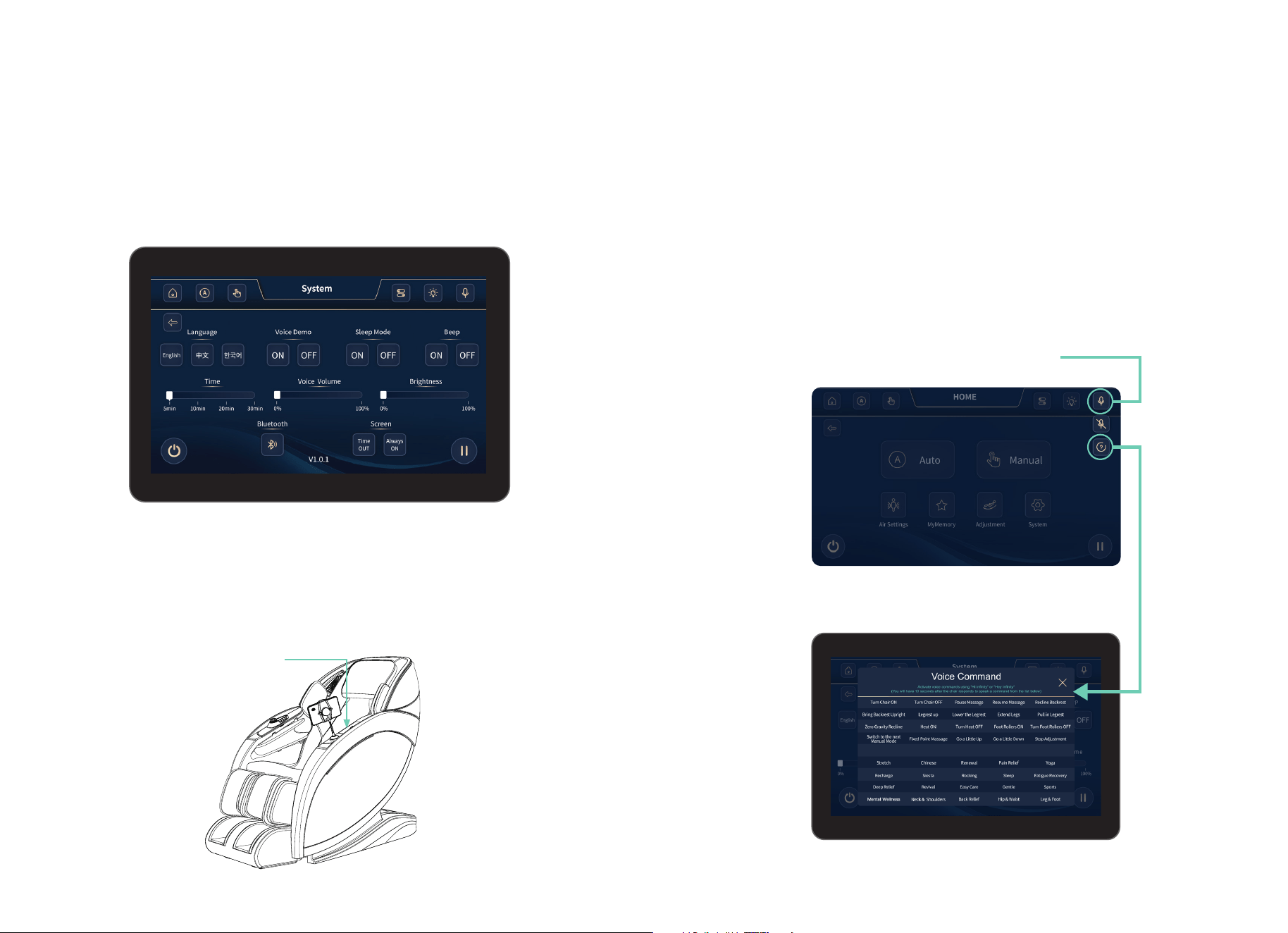
The conveniently designed quick-access control panel provides users with effortless
navigation, allowing them to seamlessly explore various settings, massage programs, and
customization options for a truly personalized relaxation experience.
1. Knob - Turn the knob clockwise to increase the 4D massage mechanism intensity and
counterclockwise to decrease it. There are a total of 6 levels, when reaching the maximum or
minimum level, the chair will make beeping noises telling you that its successful.
2. Auto Mode - Press to switch between 20 auto programs.
3. Raise Footrest - Press to raise the footrest.
4. Footrest Out - Press to let the footrest out.
5. Heat - Press to turn “on” or “off” heat.
6. Power - Press to turn chair “on” or “off”.
7. Voice Command - Press button to turn “on” voice commands, press and hold for 3
seconds to turn “off” voice commands.
8. Lower Footrest - Press to lower the footrest.
9. Footrest In - Press to let the footrest in.
10. Zero Gravity - Press once to enter Zero Gravity 1, press again to enter Zero Gravity 2.
Quick Access Control Panel
The quick access control panel offers buttons to quickly navigate specific settings, programs,
and options.
18 19
Taking Control
Bluetooth
®
The Bluetooth
®
setting lets users effortlessly connect their devices, immersing themselves in
their favorite music, podcasts, or soothing sounds for a truly enhanced and relaxing massage
experience. Simply tap the Bluetooth
®
icon and Bluetooth
®
will turn on, then pair your device
to Aura
®
Elite. Tap the Bluetooth
®
button again to turn off.
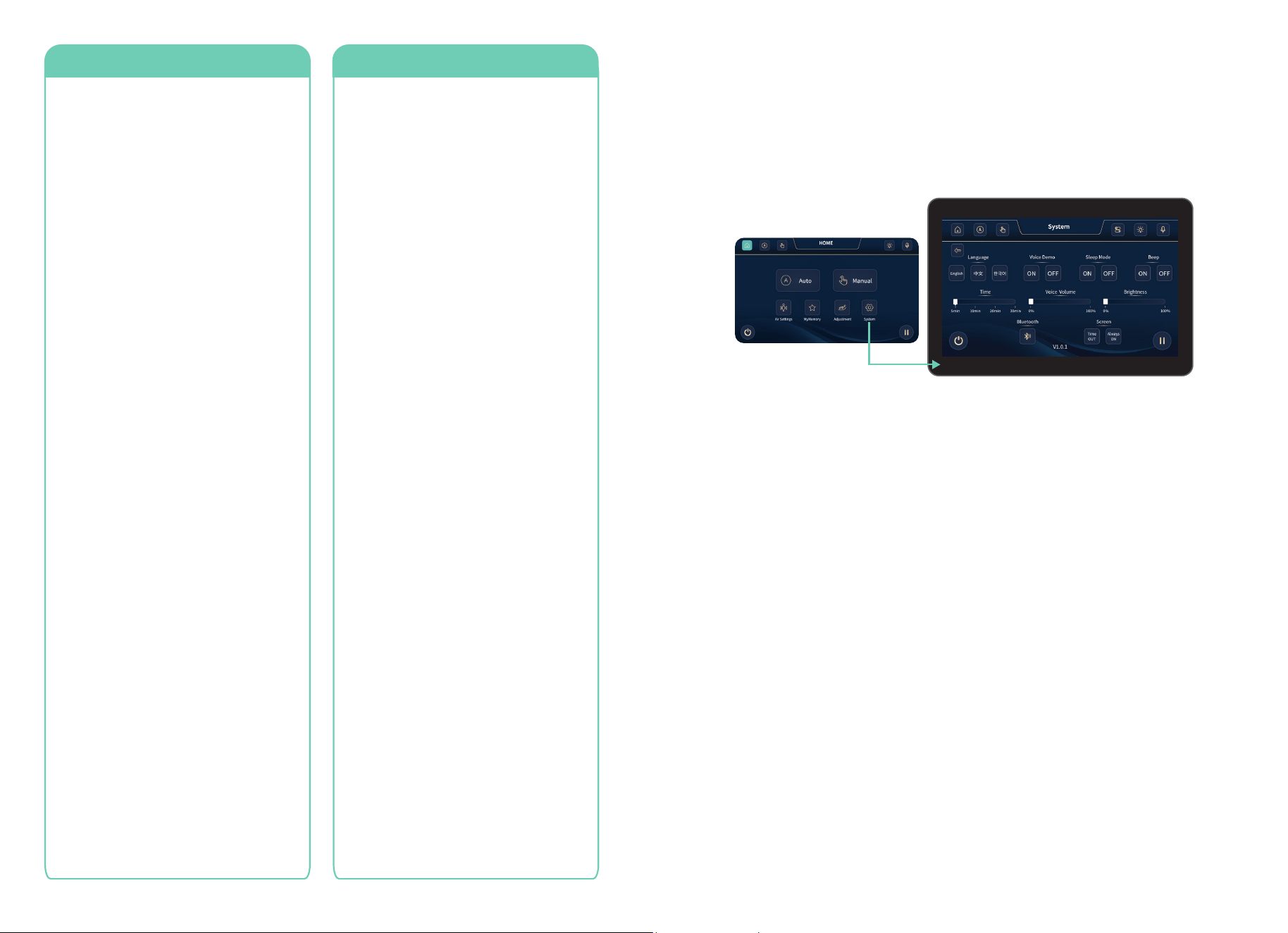
Intelligent Voice Command + Control
Your chair features built-in intelligent voice control, letting you adjust your massage hands-
free. It works when the chair is on or up to 20 minutes after an auto program ends.
To activate Voice Command, say “Hi Infinity” or “Hey Infinity” and give a command within
5 seconds. You can also press the voice command button on the control panel or tap the
button on the tablet. Speak clearly and slowly for best results.
Deactivating Voice Command + Control - To deactivate Voice Command, tap the
microphone icon on the in-use screen, press the voice command button on the tablet, or
hold the control panel button for 3 seconds. Once deactivated, commands won’t work until
reactivated.
Tap the (?) button to bring up a list of
voice commands.
Next, turn the page to see all of the
voice commands that you can use.
Tap the microphone button to
turn on voice commands.
Wireless Charging Pad + USB-C Port
Your massage chair has a built-in wireless charging pad which allows you to charge your
capable smart devices simply by placing them on the pad located on the left arm panel. In
addition, your chair has a USB-C type port which you can use to charge your smart devices
with your own USB-C type cable. Note: If the chair is powered on the charging function will
always work, however, if the power at the base is switched off, charging will not work.
Wireless Charging Pad
20 21
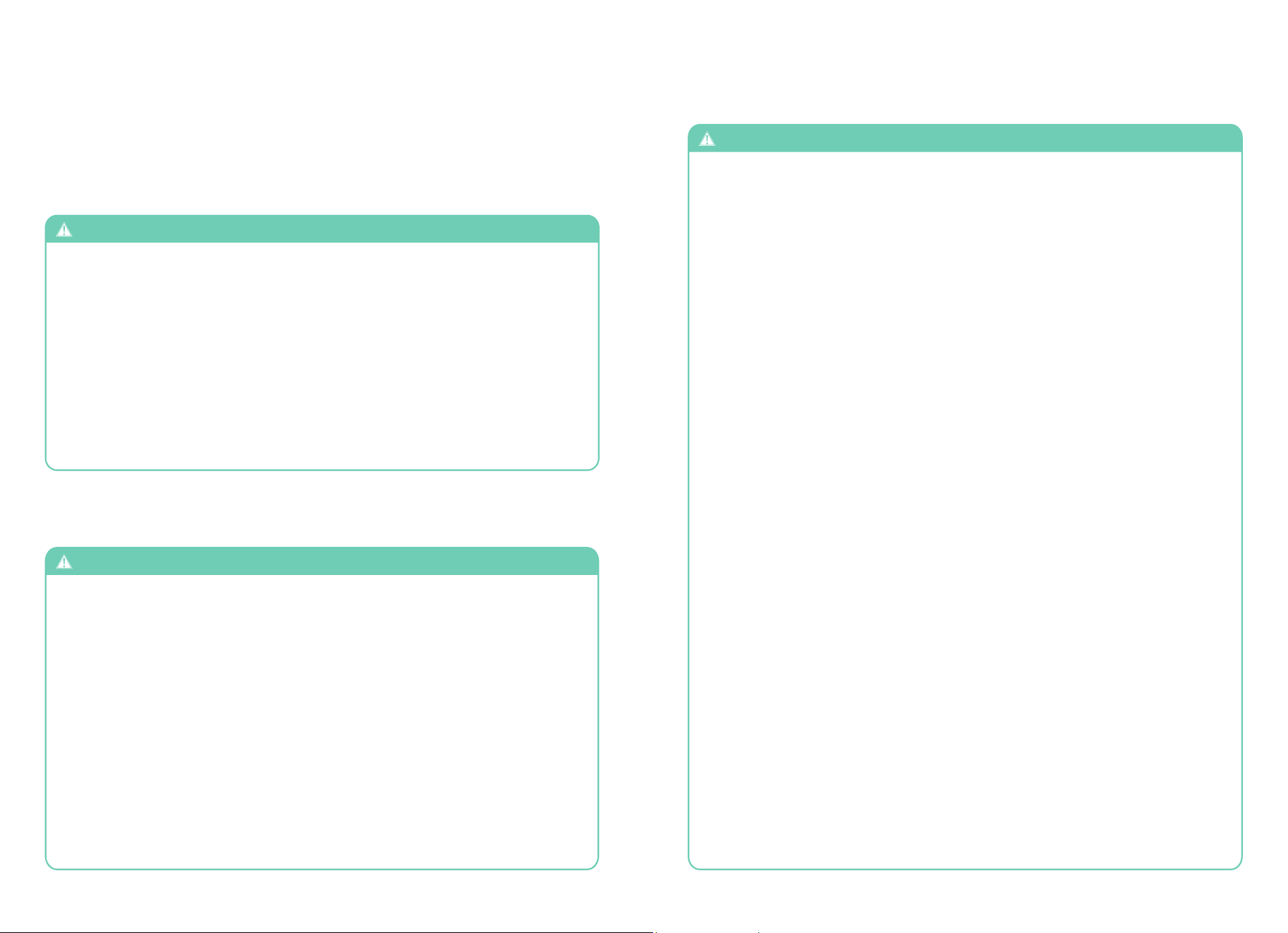
Language - Tap this button to enter the language selection screen. Select your desired
language by tapping one of the buttons: English, Chinese, or Korean.
Voice Demo - When Voice Demo is on – a spoken narration comes through the speakers
while the DEMO massage program is running. The Voice Demo gives an overview of how
massage chairs work to benefit your health & wellness. When Voice Demo is off the DEMO
massage program will run normally. This Audio track only works with the DEMO program.
Note: Voice Demo will only work when Bluetooth
®
is OFF and the Voice Demo setting is ON.
Sleep Mode - When sleep mode is ON; the chair will stay in its reclined position. When sleep
mode is OFF; the chair will return to its upright position. Create a calm environment that
helps you relax and fall asleep more easily.
Beep - Emits a beeping sound when selecting settings, programs, and options. Use these
buttons to turn beep mode on or off.
Brightness - Control your desired brightness where 0%=dim and 100%=bright. Tap and drag
the slider left or right.
Bluetooth
®
- Tap Bluetooth
®
on and connect it to a Bluetooth
®
capable device for playing
music, podcasts, or any audio driven program. Tap the Bluetooth
®
button again to deactivate.
Screen
- When the Time OUT button is lit the display screen will turn off after a few minutes
of no activity. Touch the screen anywhere to wake it up. Tap the button to Always ON and
the screen will never turn off.
Time - Increase or decrease the massage time during your session. Tap and drag the slider
left to reduce time or right to increase your massage time.
Voice Volume - Tap and drag the slider to adjust volume level, with 0% being the minimum
(sound off) and 100% being the maximum.
Tap System button
Turn Chair ON
Turn Chair OFF
Pause Massage
Resume Massage
Recline Backrest
Bring Backrest Upright
Legrest Up
Lower The Legrest
Extend Legs
Pull In Legrest
Zero Gravity Recline
Heat ON
Turn Heat OFF
Foot Rollers ON
Turn Foot Rollers OFF
Switch To The Next
Manual Mode
Fixed Point Massage
Go A Little Up
Go A Little Down
Stop Adjustment
Stretch
Chinese
Renewal
Pain Relief
Yoga
Recharge
Siesta
Rocking
Sleep
Fatigue Recovery
Deep Relief
Revival
Easy Care
Gentle
Sports
Mental Wellness
Neck & Shoulders
Back Relief
Hip & Waist
Leg & Foot
Program CommandsSettings Commands
Settings
System
Tap System on the home display to enter the system display screen. Use this screen to
adjust and personalize your chair and touch screen tablet settings.
22 23
SAFETY INFORMATION
Staying Safe
To ensure safe use of the massage chair and avoid injury or unsafe conditions, please
read and follow all instructions before using product. SAVE THESE INSTRUCTIONS.
Household use only
- The areas under the footrest and behind the back rest are potentially dangerous for
a child or pet. The chair back is heavy and reclines with force. A small child or pet
located behind the chair could be crushed as chair is reclined resulting in serious
injury or death. When chair is reclined, small children or pets who have crawled
under the leg rest may not be visible to the user and could be crushed when leg rest
is lowered or when chair is returned to upright position. To avoid serious injury or
death, check these areas carefully before reclining, lowering leg rest, or returning
chair to upright position.
- Chair should not be used by children under age 14. Small children could be trapped
or injured by airbags, heating mechanism, or moving parts. When chair is not in use,
unplug unit and secure chair so that children cannot accidentally power on and operate
chair.
- Children over age 14, persons with reduced physical, sensory, or mental capabilities,
and elderly or frail persons should exercise caution and use massage chair only when
supervised or assisted by a person over 16 years of age.
- Chair has a heated surface and could cause burns, particularly in persons with reduced
sensitivity to heat. Such persons should use the chair only after consulting with a
physician and should use extreme caution during any physician-approved use.
WARNING
WARNING
To avoid possible death or serious injury to user or others, please read and follow these
instructions:
USE NOT RECOMMENDED FOR CERTAIN PERSONS
WARNING
Use of massage chair may not be safe or suitable for persons with certain medical
conditions and could cause serious injury or death in some circumstances. If you
have any of the following conditions, please consult a physician before using the
massage chair:
- Use of implanted electronic medical
devices (such as a cardiac pacemaker)
- Pregnancy
- Cancer, malignant tumors, or other
growths
- Osteoporosis or spinal fracture
- Other fractures or musculoskeletal injuries
- Loss of or reduced sensitivity to heat
- Implanted medical fixation devices such
as rods, pins, etc.
- Recent surgery or sutures
- Skin diseases or skin injury
- High fever
- Certain pulmonary or breathing
conditions
- Impaired circulation
- Do not stand or stack heavy objects on footrest.
- Do not operate heating features of chair while under a blanket or pillow. Excessive heating
can occur and cause fire, electric shock, or injury to persons.
- To avoid pinching or crushing, please do not place body parts, especially fingers and toes,
between parts of chair and keep clear of moving parts.
- To avoid overheating, injury or discomfort from overuse, do not fall asleep while using
massage chair and do not use for extended periods of time (longer than 20 minutes).
- Avoid use while under the influence of alcohol, medications or other substances that my
cause drowsiness, disorientation, or impairment of judgment or motor skills.
- Do not use the massage chair right after a meal, as it may cause discomfort.
- If you feel any abnormal discomfort during the operation of the massage chair, turn off the
power immediately and discontinue use.
- Do not use this appliance when ambient temperature is over 40 C (104 F).
- Do not use this appliance in humid or dusty environment, or when any part of the body is in
contact with plumbing or any similar ground.
- Never operate the appliance with the air openings blocked. Keep the air openings free of
lint, hair, dust and the like.
- Do not use outdoors.
- Do not operate where aerosol (spray) products are being used or where oxygen is being
administered.
- Place the product on a flat, level floor to reduce risk of tipping or overturning.
- Do not use or store near heat or open flame.
- Intended only for users who weigh below 265 lbs.
- Use this product only for its intended use as described in this manual. Do not use
attachments not recommended by the manufacturer.
- Massage chair intended only for use by one person. Do not use by two or more persons at
the same time to avoid damage to the product.
- Do not allow children to stand, jump, or play on or around massage chair, even when it is
not powered on or in use.
- Remove personal accessories such as jewelry from arms and empty pockets, and remove
loose clothing while using the massage features of the chair.
- Check the upholstery under the cushions and other spots for damage or loose objects that
may cause injury or damage chair while operating. If any damage is present, do not use the
massage chair and refer to a qualified service professional for servicing.
- To avoid damage to chair, walls, or other objects, make sure there are no obstacles behind
the chair and there is enough clearance before adjusting the backrest or leg rest angle.
- Please be seated properly while using the product.
- To avoid damage to chair or floors, do not drag or push the chair or roll its casters on wood
floor or carpet. See instructions on p.9 for safely moving chair.
- If massage chair is not working properly, has been dropped or damaged, or has been
dropped into water or exposed to flooding, return the appliance to a service center for
examination and repair before attempting to use.
- Do not drop or insert any object into any openings in chair.
CAUTION
CAUTION
To avoid the risk of minor injury or discomfort, or damage to the massage chair or
other property, please read and follow these instructions for safe use of massage chair:
24 25
WARNING
Read and follow these instructions concerning safe use of the power cord and
power unit to avoid possible electric shock, fire hazard, use of chair by and injury to
unattended children, or damage to chair or other property.
Do not disassemble, dismantle or attempt to repair massage chair. Such actions, as well
as misuse of product, may cause damage to or failure of massage chair and may void the
manufacturer’s warranty. For repairs, please contact an authorized dealer or repair agent
at 603-910-5000. For additional details concerning terms, conditions and limitations of
warranty, see https://infinitymassagechairs.com/warranty-info.
Staying Safe
Trouble Shooting
.
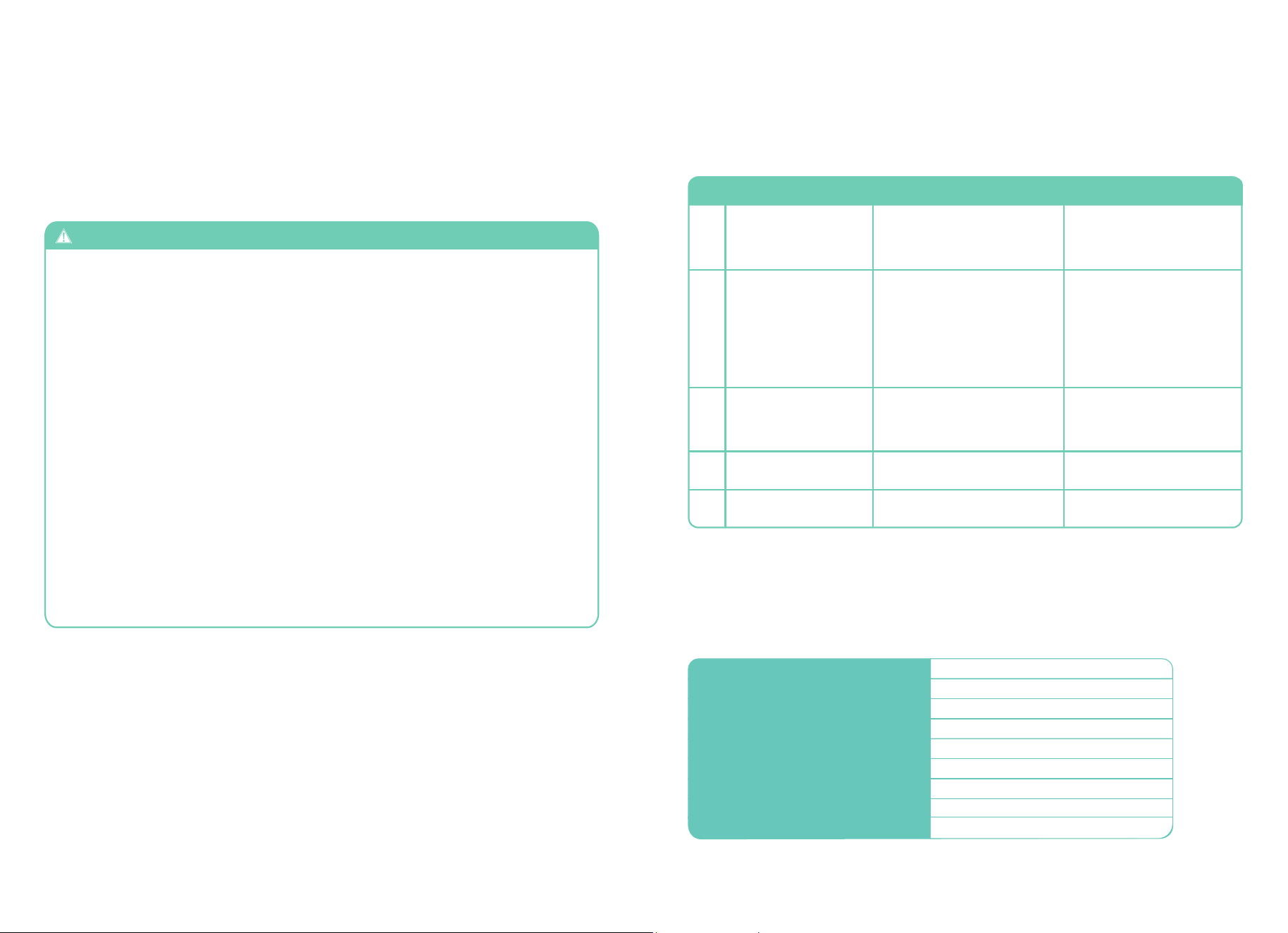
1
2
3
4
5
No need to take any
measures
Noise is heard while in
use
Massage Chair does not
start
The air hose is blockedAirbag malfunction
No. Symptoms Possible SolutionPossible Causes
Reduce the load and try again
These noises are normal and
arise from friction between the
massage rollers and the faux
leather cover
- The power cord is not
secured into the socket
- Not switched ON
- The fuse is blown
The volume is turned to the
lowest setting
Backrest or footrest can
not raise or recline
No music comes from
the speaker
Excessive load has been pressed
on the backrest or legrest
Adjust the speaker volume
from the mobile device. Make
sure Bluetooth setting on chair
and phone are both ON
Straight the air hose and
clearout the blockage
- Insert the power plug properly
into the power socket
- Replace only with a fuse of
same type and rating
-
To avoid risk of electric shock, connect this unit to a properly grounded outlet only. See
Grounding Instructions on pg. 7.
- Always unplug massage chair from the electrical outlet immediately after use and
before cleaning. An appliance should never be left unattended when plugged in. To
disconnect, turn all controls to the off position, then remove plug from outlet.
- Do not use massage chair and unplug from outlet during thunder or lightning storms,
and before putting on or taking off parts.
- To ensure safe operation, power must be supplied only at standard 110 voltage, to the
specifications of the appliance. Confirm that the power voltage stated on the rating
label corresponds to your local electricity supply.
- The massage chair should be used only with the power supply unit provided. Do not
use with any other power source.
- Do not use a wet or damp hand to unplug the cord to avoid electric shock.
- Do not pull on the power cord to unplug. Grip by plastic end nearest outlet to unplug
power cord.
- Do not squeeze, over bend, pull hard, or twist the power cord.
- Keep the power cord away from heated surfaces.
- Do not carry or drag the chair by power cord or use cord as a handle.
- If there is any smoke or unusual smell while using massage chair, stop using
immediately and unplug the power cord.
- Never operate the chair if it has a damaged power cord or plug. If the power cord is
damaged, it must be replaced by the manufacturer or its service agent or a similarly
qualified person to avoid a hazard.
WARNING
Fixing Issues
If problem remains, please contact Infinity for maintenance.
Tip: Do not attempt to repair this product yourself, our company shall not be liable for the injury or damage caused by
any servicing without authorizations. Thank you for you cooperation
Spec
ifi
cat
i
ons
Model
Rated Current
Power Consumption
300
Dimension of Main Body (in)
Necessary Clearance to Wall (in)
Net Weight (lbs)
Shipping Weight (lbs)
Max. User Weight (lbs)
Voltage
Aura
®
Elite 4D
63.5” x 29.5” x 45.75” (LxWxH)
212
4”
245
1.5A
120V~
180W
- Turn on power switch on the
back of the base of the chair.
Then tap power button on tablet
26
Frequently Asked Questions
Q: I find the chair is too intense to be comfortable. What can I do?
Q: My chair is not performing as expected. What should I do?
Q: I can never seem to get in my Infinity Massage chair, someone is
always in it.
A: Your Infinity massage chair is an amazing combination of programming and robotics.
On occasion the chair just may need to be rebooted. To do this power down the chair and
unplug from the wall for 5 minutes then plug back in and power back up to see if it self-
healed. If you are still having an issue, give Infinity a call at 603-910-5000.
A: We know. It happens. Tell your friends to get their own Infinity Chair.
For more information and access to further questions, and resources, visit our website at
www.infinitymassagechairs.com
Fixing Issues
Q: I’m not a foot massage person, what should I do?
A: Your body needs to become acclimated to therapeutic massage. To be effective, the
massage techniques must compress the tissue in your body. We recommend the following
steps to help get started. Then over time as your body acclimates you can increase the
intensity by reducing the layers between you and the chair.
1. Use Pillow to reduce upper body intensity.
2. From the in-use display screen, tap manual and use the 4D Back setting to decrease the
intensity of the back massage mechanism (0=off, 1=soft, 2, 3, 4, 5=firm).
3. From the home display tap the Air Settings icon to adjust air massage region
- If a specific airbag is too intense, turn off full body and turn on only the airbags you want.
4. Adjust the recline on the tablet and quick access panel. More upright will be less intense.
Weightless Zero Gravity Recline will be more intense.
5. If after adjustments and attempt to acclimate, you still experience discomfort, discontinue
use and consult a physician.
A: Turn off Foot Reflexology Rollers. While in auto program in-use display screen simply tap
the foot rollers setting to turn off. While in Infinity control display screen, select additional
settings, and then tap the foot rollers setting to turn off.
Warranty
27
This Infinity Massage Chairs is protected by Infinity’s 5 Year U.S Residential Limited
Warranty. For more information, scan the QR code below and click on the Infinity Care
Residential Warranty tab.
SCAN CODE

28
72 Stard Road, Seabrook, NH 03874
603-910-5000
www.infinitymassagechairs.com
Version 1.1
72 Stard Road, Seabrook, NH 03874 | (603) 910-5000 | www.infinitymassagechairs.com
