INSTRUCTION MANUAL
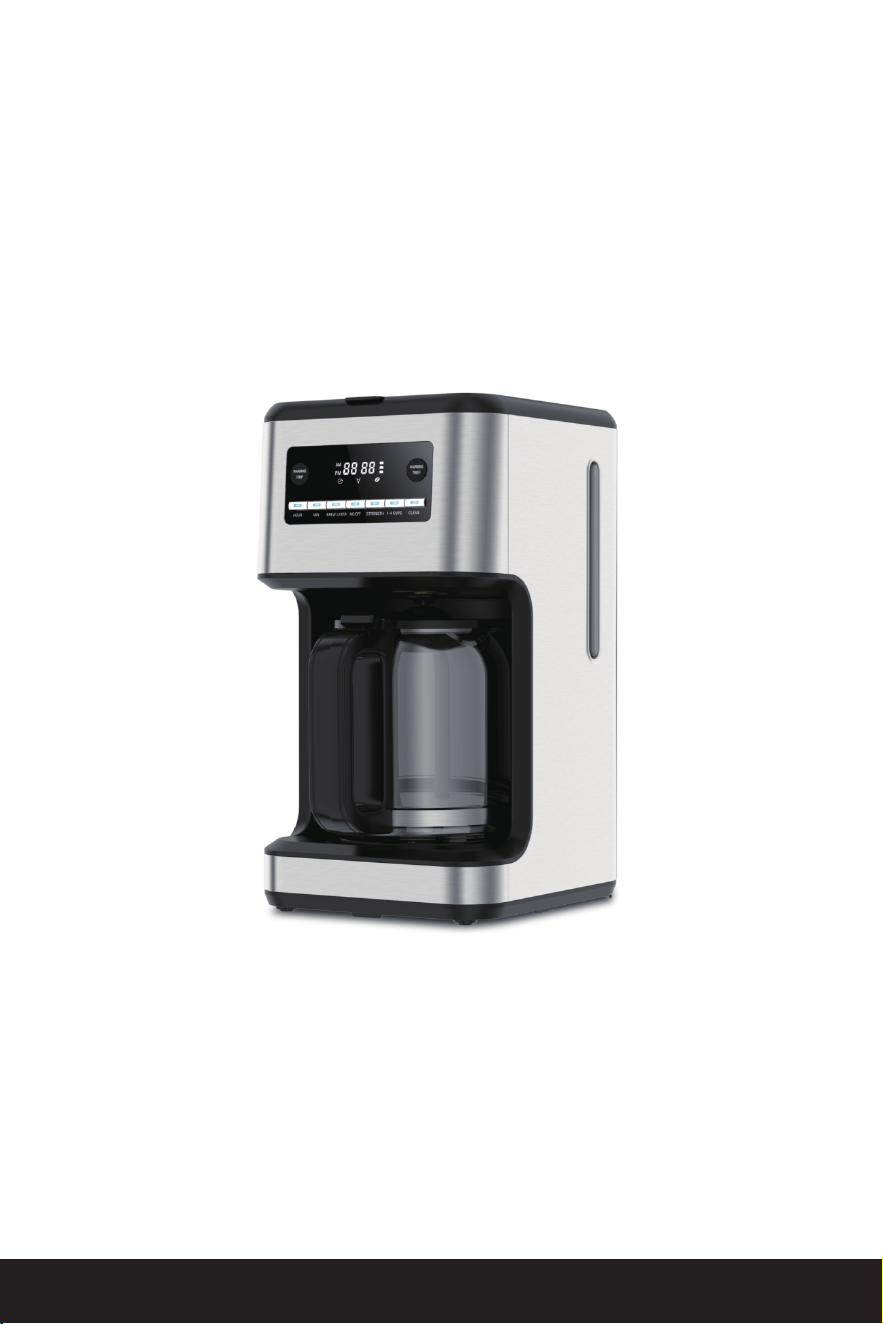
COFFEE MAKER
ITEM NO.: CM3751S
CM3751S-CS
MODEL NO.: CM9451-UL
Thank you for purchasing this product! If you have questions about the
product such as missing parts, damaged products, product assembling
and operation, etc, please contact us via customer service phone:
818-468-1528 or 661-435-8826.


1
IMPORTANT SAFEGUARDS
When using electrical appliances, basic safety precautions should always
be followed to reduce the risk of fire, electric shock, and/or injury to
persons including the following:
1. Read all instructions.
2. Do not touch hot surfaces. Use handles or knobs.
3. To protect against electric shock, do not place or immerse cord, plugs,
or appliance in water or other liquid.
4. This appliance is not intended for use by children or by persons with
reduced physical, sensory, or mental capacities, or lack of experience and
knowledge. Close supervision is necessary when any appliance is used
near children. Children should be supervised to ensure that they do not
play with the appliance. Keep the appliance and its cord out of reach of
children.
5. Unplug from outlet when either the appliance or display clock (if
provided) is not in use, and before cleaning. Allow to cool before putting
on or taking off parts, and before cleaning the appliance.
6. Do not operate any appliance with a damaged cord or plug or after the
appliance malfunctions, or has been damaged in any manner. Return
appliance to an Authorized Service Center for examination, repair or
adjustment. Do not attempt to replace or splice a damaged cord.
The use of an accessory not recommended by the appliance manufac-
turer for use with this appliance may result in fire, electric shock or injury
to persons.
7.Do not use outdoors.
8. Do not let cord hang over edge of table or counter, or touch hot surfac-
es.
9. Do not place on or near a hot gas or electric burner, or in a heated
oven.
10. Always attach plug to appliance first, then plug cord into the wall outlet
(for appliances with detachable cords). To disconnect, turn every control
to the off position, then remove plug from wall outlet.
11. Do not use appliance for other than intended use.
12. All lids should be closed during use.
13. Scalding may occur if the lid is removed or brew basket door is opened
during or immediately after the brewing cycles. Contents may be hot.
Allow to cool before opening the lid.
For appliances with glass containers:
The container is designed for use with this appliance. It must never be
used on a range top.
14. Do not set a hot container on a wet or cold surface.
15. Avoid sudden temperature changes, such as rinsing, washing, filling, or
immersing a hot container with cold liquids.

16. Do not use a cracked or chipped container or a container having a
loose or weakened handle.
17. Do not clean container with cleansers, steel wool pads, or other
abrasive material.
For appliances with service panels:
18. WARNING: TO REDUCE THE RISK OF FIRE OR ELECTRIC SHOCK, DO NOT
REMOVE THIS COVER. NO USER-SERVICEABLE PARTS INSIDE. REPAIR SHOULD
BE DONE BY AUTHORIZED SERVICE PERSONN.
2
SAVE THESE INSTRUCTIONS
HOUSEHOLD USE ONLY
POLARIZED PLUG
This appliance has a polarized plug, (one blade is wider than the other).
As a safety feature to reduce the risk of electrical shock, this plug is
intended to fit in a polarized outlet only one way. If the plug does not fit
fully in the outlet, reverse the plug. If it still does not fit, contact a qualified
electrician. Do not attempt to defeat this safety feature or modify the plug
in any way. If the plug fits loosely into the AC outlet or if the AC outlet feels
warm, do not use that outlet.
POWER CORD INSTRUCTIONS:
a) A short power-supply cord (or detachable power-supply cord) is
provided to reduce risks resulting from becoming entangled in or tripping
over a longer cord.
b) Longer detachable power-supply cords or extension cords are avail-
able and may be used if care is exercised in their use.
c) If a long detachable power-supply cord or extension cord is used:
1) The marked electrical rating of the detachable power-supply cord or
extension cord should be at least as great as the electrical rating of the
appliance;
2) If the appliance is of the grounded type, the extension cord should be a
grounding type 3-wire cord;
3) The longer cord should be arranged so that it will not drape over the
counter top or table top where it can be pulled on by children or tripped
over.
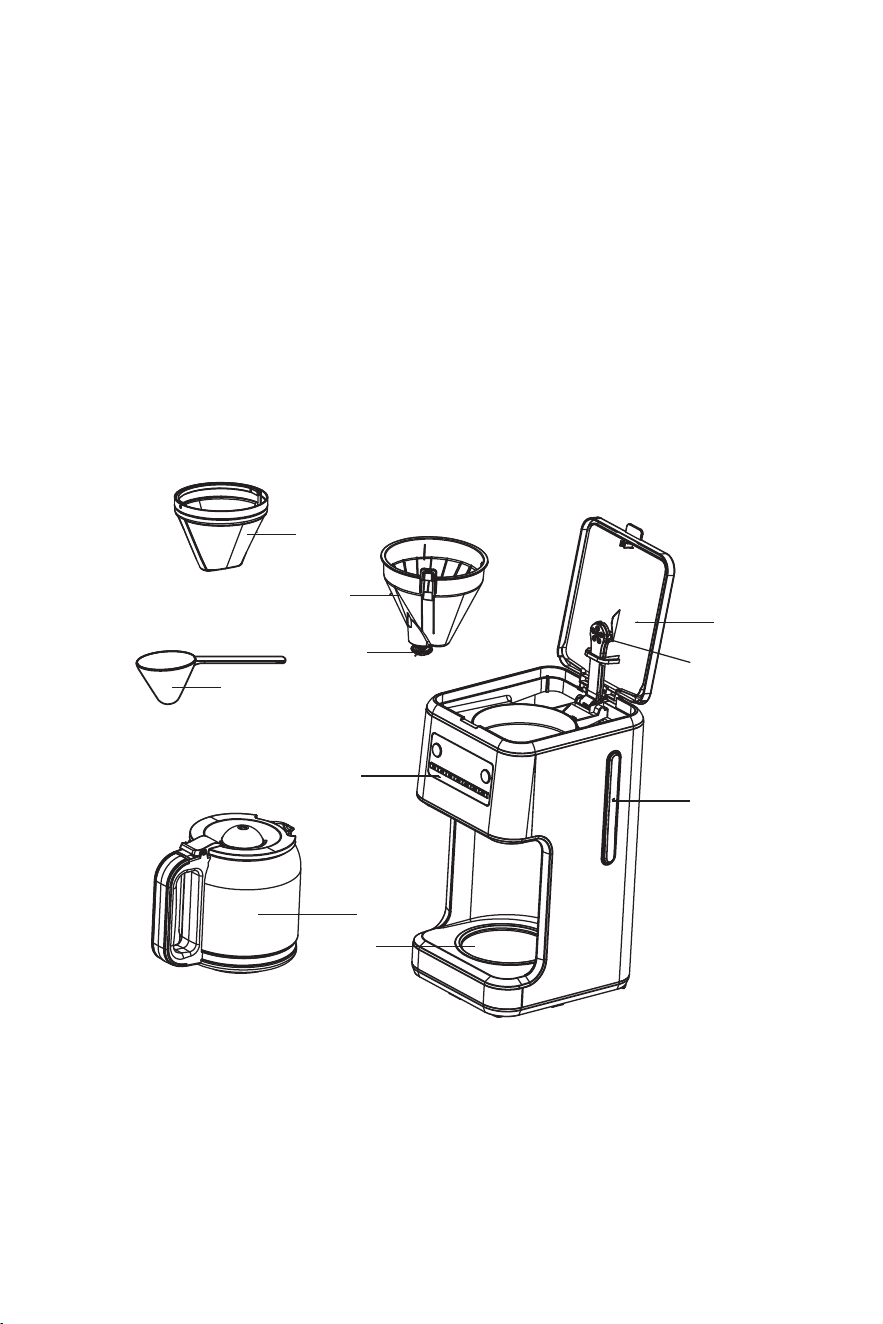
KNOWING YOUR COFFEE MAKER
3
5
9
7
6
2
8
4
1
10
3
1. Top cover
2. Control panel
3. Water level gauge
4. Warming plate
5. Filter
6. Funnel
7. Anti-drip valve
8. Carafe
9. Spoon
10. Sprayer
PRODUCT NOTICES
1. Place the appliance on a hard, flat, level surface to avoid interruption of
airflow underneath the coffeemaker.
2. Glass decanters only: Discard the decanter immediately if it is ever
boiled dry.
3. Glass decanters only: Protect the decanter from sharp blows, scratches
or rough handling.
4. Do not operate the appliance with an empty water tank.
5. Keep the area above the appliance clear during use, as hot steam will
escape the appliance.
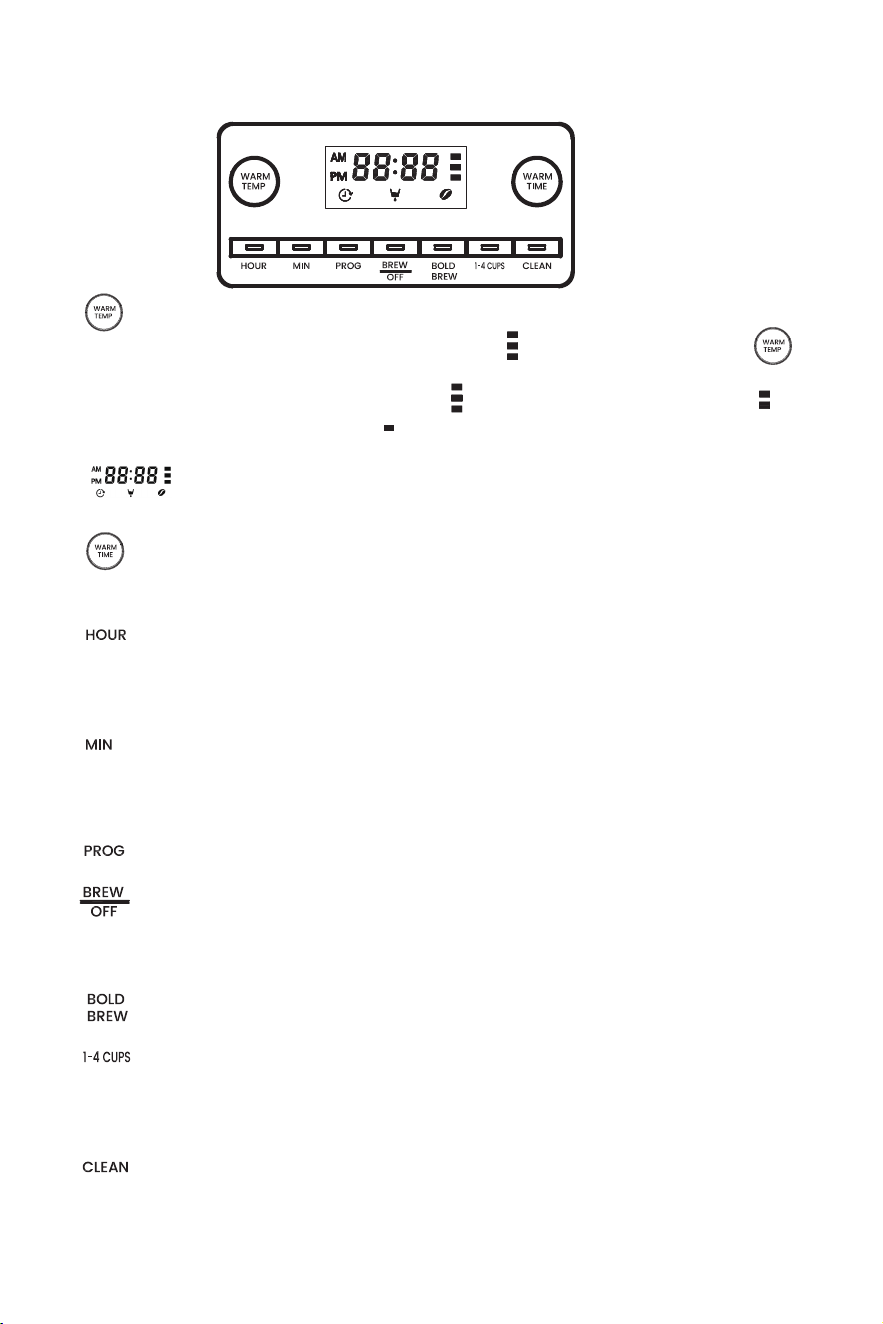
“ ” : This button is used for adjusting the warming temperature. The
default setting of warming temperature is “ ”. And you can press “ ”
to select your desired warming temperature. There are three warming
temperatures including High setting “ ” (176℉) , Medium setting “ ”
(167℉-176℉) and Low setting “ ” (158℉-167℉) for selection.
“ ”: It is the display for showing the icons for the corresponding
selected functions.
“ ”: This button is used for adjusting the warming time, which includes
1H, 2H, 3H and 4H.
“ ”: This button is used for adjusting the Hour of the time. One hour
can be increased after every press of the “HR” button. Hold and press the
“HR” button for 2 seconds to increase the hour fast.
“ ”: This button is used for adjusting the minute of the time. One minute
can be increased after every press of the “MIN” button. Hold and press the
“MIN” button for 2 seconds to increase the minute fast.
“ ”: This button is used for setting the “Delay Brew” function.
“ ”: It is On/Off button. Press the On/Off button, the appliance enters
into the working status. Press the On/Off button again, the appliance
enters into the standby mode.
4
CONTROL PANEL
“ ”: This button is used for activating the “Bold Brew” function.
“ ”: This button is used to brew less than 5 cups of coffee, and the
appliance will adjust the brew process for maximum flavor extraction
under the “1-4 cups” mode.
“ ”: This button is used for activating the “Clean” function.
8. To make stronger coffee, simply press the “ ” button, its corresponding
indicator illuminates and the icon “ ” shown in the display illuminates, then
the appliance enters into the mode for making stronger coffee. Press the
On/Off button “ ” , its corresponding indicator illuminates and the
icon “ ”
.
Check that all accessories are complete and the appliance is not dam-
aged. Fill the water tank with water to the MAX level and brew water for
several times without ground coffee, then discard the water. When
finished, the machine will emit three "beeps". Clean and dry all detachable
parts thoroughly according to the section “CLEANING & MAINTENANCE”.
USING YOUR COFFEE MAKER
1. Open the top cover and fill the water tank with drinking water. The water
level should not exceed the MAX level as indicated in the water tank.
2. Place the funnel into the funnel support, make sure it is assembled
correctly, otherwise the top cover cannot be closed. Place the filter in the
funnel.
3. Add ground coffee into the filter. Usually a cup of coffee needs a level
spoon of coffee powder, but you may adjust according to personal taste.
Close the top cover completely.
NOTE: The amount of coffee brewed will always be slightly less than the
amount of water poured in the water tank. This is due to the minimum
absorption of water by the coffee grounds.
4. Insert the carafe on the warming plate horizontally.
5. Insert the power plug into the outlet. The display will show “12:00 AM”, “12
00 AM” blinks, while “ : ” illuminates solidly.
6. Press the On/Off button “ ” , its corresponding indicator illuminates
and the icon “ ” shown in the display illuminates, and the appliance
starts to work. At that time, the "12 00 AM" illuminates solidly, while ":" blinks.
Press this button again, the corresponding indiator and the icon " "
extinguish and the machine enters into standby mode.
NOTE: The brewing process can be interrupted by pressing the On/Off
button “ ” at any time, and the appliance will continue brewing
once the On/Off button “ ” is pressed down again.
7. After the coffee-brewing is completed, remove the carafe and pour the
coffee for serving.
5
BEFORE THE FIRST USE
shown in the display illuminates, and the appliance starts to
work.

NOTE: The warming time can be adjusted when it does not exceed one hour
during the keep-warm process.
2. To adjust the temperature of the warming plate, press the “ ” button to
select the desired warming temperature including High, Medium or Low.
3. The adjustment can only be performed during the standby mode.
6
NOTE: The “Strong Brew” function can only be canceled by restting the
machine machine within 5 seconds after the “ ” button is pressed
down.
9. If brewing fewer than 5 cups, simply press the “ ” button, its
corresponding indicator illuminates, and the appliance will adjust the
brew process for maximum flavor extraction under the “1-4 cups” mode.
Press the On/Off button “ ” , its corresponding indicator illuminates
and the icon “ ” shown in the display illuminates, and the appliance
starts to work.
NOTE: The “1-4 cups” function can only be canceled by restting the
machine machine within 5 seconds after the “ ” button is pressed
down.
10. When the brewing process is completed, if you do not want to serve
immediately, keep the coffee maker be powered, and the coffee in the
carafe can be kept warm on the warming plate for 2 hours by default, and
the appliance will power off automatically after 2 hours if it has not been
manually disconnected at the end of brewing. And you can adjust the
warming time and warming temperature by following the operation
specified in the section of “CUSTOMIZING THE WARMING PLATE”. For an
optimum coffee taste, serve it just after brewing.
11. Always turn off the coffee maker and disconnect the power supply
when not in use.
NOTE: Be careful to pour the coffee out, otherwise you may be hurt as the
temperature of coffee just finished is high.
CUSTOMIZING THE WARMING PLATE
1. To adjust how long it stays warm, press the “ ” button to select the
desired warming time including 4 hours, 3 hours, 2 hours and 1 hour. After
chosen, the chosen hour will flash for 3 seconds, and then the warming
time is set.

7
DELAY-BREW FUNCTION
If you do not want the coffee maker to start working immediately, for
example now it is 8:10 AM, you hope that the coffee maker will automati-
cally start at 1:10 PM, firstly follow the operations of Step 1 to 5, then you
can set the Delay-Brew function as follows:
1. Press the “HR” and “MIN” buttons to set the current time, that is 8:10 AM.
NOTE: The time cycle is 12 hours.
2. Press “PROG” button once, the indicator of “PROG” button, the time and
the icon “ ” were shown in the display.
3. Press the “HR” and “MIN” buttons to set the auto-start time, that is 1:10PM.
4. After setting the auto-start time, press “PROG” button again, and the
appliance enters into the delay brew mode. At that time, the display
flashes for 3 seconds, showing the auto-start time already set, and then
shows the current time.
5. When the auto-start time is reached, the appliance starts to work.
NOTE: The delay-brew function can be canceled if “PROG” button is
pressed again during working.
CLEANING & MAINTENANCE
Cleaning
CAUTION: Be sure to unplug this appliance before cleaning. To protect
against electrical shock, do not immerse cord, plug or the appliance into
water or liquid. After each use, always make sure the plug is removed
from wall outlet firstly.
1. Clean all detachable parts after each use in warm, sudsy water.
2. Wipe the product’s exterior surfaces with a soft, damp cloth to remove
stains.
3. Water droplets may buildup in the area above the water outlet and drip
onto the product base during brewing. To control the dripping, wipe the
area with a clean, dry cloth after each use of the product.
4. Use a damp cloth to gently wipe the warming plate. Never use abrasive
cleaner to clean it.
5. Replace and keep all parts for next use.
Maintenance
REMOVING MINERAL DEPOSITS
Minerals (calcium/limestone) found in water will leave deposits in your
coffee maker and can affect performance.

2. Fill the water tank to capacity with a mixture of white vinegar and water.
3. Put the carafe on the warming plate and ensure it is placed in position.
4. Press the "CLEAN" button once, the "CLEAN" button indicator light and the
"CLEAN" shown in the display stay solid. The display shows " ". The
appliance enters into the descaling procedure.
HINTS FOR GREAT-TASTING COFFEE
1. A clean coffee maker is essential for making great-tasting coffee.
Regularly clean the coffee maker as specified in the section of “CLEANING
& MAINTENANCE” . Always use fresh, cold water in the coffee maker.
2. Store unused coffee powder at a cool, dry place. After opening a
package of coffee powder, reseal it tightly and store it in a refrigerator to
maintain its freshness.
3. For an optimum coffee taste, buy whole coffee beans and finely grind
them just before brewing.
4. Do not reuse coffee powder since this will greatly reduce the coffee's
flavor. Reheating coffee is not recommended as coffee is at its peak flavor
immediately after brewing.
5. Clean the coffee maker when over-extraction causes oiliness. Small oil
droplets on the surface of brewed, black coffee are due to the extraction
of oil from the coffee powder.
6. Oiliness may occur more frequently if heavily roasted coffee powder is
used.
8
1. Automatically remind you after every 90 uses to perform descaling. "CLEAN"
is shown in the display and flashes. (The screen flashing does not affect the
normal coffee making function, and is only displayed in standby mode).
1) The machine starts to brew water in the first 10 minutes with the "CLEAN"
button indicator light, "CLEAN" and " " stay solid.
2) After that, there is roughly 30 minutes of standing time with "CLEAN" and
" " stay solid and the "CLEAN" button indicator light flashes, in order for the
cleaner to react with the scale and remove it better.
3) The machine will brew for the next 10 minutes with the "CLEAN" button
indicator light, "CLEAN" and " " stay solid.
4) Once the cycle is over, the machine will beep three times and the "CLEAN"
button indicator light, "CLEAN" and " " extinguish automatically. The number of
cycles will be zeroed and recounted. The machine will return to standby mode.
6. Refill the water tank with clean water and press the “ ” button to rinse
the machine. Repeat for at least 3 times to remove the detergent and clean
the machine thoroughly.
5. The whole process takes about 50 minutes.
Thank you for purchasing this product! If you have any questions about
the product, such as missing parts, damaged products, product
assembling, and operation, please contact us via service number:
818-468-1528 or 661-435-8826.
IMPORTANT
Please call our customer service department for any consulting:
(8:30am - 5:30pm P.S.T.)
DATED PROOF OF PURCHASE IS REQUIRED FOR WARRANTY SERVICE.
AVIS
Veuillez appeler le service à la clientèle pour toutes questions au:
(8:30am - 5:30pm P.S.T.)
PREUVE D’ACHAT ORIGINALE REQUISE POUR SERVICE DE GARANTIE.
IMPORTANTE
Sólo hay que llamar nuestro departamento de servicio
al cliente en caso de tener preguntas o inquietudes:
(8:30am - 5:30pm P.S.T.)
SE REQUIERE PRUEBA DE COMPRA CON FECHA PARA SERVICIO BAJO
GARANTÍA.
���-���-���� or ���-���-����
818-468-1528
661-435-8826
818-468-1528
661-435-8826
818-468-1528
661-435-8826
V4