
Safety Information
Your system is designed and tested to meet the latest standards of safety for
information
technology equipment. However, to ensure your safety, it is important
that you read the
following safety instructions.
Setting up your system
•
Read and follow all instructions in the documentation before you operate your system.
•
Do not use this product near water or a heated source such as a radiator.
Set up the
system on a stable surface.
•
Openings on the chassis are for ventilation. Do not block or cover these openings.
Make sure you
leave plenty of space around the system for ventilation. Never insert
objects of any kind into the
ventilation openings.
•
Use this product in environments with ambient temperatures between 0°C
and 35°C.
•
If you use an extension cord, make sure that the total ampere rating of the devices
plugged into
the extension cord does not exceed its ampere rating.
Care during use
•
Do not walk on the power cord or allow anything to rest on it.
•
Do not spill water or any other liquids on your system.
•
When the system is turned OFF, a small amount of electrical current still ow. Always
unplug all power, modem, and network cables from the power outlets before cleaning
the system.
•
IF you encounter the following technical problems with the product, unplug the power
cord and contact a qualied service technician or your retailer:
■ e power cord or plug is damaged.
■ Liquid has been spilled into the system.
■ e system does not function properly even if you follow the operating instructions.
■ e system was dropped or the cabinet is damaged.
■ e system performance changes.
No disassembly
IMPORTA NT: e warranty does not apply to products that have been disassembly
by users.
Battery replacement and disposal
WARNING: Risk of explosion if battery is replaced by an incorrect type. Dispose of
used batteries according to local regulations.
Product disposal notice
IMPORTANT: is symbol of the crossed out wheeled bin indicates that
the product (electrical, electronic equipment, and mercury- containing
button cell battery) should not be placed in municipal waste. Check local
regulations for disposal of electronic products.
CE Mark Warning
is is a Class B product, in a domestic environment, this product may cause radio
interference, in which case the user may be required to take adequate measures.
FCC Compliance Statement
is device complies with Part 15 of the FCC Rules. Operation is subject to the following
two conditions:
(1) this device may not cause harmful interference, and
(2) this device must accept any interference received, including interference that
may cause undesired operation.
is equipment has been tested and found to comply with the limits for a Class B digital
device, pursuant to part 15 of the FCC Rules. ese limits are designed to provide
reasonable protection against harmful interference in a residential installation. is
equipment generates, uses and can radiate radio frequency energy and, if not installed
and used in accordance with the instructions, may cause harmful interference to radio
communications. However, there is no guarantee that interference will not occur in a
particular installation. If this equipment does cause harmful interference to radio or
television reception, which can be determined by turning the equipment o and on, the
user is encouraged to try to correct the interference by one or more of the following
measures:
- Reorient or relocate the receiving antenna.
- Increase the separation between the equipment and receiver.
- Connect the equipment into an outlet on a circuit dierent from that to which the
receiver is connected.
- Consult the dealer or an experienced radio/TV technician for help.
Button Battery Safety Notice
- Remove and immediately recycle or dispose of used batteries according to local
regulations and keep away from children. Do NOT dispose of batteries in household
trash or incinerate.
- Even used batteries may cause severe injury or death.
- Call a local poison control center for treatment information.
- Battery type: CR2032
- Battery voltage: 3V
- Non-rechargeable batteries are not to be recharged.
- Do not force discharge, recharge, disassemble, heat above (manufacturer's specied
temperature rating) or incinerate. Doing so may result in injury due to venting, leakage
or
explosion resulting in chemical burns.
- is product contains an irreplaceable battery.
- is icon indicates that a swallowed button battery can cause serious injury or death.
Please keep batteries out of sight or reach of children.
WARNING
• INGESTION HAZARD: This product contains a button cell or
coin battery.
• DEATH or serious injury can occur if ingested.
• A swallowed button cell or coin battery can cause Internal
Chemical Burns in as little as 2 hours.
• KEEP new and used batteries OUT OF REACH of CHILDREN
• Seek immediate medical attention if a battery is suspected to
be swallowed or inserted inside any part of the body.

UKCA Conformity
is device is in compliance with the essential requirements and other relevant provisions
of related UKCA Directives.
CE Conformity
is device is in compliance with the essential requirements and other relevant provisions
of related Directives.
CALIFORNIA, USA ONLY
e Lithium battery adopted on this motherboard contains Perchlorate, a toxic substance
controlled in Perchlorate Best Management Practices (BMP) regulations passed by the
California Legislature. When you discard the Lithium battery in California, USA, please
follow the related regulations in advance.
“Perchlorate Material-special handling may apply, see www.dtsc.ca.gov/hazardouswaste/
perchlorate”
AUSTRALIA ONLY
Our goods come with guarantees that cannot be excluded under the Australian Consumer
Law. You are entitled to a replacement or refund for a major failure and compensation for
any other reasonably foreseeable loss or damage caused by our goods. You are also entitled
to have the goods repaired or replaced if the goods fail to be of acceptable quality and the
failure does not amount to a major failure.

e terms HDMI® and HDMI High-Denition Multimedia Interface, and the HDMI
logo are trademarks or registered trademarks of HDMI Licensing LLC in the United
States and other countries.
INTEL END USER SOFTWARE LICENSE AGREEMENT
IMPORTANT - READ BEFORE COPYING, INSTALLING OR USING.
LICENSE. Licensee has a license under Intel’s copyrights to reproduce Intel’s Soware
only in its unmodied and binary form, (with the accompanying documentation, the
“Soware”) for Licensee’s personal use only, and not commercial use, in connection with
Intel-based products for which the Soware has been provided, subject to the following
conditions:
(a) Licensee may not disclose, distribute or transfer any part of the Soware, and You agree
to prevent unauthorized copying of the Soware.
(b) Licensee may not reverse engineer, decompile, or disassemble the Soware.
(c) Licensee may not sublicense the Soware.
(d) e Soware may contain the soware and other intellectual property of third party
suppliers, some of which may be identied in, and licensed in accordance with, an enclosed
license.txt le or other text or le.
(e) Intel has no obligation to provide any support, technical assistance or updates for the
Soware.
OWNERSHIP OF SOFTWARE AND COPYRIGHTS. Title to all copies of the Soware
remains with Intel or its licensors or suppliers. e Soware is copyrighted and protected
by the laws of the United States and other countries, and international treaty provisions.
Licensee may not remove any copyright notices from the Soware. Except as otherwise
expressly provided above, Intel grants no express or implied right under Intel patents,
copyrights, trademarks, or other intellectual property rights. Transfer of the license termi-
nates Licensee’s right to use the Soware.
DISCLAIMER OF WARRANTY. e Soware is provided “AS IS” without warranty of
any kind, EITHER EXPRESS OR IMPLIED, INCLUDING WITHOUT LIMITATION,
WARRANTIES OF MERCHANTABILITY OR FITNESS FOR ANY PARTICULAR PUR-
POSE.
LIMITATION OF LIABILITY. NEITHER INTEL NOR ITS LICENSORS OR SUPPLIERS
WILL BE LIABLE FOR ANY LOSS OF PROFITS, LOSS OF USE, INTERRUPTION OF
BUSINESS, OR INDIRECT, SPECIAL, INCIDENTAL, OR CONSEQUENTIAL DAMAG-
ES OF ANY KIND WHETHER UNDER THIS AGREEMENT OR OTHERWISE, EVEN
IF INTEL HAS BEEN ADVISED OF THE POSSIBILITY OF SUCH DAMAGES.
LICENSE TO USE COMMENTS AND SUGGESTIONS. is Agreement does NOT
obligate Licensee to provide Intel with comments or suggestions regarding the Soware.
However, if Licensee provides Intel with comments or suggestions for the modication,
correction, improvement or enhancement of (a) the Soware or (b) Intel products or
processes that work with the Soware, Licensee grants to Intel a non-exclusive, worldwide,
perpetual, irrevocable, transferable, royalty-free license, with the right to sublicense, under

Licensee’s intellectual property rights, to incorporate or otherwise utilize those comments
and suggestions.
TERMINATION OF THIS LICENSE. Intel or the sublicensor may terminate this license
at any time if Licensee is in breach of any of its terms or conditions. Upon termination,
Licensee will immediately destroy or return to Intel all copies of the Soware.
THIRD PARTY BENEFICIARY. Intel is an intended beneciary of the End User License
Agreement and has the right to enforce all of its terms.
U.S. GOVERNMENT RESTRICTED RIGHTS. e Soware is a commercial item (as
dened in 48 C.F.R. 2.101) consisting of commercial computer soware and commercial
computer soware documentation (as those terms are used in 48 C.F.R. 12.212), consistent
with 48 C.F.R. 12.212 and 48 C.F.R 227.7202-1 through 227.7202-4. You will not provide
the Soware to the U.S. Government. Contractor or Manufacturer is Intel Corporation,
2200 Mission College Blvd., Santa Clara, CA 95054.
EXPORT LAWS. Licensee agrees that neither Licensee nor Licensee’s subsidiaries will
export/re-export the Soware, directly or indirectly, to any country for which the U.S.
Department of Commerce or any other agency or department of the U.S. Government
or the foreign government from where it is shipping requires an export license, or other
governmental approval, without rst obtaining any such required license or approval. In
the event the Soware is exported from the U.S.A. or re-exported from a foreign destina-
tion by Licensee, Licensee will ensure that the distribution and export/re-export or import
of the Soware complies with all laws, regulations, orders, or other restrictions of the U.S.
Export Administration Regulations and the appropriate foreign government.
APPLICABLE LAWS. is Agreement and any dispute arising out of or relating to it will
be governed by the laws of the U.S.A. and Delaware, without regard to conict of laws
principles. e Parties to this Agreement exclude the application of the United Nations
Convention on Contracts for the International Sale of Goods (1980). e state and federal
courts sitting in Delaware, U.S.A. will have exclusive jurisdiction over any dispute arising
out of or relating to this Agreement. e Parties consent to personal jurisdiction and venue
in those courts. A Party that obtains a judgment against the other Party in the courts iden-
tied in this section may enforce that judgment in any court that has jurisdiction over the
Parties.
Licensee’s specic rights may vary from country to country.

PB 1
Product Specications/ Especicaciones del producto/
製品仕様 /
Технические характеристики/
产品规范
CPU/ CPU/
CPU
/ ЦП/
CPU
Supports 14
th
& 13
th
Gen Intel® Core
TM
Processors (Raptor Lake-U & Raptor Lake-U
Refresh)(Intel® Core™ i5-1335U Processor)/
Supports 12
th
Gen Intel® Core
TM
Processors
(Alder Lake-U) (Celeron® Processor 7305U)
GPU/ GPU/
GPU
/
Видеоадаптер/
GPU
Intel® X
e
Graphics Architecture (Gen 12)
M/B Form Factory/
Factor de forma de la placa base/
M/B フォームファクトリー /
Форм-фактор материнской
платы/
M/B 规格尺寸
Proprietary design (7.0” x 5.7")
Diseño exclusivo (7.0” x 5.7")
専用設計 (7.0 インチ x 5.7 インチ )
Фирменная конструкция (17,8х14,5см;
7,0 x 5,7дюйма)
专利设计 (7.0
”
x 5.7")
Memory/ Memoria/
メモリ /
Память/
内存
2 x SO-DIMM DDR5-5200 (14
th
& 13
th
Gen
Intel® Core
TM
Processors)/DDR5-4800 (12
th
Intel® Core
TM
Processors)
Max. 96GB (non-ECC)
M.2 slot/ Ranura M.2/
M.2 ス ロット /
Слот M.2/
M.2 插槽
Supports 2 x M.2 SSD slots
(Support PCIe 3.0x4/ SATA3 type 2260/ 2280
M.2 SSD & PCIe 4.0x4 type 2260/ 2280 M.2
SSD)
Compatible con 2 x ranura M.2 SSD
(Compatible con 2260/ 2280 M.2 SSD tipo
PCIe 3.0x4/ SATA3 & 2260/ 2280 M.2 SSD
tipo PCIe 4.0x4)
2 x M.2 SSD スロットに 対 応
(PCIe 3.0x4/ SATA3 タイプ 2260/ 2280 M.2
SSD & PCIe 4.0x4 タイプ 2260/ 2280 M.2 SSD
に対応 )
Предусмотрен 2 слот M.2 SSD
(поддерживаются SSD-накопители M.2
PCIe 3.0x4/ SATA3 типа 2260/ 2280 & SSD-
накопители M.2 PCIe 4.0x4 типа 2260/ 2280)
支持 2 x M.2 SSD 插槽
(支持 PCIe 3.0x4/ SATA3 类型 2260/ 2280
M.2 SSD & PCIe 4.0x4 类型 2260/ 2280 M.2
SSD)

2 3
WLAN/ WLAN/
WLAN/
Беспроводная сеть/
WLAN
Supports M.2 (2230) WiFi/ BT module and
Intel® CNVio/CNVio2 (Integrated WiFi/
BT)
Compatible con módulo M.2 (2230) WiFi/ BT
M.2 (2230) Wi-Fi/BT モジュール に /
Intel®
CNVio/CNVio2
対応
Поддерживается модуль WiFi/ BT M.2
(2230) / Intel® CNVio/CNVio2
支持 M.2 (2230) WiFi/ BT 模块 /
Intel®
CNVio/CNVio2
Audio codec/ Códec de audio/
オーディオコーデック /
Аудиокодек/
音频编解码器
ALC269 codec/ Códec ALC269/
ALC269 コーデック /
ALC269/
ALC269 编解
码器
Power Adaptor/ Adaptador de
alimentación/
電 源アダプタ /
Блок питания/
电源适配器
65W/ 19V
65W/ 19V
65W/ 19V
65Вт/ 19В
65W/ 19V
Front I/O / E/S en el frontal/
前面出入力 /
Фронтальные
порты ввода-вывода/
前 I/O
Card Reader (SD/SDHC/SDXC/MMC)*1 /
USB 2.0*2/ USB 3.2 Gen2 Type-A*2/ USB 4.0
underbolt
TM
4 Type-C*1
Lector de tarjeta (SD/SDHC/SDXC/MMC)*1 /
USB 2.0*2/ USB 3.2 Gen2 Tipo-A*2/ USB 4.0
underbolt
TM
4 Tipo-C*1
カードリーダー (SD/SDHC/SDXC/MMC)*1 /
USB 2.0*2/ USB 3.2 Gen2
Type-A*2/
USB 4.0 underbolt
TM
4
Type-C*1
1 кардридер (SD/SDHC/SDXC/MMC);
1 порт USB 2.0*2;
2 порта USB 3.2 Gen2 Type-A; 1 порта
USB 4.0 underbolt
TM
4 Type-C
读卡器 (SD/SDHC/SDXC/MMC)*1/ USB 2.0*2
/ USB 3.2 Gen2 A 型 *2/
USB 4.0 underbolt
TM
4
C 型 *1

2 3
Rear I/O/ E/S en posterior/
リア I/O/
Тыловые порты
ввода-вывода/
后 I/O
HDMI*1 (4K@60 Hz)/ VGA*1/ USB Type-C
/
USB 3.2 Gen2 Type-A*2/ LAN*1/ DC Jack/
Headphone/Headset Jack
HDMI*1 (4K@60 Hz)/ VGA*1/ USB
Tipo C
/
USB 3.2 Gen2 Tipo-A*2/ LAN*1/ Conector
CC/ Conector para auriculares y auriculares
con micrófono
HDMI*1 (
4K@60 Hz
)/ VGA*1/ USB
Type C
/
USB 3.2 Gen2 Type-A*2/ LAN*1/
DC ジャック / ヘッド フォン / ヘッド セ ットジャ
ック
1 порт HDMI (4K@60 Hz); 1 порт VGA;
USB Type C /
2 порта USB 3.2 Gen2 Type-A;
1 порт ЛВС; вход питания пост.тока;
Гнездо для наушников или гарнитуры
HDMI*1(
4K@60 Hz
)/ VGA*1/
USB
C 型
/
USB 3.2 Gen2 A 型 *2/ LAN*1/ DC
插孔 / 耳机插孔 / 耳机 / 头戴式耳机插孔
LED Indicator/
Indicador LED/
LED インジケータ /
Светодиодный индикатора/
LED 指示灯
Power LED (Color: blue)
LED de energía (Color: azul)
電源 LED ( 色 : 青 )
Индикатор питания (синего цвета)
电源 LED(颜色:蓝 )
VESA mount/ Montaje VESA/
VESA マウント
/
Крепление VESA/
VESA 底座
Supports VESA standard 100x100mm &
75x75mm
Compatible con VESA estándar 100 x 100 mm
y 75 x 75 mm
VESA 規格 100x100mm および 75x75mm に
対応
Совместимо с кронштейнами стандарта
VESA 100x100мм и 75x75мм
支持 VESA 标准 100x100mm & 75x75mm
Kensington lock/ Cable de
seguridad Kensington/
Kensington ロック /
Противокражный замок
Kensington/
Kensington 锁
Reserved at the rear cover
Reservado en la cubierta posterior
背面カバーに予約済
На задней панели
预留在后盖上

4 5
Stand/ Soporte/
スタンド /
Подставка/
支架
128.7x72.2x24.3mm
128,7 x 72,2 x 24,3 mm
128.7x72.2x24.3mm
128,7x72,2x24,3мм
128.7x72.2x24.3mm
Dimension/ Dimensiones/
寸法 /
Габариты/
尺寸
194mm (L)*150mm (W) *26mm (H)
194 mm (Largo) * 150 mm (Ancho) * 26 mm
(alto)
194mm (長さ ) x 150mm ( 幅 ) x 26mm ( 高さ)
194 (Д) х 150 (Ш) х 26 (В) мм
194mm (L)*150mm (W) *26mm (H)
OS/ SO/
OS/
Операционные
системы/
操作系统
Windows® 10 64-bit / 11 64-bit
Windows® 10 64 bit / 11 64 bit
Windows® 10 64 ビット / 11 64 ビット
Windows® 10 64-разрядная/ 11
64-разрядная
Windows® 10 64 位 / 11 64 位
Safety/EMC Certication/
Certicado Seguridad/EMC/
安全 /EMC 認定 /
Сертификаты безопасности
и электромагнитной
совместимости/
安全 /EMC 认证
FCC, CE
ErP/EuP ready (ErP/EuP ready power supply
is required)
FCC y CE
Preparado para ErP/EuP (se necesita una
fuente de alimentación preparada para ErP/
EuP)
FCC、CE
ErP/EuP Ready(ErP/EuP 対応電源供給装置
が必要です)
FCC, CE
Совместимость с ErP/EuP (необходим блок
питания, соответствующий стандарту ErP/
EuP)
FCC、CE
ErP/EuP 支持(需要支持 ErP/EuP 的电源)
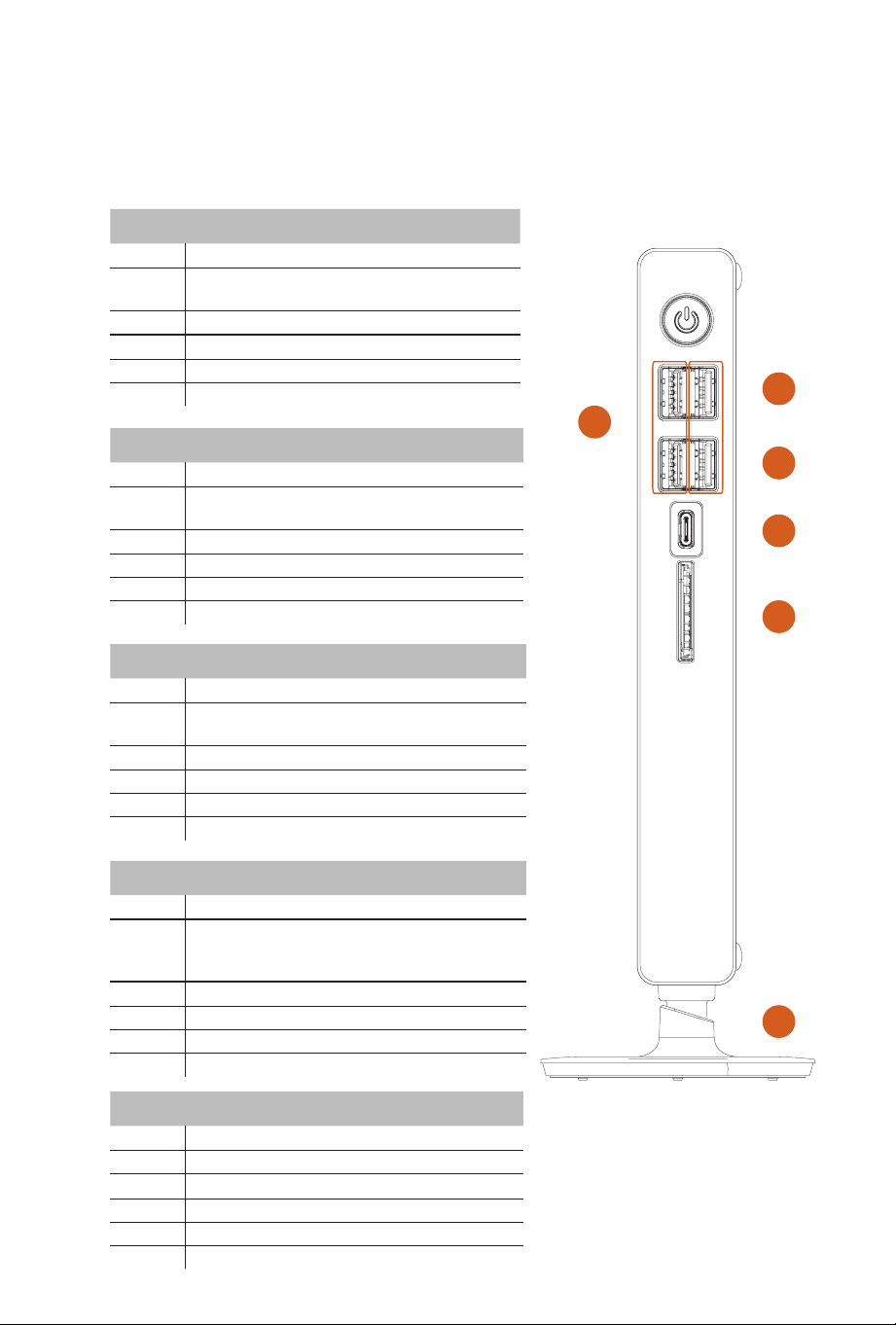
4 5
No. Feature Item
1 USB 2.0 Port
2
USB 2.0 Port
(USB Keyboard Wake-up
function supported)
3 USB 4.0 underbolt
TM
4 Type-C Port
4 Card Reader
5 Base stand screw
6 USB 3.2 Gen2 Type-A Ports
Nº Producto característico
1 Puerto USB 2.0
2
Puerto USB 2.0
(Se admite la función de
activación del teclado USB)
3 Puerto USB 4.0 underbolt
TM
4 Tipo C
4 Lector de tarjeta
5 Tornillo de base del soporte
6 Puertos USB 3.2 Gen2 Tipo A
System Front View/ Vista frontal del sistema/
システム前面図 /
Вид системы спереди/
系统正视图
3
4
5
6
1
2
番号 機能 /項目
1 USB 2.0 ポート
2
USB 2.0 ポート
(USB キ ー ボ ード ウェイク
アップ 機 能 対 応 )
3
USB 4.0 underbolt
TM
4
Type-C ポート
4 カードリーダー
5 ベーススタンド用ネジ
6
USB 3.2 Gen2 Type-A ポート
№ Компоненты
1 Порты USB 2.0
2
Порты USB 2.0
(Поддерживается
функция пробуждения от USB-
клавиатуры)
3 Порт USB 4.0 underbolt
TM
4 Type-C
4 Кардридер
5 Винт подставки
6 Порты USB 3.2 Gen2 Type-A
编号 功能项
1 USB 2.0 端口
2
USB 2.0 端口
(支持 USB 键盘唤醒功能)
3
USB 4.0 underbolt
TM
4
C 型端口
4 读卡器
5 底座支架螺丝
6
USB 3.2 Gen2 A 型端口
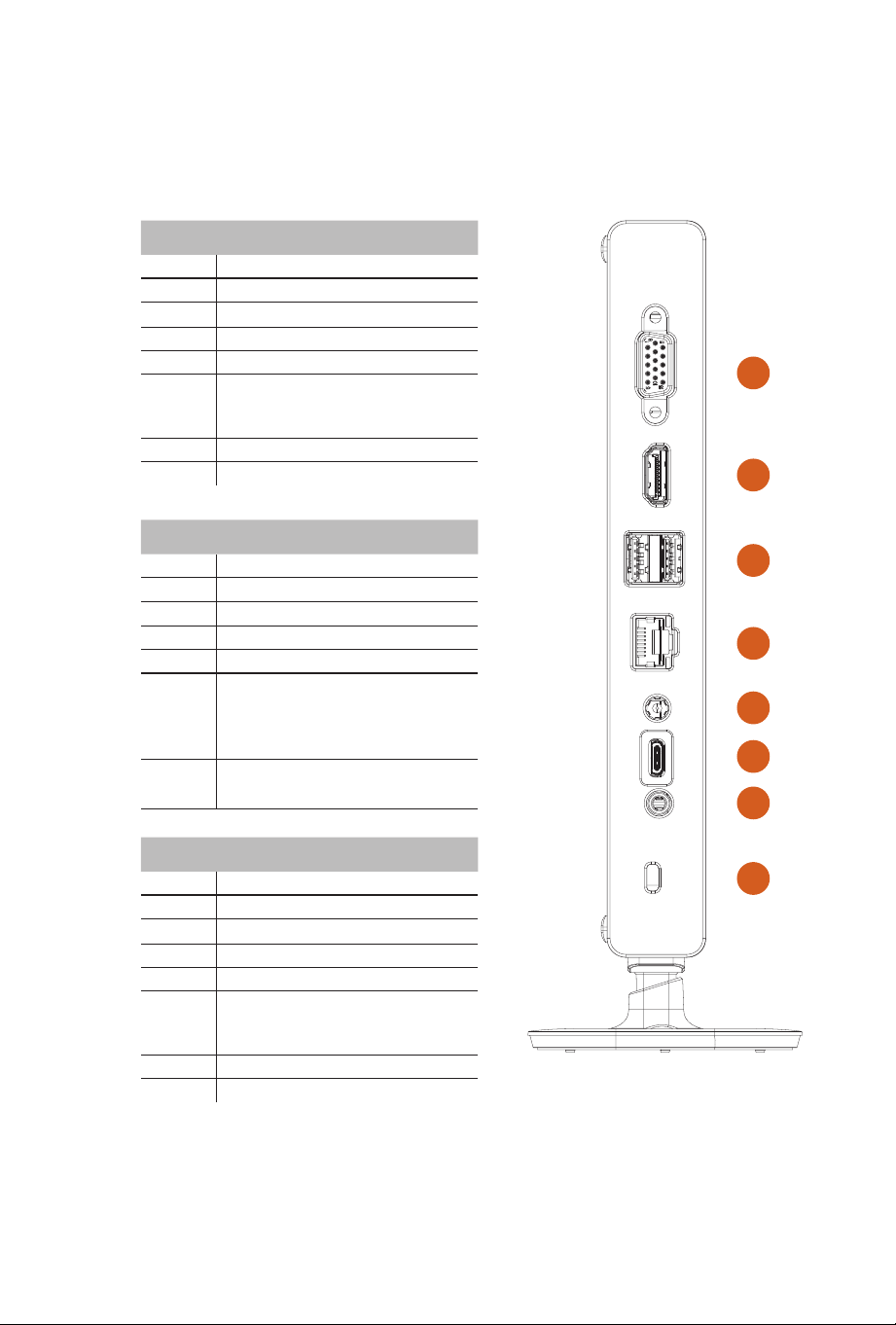
6 7
No. Feature Item
1 D-Sub Output
2 HDMI Output
3 USB 3.2 Gen2 Ports
4 LAN Port
5 DC IN
6 USB Type-C Port
*Supports USB Type-C Alt Mode (only
supports 20V Power Delivery in)
7 Headphone/Headset Jack
8 Kensington lock
Nº Producto característico
1 Salida D-Sub
2 Salida HDMI
3 Puertos USB 3.2 Gen2
4 Puerto LAN
5 Entrada DC
6 Puerto USB Tipo-C
*Admite el modo Alt USB Tipo-C (solo
admite entrada de suministro de energía
de 20 V)
7 Conector para auriculares y
auriculares con micrófono
番号 機能 /項目
1 D-Sub 出力
2 HDMI 出力
3 USB 3.2 Gen2 ポート
4 LAN ポ ート
5 DC 入力
6 USB Type-C ポート
*
USB Type-C Alt モ ードに対 応 (20 V 電
源供給のみに対応 )
7 ヘッド フォン / ヘッドセ ットジャック
8 Kensington ロック
System Rear View/ Vista trasera el sistema/
システム背面図 /
Вид системы сзади/
系统后视图
1
2
3
4
8
7
6
5
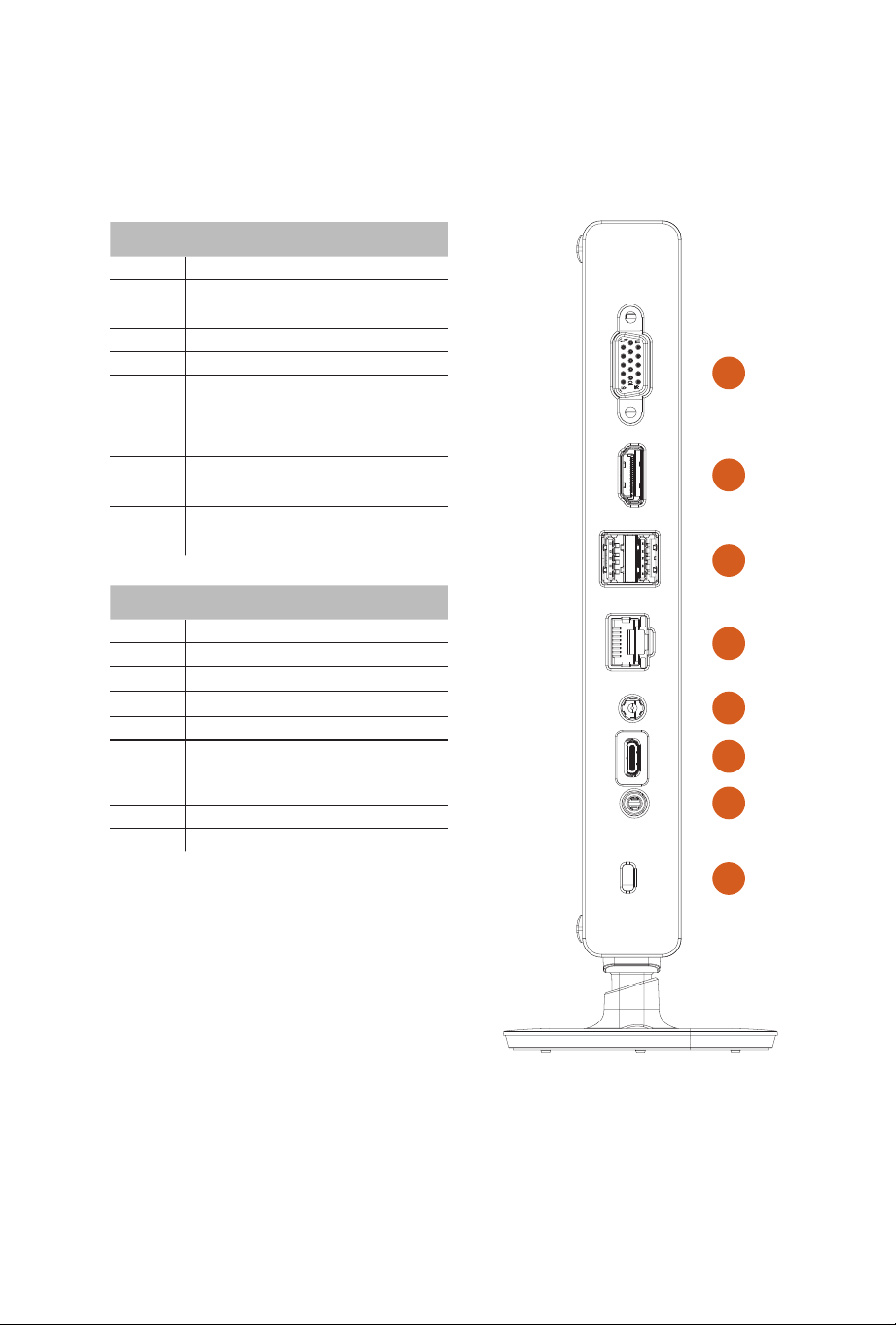
6 7
№ Компоненты
1 Выход D-Sub
2 Выход HDMI
3 Порты USB3.2 Gen2
4 Порт LAN
5 Вход питания постоянного тока
6 Порт USB Type-C
*Поддерживает только USB Type-C
в режиме Alt Mode (поддерживает
только питание 20 В)
7 Гнездо для наушников или
гарнитуры
8 Противокражный замок
Kensington
编号 功能项
1 D-Sub 输出
2 HDMI 输出
3 USB 3.2 Gen2 端口
4 LAN 端口
5 DC IN
6 USB Type-C 端口
*
支持 USB Type-C Alt 模 式( 仅 支 持
20V 供电输入)
7 耳机 / 头戴式耳机插孔
8 Kensington 锁
System Rear View/ Vista trasera el sistema/
システム背面図 /
Вид системы сзади/
系统后视图
1
2
3
4
8
7
6
5
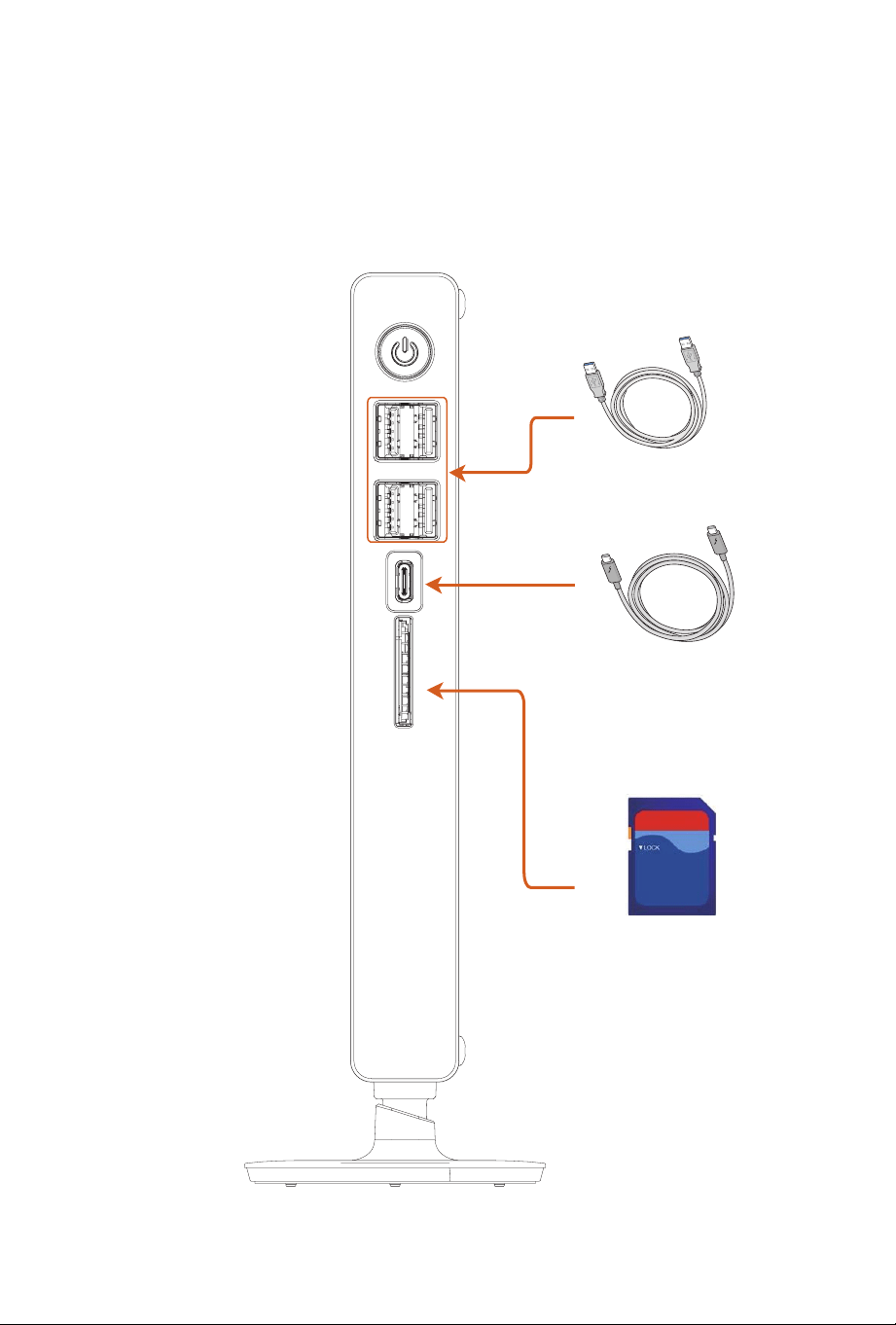
8 9
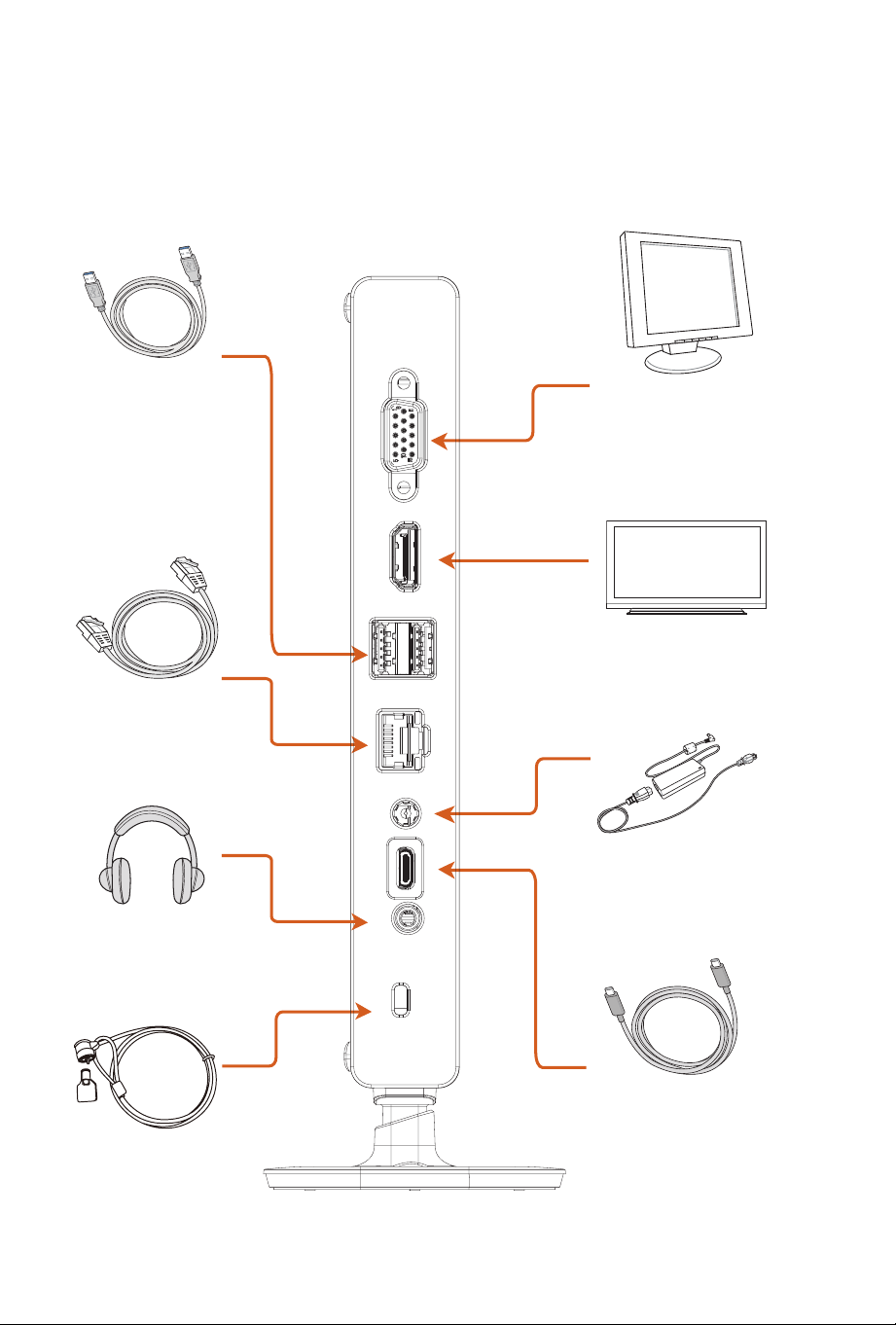
Connection Examples (Front)/ Ejemplos de conexión
(Frontal)/
接続例 ( 前面 )/
Примеры подключений
(фронтальные порты)/
连 接 示 例( 前 )
USB Cable
underbolt
TM
Type C Cable
SD Cards
Cable USB/
USB ケーブル
/
Кабель USB/
USB 线
Cable underbolt
TM
Tipo C/
underbolt
TM
Type C ケーブル
/
Кабель underbolt
TM
Type C/
C 型
underbolt
TM
线
Tarjetas SD/
SD カード
/
Карты SD/
SD 卡
Cable USB/
USB ケーブル
/
Кабель USB/
USB 线
Auriculares y auriculares con micrófono/
ヘッ
ド フォン / ヘッドセット
/
Наушники/гарнитура/
耳机 / 头戴式耳机
8 9
underbolt
TM
Type C Cable
Type C Cable
Cable Tipo C/
Type C ケーブル
/
Кабель Type C/
C 型 线
Connection Examples (Rear)/ Ejemplos de conexión
(Traseros)/
接続例 ( 背面 )/
Примеры подключений
(тыловые порты)/
连 接 示 例( 后 )
USB Cable
Computer Display
LAN Cable
HD TV
Kensington lock
Headphone/Headset
Power Adapter
Cable USB/
USB ケーブル
/
Кабель USB/
USB 线
Pantalla del ordenador/
コンピューターディスプレイ
/
Компьютерный монитор/
计算器显示器
Televisión HD/
HD テレビ
/
ТВ высокой четкости/
HD TV
Adaptador de alimentación/
電 源 アダ プタ
/ Блок питания/
电源适配器
Cable LAN/
LAN ケーブル
/
Сетевой кабель/
LAN 线
Auriculares y auriculares con micrófono/
ヘッ
ド フォン / ヘッドセット
/
Наушники/гарнитура/
耳机 / 头戴式耳机
Cable de seguridad Kensington/
Kensington ロック
/
Противокражный замок
Kensington/
Kensington 锁
10 11
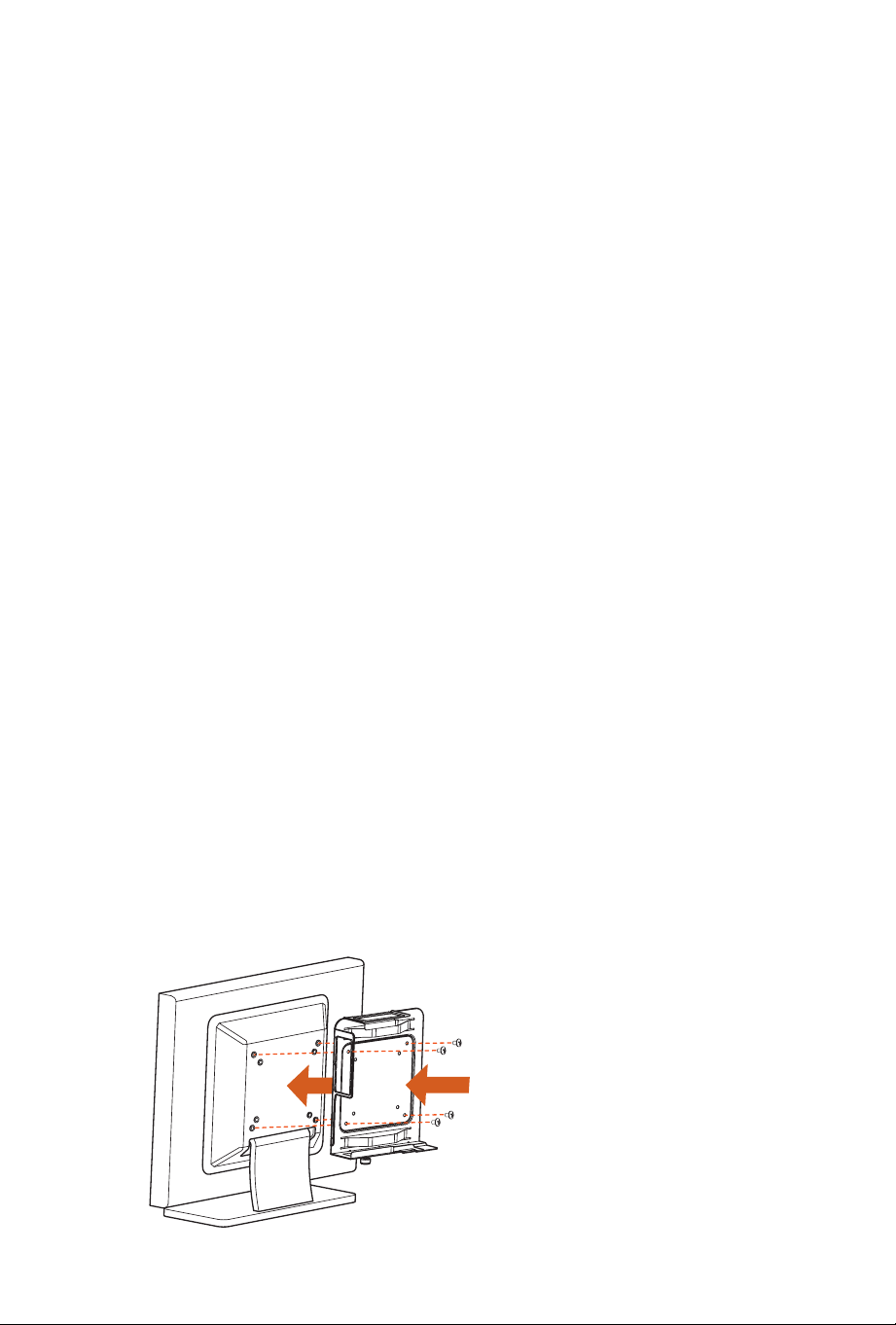
Vesa Mount/Stand Installation/ Montaje VESA/Instalación
de soporte/
Vesa マウント / スタンドの取り付け
/
Установка кронштейна VESA и подставки/
Vesa 底座 / 支架安装
Installing the VESA Bracket
Attach the VESA Bracket to the rear of a compatible display using the four screws.
*Choose mounting holes depending on the mounting hole pattern of your LCD screen
(75 mm × 75 mm or 100 mm × 100 mm).
Instalar el soporte VESA
Conecte el soporte VESA a la parte trasera de una pantalla compatible utilizando los 4
tornillos.
*Escoja los oricios de montaje dependiendo del patrón de oricio de montaje de su
pantalla LCD (75 mm x 75 mm o 100 mm x 100mm).
VESA ブラケットの取り付け
4 本のネジを使用して、互換性のあるディスプレイの背面に VESA ブラケットを取り付け
ます。
* LCD 画 面 の 取り付 け 穴 パターン (75 mm × 75 mm または 100 mm × 100 mm) に応じ
て 、取 り 付 け 穴 を 選 択 し ま す 。
Установка кронштейна VESA
Прикрепите кронштейн VESA на заднюю панель совместимого монитора с
помощью 4-х винтов.
* Выберите крепежные отверстия, соответствующие отверстиям на ЖК-мониторе
(75 × 75мм или 100 × 100мм).
安装 VESA 托架
使用四枚螺丝将 VESA 托 架 连 接 到 兼 容 显 示 器 的 后 侧。
* 根据 LCD 显示屏的安装孔图纸选择安装孔 (75 mm × 75 mm or 100 mm × 100 mm)。
10 11
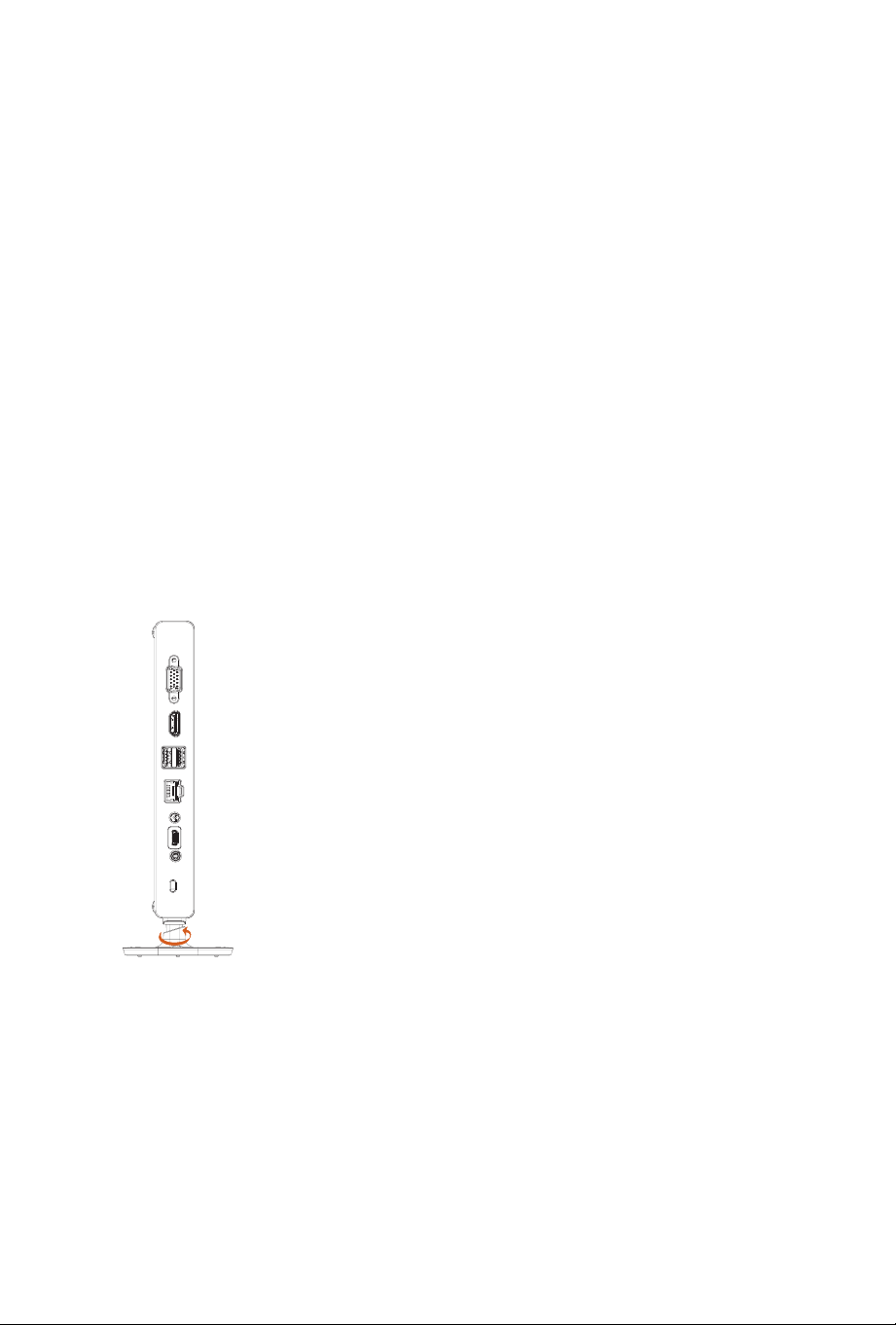
Installing the Base Stand
Attach the base stand to the unit, then hand tighten the screw.
Instalar la base del soporte
Conecte la base del soporte a la unidad, y a continuación, apriete los tornillos.
ベーススタンドの取り付け
ベーススタンドをユニットに取り付け、ネジを手で締めます。
Установка подставки
Прикрепите подставку к компьютеру и вручную затяните винт.
安装底座支架
将底座支架连接到装置上,然后用螺丝拧紧。
12 13
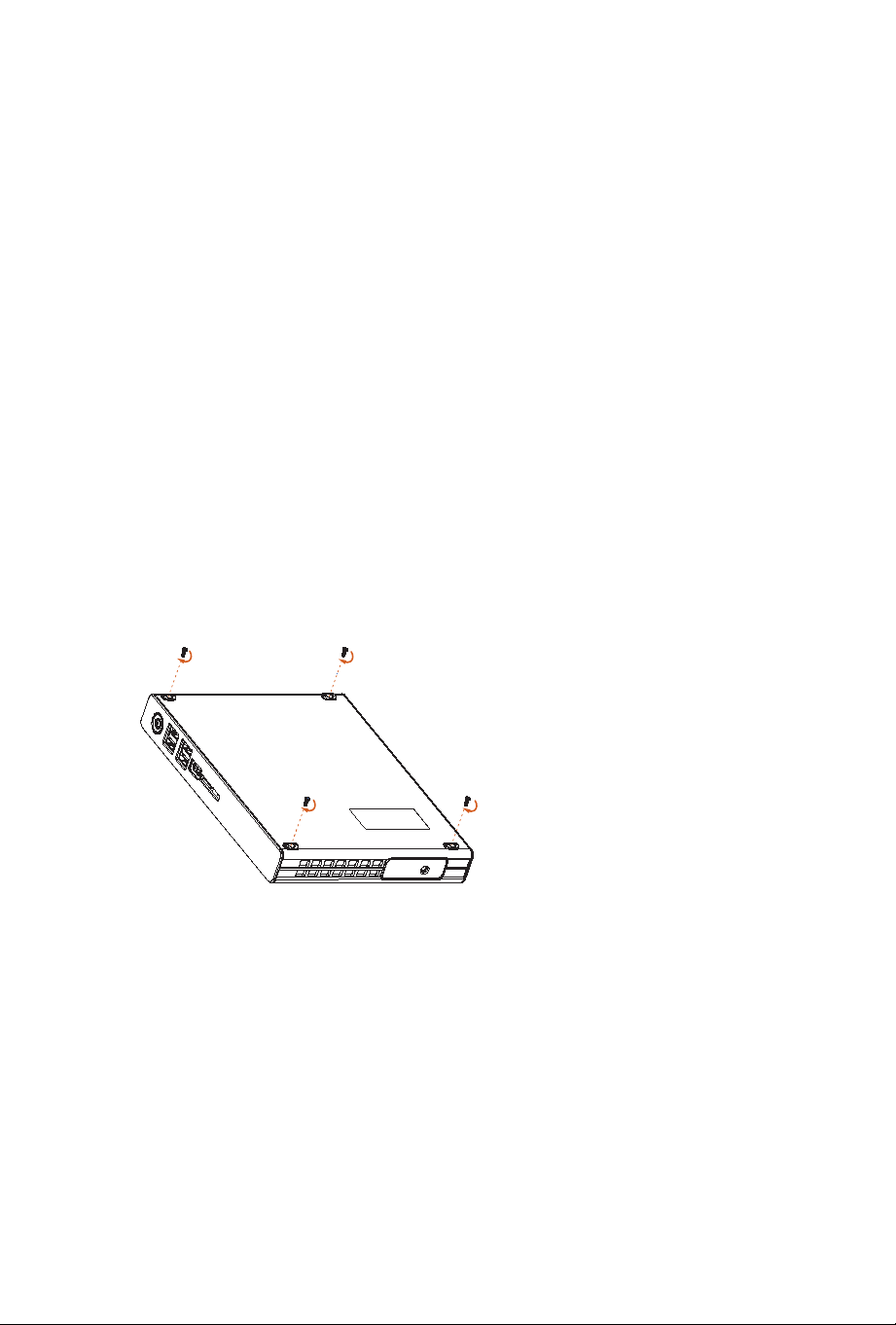
Key Parts Installation
Removing the Top Case
Remove the four screws rst.
Sacar la carcasa superior
Primero quite los cuatro tornillos.
トップカバー の 取り外し
最初に、ネジを取り外します。
Снятие верхней крышки корпуса
Сначала удалите 4 винта.
拆除顶部机箱
先拧下四枚螺丝。
Partes clave de la instalación/
主要部品の取り付け
/
Установка основных компонентов/
主要零部件安装
12 13
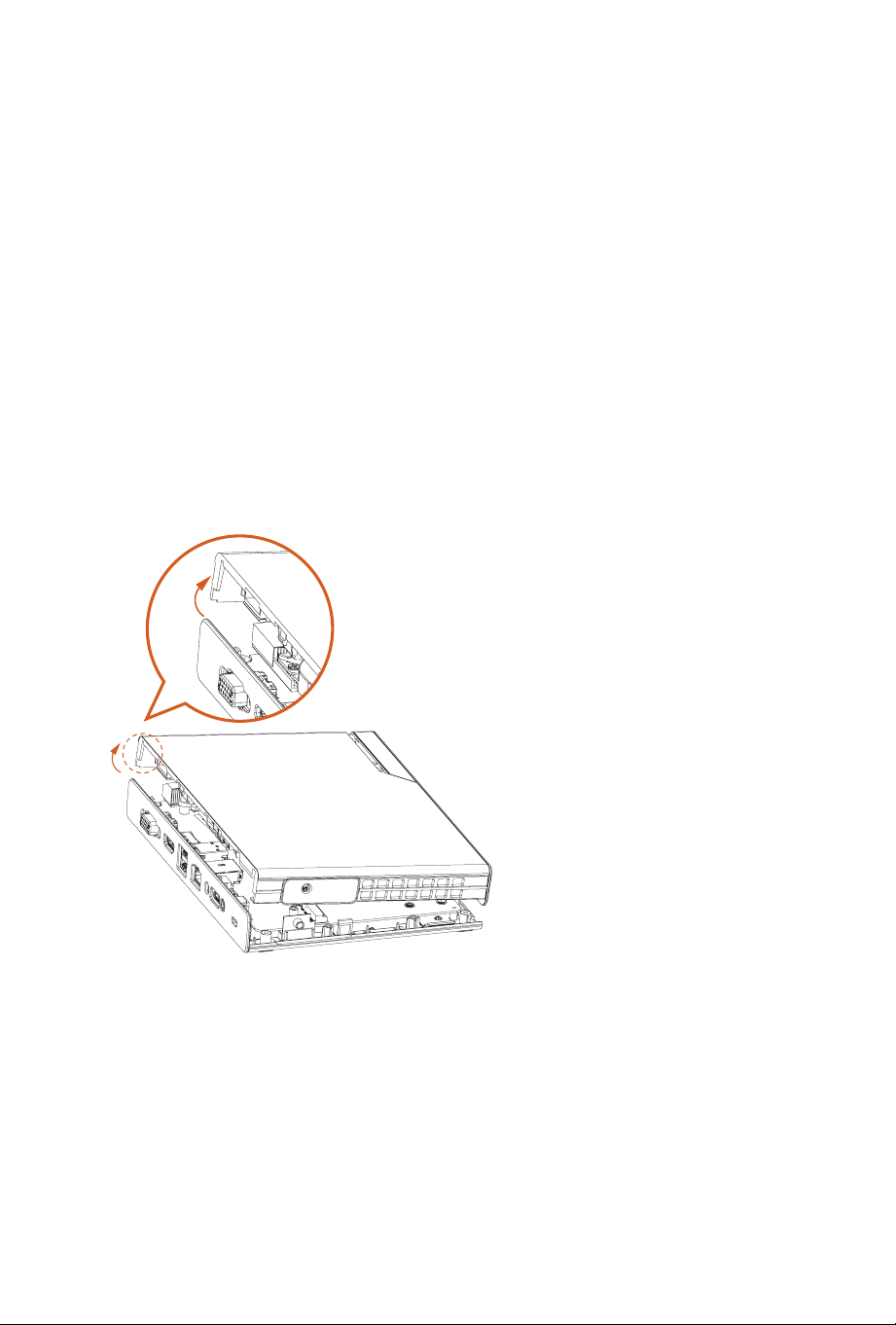
To remove the top case, place your ngers in the edge as shown in the image below.
en, li the cover.
Para quitar la carcasa superior, coloque los dedos en el borde como se muestra en la imagen
de abajo.
A continuación, levanta la carcasa.
トップケースを取り外すために、下図に示すように、縁に指を入れてください。
次に、カバーを持ち上げます。
Чтобы снять верхнюю крышку корпуса, возьмитесь за его край, как показано на
рисунке ниже.
Затем поднимите крышку.
要拆除顶部机箱,请将手指放置在下图所示的边缘处。
然后抬起盖板。
14 15
Installing the M.2 SSD/ Instalar el SSD M.2/
M.2 SSD の取り付け /
Установка SSD-накопителя M.2/
安装 M.2 SSD
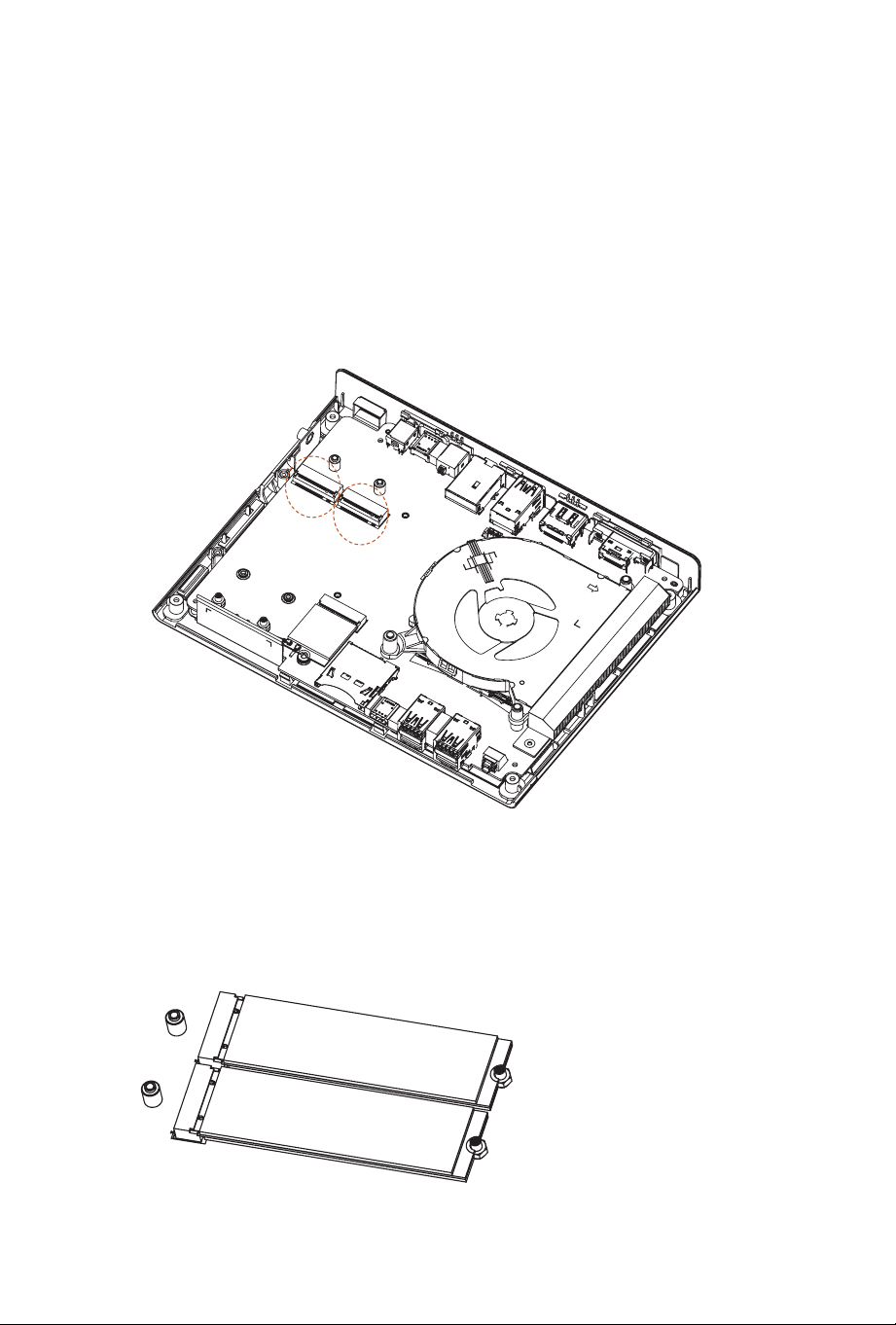
1. Locate the M.2 Slots on the motherboard
1. Localice la ranura M.2 en la placa base
1. マ ザ ーボードの M.2 スロットを 探 し ま す。
1. Найдите слот M.2 материнской платы.
1. 找到主板的 M.2 插 槽。
2. Carefully insert the M.2 SSD into the slot.
2. Con cuidado, inserte la SDD M.2 en la ranura.
2. M.2 SSD を 慎 重 に スロットに 挿 入し ま す。
2. Осторожно вставьте SSD-накопитель M.2 в слот.
2. 小心地将 M.2 SSD 插 入 插 槽 中。
14 15
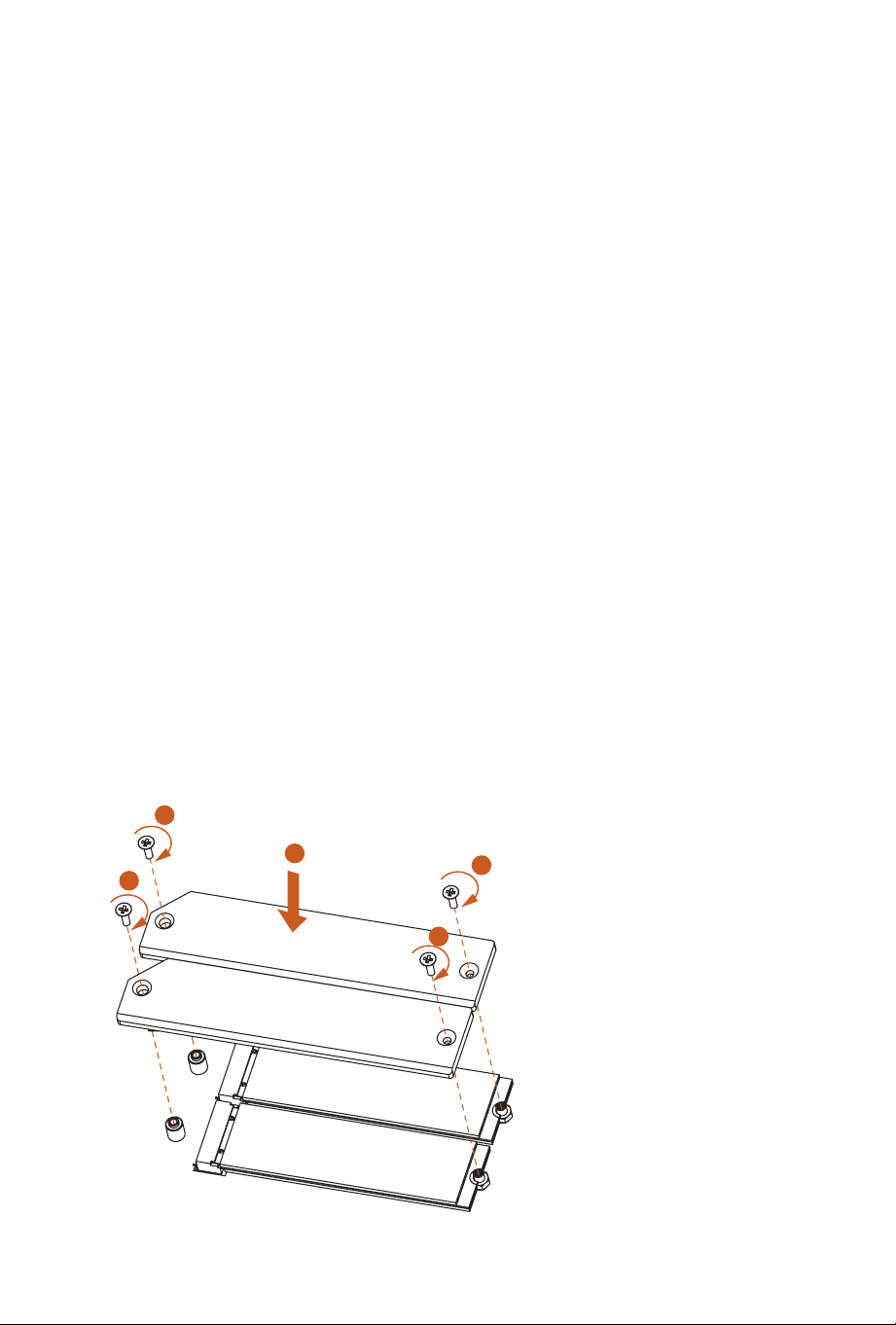
3. Prepare the M.2 heatsink and screws that come with the package. Before securing
the M.2 heatsink, make sure to align the notch on the SSD to the stando on the
motherboard. en tighten the screws with a screwdriver to secure the M.2 heatsink
into place.
*Please do not overtighten the screw as this might damage the module and M.2 heatsink.
3.
Prepare el disipador térmico M.2 y los tornillos incluidos en el paquete. Antes de
asegurar el disipador térmico M.2, asegúrese de alinear la muesca de la unidad de disco
duro con el separador de la placa base. A continuación, apriete los tornillos con un
destornillador para asegurar el disipador térmico M.2 en su lugar.
*No apriete demasiado el tornillo, ya que podría dañar el módulo y el disipador térmico
M.2.
3.
パッケージに付属の M.2 ヒートシンクとネジを 準 備します。M.2 ヒートシンクを 固 定
する前に、SSD のノッチをマザーボードのスタンドオフに合わせてください。次に、ド
ライバーでネジを締めて、M.2 ヒートシンクを所 定 の 位 置 に 固 定します。
* し か し 、き つ く 締 め す ぎ る と モ ジ ュ ー ル お よ び M.2 ヒートシンクが 破 損 する恐 れ が
あるのでご注 意ください。
3.
Подготовьте радиатор М.2 и винты, входящие в комплект поставки. Перед
закреплением радиатора М.2 убедитесь, что выемка на SSD-накопителе
совмещена с опорной стойкой на материнской плате. Затем затяните винты
отверткой, чтобы зафиксировать радиатор М.2.
* Не перетягивайте винты, т. к. это может привести к повреждению модуля и
радиатора М.2.
3. 准备包装随附的 M.2 散热器和螺丝。固定 M.2 散 热 器 之 前,务 必 将 SSD 上的凹槽对
准主板上的螺母柱。然后,用螺丝刀拧紧螺丝,将 M.2 散 热 器 固 定 到 位。
* 请勿过分拧紧螺丝,否则可能会损坏模块和 M.2 散 热 器。
1
2
2
2
2
16 17
If yo are not using the M.2 heatsink, follow the steps below to install your M.2 SSD.
Si no utiliza el disipador térmico M.2, siga los pasos que se indican a continuación para
instalar la unidad de estado sólido SSD M.2.
M.2 ヒートシンクを 使 用して いない 場 合 は 、以 下の 手 順 に 従って M.2 SSD をインストー
ルしてくだ さ い 。
Если вы не используете радиатор М.2, выполните указанные ниже действия для
установки SSD-накопителя M.2.
如果不使用 M.2 散热器,请按照以下步骤安装 M.2 SSD。
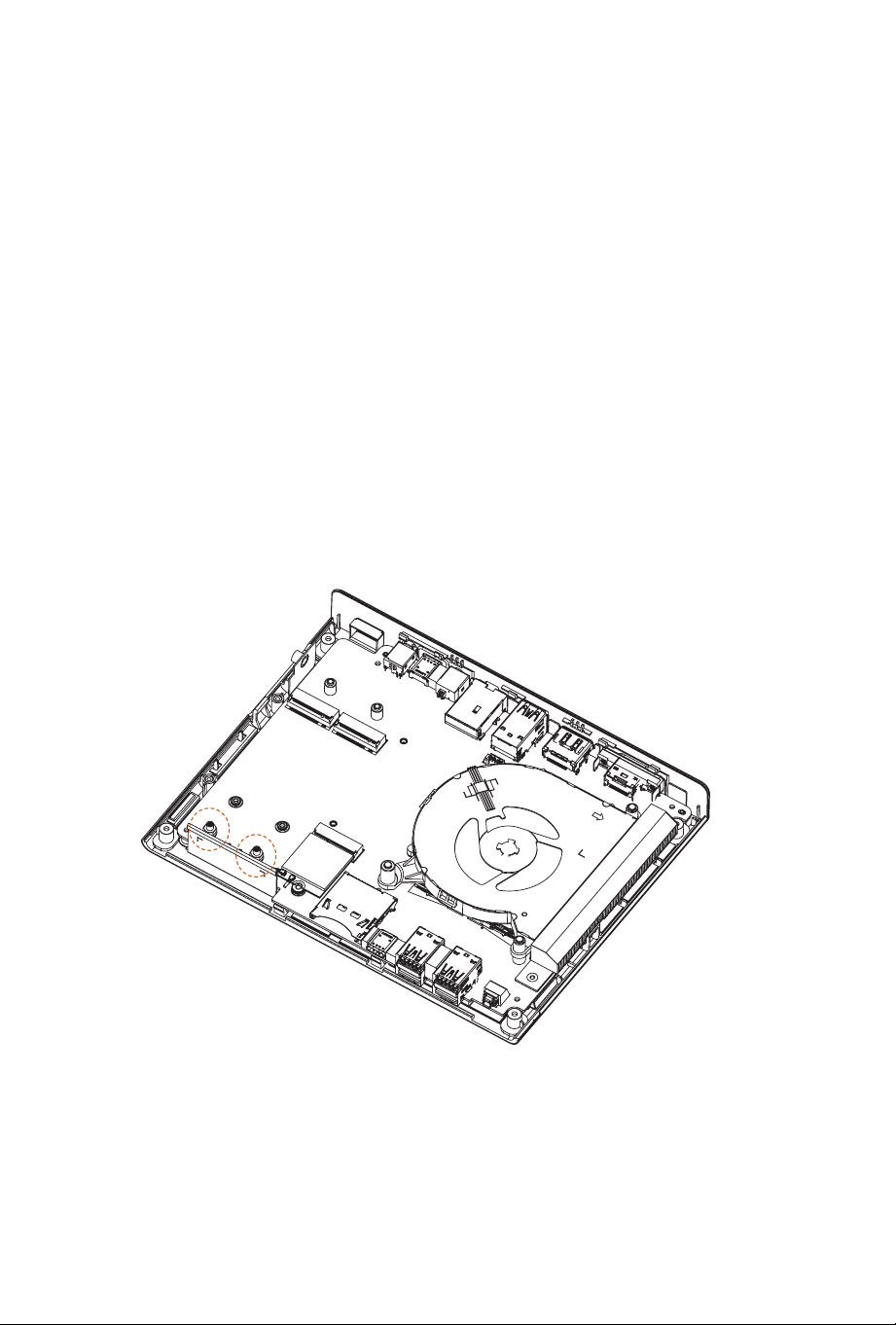
1. Remove the pre-installed standos and keep them for later use.
1. Retire los separadores preinstalados y guárdelos para usarlos más adelante.
1. 事前に取り付けられているスタンドオフを取り外し、後で使用できるように保管して
おきます。
1. Снимите предварительно установленные опорные стойки и сохраните их для
последующего использования.
1. 拆下预装螺母柱并妥善保管,稍后使用。
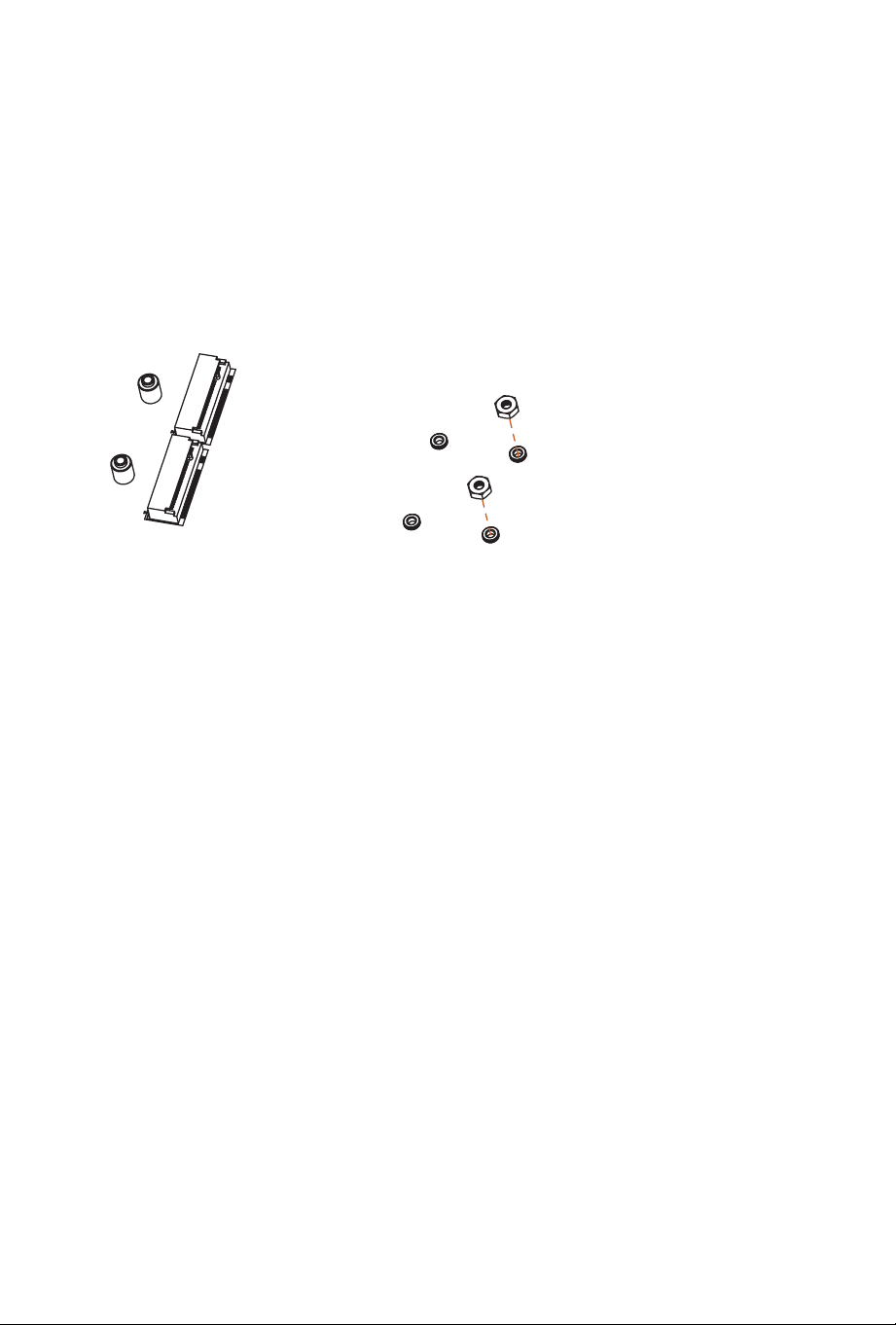
16 17
2. Prepare the M.2 standos that come with the package, and hand tighten them into the
nut.
2.
Prepare los separadores M.2 incluidos con el paquete y apriételos a mano en la tuerca.
2.
パッケージに付属の M.2 スタンドオフを準備し、ナットに手で締めます。
2.
Подготовьте опорные стойки M.2, входящие в комплект поставки, и вручную
затяните их с помощью гайки.
2. 准备包装随附的 M.2 螺母柱,用手将其拧入螺钉中。
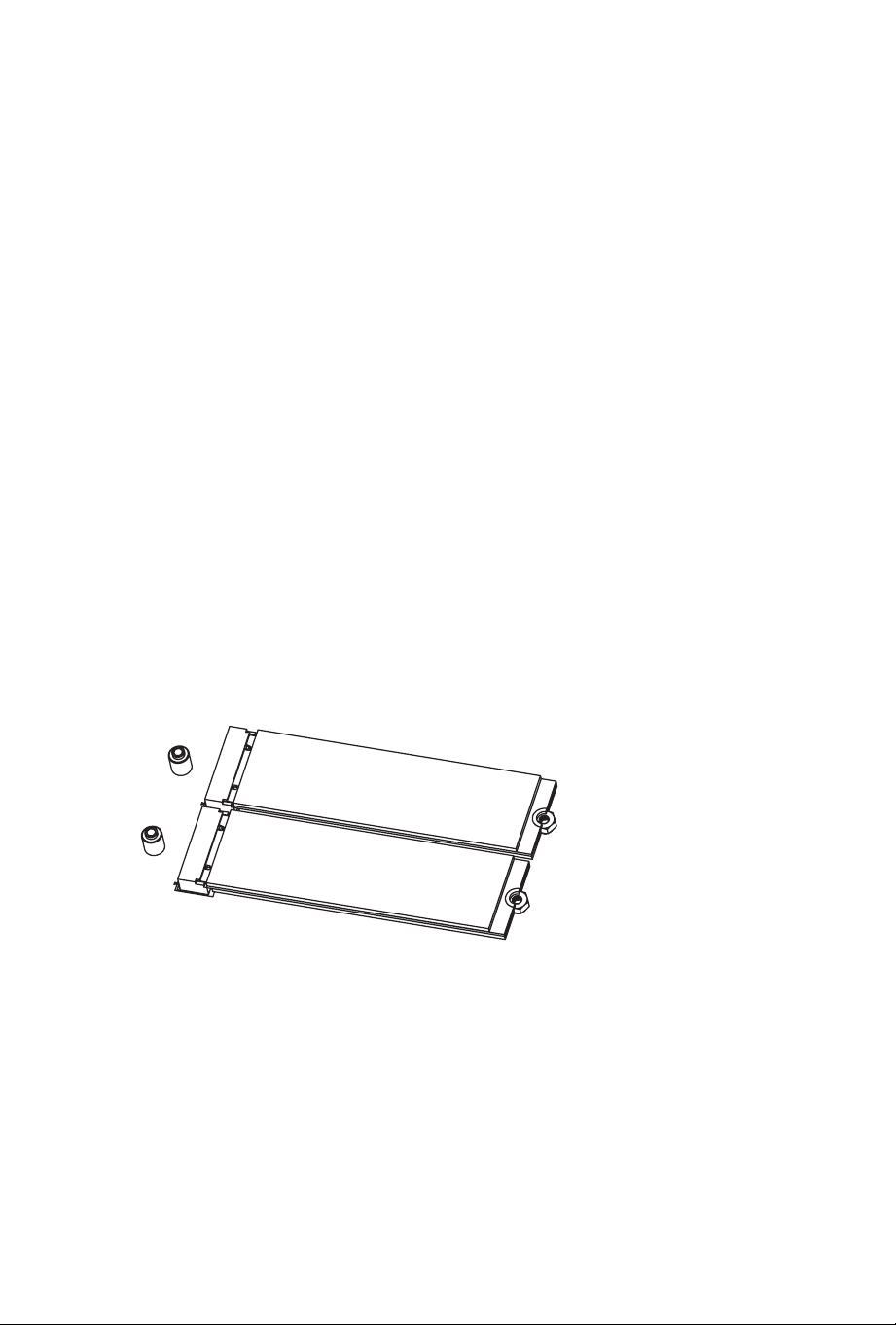
18
3. Carefully insert the M.2 SSD into the slot. en tighten the screw that comes with the
package to secure the M.2 SSD to the motherboard.
*Please do not overtighten the screw as this might damage the module and M.2 heatsink.
3.
Inserte con cuidad la unidad de estado sólido M.2 en la ranura. A continuación, apriete
el tornillo incluido con el paquete para asegurar la unidad de estado sólido M.2 a la
placa base.
*No apriete demasiado el tornillo, ya que podría dañar el módulo y el disipador térmico
M.2.
3.
M.2 SSD を慎重にスロットに挿入します。次に、パッケージに付属のネジを締めて、M.2
SSD をマザーボードに固定します。
* し か し 、き つ く 締 め す ぎ る と モ ジ ュ ー ル お よ び M.2 ヒートシンクが 破 損 する恐 れ が
あるのでご注 意ください。
3.
Осторожно вставьте SSD-накопитель M.2 в слот. Затем затяните винт, входящий
в комплект поставки, чтобы прикрепить SSD-накопитель M.2 к материнской
плате.
* Не перетягивайте винты, т. к. это может привести к повреждению модуля и
радиатора М.2.
3. 小心地将 M.2 SSD 插入插槽中。然后拧紧包装随附的螺丝,将 M.2 SSD 固定到主板
上。
* 请勿过分拧紧螺丝,否则可能会损坏模块和 M.2 散 热 器。




*15G067065000AK*
15G067065000AK
*1506-1PSW000*
1506-1PSW000