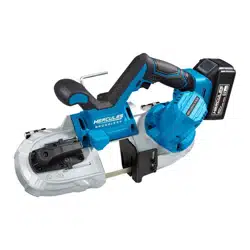
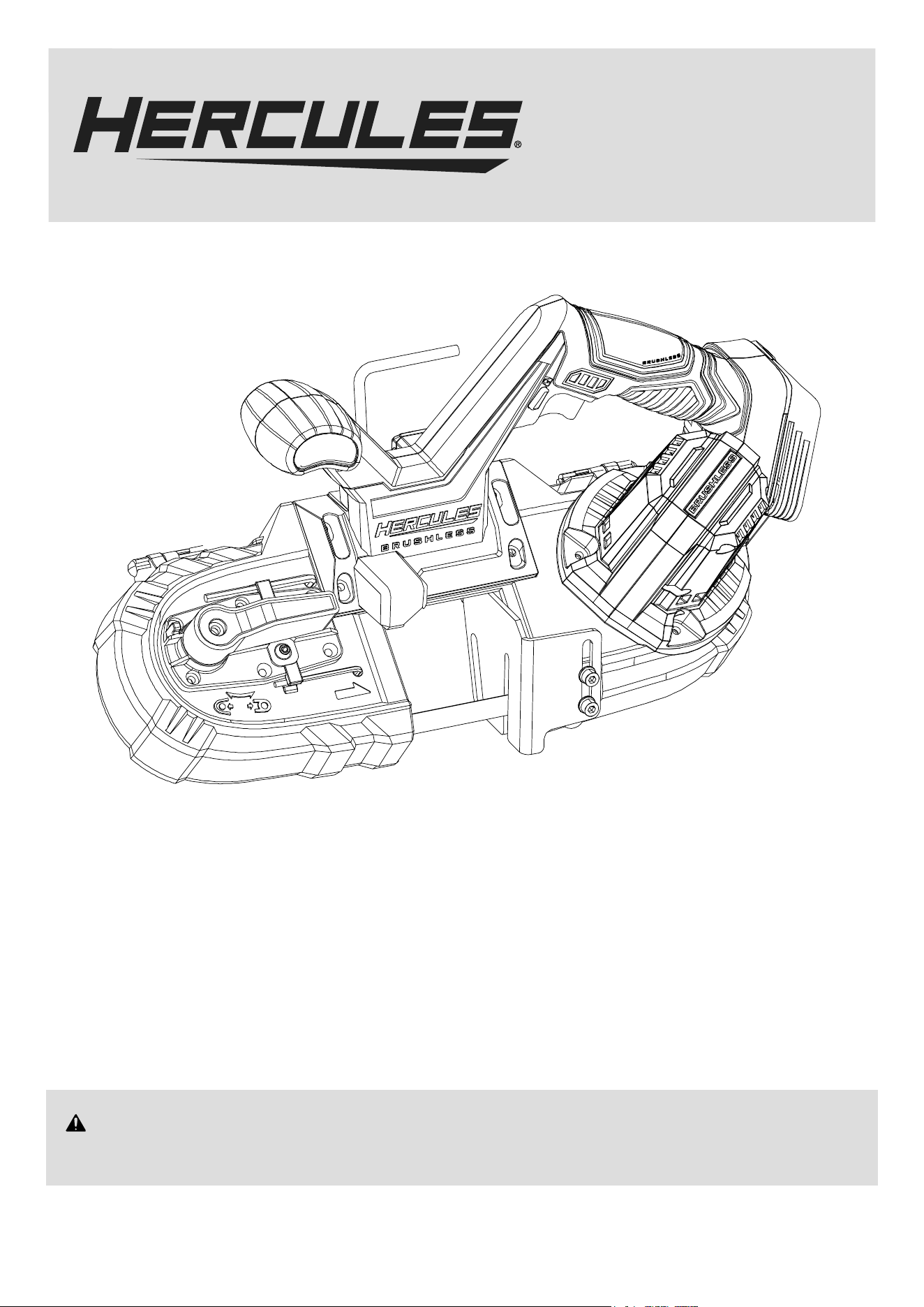
20V 2-1/2" Variable-Speed Brushless Compact Band Saw
Model
HCB790B
WARNING: To prevent serious injury, User must read and
understand Owner’s Manual. SAVE THIS MANUAL.
When unpacking, make sure that the product is intact and undamaged.
If any parts are missing or broken, please call 1‑888‑866‑5797
as soon as possible. Reference 59796.
Owner’s Manual &
Safety Instructions
24c
Battery and Charger Sold Separately
Blade Sold Separately

Page 2 For technical questions, please call 1-888-866-5797. Item 59796
IMPORTANT SAFETY INFORMATION
GENERAL POWER TOOL SAFETY WARNINGS
Read all safety warnings and all instructions.
Failure to follow the warnings and instructions may result
in electric shock, fire and/or serious injury.
Save all warnings and instructions for
future reference.
The term ″power tool″ in the warnings refers to your
battery-operated (cordless) power tool.
Work Area Safety
1. Keep work area clean and well lit.
Cluttered or dark areas invite accidents.
2. Do not operate power tools in explosive
atmospheres, such as in the presence of
flammable liquids, gases or dust. Power tools
create sparks which may ignite the dust or fumes.
3. Keep children and bystanders
away while operating a power tool.
Distractions can cause you to lose control.
Electrical Safety
Do not expose power tools to rain or wet
conditions. Water entering a power tool
will increase the risk of electric shock.
Personal Safety
1. Stay alert, watch what you are doing and use
common sense when operating a power tool.
Do not use a power tool while you are tired
or under the influence of drugs, alcohol or
medication. A moment of inattention while operating
power tools may result in serious personal injury.
2. Use personal protective equipment. Always wear
eye protection. Protective equipment such
as dust mask, non-skid safety shoes, hard hat,
or hearing protection used for appropriate
conditions will reduce personal injuries.
3. Prevent unintentional starting. Ensure the Trigger
is in the off-position before connecting to
power source, picking up or carrying the tool.
Carrying power tools with your finger on
the Trigger or energizing power tools that
have the Trigger on invites accidents.
4. Remove any adjusting key or wrench before
turning the power tool on. A wrench or
a key left attached to a rotating part of the
power tool may result in personal injury.
5. Do not overreach. Keep proper footing and
balance at all times. This enables better control
of the power tool in unexpected situations.
6. Dress properly. Do not wear loose clothing or
jewelry. Keep your hair, clothing and gloves
away from moving parts. Loose clothes, jewelry
or long hair can be caught in moving parts.
7. Do not let familiarity gained from frequent use
of tools allow you to become complacent and
ignore tool safety principles. A careless action can
cause severe injury within a fraction of a second.
8. Only use safety equipment that has been approved
by an appropriate standards agency. Unapproved
safety equipment may not provide adequate
protection. Eye protection must be ANSI‑approved
and breathing protection must be NIOSH‑approved
for the specific hazards in the work area.
9. Avoid unintentional starting. Prepare to
begin work before turning on the tool.
10. Do not lay the tool down until it has come to
a complete stop. Moving parts can grab the
surface and pull the tool out of your control.
11. When using a handheld power tool,
maintain a firm grip on the tool with both
hands to resist starting torque.
12. Do not leave the tool unattended when the
Battery Pack is connected. Turn off the tool,
and remove the Battery Pack before leaving.
13. This product is not a toy.
Keep it out of reach of children.
14. People with pacemakers should consult their
physician(s) before use. Electromagnetic fields in
close proximity to heart pacemaker could cause
pacemaker interference or pacemaker failure.
15. The warnings, precautions, and instructions
discussed in this instruction manual cannot
cover all possible conditions and situations
that may occur. It must be understood by the
operator that common sense and caution are
factors which cannot be built into this product,
but must be supplied by the operator.
Power tool use and care
1. Do not force the power tool. Use the correct
power tool for your application. The correct
power tool will do the job better and safer
at the rate for which it was designed.
2. Do not use the power tool if the Trigger
does not turn it on and off. Any power tool
that cannot be controlled with the Trigger
is dangerous and must be repaired.
3. Disconnect the battery pack from the
power tool before making any adjustments,
changing accessories, or storing power
tools. Such preventive safety measures reduce
the risk of starting the power tool accidentally.
Page 3For technical questions, please call 1-888-866-5797.Item 59796
4. Store idle power tools out of the reach of
children and do not allow persons unfamiliar
with the power tool or these instructions
to operate the power tool. Power tools are
dangerous in the hands of untrained users.
5. Maintain power tools and accessories.
Check for misalignment or binding of moving
parts, breakage of parts and any other
condition that may affect the power tool’s
operation. If damaged, have the power tool
repaired before use. Many accidents are
caused by poorly maintained power tools.
6. Keep cutting tools sharp and clean. Properly
maintained cutting tools with sharp cutting edges
are less likely to bind and are easier to control.
7. Use the power tool, accessories and tool bits
etc. in accordance with these instructions,
taking into account the working conditions
and the work to be performed. Use of the
power tool for operations different from those
intended could result in a hazardous situation.
8. Keep handles and grasping surfaces dry, clean
and free from oil and grease. Slippery handles
and grasping surfaces do not allow for safe handling
and control of the tool in unexpected situations.
Service
1. Have your power tool serviced by a
qualified repair person using only identical
replacement parts. This will ensure that the
safety of the power tool is maintained.
2. Never service damaged BATTERY packs. Service
of BATTERY packs should only be performed by
the manufacturer or authorized service providers.
3. Maintain labels and nameplates on the tool. These
carry important safety information.
If unreadable or missing, contact
Harbor Freight Tools for a replacement.
Battery Tool use and care
1. Prevent unintentional starting. Ensure the switch
is Prevent unintentional starting. Ensure the switch is
in the off-position before connecting to battery pack,
picking up or carrying the power tool. Carrying the
power tool with your finger on the switch or energizing
power tool that have the switch on invites accidents.
2. Disconnect the battery pack from the
power tool before making any adjustments,
changing accessories, or storing power tool.
Such preventive safety measures reduce the
risk of starting the power tool accidentally.
3. Recharge only with the charger specified by
the manufacturer. A charger that is suitable
for one type of battery pack may create a risk
of fire when used with another battery pack.
4. Use power tools only with specifically
designated battery packs. Use of any other
battery packs may create a risk of injury and fire.
5. When battery pack is not in use, keep it away
from other metal objects, like paper clips,
coins, keys, nails, screws or other small metal
objects, that can make a connection from
one terminal to another. Shorting the battery
terminals together may cause burns or a fire.
6. Under abusive conditions, liquid may be ejected
from the battery; avoid contact. If contact
accidentally occurs, flush with water. If liquid contacts
eyes, additionally seek medical help. Liquid ejected
from the battery may cause irritation or burns.
7. Do not use a battery pack or power tool that
is damaged or modified. Damaged or modified
batteries may exhibit unpredictable behavior
resulting in fire, explosion or risk of injury.
8. Do not expose a battery pack or power tool to
fire or excessive temperature. Exposure to fire or
temperature above 140°F may cause explosion.
9. Follow all charging instructions and do
not charge the battery pack or power tool
outside of the temperature range specified
in the instructions. Charging improperly or at
temperatures outside of the specified range may
damage the battery and increase the risk of fire.
10. Have servicing performed by a qualified
repair person using only identical
replacement parts. This will ensure that
the safety of the product is maintained.
11. Do not modify or attempt to repair the power
tool or the battery pack except as indicated
in the instructions for use and care.
12. The battery Charger gets hot during use.
The Charger’s heat can build up to unsafe
levels and create a fire hazard if it does
not receive adequate ventilation, due to
an electrical fault, or if it is used in a hot environment.
Do not place the Charger on a flammable surface.
Do not obstruct any vents on the Charger.
Especially avoid placing the Charger on carpets
and rugs; they are not only flammable, but they
also obstruct vents under the Charger. Place the
Charger on a stable, solid, nonflammable surface
(such as a stable metal workbench or concrete floor)
at least 1 foot away from all flammable objects, such
as drapes or walls. Keep a fire extinguisher and a
smoke detector in the area. Frequently monitor the
Charger and Battery Pack while charging.
Page 4 For technical questions, please call 1-888-866-5797. Item 59796
Band Saw Safety Warnings
1. Hold power tool by insulated gripping surfaces,
when performing an operation where the
cutting accessory may contact hidden wiring.
Cutting accessories contacting a ″live″ wire may
make exposed metal parts of the power tool ″live″
and could give the operator an electric shock.
2. Use clamps or another practical way to secure
and support the workpiece to a stable platform.
Holding the work by hand or against your body
leaves it unstable and may lead to loss of control.
3. Do not leave power tool unattended
while it is running.
4. Before each use, move the Tension Lever to the
tightened position (making the blade taut).
5. Work slowly and carefully to avoid snagging when
cutting near corners, sharp edges, ragged welds, etc.
6. Cutting material and the motor housing can get
very hot during operation. Stop work until tool
and blade both cool down to safe temperature.
Lithium Battery Safety Warnings
LITHIUM BATTERIES STORE A LARGE
AMOUNT OF ENERGY AND WILL VENT
FIRE OR EXPLODE IF MISTREATED:
1. Keep Battery Pack dry.
2. DO NOT DO ANY OF THE FOLLOWING
TO THE BATTERY PACK:
• Open,
• Drop,
• Short-circuit,
• Puncture,
• Incinerate, or
• Expose to temperatures greater than 140°F.
3. Charge Battery Pack only according to instructions.
4. Inspect Battery Pack before every use;
do not use or charge if damaged.
Vibration Safety
This tool vibrates during use.
Repeated or long‑term exposure to vibration may
cause temporary or permanent physical injury,
particularly to the hands, arms and shoulders.
To reduce the risk of vibration‑related injury:
1. Anyone using vibrating tools regularly or for an
extended period should first be examined by a
doctor and then have regular medical check‑ups to
ensure medical problems are not being caused or
worsened from use. Pregnant women or people who
have impaired blood circulation to the hand, past
hand injuries, nervous system disorders, diabetes,
or Raynaud’s Disease should not use this tool.
If you feel any symptoms related to vibration (such
as tingling, numbness, and white or blue fingers),
seek medical advice as soon as possible.
2. Do not smoke during use. Nicotine reduces
the blood supply to the hands and fingers,
increasing the risk of vibration‑related injury.
3. Wear suitable gloves to reduce the
vibration effects on the user.
4. Use tools with the lowest vibration
when there is a choice.
5. Include vibration‑free periods each day of work.
6. Grip tool as lightly as possible (while still keeping
safe control of it). Let the tool do the work.
7. To reduce vibration, maintain the tool as
explained in this manual. If any abnormal
vibration occurs, stop use immediately.
Page 5For technical questions, please call 1-888-866-5797.Item 59796
GROUNDING
TO PREVENT ELECTRIC SHOCK AND
DEATH FROM INCORRECT GROUNDING:
Check with a qualified electrician if you
are in doubt as to whether the outlet is
properly grounded. Do not modify the power cord
plug provided with the charger. Do not use the
charger if the power cord or plug is damaged.
If damaged, have it repaired by a service facility
before use. If the plug will not fit the outlet,
have a proper outlet installed by a
qualified electrician.
Extension Cords
Note: Extension cords must not be
used with this item’s Charger.
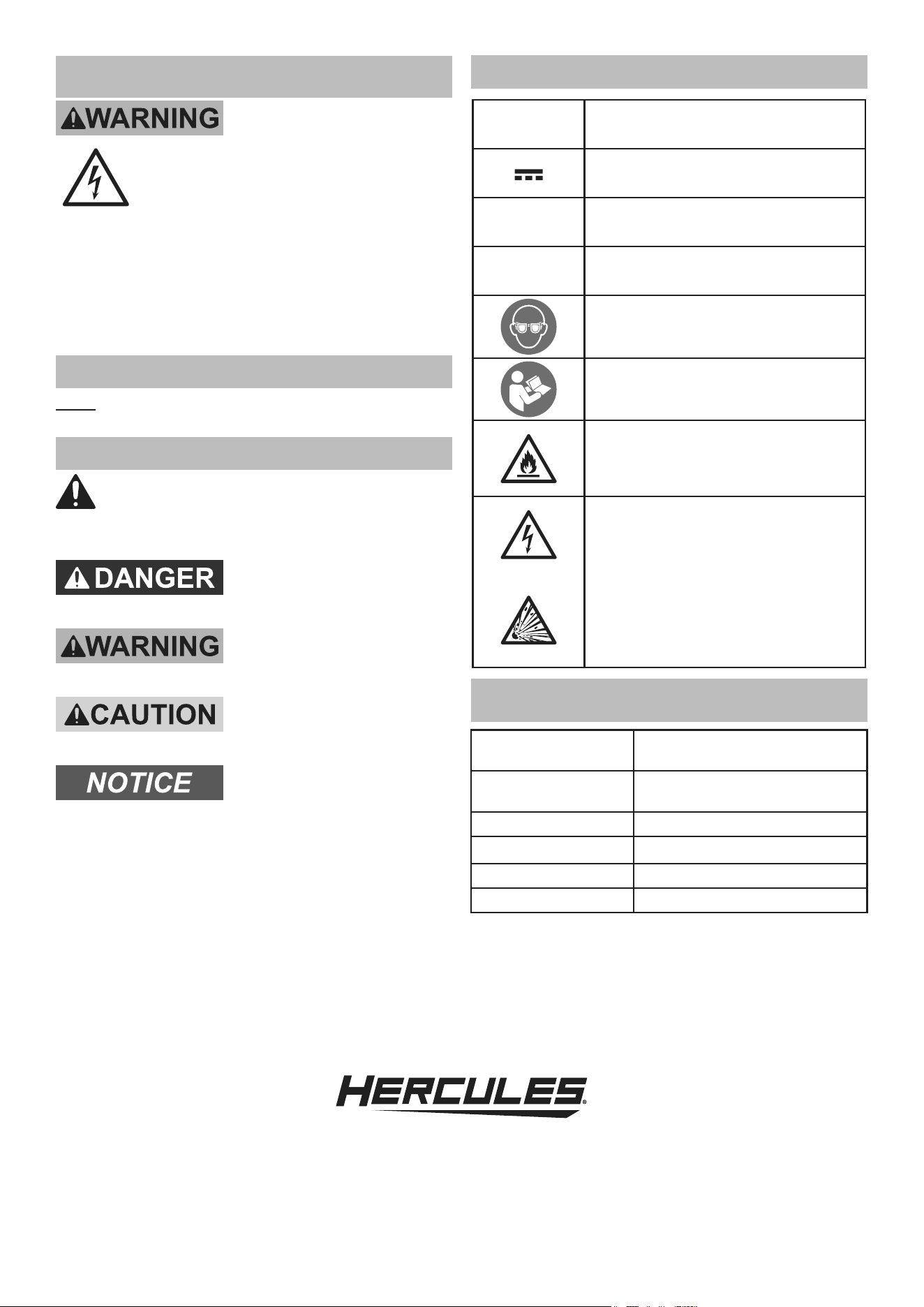
Warning Symbols and Definitions
This is the safety alert symbol. It is used to
alert you to potential personal injury hazards.
Obey all safety messages that follow this symbol to
avoid possible injury or death.
Indicates a hazardous
situation which, if not
avoided, will result in death or serious injury.
Indicates a hazardous
situation which, if not
avoided, could result in death or serious injury.
Indicates a hazardous
situation which, if not
avoided, could result in minor or moderate injury.
Addresses practices not
related to personal injury.
Symbology
V
Volts
Direct Current
A
Amperes
n
0
xxxx/min.
No Load Revolutions per Minute (RPM)
WARNING marking concerning Risk
of Eye Injury. Wear ANSI‑approved
safety goggles with side shields.
Read the manual before set‑up and/or use.
WARNING marking
concerning Risk of Fire.
Do not cover Charger ventilation ducts.
Charge on fireproof surface only.
WARNING marking concerning
Risk of Electric Shock.
Properly connect Charger’s power
cord to appropriate outlet.
WARNING marking concerning
Risk of Explosion.
Do not puncture, short, or open
battery packs and do not charge
damaged battery packs.
SPECIFICATIONS
Battery Type
Hercules 20V Li‑ion 57373
(sold separately)
Charger Type
Hercules 20V/12V Li‑ion
56559 (sold separately)
Electrical Rating 20VDC
Blade Speed 100 ‑ 635 SFPM
Blade Size
32-7/8" x 1/2"
Max. Cutting Capacity 2‑1/2" x 2‑1/2"
Page 6 For technical questions, please call 1-888-866-5797. Item 59796
SETUP - BEFORE USE
Read the ENTIRE IMPORTANT SAFETY INFORMATION section at the beginning of this manual
including all text under
subheadings therein before set up or use
.
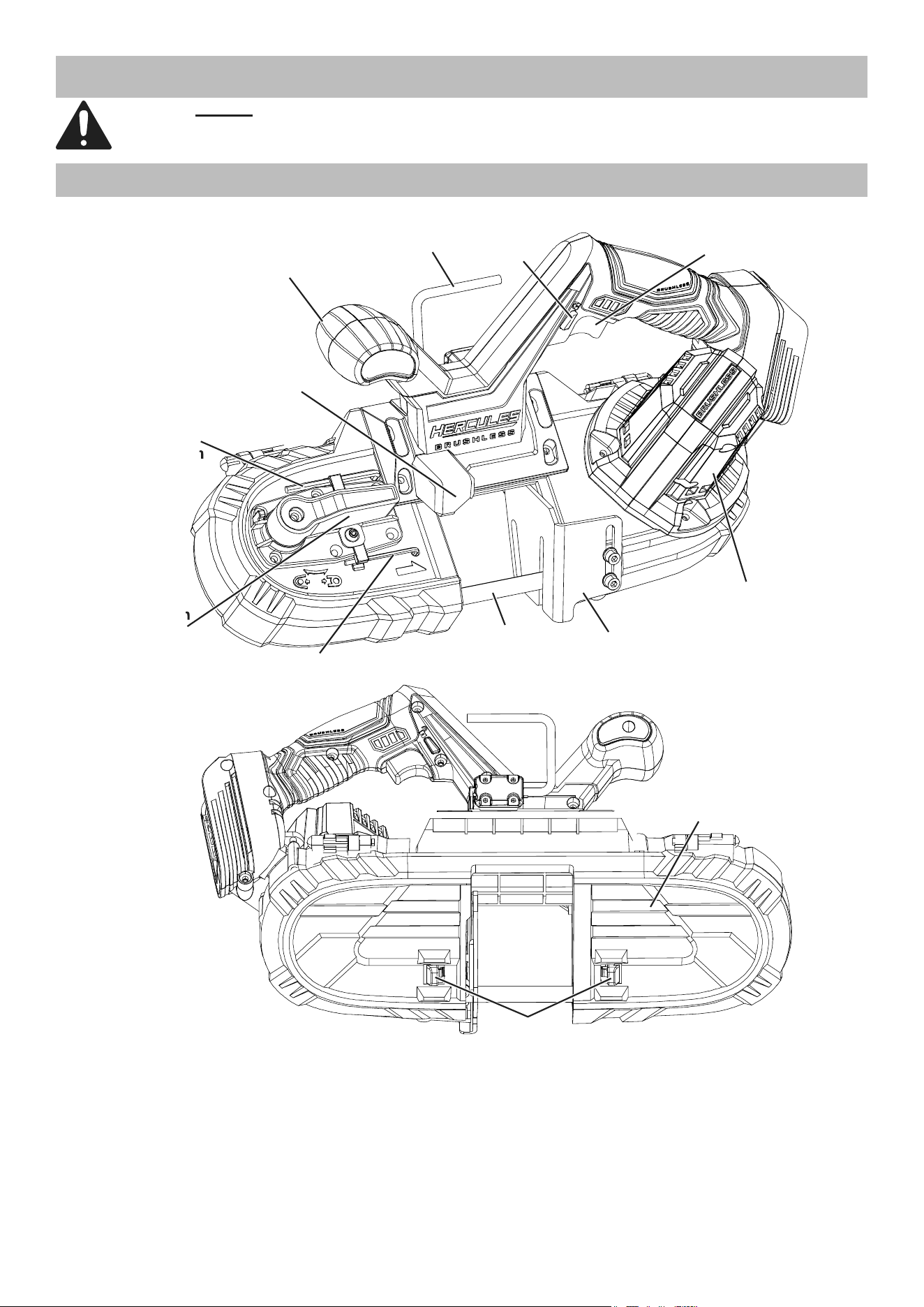
Functions
Tension
Lever
Auxiliary
Handle
Motor
Housing
Trigger
Lock
Trigger
Guide
Bar
Blade
LED
Work Light
Blade
Cover Locks
Hanger
Blade
Cover
4mm
Hex Wrench
2.5mm
Hex Wrench
Hex Wrench
Tension
Page 7For technical questions, please call 1-888-866-5797.Item 59796
OPERATING INSTRUCTIONS
Read the ENTIRE IMPORTANT SAFETY
INFORMATION section at the beginning of
this manual including all text under
subheadings therein before set up or use of this
product
.
Tool Set Up
TO PREVENT SERIOUS INJURY FROM
ACCIDENTAL OPERATION:
Make sure that the Trigger is in the off-position
and remove its Battery Pack before
performing any procedure in this section.
TO PREVENT
SERIOUS INJURY:
Wear ANSI-approved
safety goggles, heavy-duty
work gloves, and heavy-duty
long-sleeved shirt or coat whenever handling or
working near the Blade.
The Blade can suddenly spring out during service.
Charging
Charge battery after unpacking and before using this
tool. Follow instructions included with battery charger.
Blade Selection
WARNING! TO PREVENT SERIOUS INJURY
FROM BLADE COMING LOOSE, ONLY USE
BLADES OF THE SPECIFIED SIZE.
Select the proper Blade according to the cutting
material and the diameter or size of the workpiece.
This Band Saw accepts 32-7/8″ x 1/2″ Blades.
(Blade sold separately).
32-7/8″ x 1/2″
Common Blade Applications
Teeth Per Inch Use
3 - 4 Wood, resawing (ripping).
10 - 14
Stainless steel, angle iron,
pipe, tubing, plastic,
wood 1/4" or thicker.
14 - 18
Stainless steel, angle iron, pipe,
tubing, plastic, wood 1/8" to 1/4".
24
Stainless steel, angle iron,
pipe, tubing, plastic,
wood 1/8" or thinner.
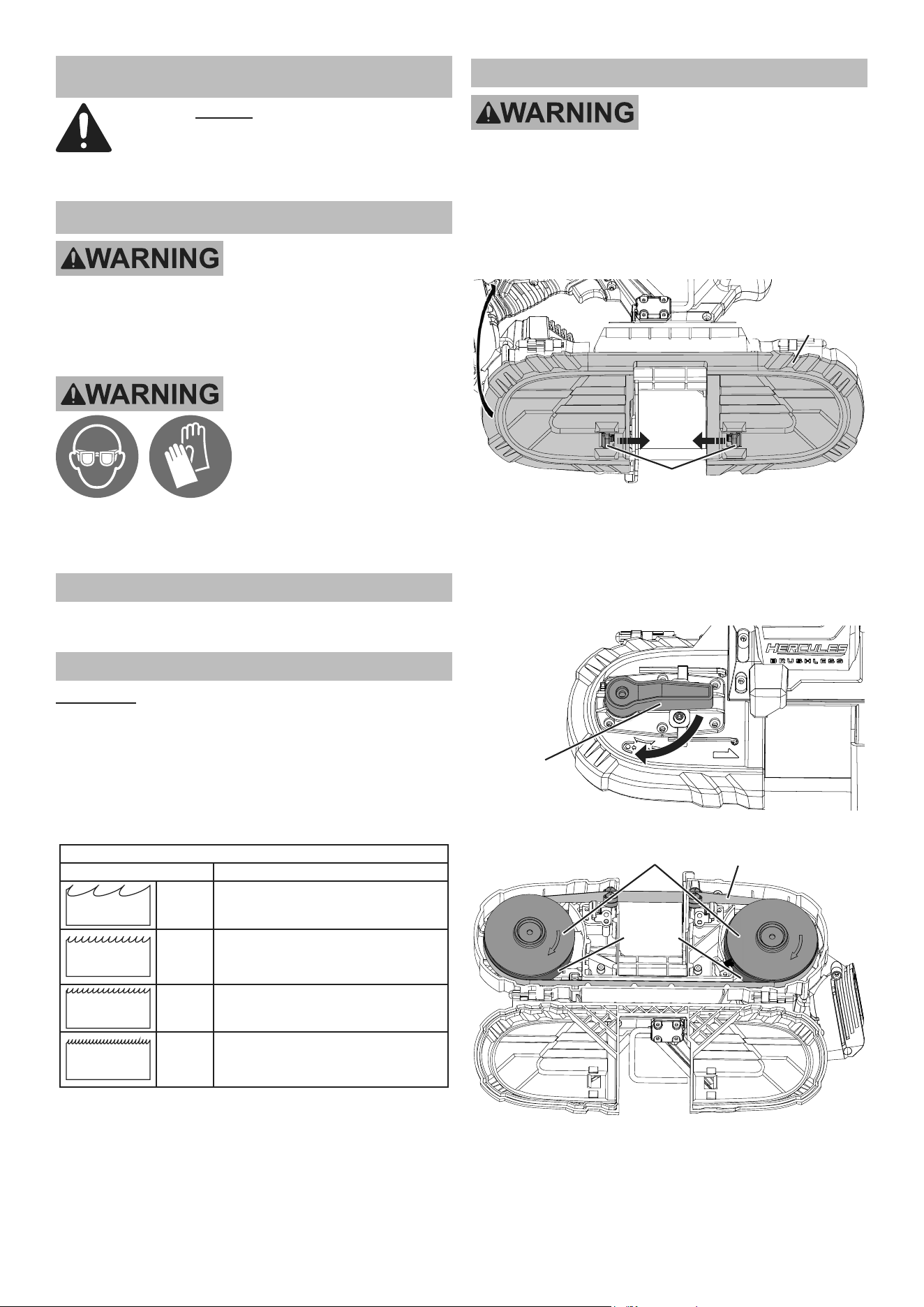
Blade Installation and Replacement
TO PREVENT SERIOUS INJURY FROM
ACCIDENTAL OPERATION:
Make sure that the Trigger is in the
off-position and remove its Battery Pack
before installing or removing a saw Blade.
1. Push the Blade Cover Locks inward
and rotate the Blade Cover away.
Blade
Cover Locks
Blade
Cover
2. Set the Frame so that the edge of the used
Blade is pointing away from you. (Once Blade
tension is released, it may spring off quickly.)
3. Turn the Tension Lever to release Blade
tension. Slide old Blade off Blade Wheels.
Tension
Lever
Blade
Wheels
Blade
Blade
Wheel
Tires
Page 8 For technical questions, please call 1-888-866-5797. Item 59796
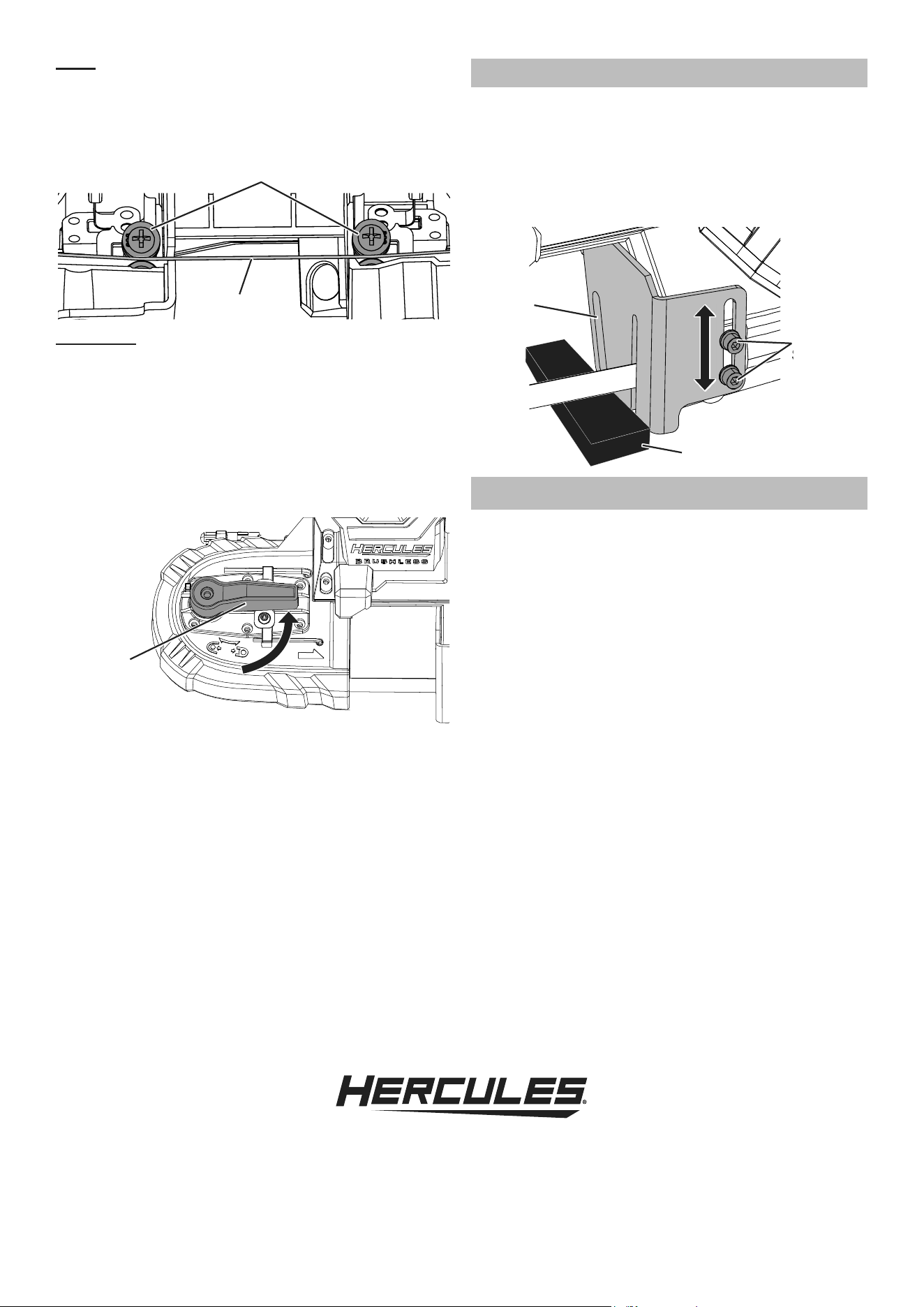
Note: Install Blade with teeth
pointing upward, facing you.
4. Set the Blade into both Guide
Bearings and center it on them.
Blade
Guide
Bearings
WARNING! TO PREVENT SERIOUS INJURY:
BEFORE EACH USE, PUT THE TENSION LEVER
IN THE TIGHTENED POSITION (MAKING THE
BLADE TAUT), AS FOLLOWS:
5. Make sure the Blade is centered on
the Guide Bearings and fits evenly
around the Blade Wheels.
6. Turn the Tension Lever until the Blade is taut
and the Lever is in tightened position.
Tension
Lever
7. Put on eye and hearing protection, then stay
clear of the blade while attaching the Battery
Pack. Briefly run the tool for 2‑3 seconds.
8. Allow the Band Saw to come to a
complete stop before setting it down.
9. Inspect the Blade. If Blade is positioned off center
on Blade Wheels, adjust Blade position as described
in Adjusting Blade Tracking on page 10.
10. Close the Blade Cover. Make sure it is held
securely by the Blade Cover Locks.
Guide Bar Adjustment
1. Loosen Cap Screws with
4mm Hex Wrench (included).
2. Adjust Guide Bar up or down so Guide Bar
butts up against rear of workpiece while
blade is cutting through workpiece.
3. Tighten Cap Screws with 4mm Hex Wrench.
Guide
Bar
Cap
Screws
Screws
Workpiece
Workpiece and Work Area Set Up
1. Designate a work area that is clean and well‑lit.
The work area must not allow access by children
or pets to prevent distraction and injury.
2. Secure loose workpieces using a vise or clamps
(not included) to prevent movement while working.
3. Verify that there are no utility lines or
hardware in or near the workpiece.
Page 9For technical questions, please call 1-888-866-5797.Item 59796
General Operating Instructions
1. Make sure that the Trigger is in the off‑position
and locked, then attach the Battery Pack.
2. Make all necessary adjustments to the Band Saw.
3. Secure your workpiece to a workbench
or other solid surface.
4. Firmly grip the Main Handle with one hand and
the Auxiliary Handle with the other hand.
5. Set the Guide Bar against the workpiece, keeping
Blade at a slight angle to the workpiece.
WARNING! TO PREVENT SERIOUS INJURY OR
DAMAGE TO PROPERTY: Do not start the Band
Saw if the Blade is in contact with anything.
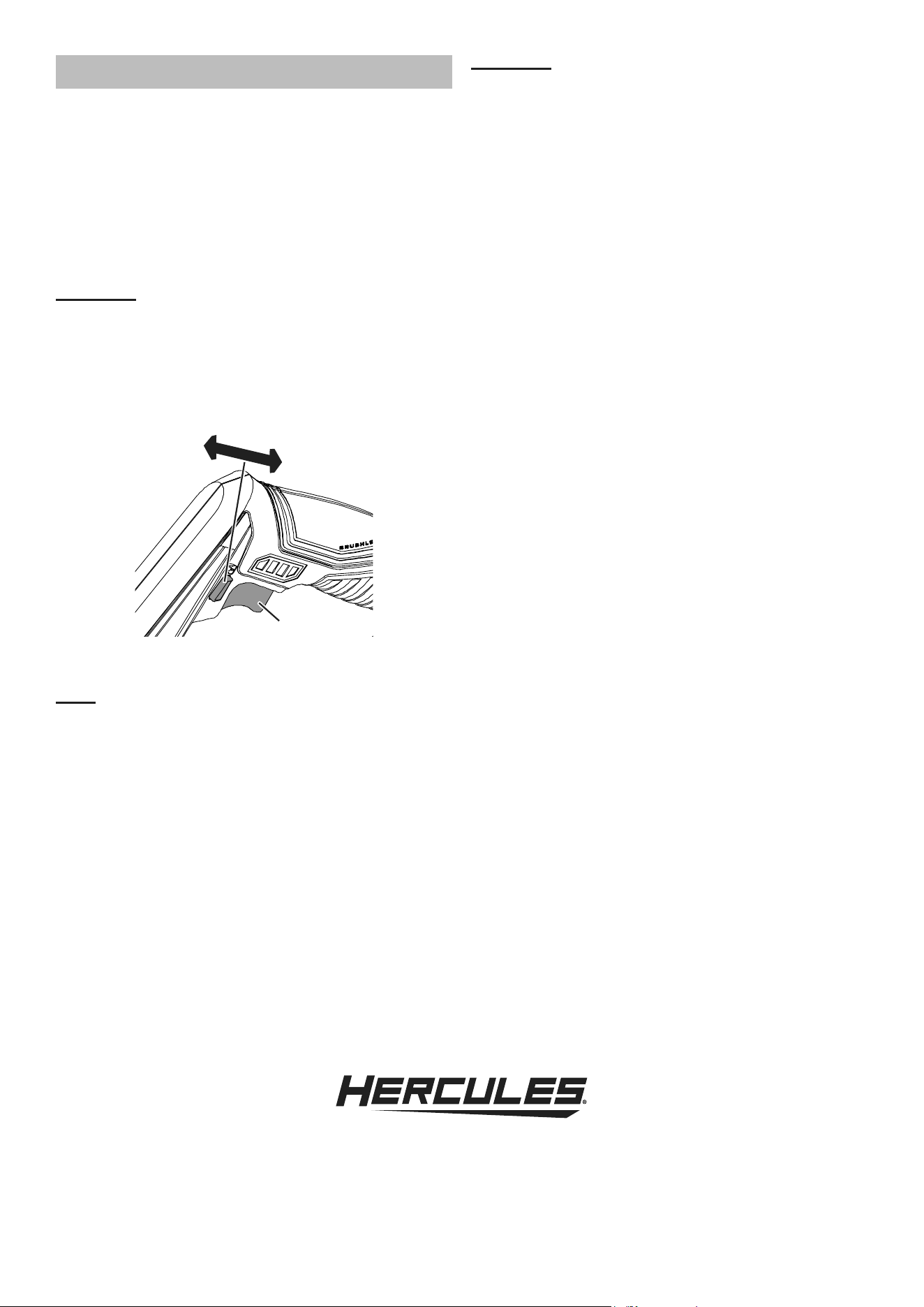
6. Push Trigger Lock to left to unlock Trigger,
then squeeze Trigger and allow tool to come
up to full speed before starting the cut.
Trigger
Trigger
Lock
Locked
Unlocked
7. To increase speed, apply more pressure to Trigger.
To decrease speed, apply less pressure.
Note: When cutting softer materials, use a faster speed.
When cutting harder materials, use a slower speed.
WARNING! TO PREVENT SERIOUS INJURY:
Exposed Blade in Band Saw underside.
Hold Band Saw away from body.
8. Tilt the unit so that the Blade is vertical. To start
a cut, use minimal force to start a groove. Once
groove is started, allow the rest of the Blade to
cut into workpiece. Doing this will prevent Blade
from moving from side‑to‑side during cutting.
CAUTION! TO PREVENT PROPERTY DAMAGE
AND INJURY: Do not apply force to the tool
by pressing too hard with your hands or
leaning into it. The weight of the tool itself creates
enough force to make a clean cut. Forcing or
leaning on the tool may twist or break the Blade,
damaging the saw and possibly causing injury.
9. As you reach the end of your workpiece,
finish off the cut by slightly raising the
unit slowly, bringing the blade up.
10. To stop the Band Saw, release the Trigger and
push Trigger lock to right to lockout Trigger.
11. Allow the Band Saw to come to a
complete stop before setting it down.
12. To prevent accidents, turn off the tool and
remove its Battery Pack after use. Clean, then
store the tool indoors out of children’s reach.
Page 10 For technical questions, please call 1-888-866-5797. Item 59796
MAINTENANCE AND SERVICING
Procedures not specifically explained
in this manual must be performed
only by a qualified technician.
TO PREVENT SERIOUS INJURY FROM ACCIDENTAL
OPERATION: Release the Trigger and remove the
Battery Pack before performing any procedure in
this section.
TO PREVENT SERIOUS INJURY FROM TOOL
FAILURE:
Do not use damaged equipment.
If abnormal noise or vibration occurs, have
the problem corrected before further use.
Cleaning, Maintenance,
and Lubrication
1. BEFORE EACH USE, inspect the general
condition of the tool. Check for:
• leaking, swollen, or cracked battery pack,
• loose hardware,
• misalignment or binding of moving parts,
• cracked or broken parts,
• damaged electrical wiring,
• any other condition that may
affect its safe operation.
2. AFTER USE, wipe external surfaces
of the tool with clean cloth.
3. TO CLEAN: The ventilation openings should
be kept clean and free of dirt and debris. Wear
ANSI‑approved safety goggles and NIOSH‑
approved dust mask/respirator before cleaning
ducts. The most effective way to clean the
ventilation openings is with compressed air.
4. If not using the tool for long periods
of time, remove the Blade.
5. For Blade installation, replacement, or
tensioning, reference Blade Installation
and Replacement on page 7.
6. Li‑Ion BATTERY MUST BE RECYCLED OR
DISPOSED OF PROPERLY.
Do not short, incinerate or open battery.
7. Disconnect battery pack and store battery pack,
charger, and tool in dry, indoor area out of
reach of children and away from metal objects
(i.e., paperclips, coins) to prevent shorting.
Adjusting Blade Tracking
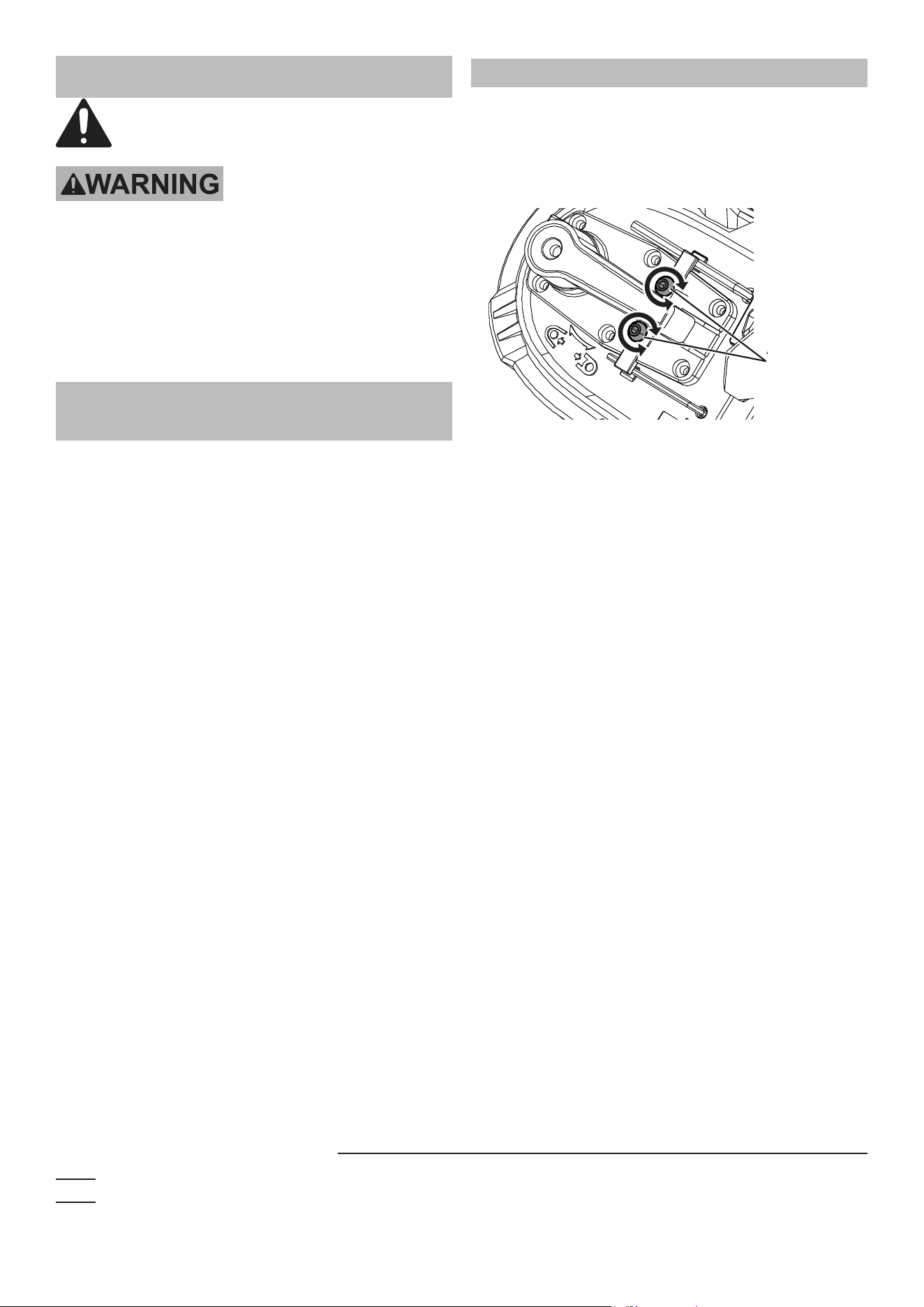
1. Using 2.5mm Hex Wrench (included):
a. To move the Blade down turn Adjustment
Screws 1/4 turn CLOCKWISE.
b. To move the Blade up turn Adjustment
Screws 1/4 turn COUNTERCLOCKWISE.
Adjustment
Screws
Adjustment
2. Put on eye and hearing protection, then stay
clear of the blade while attaching the Battery
Pack. Briefly run the tool for 2‑3 seconds.
3. Allow the Band Saw to come to a
complete stop before setting it down.
4. Inspect the Blade. If Blade is still positioned
off center, repeat adjustment.
Record Product’s Serial Number Here:
Note: If product has no serial number, record month and year of purchase instead.
Note: Replacement parts may be available for this item.
Visit harborfreight.com/parts for a list of in stock parts. Reference UPC 193175485670.
Page 11For technical questions, please call 1-888-866-5797.Item 59796
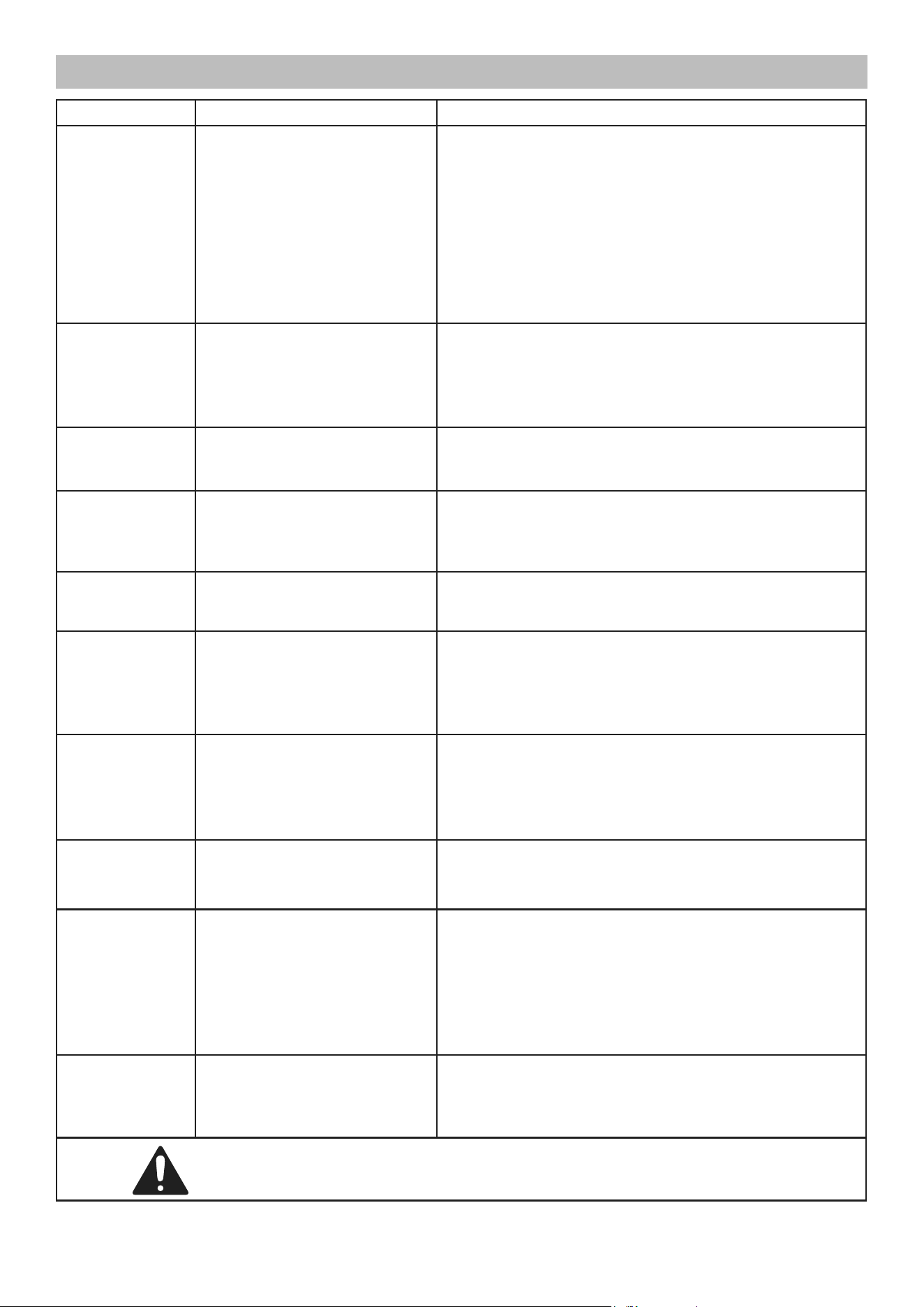
Troubleshooting
Problem Possible Causes Likely Solutions
Tool will not start. 1. Battery Pack not properly
connected.
2. Battery Pack not
properly charged.
3. Battery Pack worn‑out.
4. Internal damage or wear.
(Trigger, for example.)
1. Remove Battery Pack, make sure there are no
obstructions, reinsert the Battery Pack according
to its shape (it should only fit one way), and press
firmly until the Battery Pack locks in place.
2. Make sure Charger is connected and operating properly.
Give enough time for Battery Pack to recharge properly.
3. Dispose of old Battery Pack properly or recycle.
Replace Battery Pack.
4. Have technician service tool.
Tool operates
slowly.
1. Excess pressure applied
to workpiece.
2. Battery Pack power low.
3. Battery Pack wearing out.
1. Decrease pressure; allow tool to do the work.
2. Recharge Battery Pack.
3. Dispose of old Battery Pack properly or recycle.
Replace Battery Pack.
Performance
decreases
over time.
1. Blade dull or damaged.
2. Battery Pack wearing out.
1. Keep Blade sharp. Replace as needed.
2. Dispose of old Battery Pack properly or recycle.
Replace Battery Pack.
Excessive /
grinding / odd
noise or rattling.
1. Blade not centered
on Blade Wheels.
2. Internal damage or wear
(bearings, for example.)
1. Center Blade on Blade Wheels as described in
Adjusting Blade Tracking on page 10.
2. Have technician service tool.
Blade tracks to
Blade Pulley
side or falls off.
Blade not centered on
Blade Wheels.
Center Blade on Blade Wheels as described in
Adjusting Blade Tracking on page 10.
Overheating. 1. Forcing tool to work too fast.
2. Blade dull or damaged.
3. Blocked motor housing vents.
1. Allow tool to work at its own rate.
2. Keep Blade sharp. Replace as needed.
3. Wear ANSI‑approved safety goggles and NIOSH‑
approved dust mask/respirator while blowing
dust out of motor using compressed air.
Cuts are not
straight
1. Blade is not 90
o
to workpiece.
2. Dull Blade.
3. Guide Bar is misaligned / loose.
1. Reference operating instructions in the General
Operating Instructions on page 9.
2. Replace Blade.
3. Adjust Guide Bar as described in Guide
Bar Adjustment on page 8.
Blade dulling
too rapidly
1. Blade is too coarse.
2. Hard spots on material.
3. Blade installed backwards.
1. Use a finer tooth Blade.
2. Increase pressure more gently on object being cut.
3. Remove Blade and turn inside out before reinstalling.
Frequent Saw
Blade Breakage
1. Blade is too coarse for
workpiece being cut.
2. Guide Bar is misaligned / loose.
3. Possible Blade Weld Cracking.
4. Blade not centered
on Blade Wheels
1. Use a Saw Blade with a finer pitch.
2. Readjust Guide Bar as described in Guide
Bar Adjustment on page 8.
3. Replace the Saw Blade.
4. Center Blade on Blade Wheels as described in
Adjusting Blade Tracking on page 10.
Workpiece cuts
appear rough
1. Workpiece being fed into
Saw Blade to fast.
2. Blade is too coarse for
material being cut.
1. Slow down the speed at which you are
feeding material through the blade.
2. Use a blade with a finer pitch.
Follow all safety precautions whenever diagnosing or servicing the tool.
Disconnect power supply before service.

26677 Agoura Road • Calabasas, CA 91302 • 1-888-866-5797
Visit our website at: http://www.harborfreight.com
Email our technical support at: [email protected]
For technical questions, please call 1-888-866-5797
Copyright
©
2023 by Harbor Freight Tools
®
. All rights reserved. No portion of this manual or
any artwork contained herein may be reproduced in any shape or form without the express
written consent of Harbor Freight Tools. Diagrams within this manual may not be drawn
proportionally. Due to continuing improvements, actual product may differ slightly from the
product described herein. Tools required for assembly and service may not be included.
5-YEAR LIMITED WARRANTY
This Hercules tool is warranted to the original purchaser to be free from defects in materials and workmanship
for a period of five (5) years beginning on the date of purchase. This warranty does not cover battery packs and
battery chargers, which are covered under separate warranties. To obtain warranty service, visit your local Harbor
Freight retail store. Warranty registration is not required. The product or part must be returned to us with proof of
purchase (e.g. in‑store receipt or packing slip/invoice) and may require shipment by purchaser to a service center
at purchaser’s expense. If our inspection verifies a covered defect in materials or workmanship during the warranty
period, we will, at our option, repair or replace the defective product. We will return repaired products within a
reasonable time at our expense, but if we determine that there is no defect, or that the defect resulted from causes
not within the scope of our warranty, then we will return the product to you if you pay return shipping costs.
This warranty does not cover any failure or damage that we determine is due directly or indirectly to normal
wear and tear, misuse, use not for the intended purpose or not in accordance with the product manual,
abuse, accident, rental, modification or alteration, unauthorized repair, improper installation, neglect, lack of
maintenance, or any other failure not arising from defective materials or workmanship. Fraudulent returns or
claims will be denied. The repair or replacement described in this warranty shall be your sole and exclusive
remedy. THIS WARRANTY IS EXCLUSIVE AND IN LIEU OF ALL OTHER EXPRESS WARRANTIES, WRITTEN
OR ORAL, AND ANY IMPLIED WARRANTIES ARE DISCLAIMED TO THE EXTENT PERMITTED BY LAW
AND OTHERWISE LIMITED TO THE DURATION OF THE EXPRESS WARRANTY HEREIN. HARBOR
FREIGHT SHALL NOT BE LIABLE UNDER ANY CIRCUMSTANCES FOR ANY INCIDENTAL, INDIRECT,
SPECIAL, CONSEQUENTIAL, OR PUNITIVE DAMAGES OR COSTS ARISING FROM THIS WARRANTY
OR THE USE OF THIS PRODUCT. SOME STATES DO NOT ALLOW LIMITATIONS ON HOW LONG AN
IMPLIED WARRANTY LASTS OR THE EXCLUSION OR LIMITATION OF INCIDENTAL OR CONSEQUENTIAL
DAMAGES, SO THESE LIMITATIONS MAY NOT APPLY TO YOU. THIS WARRANTY GIVES YOU SPECIFIC
LEGAL RIGHTS, AND YOU MAY ALSO HAVE OTHER RIGHTS WHICH VARY FROM STATE TO STATE.
