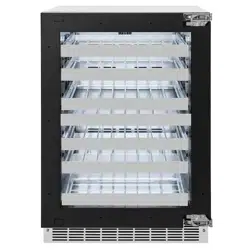

Installation and User Manual

ZLINE Kitchen and Bath provides Attainable Luxury, where the kitchen and bath of your dreams
is never out of reach. Through our unique designs and unparalleled quality, we’re dedicated to
providing you an elevated experience in the heart of your home. With an endless selection of
features and finishes, our inspiration is your reality.
ZLINE is fueled by a passion for innovation; A relentless pursuit of bringing the highest end luxury
designs and professional features into everyone’s homes. Because we continually strive to improve
our products, we may change specifications and designs without prior notice.
WARNING: This product can expose you to chemicals including nickel, which is known to the
State of California to cause cancer. For more information, go to www.P65Warnings.ca.gov.

IMPORTANT SAFETY INFORMATION . . . . . . . . . . . . . . . . . . . . . . . . . . . . . .1
BEFORE INSTALLATION . . . . . . . . . . . . . . . . . . . . . . . . . . . . . . . . . . . . . . . . . .5
Product Specifications . . . . . . . . . . . . . . . . . . . . . . . . . . . . . . 5
Provided Materials . . . . . . . . . . . . . . . . . . . . . . . . . . . . . . . 8
Materials Needed . . . . . . . . . . . . . . . . . . . . . . . . . . . . . . . . 8
INSTALLATION . . . . . . . . . . . . . . . . . . . . . . . . . . . . . . . . . . . . . . . . . . . . . . . . .9
Built-In Cabinet Instructions . . . . . . . . . . . . . . . . . . . . . . . . . . .10
Installing The Anti-Tip System . . . . . . . . . . . . . . . . . . . . . . . . . . 11
Reversing The Door Swing . . . . . . . . . . . . . . . . . . . . . . . . . . .12
Integrated Door Panel Installation . . . . . . . . . . . . . . . . . . . . . . .13
Handle Installation. . . . . . . . . . . . . . . . . . . . . . . . . . . . . . . .15
Electrical Connection . . . . . . . . . . . . . . . . . . . . . . . . . . . . . .16
OPERATION . . . . . . . . . . . . . . . . . . . . . . . . . . . . . . . . . . . . . . . . . . . . . . . . . . 17
Control Panel Layout And Operation . . . . . . . . . . . . . . . . . . . . . .17
Error Alarms . . . . . . . . . . . . . . . . . . . . . . . . . . . . . . . . . . .21
Energy-Saving Tips And Other Notes . . . . . . . . . . . . . . . . . . . . 22
CARE AND MAINTENANCE . . . . . . . . . . . . . . . . . . . . . . . . . . . . . . . . . . . . .23
TROUBLESHOOTING . . . . . . . . . . . . . . . . . . . . . . . . . . . . . . . . . . . . . . . . . . .25
WARRANTY . . . . . . . . . . . . . . . . . . . . . . . . . . . . . . . . . . . . . . . . . . . . . . . . . . .26
TABLE OF CONTENTS
1
• IMPORTANT: Read all instructions before using this appliance. Use this appliance
only for its intended purpose as described in this manual. Always exercise basic safety
precautions, as described below. After reading this manual, store it in an accessible
place where users and services can easily reference it.
• The purpose of these safety precautions is to ensure safe and correct use of the product to
minimize risks that could cause serious damage and injury to you or others. Precautions
are split into WARNINGS and CAUTIONS. Incidences where improper handling of
the unit could lead to death or serious injury are listed under the WARNING heading.
Incidences listed under CAUTION could lead to serious injury.
DANGER
Risk of fire or explosion. FLAMMABLE REFRIGERANT used.
• Do not use mechanical devices to defrost refrigerator.
• Do not puncture refrigerant tubing.
• This appliance is to be repaired only by trained service personnel.
• Consult the appliance’s user and installation manuals before attempting service.
• All safety precautions must be followed.
CAUTION
Risk of fire or explosion. FLAMMABLE REFRIGERANT used. Dispose of properly
in accordance with the applicable federal or local regulations.
CAUTION
Risk of fire or explosion if refrigerant tubing is punctured. FLAMMABLE
REFRIGERANT used. Follow handling instructions carefully.
WARNING
Keep ventilation openings, in the appliance enclosure or in the built-in structure,
clear of obstruction.
WARNING
Do not use mechanical devices or other means to accelerate the defrosting
process, other than those recommended by the manufacturer.
WARNING
Do not damage the refrigerant circuit.
WARNING
Do not use electrical appliances inside the food storage compartments of the
appliance unless they are explicitly recommended by the manufacturer.
IMPORTANT SAFETY INFORMATION
General Safety
2
WARNING
• Installation and service should be performed by a qualified installer. The appliance should
not be adjusted or repaired by anyone except qualified service personnel. Attempting to
perform these yourself could result in fire, malfunction, or injury.
• Never splash water directly onto the appliance or wash it with water without unplugging
it from power, as a short circuit could result. If the appliance is installed outdoors in a
humid or rainy environment, a water-proof covering is recommended.
• Never store flammable, explosive, or volatile substances inside or on top of the unit, as
an explosion and fire could result.
• Do not damage, modify, excessively bend, strain, twist or bundle the power cord. Avoid
hot, sharp, or aggressive surfaces. Placing heavy objects on the cord or binding it could
damage the cord, possibly resulting in electrical shock and/or fire.
• Use a dedicated wall outlet. Do not use an extension cord or multiple-outlet adapter, as
this could result in electrical shock, overheating, and fire.
• Never use flammable spray cans or leave flammable substances near the unit. Sparks
from electrical switches could result in an explosion and/or fire.
• If a combustible gas is present near the appliance, turn off the source of the gas, then
open the windows and doors to allow the gas to dissipate. To avoid an explosion, do
not pull the plug or switch off the unit.
• The electrical socket must be properly grounded and the plug should always be
accessible. The ground wire cannot be connected with a gas pipe, heating pipe, water
pipe, telephone line, or lightning rod. It cannot be replaced with the neutral wire of
single-phase power.
• For standard indoor installation, it’s recommended that a dedicated electrical circuit
suitable for a NEMA 5-15 outlet serving only your appliance be used; please ensure
the outlet is easily accessible.
• In addition to the ground wire, an electrical leakage circuit breaker is required if the unit
is installed outdoors.
• An electrician-installed ground fault circuit interrupter (GFCI) electrical outlet is also
required for outdoor installation. If no GFCI is installed, electrical shock could result.
• Never climb onto or inside the unit. The unit could tip over or fall and cause material
damage or personal injury.
IMPORTANT SAFETY INFORMATION
General Safety
3
IMPORTANT SAFETY INFORMATION
• Disconnect the power cord plug from the wall outlet before moving the unit and make
sure that the power cord is not damaged during transport. A damaged power cord
could result in electrical shock and/or fire.
• Never unplug the unit by pulling on the power cord. Always grip the plug firmly and
pull straight out from the outlet. Pulling the cord could cause wire breakage, possibly
resulting in overheating and fire. Never pull out plug when hands are wet.
• Have a qualified technician repair or replace any cord that is frayed or damaged. Do
not use a cord that shows cracks or abrasions along its length.
• Keep the appliance’s ventilation openings, whether in the appliance enclosure or in the
built-in structure, clear of any obstruction.
CAUTION
• This unit must be properly installed in accordance with the installation instructions
including in this manual, along with adhering to all local government codes, before it is
used. See electrical instructions on page 16.
• This appliance can either be built-in or freestanding. Built-in units vent air out of the
grill located at the bottom front of the refrigerator. To ensure proper service access and
ventilation, all units should not have the grill openings covered. There are no additional
requirements for venting at the top, side or rear of the unit.
• Install the unit in a location where the floor is sturdy enough to support the load of the
unit. If the floor is not sturdy enough or installation is incorrectly performed, the unit could
tip over and cause personal injury. If the unit is placed on a stand, the front surface must
be 3" (76 mm) or more back from the edge of the stand to avoid accidental tipping of
the appliance during normal usage.
• Never place heavy objects or items containing water on top of the unit. Objects could
fall and cause injury, and spilled water or other liquids could cause the deterioration of
the insulation of electrical components and result in electrical shock.
• Disconnect the unit if it is behaving abnormally, and do not reconnect until the situation is
corrected. If normal troubleshooting measures do not work, contact ZLINE at
1-614-777-5004 for assistance.
• Unplug the appliance before doing any maintenance to avoid electric shock.
• This unit is not intended for the storage of medicines, vaccines, or chemical reagents.
• Keep all packing materials away from children.
General Safety
4
IMPORTANT SAFETY INFORMATION
Disposal Safety
WARNING
Risk of child entrapment. To avoid safety and suffocation risks for children or
pets, before you dispose of the appliance, take off the doors and drawers and
leave the shelves in place so children or pets may not climb inside.
• Condenser water from the appliance evaporator drains into a hole in the floor of the
storage compartment and is channeled into a drain pan located at the back of the
appliance on the compressor. Heat transferred from the compressor evaporates any
water that has collected in the pan. Be sure the drain hole in the floor of the unit is clear
and unobstructed.
• This appliance is CFC- and HFC-free and contains small quantities of isobutane (R600a),
an environmentally friendly refrigerant.
• During long absences, remove the unit’s contents, unplug the unit, clean it, and leave the
door open slightly to avoid possible formation of condensation, mold, or odors. Use a
cover to protect the unit and prolong its lifespan.
• Leave disassembly and disposal of the unit to qualified experts. The manufacturer will not
be responsible for any damage to property or to persons caused by incorrect installation,
improper use of the appliance, or failure to heed the warnings listed, and the warranty
will be voided.
• The manufacturer reserves the right to make changes to its products when considered
necessary and useful, without affecting the essential safety and operating characteristics.
• This appliance has been designed for non-commercial, domestic use only.
• Please observe all local, state, and national codes and ordinances. Please ensure the
appliance is properly grounded. The plug should always be accessible.
• Never use an appliance with a damaged cooling system. If system is damaged upon
arrival, contact ZLINE at 1-614-777-5004
DISPOSAL
The appliance cannot be treated as normal domestic trash and must be disposed of at a
collection point for recycling electric and electronic appliances. Your contribution to the
correct disposal of this product protects the environment. Further information about the
recycling of this product can be obtained from your local municipal authority.
5
Product Specifications
BEFORE INSTALLATION
PRODUCT SPECIFICATIONS
Model RWDO-GS-24 RWDPO-24
Description
Dual-Zone
Stainless Steel Glass Door
Dual-Zone
Panel-Ready Glass Door
Weight 169 lb (77 kg) 161 lb (73 kg)
Voltage/Frequency/Max Amp Draw 115-120VAC/60Hz/15A
*Product Dimensions
23 7/8" W × 23 3/16" D × 34" H
606 mm W x 589 mm D x 864 mm H
Ambient Temperature Range 50 °F–110 °F (10 °C–43 °C)
Operating Temperature Range Both zones: 40 °F–65 °F (4 °C–18 °C)
Shelf Configuration
5 Full Depth Stainless Steel Wire Rack
1 Half Depth Stainless Steel Wire Rack (at bottom)
Interior Capacity 4.8 cu. ft.
Wine Storage Capacity 44 Bordeaux-style bottles (750 ml)
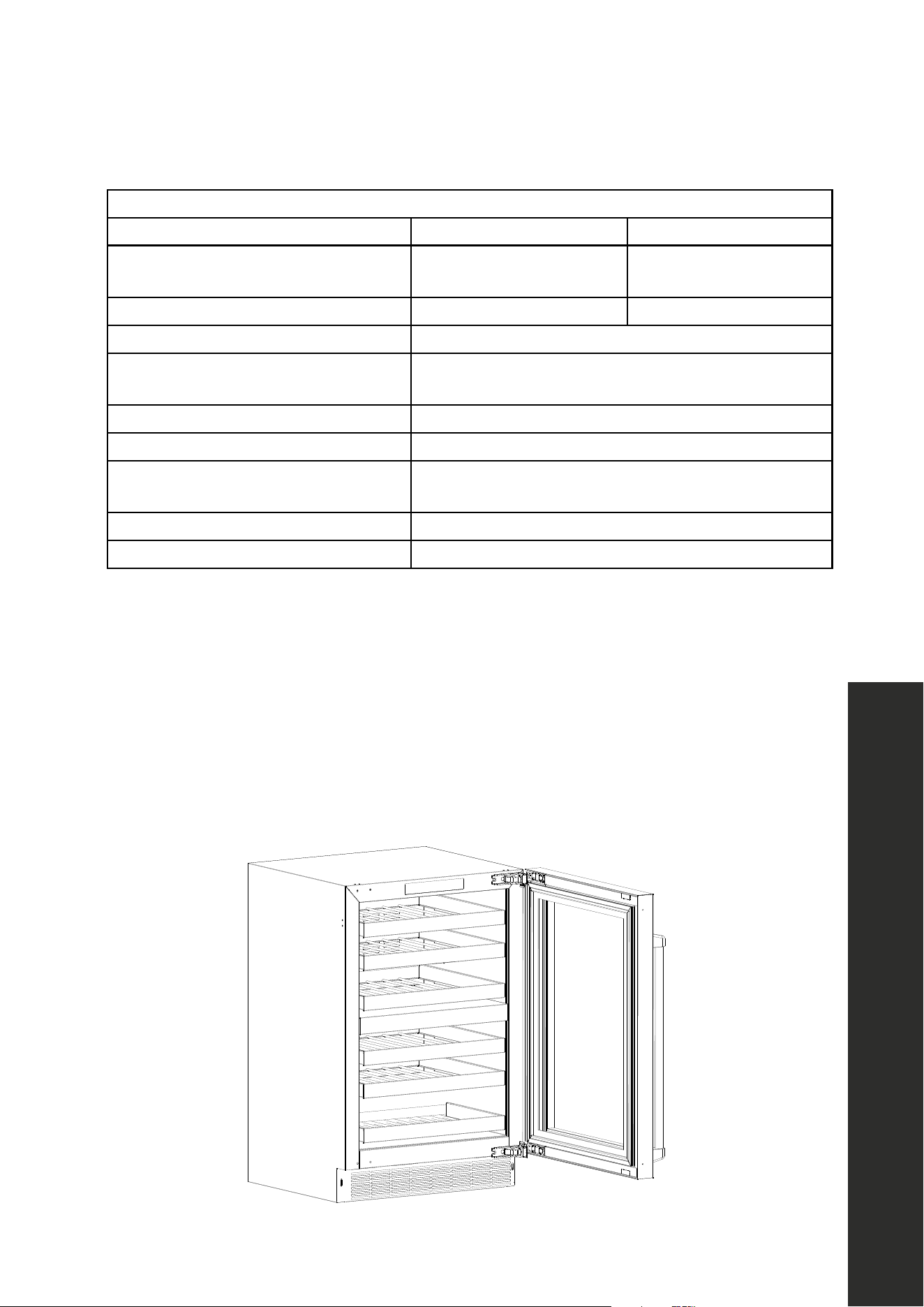
* PRODUCT DIMENSION NOTES:
• Height for both models varies depending on adjustable legs; 34" (864 mm) is the
minimum height with the legs at their lowest position. Max height is 34 15/16" (887 mm).
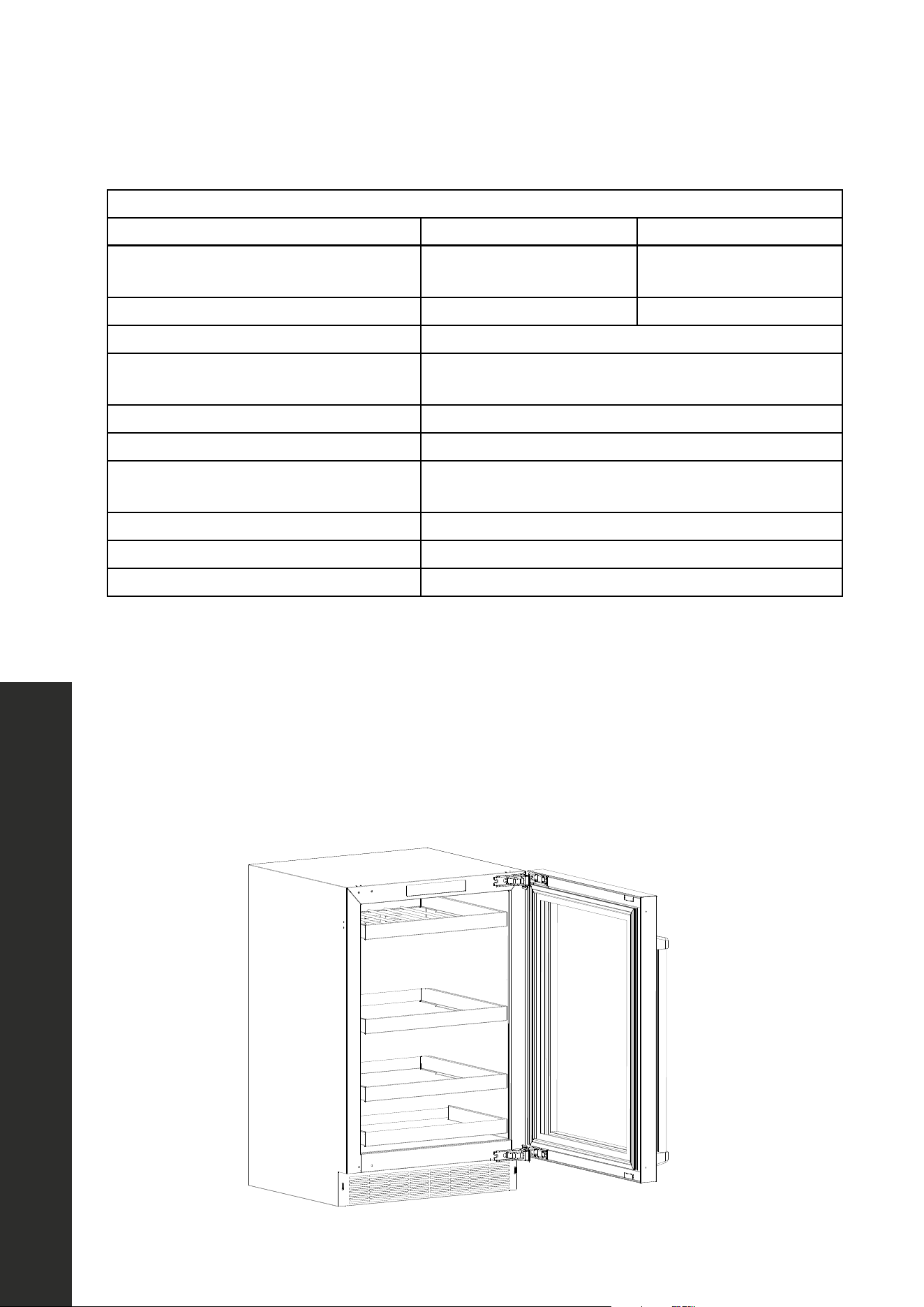
• The diagram below represents an RWDO-GS-24 model. The 23 3/16" (589 mm) depth
measurement is from back of the cooler to the front of the stainless steel door.
• For RWDPO-24, depth to the front of the panel-ready door is 22 3/8" (568 mm).
• Full depth including handle is 25 7/16" (646 mm).
6
BEFORE INSTALLATION
PRODUCT SPECIFICATIONS
Model RBSO-GS-24 RBSPO-24
Description
Beverage Center
Stainless Steel Glass Door
Beverage Center
Panel-Ready Glass Door
Weight 154 lb (70 kg) 147 lb (67 kg)
Voltage/Frequency/Max Amp Draw 115VAC/60Hz/15A
*Product Dimensions
23 7/8" W × 23 3/16" D × 34" H
606 mm W x 589 mm D x 864 mm H
Ambient Temperature Range 50 °F–110 °F (10 °C–43 °C)
Operating Temperature Range 34 °F–65 °F (1 °C–18 °C)
Shelf Configuration
1 Full Depth Stainless-Steel Wire Rack
Glass Shelves: 2 Full Depth and 1 Half Depth
Interior Capacity 5.2 cu. ft.
Can/Bottle Storage Capacity 151 cans or 79 bottles (12 oz)
Wine Storage Capacity 8 Bordeaux-style bottles (750 ml)
* PRODUCT DIMENSION NOTES:
• Minimum height for both models is 34" (864 mm). Max height is 34 15/16" (887 mm).
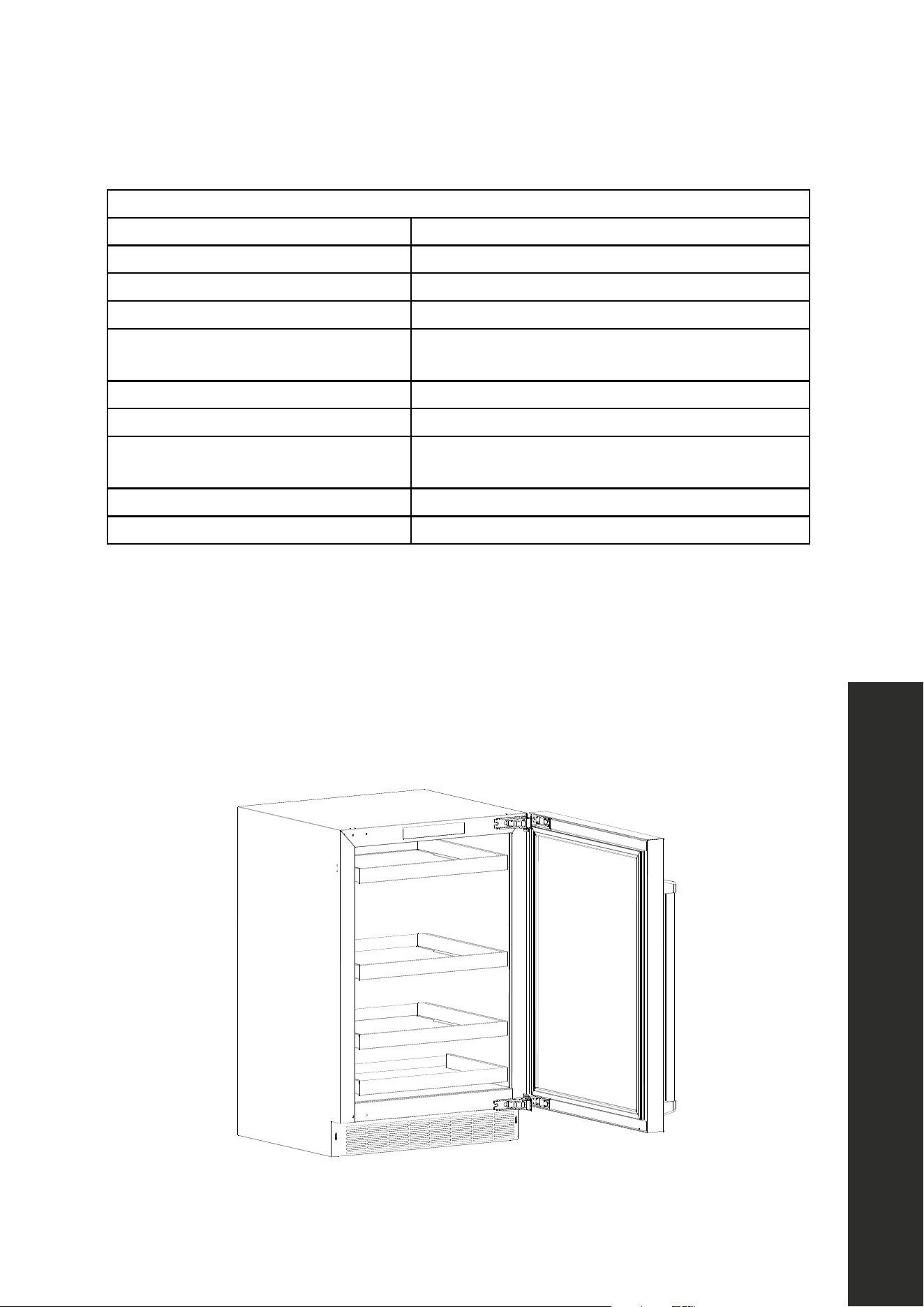
• The diagram below represents an RBSO-GS-24 model. The 23 3/16" (589 mm) depth
measurement is from back of the cooler to the front of the stainless steel door.
• For RBSPO-24, depth to the front of the panel-ready door is 22 3/8" (568 mm).
• Full depth including handle is 25 7/16" (646 mm).
Product Specifications
7
Product Specifications
BEFORE INSTALLATION
PRODUCT SPECIFICATIONS
Model RBSO-ST-24
Description Refrigerator Stainless Steel Solid Door
Weight 139 lb (63 kg)
Voltage/Frequency/Max Amp Draw 115VAC/60Hz/15A
*Product Dimensions
23 7/8" W × 23 3/16" D × 34" H
606 mm W x 589 mm D x 864 mm H
Ambient Temperature Range 50 °F–110 °F (10 °C–43 °C)
Operating Temperature Range 34 °F–65 °F (1 °C–18 °C)
Shelf Configuration
3 Full Depth Glass Shelves
1 Half Depth Glass Shelf (at bottom)
Interior Capacity 5.2 cu. ft.
Can/Bottle Storage Capacity 151 cans or 103 bottles (12 oz)
* PRODUCT DIMENSION NOTES:
• Minimum height for the refrigerator is 34" (864 mm).
• Max height is 34 15/16" (887 mm).
• The 23 3/16" (589 mm) depth measurement is from back of the cooler to the front of the
stainless steel door.
• Full depth including handle is 25 7/16" (646 mm).
8
Materials Provided and Needed
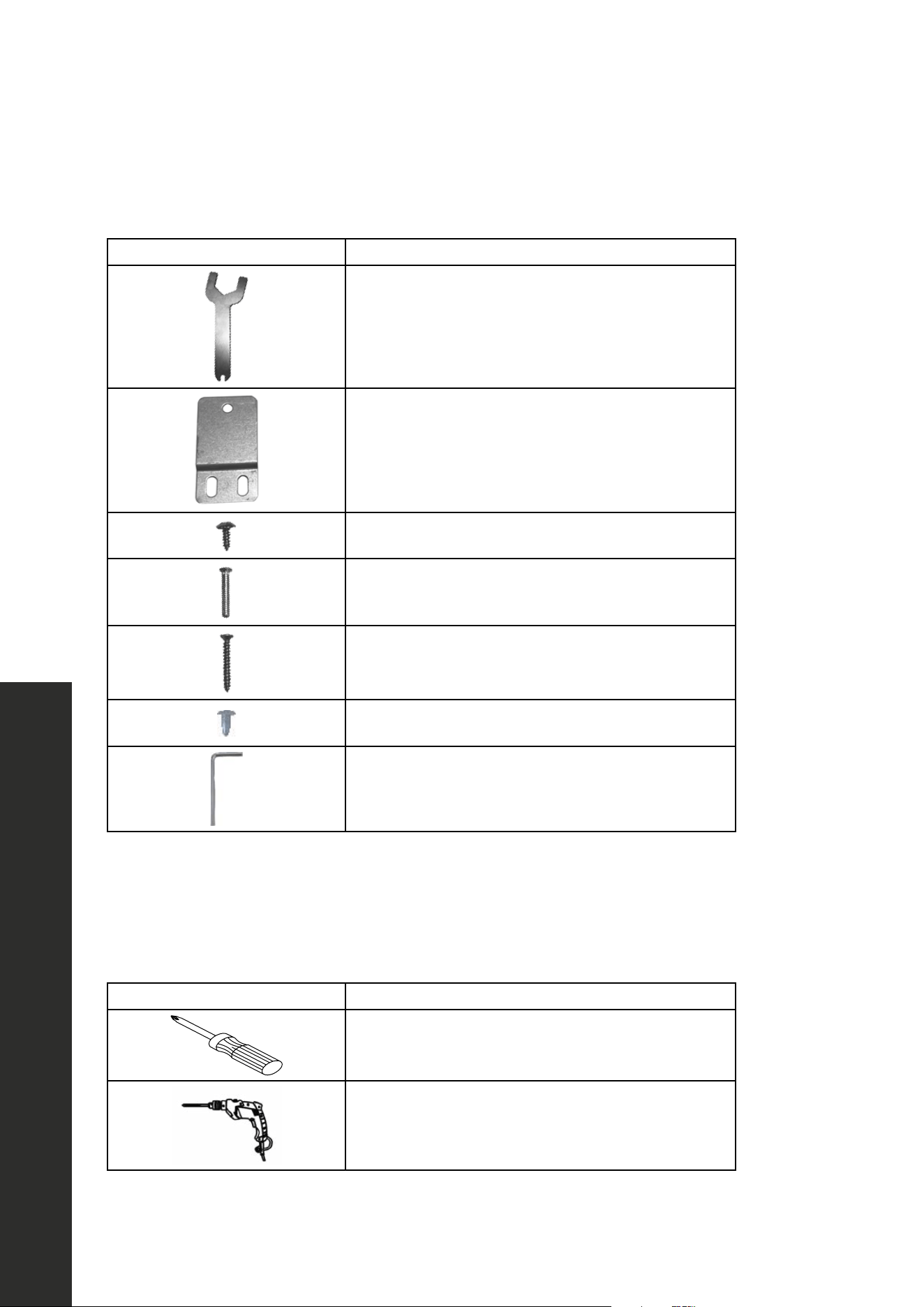
PROVIDED MATERIALS
IMAGE DESCRIPTION
Foot adjustment wrench (1)
Anti-tip brackets (2)
Screws for anti-tip brackets (6)
Door limiting pins (2)
*Screws for custom panel installation (10)
Decorative plugs (4)
Allen key (1)
* Not needed for stainless steel door models; see page 13 for panel-ready information.
MATERIALS NEEDED
IMAGE DESCRIPTION
Phillips-head screwdriver
Drill with Phillips-head bit
BEFORE INSTALLATION
9
Pre-Installation Procedure
INSTALLATION
BEFORE INSTALLING YOUR REFRIGERATOR
• Remove all exterior and interior packing and dispose appropriately.
• Before connecting the unit to the power source for the first time, let it sand upright for
approximately 2 hours. This will reduce the possibility of a malfunction in the sealed
cooling system from handling during transportation.
• Clean the interior surface with lukewarm water using a soft cloth and wipe dry.
INSTALLATION OF YOUR REFRIGERATOR
• This appliance is designed for freestanding, recessed, or built-in installation (fully
recessed). Built-in installation is recommend to reduce risk of tipping.
• Place your appliance on a floor that is strong enough to support it when it is fully loaded.
To level your appliance, adjust the front leveling legs at the bottom of the appliance with
the provided wrench. Legs can be adjusted up to 1" (25 mm).
• Install the appliance in a location away from direct sunlight and sources of heat (stove,
heater, radiator, etc.). Direct sunlight may affect the acrylic coating, and heat sources
may increase electrical consumption. Extreme cold ambient temperatures may also
cause the unit not to perform properly.
• Plug the appliance into a dedicated, properly installed and grounded outlet. Do not
under any circumstances cut or remove the third (ground) prong from the power cord.
Any questions concerning power and/or grounding should be directed toward a
certified electrician or an authorized ZLINE service provider.
• While appliances are approved for outdoor use, it’s recommended to avoid installing
units in overly moist or humid areas. Too much moisture in the air will cause frost to form
quickly on the evaporator requiring more frequent defrosting of the refrigerator.
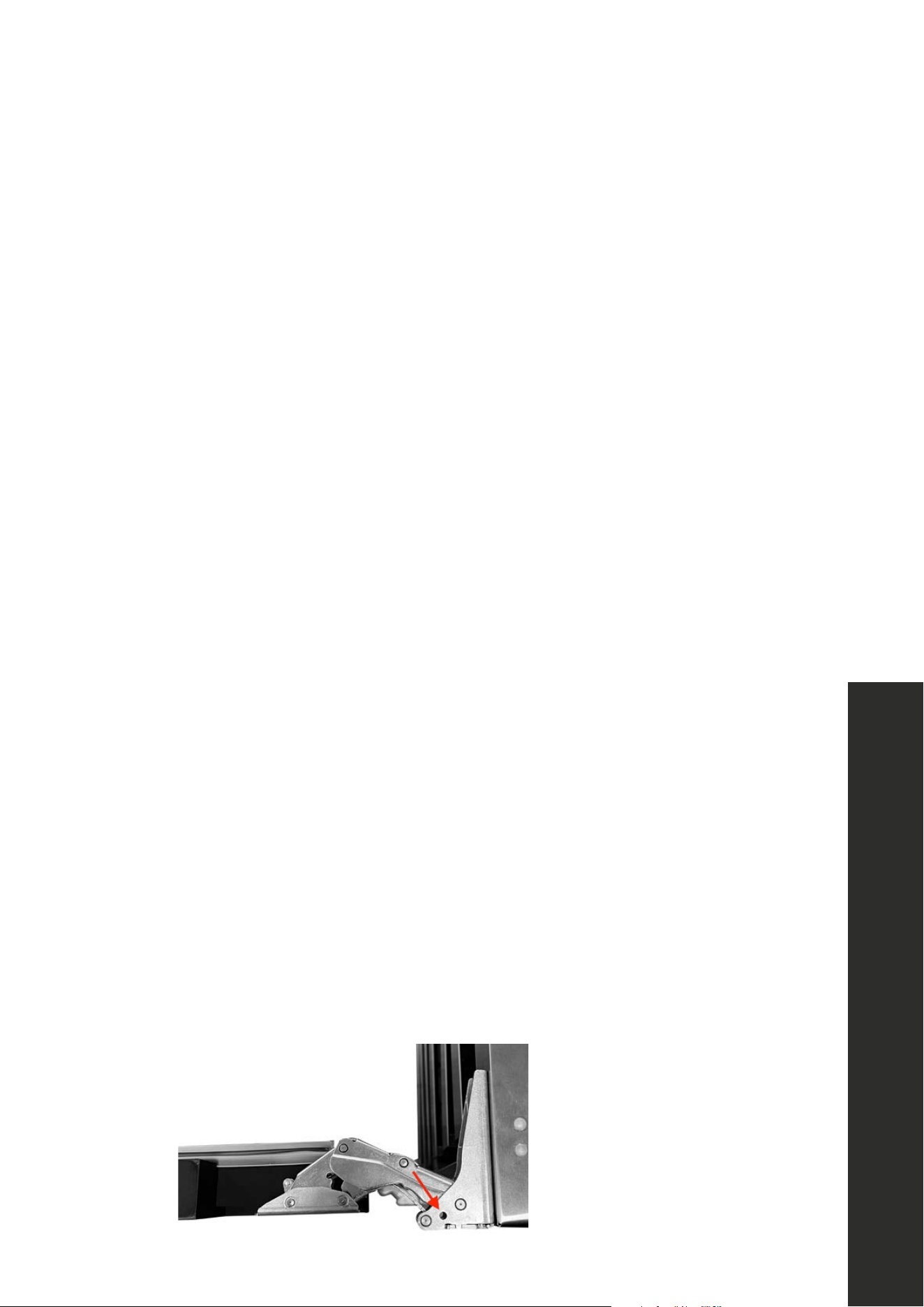
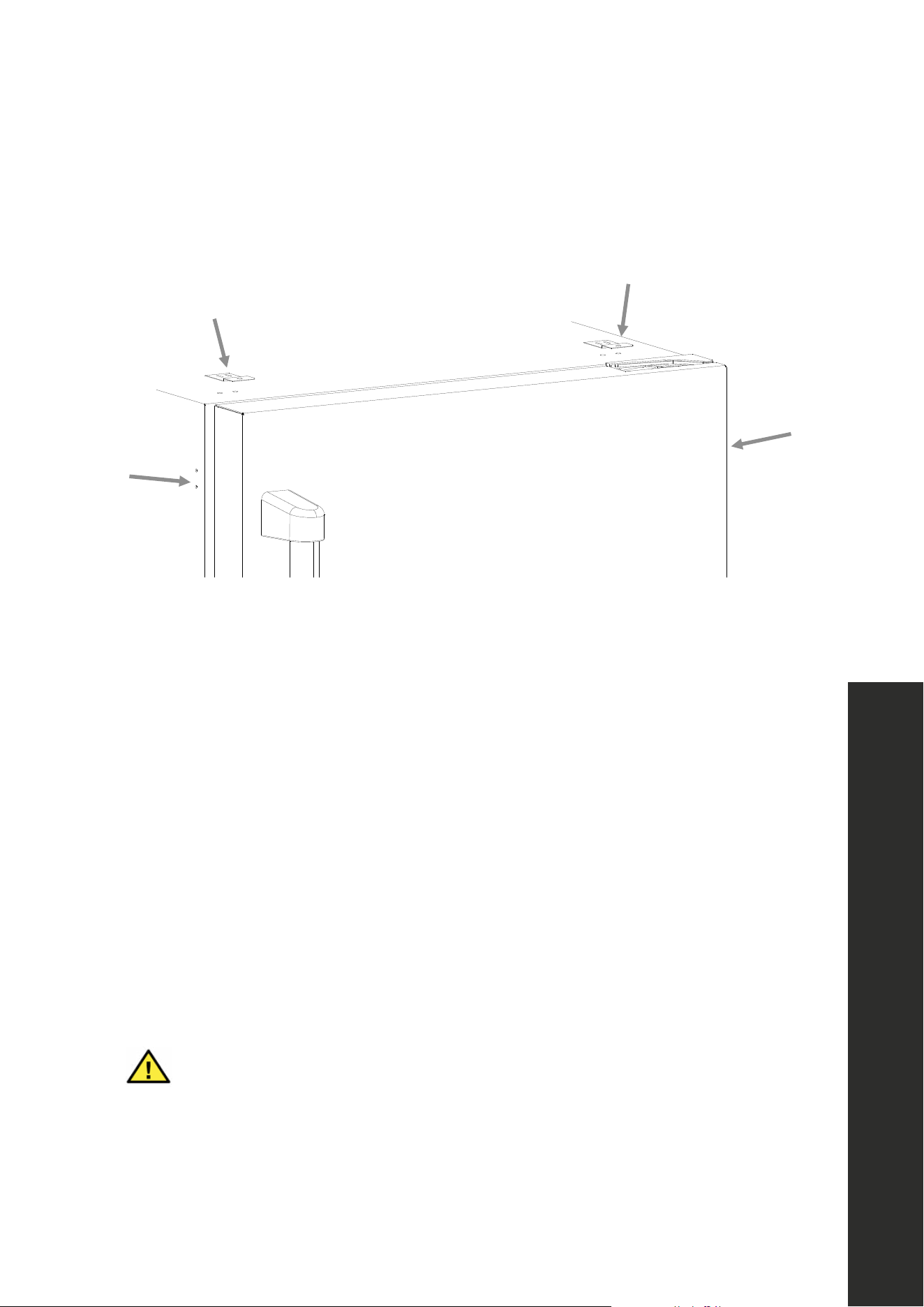
• Units come with doors installed at the pre-set maximum door swing of 135°. If you desire
to limit the door swing to 90°, insert the 2 provided door limiting pins into the pin hole
on the top and bottom door hinges, as show in the image below.
Door Limiting Pin Location
10
Cabinet Specifications
INSTALLATION
BUILT-IN CABINET INSTRUCTIONS
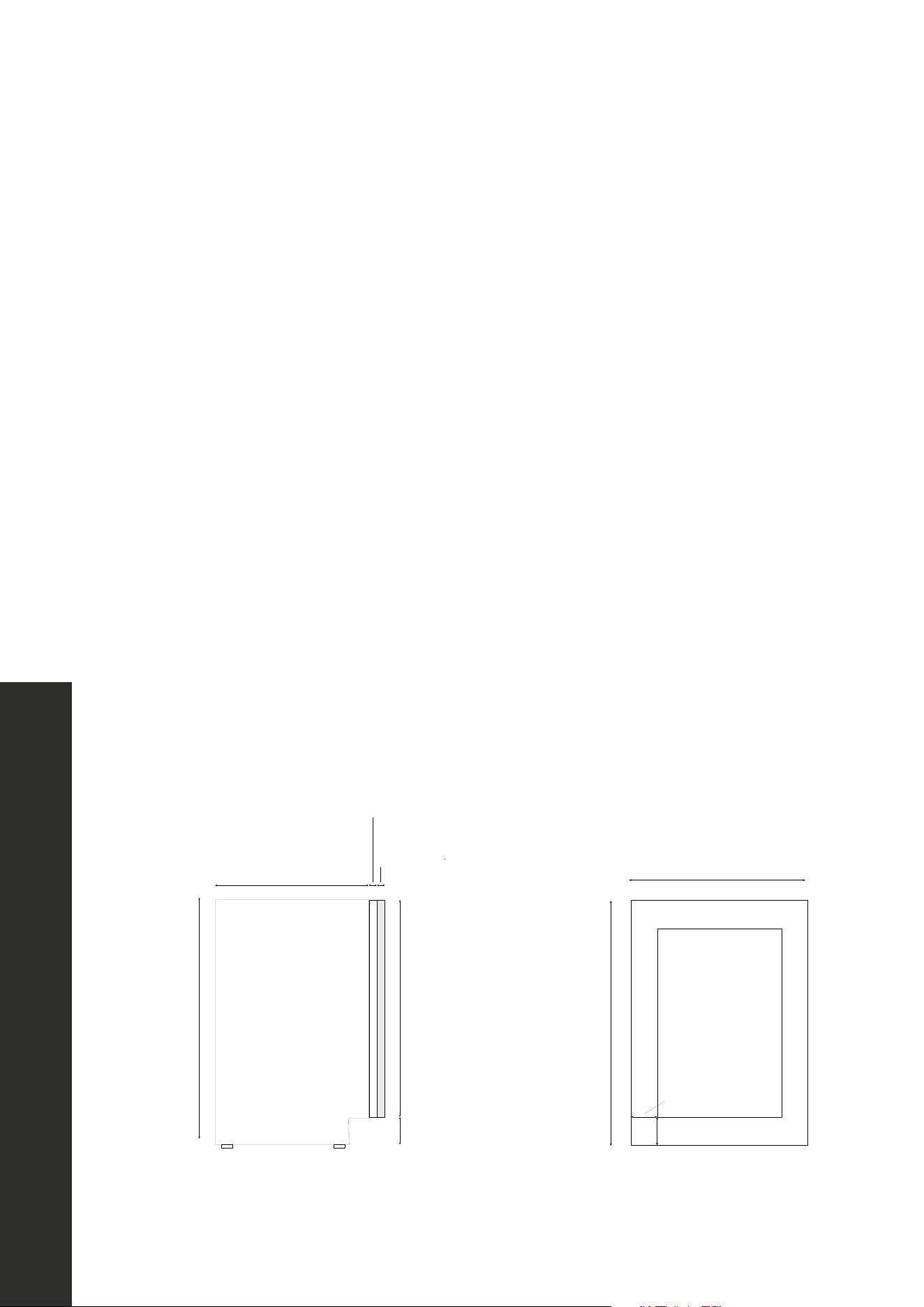
While this unit is designed for both built-in and freestanding installation, built-in installation
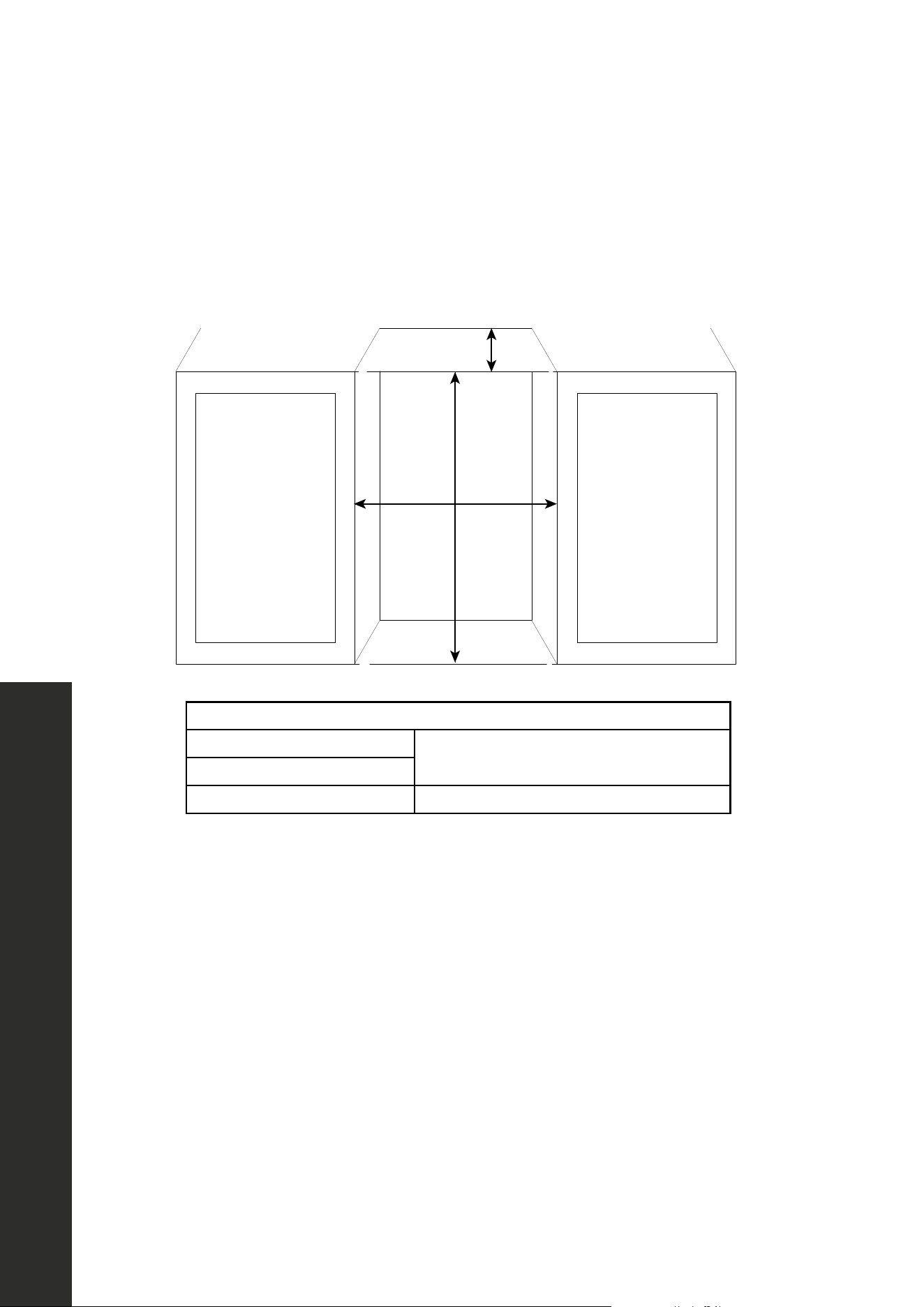
is recommend to reduce risk of tipping. If you plan to use this unit in a built-in application,
please follow the cabinet cutout requirements shown below.
Depth
Height
Width
RECOMMENDED CABINET OPENING DIMENSIONS
Width
24" (610 mm)
Depth
Height 34 1/8"–35 1/8" (867–892 mm)
ADDITIONAL INSTALLATION NOTES:
• The height cut-out variance takes into account the minimum and maximum height of the
unit (34"–35"/864–889 mm) depending on the legs being at their lowest and highest
setting. Since kitchen cabinet layouts vary, consult a professional installation technician
when considering a built-in cabinet installation.
• Depth is based off standard cabinet depths of 24" (610 mm)and also allows for ample
space at the rear of the unit for the electrical cord to be plugged into a properly installed
dedicated wall outlet.
• The minimum distance the appliance should to be installed when adjacent to a wall is 11"
(280 mm). This distance is required to obtain full swing (135°) of the door.
• If using limiting pins to obtain a 90° door swing, the minimum distance the appliance
should to be installed when adjacent to a wall is 2 3/4" (70 mm); this ensures enough
room for the handle to not hit the wall.
11
INSTALLATION
INSTALLING THE ANTI-TIP SYSTEM
(BUILT-IN INSTALLATION ONLY)
1. With built-in installations, once you’ve determined the appropriate height and have
ensured the appliance is level, position the unit at the front of the cutout to install the anti-
tip system, which is necessary to reduce risk of tipping.
2. Using a Phillips-head screwdriver or drill, secure the 2 anti-tip brackets to the top of
the unit using 4 of the provided screws, 2 for each bracket, making sure the lips of the
brackets are facing up and out, as outlined in the image above.
3. Plug the power cord into the wall and push the unit into the cutout, using care to not
tangle or damage the power cord.
4. Once the appliance is in the cutout, secure the anti-tip brackets into the countertop above
using the last 2 screws.
5. If the brackets for the anti-tip system cannot be secured above the appliance and no
wood is available, relocate the brackets for the anti-tip system to the side of the appliance
for securing into an adjacent cabinet, using the same process as above.
WARNING
The anti-tip system must be properly engaged with built-in installations to avoid
the unit tipping over and increasing risk of serious injury or death.
Anti-Tip System
12
Reversing the Door Swing
INSTALLATION
REVERSING THE DOOR SWING
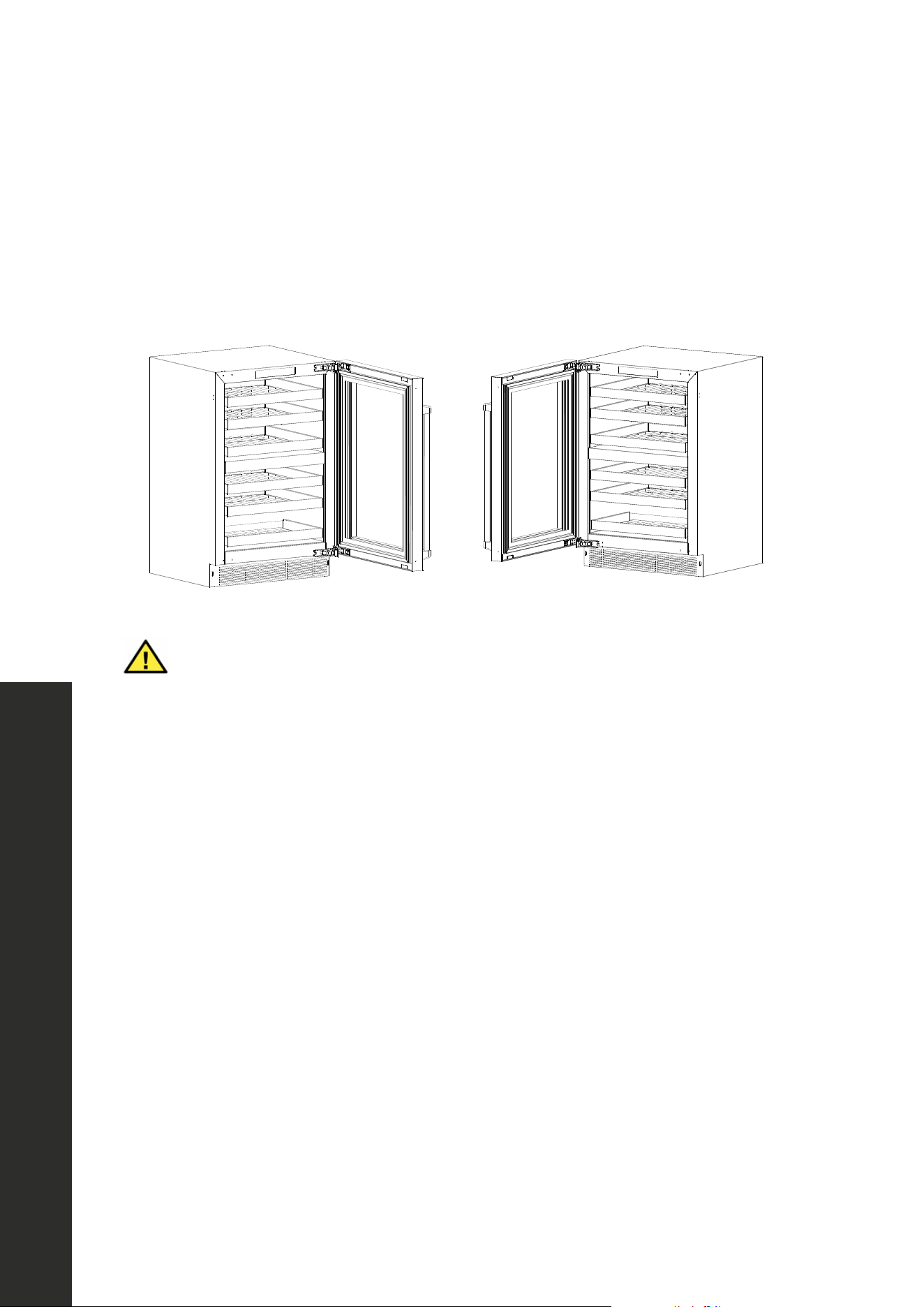
This appliance has the capability of the doors opening from either the left or right side. The
unit is delivered to you with the doors opening from the left side (Figure 1). Should you desire
to reverse the opening direction (Figure 2), follow the instructions below. NOTE: A second
person is recommended with this task due to the weight of the door.
Figure 1 Figure 2
Make sure the appliance is fully disconnected from power before performing
this task to avoid risk of electric shock.
WARNING
1. With the door open, use a drill or screwdriver to remove the 4 screws at the top and
bottom of the left side of the appliance cabinet face. Save the screws to reinstall once
the door reversal is complete.
2. Loosen the outer top and bottom screws on the right-side hinges. Do not fully remove
these screws to avoid the door falling and creating risk for injury.
3. Next, completely remove the inner top and bottom screws on the right-side hinges.
4. Initially secure the 2 removed screws about 3 turns into the left-side outer top and bottom
screw locations where the screws were removed in step 1.
5. Carefully slide the door from the 2 screw keyholes on the right-side hinges that were not
fully removed in step 2 and lift the door off the hinges.
6. Rotate the door 180° and slide the hinges on the 2 partially installed left-side screws
from step 4.
7. Remove the 2 screws loosened in step 2 from the right-side hinges and install them in the
open inner holes in the left-side hinge location. Tighten all screws.
8. Close the door and check for proper alignment. If needed, loosen the 4 screws enough
to slide the door as needed fine tune the alignment, then re-tighten all 4 screws.
9. Re-secure the 4 screws removed in step into the 4 open holes on the right side.
13
INTEGRATED DOOR PANEL INSTALLATION
RWDPO-24 and RBSPO-24 models are manufactured without door panels and handles.
To install a custom integrated panel around the glass door, follow the instructions and
dimensions below and on the next page. NOTE: Custom handles need to be affixed to the
panel prior to installing the panel onto the appliance (see page 15). Finish all sides of the
custom panel. They may be visible when the door is open.
WARNING
Make sure the appliance is fully disconnected from power before installing a
door panel to avoid risk of electric shock.
CAUTION
We recommend consulting a professional installer/carpenter when fabricating
a custom panel in wood or another material, as the dimensions provided must
be precisely followed to achieve optimal integration and appliance operation.
PREPARING THE INTEGRATED PANEL
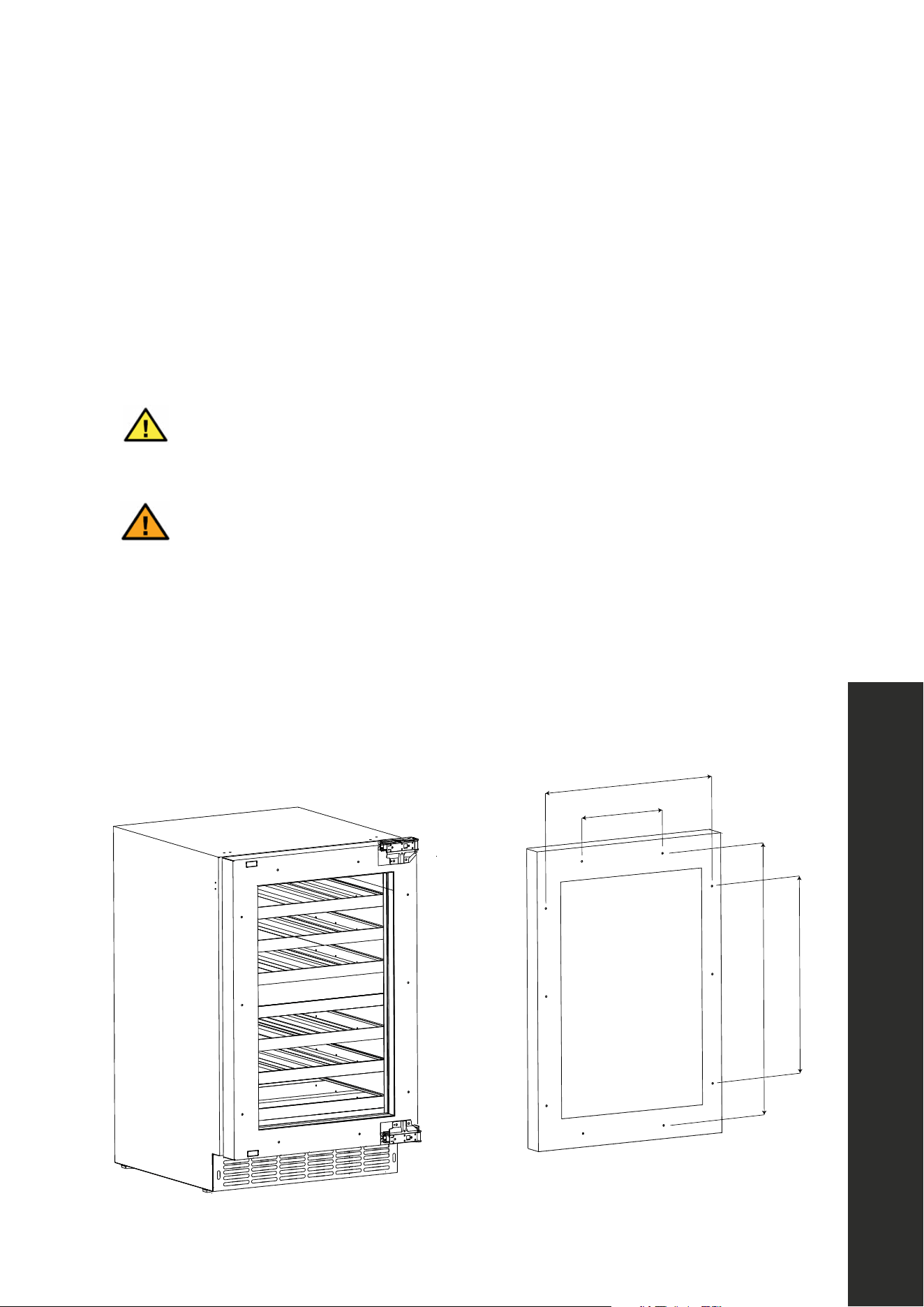
The dimensions in the figure below represent precise distances between the middle of the
corresponding screw holes. When cutting/fabricating the panel, use these measurements so
the screw holes align to ensure a flush installation onto the panel-ready door.
23 5/8" (600 mm)
18 5/8" (472 mm)
Depth of unit behind door:
20 11/16" (526 mm)
Depth of door: 1 3/4" (44 mm)
Recommended depth of
integrated door panel:
3/4" (20 mm)
30"31 "
(762787 mm)
2 3/4" (70 mm)
2 3/4" (70 mm)
Full product height:
34"35"
(864889 mm)
3 3/4"
(95 mm)
30" (762 mm)
6 7/8" (175 mm)
21 1/4" (539 mm)
20 1/2" (520 mm)
27" (685 mm)
INSTALLATION
Integrated Panel Installation
14
Integrated Panel Installation
INSTALLATION
INTEGRATED DOOR PANEL INSTALLATION INSTRUCTIONS
1. Remove the door from the unit as outlined in the steps on page 12.
2. By hand, remove the rubber door seal to access the panel mounting holes. Set the seal
aside and place the door face side up on a stable surface.
3. Place the panel onto the door and align the top be flush with the top of the door.
4. Adjust the overlap of the panel — panel width (23 5/8" or 600 mm) is slightly smaller
than the product (23 7/8" or 606 mm) — so it is equal on both sides of the door.
5. Secure the custom door panel to the door using 10 provided wood screws — 3 on each
side and 2 apiece at top and bottom — using a drill or screwdriver, using the precise
measurements provided on page 13.
6. Once installed, replace by hand the door seal. Be sure the seal is properly sealed.
7. Reinstall the door to the unit as outlined in the steps on page 12.
INTEGRATED DOOR PANEL DIMENSIONS
• Reference the dimensions below when fabricating your custom integrated panel.
• Figure 1 is a side view of the unit, showing how the panel (in gray) fits over the panel-
ready door. A panel depth of no more than 3/4" (19 mm) is recommended.
• Figure 2 shows a front view of a custom panel; follow these precise specifications when
cutting/fabricating the panel to perfectly align with the panel-ready door.
23 5/8" (600 mm)
18 5/8" (472 mm)
Depth of unit behind door:
20 11/16" (526 mm)
Depth of door: 1 3/4" (44 mm)
Recommended depth of
integrated door panel:
3/4" (20 mm)
30"31 "
(762787 mm)
2 3/4" (70 mm)
2 3/4" (70 mm)
Full product height:
34"35"
(864889 mm)
3 3/4"
(95 mm)
30" (762 mm)
6 7/8" (175 mm)
21 1/4" (539 mm)
20 1/2" (520 mm)
27" (685 mm)
Figure 1
23 5/8" (600 mm)
18 5/8" (472 mm)
Depth of unit behind door:
20 11/16" (526 mm)
Depth of door: 1 3/4" (44 mm)
Recommended depth of
integrated door panel:
3/4" (20 mm)
30"31 "
(762787 mm)
2 3/4" (70 mm)
2 3/4" (70 mm)
Full product height:
34"35"
(864889 mm)
3 3/4"
(95 mm)
30" (762 mm)
6 7/8" (175 mm)
21 1/4" (539 mm)
20 1/2" (520 mm)
27" (685 mm)
Figure 2
15
Handle Installation
INSTALLATION
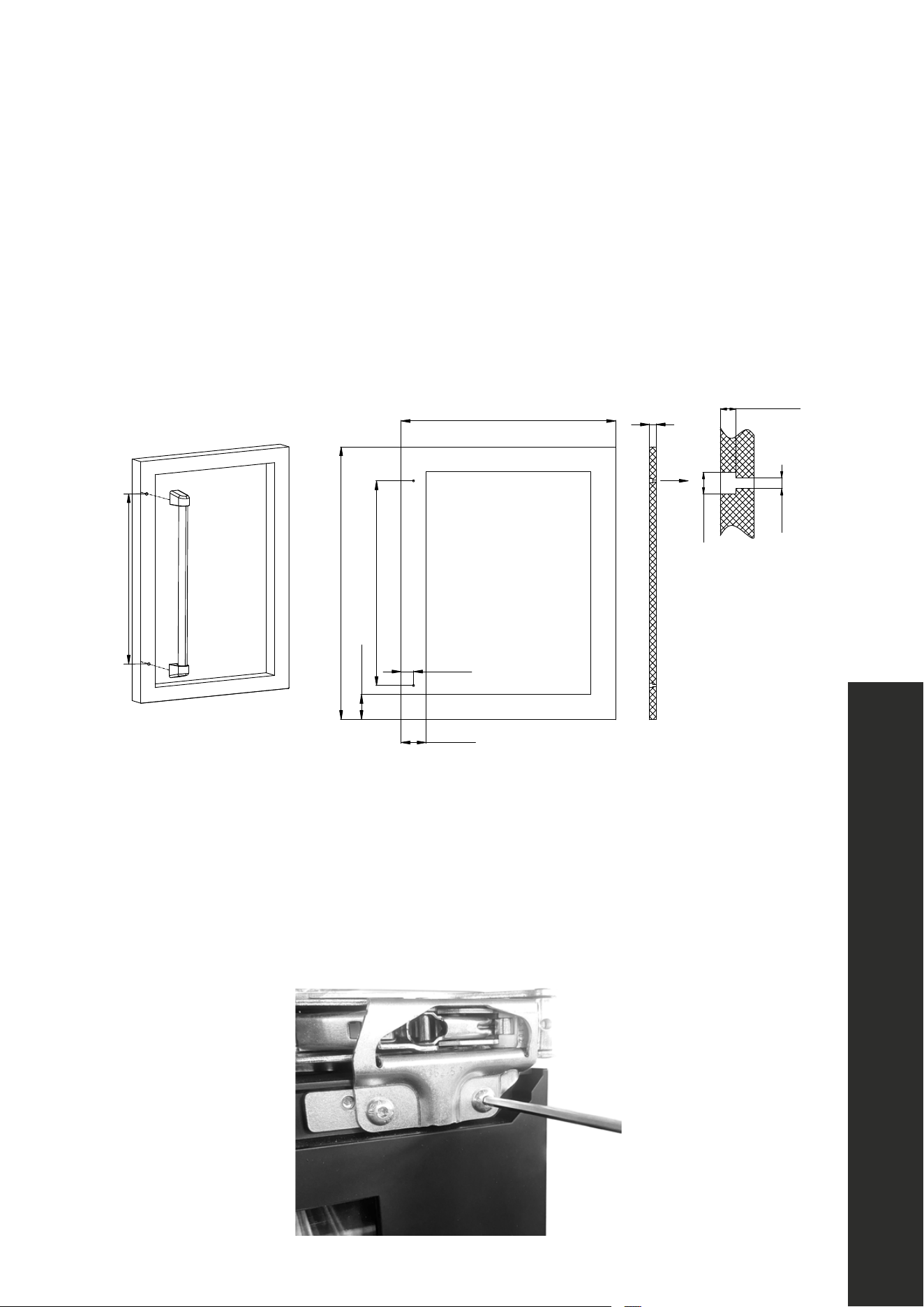
HANDLE INSTALLATION
Prior to installing a custom integrated panel around the glass door on RWDPO-24 and
RBSPO-24 models, handle(s) need to be affixed to the panel first. If you wish to install
a ZLINE Autograph Edition handle onto your custom panel, reference the measurements
displayed in the diagrams below regarding where to affix mounting studs.
22 1/2" (572 mm)
30" (762 mm)
2 3/4" (70 mm)
22 1/2" (572 mm)
1 3/8" (35 mm)
23 5/8" (600 mm)
3/4"
(20 mm)
Ø1/2" (12 mm)
Ø1/4" (6 mm)
1/4"1/3"
(69 mm)
2 3/4" (70 mm)
DOOR HINGE TIGHTENING
The appliance’s door hinges may loosen over time, which is normal with regular use. Use the
provided Allen key to loosen or tighten screws securing the hinges to the door as necessary,
as outlined in the image below for RWDPO-24 and RBSPO-24 models. For RBSO-GS-24,
RWDO-GS-24, and RBSO-ST-24 models, hinge screws are located behind the rubber
door seal. You can easily remove the upper corners of the seal by hand to access the screws.
16
Electrical Connection
ELECTRICAL CONNECTION
• For your personal safety, this appliance must be properly grounded. In the event of an
electrical short circuit, grounding reduces the risk of shock by providing an escape wire
for the electric current.
• This appliance is equipped with a cord having a grounding wire and a grounded plug.
For standard indoor installation, it’s recommended that a dedicated electrical circuit
suitable for a NEMA 5-15 outlet serving only your appliance be used; please ensure
the outlet is easily accessible.
WARNING
Do not under any circumstances cut or otherwise remove the third (ground)
prong from the power cord. Doing so increases the risk of electric shock, injury,
and/or death.
WARNING
We do not recommend using an extension cord because of potential safety
hazards under certain conditions. If one is used on this appliance, it may void
the warranty.
• For outdoor installation, an electrical leakage circuit breaker is required. Further, if
outdoor installation in a moist or damp location is unavoidable, an electrician must
install a ground fault circuit interrupter (GFCI) electrical outlet.
WARNING
If no GFCI is properly installed, electrical shock, injury, and/or death could
result. Consult a qualified electrician if you do not completely understand these
grounding instructions.
INSTALLATION
17
Buttons and Indicators
OPERATION
PRIOR TO OPERATING THE UNIT
• While this unit is capable of operating in ambient temperatures between 50 °F–110 °F
(10 °C–43 °C), it is recommended you install the appliance in a place where the ambient
temperature is generally between 60 °F–90 F (16 °C–32 °C).
• If the ambient temperature is above or below these recommended temperatures, the
performance of the unit may be affected.
• For example, placing your unit in extreme cold or hot conditions may cause interior
temperatures to fluctuate. This means the desired interior temperature ranges may not be
reached. See more on page 22.
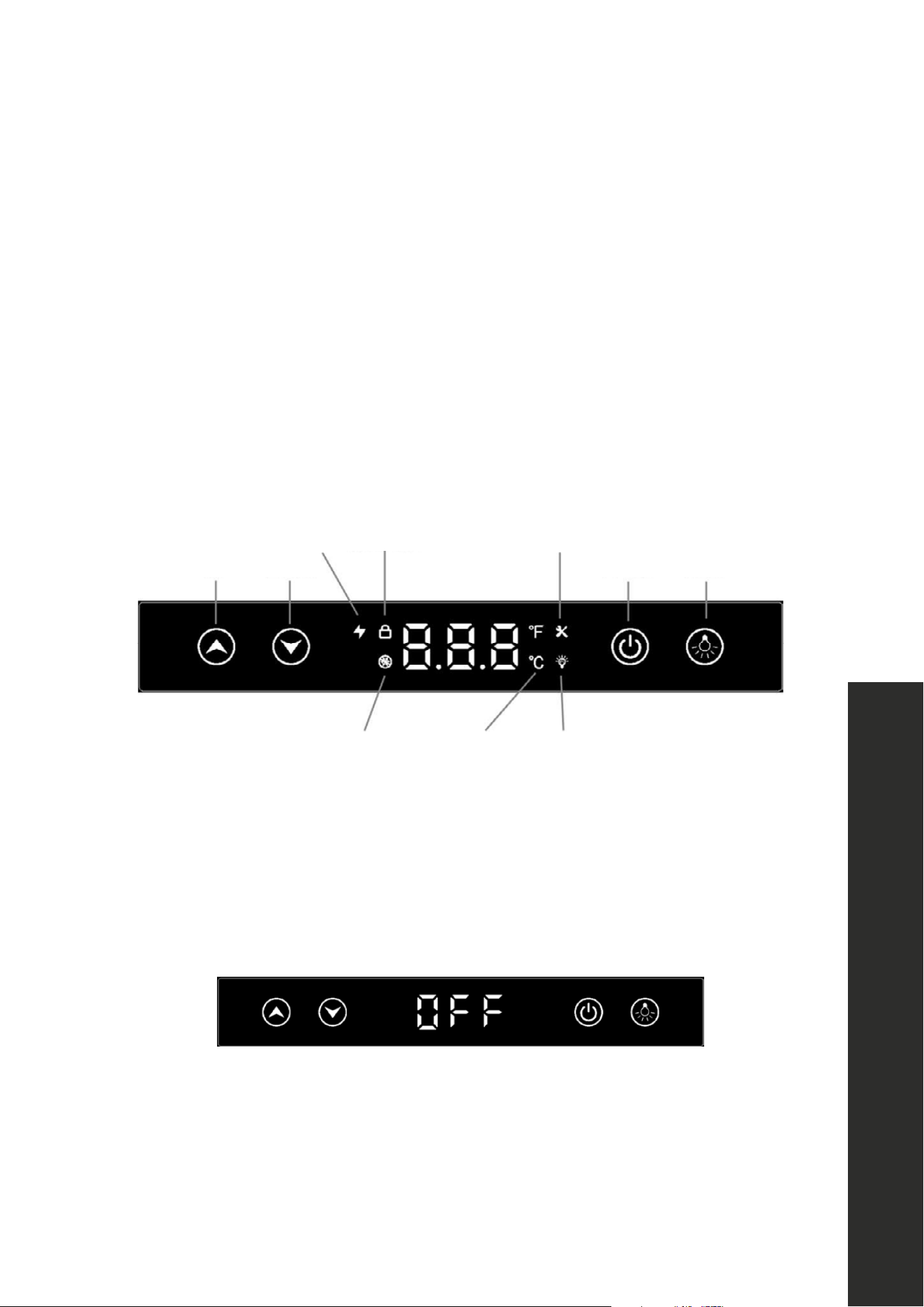
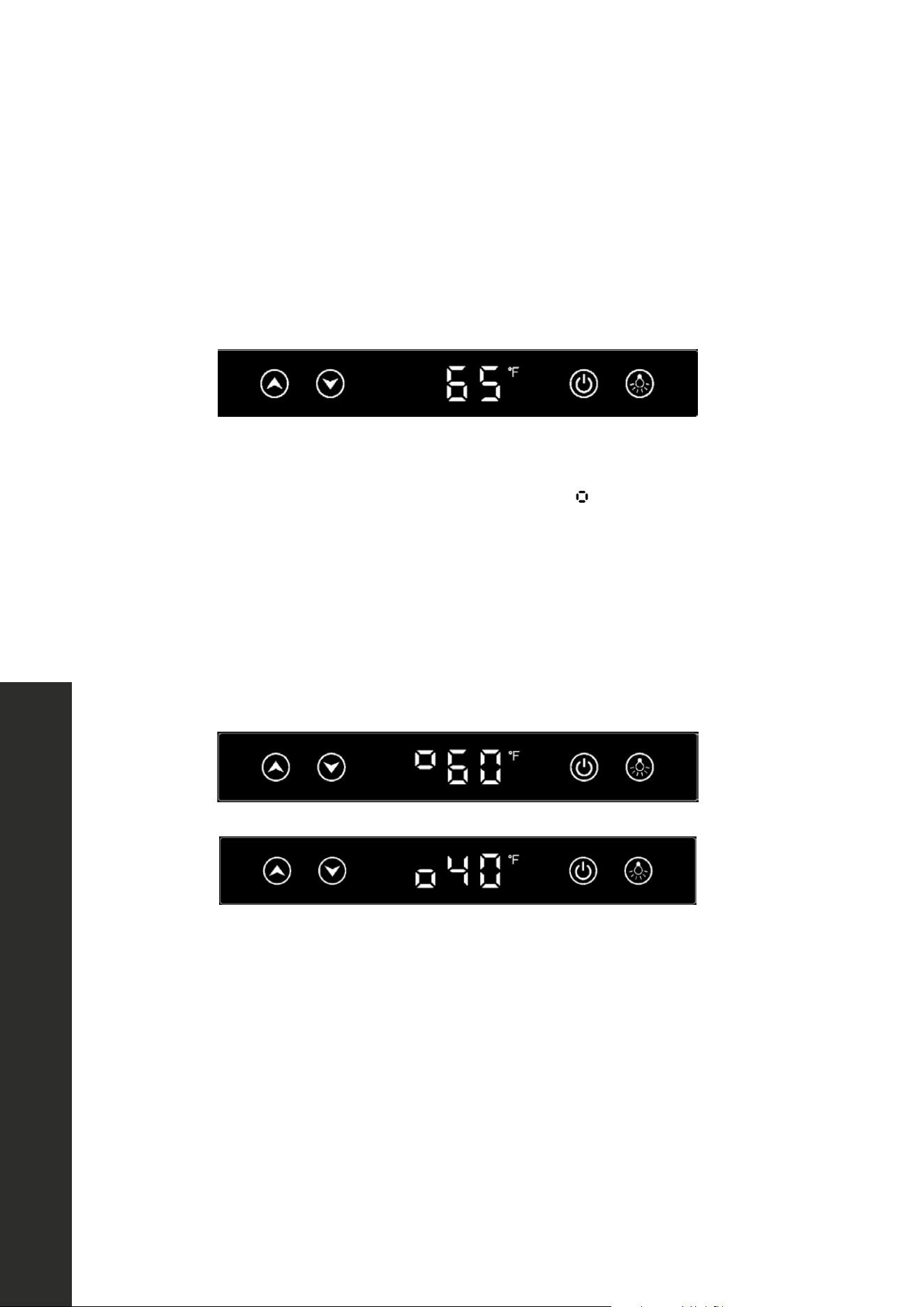
CONTROL PANEL LAYOUT AND OPERATION
Up Down Power Light
Fast cooling Screen lock Maintenance
LightingDefrosting Temp unit
ON/OFF
After plugging in the appliance for the first time, it will be in “stand by” mode, and “OFF”
will display on the screen. Press the “POWER” button once to start the unit. Press and hold
“POWER” for 3 seconds to turn off the unit and return to “stand by” mode. The factory preset
temperature for all models is 38 °F (3 °C), except for wine cooler models. The preset for wine
cooler models is 45 °F (7 °C).
Up Down Power Light
Fast cooling Screen lock Maintenance
LightingDefrosting Temp unit
18
Buttons and Indicators
OPERATION
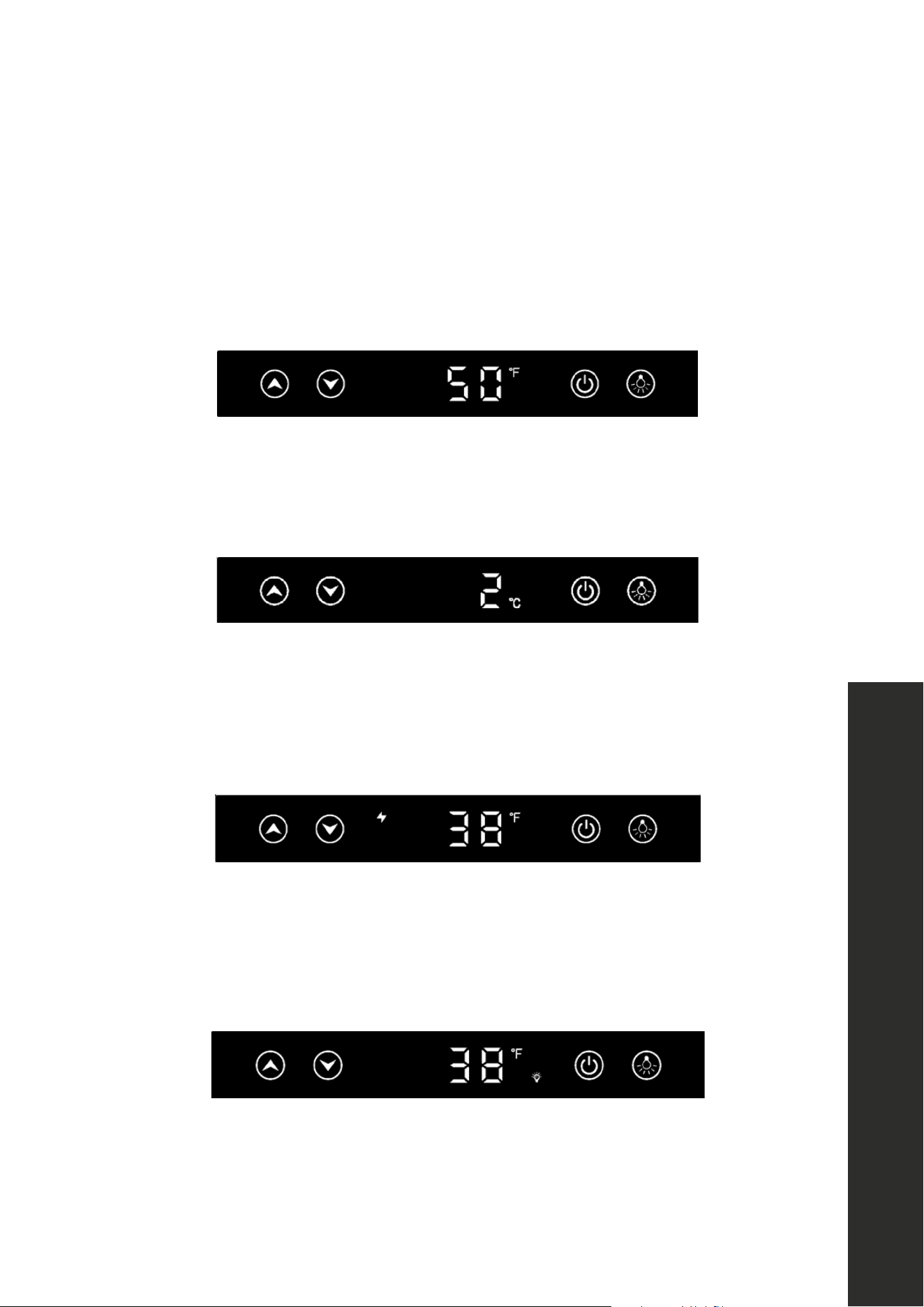
TEMPERATURE SETTING
Press “UP” or “DOWN” once to start the temperature setting. The current temperature setting
will start flashing. Then press “UP” or “DOWN” to increase or decrease the temperature
setting by 1 °F/ °C intervals. Settings will stop at the minimum and maximum levels once
you reach them. The setting value will auto save after 5 seconds or if the door is closed.
Up Down Power Light
Fast cooling Screen lock Maintenance
LightingDefrosting Temp unit
DUAL ZONE WINE COOLER TEMPERATURE SETTINGS
For models RWDO-GS-24 and RWDPO-24, this symbol
Up Down Power Light
Fast cooling Screen lock Maintenance
LightingDefrosting Temp unit
in front of the temperature
indicates the upper or lower zone temperature. Press “UP” or “DOWN” once to start the
temperature setting, then press “LIGHT” to toggle from the upper zone and lower zone setting.
The default temperature setting for the upper and lower zones are 60 °F and 45 °F (16 °C
and 7 °C). Settings will stop at the minimum and maximum levels once you reach them. The
setting value will auto save after 5 seconds or if the door is closed.
Upper Zone
Lower Zone
19
Buttons and Indicators
OPERATION
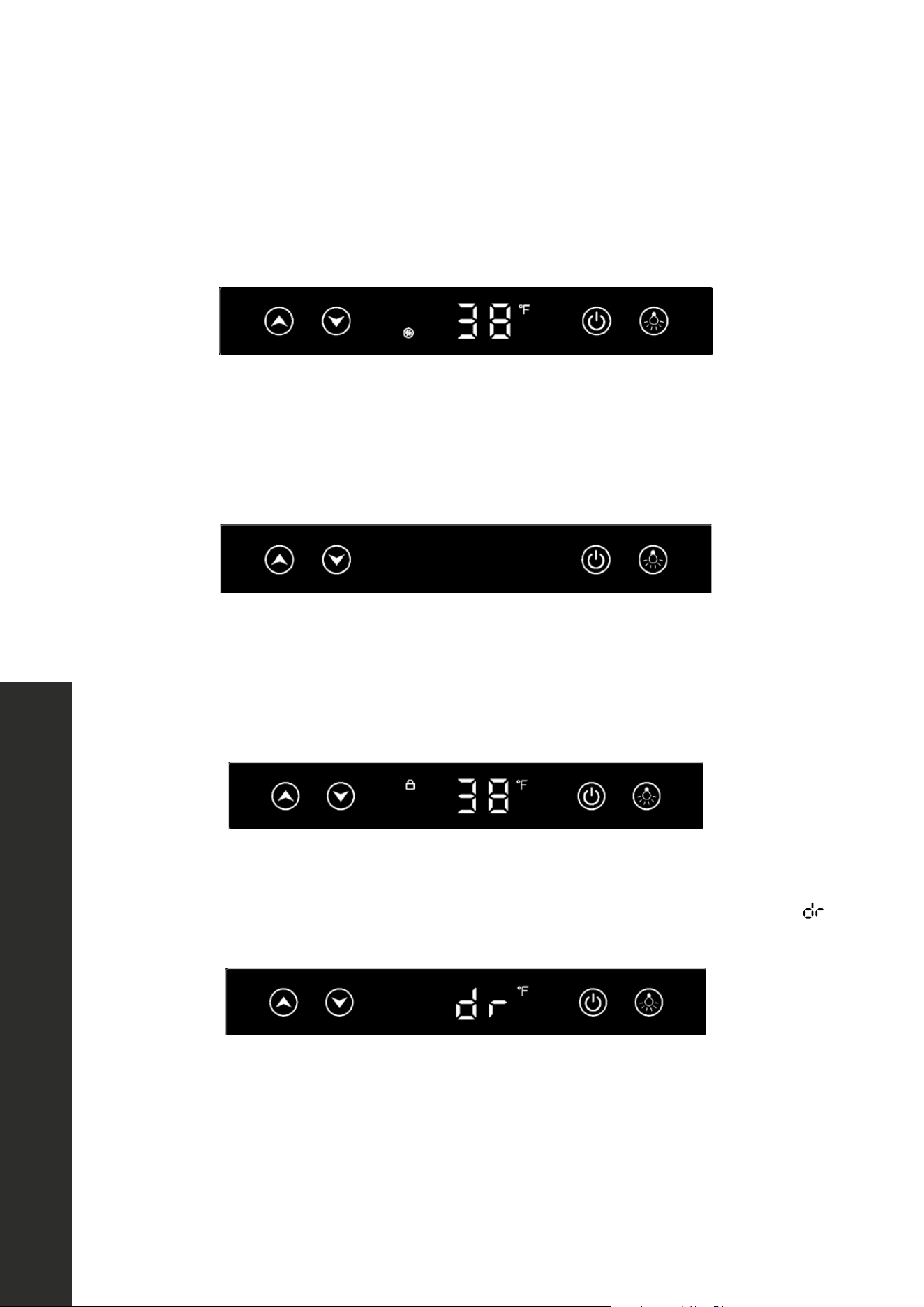
TEMPERATURE DISPLAY SETTING
Press and hold “UP” for 6 seconds to toggle the panel display temperature between the
setting temperature and the real-time temperature of the cabinet interior. The factory preset
temperature display mode is the setting temperature. For faster and more efficient cooling,
close the appliance door after setting the desired temperature.
Upper Zone
Lower Zone
TEMPERATURE UNIT SETTING
Press and hold “UP” and “DOWN” for 3 seconds to toggle the temperature unit to Celsius
or Fahrenheit. Press and hold again to revert.
Upper Zone
Lower Zone
FAST COOLING
Press and hold “UP” and “POWER” for 6 seconds to enter and exit the “fast cooling” mode,
which will more rapidly chill your appliance. This mode will auto exit after the desired
temperature is reached and the fast cooling symbol will disappear.
Upper Zone
Lower Zone
LIGHT CONTROL
Press “LIGHT” once to switch the light on/off when the door is open. Press and hold “LIGHT”
for 6 seconds to enter/exit the “light on” mode. In this mode, the light will stay on for 6
hours, with or without door open.
Upper Zone
Lower Zone
20
Buttons and Indicators
OPERATION
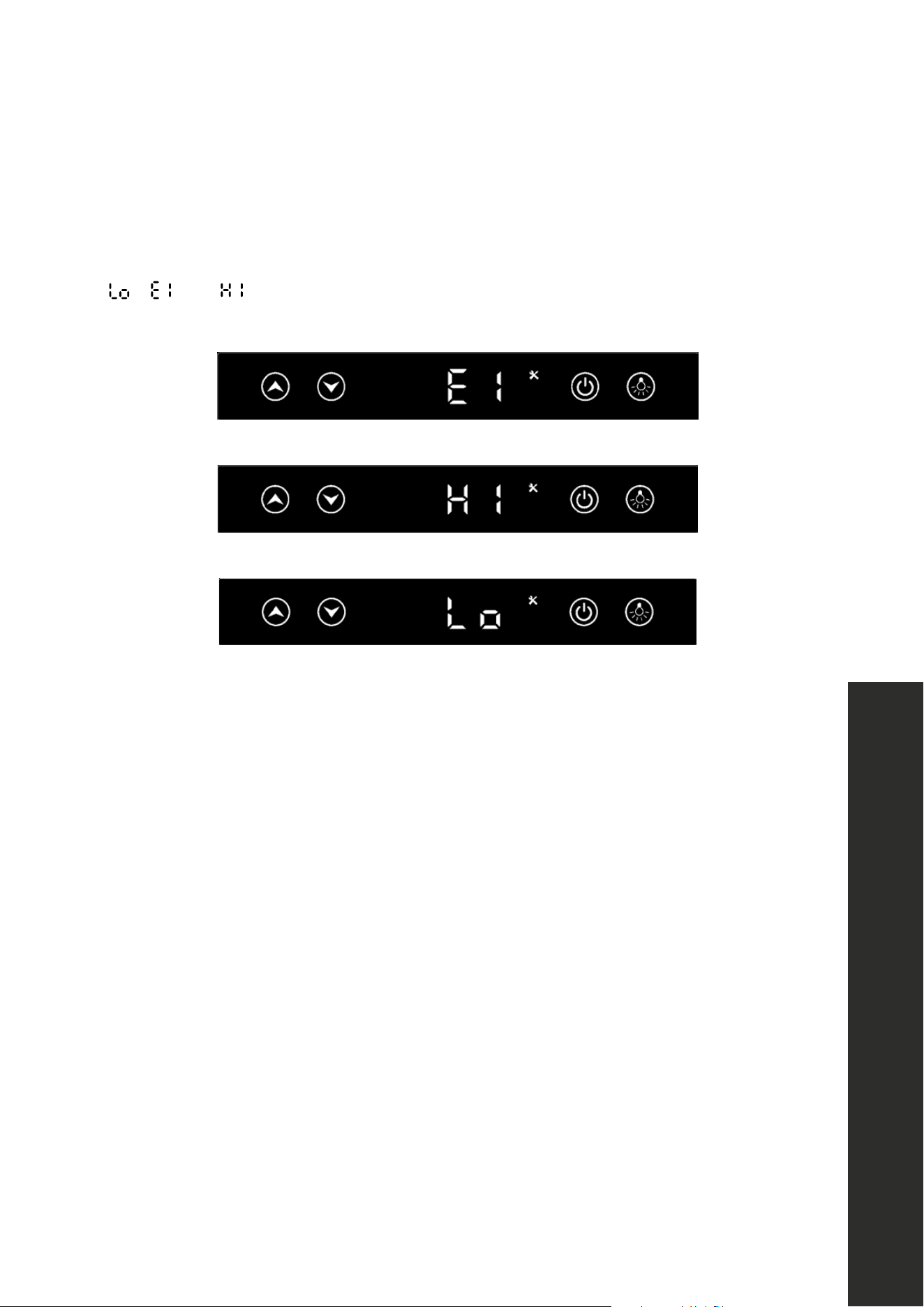
AUTOMATIC DEFROSTING
The automatic defrosting symbol will illuminate, as seen below. During automatic defrosting,
the unit’s compressor stops for 30 minutes for every 6 hours of the system running.
SABBATH MODE
Press and hold “UP” and “LIGHT” for 6 seconds to toggle on/off “Sabbath mode.” This mode
will shut off the screen display, operating sounds, and light while the unit still runs automatically
according to the previous temperature setting.
SCREEN LOCK
Press and hold “POWER” and “LIGHT” for over 6 seconds to lock/unlock the screen to
prevent children or others from operating the appliance. When locked, the symbol below will
illuminate.
DOOR OPEN ALARM
If the door has been left open for more than 5 minutes, the alarm will sound along with
flashing in the display. The alarm will stop by closing the door or press any key.
21
Error Alarm
OPERATION
ERROR ALARMS
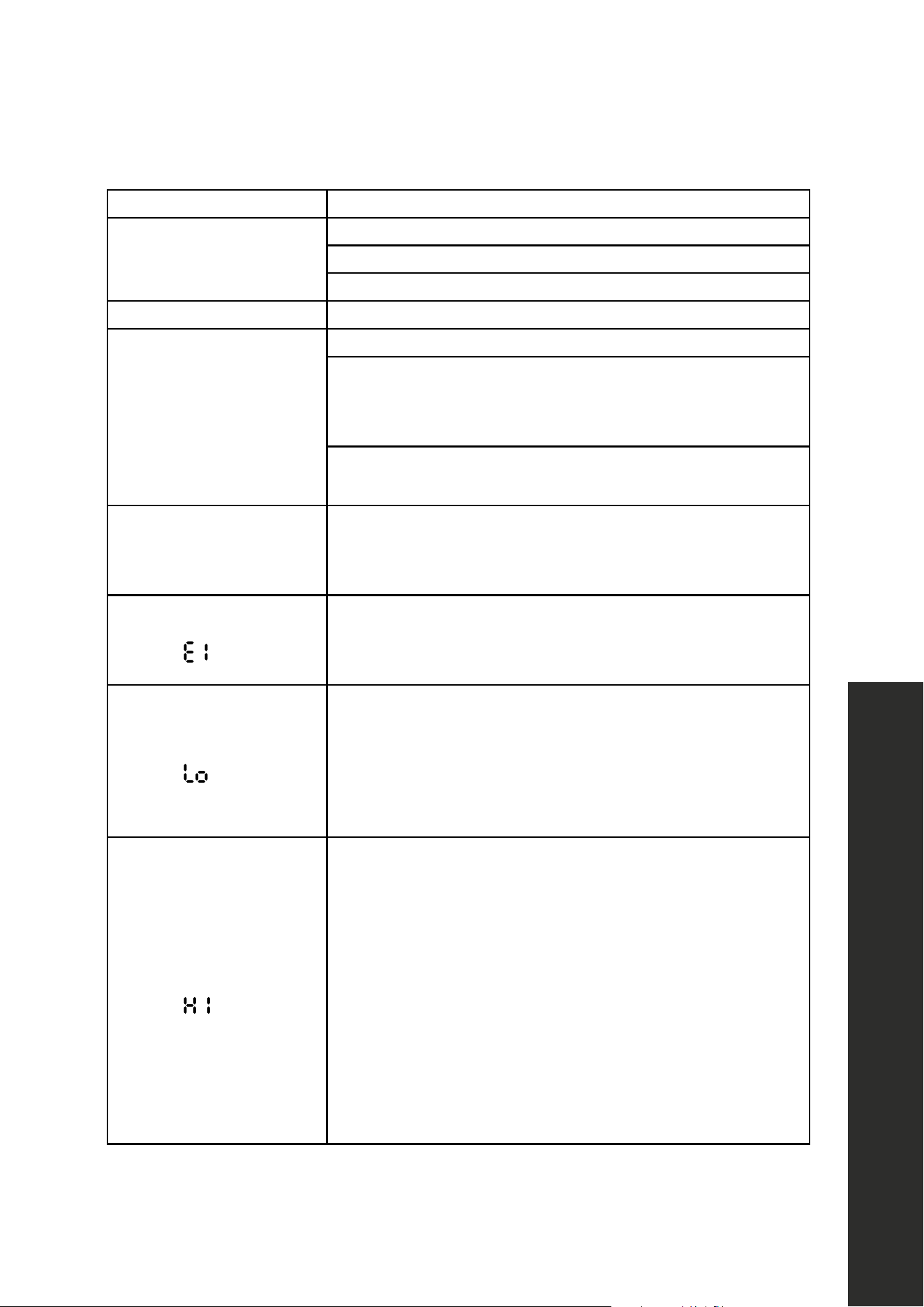
This refrigerator has built-in alarm system feature that activates when the unit detects any
malfunction in the sealed cooling system. If the temperature display window displays
, , or , and the “ALARM” indicator begins flashing, please proceed to
“Troubleshooting” on page 25.
WINE STORAGE TEMPERATURES
• While certain wines store best at temperatures between 56 °F–58 °F (13 °C–14 °C),
your unit also allows you to store wine at drinking temperatures.
• Generally, red wine should be kept at 60 °F–61 °F (16 °C) and white wine, which is
usually served chilled, is best kept at 54 °F –55 °F (12 °C).
• Sparkling wines should be kept at about 46° F (8 °C). For beer and soft drinks, choose
the temperature setting that is most agreeable to you and your guests.
22
OPERATION
ENERGY-SAVING TIPS AND OTHER NOTES
• Do not place the unit next to a heating vent, a range/oven, or in direct sunlight.
• Keep the door closed as much as possible, especially in hot, humid weather.
• Cover foods and beverages to reduce moisture buildup inside the appliance.
• A temperature sensor records the average temperature of the unit. Since cold air falls
and warm air rises, there will be a temperature variation from the bottom to the top of
the unit, meaning the bottom of the unit will always be slightly colder,
• The control panel controls the average temperature of the unit. The temperature
displayed on the control panel is the instantaneous average temperature of the unit;
as such, variations of anywhere from 1 to 6 degrees is normal.
• When fully loaded with room temperature product, the unit will operate continuously
for as long as 24 hours to reduce the temperature inside the cabinet to the desired
point. Under normal conditions, when the unit has been on for 6 hours, it will stop
working for about 30 minutes to defrost automatically.
CAUTION
Damages caused by ambient temperatures of 40 °F (4 °C) or below are not
covered by the warranty. To temporarily stop cooling, unplug the unit. To shut
down for longer periods, disconnect and leave the door partially open.
• While this unit is designed to operate between 50 °F and 110 °F (10 °C and 43 °C),
higher ambient temperatures may reduce the unit’s ability to reach low temperatures.
• Optimal results are obtained at temperatures between 65 °F and 80 °F (18 °C and
27 °C) for built-in models and between 65 °F and 90 °F (18 °C and 32 °C) for
freestanding models.
NOTE: If you unplug the refrigerator, allow at least 3 minutes before plugging it back in.
The unit may not restart in less than 3 minutes.
Temperature Sensor
23
WARNING
Make sure the appliance is fully disconnected from power before performing
any cleaning or maintenance to avoid risk of electric shock or injury.
CLEANING THE EXTERIOR
Clean the exterior stainless steel with a cloth dampened in mild soapy water. After cleaning,
dry thoroughly with a soft cloth and polish with a stainless steel cleaner. To clean the door
gasket, use only mild soapy water. Never use harsh cleansers or scouring pads to clean any
part of your unit.
CLEANING THE INSIDE
Remove any contents inside the refrigerator. Rinse the inside surfaces with plain water and
throughout dry the interior, including stainless steel racks and glass shelving. Avoid getting
excess water inside the machine since it will flow into the water trap near the compressor
and possibly overflow.
DEFROSTING THE UNIT
The unit uses an automatic defrost system in which the refrigerated surfaces of the unit defrost
automatically. Defrost water drains into a hole in the floor of the storage compartment and
is channeled into a drain pan located at the back of the unit near the compressor. Heat
transferred from the compressor evaporates any water that has collected in the pan. Be sure
the drain hole in the floor of the unit is clear and unobstructed.
START-UP AFTER LONG-TERM STORAGE:
1. If stored outside, it is recommended that the unit again be thoroughly inspected per
the storage instructions above to address any dirt or debris from the weather and/or
animals/insects.
2. Once fully cleaned, connect the unit to electrical power.
3. Turn unit on and confirm your desired control settings.
4. Allow 24 hours for the unit to stabilize before loading contents.
CARE AND MAINTENANCE
Care and Maintenance

24
WINTERIZING YOUR UNIT
If an outdoor refrigerator will be exposed to temperatures of 40 °F (4 °C) or less, perform
the following steps to winterize the unit so it will keep it in good condition while facing the
winter elements. It is important to clean and dry this appliance to prevent severe mold and
mildew growth from engulfing the fridge’s interior.
1. Turn the unit OFF by pressing the POWER button on the control panel.
2. Remove all food and drink contents from the refrigerator.
3. Unplug the unit from the power outlet. It is also recommended that the power to the outlet
be turned-off if the circuit is not required for other appliances.
4. Place all cords in a small bag or tie them together with a plastic zip-tie.
5. If necessary, move the unit so you can gain access to the rear of the product.
6. Remove the front toe kick at the bottom of the unit by removing 2 Phillips-head screws on
each side. Then, use a brush and vacuum to clean dirt and debris from beneath the unit.
Thoroughly clean the toe kick and re-install on the unit.
7. Remove the screws securing the rear access cover and use a brush and vacuum to clean
dirt and debris from the machine compartment.
8. Check if the plastic defrost drain pan located near the compressor contains water; use a
sponge to remove as much water as possible.
9. Thoroughly clean the rear access cover and re-install on the unit.
10. Clean the exterior and interior of refrigerator thoroughly. Wipe down and dry the
refrigerator with cloths or paper towels after it has been cleaned. Ensure all water has
been removed from the unit.
11 . Leave the refrigerator door open to prevent formation of mold and mildew. Open the
door a minimum of 2" (50 mm) to provide the necessary ventilation.
12. It’s recommended to not cover up the unit during winterization, as this may trap
condensation. If you are concerned about exposure to the elements, use a synthetic
cover that will not hold moisture to protect the appliance, though the door should remain
open as much as possible.
13. After completion of the above, you may choose to store the unit indoors, although this is
not required.
CARE AND MAINTENANCE
Care and Maintenance
25
Troubleshooting
TROUBLESHOOTING
ISSUE POSSIBLE SOLUTION
Unit does not turn on
Not plugged in.
Fuse blown or circuit breaker tripped.
Press Power Button on control panel
Noise or vibration Check that unit is level. If not, adjust leveling legs.
Unit is too warm
Check that door is properly closed and sealed.
Check temperature setting. To change the temperature
setting, follow the steps in “Control Panel Layout And
Operation” on page 17 of this manual.
Check if door has been opened frequently or recently filled
with product.
Unit develops
condensation on
external surfaces
Check that the unit is properly exposed to excessive
humidity. Moisture will dissipate as humidity levels decrease.
Temperature window
displays
This error code indicates the thermostatic sensor has
malfunctioned. Contact ZLINE Customer Service at
1-614-777-5004 for assistance.
Temperature window
displays
This error code indicates the actual temperature is much
lower than your set temperature. Try restarting. Unplug
the unit and wait at least 3 minutes before plugging back
in. If the problem isn’t fixed, contact 1-614-777-5004 for
assistance.
Temperature window
displays
This error code indicates the actual temperature is much
higher than your set temperature. Possible causes are:
• The door might not be fully closed.
• The refrigerant may have leaked.
• The unit may have been recently loaded with room
temperature product.
• The control panel may not be functioning properly and
should be replaced.
If you are certain the door is not the cause of the problem,
contact 1-614-777-5004 for assistance.

COVERAGE
ZLINE Kitchen and Bath Touchstone Undercounter Refrigeration appliances have a two
year parts and service warranty and a five year parts warranty for a sealed cooling system.
This is from the original purchase date for the original purchaser of the product.
TERMS
This warranty applies only to the original purchaser of the product installed for normal
residential use. This is defined as a single-family, residential dwelling in a non-commercial
setting. Commercial settings include but are not limited to: schools, churches, hotels,
restaurants, vacation rentals such as Airbnb, day care centers, private clubs, fire stations,
common areas in multi-family dwellings, nursing homes, food service locations, and
institutional food service locations such as hospitals or correction facilities.
This warranty is non-transferable and will not be extended based on the date of installation.
The warranty applies only to products installed in the continental United States and the
District of Columbia.
Warranty shall not apply and ZLINE Kitchen and Bath is not responsible for damage resulting
from negligence, improper maintenance, misuse, abuse, alteration of or tampering with
the appliance, accident, natural disaster, improper electric supply, unauthorized service or
repair, improper installation, or installation not in accordance with the instructions contained
in the manual or the local government codes.
WHAT IS NOT COVERED
1. Installation or start-up damages or problems caused by improper installation or use.
2. Damage related to unauthorized service or unauthorized parts.
3. Installation in any commercial or non-residential application.
4. Aesthetic damage, scratches, or natural wear caused by normal use.
5. Second-hand, open box products, or products purchased from an unauthorized retailer.
WARRANTY
NOTE: Please write down the model number and serial number of your appliance. The
model number is located on the rating label on the top of the unit. The serial number is
located on the top center of the interior on your appliance. Both are needed to obtain
warranty service. Do not remove permanently affixed labels, warnings, or plates from the
product. This will void the warranty. You may also consider attaching your receipt or proof
of purchase to this manual.
SERVICE
For warranty service, please contact our Customer Service team at
1-614-777-5004 or visit www.zlinekitchen.com/contact to utilize
our online Customer Experience Portal.
Need to purchase a part or accessory for your ZLINE product? Visit
www.zlineparts.com, ZLINE’s official parts distribution partner.
WARRANTY