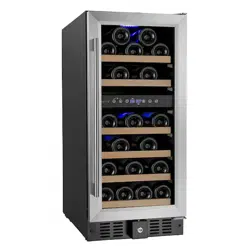

Wine Cellar
User Manual
(Features and Size May Vary)
PLEASE READ T HIS MANUAL CAREF ULLY BEFORE INSTALLING AND OPERATIN
BU-145D
BU-88D
G
1

2
IMPORTANT SAFEGUARDS
When using this appliance, always exercise basic safety precautions,
including the following:
1. Read all of the instructions before using this appliance.
2. This appliance is not intended for use by persons (including children) with
reduced physical, sensory or mental capabilities, or lack of experience and
knowledge, unless they have been given supervision or instruction concerning use
of the appliance by a person responsible for their safety.
3. Children should be supervised to ensure that they do not play with theappliance.
4. Use this appliance only for its intended purpose as described in this use andcare
guide.
5. This wine cellar must be properly installed in accordance with the installation
instructions before it is used. See grounding instructions in the installation section.
6. Never unplug your wine cellar by pulling on the power cord. Always grasp the
plug firmly and pull straight out from the outlet.
7. Unplug your wine cellar before cleaning or before making any repairs.
Note: If for any reason this product requires service, we strongly recommend that
a certified technician performs the service.
8. The SUPPLY CORD cannot be replaced. If the cord is damaged theappliance
should be scrapped.
9. This appliance is designed for free standing installation or can be recessedinto
cabinetry.
10. If your old wine cellar is not being used, we recommend that you remove the
door and leave the shelves in place. This will reduce possibility of danger tochildren.
11. Do not operate your wine cellar in the presence of explosive fumes.
12. Do not store foods in wine cellar as interior temperature may not be cool
enough to prevent spoilage or may cause bacteria growth.

3
Model number
SAVE THESE INSTRUCTIONS
DANGER
Risk of child entrapment.
Before you throw away your old wine cellar, take off the doors.
Leave the shelves in place so that children may not easily climb inside.
Thank you for using our product. This easy-to-use
manual will guide you in getting the best use of
your wine cellar. Please remember to record the
model and serial number, they are located inside
the cabinet on a label on the bottom right side.
Serial number
Date of purchase

4
Table of Contents
IMPORTANT SAFEGUARDS
..........................................................................................................................
2
Wine Cellar Features and Use
....................................................................................................................
5
Initial Setup
.......................................................................................................................................................
5
Temperature Adjustment
.............................................................................................................................
6
Shelving
..............................................................................................................................................................
6
Parts and Features
..........................................................................................................................................
7
Installation as a Built-In Cellar
...................................................................................................................
8
Reversing the Door Swing
...........................................................................................................................
9
Installing the Handle
.....................................................................................................................................
11
Operating Your Wine Cellar
........................................................................................................................
12
Before You Start
..............................................................................................................................................
13
Setting the Temperature Control
..............................................................................................................
13
Lock or Unlock the Control Panel
..............................................................................................................
13
Temperature Settings for Serving Wine
.................................................................................................
14
Door Lock
...........................................................................................................................................................
14
Normal Operating Sounds You May Hear
..............................................................................................
14
Proper Wine Cellar Care and Cleaning....................................................................................................15
Trouble shooting..............................................................................................................................................16

5
Electrical Requirement
Make sure there is a suitable power Outlet (115 volts, 15 amps outlet) with
proper grounding to power the wine cellar.
Avoid the use of three plug adapters or cutting off the third grounding in
order to accommodate a two plug outlet. This is a dangerous practice since
it provides no effective grounding for the wine cellar and may result in
shock hazard.
Install Limitations
Do not install your wine cellar in any location not properly insulated or
heated e.g. garage etc. Your wine cellar was not designed to operatein
temperature settings below 60° Fahrenheit.
Select a suitable location for the wine cellar on a hard even surface away
from direct sunlight or heat source e.g. radiators, baseboard heaters,
cooking appliances etc. Any floor unevenness should be corrected with the
leveling legs located on the front and rearbottom corners of the wine cellar.
This appliance is designed for free standing installation or canbe recessed
into cabinetry.
Use of Extension Cords
Avoid the use of an extension cord because of potential safety hazards
under certain conditions. If it is necessary to use an extension cord, use
only a 3-wire extension cord that has a 3-blade grounding plug and a 3-
slot outlet that will accept the plug. The marked rating of the extension
cord must be equal to or greater than the electrical rating of the appliance.
Wine Cellar Features and Use
Initial Setup
Before connecting the wine cellar to the power source, let it stand
upright for approximately 24 hours. This will reduce the possibility of a
malfunction in the cooling system from handling during transportation.

6
Once you have plugged the unit into an electrical outlet, let the unit run
for at least 30 minutes to acclimate before making any adjustments.
Temperature Adjustment
When the wine cellar is plugged in for the first time, the LED displaywill
show the factory preset temperature of 50°F.
The wine cellar can be set to accommodate your wine storage
requirements.To set the temperature, press the up or down arrow button
to increase or decrease the temperature setting until the desired
temperature is attained. It may take some time to reach the set
temperature.
The temperature will fluctuate more so when the wine cellar is empty.
Shelving (Type and number of shelves will vary per model)
Your cabinet was designed to store a maximum number of bottles securely. We
recommend that you observe the tips below to optimize loading:
Remove the PE form from shelves once unit is stable and ready for
bottle storage.
Disperse the bottles evenly to avoid concentrating weight in one place.
Bottles must not touch either the back of the cabinet or the step at the
bottom. While your wine cellar was designed to hold large format bottles,
such as Pinot Noir and Champagne, larger bottles reduce the number of
bottles you can fit on a shelf.
Make sure that the bottles are not all grouped together either at the top
or bottom of the cabinet.
Only pull out one shelf at a time, never attempt to pull out morethan
one.
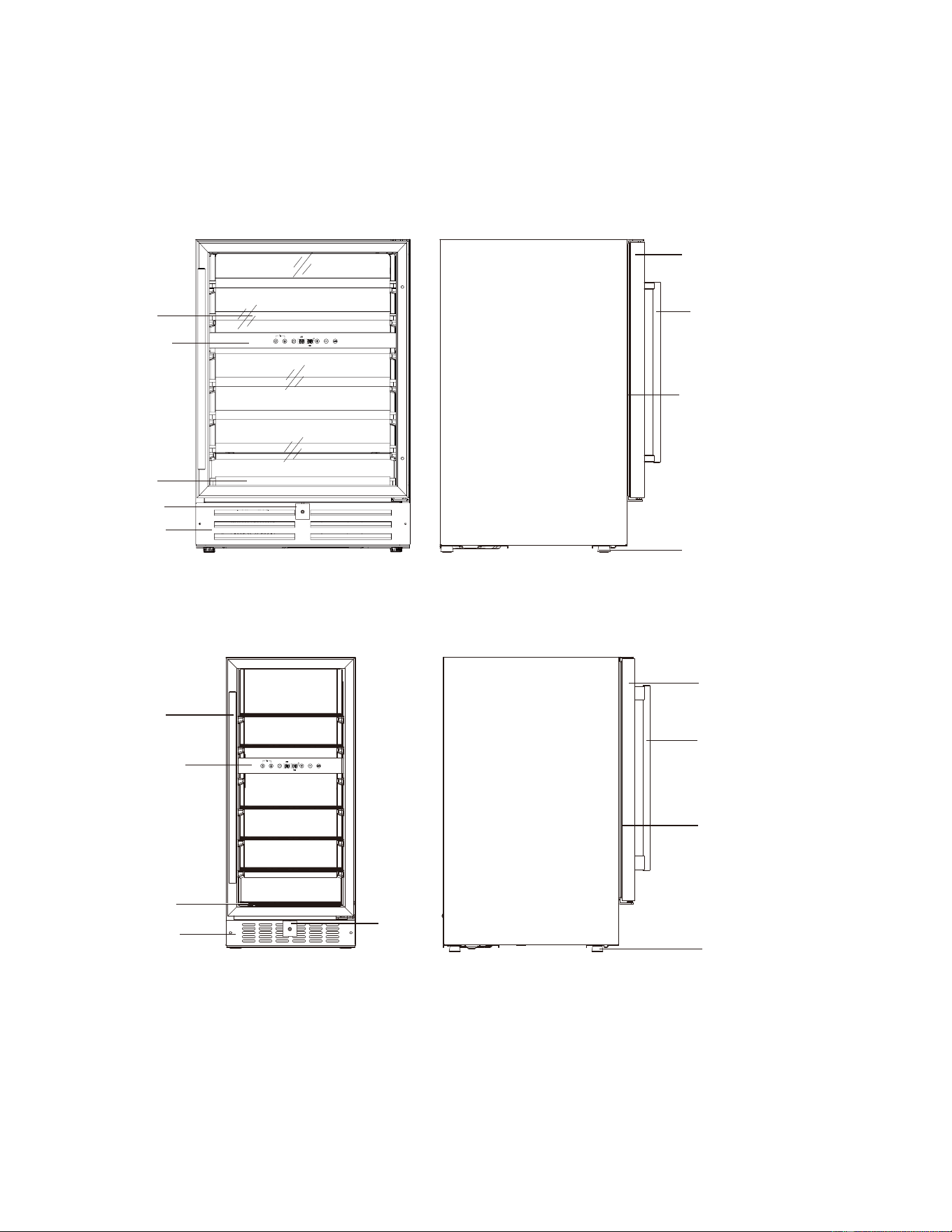
Parts and Feature
7
s
YOUR WINE CELLAR ALSO INCLUDES THE FOLLOWING:
Instruction manual
4pull-out shelves
Control Panel
Long Shelf
Short Shelf
Lock
Front Louver
Outside Canbinet
Handle
Door
Gasket
Control Panel
Adjustable Foot
Control Panel
Long Shelf
Short Shelf
Front Louver
Outside Canbinet
Handle
Door
Gasket
Control Panel
Foot
Adjustable
Lock
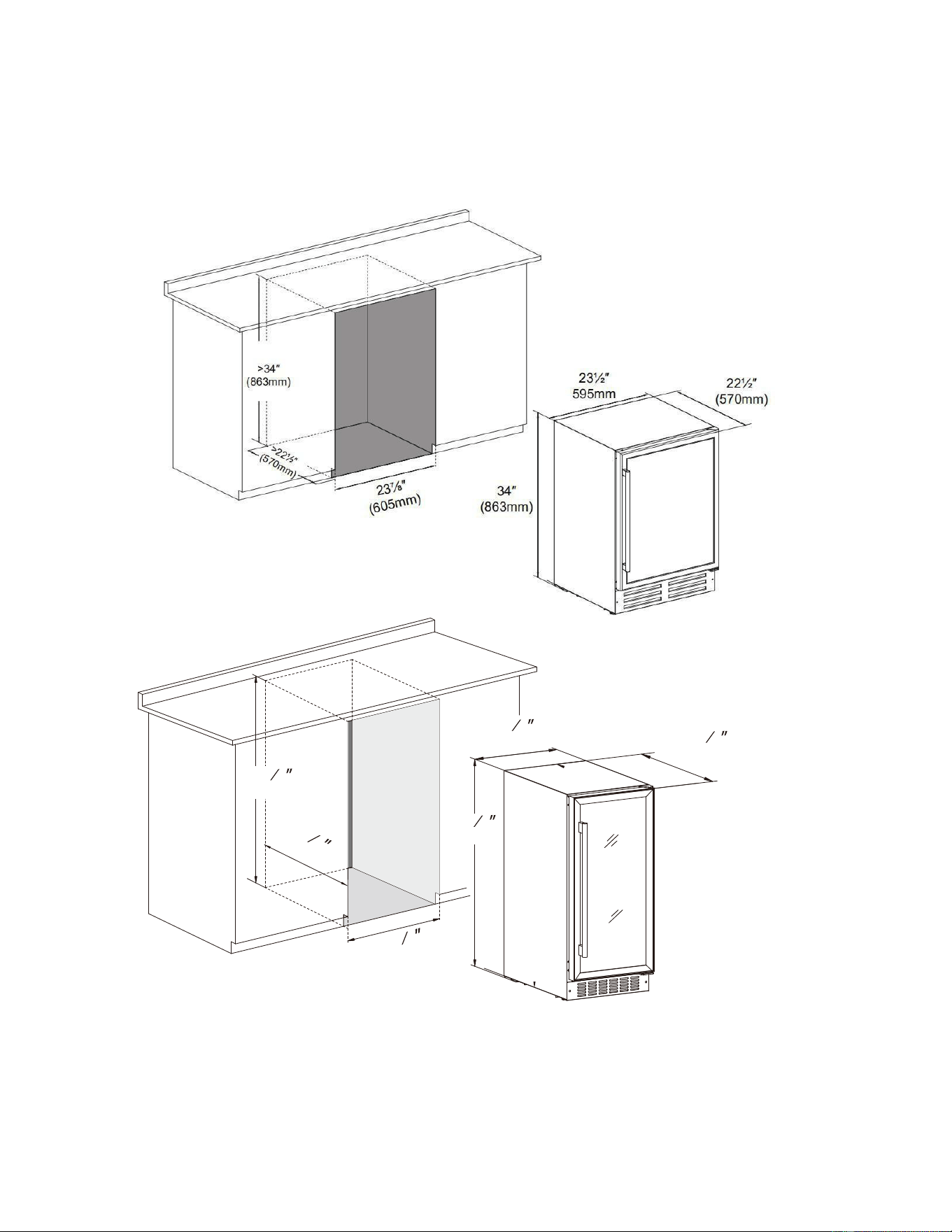
Installation as a Built-I n Cella
8
r
These cut out dimensions show the minimum space required for your wine
cellar to perform as designed.
>
>
22
7
16
(570mm)
22
7
16
(570mm)
14
24
25
(380mm)
33
7
8
(860mm)
15
4
24
(385mm)
33
7
8
(860mm)
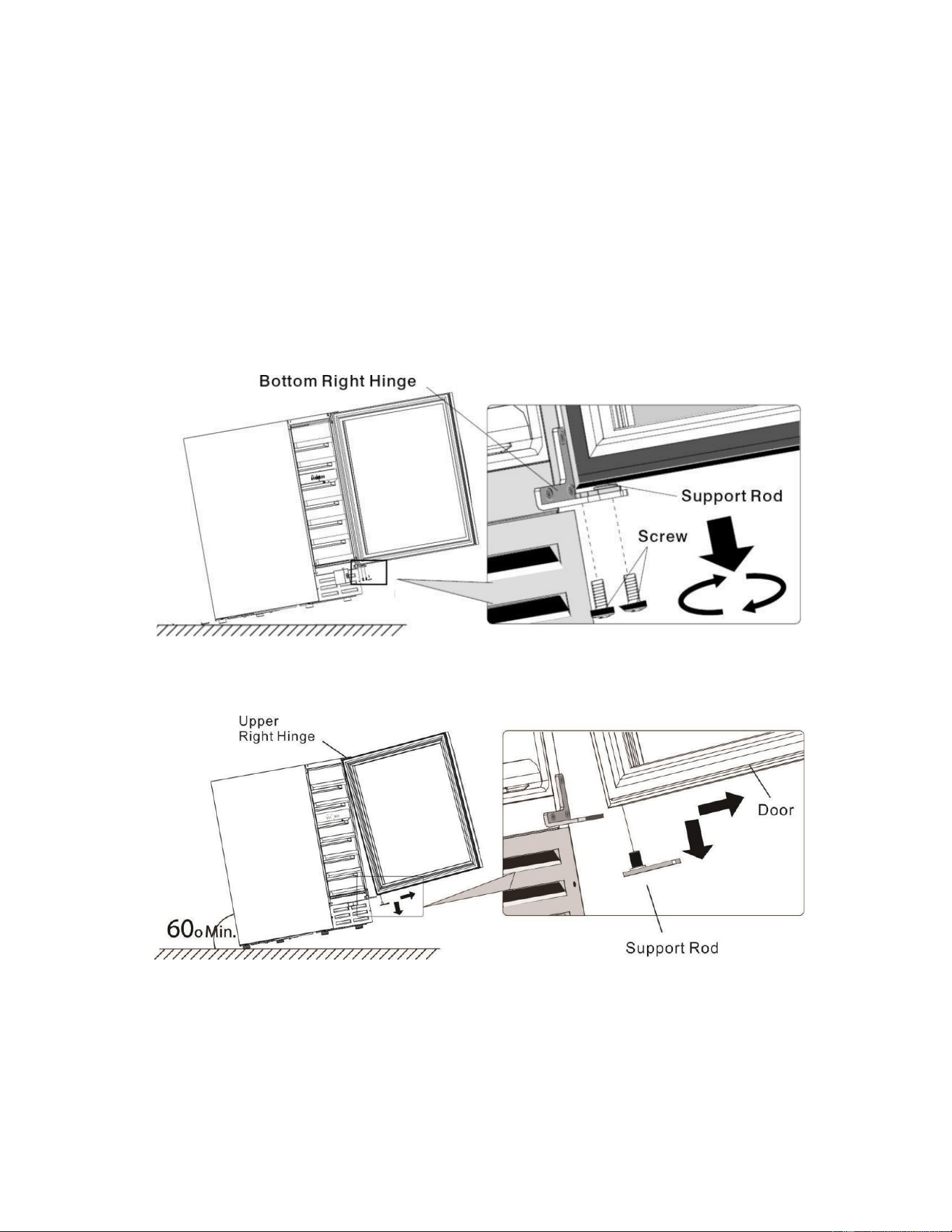
Reversing the Door Swin
9
g
Before you begin: Tape down shelves to avoid movement during the process
The door of this appliance can be hung to open on the left or rightside. To
reverse the door swing of your cooler and open from the opposite side,
please follow the instructions and diagram below.
1. Open the door, and loosen the screws from the support rod of the bottom
hinge.
2. Remove the door off the upper hinge and take out the support rod.
3. Use a small flat head screwdriver to pry up the plastic cap on the top center
(lock hole) of the door and insert into the bottom center hole.
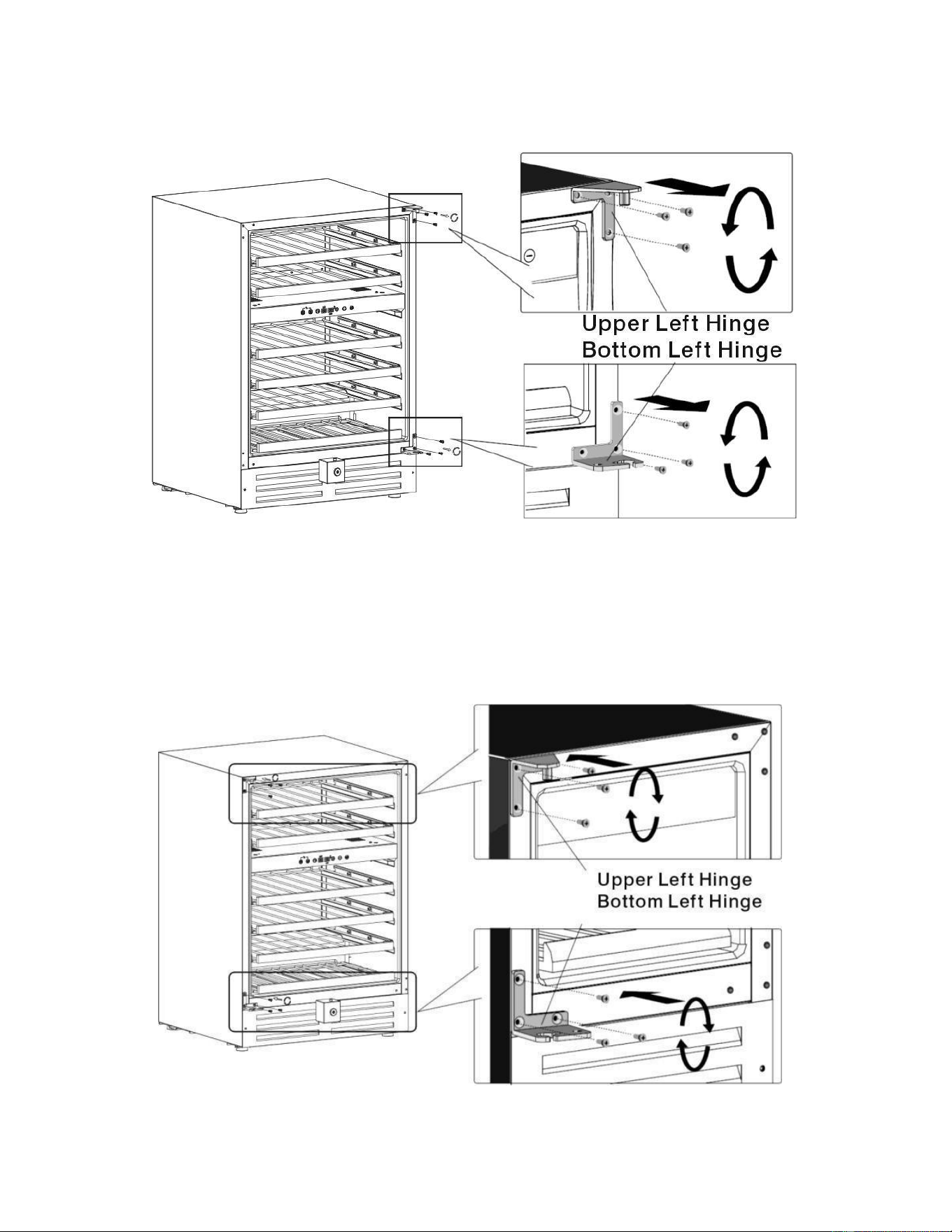
4. Unscrew the upper hinge and bottom hinge
10
.
5. Pry out the plastic caps at the left side of the cabinet, and move them
to the right side.
6. Install the hinge set which are packed as accessories with the instruction
manual to the opposite side.
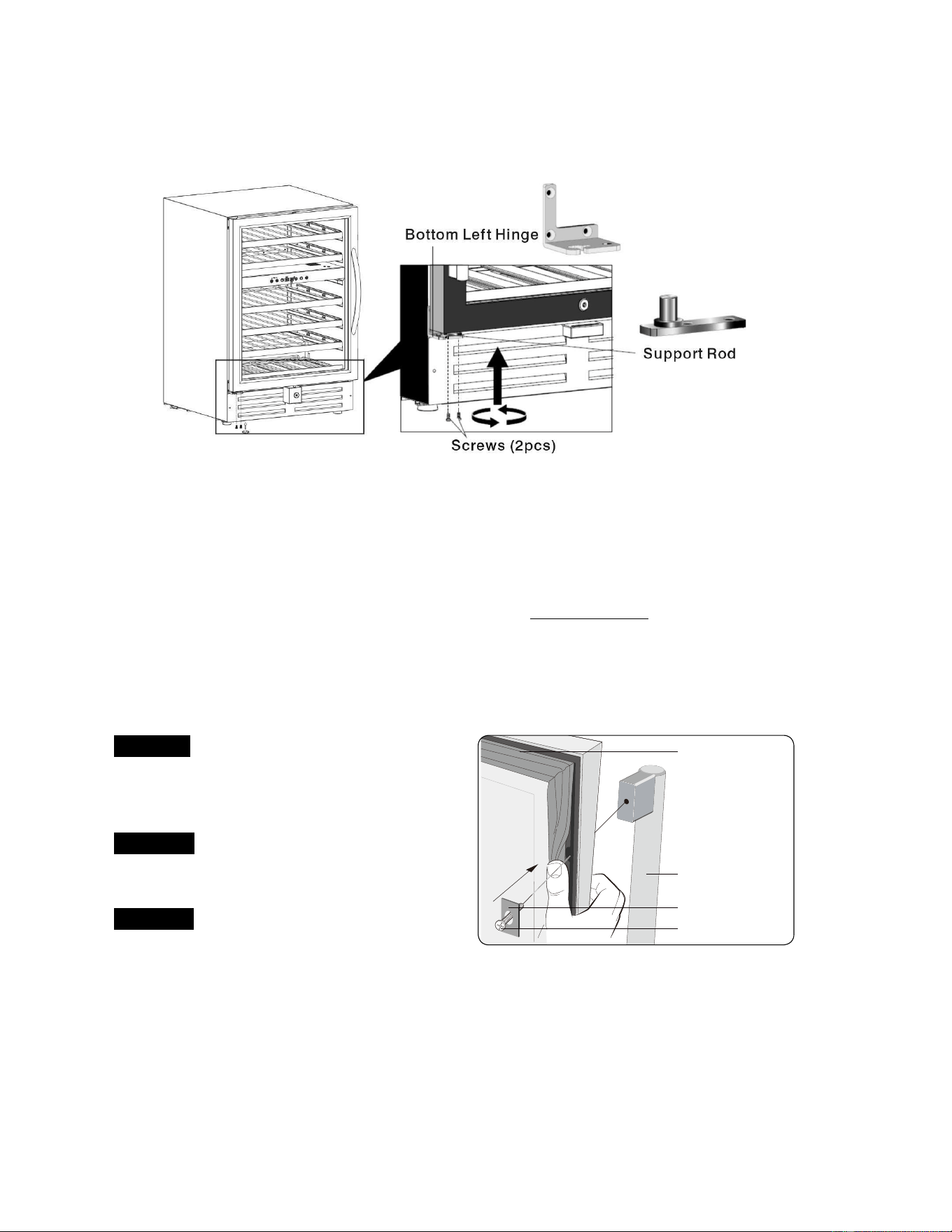
7. Rotate the door 180° so that the top is now the bottom, and install it b
11
y
attaching the support rod with screws.
•
Remove the exterior and interior packing materials.
•
Let the appliance stand upright for approximately
24 hours
before connecting
it to the power source, which helps to reduce the possibility of a cooling-system
malfunction from handling during transportation.
•
Use a soft cloth to clean the interior surface with lukewarm water.
•
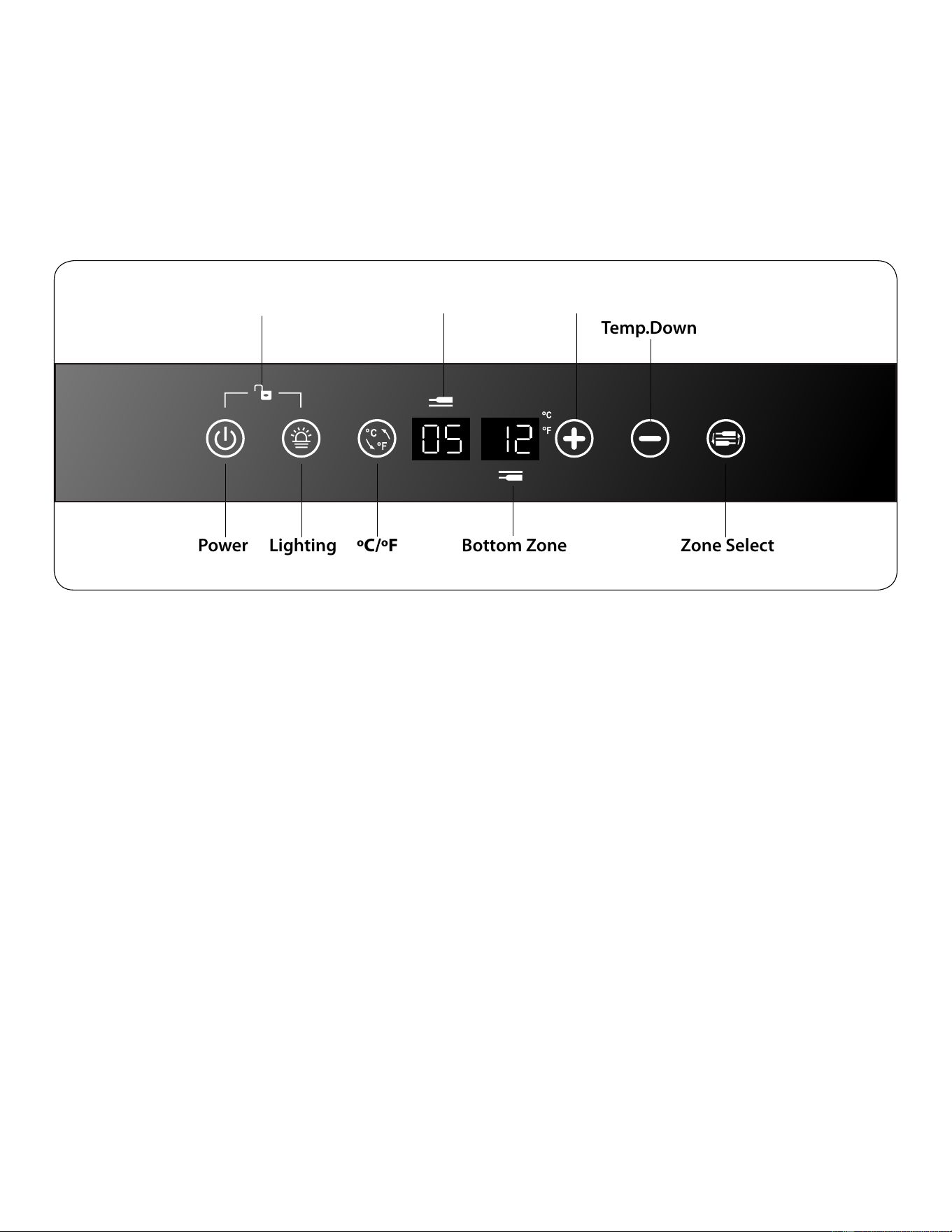
Install the door handle provided with the appliance by following these steps:
1st Step -Gently pull the door Gasket to one
Gasket
Washer
Handle Screws
Handle
side to reveal the two Handle
Screws and Washers pre-placed .
2nd Step -Fix Handle by screwing the
two Handle Screws tightly.
3rd Step -Restore the Gasket.
Installation the Handle
OPERATING YOUR WINE CELLA
12
R
Power: Turn the wine cellar system on or off. Press and hold Power button
(Hold for 3 seconds, Power Icon Flashes when power OFF)
Control Panel Display O ff: Touch Power Button (When icons illuminated, No
memory function)
Lighting: Turn the interior wine cellar light on or off.
Toggle between C and F: press + and – simultaneously (When locked,
memory function)
Lock and Unlock: press power and light bulb simultaneously (Hold for 3
seconds, No
memory function)
Temp.Up: Press + (when unlocked)
Temp.Down: Press – (when unlocked)
Each wine cellar includes an operating panel on the front of the unit. The
operating panel includes the following feature
Power Lighting
Temp.Up
Upper Zone
Display Window
Bottom Zone
Display Window
Zone Select
Temp.Down
Lock / Unlock
ºC/ºF
Interchange

Defaults:
Power ON (when plugged in)
Unlocked
Temp Digits O
13
N
BEFORE YOU START:
The wine cellar should be placed in a location where the ambient temperature
is between 60-80°Fahrenheit. If the ambient temperature is outside this range,
the performance of the unit may be affected. For example, placing yo ur unit in
extreme cold or hot conditions may cause inter ior temperatures to fluctuate.
Setting the Tem p erature Control
NOTE: The temperature readout shows the actual cellar temperature, it will
temporarily show the se t temperature while making adjustments, then reverts
back after 5 seconds.
1. Make sure power co rd is connected to a properly grounded outlet.
2. Turn power ON.
3. Set the desired temperature by pushing the Temp UP or DO W N
button.
4.
Temperatures increase or decrease 1°F with each push of the UP or
DOWN button.
NOTE: Temperatures may fluctuate depending on whether the interior light
is ON or OFF and depending on the position of the bottles.
Lock or Unlock the Control Panel
To LOCK the control panel:
Simultaneously press the POWER and LIGHT buttons for 3 seconds.
The control panel will beep and the LOCK icon will illuminate
To UNLOCK the control panel:
Touch the control panel to wake it up from sleep mode
Simultaneously press the POWER and LIGHT buttons for 3 seconds.
The control panel will beep and the LOCK icon will darken

Temperature Settings for Serving Win
14
e
Although optimal storage temperature is generally regarded to be 53-57°F,
different varietals of wine require different service temperature settings. The
recommended temperature ranges for serving different varietals of wine are listed
below. Your wine cellar will indicate when you have set the Upper/Lower zones to
the below temperature ranges.
Red Wines: 60-66°F
White Wines 45-52°F
Sparkling Wines 40-45°F
Door Lock
This unit comes with key lock.
The keys are located inside the plastic bag along with the usermanual.
To unlock the door, insert the key into the lock and turn counter
clockwise.
To lock the door, simply reverse the operation making sure themetal
pin is engaged completely.
Then remove the key and place it is a secure place for safekeeping.
Boiling water, gurgling sounds or slight vibrations that are the result of the
refrigerant circulating through the cooling coils.
The thermostat control will click when it cycles on and off.
Normal Operating Sounds You May Hear

Proper Wine Cellar Care and Cleanin
15
g
Cleaning and Maintenance
Warning: To avoid electric shock always unplug your wine cellar before cleaning.
Ignoring this warning may result in death or injury.
Caution: Before using cleaning products, always read and follow
manufacturer’s instructions and warnings to avoid personal injury or
product damage.
General: • Prepare a cleaning solution of 3-4 tablespoons of baking soda mixed
with warm water. Use sponge or soft cloth, dampened with the
cleaning solution, to wipe down your wine cellar.
• Rinse with clean warm water and dry with a soft cloth.
• Do not use harsh chemicals, abrasives, ammonia, chlorine bleach,
concentrated detergents, solvents or metal scouring pads. Some of
these chemicals may dissolve, damage and/or discolor your wine
cellar.
Mold on the interior
Microscopic mold spores are naturally occurring and present in the ambient air.
When mold gets in your wine cellar it may grow within the humid environment.
Removal can be completed with mild solutions of commonly available products
such as Borax, vinegar, or baking soda.
Door Gaskets:
Clean door gaskets every three months according to general instructions.
Gaskets must be kept clean and pliable to assure a proper seal.
Petroleum jelly applied lightly on the hinge side of gaskets will keep the
gasket pliable and assure a good seal.

Power Interruption
16
s
Occasionally there may be power interruptions due to thunderstorms
or other causes. Remove the power cord from AC outlet when a power
outage occurs. When power has been restored, wait 3 to 5 minutes
then re-plug the power cord to AC outlet.
Vacation and Moving Care
For long vacations or absences, unplug the wine cellar and clean the
wine cellar and door gaskets according to "General cleaning" section.
Leave doors open, so air can circulate inside.
Always move the wine cellar vertically. Do not move with the unit lying
Troubleshooting
Many common issues with your wine cellar can be easily solved. Try the troubleshooting
tips below if you experience any problems.
Wine Cellar Does Not Operate:
• Check if wine cellar is plugged in.
• Check if there is power in the AC outlet, by checking the circuit
breaker.
Wine appears too warm:
• Frequent door openings.
• Allow time for recently added wine to reach desired temperature.
• Check gaskets for proper seal.
• Clean condenser coils.
• Adjust temperature control to colder setting.
down, as possible damage to the sealed system could occur.
Note: After moving, wait for 24 hours before plugging in the wine cellar.
