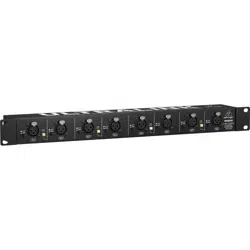
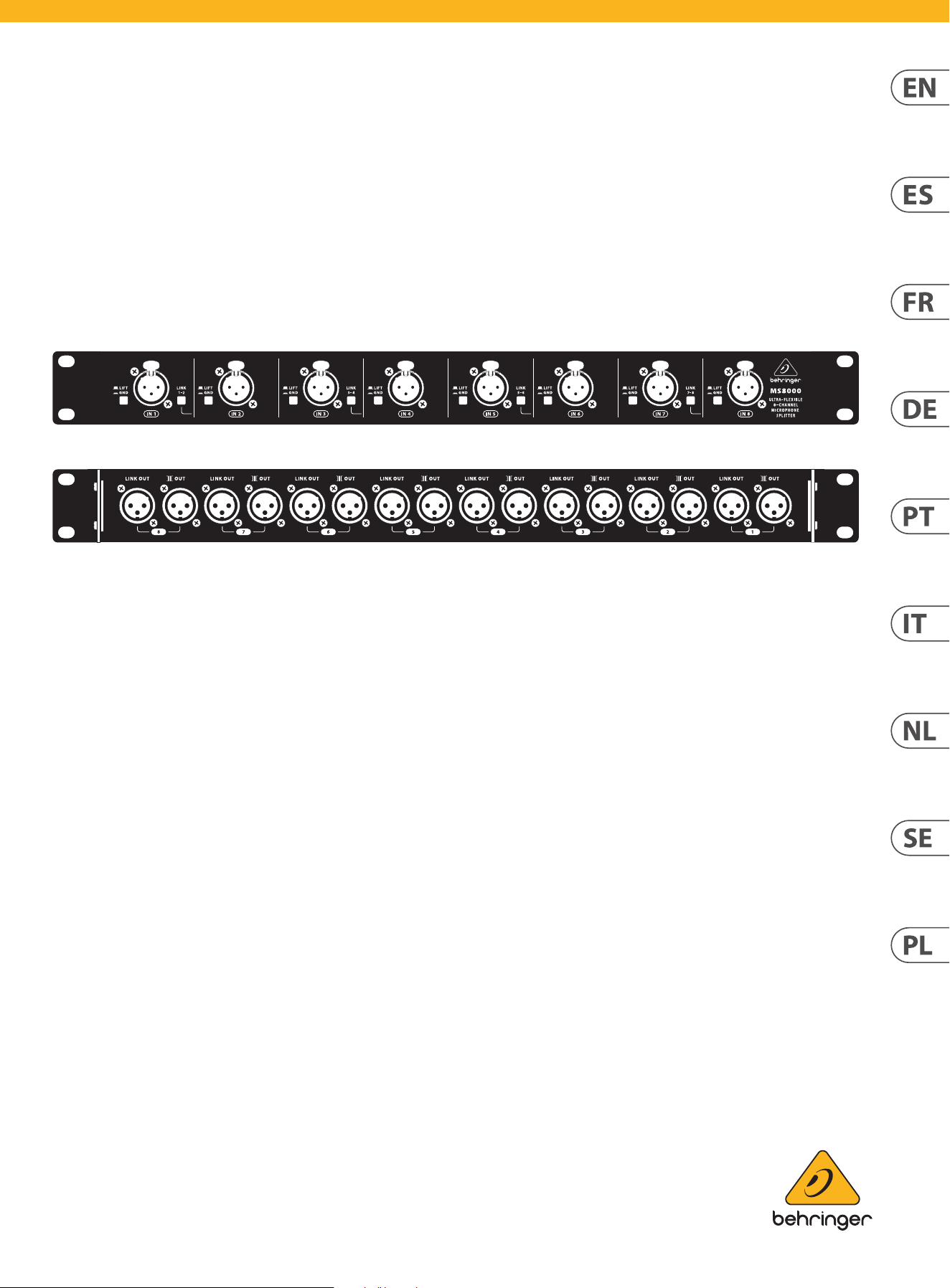
Quick Start Guide
ULTRALINK MS8000
Ultra-Flexible 8-Channel Microphone Splitter
V 5.0
2 ULTRALINK MS8000 Quick Start Guide 3
(EN) Safety Instruction
1. Read these instructions.
2. Keep these instructions.
3. Heed all warnings.
4. Follow all instructions.
5. Do not use this apparatus near water.
6. Clean only with dry cloth.
7. Do not block any ventilation openings. Install in
accordance with the manufacturer’s instructions.
8. Do not install near any heat sources such
as radiators, heat registers, stoves, or other apparatus
(including ampliers) that produce heat.
9. Use only attachments/accessories specied
by the manufacturer.
10. Use only with
the cart, stand, tripod,
bracket, or table specied
by the manufacturer, or
sold with the apparatus.
When a cart is used,
use caution when moving
the cart/apparatus combination to avoid injury from
tip-over.
11. Correct disposal of this
product: This symbol indicates that
this product must not be disposed
of with household waste,
according to the WEEE Directive
(2012/19/EU) and your national
law. This product should be taken
to a collection center licensed for
the recycling of waste electrical and electronic equipment
(EEE). The mishandling of this type of waste could have a
possible negative impact on the environment and human
health due to potentially hazardous substances that are
generally associated with EEE. At the same time, your
cooperation in the correct disposal of this product will
contribute to the ecient use of natural resources. For
more information about where you can take your waste
equipment for recycling, please contact your local city
oce, or your household waste collection service.
12. Do not install in a conned space, such as a
book case or similar unit.
13. Do not place naked ame sources, such as lighted
candles, on the apparatus.
(ES) Instrucción de seguridad
1. Lea las instrucciones.
2. Conserve estas instrucciones.
3. Preste atención a todas las advertencias.
4. Siga todas las instrucciones.
5. No use este aparato cerca del agua.
6. Limpie este aparato con un paño seco.
7. No bloquee las aberturas de ventilación.
Instale el equipo de acuerdo con las instrucciones
del fabricante.
8. No instale este equipo cerca de fuentes de calor
tales como radiadores, acumuladores de calor, estufas u
otros aparatos (incluyendo amplicadores) que puedan
producir calor.
9. Use únicamente los dispositivos o accesorios
especicados por el fabricante.
10. Use únicamente la
carretilla, plataforma,
trípode, soporte o mesa
especicados por el
fabricante o suministrados
junto con
el equipo. Al transportar el
equipo, tenga cuidado
para evitar daños y caídas al tropezar con
algún obstáculo.
11. Cómo debe deshacerse de
este aparato: Este símbolo indica
que este aparato no debe ser
tratado como basura orgánica,
según lo indicado en la Directiva
WEEE (2012/19/EU) y a las
normativas aplicables en su país.
En lugar de ello deberá llevarlo al
punto limpio más cercano para el reciclaje de sus
elementos eléctricos / electrónicos (EEE). Al hacer esto
estará ayudando a prevenir las posibles consecuencias
negativas para el medio ambiente y la salud que podrían
ser provocadas por una gestión inadecuada de este tipo
de aparatos. Además, el reciclaje de materiales ayudará a
conservar los recursos naturales. Para más información
acerca del reciclaje de este aparato, póngase en contacto
con el Ayuntamiento de su ciudad o con el punto limpio
local.
12. No instale esta unidad en un espacio muy reducido,
tal como encastrada en una librería o similar.
13. No coloque objetos con llama, como una vela
encendida, sobre este aparato.
(FR) Consignes de sécurité
1. Lisez ces consignes.
2. Conservez ces consignes.
3. Respectez tous les avertissements.
4. Respectez toutes les consignes d’utilisation.
5. N’utilisez jamais l’appareil à proximité
d’un liquide.
6. Nettoyez l’appareil avec un chion sec.
7. Veillez à ne pas empêcher la bonne ventilation
de l’appareil via ses ouïes de ventilation. Respectez les
consignes du fabricant concernant l’installation
de l’appareil.
8. Ne placez pas l’appareil à proximité d’une source
de chaleur telle qu’un chauage, une cuisinière ou tout
appareil dégageant de la chaleur (y compris un ampli de
puissance).
9. Utilisez exclusivement des accessoires et des
appareils supplémentaires recommandés par
le fabricant.
10. Utilisez
exclusivement des
chariots, des diables, des
présentoirs, des pieds et
des surfaces de travail
recommandés par le
fabricant ou livrés avec le
produit. Déplacez
précautionneusement tout chariot ou diable chargé pour
éviter d’éventuelles blessures en cas de chute.
11. Mise au rebut appropriée de
ce produit: Ce symbole indique
qu’en accord avec la directive DEEE
(2012/19/EU) et les lois
en vigueur dans votre pays,
ce produit ne doit pas être jeté
avec les déchets ménagers. Ce
produit doit être déposé dans un
point de collecte agréé pour le recyclage des déchets
d’équipements électriques et électroniques (EEE). Une
mauvaise manipulation de ce type de déchets pourrait
avoir un impact négatif sur l’environnement et la santé à
cause des substances potentiellement dangereuses
généralement associées à ces équipements.
En même temps, votre coopération dans la mise au rebut
de ce produit contribuera à l’utilisation ecace des
ressources naturelles. Pour plus d’informations sur
l’endroit où vous pouvez déposer vos déchets
d’équipements pour le recyclage, veuillez contacter votre
mairie ou votre centre local de collecte
des déchets.
12. N’installez pas l’appareil dans un espace conné tel
qu’une bibliothèque ou meuble similaire.
13. Ne placez jamais d’objets enammés, tels que des
bougies allumées, sur l’appareil.
(DE) Wichtige Sicherhteitshinweise
1. Lesen Sie diese Hinweise.
2. Bewahren Sie diese Hinweise auf.
3. Beachten Sie alle Warnhinweise.
4. Befolgen Sie alle Bedienungshinweise.
5. Betreiben Sie das Gerät nicht in der Nähe
von Wasser.
6. Reinigen Sie das Gerät mit einem trockenen Tuch.
7. Blockieren Sie nicht die Belüftungsschlitze. Beachten
Sie beim Einbau des Gerätes
die Herstellerhinweise.
8. Stellen Sie das Gerät nicht in der Nähe von
Wärmequellen auf. Solche Wärmequellen sind z.
B. Heizkörper, Herde oder andere Wärme erzeugende
Geräte (auch Verstärker).
9. Verwenden Sie nur Zusatzgeräte/Zubehörteile, die
laut Hersteller geeignet sind.
10. Verwenden
Sie nur Wagen,
Standvorrichtungen,
Stative, Halter oder Tische,
die vom Hersteller benannt
oder im Lieferumfang des
Geräts enthalten sind. Falls
Sie einen Wagen benutzen, seien Sie vorsichtig beim
Bewegen der Wagen- Gerätkombination, um
Verletzungen durch Stolpern zu vermeiden.
11. Korrekte Entsorgung dieses
Produkts: Dieses Symbol weist
darauf hin, das Produkt
entsprechend der WEEE Direktive
(2012/19/EU) und der jeweiligen
nationalen Gesetze nicht
zusammen mit Ihren
Haushaltsabfällen zu entsorgen.
Dieses Produkt sollte bei einer autorisierten Sammelstelle
für Recycling elektrischer und elektronischer Geräte (EEE)
abgegeben werden. Wegen bedenklicher Substanzen, die
generell mit elektrischen und elektronischen Geräten in
Verbindung stehen, könnte eine unsachgemäße
Behandlung dieser Abfallart eine negative Auswirkung
auf Umwelt und Gesundheit haben. Gleichzeitig
gewährleistet Ihr Beitrag zur richtigen Entsorgung dieses
Produkts die eektive Nutzung natürlicher Ressourcen.
Für weitere Informationen zur Entsorgung Ihrer Geräte bei
einer Recycling-Stelle nehmen Sie bitte Kontakt zum
zuständigen städtischen Büro, Entsorgungsamt oder zu
Ihrem Haushaltsabfallentsorger auf.
12. Installieren Sie das Gerät nicht in einer beengten
Umgebung, zum Beispiel Bücherregal oder ähnliches.
13. Stellen Sie keine Gegenstände mit oenen
Flammen, etwa brennende Kerzen, auf das Gerät.
(PT) Instruções de Seguranç
Importantes
1. Leia estas instruções.
2. Guarde estas instruções.
3. Preste atenção a todos os avisos.
4. Siga todas as instruções.
5. Não utilize este dispositivo perto de água.
6. Limpe apenas com um pano seco.
7. Não obstrua as entradas de ventilação. Instale de
acordo com as instruções do fabricante.
8. Não instale perto de quaisquer fontes de calor tais
como radiadores, bocas de ar quente, fogões de sala
ou outros aparelhos (incluindo amplicadores) que
produzam calor.
9. Utilize apenas ligações/acessórios especicados pelo
fabricante.
10. Utilize apenas com o
carrinho, estrutura, tripé,
suporte, ou mesa
especicados pelo
fabricante ou vendidos
com o dispositivo.
Quando utilizar um
carrinho, tenha cuidado ao mover o conjunto carrinho/
dispositivo para evitar danos provocados pela terpidação.
11. Correcta eliminação deste
produto: este símbolo indica que o
produto não deve ser eliminado
juntamente com os resíduos
domésticos, segundo a Directiva
REEE (2012/19/EU) e a legislação
nacional. Este produto deverá ser
levado para um centro de recolha
licenciado para a reciclagem de resíduos de equipamentos
eléctricos e electrónicos (EEE). O tratamento incorrecto
deste tipo de resíduos pode ter um eventual impacto
negativo no ambiente e na saúde humana devido a
substâncias potencialmente perigosas que estão
geralmente associadas aos EEE. Ao mesmo tempo, a sua
colaboração para a eliminação correcta deste produto irá
contribuir para a utilização eciente dos recursos naturais.
Para mais informação acerca dos locais onde poderá
deixar o seu equipamento usado para reciclagem, é favor
contactar os serviços municipais locais, a entidade de
gestão de resíduos ou os serviços de recolha de
resíduos domésticos.
12. Não instale em lugares connados, tais como
estantes ou unidades similares.
13. Não coloque fontes de chama, tais como velas
acesas, sobre o aparelho.
(IT) Istruzioni di sicurezza importanti
1. Leggere queste istruzioni.
2. Conservare queste istruzioni.
3. Prestare attenzione a tutti gli avvisi.
4. Applicare tutte le istruzioni.
5. Non utilizzare questo dispositivo vicino l'acqua.
6. Pulire esclusivamente con un panno asciutto.
7. Non bloccare le aperture di ventilazione. Installare in
conformità con le istruzioni del produttore.
8. Non installare vicino a fonti di
calore come radiatori, termoregolatori,
stufe o altri apparecchi (inclusi amplicatori) che
producono calore.
9. Utilizzare esclusivamente dispositivi/accessori
specicati dal produttore.
10. Utilizzare solo
carrelli, supporti, treppiedi,
stae o tavoli indicati dal
produttore o venduti con
l'apparecchio. Utilizzando
un carrello, prestare
attenzione quando si
sposta la combinazione carrello/apparecchio per evitare
lesioni dovute al ribaltamento.
11. Smaltimento corretto di
questo prodotto: questo simbolo
indica che questo dispositivo non
deve essere smaltito insieme ai
riuti domestici, secondo la
Direttiva RAEE (2012/19 / UE) e la
vostra legislazione nazionale.
Questo prodotto deve essere
portato in un centro di raccolta autorizzato per il
riciclaggio di riuti di apparecchiature elettriche ed
elettroniche (RAEE). La cattiva gestione di questo tipo di
riuti potrebbe avere un possibile impatto negativo
sull'ambiente e sulla salute umana a causa di sostanze
potenzialmente pericolose che sono generalmente
associate alle apparecchiature elettriche ed elettroniche.
Nello stesso tempo la vostra collaborazione al corretto
smaltimento di questo prodotto contribuirà all'utilizzo
eciente delle risorse naturali. Per ulteriori informazioni
su dove è possibile trasportare le apparecchiature per il
riciclaggio vi invitiamo a contattare l'ucio comunale
locale o il servizio di raccolta dei
riuti domestici.
12. Non installare in uno spazio ristretto, come in una
libreria o in una struttura simile.
13. Non collocare sul dispositivo fonti di amme libere,
come candele accese.
4 ULTRALINK MS8000 Quick Start Guide 5
(NL) Belangrijke
veiligheidsvoorschriften
1. Lees deze voorschriften.
2. Bewaar deze voorschriften.
3. Neem alle waarschuwingen in acht.
4. Volg alle voorschriften op.
5. Gebruik dit apparaat niet in de buurt van water.
6. Reinig het uitsluitend met een droge doek.
7. Let erop geen van de ventilatie-openingen
te bedekken. Plaats en installeer het volgens de
voor- schriften van de fabrikant.
8. Het apparaat mag niet worden geplaatst in de buurt
van radiatoren, warmte-uitlaten, kachels of andere zaken
(ook versterkers) die warmte afgeven.
9. Gebruik uitsluitend door de producent
gespeci- ceerd toebehoren c.q. onderdelen.
10. Gebruik het apparaat
uitsluitend in combinatie
met de wagen, het statief,
de driepoot, de beugel of
tafel die door de producent
is aangegeven, of die in
combinatie met het
apparaat wordt verkocht. Bij gebruik van een wagen dient
men voorzichtig te zijn bij het verrijden van de combinatie
wagen/apparaat en letsel door vallen te voorkomen.
11. Correcte afvoer van dit
product: dit symbool geeft aan dat
u dit product op grond van de
AEEA-richtlijn (2012/19/EU) en de
nationale wetgeving van uw land
niet met het gewone
huishoudelijke afval mag
weggooien. Dit product moet na
aoop van de nuttige levensduur naar een ociële
inzamelpost voor afgedankte elektrische en elektronische
apparatuur (AEEA) worden gebracht, zodat het kan
worden gerecycleerd. Vanwege de potentieel gevaarlijke
stoen die in elektrische en elektronische apparatuur
kunnen voorkomen, kan een onjuiste afvoer van afval van
het onderhavige type een negatieve invloed op het milieu
en de menselijke gezondheid hebben. Een juiste afvoer
van dit product is echter niet alleen beter voor het milieu
en de gezondheid, maar draagt tevens bij aan een
doelmatiger gebruik van de natuurlijke hulpbronnen.
Voor meer informatie over de plaatsen waar u uw
afgedankte apparatuur kunt inleveren, kunt u contact
opnemen met uw gemeente of de plaatselijke
reinigingsdienst.
12. Installeer niet in een kleine ruimte, zoals een
boekenkast of iets dergelijks.
13. Plaats geen open vlammen, zoals brandende
kaarsen, op het apparaat.
(SE) Viktiga säkerhetsanvisningar
1. Läs dessa anvisningar.
2. Spara dessa anvisningar.
3. Beakta alla varningar.
4. Följ alla anvisningar.
5. Använd inte apparaten i närheten av vatten.
6. Rengör endast med torr trasa.
7. Blockera inte ventilationsöppningarna.
Installera enligt tillverkarens anvisningar.
8. Installera aldrig intill värmekällor som
värme- element, varmluftsintag, spisar eller annan
utrustning som avger värme (inklusive förstärkare).
9. Använd endast tillkopplingar och tillbehör som
angetts av tillverkaren.
10. Använd endast med
vagn, stativ, trefot, hållare
eller bord som angetts av
tillverkaren, eller som sålts
till-sammans med
apparaten. Om du
använder en vagn, var
försiktig, när du föryttar kombinationen vagn-apparat,
för att förhindra olycksfall
genom snubbling.
11. Kassera produkten på rätt
sätt: den här symbolen indikerar
att produkten inte ska kastas i
hushållssoporna, enligt WEEE
direktivet (2012/19/EU) och
gällande, nationell lagstiftning.
Produkten ska lämnas till ett
auktoriserat återvinningsställe för
elektronisk och elektrisk utrustning (EEE). Om den här
sortens avfall hanteras på fel sätt kan miljön, och
människors hälsa, påverkas negativt på grund av
potentiella risksubstanser som ofta associeras med EEE.
Avfallshanteras produkten däremot på rätt sätt bidrar
detta till att naturens resurser används på ett bra sätt.
Kontakta kommun, ansvarig förvaltning eller
avfallshanteringsföretag för mer information om
återvinningscentral där produkten kan lämnas.
12. Installera inte i ett trångt utrymme,
t.ex. i en bokhylsa eller liknande enhet.
13. Placera inte källor med öppen eld,
t.ex. tända ljus, på apparaten.
(PL) Ważne informacje o
bezpieczeństwie
1. Proszę przeczytać poniższe wskazówki.
2. Proszę przechowywać niniejszą instrukcję.
3. Należy przestrzegać wszystkich wskazówek
ostrzegawczych.
4. Należy postępować zgodnie z instrukcją obsługi.
5. Urządzenia nie wolno używać w pobliżu wody.
6. Urządzenie można czyścić wyłącznie
suchą szmatką.
7. Nie zasłaniać otworów wentylacyjnych. W czasie
podłączania urządzenia należy przestrzegać
zaleceń producenta.
8. Nie stawiać urządzenia w pobliżu źródeł ciepła
takich, jak grzejniki, piece lub urządzenia produkujące
ciepło (np. wzmacniacze).
9. Używać wyłącznie sprzętu dodatkowego i
akcesoriów zgodnie z zaleceniami producenta.
10. Używać jedynie
zalecanych przez
producenta lub
znajdujących się w
zestawie wózków,
stojaków, statywów,
uchwytów i stołów.
W przypadku posługiwania się wózkiem należy zachować
szczególną ostrożność w trakcie przewożenia zestawu, aby
uniknąć niebezpieczeństwa potknięcia się i zranienia.
11. Prawidłowa utylizacja
produktu: Ten symbol wskazuje, że
tego produktu nie należy
wyrzucać razem ze zwykłymi
odpadami domowymi, tylko
zgodnie z dyrektywą w sprawie
zużytego sprzętu elektrycznego i
elektronicznego (WEEE) (2012/19/
EU) oraz przepisami krajowymi. Niniejszy produkt należy
przekazać do autoryzowanego punktu zbiórki zużytego
sprzętu elektrycznego i elektronicznego. Niewłaściwe
postępowanie z tego typu odpadami może wywołać
szkodliwe działanie na środowisko naturalnej i zdrowie
człowieka z powodu potencjalnych substancji
niebezpiecznych zaliczanych jako zużyty sprzęt
elektryczny i elektroniczny. Jednocześnie, Twój wkład w
prawidłową utylizację niniejszego produktu przyczynia się
do oszczędnego wykorzystywania zasobów naturalnych.
Szczegółowych informacji o miejscach, w których można
oddawać zużyty sprzęt do recyklingu, udzielają urzędy
miejskie, przedsiębiorstwa utylizacji odpadów lub
najbliższy zakład utylizacji odpadów.
12. Nie instaluj w ograniczonej przestrzeni, takiej jak
półka na książki lub podobny zestaw.
13. Nie stawiaj na urządzeniu źródeł otwartego ognia,
takich jak zapalone świece.
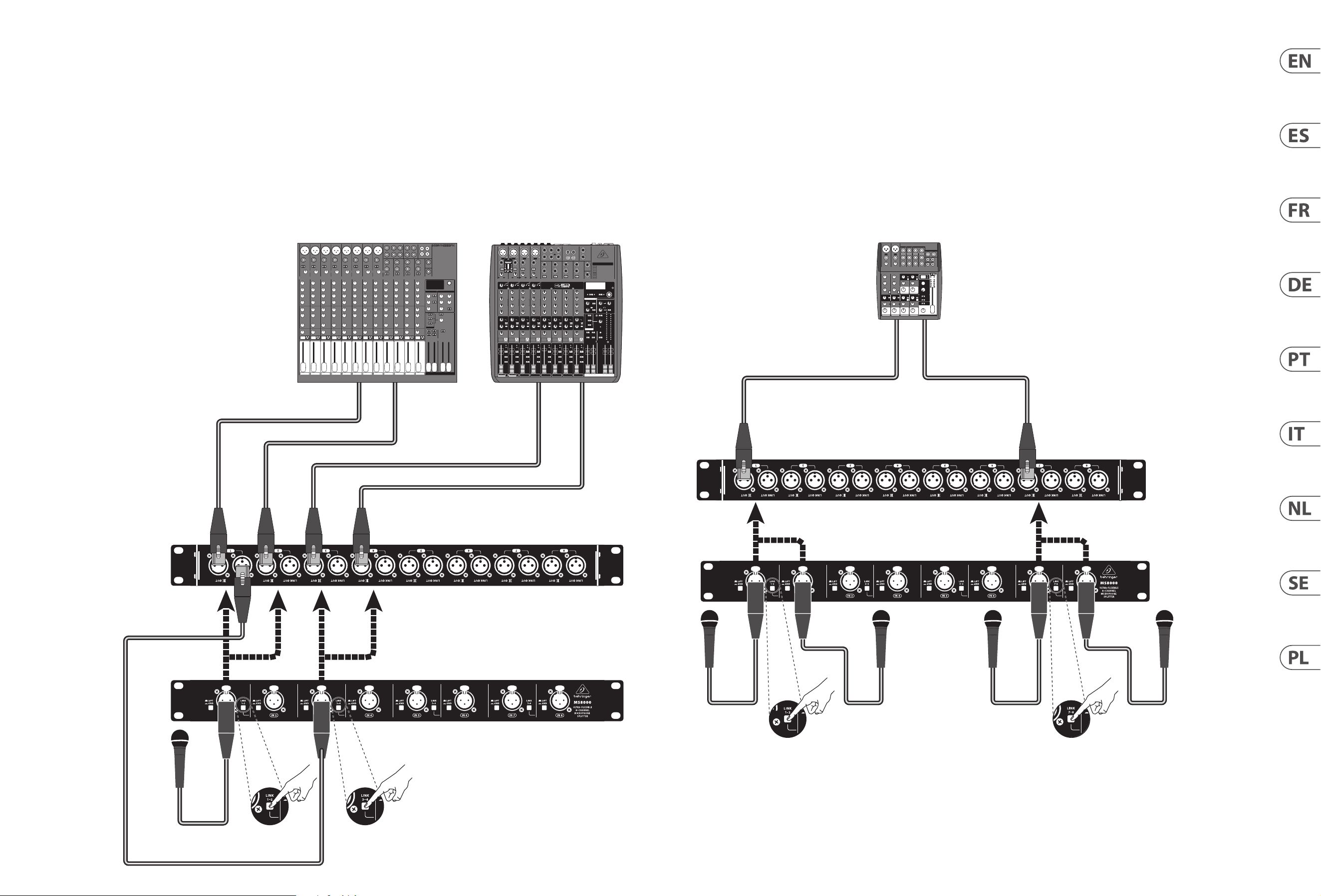
6 ULTRALINK MS8000 Quick Start Guide 7
ULTRALINK MS8000 Hook-up
(EN)
Step 1: Hook-Up
(ES)
Paso 1: Conexión
(FR)
Etape 1 : Connexions
(DE)
Schritt 1: Verkabelung
(PT)
Passo 1: Conexões
(IT)
Passo 1: Allacciare
(NL)
Stap 1: Aansluiten
(SE)
Steg 1: Anslutning
(PL)
Krok 1: Podłączeni
Creating multiple copies of an input signal
Creación de varias copias a partir de una señal de entrada
Plusieurs copies du signal d’entrée
Mehrere Kopien eines Eingangssignals erstellen
Criação de cópias múltiplas de um sinal de entrada
Creazione di più copie di un segnale di ingresso
Meerdere kopieën van een ingangssignaal maken
Skapa flera kopior av en insignal
Tworzenie wielu kopii sygnału wejściowego
Creating combined signals from multiple inputs
Creación de señales combinadas a partir de varias entradas
Signaux combinés en provenance de plusieurs entrées
Mehrere Eingangssignale zu einem Signal kombinieren
Criação de sinais combinados provenientes de múltiplas entradas
Creazione di segnali combinati da più ingressi
Gecombineerde signalen maken van meerdere ingangen
Skapa kombinerade signaler från flera ingångar
Tworzenie połączonych sygnałów z wielu wejść
XENYX 2222FX XENYX QX1622USB
XENYX 1002FX
8 ULTRALINK MS8000 Quick Start Guide 9
ULTRALINK MS8000 Controls
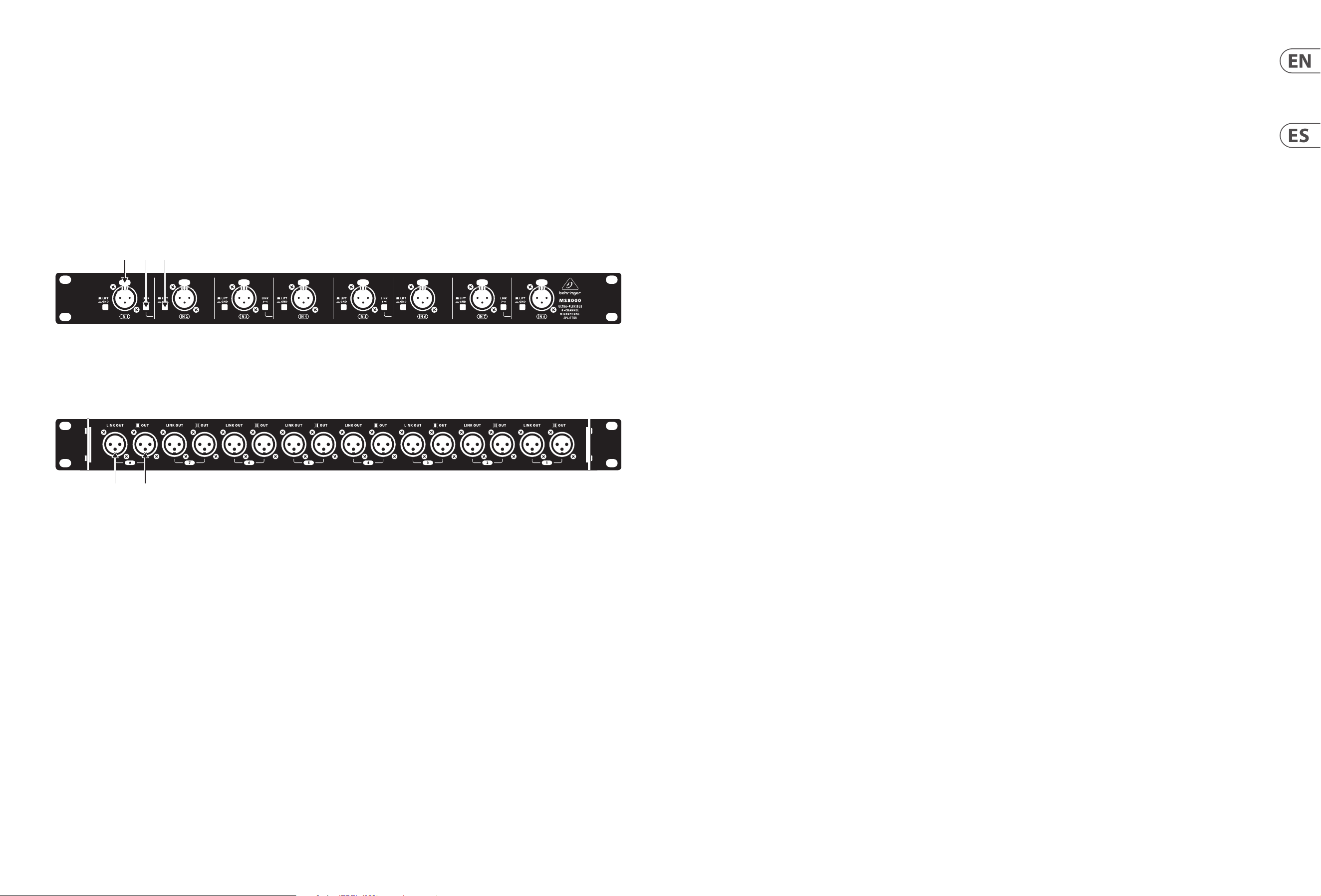
(EN) Step 2: Controls
(ES) Paso 2: Controles
(4) (5)
(1) (2) (3)
(1) IN XLR jacks accept audio signals from
devices using balanced XLR cables, such as
microphones. If microphones, DI boxes or
other devices require phantom power, the
MS8000 allows phantom power from mixers
or mic preamps to pass through the LINK
OUT XLR and back out to the devices through
the XLR IN connections.
(2) LINK switches connect adjacent channels
into combined pairs when pressed.
Using the LINK function allows you to
double the outputs for a single input
signal. You may also use the LINK function
to blend two input signals into a single,
combined output signal.
WARNING! Be careful when using phantom
power on linked channels. If two linked
channels both have phantom power sources
connected to their respective LINK OUT XLR
jacks, phantom-powered mics or DI boxes
may receive too much current.
(3) LIFT/GND switches, when released,
attenuate hum or other noise from
ground loops by interrupting the
ground connection.
(4) LINK OUT connections send out
pre-transformer copies of the related
channel’s input signal for use with
additional devices. Phantom power from
mixers or mic preamps can be transmitted
through the MS8000’s LINK OUT connections
and then back out through the XLR IN
connectors to microphones and other
devices that may require phantom power.
(5) OUT connections send out post-transformer
copies of input signals to mixing boards or
other devices. The transformer OUT provides
isolation from phantom power present on
the IN and LINK OUT XLR connections.
(1) Las tomas XLR IN aceptan señales audio
procedentes de dispositivos que usen
cables XLR balanceados, como por
ejemplo micrófonos. Si usa micrófonos,
cajas DI u otros dispositivos que requieran
alimentación fantasma, el MS8000 permite
que el voltaje de alimentación fantasma
procedente de mezcladores o previos de
micros pase a través de la toma LINK OUT
XLR y sea enviado a los dispositivos que lo
necesiten a través de las conexiones XLR IN.
(2) Cuando pulse los interruptores LINK
podrá conectar canales adyacentes para
convertirlos en canales combinados. El uso
de esta función LINK le permite duplicar
las salidas a partir de una única señal de
entrada. También puede usar esta función
LINK para mezclar dos señales de entrada en
una única señal de salida combinada.
¡ATENCIÓN! Tenga cuidado al usar la
alimentación fantasma sobre canales
enlazados. Si tiene dos canales enlazados
en los que en ambos haya fuentes de
alimentación fantasma conectadas a las
respectivas tomas LINK OUT XLR, los micros
o cajas DI que necesiten alimentación
fantasma es posible que reciban una
corriente eléctrica excesiva.
(3) Los interruptores LIFT/GND, cuando están
en la posición de “no pulsado”, atenúan los
zumbidos y otros ruidos causados por bucles
a tierra al interrumpir la conexión a toma
de tierra.
(4) Las conexiones LINK OUT envían copias
pre-transformador de la señal de entrada
del canal correspondiente para su uso con
dispositivos adicionales. La alimentación
fantasma procedente de mezcladores o
previos de micro puede ser transmitida
a través de las conexiones LINK OUT del
MS8000 y pasada a través de los conectores
XLR IN a micrófonos y otros dispositivos que
puedan necesitar dicha alimentación.
(5) Las conexiones OUT dan salida a copias
post-transformador de las señales
de entrada hacia mesas de mezclas u
otros dispositivos. La salida OUT del
transformador le ofrece una señal aislada
de la alimentación fantasma presente en las
conexiones IN y LINK OUT XLR.

10 ULTRALINK MS8000 Quick Start Guide 11
ULTRALINK MS8000 Controls
(PT) Passo 2: Controles(FR) Etape 2 : Réglages
(DE) Schritt 2:
Bedienelemente
(1) Les embases XLR IN peuvent recevoir les
signaux audio d’appareils dotés de câbles
XLR, par exemple des micros. Si vos micros,
boîtes de direct ou autres nécessitent une
alimentation fantôme, le MS8000 permet
à l’alimentation fantôme d’une console de
mixage ou d’un préampli d’être transmise
aux connecteurs XLR IN par les sorties
XLR LINK OUT.
(2) Les boutons LINK permettent de combiner
les canaux adjacents par paires lorsqu’ils
sont enfoncés. La fonction LINK permet
de dupliquer la sortie d’un signal d’entrée
seul. Vous pouvez également l’utiliser pour
mélanger deux signaux d’entrée en un seul
signal de sortie combiné.
AVERTISSEMENT ! Faites attention lorsque
vous utilisez l’alimentation fantôme sur des
canaux combinés. Si deux canaux combinés
sont tous deux connectés à une source
d’alimentation fantôme par leur sortie LINK
OUT respective, les appareils connectés à
ces canaux peuvent recevoir une tension
trop importante.
(3) Les boutons LIFT/GND, lorsqu’ils sont
relâchés, permettent de couper la connexion à
la terre an d’atténuer les bourdonnements et
autres bruits causés par des boucles de terre.
(4) Les sorties LINK OUT portent une copie
pré-transformateur des signaux d’entrée des
canaux correspondant pour une utilisation
avec d’autres appareils. L’alimentation
fantôme d’une console de mixage ou d’un
préampli d’être transmise aux connecteurs
XLR IN par les sorties XLR LINK OUT pour
alimenter vos micros, boîtes de direct
ou autres appareils nécessitant une
alimentation fantôme.
(5) Les sorties OUT portent une copie
post-transformateur des signaux d’entrée,
pouvant être envoyée à une console de
mixage ou d’autres appareils. Les sorties
OUT sont isolées de l’alimentation fantômes
transmise aux connecteurs IN et LINK OUT.
(1) IN Diese XLR-Buchsen akzeptieren
Audiosignale von Mikrofonen und anderen
Geräten, die symmetrische XLR-Kabel
verwenden. Wenn Mikrofone, DI-Boxen
oder andere Geräte Phantomspannung
benötigen, lässt der MS8000 die von Mixern
oder Mikrofonvorverstärkern erzeugte
Phantomspannung über seine LINK OUT
XLR-Anschlüsse passieren und leitet sie über
die XLR IN-Anschlüsse weiter zu den Geräten.
(2) LINK Bei gedrückter Taste werden
Nachbarkanäle zu kombinierten Paaren
verbunden. Mit der LINK-Funktion kann
man ein einzelnes Eingangssignal auf zwei
Ausgänge verteilen. Man kann mit der
LINK-Funktion auch zwei Eingangssignale
zu einem einzelnen kombinierten
Ausgangssignal mischen.
ACHTUNG! Setzen Sie Phantomspannung
bei gekoppelten Kanälen vorsichtig ein.
Wenn Phantomspannungsquellen an beide
LINK OUT XLR-Buchsen von gekoppelten
Kanälen angeschlossen sind, kommt bei
phantomgespeisten Mikrofonen oder
DI-Boxen eventuell zu viel Spannung an.
(3) Wenn man die gedrückten LIFT/GND-Schalter
löst, wird die Erdung unterbrochen und durch
Erdschleifen verursachte Störgeräusche wie
Brummen usw. werden bedämpft.
(4) LINK OUT Diese Anschlüsse leiten vor dem
Transformator abgegriene Kopien des
entsprechenden Kanaleingangssignals
zu externen Zusatzgeräten weiter.
Die Phantomspannung von Mixern oder
Mikrofonvorverstärkern kann über die
LINK OUT- und XLR IN-Anschlüsse des
MS8000 zu Mikrofonen und anderen
Geräten, die Phantomspannung benötigen,
weitergeleitet werden.
(5) OUT Diese Anschlüsse leiten hinter dem
Transformator abgegriene Kopien der
Eingangssignale zu Mischpulten oder
anderen Geräten weiter. Der Transformator
OUT-Anschluss ist gegen die an den IN- und
LINK OUT XLR-Anschlüssen anliegende
Phantomspannung isoliert.
(1) Os jacks IN XLR aceitam sinais de áudio
provenientes de dispositivos usando cabos
XLR balanceados, tais como microfones.
Se os microfones, unidades DI ou outros
dispositivos necessitarem de alimentação
fantasma, o MS8000 permite que a
alimentação fantasma proveniente de
misturadores ou pré amplicadores de
microfones passe através do LINK OUT XLR
e de volta para dispositivos através das
conexões XLR IN.
(2) Os botões LINK conectam os canais
adjacentes a pares combinados quando
apertados. Usar a função LINK possibilita
dobrar as saídas para um único sinal de
entrada. Você também pode usar a função
LINK para misturar dois sinais de entrada em
um sinal de saída único e combinado.
AVISO! Cuidado ao usar alimentação
fantasma nos canais linkados. Se ambos
os canais linkados tiverem fontes de
alimentação fantasma conectadas aos seus
respectivos jacks LINK OUT XLR, microfones
com alimentação fantasma ou unidades DI
podem receber corrente demais.
(3) Quando os botões LIFT/GND são soltos,
atenuam o zumbido ou outros ruídos dos
loops aterrados pois interrompem a conexão
de aterramento.
(4) As conexões LINK OUT enviam cópias de
pré transformadores do sinal de entrada
do canal relacionado a serem usadas com
dispositivos adicionais. A alimentação
fantasma proveniente de misturadores ou
microfones de pré amplicadores pode ser
transmitida através das conexões LINK OUT
do MS8000 e então ser transmitida através
de conectores XLR IN para microfones e
outros dispositivos que podem requerer
alimentação fantasma.
(5) As conexões OUT enviam cópias de pós
transformadores de sinais de entrada para
mesas de mistura ou outros dispositivos.
O OUT do transformador oferece isolamento
da alimentação fantasma presente nas
conexões IN e LINK OUT XLR.
(IT) Passo 2: Controlli
(1) IN I jack XLR accettano segnali audio
da dispositivi che utilizzano cavi XLR
bilanciati, come i microfoni. Se microfoni,
DI box o altri dispositivi richiedono
l’alimentazione phantom, l’MS8000
consente all’alimentazione phantom dei
mixer o dei preamplicatori microfonici di
passare attraverso LINK OUT XLR e tornare ai
dispositivi tramite le connessioni XLR IN.
(2) LINK gli interruttori collegano i canali
adiacenti in coppie combinate quando
vengono premuti. L’utilizzo della funzione
LINK consente di raddoppiare le uscite per
un singolo segnale di ingresso. È inoltre
possibile utilizzare la funzione LINK per
fondere due segnali di ingresso in un unico
segnale di uscita combinato.
AVVERTIMENTO! Prestare attenzione
quando si utilizza l’alimentazione phantom
sui canali collegati. Se due canali collegati
hanno entrambi sorgenti di alimentazione
phantom collegate ai rispettivi jack LINK
OUT XLR, i microfoni con alimentazione
phantom o le DI box potrebbero ricevere
troppacorrente.
(3) LIFT/GND gli interruttori, una volta rilasciati,
attenuano il ronzio o altri rumori dai loop di
terra interrompendo il collegamento a terra.
(4) LINK OUT le connessioni inviano copie
pre-trasformatore del segnale di ingresso
del canale correlato per l’uso con dispositivi
aggiuntivi. L’alimentazione phantom dai
mixer o dai preamplicatori microfonici può
essere trasmessa tramite le connessioni
LINK OUT dell’MS8000 e quindi ritrasmessa
tramite i connettori XLR IN a microfoni e
altri dispositivi che potrebbero richiedere
alimentazione phantom.
(5) OUT le connessioni inviano copie post-
trasformatore dei segnali di ingresso alle
schede di missaggio o ad altri dispositivi.
Il trasformatore OUT fornisce isolamento
dall’alimentazione phantom presente sulle
connessioni IN e LINK OUT XLR.

12 ULTRALINK MS8000 Quick Start Guide 13
ULTRALINK MS8000 Controls
(PL) Krok 2: Sterowanica(NL) Stap 2: Bediening
(SE) Steg 2: Kontroller
(1) IN XLR-aansluitingen accepteren
audiosignalen van apparaten die
gebalanceerde XLR-kabels gebruiken, zoals
microfoons. Als microfoons, DI-boxen of
andere apparaten fantoomvoeding nodig
hebben, laat de MS8000 fantoomvoeding
van mixers of microfoonvoorversterkers
door de LINK OUT XLR gaan en terug naar de
apparaten via de XLR IN-aansluitingen.
(2) LINK schakelaars verbinden aangrenzende
kanalen tot gecombineerde paren wanneer
ze worden ingedrukt. Met de LINK-functie
kunt u de uitgangen verdubbelen voor een
enkel ingangssignaal. U kunt ook de LINK-
functie gebruiken om twee ingangssignalen
samen te voegen tot één gecombineerd
uitgangssignaal.
WAARSCHUWING! Wees voorzichtig
bij het gebruik van fantoomvoeding op
gekoppelde kanalen. Als twee gekoppelde
kanalen beide fantoomvoedingsbronnen
hebben aangesloten op hun respectieve
LINK OUT XLR-aansluitingen, kunnen
fantoomgevoede microfoons of DI-boxen te
veel stroomontvangen.
(3) LIFT/GND schakelaars dempen, wanneer
ze worden losgelaten, brom of ander geluid
van aardlussen door de aardverbinding
teonderbreken.
(4) LINK OUT verbindingen sturen pre-
transformatorkopieën van het ingangssignaal
van het gerelateerde kanaal voor gebruik met
extra apparaten. Fantoomvoeding van mixers
of microfoonvoorversterkers kan worden
verzonden via de LINK OUT-aansluitingen
van de MS8000 en vervolgens via de XLR
IN-aansluitingen worden teruggestuurd naar
microfoons en andere apparaten die mogelijk
fantoomvoeding nodig hebben.
(5) OUT verbindingen sturen post-
transformatorkopieën van ingangssignalen
naar mengborden of andere apparaten. De
transformator OUT zorgt voor isolatie van
fantoomvoeding die aanwezig is op de IN- en
LINK OUT XLR-aansluitingen.
(1) IN XLR-uttag accepterar ljudsignaler från
enheter som använder balanserade XLR-
kablar, t.ex. mikrofoner. Om mikrofoner,
DI-lådor eller andra enheter kräver
fantommatning, tillåter MS8000 fantomeekt
från blandare eller mikrofonförförstärkare att
passera genom LINK OUT XLR och tillbaka till
enheterna via XLR IN-anslutningarna.
(2) LINK omkopplare kopplar angränsande
kanaler i kombinerade par när de trycks
in. Med LINK-funktionen kan du fördubbla
utgångarna för en enda ingångssignal. Du
kan också använda LINK-funktionen för
att blanda två ingångssignaler till en enda
kombineradutsignal.
VARNING! Var försiktig när du använder
fantommatning på länkade kanaler.
Om två länkade kanaler båda har
fantommatningskällor anslutna till respektive
LINK OUT XLR-uttag, kan fantomdrivna
mikrofoner eller DI-lådor få för mycket ström.
(3) LIFT/GND brytare, när de släpps, dämpar
brummen eller annat buller från jordslingor
genom att avbryta jordanslutningen.
(4) LINK OUT anslutningar skickar ut
transformatorer kopior av den relaterade
kanalens insignal för användning med
ytterligare enheter. Fantomeekt från mixrar
eller mikrofonförstärkare kan överföras
via MS8000: s LINK OUT-anslutningar och
sedan tillbaka genom XLR IN-kontakterna
till mikrofoner och andra enheter som kan
behöva fantomström.
(5) OUT anslutningar skickar ut kopior av
ingångssignaler efter transformator till
mixerkort eller andra enheter. Transformatorn
OUT ger isolering från fantomeekt som nns
på IN- och LINK OUT XLR-anslutningarna.
(1) IN Gniazda XLR akceptują sygnały audio z
urządzeń używających symetrycznych kabli
XLR, takich jak mikrofony. Jeśli mikrofony,
DI-boxy lub inne urządzenia wymagają
zasilania fantomowego, MS8000 pozwala na
przejście zasilania fantomowego z mikserów
lub przedwzmacniaczy mikrofonowych
przez LINK OUT XLR i z powrotem do
urządzeń przez złącza XLR IN.
(2) LINK przełączniki łączą sąsiednie kanały w
połączone pary po naciśnięciu. Korzystanie
z funkcji LINK pozwala podwoić wyjścia dla
pojedynczego sygnału wejściowego. Możesz
także użyć funkcji LINK, aby połączyć dwa
sygnały wejściowe w jeden, połączony
sygnał wyjściowy.
OSTRZEŻENIE! Zachowaj ostrożność
podczas korzystania z zasilania
fantomowego na połączonych kanałach.
Jeśli dwa połączone kanały mają źródła
zasilania fantomowego podłączone do
odpowiednich gniazd LINK OUT XLR,
mikrofony zasilane fantomowo lub DI-boxy
mogą otrzymywać zbyt dużo prądu.
(3) LIFT/GND przełączniki, po zwolnieniu,
tłumią buczenie lub inne szumy
z pętli uziemienia, przerywając
połączenieuziemienia.
(4) LINK OUT połączenia wysyłają
przedtransformatorowe kopie sygnału
wejściowego odpowiedniego kanału
do wykorzystania z dodatkowymi
urządzeniami. Zasilanie fantomowe
z mikserów lub przedwzmacniaczy
mikrofonowych może być przesyłane przez
złącza LINK OUT MS8000, a następnie
z powrotem przez złącza XLR IN do
mikrofonów i innych urządzeń, które mogą
wymagać zasilania fantomowego.
(5) OUT połączenia wysyłają
posttransformatorowe kopie sygnałów
wejściowych do mikserów lub innych
urządzeń. Transformator OUT zapewnia
izolację od zasilania fantomowego obecnego
na złączach IN i LINK OUT XLR.
14 ULTRALINK MS8000 Quick Start Guide 15
Specications
Audio Inputs
Connectors 8 x XLR
Impedance 1 kΩ, balanced
Max. input level 30 dBu @ 1 kHz
Controls
Link
Lift/Ground
Audio Outputs
Link connectors 8 x XLR, parallel to inputs
Direct out connectors 8 x XLR
Voltage transformation ratio 1 : 1.2
Impedance 2.7 kΩ, balanced
Max. output level 38 dBu @ 1 kHz
System
Frequency response 30 Hz to 30 kHz (±0.5 dB @ +4 dBu)
THD + N (Distortion) 0.02% @ 1 kHz, input level +4 dBu
Signal-to-noise ratio 104 dBu
CMRR >80 dB, typical
Insertion loss
+8 dB @ 100 kΩ
-5 dB @ 600 Ω
Power requirement Passive
Dimensions/Weight
Dimensions (H x W x D) 44 x 483 x 65 mm (1.7 x 19.0 x 2.6")
Weight 1.1 kg (2.4 lbs)
16 ULTRALINK MS8000 Quick Start Guide 17
Other important information
1. Register online. Please register your new
Music Tribe equipment right after you purchase it by
visiting musictribe.com. Registering your purchase using
our simple online form helps us to process your repair
claims more quickly and eciently. Also, read the terms
and conditions of our warranty, if applicable.
2. Malfunction. Should your Music Tribe
Authorized Reseller not be located in your vicinity,
you may contact the Music Tribe Authorized Fulller for
your country listed under “Support” at musictribe.com.
Should your country not be listed, please check if your
problem can be dealt with by our “Online Support” which
may also be found under “Support” at musictribe.com.
Alternatively, please submit an online warranty claim at
musictribe.com BEFORE returning the product.
3. Power Connections. Before plugging the
unit into a power socket, please make sure you are using
the correct mains voltage for your particular model.
Faulty fuses must be replaced with fuses of the same type
and rating without exception.
1. Registro online. Le recomendamos que
registre su nuevo aparato Music Tribe justo después de
su compra accediendo a la página web musictribe.com.
El registro de su compra a través de nuestro sencillo
sistema online nos ayudará a resolver cualquier
incidencia que se presente a la mayor brevedad posible.
Además, aproveche para leer los términos y condiciones de
nuestra garantía, si es aplicable en su caso.
2. Averías. En el caso de que no exista un distribuidor
Music
Tribe en las inmediaciones, puede ponerse en
contacto con el distribuidor
Music
Tribe de su país,
que encontrará dentro del apartado “Support” de nuestra
página web musictribe.com. En caso de que su país no
aparezca en ese listado, acceda a la sección “Online Support”
(que también encontrará dentro del apartado “Support”
de nuestra página web) y compruebe si su problema aparece
descrito y solucionado allí. De forma alternativa, envíenos a
través de la página web una solicitud online de soporte en
periodo de garantía ANTES de devolvernos el aparato.
3. Conexiones de corriente. Antes de enchufar
este aparato a una salida de corriente, asegúrese de que dicha
salida sea del voltaje adecuado para su modelo concreto.
En caso de que deba sustituir un fusible quemado, deberá
hacerlo por otro de idénticas especicaciones, sin excepción.
1. Enregistrez-vous en ligne. Prenez le
temps d’enregistrer votre produit Music Tribe aussi vite
que possible sur le site Internet musictribe.com. Le fait
d’enregistrer le produit en ligne nous permet de gérer
les réparations plus rapidement et plus ecacement.
Prenez également le temps de lire les termes et conditions
de notre garantie.
2. Dysfonctionnement. Si vous n’avez pas
de revendeur Music Tribe près de chez vous, contactez le
distributeur Music Tribe de votre pays : consultez la liste
des distributeurs de votre pays dans la page “Support”
de notre site Internet musictribe.com. Si votre pays n’est
pas dans la liste, essayez de résoudre votre problème avec
notre “aide en ligne” que vous trouverez également dans
la section “Support” du site musictribe.com. Vous pouvez
également nous faire parvenir directement votre demande
de réparation sous garantie par Internet sur le site
musictribe.com AVANT de nous renvoyer le produit.
3. Raccordement au secteur. Avant de relier
cet équipement au secteur, assurez-vous que la tension
secteur de votre région soit compatible avec l’appareil.
Veillez à remplacer les fusibles uniquement par des
modèles exactement de même taille et de même valeur
électrique — sans aucune exception.
1. Online registrieren. Bitte registrieren Sie
Ihr neues Music Tribe-Gerät direkt nach dem Kauf auf der
website musictribe.com. Wenn Sie Ihren Kauf mit unserem
einfachen online Formular registrieren, können wir Ihre
Reparaturansprüche schneller und ezienter bearbeiten.
Lesen Sie bitte auch unsere Garantiebedingungen,
falls zutreend.
2. Funktionsfehler. Sollte sich kein Music Tribe
Händler in Ihrer Nähe benden, können Sie den
Music Tribe Vertrieb Ihres Landes kontaktieren, der auf
musictribe.com unter „Support“ aufgeführt ist. Sollte Ihr
Land nicht aufgelistet sein, prüfen Sie bitte, ob Ihr Problem
von unserem „Online Support“ gelöst werden kann, den
Sie ebenfalls auf musictribe.com unter „Support“ nden.
Alternativ reichen Sie bitte Ihren Garantieanspruch
online auf musictribe.com ein, BEVOR Sie das
Produkt zurücksenden.
3. Stromanschluss. Bevor Sie das Gerät an
eine Netzsteckdose anschließen, prüfen Sie bitte, ob Sie
die korrekte Netzspannung für Ihr spezielles Modell
verwenden. Fehlerhafte Sicherungen müssen ausnahmslos
durch Sicherungen des gleichen Typs und Nennwerts
ersetzt werden.
1. Registre-se online. Por favor, registre seu
novo equipamento Music Tribe logo após a compra
visitando o site musictribe.com Registrar sua compra
usando nosso simples formulário online nos ajuda a
processar seus pedidos de reparos com maior rapidez e
eciência. Além disso, leia nossos termos e condições de
garantia, caso seja necessário.
2. Funcionamento Defeituoso.
Caso seu fornecedor Music Tribe não esteja localizado
nas proximidades, você pode contatar um distribuidor
Music Tribe para o seu país listado abaixo de “Suporte”
em musictribe.com. Se seu país não estiver na lista,
favor checar se seu problema pode ser resolvido com o
nosso “Suporte Online” que também pode ser achado
abaixo de “Suporte”em musictribe.com. Alternativamente,
favor enviar uma solicitação de garantia online em
musictribe.com ANTES da devolução do produto.
3. Ligações. Antes de ligar a unidade à tomada,
assegure-se de que está a utilizar a voltagem correcta para
o modelo em questão. Os fusíveis com defeito terão de
ser substituídos, sem qualquer excepção, por fusíveis do
mesmo tipo e corrente nominal.
1. Registratevi online. Vi invitiamo a registrare
il nuovo apparecchio Music Tribe subito dopo averlo
acquistato visitando musictribe.com. La registrazione
dell'acquisto tramite il nostro semplice modulo online ci
consente di elaborare le richieste di riparazione in modo
più rapido ed eciente. Leggete anche i termini e le
condizioni della nostra garanzia, qualora applicabile.
2. Malfunzionamento. Nel caso in cui il
rivenditore autorizzato Music Tribe non si trovi nelle vostre
vicinanze, potete contattare il Music Tribe Authorized
Fulller per il vostro paese, elencato in “Support”
@ musictribe.com. Se la vostra nazione non è elencata,
controllate se il problema può essere risolto tramite il
nostro “Online Support”che può anche essere trovato sotto
“Support” @ musictribe.com. In alternativa, inviate una
richiesta di garanzia online su musictribe.com PRIMA di
restituire il prodotto.
3. Collegamento all’alimentazione.
Prima di collegare l'unità a una presa di corrente,
assicuratevi di utilizzare la tensione di rete corretta
per il modello specico. I fusibili guasti devono essere
sostituiti, senza eccezioni, con fusibili dello stesso tipo e
valore nominale.
Important information
Aspectos importantes
Informations importantes
Weitere wichtige
Informationen
Outras Informações
Importantes
Informazioni importanti
1. Registreer online. Registreer uw nieuwe
Music Tribe-apparatuur direct nadat u deze hebt gekocht
door naar musictribe.com te gaan. Door uw aankoop
te registreren via ons eenvoudige online formulier,
kunnen wij uw reparatieclaims sneller en eciënter
verwerken. Lees ook de voorwaarden van onze garantie,
indien van toepassing.
2. Storing. Mocht uw door Music Tribe
geautoriseerde wederverkoper niet bij u in de buurt zijn
gevestigd, dan kunt u contact opnemen met de door Music
Tribe Authorized Fulller voor uw land vermeld onder
“Support” op musictribe.com. Als uw land niet in de lijst
staat, controleer dan of uw probleem kan worden opgelost
door onze "Online Support", die u ook kunt vinden onder
"Support" op musictribe.com. U kunt ook een online
garantieclaim indienen op musictribe.com VOORDAT u het
product retourneert.
3. Stroomaansluitingen. Voordat u het
apparaat op een stopcontact aansluit, moet u ervoor
zorgen dat u de juiste netspanning voor uw specieke
model gebruikt. Defecte zekeringen moeten zonder
uitzondering worden vervangen door zekeringen van
hetzelfde type en dezelfde waarde.
1. Registrera online. Registrera din nya Music
Tribe-utrustning direkt efter att du köpt den genom
att besöka musictribe.com. Att registrera ditt köp med
vårt enkla onlineformulär hjälper oss att behandla dina
reparationsanspråk snabbare och mer eektivt. Läs också
villkoren i vår garanti, om tillämpligt.
2. Fel. Om din Music Tribe-auktoriserade återförsäljare
inte nns i din närhet kan du kontakta Music Tribe
Authorized Fulller för ditt land listat under “Support” på
musictribe.com. Om ditt land inte är listat, kontrollera om
ditt problem kan hanteras av vår “Onlinesupport” som
också nns under “Support” på musictribe.com. Alternativt
kan du skicka in ett online-garantianspråk på musictribe.
com INNAN du returnerar produkten.
3. Strömanslutningar. Innan du ansluter
enheten till ett eluttag, se till att du använder rätt
nätspänning för just din modell. Felaktiga säkringar
måste bytas ut mot säkringar av samma typ och
märkning utan undantag.
1. Zarejestrować online. Zarejestruj swój
nowy sprzęt Music Tribe zaraz po zakupie na stronie
musictribe.com. Zarejestrowanie zakupu za pomocą
naszego prostego formularza online pomaga nam szybciej
i efektywniej rozpatrywać roszczenia dotyczące naprawy.
Przeczytaj również warunki naszej gwarancji, jeśli dotyczy.
2. Awaria. Jeśli Twój autoryzowany sprzedawca
Music Tribe nie znajduje się w pobliżu, możesz
skontaktować się z autoryzowanym dostawcą Music Tribe
dla swojego kraju, wymienionym w sekcji „Wsparcie” na
stronie musictribe.com. Jeśli Twojego kraju nie ma na
liście, sprawdź, czy Twój problem może zostać rozwiązany
przez nasze „Wsparcie online”, które można również
znaleźć w sekcji „Wsparcie” na stronie musictribe.com.
Alternatywnie, prześlij zgłoszenie gwarancyjne online na
musictribe.com PRZED zwrotem produktu.
3. Połączenia zasilania. Przed podłączeniem
urządzenia do gniazdka sieciowego upewnij się, że
używasz odpowiedniego napięcia sieciowego dla danego
modelu. Wadliwe bezpieczniki należy bez wyjątku
wymienić na bezpieczniki tego samego typu i wartości.
Belangrijke informatie
Viktig information
Ważna informacja

18 ULTRALINK MS8000 Quick Start Guide 19
Hereby, Music Tribe declares that this product is in compliance with Directive
2014/30/EU, Directive 2011/65/EU and Amendment 2015/863/EU, Directive 2012/19/
EU, Regulation 519/2012 REACH SVHC and Directive 1907/2006/EC.
Full text of EU DoC is available at https://community.musictribe.com/
EU Representative: Music Tribe Brands DK A/S
Address: Gammel Strand 44, DK-1202 København K, Denmark
UK Representative: Music Tribe Brands UK Ltd.
Address: 6 Lloyds Avenue, Unit 4CL London EC3N 3AX, United Kingdom

We Hear You
