User Manual
Typhur Dome
v1.0

Important Safeguards
Using for the First Time
Operation
Cooking
Self-Clean Mode
Cleaning & Maintenance
Troubleshooting
Specifications
Support
Certification
Contents
-------------------------------------------
----------------------------------------------------
----------------------------------------------------
--------------------------------------------------------
-----------------------------------------------------------
---------------------------------------
P01
-----------------------------------------
---------------------------------------------------------------
------------------------------------------------------------------
------------------------------------------------------------------
P03
P03
P06
P1 2
P1 3
P1 4
P1 5
P1 6
P1 6

a)
b)
c)
1)
A short power-supply cord is provided to reduce the risk resulting from becoming entangled or tripping
over a longer cord.
Longer detachable power-supply cords or extension cords are available and may be used if care is
exercised in their use.
If a longer detachable power-supply cord or extension cord is used:
The marked electrical rating of the cord set or extension cord should be at least as great as the electrical
IMPORTANT SAFEGUARDS
When using electrical appliances, basic safety precautions should always be followed,
including the following:
• Read all instructions carefully.
• Do NOT use outdoors.
• Do NOT touch hot surfaces. Use handles or knobs.
• Do NOT let the cord hang over the edge of a table or counter or touch hot surfaces.
• Do NOT place on or near a hot gas or electric burner or in a heated oven.
• Do NOT cover or block the air inlet or outlet openings while the appliance is operating.
• Do NOT fill the grill plate with oil or fat as this may cause smoke or a fire hazard.
• Do NOT put any amount of food that exceeds the maximum level indicated in the basket.
• Do NOT operate any appliance with a damaged cord or plug or after the appliance malfunctions
or has been damaged in any manner. Return the appliance to the nearest authorized service
facility for examination, repair, or adjustment.
• To protect against electrical shock, do not immerse the cord, plugs, or the main unit in water or
other liquids.
• Close supervision is necessary when any appliance is used by or nearby children. Store the
appliance in a safe place when not in use.
• Unplug from outlet when not in use and before cleaning. Allow to cool before attaching or
removing any components.
• The use of accessory attachments not recommended by the appliance manufacturer may cause
injuries.
• Extreme caution must be used when moving an appliance containing hot oil or other hot liquids.
• To disconnect, turn any control to "off", then remove plug from wall outlet. Do not use appliance
for any purpose other than its intended use.
• Always put the ingredients to be fried in the basket, to prevent them from coming into contact
with the heating elements.
• Ensure that no food is stuck in-between the basket and the interior of the Air Fryer. Contact
Typhur's customer support team for help, repair and replacement.
• Extension cord:
01 02
rating of the appliance;
The cord should be arranged so that it will not drape over the countertop or tabletop where it can be
pulled on by children or tripped over unintentionally; and
If the appliance is of the grounded type, the cord set or extension cord should be a grounding-type
3-wire cord.
2)
3)
Save these Instructions.

a)
b)
c)
1)
A short power-supply cord is provided to reduce the risk resulting from becoming entangled or tripping
over a longer cord.
Longer detachable power-supply cords or extension cords are available and may be used if care is
exercised in their use.
If a longer detachable power-supply cord or extension cord is used:
The marked electrical rating of the cord set or extension cord should be at least as great as the electrical
IMPORTANT SAFEGUARDS
When using electrical appliances, basic safety precautions should always be followed,
including the following:
• Read all instructions carefully.
• Do NOT use outdoors.
• Do NOT touch hot surfaces. Use handles or knobs.
• Do NOT let the cord hang over the edge of a table or counter or touch hot surfaces.
• Do NOT place on or near a hot gas or electric burner or in a heated oven.
• Do NOT cover or block the air inlet or outlet openings while the appliance is operating.
• Do NOT fill the grill plate with oil or fat as this may cause smoke or a fire hazard.
• Do NOT put any amount of food that exceeds the maximum level indicated in the basket.
• Do NOT operate any appliance with a damaged cord or plug or after the appliance malfunctions
or has been damaged in any manner. Return the appliance to the nearest authorized service
facility for examination, repair, or adjustment.
• To protect against electrical shock, do not immerse the cord, plugs, or the main unit in water or
other liquids.
• Close supervision is necessary when any appliance is used by or nearby children. Store the
appliance in a safe place when not in use.
• Unplug from outlet when not in use and before cleaning. Allow to cool before attaching or
removing any components.
• The use of accessory attachments not recommended by the appliance manufacturer may cause
injuries.
• Extreme caution must be used when moving an appliance containing hot oil or other hot liquids.
• To disconnect, turn any control to "off", then remove plug from wall outlet. Do not use appliance
for any purpose other than its intended use.
• Always put the ingredients to be fried in the basket, to prevent them from coming into contact
with the heating elements.
• Ensure that no food is stuck in-between the basket and the interior of the Air Fryer. Contact
Typhur's customer support team for help, repair and replacement.
• Extension cord:
01 02
rating of the appliance;
The cord should be arranged so that it will not drape over the countertop or tabletop where it can be
pulled on by children or tripped over unintentionally; and
If the appliance is of the grounded type, the cord set or extension cord should be a grounding-type
3-wire cord.
2)
3)
Save these Instructions.
03
04
rating of the appliance;
The cord should be arranged so that it will not drape over the countertop or tabletop where it can be
pulled on by children or tripped over unintentionally; and
If the appliance is of the grounded type, the cord set or extension cord should be a grounding-type
3-wire cord.
Using for the First Time
1. Ensure that the voltage applied to the appliance
matches your local or home voltage.
2. Remove plastic labels or stickers.
3. Place on a flat, horizontal level surface with safety
clearance for air inlet and outlet.
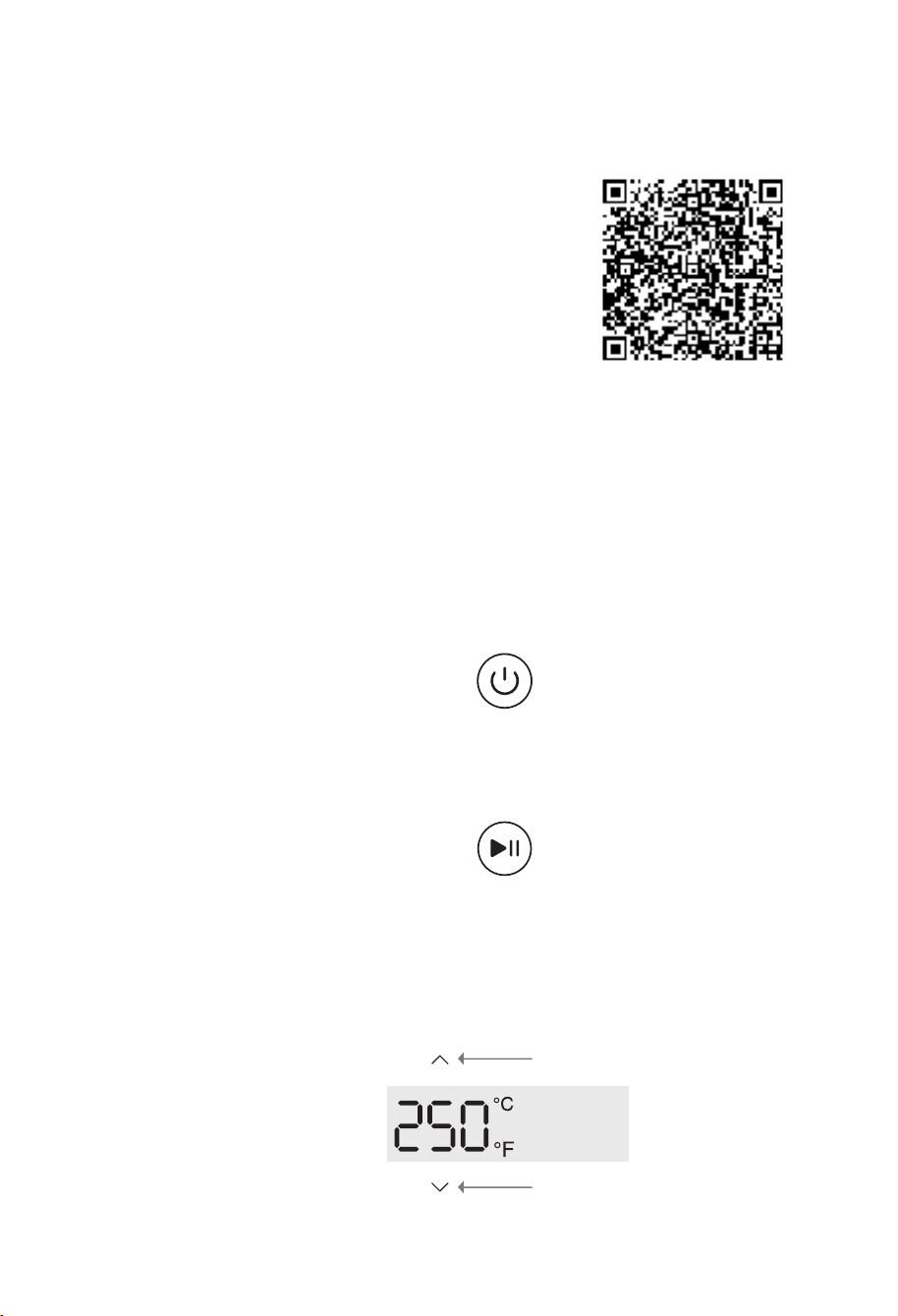
4. Scan the QR code to download the free Typhur app
for iOS or Android to control your device remotely.
Operation
Press the "power" button to turn on and off the appliance.
Press the "Start/Pause" button to start or pause cooking.
Power Control
Start/Pause Control
Temperature Unit Switch
"Down" button
"Up" button
Simultaneously press and hold the temperature buttons "Up" and "Down" for 2 seconds to switch
the temperature unit between Celsius and Fahrenheit.
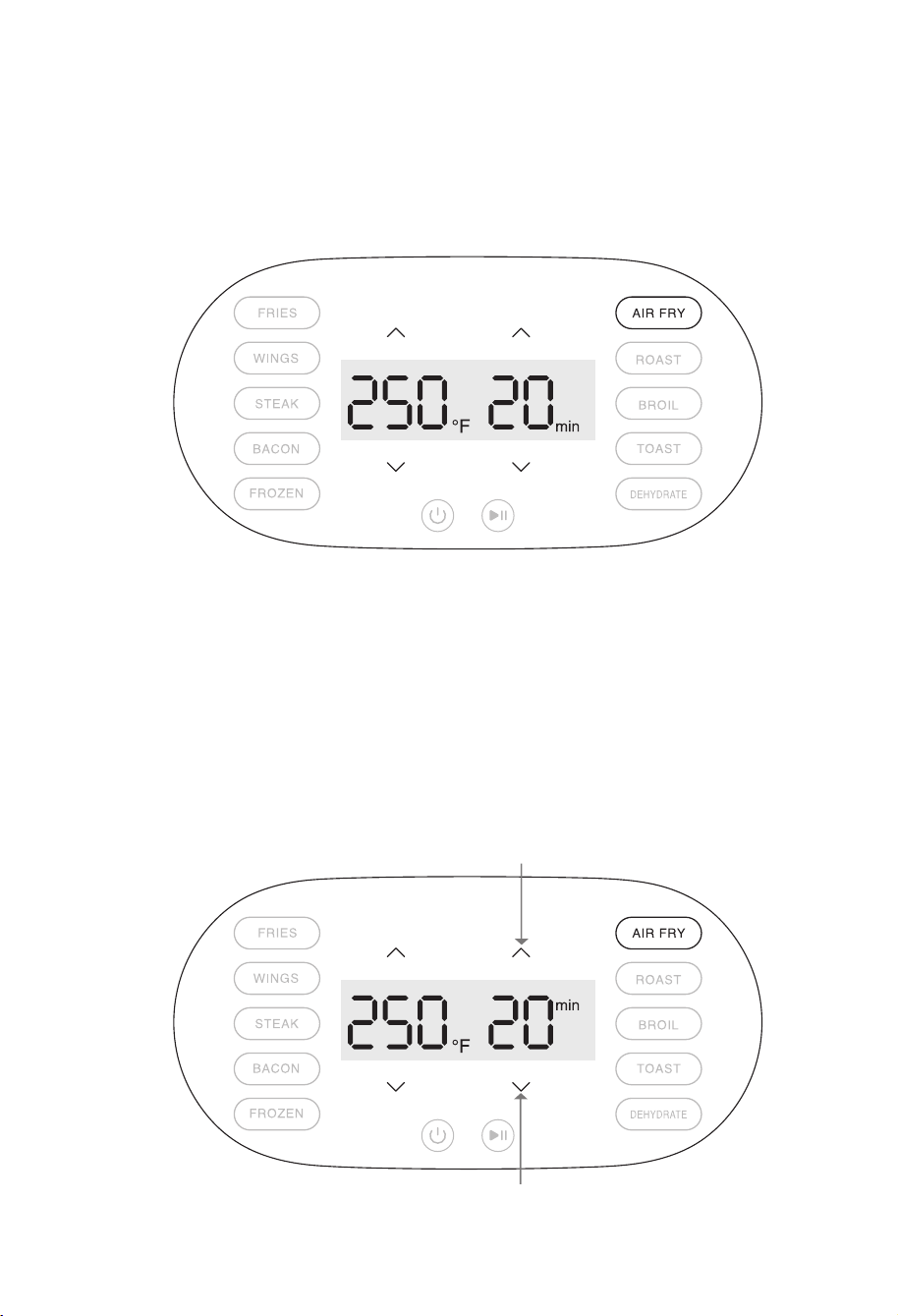
Preset Cooking Selection
App Control
To connect to Wi-Fi, press and hold the time control buttons "Up" and "Down" simultaneously for 2 seconds
when the appliance is not cooking. The Wi-Fi icon will flash, indicating that the appliance is in pairing mode.
Pair the appliance with your home Wi-Fi network to access the app. Pressing and holding the time control
buttons "Up" and "Down" simultaneously for 2 seconds will unpair the current network address and prepare
the appliance for new Wi-Fi pairing.
To select a cooking preset temperature and time, press the corresponding button: "Fries," "Wings,"
"Steak," "Bacon," "Frozen," "Air Fry," "Roast," "Broil," "Toast," or "Dehydrate."
"Up" button
"Down" button
03
04
rating of the appliance;
The cord should be arranged so that it will not drape over the countertop or tabletop where it can be
pulled on by children or tripped over unintentionally; and
If the appliance is of the grounded type, the cord set or extension cord should be a grounding-type
3-wire cord.
Using for the First Time
1. Ensure that the voltage applied to the appliance
matches your local or home voltage.
2. Remove plastic labels or stickers.
3. Place on a flat, horizontal level surface with safety
clearance for air inlet and outlet.
4. Scan the QR code to download the free Typhur app
for iOS or Android to control your device remotely.
Operation
Press the "power" button to turn on and off the appliance.
Press the "Start/Pause" button to start or pause cooking.
Power Control
Start/Pause Control
Temperature Unit Switch
"Down" button
"Up" button
Simultaneously press and hold the temperature buttons "Up" and "Down" for 2 seconds to switch
the temperature unit between Celsius and Fahrenheit.
Preset Cooking Selection
App Control
To connect to Wi-Fi, press and hold the time control buttons "Up" and "Down" simultaneously for 2 seconds
when the appliance is not cooking. The Wi-Fi icon will flash, indicating that the appliance is in pairing mode.
Pair the appliance with your home Wi-Fi network to access the app. Pressing and holding the time control
buttons "Up" and "Down" simultaneously for 2 seconds will unpair the current network address and prepare
the appliance for new Wi-Fi pairing.
To select a cooking preset temperature and time, press the corresponding button: "Fries," "Wings,"
"Steak," "Bacon," "Frozen," "Air Fry," "Roast," "Broil," "Toast," or "Dehydrate."
"Up" button
"Down" button

05 06
• Preheating the appliance is recommended when cooking beef empanadas, steak, meatballs, pork
chop, or seafood.
• Flipping halfway is recommended when cooking steak, meatballs, pork chops and toast.
• When preparing a larger amount of food, shake or stir the content in the basket in order to achieve
a consistent result.
Preset Cooking
Mode
Fries
Temperature
(Default)
Time
(Default)
350°F/175°C
16min
1min - 60min
1min - 60min
1min - 60min
1min - 60min
1min - 60min
1min - 60min
1min - 60min
1min - 60min
1min - 60min
1min - 24hr
Manual Temperature Setting
Range (Min & Max)
210°F/100°C - 450°F/230°C
Wings 380°F/195°C
14min 210°F/100°C - 450°F/230°C
210°F/100°C - 450°F/230°C
210°F/100°C - 450°F/230°C
210°F/100°C - 450°F/230°C
210°F/100°C - 450°F/230°C
210°F/100°C - 450°F/230°C
210°F/100°C - 450°F/230°C
Steak 450°F/230°C
6min
Bacon 400°F/205°C
10min
Frozen 375°F/190°C
20min
Air Fry
(default)
355°F/180°C
15min
Manual Time
Setting Range
(Min & Max)
Roast 390°F/200°C
15min
Broil
450°F/230°C
10min
390°F/200°C - 450°F/230°C
Toast 400°F/205°C
6min
Dehydrate 140°F/60°C
2hr
105°F/40°C - 250°F/150°C
120V
Cooking
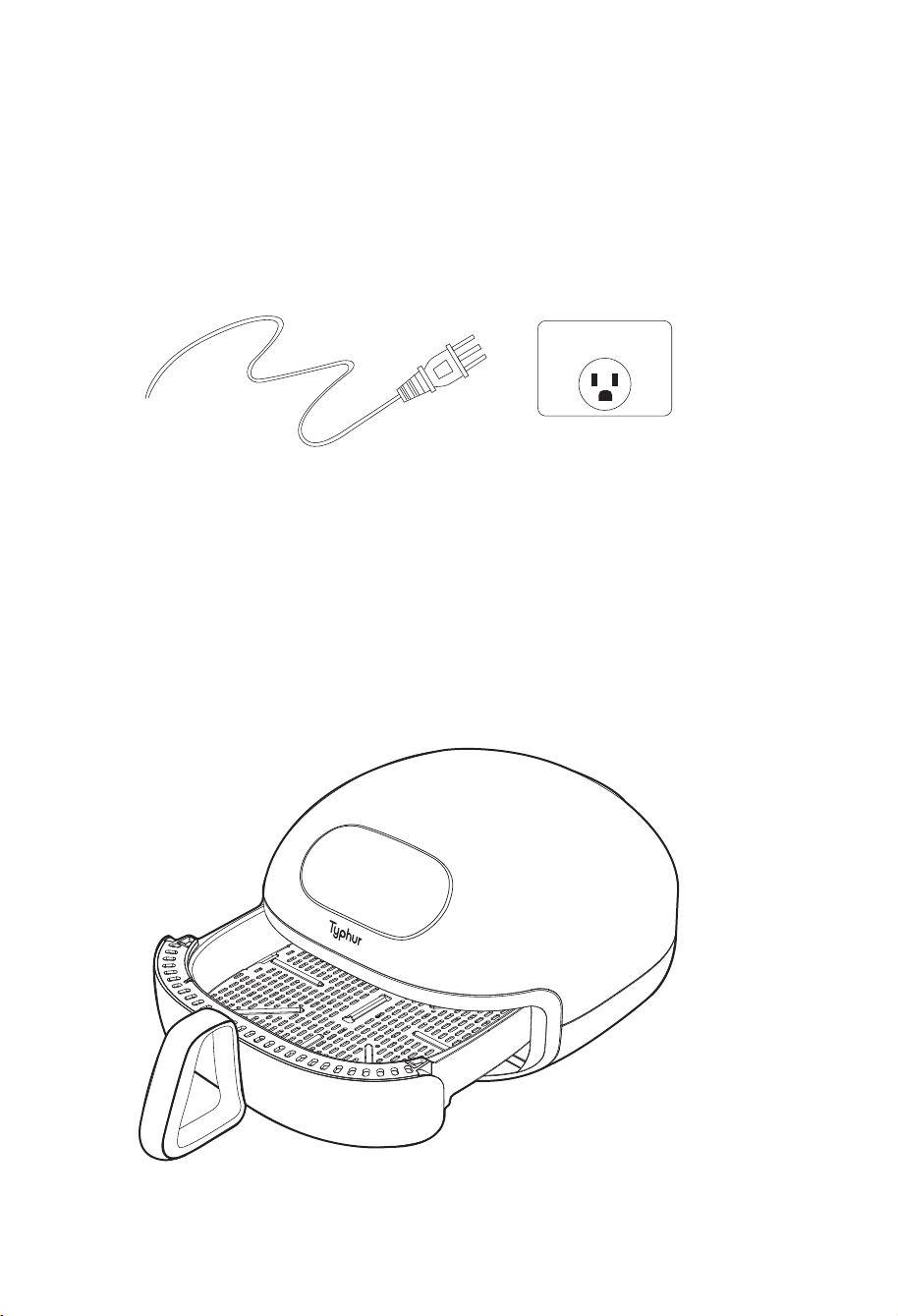
1. Plug in a 120V power plug socket.
2. Remove the basket by pulling the handle.
Standard Procedure
05 06
• Preheating the appliance is recommended when cooking beef empanadas, steak, meatballs, pork
chop, or seafood.
• Flipping halfway is recommended when cooking steak, meatballs, pork chops and toast.
• When preparing a larger amount of food, shake or stir the content in the basket in order to achieve
a consistent result.
Preset Cooking
Mode
Fries
Temperature
(Default)
Time
(Default)
350°F/175°C
16min
1min - 60min
1min - 60min
1min - 60min
1min - 60min
1min - 60min
1min - 60min
1min - 60min
1min - 60min
1min - 60min
1min - 24hr
Manual Temperature Setting
Range (Min & Max)
210°F/100°C - 450°F/230°C
Wings 380°F/195°C
14min 210°F/100°C - 450°F/230°C
210°F/100°C - 450°F/230°C
210°F/100°C - 450°F/230°C
210°F/100°C - 450°F/230°C
210°F/100°C - 450°F/230°C
210°F/100°C - 450°F/230°C
210°F/100°C - 450°F/230°C
Steak 450°F/230°C
6min
Bacon 400°F/205°C
10min
Frozen 375°F/190°C
20min
Air Fry
(default)
355°F/180°C
15min
Manual Time
Setting Range
(Min & Max)
Roast 390°F/200°C
15min
Broil
450°F/230°C
10min
390°F/200°C - 450°F/230°C
Toast 400°F/205°C
6min
Dehydrate 140°F/60°C
2hr
105°F/40°C - 250°F/150°C
120V
Cooking
1. Plug in a 120V power plug socket.
2. Remove the basket by pulling the handle.
Standard Procedure
07 08
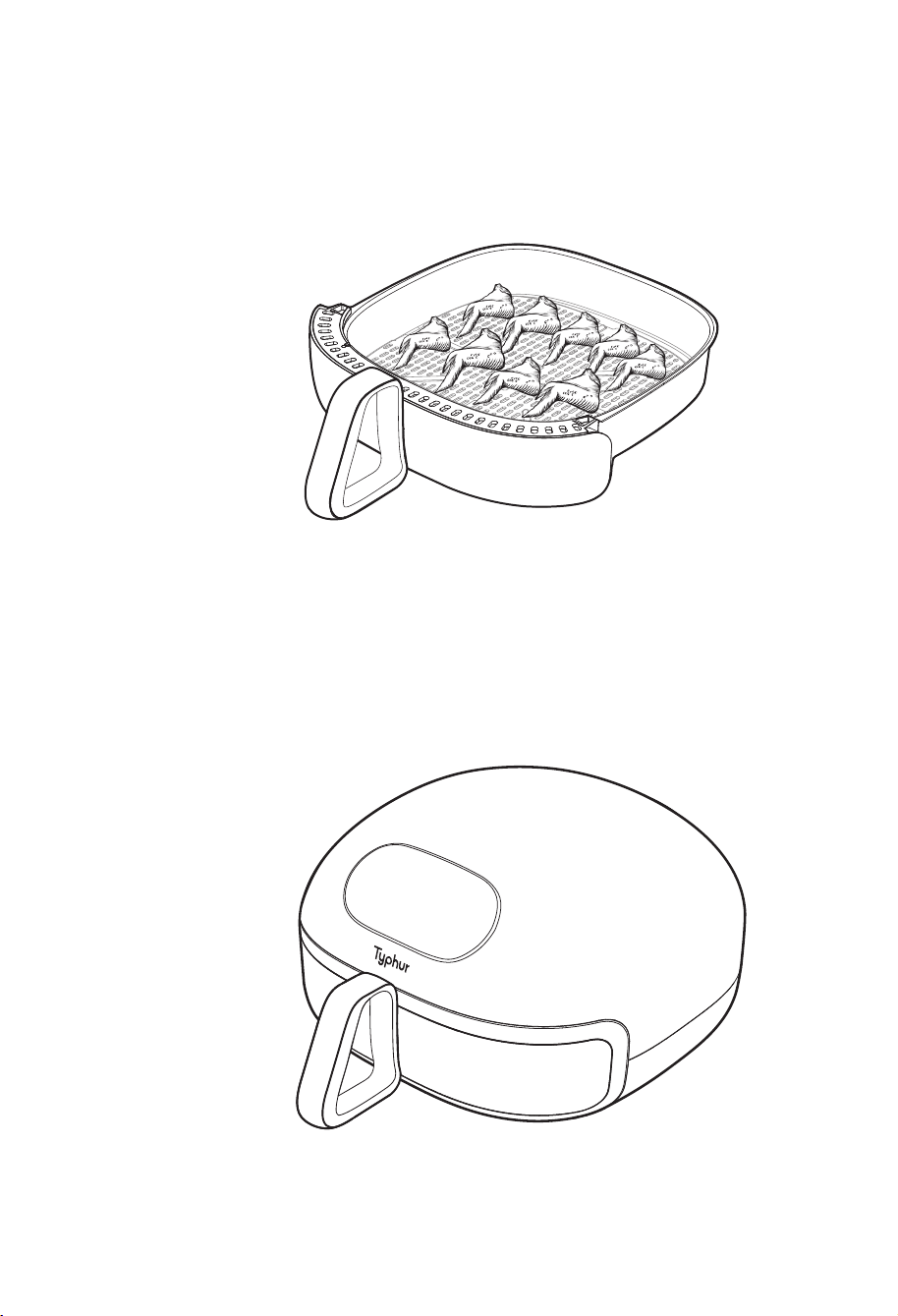
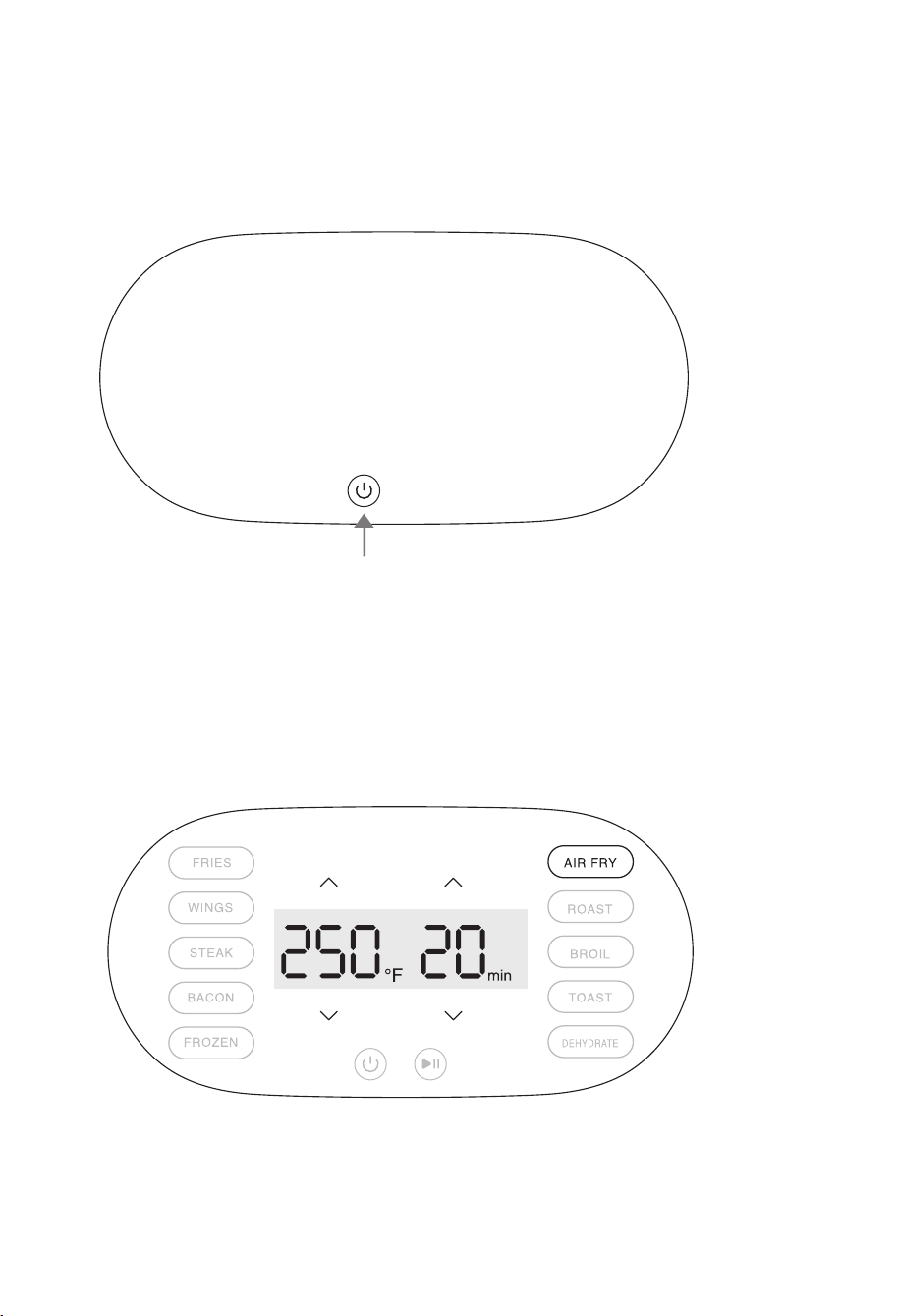
3. Put ingredients in the basket (do not exceed max amount). 5. Press the "Power" button to turn on the appliance.
4. Insert the basket with the handle into the Air Fryer securely. The Air Fryer will not start cooking if
the basket is not securely inserted. If this happens, the temperature and time display will show "---"
and "--", respectively.
6. Press the "Mode/Ingredient" button to preset cooking temperature and time.
(The temperature and cooking time can be adjusted by pressing the "Up" and "Down" buttons , respectively)
"Power" button
07 08
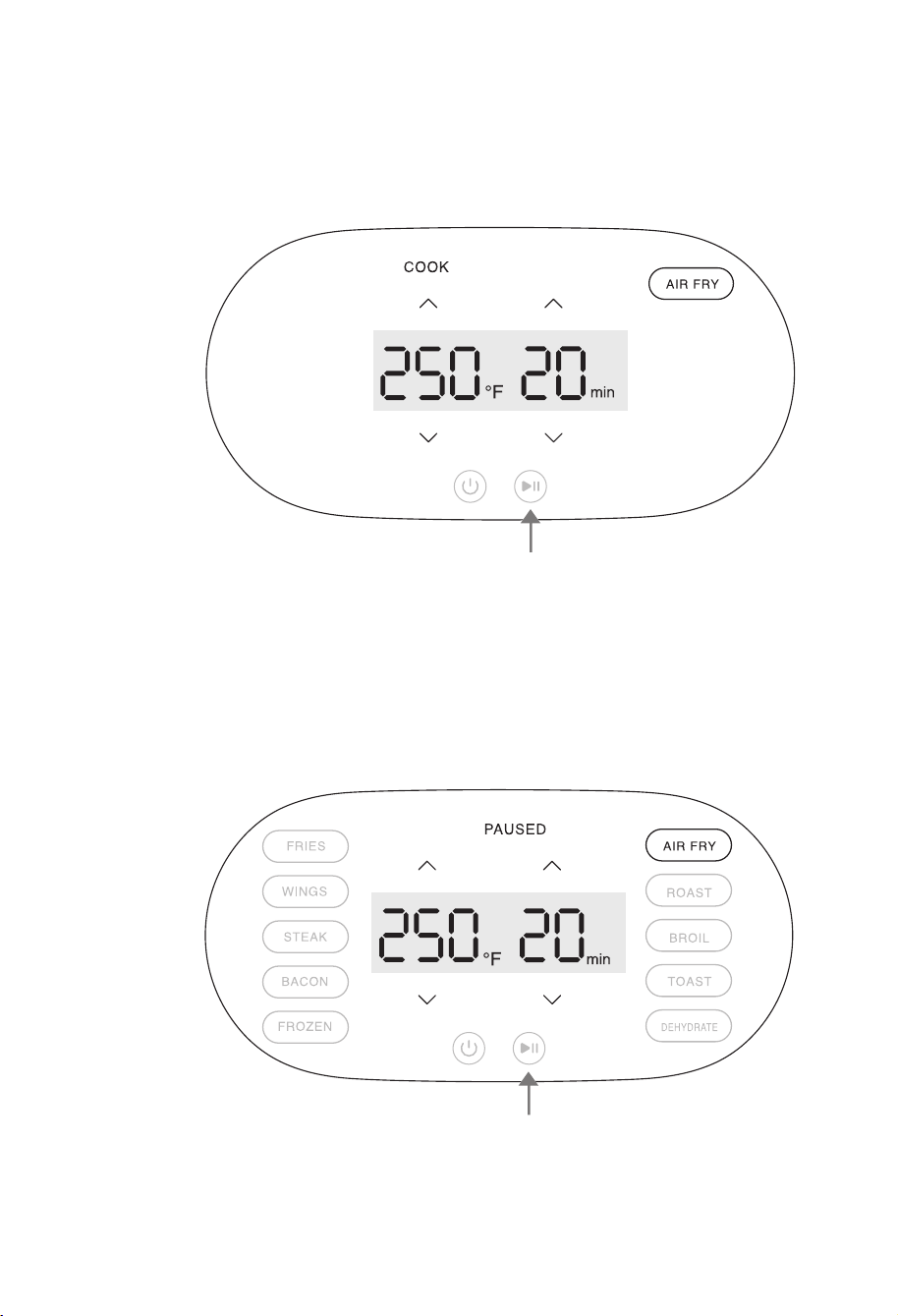
3. Put ingredients in the basket (do not exceed max amount). 5. Press the "Power" button to turn on the appliance.
4. Insert the basket with the handle into the Air Fryer securely. The Air Fryer will not start cooking if
the basket is not securely inserted. If this happens, the temperature and time display will show "---"
and "--", respectively.
6. Press the "Mode/Ingredient" button to preset cooking temperature and time.
(The temperature and cooking time can be adjusted by pressing the "Up" and "Down" buttons , respectively)
"Power" button
09 10
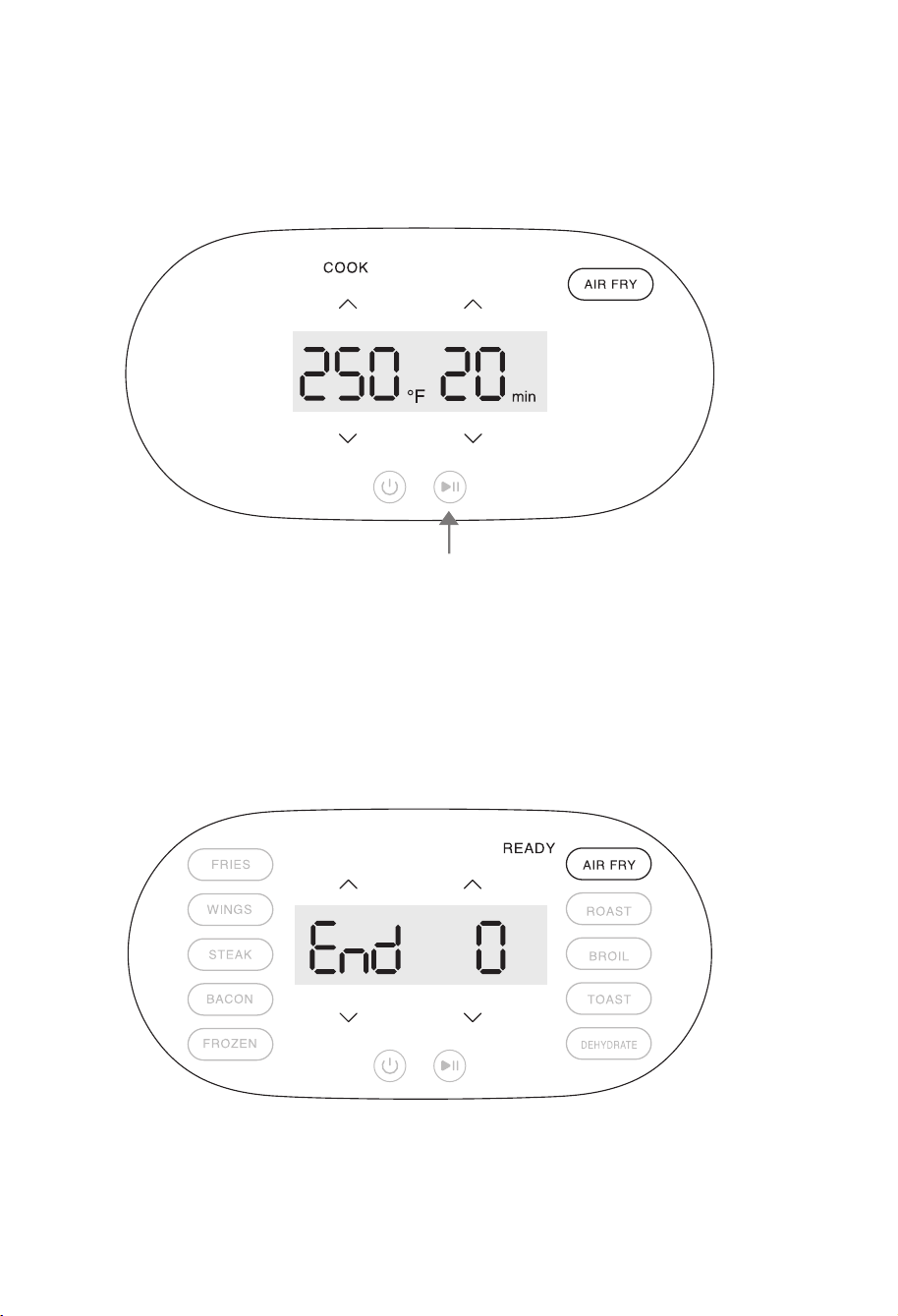
7. Press the "Start/Pause" button to start the cooking process. 9. When paused, press the "Start/Pause" button to resume the cooking process.
8. Press the "Start/Pause" button to temporarily pause the cooking process.
(The temperature and time settings can be adjusted during cooking)
10. When cooking is completed, the appliance will emit three beeps to notify the user and automatically stop the
cooking process.
"Start/Pause" button
"Start/Pause" button
"Start/Pause" button
09 10
7. Press the "Start/Pause" button to start the cooking process. 9. When paused, press the "Start/Pause" button to resume the cooking process.
8. Press the "Start/Pause" button to temporarily pause the cooking process.
(The temperature and time settings can be adjusted during cooking)
10. When cooking is completed, the appliance will emit three beeps to notify the user and automatically stop the
cooking process.
"Start/Pause" button
"Start/Pause" button
"Start/Pause" button
11 12
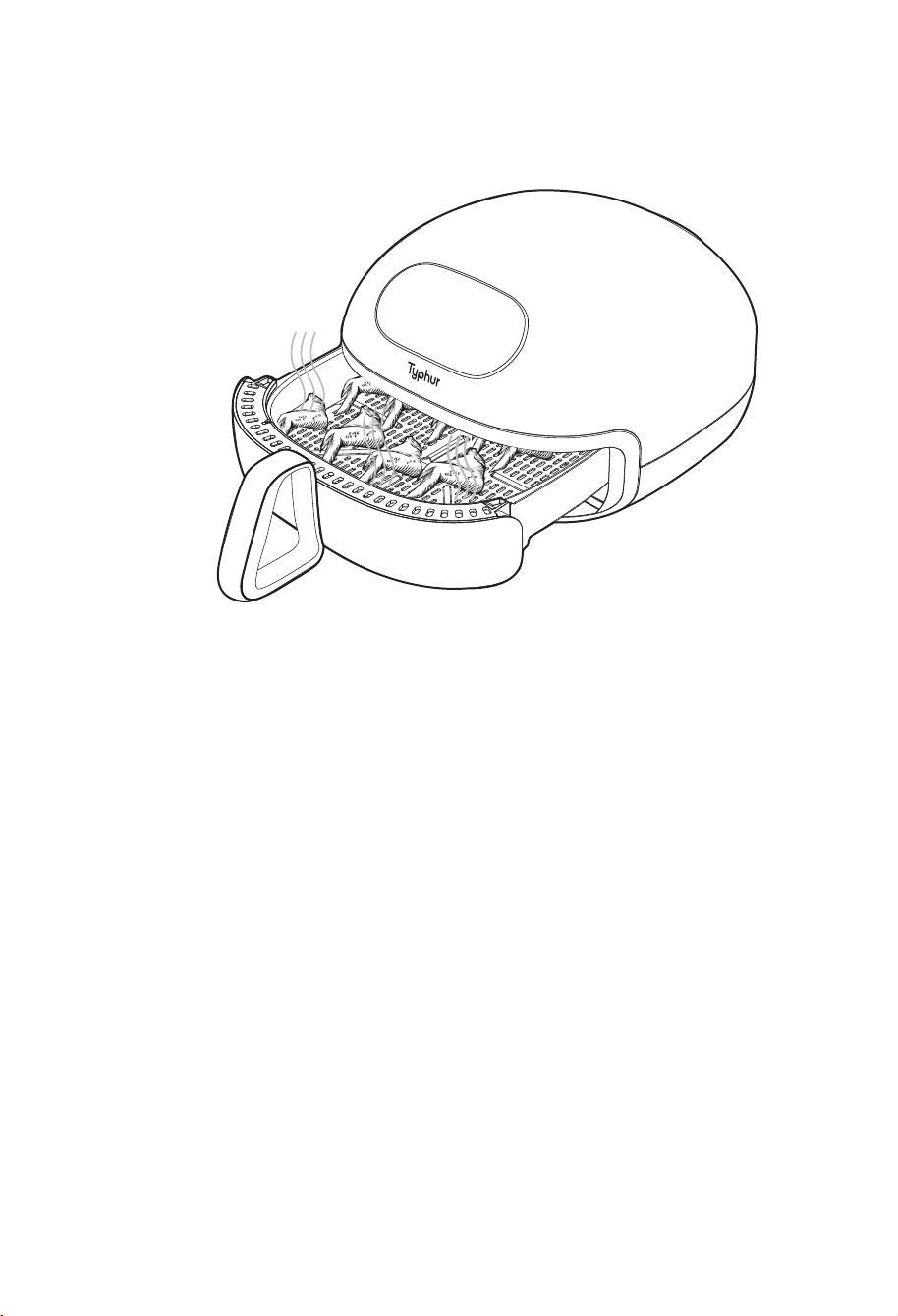
11. Remove the basket and allow the hot surface and food to cool before handling.
Stopping Cooking & Auto Shutoff
▪ The appliance will automatically pause the cooking process if the basket is pulled out during
operation.
▪ The appliance will automatically power off after 20 minutes of inactivity in standby or paused mode.
▪ The appliance will only allow the "turn off" function if the fry basket is not detected inside. The
temperature and time display will show "---" and "--", respectively.
▪ To ensure safety, the appliance will automatically shut down if it overheats during operation.
APP
SELF CLEAN
SELF CLEAN MODE
It is recommended to activate
self-clean mode after using your
air fryer several times. This will
help maintain your device
CLEAN
DEEP CLEAN
Self-Clean Mode
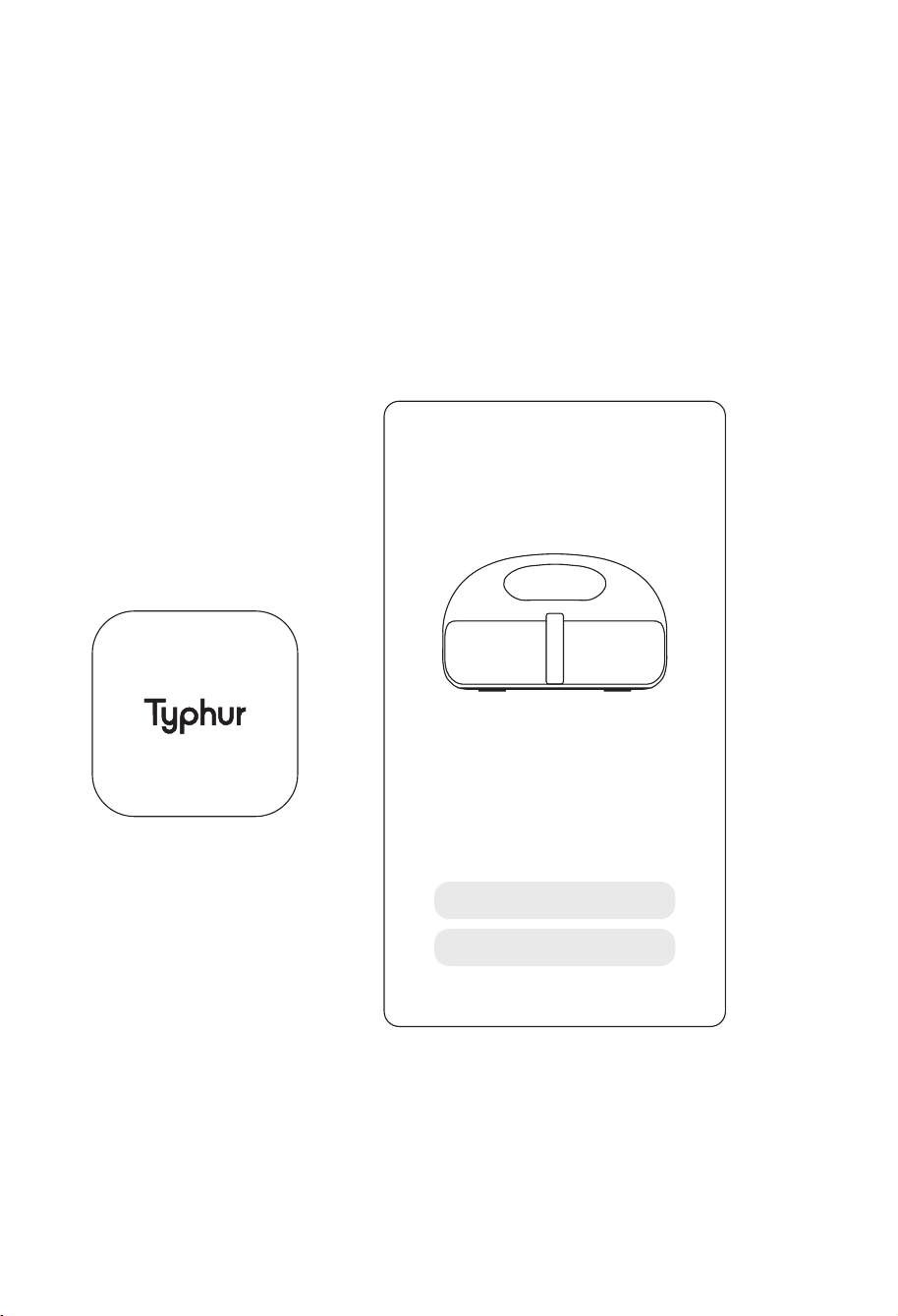
Self-Clean Mode can be used to remove oil and stains on the Upper Part of the Internal Chamber. It
is advised to run Self-Clean Mode on a monthly basis.
▪ Before starting the cleaning process, dispose of any oil or leftovers from the basket.
▪ Select Self-Clean Mode on the app.
11 12
11. Remove the basket and allow the hot surface and food to cool before handling.
Stopping Cooking & Auto Shutoff
▪ The appliance will automatically pause the cooking process if the basket is pulled out during
operation.
▪ The appliance will automatically power off after 20 minutes of inactivity in standby or paused mode.
▪ The appliance will only allow the "turn off" function if the fry basket is not detected inside. The
temperature and time display will show "---" and "--", respectively.
▪ To ensure safety, the appliance will automatically shut down if it overheats during operation.
APP
SELF CLEAN
SELF CLEAN MODE
It is recommended to activate
self-clean mode after using your
air fryer several times. This will
help maintain your device
CLEAN
DEEP CLEAN
Self-Clean Mode
Self-Clean Mode can be used to remove oil and stains on the Upper Part of the Internal Chamber. It
is advised to run Self-Clean Mode on a monthly basis.
▪ Before starting the cleaning process, dispose of any oil or leftovers from the basket.
▪ Select Self-Clean Mode on the app.
13 14
Note:
▪ The grill plate, the basket, and the inside of the appliance have a non-stick coating. Do not use
metal kitchen utensils or abrasive cleaning materials as this may damage the non-stick
coating.
▪ Make sure the appliance is clean and dry for storage.
▪ All other servicing should be performed by an authorized service representative.
Cleaning & Maintenance
Always clean the appliance after every use.
▪ Turn off, unplug the appliance and wait for the appliance to cool down.
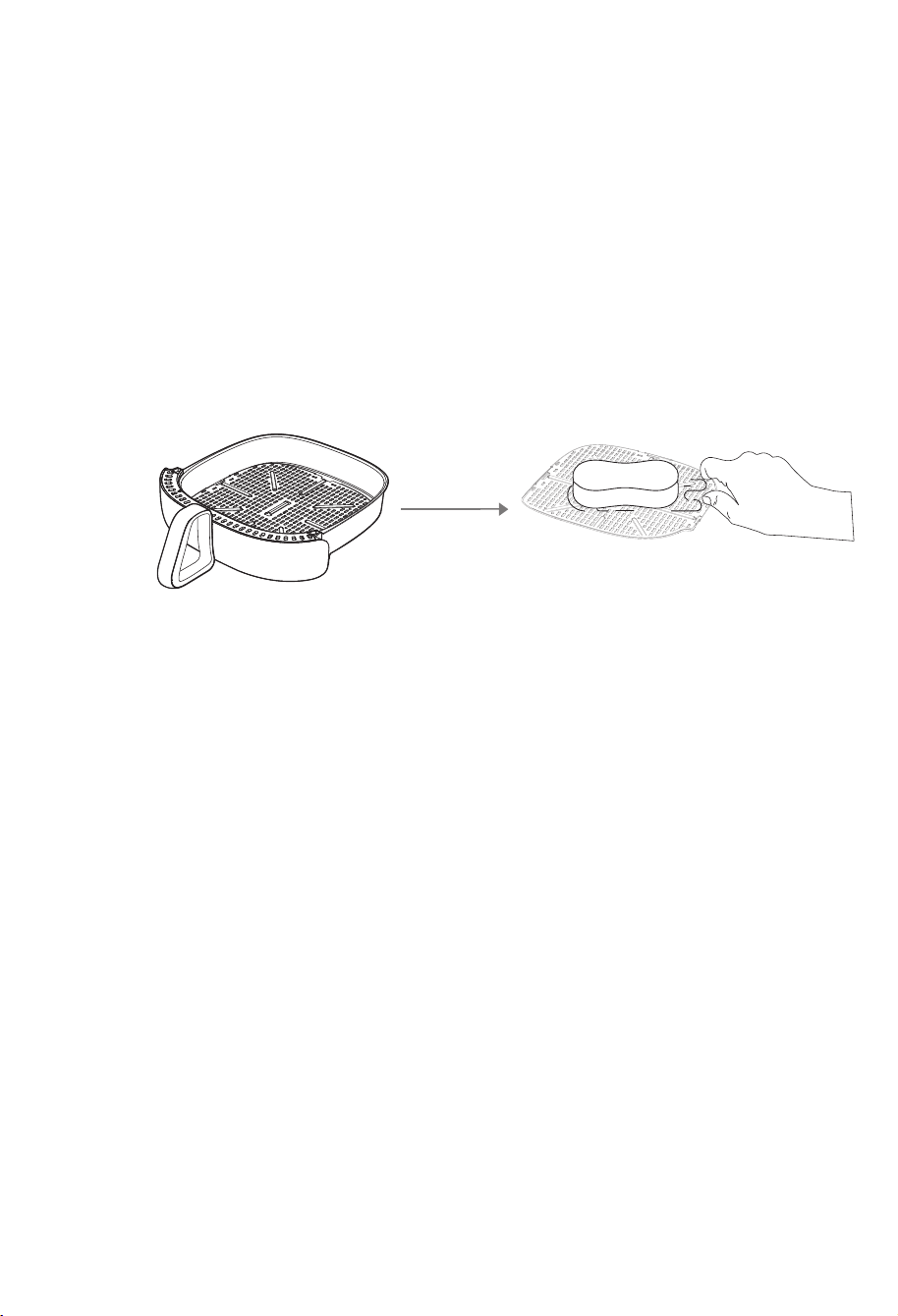
▪ The basket and plate are dishwasher safe. You can use baking soda mixed with water to
remove grease.
▪ The appliance's surface should be wiped clean and dry, with particular attention paid to the
control display.
▪ Clean the heating element with a soft brush to remove residues if necessary.
Troubleshooting
Clean
Problem
Does not
switch on
Smoke
Display screen
does not
respond
Possible Cause
Outlet supply overload
1. Cooking fatty ingredients
2. Greasy residues
Moist or liquid on display surface
Wipe out any moist or any other
liquid immediately and always
keep the display clean and dry
Switch off the device and unplug
the power cord. Allow device to
cool down to ambient temperature
before switching back on. Contact
customer service if the error code
persists.
Display Error
Code
"E1" "E2" "E3"
Contact customer service for help
Display Error
Code
"E4" "E5" "E6"
"E7" "E8" "E9"
"E10"
Possible motor, sensor or
communication failure
Please confirm the power
input is 120V AC
Display Error
Code
"E11"
1. Check if the plug is inserted
in the outlet properly
2. Try a different outlet and
check the fuses
1. Carefully pour off excess oil
or fat before resume cooking
2. Clean the pan and basket
after each use
Solution
The device is overheating
Abnormal voltage input

13 14
Note:
▪ The grill plate, the basket, and the inside of the appliance have a non-stick coating. Do not use
metal kitchen utensils or abrasive cleaning materials as this may damage the non-stick
coating.
▪ Make sure the appliance is clean and dry for storage.
▪ All other servicing should be performed by an authorized service representative.
Cleaning & Maintenance
Always clean the appliance after every use.
▪ Turn off, unplug the appliance and wait for the appliance to cool down.
▪ The basket and plate are dishwasher safe. You can use baking soda mixed with water to
remove grease.
▪ The appliance's surface should be wiped clean and dry, with particular attention paid to the
control display.
▪ Clean the heating element with a soft brush to remove residues if necessary.
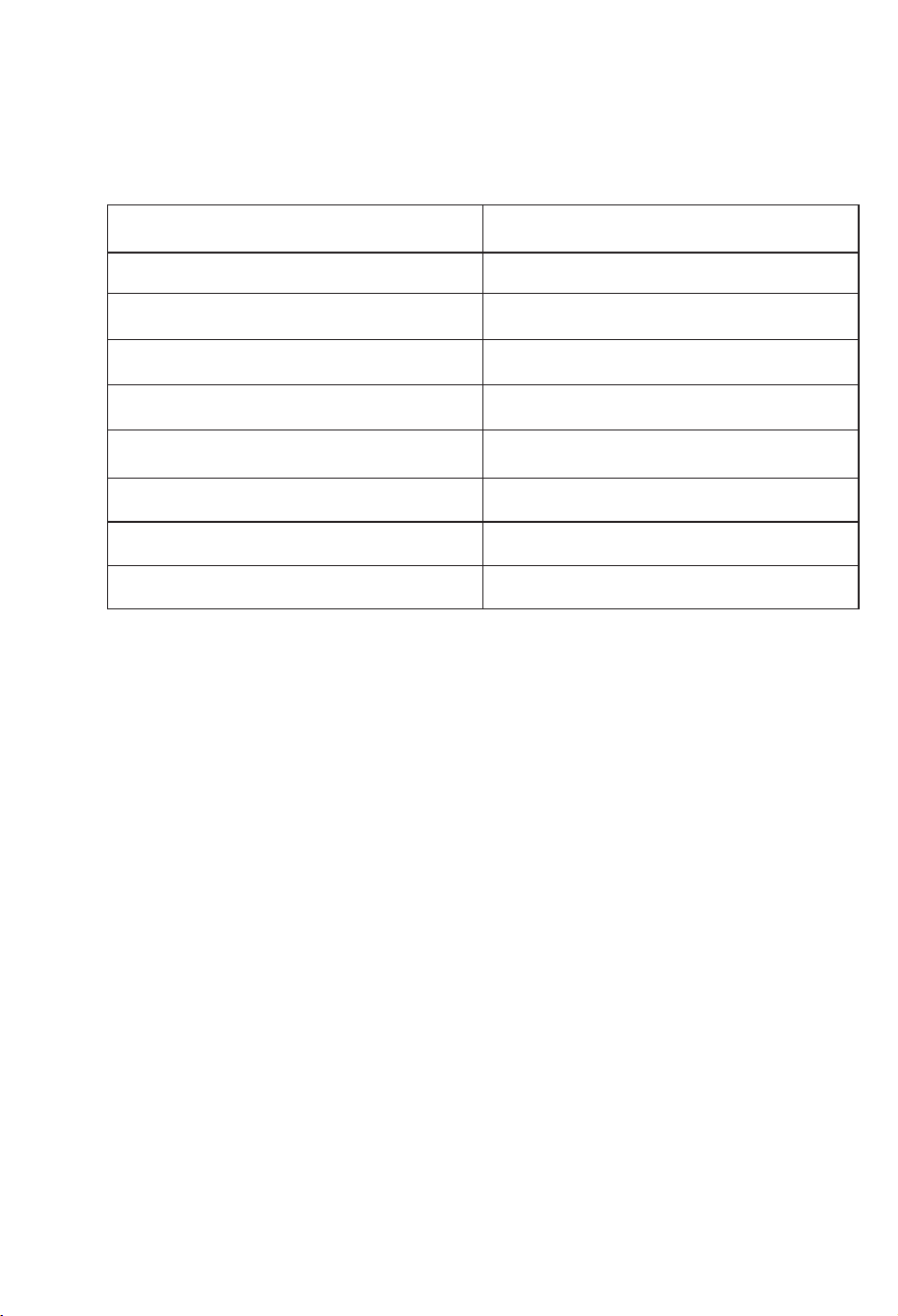
Troubleshooting
Clean
Problem
Does not
switch on
Smoke
Display screen
does not
respond
Possible Cause
Outlet supply overload
1. Cooking fatty ingredients
2. Greasy residues
Moist or liquid on display surface
Wipe out any moist or any other
liquid immediately and always
keep the display clean and dry
Switch off the device and unplug
the power cord. Allow device to
cool down to ambient temperature
before switching back on. Contact
customer service if the error code
persists.
Display Error
Code
"E1" "E2" "E3"
Contact customer service for help
Display Error
Code
"E4" "E5" "E6"
"E7" "E8" "E9"
"E10"
Possible motor, sensor or
communication failure
Please confirm the power
input is 120V AC
Display Error
Code
"E11"
1. Check if the plug is inserted
in the outlet properly
2. Try a different outlet and
check the fuses
1. Carefully pour off excess oil
or fat before resume cooking
2. Clean the pan and basket
after each use
Solution
The device is overheating
Abnormal voltage input
15 16
Typhur Privacy Statement
We value your privacy and personal data rights, and we, Typhur Inc. is the entity responsible for the
collection, use, and disclosure of information under our Privacy Statement.
For more details, please visit https://www.typhur.com/privacy-statement.
Terms of Service
For details about Typhur Terms of Service,
please visit https://www.typhur.com/terms-of-service
Refund & Return Policy
Typhur has a 30 calendar days hassle-free return policy.
For more details please visit https://www.typhur.com/refund-and-return
Limited One-Year Warranty
This appliance carries a limited one-year warranty against defects from the date of purchase.
Full details are stated in Typhur's warranty policy at www.typhur.com/warranty.
Certifications
FCC Statement:
This equipment has been tested and found to comply with the limits for a Class B digital device, pursuant
to part 15 of the FCC Rules. These limits are designed to provide reasonable protection against harmful
interference in a residential installation.
This equipment generates uses and can radiate radio frequency energy and, if not installed and used in
accordance with the instructions, may cause harmful interference to radio communications. However,
there is no guarantee that interference will not occur in a particular installation. If this equipment does
cause harmful interference to radio or television reception, which can be determined by turning the
equipment off and on, the user is encouraged to try to correct the interference by one or more of the
following measures:
Specifications
Model
Grill Plate Area
Power Supply
Rated Power
Temperature Range
Capacity
Weight
Dimensions (including handle)
Dimensions (not including handle)
AF03
12 × 12 in
AC 120V, 60Hz
1,750W
105°F~450°F
5.6 qt
20.5 lb
19.7 × 15.6 × 9.6 in
15.6 × 15.6 × 9.6 in
Support
Please contact our Customer Support Team if you have any questions.
: 1(888) 838-6563(USA)
: support@typhur.com
: www.typhur.com/contact-us (USA)

15 16
Typhur Privacy Statement
We value your privacy and personal data rights, and we, Typhur Inc. is the entity responsible for the
collection, use, and disclosure of information under our Privacy Statement.
For more details, please visit https://www.typhur.com/privacy-statement.
Terms of Service
For details about Typhur Terms of Service,
please visit https://www.typhur.com/terms-of-service
Refund & Return Policy
Typhur has a 30 calendar days hassle-free return policy.
For more details please visit https://www.typhur.com/refund-and-return
Limited One-Year Warranty
This appliance carries a limited one-year warranty against defects from the date of purchase.
Full details are stated in Typhur's warranty policy at www.typhur.com/warranty.
Certifications
FCC Statement:
This equipment has been tested and found to comply with the limits for a Class B digital device, pursuant
to part 15 of the FCC Rules. These limits are designed to provide reasonable protection against harmful
interference in a residential installation.
This equipment generates uses and can radiate radio frequency energy and, if not installed and used in
accordance with the instructions, may cause harmful interference to radio communications. However,
there is no guarantee that interference will not occur in a particular installation. If this equipment does
cause harmful interference to radio or television reception, which can be determined by turning the
equipment off and on, the user is encouraged to try to correct the interference by one or more of the
following measures:
Specifications
Model
Grill Plate Area
Power Supply
Rated Power
Temperature Range
Capacity
Weight
Dimensions (including handle)
Dimensions (not including handle)
AF03
12 × 12 in
AC 120V, 60Hz
1,750W
105°F~450°F
5.6 qt
20.5 lb
19.7 × 15.6 × 9.6 in
15.6 × 15.6 × 9.6 in
Support
Please contact our Customer Support Team if you have any questions.
: 1(888) 838-6563(USA)
: support@typhur.com
: www.typhur.com/contact-us (USA)

17 18
—Reorient or relocate the receiving antenna.
—Increase the separation between the equipment and receiver.
—Connect the equipment into an outlet on a circuit different from that to which the receiver is connected.
—Consult the dealer or an experienced radio/TV technician for help.
Caution:
The user is cautioned that changes or modifications not expressly approved by the party responsible
for compliance could void the user's authority to operate the equipment.
FCC Radiation Exposure Statement:
This equipment complies with FCC radiation exposure limits set forth for an uncontrolled environment.
This equipment should be installed and operated with minimum distance 20cm between the radiator
& your body.
FCC Supplier’s Declaration of Conformity
Product Name: Typhur Dome Air Fryer
Model Number: AF03
Suppliers Name: Typhur Inc.
Suppliers Address (USA) :2890 Zanker Rd, Suite 120, San Jose, CA 95134
Suppliers Email: allen.f@typhur.com
ISED statement:
This device contains license-exempt transmitter(s)/receiver(s) that comply with Innovation, Science
and Economic Development Canada’s license-exempt RSS(s).
Operation is subject to the following two conditions:
1. This device may not cause interference.
2. This device must accept any interference, including interference that may cause undesired
operation of the device.
L’émetteur/récepteur exempt de licence contenu dans le présent appareil est conforme aux CNR
d’Innovation, Sciences et Développement économique Canada applicables aux appareils radio
exempts de licence. L’exploitation est autorisée aux deu conditions suivantes :
1.L’appareil ne doit pas produire de brouillage;
2.L’appareil doit accepter tout brouillage radioélectrique subi, même si le brouillage est susceptible
d’en compromettre le fonctionnement.
ISED Radiation Exposure Statement:
This equipment complies with ISED RSS-102 radiation exposure limits set forth for an uncontrolled
environment. This equipment should be installed and operated with a minimum distance of 20cm
between the radiator and any part of your body.
Pour se conformer aux exigences de conformité CNR 102 RF exposition, une distance de séparation
d'au moins 20 cm doit être maintenue entre l'antenne de cet appareil ettoutes les personnes.

17 18
—Reorient or relocate the receiving antenna.
—Increase the separation between the equipment and receiver.
—Connect the equipment into an outlet on a circuit different from that to which the receiver is connected.
—Consult the dealer or an experienced radio/TV technician for help.
Caution:
The user is cautioned that changes or modifications not expressly approved by the party responsible
for compliance could void the user's authority to operate the equipment.
FCC Radiation Exposure Statement:
This equipment complies with FCC radiation exposure limits set forth for an uncontrolled environment.
This equipment should be installed and operated with minimum distance 20cm between the radiator
& your body.
FCC Supplier’s Declaration of Conformity
Product Name: Typhur Dome Air Fryer
Model Number: AF03
Suppliers Name: Typhur Inc.
Suppliers Address (USA) :2890 Zanker Rd, Suite 120, San Jose, CA 95134
Suppliers Email: allen.f@typhur.com
ISED statement:
This device contains license-exempt transmitter(s)/receiver(s) that comply with Innovation, Science
and Economic Development Canada’s license-exempt RSS(s).
Operation is subject to the following two conditions:
1. This device may not cause interference.
2. This device must accept any interference, including interference that may cause undesired
operation of the device.
L’émetteur/récepteur exempt de licence contenu dans le présent appareil est conforme aux CNR
d’Innovation, Sciences et Développement économique Canada applicables aux appareils radio
exempts de licence. L’exploitation est autorisée aux deu conditions suivantes :
1.L’appareil ne doit pas produire de brouillage;
2.L’appareil doit accepter tout brouillage radioélectrique subi, même si le brouillage est susceptible
d’en compromettre le fonctionnement.
ISED Radiation Exposure Statement:
This equipment complies with ISED RSS-102 radiation exposure limits set forth for an uncontrolled
environment. This equipment should be installed and operated with a minimum distance of 20cm
between the radiator and any part of your body.
Pour se conformer aux exigences de conformité CNR 102 RF exposition, une distance de séparation
d'au moins 20 cm doit être maintenue entre l'antenne de cet appareil ettoutes les personnes.