User Manual
CO-4226
Hand Warmer Power Bank
PRODUCT FEATURES
①
②
③
④
⑤
⑥
⑦
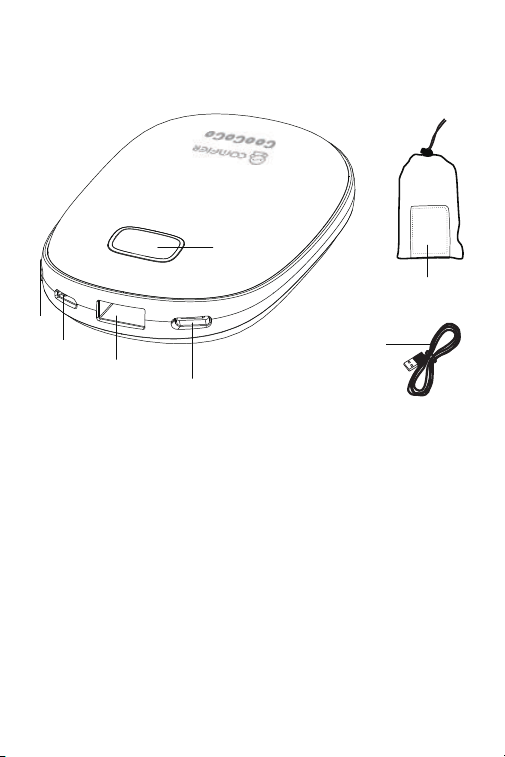
① Digital Screen
② Standard USB Output
③ Control Bu�on
④ Micro Input
⑤ Type-C Input
⑥ Grey Pouch
⑦ USB Charging Cable

PROTECTIVE FUNCTION
PRODUCT SPECIFICATIONS
Model No.
Ba�ery Voltage:
Nominal Power:
Ba�ery Fully Charged:
Ba�ery Max. Run�me:
Size
Weight
CO-4226
5VDC 8000mAh
Max 10W
3-4 hours
6-8 hours
4.17*2.56*1.06inches
0.4 lbs
Micro USB and Type-C Input
For charging the hand warmer via an external USB charger.
Digital Screen
Showing the remaining power, 01/02/03 (Selected hea�ng level)
Standard USB Output
For charging other device
Control Bu�on
For temperature control and power on/off the device.
Constant output voltage with built-in overvoltage protec�on.
USB output short-circuit protec�on is to cut off output to protect the product.
If the short circuit is removed, the output will automa�cally recover.
Built-in ba�ery protec�on. Double protec�ve protocol for built-in ba�ery through
hardware and so�ware.
Constant current output with overcurrent protec�on.
Remove the overcurrent charging device, the output will automa�cally recover.
Grey Pouch
Portable cloth bag

INSTRUCTIONS FOR USE
Power On the Hand Warmer:
Press control bu�on to turn on the hand warmer, the screen will show the remaining
power.
Turn On Hea�ng func�on:
Press and hold the control bu�on for 4 seconds to ac�vate the hea�ng func�on,a
small "Heat" word will be shown on the screen.;
Con�nuous short press to select the hea�ng level, cycle through Level 01 ~03.
Hea�ng level “01” - the temperature will reach to 45℃(113F) .
Hea�ng level "02" - the temperature will reach to 50℃(122F).
Hea�ng level "03" - the temperature will reach to 55℃(131F).
Note: You can use the hea�ng while charging other devices.
Note: The screen will start to flash when the remaining power is less than 5%.
Turn Off Hea�ng Mode:
While the hand warmer is in hea�ng, press and hold the control bu�on for 4 seconds
to turn off the hea�ng mode.
Charging the Hand Warmer:
Connect any USB charger to the hand warmer via the Micro USB input or Type-C input
to charge the hand warmer. The screen will show the charging progress in a blinking
pa�ern.
!NOTE: While charging the hand warmer, you are unable to turn on the hea�ng or
charge other devices.
Charging Other Devices
:
Connect the hand warmer to any USB charging devices via the Standard USB output to
charge other devices. The screen will show the remaining power.
Power Off the Hand Warmer:
The hand warmer will automa�cally shut off when it is not charging other devices
and the hea�ng func�on is not ac�vated.
WARRANTY
30 days uncondi�onally Return
Comfier product can be returned to receive a full refund for any reason within 30 days.
Please contact our customers service (supportus@comfier.com), our staff will contact
you within 24 hours.
90 days refund/replace
Comfier product can be returned / replaced within 90 days if the product break down in
the period of proper use.
12 months Warranty
If the product break down within 12 months in the period of proper use, customers can
enjoy the relevant warranty to get them replaced.
A�en�on!
No warranty will be given to any force majeure and man-made causes to a defec�ve
product, such as improper care, personal tear down and willful damage,etc.
If you have any issue about the product, please feel free to contact us by sending email
to supportus@comfier.com We will strive to provide the best service possible within
24 hours.
Extend Warranty for Free
1)
Enter the following URL or scan the QR code below to find COMFIER facebook
page and like it, enter“Warranty” to messenger to extend your warranty from
1 year to 3 years.
h�ps://www.facebook.com/comfiermassager
OR 2)
Send message“Warranty” and email us supportus@comfier.com to extend
your warranty from 1 year to 3 years.
Tel:
(248) 819-2623
Monday-Friday 9:00AM-4:30PM

NOTE: This equipment has been tested and found to comply with the limits for a
Class B digital device, pursuant to Part 15 of the FCC Rules. These limits are designed
to provide reasonable protec�on against harmful interference in a residen�al
installa�on. This equipment generates, uses and can radiate radio frequency energy
and, if not installed and used in accordance with the instruc�ons, may cause harmful
interference to radio communica�ons.However, there is no guarantee that
interference will not occur in a par�cular installa�on. If this equipment does cause
harmful interference to radio or television recep�on, which can be determined by
turning the equipment off and on, the user is encouraged to try to correct the
interference by one or more of the following measures:
• Reorient or relocate the receiving antenna.
• Increase the separa�on between the equipment and receiver.
• Connect the equipment into an outlet on a circuit different from that to which the
receiver is connected.
• Consult the dealer or an experienced radio / TV technician for help.
This device complies with Part 15 of the FCC Rules. Opera�on is subject to the following
two condi�ons: (1) this device may not cause harmful interference, and (2) this device
must accept any interference received, including interference that may cause undesired
opera�on.
WARNING: Changes or modifica�ons to this unit is not expressly approved by the party
responsible for compliance could void the user's authority to operate the equipment.
FCC STATEMENT
COMFIER US CORPORATION
Address:573 BELLEVUE RD
NEWARK, DE 19713 USA
www.facebook.com/comfiermassager
supportus@comfier.com
www.comfier.com

