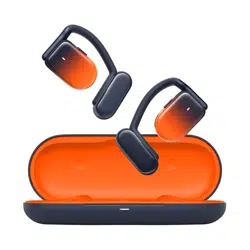
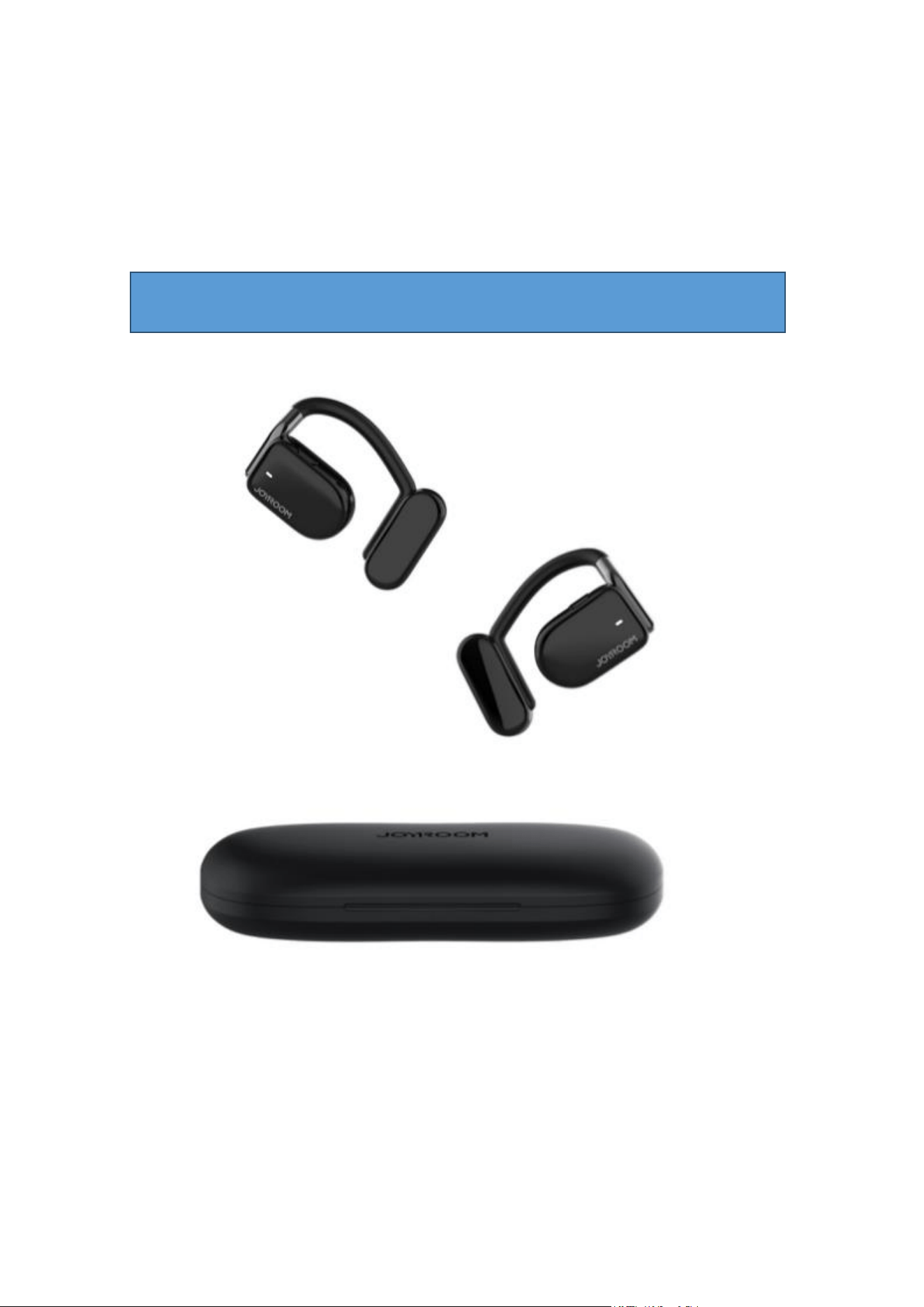
JR-OE2 开放式 TWS 蓝牙运动耳机
Open-Ear True Wireless Headphones
User Manual
I. Product picture
一、封面
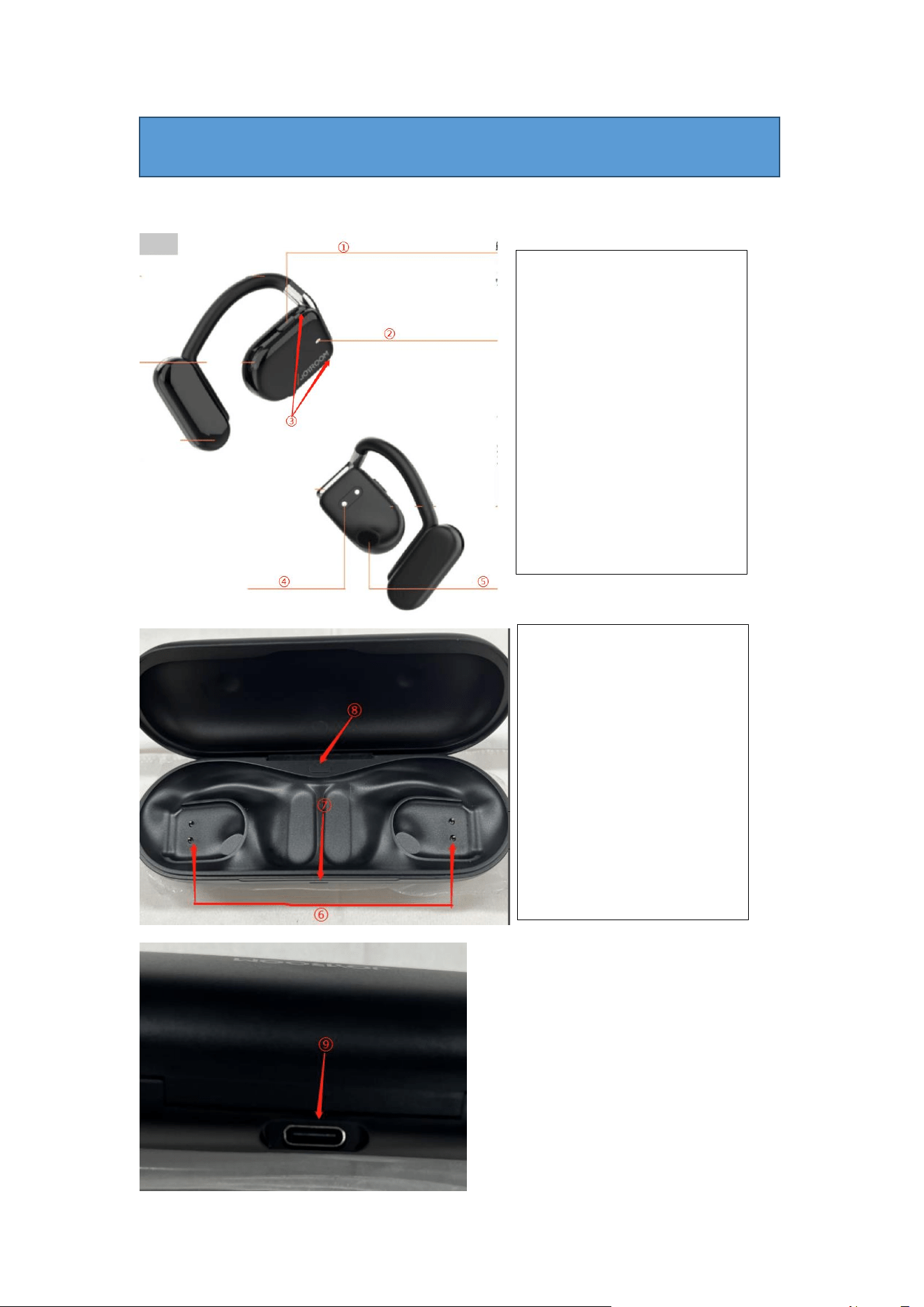
II. Product diagram
二、产品图示
①耳机多功能按键
②耳机指示灯
③耳机麦克风
④耳机充电触点
⑤耳机出音孔
① Headphone multifunctional
button
② Headphone indicator
③ Microphone
④ Headphone charging
contact
⑤ Audio out
⑥充电盒充电触点
⑦充电盒指示灯
⑧充电盒多功能按键
⑨充电盒 Type-C 充电接口
⑥ Case charging pin
⑦ Case indicator
⑧ Case multifunctional
button
⑨ Case Type-C charging port

III. Packing list
1. JR-OE2 耳机
2. 充电配线
3. 消毒棉签
4. 说明书&保修卡
1. JR-OE2 headphones
2. Charging cable
3. Disinfection cotton swab
4. User Manual & Warranty Card
IV. Basic parameters
产品名称:开放式 TWS 蓝牙运动耳机
型号:JR-OE2
蓝牙版本:V5.3
音频解码:AAC、SBC
支持协议:HFP、A2DP、AVRCP
工作频率:2402MHz-2480MHz
通讯距离:10m(无障碍空旷环境)
频响范围:20Hz-20KHz
驱动单元: φ16.2mm
音乐时长:约 10 小时(70%音量)
通话时长:约 7 小时(70%音量)
连接待机时长:约 120 小时
耳机电池容量:120mAh
充电盒电池容量:600mAh
耳机充电时长:约 1.5 小时
充电盒充电时长:约 1.5 小时
充电盒可给双耳充电次数:约 2 次
充电盒充电接口:Type-C
充电盒电源输入:5V⎓500mA
产品材质:ABS+硅胶
产品净重:单耳 12 g 充电盒 60 g
三、包装清单
四、基本参数

Name: Open-Ear True Wireless Headphones
Model: JR-OE2
BT version: V5.3
Audio decoding: AAC, SBC
Supported protocols: HFP, A2DP, AVRCP
Working frequency: 2402MHz-2480MHz
BT range: 10m (barrier-free open environment)
Frequency response range: 20Hz-20KHz
Speaker: φ16.2mm
Music time: about 10h (70% volume)
Calling time: about 7h (70% volume)
Standby time (connected): about 120h
Headphone battery capacity: 120mAh
Case battery capacity: 600mAh
Headphone charging time: about 1.5h
Case charging time: about 1.5h
Cycle counts: about 2 charging cycles
Case charging port: Type-C
Case charging input: 5V⎓500mA
Material: ABS+silicone
Net weight: single headphone-12g, charging case-60g
V. Pairing operation
1. 打开充电盒上盖,耳机自动开机;
2. 当主耳机橙白灯交替闪烁,副耳机白灯每 5 秒闪 1 次时,即耳机处于待配对
状态;
3.此时开启手机蓝牙,搜索蓝牙设备“Joyroom Openfree OE2”点击连接。
1. Open the lid of the charging case, the headphones will turn on automatically.
2. When the main headphone indicator flashes orange and white alternatively, and the auxiliary
headphone indicator flashes white every 5s, it means the headphones are ready for pairing.
3. Turn the phone’s BT function on and search for the BT device " Joyroom Openfree OE2",
connect with it.
VI. Operation instructions
开/关机 On/off
开机
Turn on
① 打开充电盒上盖,耳机自动开机,或长按多功能按键 3
秒
① Open the lid of the charging case, the headphones will turn on
automatically; or press and hold the multifunctional button for 3s
关机
Turn off
①耳机放回充电盒关盖自动关机,或长按多功能按键 5 秒;
②无连接状态下,5 分钟自动关机;
① Put the headphones back into the charging case and close the lid,
they will turn off automatically; or press and hold the multifunctional
button for 5s
② The headphones will turn off automatically if not connected for 5min
音乐状态功能 Music function
播放/暂停
Play/Pause
单击耳机多功能按键
Click the multifunctional button of the headphone
音量+
Volume up
长按右耳多功能按键 1 秒
Press and hold the multifunctional button of the right headphone for 1s
音量-
Volume down
长按左耳多功能按键 1 秒
Press and hold the multifunctional button of the left headphone for 1s
上一曲
Previous track
双击左耳多功能按键
Double-click the multifunctional button of the left headphone
下一曲
Next track
双击右耳多功能按键
Double-click the multifunctional button of the right headphone
五、配对操作(做图描述)
六、常用操作说明(做图描述)
通话状态功能 Call function
接听/挂断电话
Answer/end call
单击耳机多功能按键
Click the multifunctional button of the headphone
拒接来电
Reject call
长按耳机多功能按键 2 秒
Press and hold the multifunctional button of the headphone for 2s
语音助手功能 Voice assistant
唤醒语音助手
Activate voice
assistant
三击耳机多功能按键
Triple-click the multifunctional button of the headphone
充电盒多功能按键功能说明 Case multifunctional button
显 示 充 电 盒 当 前
电量
Display case battery
level
单击充电盒多功能按键
Click the multifunctional button of the charging case
耳 机 强 制 进 入 待
配对状态
Enter “ready for
pairing” status
长按充电盒多功能按键 2 秒
Press and hold the multifunctional button of the charging case for 2s
耳 机 恢 复 出 厂 设
置
Restore factory
settings
长按充电盒多功能按键 7 秒
Press and hold the multifunctional button of the charging case for 7s
指示灯说明 Indicator light
开机
Turn on
耳机白灯长亮 2 秒
Constant white headphone indicator for 2s
关机
Turn off
耳机橙灯长亮 2 秒
Constant orange headphone indicator for 2s
配对状态
Ready for pairing
主耳机橙白灯交替闪烁,副耳机白灯每 5 秒闪一次
The main headphone indicator flashes orange and white alternatively,
and the auxiliary headphone indicator flashes white every 5s
耳机充电
Charging the
headphones
耳机橙灯长亮
Constant orange headphone indicator
充 电 仓 给 耳 机 充
电
Charging the
headphones via the
charging case
充电盒白灯闪烁 5 秒后熄灭
Case indicator flashes white for 5s then goes out
给充电仓充电
Recharging the case
充电盒橙灯闪烁,充满电橙灯长亮
Case indicator flashes orange. When fully charged, it will be constant
orange.

VII. FAQ
友情提示 1:请每周为充电盒充电一次,避免充电盒过度放电;
友情提示 2:使用一段时间后,由于充电触点存在脏污或氧化,导致耳机无法
充电甚至无法开机,您可以使用消毒棉签蘸取酒精擦拭耳机充电触点和充电盒充
电触点来解决此问题;
Friendly reminder 1: Please recharge the charging case once a week to avoid over-discharge.
Friendly reminder 2: After using for a period of time, the charging contacts may get dirty or
oxidized, thus the headphones cannot be charged or turned on. You can use a disinfection cotton
swab dipped with alcohol to clean the charging contacts of the headphones and the charging pins
of the charging case to solve this problem.
Q: 耳机连接不上如何解决?
A: ①有可能是耳机低电,请将两只耳机都放入充电盒充电,30 分钟后取出尝
试重新搜索连接;
②若您是 IOS 系统,有可能是耳机没有及时回连您的手机,您可检查手机蓝
牙列表中是否已存在设备名“Joyroom Openfree OE2”,请直接点击设备名连接;
③请检查耳机是否已经连接上了其他设备,请在其他设备上断开连接后再尝
试重新搜索连接;
④若以上操作无效,您可以对耳机进行恢复出厂设置。
Q: Why can’t the headphones be connected?
A: ① The headphones may be out of power. Please charge them for 30 minutes in the charging
case before turning them on, and then search them for connection.
② If your phone uses iOS system, it may be that the headphones did not reconnect to your
phone in time. You can check whether the device name "Joyroom Openfree OE2" is in the
phone’s BT list. If so, please directly click the device name for connection.
③ Check whether the headphones are connected to another device. If so, please disconnect
with it and make a reconnection again.
④ If above operations failed, you can restore them to factory settings.
充电盒电量显示
( 充 电 盒 多 功 能
按键按下时)
Displaying case
battery level (when
the multifunctional
button of the case is
pressed down)
1.电量 31%-100%:白灯长亮 5 秒
2.电量 11%-30%:橙灯长亮 5 秒
3.电量 5%-10%:橙灯闪烁 5 秒(低电提示)
1. 31%-100%: constant white light for 5s
2. 11%-30%: constant orange light for 5s
3. 5%-10%: flashing orange light for 5s (low battery warning)
7、常见问题

Q: 耳机单边无音如何解决?
A: ①请将手机蓝牙列表中已连接的耳机配对名删除;
②关闭手机蓝牙,将两只耳机放入充电盒;
③30 秒后,将耳机从充电盒取出,重新开启手机蓝牙进行搜索配对;
④若以上操作无效,您可以对耳机进行恢复出厂设置。
Q: Why only one headphone has sound?
A: ① Please delete the connected headphones’ name from your phone’ BT list.
② Turn off the phone’s BT function, put the two headphones into the charging case.
③ After 30s, take out the headphones from the charging case, restart the phone’s BT function,
and then search and pair with the headphones again.
④ If above operations failed, you can restore them to factory settings.
Q: 耳机出现声音偏小的情况时如何解决?
A: ①可能是手机的播放通道没有开启,请打开手机蓝牙,点击已连接的耳机
右侧图标,将“媒体通道和通话通道”都开启;
②请打开手机的“设置”界面,检查手机的声音设置是否限定了最大音量;
③请查看两只耳机的出音孔和麦克风位置是否存在脏污,如果您看到有任
何脏污,您可以使用消毒棉签擦拭干净后再使用耳机。
Q: Why is the sound of the headphones too low?
A: ① It may be that the playback channel of the phone is not turned on. You can turn on your
phone’s BT function, click the icon on the right side of connected headphones to open the media
and call channel.
② Open the “Settings” interface of your phone, check if there is a maximum volume limit on
the phone.
③ Check whether there is dirt in the audio out and microphone holes. If so, please wipe it
clean with a disinfection cotton swab before using the headphones.
Q:充电盒充不进电如何解决?
A: ①可能充电接口没有接好,请拔出重新连接充电线,反复插抜几次,将充
电线插到位;
②请使用符合 QI 认证的充电头搭配产品配线给充电盒充电,请勿使用三无
充电头,否则可能会存在不兼容或损坏充电盒电池导致无法使用。
Q: Why can’t the charging case be recharged?
A: ① The charging port and cable may not be connected properly, please pull the cable out and
plug it in again repeatedly to make sure it is well connected.
② Please use a Qi-certified charger together with the included charging cable to recharge the
charging case. Never use unguaranteed chargers which may be incompatible or damage the
charging case.

安全准则
1. 请遵循本说明书的使用说明,勿以任何理由拆卸或改装产品,否则可能导致
产品发生故障或烧毁;
2. 请勿将产品浸入任何液体或用水冲洗产品;
3. 请使用符合国家/地区安全性标准的适配器搭配充电配线给产品充电,否则容
易造成产品电池损坏或发生危险;
4. 请在常温环境中使用和存放本产品,勿将产品置于温度过低或过高(0℃以下
或者 45℃以上)的环境中;
5. 请勿堵塞产品的开口处,如充电口、指示灯口等;
6. 请避免过大音量或者过长时间使用产品,避免造成头晕或对听力造成伤害。
7. 请勿在雷暴天气下使用设备,雷暴可以导致产品工作不正常,信号中断等现
象。
Safety Criteria
1. Please follow the instructions, do not disassemble the product or refit it for any reason,
otherwise it may break down or burn down.
2. Do not immerse it in any liquid or wash it with water.
3. Please use adapters that conform to national/regional safety standards together with the
included charging cable to charge the product, otherwise its battery may be damaged or cause
safety problems.
4. Please use and store it in normal temperatures; too low or too high temperature (below 0℃
or above 45℃) is not permitted.
5. Do not block the openings of the product, such as charging port, indicator, etc.
6. Do not use it at high volume levels or for long periods of time to avoid dizziness or hearing
damage.
7. Do not use it under thunderstorm which may lead to abnormal performance and signal
interruption.
警告:在安装或操作本仪器之前,请参阅外部底部外壳上的电气和安全信息。
警告:电池(电池或电池组)不能暴露在过度的热量中,如阳光,或类似火源。
WARNING: Before installing or operating the product, please refer to the electrical and safety
information on the bottom of the shell.
WARNING: Never expose the battery (or battery pack) to excessive heat, such as sunlight or
similar heat sources.

保修卡
用户姓名:
用户电话:
用户地址(含邮编)
购机日期:
发票编号:
销售单位名称:
销售单位地址(含邮编):
销售单位电话:
保修服务:
Warranty Card
User Name:
User Tel:
User address (with postcode):
Purchase date:
Invoice No.:
Dealer Name:
Dealer address (with postcode):
Dealer Tel:
Warranty service:

保修服务说明
A.在正常使用本产品过程中,如果本产品出现非人为损坏的性能故障,自购买之日
起,消费者享受
免费保修服务。保修期为 12 个月。
B.有下列情况之一,消费者不能享受免费保修权益:
*人为损坏;
*超过保修期;
*不能提供有效的购买凭证;
*未按说明书要求使用、维护、保养而造成产品损坏;
*未经授权,擅自拆卸、维修产品,或产品浸水;
*其他不可抗力造成的损坏。
Warranty service instructions:
A. If there is performance failure on this product and it’s not caused by human error, we will
provide a 12-month free warranty service for consumers from the date of purchase.
B. Warranty exceptions:
* Human damage;
* Expired the warranty period;
* Failure to provide valid purchase certificate;
* Product damage caused by failure to follow the use, maintenance and care instructions;
* Product damage caused by disassembling or repairing the product without authorization, or
immersing it in water;
* Damage caused by force majeure.

FCC Caution:
This device complies with part 15 of the FCC Rules. Operation is subject to the following two
conditions: (1) This device may not cause harmful interference, and (2) this device must accept
any interference received, including interference that may cause undesired operation.
Any Changes or modifications not expressly approved by the party responsible for compliance
could void the user's authority to operate the equipment.
Note: This equipment has been tested and found to comply with the limits for a Class B digital
device, pursuant to part 15 of the FCC Rules. These limits are designed to provide reasonable
protection against harmful interference in a residential installation. This equipment generates
uses and can radiate radio frequency energy and, if not installed and used in accordance with the
instructions, may cause harmful interference to radio communications. However, there is no
guarantee that interference will not occur in a particular installation. If this equipment does
cause harmful interference to radio or television reception, which can be determined by turning
the equipment off and on, the user is encouraged to try to correct the interference by one or
more of the following measures:
- Reorient or relocate the receiving antenna.
- Increase the separation between the equipment and receiver.
- Connect the equipment into an outlet on a circuit different from that to which the receiver is
connected.
- Consult the dealer or an experienced radio/TV technician for help.
The device has been evaluated to meet general RF exposure requirement. The device can be used
in portable exposure condition without restriction.