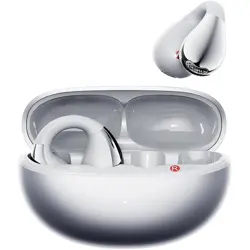
Model: M100-Purple | Brand: Piluyaa
Overview
The Piluyaa M100 Clip-on Earbuds are open-ear wireless headphones designed for sports, fitness, and daily use. They feature a C-shaped bridge and slim hook for a secure, lightweight fit without entering the ear canal. The charging case includes a full-color LCD touchscreen for direct control of music, calls, and settings.

What's in the Box
- Piluyaa M100 Clip-on Earbuds (pair)
- Charging Case with LCD Touchscreen
- USB-C Charging Cable
- User Manual
- Package
Features
Open-Ear Design & Comfort
The earbuds use a C-shaped bridge and slim hook that clips onto the ear, leaving the ear canal open. This design allows ambient sound in, making them suitable for outdoor activities and for users who wear glasses.

LCD Touchscreen Charging Case
The charging case features a full-color LCD touchscreen that provides access to:
- Music Playback: Play, pause, skip tracks.
- EQ Adjustments: Switch between preset equalizer modes.
- Call Management: Answer, reject, or end calls.
- Settings: Change wallpaper, language, and screen brightness.
- Find My Earbuds: Locate misplaced earbuds via the case.

(Refer to the product images for the touchscreen interface layout.)
Bluetooth 5.4 Connectivity
Equipped with Bluetooth 5.4, the earbuds provide a stable wireless connection up to 10 meters (33 feet). They are compatible with smartphones, tablets, laptops, and other Bluetooth-enabled devices.
Audio & Noise Reduction
- Immersive Audio: High-resolution sound with enhanced bass.
- HD Noise Cancellation: Reduces background noise during calls.
- 8th-Gen Directional Sound: Minimizes sound leakage to those around you.
Battery Life & Water Resistance
- Battery Life: Up to 24 hours total (earbuds + charging case).
- Water Resistance: IPX-rated waterproof design, suitable for workouts, rain, and sweat.
Additional Convenience Features
- Remote Selfie Control: Use the earbuds to trigger the camera shutter on your phone.
- LED Indicator: Visual status light on the earbuds.
- Customizable EQ Modes: Select from multiple sound profiles via the touchscreen.
Use Guide
Charging the Earbuds & Case
- Place the earbuds into the charging case. Ensure the charging contacts align.
- Connect the USB-C cable to the case and a power source (USB-A port or adapter).
- The LCD screen will display the charging status. A full charge takes approximately 1.5 hours.
- The case itself can be recharged using the same USB-C cable.

Power On/Off & Pairing
- Power On: Remove the earbuds from the charging case. They will power on automatically and enter pairing mode (LED flashes).
- Power Off: Place the earbuds back into the charging case. They will power off and begin charging.
- Manual Pairing: If not automatically pairing, touch and hold the touch area on both earbuds for 3 seconds until the LED flashes alternately.
- Connect to Device: On your phone or tablet, enable Bluetooth and select "Piluyaa M100" from the list of available devices.
Using the LCD Touchscreen
The charging case's touchscreen provides a menu-driven interface. Swipe or tap to navigate:
- Home Screen: Displays time, battery levels of earbuds and case, and connection status.
- Music Controls: Tap to play/pause; swipe left/right to skip tracks.
- EQ Settings: Tap the EQ icon to cycle through presets (e.g., Bass Boost, Treble, Balanced).
- Call Controls: When a call comes in, tap to answer or reject.
- Settings Menu: Access wallpaper, language, and brightness options.
- Find My Earbuds: Tap this option to make the earbuds emit a sound for easy location.
Touch Controls on Earbuds
Each earbud has a touch-sensitive surface. Default controls:
- Single Tap: Play/Pause music or Answer/End call.
- Double Tap: Skip to next track (right earbud) or previous track (left earbud).
- Triple Tap: Activate voice assistant (Siri/Google Assistant).
- Touch and Hold: Adjust volume (right earbud: volume up; left earbud: volume down).
Taking Photos (Remote Selfie)
- Open your phone's camera app.
- With the earbuds connected, press the volume button on the earbuds (or use the touchscreen control if available) to trigger the shutter.
- Ensure the earbuds are within Bluetooth range (10 meters).
Water Resistance Precautions
- The earbuds are IPX-rated waterproof, suitable for sweat and light rain.
- Do not submerge in water or expose to high-pressure water jets.
- Dry the earbuds and case with a soft cloth after exposure to moisture.
Specifications
| Model | M100-Purple |
|---|---|
| Brand | Piluyaa |
| Color | Purple |
| Ear Placement | Open Ear |
| Form Factor | Open Ear (Clip-on) |
| Connectivity | Wireless Bluetooth 5.4 |
| Bluetooth Range | Up to 10 meters |
| Impedance | 16 Ohms |
| Frequency Range | 20 Hz – 20,000 Hz |
| Audio Driver | Dynamic Driver |
| Noise Control | Active Noise Cancellation (for calls) |
| Battery Life (Total) | 24 hours (earbuds + case) |
| Charging Port | USB-C |
| Water Resistance | IPX-rated (waterproof) |
| Control Method | Touch (earbuds) + LCD Touchscreen (case) |
| Compatible Devices | Cellphones, Tablets, Laptops |
| Enclosure Material | Silicone |
| Weight | Lightweight (exact weight not specified) |
Troubleshooting
Earbuds not connecting
- Ensure the earbuds are charged and powered on.
- Delete the "Piluyaa M100" pairing from your device's Bluetooth list and re-pair.
- Place both earbuds in the case, close the lid, wait 10 seconds, then try again.
One earbud not working
- Check that both earbuds are charged.
- Reset by placing both earbuds in the case, holding the touch area for 10 seconds until the LED flashes red, then re-pair.
Touchscreen not responding
- Ensure the case has sufficient battery.
- Restart the case by disconnecting the USB-C cable and reconnecting after 30 seconds.
Poor sound quality or intermittent connection
- Reduce distance between earbuds and connected device.
- Avoid areas with heavy wireless interference.
- Ensure the earbuds are clean and the speaker grilles are not blocked.
Safety and Care
- Do not disassemble or modify the earbuds or charging case.
- Keep away from extreme heat or open flames.
- Use only the provided USB-C cable for charging.
- Clean with a soft, dry cloth. Do not use liquids or solvents.
- Store in a cool, dry place when not in use.
- Keep out of reach of children (small parts may cause choking).