Overview
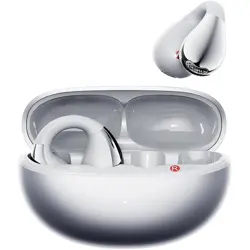
The Piluyaa Open Ear Earbuds (Model YJ33) are wireless Bluetooth 5.4 headphones designed for an open-ear listening experience. They feature an over-ear hook design for secure fit during fitness and sports activities. The earbuds use bone conduction technology and include an intelligent touch screen on the charging case for control.

Key features at a glance:
- Bluetooth 5.4 wireless connectivity
- Open-ear / over-ear design with earhooks
- Intelligent touch screen on charging case
- ANC (Active Noise Cancellation) and ENC (Environmental Noise Cancellation)
- IPX7 waterproof rating
- Bone conduction audio driver
- Independent MP3 mode
- Touch controls on earbuds
- Multi-language support (21 languages)
- Customizable EQ settings (7 modes)
- Find my earbuds function
What's in the Box
- Piluyaa Open Ear Earbuds (left and right)
- Intelligent touch screen charging case
- USB-C charging cable
- Instruction manual
- Packing box
Product Specifications
| Specification | Details |
|---|---|
| Brand | Piluyaa |
| Model Number | YJ33-Black |
| Connectivity | Bluetooth 5.4, Wireless |
| Audio Driver Type | Bone Conduction Driver |
| Impedance | 16 Ohms |
| Frequency Range | 20 Hz – 20,000 Hz |
| Noise Control | Active Noise Cancellation (ANC) + ENC |
| Water Resistance | IPX7 (Waterproof) |
| Battery Life (earbuds) | Approx. 8 hours |
| Charging Time | Approx. 8 hours |
| Control Method | Touch (earbuds) + Touch screen (case) |
| Ear Placement | Over Ear |
| Enclosure Material | Silicone |
| Compatible Devices | Cellphones, Tablets, Laptops, Desktops |
| Headphone Jack | No Jack (wireless only) |
| Color (reviewed) | BLACK |
Features
1. Intelligent Touch Screen Charging Case
The charging case features a full-color LED touch screen that provides control over music playback, track switching, volume adjustment, and EQ mode selection. The screen supports 21 languages, 5 lock screen wallpapers, and 3 control interface styles. Screen brightness is adjustable.

2. ANC and ENC Noise Cancellation
- ANC (Active Noise Cancellation): Built-in microphones capture external noise and generate inverse sound waves to reduce ambient noise.
- ENC (Environmental Noise Cancellation): Reduces background noise during phone calls for clearer conversations.
3. Independent MP3 Mode
The earbuds can function as an independent MP3 player without needing a Bluetooth connection to a phone. Music files can be stored and played directly from the earbuds.
4. Touch Controls on Earbuds
Each earbud has a touch-sensitive surface for controlling music, calls, and voice assistant. The touch controls eliminate the need for physical buttons.
5. Find My Earbuds
Use the touch screen on the charging case to locate misplaced earbuds. The earbuds will emit a sound to help you find them.
6. Customizable EQ Settings
7 specific EQ sound effects can be adjusted directly from the charging case touch screen, allowing you to tailor the audio to your preference.
7. IPX7 Waterproof Rating
The earbuds are rated IPX7, meaning they can withstand immersion in water up to 1 meter for 30 minutes. Suitable for intense workouts and outdoor use in rain.
8. Multi-Language Support
The touch screen interface supports 21 languages. If the earbuds are not in English when first used, double-tap the earbuds when not connected to a phone to switch to English.
Getting Started
Charging the Earbuds and Case
- Connect the USB-C charging cable to the charging case.
- Plug the other end into a USB power source (computer, wall adapter, etc.).
- The case LED will indicate charging status. Full charge takes approximately 8 hours.
- Place the earbuds into the charging case to charge them. The case will automatically charge the earbuds.
First-Time Pairing
- Remove the earbuds from the charging case. They will automatically enter pairing mode.
- On your phone or device, enable Bluetooth and search for available devices.
- Select "Piluyaa YJ33" (or similar name) from the list.
- If prompted, confirm pairing. The earbuds will connect.
- When first connecting, tap Allow if asked for SMS access – this syncs the time on the case screen.
Switching Language to English
If the earbuds are not in English when you first use them, double-click them when they are not connected to your phone to switch to English.
Use Guide
Wearing the Earbuds
- Place the earhook over your ear.
- Position the earbud so it rests comfortably outside your ear canal (open-ear style).
- Adjust the earhook for a secure fit. The silicone material provides comfort during extended wear.

Using the Touch Screen on the Charging Case
- Music Playback: Tap play/pause icon to control music.
- Track Switching: Swipe left/right or tap next/previous icons.
- Volume Adjustment: Use the volume slider or +/- icons on the screen.
- EQ Modes: Access the EQ settings to choose from 7 presets.
- Lock Screen Wallpaper: Change wallpaper from the settings menu (5 options).
- Brightness: Adjust screen brightness in the settings menu.
- Find My Earbuds: Select the "Find" option to make the earbuds emit a sound.
Touch Controls on Earbuds
- Play/Pause: Single tap on either earbud.
- Next Track: Double tap on right earbud.
- Previous Track: Double tap on left earbud.
- Volume Up: Triple tap on right earbud.
- Volume Down: Triple tap on left earbud.
- Answer/End Call: Single tap on either earbud.
- Reject Call: Long press (2 seconds) on either earbud.
- Voice Assistant: Triple tap and hold on either earbud.
Independent MP3 Mode
- Ensure the earbuds are charged.
- Use the touch screen on the charging case to switch to MP3 mode.
- Transfer music files to the earbuds via USB connection (refer to the full manual for file transfer instructions).
- Play music directly from the earbuds without a Bluetooth connection.
Noise Cancellation (ANC/ENC)
- ANC is activated by default. To toggle ANC on/off, use the touch screen on the charging case (look for the noise cancellation icon).
- ENC is automatically active during phone calls to reduce background noise.
Water Resistance Precautions
- The earbuds are IPX7 waterproof. They can be used in rain or during sweaty workouts.
- After exposure to water, dry the earbuds and charging contacts before placing them in the charging case.
- The charging case is not waterproof. Keep it dry.
Product Video
Video: Touch Screen Open Ear Earbuds ANC+ENC Denoise Earphones
The video showcases the product in use, guides through product setup, compares multiple products, and shows the product being unpacked.
Troubleshooting
Earbuds Not Connecting
- Ensure the earbuds are charged and in pairing mode (remove from case).
- Forget the device from your phone's Bluetooth list and re-pair.
- Reset the earbuds by placing them in the case, closing the lid, waiting 10 seconds, then removing them again.
Touch Screen Not Responding
- Ensure the charging case has sufficient battery.
- Clean the screen with a soft, dry cloth.
- Restart the case by disconnecting the charging cable and reconnecting after 30 seconds.
Poor Audio Quality or Low Volume
- Check the EQ settings on the touch screen and adjust to your preference.
- Ensure the earbuds are properly positioned over your ears.
- Clean the speaker mesh gently with a dry brush.
Earbuds Not Charging
- Clean the charging contacts on the earbuds and inside the case with a dry cloth.
- Ensure the earbuds are correctly seated in the charging slots.
- Try a different USB-C cable and power source.
Find My Earbuds Not Working
- Ensure the earbuds are within Bluetooth range of the charging case.
- The earbuds must be powered on (not in the case) for the find function to work.
Safety and Care
- Do not disassemble or modify the earbuds or charging case.
- Keep away from extreme heat or fire.
- Do not use the earbuds while driving or operating heavy machinery.
- Store in a cool, dry place when not in use.
- Clean with a soft, dry cloth. Do not use liquids or solvents.
- Keep the charging case dry. Although the earbuds are IPX7, the case is not waterproof.
- If skin irritation occurs, discontinue use and consult a doctor.
Warranty and Support
For warranty information and support, please contact the seller (BOOMDEAL) or visit the Piluyaa store on Amazon. Specific contact details were not provided in the product listing. Refer to the packaging or your Amazon order details for seller contact information.