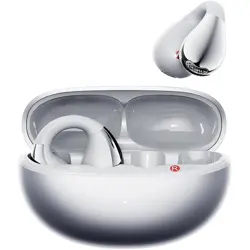
Model: M79-Black
Overview
The Piluyaa Clip-on Earbuds are wireless Bluetooth 5.4 open-ear headphones designed for comfort and situational awareness. They feature a C-shaped bridge and slim hook that clip onto the ear without entering the ear canal, making them suitable for extended wear, use with glasses, and during workouts.

Key features include dual sonic directional transmission for reduced sound leakage, ENC (Environmental Noise Cancellation) for clearer calls, and an IPX5 water-resistant rating. The earbuds provide up to 6 hours of playback on a single charge, with an additional 18 hours from the charging case, totaling 24 hours.
Features
Open-Ear Design & Lightweight Comfort
The open-ear design rests outside the ear canal, allowing you to hear ambient sounds. Each earbud weighs only 5.3 grams, reducing fatigue during long listening sessions. The C-shaped ear clip and slim hook provide a secure fit, even for users who wear glasses.

Dual Sonic Directional Transmission & ENC Noise Cancellation
Dual sonic directional transmission technology focuses audio toward your ears, minimizing sound leakage to those around you. Environmental Noise Cancellation (ENC) uses built-in microphones to filter out background noise during phone calls, improving voice clarity.
Bluetooth 5.4 Connectivity
Bluetooth 5.4 provides a stable wireless connection with low latency, ensuring audio and video remain synchronized. It also offers improved energy efficiency compared to earlier versions.
Battery Life
- Earbuds: Up to 6 hours of continuous playback on a single charge.
- Charging Case: Provides an additional 18 hours of battery life.
- Total: Up to 24 hours of combined use.
- Charging Time: Approximately 6 hours for a full charge of the earbuds.
IPX5 Water Resistance
The earbuds are rated IPX5, meaning they are protected against water splashes, rain, and sweat. This makes them suitable for outdoor activities and intense workouts.

Touch Controls
The earbuds feature touch-sensitive controls for managing playback, calls, and volume. Refer to the "Use Guide" section for specific touch commands.
What's in the Box
- Piluyaa Clip-on Earbuds (pair)
- Charging Case
- USB-C Charging Cable
- User Manual
- Package
Use Guide
Charging the Earbuds
- Place the earbuds into the charging case. Ensure the charging contacts align.
- Close the lid of the charging case.
- Connect the USB-C charging cable to the case and a power source (such as a USB wall charger or computer).
- The LED indicator on the case will show the charging status. A full charge takes approximately 6 hours.

Pairing with a Bluetooth Device
- Remove the earbuds from the charging case. They will automatically enter pairing mode (indicated by a blinking LED).
- On your Bluetooth device (e.g., smartphone, tablet), enable Bluetooth and search for available devices.
- Select "Piluyaa M79" from the list of discovered devices.
- If prompted, confirm the pairing request. The earbuds will connect, and the LED will stop blinking.
Note: If the earbuds do not enter pairing mode automatically, press and hold the touch area on both earbuds for 3 seconds until the LED flashes.
Wearing the Earbuds
- Identify the left (L) and right (R) earbuds.
- Gently hook the C-shaped bridge over the top of your ear.
- Position the slim hook so the earbud rests comfortably against the outer ear, without inserting into the ear canal.
- Adjust the angle for a secure and comfortable fit. The earbuds are designed to be worn with glasses.
Touch Controls
Use the touch-sensitive area on each earbud to control audio and calls.
- Play/Pause: Tap once on either earbud.
- Answer/End Call: Tap once on either earbud.
- Next Track: Tap twice on the right earbud.
- Previous Track: Tap twice on the left earbud.
- Volume Up: Tap three times on the right earbud.
- Volume Down: Tap three times on the left earbud.
- Activate Voice Assistant: Press and hold the touch area for 2 seconds.
- Reject Call: Press and hold the touch area for 2 seconds during an incoming call.
Resetting the Earbuds
If you experience connectivity issues, reset the earbuds:
- Place both earbuds in the charging case and close the lid.
- Open the lid and remove the earbuds.
- Press and hold the touch area on both earbuds for 10 seconds until the LED flashes red and white.
- Release the touch area. The earbuds will reset and enter pairing mode.
- Re-pair the earbuds with your device.
Specifications
| Brand | Piluyaa |
| Model Number | M79-Black |
| Color | BLACK |
| Ear Placement | Open Ear |
| Form Factor | Clip-on |
| Connectivity Technology | Wireless (Bluetooth 5.4) |
| Impedance | 16 Ohms |
| Frequency Range | 20 Hz – 20,000 Hz |
| Audio Driver Type | Dynamic Driver |
| Noise Control | Active Noise Cancellation (ENC for calls) |
| Control Method | Touch |
| Battery Life (Earbuds) | 6 hours |
| Battery Life (with Case) | 24 hours |
| Charging Time | 6 hours |
| Water Resistance Level | IPX5 (Water Resistant) |
| Weight | 5.3 grams per earbud |
| Enclosure Material | Plastic, Silicone |
| Compatible Devices | Cellphones, Tablets, Computers (Bluetooth-enabled) |
Safety and Care
- Do not expose the earbuds or charging case to extreme temperatures or direct sunlight for extended periods.
- Clean the earbuds and charging contacts with a soft, dry cloth. Do not use liquids or abrasive cleaners.
- Store the earbuds in the charging case when not in use.
- Do not attempt to disassemble or modify the earbuds or charging case.
- Keep the earbuds away from children and pets.
- If the earbuds get wet, dry them thoroughly before placing them in the charging case.
Troubleshooting
Earbuds not charging
- Ensure the earbuds are correctly seated in the charging case and the charging contacts are clean.
- Check that the USB-C cable is securely connected to the case and the power source.
- Try a different USB-C cable or power source.
No sound or poor audio quality
- Increase the volume on your connected device.
- Ensure the earbuds are within range (typically 10 meters / 33 feet) of the Bluetooth device.
- Check for obstructions between the earbuds and the device.
- Try re-pairing the earbuds with your device.
Earbuds not connecting to Bluetooth
- Make sure the earbuds are in pairing mode (LED flashing).
- Delete the earbuds from your device's Bluetooth list and re-pair.
- Reset the earbuds as described in the "Use Guide" section.
Microphone not working during calls
- Ensure the earbuds are selected as the audio input device on your phone or computer.
- Check that the microphone opening on the earbud is not blocked by debris.