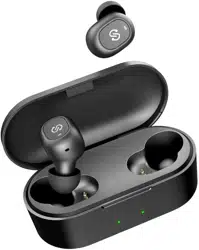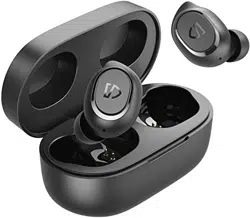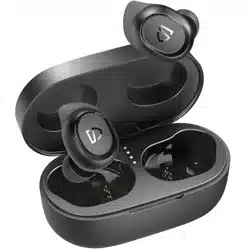
O1
User Guide | Gebrauchsanweisung | Manual de instrucciones |
Mode d'emploi | Istruzioni per l'uso
| 取扱説明ガイド|说明使用指南
BLUETOOTH HEADPHONES
1
Pairing
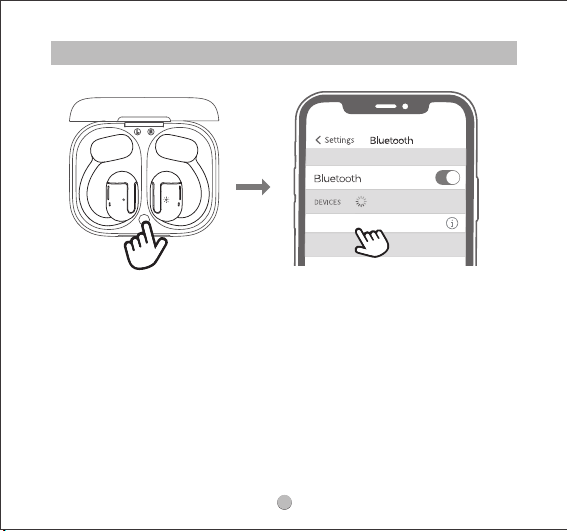
1. Open the charging case cover, take out the earbuds and remove the insulating
lm on them, then put the two earbuds back into the charging case. Press and
hold the button inside the charging box for 3 seconds until the indicator light
ashes white. At this time, the indicator light on one earbud ashes red and white
alternately, the indicator light on another earbud stays white, and then two
earbuds enter the pairing state.
2. Turn on your device's Bluetooth and select TRUEFREE O1 from the Bluetooth list to
complete the pairing.
Aer the rst time use, open the lid of charging case, earbuds will turn on and
connect the phones automatically.
TRUEFREE O1
Connected

2
Pairing Two Devices
TRUEFREE O1 can be paired and used with two devices at the same time. The
method is: aer the earbuds are paired with Device A, turn o Device A's Bluetooth.
Next, repeat the pairing operation to connect the earbuds to Device B. Aer
connecting Device B successfully, turn on Device A's Bluetooth,then you can use
the earbuds with two devices at the same time.
Reset
Open the charging case cover,
1. Place the earphones back into the charging case, and make sure they are
correctly placed.
2. Keep the charging case lid open, and press and hold the button on the charging
case for 10 seconds until the lights in the charging case ash white twice, and the
reset is complete.
3. Close the charging case lid and re-open it, the earphonesare activated.
3
Wearing
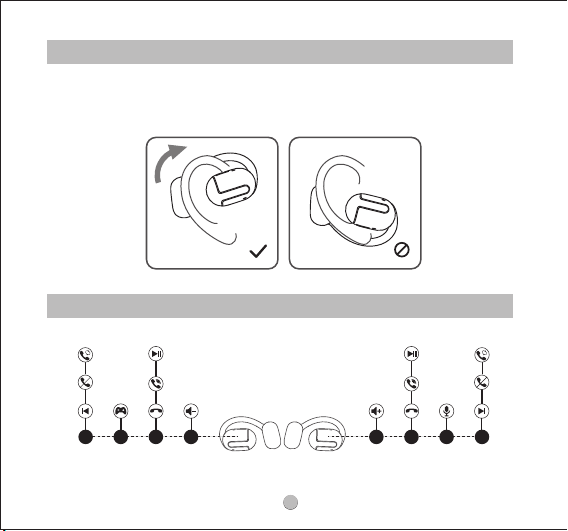
1. Identify the le earphone and the right earphone.
2. Adjust the earphones to t your ears.
Product Diagram
1.5s 3x 2x 1x 1.5s3x2x1x
RL
4
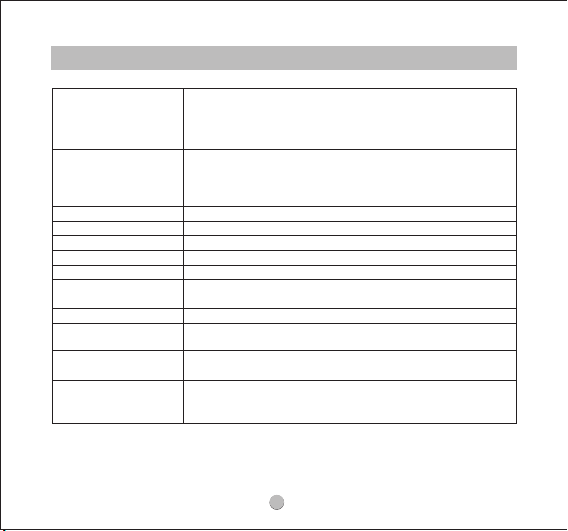
Control
Power On
Power o
Play/Pause
Volume-
Volume+
Next Track
Previous Track
Answer/
Hang Up a Phone Call
Reject a Phone Call
Switch Between Two
Active Calls
Activate the Voice
Assistant
Activate/
Deactivate the Game
Mode
Auto: Open the charging case; the earphones turn on
automatically.
Manually: Press and hold the multifunctional button for 1.5s
when earphones are o.
Auto:Place the earphones back into the
charging case and close the case lid.
Manually: Press and hold the multifunctional button for 10s
when earphones are on.
Double-tap on the multifunctional button
Single-tap on the le multifunctional button
Single-tap on the right multifunctional button
Press and hold the right multifunctional button for 1.5s
Press and hold the le multifunctional button for 1.5s
Double-tap on the multifunctional button
Press and hold the multifunctional button for 1.5s
Press and hold the multifunctional button for 1.5s
Triple-tap on the right multifunctional button
Triple-tap on the le multifunctional button
5
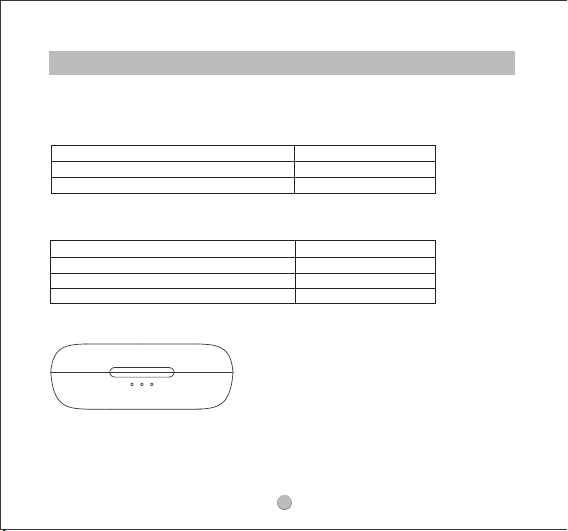
Three white lights stay on
Two white lights stay on
One white light stays on
100%—60%
59%-30%
Less than 30%
Q&A
Q1: What does the indicator light of the charging case display?
1. The battery power of the charging case:
Three white lights stay on
Three white lights ash
Two white lights ash
One white light ashes
100%
99%-60%
59% - 30%
Less than 30%
2. When charging the charging box, the indicator light shows:
6
1. Check whether the charging case has battery power. If it has run out of battery,
closing it will not disconnect the earphones from the device.
2. Make sure the earphones are properly placed in the charging case and the
charging contacts on the earphones and charging case are all clean. Please use
a so cloth and a bit of alcohol to clean the contact points on the earphones and
the charging case.
Q3: Why are the earphones still connected to the phone when they are put back
to the charging case and the case lid is closed?
Method 1: Put the earbuds back into the charging case and close the lid of the
charging case, the earbuds will automatically turn o and disconnect.
Method 2: Turn o the Bluetooth on phone to disconnect.
Method 3: Put the earbuds back into the charging case, press and hold the button
inside the charging case for 3 seconds, and the earbuds will disconnect from the
current phone and enter the pairing state.
Q4: How to disconnect the earbuds from the phone?
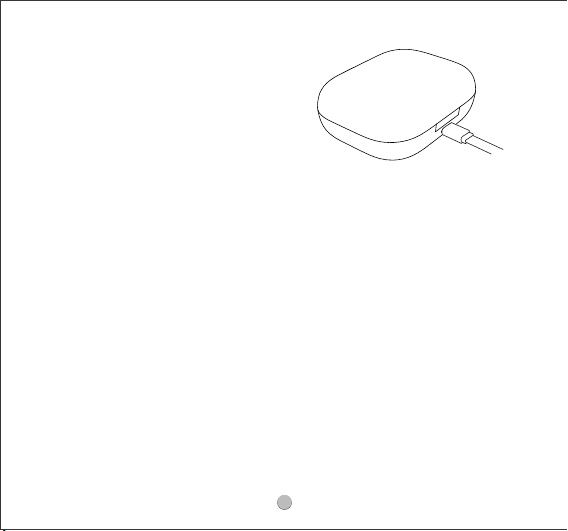
1. Connect the charging case to a Type-C
charger. (The current does not exceed 1A).
2. If the earphones stay idle for an extended
period, charge them at least every three
months to prevent the battery from being
damaged.
Q2: How to charge the charging case?

7
TRUEFREE O1 FAQ
What should I do if the problem about the earphones is not
mentioned in this FAQ?
If there is no solution for your problem in this FAQ, please feel free to contact our
Customer Service Team([email protected]) and we will provide you a solution
as soon as possible. If we conrmed that the problem couldn't be solved, we will
apply the replacement or refund for you.
How long is the warranty period?
TRUEFREE provides a 12-month warranty for every product. Your satisfaction is
always greatly important to us.
What can I do if the earphones stopped connecting to my
device?
1.Clear the pairing records between the earphones and all of the previous devices.
2.Try to clear some Bluetooth listings on your device and restart the device.
3.Put the earphones into the charging case to reset.
4.Take the earphones out of the charging case. Activate Bluetooth on the device,
and choose "TRUEFREE O1" on Bluetooth list to pair.

8
How to reset TRUEFREE O1?
1. Place the earphones back into the charging case, and make sure they are
correctly placed.
2. Keep the charging case lid open, and press and hold the button on the charging
case for 10 seconds until the lights in the charging case ash white twice, and the
reset is complete.
3. Close the charging case lid and re-open it, the earphonesare activated.
What can I do if the left earphone and the right earphone won’t
work together? Or one earphone doesn’t work?
1.Please use a bit of light microber cloth with a bit of rubbing alcohol to clean the
charging connectors to ensure the earphones charge well.
2.Put them into the charging case to reset.
What can I do if the earphones connect to my phone, but not
my Mac-book/computer?
1.Unpaired the earphones from the phone, then the earphones will lose Bluetooth
connection to the phone and enter into pairing mode.
2. Put the earphones into the charging case to reset.
3.Then open the Bluetooth of your Mac-book/computer to connect.
4.If those do not help, you may need to update your computer's Bluetooth driver.
There is no driver for it. Bluetooth drivers must come from the specic manufacturer
for your exact computer model. Download and install the appropriate Bluetooth
driver from the computer vendor's website, then restart your system before
attempting to pair and connect to your earphones.

9
How to connect the earphones with two devices at the same
time?
1.Please download the TRUEFREE APP.
2.Please open the TRUEFREE APP, connect to the headphones, nd and choose to
open multi-point connection function.
3.The operation steps are as follows:
1) Please pair the headset with device A rst, and then turn o the Bluetooth
function of device A aer conrming that the pairing is completed.
2) Next, please repeat the pairing operation to connect the earphones to device
B, keep the connection between the earphones and device B.
3) Finally, turn on the Bluetooth function of device A and pair it with the earphones,
you can use the multi-point connection function.
*NOTE: Aer manually pairing two Bluetooth devices for the rst time, the Bluetooth
connection will be established automatically from the second time.
*NOTE: LDAC cannot be used during multi-point connection.(LDAC is a high-deni-
tion decoder that occupies a lot of channels and can easily get stuck when turned
on. )
What can I do if any earphone stopped charging?
1) Please leave the earphones out of the charging case for 2 days;
2) Please use so cloth with a bit of rubbing alcohol to clean the charging
connectors;
3) Please close the cover of the case to charge the earbuds over 2 hours;
4) Please reset the earphones.
Warm tip: Please be careful not to press the earphones too hard in the charging
case, so as not to damage the copper pillars in the charging case.

10
Why are the earphones still connecting to my phone after
placing them back and close the case lid?
1. The charging case has no remaining power. Placing the earphones back into the
charging case can’t turn them o if the case battery is dead.
2. Please make sure the earphones are correctly placed in the charging case, and
make sure the charging contacts are clean. Please try to clean the places
between the charging case and the earphones with something like a microber
cloth.
What can I do if the touch controls do not work always?
1.Please check if you have turn o the “Disable all touch controls” on APP.
2.Please touch the middle of the control zone. And when your hand is wet, the
touch control may not respond well, please keep your hand dry.
3.Please try to skip the songs more times, you will nd the best frequency to control
the earphones. When you don't nd the frequency you may think the earphones
don't work, please give it some patient.
*NOTE: Another way for you to have a try: discharge the earphones, then re-charge
and reset.

11
Why the touch function is still valid after we choose “Disable
all touch controls” on APP.
The custom touch function is a new feature and you need to update the rmware
of the earbuds rst.
1.Please login the app, take out the earbuds and connect the device. Click the
setting icon on the upper right corner-"rmware update"
2.Update the headphones to the latest version.
3.Place the earphones back to the charging case and exit APP aer updated.
4.Take out the headphones from the charging case and connect to the APP again.
Choose the “Disable all touch controls” , then you can’t touch control the earbuds
anymore.
*NOTE: You can still turn o the earbuds by long press the touch button even if
choose this function.
Precautions during the APP upgrade process:
1. During the upgrade, the distance between the earphone and the mobile phone
must be within 0.5 meters;
2. Please turn on the earphone;
3. Do not disconnect, play music or answer the phone calls;
4. Don't close or shrink the upgrade page;
5.Make sure your phone is connected with good network.

12
Please check if you connect the earphone to the other device at the same time, then
please clear the pairing record on the device which you do not need temporarily.
Why the earphone lost the sound all of a sudden?
1.Please change other songs or videos. For some songs and videos, the sound eect
is unstable.
2.Please change other devices. You can try this way:
- Unpaired and delete from your original device
- Pair to a new device and play music
- Unpaired and delete from this new device
- Pair back with original device
3.Please clean o the screen with a little alcohol.
4.Try to reset the earphones.
5.Please adjust the “Audio Equalizer” in your phone:
1)For iPhone: [General] - [Accessibility] - [Hearing]
2) For Android: [Accessibility features] - [Accessibility] - [Audio balance]
What can I do if one earphone is quieter than the the other?
1.It may be caused by the sound hole being blocked by foreign objects. Please
clean the earphones regularly to avoid dust or secretions blocking.
2.Please change other devices to see if the problem still exists.
3.Please reset the earphones.
Why does the volume of the earphones reduce after using a period of time?
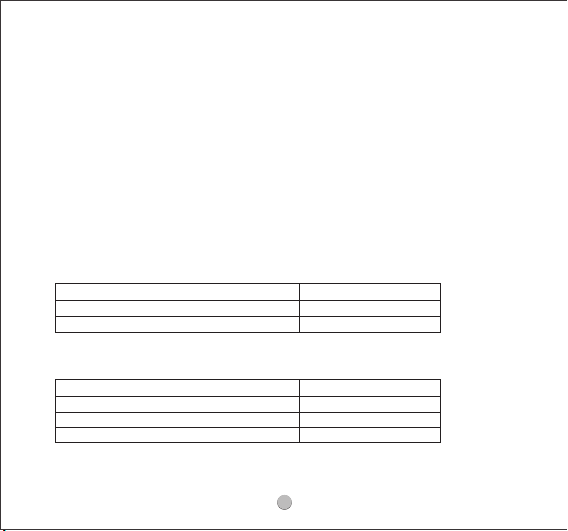
Three white lights stay on
Two white lights stay on
One white light stays on
100%—60%
59%-30%
Less than 30%
1. The battery power of the charging case:
Three white lights stay on
Three white lights ash
Two white lights ash
One white light ashes
100%
99%-60%
59% - 30%
Less than 30%
2. When charging the charging box, the indicator light shows:
13
Why the other side could not hear me when calling?
1. Please wear both earphones together instead of any single one.
2. Please choose to pick up phone calls via the earphones.
3. Please do not mute the phone calls.
4. Please clean the Mic holes to avoid dust or secretions blocking.
5. Please adjust the volume through the earphones and devices.
6. If you are using the earphones with an Android phone, please check the settings
to see if you have allowed both phone audio and media audio to be transmitted
through the earphones.
7. Please change other devices to have a try.
What does the indicator light of the charging case display?

14
How to charge the charging case?
1. Connect the charging case to a Type-C charger. (The current does not exceed
1A).
2. If the earphones stay idle for an extended period, charge them at least every
three months to prevent the battery from being damaged.
What should I do if the charging case won’t charge?
Please try to use anotherknownworkingchargingcable to charge thecharging
casefor more than 10 hours through your computer. When you charge the case,
please take both earphones out of charge case.
Compared to other electronics, the earphones are low power products. Hence for
charging safety, please use the regular charger head in good status.
Care and Maintenance
* Keep the earphone away from humidity.
* Do not put the product under direct sunlight or hot areas. High temperatures will
shorten lifespan of the earphone, battery or the internal circuit board.
* Power o the earphone when not in use or before storing.
* Do not try to take the earphone apart.
* Avoid dropping or knocking your earphone on hard surfaces.
* Do not use chemicals or detergents to clean the earphone.
* Do not scrape the surface with sharp objects.
* Please use a so cloth with a bit of rubbing alcohol to clean the charging
connectors aer using, especially aer the earbuds have been soaked in rain,
sweat or other water drops.
* When the charging case and the earphone have low battery, please charge it in
time. And please do not use fast charger.
* Please charge the earphones and charging case at least once per 3 months
when not in use for a long time.