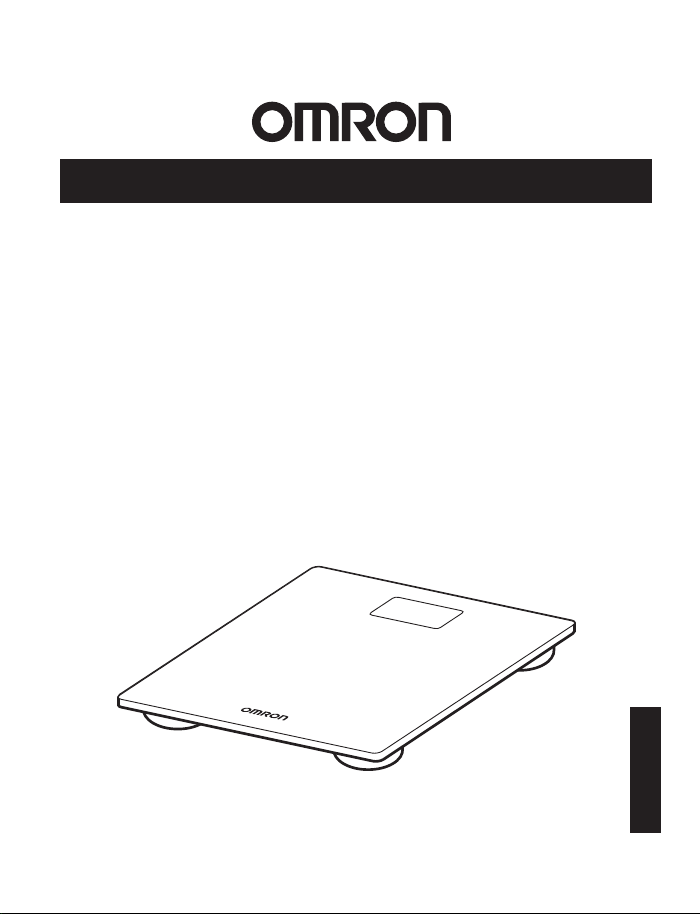
INSTRUCTION MANUAL
Scale with Bluetooth®
Model: SC-150
®
ENGLISH
5666064-4E

2
TABLE OF CONTENTS
INTRODUCTION .......................................................................................................................................... 3
IMPORTANT SAFETY INFORMATION .................................................................................................4
1. KNOW YOUR DEVICE ............................................................................................................................ 7
2. BEFORE TAKING A MEASUREMENT ...............................................................................................9
3. TAKING A MEASUREMENT ...............................................................................................................12
4. TRANSFERRING YOUR READING ...................................................................................................13
5. RESTORING THE SCALE TO THE DEFAULT SETTINGS ...........................................................14
6. ERROR MESSAGES AND TROUBLESHOOTING ........................................................................15
7. MAINTENANCE .....................................................................................................................................17
8. CALIBRATION ........................................................................................................................................18
9. SPECIFICATIONS ...................................................................................................................................19
10. FCC/ISED STATEMENT AND TRADEMARKS ............................................................................21
11. LIMITED WARRANTY ....................................................................................................................... 22
12. GUIDANCE AND MANUFACTURER’S DECLARATION ........................................................ 23

3
INTRODUCTION
Thank you for purchasing the OMRON SC-150 Scale with Bluetooth
®
.
This product is mainly designed for general household use.
Safety Instructions
This instruction manual provides you with important information about the OMRON SC-150.
To ensure the safe and proper use of this product, READ and UNDERSTAND all of these
instructions. If you do not understand these instructions or have any questions, contact
1-800-634-4350 before attempting to use this product. For specific information about
your own weight, consult with your physician.
Intended Use
The OMRON SC-150 Scale with Bluetooth
®
is intended to measure and display body weight. It
is intended for home use only.
Receiving and Inspection
Remove this product and other components from the packaging and inspect for damage. If this
product or any other components are damaged, DO NOT USE and contact 1-800-634-4350.
Symbols Glossary
For symbol information, visit:
OmronHealthcare.com/symbols-glossary
OmronHealthcare.ca/symbols-glossary
4
IMPORTANT SAFETY INFORMATION
Read the Important Safety Information in this instruction manual before using this
device.
Follow this instruction manual thoroughly for your safety.
Warning
Indicates a potentially hazardous situation which, if not avoided,
could result in death or serious injury.
• Consult with your physician or healthcare provider before beginning a weight reduction or
exercise program.
• Stop using the scale and consult your doctor if you experience skin irritation on your foot or
feet.
• DO NOT use the scale on slippery surfaces, such as a wet floor.
• Keep the scale out of the reach of infants, toddlers and children.
• DO NOT jump on the scale. Doing so may cause you to fall or slip, resulting in serious injury.
• DO NOT use the scale when your body and/or feet are wet, such as after taking a bath or
shower.
• DO NOT step on the edges or display area of the scale because you may lose your balance
and fall, resulting in serious injury.
• Persons with disabilities or persons who are physically frail should be assisted by another
person when using the scale to prevent falling when stepping on and off the scale.
• DO NOT put your fingers into any openings or inside the scale.
• Use indoors.
• DO NOT use the scale for purposes other than described in this manual.
• DO NOT use the scale with other medical electrical (ME) equipment simultaneously. This
may result in incorrect operation of the devices and/or cause an inaccurate reading.
• DO NOT damage the glass because it may break and result in an injury.
Battery Usage
• If battery fluid leaks and contacts your eyes, skin or clothing, immediately rinse with plenty of
clean water. Contact your physician if battery fluid contacts your eyes or skin.
Data Transmission
• This product emits radio frequencies (RF) in the 2.4 GHz band. DO NOT use this product in
locations where RF is restricted, such as on an aircraft or in hospitals.
For further information on potential restrictions refer to documentation on the Bluetooth
usage by the FCC/ISED.
Caution
Indicates a potentially hazardous situation which, if not avoided,
may result in minor or moderate injury to the user or patient, or
cause damage to the equipment or other property.
• DO NOT share the scale with others because your weight data accuracy may be impacted.

5
• Clean the scale before use if it has been used by people with a skin disease on their feet.
• DO NOT place the scale against a wall because an injury or malfunction of the scale may
occur.
• DO NOT attempt to disassemble, modify or repair the scale.
• Ensure that the scale has acclimated to room temperature before taking a measurement.
Taking a measurement after an extreme temperature change could lead to an inaccurate
reading. OMRON recommends waiting for approximately 2 hours for the scale to warm up
or cool down when the scale is used in an environment within the temperature specified
as operating conditions after it is stored either at the maximum or at the minimum storage
temperature. For additional information of operating and storage/transport temperature, refer
to section 9.
• DO NOT place the scale on a cushioned floor surface such as a carpet or mat because a
measurement may not be accurate.
• DO NOT submerge the scale or any of the components in water.
• DO NOT place the scale near heat sources or below air conditioners.
• Avoid exposure to direct sunlight.
• Avoid excessive impact, vibration and strong shock to this scale.
• DO NOT wash the scale with water.
• DO NOT wipe the scale with benzene, gasoline, paint thinner, or other volatile solvents.
• DO NOT place the scale where it will be exposed to chemicals or corrosive vapors.
• Store the scale on a level surface.
• DO NOT store any objects on the scale.
Battery Usage
• Replace worn batteries with new ones immediately.
• DO NOT expose the batteries to flames or fire.
• DO NOT insert the batteries with the polarities in the wrong direction.
• ONLY use 4 “AAA” manganese or alkaline batteries with the scale. DO NOT use other types
of batteries. DO NOT use new and used batteries together. Replace all 4 batteries at the
same time.
• DO NOT use different types of batteries together.
• Dispose of the device, batteries, components according to applicable local regulations.
Unlawful disposal may cause environmental pollution.
• Remove the batteries if the scale will not be used for three months or more.
• DO NOT use batteries after their expiration date.
IMPORTANT SAFETY INFORMATION

6
Data Transmission
• During measurement, make sure that no mobile device or any other electrical devices
that emit electromagnetic fields is within 12 inches (30 cm) of the scale. This may result in
incorrect operation of the scale and/or cause an inaccurate reading.
• DO NOT replace the battery while your measurement result is being transferred to your
smart device. This may result in the incorrect operation of the scale and failure to transfer
your measurement result.
• DO NOT place integrated circuit cards, magnets, metal objects, or other devices that emit
electromagnetic fields near the scale while your measurement result is being transferred
to your smart device. This may result in the incorrect operation of the scale and failure to
transfer your measurement result.
IMPORTANT SAFETY INFORMATION
7
1. KNOW YOUR DEVICE
Contents:
• Digital Weight Scale • 4 “AAA” Manganese Batteries • Instruction Manual
• Quick Start Guide
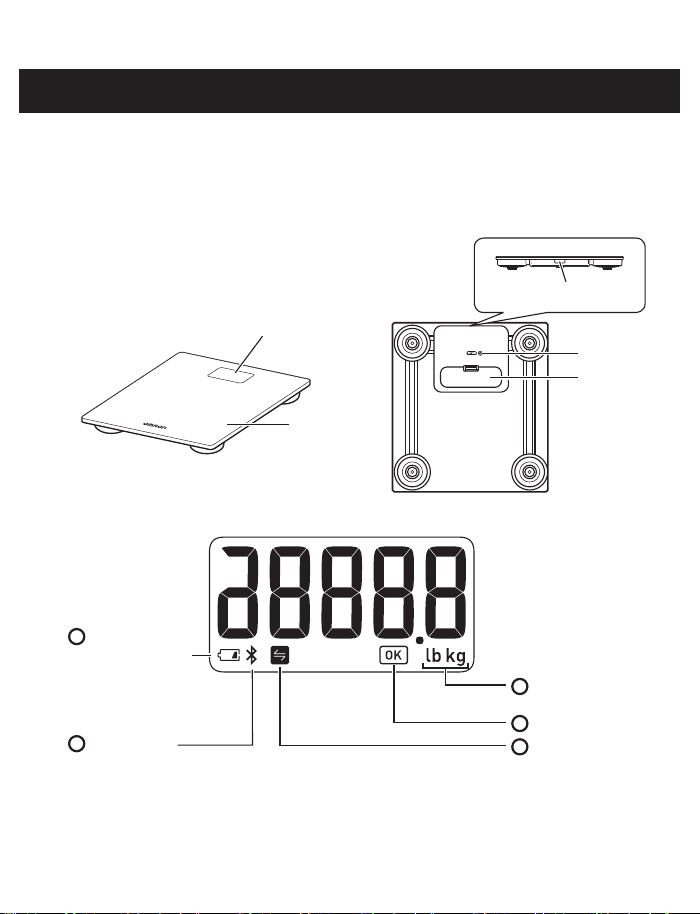
Main Unit:
Battery cover
Plate
SET button
Display
[Bluetooth] button
Front Back
Display:
A
Battery symbol
(low/depleted)
D
OK symbol
C
Weight metric
symbol
E
SYNC symbol
B
Connection
symbol
8
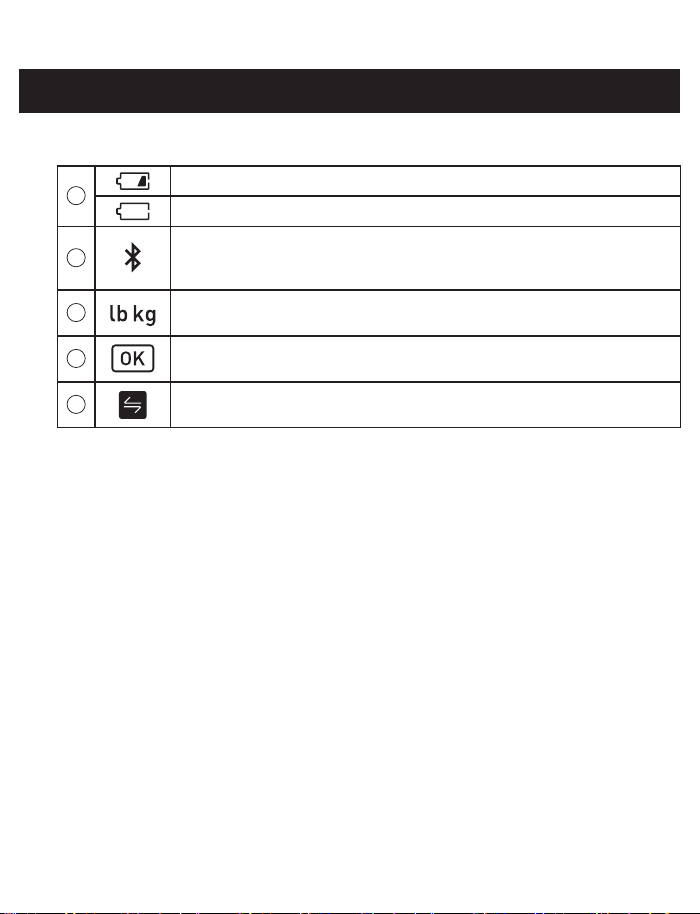
Display symbols:
A
Flashes when batteries are low.
Appears when batteries are depleted.
B
Flashes/appears when the scale is being connected to your smart
device or readings are being transferred, or when restoring the scale to
the default settings.
C
Flashes/appears when selecting weight metric and appears during your
measurement.
D
Flashes when the scale is connected to your smart device or readings
are transferred successfully.
E
Appears if your reading was not transferred successfully when the scale
has been paired with your smart device.
1. KNOW YOUR DEVICE
9
2. BEFORE TAKING A MEASUREMENT
2.1 Installing Batteries
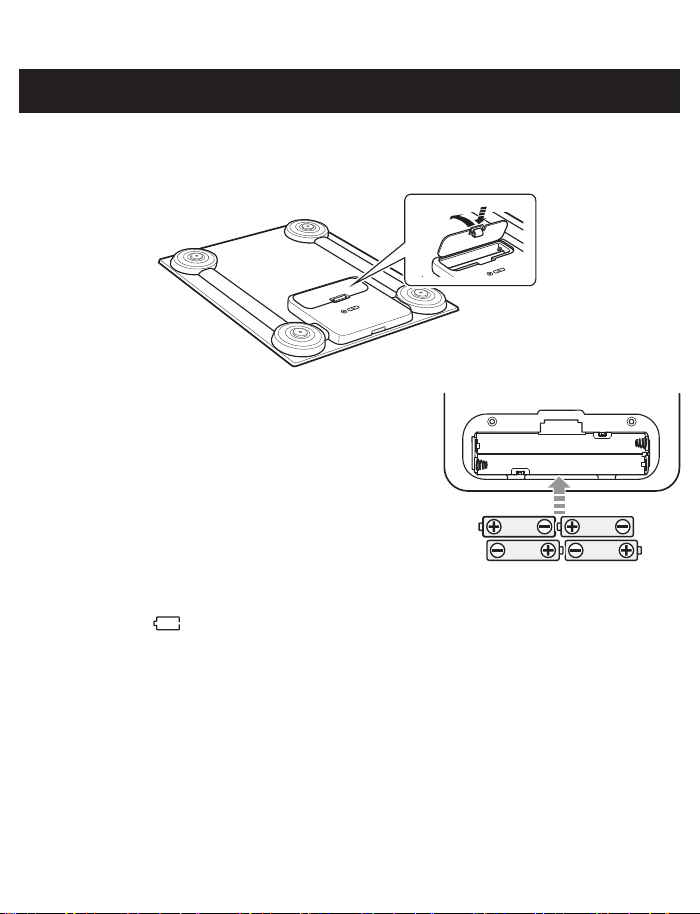
1. Open the battery cover on the back of the scale.
2. Install the batteries following the correct polarities
as shown to the right and inside the battery
compartment.
3. Close the battery cover.
Note:
• When the “ ” symbol and “A1” appear, replace all 4 batteries with new ones. Items
stored in memory will be saved even if the batteries are removed.
• Place the scale on a hard, flat and level floor immediately after installing the batteries.
The scale is calibrated automatically.
• Disposal of used batteries should be carried out in accordance with your local regulations
for the disposal of batteries.
10
2. BEFORE TAKING A MEASUREMENT
2.2 Selecting the Weight Metric
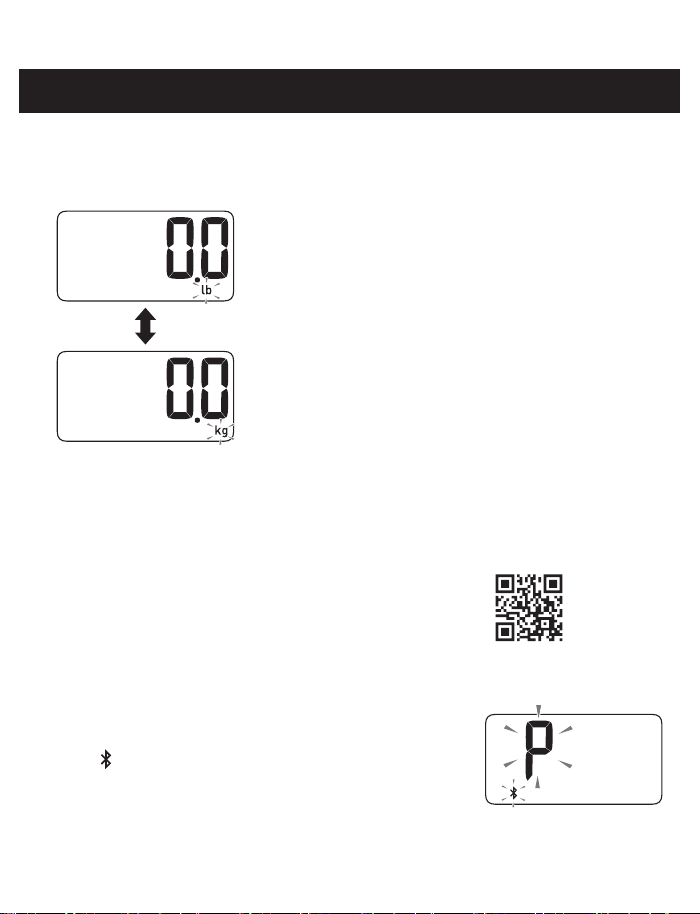
1. When the scale is off, press the [SET] button to select your preferred weight metric
“lb” or “kg”. (Weight is set to “lb” as the default metric.)
The weight metric will be saved after 10 seconds.
The scale will automatically turn off after 3 seconds.
2.3 Pairing the Scale with a Smart Device
If you want to transfer the reading, follow the below instructions.
1. Enable the Bluetooth on your smart device.
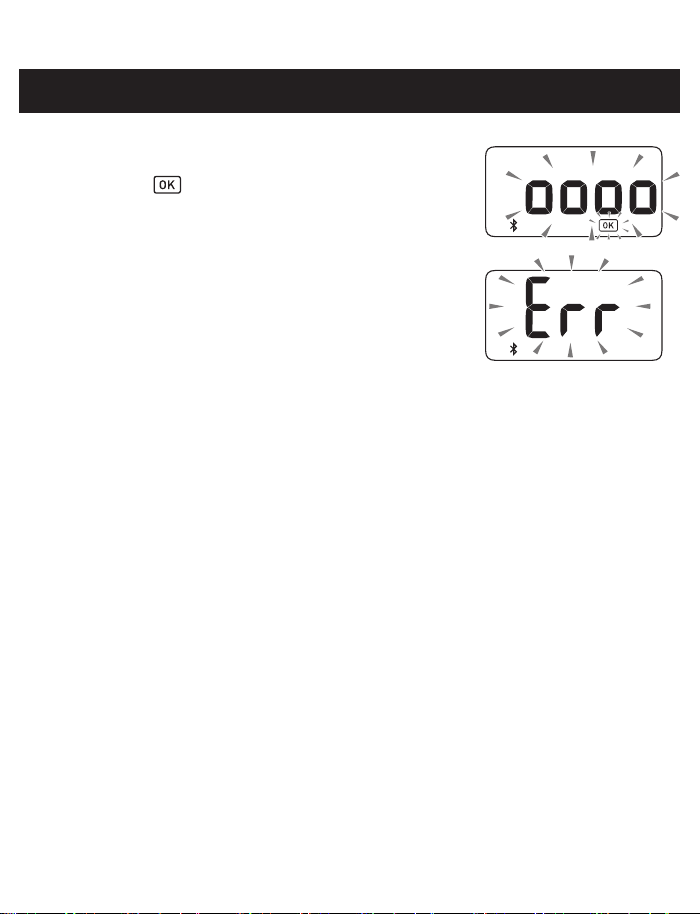
2. Scan the code on the right with your smart device
camera or visit OmronHealthcare.com/app to find the
OMRON compatible app for this product.
3. Open the app and follow the pairing instructions shown
on your smart device.
• Make sure that your scale is within 5 m of your smart device.
4. Press the [Bluetooth] button (the side of the scale) for
more than 2 seconds to connect to your smart device.
The “ ” symbol and “P” symbol flash on the display.
11
2. BEFORE TAKING A MEASUREMENT
5. Confirm that the scale is connected successfully.
When the scale is connected successfully to your smart
device, the “ ” symbol flashes.
Note:
• When the “Err” appears, follow the instructions in the app.
• The scale will automatically turn off after 10 seconds.
• Be aware that OMRON will not be responsible for the loss
of data and/or information in the app.
• This scale can be paired with one smart device and only
one user can manage the measurement data. Do not use the multiple apps.
• Only compatible OMRON apps should be used with this scale to help ensure correct
data transfer.
12
3. TAKING A MEASUREMENT
It is recommended to measure your weight at the same time each day for consistency.
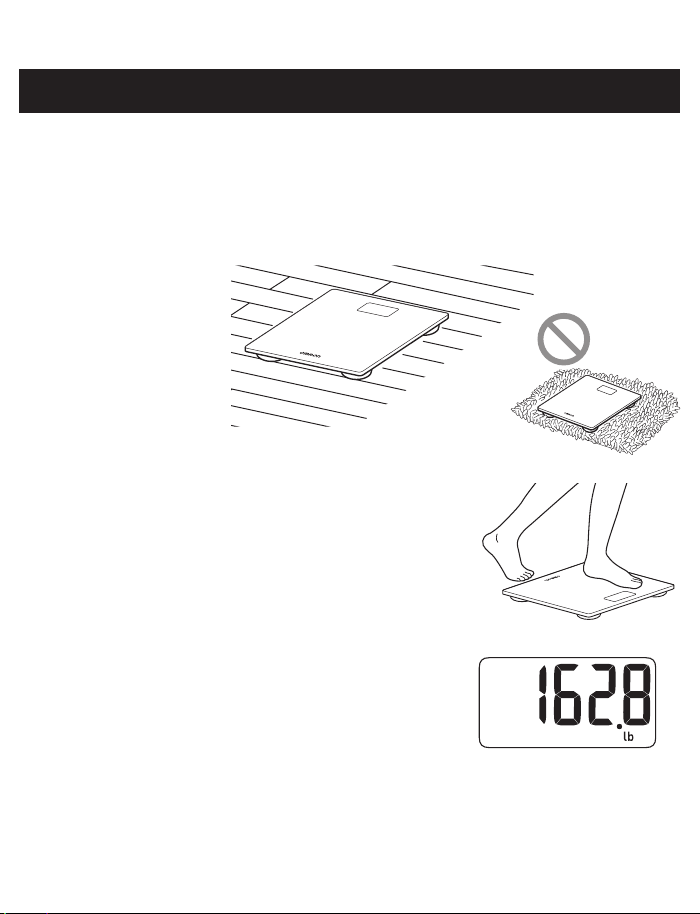
1. Place the scale on a hard, flat and level floor.
Note:
• This scale is recommended for use by one person.
• Do not place the scale on a cushioned surface such as a carpet or a mat.
2. Step onto the scale when it is turned off and take
a measurement.
The power is automatically turned on and the measurement
will start.
Note:
• Remain still during your measurement.
3. When your weight flashes, your measurement is
complete.
4. Step off of the scale.
The scale will automatically turn off after 10 seconds.
If you want to transfer your reading, refer to section 4.
13
4. TRANSFERRING YOUR READING
Open the app on your smart device.
4.1 Transferring Your Reading Automatically
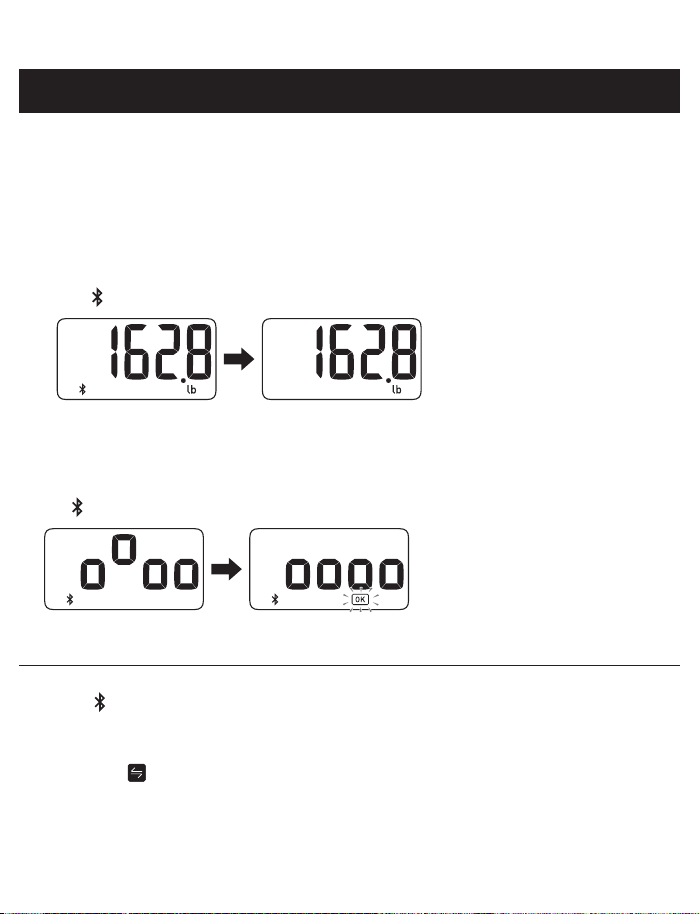
Your reading will be transferred to your smart device automatically within 30 minutes after the
scale is turned off.
Note:
• If your reading is transferred before the scale is turned off, the display shows as below with
the “ ” symbol showing on the display during the transfer.
The scale will automatically
turn off.
Transferring the reading. The transfer is completed.
4.2 Transferring Your Reading Manually
To transfer the readings manually, press the [Bluetooth] button during the power is off.
The “ ” symbol appears from the start of transferring to the end.
The scale will automatically
turn off after 10 seconds.
Transferring the reading. The transfer is completed.
Note:
• If the “ ” symbol does not appear, refer to “The data is not being transferred.” in section 6
for more detail.
• This scale will store up to 30 readings for one user. Stored readings cannot be viewed on the
scaleʼs display. You can view your readings on the app after transferring.
• When the “ ” symbol appears on the display, your reading was not transferred. Transfer
the readings immediately before the oldest reading is deleted.
14
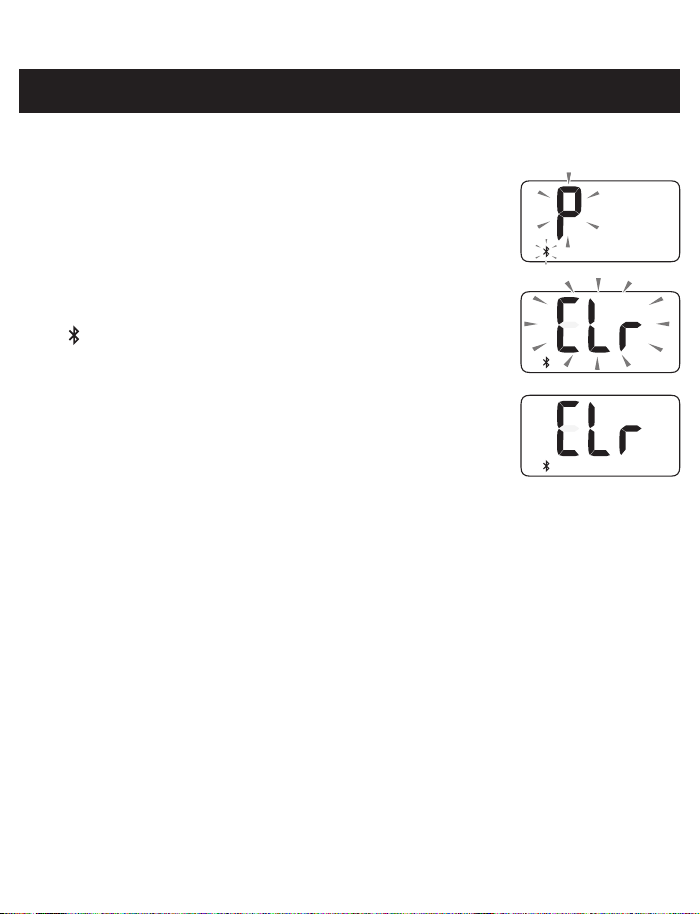
5. RESTORING THE SCALE TO THE DEFAULT SETTINGS
To delete all information stored in the scale, follow the instructions below. Make sure that the
scale is turned off.
1. Press the [Bluetooth] button for more than 2 seconds.
The display flashes as shown on the right.
2. Press the [Bluetooth] button again for more than 5 seconds.
The display flashes as shown on the right and the
“ ” symbol stops flashing.
3. Press the [SET] button.
When the display stops flashing, the scale is restored to the
default settings.
Note:
• The scale will automatically turn off after 10 seconds.
• Restoring to the default setting of the scale does not delete the information in the app.
15
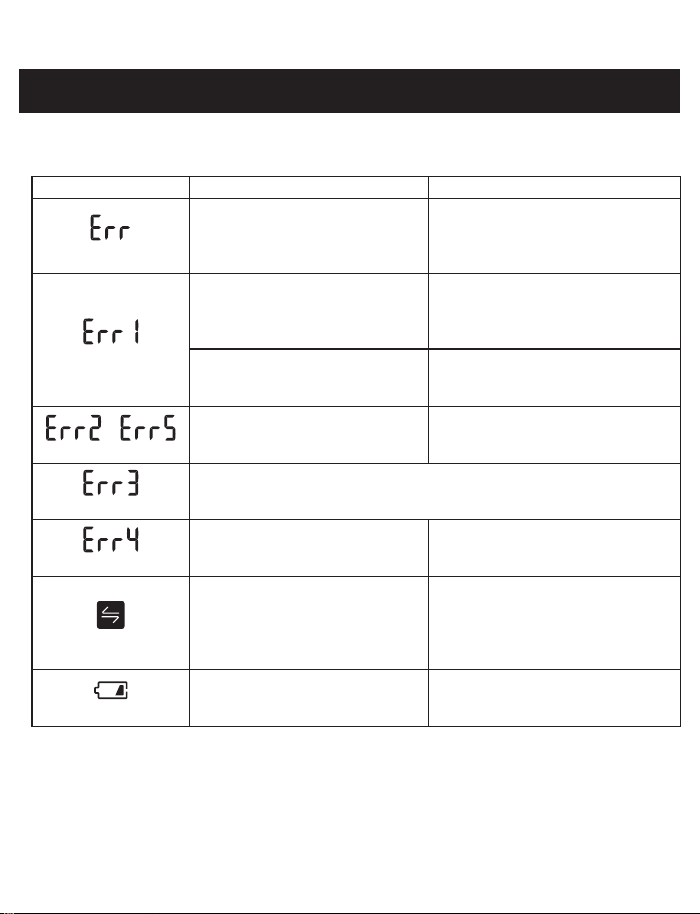
If any of the below problems occur during a measurement, check to make sure that no other
electrical device is within 12 inches (30 cm). If the problem persists, refer to the table below.
Display/Problem Possible Cause Solution
Appears
The scale cannot connect to a
smart device or transfer data
correctly.
Follow the instructions shown in the
app. If the “Err” still appears after
checking the app, contact OMRON
customer service.
Appears
You moved during a
measurement.
Step off of the scale and it will
automatically turn off after 10
seconds, then take a measurement
again.
You took a measurement in the
room under the effect of strong
magnetic fields.
Take a measurement again in
another room.
/
Appears
Device error. Contact OMRON customer service.
Appears
Your body weight is out of the measurable range.
Appears
Misalignment during
autocalibration.
Repeat the measurement.
Appears
Your reading was not transferred.
Transfer your readings to the
app. Refer to section 4 for more
information. After your readings
have been successfully transferred,
this symbol will disappear.
Flashes
Batteries are low.
Replacing all 4
batteries with new
ones is recommended. Refer to
sub-section 2.1.
6. ERROR MESSAGES AND TROUBLESHOOTING
16
6. ERROR MESSAGES AND TROUBLESHOOTING
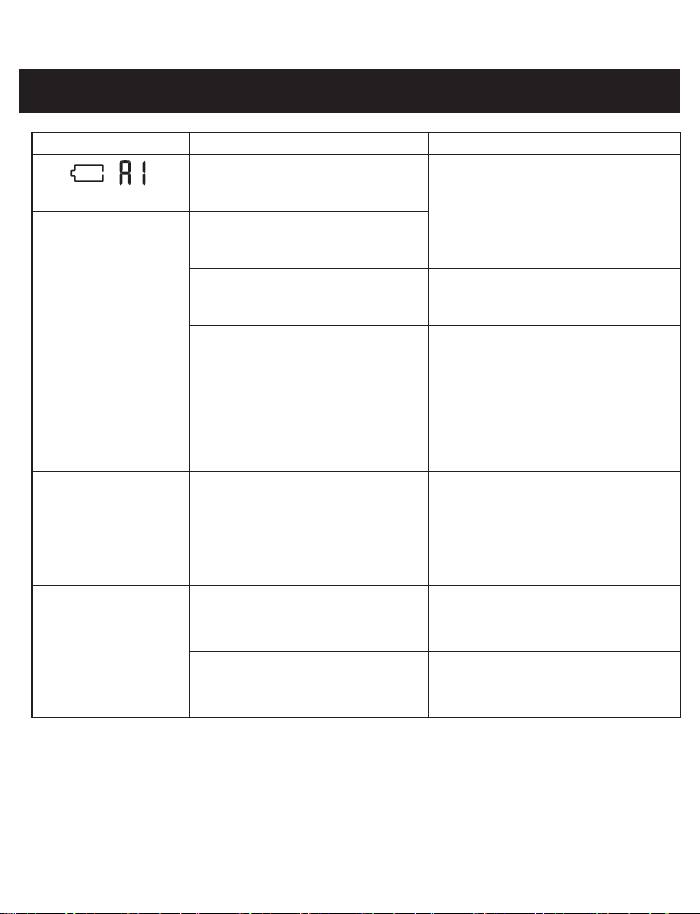
Display/Problem Possible Cause Solution
,
Appears
Batteries are depleted.
Immediately replace all 4 batteries
with new ones.
Refer to sub-section 2.1.
Stepping onto the
scale does not turn it
on.
Batteries are depleted.
Battery polarities are not properly
aligned.
Check the battery installation for
proper placement.
Refer to sub-section 2.1.
The user’s weight is less than
22.1
lb (10 kg).
This scale requires a weight load
of 22.1 lb (10 kg) or higher to
automatically turn on. If the user
weighs less than 22.1 lb (10 kg),
place an object that weighs 22.1 lb
(10 kg) or higher to turn the scale
on, and then proceed to take a
weight measurement.
Connection failure.
The data is not being
transferred.
Your smart device is too far away
from the scale.
After checking that there are no
sources of interference nearby,
move the receiving device to a
distance within 5 m (16 ft.) of the
scale. Then try to connect again.
Your measurement
result is higher or
lower than the actual
value.
Your result varies
widely for each
measurement.
You take a measurement on a
carpet or cushioned floor surface,
or an uneven floor.
Ensure the scale is correctly placed
on a hard, flat and level floor.
The scale did not properly auto-
calibrate.
Calibrate your scale. Refer to
section 8.
17
7. MAINTENANCE
7.1 Maintenance
To protect your scale from damage, follow the directions below:
• Use a soft dry cloth, or a soft cloth moistened with mild (neutral) detergent to clean the scale.
• Store the scale in a clean, safe location.
• Do not use any abrasive or volatile cleaners, gasoline, thinners or similar solvents to clean
the scale.
• Do not clean the scale by immersing it in water.
7.2 Proper storage
The scale recalibrates automatically when it is not in use.
If the automatic calibration does not work, see section 8 for instructions on how to manually
calibrate your scale.
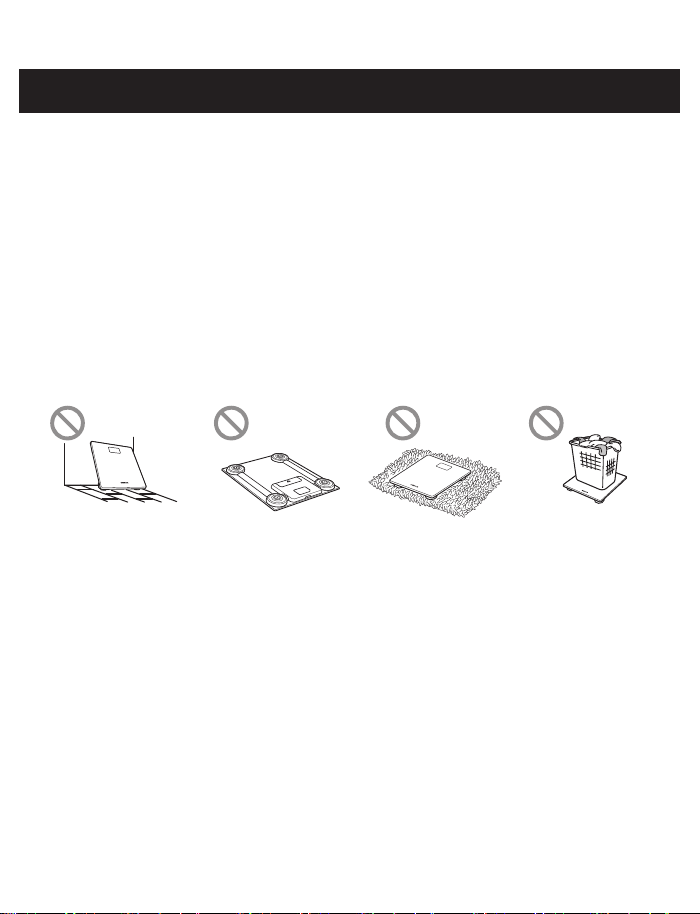
To help ensure automatic calibration, do not store your scale as shown in images below:
The scale is leaning
against the wall or
other objects
The scale is placed
upside down
The scale is placed
on the carpet or
mat
The object is
placed on the
scale

18
To calibrate your scale, follow the instructions below.
1. Place the scale on a hard, flat and level floor.
2. Press the surface of the scale with your hand to turn on the power.
3. When “0.0 lb” (or “0.0 kg”) is displayed, wait for 1 minute to turn the scale off.
Then you can take a measurement.
8. CALIBRATION
19
9. SPECIFICATIONS
Product name OMRON SC-150 Scale with Bluetooth
®
Model
SC-150
HN-300T2-Z
Display 11 to 330 lb with an increment of 0.2 lb
(5 to 150 kg with an increment of 0.1 kg)
Weight accuracy 11.0 to 330.0 lb : ±(1 %+0.2 lb)
(5 to 150 kg : ±(1 %+0.1 kg))
Transmission method Bluetooth
®
Low Energy
Wireless
communication
Frequency range: 2.4 GHz (2400 - 2483.5 MHz)
Modulation: GFSK
Effective radiated power: <20 dBm
Durable Period 5 years
IP classification IP21
Power supply 4 “AAA” batteries
Battery life Approximately 3 months: using manganese batteries
Approximately 6 months: using alkaline batteries
(When each types of batteries are used in two measurement, two data
transfer a day at a room temperature of 73.4 °F (23 °C))
Operating conditions +41 to +104 °F (+5 to +40 °C), 30 to 85 % RH (non-condensing),
860 to 1060 hPa
Storage conditions -4 to +140 °F (-20 to +60 °C), 10 to 95 % RH (non-condensing)
Weight Approximately 3.3 lb (1.5 kg)
including batteries
External dimensions Approximately 10 5/8" (W) × 1 1/32" (H) × 11 27/64" (D)
270 (W) × 26.4 (H) × 290 (D) mm
Contents Digital weight scale, 4 “AAA” manganese batteries, instruction
manual, quick start guide
Applied part
Type BF (Plate)
Notes:
• These specifications are subject to change without notice.
• IP classification is degrees of protection provided by enclosures in accordance with IEC
60529. This device is protected against solid foreign objects of 0.5 inch (12.5 mm) diameter
and greater such as a finger. This device is protected against vertically falling water drops
which may cause issues during a normal operation.
20
9. SPECIFICATIONS
About a wireless communication interference
This product operates in an unlicensed ISM band at 2.4 GHz. In the event this product is
used near other wireless devices such as microwave and wireless LAN, which operate on
the same frequency band as this product, there is a possibility that interference may occur.
If interference occurs, stop the operation of the other devices or relocate this product away
from other wireless devices before attempting to use it.

21
FCC CAUTION
Changes or modifications not expressly approved by the party responsible for compliance
could void the user’s authority to operate the equipment.
This device complies with part 15 of FCC Rules and Innovation, Science and Economic
Development Canada’s licence-exempt RSS(s). Operation is subject to the following two
conditions: (1) this device may not cause harmful interference, and (2) this device must accept
any interference received, including interference that may cause undesired operation.
Note:
This equipment has been tested and found to comply with the limits for a Class B digital
device, pursuant to part 15 of the FCC Rules. These limits are designed to provide reasonable
protection against harmful interference in a residential installation. This equipment generates,
uses and can radiate radio frequency energy and, if not installed and used in accordance with
the instructions, may cause harmful interference to radio communications. However, there is
no guarantee that interference will not occur in a particular installation. If this equipment does
cause harmful interference to radio or television reception, which can be determined by turning
the equipment off and on, the user is encouraged to try to correct the interference by one or
more of the following measures:
• Reorient or relocate the receiving antenna.
• Increase the separation between the equipment and receiver.
• Connect the equipment into an outlet on a circuit different from that to which the receiver is
connected.
• Consult the dealer or an experienced radio/TV technician for help.
This transmitter must not be co-located or operated in conjunction with any other antenna or
transmitter.
This equipment complies with FCC/ISED radiation exposure limits set forth for an uncontrolled
environment and meets the FCC radio frequency (RF) Exposure Guidelines and RSS-102 of
the ISED radio frequency (RF) Exposure rules as this equipment has very low levels of RF
energy.
10. FCC/ISED STATEMENT AND TRADEMARKS
22
11. LIMITED WARRANTY
The OMRON SC-150 Scale with Bluetooth
®
excluding batteries, is warranted to be free from
defects in materials and workmanship appearing within 1 year from the date of purchase,
when used in accordance with the instructions provided with the scale. The above warranty
extends only to the original retail purchaser, and only to products purchased from an Omron
authorized seller who is subject to and follows Omron’s quality control standards, unless
otherwise prohibited by law. We will, at our option, replace without charge any unit covered by
the above warranty. Replacement is our only responsibility and your only remedy under the
above warranty.
To obtain warranty service contact Customer Service by calling 1-800-634-4350 for the
address of the inspection center and the return shipping and handling fee.
Enclose the original printed receipt. Include a letter, with your name, address, phone number,
and description of the specific problem. Pack the product carefully to prevent damage in
transit. Because of possible loss in transit, we recommend insuring the product with return
receipt requested.
FOREGOING IS THE SOLE WARRANTY PROVIDED BY OMRON IN CONNECTION
WITH THIS PRODUCT, AND OMRON HEREBY DISCLAIMS ANY OTHER WARRANTIES,
EXPRESS OR IMPLIED, INCLUDING IMPLIED WARRANTIES OF MERCHANTABILITY AND
FITNESS FOR A PARTICULAR PURPOSE. IMPLIED WARRANTIES AND OTHER TERMS
THAT MAY BE IMPOSED BY LAW, IF ANY, ARE LIMITED IN DURATION TO THE PERIOD
OF THE ABOVE EXPRESS WARRANTY.
OMRON SHALL NOT BE LIABLE FOR LOSS OF USE OR ANY OTHER SPECIAL,
INCIDENTAL, CONSEQUENTIAL OR INDIRECT COSTS, EXPENSES OR DAMAGES.
This warranty provides you with specific legal rights, and you may have other rights which
vary by jurisdiction. Because of special local requirements, some of the above limitations and
exclusions may not apply to you.
FOR CUSTOMER SERVICE
Visit our web site at:
For USA - OmronHealthcare.com
For Canada - OmronHealthcare.ca
Call toll free: 1-800-634-4350
23
12. GUIDANCE AND MANUFACTURER’S DECLARATION
OMRON SC-150 Scale with Bluetooth
®
Information for Accompanying Documents in the
Scope of IEC60601-1-2:2014
Important information regarding Electromagnetic Compatibility (EMC)
SC-150 conforms to IEC60601-1-2:2014 Electromagnetic Compatibility (EMC) standard.
Further documentation in accordance with this EMC standard is available at
OmronHealthcare.com/emc. Refer to the EMC information for SC-150 on the website.
The Bluetooth
®
word mark and logos are registered trademarks owned by Bluetooth SIG,
Inc. and any use of such marks by OMRON HEALTHCARE Co., Ltd. is under license. Other
trademarks and trade names are those of their respective owners.

OMRON HEALTHCARE Co., Ltd.
53, Kunotsubo, Terado-cho
Muko, Kyoto, 617-0002 JAPAN
Distributed by :
OMRON HEALTHCARE, INC.
2895 Greenspoint Pkwy. Hoffman Estates, IL 60169 USA
For USA - OmronHealthcare.com
For Canada - OmronHealthcare.ca
© 2021 OMRON HEALTHCARE, INC.
Made in China

Omron Healthcare helps you
make positive lifestyle changes
with innovative home health
products that you can use
safely and accurately at home.
OmronHealthcare.ca
For questions: 1-800-634-4350
Get general pain info:
OmronHealthcare.ca