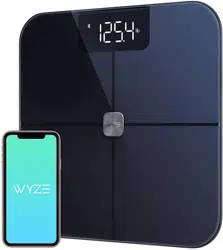
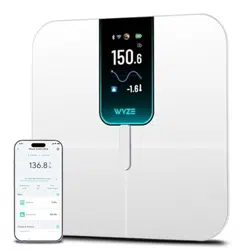
Overview
The Wyze Scale Ultra is a smart body composition scale designed to track a comprehensive range of health metrics. It features a large color display and connects to your smartphone via Wi-Fi and Bluetooth for data synchronization and analysis.

Features and Specifications
Physical Specifications
| Attribute | Specification |
|---|---|
| Dimensions | 11.8 in x 11.8 in x 1.18 in |
| Weight | 3.96 lbs (1.8 kg) |
| Weight Capacity | 11 - 400 lbs / 5 - 180 kg |
| Readout Accuracy | 0.1 lbs |
| Display | 4.3-inch Color TFT Screen |
| Surface | ITO Coated Glass |
| Power | 4 x 1.5V AAA Batteries (included) |
| Included Components | Scale Ultra x 1; 1.5V AAA Batteries x 4; Quick Start Guide x 1 |
Technical Features
- Connectivity: Dual Wi-Fi and Bluetooth connectivity for automatic data sync.
- Body Metrics: Tracks 13 essential body composition metrics.
- Multi-Mode: Includes Baby, Pet, and Luggage weighing modes.
- User Recognition: Automatically recognizes and syncs data for up to 8 unique users.
- App Integration: Syncs with Wyze app, Apple Health, Health Connect, and Fitbit.
- Display Units: Supports pounds (lb) and kilograms (kg).
- OS Compatibility: Android 9.0+ and iOS 15.0+.

Setup and Installation
- Insert Batteries: Open the battery compartment on the underside of the scale and insert the four included AAA batteries, observing the correct polarity.
- Place the Scale: Place the scale on a hard, flat, and level surface. Ensure the anti-slip floor contacts are firmly on the ground.
- Power On: The scale will power on automatically. The display will illuminate.
- Download the Wyze App: On your smartphone, download and install the "Wyze" app from the Apple App Store or Google Play Store.
- Create/Log into Account: Open the app and create a new Wyze account or log into an existing one.
- Add a Device: In the app, tap the '+' icon to add a new device. Select "Wyze Scale Ultra" from the list.
- Follow In-App Pairing: Follow the on-screen instructions to connect the scale to your Wi-Fi network and pair it via Bluetooth with your phone.
- User Profile Setup: Create a user profile in the app by entering details such as height, age, and gender. This is required for accurate body composition calculations.
Note: Avoid using the scale in areas with potential high-frequency signal interference. Ensure the ground is flat and the scale is level for accurate measurements.
Use Guide
Taking a Basic Weight Measurement
- Ensure the scale is on a flat, stable surface.
- Step onto the scale with bare feet, ensuring your feet make contact with the metal electrodes on the glass surface.
- Stand still until your weight stabilizes and is displayed on the screen.
- Step off the scale. The measurement will be saved and synced to the app if connected.
Understanding the Display
The 4.3-inch screen can be customized via the Wyze app to show different metrics after weighing. By default, it may show:
- Weight
- Body Fat Percentage
- BMI
- Muscle Mass
To customize displayed metrics: Open the Wyze app, go to Bathroom Scale > Scale Settings > Screen Settings.

Using Multi-Mode (Baby/Pet/Luggage)
- Open the Wyze app and select your scale.
- Navigate to the weighing mode settings.
- Select Baby Mode, Pet Mode, or Luggage Mode.
- Step onto the scale alone to get your baseline weight. The display will indicate it's ready for the next step.
- Step off, then step back on while holding your baby, pet, or luggage.
- The scale will calculate and display the weight of the item/person you are holding.
Tracking Metrics and Trends
All historical data is stored in the Wyze app. You can view trends for weight and other body composition metrics over time. The app also displays heart rate measurements, which are not shown on the scale's screen.

Sharing Data and User Recognition
The scale can automatically recognize up to 8 different users based on their weight profile and sync data to their respective app profiles. You can share data and trends with an unlimited number of people through the app's sharing features.
Body Composition Metrics
The scale measures the following 13 metrics. Note that body composition metrics are estimated using Bioelectrical Impedance Analysis (BIA).
| Displayed on Scale | Displayed in Wyze App Only |
|---|---|
|
|
Important Notes on Body Composition:
- Body composition metrics (body fat %, water %, etc.) are only available for individuals aged 10-100.
- For users aged 10-17, body composition metrics are for reference only.
- For accurate BMI calculation, ensure your correct height is recorded in the Wyze app.
- Heart rate measurement is only available and displayed within the Wyze app.
App Integration and Syncing
Supported Apps
The Wyze Scale Ultra can sync data with the following third-party health and fitness applications:
- Apple Health (iOS)
- Health Connect (Android)
- Fitbit
Samsung Health is not supported.
To enable syncing, go to the Wyze app settings for your scale and follow the instructions to connect to your preferred health app.

Troubleshooting
Scale Won't Connect to Bluetooth or Sync with App
- Ensure Bluetooth is enabled on your smartphone.
- Update the Wyze app to the latest version.
- Restart the scale by removing and reinserting one battery.
- Delete the scale from the Wyze app and re-add it.
- Check that your phone model is compatible (Android 9.0+ or iOS 15.0+).
- Ensure the scale's batteries are not low.
Inaccurate or Fluctuating Readings
- Place the scale on a hard, flat, level surface (not carpet).
- Ensure your feet are clean, dry, and making full contact with the electrodes.
- Stand still during the measurement.
- Check that the scale's firmware is up to date in the Wyze app.
Display is Blank or Dim
- Replace the four AAA batteries with new ones.
- Ensure the batteries are inserted with the correct polarity.
Body Composition Metrics Not Showing
- Verify the user's age in the app is between 10 and 100.
- Ensure a complete user profile (height, gender, age) is set up in the app.
Care and Maintenance
- Cleaning: Wipe the glass surface with a soft, slightly damp cloth. Do not use abrasive cleaners or submerge the scale in water.
- Storage: Store in a cool, dry place. Avoid extreme temperatures.
- Batteries: Replace all four AAA batteries when the low battery icon appears on the display or if the scale becomes unresponsive. Use high-quality batteries for best performance.
- Surface: The ITO coated glass is durable but can be scratched. Avoid dropping heavy or sharp objects on it.
Technical Details
| Brand | WYZE SCALE |
|---|---|
| Model | Scale Ultra |
| UPC | 810083474724 |
| ASIN | B0DZ5H6S4F |
| Manufacturer | Wyze Lab |
| Recommended Uses | Adults, Animals, Babies, Luggage |
| Special Features | Body Fat, Body Mass, Bodyweight, Heart Rate, Smart |
| Weigh Scale Type | Counter Scale |
| Measurement Type | Digital |
| Material | Plastic, Tempered Glass |