Overview
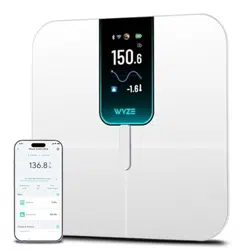
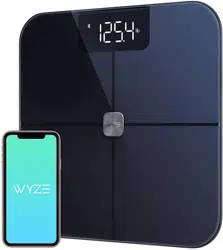
The Wyze Scale Ultra is a smart digital scale with a 4.3-inch color display. It measures body weight and composition, connects via Wi-Fi and Bluetooth, and supports multiple users and modes.

Features
Display and Design
- 4.3-inch Color TFT Display: Large screen for viewing metrics. The display is customizable via the Wyze app.
- Dimensions: 11.8 x 11.8 x 1.18 inches.
- Weight Capacity: 400 lbs (180 kg).
- Readout Accuracy: 0.1 lbs.
- Surface: ITO coated glass for accurate body composition measurements.
- Anti-Slip Floor Contacts: Provides stability during use.

Connectivity
- Dual Connectivity: Wi-Fi and Bluetooth.
- Data syncs automatically over Wi-Fi without needing your phone nearby.
- Compatible with Android 9.0+ and iOS 15.0+.

Health Metrics
The scale tracks 13 essential body composition metrics:
- Weight
- BMI (Body Mass Index)
- Body Fat Percentage
- Muscle Mass
- Lean Body Mass
- Visceral Fat
- Basal Metabolic Rate (BMR)
- Bone Mass
- Metabolic Age
- Protein
- Body Water Percentage
- Heart Rate (displayed in the Wyze app only)

Multi-User and Multi-Mode
- Automatic User Recognition: Supports up to 8 unique users.
- Baby Mode: For weighing infants.
- Pet Mode: For weighing pets.
- Luggage Mode: For weighing bags and other items.
Data Syncing and Compatibility
- Syncs data with the Wyze app.
- Compatible with Apple Health, Health Connect, and Fitbit.
- Samsung Health is not supported.

Use Guide
Initial Setup
- Install Batteries: Insert the 4 included AAA batteries into the compartment on the underside of the scale.
- Place the Scale: Place the scale on a hard, flat, horizontal surface. Avoid carpets or uneven floors.
- Power On: Step on the scale to activate the display. It will show "0.0" when ready.
- Download the Wyze App: Install the Wyze app on your smartphone (Android 9.0+ or iOS 15.0+).
- Add Device in the App: Open the Wyze app, tap the '+' icon, and select "Wyze Scale Ultra" to begin pairing. Follow the in-app instructions to connect via Bluetooth and Wi-Fi.
- Create User Profile: In the app, set up your profile with accurate height, age, and gender information for correct BMI and body composition calculations.
Taking a Measurement
- Ensure the scale is on a flat, stable surface.
- Step onto the scale with bare feet. Stand still, with your feet aligned with the electrodes on the glass surface.
- The display will show your weight, followed by selected body composition metrics.
- Step off the scale. The measurement will sync to the Wyze app automatically if Wi-Fi is connected.
Note: For accurate body composition metrics (body fat %, muscle mass, etc.), users must be between 10 and 100 years old. Measurements for users aged 10-17 are for reference only. Heart rate is only displayed within the Wyze app.
Using Special Modes (Baby/Pet/Luggage)
- Open the Wyze app and navigate to the scale settings.
- Select the desired weighing mode (Baby, Pet, or Luggage).
- Place the item on the scale. For Baby or Pet mode, ensure they are still.
- The weight will be displayed. The data for these modes is not saved to a user profile.
Customizing the Display
You can choose which metrics appear on the scale's screen after weighing:
- In the Wyze app, go to Bathroom Scale > Scale Settings > Screen Settings.
- Select the metrics you want to be displayed.
Viewing Trends and History
- Open the Wyze app to view graphs and trends of your weight and body composition over time.
- Data syncs with compatible fitness apps (Apple Health, Health Connect, Fitbit) for a consolidated view.
Technical Specifications
- Brand: WYZE SCALE
- Model: WSCLU_BL
- Color: Black
- Material: Plastic, Tempered Glass
- Display Type: TFT
- Weight Limit: 400 Pounds
- Form Factor: Flat Platform
- Readout Accuracy: 0.1 Pounds
- Item Weight: 4.71 pounds (2.14 kg)
- Power: 4 x AAA batteries (included)
- Package Dimensions: 13.82 x 13.62 x 1.81 inches
Troubleshooting
Scale Won't Connect to Bluetooth or App
- Ensure Bluetooth is enabled on your phone.
- Update the Wyze app to the latest version.
- Restart the scale by removing and reinserting the batteries.
- Delete the device from the Wyze app and re-add it.
- Check that your phone model is compatible (Android 9.0+, iOS 15.0+).
Inaccurate or Inconsistent Readings
- Ensure the scale is on a hard, flat, horizontal surface. Do not use on carpet.
- Make sure your feet are clean, dry, and making full contact with the glass.
- Stand still during the measurement.
- Update the device firmware via the Wyze app.
- Avoid using the scale in areas with potential high-frequency signal interference.
Display Shows "Err" or No Reading
- Check that the batteries are properly installed and have sufficient charge.
- Ensure the scale is not overloaded (max 400 lbs / 180 kg).
- Reposition the scale on a flat, stable surface.
Difference Between Scale and App Metrics
The scale display can show: Weight, Body Fat %, Lean Body Mass, BMI, Muscle Mass, Muscle Mass %, Visceral Fat, BMR, Bone Mass, Metabolic Age, Protein, Body Water %.
The Wyze app displays all of the above plus Heart Rate.
What's in the Box
- Wyze Scale Ultra x 1
- 1.5V AAA Batteries x 4
- Quick Start Guide x 1