Overview
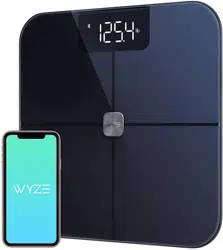
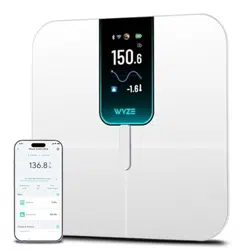
The Wyze Scale Ultra is a smart body composition scale designed to track a variety of health metrics. It features a large color display, Wi-Fi and Bluetooth connectivity, and supports multiple users.

The scale measures weight and calculates body composition metrics such as body fat percentage, muscle mass, BMI, and more. It can sync data to the Wyze app and other fitness applications.
Features
Display and Interface
- 4.3-inch Color TFT Screen: Large, customizable display for viewing metrics directly on the scale.
- Customizable Metrics: Select which body composition data to show on the scale screen via the Wyze app.

Connectivity
- Dual Wi-Fi & Bluetooth: Automatically syncs data via Wi-Fi, allowing use without your phone nearby. Bluetooth is also available for direct connection.

Health Metrics
The scale tracks 13 essential body composition metrics:
- Weight
- BMI (Body Mass Index)
- Body Fat Percentage
- Muscle Mass
- Lean Body Mass
- Visceral Fat
- Basal Metabolic Rate (BMR)
- Bone Mass
- Metabolic Age
- Protein Percentage
- Body Water Percentage
- Heart Rate (displayed in the Wyze app only)

Multi-User and Sharing
- Smart User Recognition: Automatically recognizes and syncs data for up to 8 unique users.
- Unlimited Sharing: Share data and trends with an unlimited number of people through the app.
Special Modes
- Baby/Pet/Luggage Mode: Weigh objects by holding them. The scale calculates the net weight. Select this mode in the Wyze app.
Design and Build
- ITO Coated Glass: Conductive glass surface allows for accurate body composition readings from any step position.
- Anti-Slip Floor Contacts: Provides stability on various floor surfaces.

Use Guide
Initial Setup
- Install Batteries: Insert the 4 included AAA batteries into the compartment on the bottom of the scale.
- Place the Scale: Place the scale on a hard, flat, and level surface. Avoid carpets or uneven floors.
- Download the Wyze App: Install the Wyze app on your smartphone (Android 9.0+ or iOS 15.0+).
- Add the Device: Open the Wyze app, tap the '+' to add a device, and follow the on-screen instructions to connect the scale via Bluetooth.
- Connect to Wi-Fi: In the app, connect the scale to your home Wi-Fi network for automatic data syncing.
- Create User Profile: Set up your profile in the app, including accurate height, age, and gender for correct BMI and body composition calculations.
Taking a Measurement
- Ensure the scale is on a flat surface and your feet are dry.
- Step onto the scale barefoot. Stand still with your feet aligned with the electrodes.
- The display will turn on and show your weight. After a moment, it will cycle through your selected body composition metrics.
- Step off the scale. The data will be saved and synced to the app if connected to Wi-Fi or Bluetooth.
Using the Wyze App
- View Metrics: Open the app to see detailed metrics, including heart rate, which is only displayed here.
- Track Trends: View graphs and charts of your historical data for weight and other metrics.
- Customize Display: Go to Bathroom Scale > Scale Settings > Screen Settings to choose which metrics appear on the scale's screen.
- Set Modes: Activate Baby/Pet/Luggage mode or Athlete mode from the device settings in the app.

Syncing with Other Apps
The Wyze Scale Ultra can sync data with:
- Apple Health
- Health Connect (Android)
- Fitbit
Enable these connections within the Wyze app settings. Note: Samsung Health is not supported.
Specifications
- Brand: WYZE SCALE
- Display: 4.3-inch Color TFT
- Weight Capacity: 11 lbs to 400 lbs (5 kg to 180 kg)
- Readout Accuracy: 0.1 lbs
- Materials: Plastic, Tempered Glass (ITO Coated)
- Power: 4 x AAA batteries (included)
- Connectivity: Wi-Fi (2.4 GHz), Bluetooth
- OS Compatibility: Android 9.0+, iOS 15.0+
- Dimensions: 11.8 in x 11.8 in x 1.18 in
- Item Weight: 3.96 lbs
Troubleshooting & FAQs
Common Issues
Scale won't connect to Bluetooth or sync with the app.
- Update the Wyze app to the latest version.
- Restart the scale by removing and reinserting the batteries.
- Delete the device from the Wyze app and re-add it.
- Check that your phone model is compatible (Android 9.0+ or iOS 15.0+).
Important Usage Notes
- Body Composition Metrics: Available for ages 10-100. For users 10-17, metrics are for reference only. Not available for children under 10 or seniors over 100.
- Placement: Always use on a hard, flat, level surface. Avoid areas with high-frequency signal interference.
- Batteries: Ensure batteries are properly installed and have sufficient charge. Low power can affect connectivity.
- Firmware: Keep the scale's firmware updated via the Wyze app for optimal performance.
Metric Display Differences
Displayed on the Scale Screen: Weight, Body Fat %, Lean Body Mass, BMI, Muscle Mass, Muscle Mass %, Visceral Fat, Basal Metabolic Rate, Bone Mass, Metabolic Age, Protein, Body Water %.
Displayed in the Wyze App Only: All of the above, plus Heart Rate.
What's in the Box
- Wyze Scale Ultra x 1
- 1.5V AAA Batteries x 4
- Quick Start Guide x 1