OWNER’S MANUAL AND SAFETY INSTRUCTIONS
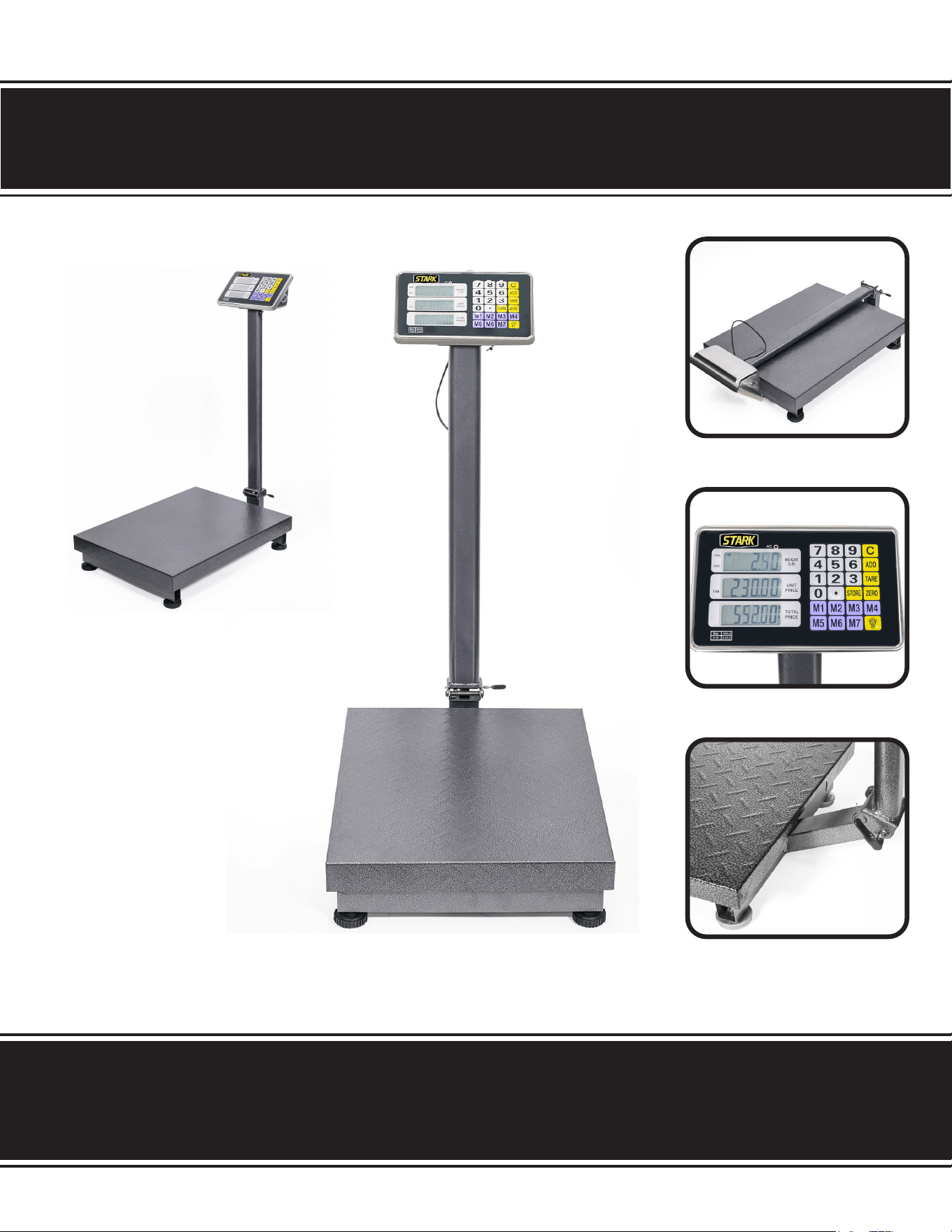
COUNTING SCALE 600LB
ITEM # 92050
SAVE THIS MANUAL. KEEP THIS MANUAL FOR SAFETY WARNINGS, PRECAUTIONS, ASSEMBLY,
OPERATION, INSPECTION, MAINTENANCE AND CLEANING PROCEDURES. WRITE THE PRODUCT’S
SERIAL NUMBER ON THE BACK OF THE MANUAL, OR THE MONTH AND YEAR OF PURCHASE IF
PRODUCT HAS NO SERIAL NUMBER
FOR QUESTIONS, PLEASE CALL CUSTOMER SERVICE: 909.628.4900
SAFETY INFORMATION
Read all safety warnings and instructions. Failure to follow the warnings
and instructions may result in injury and/or property damage. Save all
warnings and instructions for future reference.
The warning and safety instructions in this manual are not meant to cover all possible conditions
and situations that may occur. Common sense, caution and care must be exercised when
operating or cleaning tools and equipment. Always contact your dealer, distributor, service
agent or manufacturer about problems or conditions you do not understand before operating
the product.
SAVE THESE WARNINGS.
1
Never load the scale with more than 600lbs or permanent damage may occur.
Operate only at normal room temperatures and avoid exposure to extreme heat or cold.
If scale has been stored in a hot or cold location, allow it to acclimate to normal room temperature for
at least one hour before use.
Keep scale in a clean environment away from dust, dirt, moisture, vibration, air currents and close
proximity to other electronic equipment
Use only on at, stable surfaces. Gently place all items to be weighed on top of weighing platform.
Avoid shaking, dropping or otherwise shocking the scale.
Do not submerse the scale in water or in wet environments. Clean with a soft, dry cloth only.
Keep scale out of the reach of children or pets.
SAFETY INFORMATION
OPERTATION
SAVE THESE WARNINGS.
1 2
The price computing scale is low cost, highly accurate measuring equipment/ This scale is made
using highly accurate and precise sensors. It has the capacity to store up to 8 unit prices and 99
accumulation memory. It also has the ability to run on a rechargeable battery in case of a lack of
mains power.
FEATURES
Specications: 600g * 2g, 3kg * 1g, 6kg * 2g, 15kg * 5g, 30kg * 10g
Precision: 1/3000F.S.
AC 220V/110V and built in rechargeable battery.
Stores up to 8 unit prices
Accumulate operation 0-99
Account function, memory function, memory recall
Auto shut o function saves power
Display windows: Weight Window: 5 digits
Unit Price Window: 5 digits
Total Price Window: 6 digits
SCALE KEYS
ZERO: The ZERO Zero’s out the scale.
TARE: The TARE key subtracts tare values and changes the ACS from gross (no tare) to net mode.
STORE: The STORE key stores data in your scale.
ADD: The ADD key stores and accumulates the value of weight and amount.
M1 to MB: Stores the unit price value at 8 dierent locations.
C: The C key is used for canceling the memorized data.
0 ~ 9: The numeric keys used for setting the unit price data.
. : Decimal Point key is used for setting the decimal position of the unit price.
DISPLAY
DISPLAY INDICATORS
TARE INDICATOR: The TARE LED is located on the left side below the weight window.
ZERO INDICATOR: The ZERO LED is located on the right side below the weight indicator.
LOW BATTERY: LOW BATTERY indicator is located below the unit price window.
AC POWER: The AC POWER indicator is located below the total price window.

TECHNICAL INFORMATION
3
PARTS INFORMATION
OPERATION
1. When the battery goes low, the “low battery” indicator will be turned on automatically. If this indicator is on,
charge the battery with AC power.
2. Before starting, check that the bubble is in the middle of the level. Make adjustments if it is not level.
3. Allow the machine to warm up for 10 minutes after switching on the power.
ZERO THE SCALE: When there is no items on the scale, press the ZERO key to turn on the zero indicator.
Ensure that the scale is in the zero position and the indicator is glowing. Place the item on the scale. The weight
window will display the weight of the item.
TARE: Put the container on the platter, once the weight reading is stable, press the TARE key. The TARE
indicator will be on and the container’s weight will be deducted. When it is time to clear the TARE, take o the
container and press the TARE key again.
OVERLOAD WARNING: Do not add an item that is over the maximum capacity. When the scale is ringing
the alarm, remove the item to avoid damaging the scale.
UNIT PRICE SETTING: Set the unit price of goods, EPS-1 PR to set the price of goods weighing on the
scale. When the scale is displaying the weight of the goods placed on the scale, set the unit price through the
numeric keys. Set the unit showed in UNIT PRICE window display. TOTAL PRICE window display shows the
total price of the goods. To cancel the previous unit price, press the C key.
ACCUMULATOR OPERATION
PREPARE TO ACCUMULATE: Each time before accumulating, make sure the scale is empty, the current
accumulator value is reset to zero and the weight reading is stable. Then put the item on the scale, wait for the
weight reading to stabilize then press the ADD key. The window will show ADD n being the number if times a
count operation had been performed. If you have entered the unit price for the item, the accumulate operation
will show the total of both. Weight as well as price as follows: Place an item on the scale and allow the scale
reading to be stable. Enter the unit price using the numeric keys. The unit price window will show the unit price
and the total window will show the total price. Now press the ADD key, it will store the value of weight and price.
Now remove the rst item from the scale, place another item on the scale and allow it to become stable, enter
the unit price, after observing the unit price and total price, press the ADD key again, the unit price window will
ash ADD 2 and weight window as well. The Total price window will show the accumulated weight and price. You
can continue this up to 99 times with your scale. Clear the accumulated data by pressing the “C” key anytime.
UNIT PRICE STORAGE
UNIT PRICE STORAGE: Press the STORE key then enter the desired unit price using the numeric keypad.
then press M* (* = 1 to 8) key. If you already had a value there, it will be replaced by the new value.
LOADING UNIT PRICE: If you want to use the unit price stored in the ACS while weighing, press M* key
after the weighing display is stable. The unit price will be loaded and it will be displayed in the unit price window.
3
OPERTATION
TECHNICAL INFORMATION
DISCLAIMER
4
PLEASE READ THE FOLLOWING CAREFULLY
THE MANUFACTURER AND/OR DISTRIBUTOR HAS PROVIDED THE PARTS LIST AND ASSEMBLY
DIAGRAM IN THIS MANUAL AS A REFERENCE TOOL ONLY. NEITHER THE MANUFACTURER OR
DISTRIBUTOR MAKES ANY REPRESENTATION OR WARRANTY OF ANY KIND TO THE BUYER THAT HE
OR SHE IS QUALIFIED TO MAKE ANY REPAIRS TO THE PRODUCT, OR THAT HE OR SHE IS QUALIFIED
TO REPLACE ANY PARTS OF THE PRODUCT. IN FACT, THE MANUFACTURER AND/OR DISTRIBUTOR
EXPRESSLY STATES THAT ALL REPAIRS AND PARTS REPLACEMENTS SHOULD BE UNDERTAKEN
BY CERTIFIED AND LICENSED TECHNICIANS, AND NOT BY THE BUYER. THE BUYER ASSUMES
ALL RISK AND LIABILITY ARISING OUT OF HIS OR HER REPAIRS TO THE ORIGINAL PRODUCT OR
REPLACEMENT PARTS THERETO, OR ARISING OUT OF HIS OR HER INSTALLATION OF REPLACEMENT
PARTS THERETO.
Record Product’s Serial Number Here:
Note: If product has no serial number, record month and year of purchase instead.
Note: Some parts are listed and shown for illustration purposes only and are not available
individually as replacement parts.
MADE IN CHINA