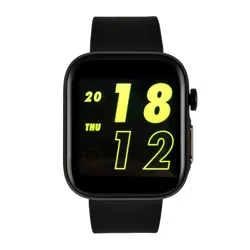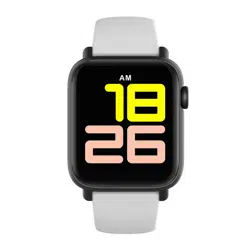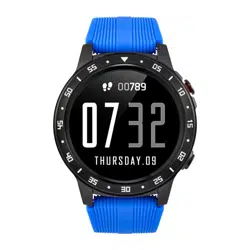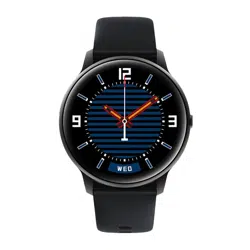
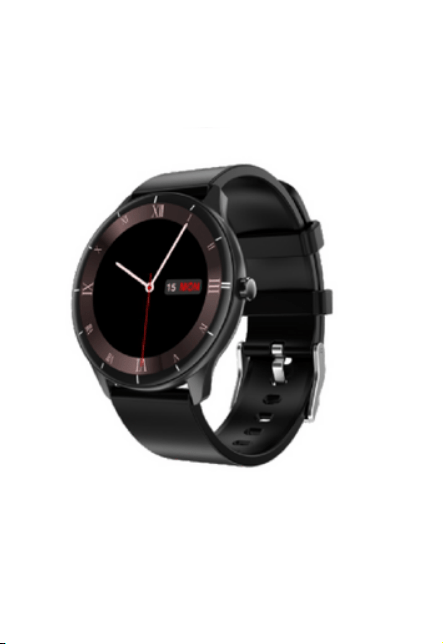
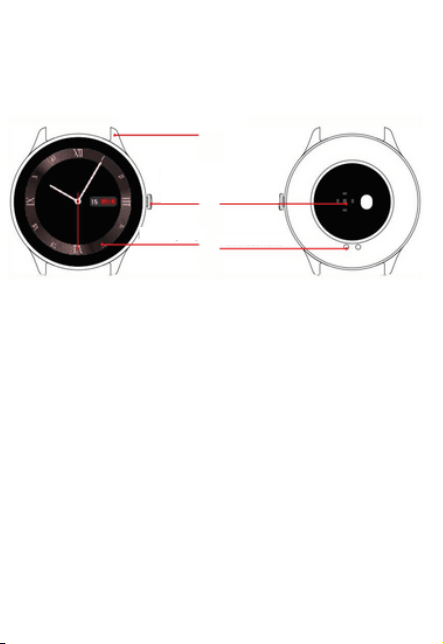
1. Appearance
4. Once the watch is paired, set the function settings
in the app according to your individual needs.
Please read the entire user manual carefully before use. It is
recommended to use only the original battery, charger and
accessories that come with the device.
Neither the manufacturer nor the distributor is responsible for
the use of third party accessories.
Please charge the device for no less than 2 hours before
using it for the first time.
Before using the device you must download the application,
install the application and accept all authorisations, otherwise
not all functions will be available.
The company reserves the right to change the content of this
manual.
DEAR CUSTOMER, THANK YOU
FOR PURCHASING OUR PRODUCT!
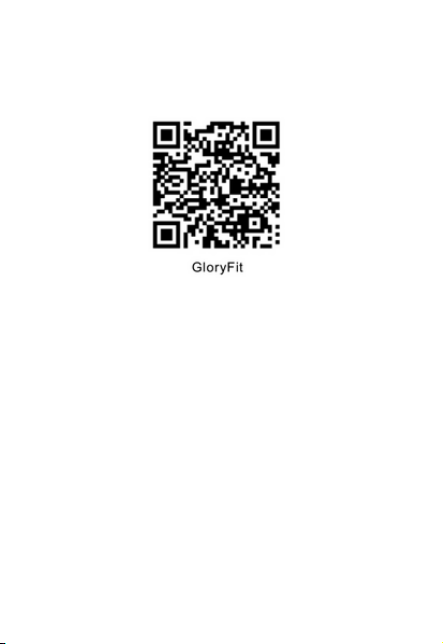
1. Scan the QR code below or go to the main app
marketplace and download and install the "GloryFit" app.
1. Press and hold for 4 seconds to turn on or off, press
briefly to return to the main interface.
2. On the home screen, press and hold for 3 seconds to
change the dial.
3. On the home screen, swipe down to display Bluetooth,
battery volume and context menu.
4. On the Home screen, swipe up to view incoming
messages and tap to read their contents.
5. Swipe right to view in the main interface. On the main
screen, swipe right to see the list of features.
6. On the main screen, swipe left to view the normal
functions.
Basic operations
Application
2 Package contents
Watch, user manual, charger
Battery specifications
Type: Model: Lithium Polymer Battery Y0392121
Battery Capacity: 180 mAh Charging voltage: 4,2
Charging current: 40 mA
4. Method of connection
Short introduction
charging
point
touch screen
aluminium frame
on/off
button
heart rate
sensor
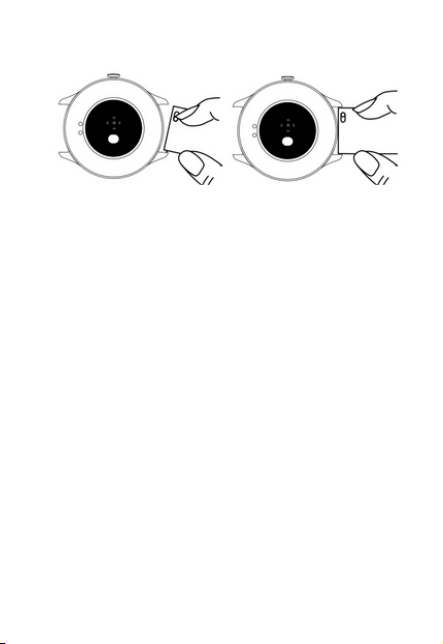
step 1 step 2
2.Once you have downloaded the application, start the
new user registration.
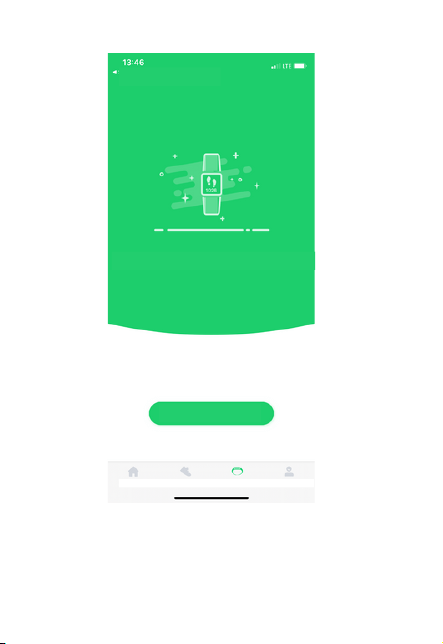
3.Pair your watch
Device -> Add Device -> Pair Watch
Basic functions
Main interface:
Press and hold for 3 seconds to change the main interface
dial.
Exercise status.
Track your current steps, distance and calories in real
time.
Body temperature monitoring
Switch to the body temperature measurement interface
body surface temperature and current body temperature
over time.
Heart rate monitoring
Switch to the heart rate monitor screen, the current heart
rate will be measured automatically, slide to complete the
measurement. Real-time heart rate measurement can be
turned on or off in the app.
Blood saturation monitoring
Touch the oxygen saturation monitoring screen to start
the measurement, the watch vibrates to remind you to
finish the measurement.
Blood pressure monitoring
Current high and low blood pressure can be measured
over time and synchronised with it
can be synchronised with the app.
Add device to save data
Add device
www.watchmark.com
ul. Paprotna 7
Wrocław
Stopwatch
Touch to move to the stopwatch and click to start. The
stopwatch can be stopped, restarted, or reset.
Countdown
Touch to access the countdown, select a time, or scroll
up to set the countdown time.
Scroll up to set the countdown time.
Sleep monitoring
You can check your sleep from the previous night by
switching to the sleep monitoring interface. When you fall
asleep with the watch on, deep sleep, shallow sleep and
total hours of sleep are automatically recorded.
Flashlight
Tap to activate torch mode and swipe right to exit.
Additional reminder functions
Incoming call reminder / Message reminder / Alarm
reminder Sitting reminder / Target reminder.
Precautions
Weather
When you log into the app, you will see the weather for
that day and the following week.
Message reminder
The last 8 messages are stored, which you can touch to
read or touch to delete.
Read or touch to clear.
24 sports modes
Touch a sport mode to go to the list of sports, touch the
selected sport mode to start measuring, swipe right to
pause, touch to stop or resume,
stop or continue.
DNO mode
DNO time can be set in the app, the mode can be turned
on or off on the watch.
Adjust brightness
Tap "+" and "-" to adjust the brightness, there are four levels.
Find your phone
Touch Find Your Phone and your phone will ring as a
reminder without the screen backlight.
Settings
Information, shutdown, and reset.
Music control
Play music on your phone, touch the clock,
pause/play, previous, next
1.Avoid strong shocks, extreme heat and sunlight.
2.Do not disassemble, repair or modify the unit without
authorization.
3.This unit is charged using the SV 500MA power supply.
Charging a surge source is strictly prohibited.
4.Charging in case of splashes is prohibited.
5.This product is to be used only for checking consumer
electronics and not for medical purposes, the measured
data is for guidance only.
WARRANTY
Warranty service:
1. During normal use of the products, if the product has no
moss damage
caused by misuse, consumers can enjoy free warranty
service for 24 months from the date of purchase.
2.The consumer is not entitled to the warranty service if:
A. they caused the damage themselves,
B. the warranty period has expired,
C. they have not used the product in accordance with the
instructions for use and maintenance,
D. the products have been disassembled, repaired or
immersed in water by themselves.
Warning
The company reserves the right to change the user
manual without prior notice. It is normal that some
functions differ in some software versions.
User Manual
Smartwatch
WATCHMARK WQ21

1. Appearance
4. Once the watch is paired, set the function settings
in the app according to your individual needs.
Please read the entire user manual carefully before use. It is
recommended to use only the original battery, charger and
accessories that come with the device.
Neither the manufacturer nor the distributor is responsible for
the use of third party accessories.
Please charge the device for no less than 2 hours before
using it for the first time.
Before using the device you must download the application,
install the application and accept all authorisations, otherwise
not all functions will be available.
The company reserves the right to change the content of this
manual.
DEAR CUSTOMER, THANK YOU
FOR PURCHASING OUR PRODUCT!
1. Scan the QR code below or go to the main app
marketplace and download and install the "GloryFit" app.
1. Press and hold for 4 seconds to turn on or off, press
briefly to return to the main interface.
2. On the home screen, press and hold for 3 seconds to
change the dial.
3. On the home screen, swipe down to display Bluetooth,
battery volume and context menu.
4. On the Home screen, swipe up to view incoming
messages and tap to read their contents.
5. Swipe right to view in the main interface. On the main
screen, swipe right to see the list of features.
6. On the main screen, swipe left to view the normal
functions.
Basic operations
Application
2 Package contents
Watch, user manual, charger
Battery specifications
Type: Model: Lithium Polymer Battery Y0392121
Battery Capacity: 180 mAh Charging voltage: 4,2
Charging current: 40 mA
4. Method of connection
Short introduction
charging
point
touch screen
aluminium frame
on/off
button
heart rate
sensor
step 1 step 2
2.Once you have downloaded the application, start the
new user registration.
3.Pair your watch
Device -> Add Device -> Pair Watch
Basic functions
Main interface:
Press and hold for 3 seconds to change the main interface
dial.
Exercise status.
Track your current steps, distance and calories in real
time.
Body temperature monitoring
Switch to the body temperature measurement interface
body surface temperature and current body temperature
over time.
Heart rate monitoring
Switch to the heart rate monitor screen, the current heart
rate will be measured automatically, slide to complete the
measurement. Real-time heart rate measurement can be
turned on or off in the app.
Blood saturation monitoring
Touch the oxygen saturation monitoring screen to start
the measurement, the watch vibrates to remind you to
finish the measurement.
Blood pressure monitoring
Current high and low blood pressure can be measured
over time and synchronised with it
can be synchronised with the app.
Add device to save data
Add device
www.watchmark.com
ul. Paprotna 7
Wrocław
Stopwatch
Touch to move to the stopwatch and click to start. The
stopwatch can be stopped, restarted, or reset.
Countdown
Touch to access the countdown, select a time, or scroll
up to set the countdown time.
Scroll up to set the countdown time.
Sleep monitoring
You can check your sleep from the previous night by
switching to the sleep monitoring interface. When you fall
asleep with the watch on, deep sleep, shallow sleep and
total hours of sleep are automatically recorded.
Flashlight
Tap to activate torch mode and swipe right to exit.
Additional reminder functions
Incoming call reminder / Message reminder / Alarm
reminder Sitting reminder / Target reminder.
Precautions
Weather
When you log into the app, you will see the weather for
that day and the following week.
Message reminder
The last 8 messages are stored, which you can touch to
read or touch to delete.
Read or touch to clear.
24 sports modes
Touch a sport mode to go to the list of sports, touch the
selected sport mode to start measuring, swipe right to
pause, touch to stop or resume,
stop or continue.
DNO mode
DNO time can be set in the app, the mode can be turned
on or off on the watch.
Adjust brightness
Tap "+" and "-" to adjust the brightness, there are four levels.
Find your phone
Touch Find Your Phone and your phone will ring as a
reminder without the screen backlight.
Settings
Information, shutdown, and reset.
Music control
Play music on your phone, touch the clock,
pause/play, previous, next
1.Avoid strong shocks, extreme heat and sunlight.
2.Do not disassemble, repair or modify the unit without
authorization.
3.This unit is charged using the SV 500MA power supply.
Charging a surge source is strictly prohibited.
4.Charging in case of splashes is prohibited.
5.This product is to be used only for checking consumer
electronics and not for medical purposes, the measured
data is for guidance only.
WARRANTY
Warranty service:
1. During normal use of the products, if the product has no
moss damage
caused by misuse, consumers can enjoy free warranty
service for 24 months from the date of purchase.
2.The consumer is not entitled to the warranty service if:
A. they caused the damage themselves,
B. the warranty period has expired,
C. they have not used the product in accordance with the
instructions for use and maintenance,
D. the products have been disassembled, repaired or
immersed in water by themselves.
Warning
The company reserves the right to change the user
manual without prior notice. It is normal that some
functions differ in some software versions.
User Manual
Smartwatch
WATCHMARK WQ21
1. Appearance
4. Once the watch is paired, set the function settings
in the app according to your individual needs.
Please read the entire user manual carefully before use. It is
recommended to use only the original battery, charger and
accessories that come with the device.
Neither the manufacturer nor the distributor is responsible for
the use of third party accessories.
Please charge the device for no less than 2 hours before
using it for the first time.
Before using the device you must download the application,
install the application and accept all authorisations, otherwise
not all functions will be available.
The company reserves the right to change the content of this
manual.
DEAR CUSTOMER, THANK YOU
FOR PURCHASING OUR PRODUCT!
1. Scan the QR code below or go to the main app
marketplace and download and install the "GloryFit" app.
1. Press and hold for 4 seconds to turn on or off, press
briefly to return to the main interface.
2. On the home screen, press and hold for 3 seconds to
change the dial.
3. On the home screen, swipe down to display Bluetooth,
battery volume and context menu.
4. On the Home screen, swipe up to view incoming
messages and tap to read their contents.
5. Swipe right to view in the main interface. On the main
screen, swipe right to see the list of features.
6. On the main screen, swipe left to view the normal
functions.
Basic operations
Application
2 Package contents
Watch, user manual, charger
Battery specifications
Type: Model: Lithium Polymer Battery Y0392121
Battery Capacity: 180 mAh Charging voltage: 4,2
Charging current: 40 mA
4. Method of connection
Short introduction
charging
point
touch screen
aluminium frame
on/off
button
heart rate
sensor
step 1 step 2
2.Once you have downloaded the application, start the
new user registration.
3.Pair your watch
Device -> Add Device -> Pair Watch
Basic functions
Main interface:
Press and hold for 3 seconds to change the main interface
dial.
Exercise status.
Track your current steps, distance and calories in real
time.
Body temperature monitoring
Switch to the body temperature measurement interface
body surface temperature and current body temperature
over time.
Heart rate monitoring
Switch to the heart rate monitor screen, the current heart
rate will be measured automatically, slide to complete the
measurement. Real-time heart rate measurement can be
turned on or off in the app.
Blood saturation monitoring
Touch the oxygen saturation monitoring screen to start
the measurement, the watch vibrates to remind you to
finish the measurement.
Blood pressure monitoring
Current high and low blood pressure can be measured
over time and synchronised with it
can be synchronised with the app.
Add device to save data
Add device
www.watchmark.com
ul. Paprotna 7
Wrocław
Stopwatch
Touch to move to the stopwatch and click to start. The
stopwatch can be stopped, restarted, or reset.
Countdown
Touch to access the countdown, select a time, or scroll
up to set the countdown time.
Scroll up to set the countdown time.
Sleep monitoring
You can check your sleep from the previous night by
switching to the sleep monitoring interface. When you fall
asleep with the watch on, deep sleep, shallow sleep and
total hours of sleep are automatically recorded.
Flashlight
Tap to activate torch mode and swipe right to exit.
Additional reminder functions
Incoming call reminder / Message reminder / Alarm
reminder Sitting reminder / Target reminder.
Precautions
Weather
When you log into the app, you will see the weather for
that day and the following week.
Message reminder
The last 8 messages are stored, which you can touch to
read or touch to delete.
Read or touch to clear.
24 sports modes
Touch a sport mode to go to the list of sports, touch the
selected sport mode to start measuring, swipe right to
pause, touch to stop or resume,
stop or continue.
DNO mode
DNO time can be set in the app, the mode can be turned
on or off on the watch.
Adjust brightness
Tap "+" and "-" to adjust the brightness, there are four levels.
Find your phone
Touch Find Your Phone and your phone will ring as a
reminder without the screen backlight.
Settings
Information, shutdown, and reset.
Music control
Play music on your phone, touch the clock,
pause/play, previous, next
1.Avoid strong shocks, extreme heat and sunlight.
2.Do not disassemble, repair or modify the unit without
authorization.
3.This unit is charged using the SV 500MA power supply.
Charging a surge source is strictly prohibited.
4.Charging in case of splashes is prohibited.
5.This product is to be used only for checking consumer
electronics and not for medical purposes, the measured
data is for guidance only.
WARRANTY
Warranty service:
1. During normal use of the products, if the product has no
moss damage
caused by misuse, consumers can enjoy free warranty
service for 24 months from the date of purchase.
2.The consumer is not entitled to the warranty service if:
A. they caused the damage themselves,
B. the warranty period has expired,
C. they have not used the product in accordance with the
instructions for use and maintenance,
D. the products have been disassembled, repaired or
immersed in water by themselves.
Warning
The company reserves the right to change the user
manual without prior notice. It is normal that some
functions differ in some software versions.
User Manual
Smartwatch
WATCHMARK WQ21
1. Appearance
4. Once the watch is paired, set the function settings
in the app according to your individual needs.
Please read the entire user manual carefully before use. It is
recommended to use only the original battery, charger and
accessories that come with the device.
Neither the manufacturer nor the distributor is responsible for
the use of third party accessories.
Please charge the device for no less than 2 hours before
using it for the first time.
Before using the device you must download the application,
install the application and accept all authorisations, otherwise
not all functions will be available.
The company reserves the right to change the content of this
manual.
DEAR CUSTOMER, THANK YOU
FOR PURCHASING OUR PRODUCT!
1. Scan the QR code below or go to the main app
marketplace and download and install the "GloryFit" app.
1. Press and hold for 4 seconds to turn on or off, press
briefly to return to the main interface.
2. On the home screen, press and hold for 3 seconds to
change the dial.
3. On the home screen, swipe down to display Bluetooth,
battery volume and context menu.
4. On the Home screen, swipe up to view incoming
messages and tap to read their contents.
5. Swipe right to view in the main interface. On the main
screen, swipe right to see the list of features.
6. On the main screen, swipe left to view the normal
functions.
Basic operations
Application
2 Package contents
Watch, user manual, charger
Battery specifications
Type: Model: Lithium Polymer Battery Y0392121
Battery Capacity: 180 mAh Charging voltage: 4,2
Charging current: 40 mA
4. Method of connection
Short introduction
charging
point
touch screen
aluminium frame
on/off
button
heart rate
sensor
step 1 step 2
2.Once you have downloaded the application, start the
new user registration.
3.Pair your watch
Device -> Add Device -> Pair Watch
Basic functions
Main interface:
Press and hold for 3 seconds to change the main interface
dial.
Exercise status.
Track your current steps, distance and calories in real
time.
Body temperature monitoring
Switch to the body temperature measurement interface
body surface temperature and current body temperature
over time.
Heart rate monitoring
Switch to the heart rate monitor screen, the current heart
rate will be measured automatically, slide to complete the
measurement. Real-time heart rate measurement can be
turned on or off in the app.
Blood saturation monitoring
Touch the oxygen saturation monitoring screen to start
the measurement, the watch vibrates to remind you to
finish the measurement.
Blood pressure monitoring
Current high and low blood pressure can be measured
over time and synchronised with it
can be synchronised with the app.
Add device to save data
Add device
www.watchmark.com
ul. Paprotna 7
Wrocław
Stopwatch
Touch to move to the stopwatch and click to start. The
stopwatch can be stopped, restarted, or reset.
Countdown
Touch to access the countdown, select a time, or scroll
up to set the countdown time.
Scroll up to set the countdown time.
Sleep monitoring
You can check your sleep from the previous night by
switching to the sleep monitoring interface. When you fall
asleep with the watch on, deep sleep, shallow sleep and
total hours of sleep are automatically recorded.
Flashlight
Tap to activate torch mode and swipe right to exit.
Additional reminder functions
Incoming call reminder / Message reminder / Alarm
reminder Sitting reminder / Target reminder.
Precautions
Weather
When you log into the app, you will see the weather for
that day and the following week.
Message reminder
The last 8 messages are stored, which you can touch to
read or touch to delete.
Read or touch to clear.
24 sports modes
Touch a sport mode to go to the list of sports, touch the
selected sport mode to start measuring, swipe right to
pause, touch to stop or resume,
stop or continue.
DNO mode
DNO time can be set in the app, the mode can be turned
on or off on the watch.
Adjust brightness
Tap "+" and "-" to adjust the brightness, there are four levels.
Find your phone
Touch Find Your Phone and your phone will ring as a
reminder without the screen backlight.
Settings
Information, shutdown, and reset.
Music control
Play music on your phone, touch the clock,
pause/play, previous, next
1.Avoid strong shocks, extreme heat and sunlight.
2.Do not disassemble, repair or modify the unit without
authorization.
3.This unit is charged using the SV 500MA power supply.
Charging a surge source is strictly prohibited.
4.Charging in case of splashes is prohibited.
5.This product is to be used only for checking consumer
electronics and not for medical purposes, the measured
data is for guidance only.
WARRANTY
Warranty service:
1. During normal use of the products, if the product has no
moss damage
caused by misuse, consumers can enjoy free warranty
service for 24 months from the date of purchase.
2.The consumer is not entitled to the warranty service if:
A. they caused the damage themselves,
B. the warranty period has expired,
C. they have not used the product in accordance with the
instructions for use and maintenance,
D. the products have been disassembled, repaired or
immersed in water by themselves.
Warning
The company reserves the right to change the user
manual without prior notice. It is normal that some
functions differ in some software versions.
User Manual
Smartwatch
WATCHMARK WQ21
1. Appearance
4. Once the watch is paired, set the function settings
in the app according to your individual needs.
Please read the entire user manual carefully before use. It is
recommended to use only the original battery, charger and
accessories that come with the device.
Neither the manufacturer nor the distributor is responsible for
the use of third party accessories.
Please charge the device for no less than 2 hours before
using it for the first time.
Before using the device you must download the application,
install the application and accept all authorisations, otherwise
not all functions will be available.
The company reserves the right to change the content of this
manual.
DEAR CUSTOMER, THANK YOU
FOR PURCHASING OUR PRODUCT!
1. Scan the QR code below or go to the main app
marketplace and download and install the "GloryFit" app.
1. Press and hold for 4 seconds to turn on or off, press
briefly to return to the main interface.
2. On the home screen, press and hold for 3 seconds to
change the dial.
3. On the home screen, swipe down to display Bluetooth,
battery volume and context menu.
4. On the Home screen, swipe up to view incoming
messages and tap to read their contents.
5. Swipe right to view in the main interface. On the main
screen, swipe right to see the list of features.
6. On the main screen, swipe left to view the normal
functions.
Basic operations
Application
2 Package contents
Watch, user manual, charger
Battery specifications
Type: Model: Lithium Polymer Battery Y0392121
Battery Capacity: 180 mAh Charging voltage: 4,2
Charging current: 40 mA
4. Method of connection
Short introduction
charging
point
touch screen
aluminium frame
on/off
button
heart rate
sensor
step 1 step 2
2.Once you have downloaded the application, start the
new user registration.
3.Pair your watch
Device -> Add Device -> Pair Watch
Basic functions
Main interface:
Press and hold for 3 seconds to change the main interface
dial.
Exercise status.
Track your current steps, distance and calories in real
time.
Body temperature monitoring
Switch to the body temperature measurement interface
body surface temperature and current body temperature
over time.
Heart rate monitoring
Switch to the heart rate monitor screen, the current heart
rate will be measured automatically, slide to complete the
measurement. Real-time heart rate measurement can be
turned on or off in the app.
Blood saturation monitoring
Touch the oxygen saturation monitoring screen to start
the measurement, the watch vibrates to remind you to
finish the measurement.
Blood pressure monitoring
Current high and low blood pressure can be measured
over time and synchronised with it
can be synchronised with the app.
Add device to save data
Add device
www.watchmark.com
ul. Paprotna 7
Wrocław
Stopwatch
Touch to move to the stopwatch and click to start. The
stopwatch can be stopped, restarted, or reset.
Countdown
Touch to access the countdown, select a time, or scroll
up to set the countdown time.
Scroll up to set the countdown time.
Sleep monitoring
You can check your sleep from the previous night by
switching to the sleep monitoring interface. When you fall
asleep with the watch on, deep sleep, shallow sleep and
total hours of sleep are automatically recorded.
Flashlight
Tap to activate torch mode and swipe right to exit.
Additional reminder functions
Incoming call reminder / Message reminder / Alarm
reminder Sitting reminder / Target reminder.
Precautions
Weather
When you log into the app, you will see the weather for
that day and the following week.
Message reminder
The last 8 messages are stored, which you can touch to
read or touch to delete.
Read or touch to clear.
24 sports modes
Touch a sport mode to go to the list of sports, touch the
selected sport mode to start measuring, swipe right to
pause, touch to stop or resume,
stop or continue.
DNO mode
DNO time can be set in the app, the mode can be turned
on or off on the watch.
Adjust brightness
Tap "+" and "-" to adjust the brightness, there are four levels.
Find your phone
Touch Find Your Phone and your phone will ring as a
reminder without the screen backlight.
Settings
Information, shutdown, and reset.
Music control
Play music on your phone, touch the clock,
pause/play, previous, next
1.Avoid strong shocks, extreme heat and sunlight.
2.Do not disassemble, repair or modify the unit without
authorization.
3.This unit is charged using the SV 500MA power supply.
Charging a surge source is strictly prohibited.
4.Charging in case of splashes is prohibited.
5.This product is to be used only for checking consumer
electronics and not for medical purposes, the measured
data is for guidance only.
WARRANTY
Warranty service:
1. During normal use of the products, if the product has no
moss damage
caused by misuse, consumers can enjoy free warranty
service for 24 months from the date of purchase.
2.The consumer is not entitled to the warranty service if:
A. they caused the damage themselves,
B. the warranty period has expired,
C. they have not used the product in accordance with the
instructions for use and maintenance,
D. the products have been disassembled, repaired or
immersed in water by themselves.
Warning
The company reserves the right to change the user
manual without prior notice. It is normal that some
functions differ in some software versions.
User Manual
Smartwatch
WATCHMARK WQ21
1. Appearance
4. Once the watch is paired, set the function settings
in the app according to your individual needs.
Please read the entire user manual carefully before use. It is
recommended to use only the original battery, charger and
accessories that come with the device.
Neither the manufacturer nor the distributor is responsible for
the use of third party accessories.
Please charge the device for no less than 2 hours before
using it for the first time.
Before using the device you must download the application,
install the application and accept all authorisations, otherwise
not all functions will be available.
The company reserves the right to change the content of this
manual.
DEAR CUSTOMER, THANK YOU
FOR PURCHASING OUR PRODUCT!
1. Scan the QR code below or go to the main app
marketplace and download and install the "GloryFit" app.
1. Press and hold for 4 seconds to turn on or off, press
briefly to return to the main interface.
2. On the home screen, press and hold for 3 seconds to
change the dial.
3. On the home screen, swipe down to display Bluetooth,
battery volume and context menu.
4. On the Home screen, swipe up to view incoming
messages and tap to read their contents.
5. Swipe right to view in the main interface. On the main
screen, swipe right to see the list of features.
6. On the main screen, swipe left to view the normal
functions.
Basic operations
Application
2 Package contents
Watch, user manual, charger
Battery specifications
Type: Model: Lithium Polymer Battery Y0392121
Battery Capacity: 180 mAh Charging voltage: 4,2
Charging current: 40 mA
4. Method of connection
Short introduction
charging
point
touch screen
aluminium frame
on/off
button
heart rate
sensor
step 1 step 2
2.Once you have downloaded the application, start the
new user registration.
3.Pair your watch
Device -> Add Device -> Pair Watch
Basic functions
Main interface:
Press and hold for 3 seconds to change the main interface
dial.
Exercise status.
Track your current steps, distance and calories in real
time.
Body temperature monitoring
Switch to the body temperature measurement interface
body surface temperature and current body temperature
over time.
Heart rate monitoring
Switch to the heart rate monitor screen, the current heart
rate will be measured automatically, slide to complete the
measurement. Real-time heart rate measurement can be
turned on or off in the app.
Blood saturation monitoring
Touch the oxygen saturation monitoring screen to start
the measurement, the watch vibrates to remind you to
finish the measurement.
Blood pressure monitoring
Current high and low blood pressure can be measured
over time and synchronised with it
can be synchronised with the app.
Add device to save data
Add device
www.watchmark.com
ul. Paprotna 7
Wrocław
Stopwatch
Touch to move to the stopwatch and click to start. The
stopwatch can be stopped, restarted, or reset.
Countdown
Touch to access the countdown, select a time, or scroll
up to set the countdown time.
Scroll up to set the countdown time.
Sleep monitoring
You can check your sleep from the previous night by
switching to the sleep monitoring interface. When you fall
asleep with the watch on, deep sleep, shallow sleep and
total hours of sleep are automatically recorded.
Flashlight
Tap to activate torch mode and swipe right to exit.
Additional reminder functions
Incoming call reminder / Message reminder / Alarm
reminder Sitting reminder / Target reminder.
Precautions
Weather
When you log into the app, you will see the weather for
that day and the following week.
Message reminder
The last 8 messages are stored, which you can touch to
read or touch to delete.
Read or touch to clear.
24 sports modes
Touch a sport mode to go to the list of sports, touch the
selected sport mode to start measuring, swipe right to
pause, touch to stop or resume,
stop or continue.
DNO mode
DNO time can be set in the app, the mode can be turned
on or off on the watch.
Adjust brightness
Tap "+" and "-" to adjust the brightness, there are four levels.
Find your phone
Touch Find Your Phone and your phone will ring as a
reminder without the screen backlight.
Settings
Information, shutdown, and reset.
Music control
Play music on your phone, touch the clock,
pause/play, previous, next
1.Avoid strong shocks, extreme heat and sunlight.
2.Do not disassemble, repair or modify the unit without
authorization.
3.This unit is charged using the SV 500MA power supply.
Charging a surge source is strictly prohibited.
4.Charging in case of splashes is prohibited.
5.This product is to be used only for checking consumer
electronics and not for medical purposes, the measured
data is for guidance only.
WARRANTY
Warranty service:
1. During normal use of the products, if the product has no
moss damage
caused by misuse, consumers can enjoy free warranty
service for 24 months from the date of purchase.
2.The consumer is not entitled to the warranty service if:
A. they caused the damage themselves,
B. the warranty period has expired,
C. they have not used the product in accordance with the
instructions for use and maintenance,
D. the products have been disassembled, repaired or
immersed in water by themselves.
Warning
The company reserves the right to change the user
manual without prior notice. It is normal that some
functions differ in some software versions.
User Manual
Smartwatch
WATCHMARK WQ21

1. Appearance
4. Once the watch is paired, set the function settings
in the app according to your individual needs.
Please read the entire user manual carefully before use. It is
recommended to use only the original battery, charger and
accessories that come with the device.
Neither the manufacturer nor the distributor is responsible for
the use of third party accessories.
Please charge the device for no less than 2 hours before
using it for the first time.
Before using the device you must download the application,
install the application and accept all authorisations, otherwise
not all functions will be available.
The company reserves the right to change the content of this
manual.
DEAR CUSTOMER, THANK YOU
FOR PURCHASING OUR PRODUCT!
1. Scan the QR code below or go to the main app
marketplace and download and install the "GloryFit" app.
1. Press and hold for 4 seconds to turn on or off, press
briefly to return to the main interface.
2. On the home screen, press and hold for 3 seconds to
change the dial.
3. On the home screen, swipe down to display Bluetooth,
battery volume and context menu.
4. On the Home screen, swipe up to view incoming
messages and tap to read their contents.
5. Swipe right to view in the main interface. On the main
screen, swipe right to see the list of features.
6. On the main screen, swipe left to view the normal
functions.
Basic operations
Application
2 Package contents
Watch, user manual, charger
Battery specifications
Type: Model: Lithium Polymer Battery Y0392121
Battery Capacity: 180 mAh Charging voltage: 4,2
Charging current: 40 mA
4. Method of connection
Short introduction
charging
point
touch screen
aluminium frame
on/off
button
heart rate
sensor
step 1 step 2
2.Once you have downloaded the application, start the
new user registration.
3.Pair your watch
Device -> Add Device -> Pair Watch
Basic functions
Main interface:
Press and hold for 3 seconds to change the main interface
dial.
Exercise status.
Track your current steps, distance and calories in real
time.
Body temperature monitoring
Switch to the body temperature measurement interface
body surface temperature and current body temperature
over time.
Heart rate monitoring
Switch to the heart rate monitor screen, the current heart
rate will be measured automatically, slide to complete the
measurement. Real-time heart rate measurement can be
turned on or off in the app.
Blood saturation monitoring
Touch the oxygen saturation monitoring screen to start
the measurement, the watch vibrates to remind you to
finish the measurement.
Blood pressure monitoring
Current high and low blood pressure can be measured
over time and synchronised with it
can be synchronised with the app.
Add device to save data
Add device
www.watchmark.com
ul. Paprotna 7
Wrocław
Stopwatch
Touch to move to the stopwatch and click to start. The
stopwatch can be stopped, restarted, or reset.
Countdown
Touch to access the countdown, select a time, or scroll
up to set the countdown time.
Scroll up to set the countdown time.
Sleep monitoring
You can check your sleep from the previous night by
switching to the sleep monitoring interface. When you fall
asleep with the watch on, deep sleep, shallow sleep and
total hours of sleep are automatically recorded.
Flashlight
Tap to activate torch mode and swipe right to exit.
Additional reminder functions
Incoming call reminder / Message reminder / Alarm
reminder Sitting reminder / Target reminder.
Precautions
Weather
When you log into the app, you will see the weather for
that day and the following week.
Message reminder
The last 8 messages are stored, which you can touch to
read or touch to delete.
Read or touch to clear.
24 sports modes
Touch a sport mode to go to the list of sports, touch the
selected sport mode to start measuring, swipe right to
pause, touch to stop or resume,
stop or continue.
DNO mode
DNO time can be set in the app, the mode can be turned
on or off on the watch.
Adjust brightness
Tap "+" and "-" to adjust the brightness, there are four levels.
Find your phone
Touch Find Your Phone and your phone will ring as a
reminder without the screen backlight.
Settings
Information, shutdown, and reset.
Music control
Play music on your phone, touch the clock,
pause/play, previous, next
1.Avoid strong shocks, extreme heat and sunlight.
2.Do not disassemble, repair or modify the unit without
authorization.
3.This unit is charged using the SV 500MA power supply.
Charging a surge source is strictly prohibited.
4.Charging in case of splashes is prohibited.
5.This product is to be used only for checking consumer
electronics and not for medical purposes, the measured
data is for guidance only.
WARRANTY
Warranty service:
1. During normal use of the products, if the product has no
moss damage
caused by misuse, consumers can enjoy free warranty
service for 24 months from the date of purchase.
2.The consumer is not entitled to the warranty service if:
A. they caused the damage themselves,
B. the warranty period has expired,
C. they have not used the product in accordance with the
instructions for use and maintenance,
D. the products have been disassembled, repaired or
immersed in water by themselves.
Warning
The company reserves the right to change the user
manual without prior notice. It is normal that some
functions differ in some software versions.
User Manual
Smartwatch
WATCHMARK WQ21

1. Appearance
4. Once the watch is paired, set the function settings
in the app according to your individual needs.
Please read the entire user manual carefully before use. It is
recommended to use only the original battery, charger and
accessories that come with the device.
Neither the manufacturer nor the distributor is responsible for
the use of third party accessories.
Please charge the device for no less than 2 hours before
using it for the first time.
Before using the device you must download the application,
install the application and accept all authorisations, otherwise
not all functions will be available.
The company reserves the right to change the content of this
manual.
DEAR CUSTOMER, THANK YOU
FOR PURCHASING OUR PRODUCT!
1. Scan the QR code below or go to the main app
marketplace and download and install the "GloryFit" app.
1. Press and hold for 4 seconds to turn on or off, press
briefly to return to the main interface.
2. On the home screen, press and hold for 3 seconds to
change the dial.
3. On the home screen, swipe down to display Bluetooth,
battery volume and context menu.
4. On the Home screen, swipe up to view incoming
messages and tap to read their contents.
5. Swipe right to view in the main interface. On the main
screen, swipe right to see the list of features.
6. On the main screen, swipe left to view the normal
functions.
Basic operations
Application
2 Package contents
Watch, user manual, charger
Battery specifications
Type: Model: Lithium Polymer Battery Y0392121
Battery Capacity: 180 mAh Charging voltage: 4,2
Charging current: 40 mA
4. Method of connection
Short introduction
charging
point
touch screen
aluminium frame
on/off
button
heart rate
sensor
step 1 step 2
2.Once you have downloaded the application, start the
new user registration.
3.Pair your watch
Device -> Add Device -> Pair Watch
Basic functions
Main interface:
Press and hold for 3 seconds to change the main interface
dial.
Exercise status.
Track your current steps, distance and calories in real
time.
Body temperature monitoring
Switch to the body temperature measurement interface
body surface temperature and current body temperature
over time.
Heart rate monitoring
Switch to the heart rate monitor screen, the current heart
rate will be measured automatically, slide to complete the
measurement. Real-time heart rate measurement can be
turned on or off in the app.
Blood saturation monitoring
Touch the oxygen saturation monitoring screen to start
the measurement, the watch vibrates to remind you to
finish the measurement.
Blood pressure monitoring
Current high and low blood pressure can be measured
over time and synchronised with it
can be synchronised with the app.
Add device to save data
Add device
www.watchmark.com
ul. Paprotna 7
Wrocław
Stopwatch
Touch to move to the stopwatch and click to start. The
stopwatch can be stopped, restarted, or reset.
Countdown
Touch to access the countdown, select a time, or scroll
up to set the countdown time.
Scroll up to set the countdown time.
Sleep monitoring
You can check your sleep from the previous night by
switching to the sleep monitoring interface. When you fall
asleep with the watch on, deep sleep, shallow sleep and
total hours of sleep are automatically recorded.
Flashlight
Tap to activate torch mode and swipe right to exit.
Additional reminder functions
Incoming call reminder / Message reminder / Alarm
reminder Sitting reminder / Target reminder.
Precautions
Weather
When you log into the app, you will see the weather for
that day and the following week.
Message reminder
The last 8 messages are stored, which you can touch to
read or touch to delete.
Read or touch to clear.
24 sports modes
Touch a sport mode to go to the list of sports, touch the
selected sport mode to start measuring, swipe right to
pause, touch to stop or resume,
stop or continue.
DNO mode
DNO time can be set in the app, the mode can be turned
on or off on the watch.
Adjust brightness
Tap "+" and "-" to adjust the brightness, there are four levels.
Find your phone
Touch Find Your Phone and your phone will ring as a
reminder without the screen backlight.
Settings
Information, shutdown, and reset.
Music control
Play music on your phone, touch the clock,
pause/play, previous, next
1.Avoid strong shocks, extreme heat and sunlight.
2.Do not disassemble, repair or modify the unit without
authorization.
3.This unit is charged using the SV 500MA power supply.
Charging a surge source is strictly prohibited.
4.Charging in case of splashes is prohibited.
5.This product is to be used only for checking consumer
electronics and not for medical purposes, the measured
data is for guidance only.
WARRANTY
Warranty service:
1. During normal use of the products, if the product has no
moss damage
caused by misuse, consumers can enjoy free warranty
service for 24 months from the date of purchase.
2.The consumer is not entitled to the warranty service if:
A. they caused the damage themselves,
B. the warranty period has expired,
C. they have not used the product in accordance with the
instructions for use and maintenance,
D. the products have been disassembled, repaired or
immersed in water by themselves.
Warning
The company reserves the right to change the user
manual without prior notice. It is normal that some
functions differ in some software versions.
User Manual
Smartwatch
WATCHMARK WQ21

1. Appearance
4. Once the watch is paired, set the function settings
in the app according to your individual needs.
Please read the entire user manual carefully before use. It is
recommended to use only the original battery, charger and
accessories that come with the device.
Neither the manufacturer nor the distributor is responsible for
the use of third party accessories.
Please charge the device for no less than 2 hours before
using it for the first time.
Before using the device you must download the application,
install the application and accept all authorisations, otherwise
not all functions will be available.
The company reserves the right to change the content of this
manual.
DEAR CUSTOMER, THANK YOU
FOR PURCHASING OUR PRODUCT!
1. Scan the QR code below or go to the main app
marketplace and download and install the "GloryFit" app.
1. Press and hold for 4 seconds to turn on or off, press
briefly to return to the main interface.
2. On the home screen, press and hold for 3 seconds to
change the dial.
3. On the home screen, swipe down to display Bluetooth,
battery volume and context menu.
4. On the Home screen, swipe up to view incoming
messages and tap to read their contents.
5. Swipe right to view in the main interface. On the main
screen, swipe right to see the list of features.
6. On the main screen, swipe left to view the normal
functions.
Basic operations
Application
2 Package contents
Watch, user manual, charger
Battery specifications
Type: Model: Lithium Polymer Battery Y0392121
Battery Capacity: 180 mAh Charging voltage: 4,2
Charging current: 40 mA
4. Method of connection
Short introduction
charging
point
touch screen
aluminium frame
on/off
button
heart rate
sensor
step 1 step 2
2.Once you have downloaded the application, start the
new user registration.
3.Pair your watch
Device -> Add Device -> Pair Watch
Basic functions
Main interface:
Press and hold for 3 seconds to change the main interface
dial.
Exercise status.
Track your current steps, distance and calories in real
time.
Body temperature monitoring
Switch to the body temperature measurement interface
body surface temperature and current body temperature
over time.
Heart rate monitoring
Switch to the heart rate monitor screen, the current heart
rate will be measured automatically, slide to complete the
measurement. Real-time heart rate measurement can be
turned on or off in the app.
Blood saturation monitoring
Touch the oxygen saturation monitoring screen to start
the measurement, the watch vibrates to remind you to
finish the measurement.
Blood pressure monitoring
Current high and low blood pressure can be measured
over time and synchronised with it
can be synchronised with the app.
Add device to save data
Add device
www.watchmark.com
ul. Paprotna 7
Wrocław
Stopwatch
Touch to move to the stopwatch and click to start. The
stopwatch can be stopped, restarted, or reset.
Countdown
Touch to access the countdown, select a time, or scroll
up to set the countdown time.
Scroll up to set the countdown time.
Sleep monitoring
You can check your sleep from the previous night by
switching to the sleep monitoring interface. When you fall
asleep with the watch on, deep sleep, shallow sleep and
total hours of sleep are automatically recorded.
Flashlight
Tap to activate torch mode and swipe right to exit.
Additional reminder functions
Incoming call reminder / Message reminder / Alarm
reminder Sitting reminder / Target reminder.
Precautions
Weather
When you log into the app, you will see the weather for
that day and the following week.
Message reminder
The last 8 messages are stored, which you can touch to
read or touch to delete.
Read or touch to clear.
24 sports modes
Touch a sport mode to go to the list of sports, touch the
selected sport mode to start measuring, swipe right to
pause, touch to stop or resume,
stop or continue.
DNO mode
DNO time can be set in the app, the mode can be turned
on or off on the watch.
Adjust brightness
Tap "+" and "-" to adjust the brightness, there are four levels.
Find your phone
Touch Find Your Phone and your phone will ring as a
reminder without the screen backlight.
Settings
Information, shutdown, and reset.
Music control
Play music on your phone, touch the clock,
pause/play, previous, next
1.Avoid strong shocks, extreme heat and sunlight.
2.Do not disassemble, repair or modify the unit without
authorization.
3.This unit is charged using the SV 500MA power supply.
Charging a surge source is strictly prohibited.
4.Charging in case of splashes is prohibited.
5.This product is to be used only for checking consumer
electronics and not for medical purposes, the measured
data is for guidance only.
WARRANTY
Warranty service:
1. During normal use of the products, if the product has no
moss damage
caused by misuse, consumers can enjoy free warranty
service for 24 months from the date of purchase.
2.The consumer is not entitled to the warranty service if:
A. they caused the damage themselves,
B. the warranty period has expired,
C. they have not used the product in accordance with the
instructions for use and maintenance,
D. the products have been disassembled, repaired or
immersed in water by themselves.
Warning
The company reserves the right to change the user
manual without prior notice. It is normal that some
functions differ in some software versions.
User Manual
Smartwatch
WATCHMARK WQ21

1. Appearance
4. Once the watch is paired, set the function settings
in the app according to your individual needs.
Please read the entire user manual carefully before use. It is
recommended to use only the original battery, charger and
accessories that come with the device.
Neither the manufacturer nor the distributor is responsible for
the use of third party accessories.
Please charge the device for no less than 2 hours before
using it for the first time.
Before using the device you must download the application,
install the application and accept all authorisations, otherwise
not all functions will be available.
The company reserves the right to change the content of this
manual.
DEAR CUSTOMER, THANK YOU
FOR PURCHASING OUR PRODUCT!
1. Scan the QR code below or go to the main app
marketplace and download and install the "GloryFit" app.
1. Press and hold for 4 seconds to turn on or off, press
briefly to return to the main interface.
2. On the home screen, press and hold for 3 seconds to
change the dial.
3. On the home screen, swipe down to display Bluetooth,
battery volume and context menu.
4. On the Home screen, swipe up to view incoming
messages and tap to read their contents.
5. Swipe right to view in the main interface. On the main
screen, swipe right to see the list of features.
6. On the main screen, swipe left to view the normal
functions.
Basic operations
Application
2 Package contents
Watch, user manual, charger
Battery specifications
Type: Model: Lithium Polymer Battery Y0392121
Battery Capacity: 180 mAh Charging voltage: 4,2
Charging current: 40 mA
4. Method of connection
Short introduction
charging
point
touch screen
aluminium frame
on/off
button
heart rate
sensor
step 1 step 2
2.Once you have downloaded the application, start the
new user registration.
3.Pair your watch
Device -> Add Device -> Pair Watch
Basic functions
Main interface:
Press and hold for 3 seconds to change the main interface
dial.
Exercise status.
Track your current steps, distance and calories in real
time.
Body temperature monitoring
Switch to the body temperature measurement interface
body surface temperature and current body temperature
over time.
Heart rate monitoring
Switch to the heart rate monitor screen, the current heart
rate will be measured automatically, slide to complete the
measurement. Real-time heart rate measurement can be
turned on or off in the app.
Blood saturation monitoring
Touch the oxygen saturation monitoring screen to start
the measurement, the watch vibrates to remind you to
finish the measurement.
Blood pressure monitoring
Current high and low blood pressure can be measured
over time and synchronised with it
can be synchronised with the app.
Add device to save data
Add device
www.watchmark.com
ul. Paprotna 7
Wrocław
Stopwatch
Touch to move to the stopwatch and click to start. The
stopwatch can be stopped, restarted, or reset.
Countdown
Touch to access the countdown, select a time, or scroll
up to set the countdown time.
Scroll up to set the countdown time.
Sleep monitoring
You can check your sleep from the previous night by
switching to the sleep monitoring interface. When you fall
asleep with the watch on, deep sleep, shallow sleep and
total hours of sleep are automatically recorded.
Flashlight
Tap to activate torch mode and swipe right to exit.
Additional reminder functions
Incoming call reminder / Message reminder / Alarm
reminder Sitting reminder / Target reminder.
Precautions
Weather
When you log into the app, you will see the weather for
that day and the following week.
Message reminder
The last 8 messages are stored, which you can touch to
read or touch to delete.
Read or touch to clear.
24 sports modes
Touch a sport mode to go to the list of sports, touch the
selected sport mode to start measuring, swipe right to
pause, touch to stop or resume,
stop or continue.
DNO mode
DNO time can be set in the app, the mode can be turned
on or off on the watch.
Adjust brightness
Tap "+" and "-" to adjust the brightness, there are four levels.
Find your phone
Touch Find Your Phone and your phone will ring as a
reminder without the screen backlight.
Settings
Information, shutdown, and reset.
Music control
Play music on your phone, touch the clock,
pause/play, previous, next
1.Avoid strong shocks, extreme heat and sunlight.
2.Do not disassemble, repair or modify the unit without
authorization.
3.This unit is charged using the SV 500MA power supply.
Charging a surge source is strictly prohibited.
4.Charging in case of splashes is prohibited.
5.This product is to be used only for checking consumer
electronics and not for medical purposes, the measured
data is for guidance only.
WARRANTY
Warranty service:
1. During normal use of the products, if the product has no
moss damage
caused by misuse, consumers can enjoy free warranty
service for 24 months from the date of purchase.
2.The consumer is not entitled to the warranty service if:
A. they caused the damage themselves,
B. the warranty period has expired,
C. they have not used the product in accordance with the
instructions for use and maintenance,
D. the products have been disassembled, repaired or
immersed in water by themselves.
Warning
The company reserves the right to change the user
manual without prior notice. It is normal that some
functions differ in some software versions.
User Manual
Smartwatch
WATCHMARK WQ21

1. Appearance
4. Once the watch is paired, set the function settings
in the app according to your individual needs.
Please read the entire user manual carefully before use. It is
recommended to use only the original battery, charger and
accessories that come with the device.
Neither the manufacturer nor the distributor is responsible for
the use of third party accessories.
Please charge the device for no less than 2 hours before
using it for the first time.
Before using the device you must download the application,
install the application and accept all authorisations, otherwise
not all functions will be available.
The company reserves the right to change the content of this
manual.
DEAR CUSTOMER, THANK YOU
FOR PURCHASING OUR PRODUCT!
1. Scan the QR code below or go to the main app
marketplace and download and install the "GloryFit" app.
1. Press and hold for 4 seconds to turn on or off, press
briefly to return to the main interface.
2. On the home screen, press and hold for 3 seconds to
change the dial.
3. On the home screen, swipe down to display Bluetooth,
battery volume and context menu.
4. On the Home screen, swipe up to view incoming
messages and tap to read their contents.
5. Swipe right to view in the main interface. On the main
screen, swipe right to see the list of features.
6. On the main screen, swipe left to view the normal
functions.
Basic operations
Application
2 Package contents
Watch, user manual, charger
Battery specifications
Type: Model: Lithium Polymer Battery Y0392121
Battery Capacity: 180 mAh Charging voltage: 4,2
Charging current: 40 mA
4. Method of connection
Short introduction
charging
point
touch screen
aluminium frame
on/off
button
heart rate
sensor
step 1 step 2
2.Once you have downloaded the application, start the
new user registration.
3.Pair your watch
Device -> Add Device -> Pair Watch
Basic functions
Main interface:
Press and hold for 3 seconds to change the main interface
dial.
Exercise status.
Track your current steps, distance and calories in real
time.
Body temperature monitoring
Switch to the body temperature measurement interface
body surface temperature and current body temperature
over time.
Heart rate monitoring
Switch to the heart rate monitor screen, the current heart
rate will be measured automatically, slide to complete the
measurement. Real-time heart rate measurement can be
turned on or off in the app.
Blood saturation monitoring
Touch the oxygen saturation monitoring screen to start
the measurement, the watch vibrates to remind you to
finish the measurement.
Blood pressure monitoring
Current high and low blood pressure can be measured
over time and synchronised with it
can be synchronised with the app.
Add device to save data
Add device
www.watchmark.com
ul. Paprotna 7
Wrocław
Stopwatch
Touch to move to the stopwatch and click to start. The
stopwatch can be stopped, restarted, or reset.
Countdown
Touch to access the countdown, select a time, or scroll
up to set the countdown time.
Scroll up to set the countdown time.
Sleep monitoring
You can check your sleep from the previous night by
switching to the sleep monitoring interface. When you fall
asleep with the watch on, deep sleep, shallow sleep and
total hours of sleep are automatically recorded.
Flashlight
Tap to activate torch mode and swipe right to exit.
Additional reminder functions
Incoming call reminder / Message reminder / Alarm
reminder Sitting reminder / Target reminder.
Precautions
Weather
When you log into the app, you will see the weather for
that day and the following week.
Message reminder
The last 8 messages are stored, which you can touch to
read or touch to delete.
Read or touch to clear.
24 sports modes
Touch a sport mode to go to the list of sports, touch the
selected sport mode to start measuring, swipe right to
pause, touch to stop or resume,
stop or continue.
DNO mode
DNO time can be set in the app, the mode can be turned
on or off on the watch.
Adjust brightness
Tap "+" and "-" to adjust the brightness, there are four levels.
Find your phone
Touch Find Your Phone and your phone will ring as a
reminder without the screen backlight.
Settings
Information, shutdown, and reset.
Music control
Play music on your phone, touch the clock,
pause/play, previous, next
1.Avoid strong shocks, extreme heat and sunlight.
2.Do not disassemble, repair or modify the unit without
authorization.
3.This unit is charged using the SV 500MA power supply.
Charging a surge source is strictly prohibited.
4.Charging in case of splashes is prohibited.
5.This product is to be used only for checking consumer
electronics and not for medical purposes, the measured
data is for guidance only.
WARRANTY
Warranty service:
1. During normal use of the products, if the product has no
moss damage
caused by misuse, consumers can enjoy free warranty
service for 24 months from the date of purchase.
2.The consumer is not entitled to the warranty service if:
A. they caused the damage themselves,
B. the warranty period has expired,
C. they have not used the product in accordance with the
instructions for use and maintenance,
D. the products have been disassembled, repaired or
immersed in water by themselves.
Warning
The company reserves the right to change the user
manual without prior notice. It is normal that some
functions differ in some software versions.
User Manual
Smartwatch
WATCHMARK WQ21

1. Appearance
4. Once the watch is paired, set the function settings
in the app according to your individual needs.
Please read the entire user manual carefully before use. It is
recommended to use only the original battery, charger and
accessories that come with the device.
Neither the manufacturer nor the distributor is responsible for
the use of third party accessories.
Please charge the device for no less than 2 hours before
using it for the first time.
Before using the device you must download the application,
install the application and accept all authorisations, otherwise
not all functions will be available.
The company reserves the right to change the content of this
manual.
DEAR CUSTOMER, THANK YOU
FOR PURCHASING OUR PRODUCT!
1. Scan the QR code below or go to the main app
marketplace and download and install the "GloryFit" app.
1. Press and hold for 4 seconds to turn on or off, press
briefly to return to the main interface.
2. On the home screen, press and hold for 3 seconds to
change the dial.
3. On the home screen, swipe down to display Bluetooth,
battery volume and context menu.
4. On the Home screen, swipe up to view incoming
messages and tap to read their contents.
5. Swipe right to view in the main interface. On the main
screen, swipe right to see the list of features.
6. On the main screen, swipe left to view the normal
functions.
Basic operations
Application
2 Package contents
Watch, user manual, charger
Battery specifications
Type: Model: Lithium Polymer Battery Y0392121
Battery Capacity: 180 mAh Charging voltage: 4,2
Charging current: 40 mA
4. Method of connection
Short introduction
charging
point
touch screen
aluminium frame
on/off
button
heart rate
sensor
step 1 step 2
2.Once you have downloaded the application, start the
new user registration.
3.Pair your watch
Device -> Add Device -> Pair Watch
Basic functions
Main interface:
Press and hold for 3 seconds to change the main interface
dial.
Exercise status.
Track your current steps, distance and calories in real
time.
Body temperature monitoring
Switch to the body temperature measurement interface
body surface temperature and current body temperature
over time.
Heart rate monitoring
Switch to the heart rate monitor screen, the current heart
rate will be measured automatically, slide to complete the
measurement. Real-time heart rate measurement can be
turned on or off in the app.
Blood saturation monitoring
Touch the oxygen saturation monitoring screen to start
the measurement, the watch vibrates to remind you to
finish the measurement.
Blood pressure monitoring
Current high and low blood pressure can be measured
over time and synchronised with it
can be synchronised with the app.
Add device to save data
Add device
www.watchmark.com
ul. Paprotna 7
Wrocław
Stopwatch
Touch to move to the stopwatch and click to start. The
stopwatch can be stopped, restarted, or reset.
Countdown
Touch to access the countdown, select a time, or scroll
up to set the countdown time.
Scroll up to set the countdown time.
Sleep monitoring
You can check your sleep from the previous night by
switching to the sleep monitoring interface. When you fall
asleep with the watch on, deep sleep, shallow sleep and
total hours of sleep are automatically recorded.
Flashlight
Tap to activate torch mode and swipe right to exit.
Additional reminder functions
Incoming call reminder / Message reminder / Alarm
reminder Sitting reminder / Target reminder.
Precautions
Weather
When you log into the app, you will see the weather for
that day and the following week.
Message reminder
The last 8 messages are stored, which you can touch to
read or touch to delete.
Read or touch to clear.
24 sports modes
Touch a sport mode to go to the list of sports, touch the
selected sport mode to start measuring, swipe right to
pause, touch to stop or resume,
stop or continue.
DNO mode
DNO time can be set in the app, the mode can be turned
on or off on the watch.
Adjust brightness
Tap "+" and "-" to adjust the brightness, there are four levels.
Find your phone
Touch Find Your Phone and your phone will ring as a
reminder without the screen backlight.
Settings
Information, shutdown, and reset.
Music control
Play music on your phone, touch the clock,
pause/play, previous, next
1.Avoid strong shocks, extreme heat and sunlight.
2.Do not disassemble, repair or modify the unit without
authorization.
3.This unit is charged using the SV 500MA power supply.
Charging a surge source is strictly prohibited.
4.Charging in case of splashes is prohibited.
5.This product is to be used only for checking consumer
electronics and not for medical purposes, the measured
data is for guidance only.
WARRANTY
Warranty service:
1. During normal use of the products, if the product has no
moss damage
caused by misuse, consumers can enjoy free warranty
service for 24 months from the date of purchase.
2.The consumer is not entitled to the warranty service if:
A. they caused the damage themselves,
B. the warranty period has expired,
C. they have not used the product in accordance with the
instructions for use and maintenance,
D. the products have been disassembled, repaired or
immersed in water by themselves.
Warning
The company reserves the right to change the user
manual without prior notice. It is normal that some
functions differ in some software versions.
User Manual
Smartwatch
WATCHMARK WQ21