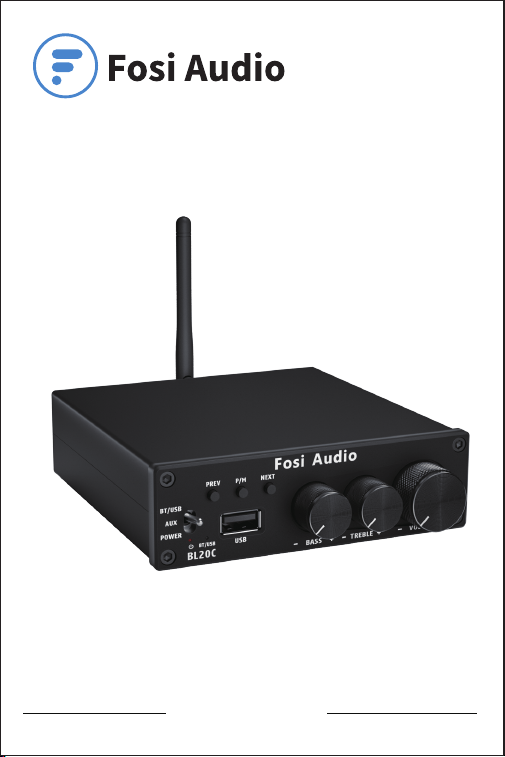
Thanks for choosing us!
Fosi Audio BL20C User Manual

Product Specifications
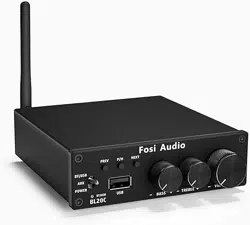
Fosi Audio BL20C is a powerful Bluetooth 5.0 HiFi stereo
2.1 channel amplifier with AUX/Bluetooth/U-disk inputs and
Treble & Bass control to meet more your needs. It supports
MP3/WMA/APE/FLAC/WAV music formats, suitable for most
home passive speakers. Adopting classic TDA7498E chip
to get clear sound without any audible noise even at high
output.
Input mode: AUX/Bluetooth/U-disk
U-disk: USB 2.0, compatible with
USB 3.0
U-disk capacity: Up to 32GB, no more than
100MB per file
Output mode: Active subwoofer+
Passive Speakers
Support format: MP3/WMA/APE/ FLAC/WAV
Max output power: 160 watt x 2 @4 ohm
Working voltage: 19-35V
Speaker impedance: 4-8Ω
SNR: ≥98dB
THD: ≤0.05%
Frequency response: 20Hz-20kHz(±3dB)
Input priority: U-disk>Bluetooth = AUX
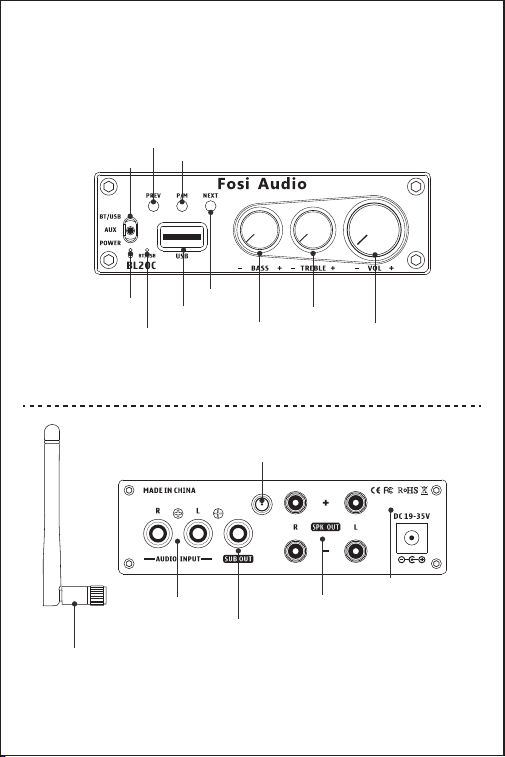
Product Overview & Control
Functions
Power Switch
U-disk Input
RCA Input
Passive Speaker
Output
Bass Control
Active Subwoofer
Output
DC Input
(19-35V)
Treble Control
Volume Control
Next Song
Previous
Song
Power
Indicator
Bluetooth/USB
Indicator
Short press to pause and playback,
long press to switch U-disk and Bluetooth input
Bluetooth Antenna
Interface
Back Panel
Bluetooth
Antenna
Front Panel

Package Contents
Fosi Audio BL20C Amplifier*1
AC Power Cord*1
24V/4.5A Power Supply *1
Bluetooth antenna*1
User Manual *1
Quick Setup
Preparation
Prepare 1: BL20C, 24V power supply, passive speaker, active
subwoofer, speaker wires or banana plugs, RCA cable;
Prepare 2: Make sure the volume is at a minimum.
Prepare 3: Connect passive speaker via the speaker wires or
banana plugs, and connect active subwoofer via 3.5mm
AUX cable, please pay attention to distinguish between
positive and negative polarity.
Prepare 4: Make sure the power switch is on the "OFF" position.
Prepare 5: Connect the power supply and turn it on, the power
indicator shows red light.
Note: Please make sure that the power switch is in the OFF
position before connect the power supply.
How to connect the speaker wire?
Method 1: Bare wire connection illustration
: Release the horn terminals block terminals;
: Insert the two ends of the speaker wire into the
amplifier and speaker terminal holes;
: Tighten the horn terminals;
Note: Please make sure that the speakers’ wire are not attached
with each other, the speaker connection area is very
narrow,
1
2
3
Package Contents
Fosi Audio BL20C Amplifier*1
AC Power Cord*1
24V/4.5A Power Supply *1
Bluetooth antenna*1
User Manual *1
Quick Setup
Preparation
Prepare 1: BL20C, 24V power supply, passive speaker, active
subwoofer, speaker wires or banana plugs, RCA cable;
Prepare 2: Make sure the volume is at a minimum.
Prepare 3: Connect passive speaker via the speaker wires or
banana plugs, and connect active subwoofer via 3.5mm
AUX cable, please pay attention to distinguish between
positive and negative polarity.
Prepare 4: Make sure the power switch is on the "OFF" position.
Prepare 5: Connect the power supply and turn it on, the power
indicator shows red light.
Note: Please make sure that the power switch is in the OFF
position before connect the power supply.
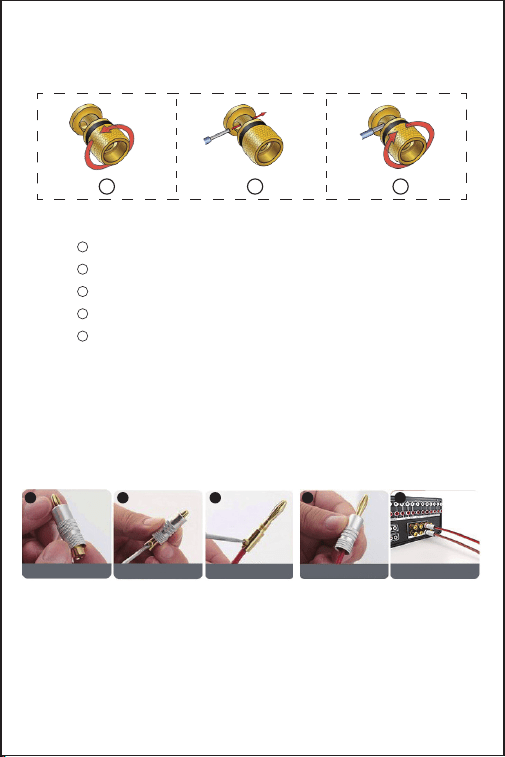
How to connect the speaker wire?
Method 1: Bare wire connection illustration
: Release the horn terminals block terminals;
: Insert the two ends of the speaker wire into the
amplifier and speaker terminal holes;
: Tighten the horn terminals;
Note: Please make sure that the speakers’ wire are not attached
with each other, the speaker connection area is very
narrow,
Method 2: Banana plugs connection illustration
: Release the banana jacket;
: Loosen the screw;
: Insertion speaker wire and tighten the screw;
: Tighten the banana jacket;
: Insert the banana plug into the horn terminals of the
speaker and amplifier.
Note: Please make sure that the speakers’ wire are not attached
with each other, the speaker connection area is very
narrow, it is easy to cause the positive and negative
speakers’ wires to contact each other, which will result in
no sound output.
1
2
3
4
5
1
2
3
Bluetooth Input
Prepare your Bluetooth device (take a phone as an example)
Step 1: Install the Bluetooth antenna.
Step 2: Switch the input mode to the "BT/USB" position, the
"BT/USB" indicator shows blue light.
Step 3: Turn on the Bluetooth on your phone and connect
“BT HIFI AUDIO” .
it is easy to cause the positive and negative
speakers’ wires to contact each other, which will result in no sound
output.
Release Jacket Loosen Screw
Insertion speaker wire
tighten screw
Tighten Jacket
1 2 3 4
banana plug into
the horn terminals
5

Step 4: Open the audio application, play and enjoy!
AUX Input
Prepare: audio source (take a TV as an example), a RCA cable.
Step 1: Switch the input mode to the "AUX" position, the power
indicator shows red light;
Step 2: Connect your TV to “Audio Input” via a RCA cable;
Step 3: Open your TV, play and enjoy!
U-disk Input
Prepare: a U-disk
Step 1: Switch the input channel to the "BT/USB" position, the
"BT/USB" indicator shows blue light.
Step 2: Insert the U-disk into the "USB" port on the front panel,
and BL20C will automatically recognize the music format
in the U-disk.
Step 3: Short press the “PREV”, “NEXT” or “P/M” buttons on the
front panel of BL20C to select or pause your songs.
Note: The capacity of U-disk for BL20C should be under 32GB, and
no more than 100MB per file.
Note: Make sure there is no Bluetooth connection, if there is,
please press and hold the "P/M" button to switch to USB
mode.
Troubleshooting/QA
1: What type of speakers work best with BL20C Amplifier?
• Fosi Audio BL20C amplifier work great with any 4-8 ohm passive
speakers. But please be attention that the amplifier is for passive
speakers and a active subwoofer, not for active speakers.

2: Can I connect a turntable to BL20C amp, why is the
volume is extremely Low?
• As for the turntables do not have a built-in preamp, if not connect
to a phono preamp first, the volume would be low.
• As for the turntables which have a built-in preamp, you can
connect directly to the BL20C with the turntable.
3: Why does the sound is cracking or make a lot of
electric noise?
• Please make sure all the cables completely pushed into the
devices, incompletely connection will cause this cracking.
• Please remove all the inputs then check whether cracking noise
disappear or not, the cracking maybe from the audio source or
input cables.
• If you are not using the original factory standard power supply,
please replace the power supply before testing. Many power
supply in the market have large interference coefficient, which
will cause a lot of current sound.
4: My Bluetooth device cannot pair with BL20C?
• Make sure that you have selected the input channel to “BT/USB”
on the front panel of the BL20C, and the "BT/USB" indicator
shows blue light.
• Make sure there is no U-disk on your device because U-disk
takes priority over Bluetooth.
• Make sure that BL20C is powered on.
• Make sure that BL20C is not paired with other devices.
• Make sure that the distance between your device and BL20C is
not too long.
• Make sure there are no barriers between your device and BL20C,
barriers will affect the Bluetooth operation distance.
• Please reconnect the power supply to the BL20C, and move the
BL20C to another room to have a try.
Step 4: Open the audio application, play and enjoy!
AUX Input
Prepare: audio source (take a TV as an example), a RCA cable.
Step 1: Switch the input mode to the "AUX" position, the power
indicator shows red light;
Step 2: Connect your TV to “Audio Input” via a RCA cable;
Step 3: Open your TV, play and enjoy!
U-disk Input
Prepare: a U-disk
Step 1: Switch the input channel to the "BT/USB" position, the
"BT/USB" indicator shows blue light.
Step 2: Insert the U-disk into the "USB" port on the front panel,
and BL20C will automatically recognize the music format
in the U-disk.
Step 3: Short press the “PREV”, “NEXT” or “P/M” buttons on the
front panel of BL20C to select or pause your songs.
Note: The capacity of U-disk for BL20C should be under 32GB, and
no more than 100MB per file.
Note: Make sure there is no Bluetooth connection, if there is,
please press and hold the "P/M" button to switch to USB
mode.
Troubleshooting/QA
1: What type of speakers work best with BL20C Amplifier?
• Fosi Audio BL20C amplifier work great with any 4-8 ohm passive
speakers. But please be attention that the amplifier is for passive
speakers and a active subwoofer, not for active speakers.

• Restart the BL20C and then try to connect again, try to use other
Bluetooth devices.
5: Why Bluetooth is intermittent?
• Please try with another Bluetooth device.
• Make sure there is no interference from other electronic devices
between the BL20C and your audio source.
• Place your device close to the BL20C, and plug in the power
adapter again.
6: How much power does it take in standby mode? Can
this amp be left on all the time?
• This is the class D amplifier, it will cost very low power when it is
in standby mode. It can be connected all the time and it is safe
without power consumption.
7: Sound quality is not good?
• Make sure all the cables are fully connected.
• Adjust the treble and bass control of the power amplifier to
achieve the right tone.
• Please try to change the sound source and cables to test.
8: Can BL20C accept signal from a Bluetooth microphone?
• Please make sure your Bluetooth microphone must be the
transmitter. Because BL20C is a Bluetooth receiver amplifier.
• Please make sure that microphone's Bluetooth can be connected
to the BL20C's Bluetooth by your operation.
9: Why does the sound cut in and cut out?
• Please try to change the sound source.
• Lower the treble and bass of the BL20C.
• Make sure that the positive and negative terminals of the speaker
outputs do not touch each other. Some of the larger banana plugs
can easily touch each other and cause a short circuit.

10: Can I bridge channel 1 and channel 2 to get 320watts?
• No, this amplifier can't be bridged.
11: Why does distortion occur?
• When the output power of the BL20C exceeds the normal output
power, there will be a large distortion. That means if you turn the
sound up too loud, distortion may occur. Please try turning the
volume down a little.
12: Why does my power indicator not light up?
• Please check that the AC power cord is securely connected to the
power supply and to an AC power outlet.
• Please check that the AC power outlet is supplying power, make
sure the power LED on the power supply will stay on.
• Please replace another power supply and try it again. 19-35V DC
power supply are suitable.
• If you make sure the power supply is defective, please contact us
for exchange.
13: How can I use BL20C to create a 2.1 Channel system?
• You can connect two passive speakers via "SPK OUT" and one
active subwoofer via "SUB OUT" to create a 2.1 Channel system.
• Please use a RCA cable to connect your active subwoofer to the
"SUB OUT" output port.
14: Can I connect Bluetooth and U-disk at the same time?
• No, when the U-disk plugs in, the Bluetooth connection will be
interrupted.
Input priority: U-disk Input > Bluetooth Input
15: How can I connect BL20C to TV?
• The RCA jack is the audio input on the back panel of the BL20C. It
can be connected to your TV via RCA cables.

16: Why there is no voice from my speakers?
• Please make sure the input mode you select is consistent with
your input method.
Note: If you use U-disk, please make sure the capacity of U-disk
should be under 32GB, and no more than 100MB per file
• Please check whether the cable of power supply is connected to
BL20C and whether the power indicator is on.
• Make sure the BL20C's indicator light is on when the power is
turned on.
• Please check that the BL20C and your source components are
turned on and not set to minimum volume, if possible replace
your source and test again.
• Check that the wire connections from the audio source to each
speaker in the amplifier are connected correctly.
• Please check that the cable and your U-disk are not loosen or
damaged. Incomplete connection is one of the main reasons for
no sound.
17: Does BL20C support aptX-HD and aptX-LL?
• No. BL20C does not support aptX-HD and aptX-LL.
18: One channel does not work?
• Please test whether the Bluetooth and RCA input have the same
problem first.
• If the two modes have the same problem, swap the speaker
cables of the left and right channels, or change another speaker,
and then test whether this channel still does not work.
• If only RCA or Bluetooth mode does not work, change the audio
source, change the RCA cable and test again, and make sure that
all the cables are completely pushed into the device.
10: Can I bridge channel 1 and channel 2 to get 320watts?
• No, this amplifier can't be bridged.
11: Why does distortion occur?
• When the output power of the BL20C exceeds the normal output
power, there will be a large distortion. That means if you turn the
sound up too loud, distortion may occur. Please try turning the
volume down a little.
12: Why does my power indicator not light up?
• Please check that the AC power cord is securely connected to the
power supply and to an AC power outlet.
• Please check that the AC power outlet is supplying power, make
sure the power LED on the power supply will stay on.
• Please replace another power supply and try it again. 19-35V DC
power supply are suitable.
• If you make sure the power supply is defective, please contact us
for exchange.
13: How can I use BL20C to create a 2.1 Channel system?
• You can connect two passive speakers via "SPK OUT" and one
active subwoofer via "SUB OUT" to create a 2.1 Channel system.
• Please use a RCA cable to connect your active subwoofer to the
"SUB OUT" output port.
14: Can I connect Bluetooth and U-disk at the same time?
• No, when the U-disk plugs in, the Bluetooth connection will be
interrupted.
Input priority: U-disk Input > Bluetooth Input
15: How can I connect BL20C to TV?
• The RCA jack is the audio input on the back panel of the BL20C. It
can be connected to your TV via RCA cables.

Our website: www.fosiaudio.com
Amazon store: www.amazon.com/fosiaudio
Our Youtube channel: Fosi Audio
Our Facebook page: Fosi Audio
After-sale Service and Technical Support Email:
support@fosiaudio.com
customer@fosiaudioshop.com
Warranty Information
• All Fosi Audio products have an 18-month limited warranty on
parts and labor from the date of purchase. Please contact us if
you have any problems.
About Fosi Audio
• Fosi Audio designs and builds innovative audio products with
all your music in mind. Great sound, simple but elegant
designs, high-quality materials, and truly useful features are
what Fosi Audio is about. We sincerely hope you get as much
enjoyment from our products as we’ve had to create them!
Fosi Audio Product’s User Manual
