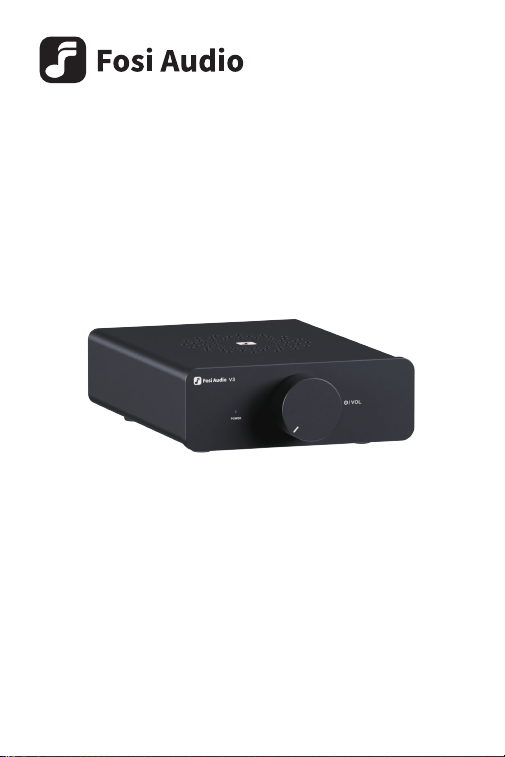
V3 User Manual

Product Overview
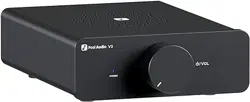
The V3 is a high-performance stereo audio power amplifier developed by
Fosi Audio based on user needs. It features Texas Instruments' high-end
TPA3255 digital amplifier chip, supporting up to 600W of output power
(into 4Ω impedance speakers). The V3 comes with an innovative design in
that there are cooling vents on top and bottom of the aluminum alloy
chassis, and the amplifier chip's heat sink is attached to the casing, turning
the entire chassis into a heat dissipator. This significantly enhances heat
dissipation performance, ensuring chip stability and safety, and providing
solid support for continuous high-power output. The V3 also integrates
numerous HiFi class capacitors, inductors, and resistors to ensure stable
and pure high-fidelity audio output. Furthermore, the V3's op-amps are
replaceable, allowing you to easily swap different op-amps for a
personalized music experience.
The V3 is a mini amplifier designed for music enthusiasts, and we believe
it will take you on a wonderful journey through HiFi music.
Audio Channel
Power Amplifier Chip
Input Interface
Output Interface
SNR
Dynamic Range
THD
Terminal Impedance
Output Power
Frequency Response
Input Voltage Range
2.0
TI TPA3255
RCA In
Speaker Output (Banana Plug
or Bare Wire), Pre-Out
≥110dB
SINAD 88dB
≥110dB
<0.003%
2~8Ω
Max 300W x2@4Ω
20Hz-20kHz (±0.1dB)
DC 24V~48V
Product Specifications
Package Contents
V3 Power Amplifier ×1
Power Supply ×1
User Manual ×1
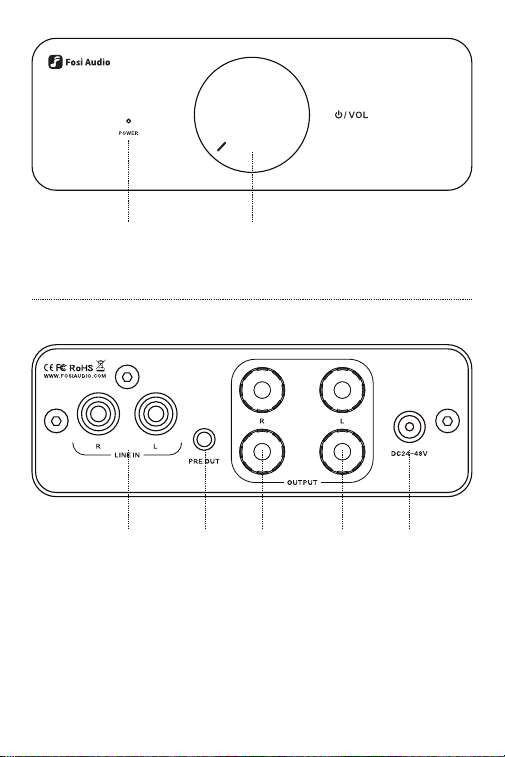
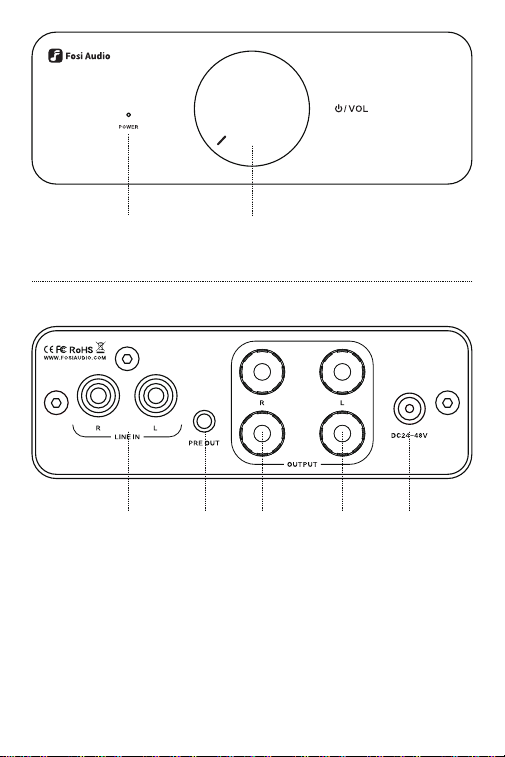
Power Switch/
Volume Control
Power
Indicator
RCA
Input
Pre-Out Left
Channel
Output
Right
Channel
Output
DC Power
Input

Troubleshooting
Quick Steup
Do not plug in the power cord until all connections are complete.
Step 1: Prepare your audio source device, V3 power amplifier, 24V-48V
power adapter, passive speakers, speaker cables (with banana plugs or
bare wires), and RCA audio cable;
Step 2: Plug the RCA cable into the RCA input terminal of V3, red for right
channel and white for left channel. Connect the other end to your audio
source device;
Step 3: Connect the speakers to the V3's speaker terminals with the
speaker cables, ensuring the polarity is matched correctly. The red is the
positive pole, while black is the negative pole. You scan the QR code to
watch the instruction video;
Step 4: Plug the power adapter connector into the DC power input port of
V3, and power cord into an AC outlet;
Step 5: Turn the knob clockwise to switch on the V3, and the blue power
indicator light will be on. Then you can play songs on your audio source
device and start enjoying music.
NOTE: The pre-out terminal can be used to connect an active subwoofer,
active speakers or a second amplifier to expand or customize your audio
system.
The system is set up, but there is no sound output.
• There may be no power. Please check whether the power indicators
on the V3 and power adapter are on or not.
01.

NOTE: If you still can't solve the problems, please scan the QR code to
learn more or contact our support team [email protected]
• The volume may be too low. Please turn the volume knob clockwise
to raise the volume.
• The audio cables may be connected incorrectly. Please follow the
instructions above to reconnect the cables;
•The songs in your audio source device may not be played or the
sound is muted. Please check on the audio source device.
The sound output is abnormal.
• Please ensure the polarity is matched correctly when you connect
the speaker cables to the binding posts. The red is the positive pole,
while black is the negative pole;
• The speaker cables may not be in good contact. Please try to
reconnect or swap the cables;
• The RCA cable may not be in good contact. Please try to reconnect
or swap it;
• The V3 amplifier may be overloaded. Please turn down the volume.
Cannot play when connecting the turntable.
• The turntable may not have a built-in phono preamplifier. Please
check in your turntable's user manual. You'll need an external
preamplifier to connect your turntable and the V3 to play your record;
• The phono output mode may be incorrect. Generally speaking, there
are phono output and line output modes. Please select the line output.
Why the device connected to the pre-out is still playing
after turning V3 off?
• The pre-out terminal is designed to bypass the amplifier's built-in
power amplification stage. The knob on V3 does not affect the
pre-out's signal output or volume. You need to turn off or modify the
volume on the device connected to the pre-out.
02.
03.
04.

Warranty and Maintenance
About Us
Fosi Audio pledges to give a 24-month limited warranty and support from
the date of purchase. If you encounter any problem when using our
product, please contact our support team at [email protected].
Fosi Audio designs and builds innovative audio products with all your
music in mind. Great sound, simple but elegant designs, high-quality
materials, and truly useful features are what Fosi Audio pursues. We
sincerely hope you get as much enjoyment from our products as we’ve had
to create them!
Our website:
www.fosiaudio.com
Amazon store:
www.amazon.com/fosiaudio
Our Youtube channel:
Fosi Audio
Our Facebook page:
Fosi Audio
After-sale Service and Technical Support Email:
Fosi Audio Product’s User Manual:

声道
功放芯片
输入接口
输出接口
信噪比
动态范围
失真度
音箱阻抗支持
输出功率
频率响应
输入电压范围
�.�
德州仪器TI TPA����
RCA
音箱输出(支持香蕉插头
或裸线连接),前置输出
≥���dB
信纳比��dB
≥���dB
<�.���%
�~�Ω
最大���瓦 x� @�Ω
��Hz-��kHz(±�.�dB)
DC��V~��V
规格参数
产品简介
感谢您购买Fosi Audio V�立体声HiFi数字功放!
V� 是Fosi Audio基于用户需求,潜心研发的一款高性能立体声音频功
率放大器。它搭载了德州仪器高端的TPA����数字功放芯片,最大可支
持双声道共���瓦的输出功率(连接�Ω阻抗音箱下)。顶部和底部创新地
采用了开孔散热设计,并巧妙地将功放芯片散热片与全铝合金外壳相贴
合,让全机身成为散热器,有效提升散热性能,确保芯片运行安全稳定,
为持续大功率输出提供坚实保障。V�还集成了众多发烧级的电容、电感
和电阻等元器件,全力保障高保真音频输出的稳定与纯净。此外,V�的
运放芯片采用了可拆换式设计,用户可根据个人喜好,轻松更换不同的
运放芯片,实现音乐个性化体验。
V�是为音乐发烧友而生的迷你功放,我们相信它将带您领略HiFi音乐的
美妙之旅。
包装清单
V�功率放大器 ×�
电源适配器 ×�
说明书 ×�
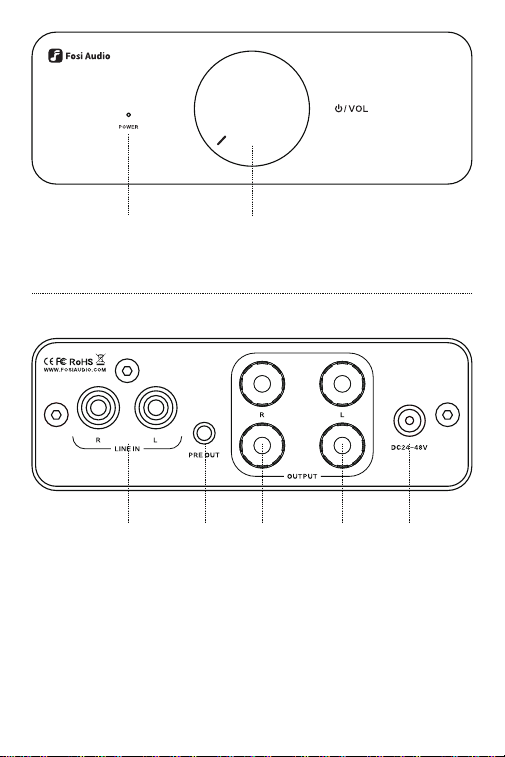
电源开关/音量调节旋钮
电源指示灯
RCA
输入端子
前置
输出端子
音箱
左声道
输出端子
音箱
右声道
输出端子
DC电源
输入端口

故障排除
安装指南
在所有连接完成之前,请勿插上电源线。
�. 准备好音源设备,V�功放,��V-��V电源适配器,无源音箱,音箱电缆
(带香蕉插头或者裸线),RCA音频电缆;
�. 将RCA电缆按左右声道对应插入V�的RCA输入端子,红色为右声道,
白色为左声道,另一端连接到你的音源设备;
�. 将音箱电缆按左右声道连接到V�的音箱输出端子上。请注意,音箱线
要按照正负极连接,具体连接方式可扫码查看视频指引;
�. 将电源适配器接头插入V�的DC电源输入端口,然后接通电源适配器
的电源;
�. 顺时针旋转电源旋钮打开V�功放,此时蓝色电源指示灯亮起,接下来
即可在音源设备上播放歌曲,开始欣赏音乐。
温馨提示: 前置输出端子可用于连接有源低音炮、有源音箱或者再接
一台功放来扩展或定制你的音响系统。
系统搭建起来了,但是没有声音?
· 没有通电,请检查V�前面板上和电源适配器上的指示灯是否亮起;
· 功放音量太小,请顺时针旋转音量旋钮,调至合适的音量大小;
· 音频线连接错误,请按使用说明的步骤重新连接;
· 音源未播放或静音,请检查音源设备。
��.

保修卡
温馨提示: 如果您依然不能解决问题,请扫码了解更多或者联系我们
的支持团队[email protected]om
连接成功后,声音不正常?
· 正负极接反,请检查音箱电缆正负极是否接反,红色为正极,黑色
为负极;
· 音箱线接触不良,请重新连接或换一根音箱线连接;
· RCA线接触不良,请重新连接或换一根RCA线连接;
· 功放过载,请把音量稍微调小。
连接唱机后无法正常播放?
· 唱机没有内置前级,请检查您的唱机是否内置前级,V�是不带唱
机前级的,你需要在唱机和V�之间再连接一台唱机前级来使用,比
如Fosi Audio Box X�、X�、X�等;
· 唱机输出模式不对,内置前级的唱机一般有唱机输出和线路输出
两种,请选择线输出;
关掉V�后,通过前置输出连接的设备仍在播放?
· V�的前置输出设计为直通,不受功放控制,请在连接前置输出的
设备上控制。
��.
��.
��.
服务期限
深圳远虑科技有限公司承诺产品的良好品质,产品自售出�日内,在
正常使用情况下出现故障,客户可以无条件退换货。正常使用两年
内出现故障,可以免费保修。
购买日期以发票或收据日期为准,网上购买按订单日期为
准。
·
·

无法享受“三包”服务的情况:
�. 一切人为因素损坏,包括但不限于非正常工作环境下使用或者不
按照说明书使用的;
�. 用户私自拆机、改装以及维修的;
�. 使用非指定或许可的配件造成损坏的;
�. 不能出示有效购机凭证的;
�. 不属于本公司产品的。
保修方式
保修方式为送修,此条款只适用于官方销售渠道售出的产品,其他
渠道请参考销售代理商的规定和当地国家法规关于质保的规定。
·
·

关于我们
深圳远虑是一家专注于音频产品的设计,研发和销售为一体的科技型公
司。我们深耕用户需求,深入研发设计,通过不断创新,持续打磨产品和
服务,致力于打造全球音频领域的星品牌。我们尤其在意客户的反馈,如
果您有任何问题或者需求,欢迎联系我们。
官网:
https://www.fosiaudio.com
店铺:
www.amazon.com/fosiaudio
京东店铺:
FOSI AUDIO旗舰店
QQ群:
���������
售后邮箱:
说明书二维码:

オーディオチャンネル
パ ワー ア ンプチップ
入力イ ンター フェース
出力イ ンター フェース
SNR
ダイナミックレン ジ
THD
端末インピーダンス
出力電力
周波数応答
入力電圧範囲
�.�
TI TPA����
RCA入力
スピーカー出力 (バナナプラグまたは
裸線)、プリアウト
≥���dB
SINAD��dB
≥���dB
<�.���%
�~�Ω
最大���W x�@�Ω
��Hz-��kHz(±�.�dB)
DC��V~��V
製品仕様
製品詳細
V�は、ユーザーのニーズに基づいて開発された高性能ステレオオーディ
オパワーアンプでございます。テキサスインスツルメンツの高級TPA����
デジタルアンプチップを搭載し、�Ωインピーダンススピーカーに最大
���Wの出力をサポートしております。
V�には革新的なデザインが採用されておりまして、アルミ合金製のシャ
ーシの上と下に冷却口がございます。アンプチップのヒートシンクが筐体
に取り 付け られて おり ま すため、全体をヒートディシペータに変え る よう
になっております。ヒートディシペーション性能が大幅に向上し、チップの
安定性と安全性が保証され、連続高出力に堅牢なサポートが提供され
ます。V�には、多数のHiFiクラスのキャパシタ、インダクタ、および抵抗器
が統合されており、安定かつ純粋なハイファイ音声出力を保証しており
ます。V�のオペアンプは交換可能でございますので、異なるオペアンプを
簡単に交換して個人の音楽体験をカスタマイズすることができます。
パッケージ内容
V�パワーアンプ ×�
電源 ×�
ユーザーマニュアル ×�
電源スイッチ/音量調節
電源インジケータ
RCA入力プリアウト左 チャン ネ ル
出力
右 チャン ネ ル
出力
DC電源
入力

クイック設定
接続が完了するまで、電源コードを差し込まないでください。
ステップ �: オーディオソースデバイス、V�パワーアンプ、��V-��Vの電
源 アダプター 、パッシブスピ ー カー 、スピー カー ケーブル(バナ ナプラグ
または裸線)、およびRCAオーディオケーブルを用意してください。
ステップ �: RCAケーブルをV�のRCA入力端子に差し込まれ、赤色を右
チャン ネ ル、白色を 左チャン ネ ルに割 り 当 て てくださ い。もう一方の端を
お客様の音源機器に接続してください。
ステップ �: V�のスピーカーターミナルに、スピーカーケーブルを使用
してスピーカーを接続し、極性が正しく一致するようにしてください。赤色
が正極であり、黒色が負極です。説明動画をご覧になる場合はQRコード
を読み取ってく ださい。
ステップ �: V�のDC電源入力ポートに電源アダプターのコネクタを
挿入し、電源コードを交流電源コンセントに差し込んでください。
ステップ �: V�の電源をオンにするために、つまみを時計回りに回して
ください。このとき、青い電 源インジケーターランプが点灯します。オーデ
ィオソースデバイスで曲を再 生して、音 楽をお楽しみいただ けます。
ご注意: プリア ウト端 子 は 、アクティブサブウーファー やアクティブ
スピーカー、または第�アンプなどを接続して、オーディオシステムを拡張
またはカスタマイズするために使用できます。

不良診断
システムは設定されていますが、音声出力がありません。
·電源が入っていない可能性があります。V�と電源アダプターの電源
インジケーターが点灯しているかどうかを確認してください。
·音量が低すぎる可能性があります。音量つまみを時計回りに回して
音量を上げてみてください。
·オーディオケーブルが間違って接続されている可能性があります。
上記の指示に従ってケーブルを再接続してください。
·オーディオソースデバイスで曲が再生されないか、音声が消音され
ている可能性があります。オーディオソースデバイスを確認してくださ
い。
音声出力が異常になっています。
·スピーカーケーブルをバインディングポストに接続する際に極 性が
正しく一致していることを確認してください。赤はプラス極、黒は
マイナス 極 です。
·スピーカーケーブルが不良な接触をしている可能性があります。
ケーブルを再接続したり、交換してみてください。
·RCAケーブルが不良な接触をしている可能性があります。ケーブル
を再接続したり、交換してみてください。
·V�アンプが過負荷になっている可能性があります。音量を下げてみ
てください。
ターンテーブルを接続しても再生できません。
·ターンテーブルには内蔵のフォノプリアンプがない可能性がありま
す。ターンテーブルの取扱説明書を確認してください。レコードを再生
するには、ターンテーブルとV�を接続するための外部プリアンプが必
要 です。
·フォノ出力モードが間違っている可能性があります。一般的にフォノ
出力モードとライン出力モードがあります。ライン出力を選択してく
ださい。
��.
��.
��.

保証情報
ご注意:
それでも問題が解決しない場合は、QR コードをスキャンして詳
細を確認して、[email protected]om までお問い合わせください。
Fosi Audioは、ご購入日から��ヵ月間の限定保証およびサポートを約束
しております。製品を使用中に何か問題が発生した場合は、
[email protected]omまでお問い合わせください。
V�をオフにした後も、プリアウトに接続された機器が再生
されているのはなぜですか?
·プリアウト端子は、アンプの内蔵パワーアンプステージをバイパスす
るように設計されています。 V�のノブはプリアウトの信号出力や音量
に影響を与えません。プリアウトに接続された機器の音量を調整する
には、その機器の電源を切るか、調整する必要があります。
��.

Fosi Audio について
Fosi Audioは、すべての音楽を考慮に入れた革新的なオーディオ製品を
設計·製造しております。優れた音質、シンプルでエレガントなデザイン、
高品質の素材、そして本当に役立つ機能を提供することを目指しており
ます。製品を作成するための以上の喜びを、皆様も製品から同じくらい楽
しんでいただけることを心から願っております。
ウェブサイト:
https://www.fosiaudio.com
アマ ゾンストア :
www.amazon.co.jp/fosiaudio
YouTube チャンネル:
Fosi Audio
Facebook ページ:
Fosi Audio
アフターサービスとテクニカルサポートの電子メール:
Fosi Audio 製品のユーザーマニュアル:
