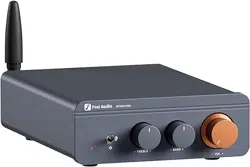

BT20A PRO User Manual
Product Overview
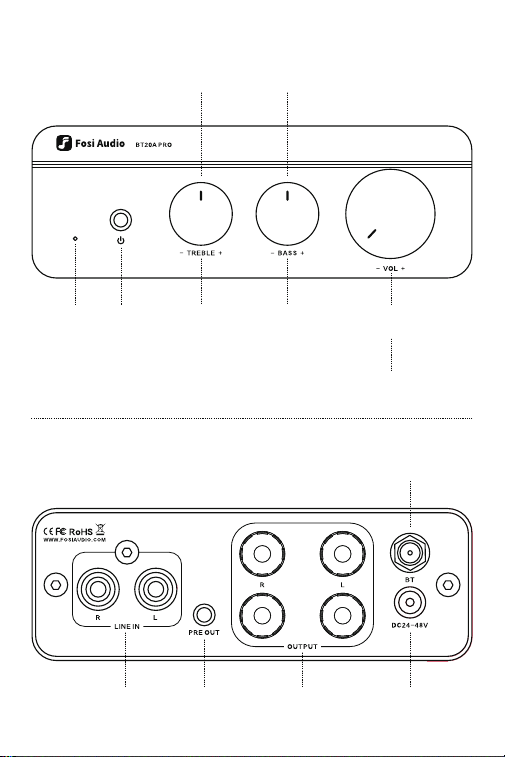
Power
Indicator
RCA
Input
3.5mm
PRE OUT
Speakers
Output
DC
Input
Bluetooth
Antenna
Treble
Control
The Bass/Treble knobs with midpoint position
Long press 5s to clear all bluetooth pairing records
Bass
Control
Volume
Control
Power
Switch

Product Specifications
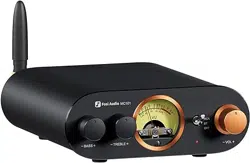
Fosi Audio BT20A PRO is an upgraded Bluetooth 5.0 HiFi stereo amplifier
with PRE-OUT port, which can be used as a preamplifier. The BT20A PRO
supports RCA/Bluetooth input, suitable for most passive speakers as well
as active ones.
It adopts TI TPA3255 high-performance Class-D power amplifier chip
enabling true premium sound quality and allows ultra low distortion across
the audio band.
The BT20A PRO is mounted with high-power inductors.
Package Contents
BT20A PRO Bluetooth Amplifier x1
Bluetooth Antenna x1
Power Adapter x1
AC Cord x1
User Manual x1
Audio Input
Audio Output
Power Output
SNR
Terminating Impedances
THD
Power Amplifier Chip
Power Adapter
DC Input Range
Frequency Response Range
Bluetooth Transmission Distance
RCA/Bluetooth
Speaker Output/3.5mm Pre out
300Wx2 @4Ω
≥108dB
2-8Ω
0.005%
TPA3255
32V 5A
DC24V-48V
20Hz-20kHz(±1.2dB)
Up to 50Ft

Quick Steup
Basic operation
Step 1:
Install the Bluetooth antenna to the BT20A PRO.
Step 2: Connect your passive speakers to the BT20A PRO via speaker
wires.
NOTE: The PRE OUT can be connected to an active subwoofer and
speakers. Or you can connect it to the PRE OUT as a preamplifier.
You don’t need to connect all the outputs. You can connect 2 passive
speakers only.
And you can connect all the outputs simultaneously.
Step 3: Connect the power supply to BT20A PRO and the socket. Flip the
switch's toggle to power on the BT20A PRO.
Then the input mode indicator light of BT20A PRO stays red after
powered on.
NOTE 1: Please make sure the LED light on the power adapter stays on.
NOTE 2: Before connecting the power supply, please set the bass
and treble control to the center position and set the volume to zero to
avoid sudden loud noise.
Step 4: Connect the audio source (RCA input/Bluetooth input) to the
BT20A PRO.
Step 5: Adjust the Volume control, Bass/Treble control, then enjoy it!
NOTE: Make sure that all the cables are completely pushed into the
device.

Connectivity
RCA Input:
Use an RCA cable to connect the BT20A PRO and your device. The input
indicator light will stay on Red.
Bluetooth Input:
Turn on the Bluetooth on your device, and select "Fosi Audio BT20A PRO"
for pairing, the input mode indicator light will stay blue after a successful
connection.
Input priority: The Bluetooth input mode first.
NOTE: Please keep the Fosi Audio BT20A PRO away from other electrical
devices. The Fosi Audio BT20A PRO can't use with a radio at the same
time.
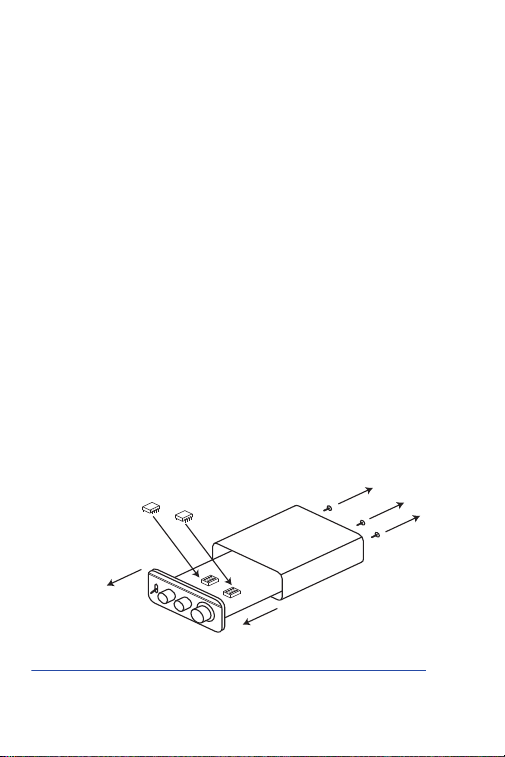
TIP: How to change/replace op-amp?
It is built in with two plug-in NE5532 Op-Amps, different op amps make
different sound quality, it can be replaced by LME49720HA/MUSES02/O-
PA26041P/OPA2134PA/LM4562/NJM4556AD Op-Amps etc.
Use a hex screwdriver to remove the back panel screws, pull the board out
and unplug the op-amp, align the holes and reassemble the other
op-amps.
Video Tutorial:
https://www.fosiaudio.com/how-to/change-bt20a-pro-op-amp-chip
TIP: How to clear the Bluetooth connection?
Press and hold the volume knob for 5 seconds and it will be disconnected.
screw
front panel
circuit board
amp chip
chip
socket

Troubleshooting/QA
Get noise when playing music?
• Bluetooth input mode: Try to use other Bluetooth devices. Weak or
unstable Bluetooth signal will cause this problem, try to place your
device nearer to the BT20A PRO.
• RCA input mode: Please change the audio cable to try.
•Try another RCA cable and make sure the audio cable is connected
correctly.
• Please unplug the RCA cable from the amplifier, and then turn it on to
try.
• Please change the audio source or other brand devices to try.
• Did you set the "treble" gain to the max? please turn the "Treble" gain
down.
• Make sure all cables are all securely in place and correctly
connected.
• Please keep this device away from other electronic devices.
All cables are connected, but there is no audio output?
• Check to make sure the indicator lights on the front panel of the
BT20A PRO and the power supply are both on.
• If the indicator light is on, please check if the volume knob is at the
minimum level. If yes, please turn up the volume.
• Make sure that the BT20A PRO is set to the input mode you want.
Note: Bluetooth input mode (The input mode indicator light will stay
on blue)
RCA input mode (The input mode indicator light will stay on red)
Input priority: The Bluetooth input mode first.
• Please check if the audio source is paused.
• Please try to change the sound source, cables, and speakers.
• Try restarting both your device and BT20A PRO, then connect again.
NOTE: Make sure that all the cables are completely pushed into the
device.
My Bluetooth device can’t be paired with the BT20A Pro?
• Check to make sure the BT20A PRO is powered on and the LED light
on the power adapter stays on.
• Ensure that the BT20A PRO is not paired with another device.
01.
02.
03.

• Make sure that the distance between your device and the BT20A
PRO is not too far, place your device nearer to the BT20A PRO.
• Make sure there are no obstacles between your device and the
BT20A PRO. Obstacles will affect the Bluetooth operation distance.
• Please try to change to another Bluetooth audio source to test.
• Please replug the power supply, move the amplifier to another room
and test it again.
• Restart the BT20A PRO and then try to connect again, try to use
another brand of mobile phone or device.
Why the sound is intermittent in Bluetooth mode?
• Use another Bluetooth device to have a try.
• Ensure that there is no other electronic equipment between the
BT20A PRO and the audio source which may cause interference.
• Put your device closer to the BT20A PRO.
• Replug the power supply.
One channel does not work?
• Please test whether the Bluetooth and AUX inputs have the same
problem first.
• If these two modes have the same problem, swap the speaker
cables of the left and right channels, or change to use another
speaker, and then test whether this channel still does not work;
• If only AUX mode does not work, change the audio source, change
the audio cable, and test again, and make sure that the audio source
and cables both deliver stereo sound, not MONO.
Can’t be powered on?
• Make sure that the LED light on the power adapter stays on.
• If it does not light up: Unplug the power adapter from the BT20A
PRO, plug the power adapter directly into the AC power source, and
see if the LED will light up. If it still does not light up, there may be a
problem with the power adapter. Please contact us to replace the
power adapter.
• You can use a DC 24V-48V power adapter of a camera or router to
connect the BT20A PRO to test whether it can be turned on.
The BT20A Pro can be used as a pre-amp?
• Yes. There is a PRE-OUT port on the rear panel, which allows it to be
04.
05.
06.
07.

used as a preamplifier.
Sound quality is not good?
• Make sure all the cables are fully connected.
• Adjust the treble and bass control of the BT20A PRO to find the right
tone.
• Please try to change the sound source and cables to test.
Why does the sound cut in and cut out?
• Try to reduce the sound of the sound source.
• Try to change the audio source to test.
• Reduce the gain of the treble and bass knob on the BT20A PRO.
• Ensure that the positive and negative poles of the speaker output do
not touch together. Some relatively large banana plugs are easy to
touch together and cause a short circuit.
Does the BT20A PRO support Bluetooth aptX and Low
Latency?
• No. The BT20A PRO does not support Dolby, aptX, aptX HD or aptX
Low Latency.
Can this amp be left on all the time?
• It can be connected all the time and it is safe without power
consumption.
Can I listen to two audio inputs at the same time?
• No, only one mode can be used at a time.
08.
09.
10.
11.
12.

Warranty Information
All Fosi Audio products have an 18-month limited warranty on parts and
labor from the date of purchase. Please contact us if you have any
problems.
About Fosi Audio
Fosi Audio designs and builds innovative audio products with all your
music in mind. Great sound, simple but elegant designs, high-quality
materials, and truly useful features are what Fosi Audio is about. We
sincerely hope you get as much enjoyment from our products as we’ve had
to create them!
Our website:
www.fosiaudio.com
Amazon store:
www.amazon.com/fosiaudio
Our Youtube channel:
Fosi Audio
Our Facebook page:
Fosi Audio
WhatsApp:
+86 13716612254
Call us:
+49 33389171782
After-sale Service and Technical Support Email: