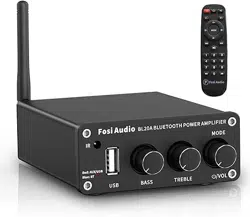
BL20A Bluetooth Power Amplifier User’s Manual
Red:AUX/USB
Blue:BT
- Treble +
- Bass +
IR
BL20A BLUETOOTH POWER AMPLIFIER
MODE
/VOL

Product Specifications
• Fosi Audio BL20A is a powerful Bluetooth 5.0 HiFi stereo
amplifier with AUX pre-output, which can be used as a
pre-amplifier. Design Treble & Bass control and remote
control to meet your more needs.
• The BL20A supports AUX/U-Disk/Bluetooth input, suitable
for most home passive speakers. Using two low-distortion
TPA3116 high-performance chips to display
ultra-high-definition sound quality.
• Let's join the audiophile’s music journey with Fosi Audio
BL20A!
Input Interface AUX/U-Disk/Bluetooth Input
SNR 92dB
THD <0.001%
Power Amplifier Chip TPA3116×2
Bluetooth Chip ATS2853
Power Adapter 24V/4.5A
DC Input Range DC 12-24V
Frequency Response Range 20Hz- 20KHz
Load Impedance 2-8 Ohm
Input Sensitivity 500mV
U-Disk Capacity Max 32GB
Support Format MP3/WMA/APE/ FLAC/WAV
Max Power Output 100watt×2
Output Interface Speaker’s Output +
3.5MM AUX Pre-out
Bluetooth Transmission
Distance
Bluetooth 5.0, up to 164ft/50m
Output Passive Speakers,
Powered Speakers, Amplifier

Product Weight 0.71lb / 323g
Dimensions 3.54×4.72×1.18 inches
(9×12×3 cm)
Product Overview
1
2 3 5
6
4
Red:AUX/USB
Blue:BT
- Treble +
- Bass +
IR
BL20A BLUETOOTH POWER AMPLIFIER
MODE
/VOL
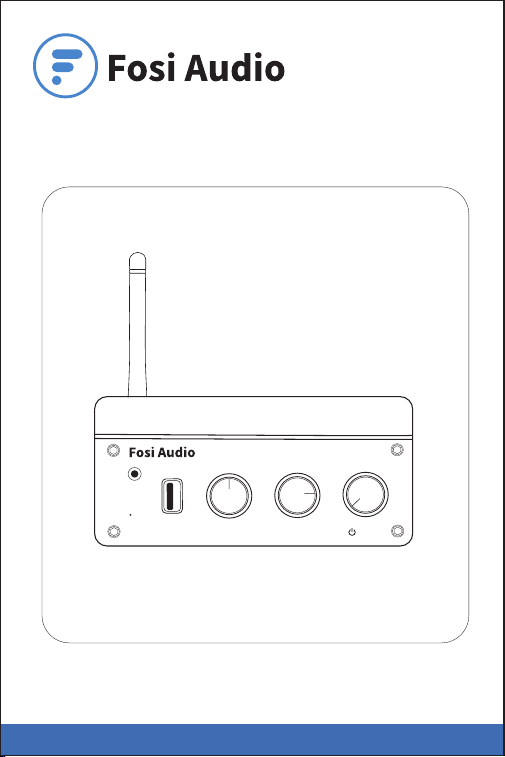
3: U-Disk Input
4: Bass Control
5: Treble Control
6: Multi-function
Knob(Power Switch/
Mode Switch/
Volume Control)
2: AUX/U-Disk/Blue-
tooth Input Indicator
Light
1: Infrared Radiation
Note:
Multi- function Knob: Long press to power on/off;
Short press to switch mode; Turn left to decrease the
volume; Turn right to increase the volume.
9: Passive
Speakers Output
10: Bluetooth
Antenna Interface
11: DC Input
12: Bluetooth Antenna 8: 3.5MM AUX
Pre-output
7: 3.5MM AUX Input
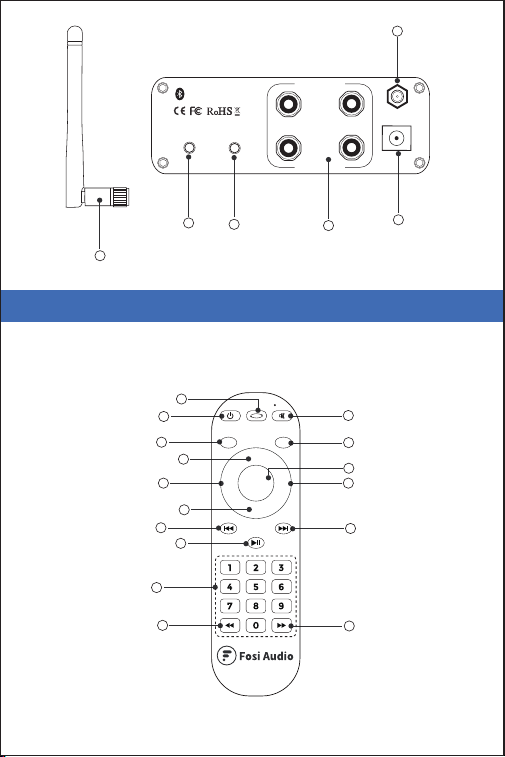
Remote Control
Infrared remote control working distance: ≤15 m
10
11
12
9
8
7
L
R
INPUT
PRE-OUT
OUTPUT
SPEAKERS
ANT
Bluetooth
DC 12V-24V
12: Bluetooth Antenna
3
2
1
5
9
6
4
7
8
13
12
16
11
15
10
V–
V
+
MODE
H–
B–
H
+
B
+
14

V–
V
+
MODE
H–
B–
H
+
B
+
Short press to power on/off the BL20A1
Short press to mute
3
Short press: Volume down
4
Short press: Volume up
5
Short press: Treble up
7
Short press: Treble down
8
Short press: Bass up
9
Short press: Bass down
10
Single cycle/All loop
Note: When playing music in U-Disk mode, short press
this button to switch single loop or all loop
playback.
2
Short press: Play / Pause
Note: After connecting Bluetooth to the BL20A in
Bluetooth mode, long press this button will
disconnect the Bluetooth connection.
13
Short press to switch mode (AUX/U-Disk/Bluetooth)
Note: U-Disk must be inserted into the BL20A, skip it if
not.
6
Short press: Previous track
Note: It can only be used in Bluetooth or U-Disk mode.
AUX mode does not work.
11
Short press: Next track
Note: It can only be used in Bluetooth or U-Disk mode.
AUX mode does not work.
12

Quick Setup
Step 1: Install the Bluetooth antenna to the BL20A.
Step 2: • Use speaker’s wire to connect the speaker’s output
to your passive speakers.
• Or use 3.5MM audio cable to connect the 3.5MM
AUX pre-out of BL20A to your amplifier, then use
speaker’s wire to connect the amplifier with your
passive speakers.
• Or use 3.5MM audio cable to connect the 3.5MM
AUX pre-out of BL20A to your powered speakers.
Package Contents
BL20A Bluetooth Amplifier x 1
Bluetooth Antenna x 1
Remote Control x 1 (Not include battery)
Power Adapter x1
AC Cord x1
User Manual x 1
Long press: Fast backward
15
Long press: Fast forward
Note: Fast backward and Fast forward functions can
only be used in U-Disk mode.
16
Select a specific song in U-Disk mode (0-9 Number
buttons)
Note: It can only be used in U-Disk mode. For songs
ranked after 10, click the corresponding serial
number directly, please click the number keys
continuously. After 5 seconds it will play, or you
can click the “ ” button to play immediately.
14
Single cycle/All loop
Note: When playing music in U-Disk mode, short press
this button to switch single loop or all loop
playback.

Note: You don’t need to connect all the outputs. You can
connect 2 passive speakers only.
Or you can connect it to the pre-out as a preamplifier.
And you can connect all the outputs simultaneously.
Step 3: Connect the power adapter to BL20A and the socket.
Long press the Multi-function Knob(Power Switch/Mode
Switch/Volume Control) to power on the BL20A.
Then the input mode indicator light of BL20A stays red
after power is on.
Note1: Please make sure the LED light on the power adapter
stays on.
Note2: Before connecting the power supply, please turn
down the bass and treble control to 0 (always to the
left) to avoid your hearing from damage.
Step 4: Connect the audio source (AUX input/U-Disk
input/Bluetooth input) to the BL20A.
• AUX Input: Use a 3.5mm audio cable to connect the BL20A
and your device. The input indicator light will
stay on Red.
Quick Setup
Step 1: Install the Bluetooth antenna to the BL20A.
Step 2: • Use speaker’s wire to connect the speaker’s output
to your passive speakers.
• Or use 3.5MM audio cable to connect the 3.5MM
AUX pre-out of BL20A to your amplifier, then use
speaker’s wire to connect the amplifier with your
passive speakers.
• Or use 3.5MM audio cable to connect the 3.5MM
AUX pre-out of BL20A to your powered speakers.
L
R
INPUT
PRE-OUT
OUTPUT
SPEAKERS
ANT
Bluetooth
DC 12V-24V
Bluetooth
Antenna
Active Speakers Passive Speakers
Power
Adapter
Amplifier


• U-Disk Input: Insert your U-Disk into the U-Disk input
interface. The input indicator light is red and
flashes continuously.
• Bluetooth Input: Short Press the Multi-function Knob
(Power Switch/Mode Switch/Volume
Control) to the Bluetooth mode input(the
blue input mode indicator light flashing).
Then turn on the Bluetooth on your
device,select "BL20A" for pairing, the
input mode indicator light will stay blue
after a successful connection.
Input priority: The latest input mode first.
Note: Please keep the BL20A away from other electric
devices. The BL20A can't use with a radio
simultaneously.
Step 5: Adjust the Volume control, Bass/Treble control, then
enjoy it!
Note: Make sure that all the cables are completely pushed
into the device.
Q&A/ Troubleshooting
1. Get noise when playing music?
• Bluetooth input play mode: Try to use other Bluetooth
devices. Weak or unstable Bluetooth signal will cause this
problem, try to close your device to the BL20A.
• U-Disk input play mode: Try to use other U-Disks, and make
sure the audio format is compatible with the BL20A. (BL20A
supports MP3/WMA/APE/ FLAC/WAV audio format). Make
sure that the U-Disk capacity does not exceed 32GB and can
be used normally.
• AUX input play mode: Please change the audio cable to have
a try.
• Try another RCA cable and make sure the audio cable is
connected correctly.

• U-Disk Input: Insert your U-Disk into the U-Disk input
interface. The input indicator light is red and
flashes continuously.
• Bluetooth Input: Short Press the Multi-function Knob
(Power Switch/Mode Switch/Volume
Control) to the Bluetooth mode input(the
blue input mode indicator light flashing).
Then turn on the Bluetooth on your
device,select "BL20A" for pairing, the
input mode indicator light will stay blue
after a successful connection.
Input priority: The latest input mode first.
Note: Please keep the BL20A away from other electric
devices. The BL20A can't use with a radio
simultaneously.
Step 5: Adjust the Volume control, Bass/Treble control, then
enjoy it!
Note: Make sure that all the cables are completely pushed
into the device.
Q&A/ Troubleshooting
1. Get noise when playing music?
• Bluetooth input play mode: Try to use other Bluetooth
devices. Weak or unstable Bluetooth signal will cause this
problem, try to close your device to the BL20A.
• U-Disk input play mode: Try to use other U-Disks, and make
sure the audio format is compatible with the BL20A. (BL20A
supports MP3/WMA/APE/ FLAC/WAV audio format). Make
sure that the U-Disk capacity does not exceed 32GB and can
be used normally.
• AUX input play mode: Please change the audio cable to have
a try.
• Try another RCA cable and make sure the audio cable is
connected correctly.
• Please unplug the RCA cable from the amplifier, and then
turn it on to have a try.
• Please change the audio source or other brand devices to
have a try.
• Did you set the "treble" volume to the top? please volume
down the "Treble" volume.
• Make sure that all the cables are completely pushed into the
device, incompletely connection will cause this issue.
• Please keep this device away from other electronic devices.
2. All cables are connected, but there is no audio
output?
• Please check the input indicator light on the front panel of
the BL20A and the power supply are on.
• If the input indicator light is on, please check if the volume
knob is at the minimum state, if it is, please turn up the
volume.
• Make sure that the BL20A is in the play mode you want.
Note: Bluetooth input mode (The input mode indicator light
will stay on blue.)
AUX input mode (The input mode indicator light will
stay on red.)
U-Disk input mode (The input indicator light is red and
flashes continuously.)
Input priority: The latest input mode first.
• Make sure that the U-Disk capacity does not exceed 32GB
and can work normally.
• Please check if the audio source is paused.
• Please try to change the sound source, cables and speakers.
• Restart the BL20A and your device, then try to connect again.

Note: Make sure that all the cables are completely pushed
into the device.
3. My Bluetooth device can’t pair with the BL20A?
• Make sure that the BL20A is powered on and the LED light
on the power adapter stays on.
• Make sure that the BL20A is not paired with another device.
• Make sure that the distance between your device and the
BL20A is not too long, close your device to the BL20A to
have a try.
• Make sure there are no obstacles between your device and
the BL20A, obstacles will affect the Bluetooth operation
distance. (Maximum transmission distance without
obstacles: 164ft/50m)
• Please try to change another Bluetooth audio source to test.
• Please replug the power supply, move the amplifier to
another room and test it again.
• Restart the BL20A and then try to connect again, try to use
another brand of mobile phone.
4. Why Bluetooth is intermittent?
• Use another Bluetooth device to have a try.
• Ensure that there is no interference from other electronic
equipment between the BL20A and the audio source.
• Put your device close to the BL20A.
• Replug the power adapter.
5. One channel does not work?
• Please test whether the Bluetooth, U-Disk, and AUX inputs
have the same problem first.
• If these three modes have the same problem, swap the
speaker cables of the left and right channels, or change

another speaker, and then test whether this channel still
does not work;
• If only Bluetooth, U-Disk, or AUX mode does not work,
change the audio source, change the audio cable and test
again, and make sure that all the cables are completely
pushed into the device.
6. U-Disk cannot be played?
• Please try other different U-Disk playback tests.
• Make sure that the U-Disk capacity does not exceed 32GB
and can work normally.
• Make sure that the BL20A is in the U-Disk play mode.
7. U-Disk play rustling?
• Song format problem. WAV contains DTS multi-channel, the
BL20A supports stereo but does not support multi-channel,
you can convert DTS to stereo. Download the Foobar2000
software on the computer to convert the audio channel.
8. Can’t power on?
• Long press the power switch button to power on/off.
• Make sure that the LED light on the power adapter stays on.
• If it does not light up: Unplug the power adapter from the
BL20A, plug the power adapter directly into the AC power
source, and see if the LED will light up. If it still does not light
up, it may be a problem with the power adapter. Please
contact us to replace the power adapter.
• You can use the DC12-24V power adapter of the camera or
router to connect the BL20A to test whether the BL20A can
be turned on.

9. The BL20A can be used as a pre-amp?
• Yes. There is a PRE-OUT interface on the rear panel, which
can be used as a preamplifier.
10. Do I have to connect all the outputs of BL20A? Can I
only connect 2 speakers? Or just use it as a
preamp?
• You don’t need to connect all the outputs. You can connect 2
passive speakers only. Or you can connect it to the pre-out
as a preamplifier. And you can connect all the outputs
simultaneously.
11. Sound quality is not good?
• Make sure all the cables are fully connected.
• Adjust the treble and bass control of the BL20A to achieve
the right tone.
• Please try to change the sound source and cables to test.
12. Why the sound cut in and cut out?
• Try to reduce the sound of the sound source.
• Try to change the audio source to test.
• Reduce the volume of the treble and bass knob on the
BL20A.
• Ensure that the positive and negative poles of the speaker
output do not touch together. Some relatively large banana
plugs are easy to touch together and cause a short circuit.
13. Does the BL20A support Bluetooth aptX and Low
Latency?
• No. The BL20A does not support Dolby, aptX, aptX HD and
aptX Low Latency.
Our website: www.fosiaudio.com
Amazon store: www.amazon.com/fosiaudio
Our Youtube channel: Fosi Audio
Our Facebook page: Fosi Audio
After-sale Service and
Technical Support Email:
support@fosiaudio.com
fosiaudio@hotmail.com
Fosi Audio Product’s User Manual
14. Can this amp be left on all the time?
• It can be connected all the time and it is safe without power
consumption.
15. Can I listen to two audio inputs at the same time?
• No, only one mode can be used at a time.
Warranty Information
• All Fosi Audio products have an 18-month limited warranty
on parts and labor from the date of purchase. Please contact
us if you have any problems.
About Fosi Audio
• Fosi Audio designs and builds innovative audio products
with all your music in mind. Great sound, simple but elegant
designs, high-quality materials, and truly useful features are
what Fosi Audio is about. We sincerely hope you get as
much enjoyment from our products as we’ve had to create
them!
