Warranty service:
1. For 24 months from the date of purchase,
consumers can take advantage of free warranty
services during normal use of the products,
provided that the product is free from mechanical
damage and is not the result of improper use.
2. Consumers cannot benefit from the warranty if:
A. the damage is self-inflicted,
B. the warranty period has expired,
C. they have not used the product in accordance
with the instructions for use and maintenance,
D. the products have been disassembled, self-
repaired or immersed in water.
2. Notes on water resistance (even if it's a water-
resistant watch):
Be aware of the following methods as they
deteriorate the waterproofing.
-Do not wear the watch in the shower.
-Do not wear the watch in a heated swimming
pool, sauna or other high temperature/humidity
environment.
-Do not wear the watch when washing your
hands or face or when working where soap or
detergent is used.
-Remember to wash any salt or dirt off the watch
when you immerse it in the sea.
WARRANTY
PRECAUTIONS
1. Weak battery:
If the battery is low, charge the device
immediately to protect the battery life.
2. Charging:
Do not use the watch while it is charging.
3. Do not use the watch while it is charging
as described above.
50 degrees Celsius can cause
overheating, deformation and burning of
the device.
4. Do not swim, dive or use the device
under water.
5. The device uses a built-in battery and it is
forbidden to disassemble it separately.
6. In case of battery rupture and leakage,
avoid contact with eyes and skin.
IMPORTANT INFORMATION
1.Security:
-wipe the watch with a soft cloth to keep the
watch and strap clean (use clean water or
seawater).
- Make sure the heart rate lens on the watch is
close to your skin.
- The skin temperature on the wrist is too low
due to weather conditions, which affects the
heart rate control.
7. ECG measurements can only be taken in the
app. The history is automatically saved.
8. Sleep quality monitoring.
9. Activity.
10. Remote control of the phone camera.
11. Remote control of music playback on your
phone.
12. Phone search (this function is available
when connected to the MActive app.
13. You can adjust the brightness of the screen.
14. Alarm.
15. Stopwatch
16.Calendar
17.Calculator
18.Sedentary mode: when set, indicates that
you are not moving for too long.
When your device is connected to the app, the
date and time are synchronised.
You can also set the data manually. Enter a
setting - clock - and turn synchronisation off. Then
go to the date and time and set them manually.
DATE AND TIME SETTING
ON/OFF
Hold the bottom button for 3 seconds to start the
clock.
To turn the clock off, hold down the bottom
button for 3 seconds.
CLOCK FACES
There are 5 clock faces that can be set as you
like.
1. Pedometer. Step counting lasts 24 hours. At
midnight, the data is stored and reset to 0 so that it
can be recalculated.
2. Calorie counter.
3. Distance travelled.
4. Heart rate.
The heart rate test is dynamic and stops when
you leave the interface.
5. Blood pressure measurement.
6. Blood Oxygenation measurement.
.
FUNCTIONS
ACTIVATION
Turn on the Bluetooth function on your phone.
Go to Bluetooth settings and select
to connect your smartwatch to your phone. Your
phone displays the pairing information and you
confirm the pairing. When the device is positively
connected, the Bluetooth label on the
smartwatch turns blue and you can receive and
make calls.
IMPORTANT: Only contacts from your SIM card
will be visible on the watch, and the contact
name will be visible when you receive a call.
You can also connect your WL13 smartwatch to
your phone via the dedicated "MActive" app. This
combination will allow you to store your
measurements and activity data, and allow you
to set goals and various notifications.
CHARGING INSTRUCTIONS
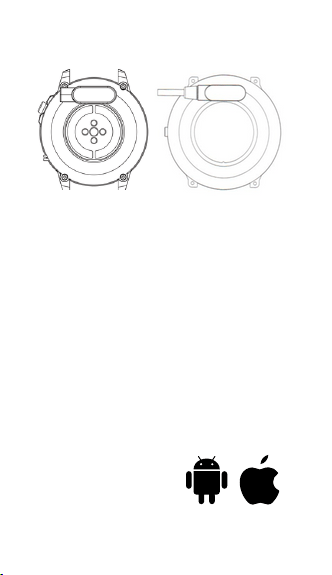
This product uses magnetic charging.
Connect the charger to the USB input and to the
rear charging contacts of the device. Once the
connection is established, charging starts
automatically and the charging icon appears on
the display.
Note: Do not connect the magnetic charging
cable to two contacts at the same time with
conductive material as a short circuit may occur.
HARDWARE REQUIREMENTS
iOS 9.0 and later
Android 4.4 and later
Bluetooth 4.0 supported
You must have an Android
6.0 device to use the GPS
function.
Android 4.4 + iOS 9.0 +
SMARTWATCH
WL13
User manual
DEAR CUSTOMER, THANK YOU FOR
PURCHASING OUR
PRODUCT!
Please read the full instructions carefully before
use. It is recommended to use only the original
battery, charger and accessories included with
the device.
The manufacturer and distributor are not
responsible for the use of accessories from other
manufacturers.
(The functions listed in this manual may vary
slightly between models as the manual is a
general description of the smartwatch and some
models may differ from the standard).
The device must be charged for at least 2 hours
before first use.
Before using the device, you must download the
app, install it and accept all permissions,
otherwise not all functions will be available.
The Company reserves the right to change the
contents of this manual.
SI
EN

Warranty service:
1. For 24 months from the date of purchase,
consumers can take advantage of free warranty
services during normal use of the products,
provided that the product is free from mechanical
damage and is not the result of improper use.
2. Consumers cannot benefit from the warranty if:
A. the damage is self-inflicted,
B. the warranty period has expired,
C. they have not used the product in accordance
with the instructions for use and maintenance,
D. the products have been disassembled, self-
repaired or immersed in water.
2. Notes on water resistance (even if it's a water-
resistant watch):
Be aware of the following methods as they
deteriorate the waterproofing.
-Do not wear the watch in the shower.
-Do not wear the watch in a heated swimming
pool, sauna or other high temperature/humidity
environment.
-Do not wear the watch when washing your
hands or face or when working where soap or
detergent is used.
-Remember to wash any salt or dirt off the watch
when you immerse it in the sea.
WARRANTY
PRECAUTIONS
1. Weak battery:
If the battery is low, charge the device
immediately to protect the battery life.
2. Charging:
Do not use the watch while it is charging.
3. Do not use the watch while it is charging
as described above.
50 degrees Celsius can cause
overheating, deformation and burning of
the device.
4. Do not swim, dive or use the device
under water.
5. The device uses a built-in battery and it is
forbidden to disassemble it separately.
6. In case of battery rupture and leakage,
avoid contact with eyes and skin.
IMPORTANT INFORMATION
1.Security:
-wipe the watch with a soft cloth to keep the
watch and strap clean (use clean water or
seawater).
- Make sure the heart rate lens on the watch is
close to your skin.
- The skin temperature on the wrist is too low
due to weather conditions, which affects the
heart rate control.
7. ECG measurements can only be taken in the
app. The history is automatically saved.
8. Sleep quality monitoring.
9. Activity.
10. Remote control of the phone camera.
11. Remote control of music playback on your
phone.
12. Phone search (this function is available
when connected to the MActive app.
13. You can adjust the brightness of the screen.
14. Alarm.
15. Stopwatch
16.Calendar
17.Calculator
18.Sedentary mode: when set, indicates that
you are not moving for too long.
When your device is connected to the app, the
date and time are synchronised.
You can also set the data manually. Enter a
setting - clock - and turn synchronisation off. Then
go to the date and time and set them manually.
DATE AND TIME SETTING
ON/OFF
Hold the bottom button for 3 seconds to start the
clock.
To turn the clock off, hold down the bottom
button for 3 seconds.
CLOCK FACES
There are 5 clock faces that can be set as you
like.
1. Pedometer. Step counting lasts 24 hours. At
midnight, the data is stored and reset to 0 so that it
can be recalculated.
2. Calorie counter.
3. Distance travelled.
4. Heart rate.
The heart rate test is dynamic and stops when
you leave the interface.
5. Blood pressure measurement.
6. Blood Oxygenation measurement.
.
FUNCTIONS
ACTIVATION
Turn on the Bluetooth function on your phone.
Go to Bluetooth settings and select
to connect your smartwatch to your phone. Your
phone displays the pairing information and you
confirm the pairing. When the device is positively
connected, the Bluetooth label on the
smartwatch turns blue and you can receive and
make calls.
IMPORTANT: Only contacts from your SIM card
will be visible on the watch, and the contact
name will be visible when you receive a call.
You can also connect your WL13 smartwatch to
your phone via the dedicated "MActive" app. This
combination will allow you to store your
measurements and activity data, and allow you
to set goals and various notifications.
CHARGING INSTRUCTIONS
This product uses magnetic charging.
Connect the charger to the USB input and to the
rear charging contacts of the device. Once the
connection is established, charging starts
automatically and the charging icon appears on
the display.
Note: Do not connect the magnetic charging
cable to two contacts at the same time with
conductive material as a short circuit may occur.
HARDWARE REQUIREMENTS
iOS 9.0 and later
Android 4.4 and later
Bluetooth 4.0 supported
You must have an Android
6.0 device to use the GPS
function.
Android 4.4 + iOS 9.0 +
SMARTWATCH
WL13
User manual
DEAR CUSTOMER, THANK YOU FOR
PURCHASING OUR
PRODUCT!
Please read the full instructions carefully before
use. It is recommended to use only the original
battery, charger and accessories included with
the device.
The manufacturer and distributor are not
responsible for the use of accessories from other
manufacturers.
(The functions listed in this manual may vary
slightly between models as the manual is a
general description of the smartwatch and some
models may differ from the standard).
The device must be charged for at least 2 hours
before first use.
Before using the device, you must download the
app, install it and accept all permissions,
otherwise not all functions will be available.
The Company reserves the right to change the
contents of this manual.
SI
EN
Warranty service:
1. For 24 months from the date of purchase,
consumers can take advantage of free warranty
services during normal use of the products,
provided that the product is free from mechanical
damage and is not the result of improper use.
2. Consumers cannot benefit from the warranty if:
A. the damage is self-inflicted,
B. the warranty period has expired,
C. they have not used the product in accordance
with the instructions for use and maintenance,
D. the products have been disassembled, self-
repaired or immersed in water.
2. Notes on water resistance (even if it's a water-
resistant watch):
Be aware of the following methods as they
deteriorate the waterproofing.
-Do not wear the watch in the shower.
-Do not wear the watch in a heated swimming
pool, sauna or other high temperature/humidity
environment.
-Do not wear the watch when washing your
hands or face or when working where soap or
detergent is used.
-Remember to wash any salt or dirt off the watch
when you immerse it in the sea.
WARRANTY
PRECAUTIONS
1. Weak battery:
If the battery is low, charge the device
immediately to protect the battery life.
2. Charging:
Do not use the watch while it is charging.
3. Do not use the watch while it is charging
as described above.
50 degrees Celsius can cause
overheating, deformation and burning of
the device.
4. Do not swim, dive or use the device
under water.
5. The device uses a built-in battery and it is
forbidden to disassemble it separately.
6. In case of battery rupture and leakage,
avoid contact with eyes and skin.
IMPORTANT INFORMATION
1.Security:
-wipe the watch with a soft cloth to keep the
watch and strap clean (use clean water or
seawater).
- Make sure the heart rate lens on the watch is
close to your skin.
- The skin temperature on the wrist is too low
due to weather conditions, which affects the
heart rate control.
7. ECG measurements can only be taken in the
app. The history is automatically saved.
8. Sleep quality monitoring.
9. Activity.
10. Remote control of the phone camera.
11. Remote control of music playback on your
phone.
12. Phone search (this function is available
when connected to the MActive app.
13. You can adjust the brightness of the screen.
14. Alarm.
15. Stopwatch
16.Calendar
17.Calculator
18.Sedentary mode: when set, indicates that
you are not moving for too long.
When your device is connected to the app, the
date and time are synchronised.
You can also set the data manually. Enter a
setting - clock - and turn synchronisation off. Then
go to the date and time and set them manually.
DATE AND TIME SETTING
ON/OFF
Hold the bottom button for 3 seconds to start the
clock.
To turn the clock off, hold down the bottom
button for 3 seconds.
CLOCK FACES
There are 5 clock faces that can be set as you
like.
1. Pedometer. Step counting lasts 24 hours. At
midnight, the data is stored and reset to 0 so that it
can be recalculated.
2. Calorie counter.
3. Distance travelled.
4. Heart rate.
The heart rate test is dynamic and stops when
you leave the interface.
5. Blood pressure measurement.
6. Blood Oxygenation measurement.
.
FUNCTIONS
ACTIVATION
Turn on the Bluetooth function on your phone.
Go to Bluetooth settings and select
to connect your smartwatch to your phone. Your
phone displays the pairing information and you
confirm the pairing. When the device is positively
connected, the Bluetooth label on the
smartwatch turns blue and you can receive and
make calls.
IMPORTANT: Only contacts from your SIM card
will be visible on the watch, and the contact
name will be visible when you receive a call.
You can also connect your WL13 smartwatch to
your phone via the dedicated "MActive" app. This
combination will allow you to store your
measurements and activity data, and allow you
to set goals and various notifications.
CHARGING INSTRUCTIONS
This product uses magnetic charging.
Connect the charger to the USB input and to the
rear charging contacts of the device. Once the
connection is established, charging starts
automatically and the charging icon appears on
the display.
Note: Do not connect the magnetic charging
cable to two contacts at the same time with
conductive material as a short circuit may occur.
HARDWARE REQUIREMENTS
iOS 9.0 and later
Android 4.4 and later
Bluetooth 4.0 supported
You must have an Android
6.0 device to use the GPS
function.
Android 4.4 + iOS 9.0 +
SMARTWATCH
WL13
User manual
DEAR CUSTOMER, THANK YOU FOR
PURCHASING OUR
PRODUCT!
Please read the full instructions carefully before
use. It is recommended to use only the original
battery, charger and accessories included with
the device.
The manufacturer and distributor are not
responsible for the use of accessories from other
manufacturers.
(The functions listed in this manual may vary
slightly between models as the manual is a
general description of the smartwatch and some
models may differ from the standard).
The device must be charged for at least 2 hours
before first use.
Before using the device, you must download the
app, install it and accept all permissions,
otherwise not all functions will be available.
The Company reserves the right to change the
contents of this manual.
SI
EN
Warranty service:
1. For 24 months from the date of purchase,
consumers can take advantage of free warranty
services during normal use of the products,
provided that the product is free from mechanical
damage and is not the result of improper use.
2. Consumers cannot benefit from the warranty if:
A. the damage is self-inflicted,
B. the warranty period has expired,
C. they have not used the product in accordance
with the instructions for use and maintenance,
D. the products have been disassembled, self-
repaired or immersed in water.
2. Notes on water resistance (even if it's a water-
resistant watch):
Be aware of the following methods as they
deteriorate the waterproofing.
-Do not wear the watch in the shower.
-Do not wear the watch in a heated swimming
pool, sauna or other high temperature/humidity
environment.
-Do not wear the watch when washing your
hands or face or when working where soap or
detergent is used.
-Remember to wash any salt or dirt off the watch
when you immerse it in the sea.
WARRANTY
PRECAUTIONS
1. Weak battery:
If the battery is low, charge the device
immediately to protect the battery life.
2. Charging:
Do not use the watch while it is charging.
3. Do not use the watch while it is charging
as described above.
50 degrees Celsius can cause
overheating, deformation and burning of
the device.
4. Do not swim, dive or use the device
under water.
5. The device uses a built-in battery and it is
forbidden to disassemble it separately.
6. In case of battery rupture and leakage,
avoid contact with eyes and skin.
IMPORTANT INFORMATION
1.Security:
-wipe the watch with a soft cloth to keep the
watch and strap clean (use clean water or
seawater).
- Make sure the heart rate lens on the watch is
close to your skin.
- The skin temperature on the wrist is too low
due to weather conditions, which affects the
heart rate control.
7. ECG measurements can only be taken in the
app. The history is automatically saved.
8. Sleep quality monitoring.
9. Activity.
10. Remote control of the phone camera.
11. Remote control of music playback on your
phone.
12. Phone search (this function is available
when connected to the MActive app.
13. You can adjust the brightness of the screen.
14. Alarm.
15. Stopwatch
16.Calendar
17.Calculator
18.Sedentary mode: when set, indicates that
you are not moving for too long.
When your device is connected to the app, the
date and time are synchronised.
You can also set the data manually. Enter a
setting - clock - and turn synchronisation off. Then
go to the date and time and set them manually.
DATE AND TIME SETTING
ON/OFF
Hold the bottom button for 3 seconds to start the
clock.
To turn the clock off, hold down the bottom
button for 3 seconds.
CLOCK FACES
There are 5 clock faces that can be set as you
like.
1. Pedometer. Step counting lasts 24 hours. At
midnight, the data is stored and reset to 0 so that it
can be recalculated.
2. Calorie counter.
3. Distance travelled.
4. Heart rate.
The heart rate test is dynamic and stops when
you leave the interface.
5. Blood pressure measurement.
6. Blood Oxygenation measurement.
.
FUNCTIONS
ACTIVATION
Turn on the Bluetooth function on your phone.
Go to Bluetooth settings and select
to connect your smartwatch to your phone. Your
phone displays the pairing information and you
confirm the pairing. When the device is positively
connected, the Bluetooth label on the
smartwatch turns blue and you can receive and
make calls.
IMPORTANT: Only contacts from your SIM card
will be visible on the watch, and the contact
name will be visible when you receive a call.
You can also connect your WL13 smartwatch to
your phone via the dedicated "MActive" app. This
combination will allow you to store your
measurements and activity data, and allow you
to set goals and various notifications.
CHARGING INSTRUCTIONS
This product uses magnetic charging.
Connect the charger to the USB input and to the
rear charging contacts of the device. Once the
connection is established, charging starts
automatically and the charging icon appears on
the display.
Note: Do not connect the magnetic charging
cable to two contacts at the same time with
conductive material as a short circuit may occur.
HARDWARE REQUIREMENTS
iOS 9.0 and later
Android 4.4 and later
Bluetooth 4.0 supported
You must have an Android
6.0 device to use the GPS
function.
Android 4.4 + iOS 9.0 +
SMARTWATCH
WL13
User manual
DEAR CUSTOMER, THANK YOU FOR
PURCHASING OUR
PRODUCT!
Please read the full instructions carefully before
use. It is recommended to use only the original
battery, charger and accessories included with
the device.
The manufacturer and distributor are not
responsible for the use of accessories from other
manufacturers.
(The functions listed in this manual may vary
slightly between models as the manual is a
general description of the smartwatch and some
models may differ from the standard).
The device must be charged for at least 2 hours
before first use.
Before using the device, you must download the
app, install it and accept all permissions,
otherwise not all functions will be available.
The Company reserves the right to change the
contents of this manual.
SI
EN

Warranty service:
1. For 24 months from the date of purchase,
consumers can take advantage of free warranty
services during normal use of the products,
provided that the product is free from mechanical
damage and is not the result of improper use.
2. Consumers cannot benefit from the warranty if:
A. the damage is self-inflicted,
B. the warranty period has expired,
C. they have not used the product in accordance
with the instructions for use and maintenance,
D. the products have been disassembled, self-
repaired or immersed in water.
2. Notes on water resistance (even if it's a water-
resistant watch):
Be aware of the following methods as they
deteriorate the waterproofing.
-Do not wear the watch in the shower.
-Do not wear the watch in a heated swimming
pool, sauna or other high temperature/humidity
environment.
-Do not wear the watch when washing your
hands or face or when working where soap or
detergent is used.
-Remember to wash any salt or dirt off the watch
when you immerse it in the sea.
WARRANTY
PRECAUTIONS
1. Weak battery:
If the battery is low, charge the device
immediately to protect the battery life.
2. Charging:
Do not use the watch while it is charging.
3. Do not use the watch while it is charging
as described above.
50 degrees Celsius can cause
overheating, deformation and burning of
the device.
4. Do not swim, dive or use the device
under water.
5. The device uses a built-in battery and it is
forbidden to disassemble it separately.
6. In case of battery rupture and leakage,
avoid contact with eyes and skin.
IMPORTANT INFORMATION
1.Security:
-wipe the watch with a soft cloth to keep the
watch and strap clean (use clean water or
seawater).
- Make sure the heart rate lens on the watch is
close to your skin.
- The skin temperature on the wrist is too low
due to weather conditions, which affects the
heart rate control.
7. ECG measurements can only be taken in the
app. The history is automatically saved.
8. Sleep quality monitoring.
9. Activity.
10. Remote control of the phone camera.
11. Remote control of music playback on your
phone.
12. Phone search (this function is available
when connected to the MActive app.
13. You can adjust the brightness of the screen.
14. Alarm.
15. Stopwatch
16.Calendar
17.Calculator
18.Sedentary mode: when set, indicates that
you are not moving for too long.
When your device is connected to the app, the
date and time are synchronised.
You can also set the data manually. Enter a
setting - clock - and turn synchronisation off. Then
go to the date and time and set them manually.
DATE AND TIME SETTING
ON/OFF
Hold the bottom button for 3 seconds to start the
clock.
To turn the clock off, hold down the bottom
button for 3 seconds.
CLOCK FACES
There are 5 clock faces that can be set as you
like.
1. Pedometer. Step counting lasts 24 hours. At
midnight, the data is stored and reset to 0 so that it
can be recalculated.
2. Calorie counter.
3. Distance travelled.
4. Heart rate.
The heart rate test is dynamic and stops when
you leave the interface.
5. Blood pressure measurement.
6. Blood Oxygenation measurement.
.
FUNCTIONS
ACTIVATION
Turn on the Bluetooth function on your phone.
Go to Bluetooth settings and select
to connect your smartwatch to your phone. Your
phone displays the pairing information and you
confirm the pairing. When the device is positively
connected, the Bluetooth label on the
smartwatch turns blue and you can receive and
make calls.
IMPORTANT: Only contacts from your SIM card
will be visible on the watch, and the contact
name will be visible when you receive a call.
You can also connect your WL13 smartwatch to
your phone via the dedicated "MActive" app. This
combination will allow you to store your
measurements and activity data, and allow you
to set goals and various notifications.
CHARGING INSTRUCTIONS
This product uses magnetic charging.
Connect the charger to the USB input and to the
rear charging contacts of the device. Once the
connection is established, charging starts
automatically and the charging icon appears on
the display.
Note: Do not connect the magnetic charging
cable to two contacts at the same time with
conductive material as a short circuit may occur.
HARDWARE REQUIREMENTS
iOS 9.0 and later
Android 4.4 and later
Bluetooth 4.0 supported
You must have an Android
6.0 device to use the GPS
function.
Android 4.4 + iOS 9.0 +
SMARTWATCH
WL13
User manual
DEAR CUSTOMER, THANK YOU FOR
PURCHASING OUR
PRODUCT!
Please read the full instructions carefully before
use. It is recommended to use only the original
battery, charger and accessories included with
the device.
The manufacturer and distributor are not
responsible for the use of accessories from other
manufacturers.
(The functions listed in this manual may vary
slightly between models as the manual is a
general description of the smartwatch and some
models may differ from the standard).
The device must be charged for at least 2 hours
before first use.
Before using the device, you must download the
app, install it and accept all permissions,
otherwise not all functions will be available.
The Company reserves the right to change the
contents of this manual.
SI
EN

Warranty service:
1. For 24 months from the date of purchase,
consumers can take advantage of free warranty
services during normal use of the products,
provided that the product is free from mechanical
damage and is not the result of improper use.
2. Consumers cannot benefit from the warranty if:
A. the damage is self-inflicted,
B. the warranty period has expired,
C. they have not used the product in accordance
with the instructions for use and maintenance,
D. the products have been disassembled, self-
repaired or immersed in water.
2. Notes on water resistance (even if it's a water-
resistant watch):
Be aware of the following methods as they
deteriorate the waterproofing.
-Do not wear the watch in the shower.
-Do not wear the watch in a heated swimming
pool, sauna or other high temperature/humidity
environment.
-Do not wear the watch when washing your
hands or face or when working where soap or
detergent is used.
-Remember to wash any salt or dirt off the watch
when you immerse it in the sea.
WARRANTY
PRECAUTIONS
1. Weak battery:
If the battery is low, charge the device
immediately to protect the battery life.
2. Charging:
Do not use the watch while it is charging.
3. Do not use the watch while it is charging
as described above.
50 degrees Celsius can cause
overheating, deformation and burning of
the device.
4. Do not swim, dive or use the device
under water.
5. The device uses a built-in battery and it is
forbidden to disassemble it separately.
6. In case of battery rupture and leakage,
avoid contact with eyes and skin.
IMPORTANT INFORMATION
1.Security:
-wipe the watch with a soft cloth to keep the
watch and strap clean (use clean water or
seawater).
- Make sure the heart rate lens on the watch is
close to your skin.
- The skin temperature on the wrist is too low
due to weather conditions, which affects the
heart rate control.
7. ECG measurements can only be taken in the
app. The history is automatically saved.
8. Sleep quality monitoring.
9. Activity.
10. Remote control of the phone camera.
11. Remote control of music playback on your
phone.
12. Phone search (this function is available
when connected to the MActive app.
13. You can adjust the brightness of the screen.
14. Alarm.
15. Stopwatch
16.Calendar
17.Calculator
18.Sedentary mode: when set, indicates that
you are not moving for too long.
When your device is connected to the app, the
date and time are synchronised.
You can also set the data manually. Enter a
setting - clock - and turn synchronisation off. Then
go to the date and time and set them manually.
DATE AND TIME SETTING
ON/OFF
Hold the bottom button for 3 seconds to start the
clock.
To turn the clock off, hold down the bottom
button for 3 seconds.
CLOCK FACES
There are 5 clock faces that can be set as you
like.
1. Pedometer. Step counting lasts 24 hours. At
midnight, the data is stored and reset to 0 so that it
can be recalculated.
2. Calorie counter.
3. Distance travelled.
4. Heart rate.
The heart rate test is dynamic and stops when
you leave the interface.
5. Blood pressure measurement.
6. Blood Oxygenation measurement.
.
FUNCTIONS
ACTIVATION
Turn on the Bluetooth function on your phone.
Go to Bluetooth settings and select
to connect your smartwatch to your phone. Your
phone displays the pairing information and you
confirm the pairing. When the device is positively
connected, the Bluetooth label on the
smartwatch turns blue and you can receive and
make calls.
IMPORTANT: Only contacts from your SIM card
will be visible on the watch, and the contact
name will be visible when you receive a call.
You can also connect your WL13 smartwatch to
your phone via the dedicated "MActive" app. This
combination will allow you to store your
measurements and activity data, and allow you
to set goals and various notifications.
CHARGING INSTRUCTIONS
This product uses magnetic charging.
Connect the charger to the USB input and to the
rear charging contacts of the device. Once the
connection is established, charging starts
automatically and the charging icon appears on
the display.
Note: Do not connect the magnetic charging
cable to two contacts at the same time with
conductive material as a short circuit may occur.
HARDWARE REQUIREMENTS
iOS 9.0 and later
Android 4.4 and later
Bluetooth 4.0 supported
You must have an Android
6.0 device to use the GPS
function.
Android 4.4 + iOS 9.0 +
SMARTWATCH
WL13
User manual
DEAR CUSTOMER, THANK YOU FOR
PURCHASING OUR
PRODUCT!
Please read the full instructions carefully before
use. It is recommended to use only the original
battery, charger and accessories included with
the device.
The manufacturer and distributor are not
responsible for the use of accessories from other
manufacturers.
(The functions listed in this manual may vary
slightly between models as the manual is a
general description of the smartwatch and some
models may differ from the standard).
The device must be charged for at least 2 hours
before first use.
Before using the device, you must download the
app, install it and accept all permissions,
otherwise not all functions will be available.
The Company reserves the right to change the
contents of this manual.
SI
EN

Warranty service:
1. For 24 months from the date of purchase,
consumers can take advantage of free warranty
services during normal use of the products,
provided that the product is free from mechanical
damage and is not the result of improper use.
2. Consumers cannot benefit from the warranty if:
A. the damage is self-inflicted,
B. the warranty period has expired,
C. they have not used the product in accordance
with the instructions for use and maintenance,
D. the products have been disassembled, self-
repaired or immersed in water.
2. Notes on water resistance (even if it's a water-
resistant watch):
Be aware of the following methods as they
deteriorate the waterproofing.
-Do not wear the watch in the shower.
-Do not wear the watch in a heated swimming
pool, sauna or other high temperature/humidity
environment.
-Do not wear the watch when washing your
hands or face or when working where soap or
detergent is used.
-Remember to wash any salt or dirt off the watch
when you immerse it in the sea.
WARRANTY
PRECAUTIONS
1. Weak battery:
If the battery is low, charge the device
immediately to protect the battery life.
2. Charging:
Do not use the watch while it is charging.
3. Do not use the watch while it is charging
as described above.
50 degrees Celsius can cause
overheating, deformation and burning of
the device.
4. Do not swim, dive or use the device
under water.
5. The device uses a built-in battery and it is
forbidden to disassemble it separately.
6. In case of battery rupture and leakage,
avoid contact with eyes and skin.
IMPORTANT INFORMATION
1.Security:
-wipe the watch with a soft cloth to keep the
watch and strap clean (use clean water or
seawater).
- Make sure the heart rate lens on the watch is
close to your skin.
- The skin temperature on the wrist is too low
due to weather conditions, which affects the
heart rate control.
7. ECG measurements can only be taken in the
app. The history is automatically saved.
8. Sleep quality monitoring.
9. Activity.
10. Remote control of the phone camera.
11. Remote control of music playback on your
phone.
12. Phone search (this function is available
when connected to the MActive app.
13. You can adjust the brightness of the screen.
14. Alarm.
15. Stopwatch
16.Calendar
17.Calculator
18.Sedentary mode: when set, indicates that
you are not moving for too long.
When your device is connected to the app, the
date and time are synchronised.
You can also set the data manually. Enter a
setting - clock - and turn synchronisation off. Then
go to the date and time and set them manually.
DATE AND TIME SETTING
ON/OFF
Hold the bottom button for 3 seconds to start the
clock.
To turn the clock off, hold down the bottom
button for 3 seconds.
CLOCK FACES
There are 5 clock faces that can be set as you
like.
1. Pedometer. Step counting lasts 24 hours. At
midnight, the data is stored and reset to 0 so that it
can be recalculated.
2. Calorie counter.
3. Distance travelled.
4. Heart rate.
The heart rate test is dynamic and stops when
you leave the interface.
5. Blood pressure measurement.
6. Blood Oxygenation measurement.
.
FUNCTIONS
ACTIVATION
Turn on the Bluetooth function on your phone.
Go to Bluetooth settings and select
to connect your smartwatch to your phone. Your
phone displays the pairing information and you
confirm the pairing. When the device is positively
connected, the Bluetooth label on the
smartwatch turns blue and you can receive and
make calls.
IMPORTANT: Only contacts from your SIM card
will be visible on the watch, and the contact
name will be visible when you receive a call.
You can also connect your WL13 smartwatch to
your phone via the dedicated "MActive" app. This
combination will allow you to store your
measurements and activity data, and allow you
to set goals and various notifications.
CHARGING INSTRUCTIONS
This product uses magnetic charging.
Connect the charger to the USB input and to the
rear charging contacts of the device. Once the
connection is established, charging starts
automatically and the charging icon appears on
the display.
Note: Do not connect the magnetic charging
cable to two contacts at the same time with
conductive material as a short circuit may occur.
HARDWARE REQUIREMENTS
iOS 9.0 and later
Android 4.4 and later
Bluetooth 4.0 supported
You must have an Android
6.0 device to use the GPS
function.
Android 4.4 + iOS 9.0 +
SMARTWATCH
WL13
User manual
DEAR CUSTOMER, THANK YOU FOR
PURCHASING OUR
PRODUCT!
Please read the full instructions carefully before
use. It is recommended to use only the original
battery, charger and accessories included with
the device.
The manufacturer and distributor are not
responsible for the use of accessories from other
manufacturers.
(The functions listed in this manual may vary
slightly between models as the manual is a
general description of the smartwatch and some
models may differ from the standard).
The device must be charged for at least 2 hours
before first use.
Before using the device, you must download the
app, install it and accept all permissions,
otherwise not all functions will be available.
The Company reserves the right to change the
contents of this manual.
SI
EN

Warranty service:
1. For 24 months from the date of purchase,
consumers can take advantage of free warranty
services during normal use of the products,
provided that the product is free from mechanical
damage and is not the result of improper use.
2. Consumers cannot benefit from the warranty if:
A. the damage is self-inflicted,
B. the warranty period has expired,
C. they have not used the product in accordance
with the instructions for use and maintenance,
D. the products have been disassembled, self-
repaired or immersed in water.
2. Notes on water resistance (even if it's a water-
resistant watch):
Be aware of the following methods as they
deteriorate the waterproofing.
-Do not wear the watch in the shower.
-Do not wear the watch in a heated swimming
pool, sauna or other high temperature/humidity
environment.
-Do not wear the watch when washing your
hands or face or when working where soap or
detergent is used.
-Remember to wash any salt or dirt off the watch
when you immerse it in the sea.
WARRANTY
PRECAUTIONS
1. Weak battery:
If the battery is low, charge the device
immediately to protect the battery life.
2. Charging:
Do not use the watch while it is charging.
3. Do not use the watch while it is charging
as described above.
50 degrees Celsius can cause
overheating, deformation and burning of
the device.
4. Do not swim, dive or use the device
under water.
5. The device uses a built-in battery and it is
forbidden to disassemble it separately.
6. In case of battery rupture and leakage,
avoid contact with eyes and skin.
IMPORTANT INFORMATION
1.Security:
-wipe the watch with a soft cloth to keep the
watch and strap clean (use clean water or
seawater).
- Make sure the heart rate lens on the watch is
close to your skin.
- The skin temperature on the wrist is too low
due to weather conditions, which affects the
heart rate control.
7. ECG measurements can only be taken in the
app. The history is automatically saved.
8. Sleep quality monitoring.
9. Activity.
10. Remote control of the phone camera.
11. Remote control of music playback on your
phone.
12. Phone search (this function is available
when connected to the MActive app.
13. You can adjust the brightness of the screen.
14. Alarm.
15. Stopwatch
16.Calendar
17.Calculator
18.Sedentary mode: when set, indicates that
you are not moving for too long.
When your device is connected to the app, the
date and time are synchronised.
You can also set the data manually. Enter a
setting - clock - and turn synchronisation off. Then
go to the date and time and set them manually.
DATE AND TIME SETTING
ON/OFF
Hold the bottom button for 3 seconds to start the
clock.
To turn the clock off, hold down the bottom
button for 3 seconds.
CLOCK FACES
There are 5 clock faces that can be set as you
like.
1. Pedometer. Step counting lasts 24 hours. At
midnight, the data is stored and reset to 0 so that it
can be recalculated.
2. Calorie counter.
3. Distance travelled.
4. Heart rate.
The heart rate test is dynamic and stops when
you leave the interface.
5. Blood pressure measurement.
6. Blood Oxygenation measurement.
.
FUNCTIONS
ACTIVATION
Turn on the Bluetooth function on your phone.
Go to Bluetooth settings and select
to connect your smartwatch to your phone. Your
phone displays the pairing information and you
confirm the pairing. When the device is positively
connected, the Bluetooth label on the
smartwatch turns blue and you can receive and
make calls.
IMPORTANT: Only contacts from your SIM card
will be visible on the watch, and the contact
name will be visible when you receive a call.
You can also connect your WL13 smartwatch to
your phone via the dedicated "MActive" app. This
combination will allow you to store your
measurements and activity data, and allow you
to set goals and various notifications.
CHARGING INSTRUCTIONS
This product uses magnetic charging.
Connect the charger to the USB input and to the
rear charging contacts of the device. Once the
connection is established, charging starts
automatically and the charging icon appears on
the display.
Note: Do not connect the magnetic charging
cable to two contacts at the same time with
conductive material as a short circuit may occur.
HARDWARE REQUIREMENTS
iOS 9.0 and later
Android 4.4 and later
Bluetooth 4.0 supported
You must have an Android
6.0 device to use the GPS
function.
Android 4.4 + iOS 9.0 +
SMARTWATCH
WL13
User manual
DEAR CUSTOMER, THANK YOU FOR
PURCHASING OUR
PRODUCT!
Please read the full instructions carefully before
use. It is recommended to use only the original
battery, charger and accessories included with
the device.
The manufacturer and distributor are not
responsible for the use of accessories from other
manufacturers.
(The functions listed in this manual may vary
slightly between models as the manual is a
general description of the smartwatch and some
models may differ from the standard).
The device must be charged for at least 2 hours
before first use.
Before using the device, you must download the
app, install it and accept all permissions,
otherwise not all functions will be available.
The Company reserves the right to change the
contents of this manual.
SI
EN