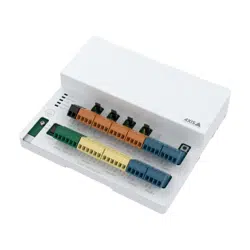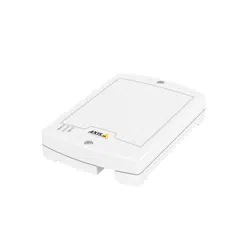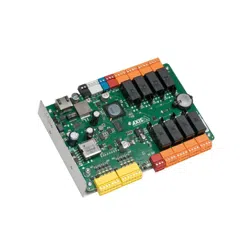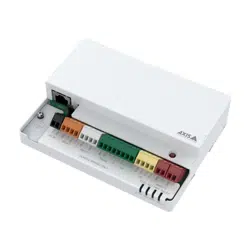


AXISA9210NetworkI/ORelayModule
Getstarted
Getstarted
Findthedeviceonthenetwork
TondAxisdevicesonthenetworkandassignthemIPaddressesinWindows®,useAXISIPUtilityorAXISDeviceManager.Both
applicationsarefreeandcanbedownloadedfromaxis.com/support.
FormoreinformationabouthowtondandassignIPaddresses,gotoHowtoassignanIPaddressandaccessyourdevice.
Browsersupport
Youcanusethedevicewiththefollowingbrowsers:
Chrome
TM
Firefox
®
Edge
TM
Safari
®
Windows
®
recommended
recommended
macOS
®
recommendedrecommended
Linux
®
recommendedrecommended
Otheroperatingsystems*
*TouseAXISOSwebinterfacewithiOS15oriPadOS15,gotoSettings Settings
Settings
> >
>
Safari Safari
Safari
> >
>
Advanced Advanced
Advanced
> >
>
Experimental Experimental
Experimental
Features Features
Features
anddisable
NSURLSessionWebsocket.
Ifyouneedmoreinformationaboutrecommendedbrowsers,gotoAXISOSPortal.
Openthedevice'swebinterface
1.OpenabrowserandtypetheIPaddressorhostnameoftheAxisdevice.
IfyoudonotknowtheIPaddress,useAXISIPUtilityorAXISDeviceManagertondthedeviceonthenetwork.
2.Typetheusernameandpassword.Ifyouaccessthedeviceforthersttime,youmustcreateanadministratoraccount.See
Createanadministratoraccountonpage2.
Fordescriptionsofallthecontrolsandoptionsyoumightencounterinthedevice’swebinterface,seeThewebinterfaceonpage6.
Createanadministratoraccount
Thersttimeyoulogintoyourdevice,youmustcreateanadministratoraccount.
1.Enterausername.
2.Enterapassword.SeeSecurepasswordsonpage2.
3.Re-enterthepassword.
4.Acceptthelicenseagreement.
5.ClickAddaccount.
Important
Thedevicehasnodefaultaccount.Ifyoulosethepasswordforyouradministratoraccount,youmustresetthedevice.See
Resettofactorydefaultsettingsonpage32.
2

AXISA9210NetworkI/ORelayModule
Getstarted
Securepasswords
Important
Axisdevicessendtheinitiallysetpasswordincleartextoverthenetwork.Toprotectyourdeviceaftertherstlogin,set
upasecureandencryptedHTTPSconnectionandthenchangethepassword.
Thedevicepasswordistheprimaryprotectionforyourdataandservices.Axisdevicesdonotimposeapasswordpolicyasthey
maybeusedinvarioustypesofinstallations.
Toprotectyourdatawestronglyrecommendthatyou:
•Useapasswordwithatleast8characters,preferablycreatedbyapasswordgenerator.
•Don’texposethepassword.
•Changethepasswordatarecurringinterval,atleastonceayear.
Verifythatnoonehastamperedwiththermware
TomakesurethatthedevicehasitsoriginalAxisrmware,ortotakefullcontrolofthedeviceafterasecurityattack:
1.Resettofactorydefaultsettings.SeeResettofactorydefaultsettingsonpage32.
Afterthereset,securebootguaranteesthestateofthedevice.
2.Congureandinstallthedevice.
Webinterfaceoverview
Thisvideogivesyouanoverviewofthedevice’swebinterface.
Towatchthisvideo,gotothewebversionofthisdocument.
help.axis.com/?&piaId=92430§ion=web-interface-overview
Axisdevicewebinterface
3

AXISA9210NetworkI/ORelayModule
Configureyourdevice
Configureyourdevice
CongureanI/Oport
1.GotoDevice>I/Osandrelays>AXISA9210>I/Os.
2.Click
toexpandtheI/Oportsettings.
3.Renametheport.
4.Congurethenormalstate.Clickforopencircuit,orforclosedcircuit.
5.ToconguretheI/Oportasinput:
5.1UnderDirection,click.
5.2Tomonitortheinputstate,turnonSupervised.SeeSupervisedinputsonpage30.
Note
InAPIs,thesupervisedI/Oportsworkdifferentlyfromthesupervisedinputports.Formoreinformation,goto
theVAPIX®Library.
6.ToconguretheI/Oportasoutput:
6.1UnderDirection,click
.
6.2ToviewtheURLstoactivateanddeactivateconnecteddevices,gotoToggleportURL.
Congurearelay
1.GotoDevice>I/Osandrelays>AXISA9210>Relays.
2.Click
toexpandtherelaysettings.
3.TurnonRelay.
4.Renametherelay.
5.ToviewtheURLstoactivateanddeactivatetherelay,gotoToggleportURL.
Setuprulesforevents
Tolearnmore,checkoutourguideGetstartedwithrulesforevents.
Triggeranaction
1.GotoSystem>Eventsandaddarule.Theruledeneswhenthedevicewillperformcertainactions.Youcanset
uprulesasscheduled,recurring,ormanuallytriggered.
2.EnteraName.
3.SelecttheConditionthatmustbemettotriggertheaction.Ifyouspecifymorethanoneconditionfortherule,allofthe
conditionsmustbemettotriggertheaction.
4

AXISA9210NetworkI/ORelayModule
Configureyourdevice
4.SelectwhichActionthedeviceshouldperformwhentheconditionsaremet.
Note
Ifyoumakechangestoanactiverule,therulemustbeturnedonagainforthechangestotakeeffect.
5
AXISA9210NetworkI/ORelayModule
Thewebinterface
Thewebinterface
Toreachthedevice’swebinterface,typethedevice’sIPaddressinawebbrowser.
Note
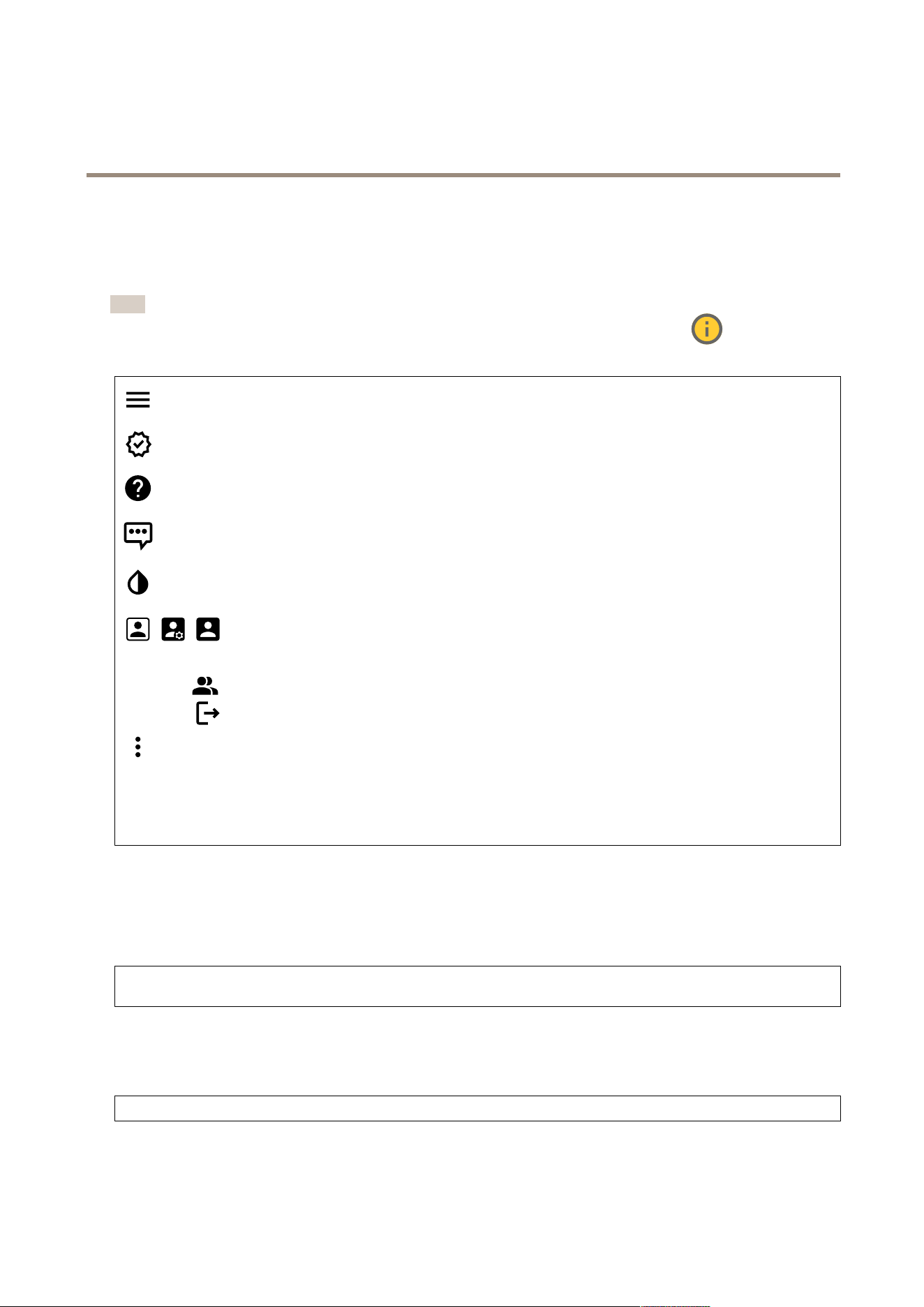
Supportforthefeaturesandsettingsdescribedinthissectionvariesbetweendevices.Thisicon
indicatesthat
thefeatureorsettingisonlyavailableinsomedevices.
Showorhidethemainmenu.
Accessthereleasenotes.
Accesstheproducthelp.
Changethelanguage.
Setlightthemeordarktheme.
Theusermenucontains:
•Informationabouttheuserwhoisloggedin.
•
Changeaccount:Logoutfromthecurrentaccountandlogintoanewaccount.
•
Logout:Logoutfromthecurrentaccount.
Thecontextmenucontains:
•Analyticsdata:Accepttosharenon-personalbrowserdata.
•Feedback:Shareanyfeedbacktohelpusimproveyouruserexperience.
•Legal:Viewinformationaboutcookiesandlicenses.
•About:Viewdeviceinformation,includingrmwareversionandserialnumber.
Status
Deviceinfo
Showsthedeviceinformation,includingrmwareversionandserialnumber.
Upgradermware:Upgradethermwareonyourdevice.TakesyoutotheMaintenancepagewhereyoucandoarmware
upgrade.
Timesyncstatus
ShowsNTPsynchronizationinformation,includingifthedeviceisinsyncwithanNTPserverandthetimeremaininguntil
thenextsync.
NTPsettings:ViewandupdatetheNTPsettings.TakesyoutotheDateandtimepagewhereyoucanchangetheNTPsettings.
Security
6

AXISA9210NetworkI/ORelayModule
Thewebinterface
Showswhatkindofaccesstothedevicethatisactive,andwhatencryptionprotocolsareinuse.Recommendationstothesettings
arebasedontheAXISOSHardeningGuide.
Hardeningguide:LinktoAXISOSHardeningguidewhereyoucanlearnmoreaboutcybersecurityonAxisdevicesandbest
practices.
Connectedclients
Showsthenumberofconnectionsandconnectedclients.
Viewdetails:Viewandupdatethelistofconnectedclients.ThelistshowsIPaddress,protocol,port,state,andPID/process
ofeachconnection.
I/Oportsandrelays
Settings
Input
•Name:Editthetexttorenametheport.
•Direction:Indicatesthatitisaninputport.
•Normalstate:Click
foropencircuit,andforclosedcircuit.
•Supervised:Turnontomakeitpossibletodetectandtriggeractionsifsomeonetamperswiththeconnectionto
digitalI/Odevices.Inadditiontodetectingifaninputisopenorclosed,youcanalsodetectifsomeonehastampered
withit(thatis,cutorshorted).Tosupervisetheconnectionrequiresadditionalhardware(end-of-lineresistors)
intheexternalI/Oloop.
-Touseparallelrstconnection,selectParallelrstconnectionwitha22KΩparallelresistoranda4.7
KΩserialresistor.
-Touseserialrstconnection,selectSerialrstconnectionandselectaresistorvaluefromtheResistor
valuesdrop-downlist.
Output:Turnontoactivateconnecteddevices.
•Name:Editthetexttorenametheport.
•Direction:Indicatesthatitisanoutputport.
•Normalstate:Click
foropencircuit,andforclosedcircuit.
•ToggleportURL:ShowstheURLstoactivateanddeactivateconnecteddevicesthroughtheVAPIX®Application
ProgrammingInterface.
I/O:Turnontoactivateconnecteddeviceswhentheportisconguredasoutput.
•Name:Editthetexttorenametheport.
•Direction:Click
ortocongureitasinputoroutput.
•Normalstate:Click
foropencircuit,andforclosedcircuit.
•Supervised:Turnontomakeitpossibletodetectandtriggeractionsifsomeonetamperswiththeconnectionto
digitalI/Odevices.Inadditiontodetectingifaninputisopenorclosed,youcanalsodetectifsomeonehastampered
withit(thatis,cutorshorted).Tosupervisetheconnectionrequiresadditionalhardware(end-of-lineresistors)in
theexternalI/Oloop.Itappearsonlywhentheportisconguredasinput.
-Touseparallelrstconnection,selectParallelrstconnectionwitha22KΩparallelresistoranda4.7
KΩserialresistor.
-Touseserialrstconnection,selectSerialrstconnectionandselectaresistorvaluefromtheResistor
valuesdrop-downlist.
•ToggleportURL:ShowstheURLstoactivateanddeactivateconnecteddevicesthroughtheVAPIX®Application
ProgrammingInterface.Itappearsonlywhentheportisconguredasoutput.
7
AXISA9210NetworkI/ORelayModule
Thewebinterface
Relays
•Relay:Turnonorofftherelay.
•Name:Editthetexttorenametherelay.
•Direction:Indicatesthatitisanoutputrelay.
•ToggleportURL:ShowstheURLstoactivateanddeactivatetherelaythroughtheVAPIX®ApplicationProgramming
Interface.
Alarms
Devicemotion:Turnontotriggeranalarminyoursystemwhenitdetectsamovementofthedevice.
Casingopen
:Turnontotriggeranalarminyoursystemwhenitdetectsanopendoorcontrollercase.Turnoffthis
settingforbarebonedoorcontrollers.
Externaltamper
:Turnontotriggeranalarminyoursystemwhenitdetectsanexternaltamper.Forexample,when
someoneopensorclosestheexternalcabinet.
•Supervisedinput
:Turnontomonitortheinputstateandconguretheend-of-lineresistors.
-Touseparallelrstconnection,selectParallelrstconnectionwitha22KΩparallelresistoranda4.7
KΩserialresistor.
-Touseserialrstconnection,selectSerialrstconnectionandselectaresistorvaluefromtheResistor
valuesdrop-downlist.
Apps
Addapp:Installanewapp.
Findmoreapps:Findmoreappstoinstall.YouwillbetakentoanoverviewpageofAxisapps.
Allowunsignedapps:Turnontoallowinstallationofunsignedapps.
Allowroot-privilegedapps
:Turnontoallowappswithrootprivilegesfullaccesstothedevice.
ViewthesecurityupdatesinAXISOSandACAPapps.
Note
Thedevice’sperformancemightbeaffectedifyourunseveralappsatthesametime.
Usetheswitchnexttotheappnametostartorstoptheapp.
Open:Accesstheapp’ssettings.Theavailablesettingsdependontheapplication.Someapplicationsdon’thaveanysettings.
Thecontextmenucancontainoneormoreofthefollowingoptions:
•Open-sourcelicense:Viewinformationaboutopen-sourcelicensesusedintheapp.
•Applog:Viewalogoftheappevents.Thelogishelpfulwhenyoucontactsupport.
•Activatelicensewithakey:Iftheapprequiresalicense,youneedtoactivateit.Usethisoptionifyourdevice
doesn’thaveinternetaccess.
8

AXISA9210NetworkI/ORelayModule
Thewebinterface
Ifyoudon’thavealicensekey,gotoaxis.com/products/analytics.YouneedalicensecodeandtheAxisproductserial
numbertogeneratealicensekey.
•Activatelicenseautomatically:Iftheapprequiresalicense,youneedtoactivateit.Usethisoptionifyourdevicehas
internetaccess.Youneedalicensecodetoactivatethelicense.
•Deactivatethelicense:Deactivatethelicensetoreplaceitwithanotherlicense,forexample,whenyouchangefroma
triallicensetoafulllicense.Ifyoudeactivatethelicense,youalsoremoveitfromthedevice.
•Settings:Conguretheparameters.
•Delete:Deletetheapppermanentlyfromthedevice.Ifyoudon’tdeactivatethelicenserst,itremainsactive.
System
Timeandlocation
Dateandtime
Thetimeformatdependsonthewebbrowser’slanguagesettings.
Note
Werecommendyousynchronizethedevice’sdateandtimewithanNTPserver.
Synchronization:Selectanoptionforthedevice’sdateandtimesynchronization.
•Automaticdateandtime(manualNTSKEservers):SynchronizewiththesecureNTPkeyestablishmentservers
connectedtotheDHCPserver.
-ManualNTSKEservers:EntertheIPaddressofoneortwoNTPservers.WhenyouusetwoNTPservers,
thedevicesynchronizesandadaptsitstimebasedoninputfromboth.
•Automaticdateandtime(NTPserversusingDHCP):SynchronizewiththeNTPserversconnectedtotheDHCPserver.
-FallbackNTPservers:EntertheIPaddressofoneortwofallbackservers.
•Automaticdateandtime(manualNTPservers):SynchronizewithNTPserversofyourchoice.
-ManualNTPservers:EntertheIPaddressofoneortwoNTPservers.WhenyouusetwoNTPservers,the
devicesynchronizesandadaptsitstimebasedoninputfromboth.
•Customdateandtime:Manuallysetthedateandtime.ClickGetfromsystemtofetchthedateandtimesettings
oncefromyourcomputerormobiledevice.
Timezone:Selectwhichtimezonetouse.Timewillautomaticallyadjusttodaylightsavingtimeandstandardtime.
•DHCP:AdoptsthetimezoneoftheDHCPserver.ThedevicemustconnectedtoaDHCPserverbeforeyoucanselect
thisoption.
•Manual:Selectatimezonefromthedrop-downlist.
Note
Thesystemusesthedateandtimesettingsinallrecordings,logs,andsystemsettings.
Devicelocation
Enterwherethedeviceislocated.Yourvideomanagementsystemcanusethisinformationtoplacethedeviceonamap.
•Latitude:Positivevaluesarenorthoftheequator.
•Longitude:Positivevaluesareeastoftheprimemeridian.
•Heading:Enterthecompassdirectionthatthedeviceisfacing.0isduenorth.
•Label:Enteradescriptivenameforthedevice.
•Save:Clicktosaveyourdevicelocation.
Network
IPv4
9

AXISA9210NetworkI/ORelayModule
Thewebinterface
AssignIPv4automatically:SelecttoletthenetworkrouterassignanIPaddresstothedeviceautomatically.Werecommend
automaticIP(DHCP)formostnetworks.
IPaddress:EnterauniqueIPaddressforthedevice.StaticIPaddressescanbeassignedatrandomwithinisolatednetworks,
providedthateachaddressisunique.Toavoidconicts,werecommendyoucontactyournetworkadministratorbeforeyou
assignastaticIPaddress.
Subnetmask:Enterthesubnetmasktodenewhataddressesareinsidethelocalareanetwork.Anyaddressoutsidethelocal
areanetworkgoesthroughtherouter.
Router:EntertheIPaddressofthedefaultrouter(gateway)usedtoconnectdevicesthatareattachedtodifferentnetworksand
networksegments.
FallbacktostaticIPaddressifDHCPisn’tavailable:SelectifyouwanttoaddastaticIPaddresstouseasfallbackifDHCP
isunavailableandcan’tassignanIPaddressautomatically.
Note
IfDHCPisn’tavailableandthedeviceusesastaticaddressfallback,thestaticaddressisconguredwithalimitedscope.
IPv6
AssignIPv6automatically:SelecttoturnonIPv6andtoletthenetworkrouterassignanIPaddresstothedeviceautomatically.
Hostname
Assignhostnameautomatically:Selecttoletthenetworkrouterassignahostnametothedeviceautomatically.
Hostname:Enterthehostnamemanuallytouseasanalternativewayofaccessingthedevice.Theserverreportandsystemlog
usethehostname.AllowedcharactersareA–Z,a–z,0–9and-.
DNSservers
AssignDNSautomatically:SelecttolettheDHCPserverassignsearchdomainsandDNSserveraddressestothedevice
automatically.WerecommendautomaticDNS(DHCP)formostnetworks.
Searchdomains:Whenyouuseahostnamethatisnotfullyqualied,clickAddsearchdomainandenteradomaininwhichto
searchforthehostnamethedeviceuses.
DNSservers:ClickAddDNSserverandentertheIPaddressoftheDNSserver.ThisprovidesthetranslationofhostnamestoIP
addressesonyournetwork.
HTTPandHTTPS
HTTPSisaprotocolthatprovidesencryptionforpagerequestsfromusersandforthepagesreturnedbythewebserver.Theencrypted
exchangeofinformationisgovernedbytheuseofanHTTPScerticate,whichguaranteestheauthenticityoftheserver.
TouseHTTPSonthedevice,youmustinstallanHTTPScerticate.GotoSystem>Securitytocreateandinstallcerticates.
10

AXISA9210NetworkI/ORelayModule
Thewebinterface
Allowaccessthrough:SelectifauserisallowedtoconnecttothedevicethroughtheHTTP,HTTPS,orbothHTTPandHTTPS
protocols.
Note
IfyouviewencryptedwebpagesthroughHTTPS,youmightexperienceadropinperformance,especiallywhenyou
requestapageforthersttime.
HTTPport:EntertheHTTPporttouse.Thedeviceallowsport80oranyportintherange1024-65535.Ifyouareloggedinasan
administrator,youcanalsoenteranyportintherange1-1023.Ifyouuseaportinthisrange,yougetawarning.
HTTPSport:EntertheHTTPSporttouse.Thedeviceallowsport443oranyportintherange1024-65535.Ifyouareloggedinas
anadministrator,youcanalsoenteranyportintherange1-1023.Ifyouuseaportinthisrange,yougetawarning.
Certicate:SelectacerticatetoenableHTTPSforthedevice.
Networkdiscoveryprotocols
Bonjour
®
:Turnontoallowautomaticdiscoveryonthenetwork.
Bonjourname:Enterafriendlynametobevisibleonthenetwork.ThedefaultnameisthedevicenameandMACaddress.
UPnP
®
:Turnontoallowautomaticdiscoveryonthenetwork.
UPnPname:Enterafriendlynametobevisibleonthenetwork.ThedefaultnameisthedevicenameandMACaddress.
WS-Discovery:Turnontoallowautomaticdiscoveryonthenetwork.
One-clickcloudconnection
One-clickcloudconnection(O3C)togetherwithanO3Cserviceprovideseasyandsecureinternetaccesstoliveandrecordedvideo
fromanylocation.Formoreinformation,seeaxis.com/end-to-end-solutions/hosted-services.
AllowO3C:
•One-click:Thisisthedefaultsetting.PressandholdthecontrolbuttononthedevicetoconnecttoanO3Cservice
overtheinternet.YouneedtoregisterthedevicewiththeO3Cservicewithin24hoursafteryoupressthecontrol
button.Otherwise,thedevicedisconnectsfromtheO3Cservice.Onceyouregisterthedevice,Alwaysisenabledand
thedevicestaysconnectedtotheO3Cservice.
•Always:ThedeviceconstantlyattemptstoconnecttoanO3Cserviceovertheinternet.Onceyouregisterthedevice,
itstaysconnectedtotheO3Cservice.Usethisoptionifthecontrolbuttononthedeviceisoutofreach.
•No:DisablestheO3Cservice.
Proxysettings:Ifneeded,entertheproxysettingstoconnecttotheproxyserver.
Host:Entertheproxyserver’saddress.
Port:Entertheportnumberusedforaccess.
LoginandPassword:Ifneeded,enterusernameandpasswordfortheproxyserver.
Authenticationmethod:
•Basic:ThismethodisthemostcompatibleauthenticationschemeforHTTP.It’slesssecurethantheDigestmethod
becauseitsendstheusernameandpasswordunencryptedtotheserver.
•Digest:Thismethodismoresecurebecauseitalwaystransfersthepasswordencryptedacrossthenetwork.
•Auto:Thisoptionletsthedeviceselecttheauthenticationmethoddependingonthesupportedmethods.Itprioritizes
theDigestmethodovertheBasicmethod.
Ownerauthenticationkey(OAK):ClickGetkeytofetchtheownerauthenticationkey.Thisisonlypossibleifthedeviceis
connectedtotheinternetwithoutarewallorproxy.
SNMP
TheSimpleNetworkManagementProtocol(SNMP)allowsremotemanagementofnetworkdevices.
11

AXISA9210NetworkI/ORelayModule
Thewebinterface
SNMP:SelecttheversionofSNMPtouse.
•v1andv2c:
-Readcommunity:Enterthecommunitynamethathasread-onlyaccesstoallsupportedSNMPobjects.The
defaultvalueispublic.
-Writecommunity:EnterthecommunitynamethathasreadorwriteaccesstoallsupportedSNMPobjects
(exceptread-onlyobjects).Thedefaultvalueiswrite.
-Activatetraps:Turnontoactivatetrapreporting.Thedeviceusestrapstosendmessagesforimportant
eventsorstatuschangestoamanagementsystem.Inthewebinterface,youcansetuptrapsforSNMPv1
andv2c.TrapsareautomaticallyturnedoffifyouchangetoSNMPv3orturnoffSNMP.IfyouuseSNMPv3,
youcansetuptrapsthroughtheSNMPv3managementapplication.
-Trapaddress:EntertheIPaddressorhostnameofthemanagementserver.
-Trapcommunity:Enterthecommunitytousewhenthedevicesendsatrapmessagetothemanagement
system.
-Traps:
-Coldstart:Sendsatrapmessagewhenthedevicestarts.
-Warmstart:SendsatrapmessagewhenyouchangeanSNMPsetting.
-Linkup:Sendsatrapmessagewhenalinkchangesfromdowntoup.
-Authenticationfailed:Sendsatrapmessagewhenanauthenticationattemptfails.
Note
AllAxisVideoMIBtrapsareenabledwhenyouturnonSNMPv1andv2ctraps.Formoreinformation,see
AXISOSPortal>SNMP.
•v3:SNMPv3isamoresecureversion,whichprovidesencryptionandsecurepasswords.TouseSNMPv3,we
recommendyoutoactivateHTTPS,asthepasswordisthensentthroughHTTPS.Thisalsopreventsunauthorized
parties’accesstounencryptedSNMPv1andv2ctraps.IfyouuseSNMPv3,youcansetuptrapsthroughtheSNMPv3
managementapplication.
-Passwordfortheaccount“initial”:EntertheSNMPpasswordfortheaccountnamed“initial”.Althoughthe
passwordcanbesentwithoutactivatingHTTPS,wedon’trecommendit.TheSNMPv3passwordcanonly
besetonce,andpreferablyonlywhenHTTPSisenabled.Oncethepasswordisset,thepasswordeldisno
longerdisplayed.Tosetthepasswordagain,youmustresetthedevicetofactorydefaultsettings.
Security
Certicates
Certicatesareusedtoauthenticatedevicesonanetwork.Thedevicesupportstwotypesofcerticates:
•Client/servercerticates
Aclient/servercerticatevalidatesthedevice’sidentity,andcanbeself-signedorissuedbyaCerticateAuthority(CA).
Aself-signedcerticateofferslimitedprotectionandcanbeusedbeforeaCA-issuedcerticatehasbeenobtained.
•CAcerticates
YoucanuseaCAcerticatetoauthenticateapeercerticate,forexampletovalidatetheidentityofanauthentication
serverwhenthedeviceconnectstoanetworkprotectedbyIEEE802.1X.Thedevicehasseveralpre-installedCA
certicates.
Theseformatsaresupported:
•Certicateformats:.PEM,.CER,and.PFX
•Privatekeyformats:PKCS#1andPKCS#12
Important
Ifyouresetthedevicetofactorydefault,allcerticatesaredeleted.Anypre-installedCAcerticatesarereinstalled.
Addcerticate:Clicktoaddacerticate.
•More
:Showmoreeldstollinorselect.
•Securekeystore:SelecttouseSecureelementorTrustedPlatformModule2.0tosecurelystoretheprivatekey.For
moreinformationonwhichsecurekeystoretoselect,gotohelp.axis.com/en-us/axis-os#cryptographic-support.
12

AXISA9210NetworkI/ORelayModule
Thewebinterface
•Keytype:Selectthedefaultoradifferentencryptionalgorithmfromthedrop-downlisttoprotectthecerticate.
Thecontextmenucontains:
•Certicateinformation:Viewaninstalledcerticate’sproperties.
•Deletecerticate:Deletethecerticate.
•Createcerticatesigningrequest:Createacerticatesigningrequesttosendtoaregistrationauthoritytoapply
foradigitalidentitycerticate.
Securekeystore
:
•Secureelement(CCEAL6+):Selecttousesecureelementforsecurekeystore.
•TrustedPlatformModule2.0(CCEAL4+,FIPS140-2Level2):SelecttouseTPM2.0forsecurekeystore.
IEEE802.1xandIEEE802.1AEMACsec
IEEE802.1xisanIEEEstandardforport-basednetworkadmissioncontrolprovidingsecureauthenticationofwiredandwireless
networkdevices.IEEE802.1xisbasedonEAP(ExtensibleAuthenticationProtocol).
ToaccessanetworkprotectedbyIEEE802.1x,networkdevicesmustauthenticatethemselves.Theauthenticationisperformedby
anauthenticationserver,typicallyaRADIUSserver(forexample,FreeRADIUSandMicrosoftInternetAuthenticationServer).
Certicates
WhenconguredwithoutaCAcerticate,servercerticatevalidationisdisabledandthedevicetriestoauthenticateitself
regardlessofwhatnetworkitisconnectedto.
Whenusingacerticate,inAxis'implementation,thedeviceandtheauthenticationserverauthenticatethemselveswithdigital
certicatesusingEAP-TLS(ExtensibleAuthenticationProtocol-TransportLayerSecurity).
Toallowthedevicetoaccessanetworkprotectedthroughcerticates,youmustinstallasignedclientcerticateonthedevice.
Authenticationmethod:SelectanEAPtypeusedforauthentication.ThedefaultoptionisEAP-TLS.EAP-PEAP/MSCHAPv2isa
moresecureoption.
Clientcerticate:SelectaclientcerticatetouseIEEE802.1x.Theauthenticationserverusesthecerticatetovalidatethe
client’sidentity.
CAcerticate:SelectCAcerticatestovalidatetheauthenticationserver’sidentity.Whennocerticateisselected,thedevice
triestoauthenticateitselfregardlessofwhatnetworkitisconnectedto.
EAPidentity:Entertheuseridentityassociatedwiththeclientcerticate.
EAPOLversion:SelecttheEAPOLversionthatisusedinthenetworkswitch.
UseIEEE802.1x:SelecttousetheIEEE802.1xprotocol.
IEEE802.1AEMACsec
IEEE802.1AEMACsecisanIEEEstandardformediaaccesscontrol(MAC)securitythatdenesconnectionlessdatacondentiality
andintegrityformediaaccessindependentprotocols.
ThesettingsareonlyavailableifyouuseEAP-TLSastheauthenticationmethod:
Mode
•DynamicCAK/EAP-TLS:Thedefaultoption.Afterasecuredconnection,thedevicechecksforMACseconthenetwork.
•StaticCAK/pre-sharedkey(PSK):Selecttosetthekeynameandvaluetoconnecttothenetwork.
ThesettingsareonlyavailableifyouuseEAP-PEAP/MSCHAPv2astheauthenticationmethod:
•Password:Enterthepasswordforyouruseridentity.
•Peapversion:SelectthePeapversionthatisusedinthenetworkswitch.
•Label:Select1touseclientEAPencryption;select2touseclientPEAPencryption.SelecttheLabelthatthenetwork
switchuseswhenusingPeapversion1.
13

AXISA9210NetworkI/ORelayModule
Thewebinterface
Preventbrute-forceattacks
Blocking:Turnontoblockbrute-forceattacks.Abrute-forceattackusestrial-and-errortoguesslogininfoorencryptionkeys.
Blockingperiod:Enterthenumberofsecondstoblockabrute-forceattack.
Blockingconditions:Enterthenumberofauthenticationfailuresallowedpersecondbeforetheblockstarts.Youcansetthe
numberoffailuresallowedbothonpagelevelanddevicelevel.
Firewall
Activate:Turnontherewall.
DefaultPolicy:Selectthedefaultstatefortherewall.
•Allow:Allowsallconnectionstothedevice.Thisoptionissetbydefault.
•Deny:Deniesallconnectionstothedevice.
Tomakeexceptionstothedefaultpolicy,youcancreaterulesthatallowsordeniesconnectionstothedevicefromspecic
addresses,protocols,andports.
•Address:EnteranaddressinIPv4/IPv6orCIDRformatthatyouwanttoallowordenyaccessto.
•Protocol:Selectaprotocolthatyouwanttoallowordenyaccessto.
•Port:Enteraportnumberthatyouwanttoallowordenyaccessto.Youcanaddaportnumberbetween1and65535.
•Policy:Selectthepolicyoftherule.
:Clicktocreateanotherrule.
Addrules:Clicktoaddtherulesthatyouhavedened.
•Timeinseconds:Setatimelimitfortestingtherules.Thedefaulttimelimitissetto300seconds.Toactivatethe
rulesstraightaway,setthetimeto0seconds.
•Conrmrules:Conrmtherulesandtheirtimelimit.Ifyouhavesetatimelimitofmorethan1second,theruleswill
beactiveduringthistime.Ifyouhavesetthetimeto0,theruleswillbeactivestraightaway.
Pendingrules:Anoverviewofthelatesttestedrulesthatyouareyettoconrm.
Note
TherulesthathaveatimelimitappearsbothunderPendingrulesandActiverulesuntilthesettimehaspassed,oruntil
youconrmthem.Ifyoudon'tconrmthem,theyappearonlyunderPendingrules,andtherewallfallsbacktothe
previouslydenedsettings.Ifyouconrmthem,theywillreplacethecurrentactiverules.
Conrmrules:Clicktoactivatethependingrules.
Activerules:Anoverviewoftherulesyouarecurrentlyrunningonthedevice.
:Clicktodeleteanactiverule.
:Clicktodeleteallrules,bothpendingandactive.
Customsignedrmwarecerticate
14
AXISA9210NetworkI/ORelayModule
Thewebinterface
ToinstalltestrmwareorothercustomrmwarefromAxisonthedevice,youneedacustomsignedrmwarecerticate.The
certicateveriesthatthermwareisapprovedbyboththedeviceownerandAxis.Thermwarecanonlyrunonaspecic
devicewhichisidentiedbyitsuniqueserialnumberandchipID.OnlyAxiscancreatecustomsignedrmwarecerticates,
sinceAxisholdsthekeytosignthem.
Install:Clicktoinstallthecerticate.Youneedtoinstallthecerticatebeforeyouinstallthermware.
Thecontextmenucontains:
•Deletecerticate:Deletethecerticate.
Accounts
Accounts
Addaccount:Clicktoaddanewaccount.Youcanaddupto100accounts.
Account:Enterauniqueaccountname.
Newpassword:Enterapasswordfortheaccount.Passwordsmustbe1to64characterslong.OnlyASCIIprintablecharacters
(code32to126)areallowedinthepassword,forexample,letters,numbers,punctuation,andsomesymbols.
Repeatpassword:Enterthesamepasswordagain.
Privileges:
•Administrator:Hasfullaccesstoallsettings.Administratorscanalsoadd,update,andremoveotheraccounts.
•Operator:Hasaccesstoallsettingsexcept:
-AllSystemsettings.
-Addingapps.
•Viewer:Doesn’thaveaccesstochangeanysettings.
Thecontextmenucontains:
Updateaccount:Edittheaccountproperties.
Deleteaccount:Deletetheaccount.Youcan’tdeletetherootaccount.
Anonymousaccess
Allowanonymousviewing:Turnontoallowanyoneaccessthedeviceasaviewerwithoutlogginginwithanaccount.
AllowanonymousPTZoperating
:Turnontoallowanonymoususerstopan,tilt,andzoomtheimage.
SSHaccounts
15

AXISA9210NetworkI/ORelayModule
Thewebinterface
AddSSHaccount:ClicktoaddanewSSHaccount.
•Restrictrootaccess:Turnontorestrictfunctionalitythatrequiresrootaccess.
•EnableSSH:TurnontouseSSHservice.
Account:Enterauniqueaccountname.
Newpassword:Enterapasswordfortheaccount.Passwordsmustbe1to64characterslong.OnlyASCIIprintablecharacters
(code32to126)areallowedinthepassword,forexample,letters,numbers,punctuation,andsomesymbols.
Repeatpassword:Enterthesamepasswordagain.
Comment:Enteracomment(optional).
Thecontextmenucontains:
UpdateSSHaccount:Edittheaccountproperties.
DeleteSSHaccount:Deletetheaccount.Youcan’tdeletetherootaccount.
OpenIDConguration
Important
Entertherightvaluestoensureyoucanlogintothedeviceagain.
ClientID:EntertheOpenIDusername.
OutgoingProxy:EntertheproxyaddressfortheOpenIDconnectiontouseaproxyserver.
Adminclaim:Enteravaluefortheadminrole.
ProviderURL:EntertheweblinkfortheAPIendpointauthentication.Formatshouldbehttps://[insert
URL]/.well-known/openid-conguration
Operatorclaim:Enteravaluefortheoperatorrole.
Requireclaim:Enterthedatathatshouldbeinthetoken.
Viewerclaim:Enterthevaluefortheviewerrole.
Remoteuser:Enteravaluetoidentifyremoteusers.Thiswillhelptodisplaythecurrentuserinthedevice’swebinterface.
Scopes:Optionalscopesthatcouldbepartofthetoken.
Clientsecret:EntertheOpenIDpassword
Save:ClicktosavetheOpenIDvalues.
EnableOpenID:TurnontoclosecurrentconnectionandallowdeviceauthenticationfromtheproviderURL.
Events
Rules
Aruledenestheconditionsthattriggerstheproducttoperformanaction.Thelistshowsallthecurrentlyconguredrulesin
theproduct.
Note
Youcancreateupto256actionrules.
16

AXISA9210NetworkI/ORelayModule
Thewebinterface
Addarule:Createarule.
Name:Enteranamefortherule.
Waitbetweenactions:Entertheminimumtime(hh:mm:ss)thatmustpassbetweenruleactivations.Itisusefuliftheruleis
activatedby,forexample,day-nightmodeconditions,toavoidthatsmalllightchangesduringsunriseandsunsetactivate
therulerepeatedly.
Condition:Selectaconditionfromthelist.Aconditionmustbemetforthedevicetoperformanaction.Ifmultiple
conditionsaredened,allofthemmustbemettotriggertheaction.Forinformationaboutspecicconditions,see
Getstartedwithrulesforevents.
Usethisconditionasatrigger:Selecttomakethisrstconditionfunctiononlyasastartingtrigger.Itmeansthatoncetherule
isactivated,itremainsactiveforaslongasalltheotherconditionsaremet,nomatterthestateoftherstcondition.Ifyoudon’t
selectthisoption,therulewillsimplybeactivewheneveralltheconditionsaremet.
Invertthiscondition:Selectifyouwanttheconditiontobetheoppositeofyourselection.
Addacondition:Clicktoaddanadditionalcondition.
Action:Selectanactionfromthelistandenteritsrequiredinformation.Forinformationaboutspecicactions,see
Getstartedwithrulesforevents.
Recipients
Youcansetupyourdevicetonotifyrecipientsabouteventsorsendles.Thelistshowsalltherecipientscurrentlyconguredinthe
product,alongwithinformationabouttheirconguration.
Note
Youcancreateupto20recipients.
Addarecipient:Clicktoaddarecipient.
Name:Enteranamefortherecipient.
Type:Selectfromthelist:
•FTP
-Host:Entertheserver'sIPaddressorhostname.Ifyouenterahostname,makesurethataDNSserveris
speciedunderSystem>Network>IPv4andIPv6.
-Port:EntertheportnumberusedbytheFTPserver.Thedefaultis21.
-Folder:Enterthepathtothedirectorywhereyouwanttostoreles.Ifthisdirectorydoesn’talreadyexist
ontheFTPserver,youwillgetanerrormessagewhenuploadingles.
-Username:Entertheusernameforthelogin.
-Password:Enterthepasswordforthelogin.
-Usetemporarylename:Selecttouploadleswithtemporary,automaticallygeneratedlenames.The
lesgetrenamedtothedesirednameswhentheuploadcompletes.Iftheuploadisaborted/interrupted,
youdon’tgetanycorruptles.However,youprobablystillgetthetemporaryles.Thiswayyouknow
thatalllesthathavethedesirednamearecorrect.
-UsepassiveFTP:Undernormalcircumstances,theproductsimplyrequeststhetargetFTPservertoopenthe
dataconnection.ThedeviceactivelyinitiatesboththeFTPcontrolanddataconnectionstothetargetserver.
ThisisnormallyneededifthereisarewallbetweenthedeviceandthetargetFTPserver.
•HTTP
-URL:EnterthenetworkaddresstotheHTTPserverandthescriptthatwillhandletherequest.Forexample,
http://192.168.254.10/cgi-bin/notify.cgi.
-Username:Entertheusernameforthelogin.
17
AXISA9210NetworkI/ORelayModule
Thewebinterface
-Password:Enterthepasswordforthelogin.
-Proxy:TurnonandentertherequiredinformationifaproxyservermustbepassedtoconnecttotheHTTP
server.
•HTTPS
-URL:EnterthenetworkaddresstotheHTTPSserverandthescriptthatwillhandletherequest.Forexample,
https://192.168.254.10/cgi-bin/notify.cgi.
-Validateservercerticate:SelecttovalidatethecerticatethatwascreatedbyHTTPSserver.
-Username:Entertheusernameforthelogin.
-Password:Enterthepasswordforthelogin.
-Proxy:TurnonandentertherequiredinformationifaproxyservermustbepassedtoconnecttotheHTTPS
server.
•Networkstorage
YoucanaddnetworkstoragesuchasNAS(network-attachedstorage)anduseitasarecipienttostoreles.Theles
arestoredintheMatroska(MKV)leformat.
-Host:EntertheIPaddressorhostnameforthenetworkstorage.
-Share:Enterthenameoftheshareonthehost.
-Folder:Enterthepathtothedirectorywhereyouwanttostoreles.
-Username:Entertheusernameforthelogin.
-Password:Enterthepasswordforthelogin.
•SFTP
-Host:Entertheserver'sIPaddressorhostname.Ifyouenterahostname,makesurethataDNSserveris
speciedunderSystem>Network>IPv4andIPv6.
-Port:EntertheportnumberusedbytheSFTPserver.Thedefaultis22.
-Folder:Enterthepathtothedirectorywhereyouwanttostoreles.Ifthisdirectorydoesn’talreadyexiston
theSFTPserver,youwillgetanerrormessagewhenuploadingles.
-Username:Entertheusernameforthelogin.
-Password:Enterthepasswordforthelogin.
-SSHhostpublickeytype(MD5):Enterthengerprintoftheremotehost’spublickey(a32-digit
hexadecimalstring).TheSFTPclientsupportsSFTPserversusingSSH-2withRSA,DSA,ECDSA,andED25519
hostkeytypes.RSAisthepreferredmethodduringnegotiation,followedbyECDSA,ED25519,andDSA.Make
suretoentertherightMD5hostkeythatisusedbyyourSFTPserver.WhiletheAxisdevicesupportsboth
MD5andSHA-256hashkeys,werecommendusingSHA-256duetostrongersecurityoverMD5.Formore
informationonhowtocongureanSFTPserverwithanAxisdevice,gototheAXISOSPortal.
-SSHhostpublickeytype(SHA256):Enterthengerprintoftheremotehost’spublickey(a43-digitBase64
encodedstring).TheSFTPclientsupportsSFTPserversusingSSH-2withRSA,DSA,ECDSA,andED25519host
keytypes.RSAisthepreferredmethodduringnegotiation,followedbyECDSA,ED25519,andDSA.Make
suretoentertherightMD5hostkeythatisusedbyyourSFTPserver.WhiletheAxisdevicesupportsboth
MD5andSHA-256hashkeys,werecommendusingSHA-256duetostrongersecurityoverMD5.Formore
informationonhowtocongureanSFTPserverwithanAxisdevice,gototheAXISOSPortal.
-Usetemporarylename:Selecttouploadleswithtemporary,automaticallygeneratedlenames.The
lesgetrenamedtothedesirednameswhentheuploadcompletes.Iftheuploadisabortedorinterrupted,
youdon’tgetanycorruptles.However,youprobablystillgetthetemporaryles.Thisway,youknow
thatalllesthathavethedesirednamearecorrect.
•SIPorVMS
:
SIP:SelecttomakeaSIPcall.
VMS:SelecttomakeaVMScall.
-FromSIPaccount:Selectfromthelist.
-ToSIPaddress:EntertheSIPaddress.
-Test:Clicktotestthatyourcallsettingsworks.
•Email
-Sendemailto:Entertheemailaddresstosendemailsto.Toentermultipleaddresses,usecommasto
separatethem.
-Sendemailfrom:Entertheemailaddressofthesendingserver.
-Username:Entertheusernameforthemailserver.Leavethiseldemptyifthemailserverdoesnot
requireauthentication.
-Password:Enterthepasswordforthemailserver.Leavethiseldemptyifthemailserverdoesnotrequire
authentication.
-Emailserver(SMTP):EnterthenameoftheSMTPserver,forexample,smtp.gmail.com,smtp.mail.yahoo.com.
-Port:EntertheportnumberfortheSMTPserver,usingvaluesintherange0-65535.Thedefaultvalueis587.
18

AXISA9210NetworkI/ORelayModule
Thewebinterface
-Encryption:Touseencryption,selecteitherSSLorTLS.
-Validateservercerticate:Ifyouuseencryption,selecttovalidatetheidentityofthedevice.Thecerticate
canbeself-signedorissuedbyaCerticateAuthority(CA).
-POPauthentication:TurnontoenterthenameofthePOPserver,forexample,pop.gmail.com.
Note
Someemailprovidershavesecurityltersthatpreventusersfromreceivingorviewinglargeamountof
attachments,fromreceivingscheduledemailsandsimilar.Checktheemailprovider'ssecuritypolicytoavoid
youremailaccountbeinglockedormissingoutonyourexpectedemails.
•TCP
-Host:Entertheserver'sIPaddressorhostname.Ifyouenterahostname,makesurethataDNSserveris
speciedunderSystem>Network>IPv4andIPv6.
-Port:Entertheportnumberusedtoaccesstheserver.
Test:Clicktotestthesetup.
Thecontextmenucontains:
Viewrecipient:Clicktoviewalltherecipientdetails.
Copyrecipient:Clicktocopyarecipient.Whenyoucopy,youcanmakechangestothenewrecipient.
Deleterecipient:Clicktodeletetherecipientpermanently.
Schedules
Schedulesandpulsescanbeusedasconditionsinrules.Thelistshowsalltheschedulesandpulsescurrentlyconguredinthe
product,alongwithinformationabouttheirconguration.
Addschedule:Clicktocreateascheduleorpulse.
Manualtriggers
Youcanusethemanualtriggertomanuallytriggerarule.Themanualtriggercan,forexample,beusedtovalidateactions
duringproductinstallationandconguration.
MQTT
MQTT(MessageQueuingTelemetryTransport)isastandardmessagingprotocolfortheInternetofThings(IoT).Itwasdesignedfor
simpliedIoTintegrationandisusedinawidevarietyofindustriestoconnectremotedeviceswithasmallcodefootprintand
minimalnetworkbandwidth.TheMQTTclientinAxisdevicermwarecansimplifyintegrationofdataandeventsproducedinthe
devicetosystemswhicharenotvideomanagementsoftware(VMS).
SetupthedeviceasanMQTTclient.MQTTcommunicationisbasedontwoentities,theclientsandthebroker.Theclientscan
sendandreceivemessages.Thebrokerisresponsibleforroutingmessagesbetweenclients.
YoucanlearnmoreaboutMQTTinAXISOSPortal.
ALPN
ALPNisaTLS/SSLextensionthatallowsfortheselectionofanapplicationprotocolduringthehandshakephaseoftheconnection
betweentheclientandserver.ThisisusedtoenableMQTTtrafcoverthesameportthatisusedforotherprotocols,suchasHTTP.
Insomecases,theremightnotbeadedicatedportopenforMQTTcommunication.AsolutioninsuchcasesistouseALPNto
negotiatetheuseofMQTTastheapplicationprotocolonastandardport,allowedbytherewalls.
MQTTclient
19

AXISA9210NetworkI/ORelayModule
Thewebinterface
Connect:TurnonorofftheMQTTclient.
Status:ShowsthecurrentstatusoftheMQTTclient.
Broker
Host:EnterthehostnameorIPaddressoftheMQTTserver.
Protocol:Selectwhichprotocoltouse.
Port:Entertheportnumber.
•1883isthedefaultvalueforMQTToverTCP
•8883isthedefaultvalueforMQTToverSSL
•80isthedefaultvalueforMQTToverWebSocket
•443isthedefaultvalueforMQTToverWebSocketSecure
ALPNprotocol:EntertheALPNprotocolnameprovidedbyyourMQTTbrokerprovider.ThisisonlyapplicablewithMQTToverSSL
andMQTToverWebSocketSecure.
Username:Entertheusernamethattheclientwillusetoaccesstheserver.
Password:Enterapasswordfortheusername.
ClientID:EnteraclientID.Theclientidentierissenttotheserverwhentheclientconnectstoit.
Cleansession:Controlsthebehavioratconnectionanddisconnectiontime.Whenselected,thestateinformationisdiscarded
atconnectanddisconnect.
HTTPproxy:AURLwithamaximumlengthof255bytes.Youcanleavetheeldemptyifyoudon'twanttouseanHTTPproxy.
HTTPSproxy:AURLwithamaximumlengthof255bytes.Youcanleavetheeldemptyifyoudon'twanttouseanHTTPSproxy.
Keepaliveinterval:Enablestheclienttodetectwhentheserverisnolongeravailablewithouthavingtowaitforthelong
TCP/IPtimeout.
Timeout:Thetimeintervalinsecondstoallowaconnecttocomplete.Defaultvalue:60
Devicetopicprex:UsedinthedefaultvaluesforthetopicintheconnectmessageandLWTmessageontheMQTTclienttab,
andinthepublicationconditionsontheMQTTpublicationtab.
Reconnectautomatically:Specieswhethertheclientshouldreconnectautomaticallyafteradisconnect.
Connectmessage
Speciesifamessageshouldbesentoutwhenaconnectionisestablished.
Sendmessage:Turnontosendmessages.
Usedefault:Turnofftoenteryourowndefaultmessage.
Topic:Enterthetopicforthedefaultmessage.
Payload:Enterthecontentforthedefaultmessage.
Retain:SelecttokeepthestateofclientonthisTopic
QoS:ChangetheQoSlayerforthepacketow.
LastWillandTestamentmessage
TheLastWillTestament(LWT)letsaclientprovideatestamentalongwithitscredentialswhenconnectingtothebroker.Ifthe
clientdisconnectsungracefullyatsomepointlater(maybebecausehispowersourcedied),itcanletthebrokerdeliveramessage
tootherclients.ThisLWTmessagehasthesameformasanordinarymessageandgetsroutedviathesamemechanics.
Sendmessage:Turnontosendmessages.
20

AXISA9210NetworkI/ORelayModule
Thewebinterface
Usedefault:Turnofftoenteryourowndefaultmessage.
Topic:Enterthetopicforthedefaultmessage.
Payload:Enterthecontentforthedefaultmessage.
Retain:SelecttokeepthestateofclientonthisTopic
QoS:ChangetheQoSlayerforthepacketow.
MQTTpublication
Usedefaulttopicprex:Selecttousethedefaulttopicprex,thatisdenedinthedevicetopicprexintheMQTTclienttab.
Includetopicname:SelecttoincludethetopicthatdescribestheconditionintheMQTTtopic.
Includetopicnamespaces:SelecttoincludeONVIFtopicnamespacesintheMQTTtopic.
Includeserialnumber:Selecttoincludethedevice’sserialnumberintheMQTTpayload.
Addcondition:Clicktoaddacondition.
Retain:DeneswhichMQTTmessagesaresentasretained.
•None:Sendallmessagesasnon-retained.
•Property:Sendonlystatefulmessagesasretained.
•All:Sendbothstatefulandstatelessmessagesasretained.
QoS:SelectthedesiredlevelfortheMQTTpublication.
MQTTsubscriptions
Addsubscription:ClicktoaddanewMQTTsubscription.
Subscriptionlter:EntertheMQTTtopicthatyouwanttosubscribeto.
Usedevicetopicprex:AddthesubscriptionlterasprextotheMQTTtopic.
Subscriptiontype:
•Stateless:SelecttoconvertMQTTmessagesintoastatelessmessage.
•Stateful:SelecttoconvertMQTTmessagesintoacondition.Thepayloadisusedasthestate.
QoS:SelectthedesiredlevelfortheMQTTsubscription.
Logs
Reportsandlogs
21
AXISA9210NetworkI/ORelayModule
Thewebinterface
Reports
•Viewthedeviceserverreport:Viewinformationabouttheproductstatusinapop-upwindow.TheAccessLogis
automaticallyincludedintheServerReport.
•Downloadthedeviceserverreport:Itcreatesa.ziplethatcontainsacompleteserverreporttextleinUTF–8
format,aswellasasnapshotofthecurrentliveviewimage.Alwaysincludetheserverreport.ziplewhenyou
contactsupport.
•Downloadthecrashreport:Downloadanarchivewithdetailedinformationabouttheserver'sstatus.Thecrashreport
containsinformationthatisintheserverreportaswellasdetaileddebuginformation.Thisreportmightcontain
sensitiveinformationsuchasnetworktraces.Itcantakeseveralminutestogeneratethereport.
Logs
•Viewthesystemlog:Clicktoshowinformationaboutsystemeventssuchasdevicestartup,warnings,andcritical
messages.
•Viewtheaccesslog:Clicktoshowallfailedattemptstoaccessthedevice,forexample,whenawronglogin
passwordisused.
Networktrace
Important
Anetworktracelemightcontainsensitiveinformation,forexamplecerticatesorpasswords.
Anetworktracelecanhelpyoutroubleshootproblemsbyrecordingactivityonthenetwork.
Tracetime:Selectthedurationofthetraceinsecondsorminutes,andclickDownload.
Remotesystemlog
Syslogisastandardformessagelogging.Itallowsseparationofthesoftwarethatgeneratesmessages,thesystemthatstoresthem,
andthesoftwarethatreportsandanalyzesthem.Eachmessageislabeledwithafacilitycode,whichindicatesthesoftware
typegeneratingthemessage,andassignedaseveritylevel.
Server:Clicktoaddanewserver.
Host:EnterthehostnameorIPaddressoftheserver.
Format:Selectwhichsyslogmessageformattouse.
•Axis
•RFC3164
•RFC5424
Protocol:Selecttheprotocoltouse:
•UDP(Defaultportis514)
•TCP(Defaultportis601)
•TLS(Defaultportis6514)
Port:Edittheportnumbertouseadifferentport.
Severity:Selectwhichmessagestosendwhentriggered.
CAcerticateset:Seethecurrentsettingsoraddacerticate.
Plaincong
PlaincongisforadvanceduserswithexperienceofAxisdeviceconguration.Mostparameterscanbesetandeditedfrom
thispage.
22

AXISA9210NetworkI/ORelayModule
Thewebinterface
Maintenance
Restart:Restartthedevice.Thisdoesnotaffectanyofthecurrentsettings.Runningapplicationsrestartautomatically.
Restore:Returnmostsettingstothefactorydefaultvalues.Afterwardsyoumustrecongurethedeviceandapps,reinstallany
appsthatdidn’tcomepreinstalled,andrecreateanyeventsandpresets.
Important
Theonlysettingssavedafterrestoreare:
•Bootprotocol(DHCPorstatic)
•StaticIPaddress
•Defaultrouter
•Subnetmask
•802.1Xsettings
•O3Csettings
•DNSserverIPaddress
Factorydefault:Returnallsettingstothefactorydefaultvalues.AfterwardsyoumustresettheIPaddresstomakethedevice
accessible.
Note
AllAxisdevicermwareisdigitallysignedtoensurethatyouonlyinstallveriedrmwareonyourdevice.Thisfurther
increasestheoverallminimumcybersecuritylevelofAxisdevices.Formoreinformation,seethewhitepaper“Signed
rmware,secureboot,andsecurityofprivatekeys”ataxis.com.
Firmwareupgrade:Upgradetoanewrmwareversion.Newrmwarereleasescancontainimprovedfunctionality,bug
xes,andcompletelynewfeatures.Werecommendyoutoalwaysusethelatestrelease.Todownloadthelatestrelease,go
toaxis.com/support.
Whenyouupgrade,youcanchoosebetweenthreeoptions:
•Standardupgrade:Upgradetothenewrmwareversion.
•Factorydefault:Upgradeandreturnallsettingstothefactorydefaultvalues.Whenyouchoosethisoption,youcan’t
reverttothepreviousrmwareversionaftertheupgrade.
•Autorollback:Upgradeandconrmtheupgradewithinthesettime.Ifyoudon’tconrm,thedevicerevertstothe
previousrmwareversion.
Firmwarerollback:Reverttothepreviouslyinstalledrmwareversion.
23

AXISA9210NetworkI/ORelayModule
Learnmore
Learnmore
Cybersecurity
AxisEdgeVault
AxisEdgeVaultprovidesahardware-basedcybersecurityplatformthatsafeguardstheAxisdevice.Itoffersfeaturestoguaranteethe
device’sidentityandintegrityandtoprotectyoursensitiveinformationfromunauthorizedaccess.Itbuildsonastrongfoundationof
cryptographiccomputingmodules(secureelementandTPM)andSoCsecurity(TEEandsecureboot),combinedwithexpertisein
edgedevicesecurity.
Signedrmware
Signedrmwareisimplementedbythesoftwarevendorsigningthermwareimagewithaprivatekey.Whenarmwarehasthis
signatureattachedtoit,adevicewillvalidatethermwarebeforeacceptingtoinstallit.Ifthedevicedetectsthatthermware
integrityiscompromised,thermwareupgradewillberejected.
Secureboot
Securebootisabootprocessthatconsistsofanunbrokenchainofcryptographicallyvalidatedsoftware,startinginimmutable
memory(bootROM).Beingbasedontheuseofsignedrmware,securebootensuresthatadevicecanbootonlywithauthorized
rmware.
Securekeystore
Atamper-protectedenvironmentfortheprotectionofprivatekeysandsecureexecutionofcryptographicoperations.Itprevents
unauthorizedaccessandmaliciousextractionintheeventofasecuritybreach.Dependingonsecurityrequirements,anAxisdevice
canhaveeitheroneormultiplehardware-basedcryptographiccomputingmodules,whichprovideahardware-protectedsecure
keystore.Dependingonsecurityrequirements,anAxisdevicecanhaveeitheroneormultiplehardware-basedcryptographic
computingmodules,likeaTPM2.0(TrustedPlatformModule)orasecureelement,and/oraTEE(TrustedExecutionEnvironment),
whichprovideahardware-protectedsecurekeystore.Furthermore,selectedAxisproductsfeatureaFIPS140-2Level2-certied
securekeystore.
AxisdeviceID
Beingabletoverifytheoriginofthedeviceiskeytoestablishingtrustinthedeviceidentity.Duringproduction,deviceswith
AxisEdgeVaultareassignedaunique,factory-provisioned,andIEEE802.1AR-compliantAxisdeviceIDcerticate.Thisworks
likeapassporttoprovetheoriginofthedevice.ThedeviceIDissecurelyandpermanentlystoredinthesecurekeystoreasa
certicatesignedbyAxisrootcerticate.ThedeviceIDcanbeleveragedbythecustomer’sITinfrastructureforautomatedsecure
deviceonboardingandsecuredeviceidentication
Encryptedlesystem
Thesecurekeystorepreventsthemaliciousexltrationofinformationandpreventscongurationtamperingbyenforcingstrong
encryptionuponthelesystem.Thisensuresnodatastoredinthelesystemcanbeextractedortamperedwithwhenthedeviceis
notinuse,unauthenticatedaccesstothedeviceisachievedand/ortheAxisdeviceisstolen.Duringthesecurebootprocess,the
read-writelesystemisdecryptedandcanbemountedandusedbytheAxisdevice.
TolearnmoreaboutthecybersecurityfeaturesinAxisdevices,gotoaxis.com/learning/white-papersandsearchforcybersecurity.
24
AXISA9210NetworkI/ORelayModule
Specifications
Specifications
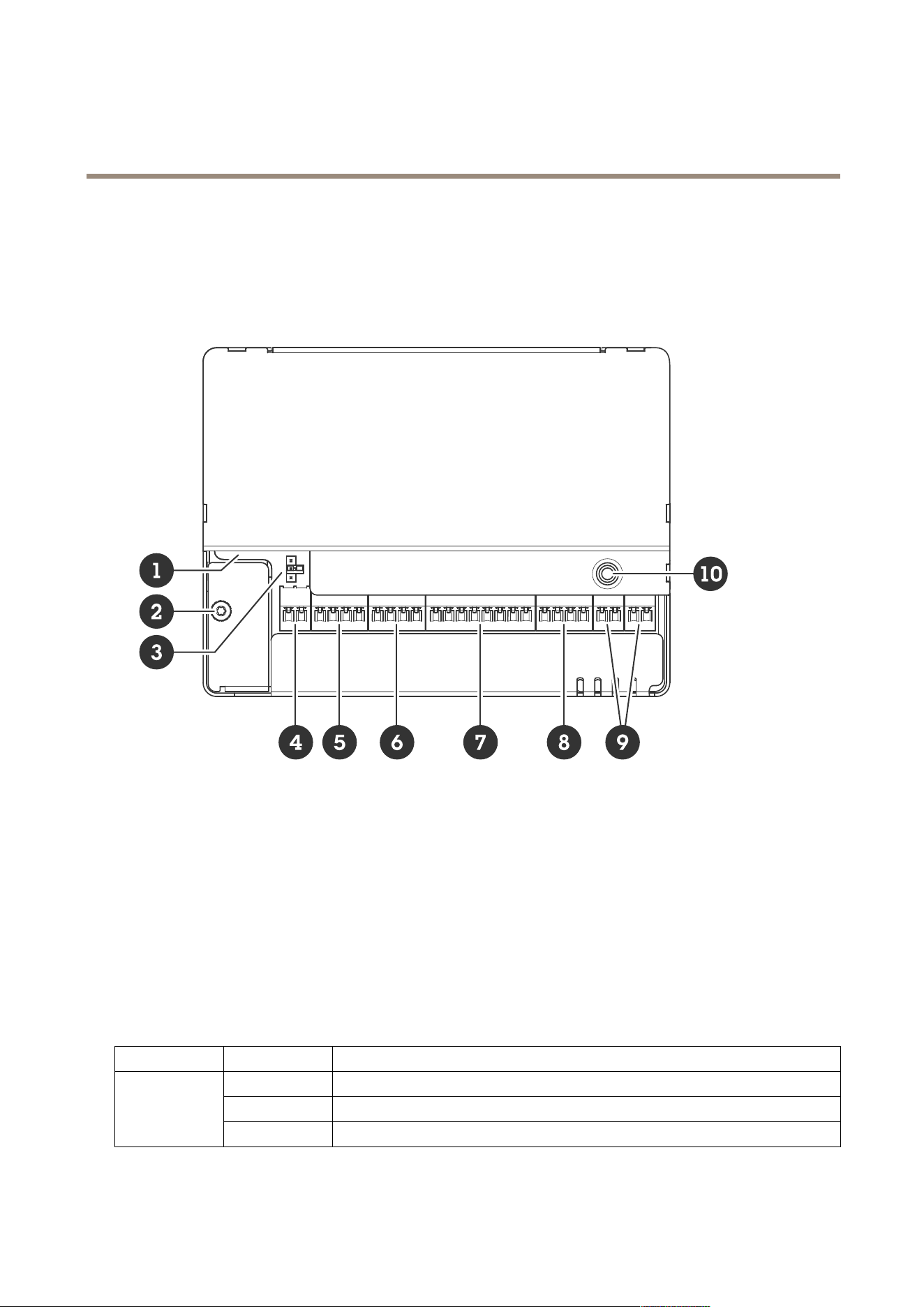
Productoverview
1
Networkconnector
2
Groundingposition
3
Relayjumper
4
Powerconnector
5
Relayconnector
6
Input1connector
7
RS485andI/Oconnector
8
I/Oconnector
9
Input2connector
10
Controlbutton
LEDindicators
LED
Color
Indication
GreenSteadygreenfornormaloperation.
Amber
Steadyduringstartupandwhenrestoringsettings.
Status
Red
Slowashforfailedupgrade.
25

AXISA9210NetworkI/ORelayModule
Specifications
Green
Steadyforconnectiontoa100MBit/snetwork.Flashesfornetworkactivity.
Amber
Steadyforconnectiontoa10MBit/snetwork.Flashesfornetworkactivity.
Network
UnlitNonetworkconnection.
Green
Normaloperation.
Power
Amber
Flashesgreen/amberduringrmwareupgrade.
Green
Relayactive.
1
Relay
UnlitRelayinactive.
1.RelayisactivewhenCOMisconnectedtoNO.
Buttons
Controlbutton
Thecontrolbuttonisusedfor:
•Resettingtheproducttofactorydefaultsettings.SeeResettofactorydefaultsettingsonpage32.
•Connectingtoaone-clickcloudconnection(O3C)serviceovertheinternet.Toconnect,pressandholdthebutton
forabout3secondsuntilthestatusLEDashesgreen.
Connectors
Networkconnector
RJ45EthernetconnectorwithPoweroverEthernetPlus(PoE+).
UL:PoweroverEthernet(PoE)shallbeoverEthernetIEEE802.3af/802.3atType1Class3orPoweroverEthernetPlus(PoE+)
IEEE802.3atType2Class4powerlimitedinjectorthatprovides44–57VDC,15.4W/30W.PoweroverEthernet(PoE)has
beenevaluatedbyULwithAXIST8133Midspan30W1-port.
Powerpriority
ThisdevicecanbepoweredbyeitherPoEorDCinput.SeeNetworkconnectoronpage26andPowerconnectoronpage26.
•WhenPoEandDCarebothconnectedbeforethedeviceispowered,PoEisusedforpowering.
•PoEandDCarebothconnectedandPoEiscurrentlypowering.WhenPoEislost,thedeviceusesDCforpoweringwithout
restart.
•PoEandDCarebothconnectedandDCiscurrentlypowering.WhenDCislost,thedevicerestartsandusesPoEfor
powering.
•WhenDCisusedduringstartupandPoEisconnectedafterthedevicehasstarted,DCisusedforpowering.
•WhenPoEisusedduringstartupandDCisconnectedafterthedevicehasstarted,PoEisusedforpowering.
Powerconnector
2-pinterminalblockforDCpowerinput.UseaSafetyExtraLowVoltage(SELV)compliantlimitedpowersource(LPS)witheither
aratedoutputpowerlimitedto≤100Woraratedoutputcurrentlimitedto≤5A.
26

AXISA9210NetworkI/ORelayModule
Specifications
FunctionPinNotes
Specications
DCground(GND)
1
0VDC
DCinput
2
Forpoweringthedevicewhen
notusingPoweroverEthernet.
Note:Thispincanonlybe
usedaspowerin.
12VDC,max36W
UL:DCpowertobesuppliedbyaUL603listedpowersupply,dependingonapplication,withappropriateratings.
Relayconnector
One4-pinterminalblockforformCrelaysthatcanbeused,forexample,tocontrolalockoraninterfacetoagate.Ifusedwithan
inductiveload,forexamplealock,connectadiodeinparallelwiththeloadtoprotectagainstvoltagetransients.
FunctionPinNotes
Specications
DCground(GND)
1
0VDC
NO
2
Normallyopen.
Forconnectingrelaydevices.
Connectafail-securelock
betweenNOandDCground.
Thetworelaypinsare
galvanicallyseparatedfrom
therestofthecircuitryifthe
jumpersarenotused.
COM
3
Common
NC
4
Normallyclosed.
Forconnectingrelaydevices.
Connectafail-safelock
betweenNCandDCground.
Thetworelaypinsare
galvanicallyseparatedfrom
therestofthecircuitryifthe
jumpersarenotused.
Maxcurrent=2A
Maxvoltage=30VDC
Relaypowerjumper
Whentherelaypowerjumperistted,itconnects12VDCor24VDCtotherelayCOMpin.
ItcanbeusedtoconnectalockbetweentheGNDandNO,orGNDandNCpins.
Powersource
Maxpowerat12VDCMaxpowerat24VDC
DCIN
2000mA1000mA
PoE350mA150mA
PoE+1100mA500mA
Input1connector
One4-pinterminalblockforinput.
27

AXISA9210NetworkI/ORelayModule
Specifications
Itsupportssupervisionwithendoflineresistors.Iftheconnectionisinterrupted,analarmistriggered.Tousesupervisedinputs,
installendoflineresistors.Usetheconnectiondiagramforsupervisedinputs.SeeSupervisedinputsonpage30.
FunctionPinNotes
Specications
DCground
1,3
0VDC
Input
2,4
Digitalinputorsupervisedinput—Connectto
pin1or3respectivelytoactivate,orleaveoating
(unconnected)todeactivate.
0tomax30VDC
Important
Thequaliedcablelengthisupto200m(656ft)ifthefollowingcablerequirementismet:AWG24.
RS485andI/Oconnector
One8-pinterminalblockincluding4-pinRS485and4-pinI/O.
RS485
FunctionPinNote
Specications
DCground(GND)
1
0VDC
DCoutput(+12V)
2
Suppliespowertoauxiliary
devices,forexample,Modbus
sensors.
12VDC,max200mA
A
3
B
4
I/O
FunctionPinNote
Specications
Digitaloutput
5
Ifusedwithaninductiveload,
forexamplearelay,connect
adiodeinparallelwiththe
loadtoprotectagainstvoltage
transients.
0tomax30VDC,opendrain,
100mA
Digitaloutput
6
Ifusedwithaninductiveload,
forexamplearelay,connect
adiodeinparallelwiththe
loadtoprotectagainstvoltage
transients.
0tomax30VDC,opendrain,
100mA
28

AXISA9210NetworkI/ORelayModule
Specifications
Input
7
Digitalinputorsupervised
input—Connecttopin1to
activate,orleaveoating
(unconnected)todeactivate.
0tomax30VDC
Digitaloutput
8
Ifusedwithaninductiveload,
forexamplearelay,connect
adiodeinparallelwiththe
loadtoprotectagainstvoltage
transients.
0tomax30VDC,opendrain,
100mA
Important
•ThequaliedcablelengthforRS485isupto1000m(3281ft)ifthefollowingcablerequirementsaremet:1twistedpair
withshield,AWG24,120ohmimpedance.
•ThequaliedcablelengthforI/Oisupto200m(656ft).
I/Oconnector
Usetheauxiliaryconnectorwithexternaldevicesincombinationwith,forexample,motiondetection,eventtriggering,andalarm
notications.Inadditiontothe0VDCreferencepointandpower(DCoutput),theauxiliaryconnectorprovidestheinterfaceto:
Digitalinput-Forconnectingdevicesthatcantogglebetweenanopenandclosedcircuit,forexamplePIRsensors,door/window
contacts,andglassbreakdetectors.
Supervisedinput-Enablespossibilitytodetecttamperingonadigitalinput.
Digitaloutput-ForconnectingexternaldevicessuchasrelaysandLEDs.ConnecteddevicescanbeactivatedbytheVAPIX®
ApplicationProgrammingInterfaceorfromtheproduct’swebpage.
4-pinterminalblock
FunctionPinNotes
Specications
DCground
1
0VDC
DCoutput
2
Canbeusedtopowerauxiliaryequipment.
Note:Thispincanonlybeusedaspowerout.
12VDC
Maxload=50mAintotal
Digitalinputorsupervisedinput–Connecttopin1toactivate,or
leaveoating(unconnected)todeactivate.Tousesupervisedinput,
installend-of-lineresistors.Seeconnectiondiagramforinformation
abouthowtoconnecttheresistors.
0tomax30VDC
Congurable
(InputorOutput)
3–4
Digitaloutput–Internallyconnectedtopin1(DCground)when
active,andoating(unconnected)wheninactive.Ifusedwithan
inductiveload,e.g.,arelay,connectadiodeinparallelwiththeload,
toprotectagainstvoltagetransients.I/Osarecapableofdriving
12VDC,50mA(combinedmax)externalload,ifinternal12VDC
output(pin2)isused.Inthecaseofusingopendrainconnections
incombinationwithanexternalpowersupply,thentheI/Oscan
manageDCsupplyof0–30VDC,100mAeach.
0tomax30VDC,opendrain,
100mA
29
AXISA9210NetworkI/ORelayModule
Specifications
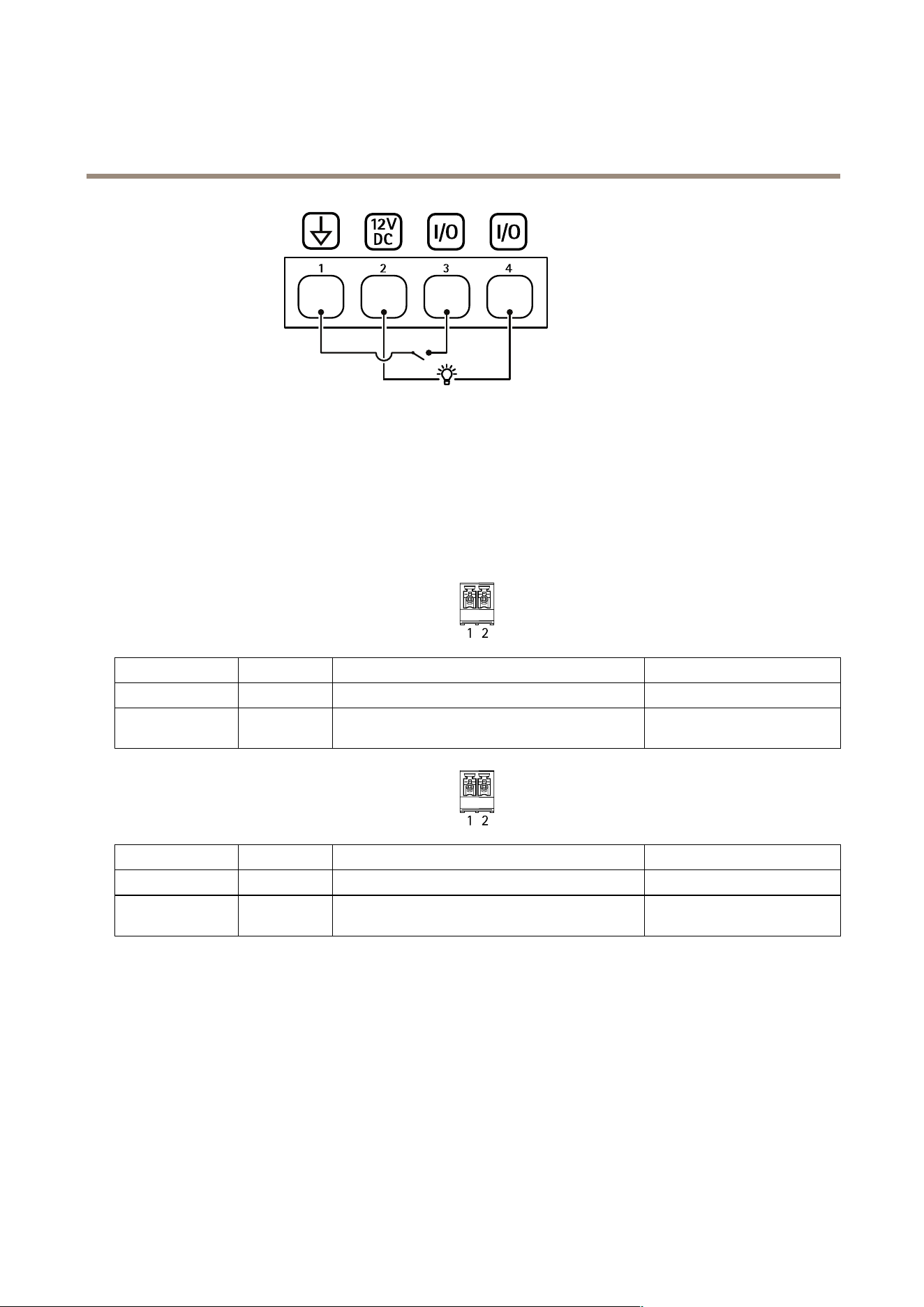
1
DCground
2
DCoutput12V
3
I/Oconguredasinput
4
I/Oconguredasoutput
Input2connector
Two2-pinterminalblocksforexternaldevices,forexampleglassbreakorredetectors.
UL:TheconnectorhasnotbeenevaluatedbyULforburglarorrealarmuse.
FunctionPinNotes
Specications
DCground
1
0VDC
Input
2
Digitalinputorsupervisedinput–Connecttopin1to
activate,orleaveoating(unconnected)todeactivate.
0tomax30VDC
FunctionPinNotes
Specications
DCground
1
0VDC
Input
2
Digitalinputorsupervisedinput–Connecttopin1to
activate,orleaveoating(unconnected)todeactivate.
0tomax30VDC
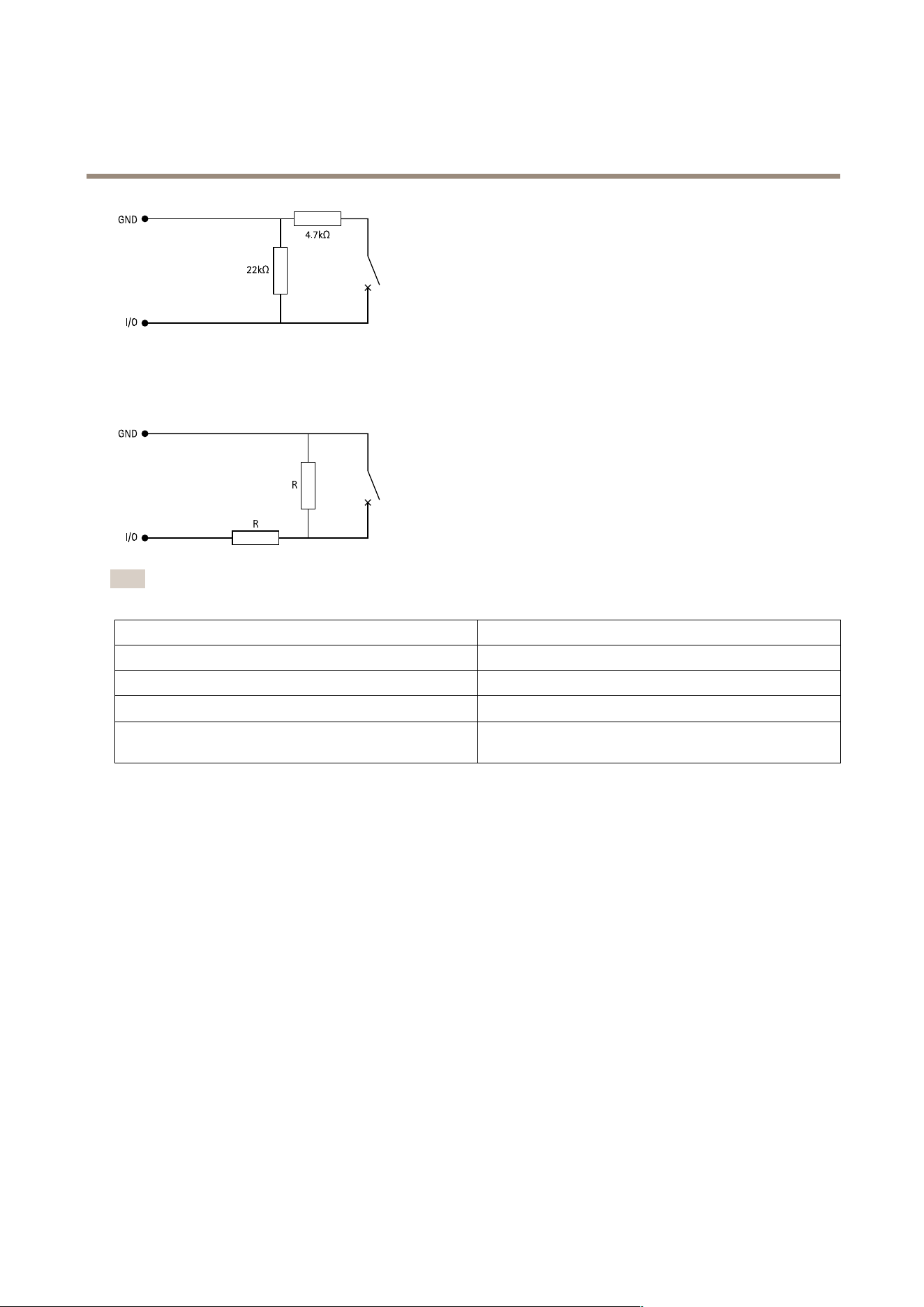
Supervisedinputs
Tousesupervisedinputs,installendoflineresistorsaccordingtothediagrambelow.
Parallelrstconnection
Theresistorvaluesmustbe4.7kΩand22kΩ.
30
AXISA9210NetworkI/ORelayModule
Specifications
Serialrstconnection
Theresistorvaluesmustbethesameandpossiblevaluesare1kΩ,2.2kΩ,4.7kΩand10kΩ.
Note
Itisrecommendedtousetwistedandshieldedcables.Connectshieldingto0VDC.
Status
Description
Open
Thesupervisedswitchisinopenmode.
Closed
Thesupervisedswitchisinclosedmode.
Short
TheI/OorInput1-5cableisshortcircuittoGND.
Cut
TheI/OorInput1-5cableiscutandleftopenwithnocurrent
pathtoGND.
31

AXISA9210NetworkI/ORelayModule
Troubleshooting
Troubleshooting
Resettofactorydefaultsettings
Important
Resettofactorydefaultshouldbeusedwithcaution.Aresettofactorydefaultresetsallsettings,includingtheIPaddress,to
thefactorydefaultvalues.
Toresettheproducttothefactorydefaultsettings:
1.Disconnectpowerfromtheproduct.
2.Pressandholdthecontrolbuttonwhilereconnectingpower.SeeProductoverviewonpage25.
3.Keepthecontrolbuttonpressedfor25secondsuntilthestatusLEDindicatorturnsamberforthesecondtime.
4.Releasethecontrolbutton.TheprocessiscompletewhenthestatusLEDindicatorturnsgreen.Theproducthasbeenreset
tothefactorydefaultsettings.IfnoDHCPserverisavailableonthenetwork,thedefaultIPaddressis192.168.0.90.
5.Usetheinstallationandmanagementsoftwaretools,assignanIPaddress,setthepassword,andaccesstheproduct.
Youcanalsoresetparameterstofactorydefaultthroughthedevice’swebinterface.GotoMaintenance>Factorydefaultand
clickDefault.
Firmwareoptions
Axisoffersproductrmwaremanagementaccordingtoeithertheactivetrackorthelong-termsupport(LTS)tracks.Beingonthe
activetrackmeanscontinuouslygettingaccesstoallthelatestproductfeatures,whiletheLTStracksprovideaxedplatformwith
periodicreleasesfocusedmainlyonbugxesandsecurityupdates.
Usingrmwarefromtheactivetrackisrecommendedifyouwanttoaccessthenewestfeatures,orifyouuseAxisend-to-end
systemofferings.TheLTStracksarerecommendedifyouusethird-partyintegrations,whicharenotcontinuouslyvalidated
againstthelatestactivetrack.WithLTS,theproductscanmaintaincybersecuritywithoutintroducinganysignicantfunctional
changesoraffectinganyexistingintegrations.FormoredetailedinformationaboutAxisproductrmwarestrategy,goto
axis.com/support/device-software.
Checkthecurrentrmwareversion
Firmwareisthesoftwarethatdeterminesthefunctionalityofnetworkdevices.Whenyoutroubleshootaproblem,werecommend
youtostartbycheckingthecurrentrmwareversion.Thelatestrmwareversionmightcontainacorrectionthatxesyour
particularproblem.
Tocheckthecurrentrmware:
1.Gotothedevice’swebinterface>Status.
2.SeethermwareversionunderDeviceinfo.
Upgradethermware
Important
•Preconguredandcustomizedsettingsaresavedwhenyouupgradethermware(providedthatthefeaturesareavailablein
thenewrmware)althoughthisisnotguaranteedbyAxisCommunicationsAB.
•Makesurethedeviceremainsconnectedtothepowersourcethroughouttheupgradeprocess.
32

AXISA9210NetworkI/ORelayModule
Troubleshooting
Note
Whenyouupgradethedevicewiththelatestrmwareintheactivetrack,theproductreceivesthelatestfunctionality
available.Alwaysreadtheupgradeinstructionsandreleasenotesavailablewitheachnewreleasebeforeyouupgradethe
rmware.Tondthelatestrmwareandthereleasenotes,gotoaxis.com/support/device-software.
1.Downloadthermwareletoyourcomputer,availablefreeofchargeataxis.com/support/device-software.
2.Logintothedeviceasanadministrator.
3.GotoMaintenance>FirmwareupgradeandclickUpgrade.
Whentheupgradehasnished,theproductrestartsautomatically.
Technicalissues,clues,andsolutions
Ifyoucan’tndwhatyou’relookingforhere,trythetroubleshootingsectionataxis.com/support.
Problemsupgradingthermware
FirmwareupgradefailureIfthermwareupgradefails,thedevicereloadsthepreviousrmware.Themostcommonreason
isthatthewrongrmwarelehasbeenuploaded.Checkthatthenameofthermwarele
correspondstoyourdeviceandtryagain.
Problemsafterrmware
upgrade
Ifyouexperienceproblemsafterarmwareupgrade,rollbacktothepreviouslyinstalledversion
fromtheMaintenancepage.
ProblemssettingtheIPaddress
Thedeviceislocatedona
differentsubnet
IftheIPaddressintendedforthedeviceandtheIPaddressofthecomputerusedtoaccessthe
devicearelocatedondifferentsubnets,youcannotsettheIPaddress.Contactyournetwork
administratortoobtainanIPaddress.
TheIPaddressisbeingused
byanotherdevice
DisconnecttheAxisdevicefromthenetwork.Runthepingcommand(inaCommand/DOSwindow,
typepingandtheIPaddressofthedevice):
•Ifyoureceive:Replyfrom<IPaddress>:bytes=32;time=10...
thismeansthattheIPaddressmayalreadybeinusebyanotherdeviceonthenetwork.
ObtainanewIPaddressfromthenetworkadministratorandreinstallthedevice.
•Ifyoureceive:Requesttimedout,thismeansthattheIPaddressisavailable
forusewiththeAxisdevice.Checkallcablingandreinstallthedevice.
PossibleIPaddressconict
withanotherdeviceonthe
samesubnet
ThestaticIPaddressintheAxisdeviceisusedbeforetheDHCPserversetsadynamicaddress.
ThismeansthatifthesamedefaultstaticIPaddressisalsousedbyanotherdevice,theremay
beproblemsaccessingthedevice.
Thedevicecan’tbeaccessedfromabrowser
Can’tlogin
WhenHTTPSisenabled,ensurethatthecorrectprotocol(HTTPorHTTPS)isusedwhenattempting
tologin.Youmayneedtomanuallytypehttporhttpsinthebrowser’saddresseld.
Ifthepasswordfortherootaccountislost,thedevicemustberesettothefactorydefaultsettings.
SeeResettofactorydefaultsettingsonpage32.
TheIPaddresshasbeen
changedbyDHCP
IPaddressesobtainedfromaDHCPserveraredynamicandmaychange.IftheIPaddresshasbeen
changed,useAXISIPUtilityorAXISDeviceManagertolocatethedeviceonthenetwork.Identify
thedeviceusingitsmodelorserialnumber,orbytheDNSname(ifthenamehasbeencongured).
Ifrequired,astaticIPaddresscanbeassignedmanually.Forinstructions,gotoaxis.com/support.
Certicateerrorwhenusing
IEEE802.1X
Forauthenticationtoworkproperly,thedateandtimesettingsintheAxisdevicemustbe
synchronizedwithanNTPserver.GotoSystem>Dateandtime.
33

AXISA9210NetworkI/ORelayModule
Troubleshooting
Thedeviceisaccessiblelocallybutnotexternally
Toaccessthedeviceexternally,werecommendyoutouseoneofthefollowingapplicationsforWindows
®
:
•AXISCompanion:freeofcharge,idealforsmallsystemswithbasicsurveillanceneeds.
•AXISCameraStation:30-daytrialversionfreeofcharge,idealforsmalltomid-sizesystems.
Forinstructionsanddownload,gotoaxis.com/vms.
Can’tconnectoverport8883withMQTToverSSL
Therewallblockstrafc
usingport8883asit’s
deemedinsecure.
Insomecasestheserver/brokermightnotprovideaspecicportforMQTTcommunication.Itmay
stillbepossibletouseMQTToveraportnormallyusedforHTTP/HTTPStrafc.
•Iftheserver/brokersupportsWebSocket/WebSocketSecure(WS/WSS),typicallyon
port443,usethisprotocolinstead.Checkwiththeserver/brokerprovidertoseeif
WS/WSSissupportedandwhichportandbasepathtouse.
•Iftheserver/brokersupportsALPN,theuseofMQTTcanbenegotiatedoveranopen
port,suchas443.Checkwithyourserver/brokerprovidertoseeifALPNissupported
andwhichALPNprotocolandporttouse.
Contactsupport
Ifyouneedmorehelp,gotoaxis.com/support.
34

UsermanualVer.M2.2
AXISA9210NetworkI/ORelayModule
Date:April2024
©AxisCommunicationsAB,2023
Partno.T10202445