

AboutthisDocument
Thismanualisintendedforadministratorsandusersof
AXISA9161NetworkI/ORelayModuleandisapplicabletormware
1.0andlater.Itincludesinstructionsforusingandmanagingthe
productonyournetwork.Previousexperienceofnetworkingwillbeof
usewhenusingthisproduct.SomeknowledgeofUNIXorLinux-based
systemsmayalsobebenecial,fordevelopingshellscriptsand
applications.LaterversionsofthisdocumentwillbepostedtotheAxis
website,asrequired.Seealsotheproduct’sonlinehelp,availablevia
theweb-basedinterface.
Inthismanual,AXISA9161NetworkI/ORelayModuleisreferredto
astheAxisproduct.
Liability
Everycarehasbeentakeninthepreparationofthisdocument.Please
informyourlocalAxisofceofanyinaccuraciesoromissions.Axis
CommunicationsABcannotbeheldresponsibleforanytechnicalor
typographicalerrorsandreservestherighttomakechangestothe
productandmanualswithoutpriornotice.AxisCommunicationsAB
makesnowarrantyofanykindwithregardtothematerialcontained
withinthisdocument,including,butnotlimitedto,theimplied
warrantiesofmerchantabilityandtnessforaparticularpurpose.Axis
CommunicationsABshallnotbeliablenorresponsibleforincidentalor
consequentialdamagesinconnectionwiththefurnishing,performance
oruseofthismaterial.Thisproductisonlytobeusedforitsintended
purpose.
Intellectualpropertyrights
AxisABhasintellectualpropertyrightsrelatingtotechnologyembodied
intheproductdescribedinthisdocument.Inparticular,andwithout
limitation,theseintellectualpropertyrightsmayincludeoneormore
ofthepatentslistedatwww.axis.com/patent.htmandoneormore
additionalpatentsorpendingpatentapplicationsintheUSandother
countries.
Equipmentmodications
Thisequipmentmustbeinstalledandusedinstrictaccordancewiththe
instructionsgivenintheuserdocumentation.Thisequipmentcontains
nouser-serviceablecomponents.Unauthorizedequipmentchangesor
modicationswillinvalidateallapplicableregulatorycertications
andapprovals.
Trademarkacknowledgments
AXISCOMMUNICATIONS,AXIS,ETRAX,ARTPECandVAPIXare
registeredtrademarksortrademarkapplicationsofAxisABinvarious
jurisdictions.Allothercompanynamesandproductsaretrademarksor
registeredtrademarksoftheirrespectivecompanies.
Regulatoryinformation
Europe
ThisproductcomplieswiththeapplicableCEmarkingdirectives
andharmonizedstandards:
•ElectromagneticCompatibility(EMC)Directive2014/30/EU.See
Electromagneticcompatibility(EMC)onpage2.
•LowVoltage(LVD)Directive2014/35/EU.SeeSafetyonpage2.
•RestrictionsofHazardousSubstances(RoHS)Directive201 1/65/EU.
SeeDisposalandrecyclingonpage3.
Acopyoftheoriginaldeclarationofconformitymaybeobtainedfrom
AxisCommunicationsAB.SeeContactinformationonpage3.
Electromagneticcompatibility(EMC)
Thisequipmenthasbeendesignedandtestedtofulllapplicable
standardsfor:
•Radiofrequencyemissionwheninstalledaccordingtothe
instructionsandusedinitsintendedenvironment.
•Immunitytoelectricalandelectromagneticphenomenawhen
installedaccordingtotheinstructionsandusedinitsintended
environment.
USA
Thisequipmenthasbeentestedusingashieldednetworkcable(STP)
andfoundtocomplywiththelimitsforaClassBdigitaldevice,
pursuanttopart15oftheFCCRules.Theselimitsaredesigned
toprovidereasonableprotectionagainstharmfulinterferenceina
residentialinstallation.Thisequipmentgenerates,usesandcanradiate
radiofrequencyenergyand,ifnotinstalledandusedinaccordance
withtheinstructions,maycauseharmfulinterferencetoradio
communications.However,thereisnoguaranteethatinterference
willnotoccurinaparticularinstallation.Ifthisequipmentdoes
causeharmfulinterferencetoradioortelevisionreception,which
canbedeterminedbyturningtheequipmentoffandon,theuseris
encouragedtotrytocorrecttheinterferencebyoneormoreofthe
followingmeasures:
•Reorientorrelocatethereceivingantenna.
•Increasetheseparationbetweentheequipmentandreceiver.
•Connecttheequipmentintoanoutletonacircuitdifferentfrom
thattowhichthereceiverisconnected.
•Consultthedealeroranexperiencedradio/TVtechnicianforhelp.
Theproductshallbeconnectedusingashieldednetworkcable(STP)
thatisproperlygrounded.
Canada
ThisdigitalapparatuscomplieswithCANICES-3(ClassB).Theproduct
shallbeconnectedusingashieldednetworkcable(STP)thatis
properlygrounded.Cetappareilnumériqueestconformeàlanorme
CANNMB-3(classeB).Leproduitdoitêtreconnectéàl'aided'uncâble
réseaublindé(STP)quiestcorrectementmisàlaterre.
Europe
ThisdigitalequipmentfulllstherequirementsforRFemission
accordingtotheClassBlimitofEN55032.Theproductshallbe
connectedusingashieldednetworkcable(STP)thatisproperly
grounded.
Thisproductfulllstherequirementsforimmunityaccording
toEN61000-6-1residential,commercialandlight-industrial
environments.
Thisproductfulllstherequirementsforimmunityaccordingto
EN61000-6-2industrialenvironments.
Thisproductfulllstherequirementsforimmunityaccordingto
EN55024ofceandcommercialenvironments.
Thisproductfulllstherequirementsforimmunityaccordingto
EN50130-4residential,commercial,light-industrialandindustrial
environments.
Australia/NewZealand
ThisdigitalequipmentfulllstherequirementsforRFemission
accordingtotheClassBlimitofAS/NZSCISPR32.Theproductshall
beconnectedusingashieldednetworkcable(STP)thatisproperly
grounded.
Japan
この装置は、クラスB情報技術装置です。この装置は、家
庭環境で使⽤することを⽬的としていますが、この装置が
ラジオやテレビジョン受信機に近接して使⽤されると、受
信障害を引き起こすことがあります。取扱説明書に従って
正しい取り扱いをして下さい。本製品は、シールドネット
ワークケーブル(STP)を使⽤して接続してください。また
適切に接地してください。
Safety
ThisproductcomplieswithIEC/EN/UL62368-1,safetyofaudio/video
andITequipment.
Ifitsconnectingcablesareroutedoutdoors,theproductshallbe
groundedeitherthroughashieldednetworkcable(STP)orother
appropriatemethod.
Thepowersupplyusedwiththisproductshallfullltherequirements
forSafetyExtraLowVoltage(SELV)andLimitedPowerSource(LPS)
accordingtoIEC/EN/UL60950-1.
Battery
Lithiumcoincell3.0Vbatteriescontain1,2-dimethoxyethane;ethylene
glycoldimethylether(EGDME),CASno.110-71-4.
WARNING
•Riskofexplosionifthebatteryisincorrectlyreplaced.
•Replaceonlywithanidenticalbatteryorabatterywhichis
recommendedbyAxis.
•Disposeofusedbatteriesaccordingtolocalregulationsor
thebatterymanufacturer'sinstructions.

Disposalandrecycling
Whenthisproducthasreachedtheendofitsusefullife,disposeof
itaccordingtolocallawsandregulations.Forinformationabout
yournearestdesignatedcollectionpoint,contactyourlocalauthority
responsibleforwastedisposal.Inaccordancewithlocallegislation,
penaltiesmaybeapplicableforincorrectdisposalofthiswaste.
Europe
Thissymbolmeansthattheproductshallnotbedisposedof
togetherwithhouseholdorcommercialwaste.Directive2012/19/EU
onwasteelectricalandelectronicequipment(WEEE)isapplicablein
theEuropeanUnionmemberstates.Topreventpotentialharmto
humanhealthandtheenvironment,theproductmustbedisposed
ofinanapprovedandenvironmentallysaferecyclingprocess.For
informationaboutyournearestdesignatedcollectionpoint,contact
yourlocalauthorityresponsibleforwastedisposal.Businessesshould
contacttheproductsupplierforinformationabouthowtodispose
ofthisproductcorrectly.
ThisproductcomplieswiththerequirementsofDirective201 1/65/EUon
therestrictionoftheuseofcertainhazardoussubstancesinelectrical
andelectronicequipment(RoHS).
China
ThisproductcomplieswiththerequirementsofSJ/T1 1364-2014,
Markingfortherestrictionofhazardoussubstancesinelectricaland
electronicproducts.
有毒有害物质或元素
部
件
名
称
铅
(Pb)
汞
(Hg)
镉
(Cd)
六价
铬
(Cr(VI)
)
多溴
联苯
(PBB)
多溴
二苯
醚
(PBDE)
电
气
实
装
部
分
X
00000
0:表示该有毒有害物质在该部件所有均质材料中的含量均在
GB/T26572标准规定的限量要求以下。
X:表示该有毒有害物质至少在该部件的某一均质材料中的含
量超出GB/T26572标准规定的限量要求。
Contactinformation
AxisCommunicationsAB
Emdalavägen14
22369Lund
Sweden
Tel:+46462721800
Fax:+4646136130
www.axis.com
Warrantyinformation
ForinformationaboutAxis’productwarrantyandtheretorelated
information,gotowww.axis.com/warranty/
Learnmore!
VisitAxislearningcenterwww.axis.com/academy/forusefultrainings,
webinars,tutorialsandguides.

AXISA9161NetworkI/ORelayModule
TableofContents
Safetyinformation..........................................5
Hazardlevels...................................................5
Othermessagelevels.............................................5
Hardwareoverview..........................................6
Howtoaccesstheproduct....................................7
Howtoaccesstheproductfromabrowser...........................7
HowtoaccesstheproductfromtheInternet.........................7
Howtosettherootpassword.....................................7
TheDashboardPage.............................................8
Aboutapplications..........................................9
Aboutapplicationlicenses........................................9
Howtouploadandstartanapplication.............................9
ApplicationConsiderations........................................9
SystemConguration........................................10
Conguration–StepbyStep......................................10
SelectaLanguage...............................................10
ConguretheHardware..........................................10
SettheDateandTime............................................11
ConguretheNetworkSettings....................................12
MaintenanceInstructions.........................................13
Scheduleconguration......................................14
EventConguration.........................................15
ViewtheEventLog..............................................15
SetUpActionRules.............................................15
Aboutsystemoptions........................................18
Security.......................................................18
Date&Time....................................................20
Network.......................................................20
Maintenance...................................................25
Support.......................................................25
Advanced......................................................26
Howtoresettofactorydefaultsettings.............................26
Troubleshooting............................................27
Howtocheckthecurrentrmware.................................27
Howtoupgradethermware.....................................27
EmergencyRecoveryProcedure....................................27
Symptoms,possiblecausesandremedialactions......................27
Technicalspecications......................................29
LEDIndicators..................................................29
Buttons.......................................................30
Connectors....................................................30
ConnectionDiagrams............................................33
4

AXISA9161NetworkI/ORelayModule
Safetyinformation
Safetyinformation
Hazardlevels
DANGER
Indicatesahazardoussituationwhich,ifnotavoided,willresultindeathorseriousinjury.
WARNING
Indicatesahazardoussituationwhich,ifnotavoided,couldresultindeathorseriousinjury.
CAUTION
Indicatesahazardoussituationwhich,ifnotavoided,couldresultinminorormoderateinjury.
NO NO
NO
TICE TICE
TICE
Indicatesasituationwhich,ifnotavoided,couldresultindamagetoproperty.
Othermessagelevels
Important
Indicatessignicantinformationwhichisessentialfortheproducttofunctioncorrectly.
Note
Indicatesusefulinformationwhichhelpsingettingthemostoutoftheproduct.
5
AXISA9161NetworkI/ORelayModule
Hardwareoverview
Hardwareoverview
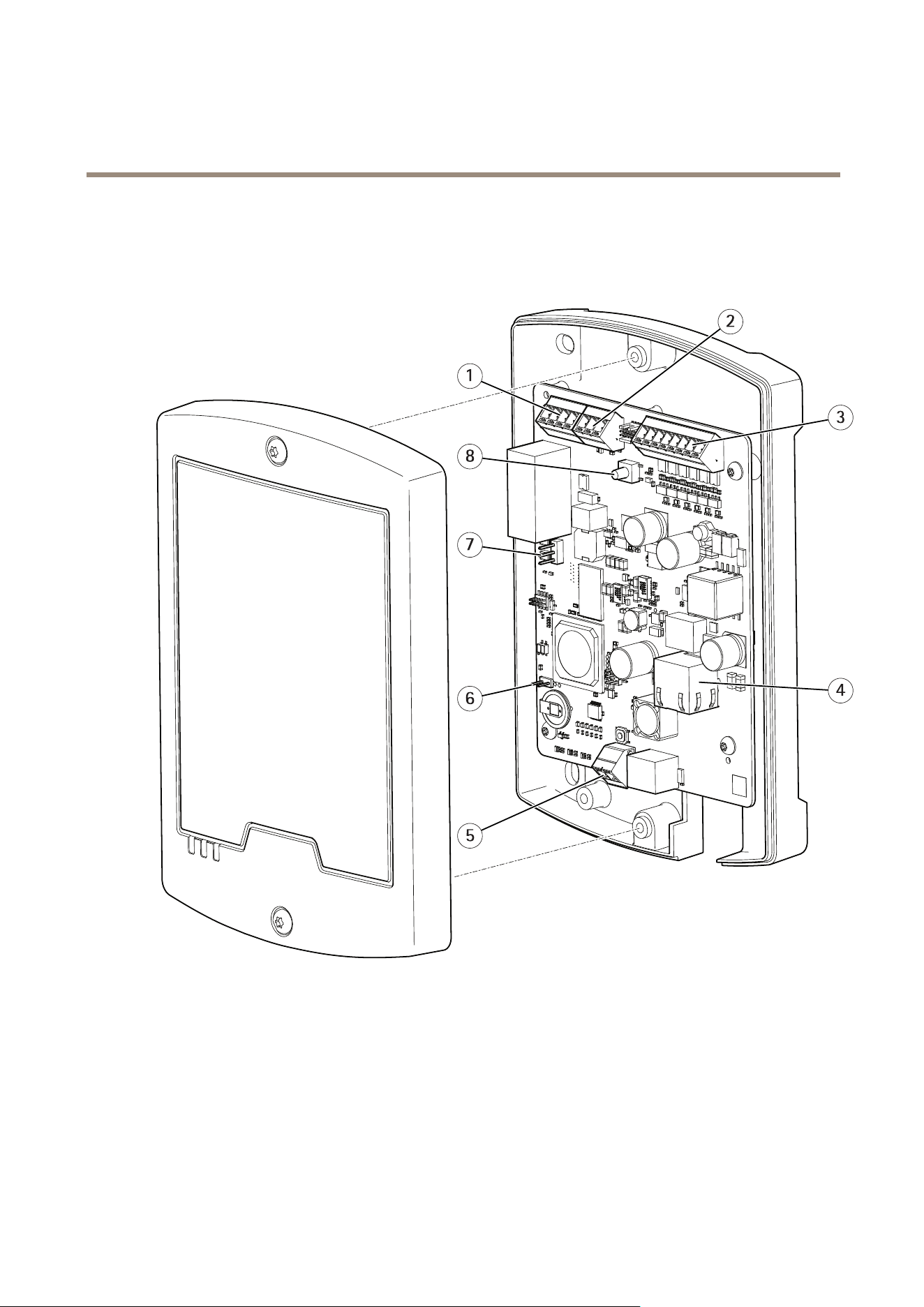
Forspecicationsofthehardwarecomponents,seeTechnicalspecicationsonpage29.
1
Relayconnector
2
12/24Vpowerconnector(DCOUT)
3
SupervisedI/Oandpowerconnector(DCOUT)
4
Networkconnector(PoE)
5
Powerconnector(DCIN)
6
Tamperingalarmbypassjumper
7
Relayjumper
8
Controlbutton
Forinformationabouttheproduct’sLEDindicators,seeLEDIndicatorsonpage29.
6

AXISA9161NetworkI/ORelayModule
Howtoaccesstheproduct
Howtoaccesstheproduct
ToinstalltheAxisproduct,seetheInstallationGuidesuppliedwiththeproduct.
Howtoaccesstheproductfromabrowser
1.Startawebbrowser.
2.EntertheIPaddressorhostnameoftheAxisproductinthebrowser’saddresseld.
Note
ToshowBonjourasabrowserbookmark,gotoSafari>Preferences.
3.Enteryourusernameandpassword.Ifthisisthersttimetheproductisaccessed,therootpasswordmustrstbe
congured.
4.AXISI/OManageropensinyourbrowser.ThestartpageiscalledtheDashboard.
HowtoaccesstheproductfromtheInternet
Onceconnected,theAxisproductisaccessibleonyourlocalnetwork(LAN).ToaccesstheproductfromtheInternetyoumust
congureyournetworkroutertoallowincomingdatatrafctotheproduct.Todothis,enabletheNAT-traversalfeature,whichwill
attempttoautomaticallyconguretheroutertoallowaccesstotheproduct.ThisisenabledfromPreferences>AdditionalDevice
Conguration>SystemOptions>Network>TCP/IP>Advanced.
Formoreinformation,seeNATtraversal(portmapping)forIPv4onpage23.SeealsoAXISInternetDynamicDNSServiceat
www.axiscam.net
ForTechnicalnotesonthisandothertopics,visittheAxisSupportwebatwww.axis.com/support
Howtosettherootpassword
ToaccesstheAxisproduct,youmustsetthepasswordforthedefaultadministratoruserroot.ThisisdoneintheCongureRoot
Passworddialog,whichopenswhentheproductisaccessedforthersttime.
Topreventnetworkeavesdropping,therootpasswordcanbesetviaanencryptedHTTPSconnection,whichrequiresanHTTPS
certicate.HTTPS(HypertextTransferProtocoloverSSL)isaprotocolusedtoencrypttrafcbetweenwebbrowsersandservers.The
HTTPScerticateensuresencryptedexchangeofinformation.SeeHTTPSonpage18.
Thedefaultadministratorusernamerootispermanentandcannotbedeleted.Ifthepasswordforrootislost,theproductmustbe
resettothefactorydefaultsettings.SeeHowtoresettofactorydefaultsettingsonpage26.
TosetthepasswordviaastandardHTTPconnection,enteritdirectlyinthedialog.
TosetthepasswordviaanencryptedHTTPSconnection,followthesesteps:
1.ClickUseHTTPS.
Atemporarycerticate(validforoneyear)iscreated,enablingencryptionofalltrafctoandfromtheproduct,andthe
passwordcannowbesetsecurely.
2.Enterapasswordandthenre-enterittoconrmthespelling.
3.ClickOK.Thepasswordhasnowbeencongured.
7

AXISA9161NetworkI/ORelayModule
Howtoaccesstheproduct
TheDashboardPage
ThedashboardpageinAXISNetworkIOmoduleisthestartscreenthatshowsinformationabouttheIOsandrelays.ClickoneachIO
orrelayrowtoexpandformoresettings.FromthispageyoucannavigatetoSchedules,EventlogandPreferences.
Toreturntothedashboardpageromtheproduct’sotherwebpages,clickDashboardinthemenubar.
8

AXISA9161NetworkI/ORelayModule
Aboutapplications
Aboutapplications
AXISCameraApplicationPlatform(ACAP)isanopenplatformthatenablesthirdpartiestodevelopanalyticsandotherapplications
forAxisproducts.Forinformationaboutavailableapplications,downloads,trialsandlicenses,gotowww.axis.com/applications
TondtheusermanualsforAxisapplications,gotowww.axis.com
Aboutapplicationlicenses
Someapplicationsneedalicensetorun.Licensescanbeinstalledintwoways:
•Automaticinstallation—requiresaccesstotheInternet
•Manualinstallation—obtainthelicensekeyfromtheapplicationvendoranduploadthekeytotheAxisproduct
Torequestalicense,theAxisproductserialnumber(S/N)isrequired.Theserialnumbercanbefoundontheproductlabelandunder
Preferences>Additionaldeviceconguration>SystemOptions>Support>SupportOverview.
Howtouploadandstartanapplication
Touploadandstartanapplication:
1.GotoPreferences>Additionaldeviceconguration>Applications.
2.UnderUploadApplication,clickBrowse.LocatetheapplicationleandclickUploadPackage.
3.Installthelicense(ifapplicable).Forinstructions,seethedocumentationprovidedbytheapplicationvendor.
4.Starttheapplication.GotoApplications,selecttheapplicationinthelistofinstalledapplicationsandclickStart.
5.Conguretheapplication.Forinstructions,seethedocumentationprovidedbytheapplicationvendor.
Note
•Applicationscanbeuploadedbyproductadministrators.
•ApplicationsandlicensescanbeinstalledonmultipleproductsatthesametimeusingAXISCameraManagement,version
3.10andlater.
Togeneratealoglefortheapplication,gotoApplications.SelecttheapplicationandclickLog.
ApplicationConsiderations
Ifanapplicationisupgraded,applicationsettings,includingthelicense,willberemoved.Thelicensemustbereinstalledand
theapplicationrecongured.
IftheAxisproduct’srmwareisupgraded,uploadedapplicationsandtheirsettingswillremainunchanged,althoughthisisnot
guaranteedbyAxisCommunications.Notethattheapplicationmustbesupportedbythenewrmware.Forinformationabout
rmwareupgrades,seeHowtoupgradethermwareonpage27.
IftheAxisproductisrestarted,runningapplicationswillrestartautomatically.
IftheAxisproductisrestoredorresettofactorydefault,uploadedapplicationsandtheirsettingsareremoved.Forinformation
aboutrestoringtheAxisproduct,seeMaintenanceonpage25.Forinformationaboutfactorydefault,seeHowtoresettofactory
defaultsettingsonpage26.
9

AXISA9161NetworkI/ORelayModule
SystemConfiguration
SystemConfiguration
Toopentheproduct’sSetuppages,clickPreferences>AdditionaldevicecongurationintheDashboardpage.
TheAxisproductcanbeconguredbyadministrators.Formoreinformationaboutusersandadministrators,seepage18.
Conguration–StepbyStep
BeforeyoustartusingyourAXISNetworkIORelayModule,youshouldcompletethefollowingsetupsteps:
1.IfEnglishisnotyourrstlanguage,youmaywantAXISNetworkIORelayModuletouseadifferentlanguage.Seepage10.
2.Congurethemoduleandconnecteddevices.Seepage10.
3.Setthedateandtime.Seepage1 1.
4.Congurethenetworksettings.Seepage12.
Forinformationaboutmaintenancerecommendations,seepage13.
SelectaLanguage
ThedefaultlanguageofAXISNetworkIORelayModuleisEnglish,butyoucanswitchtoanyofthelanguagesthatareincludedinthe
product’srmware.Forinformationaboutthelatestavailablermware,seewww.axis.com
Youcanswitchlanguagesinanyoftheproduct’swebpages.
Toswitchlanguages,clickthelanguagedrop-downlist
andselectalanguage.Alltheproduct’swebpagesandhelppagesare
displayedintheselectedlanguage.
Note
•Whenyouswitchlanguages,thedateformatalsochangestoaformatcommonlyusedintheselectedlanguage.The
correctformatisdisplayedinthedataelds.
•IfyouresettheproducttofactorydefaultsettingsthelanguageswitchesbacktoEnglish.
•Ifyourestoretheproduct,itwillcontinuetousetheselectedlanguage.
•Ifyourestarttheproduct,itwillcontinuetousetheselectedlanguage.
•Ifyouupgradethermware,itwillcontinuetousetheselectedlanguage.
ConguretheHardware
Beforeyoucanmanagetheconnecteddevices,thehardwaremustbeconguredintheDashboardpage.
DevicescanbeconnectedtotheAxisproductbeforecompletingthehardwareconguration.However,theconnectionofdevices
willbeeasierifyoucompletethehardwarecongurationrst.Thisisbecausethehardwarepinchartwillbeavailablewhenthe
congurationiscomplete.Thehardwarepinchartisaguideonhowtowirethehardwareandcanbeusedasareferencesheet
formaintenance.Formaintenanceinstructions,seepage13
ConguretheIOs
IntheDashboardpageyoucanmakevariouschangesandsettingsfortheIOs.
•ClickonanIOrowtoexpandandmaketheoptionavailable.
•ClickChangestatetosettheIOActiveorInactive(foroutputonly)
•ClickSettingstochangename,type,activestateandschedulefortheIOs.
10

AXISA9161NetworkI/ORelayModule
SystemConfiguration
-ChooseDigitaloutputorDigitalinputdependingonyoursystemsetup.
-ChooseSupervisedinputtoreportonthestatusoftheconnectionbetweenthenetworkIOmanangerconnected
devices.Iftheconnectionisinterrupted,aneventisactivated.Usingsupervisedinputrequiresexternalcircuitry,
seeSupervisedInputsonpage33.
-ChooseActivestateGroundedcircuitorOpencircuitdependingonyoursystemsetup.
-SelectascheduletousewhenDigitalOutputischosen.
Note
Ifthemoduleispartofasystem,itispossibletoselectfallbackschedule.
•ClickSaveorCanceltonish.
ConguretheRelays
IntheDashboardpageyoucanmakevariouschangesandsettingsfortherelays
•ClickonanRelayrowtoexpandandmaketheoptionsavailable.
•ClickChangestatetosettherelayActiveorInactive
•ClickSettingstochangenameandschedulefortherelay.
-Selectascheduletouse.
Note
Ifthemoduleispartofasystemasaslave,itispossibletoselectfallbackschedule.
•ClickSaveorCanceltonish.
UseSupervisedInputs
Choosesupervisedinputtomonitorstatusofthecableconnections,switchesandotherdevices.Iftheconnectionisinterrupted,
aneventisactivated.
Tousesupervisedinputs:
1.Installendoflineresistorsonalltheusedsupervisedinputs.Seetheconnectiondiagramonpage33.
2.GotoDashboard>IOs>SettingsandselectSupervisedinputs.
SettheDateandTime
TosetthedateandtimeoftheAxisproduct,fromtheDashboardgotoPreferences>Additionaldeviceconguration>System
Options>Date&Time.
Youcansetthedateandtimeinthefollowingways:
•Getthedateandtimefromanetworktimeprotocol(NTP)server.Seepage11
•Setthedateandtimemanually.Seepage12.
•Getthedateandtimefromthecomputer.Seepage12.
GettheDateandTimefromaNetworkTimeProtocol(NTP)Server
1.GotoPreferences>Additionaldeviceconguration>SystemOptions>Date&Time.
2.SelectyourTimezonefromthedrop-downlist.
11

AXISA9161NetworkI/ORelayModule
SystemConfiguration
3.Ifdaylightsavingtimeisusedinyourregion,selectAdjustfordaylightsaving.
4.SelectSynchronizewithNTP.
5.SelectthedefaultDHCPaddressorentertheaddressofaNTPserver.
6.ClickSave.
WhensynchronizingwithanNTPserver,dateandtimeareupdatedcontinuouslybecausethedataispushedfromtheNTPserver.For
informationaboutNTPsettings,seeNTPCongurationonpage22.
IfyouuseahostnamefortheNTPserver,aDNSservermustbecongured.SeeDNSCongurationonpage22.
SettheDateandTimeManually
1.GotoPreferences>Additionaldeviceconguration>SystemOptions>Date&Time.
2.Ifdaylightsavingtimeisusedinyourregion,selectAdjustfordaylightsaving.
3.SelectSetdate&timemanually.
4.Enterthedesireddateandtime.
5.ClickSave.
Whensettingthedate&timemanually,dateandtimearesetonceandwillnotbeupdatedautomatically.Thismeansthatifthe
dateortimeneedstobeupdated,thechangesmustbemademanuallybecausethereisnoconnectiontoanexternalNTPserver.
GettheDateandTimefromtheComputer
1.GotoPreferences>Additionaldeviceconguration>BasicSetup>Date&Time.
2.Ifdaylightsavingtimeisusedinyourregion,selectAdjustfordaylightsaving.
3.SelectSetdate&timemanually.
4.ClickSyncnowandsave.
Whenusingthecomputertime,dateandtimearesynchronizedwiththecomputertimeonceandwillnotbeupdatedautomatically.
Thismeansthatifyouchangethedateortimeonthecomputeryouusetomanagethesystem,youshouldsynchronizeagain.
ConguretheNetworkSettings
Tocongurethebasicnetworksettings,gotoPreferences>Additionaldeviceconguration>SystemOptions>SystemOptions
>Network>TCP/IP>Basic.
Formoreinformationaboutnetworksettings,seeNetworkonpage20.
BasicTCP/IPSettings
TheAxisproductsupportsIPversion4(IPv4).
TheAxisproductcangetanIPv4addressinthefollowingways:
•DynamicIPaddress–ObtainIPaddressviaDHCPisselectedbydefault.ThismeansthattheAxisproductissettoget
theIPaddressautomaticallyviaDynamicHostCongurationProtocol(DHCP).
DHCPallowsnetworkadministratorstocentrallymanageandautomatetheassignmentofIPaddresses.
•StaticIPaddress–TouseastaticIPaddress,selectUsethefollowingIPaddressandspecifytheIPaddress,subnetmask
anddefaultrouter.ThenclickSave.
12

AXISA9161NetworkI/ORelayModule
SystemConfiguration
DHCPshouldonlybeenabledwhenusingdynamicIPaddressnotication,oriftheDHCPcanupdateaDNSserverthatmakes
itpossibletoaccesstheAxisproductbyname(hostname).
IfDHCPisenabledandtheproductcannotbeaccessed,runAXISIPUtilitytosearchthenetworkforconnectedAxisproducts,or
resettheproducttothefactorydefaultsettingsandthenperformtheinstallationagain.Forinformationabouthowtoresetto
factorydefault,seepage26.
MaintenanceInstructions
TokeepthenetworkI/Omodulerunningsmoothly,AxisrecommendsregularmaintenanceofthenetworkI/Omoduleandconnected
devices.
Domaintenanceatleastonceayear.Thesuggestedmaintenanceprocedureincludes,butisnotlimitedto,thefollowingsteps:
•MakesurealltheconnectionsbetweennetworkI/Omoduleandtheexternaldevicesaresecure.
•Verifyallthehardwareconnections.Thisrequiresaccesstotheproduct’swebpages.
Iftheresultsfromanyofthestepsaboveindicatefaultsorunexpectedbehavior:
-Testthesignalsofthewiresusingappropriateequipmentandcheckifthewiresorcablesaredamaged
inanyway.
-Replacealldamagedorfaultycablesandwires.
-Oncethecablesandwireshavebeenreplaced,verifyallthehardwareconnectionsagain.Thisrequiresaccessto
theproduct’swebpages.
Forinformationaboutmaintenanceofthebattery,seeInstallationGuide.
13

AXISA9161NetworkI/ORelayModule
Scheduleconfiguration
Scheduleconfiguration
Useschedulestocontroltheactivetimesfortherelaysanddigitaloutputports.GotoSchedulestoviewandeditexistingschedules
andcreatenewones.
Viewpredenedscheduleslistedinthedropdownmenu:
•Always
•Ofcehours
•Weekends
•Afterhours
ToeditthenameoftheviewedscheduleclickEditschedule
Toeditthestartandendtimesclickonthecalender.Chooseifyouwantweeklyrecurrence
TocreateanewscheduleclickNewschedule
•EnteranameandclickSave
•Click,holdanddraginthecalendertochooseactivestartandendtimes.
14

AXISA9161NetworkI/ORelayModule
EventConfiguration
EventConfiguration
Eventsthatoccurinthesystem,forexamplewhenanIOportorrelayisactivated,areloggedintheeventlog.Eventscanbe
conguredtotriggeralarms.
•Viewtheeventlog.Seepage15.
ViewtheEventLog
Toviewloggedevents,gotoDashboard>EventLog.
Applyinglterstotheeventlogmakesiteasiertondspecicevents.Tolterthelist,selectoneorseveraleventloglters
andusethetwodropdownmenus.
Youcannarrowthescopeoftheeventlogbyselectingoneorseveralofthefollowinglters:
•Relayoutputport–Filteroneventsthatrelatestotherelayport.Chooseaspecicrelaywiththesecondarydrop
downmenu.
•Schedulewastriggered–Filteronschedules.Chooseaspecicschedulewiththesecondarydropdownmenu.
•RecurringUserAlarmwastriggered.
•Port–FilteroneventsthatrelatestotheIOport.ChooseaspecicIOportwiththesecondarydropdownmenu.
•Digitalinputport.
•Systemready.
•Virtualport.
•Virtualinputport.
•Devicelostnetwork.
•Devicecasingopened.
•Periodheartbeatfromcontroller.
SetUpActionRules
TheEventpagesallowyoutoconguretheAxisproducttoperformactionswhendifferenteventsoccur.Forexample,theproduct
cansendanemailnoticationoractivateanoutputportwhenanalarmistriggered.Thesetofconditionsthatdeneshowand
whentheactionistriggerediscalledanactionrule.Ifmultipleconditionsaredened,allofthemmustbemettotriggertheaction.
Formoreinformationaboutavailabletriggersandactions,seeandAboutactionsonpage16.
Thefollowingexampledescribeshowtosetupanactionruletosendanemailnoticationwhenanalarmistriggered.
1.GotoPreferences>Additionaldeviceconguration>Events>ActionRules.
2.SelectAddandenteradescriptivenamefortherule.
3.SelectEventLoggerfromtheTriggerdrop-downlist.
4.Optionally,selectaScheduleandAdditionalconditions.Seebelow.
5.UnderActions,selectSendNoticationfromtheTypedrop-downlist.
6.Selectanemailrecipientfromthedrop-downlist.SeeHowtoaddrecipientsonpage16.
Thefollowingexampledescribeshowtosetupanactionruletoactivateanoutputportwhenthedoorisforcedopen.
15

AXISA9161NetworkI/ORelayModule
EventConfiguration
Formoreinformation,seetheonlinehelp.
Triggers
Availableactionruletriggersandconditionsinclude:
•Eventlogger
•Hardware
•Inputsignal
•Schedule
•System
•Time
Formoreinformation,seetheonlinehelp
.
Aboutactions
Availableactionsinclude:
•OutputPort–ActivateanI/Oporttocontrolanexternaldevice.
•SendNotication–Sendanoticationmessagetoarecipient.
•SendSNMPTrap–SendanSNMPtrapmessagetotheoperator.MakesurethatSNMPisenabledandcongured
underSystemOptions>Network>SNMP.
•StatusLED–FlashtheLEDindicator.Thiscanforexamplebeusedtovalidatetriggerssuchasmotiondetectionduring
productinstallationandconguration.
Howtoaddrecipients
Theproductcansendmessagestonotifyrecipientsabouteventsandalarms.Butbeforetheproductcansendnoticationmessages,
youmustdeneoneormorerecipients.Forinformationaboutavailableoptions,seeAboutrecipienttypesonpage16.
Toaddarecipient:
1.GotoSetup>AdditionalControllerConguration>Events>RecipientsandclickAdd.
2.Enteradescriptivename.
3.SelectarecipientType.
4.Entertheinformationneededfortherecipienttype.
5.ClickTesttotesttheconnectiontotherecipient.
6.ClickOK.
Aboutrecipienttypes
Thefollowingrecipienttypesareavailable:
•HTTP
•HTTPS
•Email
16

AXISA9161NetworkI/ORelayModule
EventConfiguration
•TCP
Howtosetupemailrecipients
Emailrecipientscanbeconguredbyselectingoneofthelistedemailproviders,orbyspecifyingtheSMTPserver,portand
authenticationusedby,forexample,acorporateemailserver.
Note
Someemailprovidershavesecurityltersthatpreventusersfromreceivingorviewinglargeattachments,fromreceiving
scheduledemailsandsimilar.Checktheemailprovider’ssecuritypolicytoavoiddeliveryproblemsandlockedemailaccounts.
Tosetupanemailrecipientusingoneofthelistedproviders:
1.GotoEvents>RecipientsandclickAdd.
2.EnteraNameandselectEmailfromtheTypelist.
3.EntertheemailaddressestosendemailstointheToeld.Usecommastoseparatemultipleaddresses.
4.SelecttheemailproviderfromtheProviderlist.
5.EntertheuserIDandpasswordfortheemailaccount.
6.ClickTesttosendatestemail.
Tosetupanemailrecipientusingforexampleacorporateemailserver,followtheinstructionsabovebutselectUserdenedas
Provider.EntertheemailaddresstoappearassenderintheFromeld.SelectAdvancedsettingsandspecifytheSMTPserver
address,portandauthenticationmethod.Optionally,selectUseencryptiontosendemailsoveranencryptedconnection.Theserver
certicatecanbevalidatedusingthecerticatesavailableintheAxisproduct.Forinformationonhowtouploadcerticates,see
Aboutcerticatesonpage19.
Howtosetuprecurrences
Recurrencesareusedtotriggeractionrulesrepeatedly,forexampleevery5minutesoreveryhour.
Tosetuparecurrence:
1.GotoPreferences>AdditionalDeviceConguration>Events>RecurrencesandclickAdd.
2.Enteradescriptivenameandrecurrencepattern.
3.ClickOK.
Tousetherecurrenceinanactionrule,rstselectTimefromtheTriggerdrop-downlistintheActionRuleSetuppageandthen
selecttherecurrencefromtheseconddrop-downlist.
Tomodifyorremoverecurrences,selecttherecurrenceintheRecurrencesListandclickModifyorRemove.
17

AXISA9161NetworkI/ORelayModule
Aboutsystemoptions
Aboutsystemoptions
Security
Users
UseraccesscontrolisenabledbydefaultandcanbeconguredunderPreferences>AdditionalDeviceConguration>System
Options>Security>Users.Anadministratorcansetupotherusersbygivingthemusernamesandpasswords.
Theuserlistdisplaysauthorizedusersandusergroups(accesslevels):
•Administratorshaveunrestrictedaccesstoallsettings.Theadministratorcanadd,modifyandremoveotherusers.
Note
NotethatwhentheoptionEncrypted&unencryptedisselected,thewebserverwillencryptthepassword.Thisisthedefault
optionforanewunitoraunitresettofactorydefaultsettings.
UnderHTTP/RTSPPasswordSettings,selectthetypeofpasswordtoallow.Youmayneedtoallowunencryptedpasswordsifthereare
viewingclientsthatdonotsupportencryption,orifyouupgradedthermwareandexistingclientssupportencryptionbutneed
tologinagainandbeconguredtousethisfunctionality.
DeselecttheEnableBasicSetupoptiontohidetheBasicSetupmenu.BasicSetupprovidesquickaccesstosettingsthatshouldbe
madebeforeusingtheAxisproduct.
ONVIF
ONVIF(OpenNetworkVideoInterfaceForum)isaglobalinterfacestandardthatmakesiteasierforendusers,integrators,consultants,
andmanufacturerstotakeadvantageofthepossibilitiesofferedbynetworkvideotechnology.ONVIFenablesinteroperability
betweendifferentvendorproducts,increasedexibility,reducedcostandfuture-proofsystems.
BycreatingauseryouautomaticallyenableONVIFcommunication.UsetheusernameandpasswordwithallONVIFcommunication
withtheproduct.Formoreinformationseewww.onvif.org
IPAddressFilter
IPaddresslteringisenabledonthePreferences>AdditionalDeviceConguration>SystemOptions>Security>IPAddress
Filterpage.Onceenabled,thelistedIPaddressareallowedordeniedaccesstotheAxisproduct.SelectAlloworDenyfromthelist
andclickApplytoenableIPaddressltering.
Theadministratorcanaddupto256IPaddressentriestothelist(asingleentrycancontainmultipleIPaddresses).
HTTPS
HTTPS(HyperTextTransferProtocoloverSecureSocketLayer,orHTTPoverSSL)isawebprotocolprovidingencryptedbrowsing.
HTTPScanalsobeusedbyusersandclientstoverifythatthecorrectdeviceisbeingaccessed.Thesecuritylevelprovidedby
HTTPSisconsideredadequateformostcommercialexchanges.
TouseHTTPS,anHTTPScerticatemustrstbeinstalled.GotoPreferences>AdditionalDeviceConguration>SystemOptions>
Security>Certicatestoinstallandmanagecerticates.SeeAboutcerticatesonpage19.
ToenableHTTPSontheAxisproduct:
1.GotoPreferences>AdditionalDeviceConguration>SystemOptions>Security>HTTPS
2.SelectanHTTPScerticatefromthelistofinstalledcerticates.
3.Optionally,clickCiphersandselecttheencryptionalgorithmstouseforSSL.
4.SettheHTTPSConnectionPolicyforthedifferentusergroups.
18

AXISA9161NetworkI/ORelayModule
Aboutsystemoptions
5.ClickSavetoenablethesettings.
ToaccesstheAxisproductviathedesiredprotocol,intheaddresseldinabrowser,enterhttps://fortheHTTPSprotocol
andhttp://fortheHTTPprotocol.
TheHTTPSportcanbechangedontheSystemOptions>Network>TCP/IP>Advancedpage.
IEEE802.1X
IEEE802.1Xisastandardforport-basedNetworkAdmissionControlprovidingsecureauthenticationofwiredandwirelessnetwork
devices.IEEE802.1XisbasedonEAP(ExtensibleAuthenticationProtocol).
ToaccessanetworkprotectedbyIEEE802.1X,devicesmustbeauthenticated.Theauthenticationisperformedbyanauthentication
server,typicallyaRADIUSserver,examplesofwhichareFreeRADIUSandMicrosoftInternetAuthenticationService.
InAxisimplementation,theAxisproductandtheauthenticationserveridentifythemselveswithdigitalcerticatesusingEAP-TLS
(ExtensibleAuthenticationProtocol-TransportLayerSecurity).ThecerticatesareprovidedbyaCerticationAuthority(CA).
Youneed:
•aCAcerticatetoauthenticatetheauthenticationserver.
•aCA-signedclientcerticatetoauthenticatetheAxisproduct.
Tocreateandinstallcerticates,gotoPreferences>AdditionalDeviceConguration>SystemOptions>Security>Certicates.
SeeAboutcerticatesonpage19.
ToallowtheproducttoaccessanetworkprotectedbyIEEE802.1X:
1.GotoPreferences>AdditionalDeviceConguration>SystemOptions>Security>IEEE802.1X.
2.SelectaCACerticateandaClientCerticatefromthelistsofinstalledcerticates.
3.UnderSettings,selecttheEAPOLversionandprovidetheEAPidentityassociatedwiththeclientcerticate.
4.ChecktheboxtoenableIEEE802.1XandclickSave.
Note
Forauthenticationtoworkproperly,thedateandtimesettingsintheAxisproductshouldbesynchronizedwithanNTP
server.SeeDate&Timeonpage20.
Aboutcerticates
Certicatesareusedtoauthenticatedevicesonanetwork.Typicalapplicationsincludeencryptedwebbrowsing(HTTPS),network
protectionviaIEEE802.1Xandsecureuploadofimagesandnoticationmessagesforexampleviaemail.Twotypesofcerticates
canbeusedwiththeAxisproduct:
Server/Clientcerticates-ToauthenticatetheAxisproduct.AServer/Clientcerticatecanbeself-signedorissuedbyaCerticate
Authority(CA).Aself-signedcerticateofferslimitedprotectionandcanbeusedbeforeaCA-issuedcerticatehasbeenobtained.
CAcerticates-Toauthenticatepeercerticates,forexamplethecerticateofanauthenticationserverincasetheAxisproductis
connectedtoanIEEE802.1Xprotectednetwork.TheAxisproductisshippedwithseveralpreinstalledCAcerticates.
Note
•Iftheproductisresettofactorydefault,allcerticates,exceptpreinstalledCAcerticates,willbedeleted.
•Iftheproductisresettofactorydefault,allpreinstalledCAcerticatesthathavebeendeletedwillbereinstalled.
Howtocreateaself-signedcerticate
1.GotoPreferences>AdditionalDeviceConguration>SystemOptions>Security>Certicates.
2.ClickCreateself-signedcerticateandprovidetherequestedinformation.
19

AXISA9161NetworkI/ORelayModule
Aboutsystemoptions
HowtocreateandinstallaCA-signedcerticate
1.Createaself-signedcerticate,seeHowtocreateaself-signedcerticateonpage19.
2.GotoPrefernces>AdditionalDeviceConguration>SystemOptions>Security>Certicates.
3.ClickCreatecerticatesigningrequestandprovidetherequestedinformation.
4.CopythePEM-formattedrequestandsendtotheCAofyourchoice.
5.Whenthesignedcerticateisreturned,clickInstallcerticateanduploadthecerticate.
HowtoinstalladditionalCAcerticates
1.GotoPreferences>AdditionalDeviceConguration>SystemOptions>Security>Certicates.
2.ClickInstallcerticateanduploadthecerticate.
Date&Time
TheAxisproduct’sdateandtimesettingsareconguredunderSystemOptions>Date&Time.
Tochangethedateandtimesettings,selectthepreferredTimemodeunderNewServerTime:
•Synchronizewithcomputertime–Setsdateandtimeaccordingtothecomputer’sclock.Withthisoption,dateand
timearesetonceandwillnotbeupdatedautomatically.
•SynchronizewithNTPServer–ObtainsdateandtimefromanNTPserver.Withthisoption,dateandtimesettingsare
updatedcontinuously.ForinformationonNTPsettings,seeNTPCongurationonpage22.
IfusingahostnamefortheNTPserver,aDNSservermustbecongured.SeeDNSCongurationonpage22.
•Setmanually–Allowsyoutomanuallysetdateandtime.
IfusinganNTPserver,selectyourTimezonefromthedrop-downlist.Ifrequired,checkAutomaticallyadjustfordaylightsaving
timechanges.
Network
BasicTCP/IPSettings
TheAxisproductsupportsIPversion4(IPv4).
TheAxisproductcangetanIPv4addressinthefollowingways:
•DynamicIPaddress–ObtainIPaddressviaDHCPisselectedbydefault.ThismeansthattheAxisproductissettoget
theIPaddressautomaticallyviaDynamicHostCongurationProtocol(DHCP).
DHCPallowsnetworkadministratorstocentrallymanageandautomatetheassignmentofIPaddresses.
•StaticIPaddress–TouseastaticIPaddress,selectUsethefollowingIPaddressandspecifytheIPaddress,subnetmask
anddefaultrouter.ThenclickSave.
DHCPshouldonlybeenabledwhenusingdynamicIPaddressnotication,oriftheDHCPcanupdateaDNSserverthatmakes
itpossibletoaccesstheAxisproductbyname(hostname).
IfDHCPisenabledandtheproductcannotbeaccessed,runAXISIPUtilitytosearchthenetworkforconnectedAxisproducts,or
resettheproducttothefactorydefaultsettingsandthenperformtheinstallationagain.Forinformationabouthowtoresetto
factorydefault,seepage26.
20

AXISA9161NetworkI/ORelayModule
Aboutsystemoptions
ARP/Ping
Theproduct’sIPaddresscanbeassignedusingARPandPing.Forinstructions,seeAssignIPAddressUsingARP/Pingonpage21.
TheARP/Pingserviceisenabledbydefaultbutisautomaticallydisabledtwominutesaftertheproductisstarted,orassoonasanIP
addressisassigned.Tore-assignIPaddressusingARP/Ping,theproductmustberestartedtoenableARP/Pingforanadditional
twominutes.
Todisabletheservice,gotoPreferences>AdditionalDeviceConguration>SystemOptions>Network>TCP/IP>Basic
andcleartheoptionEnableARP/PingsettingofIPaddress.
Pingingtheproductisstillpossiblewhentheserviceisdisabled.
AssignIPAddressUsingARP/Ping
Theproduct'sIPaddresscanbeassignedusingARP/Ping.Thecommandmustbeissuedwithin2minutesofconnectingpower.
1.AcquireafreestaticIPaddressonthesamenetworksegmentasthecomputer.
2.Locatetheserialnumber(S/N)ontheproductlabel.
3.Openacommandpromptandenterthefollowingcommands:
Linux/Unixsyntax
arp-s<IPaddress><serialnumber>temp
ping-s408<IPaddress>
Linux/Unixexample
arp-s192.168.0.12500:40:8c:18:10:00temp
ping-s408192.168.0.125
Windowssyntax(thismayrequirethatyourunthecommandpromptasanadministrator)
arp-s<IPaddress><serialnumber>
ping-l408-t<IPaddress>
Windowsexample(thismayrequirethatyourunthecommandpromptasanadministrator)
arp-s192.168.0.12500-40-8c-18-10-00
ping-l408-t192.168.0.125
4.Checkthatthenetworkcableisconnectedandthenrestarttheproductbydisconnectingandreconnectingpower.
5.ClosethecommandpromptwhentheproductrespondswithReplyfrom192.168.0.125:...orsimilar.
6.Openabrowserandtypehttp://<IPaddress>intheLocation/Addresseld.
Note
•ToopenacommandpromptinWindows,opentheStartmenuandtypecmdintheRun/Searcheld.
•TousetheARPcommandinWindows8/Windows7/WindowsVista,right-clickthecommandprompticonandselect
Runasadministrator.
•ToopenacommandpromptinMacOSX,opentheTerminalutilityfromApplication>Utilities.
AXISVideoHostingSystem(AVHS)
TheAVHSsettingsareconguredunderPreferences>AdditionalDeviceConguration>SystemOptions>Network>TCP/IP>
Basic.ThepossibilitytoconnecttoanAVHSserviceisenabledbydefault.Todisable,cleartheEnableAVHSbox.
One-clickenabled-Pressandholdtheproduct’scontrolbutton(seeHardwareoverviewonpage6)forabout3secondstoconnectto
anAVHSserviceovertheInternet.Onceregistered,AlwayswillbeenabledandtheAxisproductstaysconnectedtotheAVHSservice.
Iftheproductisnotregisteredwithin24hoursfromwhenthebuttonispressed,theproductwilldisconnectfromtheAVHSservice.
21

AXISA9161NetworkI/ORelayModule
Aboutsystemoptions
Always-TheAxisproductwillconstantlyattempttoconnecttotheAVHSserviceovertheInternet.Onceregisteredtheproductwill
stayconnectedtotheservice.Thisoptioncanbeusedwhentheproductisalreadyinstalledanditisnotconvenienttousethe
one-clickinstallation.
AXISInternetDynamicDNSService
AXISInternetDynamicDNSServiceassignsahostnameforeasyaccesstotheproduct.Formoreinformation,seewww.axiscam.net
ToregistertheAxisproductwithAXISInternetDynamicDNSService,gotoPreferences>AdditionalDeviceConguration>System
Options>Network>TCP/IP>Basic.UnderServices,clicktheAXISInternetDynamicDNSServiceSettingsbutton(requiresaccessto
theInternet).ThedomainnamecurrentlyregisteredatAXISInternetDynamicDNSservicefortheproductcanatanytimeberemoved.
Note
AXISInternetDynamicDNSServicerequiresIPv4.
AdvancedTCP/IPSettings
DNSConguration
DNS(DomainNameService)providesthetranslationofhostnamestoIPaddresses.TheDNSsettingsareconguredunder
Preferences>AdditionalDeviceConguration>SystemOptions>Network>TCP/IP>Advanced.
SelectObtainDNSserveraddressviaDHCPtousetheDNSsettingsprovidedbytheDHCPserver.
Tomakemanualsettings,selectUsethefollowingDNSserveraddressandspecifythefollowing:
Domainname-Enterthedomain(s)tosearchforthehostnameusedbytheAxisproduct.Multipledomainscanbeseparatedby
semicolons.Thehostnameisalwaystherstpartofafullyqualieddomainname,forexample,myserveristhehostnameinthe
fullyqualieddomainnamemyserver.mycompany.comwheremycompany.comisthedomainname.
Primary/SecondaryDNSserver-EntertheIPaddressesoftheprimaryandsecondaryDNSservers.ThesecondaryDNSserveris
optionalandwillbeusediftheprimaryisunavailable.
NTPConguration
NTP(NetworkTimeProtocol)isusedtosynchronizetheclocktimesofdevicesinanetwork.TheNTPsettingsareconguredunder
Preferences>AdditionalDeviceConguration>SystemOptions>Network>TCP/IP>Advanced.
SelectObtainNTPserveraddressviaDHCPtousetheNTPsettingsprovidedbytheDHCPserver.
Tomakemanualsettings,selectUsethefollowingNTPserveraddressandenterthehostnameorIPaddressoftheNTPserver.
HostNameConguration
TheAxisproductcanbeaccessedusingahostnameinsteadofanIPaddress.Thehostnameisusuallythesameastheassigned
DNSname.ThehostnameisconguredunderPreferences>AdditionalDeviceConguration>SystemOptions>Network>
TCP/IP>Advanced.
SelectObtainhostnameviaIPv4DHCPtousehostnameprovidedbytheDHCPserverrunningonIPv4.
SelectUsethehostnametosetthehostnamemanually.
SelectEnabledynamicDNSupdatestodynamicallyupdatelocalDNSserverswhenevertheAxisproduct’sIPaddresschanges.
Formoreinformation,seetheonlinehelp
.
Link-LocalIPv4Address
Link-LocalAddressisenabledbydefaultandassignstheAxisproductanadditionalIPaddresswhichcanbeusedtoaccess
theproductfromotherhostsonthesamesegmentonthelocalnetwork.TheproductcanhaveaLink-LocalIPandastatic
orDHCP-suppliedIPaddressatthesametime.
22

AXISA9161NetworkI/ORelayModule
Aboutsystemoptions
ThisfunctioncanbedisabledunderPreferences>AdditionalDeviceConguration>SystemOptions>Network>TCP/IP
>Advanced.
HTTP
TheHTTPportusedbytheAxisproductcanbechangedunderPreferences>AdditionalDeviceConguration>SystemOptions>
Network>TCP/IP>Advanced.Inadditiontothedefaultsetting,whichis80,anyportintherange1024–65535canbeused.
HTTPS
TheHTTPSportusedbytheAxisproductcanbechangedunderPreferences>AdditionalDeviceConguration>SystemOptions>
Network>TCP/IP>Advanced.Inadditiontothedefaultsetting,whichis443,anyportintherange1024–65535canbeused.
ToenableHTTPS,gotoPreferences>AdditionalDeviceConguration>SystemOptions>Security>HTTPS.Formore
information,seeHTTPSonpage18.
NATtraversal(portmapping)forIPv4
Anetworkrouterallowsdevicesonaprivatenetwork(LAN)toshareasingleconnectiontotheInternet.Thisisdonebyforwarding
networktrafcfromtheprivatenetworktothe“outside”,thatis,theInternet.Securityontheprivatenetwork(LAN)isincreased
sincemostroutersarepre-conguredtostopattemptstoaccesstheprivatenetwork(LAN)fromthepublicnetwork(Internet).
UseNATtraversalwhentheAxisproductislocatedonanintranet(LAN)andyouwishtomakeitavailablefromtheother(WAN)side
ofaNATrouter.WithNATtraversalproperlycongured,allHTTPtrafctoanexternalHTTPportintheNATrouterisforwardedto
theproduct.
NATtraversalisconguredunderPreferences>AdditionalDeviceConguration>SystemOptions>Network>TCP/IP
>Advanced.
Note
•ForNATtraversaltowork,thismustbesupportedbytherouter.TheroutermustalsosupportUPnP
TM
.
•Inthiscontext,routerreferstoanynetworkroutingdevicesuchasaNATrouter,Networkrouter,InternetGateway,
Broadbandrouter,Broadbandsharingdevice,orasoftwaresuchasarewall.
Enable/Disable-Whenenabled,theAxisproductattemptstocongureportmappinginaNATrouteronyournetwork,using
UPnP
TM
.NotethatUPnP
TM
mustbeenabledintheproduct(seePreferences>AdditionalDeviceConguration>SystemOptions
>Network>UPnP).
UsemanuallyselectedNATrouter-SelectthisoptiontomanuallyselectaNATrouterandentertheIPaddressfortherouterin
theeld.Ifnorouterisspecied,theproductautomaticallysearchesforNATroutersonyournetwork.Ifmorethanonerouteris
found,thedefaultrouterisselected.
AlternativeHTTPport-SelectthisoptiontomanuallydeneanexternalHTTPport.Enteraportintherange1024–65535.Ifthe
porteldisemptyorcontainsthedefaultsetting,whichis0,aportnumberisautomaticallyselectedwhenenablingNATtraversal.
Note
•AnalternativeHTTPportcanbeusedorbeactiveevenifNATtraversalisdisabled.ThisisusefulifyourNATrouterdoesnot
supportUPnPandyouneedtomanuallycongureportforwardingintheNATrouter.
•Ifyouattempttomanuallyenteraportthatisalreadyinuse,anotheravailableportisautomaticallyselected.
•Whentheportisselectedautomaticallyitisdisplayedinthiseld.Tochangethis,enteranewportnumberandclickSave.
FTP
TheFTPserverrunningintheAxisproductenablesuploadofnewrmware,userapplications,etc.TheFTPservercanbedisabled
underPreferences>AdditionalDeviceConguration>SystemOptions>Network>TCP/IP>Advanced.
23

AXISA9161NetworkI/ORelayModule
Aboutsystemoptions
SOCKS
SOCKSisanetworkingproxyprotocol.TheAxisproductcanbeconguredtouseaSOCKSservertoreachnetworksontheother
sideofarewallorproxyserver.ThisfunctionalityisusefuliftheAxisproductislocatedonalocalnetworkbehindarewall,and
notications,uploads,alarms,etcneedtobesenttoadestinationoutsidethelocalnetwork(forexampletheInternet).
SOCKSisconguredunderPreferences>AdditionalDeviceConguration>SystemOptions>Network>SOCKS.Formore
information,seetheonlinehelp
.
QoS(QualityofService)
QoS(QualityofService)guaranteesacertainlevelofaspeciedresourcetoselectedtrafconanetwork.AQoS-awarenetwork
prioritizesnetworktrafcandprovidesagreaternetworkreliabilitybycontrollingtheamountofbandwidthanapplicationmayuse.
SNMP
TheSimpleNetworkManagementProtocol(SNMP)allowsremotemanagementofnetworkdevices.AnSNMPcommunityisthe
groupofdevicesandmanagementstationrunningSNMP.Communitynamesareusedtoidentifygroups.
AXISVideoMIB(ManagementInformationBase)forvideohardwarecanbeusedtomonitorAxis-specic,hardware-related
issuesthatmayneedadministrativeattention.FormoreinformationaboutAXISVideoMIBandtodownloadMIBles,goto
www.axis.com/support
ToenableandcongureSNMPintheAxisproduct,gotothePreferences>AdditionalDeviceConguration>SystemOptions
>Network>SNMPpage.
Dependingonthelevelofsecurityrequired,selecttheversiononSNMPtouse.
TrapsareusedbytheAxisproducttosendmessagestoamanagementsystemonimportanteventsandstatuschanges.CheckEnable
trapsandentertheIPaddresswherethetrapmessageshouldbesentandtheTrapcommunitythatshouldreceivethemessage.
Note
IfHTTPSisenabled,SNMPv1andSNMPv2cshouldbedisabled.
TrapsforSNMPv1/v2areusedbytheAxisproducttosendmessagestoamanagementsystemonimportanteventsandstatus
changes.CheckEnabletrapsandentertheIPaddresswherethetrapmessageshouldbesentandtheTrapcommunitythat
shouldreceivethemessage.
Thefollowingtrapsareavailable:
•Coldstart
•Warmstart
•Linkup
•Authenticationfailed
Note
AllAXISVideoMIBtrapsareenabledwhenSNMPv1/v2ctrapsareenabled.Itisnotpossibletoturnonoroffspecictraps.
SNMPv3providesencryptionandsecurepasswords.TousetrapswithSNMPv3,anSNMPv3managementapplicationisrequired.
TouseSNMPv3,HTTPSmustbeenabled,seeHTTPSonpage18.ToenableSNMPv3,checktheboxandprovidetheinitialuser
password.
Note
Theinitialpasswordcanonlybesetonce.Ifthepasswordislost,theAxisproductmustberesettofactorydefault,seeHow
toresettofactorydefaultsettingsonpage26.
24

AXISA9161NetworkI/ORelayModule
Aboutsystemoptions
UPnP
TM
TheAxisproductincludessupportforUPnP
TM
.UPnP
TM
isenabledbydefaultandtheproductisautomaticallydetectedbyoperating
systemsandclientsthatsupportthisprotocol.
UPnP
TM
canbedisabledunderPreferences>AdditionalDeviceConguration>SystemOptions>Network>UPnP.
Bonjour
TheAxisproductincludessupportforBonjour.Bonjourisenabledbydefaultandtheproductisautomaticallydetectedbyoperating
systemsandclientsthatsupportthisprotocol.
BonjourcanbedisabledunderPreferences>AdditionalDeviceConguration>SystemOptions>Network>Bonjour.
Maintenance
TheAxisproductprovidesseveralmaintenancefunctions.TheseareavailableunderPreferences>AdditionalDeviceConguration
>SystemOptions>Maintenance.
ClickRestarttoperformacorrectrestartiftheAxisproductisnotbehavingasexpected.Thiswillnotaffectanyofthecurrent
settings.
Note
ArestartclearsallentriesintheServerReport.
ClickRestoretoresetmostsettingstothefactorydefaultvalues.Thefollowingsettingsarenotaffected:
•thebootprotocol(DHCPorstatic)
•thestaticIPaddress
•thedefaultrouter
•thesubnetmask
•thesystemtime
•theIEEE802.1Xsettings
ClickDefaulttoresetallsettings,includingtheIPaddress,tothefactorydefaultvalues.Thisbuttonshouldbeusedwithcaution.The
Axisproductcanalsoberesettofactorydefaultusingthecontrolbutton,seeHowtoresettofactorydefaultsettingsonpage26.
Forinformationaboutrmwareupgrade,seeHowtoupgradethermwareonpage27.
Support
SupportOverview
ThePreferences>Additionaldeviceconguration>SystemOptions>Support>SupportOverviewpageprovidesinformationon
troubleshootingandcontactinformation,shouldyourequiretechnicalassistance.
SeealsoTroubleshootingonpage27.
SystemOverview
Logs&Reports
ThePreferences>AdditionalDeviceConguration>SystemOptions>Support>Logs&Reportspagegenerateslogsandreports
usefulforsystemanalysisandtroubleshooting.IfcontactingAxisSupport,pleaseprovideaServerReportwithyourquery.
25

AXISA9161NetworkI/ORelayModule
Aboutsystemoptions
SystemLog-Providesinformationaboutsystemevents.
AccessLog-Listsallfailedattemptstoaccesstheproduct.TheAccessLogcanalsobeconguredtolistallconnectionstothe
product(seebelow).
ServerReport-Providesinformationabouttheproductstatusinapop-upwindow.TheAccessLogisautomaticallyincluded
intheServerReport.
ParameterList-Showstheproduct'sparametersandtheircurrentsettings.Thismayproveusefulwhentroubleshootingor
whencontactingAxisSupport.
ConnectionList-Listsallclientsthatarecurrentlyaccessingmediastreams.
CrashReport-Generatesanarchivewithdebugginginformation.Thereporttakesseveralminutestogenerate.
Advanced
Scripting
Scriptingallowsexperienceduserstocustomizeandusetheirownscripts.
NO NO
NO
TICE TICE
TICE
ImproperusemaycauseunexpectedbehaviorandlossofcontactwiththeAxisproduct.
Axisstronglyrecommendsthatyoudonotusethisfunctionunlessyouunderstandtheconsequences.AxisSupportdoesnotprovide
assistanceforproblemswithcustomizedscripts.
ToopentheScriptEditor,gotoPreferences>AdditionalDeviceConguration>SystemOptions>Advanced>Scripting.Ifa
scriptcausesproblems,resettheproducttoitsfactorydefaultsettings,seepage26.
Formoreinformation,seewww.axis.com/developer
FileUpload
Files,forexamplewebpagesandimages,canbeuploadedtotheAxisproductandusedascustomsettings.Touploadale,goto
Preferences>AdditionalDeviceConguration>SystemOptions>Advanced>FileUpload.
Howtoresettofactorydefaultsettings
Important
Resettofactorydefaultshouldbeusedwithcaution.Aresettofactorydefaultresetsallsettings,includingtheIPaddress,to
thefactorydefaultvalues.
Toresettheproducttothefactorydefaultsettings:
1.Disconnectpowerfromtheproduct.
2.Pressandholdthecontrolbuttonandreconnectpower.
3.Keepthecontrolbuttonpressedfor25secondsuntilthestatusLEDindicatorturnsamberforthesecondtime.
4.Releasethecontrolbutton.TheprocessiscompletewhenthestatusLEDindicatorturnsgreen.Theproducthasbeenreset
tothefactorydefaultsettings.IfnoDHCPserverisavailableonthenetwork,thedefaultIPaddressis192.168.0.90
5.Usingtheinstallationandmanagementsoftwaretools,assignanIPaddress,setthepassword,andaccesstheproduct.
Itisalsopossibletoresetparameterstofactorydefaultviathewebinterface.GotoPreferences>AdditionalDeviceConguration
>SystemOptions>MaintenanceandclickDefault.
26

AXISA9161NetworkI/ORelayModule
Troubleshooting
Troubleshooting
Howtocheckthecurrentrmware
Firmwareissoftwarethatdeterminesthefunctionalityofnetworkdevices.Oneofyourrstactionswhentroubleshootingaproblem
shouldbetocheckthecurrentrmwareversion.Thelatestversionmaycontainacorrectionthatxesyourparticularproblem.The
currentrmwareversionintheAxisproductisdisplayedinthepageandin.
Howtoupgradethermware
Important
•Yourdealerreservestherighttochargeforanyrepairattributabletofaultyupgradebytheuser.
•Preconguredandcustomizedsettingsaresavedwhenthermwareisupgraded(providingthefeaturesareavailableinthe
newrmware)althoughthisisnotguaranteedbyAxisCommunicationsAB.
Note
•WhenyouupgradetheAxisproductwiththelatestrmware,theproductreceivesthelatestfunctionalityavailable.Always
readtheupgradeinstructionsandreleasenotesavailablewitheachnewreleasebeforeupgradingthermware.
EmergencyRecoveryProcedure
Ifpowerornetworkconnectionislostduringtheupgrade,theprocessfailsandtheproductmaybecomeunresponsive.Flashing
redStatusindicatorindicatesafailedupgrade.Torecovertheproduct,followthestepsbelow.Theserialnumberisfoundon
theproduct’slabel.
1.InUNIX/Linux,typethefollowingfromthecommandline:
arp-s<IPaddress><serialnumber>temp
ping-l408<IPaddress>
InWindows,typethefollowingfromacommand/DOSprompt(thismayrequirethatyourunthecommandpromptas
anadministrator):
arp-s<IPaddress><serialnumber>
ping-l408-t<IPaddress>
2.Iftheproductdoesnotreplyin30seconds,restartitandwaitforareply.PressCTRL+CtostopPing.
3.Openabrowserandtypeintheproduct’sIPaddress.Inthepagethatopens,usetheBrowsebuttontoselecttheupgrade
letouse.ThenclickLoadtorestarttheupgradeprocess.
4.Aftertheupgradeiscomplete(1–10minutes),theproductautomaticallyrestartsandshowsasteadygreenonthe
Statusindicator.
5.Reinstalltheproduct,referringtotheInstallationGuide.
Iftheemergencyrecoveryproceduredoesnotgettheproductupandrunningagain,contactAxissupportatwww.axis.com/support
Symptoms,possiblecausesandremedialactions
Problemsupgradingthermware
Firmwareupgradefailure
Ifthermwareupgradefails,theproductreloadsthepreviousrmware.Checkthermware
leandtryagain.
27

AXISA9161NetworkI/ORelayModule
Troubleshooting
ProblemssettingtheIPaddress
WhenusingARP/Ping
Theproductislocatedona
differentsubnet
IftheIPaddressintendedfortheproductandtheIPaddressofthecomputerusedtoaccessthe
productarelocatedondifferentsubnets,youwillnotbeabletosettheIPaddress.Contactyour
networkadministratortoobtainanIPaddress.
TheIPaddressisbeingused
byanotherdevice
DisconnecttheAxisproductfromthenetwork.RunthePingcommand(inaCommand/DOS
window,typepingandtheIPaddressoftheproduct):
•Ifyoureceive:Replyfrom<IPaddress>:bytes=32;time=10...
thismeansthattheIPaddressmayalreadybeinusebyanotherdeviceonthenetwork.
ObtainanewIPaddressfromthenetworkadministratorandreinstalltheproduct.
•Ifyoureceive:Requesttimedout,thismeansthattheIPaddressisavailable
forusewiththeAxisproduct.Checkallcablingandreinstalltheproduct.
PossibleIPaddressconict
withanotherdeviceonthe
samesubnet
ThestaticIPaddressintheAxisproductisusedbeforetheDHCPserversetsadynamicaddress.
ThismeansthatifthesamedefaultstaticIPaddressisalsousedbyanotherdevice,theremay
beproblemsaccessingtheproduct.
Theproductcannotbeaccessedfromabrowser
Cannotlogin
WhenHTTPSisenabled,ensurethatthecorrectprotocol(HTTPorHTTPS)isusedwhenattempting
tologin.Youmayneedtomanuallytypehttporhttpsinthebrowser’saddresseld.
Ifthepasswordfortheuserrootislost,theproductmustberesettothefactorydefaultsettings.
SeeHowtoresettofactorydefaultsettingsonpage26.
TheIPaddresshasbeen
changedbyDHCP
Certicateerrorwhenusing
IEEE802.1X
Forauthenticationtoworkproperly,thedateandtimesettingsintheAxisproductshouldbe
synchronizedwithanNTPserver.SeeDate&Timeonpage20.
Theproductisaccessiblelocallybutnotexternally
RoutercongurationTocongureyourroutertoallowincomingdatatrafctotheAxisproduct,enabletheNAT-traversal
featurewhichwillattempttoautomaticallyconguretheroutertoallowaccesstotheAxis
product,seeNATtraversal(portmapping)forIPv4onpage23.TheroutermustsupportUPnP
TM
.
Firewallprotection
ChecktheInternetrewallwithyournetworkadministrator.
Defaultroutersrequired
StatusandNetworkindicatorLEDsareashingredrapidly
Hardwarefailure
ContactyourAxisreseller.
Productdoesnotstartup
ProductdoesnotstartupIftheproductdoesnotstartupkeepthenetworkcableconnectedandre-insertthepowercable
tothemidspan.
28
AXISA9161NetworkI/ORelayModule
Technicalspecifications
Technicalspecifications
Youcanndthelatestversionofthedatasheetatwww.axis.com
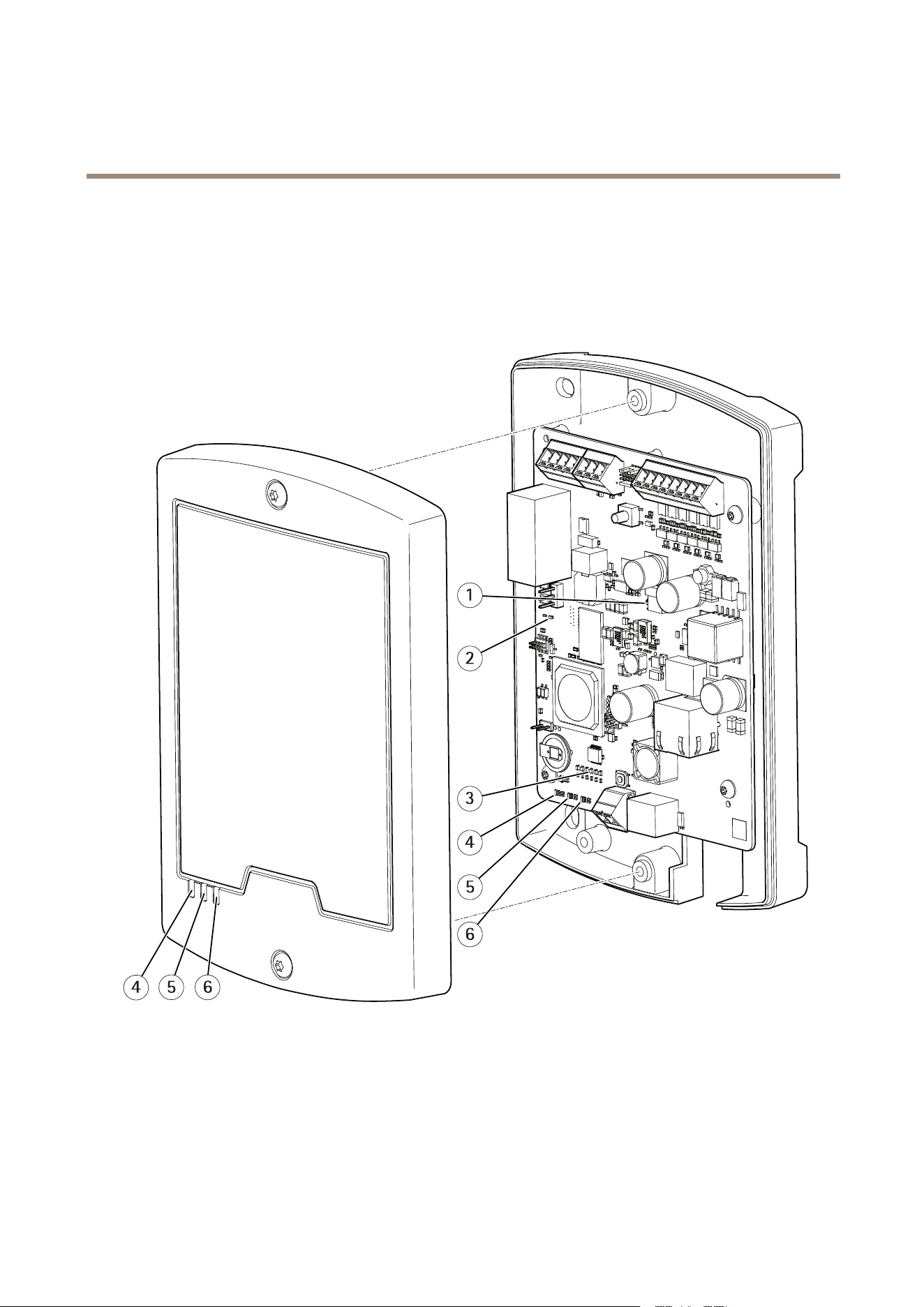
LEDIndicators
1
I/OvoltageLEDindicator
2
RelayLEDindicator
3
I/OLEDindicators(6x)
4
PowerLEDindicator
5
StatusLEDindicator
6
NetworkLEDindicator
29

AXISA9161NetworkI/ORelayModule
Technicalspecifications
LED
Color
Indication
Green
Steadyforconnectiontoa100MBit/snetwork.Flashesfornetworkactivity.
Amber
Steadyforconnectiontoa10MBit/snetwork.Flashesfornetworkactivity.
Network
UnlitNonetworkconnection.
GreenSteadygreenfornormaloperation.
Amber
Steadyduringstartupandwhenrestoringsettings.
Status
Red
Slowashforfailedupgrade.
Green
Normaloperation.
Power
Amber
Flashesgreen/amberduringrmwareupgrade.
Green
Relaycoilisenergized
Relay
UnlitRelaycoilisunenergized
Green
I/Oisgrounded
Unlit
I/Oisoating
I/O
Blinking
Tampererror(wirecutoropen)
Red
Overcurrent
I/Ovoltage
UnlitNormalstate
Buttons
Thecontrolbuttonisusedfor:
•Resettingtheproducttofactorydefaultsettings,page26.
•ConnectingtoAXISInternetDynamicDNSService.Seewww.axis.com
Connectors
Forinformationabouttheconnectors’positions,seeHardwareoverviewonpage6.
Forconnectiondiagramsandinformationaboutthehardwarepinchartgeneratedthroughthehardwareconguration,see
ConnectionDiagramsonpage33.
Thefollowingsectiondescribestheconnectors’technicalspecications.
NetworkConnector
NO NO
NO
TICE TICE
TICE
Theproductshallbeconnectedusingashieldednetworkcable(STP).Allcablesconnectingtheproducttothenetworkshall
beintendedfortheirspecicuse.Makesurethatthenetworkdevicesareinstalledinaccordancewiththemanufacturer’s
instructions.Forinformationaboutregulatoryrequirements,seeElectromagneticcompatibility(EMC)onpage2.
RJ45Ethernetconnector.UseCategory5ecablesorhigher.
Function
Specications
PowerandEthernet
PoweroverEthernetIEEE802.3af/802.3atType1Class3,44–57VDC
30

AXISA9161NetworkI/ORelayModule
Technicalspecifications
SupervisedI/OandPowerConnector
8-pincongurableI/Oterminalblockfor:
•Auxiliarypower(DCoutput)
•DigitalInput
•DigitalOutput
•Supervisedinput
•0VDC(-)
Foranexampleconnectiondiagram,seeConnectionDiagramsonpage33.
FunctionPinNotes
Specications
0VREF
1
0VREF
12VDCoutput
2
Forpoweringauxiliaryequipment.
Note:Thispincanonlybeusedas
powerout.
SeeTechnicalspecications
Digitalinput—Connecttopin1to
activate,orleaveoating(unconnected)
todeactivate.
0tomax40VDC
Congurable
(InputorOutput)
3–8
Digitaloutput–Connecttheload
betweenDCoutorexternalsourceand
theoutputpin.
Ifusedwithaninductiveload,e.g.a
relay,adiodemustbeconnectedin
parallelwiththeload,forprotections
againsttransients.
0tomax40VDC,opendrain,100mA
Important
Therecommendedmaximumcablelengthis100m(328ft).
Important
TheoutputcircuitsinthissectionareNECClass2powerlimited.
Important
ThetotalpowerfromallDCoutputsare12W(PoEType2Class4)or3.6W(PoEType2Class3).
RelayConnector
4-pinrelayterminalblockfor:
•0VREF
•NO
•COM
•NC
FunctionPinNotes
Specications
0VREF
1
0VREF
NO
2
Forconnectingauxiliaryequipment.
COM
3
Forconnectingauxiliaryequipment.
NC
4
Forconnectingauxiliaryequipment.
0tomax30VDC,1A
31

AXISA9161NetworkI/ORelayModule
Technicalspecifications
Important
Therecommendedmaximumcablelengthis30m(98.4ft).
WARNING
Maximumconnectedloadontherelayis30VDC,1A.
RelayJumper
3-pinrelayjumperforenablingpowertoauxiliaryequipmentviatheRelayconnector.Inserting
thejumperbetween12Vor24VtoCOMcausestheinternalvoltagetobeconnectedtothe
COMterminaloftherelay.
•+12V
•RelayCOM
•+24V
FunctionPinNotes
Specications
+12V+12V
UsejumpertoconnectpowerouttoRelayCOM+12VDC
RelayCOMCOMOutputpowertoauxiliaryequipmentwhenjumper
isused
+24V+24V
UsejumpertoconnectpowerouttoRelayCOM+24VDC
12/24VDCOutPowerConnector
3–pinterminalblockfor:
•0VREF
•12VDCOUT
•24VDCOUT
FunctionPinNotes
Specications
0VREF
1
0VDC
12VDCOUT
2
Forpoweringauxiliaryequipment.
SeeTechnicalspecications
24VDCOUT
3
Forpoweringauxiliaryequipment.
SeeTechnicalspecications
Important
Therecommendedmaximumcablelengthis30m(98.4ft).
Important
TheoutputcircuitsinthissectionareNECClass2powerlimited.
DCInPowerConnector
2-pinterminalblockforDCpowerinput.UseaClass1electricalenergysource(ES1)oraSafety
ExtraLowVoltage(SELV)compliantlimitedpowersource(LPS)witheitheraratedoutputpower
limitedto≤100Woraratedoutputcurrentlimitedto≤5Aat≤100W.
32
AXISA9161NetworkI/ORelayModule
Technicalspecifications
FunctionPinNotes
Specications
0VREF
1
0VDC
DCinput
2
ForpoweringcontrollerwhennotusingPowerover
Ethernet.
Note:Thispincanonlybeusedaspowerin.
8–28VDC,max26W
ConnectionDiagrams
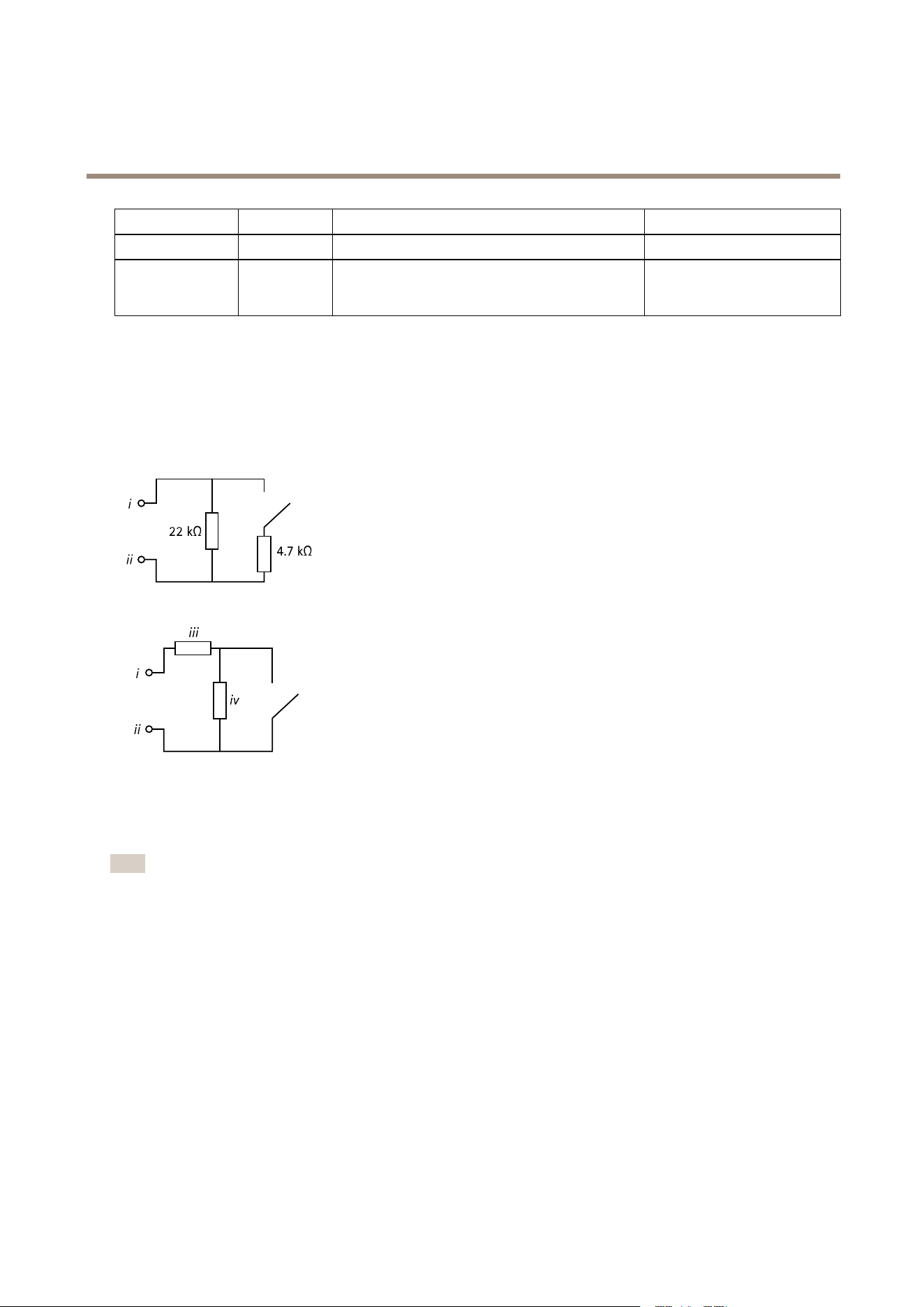
SupervisedInputs
Tousesupervisedinputs,installendoflineresistorsaccordingtoanyoftheoptionsinthediagramsbelow.
iInput
ii
0VDC(-)
iii=iv
1k
Ω
,or2k
Ω
,or4k
Ω
,or10k
Ω
Note
Itisrecommendedtousetwistedandshieldedcables.Connectshieldingto0VDC.
33

UserManualVer.M2.2
AXISA9161NetworkI/ORelayModule
Date:January2017
©AxisCommunicationsAB,2017
PartNo.1659554