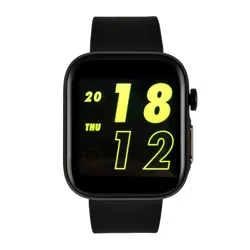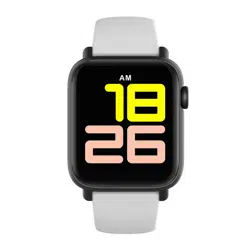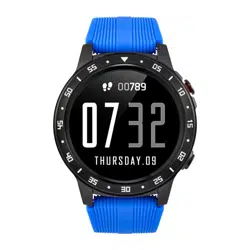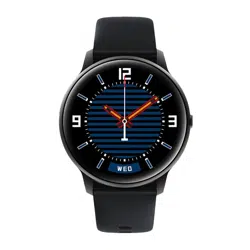
1.Waterproof to IP68
2.Battery capacity 330 mAh
3.Bluetooth 4.0
4.Charging time 2 - 2.5 hours
5.Package contents: Watchmark Wear3 smart watch,
charging cable, user manual
Warranty
The warranty is 24 months and covers defects in
operation and manufacture. The warranty does not
cover:
the life of the battery, hands and dial; normal wear
and tear resulting from use and ageing (e.g.
scratches on the glass, discolouration, etc.); damage
to any part of the watch caused by misuse,
negligence, accident; misuse and failure to follow the
instructions for use; a product on which operations
have been carried out by unauthorised persons (e.g.
in connection with battery replacement,
maintenance or repair).
Important
Please read the entire user manual carefully before
use. We recommend using only the original battery,
charger and accessories supplied with your device.
The manufacturer and distributor are not
responsible for the use of accessories from other
manufacturers.
Please charge the device for at least 2 hours before
first use.
The company reserves the right to change the
content of this manual.
14. Sports modes: there are 12 sports modes to
choose from:
- Running
- walking
- cycling
- climbing
- table tennis
- badminton
- basketball
- skipping
- swimming
- tennis
- yoga
- weightlifting
During a workout, the smartwatch collects key data
including workout length, calories burned, distance
covered and more, depending on the mode
selected.
www.watchmark.com
ul. Paprotna 7
Wrocław
POLAND
Watchmark
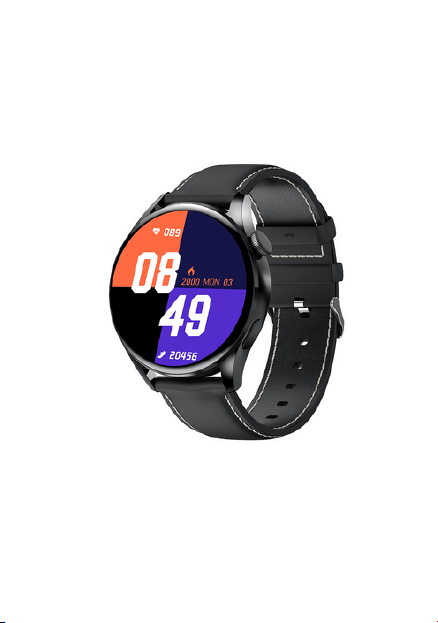
Wear3
Manual instruction
1.Android 5.0 and later
2. iOS 9.0 and later
I.System requirements
5. Calendar: enter the date display function, press
the calendar icon to display the current month.
6. Stopwatch: after selecting the function will be
timing, you can pause or clear the result.
7. Calculator: this function allows you to perform
calculations.
II. Application - MActive
1. Methods for downloading the application
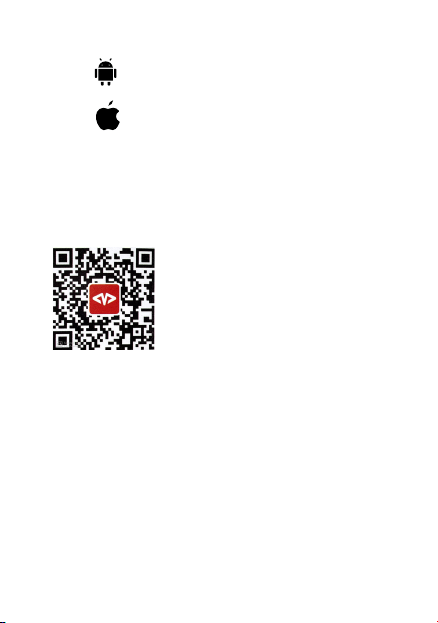
1.1 Scan the QR code and install the application
*All permissions and approvals
must be accepted, otherwise all
functions will not be available.
1.2 Download and install the MActive app from Google
Play (Android) or the App Store (iOS).
III. Bluetooth; time and date
Turn on Bluetooth on your phone and go to the
installed app. Find your watch in the app and connect it
to your phone. The time and date will automatically
update when the smartwatch is successfully connected
to the app.
IV. Charging
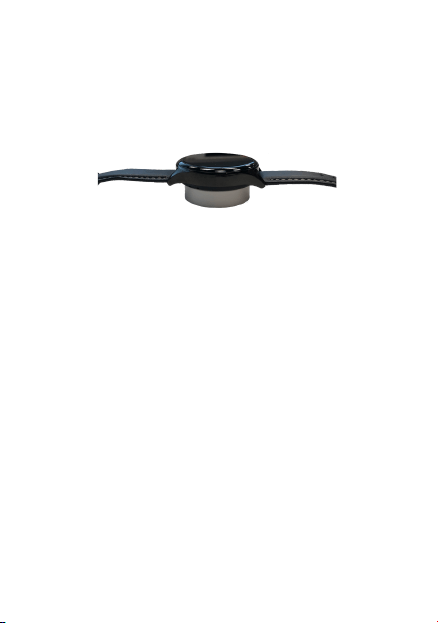
This product uses inductive charging.
Connect the charger to the USB input. Place the
watch on the charging plate. Charging will start
automatically and the charging icon will appear on the
screen. A full charge usually takes 2-2.5 hours.
V.Application
Bottom button - long press to turn the
smartwatch on/off and return to the main menu.
Top button - press to enter the selected function,
knob - navigate through the menu
Scroll down - settings, charge level, etc.
Swipe left - information on steps, calories burned,
distance covered, heart rate measurement, sleep
analysis and sports modes.
Swipe right - go to main menu
Change dial - hold the home screen for a few
seconds or swipe the dial to change the look of the
home screen.
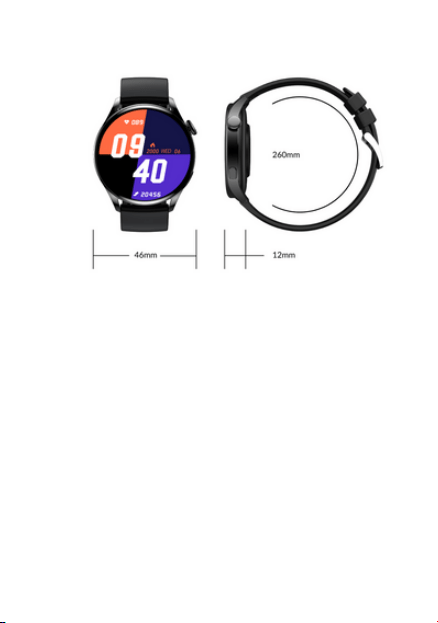
The smartwatch is equipped with a touch screen,
which can also be used to control the watch.
1.
2.
3.
4.
5.
6.
7.
VI.Notifications
1.Incoming call: the watch starts ringing. The home
screen displays the caller's number or stored contact.
2.Messages/Notifications: the watch vibrates and the
message content is displayed on the home screen. To
receive notifications from individual apps, you must
allow this in the app in question.
3.Alarm: set the watch to vibrate, ring, or ring with
vibration. There are 5 ringtones to choose from. Up
to 5 alarms can be set. 4.
4. Idle alarm: once set on the watch, it will vibrate to
notify you that you are spending too much time
resting.
5. Goal achievement notification: the watch will
vibrate to notify you that you have reached today's
goal. Set goals in the app.
VII. Menu
1.Daily statistics: informs you of the number of
steps, calories burned and distance travelled. The
watch automatically calculates the functions. This
information will also be sent to the app. The counter
will be reset at 24:00.
2.Health function: enter the selected function to
perform the measurement. After a successful
measurement, the result will be shown on the
smartwatch display. The measurement history is
saved in the app.
3.Pulsometer: heart rate measurement: number of
beats per minute. It is assumed that the norm is
between 60 and 100 beats per minute.
4.Sleep monitor: when the user falls asleep, the
watch automatically switches to sleep detection
mode. During sleep, the smart watch records data
such as the length and quality of sleep and the
number of awakenings during the night. The data is
sent to the app. The sleep monitor works from 22:00
hours.
8 Settings:
8.1 Bluetooth settings
8.2 Clock - set to synchronise when connected or
manually set time and date.
8.3 Sounds - option to select ringtone:
- Alarm
- Call
- Notification
8.4 Volume - option that allows you to set the volume
of notifications, incoming calls.
8.5 Display settings - brightness
(5 levels), time of active screen after waking up (from
5 to 60 seconds)
8.6 Reset - option enabling restoration of the factory
settings
8.7 Device information
9. Remote music play: you can use the watch to
remotely control the music playing in your phone.
Remote camera: you can use the watch to
remotely control your phone's camera.
11.Wrist movement (Motion):
- Turn your wrist to silence an incoming call.
-Turn off the alarm by twisting your wrist
- Wake up the screen with a flick of the wrist -
Answer calls with a flick of the wrist
- Answer calls with a flick of your wrist
12 Calls: after pairing with your phone!
The smartwatch allows you to make and receive
calls. The smartwatch must be paired in Bluetooth
settings.
13.1 Contacts: after a successful connection, the
contacts stored on the SIM card are displayed on
the watch. 13.2 Keypad: you can enter a contact
number and make a call.
1.Waterproof to IP68
2.Battery capacity 330 mAh
3.Bluetooth 4.0
4.Charging time 2 - 2.5 hours
5.Package contents: Watchmark Wear3 smart watch,
charging cable, user manual
Warranty
The warranty is 24 months and covers defects in
operation and manufacture. The warranty does not
cover:
the life of the battery, hands and dial; normal wear
and tear resulting from use and ageing (e.g.
scratches on the glass, discolouration, etc.); damage
to any part of the watch caused by misuse,
negligence, accident; misuse and failure to follow the
instructions for use; a product on which operations
have been carried out by unauthorised persons (e.g.
in connection with battery replacement,
maintenance or repair).
Important
Please read the entire user manual carefully before
use. We recommend using only the original battery,
charger and accessories supplied with your device.
The manufacturer and distributor are not
responsible for the use of accessories from other
manufacturers.
Please charge the device for at least 2 hours before
first use.
The company reserves the right to change the
content of this manual.
14. Sports modes: there are 12 sports modes to
choose from:
- Running
- walking
- cycling
- climbing
- table tennis
- badminton
- basketball
- skipping
- swimming
- tennis
- yoga
- weightlifting
During a workout, the smartwatch collects key data
including workout length, calories burned, distance
covered and more, depending on the mode
selected.
www.watchmark.com
ul. Paprotna 7
Wrocław
POLAND
Watchmark
Wear3
Manual instruction
1.Android 5.0 and later
2. iOS 9.0 and later
I.System requirements
5. Calendar: enter the date display function, press
the calendar icon to display the current month.
6. Stopwatch: after selecting the function will be
timing, you can pause or clear the result.
7. Calculator: this function allows you to perform
calculations.
II. Application - MActive
1. Methods for downloading the application
1.1 Scan the QR code and install the application
*All permissions and approvals
must be accepted, otherwise all
functions will not be available.
1.2 Download and install the MActive app from Google
Play (Android) or the App Store (iOS).
III. Bluetooth; time and date
Turn on Bluetooth on your phone and go to the
installed app. Find your watch in the app and connect it
to your phone. The time and date will automatically
update when the smartwatch is successfully connected
to the app.
IV. Charging
This product uses inductive charging.
Connect the charger to the USB input. Place the
watch on the charging plate. Charging will start
automatically and the charging icon will appear on the
screen. A full charge usually takes 2-2.5 hours.
V.Application
Bottom button - long press to turn the
smartwatch on/off and return to the main menu.
Top button - press to enter the selected function,
knob - navigate through the menu
Scroll down - settings, charge level, etc.
Swipe left - information on steps, calories burned,
distance covered, heart rate measurement, sleep
analysis and sports modes.
Swipe right - go to main menu
Change dial - hold the home screen for a few
seconds or swipe the dial to change the look of the
home screen.
The smartwatch is equipped with a touch screen,
which can also be used to control the watch.
1.
2.
3.
4.
5.
6.
7.
VI.Notifications
1.Incoming call: the watch starts ringing. The home
screen displays the caller's number or stored contact.
2.Messages/Notifications: the watch vibrates and the
message content is displayed on the home screen. To
receive notifications from individual apps, you must
allow this in the app in question.
3.Alarm: set the watch to vibrate, ring, or ring with
vibration. There are 5 ringtones to choose from. Up
to 5 alarms can be set. 4.
4. Idle alarm: once set on the watch, it will vibrate to
notify you that you are spending too much time
resting.
5. Goal achievement notification: the watch will
vibrate to notify you that you have reached today's
goal. Set goals in the app.
VII. Menu
1.Daily statistics: informs you of the number of
steps, calories burned and distance travelled. The
watch automatically calculates the functions. This
information will also be sent to the app. The counter
will be reset at 24:00.
2.Health function: enter the selected function to
perform the measurement. After a successful
measurement, the result will be shown on the
smartwatch display. The measurement history is
saved in the app.
3.Pulsometer: heart rate measurement: number of
beats per minute. It is assumed that the norm is
between 60 and 100 beats per minute.
4.Sleep monitor: when the user falls asleep, the
watch automatically switches to sleep detection
mode. During sleep, the smart watch records data
such as the length and quality of sleep and the
number of awakenings during the night. The data is
sent to the app. The sleep monitor works from 22:00
hours.
8 Settings:
8.1 Bluetooth settings
8.2 Clock - set to synchronise when connected or
manually set time and date.
8.3 Sounds - option to select ringtone:
- Alarm
- Call
- Notification
8.4 Volume - option that allows you to set the volume
of notifications, incoming calls.
8.5 Display settings - brightness
(5 levels), time of active screen after waking up (from
5 to 60 seconds)
8.6 Reset - option enabling restoration of the factory
settings
8.7 Device information
9. Remote music play: you can use the watch to
remotely control the music playing in your phone.
Remote camera: you can use the watch to
remotely control your phone's camera.
11.Wrist movement (Motion):
- Turn your wrist to silence an incoming call.
-Turn off the alarm by twisting your wrist
- Wake up the screen with a flick of the wrist -
Answer calls with a flick of the wrist
- Answer calls with a flick of your wrist
12 Calls: after pairing with your phone!
The smartwatch allows you to make and receive
calls. The smartwatch must be paired in Bluetooth
settings.
13.1 Contacts: after a successful connection, the
contacts stored on the SIM card are displayed on
the watch. 13.2 Keypad: you can enter a contact
number and make a call.
1.Waterproof to IP68
2.Battery capacity 330 mAh
3.Bluetooth 4.0
4.Charging time 2 - 2.5 hours
5.Package contents: Watchmark Wear3 smart watch,
charging cable, user manual
Warranty
The warranty is 24 months and covers defects in
operation and manufacture. The warranty does not
cover:
the life of the battery, hands and dial; normal wear
and tear resulting from use and ageing (e.g.
scratches on the glass, discolouration, etc.); damage
to any part of the watch caused by misuse,
negligence, accident; misuse and failure to follow the
instructions for use; a product on which operations
have been carried out by unauthorised persons (e.g.
in connection with battery replacement,
maintenance or repair).
Important
Please read the entire user manual carefully before
use. We recommend using only the original battery,
charger and accessories supplied with your device.
The manufacturer and distributor are not
responsible for the use of accessories from other
manufacturers.
Please charge the device for at least 2 hours before
first use.
The company reserves the right to change the
content of this manual.
14. Sports modes: there are 12 sports modes to
choose from:
- Running
- walking
- cycling
- climbing
- table tennis
- badminton
- basketball
- skipping
- swimming
- tennis
- yoga
- weightlifting
During a workout, the smartwatch collects key data
including workout length, calories burned, distance
covered and more, depending on the mode
selected.
www.watchmark.com
ul. Paprotna 7
Wrocław
POLAND
Watchmark
Wear3
Manual instruction
1.Android 5.0 and later
2. iOS 9.0 and later
I.System requirements
5. Calendar: enter the date display function, press
the calendar icon to display the current month.
6. Stopwatch: after selecting the function will be
timing, you can pause or clear the result.
7. Calculator: this function allows you to perform
calculations.
II. Application - MActive
1. Methods for downloading the application
1.1 Scan the QR code and install the application
*All permissions and approvals
must be accepted, otherwise all
functions will not be available.
1.2 Download and install the MActive app from Google
Play (Android) or the App Store (iOS).
III. Bluetooth; time and date
Turn on Bluetooth on your phone and go to the
installed app. Find your watch in the app and connect it
to your phone. The time and date will automatically
update when the smartwatch is successfully connected
to the app.
IV. Charging
This product uses inductive charging.
Connect the charger to the USB input. Place the
watch on the charging plate. Charging will start
automatically and the charging icon will appear on the
screen. A full charge usually takes 2-2.5 hours.
V.Application
Bottom button - long press to turn the
smartwatch on/off and return to the main menu.
Top button - press to enter the selected function,
knob - navigate through the menu
Scroll down - settings, charge level, etc.
Swipe left - information on steps, calories burned,
distance covered, heart rate measurement, sleep
analysis and sports modes.
Swipe right - go to main menu
Change dial - hold the home screen for a few
seconds or swipe the dial to change the look of the
home screen.
The smartwatch is equipped with a touch screen,
which can also be used to control the watch.
1.
2.
3.
4.
5.
6.
7.
VI.Notifications
1.Incoming call: the watch starts ringing. The home
screen displays the caller's number or stored contact.
2.Messages/Notifications: the watch vibrates and the
message content is displayed on the home screen. To
receive notifications from individual apps, you must
allow this in the app in question.
3.Alarm: set the watch to vibrate, ring, or ring with
vibration. There are 5 ringtones to choose from. Up
to 5 alarms can be set. 4.
4. Idle alarm: once set on the watch, it will vibrate to
notify you that you are spending too much time
resting.
5. Goal achievement notification: the watch will
vibrate to notify you that you have reached today's
goal. Set goals in the app.
VII. Menu
1.Daily statistics: informs you of the number of
steps, calories burned and distance travelled. The
watch automatically calculates the functions. This
information will also be sent to the app. The counter
will be reset at 24:00.
2.Health function: enter the selected function to
perform the measurement. After a successful
measurement, the result will be shown on the
smartwatch display. The measurement history is
saved in the app.
3.Pulsometer: heart rate measurement: number of
beats per minute. It is assumed that the norm is
between 60 and 100 beats per minute.
4.Sleep monitor: when the user falls asleep, the
watch automatically switches to sleep detection
mode. During sleep, the smart watch records data
such as the length and quality of sleep and the
number of awakenings during the night. The data is
sent to the app. The sleep monitor works from 22:00
hours.
8 Settings:
8.1 Bluetooth settings
8.2 Clock - set to synchronise when connected or
manually set time and date.
8.3 Sounds - option to select ringtone:
- Alarm
- Call
- Notification
8.4 Volume - option that allows you to set the volume
of notifications, incoming calls.
8.5 Display settings - brightness
(5 levels), time of active screen after waking up (from
5 to 60 seconds)
8.6 Reset - option enabling restoration of the factory
settings
8.7 Device information
9. Remote music play: you can use the watch to
remotely control the music playing in your phone.
Remote camera: you can use the watch to
remotely control your phone's camera.
11.Wrist movement (Motion):
- Turn your wrist to silence an incoming call.
-Turn off the alarm by twisting your wrist
- Wake up the screen with a flick of the wrist -
Answer calls with a flick of the wrist
- Answer calls with a flick of your wrist
12 Calls: after pairing with your phone!
The smartwatch allows you to make and receive
calls. The smartwatch must be paired in Bluetooth
settings.
13.1 Contacts: after a successful connection, the
contacts stored on the SIM card are displayed on
the watch. 13.2 Keypad: you can enter a contact
number and make a call.

1.Waterproof to IP68
2.Battery capacity 330 mAh
3.Bluetooth 4.0
4.Charging time 2 - 2.5 hours
5.Package contents: Watchmark Wear3 smart watch,
charging cable, user manual
Warranty
The warranty is 24 months and covers defects in
operation and manufacture. The warranty does not
cover:
the life of the battery, hands and dial; normal wear
and tear resulting from use and ageing (e.g.
scratches on the glass, discolouration, etc.); damage
to any part of the watch caused by misuse,
negligence, accident; misuse and failure to follow the
instructions for use; a product on which operations
have been carried out by unauthorised persons (e.g.
in connection with battery replacement,
maintenance or repair).
Important
Please read the entire user manual carefully before
use. We recommend using only the original battery,
charger and accessories supplied with your device.
The manufacturer and distributor are not
responsible for the use of accessories from other
manufacturers.
Please charge the device for at least 2 hours before
first use.
The company reserves the right to change the
content of this manual.
14. Sports modes: there are 12 sports modes to
choose from:
- Running
- walking
- cycling
- climbing
- table tennis
- badminton
- basketball
- skipping
- swimming
- tennis
- yoga
- weightlifting
During a workout, the smartwatch collects key data
including workout length, calories burned, distance
covered and more, depending on the mode
selected.
www.watchmark.com
ul. Paprotna 7
Wrocław
POLAND
Watchmark
Wear3
Manual instruction
1.Android 5.0 and later
2. iOS 9.0 and later
I.System requirements
5. Calendar: enter the date display function, press
the calendar icon to display the current month.
6. Stopwatch: after selecting the function will be
timing, you can pause or clear the result.
7. Calculator: this function allows you to perform
calculations.
II. Application - MActive
1. Methods for downloading the application
1.1 Scan the QR code and install the application
*All permissions and approvals
must be accepted, otherwise all
functions will not be available.
1.2 Download and install the MActive app from Google
Play (Android) or the App Store (iOS).
III. Bluetooth; time and date
Turn on Bluetooth on your phone and go to the
installed app. Find your watch in the app and connect it
to your phone. The time and date will automatically
update when the smartwatch is successfully connected
to the app.
IV. Charging
This product uses inductive charging.
Connect the charger to the USB input. Place the
watch on the charging plate. Charging will start
automatically and the charging icon will appear on the
screen. A full charge usually takes 2-2.5 hours.
V.Application
Bottom button - long press to turn the
smartwatch on/off and return to the main menu.
Top button - press to enter the selected function,
knob - navigate through the menu
Scroll down - settings, charge level, etc.
Swipe left - information on steps, calories burned,
distance covered, heart rate measurement, sleep
analysis and sports modes.
Swipe right - go to main menu
Change dial - hold the home screen for a few
seconds or swipe the dial to change the look of the
home screen.
The smartwatch is equipped with a touch screen,
which can also be used to control the watch.
1.
2.
3.
4.
5.
6.
7.
VI.Notifications
1.Incoming call: the watch starts ringing. The home
screen displays the caller's number or stored contact.
2.Messages/Notifications: the watch vibrates and the
message content is displayed on the home screen. To
receive notifications from individual apps, you must
allow this in the app in question.
3.Alarm: set the watch to vibrate, ring, or ring with
vibration. There are 5 ringtones to choose from. Up
to 5 alarms can be set. 4.
4. Idle alarm: once set on the watch, it will vibrate to
notify you that you are spending too much time
resting.
5. Goal achievement notification: the watch will
vibrate to notify you that you have reached today's
goal. Set goals in the app.
VII. Menu
1.Daily statistics: informs you of the number of
steps, calories burned and distance travelled. The
watch automatically calculates the functions. This
information will also be sent to the app. The counter
will be reset at 24:00.
2.Health function: enter the selected function to
perform the measurement. After a successful
measurement, the result will be shown on the
smartwatch display. The measurement history is
saved in the app.
3.Pulsometer: heart rate measurement: number of
beats per minute. It is assumed that the norm is
between 60 and 100 beats per minute.
4.Sleep monitor: when the user falls asleep, the
watch automatically switches to sleep detection
mode. During sleep, the smart watch records data
such as the length and quality of sleep and the
number of awakenings during the night. The data is
sent to the app. The sleep monitor works from 22:00
hours.
8 Settings:
8.1 Bluetooth settings
8.2 Clock - set to synchronise when connected or
manually set time and date.
8.3 Sounds - option to select ringtone:
- Alarm
- Call
- Notification
8.4 Volume - option that allows you to set the volume
of notifications, incoming calls.
8.5 Display settings - brightness
(5 levels), time of active screen after waking up (from
5 to 60 seconds)
8.6 Reset - option enabling restoration of the factory
settings
8.7 Device information
9. Remote music play: you can use the watch to
remotely control the music playing in your phone.
Remote camera: you can use the watch to
remotely control your phone's camera.
11.Wrist movement (Motion):
- Turn your wrist to silence an incoming call.
-Turn off the alarm by twisting your wrist
- Wake up the screen with a flick of the wrist -
Answer calls with a flick of the wrist
- Answer calls with a flick of your wrist
12 Calls: after pairing with your phone!
The smartwatch allows you to make and receive
calls. The smartwatch must be paired in Bluetooth
settings.
13.1 Contacts: after a successful connection, the
contacts stored on the SIM card are displayed on
the watch. 13.2 Keypad: you can enter a contact
number and make a call.

1.Waterproof to IP68
2.Battery capacity 330 mAh
3.Bluetooth 4.0
4.Charging time 2 - 2.5 hours
5.Package contents: Watchmark Wear3 smart watch,
charging cable, user manual
Warranty
The warranty is 24 months and covers defects in
operation and manufacture. The warranty does not
cover:
the life of the battery, hands and dial; normal wear
and tear resulting from use and ageing (e.g.
scratches on the glass, discolouration, etc.); damage
to any part of the watch caused by misuse,
negligence, accident; misuse and failure to follow the
instructions for use; a product on which operations
have been carried out by unauthorised persons (e.g.
in connection with battery replacement,
maintenance or repair).
Important
Please read the entire user manual carefully before
use. We recommend using only the original battery,
charger and accessories supplied with your device.
The manufacturer and distributor are not
responsible for the use of accessories from other
manufacturers.
Please charge the device for at least 2 hours before
first use.
The company reserves the right to change the
content of this manual.
14. Sports modes: there are 12 sports modes to
choose from:
- Running
- walking
- cycling
- climbing
- table tennis
- badminton
- basketball
- skipping
- swimming
- tennis
- yoga
- weightlifting
During a workout, the smartwatch collects key data
including workout length, calories burned, distance
covered and more, depending on the mode
selected.
www.watchmark.com
ul. Paprotna 7
Wrocław
POLAND
Watchmark
Wear3
Manual instruction
1.Android 5.0 and later
2. iOS 9.0 and later
I.System requirements
5. Calendar: enter the date display function, press
the calendar icon to display the current month.
6. Stopwatch: after selecting the function will be
timing, you can pause or clear the result.
7. Calculator: this function allows you to perform
calculations.
II. Application - MActive
1. Methods for downloading the application
1.1 Scan the QR code and install the application
*All permissions and approvals
must be accepted, otherwise all
functions will not be available.
1.2 Download and install the MActive app from Google
Play (Android) or the App Store (iOS).
III. Bluetooth; time and date
Turn on Bluetooth on your phone and go to the
installed app. Find your watch in the app and connect it
to your phone. The time and date will automatically
update when the smartwatch is successfully connected
to the app.
IV. Charging
This product uses inductive charging.
Connect the charger to the USB input. Place the
watch on the charging plate. Charging will start
automatically and the charging icon will appear on the
screen. A full charge usually takes 2-2.5 hours.
V.Application
Bottom button - long press to turn the
smartwatch on/off and return to the main menu.
Top button - press to enter the selected function,
knob - navigate through the menu
Scroll down - settings, charge level, etc.
Swipe left - information on steps, calories burned,
distance covered, heart rate measurement, sleep
analysis and sports modes.
Swipe right - go to main menu
Change dial - hold the home screen for a few
seconds or swipe the dial to change the look of the
home screen.
The smartwatch is equipped with a touch screen,
which can also be used to control the watch.
1.
2.
3.
4.
5.
6.
7.
VI.Notifications
1.Incoming call: the watch starts ringing. The home
screen displays the caller's number or stored contact.
2.Messages/Notifications: the watch vibrates and the
message content is displayed on the home screen. To
receive notifications from individual apps, you must
allow this in the app in question.
3.Alarm: set the watch to vibrate, ring, or ring with
vibration. There are 5 ringtones to choose from. Up
to 5 alarms can be set. 4.
4. Idle alarm: once set on the watch, it will vibrate to
notify you that you are spending too much time
resting.
5. Goal achievement notification: the watch will
vibrate to notify you that you have reached today's
goal. Set goals in the app.
VII. Menu
1.Daily statistics: informs you of the number of
steps, calories burned and distance travelled. The
watch automatically calculates the functions. This
information will also be sent to the app. The counter
will be reset at 24:00.
2.Health function: enter the selected function to
perform the measurement. After a successful
measurement, the result will be shown on the
smartwatch display. The measurement history is
saved in the app.
3.Pulsometer: heart rate measurement: number of
beats per minute. It is assumed that the norm is
between 60 and 100 beats per minute.
4.Sleep monitor: when the user falls asleep, the
watch automatically switches to sleep detection
mode. During sleep, the smart watch records data
such as the length and quality of sleep and the
number of awakenings during the night. The data is
sent to the app. The sleep monitor works from 22:00
hours.
8 Settings:
8.1 Bluetooth settings
8.2 Clock - set to synchronise when connected or
manually set time and date.
8.3 Sounds - option to select ringtone:
- Alarm
- Call
- Notification
8.4 Volume - option that allows you to set the volume
of notifications, incoming calls.
8.5 Display settings - brightness
(5 levels), time of active screen after waking up (from
5 to 60 seconds)
8.6 Reset - option enabling restoration of the factory
settings
8.7 Device information
9. Remote music play: you can use the watch to
remotely control the music playing in your phone.
Remote camera: you can use the watch to
remotely control your phone's camera.
11.Wrist movement (Motion):
- Turn your wrist to silence an incoming call.
-Turn off the alarm by twisting your wrist
- Wake up the screen with a flick of the wrist -
Answer calls with a flick of the wrist
- Answer calls with a flick of your wrist
12 Calls: after pairing with your phone!
The smartwatch allows you to make and receive
calls. The smartwatch must be paired in Bluetooth
settings.
13.1 Contacts: after a successful connection, the
contacts stored on the SIM card are displayed on
the watch. 13.2 Keypad: you can enter a contact
number and make a call.

1.Waterproof to IP68
2.Battery capacity 330 mAh
3.Bluetooth 4.0
4.Charging time 2 - 2.5 hours
5.Package contents: Watchmark Wear3 smart watch,
charging cable, user manual
Warranty
The warranty is 24 months and covers defects in
operation and manufacture. The warranty does not
cover:
the life of the battery, hands and dial; normal wear
and tear resulting from use and ageing (e.g.
scratches on the glass, discolouration, etc.); damage
to any part of the watch caused by misuse,
negligence, accident; misuse and failure to follow the
instructions for use; a product on which operations
have been carried out by unauthorised persons (e.g.
in connection with battery replacement,
maintenance or repair).
Important
Please read the entire user manual carefully before
use. We recommend using only the original battery,
charger and accessories supplied with your device.
The manufacturer and distributor are not
responsible for the use of accessories from other
manufacturers.
Please charge the device for at least 2 hours before
first use.
The company reserves the right to change the
content of this manual.
14. Sports modes: there are 12 sports modes to
choose from:
- Running
- walking
- cycling
- climbing
- table tennis
- badminton
- basketball
- skipping
- swimming
- tennis
- yoga
- weightlifting
During a workout, the smartwatch collects key data
including workout length, calories burned, distance
covered and more, depending on the mode
selected.
www.watchmark.com
ul. Paprotna 7
Wrocław
POLAND
Watchmark
Wear3
Manual instruction
1.Android 5.0 and later
2. iOS 9.0 and later
I.System requirements
5. Calendar: enter the date display function, press
the calendar icon to display the current month.
6. Stopwatch: after selecting the function will be
timing, you can pause or clear the result.
7. Calculator: this function allows you to perform
calculations.
II. Application - MActive
1. Methods for downloading the application
1.1 Scan the QR code and install the application
*All permissions and approvals
must be accepted, otherwise all
functions will not be available.
1.2 Download and install the MActive app from Google
Play (Android) or the App Store (iOS).
III. Bluetooth; time and date
Turn on Bluetooth on your phone and go to the
installed app. Find your watch in the app and connect it
to your phone. The time and date will automatically
update when the smartwatch is successfully connected
to the app.
IV. Charging
This product uses inductive charging.
Connect the charger to the USB input. Place the
watch on the charging plate. Charging will start
automatically and the charging icon will appear on the
screen. A full charge usually takes 2-2.5 hours.
V.Application
Bottom button - long press to turn the
smartwatch on/off and return to the main menu.
Top button - press to enter the selected function,
knob - navigate through the menu
Scroll down - settings, charge level, etc.
Swipe left - information on steps, calories burned,
distance covered, heart rate measurement, sleep
analysis and sports modes.
Swipe right - go to main menu
Change dial - hold the home screen for a few
seconds or swipe the dial to change the look of the
home screen.
The smartwatch is equipped with a touch screen,
which can also be used to control the watch.
1.
2.
3.
4.
5.
6.
7.
VI.Notifications
1.Incoming call: the watch starts ringing. The home
screen displays the caller's number or stored contact.
2.Messages/Notifications: the watch vibrates and the
message content is displayed on the home screen. To
receive notifications from individual apps, you must
allow this in the app in question.
3.Alarm: set the watch to vibrate, ring, or ring with
vibration. There are 5 ringtones to choose from. Up
to 5 alarms can be set. 4.
4. Idle alarm: once set on the watch, it will vibrate to
notify you that you are spending too much time
resting.
5. Goal achievement notification: the watch will
vibrate to notify you that you have reached today's
goal. Set goals in the app.
VII. Menu
1.Daily statistics: informs you of the number of
steps, calories burned and distance travelled. The
watch automatically calculates the functions. This
information will also be sent to the app. The counter
will be reset at 24:00.
2.Health function: enter the selected function to
perform the measurement. After a successful
measurement, the result will be shown on the
smartwatch display. The measurement history is
saved in the app.
3.Pulsometer: heart rate measurement: number of
beats per minute. It is assumed that the norm is
between 60 and 100 beats per minute.
4.Sleep monitor: when the user falls asleep, the
watch automatically switches to sleep detection
mode. During sleep, the smart watch records data
such as the length and quality of sleep and the
number of awakenings during the night. The data is
sent to the app. The sleep monitor works from 22:00
hours.
8 Settings:
8.1 Bluetooth settings
8.2 Clock - set to synchronise when connected or
manually set time and date.
8.3 Sounds - option to select ringtone:
- Alarm
- Call
- Notification
8.4 Volume - option that allows you to set the volume
of notifications, incoming calls.
8.5 Display settings - brightness
(5 levels), time of active screen after waking up (from
5 to 60 seconds)
8.6 Reset - option enabling restoration of the factory
settings
8.7 Device information
9. Remote music play: you can use the watch to
remotely control the music playing in your phone.
Remote camera: you can use the watch to
remotely control your phone's camera.
11.Wrist movement (Motion):
- Turn your wrist to silence an incoming call.
-Turn off the alarm by twisting your wrist
- Wake up the screen with a flick of the wrist -
Answer calls with a flick of the wrist
- Answer calls with a flick of your wrist
12 Calls: after pairing with your phone!
The smartwatch allows you to make and receive
calls. The smartwatch must be paired in Bluetooth
settings.
13.1 Contacts: after a successful connection, the
contacts stored on the SIM card are displayed on
the watch. 13.2 Keypad: you can enter a contact
number and make a call.

1.Waterproof to IP68
2.Battery capacity 330 mAh
3.Bluetooth 4.0
4.Charging time 2 - 2.5 hours
5.Package contents: Watchmark Wear3 smart watch,
charging cable, user manual
Warranty
The warranty is 24 months and covers defects in
operation and manufacture. The warranty does not
cover:
the life of the battery, hands and dial; normal wear
and tear resulting from use and ageing (e.g.
scratches on the glass, discolouration, etc.); damage
to any part of the watch caused by misuse,
negligence, accident; misuse and failure to follow the
instructions for use; a product on which operations
have been carried out by unauthorised persons (e.g.
in connection with battery replacement,
maintenance or repair).
Important
Please read the entire user manual carefully before
use. We recommend using only the original battery,
charger and accessories supplied with your device.
The manufacturer and distributor are not
responsible for the use of accessories from other
manufacturers.
Please charge the device for at least 2 hours before
first use.
The company reserves the right to change the
content of this manual.
14. Sports modes: there are 12 sports modes to
choose from:
- Running
- walking
- cycling
- climbing
- table tennis
- badminton
- basketball
- skipping
- swimming
- tennis
- yoga
- weightlifting
During a workout, the smartwatch collects key data
including workout length, calories burned, distance
covered and more, depending on the mode
selected.
www.watchmark.com
ul. Paprotna 7
Wrocław
POLAND
Watchmark
Wear3
Manual instruction
1.Android 5.0 and later
2. iOS 9.0 and later
I.System requirements
5. Calendar: enter the date display function, press
the calendar icon to display the current month.
6. Stopwatch: after selecting the function will be
timing, you can pause or clear the result.
7. Calculator: this function allows you to perform
calculations.
II. Application - MActive
1. Methods for downloading the application
1.1 Scan the QR code and install the application
*All permissions and approvals
must be accepted, otherwise all
functions will not be available.
1.2 Download and install the MActive app from Google
Play (Android) or the App Store (iOS).
III. Bluetooth; time and date
Turn on Bluetooth on your phone and go to the
installed app. Find your watch in the app and connect it
to your phone. The time and date will automatically
update when the smartwatch is successfully connected
to the app.
IV. Charging
This product uses inductive charging.
Connect the charger to the USB input. Place the
watch on the charging plate. Charging will start
automatically and the charging icon will appear on the
screen. A full charge usually takes 2-2.5 hours.
V.Application
Bottom button - long press to turn the
smartwatch on/off and return to the main menu.
Top button - press to enter the selected function,
knob - navigate through the menu
Scroll down - settings, charge level, etc.
Swipe left - information on steps, calories burned,
distance covered, heart rate measurement, sleep
analysis and sports modes.
Swipe right - go to main menu
Change dial - hold the home screen for a few
seconds or swipe the dial to change the look of the
home screen.
The smartwatch is equipped with a touch screen,
which can also be used to control the watch.
1.
2.
3.
4.
5.
6.
7.
VI.Notifications
1.Incoming call: the watch starts ringing. The home
screen displays the caller's number or stored contact.
2.Messages/Notifications: the watch vibrates and the
message content is displayed on the home screen. To
receive notifications from individual apps, you must
allow this in the app in question.
3.Alarm: set the watch to vibrate, ring, or ring with
vibration. There are 5 ringtones to choose from. Up
to 5 alarms can be set. 4.
4. Idle alarm: once set on the watch, it will vibrate to
notify you that you are spending too much time
resting.
5. Goal achievement notification: the watch will
vibrate to notify you that you have reached today's
goal. Set goals in the app.
VII. Menu
1.Daily statistics: informs you of the number of
steps, calories burned and distance travelled. The
watch automatically calculates the functions. This
information will also be sent to the app. The counter
will be reset at 24:00.
2.Health function: enter the selected function to
perform the measurement. After a successful
measurement, the result will be shown on the
smartwatch display. The measurement history is
saved in the app.
3.Pulsometer: heart rate measurement: number of
beats per minute. It is assumed that the norm is
between 60 and 100 beats per minute.
4.Sleep monitor: when the user falls asleep, the
watch automatically switches to sleep detection
mode. During sleep, the smart watch records data
such as the length and quality of sleep and the
number of awakenings during the night. The data is
sent to the app. The sleep monitor works from 22:00
hours.
8 Settings:
8.1 Bluetooth settings
8.2 Clock - set to synchronise when connected or
manually set time and date.
8.3 Sounds - option to select ringtone:
- Alarm
- Call
- Notification
8.4 Volume - option that allows you to set the volume
of notifications, incoming calls.
8.5 Display settings - brightness
(5 levels), time of active screen after waking up (from
5 to 60 seconds)
8.6 Reset - option enabling restoration of the factory
settings
8.7 Device information
9. Remote music play: you can use the watch to
remotely control the music playing in your phone.
Remote camera: you can use the watch to
remotely control your phone's camera.
11.Wrist movement (Motion):
- Turn your wrist to silence an incoming call.
-Turn off the alarm by twisting your wrist
- Wake up the screen with a flick of the wrist -
Answer calls with a flick of the wrist
- Answer calls with a flick of your wrist
12 Calls: after pairing with your phone!
The smartwatch allows you to make and receive
calls. The smartwatch must be paired in Bluetooth
settings.
13.1 Contacts: after a successful connection, the
contacts stored on the SIM card are displayed on
the watch. 13.2 Keypad: you can enter a contact
number and make a call.

1.Waterproof to IP68
2.Battery capacity 330 mAh
3.Bluetooth 4.0
4.Charging time 2 - 2.5 hours
5.Package contents: Watchmark Wear3 smart watch,
charging cable, user manual
Warranty
The warranty is 24 months and covers defects in
operation and manufacture. The warranty does not
cover:
the life of the battery, hands and dial; normal wear
and tear resulting from use and ageing (e.g.
scratches on the glass, discolouration, etc.); damage
to any part of the watch caused by misuse,
negligence, accident; misuse and failure to follow the
instructions for use; a product on which operations
have been carried out by unauthorised persons (e.g.
in connection with battery replacement,
maintenance or repair).
Important
Please read the entire user manual carefully before
use. We recommend using only the original battery,
charger and accessories supplied with your device.
The manufacturer and distributor are not
responsible for the use of accessories from other
manufacturers.
Please charge the device for at least 2 hours before
first use.
The company reserves the right to change the
content of this manual.
14. Sports modes: there are 12 sports modes to
choose from:
- Running
- walking
- cycling
- climbing
- table tennis
- badminton
- basketball
- skipping
- swimming
- tennis
- yoga
- weightlifting
During a workout, the smartwatch collects key data
including workout length, calories burned, distance
covered and more, depending on the mode
selected.
www.watchmark.com
ul. Paprotna 7
Wrocław
POLAND
Watchmark
Wear3
Manual instruction
1.Android 5.0 and later
2. iOS 9.0 and later
I.System requirements
5. Calendar: enter the date display function, press
the calendar icon to display the current month.
6. Stopwatch: after selecting the function will be
timing, you can pause or clear the result.
7. Calculator: this function allows you to perform
calculations.
II. Application - MActive
1. Methods for downloading the application
1.1 Scan the QR code and install the application
*All permissions and approvals
must be accepted, otherwise all
functions will not be available.
1.2 Download and install the MActive app from Google
Play (Android) or the App Store (iOS).
III. Bluetooth; time and date
Turn on Bluetooth on your phone and go to the
installed app. Find your watch in the app and connect it
to your phone. The time and date will automatically
update when the smartwatch is successfully connected
to the app.
IV. Charging
This product uses inductive charging.
Connect the charger to the USB input. Place the
watch on the charging plate. Charging will start
automatically and the charging icon will appear on the
screen. A full charge usually takes 2-2.5 hours.
V.Application
Bottom button - long press to turn the
smartwatch on/off and return to the main menu.
Top button - press to enter the selected function,
knob - navigate through the menu
Scroll down - settings, charge level, etc.
Swipe left - information on steps, calories burned,
distance covered, heart rate measurement, sleep
analysis and sports modes.
Swipe right - go to main menu
Change dial - hold the home screen for a few
seconds or swipe the dial to change the look of the
home screen.
The smartwatch is equipped with a touch screen,
which can also be used to control the watch.
1.
2.
3.
4.
5.
6.
7.
VI.Notifications
1.Incoming call: the watch starts ringing. The home
screen displays the caller's number or stored contact.
2.Messages/Notifications: the watch vibrates and the
message content is displayed on the home screen. To
receive notifications from individual apps, you must
allow this in the app in question.
3.Alarm: set the watch to vibrate, ring, or ring with
vibration. There are 5 ringtones to choose from. Up
to 5 alarms can be set. 4.
4. Idle alarm: once set on the watch, it will vibrate to
notify you that you are spending too much time
resting.
5. Goal achievement notification: the watch will
vibrate to notify you that you have reached today's
goal. Set goals in the app.
VII. Menu
1.Daily statistics: informs you of the number of
steps, calories burned and distance travelled. The
watch automatically calculates the functions. This
information will also be sent to the app. The counter
will be reset at 24:00.
2.Health function: enter the selected function to
perform the measurement. After a successful
measurement, the result will be shown on the
smartwatch display. The measurement history is
saved in the app.
3.Pulsometer: heart rate measurement: number of
beats per minute. It is assumed that the norm is
between 60 and 100 beats per minute.
4.Sleep monitor: when the user falls asleep, the
watch automatically switches to sleep detection
mode. During sleep, the smart watch records data
such as the length and quality of sleep and the
number of awakenings during the night. The data is
sent to the app. The sleep monitor works from 22:00
hours.
8 Settings:
8.1 Bluetooth settings
8.2 Clock - set to synchronise when connected or
manually set time and date.
8.3 Sounds - option to select ringtone:
- Alarm
- Call
- Notification
8.4 Volume - option that allows you to set the volume
of notifications, incoming calls.
8.5 Display settings - brightness
(5 levels), time of active screen after waking up (from
5 to 60 seconds)
8.6 Reset - option enabling restoration of the factory
settings
8.7 Device information
9. Remote music play: you can use the watch to
remotely control the music playing in your phone.
Remote camera: you can use the watch to
remotely control your phone's camera.
11.Wrist movement (Motion):
- Turn your wrist to silence an incoming call.
-Turn off the alarm by twisting your wrist
- Wake up the screen with a flick of the wrist -
Answer calls with a flick of the wrist
- Answer calls with a flick of your wrist
12 Calls: after pairing with your phone!
The smartwatch allows you to make and receive
calls. The smartwatch must be paired in Bluetooth
settings.
13.1 Contacts: after a successful connection, the
contacts stored on the SIM card are displayed on
the watch. 13.2 Keypad: you can enter a contact
number and make a call.

1.Waterproof to IP68
2.Battery capacity 330 mAh
3.Bluetooth 4.0
4.Charging time 2 - 2.5 hours
5.Package contents: Watchmark Wear3 smart watch,
charging cable, user manual
Warranty
The warranty is 24 months and covers defects in
operation and manufacture. The warranty does not
cover:
the life of the battery, hands and dial; normal wear
and tear resulting from use and ageing (e.g.
scratches on the glass, discolouration, etc.); damage
to any part of the watch caused by misuse,
negligence, accident; misuse and failure to follow the
instructions for use; a product on which operations
have been carried out by unauthorised persons (e.g.
in connection with battery replacement,
maintenance or repair).
Important
Please read the entire user manual carefully before
use. We recommend using only the original battery,
charger and accessories supplied with your device.
The manufacturer and distributor are not
responsible for the use of accessories from other
manufacturers.
Please charge the device for at least 2 hours before
first use.
The company reserves the right to change the
content of this manual.
14. Sports modes: there are 12 sports modes to
choose from:
- Running
- walking
- cycling
- climbing
- table tennis
- badminton
- basketball
- skipping
- swimming
- tennis
- yoga
- weightlifting
During a workout, the smartwatch collects key data
including workout length, calories burned, distance
covered and more, depending on the mode
selected.
www.watchmark.com
ul. Paprotna 7
Wrocław
POLAND
Watchmark
Wear3
Manual instruction
1.Android 5.0 and later
2. iOS 9.0 and later
I.System requirements
5. Calendar: enter the date display function, press
the calendar icon to display the current month.
6. Stopwatch: after selecting the function will be
timing, you can pause or clear the result.
7. Calculator: this function allows you to perform
calculations.
II. Application - MActive
1. Methods for downloading the application
1.1 Scan the QR code and install the application
*All permissions and approvals
must be accepted, otherwise all
functions will not be available.
1.2 Download and install the MActive app from Google
Play (Android) or the App Store (iOS).
III. Bluetooth; time and date
Turn on Bluetooth on your phone and go to the
installed app. Find your watch in the app and connect it
to your phone. The time and date will automatically
update when the smartwatch is successfully connected
to the app.
IV. Charging
This product uses inductive charging.
Connect the charger to the USB input. Place the
watch on the charging plate. Charging will start
automatically and the charging icon will appear on the
screen. A full charge usually takes 2-2.5 hours.
V.Application
Bottom button - long press to turn the
smartwatch on/off and return to the main menu.
Top button - press to enter the selected function,
knob - navigate through the menu
Scroll down - settings, charge level, etc.
Swipe left - information on steps, calories burned,
distance covered, heart rate measurement, sleep
analysis and sports modes.
Swipe right - go to main menu
Change dial - hold the home screen for a few
seconds or swipe the dial to change the look of the
home screen.
The smartwatch is equipped with a touch screen,
which can also be used to control the watch.
1.
2.
3.
4.
5.
6.
7.
VI.Notifications
1.Incoming call: the watch starts ringing. The home
screen displays the caller's number or stored contact.
2.Messages/Notifications: the watch vibrates and the
message content is displayed on the home screen. To
receive notifications from individual apps, you must
allow this in the app in question.
3.Alarm: set the watch to vibrate, ring, or ring with
vibration. There are 5 ringtones to choose from. Up
to 5 alarms can be set. 4.
4. Idle alarm: once set on the watch, it will vibrate to
notify you that you are spending too much time
resting.
5. Goal achievement notification: the watch will
vibrate to notify you that you have reached today's
goal. Set goals in the app.
VII. Menu
1.Daily statistics: informs you of the number of
steps, calories burned and distance travelled. The
watch automatically calculates the functions. This
information will also be sent to the app. The counter
will be reset at 24:00.
2.Health function: enter the selected function to
perform the measurement. After a successful
measurement, the result will be shown on the
smartwatch display. The measurement history is
saved in the app.
3.Pulsometer: heart rate measurement: number of
beats per minute. It is assumed that the norm is
between 60 and 100 beats per minute.
4.Sleep monitor: when the user falls asleep, the
watch automatically switches to sleep detection
mode. During sleep, the smart watch records data
such as the length and quality of sleep and the
number of awakenings during the night. The data is
sent to the app. The sleep monitor works from 22:00
hours.
8 Settings:
8.1 Bluetooth settings
8.2 Clock - set to synchronise when connected or
manually set time and date.
8.3 Sounds - option to select ringtone:
- Alarm
- Call
- Notification
8.4 Volume - option that allows you to set the volume
of notifications, incoming calls.
8.5 Display settings - brightness
(5 levels), time of active screen after waking up (from
5 to 60 seconds)
8.6 Reset - option enabling restoration of the factory
settings
8.7 Device information
9. Remote music play: you can use the watch to
remotely control the music playing in your phone.
Remote camera: you can use the watch to
remotely control your phone's camera.
11.Wrist movement (Motion):
- Turn your wrist to silence an incoming call.
-Turn off the alarm by twisting your wrist
- Wake up the screen with a flick of the wrist -
Answer calls with a flick of the wrist
- Answer calls with a flick of your wrist
12 Calls: after pairing with your phone!
The smartwatch allows you to make and receive
calls. The smartwatch must be paired in Bluetooth
settings.
13.1 Contacts: after a successful connection, the
contacts stored on the SIM card are displayed on
the watch. 13.2 Keypad: you can enter a contact
number and make a call.

1.Waterproof to IP68
2.Battery capacity 330 mAh
3.Bluetooth 4.0
4.Charging time 2 - 2.5 hours
5.Package contents: Watchmark Wear3 smart watch,
charging cable, user manual
Warranty
The warranty is 24 months and covers defects in
operation and manufacture. The warranty does not
cover:
the life of the battery, hands and dial; normal wear
and tear resulting from use and ageing (e.g.
scratches on the glass, discolouration, etc.); damage
to any part of the watch caused by misuse,
negligence, accident; misuse and failure to follow the
instructions for use; a product on which operations
have been carried out by unauthorised persons (e.g.
in connection with battery replacement,
maintenance or repair).
Important
Please read the entire user manual carefully before
use. We recommend using only the original battery,
charger and accessories supplied with your device.
The manufacturer and distributor are not
responsible for the use of accessories from other
manufacturers.
Please charge the device for at least 2 hours before
first use.
The company reserves the right to change the
content of this manual.
14. Sports modes: there are 12 sports modes to
choose from:
- Running
- walking
- cycling
- climbing
- table tennis
- badminton
- basketball
- skipping
- swimming
- tennis
- yoga
- weightlifting
During a workout, the smartwatch collects key data
including workout length, calories burned, distance
covered and more, depending on the mode
selected.
www.watchmark.com
ul. Paprotna 7
Wrocław
POLAND
Watchmark
Wear3
Manual instruction
1.Android 5.0 and later
2. iOS 9.0 and later
I.System requirements
5. Calendar: enter the date display function, press
the calendar icon to display the current month.
6. Stopwatch: after selecting the function will be
timing, you can pause or clear the result.
7. Calculator: this function allows you to perform
calculations.
II. Application - MActive
1. Methods for downloading the application
1.1 Scan the QR code and install the application
*All permissions and approvals
must be accepted, otherwise all
functions will not be available.
1.2 Download and install the MActive app from Google
Play (Android) or the App Store (iOS).
III. Bluetooth; time and date
Turn on Bluetooth on your phone and go to the
installed app. Find your watch in the app and connect it
to your phone. The time and date will automatically
update when the smartwatch is successfully connected
to the app.
IV. Charging
This product uses inductive charging.
Connect the charger to the USB input. Place the
watch on the charging plate. Charging will start
automatically and the charging icon will appear on the
screen. A full charge usually takes 2-2.5 hours.
V.Application
Bottom button - long press to turn the
smartwatch on/off and return to the main menu.
Top button - press to enter the selected function,
knob - navigate through the menu
Scroll down - settings, charge level, etc.
Swipe left - information on steps, calories burned,
distance covered, heart rate measurement, sleep
analysis and sports modes.
Swipe right - go to main menu
Change dial - hold the home screen for a few
seconds or swipe the dial to change the look of the
home screen.
The smartwatch is equipped with a touch screen,
which can also be used to control the watch.
1.
2.
3.
4.
5.
6.
7.
VI.Notifications
1.Incoming call: the watch starts ringing. The home
screen displays the caller's number or stored contact.
2.Messages/Notifications: the watch vibrates and the
message content is displayed on the home screen. To
receive notifications from individual apps, you must
allow this in the app in question.
3.Alarm: set the watch to vibrate, ring, or ring with
vibration. There are 5 ringtones to choose from. Up
to 5 alarms can be set. 4.
4. Idle alarm: once set on the watch, it will vibrate to
notify you that you are spending too much time
resting.
5. Goal achievement notification: the watch will
vibrate to notify you that you have reached today's
goal. Set goals in the app.
VII. Menu
1.Daily statistics: informs you of the number of
steps, calories burned and distance travelled. The
watch automatically calculates the functions. This
information will also be sent to the app. The counter
will be reset at 24:00.
2.Health function: enter the selected function to
perform the measurement. After a successful
measurement, the result will be shown on the
smartwatch display. The measurement history is
saved in the app.
3.Pulsometer: heart rate measurement: number of
beats per minute. It is assumed that the norm is
between 60 and 100 beats per minute.
4.Sleep monitor: when the user falls asleep, the
watch automatically switches to sleep detection
mode. During sleep, the smart watch records data
such as the length and quality of sleep and the
number of awakenings during the night. The data is
sent to the app. The sleep monitor works from 22:00
hours.
8 Settings:
8.1 Bluetooth settings
8.2 Clock - set to synchronise when connected or
manually set time and date.
8.3 Sounds - option to select ringtone:
- Alarm
- Call
- Notification
8.4 Volume - option that allows you to set the volume
of notifications, incoming calls.
8.5 Display settings - brightness
(5 levels), time of active screen after waking up (from
5 to 60 seconds)
8.6 Reset - option enabling restoration of the factory
settings
8.7 Device information
9. Remote music play: you can use the watch to
remotely control the music playing in your phone.
Remote camera: you can use the watch to
remotely control your phone's camera.
11.Wrist movement (Motion):
- Turn your wrist to silence an incoming call.
-Turn off the alarm by twisting your wrist
- Wake up the screen with a flick of the wrist -
Answer calls with a flick of the wrist
- Answer calls with a flick of your wrist
12 Calls: after pairing with your phone!
The smartwatch allows you to make and receive
calls. The smartwatch must be paired in Bluetooth
settings.
13.1 Contacts: after a successful connection, the
contacts stored on the SIM card are displayed on
the watch. 13.2 Keypad: you can enter a contact
number and make a call.
1.Waterproof to IP68
2.Battery capacity 330 mAh
3.Bluetooth 4.0
4.Charging time 2 - 2.5 hours
5.Package contents: Watchmark Wear3 smart watch,
charging cable, user manual
Warranty
The warranty is 24 months and covers defects in
operation and manufacture. The warranty does not
cover:
the life of the battery, hands and dial; normal wear
and tear resulting from use and ageing (e.g.
scratches on the glass, discolouration, etc.); damage
to any part of the watch caused by misuse,
negligence, accident; misuse and failure to follow the
instructions for use; a product on which operations
have been carried out by unauthorised persons (e.g.
in connection with battery replacement,
maintenance or repair).
Important
Please read the entire user manual carefully before
use. We recommend using only the original battery,
charger and accessories supplied with your device.
The manufacturer and distributor are not
responsible for the use of accessories from other
manufacturers.
Please charge the device for at least 2 hours before
first use.
The company reserves the right to change the
content of this manual.
14. Sports modes: there are 12 sports modes to
choose from:
- Running
- walking
- cycling
- climbing
- table tennis
- badminton
- basketball
- skipping
- swimming
- tennis
- yoga
- weightlifting
During a workout, the smartwatch collects key data
including workout length, calories burned, distance
covered and more, depending on the mode
selected.
www.watchmark.com
ul. Paprotna 7
Wrocław
POLAND
Watchmark
Wear3
Manual instruction
1.Android 5.0 and later
2. iOS 9.0 and later
I.System requirements
5. Calendar: enter the date display function, press
the calendar icon to display the current month.
6. Stopwatch: after selecting the function will be
timing, you can pause or clear the result.
7. Calculator: this function allows you to perform
calculations.
II. Application - MActive
1. Methods for downloading the application
1.1 Scan the QR code and install the application
*All permissions and approvals
must be accepted, otherwise all
functions will not be available.
1.2 Download and install the MActive app from Google
Play (Android) or the App Store (iOS).
III. Bluetooth; time and date
Turn on Bluetooth on your phone and go to the
installed app. Find your watch in the app and connect it
to your phone. The time and date will automatically
update when the smartwatch is successfully connected
to the app.
IV. Charging
This product uses inductive charging.
Connect the charger to the USB input. Place the
watch on the charging plate. Charging will start
automatically and the charging icon will appear on the
screen. A full charge usually takes 2-2.5 hours.
V.Application
Bottom button - long press to turn the
smartwatch on/off and return to the main menu.
Top button - press to enter the selected function,
knob - navigate through the menu
Scroll down - settings, charge level, etc.
Swipe left - information on steps, calories burned,
distance covered, heart rate measurement, sleep
analysis and sports modes.
Swipe right - go to main menu
Change dial - hold the home screen for a few
seconds or swipe the dial to change the look of the
home screen.
The smartwatch is equipped with a touch screen,
which can also be used to control the watch.
1.
2.
3.
4.
5.
6.
7.
VI.Notifications
1.Incoming call: the watch starts ringing. The home
screen displays the caller's number or stored contact.
2.Messages/Notifications: the watch vibrates and the
message content is displayed on the home screen. To
receive notifications from individual apps, you must
allow this in the app in question.
3.Alarm: set the watch to vibrate, ring, or ring with
vibration. There are 5 ringtones to choose from. Up
to 5 alarms can be set. 4.
4. Idle alarm: once set on the watch, it will vibrate to
notify you that you are spending too much time
resting.
5. Goal achievement notification: the watch will
vibrate to notify you that you have reached today's
goal. Set goals in the app.
VII. Menu
1.Daily statistics: informs you of the number of
steps, calories burned and distance travelled. The
watch automatically calculates the functions. This
information will also be sent to the app. The counter
will be reset at 24:00.
2.Health function: enter the selected function to
perform the measurement. After a successful
measurement, the result will be shown on the
smartwatch display. The measurement history is
saved in the app.
3.Pulsometer: heart rate measurement: number of
beats per minute. It is assumed that the norm is
between 60 and 100 beats per minute.
4.Sleep monitor: when the user falls asleep, the
watch automatically switches to sleep detection
mode. During sleep, the smart watch records data
such as the length and quality of sleep and the
number of awakenings during the night. The data is
sent to the app. The sleep monitor works from 22:00
hours.
8 Settings:
8.1 Bluetooth settings
8.2 Clock - set to synchronise when connected or
manually set time and date.
8.3 Sounds - option to select ringtone:
- Alarm
- Call
- Notification
8.4 Volume - option that allows you to set the volume
of notifications, incoming calls.
8.5 Display settings - brightness
(5 levels), time of active screen after waking up (from
5 to 60 seconds)
8.6 Reset - option enabling restoration of the factory
settings
8.7 Device information
9. Remote music play: you can use the watch to
remotely control the music playing in your phone.
Remote camera: you can use the watch to
remotely control your phone's camera.
11.Wrist movement (Motion):
- Turn your wrist to silence an incoming call.
-Turn off the alarm by twisting your wrist
- Wake up the screen with a flick of the wrist -
Answer calls with a flick of the wrist
- Answer calls with a flick of your wrist
12 Calls: after pairing with your phone!
The smartwatch allows you to make and receive
calls. The smartwatch must be paired in Bluetooth
settings.
13.1 Contacts: after a successful connection, the
contacts stored on the SIM card are displayed on
the watch. 13.2 Keypad: you can enter a contact
number and make a call.

1.Waterproof to IP68
2.Battery capacity 330 mAh
3.Bluetooth 4.0
4.Charging time 2 - 2.5 hours
5.Package contents: Watchmark Wear3 smart watch,
charging cable, user manual
Warranty
The warranty is 24 months and covers defects in
operation and manufacture. The warranty does not
cover:
the life of the battery, hands and dial; normal wear
and tear resulting from use and ageing (e.g.
scratches on the glass, discolouration, etc.); damage
to any part of the watch caused by misuse,
negligence, accident; misuse and failure to follow the
instructions for use; a product on which operations
have been carried out by unauthorised persons (e.g.
in connection with battery replacement,
maintenance or repair).
Important
Please read the entire user manual carefully before
use. We recommend using only the original battery,
charger and accessories supplied with your device.
The manufacturer and distributor are not
responsible for the use of accessories from other
manufacturers.
Please charge the device for at least 2 hours before
first use.
The company reserves the right to change the
content of this manual.
14. Sports modes: there are 12 sports modes to
choose from:
- Running
- walking
- cycling
- climbing
- table tennis
- badminton
- basketball
- skipping
- swimming
- tennis
- yoga
- weightlifting
During a workout, the smartwatch collects key data
including workout length, calories burned, distance
covered and more, depending on the mode
selected.
www.watchmark.com
ul. Paprotna 7
Wrocław
POLAND
Watchmark
Wear3
Manual instruction
1.Android 5.0 and later
2. iOS 9.0 and later
I.System requirements
5. Calendar: enter the date display function, press
the calendar icon to display the current month.
6. Stopwatch: after selecting the function will be
timing, you can pause or clear the result.
7. Calculator: this function allows you to perform
calculations.
II. Application - MActive
1. Methods for downloading the application
1.1 Scan the QR code and install the application
*All permissions and approvals
must be accepted, otherwise all
functions will not be available.
1.2 Download and install the MActive app from Google
Play (Android) or the App Store (iOS).
III. Bluetooth; time and date
Turn on Bluetooth on your phone and go to the
installed app. Find your watch in the app and connect it
to your phone. The time and date will automatically
update when the smartwatch is successfully connected
to the app.
IV. Charging
This product uses inductive charging.
Connect the charger to the USB input. Place the
watch on the charging plate. Charging will start
automatically and the charging icon will appear on the
screen. A full charge usually takes 2-2.5 hours.
V.Application
Bottom button - long press to turn the
smartwatch on/off and return to the main menu.
Top button - press to enter the selected function,
knob - navigate through the menu
Scroll down - settings, charge level, etc.
Swipe left - information on steps, calories burned,
distance covered, heart rate measurement, sleep
analysis and sports modes.
Swipe right - go to main menu
Change dial - hold the home screen for a few
seconds or swipe the dial to change the look of the
home screen.
The smartwatch is equipped with a touch screen,
which can also be used to control the watch.
1.
2.
3.
4.
5.
6.
7.
VI.Notifications
1.Incoming call: the watch starts ringing. The home
screen displays the caller's number or stored contact.
2.Messages/Notifications: the watch vibrates and the
message content is displayed on the home screen. To
receive notifications from individual apps, you must
allow this in the app in question.
3.Alarm: set the watch to vibrate, ring, or ring with
vibration. There are 5 ringtones to choose from. Up
to 5 alarms can be set. 4.
4. Idle alarm: once set on the watch, it will vibrate to
notify you that you are spending too much time
resting.
5. Goal achievement notification: the watch will
vibrate to notify you that you have reached today's
goal. Set goals in the app.
VII. Menu
1.Daily statistics: informs you of the number of
steps, calories burned and distance travelled. The
watch automatically calculates the functions. This
information will also be sent to the app. The counter
will be reset at 24:00.
2.Health function: enter the selected function to
perform the measurement. After a successful
measurement, the result will be shown on the
smartwatch display. The measurement history is
saved in the app.
3.Pulsometer: heart rate measurement: number of
beats per minute. It is assumed that the norm is
between 60 and 100 beats per minute.
4.Sleep monitor: when the user falls asleep, the
watch automatically switches to sleep detection
mode. During sleep, the smart watch records data
such as the length and quality of sleep and the
number of awakenings during the night. The data is
sent to the app. The sleep monitor works from 22:00
hours.
8 Settings:
8.1 Bluetooth settings
8.2 Clock - set to synchronise when connected or
manually set time and date.
8.3 Sounds - option to select ringtone:
- Alarm
- Call
- Notification
8.4 Volume - option that allows you to set the volume
of notifications, incoming calls.
8.5 Display settings - brightness
(5 levels), time of active screen after waking up (from
5 to 60 seconds)
8.6 Reset - option enabling restoration of the factory
settings
8.7 Device information
9. Remote music play: you can use the watch to
remotely control the music playing in your phone.
Remote camera: you can use the watch to
remotely control your phone's camera.
11.Wrist movement (Motion):
- Turn your wrist to silence an incoming call.
-Turn off the alarm by twisting your wrist
- Wake up the screen with a flick of the wrist -
Answer calls with a flick of the wrist
- Answer calls with a flick of your wrist
12 Calls: after pairing with your phone!
The smartwatch allows you to make and receive
calls. The smartwatch must be paired in Bluetooth
settings.
13.1 Contacts: after a successful connection, the
contacts stored on the SIM card are displayed on
the watch. 13.2 Keypad: you can enter a contact
number and make a call.