EN
Original Instructions
Version 1 – June 2023
12442
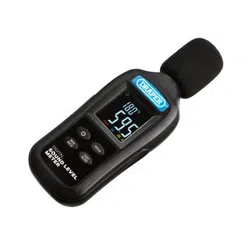
DIGITAL
SOUND LEVEL METER
Permissible ambient conditions:
Temperature Humidity
Operation: -20 to +60°C 10–90% RH
(-4 to +140°F)
Storage: -20 to +60°C 10–75% RH
(-4 to +140°F)
Dimensions: W 56 × H 144 × D 30.5mm
Weight (with batteries): 123.5g
3. Health and Safety Information
Important: Read all the Health and Safety instructions
before attempting to use this product.
• Use this product ONLY as instructed in this manual.
• DO NOT attempt to open, dismantle or modify this
product in any way.
• Before every use, inspect the device for missing,
broken, loose or corroded parts and battery leakage.
− DO NOT use this product if it is damaged in any
way; contact Draper Tools to discuss repair and
replacement options.
− If battery acid comes into contact with your skin,
wash it o immediately with plenty of clean water.
− If battery acid comes into contact with your eyes,
ush them with plenty of clean water and seek
immediate medical attention.
• DO NOT expose this product to liquids or wet
environments.
• DO NOT use this product in environments in which
dust, steam or smoke are present as this may interfere
with the readings.
• DO NOT use this device in environments that exhibit or
are aected by strong magnetic elds.
• DO NOT use this product if it exhibits abnormal
behaviour and have it checked by a qualied and
authorised technician before next use.
• Keep a lose but rm grip on the device and hold it as
steady as possible as vibrations may aect the
measurements recorded.
• DO NOT abuse, mutilate or burn the battery.
• Keep this product out of reach of children.
Read this manual in full before using this product and
retain it for future use. Always use the latest version of the
manual. Please visit drapertools.com/manuals for the
latest version.
1. Intended Use
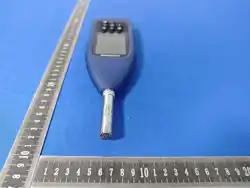
This product is a hand-held device designed to measure
sound levels in a given environment. An indication of
temperature is also shown. This device is best used for
measuring ambient noise. Any other application beyond
the conditions established for use will be considered
misuse. Draper Tools accepts no responsibility for
improper use of this product.
Part of our core range, this product is suitable for regular
use by enthusiasts and tradespersons alike.
2. Specication
Stock No.: 12442
Part No.: 180-DSLM-1
Sound measurement
Measurement range: 35–135dB
Dynamic rage: 50dB
Frequency range: 31.5–8,000Hz
Accuracy: ±2.0dB
Resolution: 0.1
Frequency weighting: A-weighted
Time weighting: 0.125s (Fast mode) /1.0s (Slow mode)
Microphone: 1⁄ 2" electrets condenser microphone
Temperatre measurement
Measurement range : -20 to +70°C
Accuracy : ±1.5°C / ±2.7°F
Resolution : 0.1
Operating time: Up to 60 hours
Batteries: 3 × 1.5V AAA (not supplied)
4. Identication
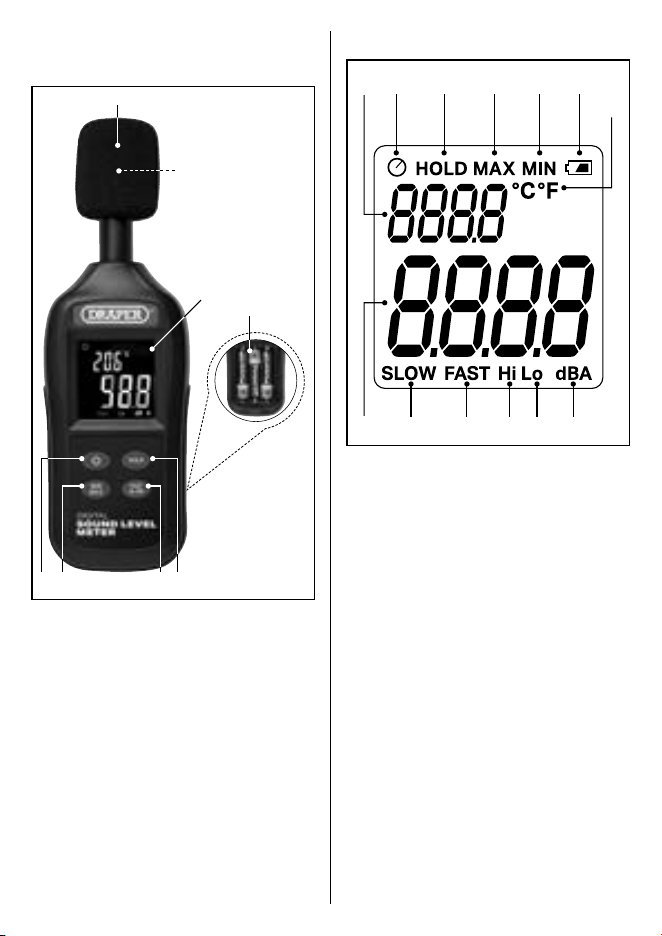
4.1 Product Overview
(1)
(6) (5) (3)(7)
(2)
(8)
(4)
(1) Battery compartment
(2) Display
(3) Hold button
(4) Microphone
(5) Min/max button
(6) Power button
(7) Update speed button
(8) Wind shielding microphone cover
Please visit drapertools.com for our full range of
accessories and consumables.
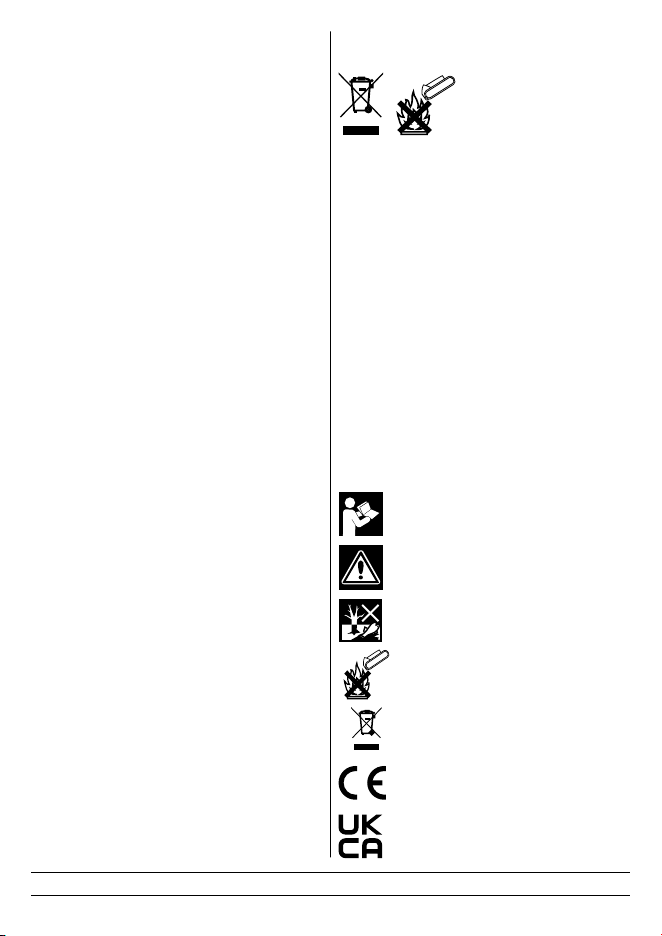
4.2 Display Overview
(9)(20)
(17) (11) (12) (14) (20)(18)
(19)
(13) (15) (16) (10)
(9) Auto-o indicator
(10) Battery level indicator
(11) Fast update speed indicator
(12) High sound level indicator
(13) Hold data indicator
(14) Low sound level indicator
(15) Max value indicator
(16) Min value indicator
(17) Slow update speed indicator
(18) Sound level value
(19) Temperature unit indicator
(20) Temperature value
(20) Frequency weighting icon
5. Operation
5.1 Installing Batteries
This product requires 3 × 1.5V AAA batteries (not
supplied). To install the batteries, slide the battery
compartment cover (1) down and away from the back of
the device and insert the batteries according to the
correct polarity.

5.2 Switching On and Basic Operation
To switch on the device, press the power button (6). The
device performs a diagnostics check during startup for
approximately two seconds before readings are shown on
the display.
Stand in the position to be measured and direct the
microphone (4) toward the source of the sound. The top
end of the microphone is the most receptive to sound and
will deliver the most accurate readings.
Avoid adjusting your grip, moving the device and creating
other audible interference when taking a sound level
measurement. Keep in mind that low-level sound readings
may be aected by sounds generated by the operator.
Important: Ensure that the foam windshield is installed
onto the microphone to reduce interference caused by
wind or air across the face of the microphone. The
windshield slides easily onto the microphone.
Important: Take several measurements in the location to
ensure that the readings are consistent and accurate.
The device begins measuring sound levels and temperature
immediately upon loading and the readings are indicated
on the display. Sound level readings are updated according
to the update speed selected. Temperature readings are
updated every 300ms.
To switch o the device, press the power button. This resets
the device, including any overload warnings.
5.3 Freezing the Display
The current readings can be held on the display by pressing
the hold button (3). The hold data indicator (13) illuminates
to show that the display has been frozen.
Important: While data is held on the display, no other
measurements are taken.
To resume measurements, press the hold button again. The
hold data indicator is hidden and the display updates in
real-time.
5.4 Maximum and Minimum Values
The display can be set to show the maximum or minimum
value recorded for both sound levels and temperature
during an active session.
Press the min/max button to display the maximum value
recorded. Each subsequent press of the min/max button (5)
alternates between the highest and lowest values recorded
since the device was switched on. The max (15) or min (16)
value indicators illuminate as appropriate to identify the
value shown on the display.
Important: While min/max mode is active, no other
measurements are displayed unless they exceed the min or
max reading currently shown on the screen. These new
readings are then locked until they are surpassed by new
data.
To exit min/max display mode, press and hold the min/max
button for three seconds.
5.5 Time-Weighting Modes
The device can be set to display a real-time sound level
reading that updates every 125ms (fast update mode) or to
display an average of the level measured over the course of
every 1s (slow update mode).
Use fast mode to detect peaks in sound levels that occur
very quickly. Use slow mode for more consistent sound
environments.
To switch between update speed modes, press the update
speed button (7). The fast (11) and slow (17) update speed
indicators illuminate as appropriate according to the
enabled mode.
5.6 High- and Low-Level Indicators
While the measured sound level remains lower than 100dB,
the low sound level indicator (14) is illuminated.
If the sound level rises above 100dB, the high sound level
indicator (12) illuminates until the level drops.
5.7 Temperature Reading Units
The unit of the temperature reading can be changed during
startup.
Important: Ensure the correct unit of measurement for
temperature is enabled before capturing meaningful
readings as all readings are lost when the device is
switched o.
While the device is o, press and hold the hold button (3).
Keeping the hold button depressed, also press the power
button (6) to switch on the device. The device will launch
with the other temperature units enabled.
The default unit for temperature measurement is degrees
Celsius.
5.8 Automatic Switch-O
By default, the device is congured to power o
automatically after approximately 15 minutes of inactivity.
If automatic switch-o function is enabled, the auto-o
indicator (9) is illuminated on the device display.
To disable the automatic switch-o function, press and
hold the min/max button (5) while the device is o and,
keeping the min/max button depressed, also press the
power button (6) to switch on the device. The device will
launch with the function disabled.
Important: If automatic switch-o is disabled, this applies
only to the current active session. Automatic switch-o is
automatically enabled the next time that the device is
switched on.
Important: If automatic switch-o is disabled, the device
can only be powered down by pressing the power button.
5.9 Low Battery Warning
An approximate indication of the device battery level is
shown in the corner of the display. When the battery level
indicator (10) is empty, the batteries must be changed.
Important: Low power to the device may aect the
accuracy of the measurements displayed.
5.10 Overload Warnings
If the measured sound exceeds the upper or lower limits
permitted by the device, “OL” or “LO” is indicated on the
display as appropriate.
6. Maintenance and Disposal
Important: Other than the batteries, this product has no
user-serviceable parts; however, regular product care will
extend the life of the product. Any additional servicing or
repairs MUST be performed by an authorised and qualied
professional.
Important: Remove the batteries from the product before
cleaning.
• Keep the windshield and microphone apertures free
from dust and debris.
• DO NOT allow the microphone to suer impact damage.
• Keep the buttons free from dust and debris to ensure
that they function eectively when pressed.
• Clean the device with a dry cloth ONLY; DO NOT allow
moisture to enter the device housing.
• Important: DO NOT clean this product using abrasives,
solvents or other aggressive substances as they may
damage plastic or insulated parts.
• Have the device recalibrated every 12 months by an
authorised technician.
• Store this product in a cool, clean and dry location, out
of direct sunlight and out of reach of children.
• Remove the battery when storing the device for
extended periods of time.
At the end of its working life, dispose of the product
responsibly and in line with local regulations. Recycle
where possible.
• DO NOT dispose of this product with domestic waste;
most local authorities provide appropriate recycling
facilities.
• DO NOT burn or mutilate batteries; this may release
toxic or corrosive substances.
• Dispose of batteries separately and in accordance with
local regulations.
7. Warranty
Should the tool develop a fault, return the complete tool to
your nearest distributor or contact Draper Tools directly.
Proof of purchase must be provided.
If, upon inspection, it is found that the fault occurring is
due to defective materials or workmanship, repairs will be
carried out free of charge. This warranty covers parts and
labour for 12 months from the date of purchase. However, if
the tools are hired out, the warranty period is 90 days from
the date of purchase.
This warranty does not apply to any consumable parts,
batteries or normal wear and tear, nor does it cover any
damage caused by misuse, careless or unsafe handling,
alterations, accidents, or repairs attempted or made by any
personnel other than the authorised Draper Tools repair
agent.
Visit drapertools.com/warranty for full details.
8. Explanation of Symbols
Read the instruction manual
Warning!
Do not abandon in the environment
Do not incinerate or throw onto re
WEEE – Waste Electrical
& Electronic Equipment
Do not dispose of Waste Electrical & Electronic
Equipment in with domestic rubbish
European conformity
UK Conformity Assessed
Helpline: +44 (0) 23 8049 4344 Sales Desk: +44 (0) 23 8049 4333 General Enquiries: +44 (0) 23 8026 6355 Website: drapertools.com Email: [email protected]
Draper Tools Limited, Hursley Road, Chandler’s Ford, Eastleigh, Hampshire, SO53 1YF, UK Delta International BV, Oude Graaf 8, 6002 NL, Weert, Netherlands 0723