AK_DB16L_MIC
Sound Control Level indicator operating instructions:
(The current verion of the software is REV1.00 _20190718,copyright is owned
by AK Technology)
Featrues:
By micophone pickup (Sound Control)
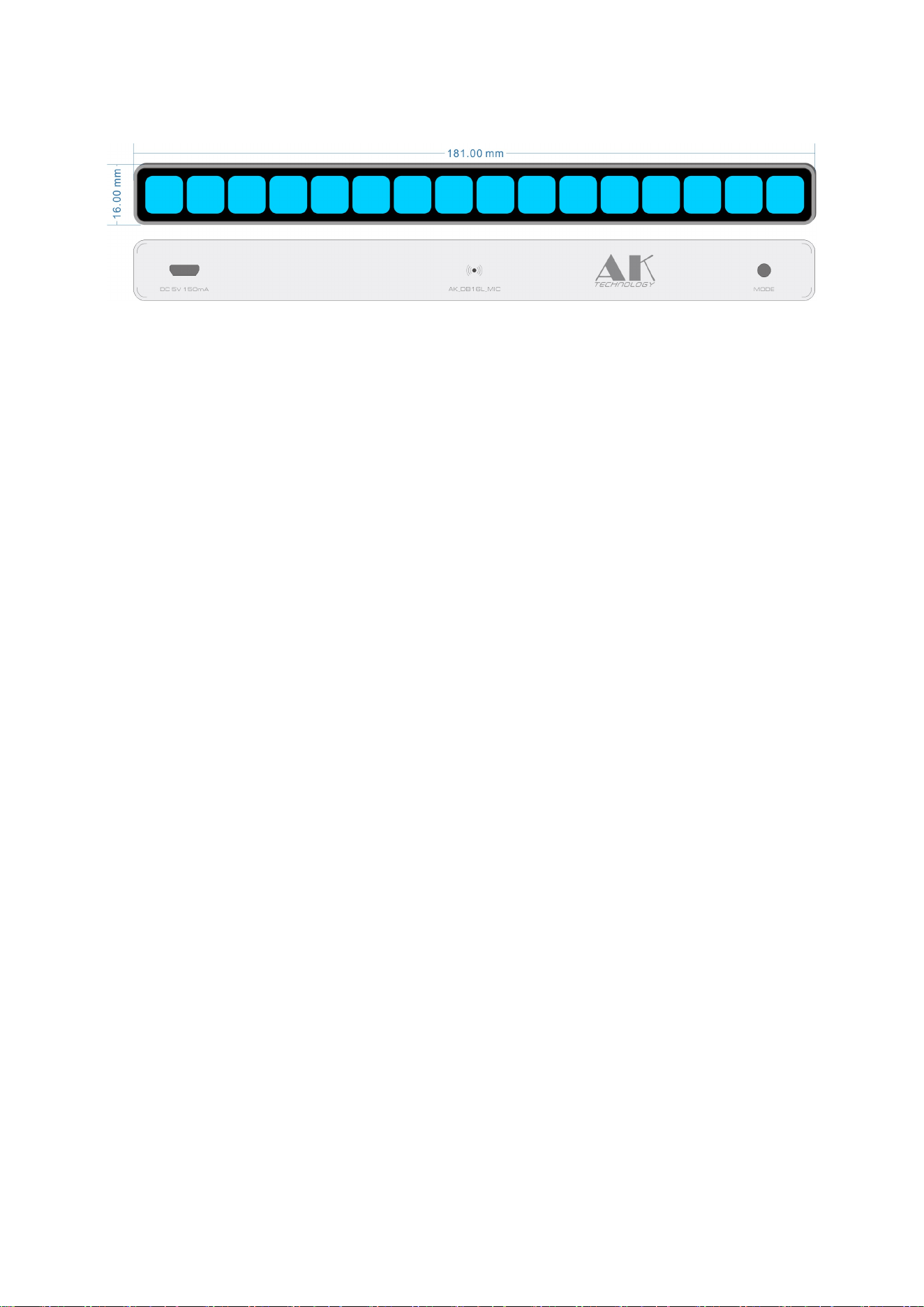
Aluminum alloy integrated molding housing 181x16 x 18.5 mm.
Mono 16 segment square lights to ensure adequate dynamic range and
shock enough.
Exclusive custom square rounded lights strip. (There are no similar lights
in the market).
The rising speed and the falling speed of the light bar, the holding time
and the falling speed of the peak can be adjusted separately.
The brightness of the lamp can be adjusted freely.
Microphone sensitivity can be adjusted 15 levels.
The reaction speed of AGC can be adjusted 15 levels.
super wide range of AGC adaptive algorithm to ensure the best effect..
Single button operation.
Exclusive Software - the function of eliminating ambient noise .
Specific operation: (There are LED instructions operating time)
Normal mode:
1. 1 second - Mode switch (there will be a corresponding preview).
2. 5 seconds - Enter the speed setting mode.
3. 10 seconds - Factory default
4. Double Click - The function of eliminating ambient noise is turned off.
5.Three Click - The function of eliminating ambient noise is turned on。
After keeping quiet, the recognition was completed in a few
seconds.
6. Four Click - Enter sensitivity setting mode(15 optional)
7. Five Click - Enter the AGC speed setting mode(15 optional)
8. Six Click - Adjust the brightness of the light bar,low/medium/high
Speed setting mode: (In normal mode, press the button for 5 seconds to enter,
press the button for 5 seconds to exit) .
1. 1 second
a. The rising speed of the light bar (15 optional)
b. The falling speed of the light bar (15 optional)
c. The holding time of the peak (15 optional)
d. The falling speed of the peak (15 optional)
e. Brightness adjustment (15 optional)
Loop in these functions.

2. Click the button - Loop to change the parameters set.
I. Environmental noise can be eliminated :(In normal mode ,three-click
button opens and automatically exits after recognition)
(Special description:Evey environment has different environmental
noise,Because it’s the microphone that picks up the sound,and the
microphone can’t recognize noise or music,So we need to eliminate
environmental noise. Then the sound reflected by the level lamp is the real
sound of music. Before making this correction,make sure you don’t play
music or talk ,the whole process will be completed in 5 seconds,so that the
current environmental noise can be recognized.It is suggested that
correction should be made once for every change of environment. )
Sensitivity setting mode:(In normal mode, Four Click to enter,No click 5 seconds
to exit.)
1. Single -Click - Sensitivity is reduced(The more lights light on the
indicator ,The sensitivity will getting more lower (15 optional)).
2. Double-Click - Sensitivity increases(The less lights light on the
indicator , The sensitivity will getting more higher (15 optional)).
(NOTE:
In order to achieve the best effect,it is suggested to lower the sensitivity
when the signal amplitude is large,and in the case of small signal,the
sensitivity can be increased.)
AGC Speed Mode:(In normal mode, Five Click to enter,No click 5 seconds to exit.)
1. Single -Click - AGC speed reduced (The more lights light on the indicator,
The AGC speed will getting more slower(15 optional)).
2. Double-Click - AGC speed increases(The less lights light on the indicator,
The AGC speed will getting more faster (15 optional)).
(NOTE:
The principle of AGC is to enlarge the input small signal to full screen
display, reduce the large signal to the range that the screen can display, and
automatically scale the signal according to the size of the input signal.
The speed of the AGC is the speed at which the small signal is amplified to
the full screen display. Because the input signal exceeds the display area,
it will be compressed immediately. If it is used in an environment where the
signal amplitude varies greatly, it is recommended that the AGC speed be
adjusted to faster.)