RGB LED Analog VU Meter
User Manual Model: VU22
Douk Audio & One Little Bear
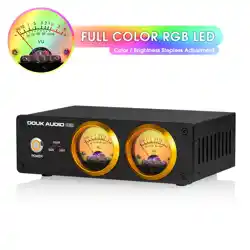
VU22 is a multi-functional VU meter, with stereo RCA/3.5mm AUX line
inputs and microphone pick-up, work well with most audio devices.
Customized colorful RGB VU meter, the color and backlight brightness
can be adjusted freely. 100K high-impedance input circuit, ensures clean
sound without any audio rendering when using line inputs. Support gain
adjustment, even can set the swing range of pointer. All metal case with
CNC machined panel, solid stepless adjustment knob, all I/O interfaces
are gold-plated, ensures the smooth transmission of the original audio
signal and minimizes the loss.
Introduction
FAQ
Parameters
1. Connect USB power cable to the USB type-c interface of VU22 and turn
it on.
2. Connect the output of audio source to the "IN" port (RCA or 3.5mm
Jack) on the back panel of the VU22 via high-quality audio cable.
Connect the input of amplifier or other equipments to the "OUT" port
(RCA or 3.5mm Jack) on the back panel of VU22.
3. Switch the audio source selector on the back of VU22 to correct
position according to the input you want.
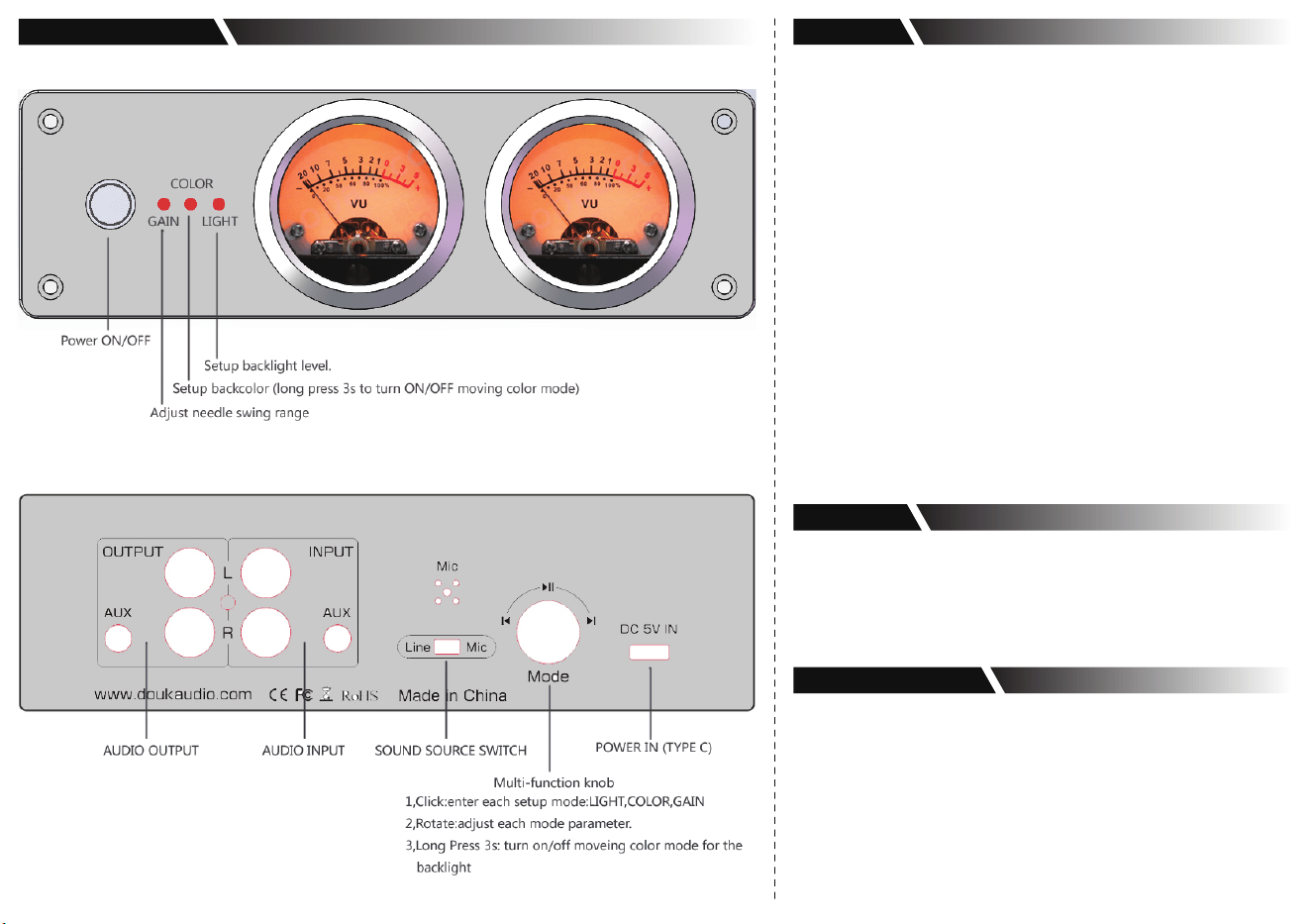
4. Press Mode Knob to select 3 modes. Single click it to the "GAIN" mode
and then rotate the knob to adjust it until the VU meter pointer in the
most suitable position. (When adjusting in "GAIN" mode, there will be
red backlight from the left VU meter, the pointer will indicate the
current GAIN range, and the mode will auto exit in 2 seconds.)
5. If you want to switch the color and brightness level of backlight, please
click the Mode Knob to"COLOR" or "LIGHT" mode, and then rotate the
knob to adjust them.
6. In any mode, long press Mode Knob for 3 seconds and all LED (color /
gain / light) will be turned off, then you can turn on or off the flowing
water light mode.
7. In flowing water light mode, the changing speed of flowing water light
also can be adjusted in COLOR mode. And the functions in GAIN and
LIGHT mode will not be changed.
Q: Why is there noise when the sound passes through VU22 preamp?
A: 1. Poor-quality USB power adapter with large ripple and big
interference, noise will be easily caused. Please change a better
USB power supply to have a try again.
2. VU22 needs to be powered by an independent USB power supply,
don't share a USB power supply with audio source, otherwise
common ground noise will be caused.
Q: The rear 3.5mm input is independent of the RCA input, can it be
switched?
A: Not supported. Stereo RCA and 3.5mm AUX input are in parallel, two
inputs and outputs will work simultaneously, so please don't connect
RCA and 3.5mm AUX input at the same time to avoid mixing.
How to Use
Contact Information
● Audio input: stereo RCA / 3.5mm AUX / Microphone
● Audio output: stereo RCA / 3.5mm AUX
● Input impedance: 100K
● Input voltage: 0.1-2Vrms
● Frequency response: 5Hz-20KHz
● Brightness color: switchable
● Brightness level: adjustable
● Gain adjustment: support
● Working voltage: DC 5V (≥1A)
● Power interface: USB (type-C)
● Setup save: support
● VU meter diameter: 45mm
● Dimensions(W*D*H): 177*115*59mm / 6.97*4.53*2.32in
● Net weight: 661g / 1.46lb
● Package weight: 900g / 1.98lb
1*VU22 VU Meter
4*Rubber Feet
1*USB Cable (No power adapter)
1*User Manual
Address: Room 1329, Wang Cheng Building, Long Guan
street, Long Hua new District, Shenzhen, Guang Dong,
China
Contact: LIU CHENXI
Tel: +86-18570015672
Official website: www.doukaudio.com
Email: [email protected]
Parameters
Packing List
Front and Rear Panel