Installation Guide
MRCHDDVRJW
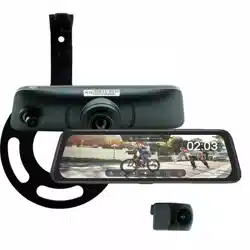
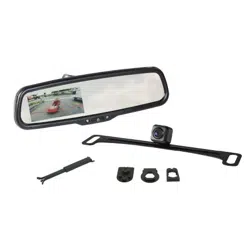
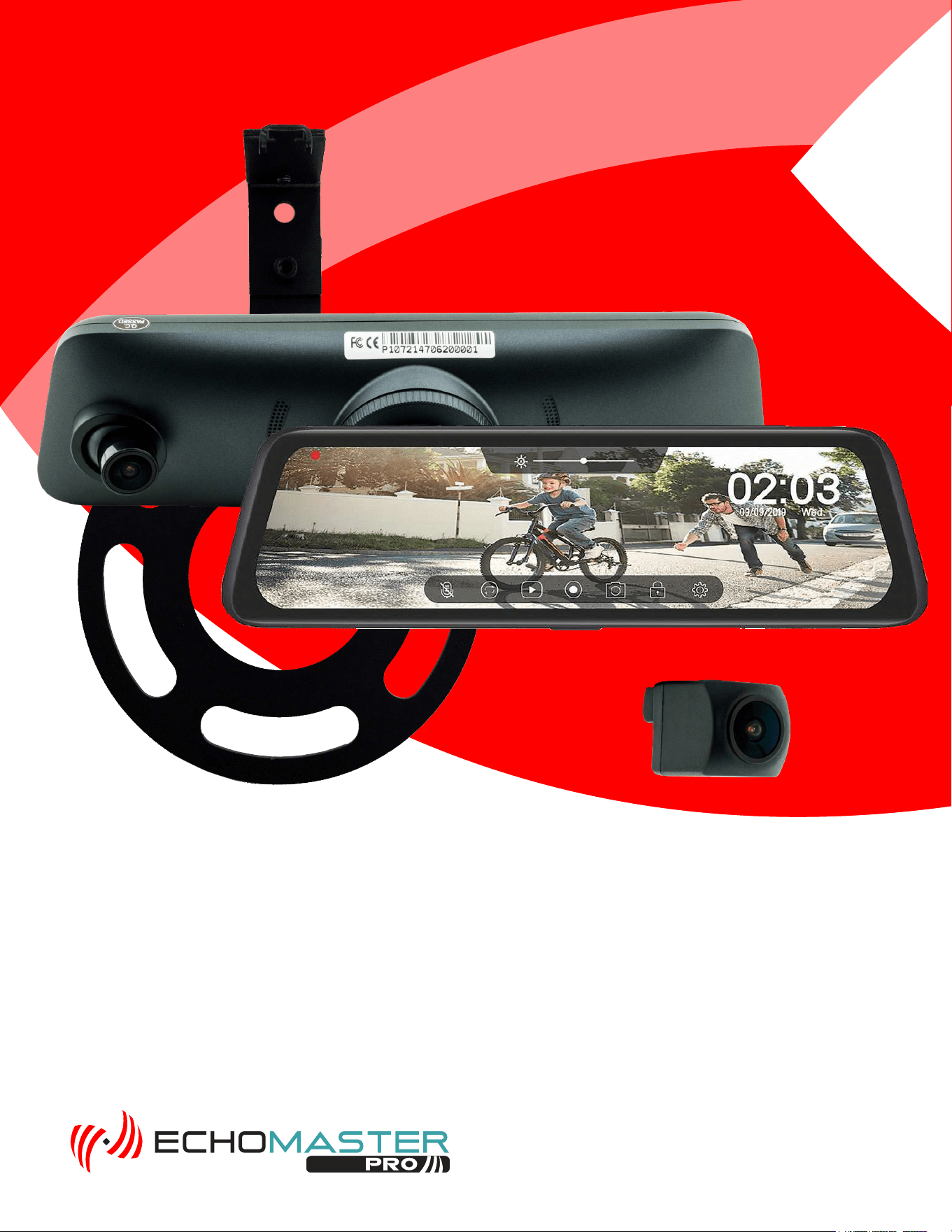
WITH DVR & SPARE TIRE MOUNTED CAMERA KIT
FULL SCREEN REAR-VIEW MIRROR MONITOR
2007-2018 Wrangler JK/JKU
2018 and Up Wrangler JL/JLU
2
Installation Guide
2
tel - 1-800-477-2267
email - support@echomaster.com
Please read and follow the instructions carefully. To emphasize special information, the symbol and the
words Warning, Caution and Note have special meanings. Pay special attention to messages highlighted by
these signal words.
These instructions are designed as a guide to help make the installation of this product successful. Always
use caution and ask for assistance if you are not sure how to proceed.
AAMP Global & EchoMaster are not responsible for any damage that may occur during installation
or any changes to the vehicle interior.
Important
WARNING
Indicates a potential hazard
that could result in a death
or serious injury
CAUTION
Indicates a potential hazard
that could result in vehicle
damage
NOTE
Indicates special information to make
installation easier or instructions
clearer.
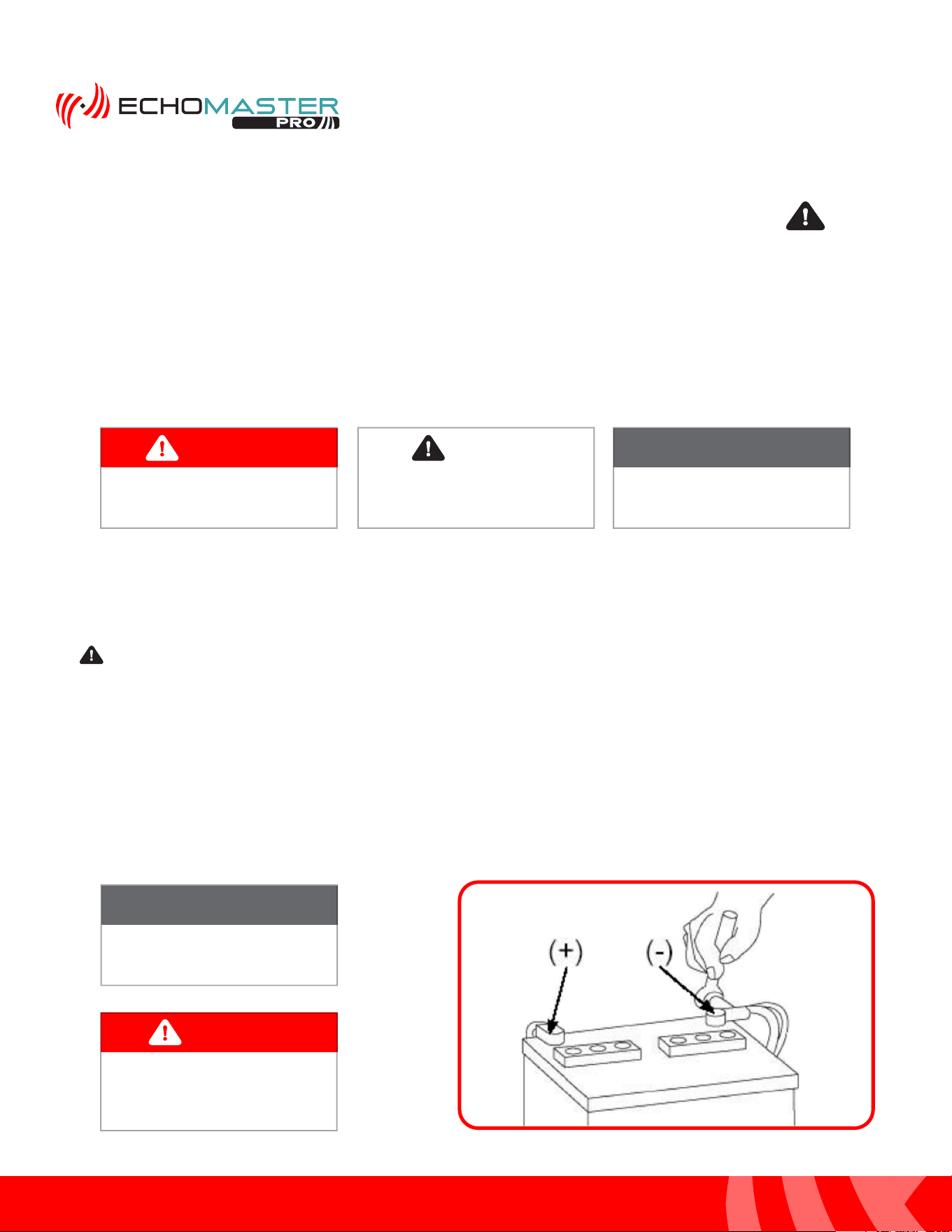
NOTE
Consult Vehicle owners guide
before disconnecting negative
battery cable
WARNING
DO NOT TOUCH the positive
terminal with any tool when
removing the negative battery
cable
Vehicle Preparation & Protection
Consult your vehicle owner’s manual to disconnect the battery. Do not disconnect ANY airbag connectors or
indicators. Doing so may result in activating a diagnostic code. These codes will require the dealer to perform
the reset procedure which may incur a reset fee. If you are unsure of any vehicle trim removal process consult
the OEM service manual.
Removing vehicle trim panels in extreme hot and/or cold climate could result in damage. Use care when
removing all vehicle trims. Using painter’s blue tape on the vehicle trim panels can help limit any scratches
and/or marring. Use a nylon trim panel removal tool whenever possible.
CAUTION
MRCHDDVRJW
3
Installation Guide
3
tel - 1-800-477-2267
email - support@echomaster.com
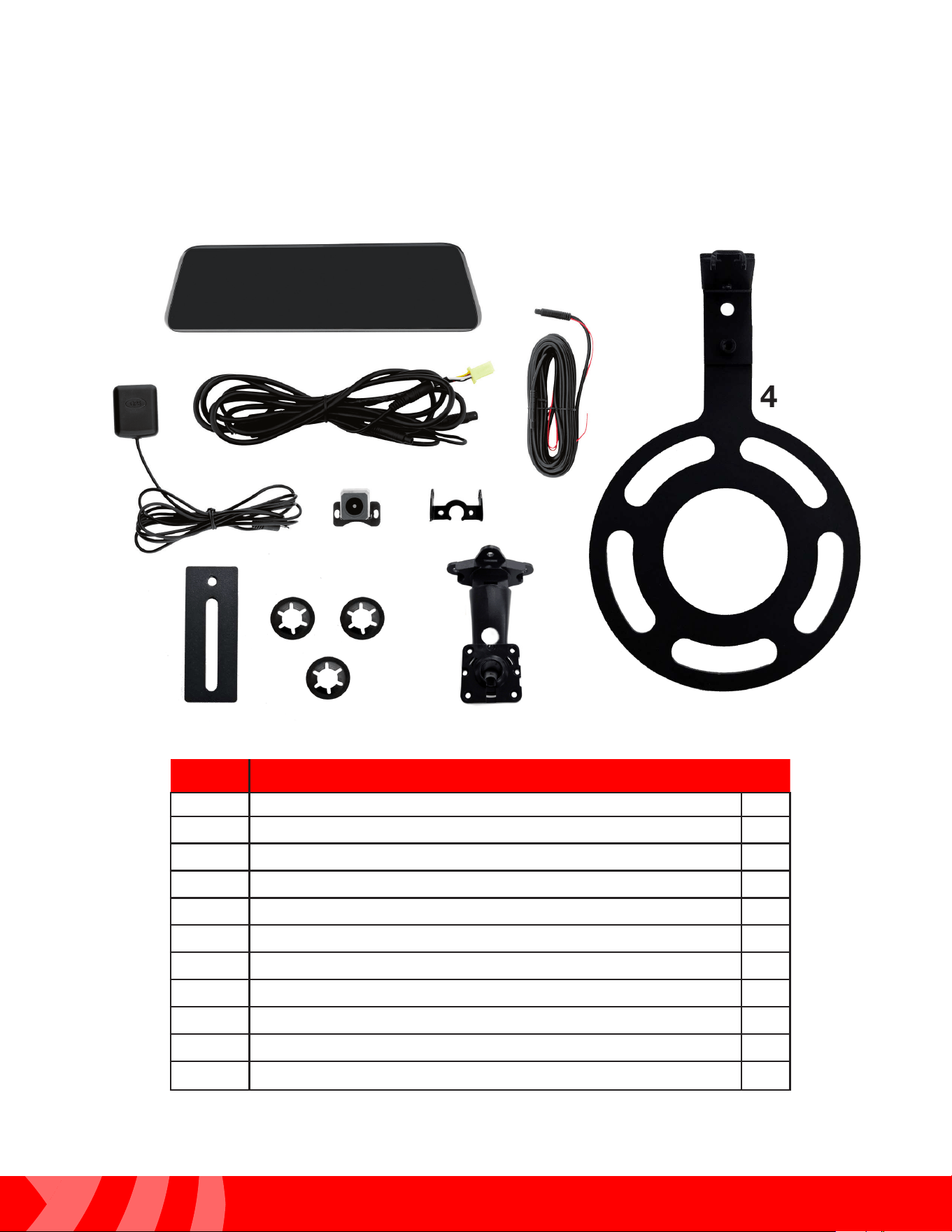
What’s in the box
Image Description Qty
1
Mirror Monitor / Dash Camera
1
2
Monitor Power / Video Cable
1
3
Camera Extension Cable
1
4
Spare Tire Mounting Bracket
1
5
GPS Antenna
1
6
Rear Camera
1
7
JW Camera Bracket (PMRC-BRKT)
1
8
Riser Plate
1
9
Push Nuts
3
10
JL Mirror Mounting Bracket (MRC-JLBRKT)
1
1
2
3
4
5
6
7
8
9
10
NOTE: The kit consists of three boxes (MRC-HDDVR / JP3-MOUNT / MRC-JLBRKT).
There are additional parts included that will not be used.
4
Installation Guide
4
tel - 1-800-477-2267
email - support@echomaster.com
Illustrations are typical and may not match exact vehicle detail
Recommended Tools
Installation Notes
Lug Wrench
Plastic Trim Tool
7mm Socket
8mm Socket
10mm Socket
Ratchet
Socket Extension
#1 Phillips Screwdriver
#2 Phillips Screwdriver
Diagonal Cutters
Wire Crimpers
Electrical Tape
Wire Feeder
Allen Wrench Set
Hammer
11/16” (17mm) Deep Socket
Small Pick Tool
Zip Ties
Utility Knife
Torx T-20, 25, 30, 40
Read this installation guide thoroughly before disassembling vehicle or making wire connections.
Installation of this product requires technical skill, experience, and specialized tools. If unsure,
it is recommended to have it professionally installed by an authorized EchoMaster Dealer.
This guide covers both Wrangler JK and JL installations.
Questions?
Reach out to our Technical Support Team:
Phone: 727-592-5991
Email: [email protected]
Chat: EchoMaster.com
A video installation guide is available at:
https://stingerelectronics.com/installvideos
5
Installation Guide
5
tel - 1-800-477-2267
email - support@echomaster.com
Illustrations are typical and may not match exact vehicle detail
MRCHDDVRJW
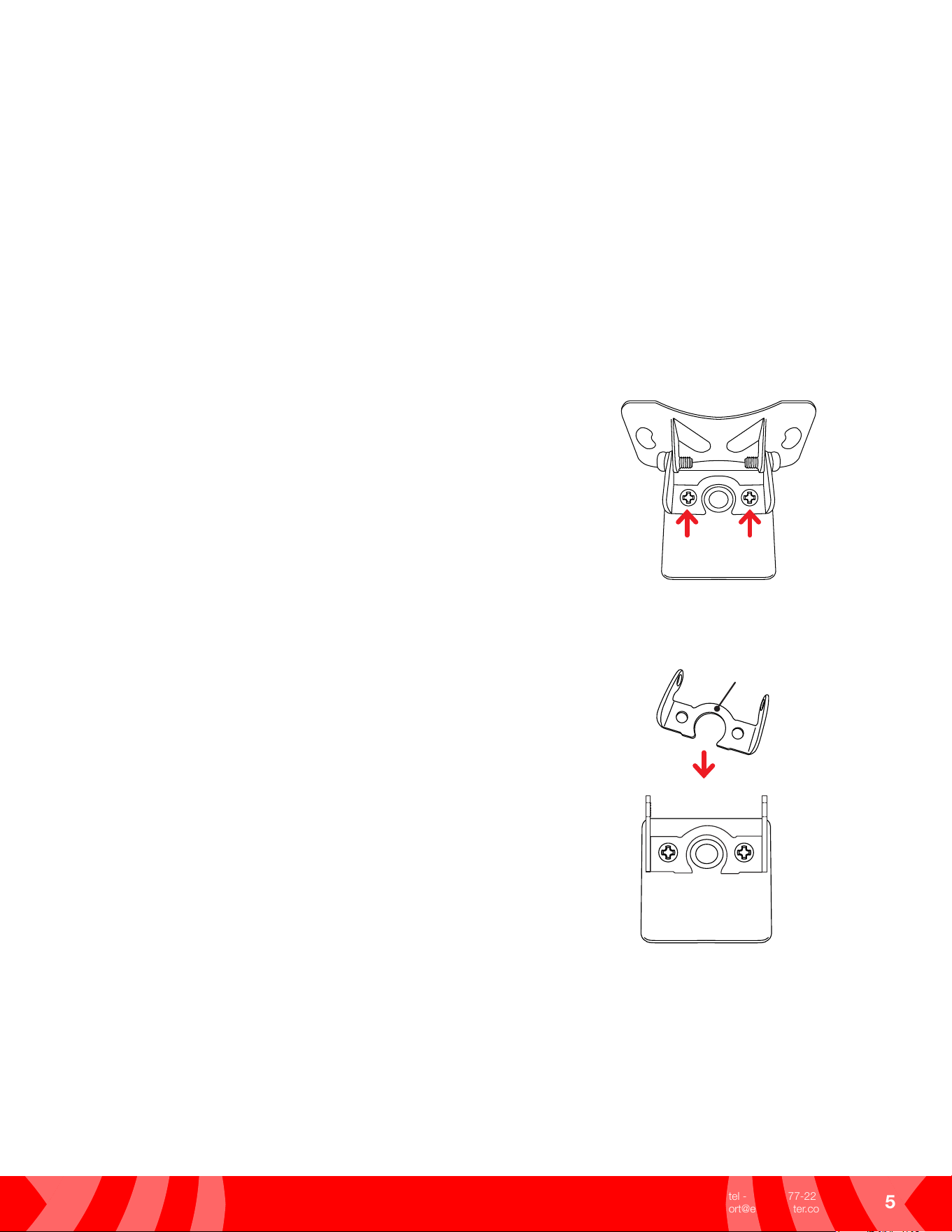
Rear Camera Bracket (JK & JL)
The MRC-HDDVR Rear Camera comes with a “universal” bracket attached. For all Wrangler installations,
the universal bracket will need to be removed and the JW Camera Bracket from the JP3-MOUNT will need
to be installed by following the steps below.
Step 1
Using a #1 Phillips screw driver, remove the two screws
securing the universal bracket from the back of the camera
and remove.
Step 2
Attach the JW Camera Bracket using the same screws
removed in Step 1.
JW Camera Bracket
(PMRC-BRKT)
6
Installation Guide
6
tel - 1-800-477-2267
email - support@echomaster.com
Illustrations are typical and may not match exact vehicle detail
Spare Tire Camera Mount (JK & JL)
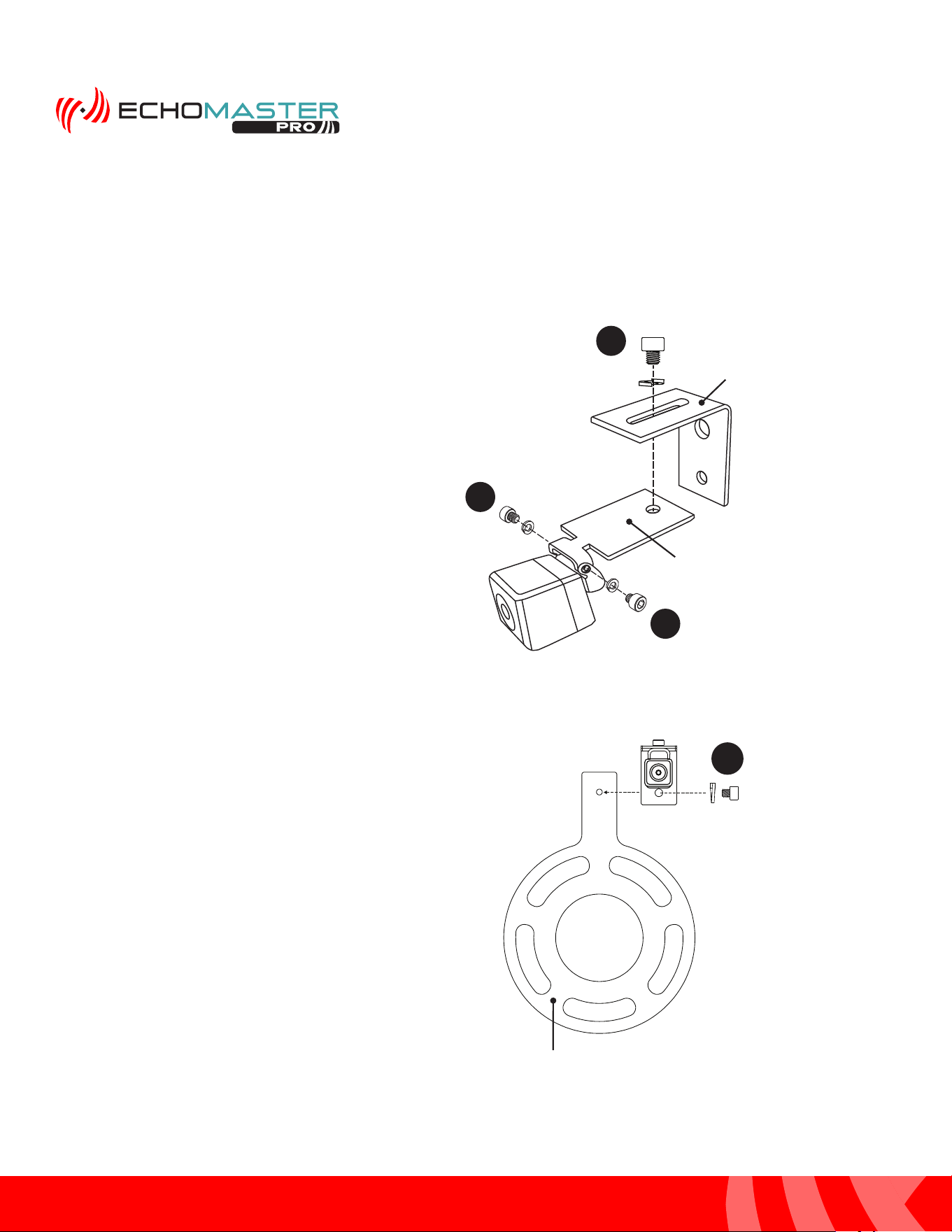
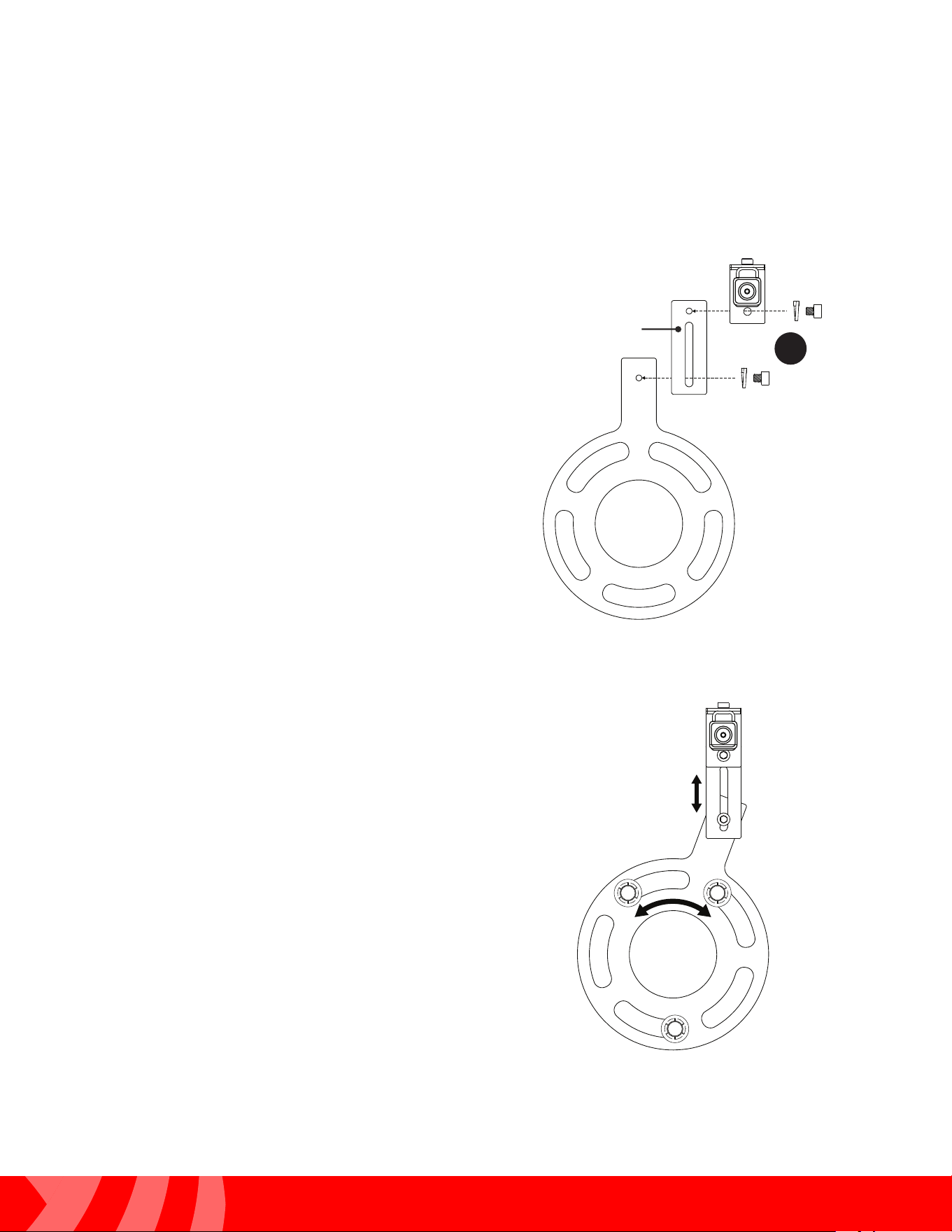
Using the JP3-MOUNT kit, attach the camera and assemble the mounting bracket as shown.
Assembly
2
1
1
3A
Step 1
Using two M3 x .50 screws and lock
washers, attach the camera to the
Camera Mounting Plate.
Step 2
Using a M6 x 1 screw and lock washer,
attach the Camera Mounting Plate to
the Right Angle Bracket as shown.
Step 3A
For most applications with stock/standard
wheels, attach the camera bracket assem-
bly to the Wheel Bracket using a M6 x 1
screw and lock washer.
For applications with larger wheels and/
or off-center wheel openings,
see step 3B.
Wheel Bracket
Camera
Mounting Plate
Right Angle
Bracket
7
Installation Guide
7
tel - 1-800-477-2267
email - support@echomaster.com
Illustrations are typical and may not match exact vehicle detail
MRCHDDVRJW
3B
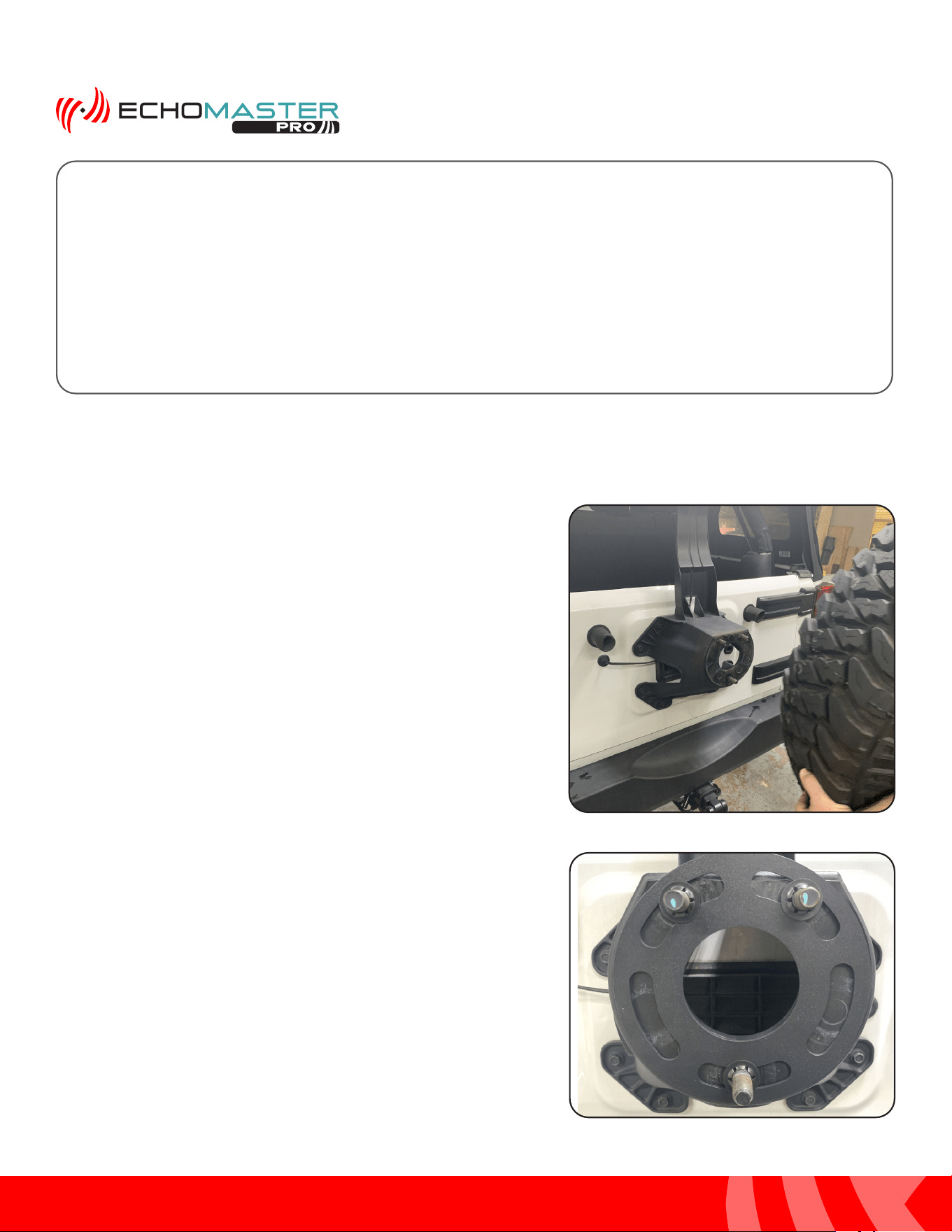
Step 3B
For larger wheels, attach the Riser Plate to
the Wheel Bracket and attach the camera
assembly to the Riser plate using M6 x 1
screws and lock washers.
When using the riser plate, the camera
height, angle and rotation can be adjusted
to match the wheel.
Riser Plate
Spare Tire Camera Mount (cont)
8
Installation Guide
8
tel - 1-800-477-2267
email - support@echomaster.com
Illustrations are typical and may not match exact vehicle detail
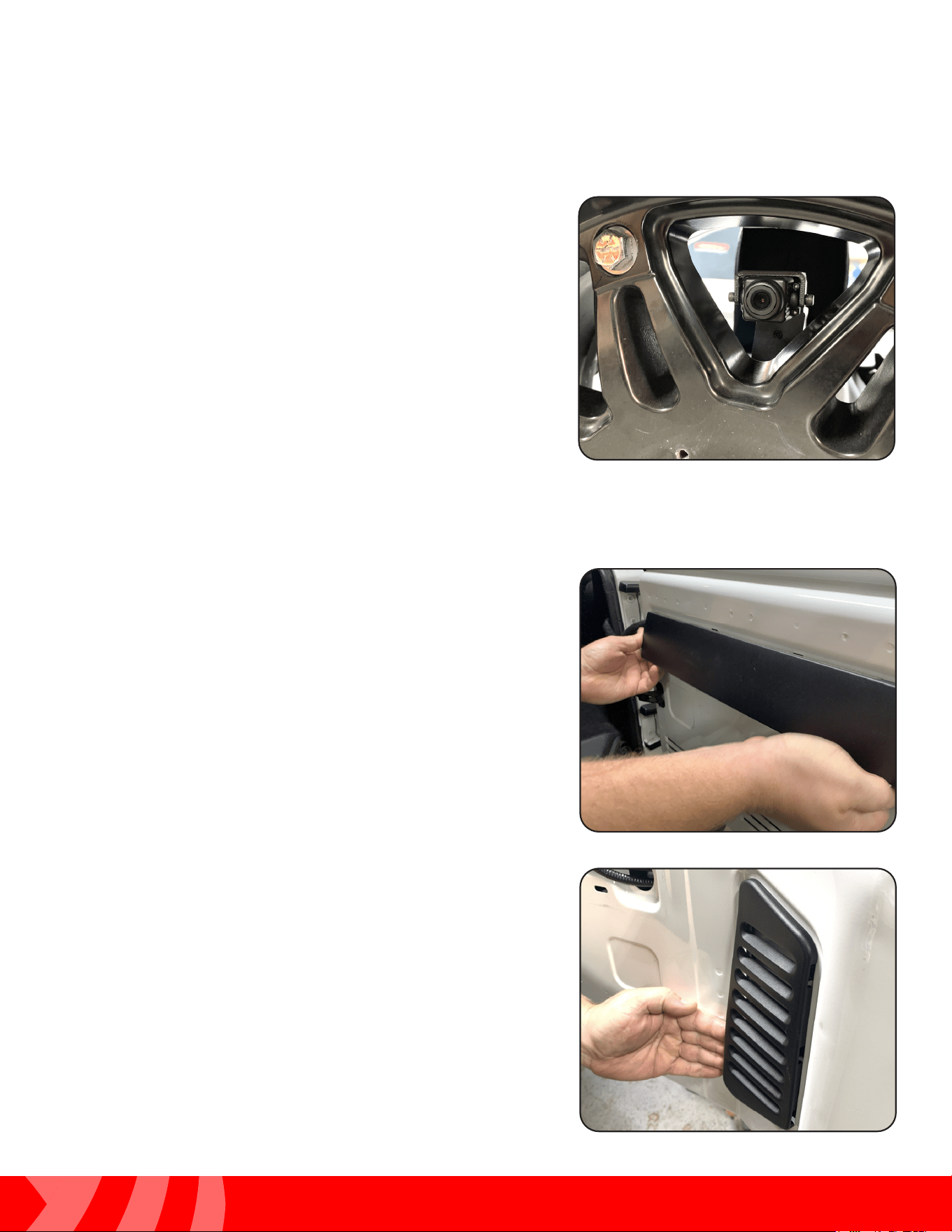
Step 1
Remove the spare tire off of the tire carrier.
Mounting the Rear Camera (JK)
Step 2
Place the Spare Tire Mounting Bracket and camera
assembly on the wheel studs and secure with the
three push nut retainers included in the JP3-MOUNT.
The push nut retainers are installed using a 11/16”
(17mm) deep socket and a hammer.
JK Installation Instructions start here on Page 9
For JL Installation Instructions, skip ahead to Page 21
After the installation is complete, Operating Instructions start on
Page 11 of the User Manual included with the MRC-HDDVR
9
Installation Guide
9
tel - 1-800-477-2267
email - support@echomaster.com
Illustrations are typical and may not match exact vehicle detail
MRCHDDVRJW
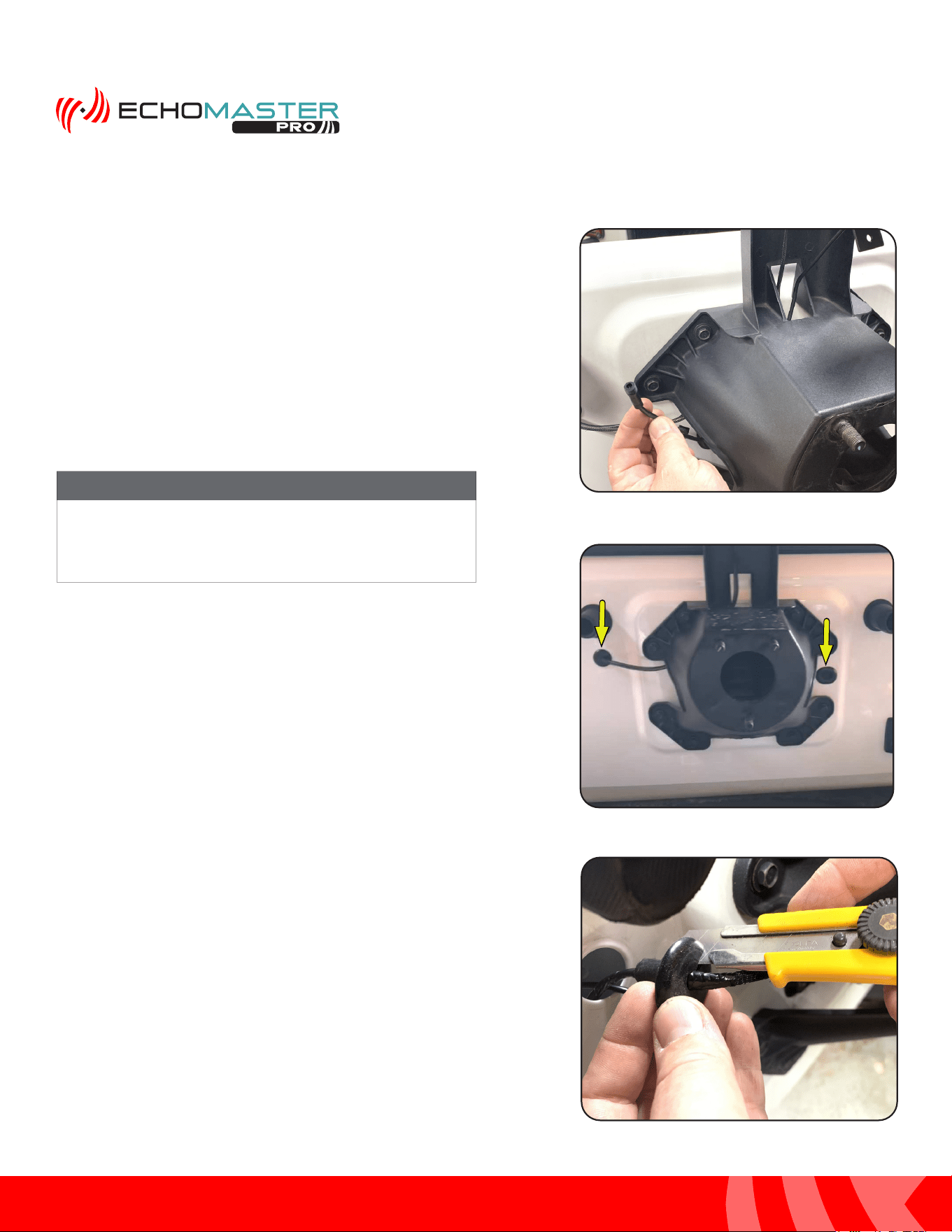
Step 1
Remove the trim panel on the inside of the tailgate by pulling
it away from the tailgate along the bottom of the panel
from one side to the other. Then swing the panel upward to
disengage the upper tabs. A plastic trim tool may be needed
for this step.
Step 2
Remove the vent panel on the inside of the tailgate by pulling
it away from the tailgate along the left side of the panel and
releasing the tabs on the right side. A plastic trim tool may
be needed for this step.
Mounting the Rear Camera (cont)
Step 3
Temporarily install the spare tire. Conrm a usable opening
in the wheel is located at or close to center. This may require
removing and rotating the wheel until a usable opening is
located. If using the Riser Plate, the camera can be adjusted
up and down.
Remove the spare tire. Tighten all camera mount hardware.
Routing the Camera Cable (JK)
10
Installation Guide
10
tel - 1-800-477-2267
email - support@echomaster.com
Illustrations are typical and may not match exact vehicle detail
Routing the Camera Cable (cont)
Step 3
Route the camera cable through the opening in the
top of carrier and through the opening on the side.
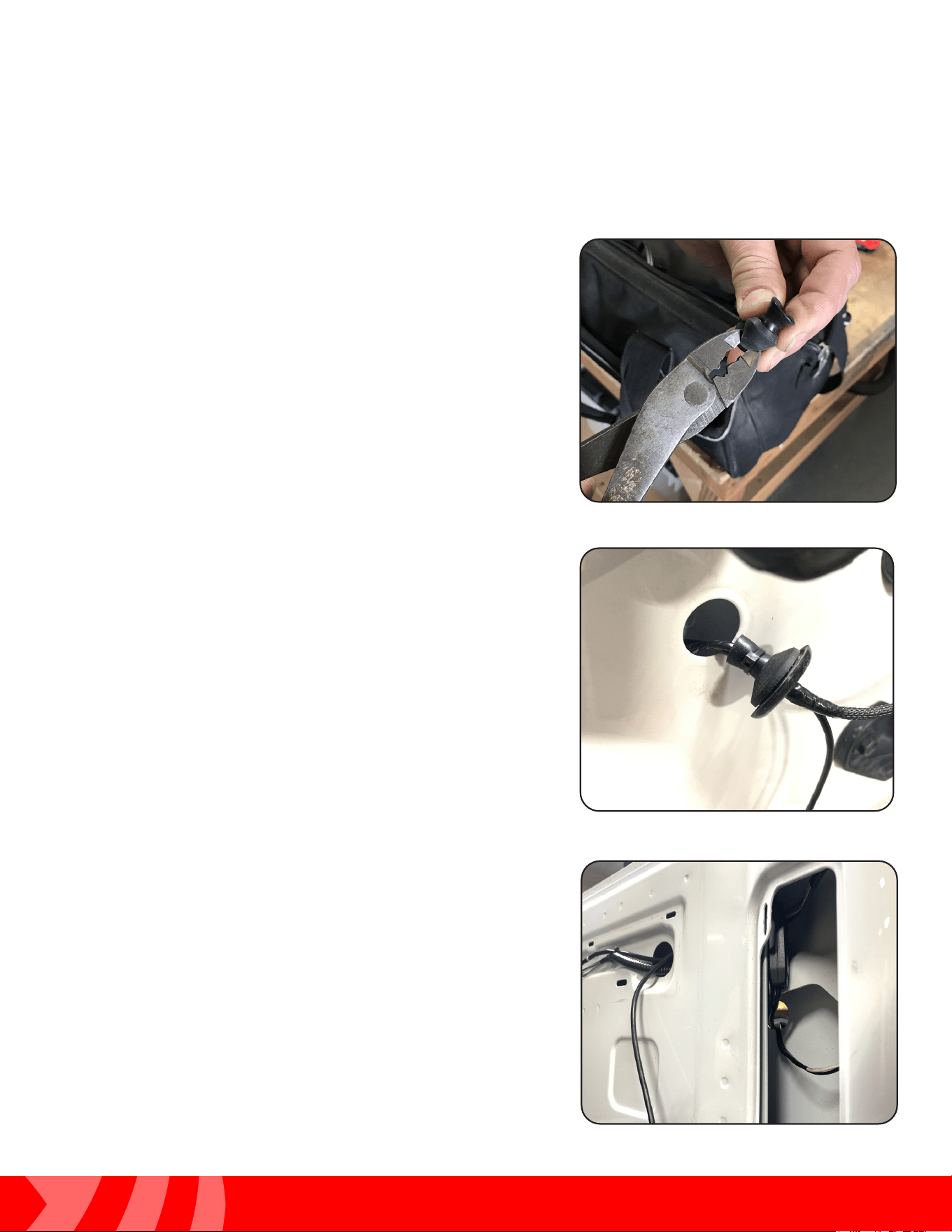
Step 4
Remove one of the rubber grommets.
Step 5A
Left Side Grommet: Rotate the grommet 180 degrees
so that the side that faces down is facing up. Using a
utility knife, make a cut from the outside edge to the
middle paying special attention to not cut yourself or
the existing wires.
There are rubber grommets on both sides of the tire
carrier. Either one can be used to route the cable to the
inside of the tailgate.
NOTE
11
Installation Guide
11
tel - 1-800-477-2267
email - support@echomaster.com
Illustrations are typical and may not match exact vehicle detail
MRCHDDVRJW
Routing the Camera Cable (cont)
Step 5B
Right Side Grommet: With the grommet removed, fold it in
half and cut a small slit in the center using diagonal cutters
or similar.
Step 6
Feed the camera cable through the grommet and then into
the inside of the tailgate.
Step 7
Using the vent opening to access the inside of the tailgate,
feed the camera cable out the access hole along with the
factory wiring harness.
NOTE
12
Installation Guide
12
tel - 1-800-477-2267
email - support@echomaster.com
Illustrations are typical and may not match exact vehicle detail
Routing the Camera Cable (cont)
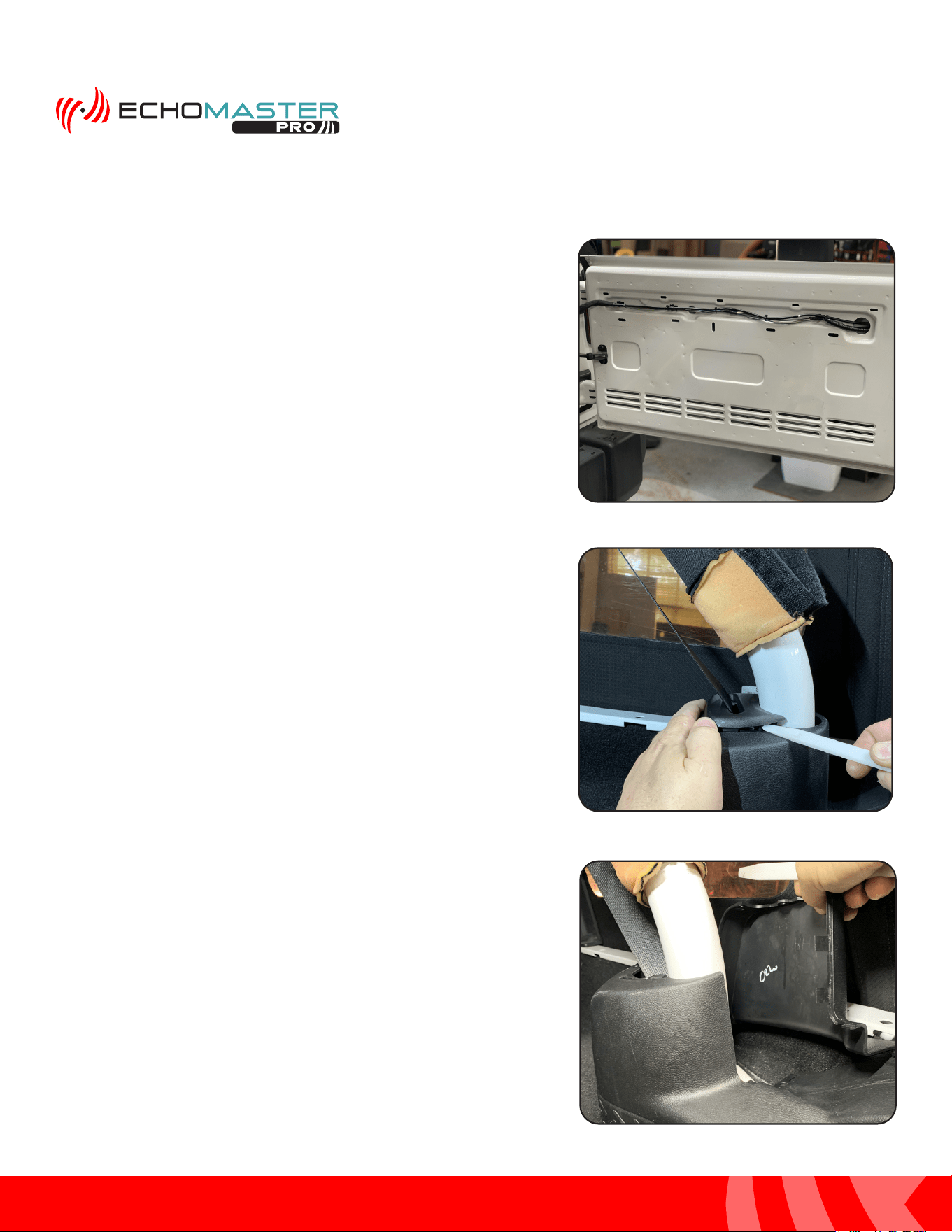
Step 8
Route and securely zip-tie the camera cable to the factory
wire harness running across the tailgate.
Step 9
Inside the cargo area, fold up the rear passenger roll bar
cover and pop up the plastic seatbelt guide using a plastic
trim tool. Slide it up the seat belt so that it is out of the way.
Step 10
Using a plastic trim tool remove the back side cover from
the base of the roll bar.
NOTE
13
Installation Guide
13
tel - 1-800-477-2267
email - support@echomaster.com
Illustrations are typical and may not match exact vehicle detail
MRCHDDVRJW
Unplug the factory subwoofer and/or power port on
the backside of the panel if equipped.
NOTE
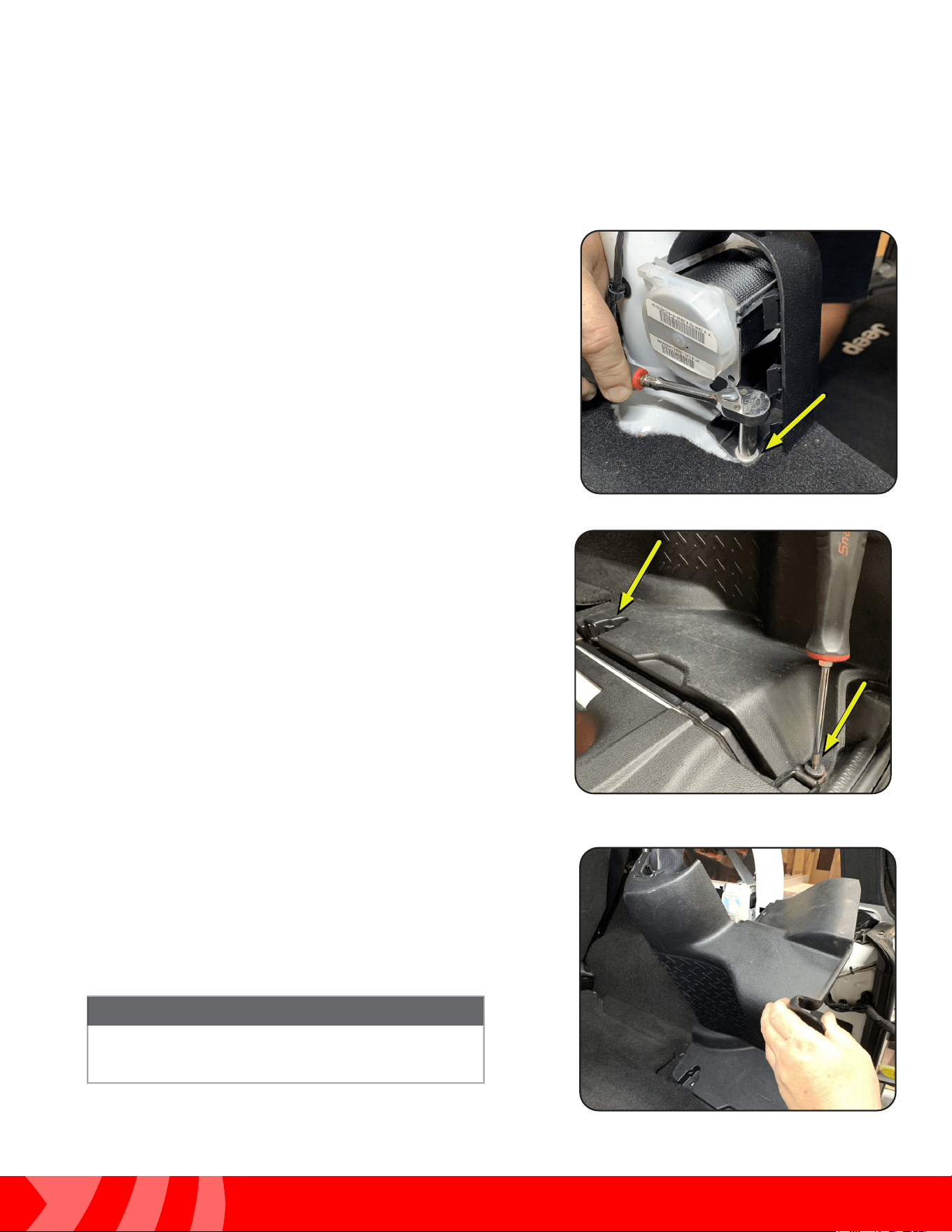
Step 11
Remove the 10mm nut that fastens the rear trim panel into
place.
Step 12
Remove the (2x) T30 Torx bolts that fasten the right side
tie-downs ad rear trim panel into place.
Step 13
With all the nuts and bolts removed, pull the rear trim panel
towards the center of the vehicle to remove it.
Routing the Camera Cable (cont)
14
Installation Guide
14
tel - 1-800-477-2267
email - support@echomaster.com
Illustrations are typical and may not match exact vehicle detail
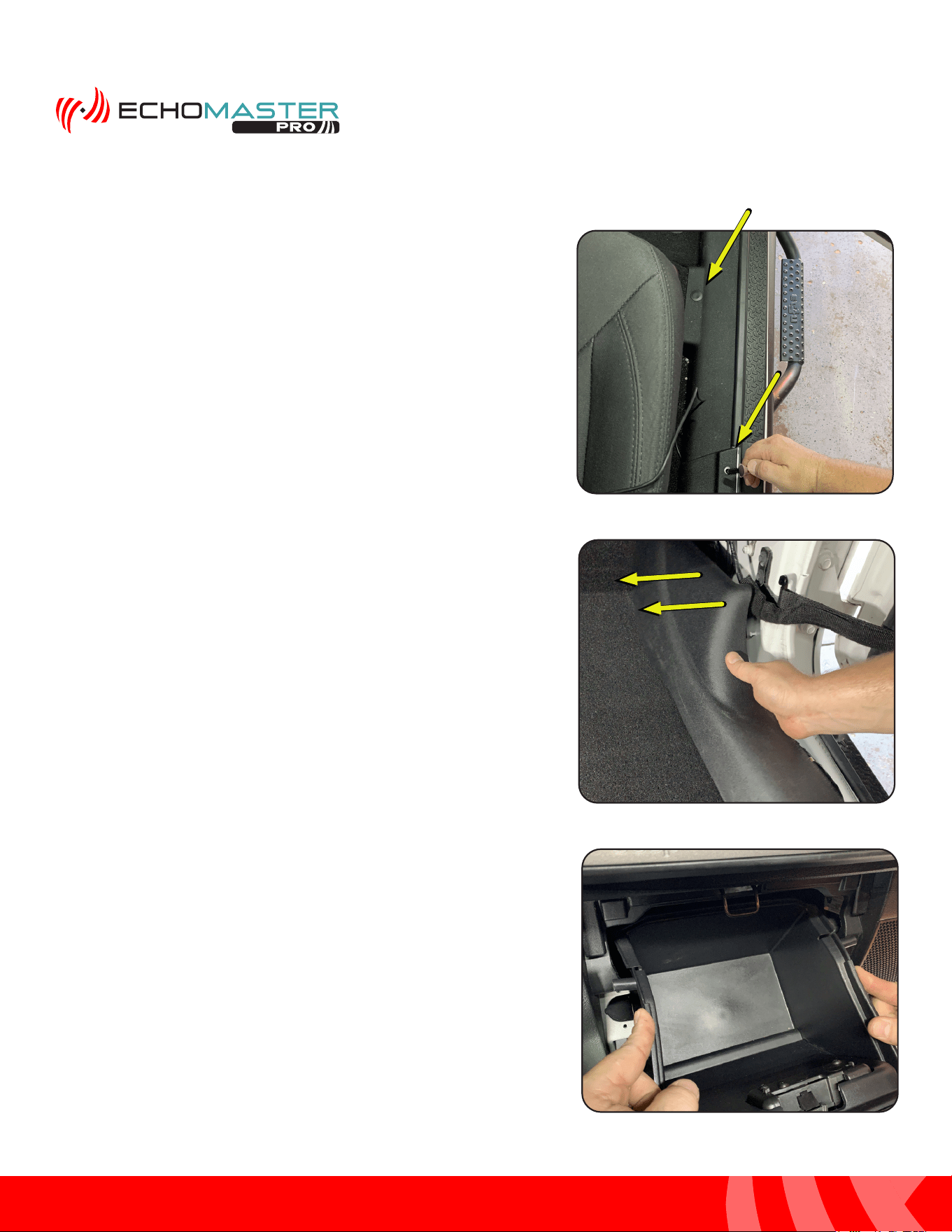
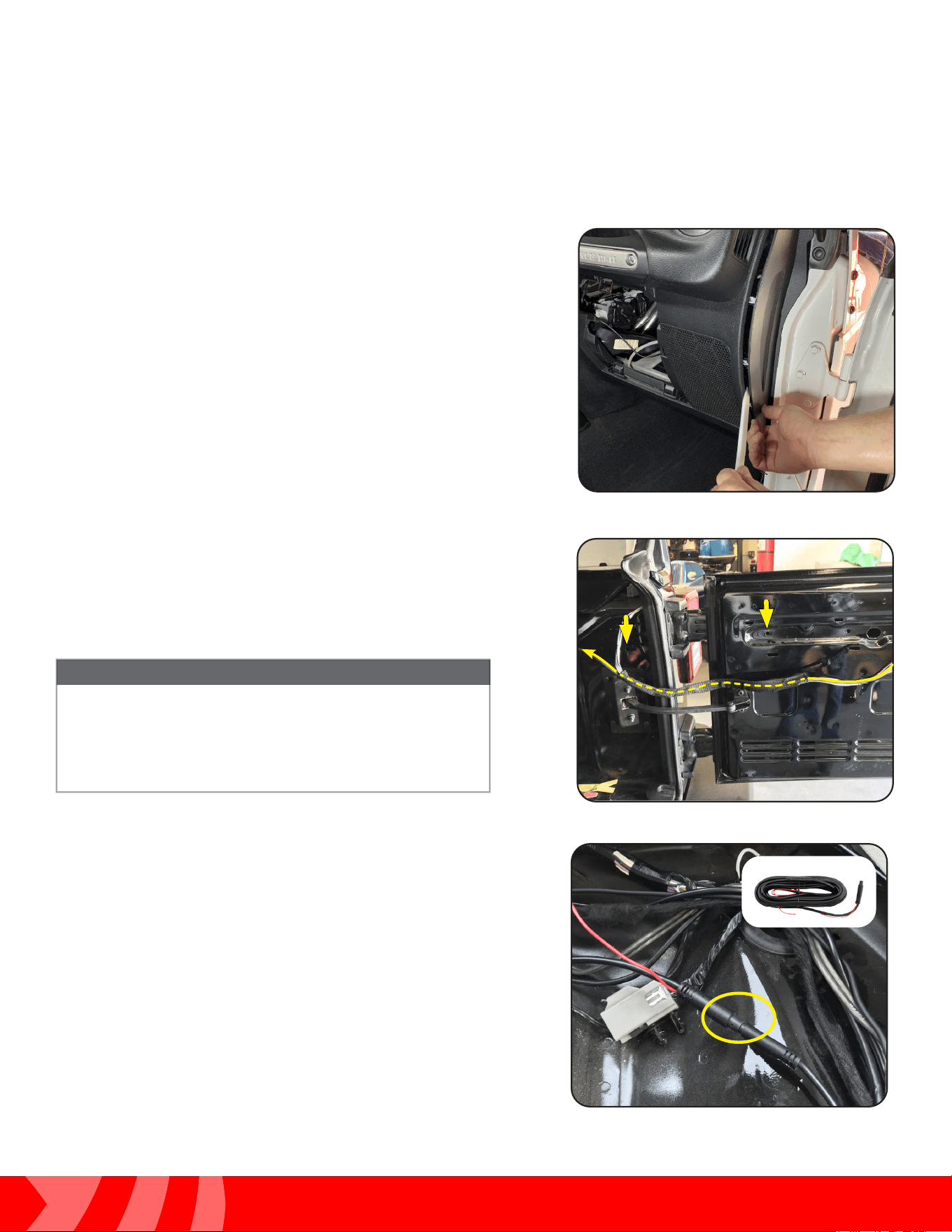
Step 14
Prepare the passenger side door sill for removal by removing
the two plastic fasteners.
Step 15
Grab the passenger side door sill at the front most edge and
pull it towards the middle of the vehicle to release the two
fasteners. Remove the sill panel and set aside.
Step 16
Remove the glove box by squeezing the sides to release
the retaining posts. Once retaining post are clear of the sub
dash, tilt down and pull towards the rear of the vehicle to
remove.
Routing the Camera Cable (cont)
15
Installation Guide
15
tel - 1-800-477-2267
email - support@echomaster.com
Illustrations are typical and may not match exact vehicle detail
MRCHDDVRJW
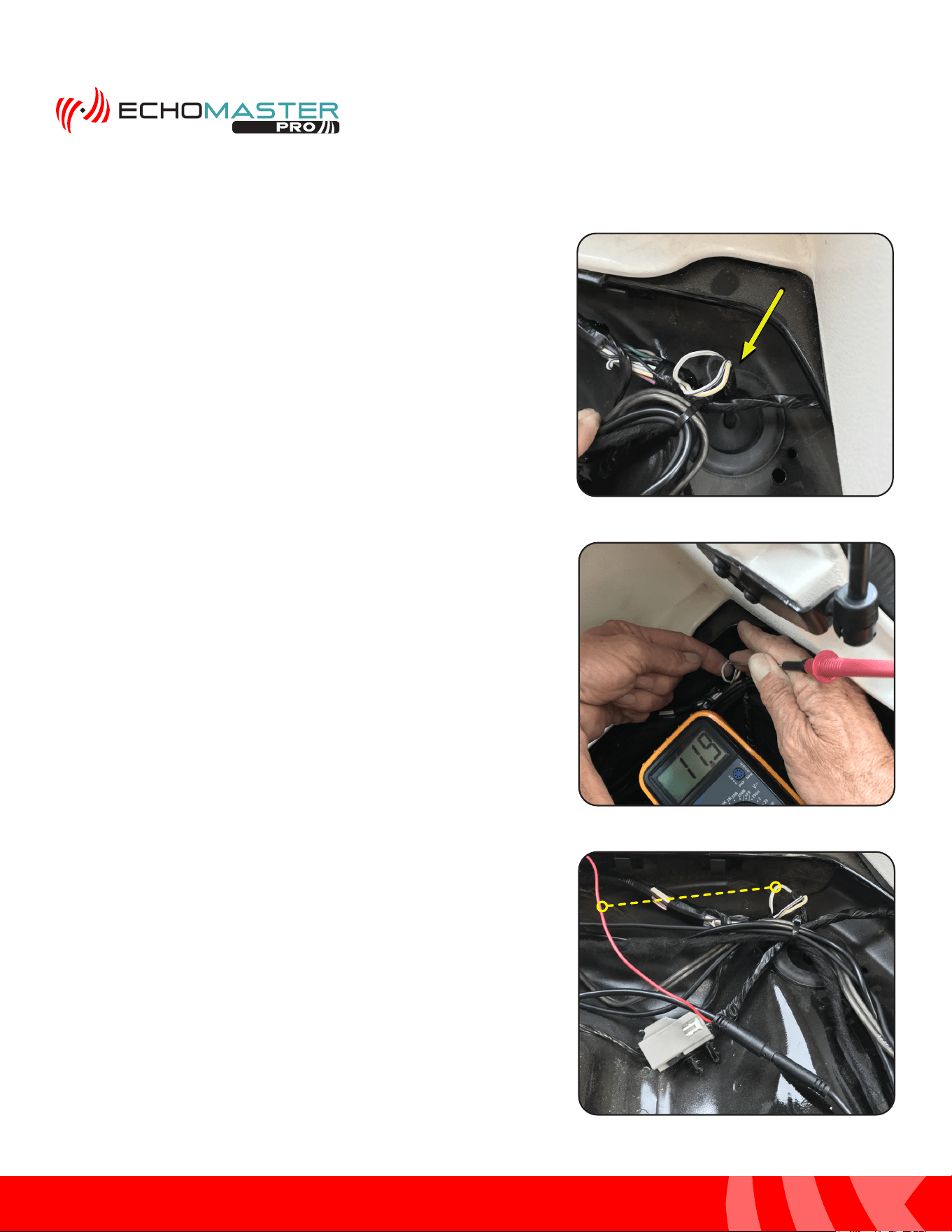
Step 17
Using a plastic trim tool remove the passenger side dash
trim panel.
Step 18
Unclip and untape the tailgate wire harness that runs into
the cargo area. Using a wire feeder, route the camera cable
through the fabric wire loom.
Step 19
Connect the Camera Extension Cable to the Camera Cable
by lining up the arrows on the two 4-pin ends and pushing
together.
The zip tie clips securing the wire harness can be
removed by using a small pick tool to release the zip
tie locking tab. Or the zip tie can be cut and then a
new zip tie ran through the base of the clips.
NOTE
Routing the Camera Cable (cont)
16
Installation Guide
16
tel - 1-800-477-2267
email - support@echomaster.com
Illustrations are typical and may not match exact vehicle detail
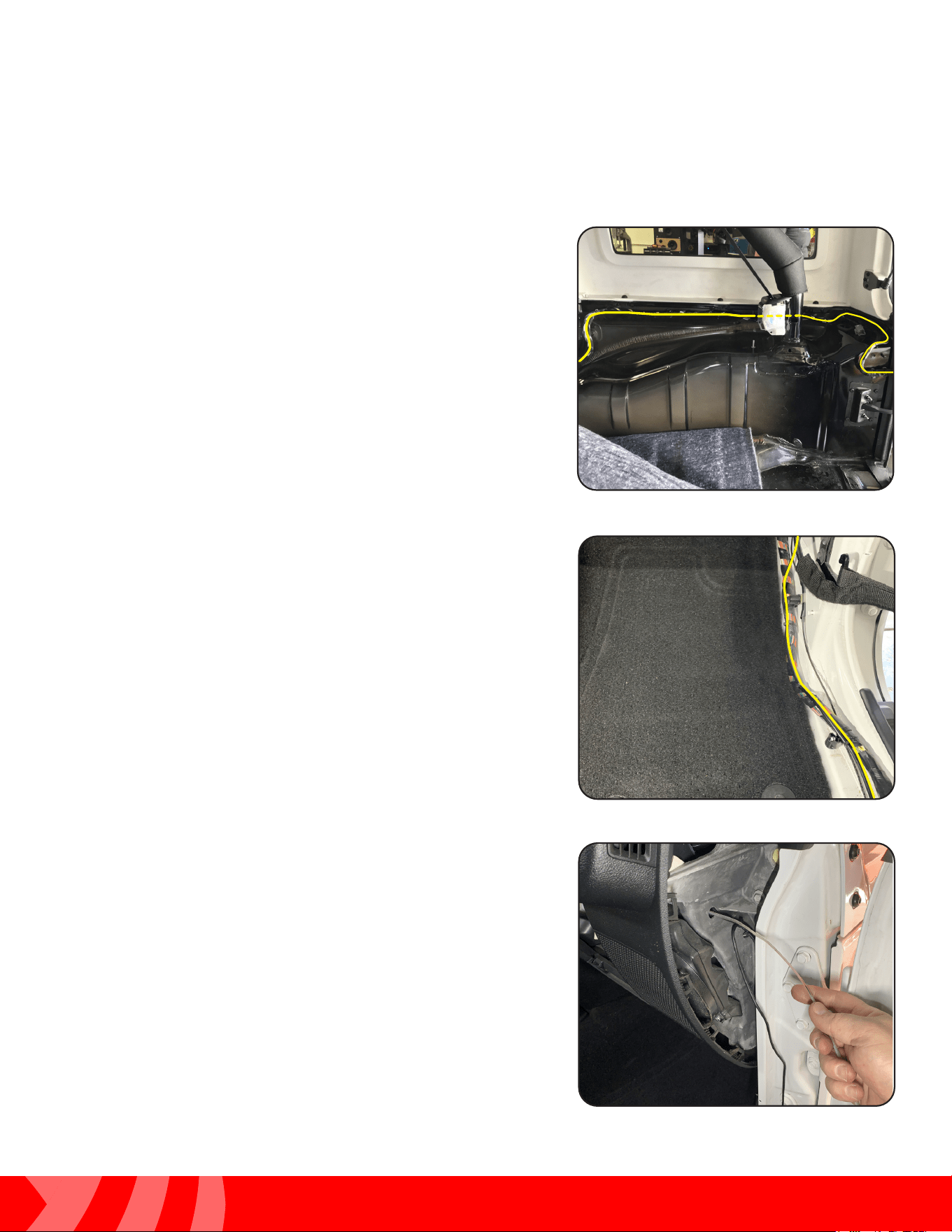
Step 20
Locate the passenger tail light wire harness running through
the rubber grommet above the tail light.
Step 21
On most JK’s, the reverse light wire color will be White with
a Gray Stripe (WHT/GRY). Using a multimeter, conrm the
reverse wire shows 12V when in reverse. DO NOT START
THE VEHICLE. ENGAGE THE PARKING BRAKE. The wire
can be tested with just the ignition turned on.
Step 22
Attach the Red Reverse Trigger Wire on the cameras
extension cable to the reverse wire of the vehicle.
Routing the Camera Cable (cont)
17
Installation Guide
17
tel - 1-800-477-2267
email - support@echomaster.com
Illustrations are typical and may not match exact vehicle detail
MRCHDDVRJW
Routing the Camera Cable (cont)
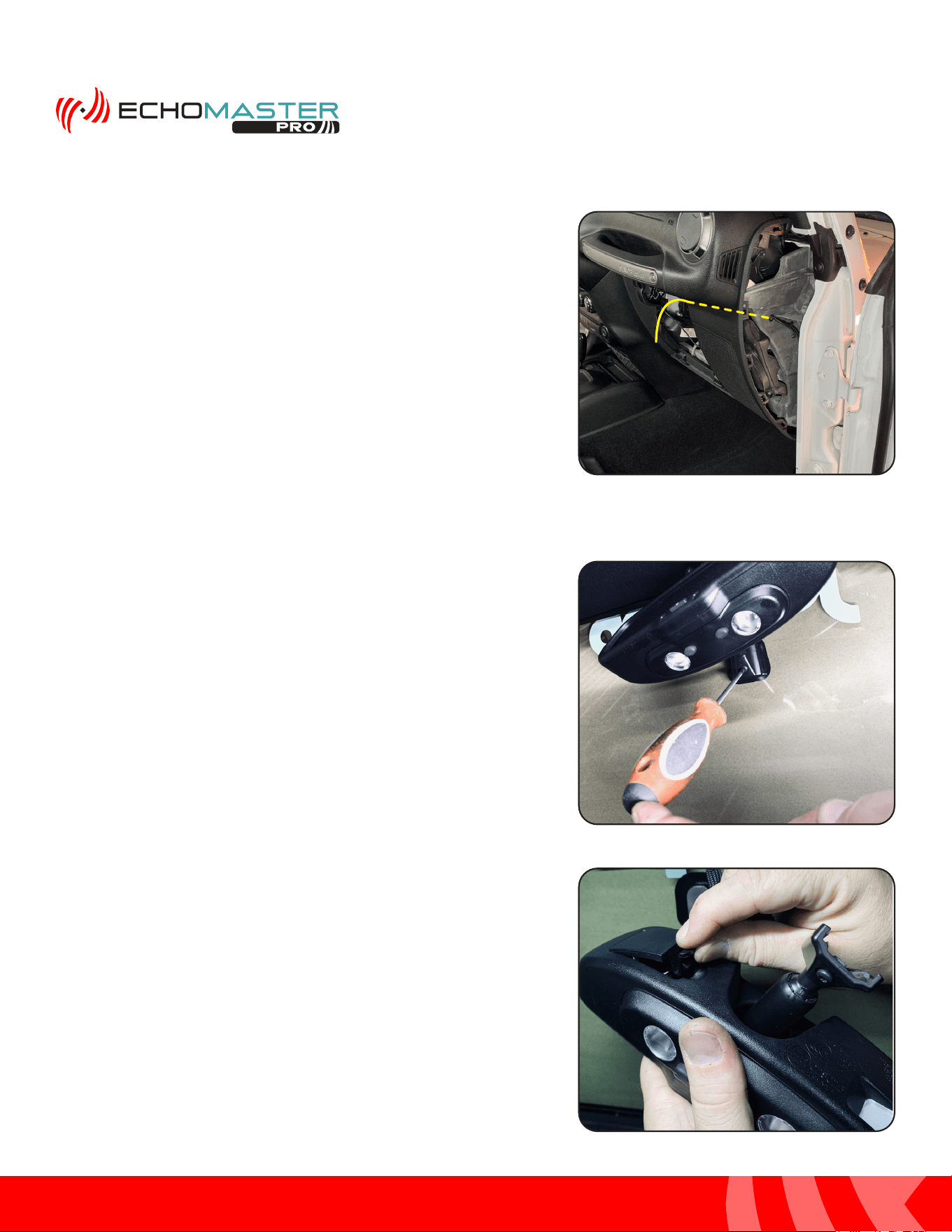
Step 24
Continue following the factory wire harness forward, across
the door sill(s), up to the glove box area. Secure with zip
ties.
Step 23
Route the camera extension cable towards the front of the
vehicle following the factory wire harness. Secure with zip
ties.
Step 25
Using a wire shing tool route the cable through the hole in
the passenger side of the dash just above the speaker.
18
Installation Guide
18
tel - 1-800-477-2267
email - support@echomaster.com
Illustrations are typical and may not match exact vehicle detail
Routing the Camera Cable (cont)
Step 26
Route the cable along the thick bundle of wires high in the
dash and pull the remainder of the cable through the glove
box opening. This will later be connected to the mirror
power harness.
Installing the Mirror & Harness (JK)
Step 1
Using T20 Torx driver, loosen the set screw on the bas
of the factory rear view mirror. Slide the mirror upward to
remove it from the windshield mounting tab.
Step 2
If the vehicle is equipped with an auto dimming mirror,
depress the clip and open the back cover. Depress the
wire connector locking tab and remove the connector.
19
Installation Guide
19
tel - 1-800-477-2267
email - support@echomaster.com
Illustrations are typical and may not match exact vehicle detail
MRCHDDVRJW
Step 3
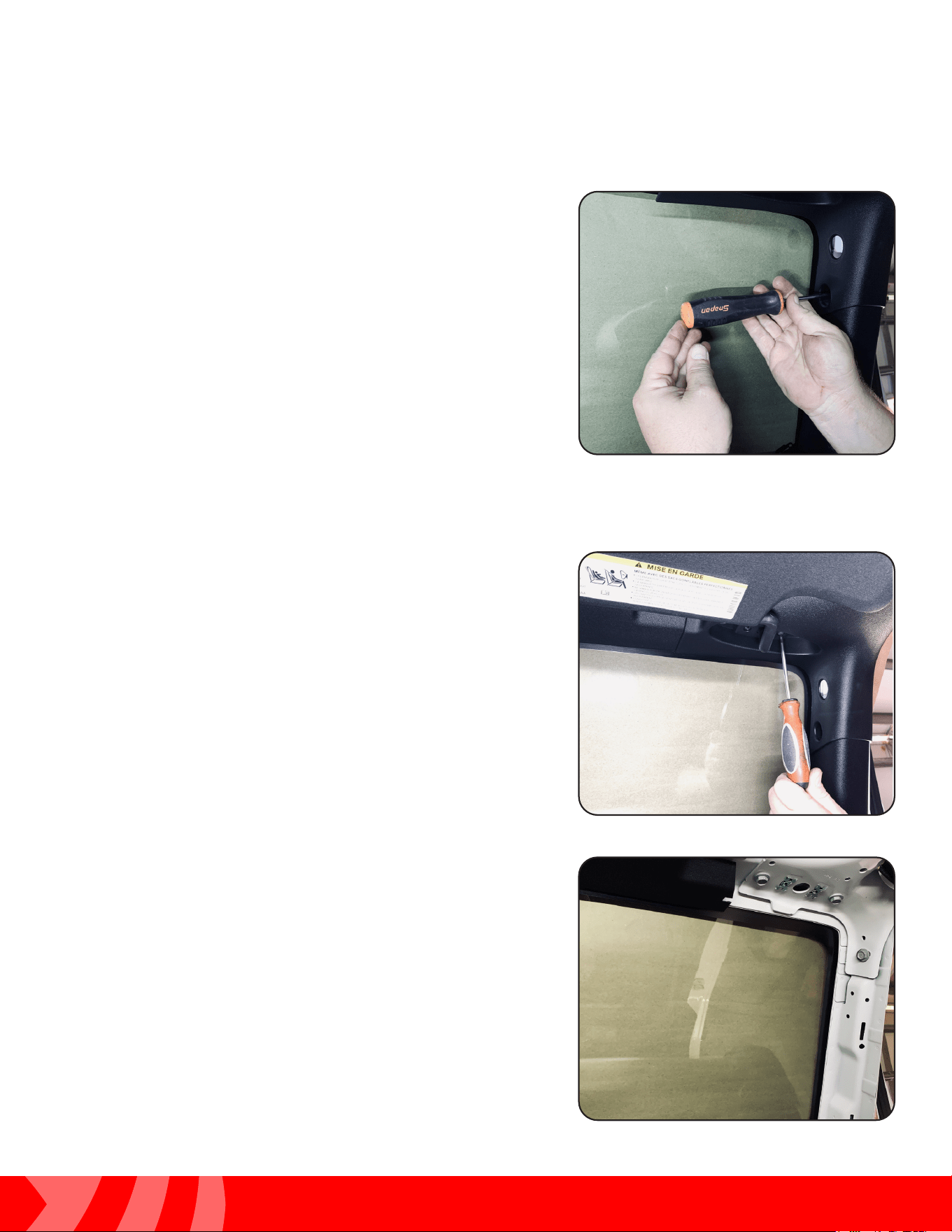
Using a Phillips screwdriver, remove the push rivet from the
passenger A pillar.
Step 4
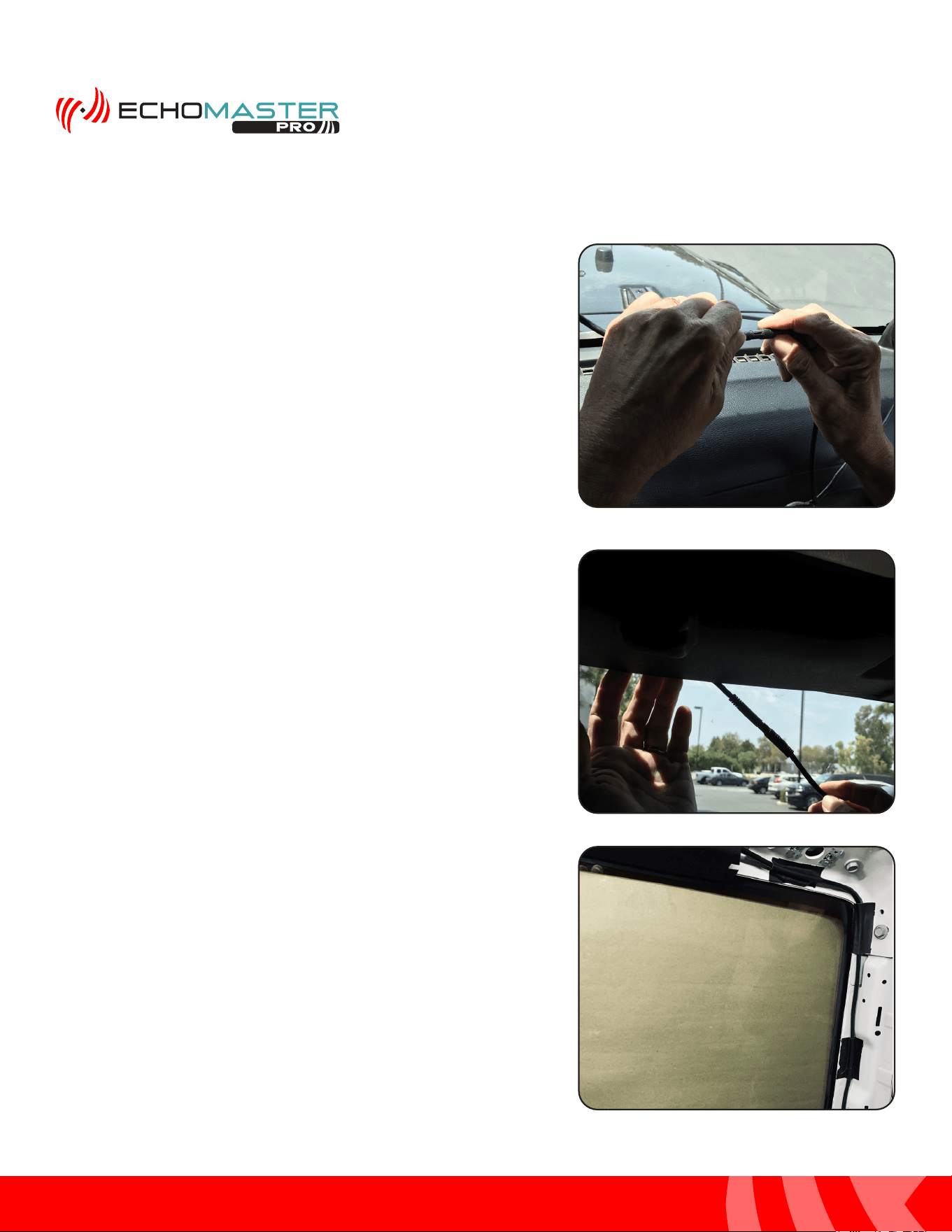
Remove the passenger sun visor by removing the two Torx
T20 screws.
Step 5
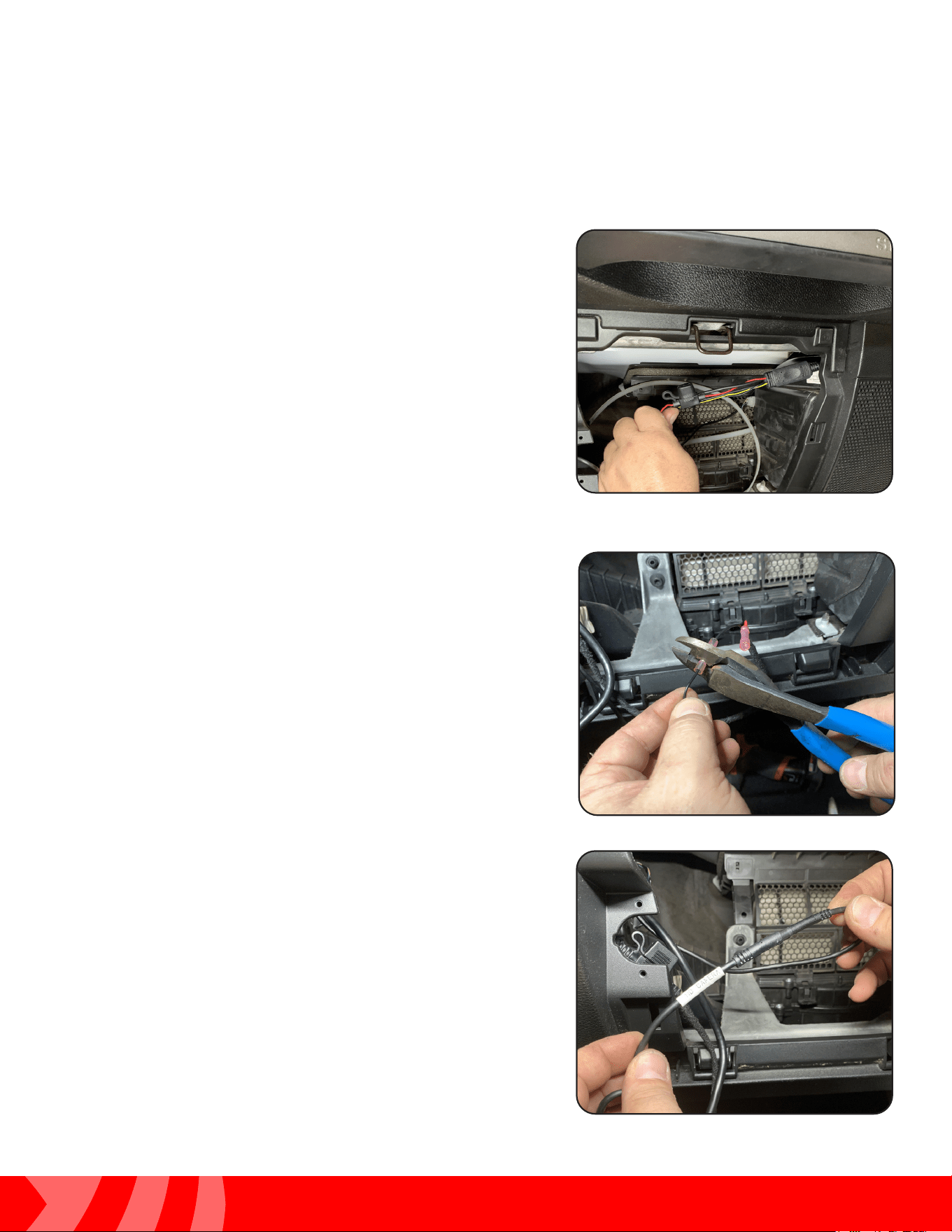
Remove the passenger A pillar trim panel by pulling to
release the retaining clips.
20
Installation Guide
20
tel - 1-800-477-2267
email - support@echomaster.com
Illustrations are typical and may not match exact vehicle detail
Step 6
Loosen the Phillips set screw on the HDDVR mounting
bracket. Slide the mirror onto the windshield mounting tab.
Tighten the set screw.
Attach the monitor cable to the Mirror Power/Video
Harness.
Step 7
Route the mirror cable towards the passenger A pillar,
tucking the cable behind the windshield header panel.
Step 8
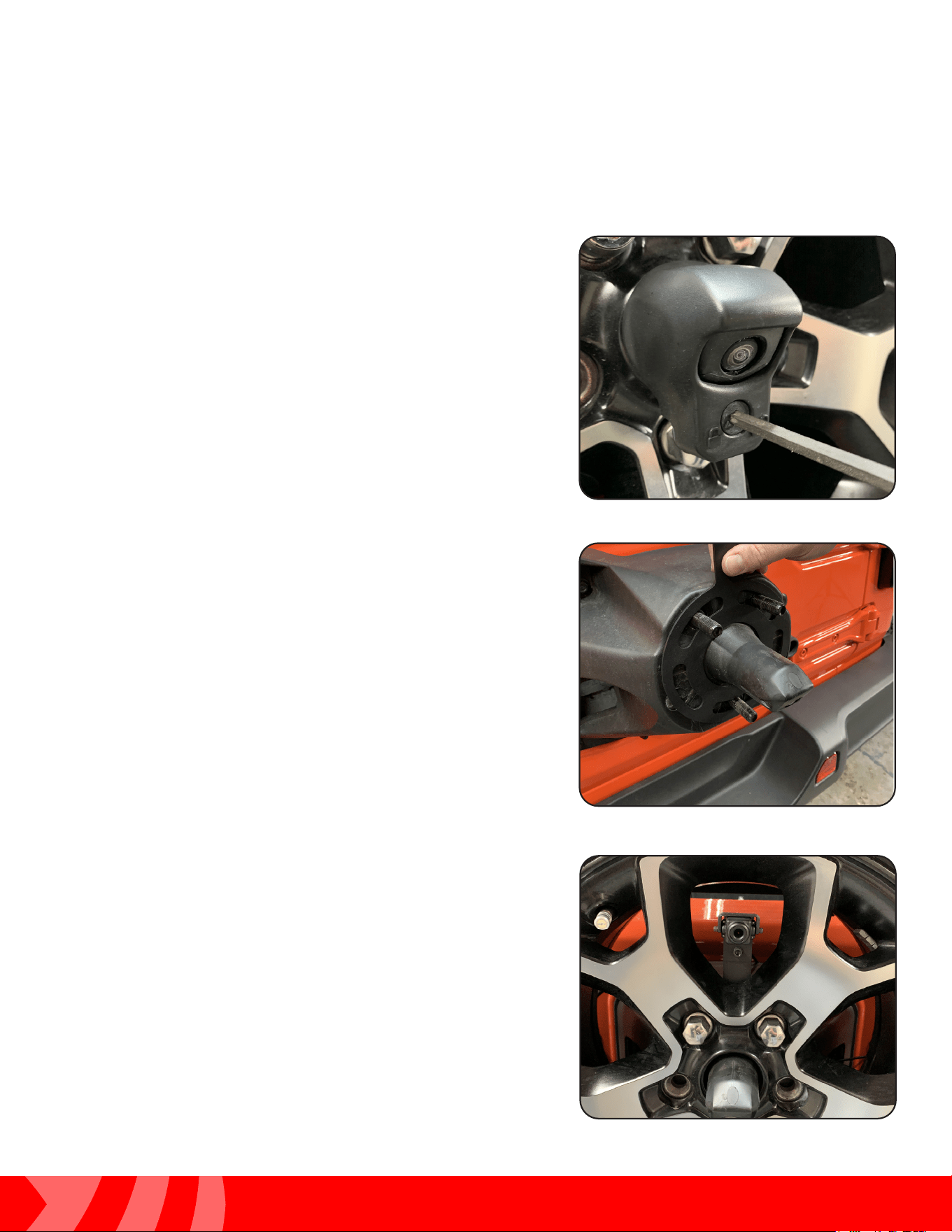
Route and secure the cable across the windshield frame
and down the A pillar.
Installing the Mirror & Harness (cont.)
21
Installation Guide
21
tel - 1-800-477-2267
email - support@echomaster.com
Illustrations are typical and may not match exact vehicle detail
MRCHDDVRJW
Step 9
Route the harness into the dash on the passenger side and
out of the glove box opening.
Step 11
Connect the 4 pin plug on the Camera Extension harness
to the matching plug on the mirror power/video harness.
Installing the Mirror & Harness (cont.)
Step 10
Connect the mirror monitor power and ground wires:
BLACK = Chassis Ground
RED = Switched Power
YELLOW = Constant Power

22
Installation Guide
22
tel - 1-800-477-2267
email - support@echomaster.com
Illustrations are typical and may not match exact vehicle detail
Test and Enjoy
After the installation is complete, Operating Instructions start on
Page 11 of the User Manual included with the MRC-HDDVR
Questions?
Reach out to our Technical Support Team:
Phone: 727-592-5991
Email: [email protected]
Chat: EchoMaster.com
23
Installation Guide
23
tel - 1-800-477-2267
email - support@echomaster.com
Illustrations are typical and may not match exact vehicle detail
MRCHDDVRJW
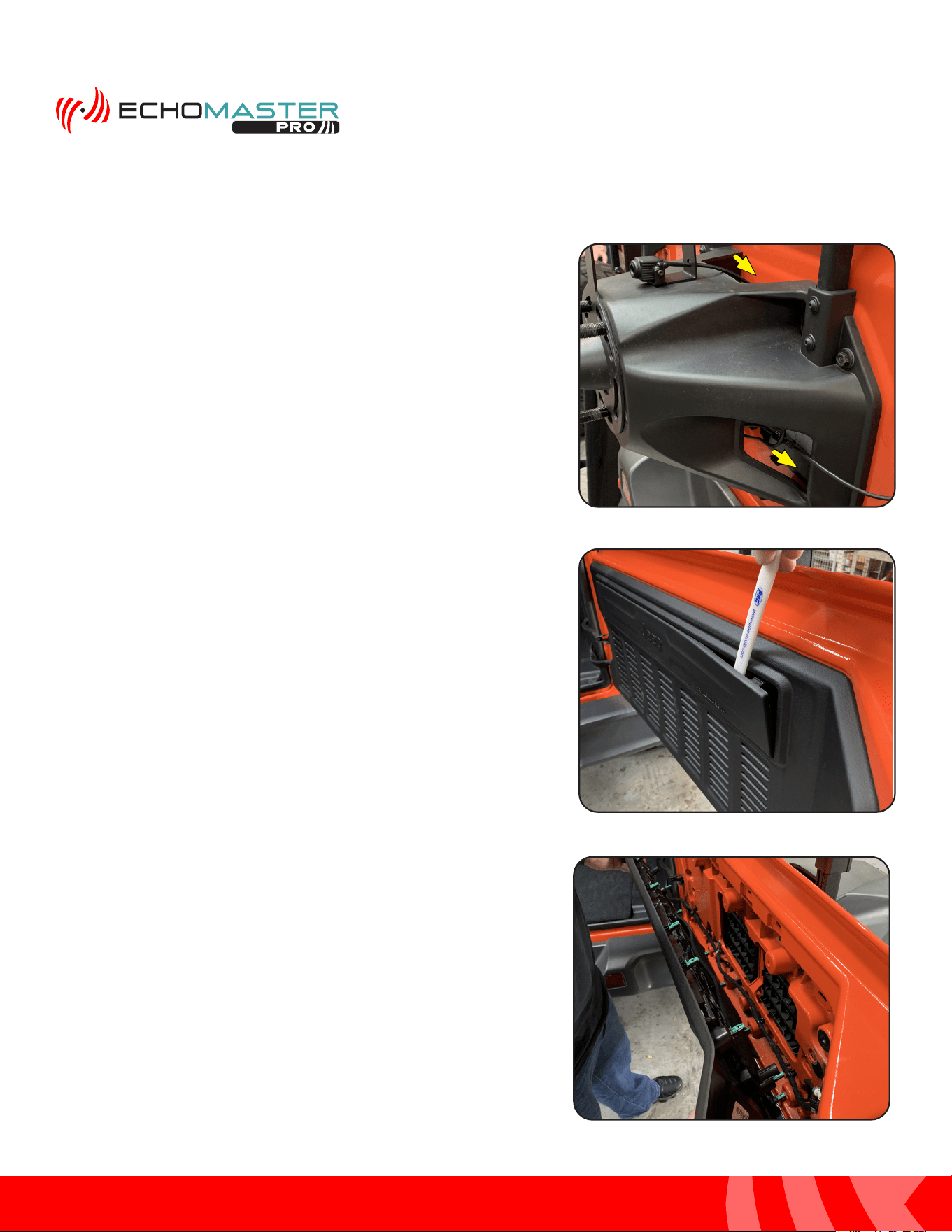
Mounting the Rear Camera (JL)
Step 1
Using a T40 Torx driver, unlock the camera trim bezel and
remove bezel.
Step 2
Remove the spare tire. Place the Spare Tire Mounting
Bracket and camera assembly on the wheel studs and
secure with the three push nut retainers included in the
JP3-MOUNT.
The push nut retainers are installed using a 11/16”
(17mm) deep socket and a hammer.
Step 3
Temporarily install the spare tire. Conrm a usable opening
in the wheel is located at or close to center. This may
require removing and rotating the wheel until a usable
opening is located. If using the Riser Plate, the camera
can be adjusted up and down.
Remove the spare tire.
24
Installation Guide
24
tel - 1-800-477-2267
email - support@echomaster.com
Illustrations are typical and may not match exact vehicle detail
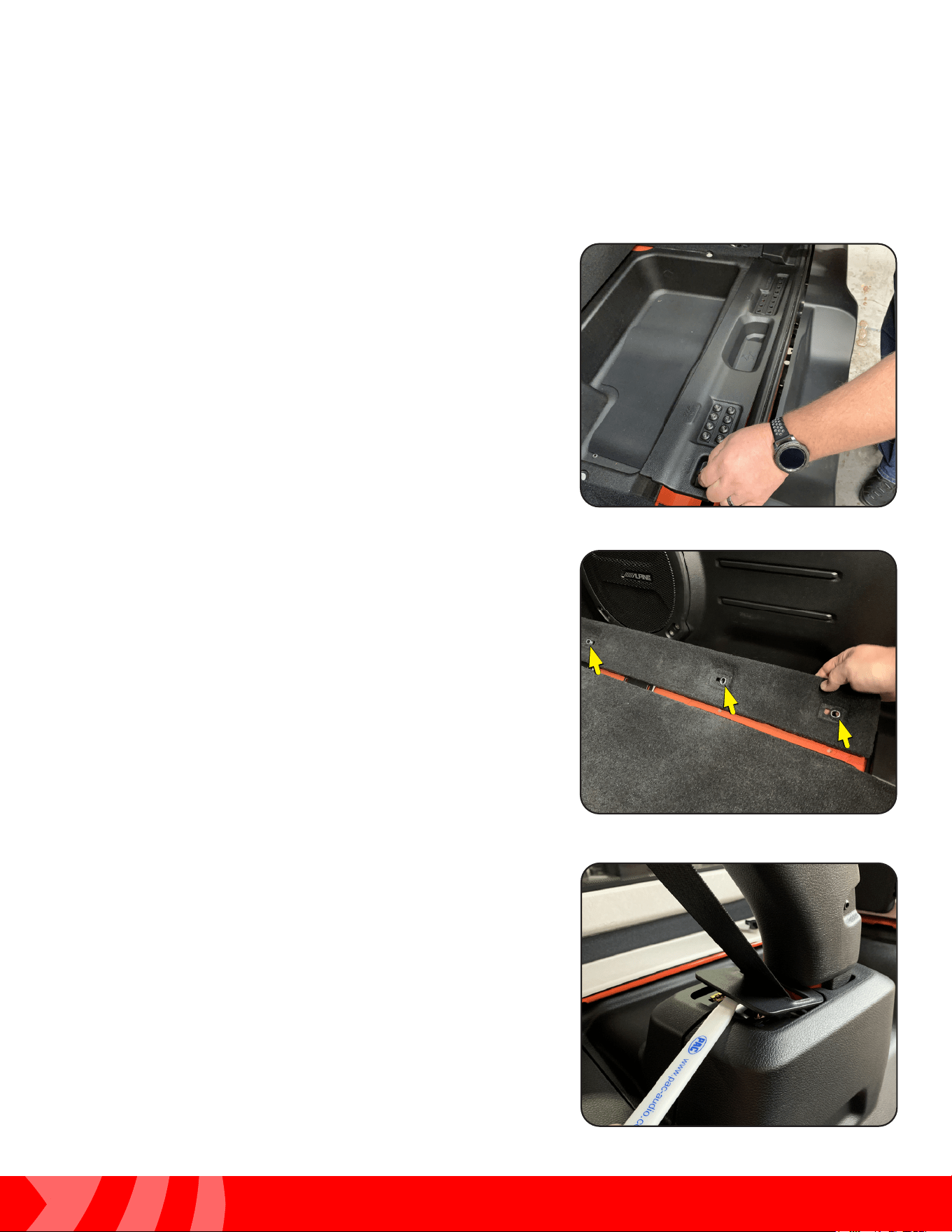
Step 1
Route the camera cable through the factory opening in
the top of carrier and through the opening towards the
passenger side.
Step 2
Remove the trim panel on the inside of the tailgate by
pulling it away from the tailgate along the top of the panel
and working your way from one side to the other. A plastic
trim tool may be needed for this step.
Step 3
Remove the tailgate cover on the inside of the tailgate by
pulling it away from the tailgate along the top of the panel
and working your way from one side to the other. A plastic
trim tool may be needed for this step.
Routing the Camera Cable (JL)
25
Installation Guide
25
tel - 1-800-477-2267
email - support@echomaster.com
Illustrations are typical and may not match exact vehicle detail
MRCHDDVRJW
Routing the Camera Cable (cont)
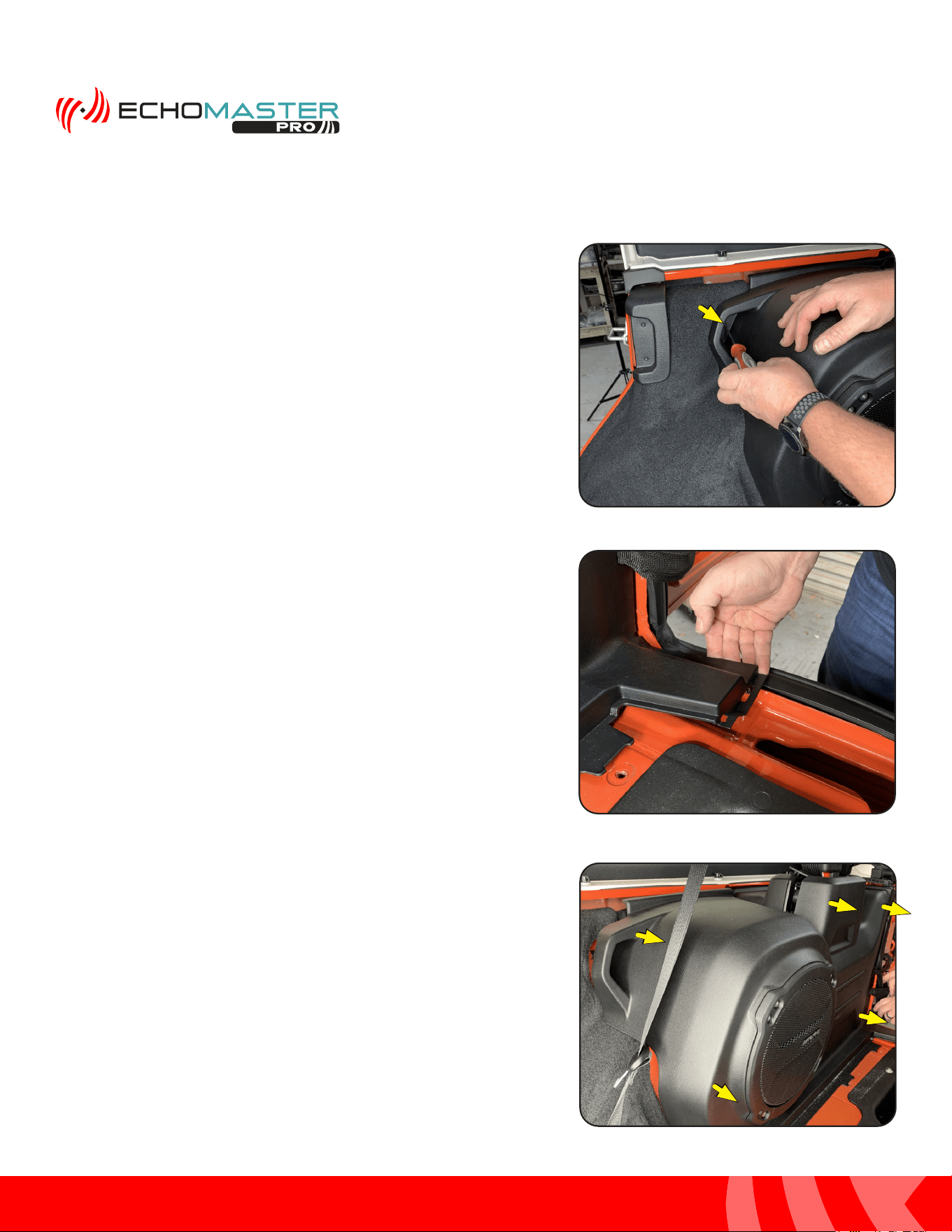
Step 4
Lift up the storage cover and remove the rear most trim
panel that covers the jack.
Step 5
Remove the (X3) Torx bolts securing the passenger side
trim panel to the oor.
Step 6
Using a plastic trim tool pop up the plastic seatbelt
guide. Slide it up the seat belt so that it is out of the way.
26
Installation Guide
26
tel - 1-800-477-2267
email - support@echomaster.com
Illustrations are typical and may not match exact vehicle detail
Routing the Camera Cable (cont)
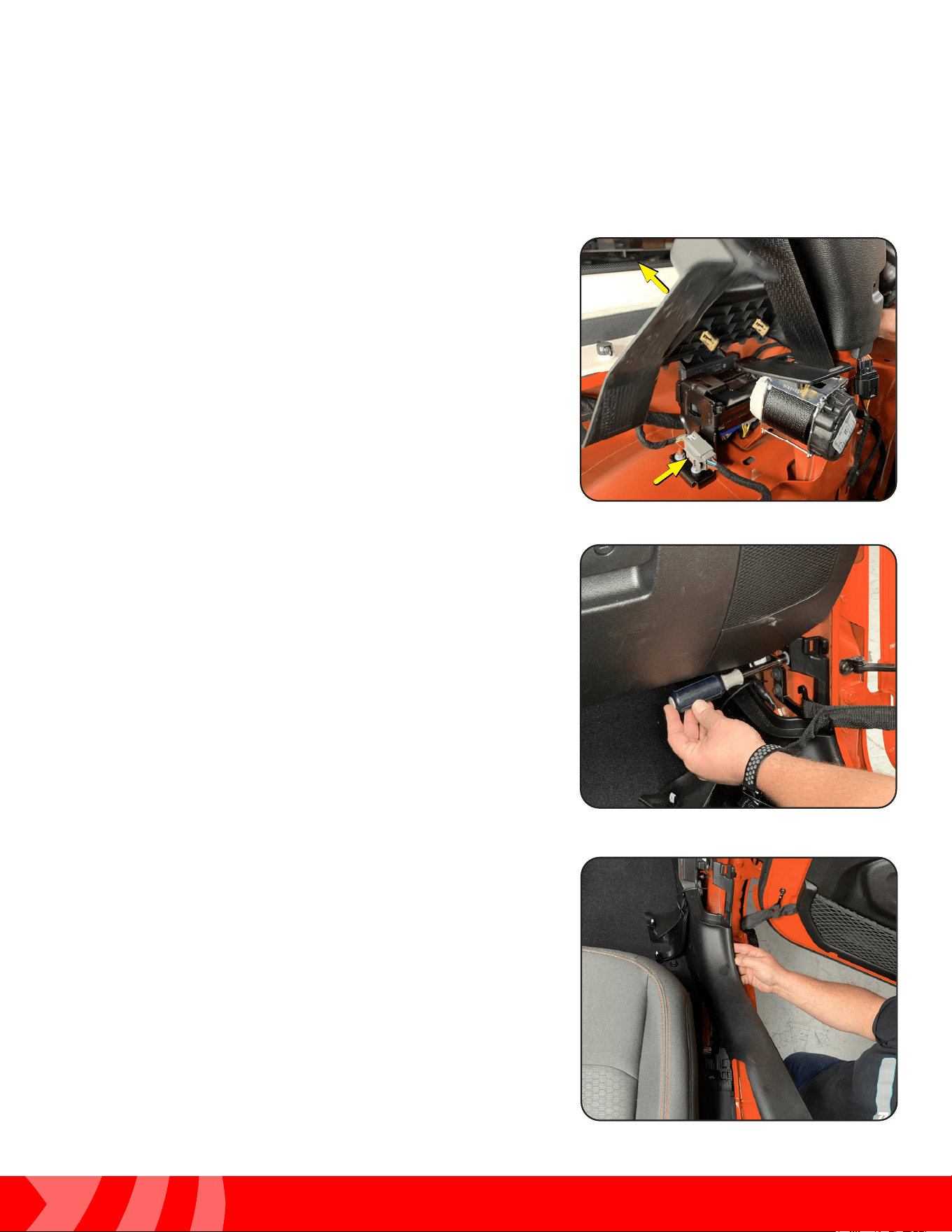
Step 7
Remove the T20 Torx bolt that fastens the rear subwoofer
trim panel into place.
Step 8
Release the clip located by the jack compartment by pulling
up on the panel.
Step 9
Pull the whole panel assembly towards the center of
the vehicle to release the clips securing it to the body of
the vehicle.
27
Installation Guide
27
tel - 1-800-477-2267
email - support@echomaster.com
Illustrations are typical and may not match exact vehicle detail
MRCHDDVRJW
Routing the Camera Cable (cont)
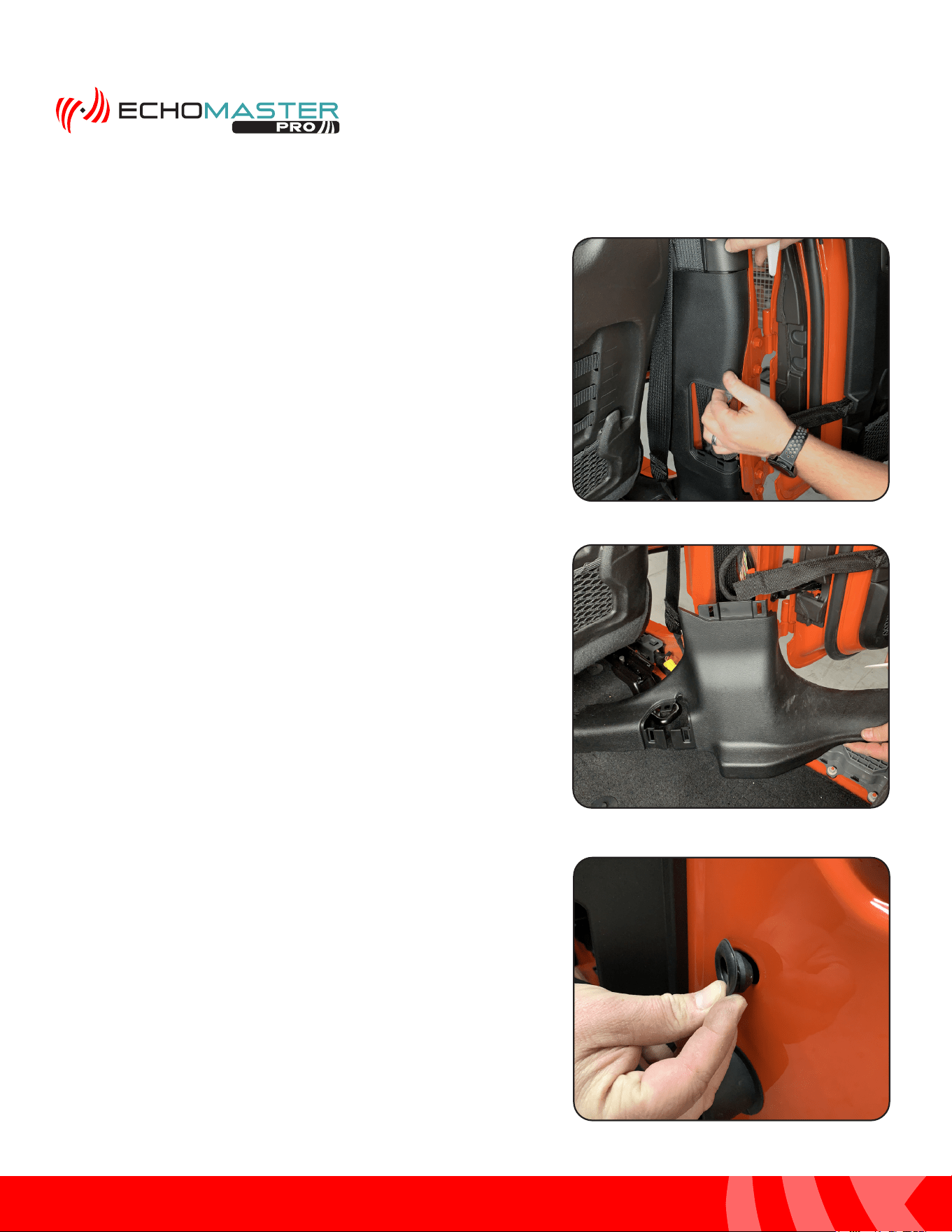
Step 10
Pull up on the seat belt assembly trim panel and set aside.
If the vehicle is equipped with a subwoofer, disconnect the
subwoofer wire harness.
Step 11
At the front of the vehicle, release the cover panel on the
passenger side kick panel. Disconnect the door check
strap and the electrical connector. Remove the 10mm nut
the secures the panel to the body.
Step 12
Lift the door sill panel at the rear, then gently pull rearward
and remove.
28
Installation Guide
28
tel - 1-800-477-2267
email - support@echomaster.com
Illustrations are typical and may not match exact vehicle detail
Routing the Camera Cable (cont)
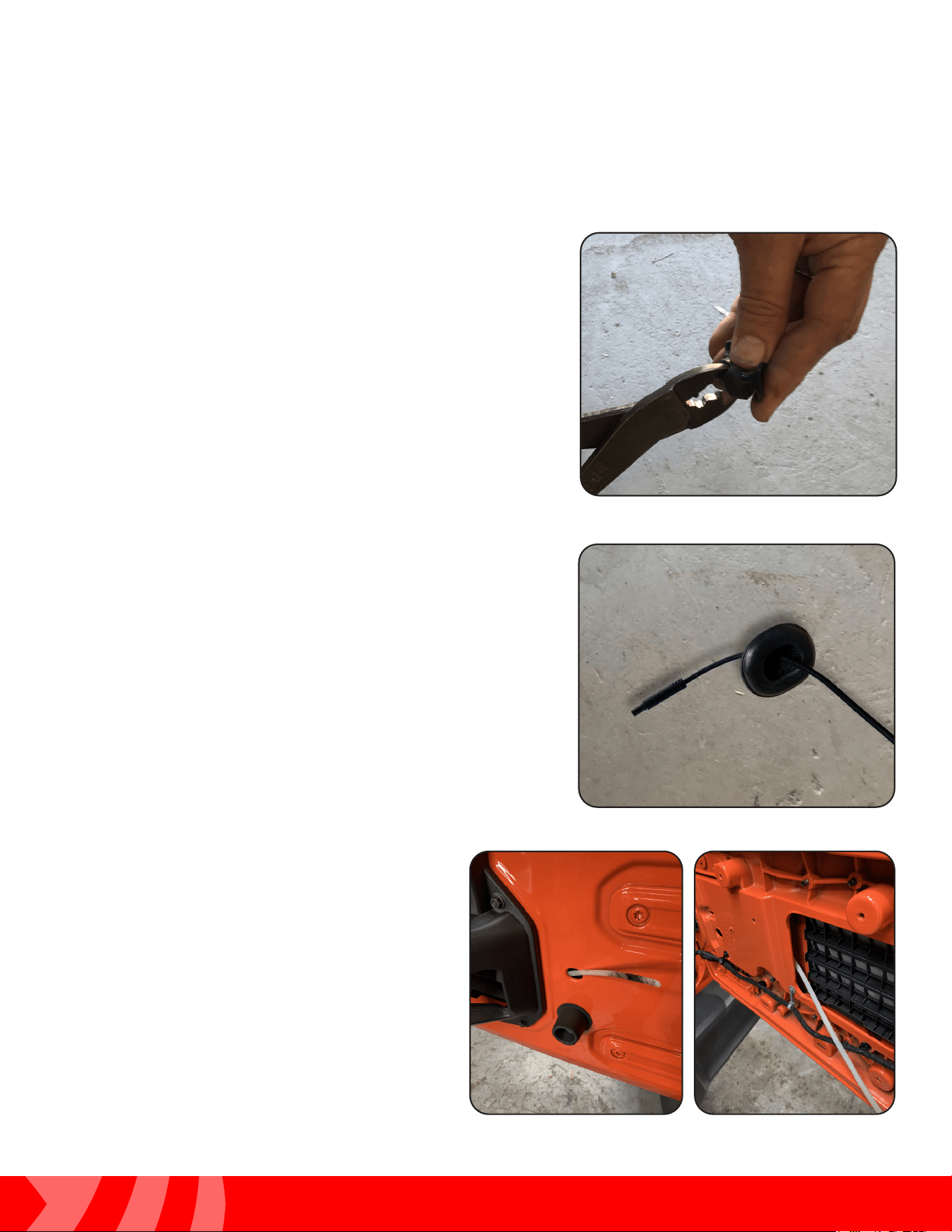
Step 13
Move the front passenger seat to the full forward position.
Spread the bottom of the middle B-pillar panel, then pull
out to release the retaining clips and remove.
Step 14
Using a trim stick or equivalent, release the retaining clips
and loosen the lower B-pillar trim panel. Guide the seat belt
through the split in the trim panel.
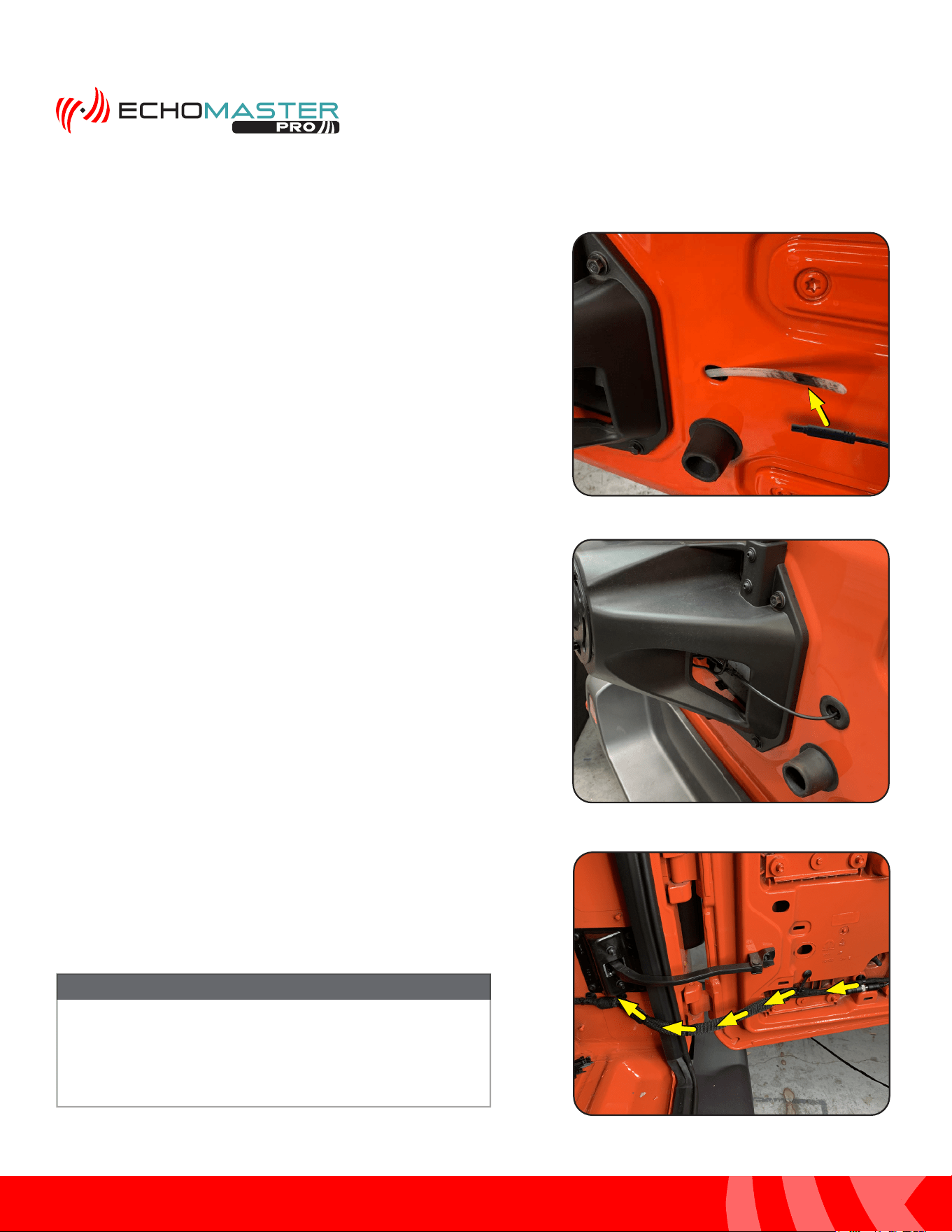
Step 15
Remove the rubber grommet on the right side of the spare
tire carrier.
29
Installation Guide
29
tel - 1-800-477-2267
email - support@echomaster.com
Illustrations are typical and may not match exact vehicle detail
MRCHDDVRJW
Routing the Camera Cable (cont)
Step 16
Using diagonal cutters or similar, cut a slit in the grommet
large enough to allow the camera cable to pass through.
Step 17
Feed the camera cable through the rubber grommet.
Step 18
Route a wire feeder through the grommet hole
to the inside of the tailgate near the vent.
30
Installation Guide
30
tel - 1-800-477-2267
email - support@echomaster.com
Illustrations are typical and may not match exact vehicle detail
Routing the Camera Cable (cont)
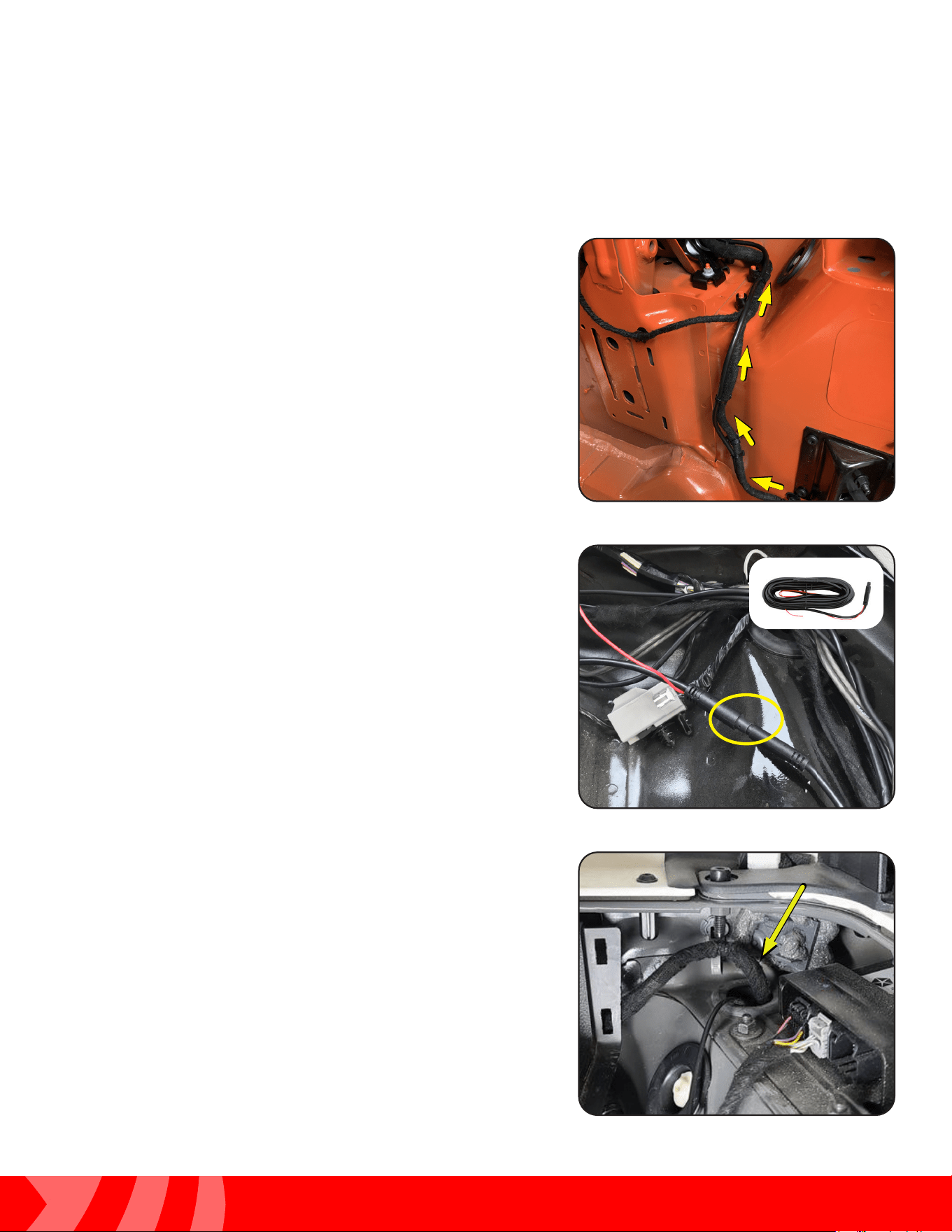
Step 19
Attach the end of the camera cable to the wire feeder and
pull it through to the inside of the tailgate.
Step 20
Reinsert the grommet.
Step 18
Unclip and untape the tailgate wire harness that runs into
the cargo area. Using a wire feeder, route the camera cable
through the fabric wire loom.
The zip tie clips securing the wire harness can be
removed by using a small pick tool to release the zip
tie locking tab. Or the zip tie can be cut and then a
new zip tie ran through the base of the clips.
NOTE
31
Installation Guide
31
tel - 1-800-477-2267
email - support@echomaster.com
Illustrations are typical and may not match exact vehicle detail
MRCHDDVRJW
Routing the Camera Cable (cont)
Step 23
Connect the Camera Extension Cable to the camera cable
by lining up the arrows on the two 4-pin ends and pushing
together.
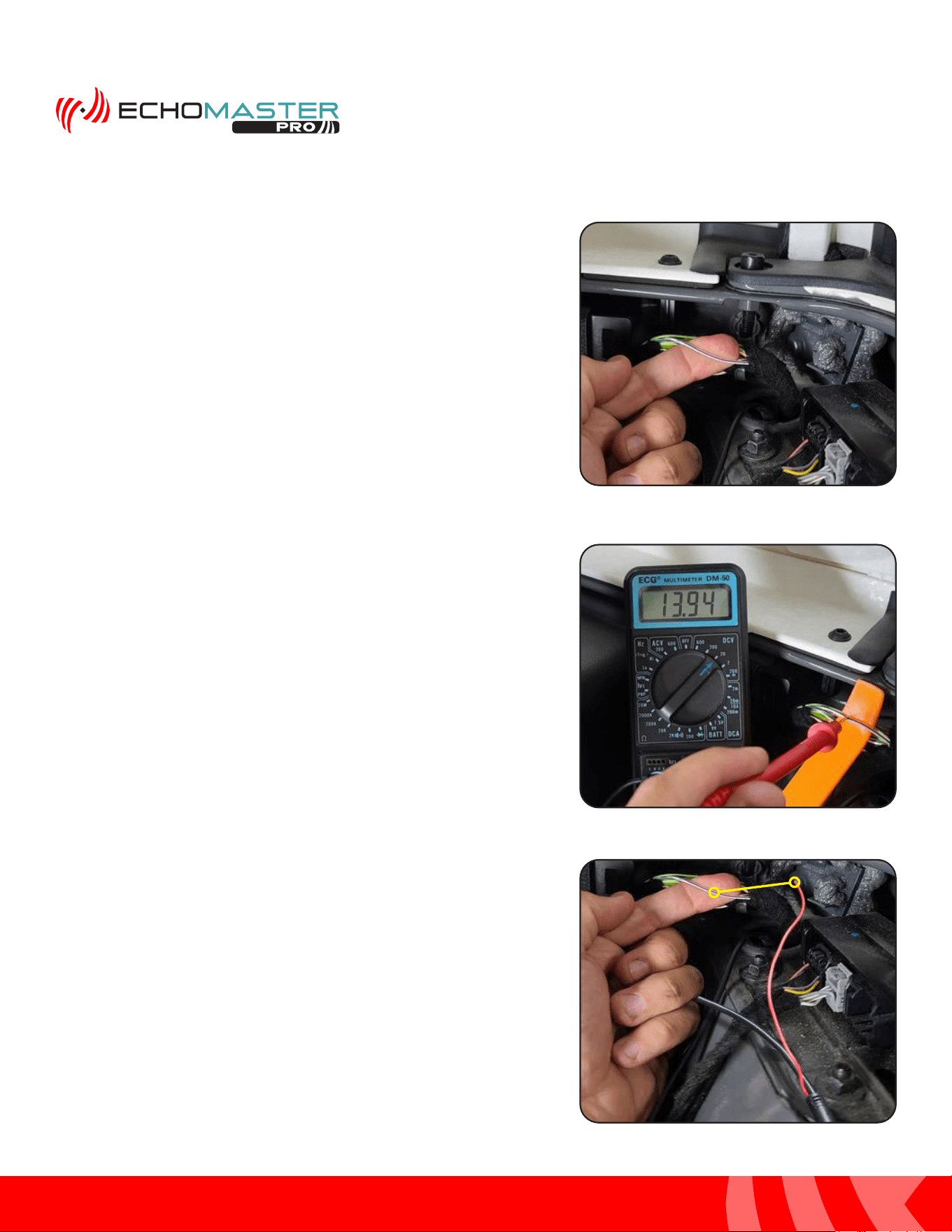
Step 22
Following the factory wire harness, route the camera cable
up over the rear tire well. Secure with zip ties.
Step 24
Locate the passenger tail light wire harness running through
the rubber grommet above the passenger tail light.
32
Installation Guide
32
tel - 1-800-477-2267
email - support@echomaster.com
Illustrations are typical and may not match exact vehicle detail
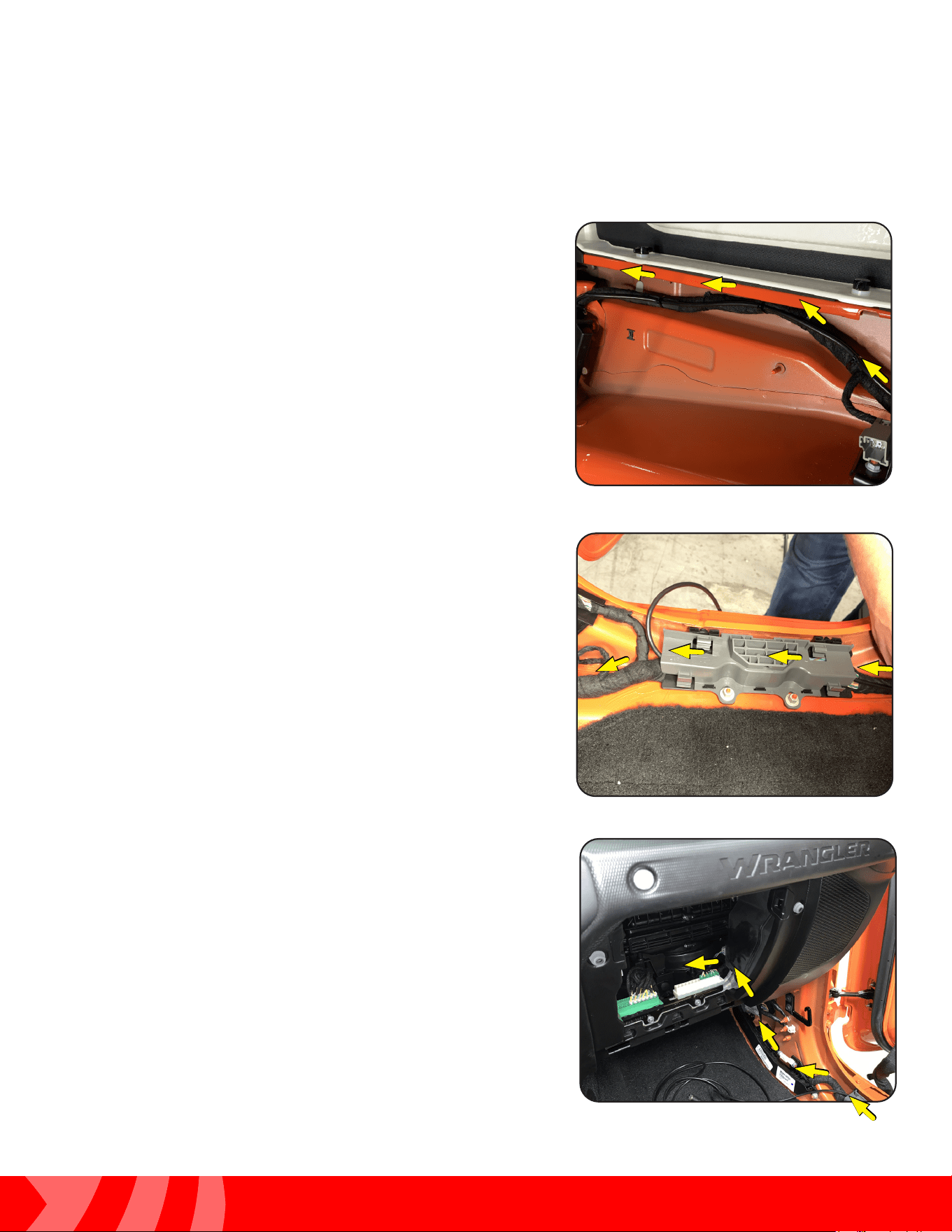
Step 26
Using a multimeter, conrm the reverse wire shows +12V
when in reverse. Testing the reverse wire will require two
people. Set the parking brake before starting the vehicle
and placing in reverse.
Routing the Camera Cable (cont)
Step 25
Remove a portion of the wire harness cloth tape. Locate the
White wire with a Purple stripe (WHT/PUR). On most JL’s,
this will be the reverse light wire, but it will need to be
conrmed using a multimeter.
Step 27
Attach the Red Reverse Trigger Wire on the cameras
extension cable to the reverse wire of the vehicle.
33
Installation Guide
33
tel - 1-800-477-2267
email - support@echomaster.com
Illustrations are typical and may not match exact vehicle detail
MRCHDDVRJW
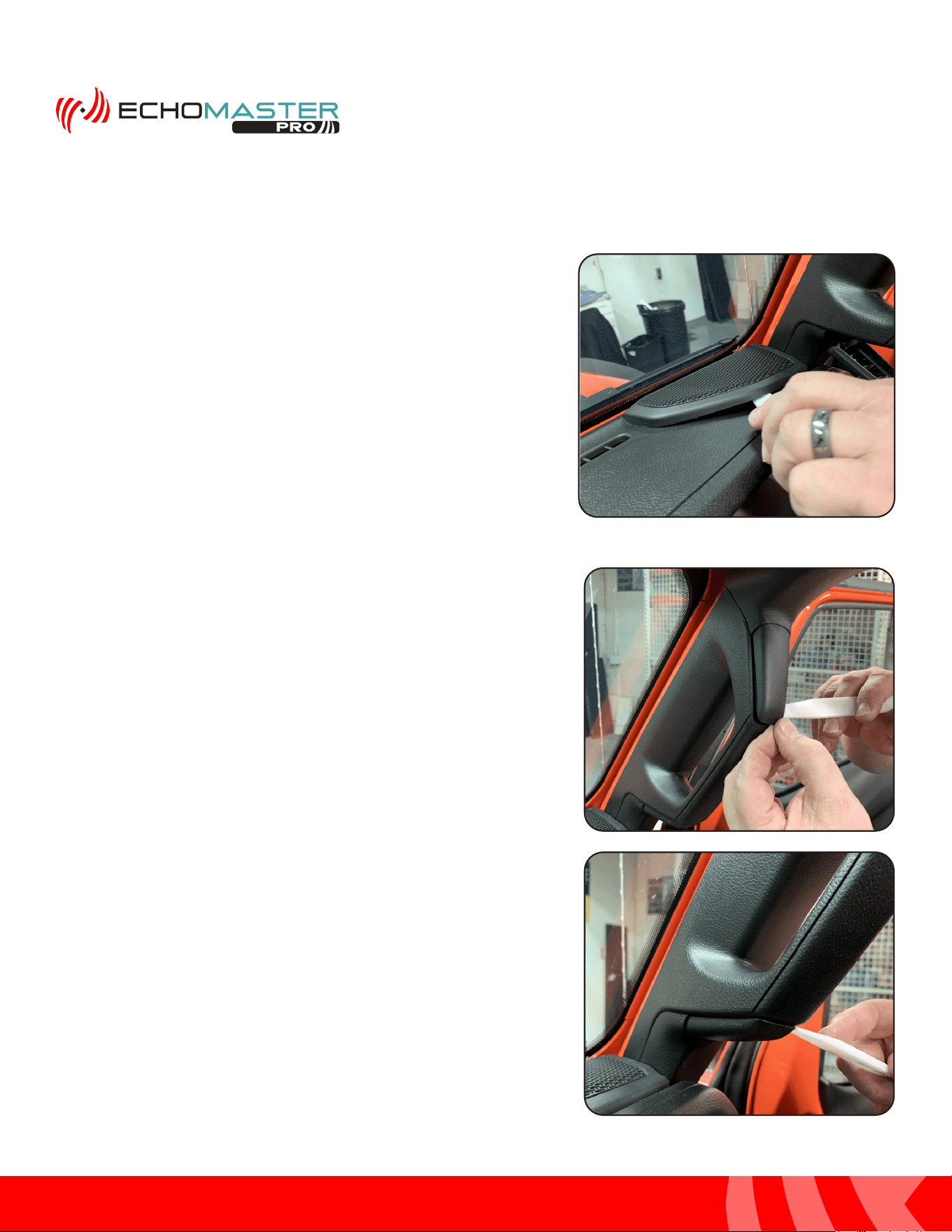
Step 29
Route the camera extension cable through the plastic
channels along the door sill(s) following the factory wire
harness.
Routing the Camera Cable (cont)
Step 28
Continue routing the camera extension cable towards the
front of the vehicle following the factory wire harness. Secure
with zip ties.
Step 30
Finish by routing the cable up into the inner dash area behind
the glove box.
34
Installation Guide
34
tel - 1-800-477-2267
email - support@echomaster.com
Illustrations are typical and may not match exact vehicle detail
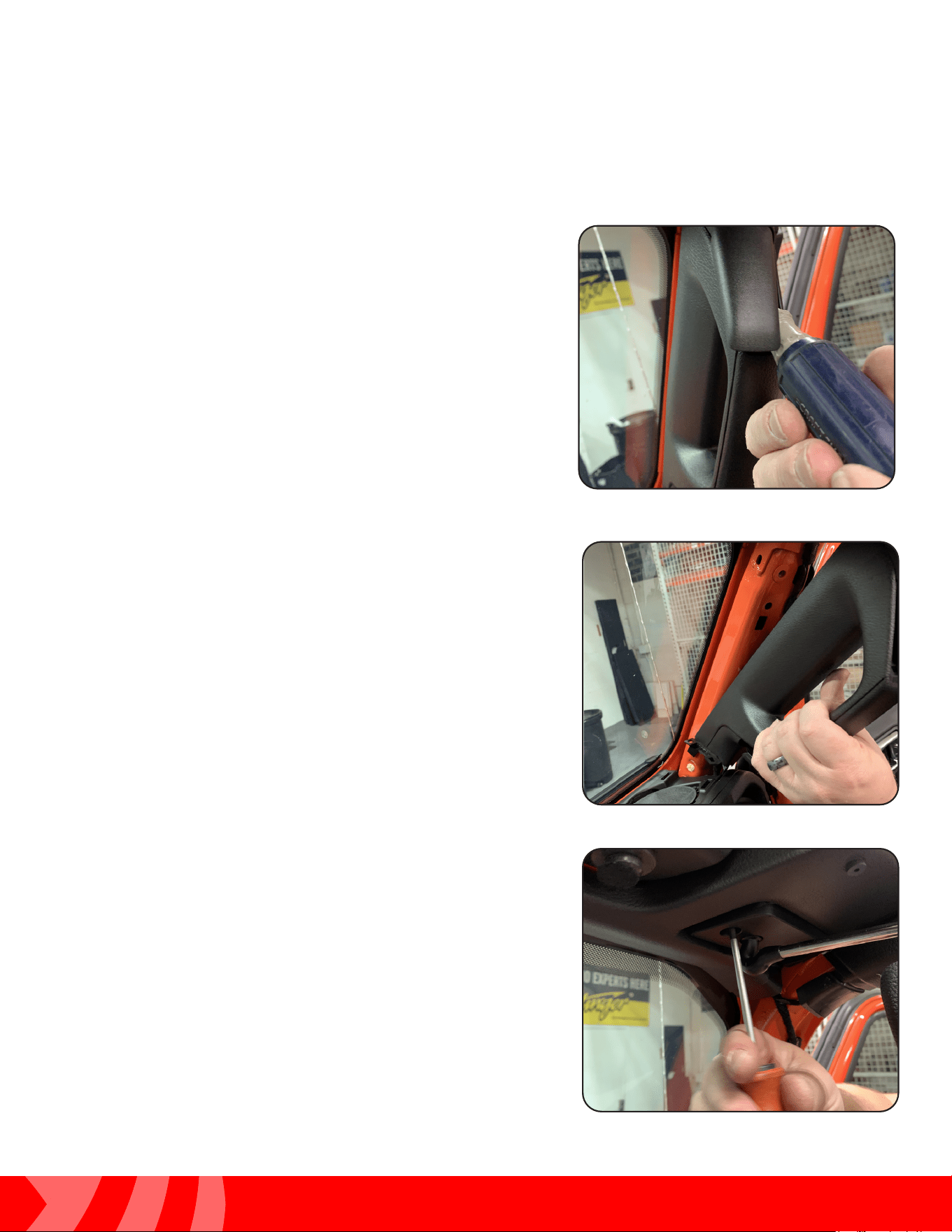
Step 1
Using a plastic trim tool remove the upper dash
speaker grill.
Step 2
Using a plastic trim tool, remove the
upper and lower fastener covers on the
passenger A-Pillar handle.
Installing the Mirror & Harness (JL)
35
Installation Guide
35
tel - 1-800-477-2267
email - support@echomaster.com
Illustrations are typical and may not match exact vehicle detail
MRCHDDVRJW
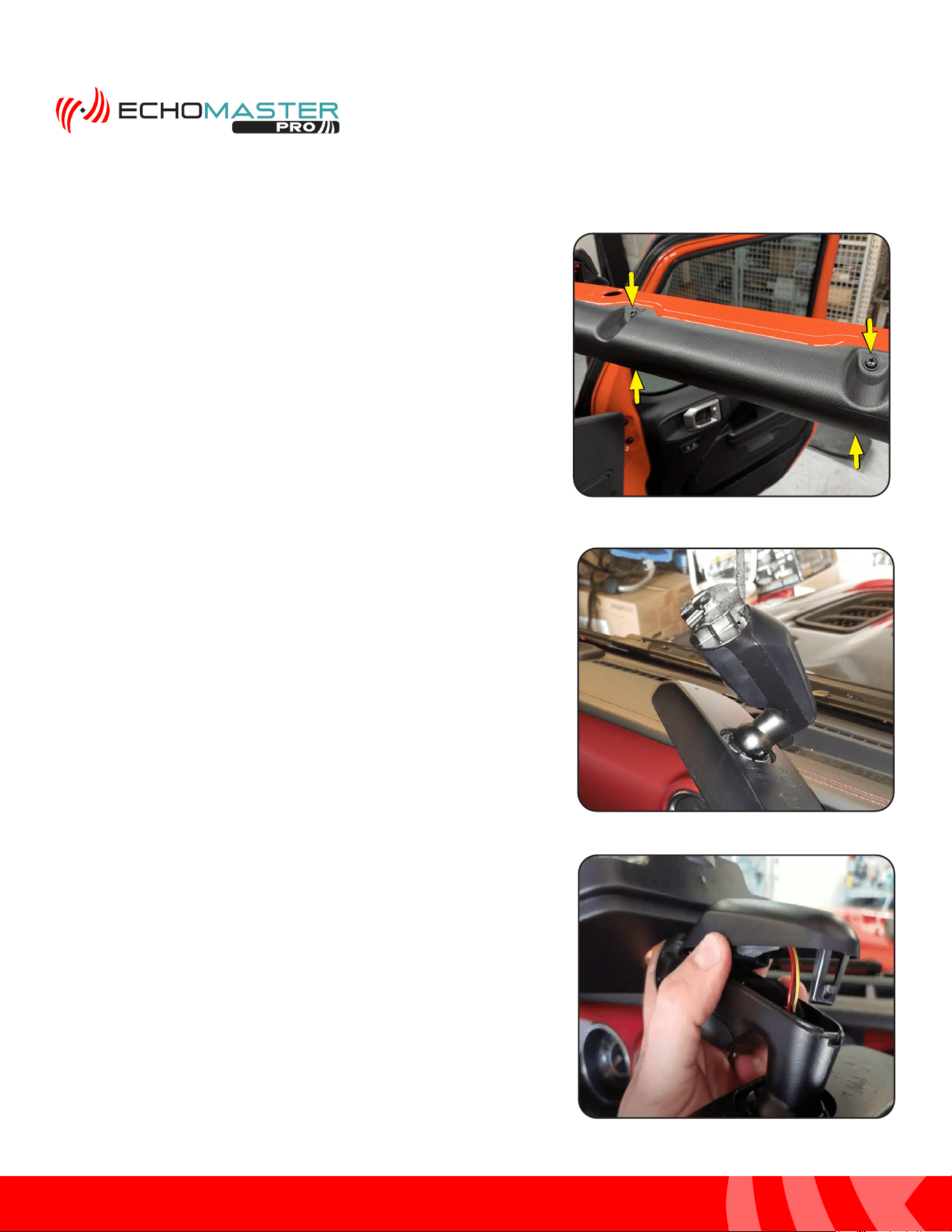
Step 4
Grasp the handle rmly and pull towards the center of the
vehicle to release the retaining clips and remove.
Step 5
Remove the passenger side sun visor by removing the two
Torx T20 screws.
Step 3
Remove the two 10mm bolts securing the
handle.
Installing the Mirror & Harness (cont.)
36
Installation Guide
36
tel - 1-800-477-2267
email - support@echomaster.com
Illustrations are typical and may not match exact vehicle detail
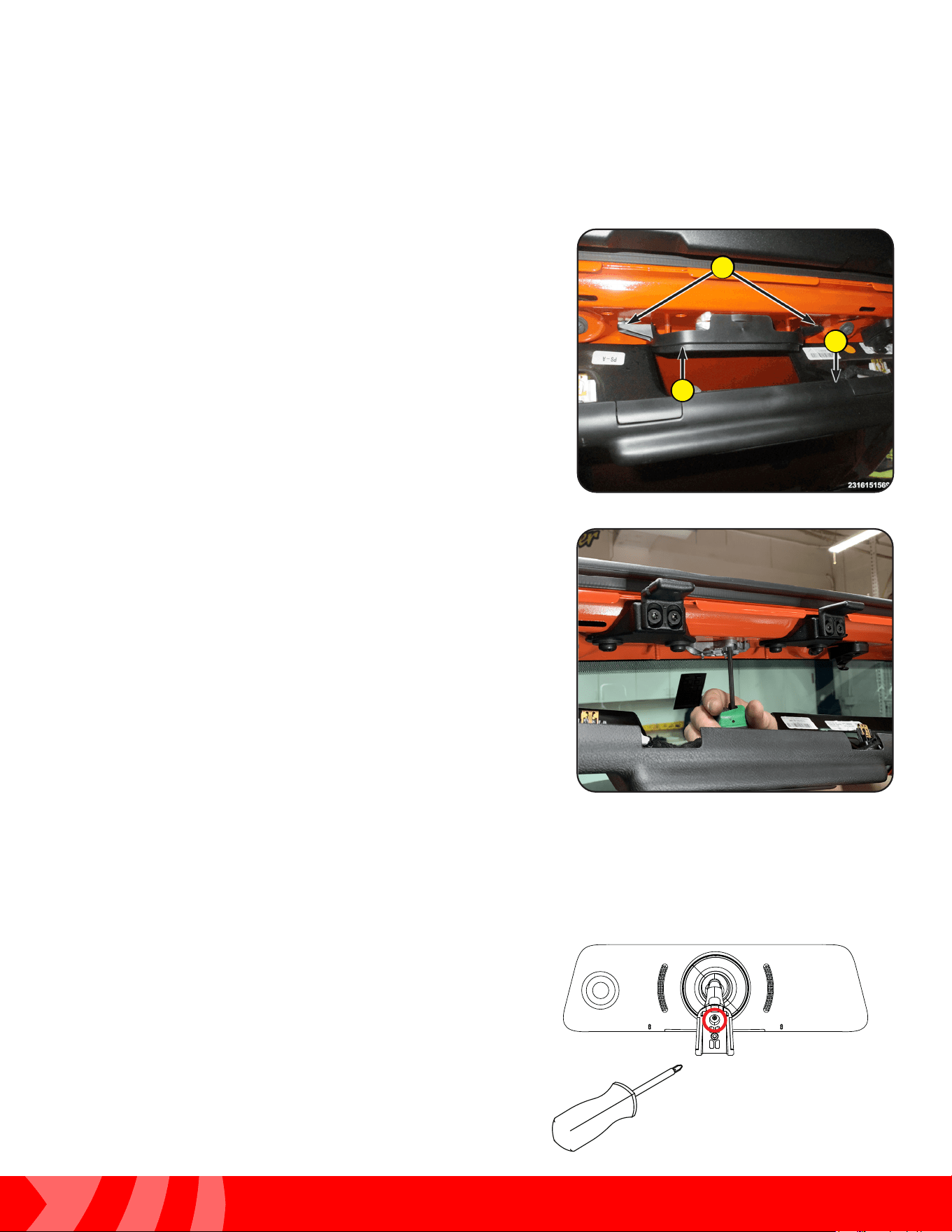
Step 7
Remove the factory rear view mirror by grabbing it by the
base and twisting it counter-clockwise 90 degrees.
Step 8
If equipped with a wire harness, open the back cover plate
and unplug the wire harness.
Step 6
Remove the passenger side front roll bar trim panel by
removing four Torx T20 screws and pulling the panel
towards the center of the vehicle.
Installing the Mirror & Harness (cont.)
37
Installation Guide
37
tel - 1-800-477-2267
email - support@echomaster.com
MRC-HDDVR-JW
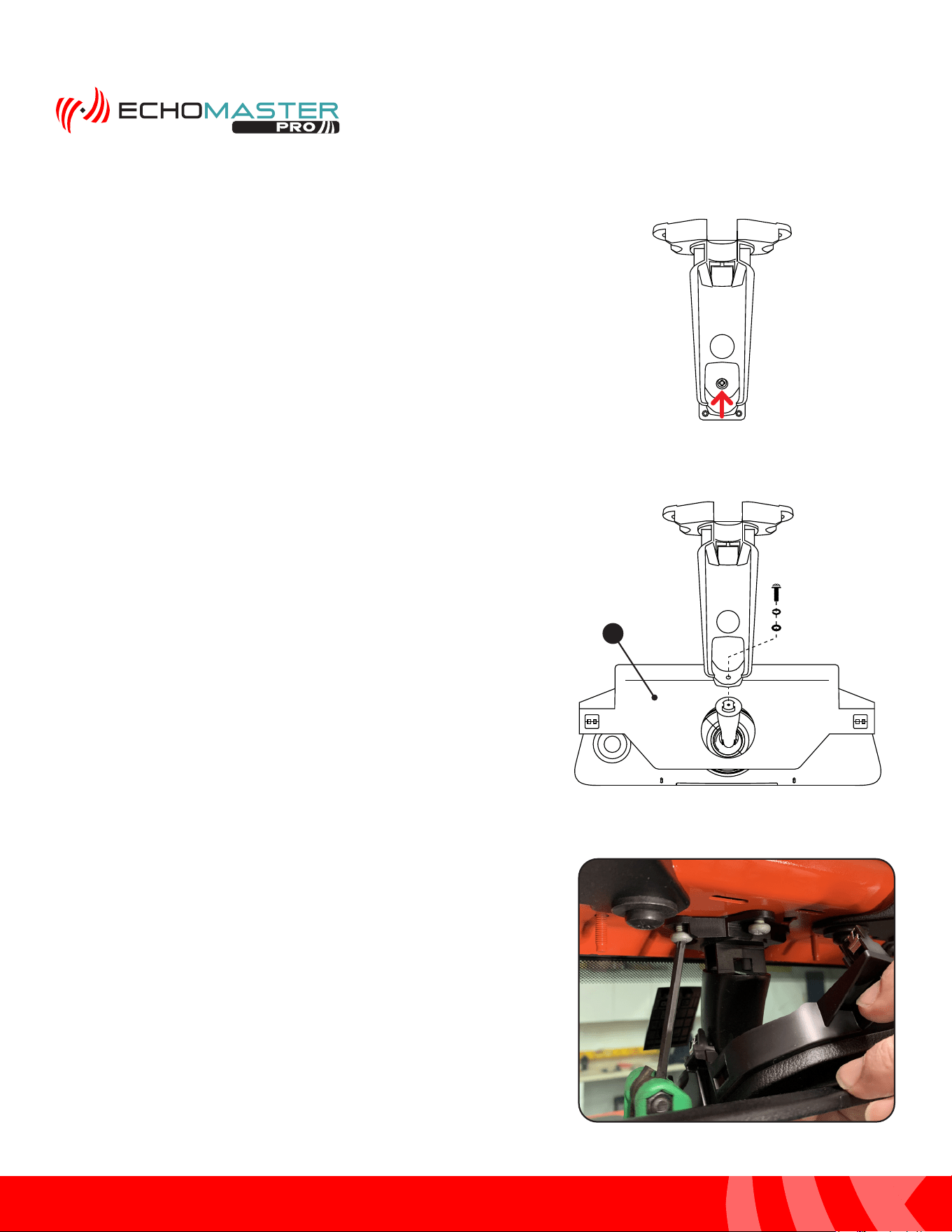
Step 10
Remove the three Torx bolts securing the mirror mount
to the windshield frame and remove the factory mirror
mounting base.
Step 9
Pull to release the retaining clips securing the windshield
header panel (1). With the header panel dropped out of the
way, release the two retaining clips (2) and remove the rear
view mirror base cover (3).
1
2
3
The HDDVR Mirror Monitor comes with the JK mounting bracket attached. For JL installations, the
JK style mount will need to be removed and the JL Mounting Bracket (PMRC-BRKT) installed by
following the steps below.
Step A
Using a Phillips screw driver, remove the screw inside
the access hole on the back of the mirror bracket.
Remove the JK style mount from the mirror stem.
Installing the Mirror & Harness (cont.)
38
Installation Guide
38
tel - 1-800-477-2267
email - support@echomaster.com
Illustrations are typical and may not match exact vehicle detail
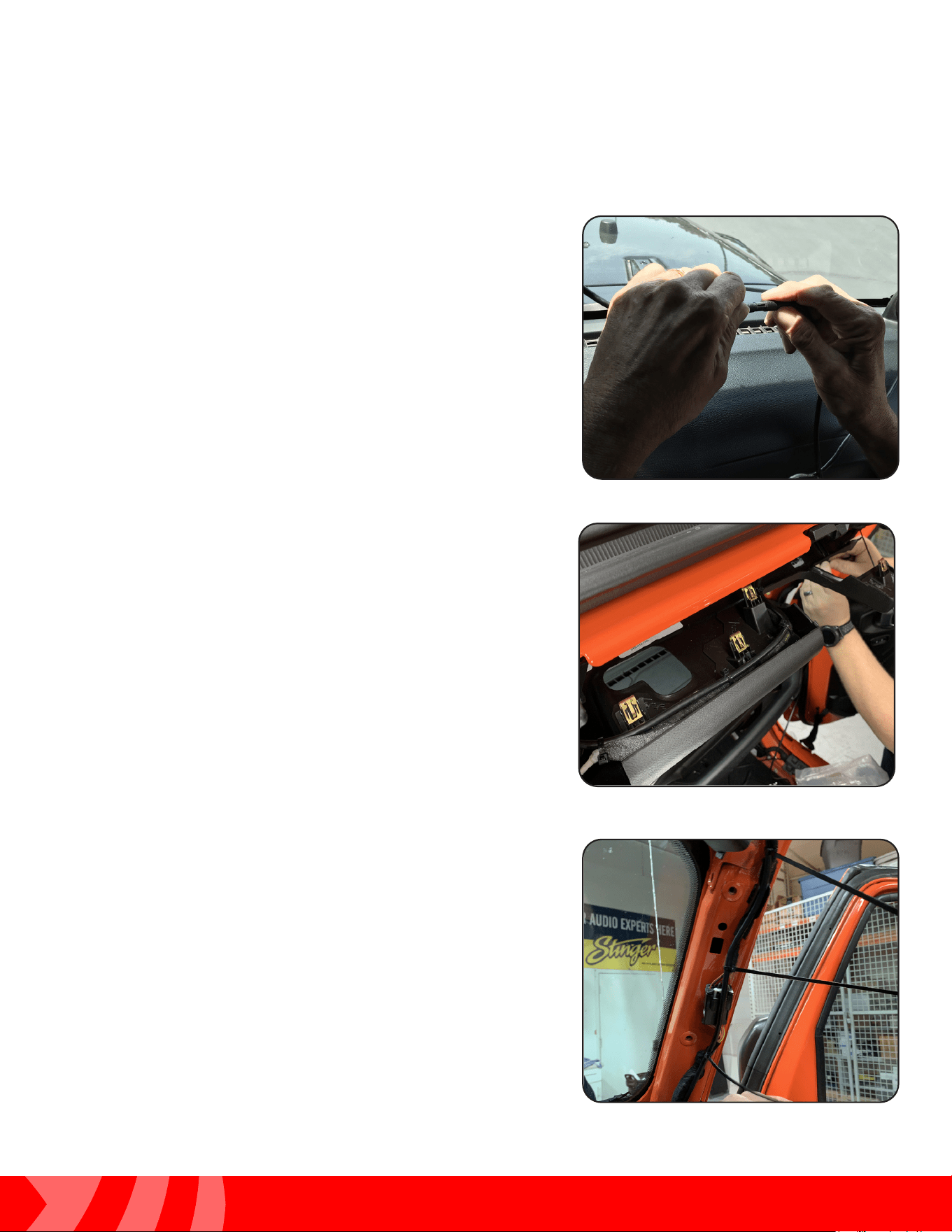
Step 11
Secure the HDDVR mirror to the windshield frame using the
three factory Torx bolts removed in Step 10. Run the
mirror power harness through the hole in the middle of the
mirror base trim panel and secure the trim panel back into
place.
Step C
Place the vehicles rear view mirror base cover (1)
onto the mirror stem with the retaining clips facing
up. Attach the JL mount to the mirror stem in the
orientation shown at right. Secure with screw and
washers.
Step B
Remove the Phillips screw and washers on the
JL mount and separate the two pieces.
1
Installing the Mirror & Harness (cont.)
39
Installation Guide
39
tel - 1-800-477-2267
email - support@echomaster.com
Illustrations are typical and may not match exact vehicle detail
MRCHDDVRJW
Step 14
Route the mirror power harness down the passenger side
A-Pillar and secure it using wire ties.
Step 13
Route the mirror cable towards the passenger side
A-Pillar following the factory wiring and securing it
using wire ties. Secure the windshield front upper
trim panel back into place.
Step 12
Align and connect the mirror wire connector to the
Mirror Power/Video Cable.
Installing the Mirror & Harness (cont.)
40
Installation Guide
40
tel - 1-800-477-2267
email - support@echomaster.com
Illustrations are typical and may not match exact vehicle detail
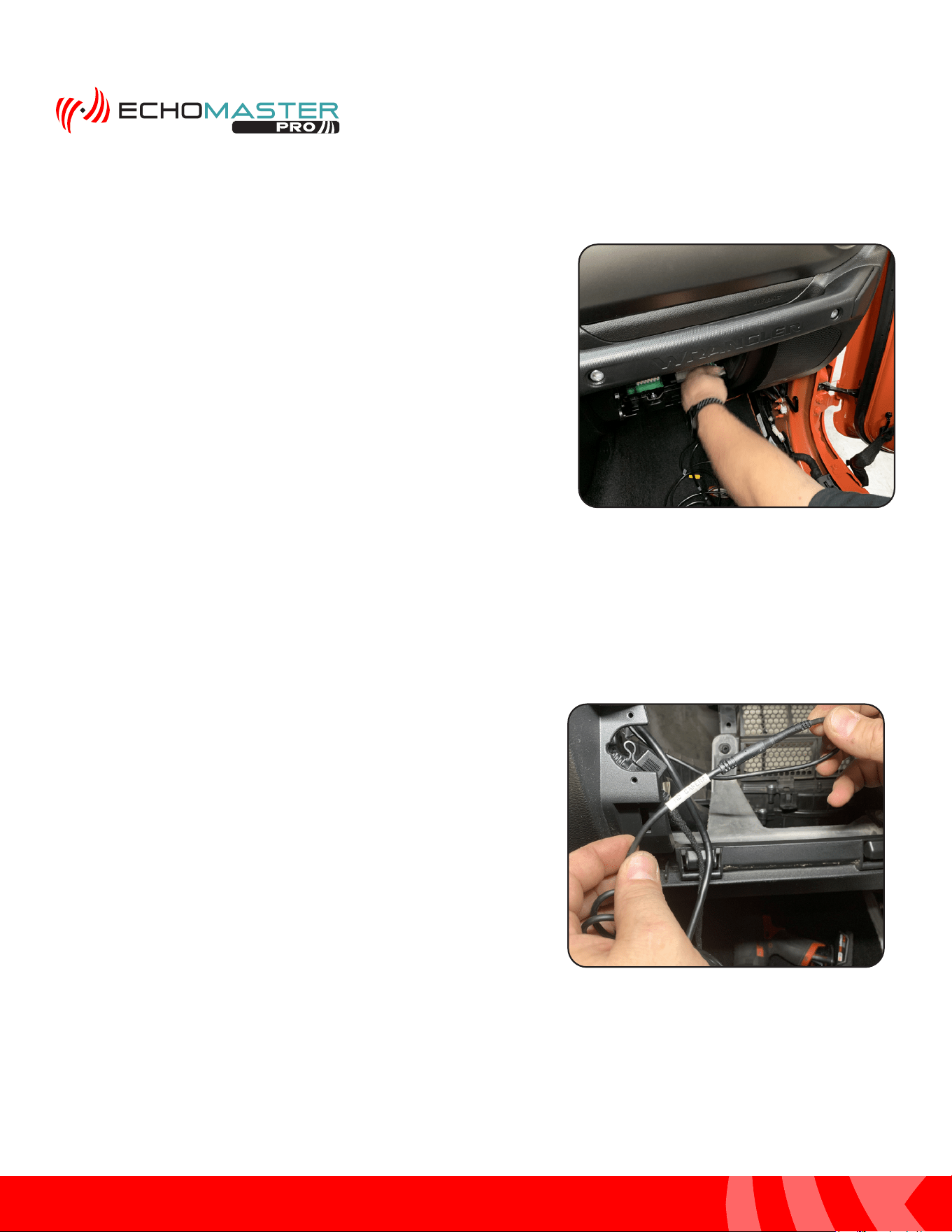
Step 1
Connect the Camera Extension Cable to the mirror
monitor cable.
Cable and Wire Connections
Step 14
Route the monitor cable down into the area behind the
glove box.
Installing the Mirror & Harness (cont.)
41
Installation Guide
41
tel - 1-800-477-2267
email - support@echomaster.com
Illustrations are typical and may not match exact vehicle detail
MRCHDDVRJW
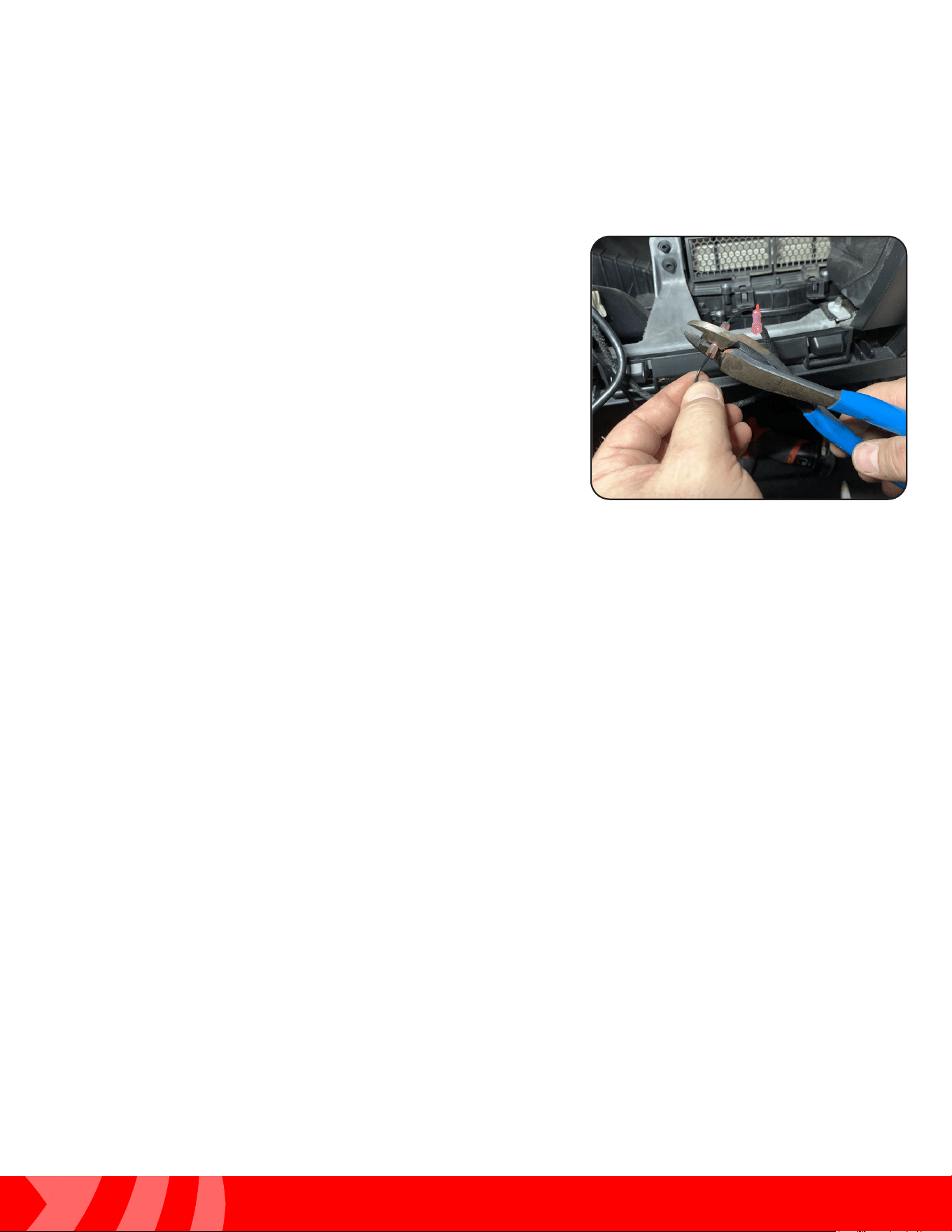
Step 2
Connect the mirror monitor power and ground wires:
BLACK = Chassis Ground
RED = Switched Power
YELLOW = Constant Power
Cable and Wire Connections (cont.)
Test and Enjoy
After the installation is complete, Operating Instructions start on
Page 11 of the User Manual included with the MRC-HDDVR
Questions?
Reach out to our Technical Support Team:
Phone: 727-592-5991
Email: [email protected]
Chat: EchoMaster.com

AGREEMENT: End user agrees to use this product in compliance with the instructions and terms of use above and with
all State and Federal laws. EchoMaster provides instructions and safety warnings with respect to this product and
disclaims all liability for any use not in conformity with those instructions or other misuse of its product. If you do not agree,
please discontinue use immediately and contact EchoMaster. This product is intended for off-road use and passenger
use only.
email - [email protected]
tel - 1-800-477-2267
15500 Lightwave Drive, Suite 202, Clearwater, Florida 33760
EchoMaster is a Power Brand of AAMP Global.
EchoMaster.com
IG-MRCHDDVRJW
REV. 082021