User Manual
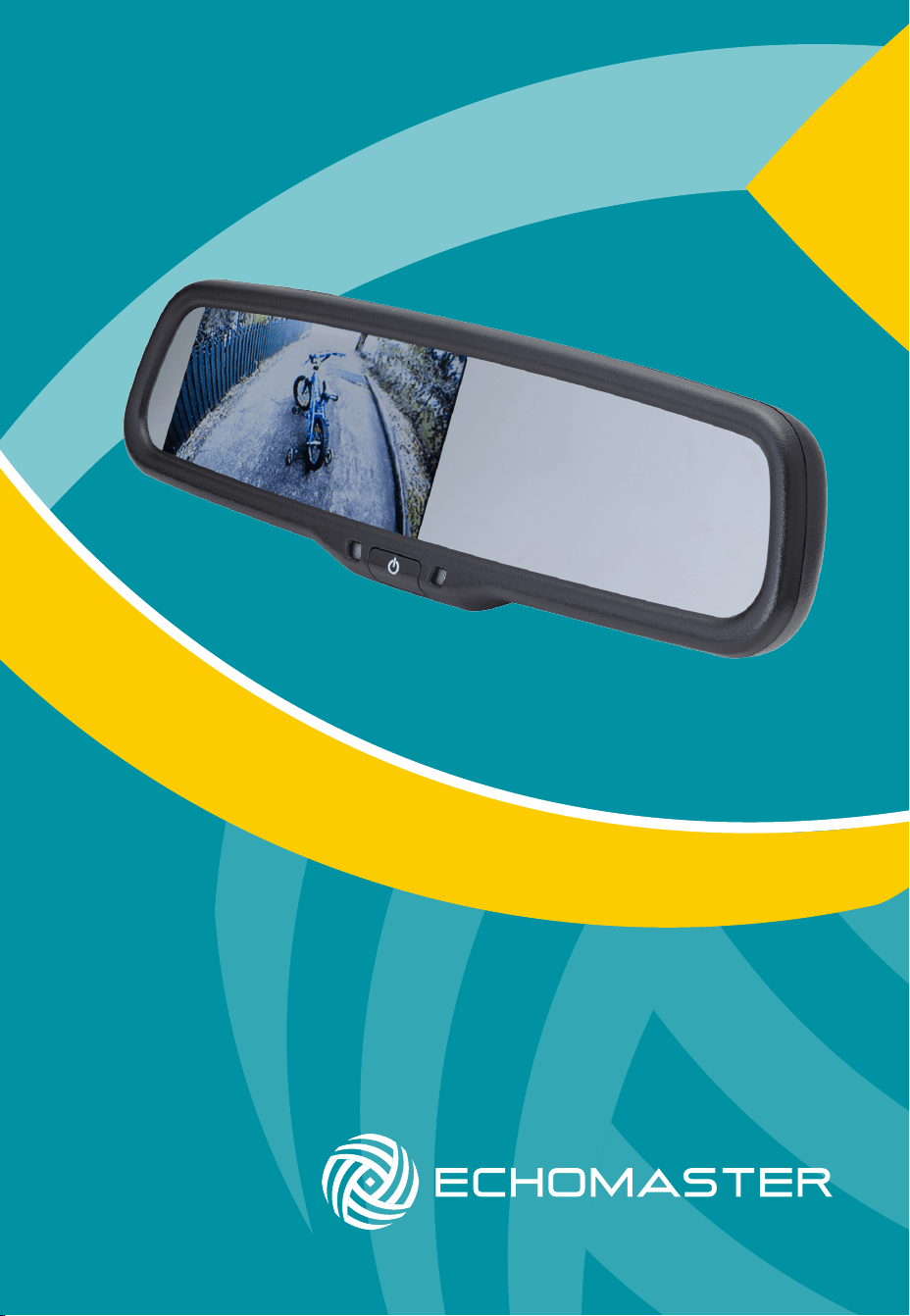
4.3” Factory Mount Mirror Monitor
MM-4320

3
email - [email protected] (US)
tel - 1-800-477-2267 (East Coast) - 1-888-883-2790 (West Coast)
email - [email protected] (Europe)
Installation Guide
2
email - [email protected] (US)
tel - 1-800-477-2267 (East Coast) - 1-888-883-2790 (West Coast)
email - [email protected] (Europe)
Installation Guide
Fitting Instructions
MM-4320
4.3” Factory Mount Mirror Monitor
MM-4320
4.3” Factory Mount Mirror Monitor
The MM-4320 will replace your factory tted rearview mirror.
Remove the original mirror from the vehicle and replace with the MM-4320.
If your factory mounting bracket differs from the MM-4320 then there is a
supplied metal button that can be bonded to the windshield to allow the new
mirror to t.
Once the unit is in place, you can run the connections cable across the
headliner of the vehicle and down the A pillar.
Please ensure that you do not impede the operation of any airbags that may
be located in the A pillar of the vehicle. Any cable passing these airbags
should be run behind the airbag and not in front of it.
Once the cable has been routed down to the dashboard, connect the camera
inputs and power connections as shown in the wiring diagram section of this
manual.
Introduction
Box Contents Key Features
u User Guide
u Mirror Monitor
u Main Harness
u Universal Mounting Button
u Cable Management
u Allen Key
Thank you for purchasing your EchoMaster Mirror Monitor.
EchoMaster mirror monitors are designed to improve safety by providing
high quality images from camera inputs. This may help to improve vehicle
maneuvering capabilities by displaying blind spots or areas not normally
visible to the driver.
Please ensure you read and understand all aspects of this manual before
tting or using your EchoMaster mirror monitor.
u Factory replacement mirror
u Dual video sensing inputs
u Auto-dimming display
Operating Instructions
The screen will automatically turn on when it detects a signal input on
either channel.
If the signal input is on Video 1 then the picture can be turned off by pressing
the POWER button on the monitor. To turn it back on, press the button again.
If a video signal is detected on Video 2 then the screen will automatically
switch over to this channel. When Video 2 is being displayed, the monitor
cannot be turned off.
Video 2 has a brightness adjustment which is selectable by briey pressing
the power button when a Video 2 image is being displayed.
The screen display will auto-dim in dark conditions so as not to distract
the driver.

3
email - [email protected] (US)
tel - 1-800-477-2267 (East Coast) - 1-888-883-2790 (West Coast)
email - [email protected] (Europe)
Installation Guide
2
email - [email protected] (US)
tel - 1-800-477-2267 (East Coast) - 1-888-883-2790 (West Coast)
email - [email protected] (Europe)
Installation Guide
Fitting Instructions
MM-4320
4.3” Factory Mount Mirror Monitor
MM-4320
4.3” Factory Mount Mirror Monitor
The MM-4320 will replace your factory tted rearview mirror.
Remove the original mirror from the vehicle and replace with the MM-4320.
If your factory mounting bracket differs from the MM-4320 then there is a
supplied metal button that can be bonded to the windshield to allow the new
mirror to t.
Once the unit is in place, you can run the connections cable across the
headliner of the vehicle and down the A pillar.
Please ensure that you do not impede the operation of any airbags that may
be located in the A pillar of the vehicle. Any cable passing these airbags
should be run behind the airbag and not in front of it.
Once the cable has been routed down to the dashboard, connect the camera
inputs and power connections as shown in the wiring diagram section of this
manual.
Introduction
Box Contents Key Features
u User Guide
u Mirror Monitor
u Main Harness
u Universal Mounting Button
u Cable Management
u Allen Key
Thank you for purchasing your EchoMaster Mirror Monitor.
EchoMaster mirror monitors are designed to improve safety by providing
high quality images from camera inputs. This may help to improve vehicle
maneuvering capabilities by displaying blind spots or areas not normally
visible to the driver.
Please ensure you read and understand all aspects of this manual before
tting or using your EchoMaster mirror monitor.
u Factory replacement mirror
u Dual video sensing inputs
u Auto-dimming display
Operating Instructions
The screen will automatically turn on when it detects a signal input on
either channel.
If the signal input is on Video 1 then the picture can be turned off by pressing
the POWER button on the monitor. To turn it back on, press the button again.
If a video signal is detected on Video 2 then the screen will automatically
switch over to this channel. When Video 2 is being displayed, the monitor
cannot be turned off.
Video 2 has a brightness adjustment which is selectable by briey pressing
the power button when a Video 2 image is being displayed.
The screen display will auto-dim in dark conditions so as not to distract
the driver.
5
email - [email protected] (US)
tel - 1-800-477-2267 (East Coast) - 1-888-883-2790 (West Coast)
email - [email protected] (Europe)
Installation Guide
4
email - [email protected] (US)
tel - 1-800-477-2267 (East Coast) - 1-888-883-2790 (West Coast)
email - [email protected] (Europe)
Installation Guide
MM-4320
4.3” Factory Mount Mirror Monitor
MM-4320
4.3” Factory Mount Mirror Monitor
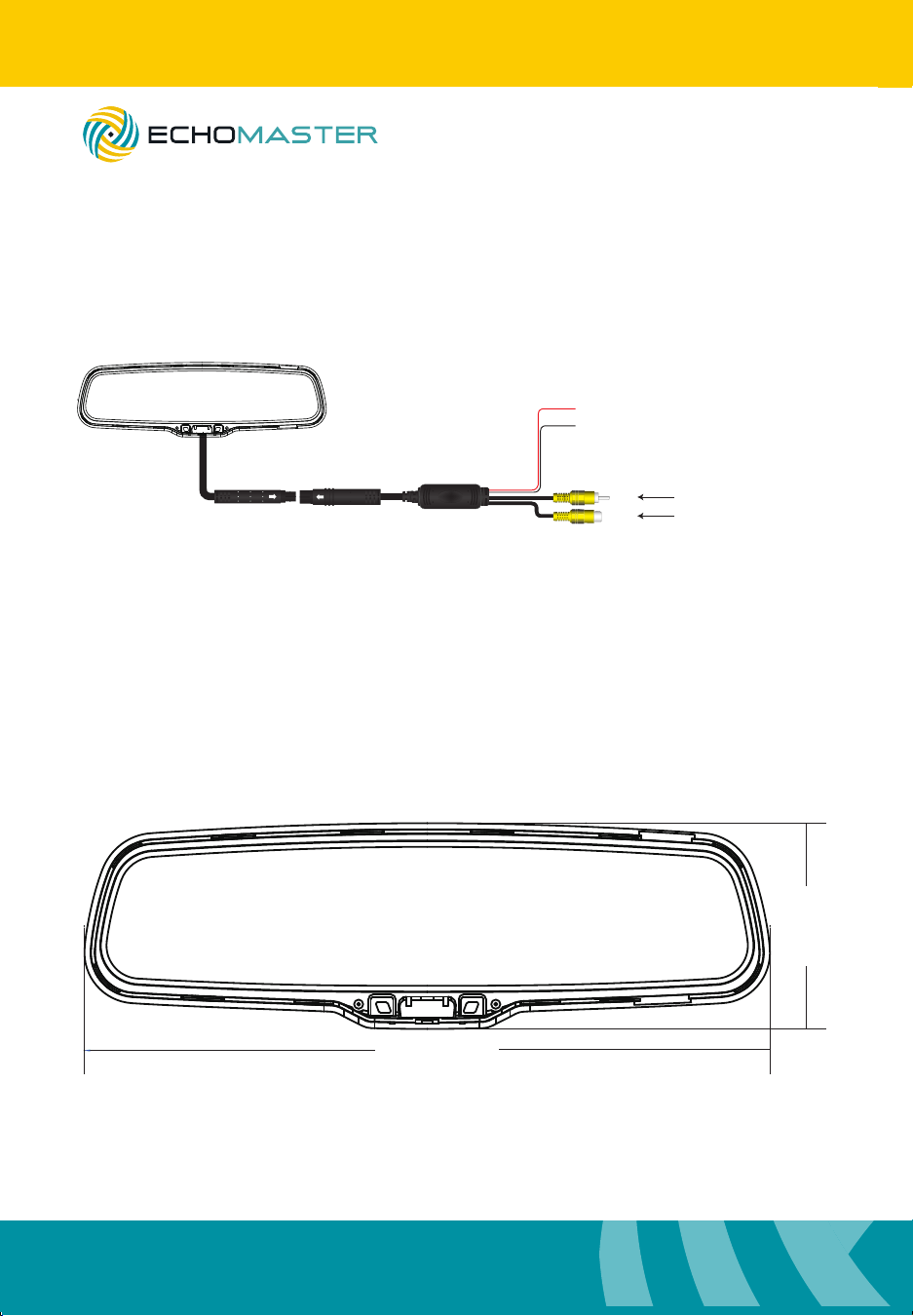
Dimensions
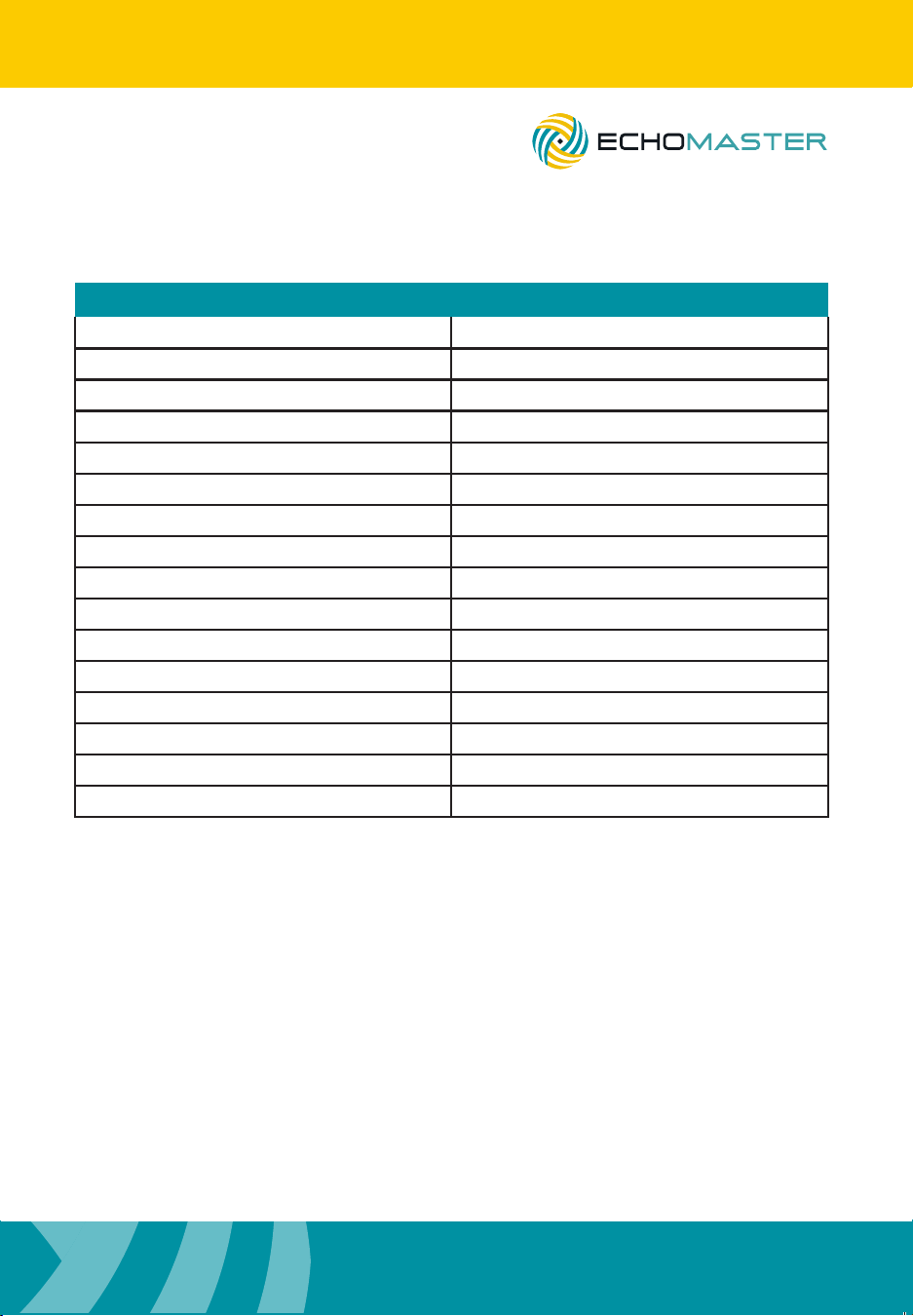
Specications
278mm
81mm
MM-4320
Screen Size 4.3”
Aspect Ratio 16:9
Power Supply 12VDC
Resolution 480x272
Luminance 1000
Contrast 500:1
TV Format Auto
OSD Languages English
Video Inputs 2
Audio Inputs 0
Triggers 0
Current Draw 200-400mA
Operating Temperature -20C - +60C
Parking Guidelines No
Connection Type RCA
Dimensions (mm) 278 x 81 x 43
Wiring Diagram
+12V Ignition
GND
V1
V 2
Reverse Camera Input
Video Input
Main Harness
(Black)
(Red)
5
email - [email protected] (US)
tel - 1-800-477-2267 (East Coast) - 1-888-883-2790 (West Coast)
email - [email protected] (Europe)
Installation Guide
4
email - [email protected] (US)
tel - 1-800-477-2267 (East Coast) - 1-888-883-2790 (West Coast)
email - [email protected] (Europe)
Installation Guide
MM-4320
4.3” Factory Mount Mirror Monitor
MM-4320
4.3” Factory Mount Mirror Monitor
Dimensions
Specications
278mm
81mm
MM-4320
Screen Size 4.3”
Aspect Ratio 16:9
Power Supply 12VDC
Resolution 480x272
Luminance 1000
Contrast 500:1
TV Format Auto
OSD Languages English
Video Inputs 2
Audio Inputs 0
Triggers 0
Current Draw 200-400mA
Operating Temperature -20C - +60C
Parking Guidelines No
Connection Type RCA
Dimensions (mm) 278 x 81 x 43
Wiring Diagram
+12V Ignition
GND
V1
V 2
Reverse Camera Input
Video Input
Main Harness
(Black)
(Red)

7
email - [email protected] (US)
tel - 1-800-477-2267 (East Coast) - 1-888-883-2790 (West Coast)
email - [email protected] (Europe)
Installation Guide
6
email - [email protected] (US)
tel - 1-800-477-2267 (East Coast) - 1-888-883-2790 (West Coast)
email - [email protected] (Europe)
Installation Guide
MM-4320
4.3” Factory Mount Mirror Monitor
MM-4320
4.3” Factory Mount Mirror Monitor

7
email - [email protected] (US)
tel - 1-800-477-2267 (East Coast) - 1-888-883-2790 (West Coast)
email - [email protected] (Europe)
Installation Guide
6
email - [email protected] (US)
tel - 1-800-477-2267 (East Coast) - 1-888-883-2790 (West Coast)
email - [email protected] (Europe)
Installation Guide
MM-4320
4.3” Factory Mount Mirror Monitor
MM-4320
4.3” Factory Mount Mirror Monitor

email - [email protected] (US)
tel - 1-800-477-2267 (East Coast) - 1-888-883-2790 (West Coast)
email - [email protected] (Europe)
15500 Lightwave Drive, Suite 202, Clearwater, Florida 33760
Woolmer Way, Bordon, Hampshire, United Kingdom
EchoMaster is a Power Brand of AAMP Global.
EchoMaster.com
