aeg.com/register
KME525860M
KMK525860M
KMX525060M
EN
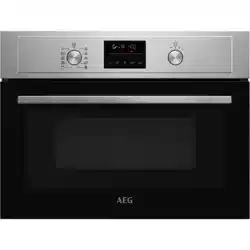
User Manual | Microwave Oven
aeg.com\register
Welcome to AEG! Thank you for choosing our appliance.
Get usage advice, brochures, trouble shooter, service and repair information:
www.aeg.com/support
Subject to change without notice.
CONTENTS
1. SAFETY INFORMATION................................................................................ 2
2. SAFETY INSTRUCTIONS.............................................................................. 5
3. PRODUCT DESCRIPTION............................................................................. 8
4. CONTROL PANEL.......................................................................................... 8
5. BEFORE FIRST USE......................................................................................9
6. DAILY USE......................................................................................................9
7. ADDITIONAL FUNCTIONS...........................................................................11
8. CLOCK FUNCTIONS.................................................................................... 12
9. USING THE ACCESSORIES........................................................................13
10. HINTS AND TIPS........................................................................................ 13
11. CARE AND CLEANING.............................................................................. 16
12. TROUBLESHOOTING................................................................................ 16
13. ENERGY EFFICIENCY...............................................................................17
14. ENVIRONMENTAL CONCERNS................................................................17
1. SAFETY INFORMATION
Before the installation and use of the appliance, carefully read
the supplied instructions. The manufacturer is not responsible
for any injuries or damage that are the result of incorrect
installation or usage. Always keep the instructions in a safe
and accessible location for future reference.
1.1 Children and vulnerable people safety
• This appliance can be used by children aged from 8 years
and above and persons with reduced physical, sensory or
mental capabilities or lack of experience and knowledge if
they have been given supervision or instruction concerning
the use of the appliance in a safe way and understand the
hazards involved. Children of less than 8 years of age and
persons with very extensive and complex disabilities shall
be kept away from the appliance unless continuously
supervised.
2 ENGLISH

• Children should be supervised to ensure that they do not
play with the appliance.
• Keep all packaging away from children and dispose of it
appropriately.
• WARNING: The appliance and its accessible parts become
hot during use. Keep children and pets away from the
appliance when in use and when cooling down.
• If the appliance has a child safety device, it should be
activated.
• Children shall not carry out cleaning and user maintenance
of the appliance without supervision.
1.2 General Safety
• This appliance is for cooking purposes only.
• This appliance is designed for single household domestic
use in an indoor environment.
• This appliance may be used in, offices, hotel guest rooms,
bed & breakfast guest rooms, farm guest houses and other
similar accommodation where such use does not exceed
(average) domestic usage levels.
• Only a qualified person must install this appliance and
replace the cable.
• Do not use the appliance before installing it in the built-in
structure.
• Disconnect the appliance from the power supply before
carrying out any maintenance.
• If the supply cord is damaged, it must be replaced by the
manufacturer, its Authorised Service Centre or similarly
qualified persons to avoid an electrical hazard.
• WARNING: Ensure that the appliance is switched off before
replacing the lamp to avoid the possibility of electric shock.
• WARNING: The appliance and its accessible parts become
hot during use. Care should be taken to avoid touching
heating elements or the surface of the appliance cavity.
• Always use oven gloves to remove or insert accessories or
ovenware.
ENGLISH 3

• Use only the turntable and the turntable support designed
for this appliance.
• Do not activate the microwave function when the appliance
is empty. Metal parts inside the cavity can create electric
arcing.
• Metallic containers for food and beverages are not allowed
during microwave cooking. This requirement is not
applicable if the manufacturer specifies size and shape of
metallic containers suitable for microwave cooking.
• WARNING: If the door or door seals are damaged, the
appliance must not be operated until it has been repaired by
a qualified person.
• WARNING: Only a qualified person can carry out any
service or repair operation that involves the removal of a
cover which gives protection against exposure to
microwave energy.
• WARNING: Do not heat liquids and other foods in sealed
containers. They are liable to explode.
• Use only utensils that are suitable for use in microwave
ovens.
• When heating food in plastic or paper containers, observe
the appliance due to the possibility of ignition.
• The appliance is intended for heating food and beverages.
Drying of food or clothing and heating of warming pads,
slippers, sponges, damp cloth and similar may lead to risk
of injury, ignition or fire.
• If smoke is emitted, switch off or unplug the appliance and
keep the door closed in order to stifle any flames.
• Microwave heating of beverages can result in delayed
eruptive boiling. Care must be taken when handling the
container.
• The contents of feeding bottles and baby food jars shall be
stirred or shaken and the temperature checked before
consumption, in order to avoid burns.
4 ENGLISH
• Eggs in their shell and whole hard-boiled eggs should not
be heated in the appliance since they may explode, even
after microwave heating has ended.
• The appliance should be cleaned regularly and any food
deposits removed.
• Do not use a steam cleaner to clean the appliance.
• Do not use harsh abrasive cleaners or sharp metal scrapers
to clean the glass door since they can scratch the surface,
which may result in shattering of the glass.
• Failure to maintain the appliance in a clean condition could
lead to deterioration of the surface that could adversely
affect the life of the appliance and possibly result in a
hazardous situation.
2. SAFETY INSTRUCTIONS
2.1 Installation
WARNING!
Only a qualified person must install this
appliance.
• Remove all the packaging.
• Do not install or use a damaged
appliance.
• Follow the installation instructions supplied
with the appliance.
• Always take care when moving the
appliance as it is heavy. Always use safety
gloves and enclosed footwear.
• Do not pull the appliance by the handle.
• Install the appliance in a safe and suitable
place that meets installation requirements.
• Keep the minimum distance from other
appliances and units.
• Before mounting the appliance, check if
the appliance door opens without restraint.
• The appliance is equipped with an electric
cooling system. It must be operated with
the electric power supply.
• The built-in unit must meet the stability
requirements of DIN 68930.
Cabinet minimum height
(Cabinet under the worktop
minimum height)
444 (460) mm
Cabinet width 560 mm
Cabinet depth 550 (550) mm
Height of the front of the
appliance
455 mm
Height of the back of the
appliance
440 mm
Width of the front of the ap‐
pliance
595 mm
Width of the back of the ap‐
pliance
559 mm
Depth of the appliance 567 mm
Built in depth of the appli‐
ance
546 mm
Depth with open door 882 mm
Ventilation opening mini‐
mum size. Opening placed
on the bottom rear side
560x20 mm
Mains supply cable length.
Cable is placed in the right
corner of the back side
1500 mm
Mounting screws 3.5x25 mm
ENGLISH 5
2.2 Electrical connection
WARNING!
Risk of fire and electric shock.
• All electrical connections should be made
by a qualified electrician.
• The appliance must be earthed.
• Make sure that the parameters on the
rating plate are compatible with the
electrical ratings of the mains power
supply.
• Always use a correctly installed
shockproof socket.
• Do not use multi-plug adapters and
extension cables.
• Make sure not to cause damage to the
mains plug and to the mains cable. Should
the mains cable need to be replaced, this
must be carried out by our Authorised
Service Centre.
• Do not let mains cables touch or come
near the appliance door or the niche below
the appliance, especially when it operates
or the door is hot.
• The shock protection of live and insulated
parts must be fastened in such a way that
it cannot be removed without tools.
• Connect the mains plug to the mains
socket only at the end of the installation.
Make sure that there is access to the
mains plug after the installation.
• If the mains socket is loose, do not
connect the mains plug.
• Do not pull the mains cable to disconnect
the appliance. Always pull the mains plug.
• Use only correct isolation devices: line
protecting cut-outs, fuses (screw type
fuses removed from the holder), earth
leakage trips and contactors.
• The electrical installation must have an
isolation device which lets you disconnect
the appliance from the mains at all poles.
The isolation device must have a contact
opening width of minimum 3 mm.
• This appliance is supplied only with a main
cable.
2.3 Use
WARNING!
Risk of injury, burns and electric shock or
explosion.
• Do not change the specification of this
appliance.
• Make sure that the ventilation openings
are not blocked.
• Do not let the appliance stay unattended
during operation.
• Deactivate the appliance after each use.
• Be careful when you open the appliance
door while the appliance is in operation.
Hot air can release.
• Do not operate the appliance with wet
hands or when it has contact with water.
• Do not apply pressure on the open door.
• Do not use the appliance as a work
surface or as a storage surface.
• Open the appliance door carefully. The
use of ingredients with alcohol can cause
a mixture of alcohol and air.
• Do not let sparks or open flames to come
in contact with the appliance when you
open the door.
• Always use glass and jars approved for
preserving purposes.
• Do not put flammable products or items
that are wet with flammable products in,
near or on the appliance.
• Do not use microwave function to preheat
the appliance.
WARNING!
Risk of damage to the appliance.
• To prevent damage or discoloration to the
enamel:
– do not put aluminium foil directly on
the bottom of cavity of the appliance.
– do not put water directly into the hot
appliance.
– do not keep moist dishes and food in
the appliance after you finish the
cooking.
– be careful when you remove or install
the accessories.
• Discoloration of the enamel or stainless
steel has no effect on the performance of
the appliance.
6 ENGLISH
• Always cook with the appliance door
closed.
• If the appliance is installed behind a
furniture panel (e.g. a door) make sure the
door is never closed when the appliance
operates. Heat and moisture can build up
behind a closed furniture panel and cause
subsequent damage to the appliance, the
housing unit or the floor. Do not close the
furniture panel until the appliance has
cooled down completely after use.
2.4 Care and cleaning
WARNING!
Risk of injury, fire, or damage to the
appliance.
• Before maintenance, deactivate the
appliance and disconnect the mains plug
from the mains socket.
• Make sure the appliance is cold. There is
the risk that the glass panels can break.
• Replace immediately the door glass
panels when they are damaged. Contact
the Authorised Service Centre.
• Be careful when you remove the door from
the appliance. The door is heavy!
• Make sure the cavity, the turntable and the
door are wiped dry after each use. Steam
produced during the operation of the
appliance condensates on cavity walls and
can cause corrosion.
• Clean regularly the appliance to prevent
the deterioration of the surface material.
• Fat and food remaining in the appliance
can cause fire and electric arcing when
the microwave function operates.
• Clean the appliance with a moist soft
cloth. Use only neutral detergents. Do not
use abrasive products, abrasive cleaning
pads, solvents or metal objects.
• If you use an oven spray, follow the safety
instructions on its packaging.
2.5 Internal lighting
WARNING!
Risk of electric shock.
• Concerning the lamp(s) inside this product
and spare part lamps sold separately:
These lamps are intended to withstand
extreme physical conditions in household
appliances, such as temperature,
vibration, humidity, or are intended to
signal information about the operational
status of the appliance. They are not
intended to be used in other applications
and are not suitable for household room
illumination.
• This product contains a light source of
energy efficiency class G.
• Use only lamps with the same
specifications.
2.6 Service
• To repair the appliance contact the
Authorised Service Centre.
• Use original spare parts only.
2.7 Disposal
WARNING!
Risk of injury or suffocation.
• Contact your municipal authority for
information on how to dispose of the
appliance.
• Disconnect the appliance from the mains
supply.
• Cut off the mains electrical cable close to
the appliance and dispose of it.
ENGLISH 7
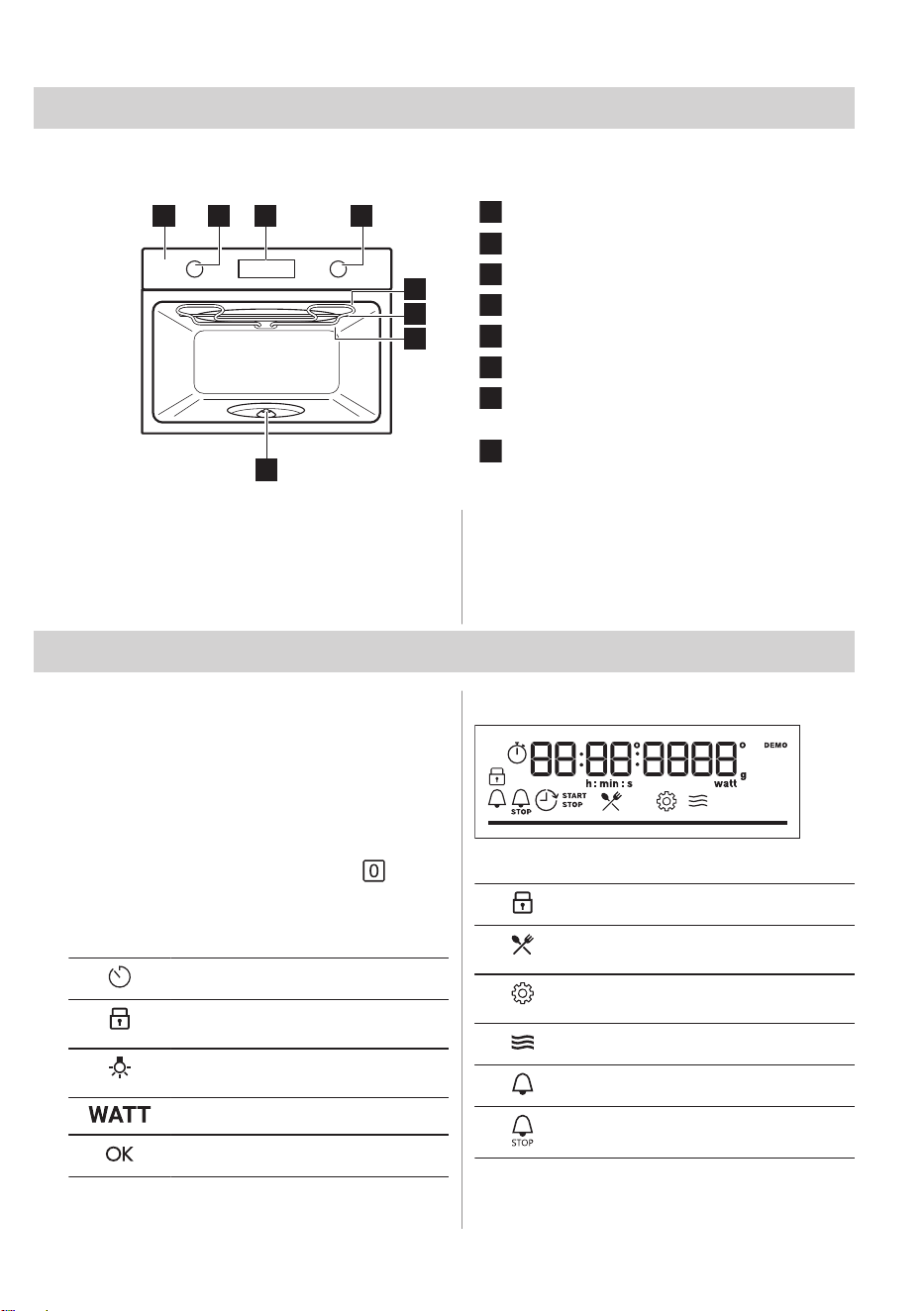
3. PRODUCT DESCRIPTION
3.1 General overview
5
6
7
8
1 2 43
Control panel
Knob for the heating functions
Display
Control knob
Heating element
Microwave generator
Lamp
Turntable shaft
3.2 Accessories
• Turntable set
To place food and cookware on it.
Maximum load: 4 kg.
• Grill rack set
To grill. The set includes: Low rack, High
rack.
4. CONTROL PANEL
4.1 Turning the appliance on and off
To turn on the appliance:
1. Press the knobs. The knobs come out.
2. Turn the knob for the heating functions to
select a function.
3. Turn the control knob to adjust settings.
To turn off the appliance: turn the knob for the
heating functions to the off position .
4.2 Control panel overview
Press to set: Clock functions.
Press and hold to set the function:
Lock.
Press to turn on or to turn off the oven
lamp.
Press to set: Microwave power.
Press to confirm your selection.
4.3 Display indicators
Display with key functions.
The appliance is locked.
Enter the menu and select the icon to
open: Assisted Cooking.
Enter the menu and select the icon to
open: Settings
Microwave function is turned on.
Minute minder is turned on.
End time is turned on.
8 ENGLISH
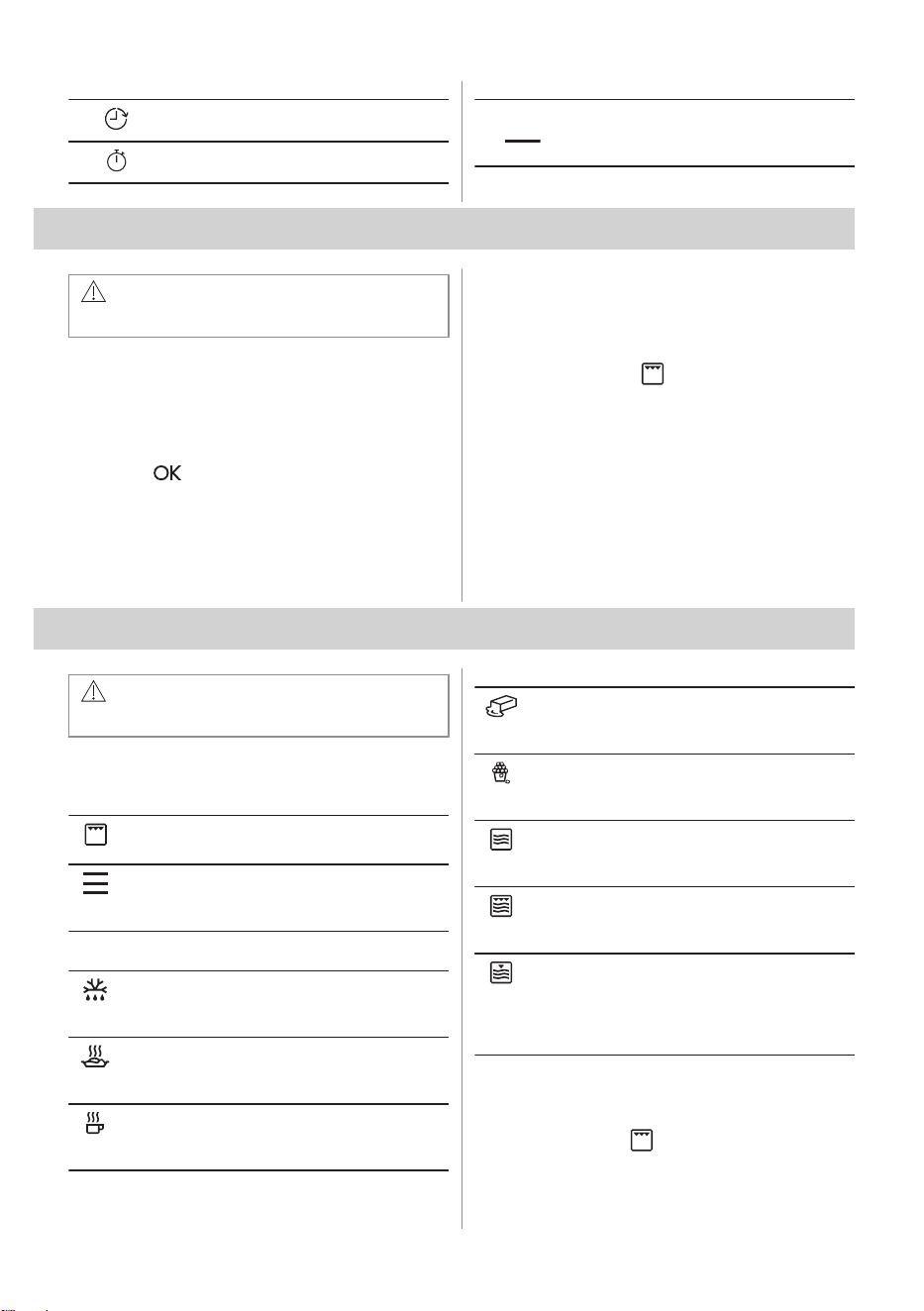
Time Delayed Start is turned on.
Uptimer is turned on.
For temperature or time. The bar is fully
red when the appliance reaches the set
temperature.
5. BEFORE FIRST USE
WARNING!
Refer to Safety chapters.
5.1 Setting the time
After the first connection to the mains, wait
until the display shows: "00:00".
1. Turn the control knob to set the time.
2. Press .
5.2 Initial preheating and cleaning
Preheat the empty appliance before the first
use and contact with food. The appliance can
emit unpleasant smell and smoke. Ventilate
the room during preheating.
1. Remove all accessories from the
appliance.
2. Set the function . Let the appliance
operate for 1 h.
3. Turn off the appliance and wait until it is
cold.
4. Clean the appliance and the accessories
only with a microfibre cloth, warm water
and a mild detergent.
5. Put the accessories back to their initial
position.
6. DAILY USE
WARNING!
Refer to Safety chapters.
6.1 Heating functions
Standard heating functions
Grill
To grill thin pieces of food and to toast bread.
Menu
To enter the Menu: Assisted Cooking, Set‐
tings.
Microwave functions
Defrost
Defrosting meat, fish, cakes, power range:
100 - 200 W
Reheat
Heating up pre-prepared meals, power range:
300 - 700 W
Liquid
Heating up drinks and soups, power range:
600 - 1000 W
Melting
Melting chocolate and butter, power range:
100 - 400 W
Popcorn
Preparing popcorn bags, power range: 600 -
800 W
Microwave
Heating up, cooking, power range: 100 - 1000
W
Grill High
To cook food in short time and brown it with
high grill intensity. Power range: 100 - 400 W.
Grill Low
To cook food in short time and brown it with
low grill intensity. For casseroles such as po‐
tato gratin, lasagne. Power range: 100 - 400
W.
6.2 Setting: Heating functions
Turn the knob for the heating functions to
select the function
.
ENGLISH 9
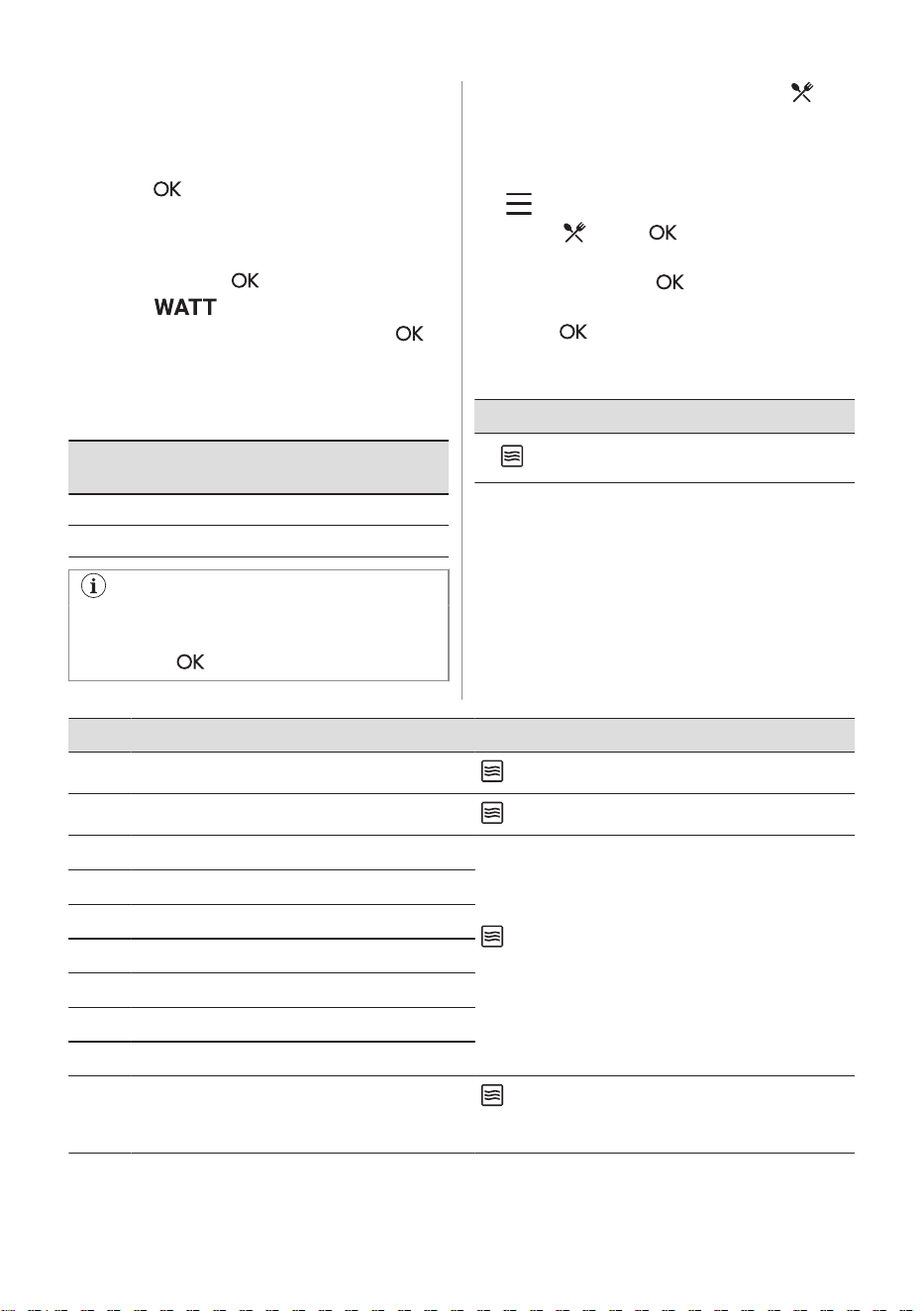
6.3 Setting: Microwave functions
1. Insert the food into the appliance.
2. Turn the knob for the heating functions to
select the microwave function.
3. Press to start with default settings.
The display shows: duration and microwave
power.
4. Turn the control knob to adjust the
duration. Press .
5. Press . Turn the control knob to
adjust the microwave power. Press
.
You can adjust settings while cooking.
The maximum time of microwave functions
depends on microwave power you set:
Microwave power
(W)
Maximum time (min)
100 - 600 59:55
> 600 7
If you open the door, the microwave
function stops. To start it again, close the
door. Press .
6.4 Setting: Assisted Cooking
When the function ends, check if the food is
ready.
1. Turn the knob for the heating functions to
to enter Menu.
2. Select
. Press .
3. Turn the control knob to select a number
of the dish. Press .
4. Place the food inside the appliance.
Press .
Menu: Assisted Cooking
Legend
Function with microwave power. Use mi‐
crowave safe accessory.
The display shows P and a number of the
dish that you can check in the table.
Dish Weight Accessory
P1
Chicken, whole 1.1 kg
low wire rack; ceramic or glass casserole dish
P2
Chicken, two halves 0.6 - 0.7 kg per half
low wire rack; ceramic or glass casserole dish
P3
Fish, whole 0.6 kg
ceramic or glass casserole dish on turntable
Add 50 ml of water. Cover the food with a microwave
safe lid with some holes.
P4
Fish fillet 0.5 kg; 150 g per fillet
P5
Broccoli 0.5 kg
P6
Cauliflower 0.5 kg
P7
Cauliflower, frozen 0.5 kg
P8
Peas, frozen 0.5 kg
P9
Jacket potatoes 0.5 kg
P10
Rice 0.2 kg
ceramic or glass casserole dish on turntable
Add 400 ml of water. Cover the food with a micro‐
wave safe lid with some holes.
10 ENGLISH
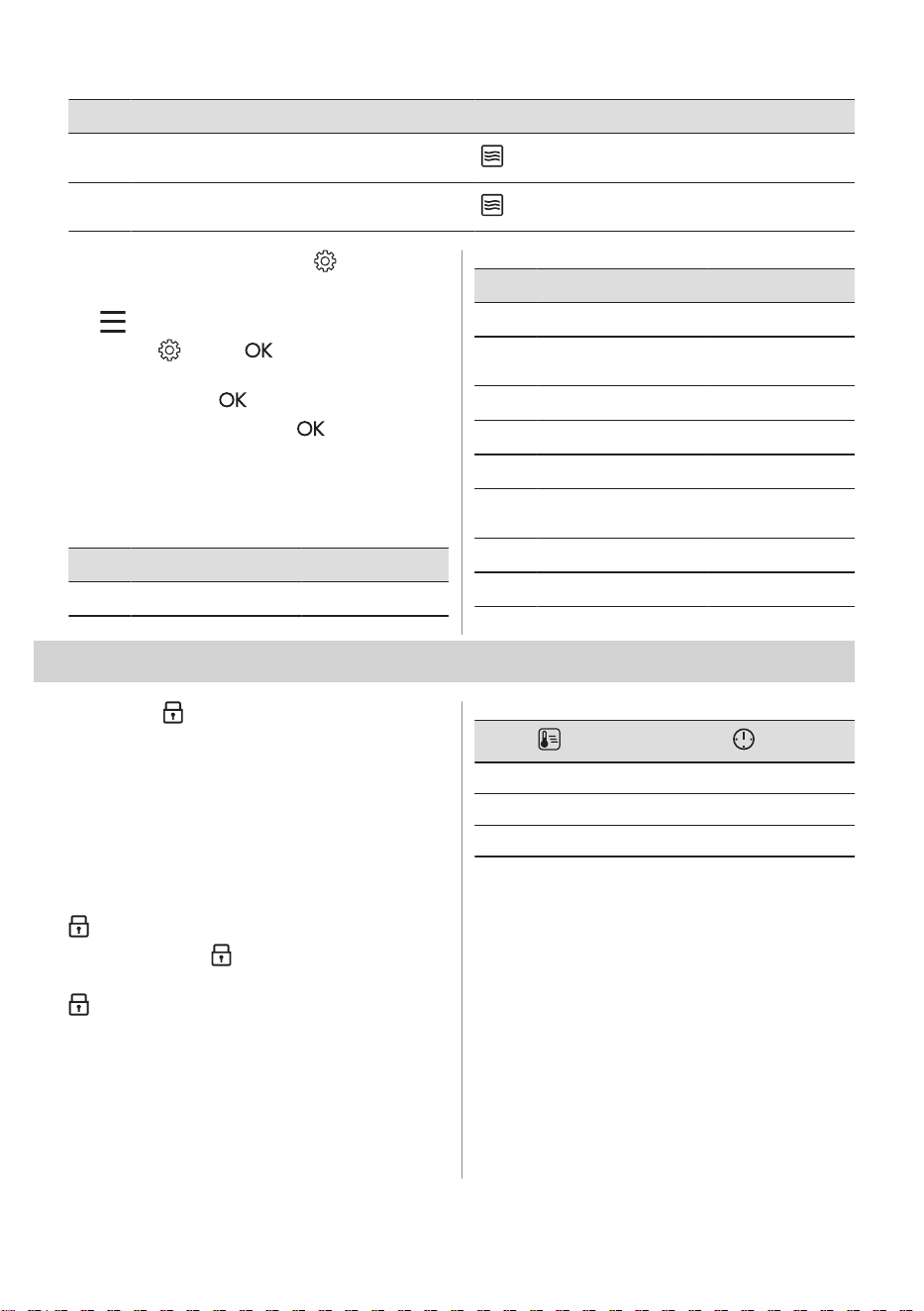
Dish Weight Accessory
P11
Potato gratin (raw po‐
tatoes)
1.1 kg
low wire rack; ceramic or glass casserole dish
P12
Lasagna with dry pas‐
ta sheets
1 - 1.5 kg
ceramic or glass casserole dish on turntable
6.5 Changing: Settings
1. Turn the knob for the heating functions to
to enter Menu.
2. Select . Press .
3. Turn the control knob to select the
setting. Press .
4. Adjust the value. Press .
Turn the knob for the heating functions to the
off position to exit Menu.
Menu: Settings
Setting Value
01
Time of day Change
Setting Value
02
Display brightness 1 - 5
03
Key tones 1 - Beep, 2 - Click,
3 - Sound off
04
Buzzer volume 1 - 4
05
Uptimer On / Off
06
Light On / Off
07
Demo mode Activation code:
2468
08
Software version Check
09
Reset all settings Yes / No
7. ADDITIONAL FUNCTIONS
7.1 Lock
This function prevents an accidental change
of the appliance function.
Turn it on when the appliance works - the set
cooking continues, the control panel is
locked.
Turn it on when the appliance is off - it cannot
be turned on, the control panel is locked.
- press and hold to turn on the function.
A signal sounds. - flashes 3 times when
the lock is turned on.
- press and hold to turn off the function.
7.2 Automatic switch-off
For safety reasons, if the heating function is
active and no settings are changed, the
appliance will turn off automatically after a
certain period of time.
(°C) (h)
30 - 115 12.5
120 - 195 8.5
200 - 230 5.5
If you intend to run a heating function for a
duration exceeding the automatic switch-off
time, set the cooking length. Refer to the
'Clock functions' chapter.
The Automatic switch-off does not work with
the functions: Light, Time Delayed Start.
7.3 Cooling fan
When the appliance operates, the cooling fan
turns on automatically to keep the surfaces of
the appliance cool. If you turn off the
appliance, the cooling fan can continue to
operate until the appliance cools down.
ENGLISH 11
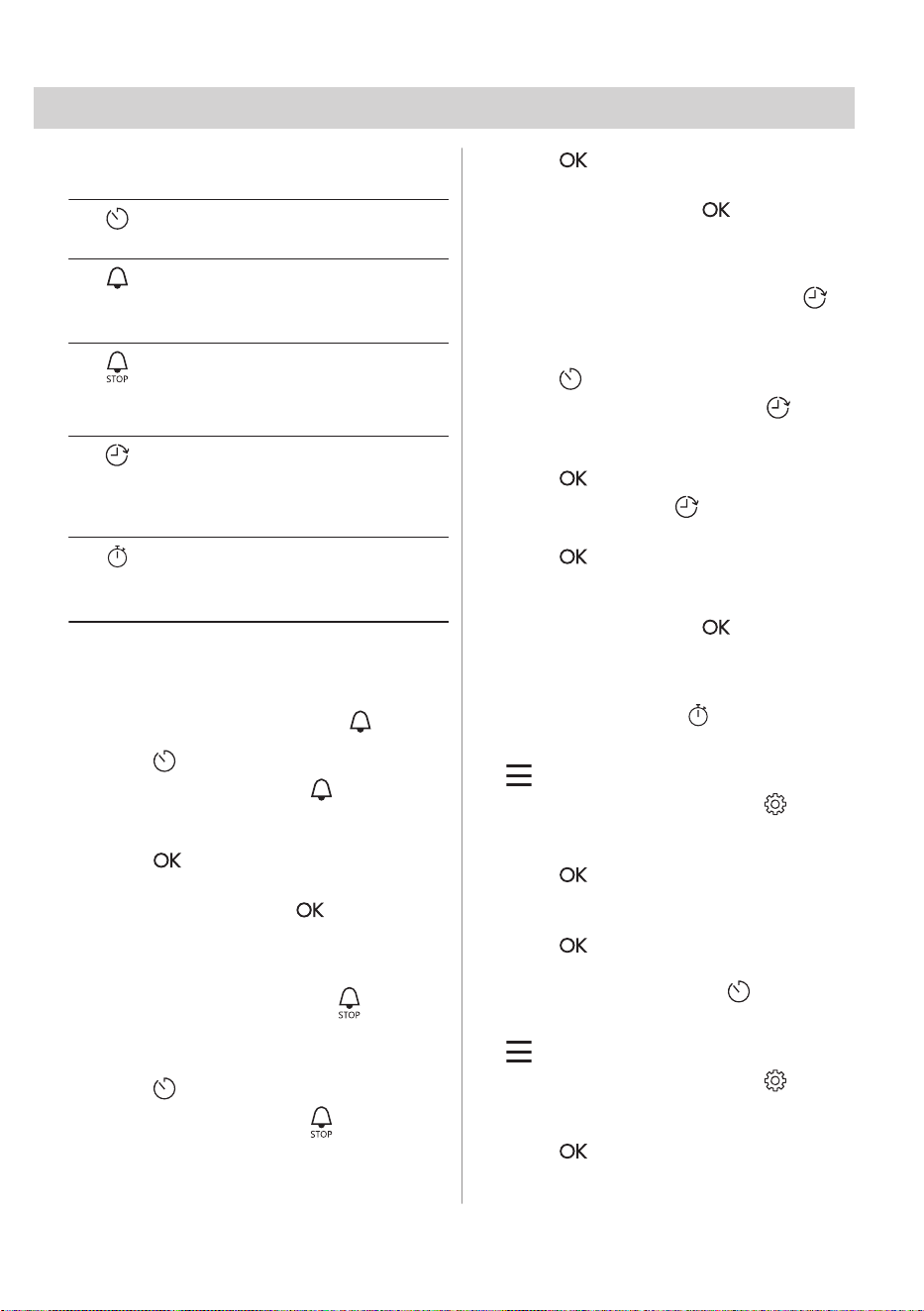
8. CLOCK FUNCTIONS
8.1 Clock functions description
Time of day
To set the clock that displays the cur‐
rent time.
Minute
minder
1)
To set a countdown timer. When the
timer ends, the signal sounds. This
function has no effect on the operation
of the oven.
Cooking
time
1)
To set cooking duration. When the tim‐
er ends, the signal sounds and the
heating function will automatically turn
off.
Time De‐
layed Start
2)
To postpone the start and / or end of
cooking.
Uptimer
To show how long the appliance oper‐
ates. Maximum is 23 h 59 min.This
function has no effect on the operation
of the oven.
1)
This function is available only for: Grill, Grill Low,
Grill High.
2)
This function is available only for: Grill.
8.2 Setting: Minute minder
1. Press .
The display shows: 0:00 and
.
2. Turn the control knob to set the Minute
minder.
3. Press . The timer starts counting down
immediately.
When the time ends, press and turn the
knob for the heating functions to the off
position.
8.3 Setting: Cooking time
1. Turn the knob to select the heating
function and set the temperature.
2. Press repeatedly.
The display shows: 0:00 and
.
3. Turn the control knob to set the Cooking
time.
4. Press .
The timer starts counting down immediately.
When the time ends, press and turn the
knob for the heating functions to the off
position.
8.4 Setting: Time Delayed Start
1. Turn the knobs to select the heating
function and set the temperature.
2. Press
repeatedly.
The display shows: the time of day
START .
3. Turn the control knob to set the start time.
4. Press .
The display shows: --:-- STOP .
5. Turn the control knob to set the end time.
6. Press .
The timer starts counting down at a set start
time.
When the time ends, press and turn the
knob for the heating functions to the off
position.
8.5 Setting: Uptimer
1. Turn the knob for the heating functions to
to enter Menu.
2. Turn the control knob to select /
Uptimer. Refer to "Daily Use" chapter,
Menu: Settings.
3. Press .
4. Turn the control knob to turn the function
on and off.
5. Press .
8.6 Setting: Time of day
1. Turn the knob for the heating functions to
to enter Menu.
2. Turn the control knob to select / Time
of day.
3. Turn the control knob to set the clock.
4. Press
.
12 ENGLISH
9. USING THE ACCESSORIES
WARNING!
Refer to Safety chapters.
9.1 Inserting accessories
Use only suitable cookware and material.
Refer to "Hints and tips" chapter, Microwave
suitable cookware and materials.
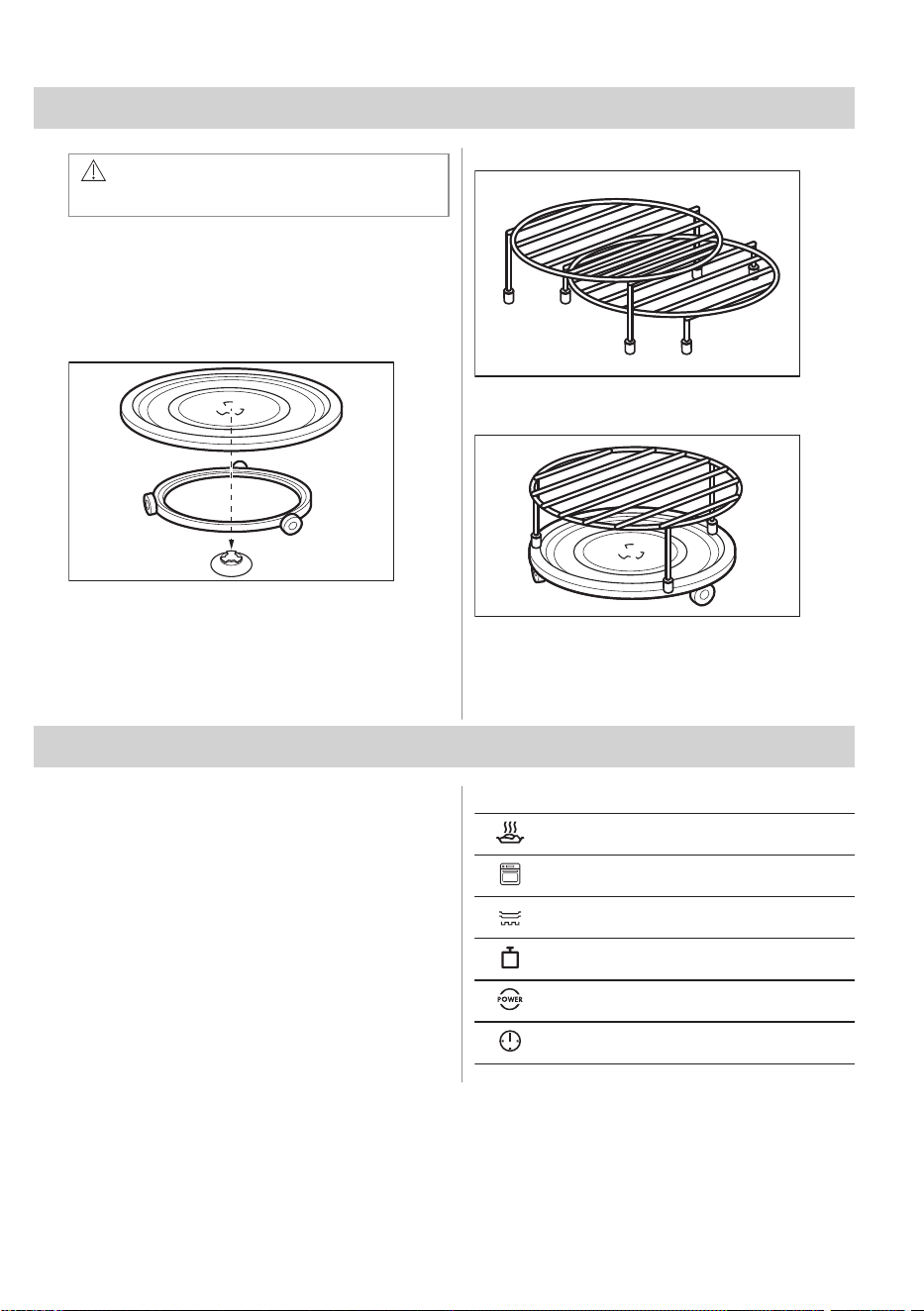
Turntable set
Always cook food on the turntable set. Place
the roller guide around the turntable shaft.
Place the turntable glass on the roller guide.
Use only the turntable set supplied with the
appliance.
Grill rack set
Place the grill rack with the silicon caps down
on the turntable set.
For Microwave heating functions only low grill
rack is recommended.
10. HINTS AND TIPS
10.1 Cooking recommendations
The temperature and cooking times in the
tables are for guidance only. They depend on
the recipes, quality and quantity of the
ingredients used.
Your appliance may cook differently than your
previous appliance. The hints below show
recommended heating functions and settings
for cooking time for specific types of the food.
If you cannot find the settings for a specific
recipe, look for a similar one.
Symbols used in the tables:
Food type
Heating function
Accessory
Weight (kg)
Microwave power (W)
Cooking time (min)
10.2 Information for test institutes
Microwave function
Tests according to IEC 60705.
ENGLISH 13
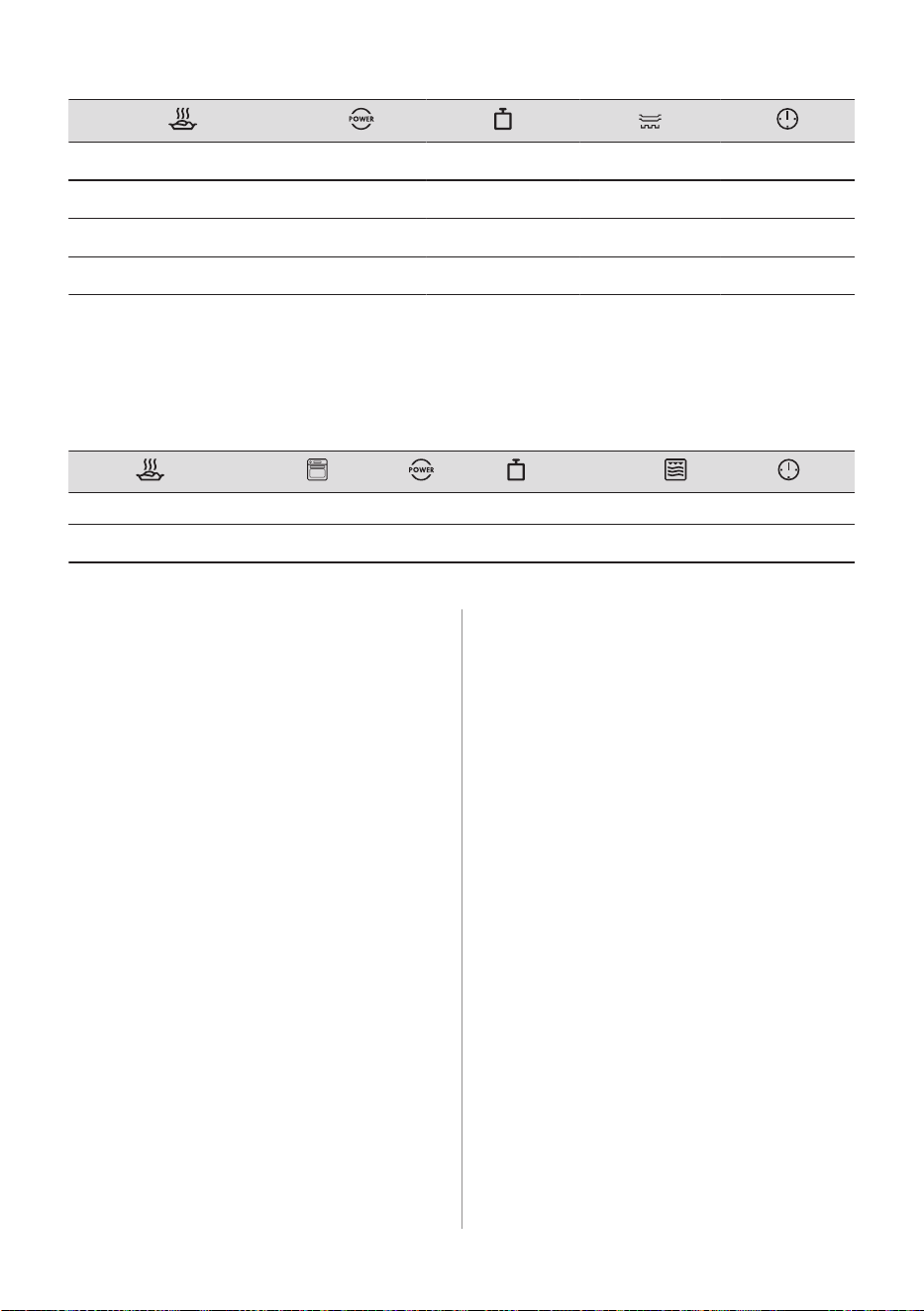
Sponge cake
1)
600 0.475 Turntable set 5 - 7
Meatloaf
1)
500 0.9 Turntable set 18 - 20
Egg custard
1)
500 1 Turntable set 15 - 17
Meat defrosting
2)
200 0.5 Turntable set 8 - 9
1)
Turn the container around by 1/4, halfway through the cooking time.
2)
Turn the meat upside down halfway through defrosting time.
Microwave Combi function
Tests according to IEC 60705.
Use the low grill rack.
Potato gratin Grill + MW 300 1.1 low 30 - 35
Chicken
1)
Grill + MW 300 1.1 high 30 - 35
1)
Put the meat in a round glass container.
10.3 Microwave recommendations
Do not place the food directly on the turntable
set. Always use the microwave suitable
cookware.
Place the cookware in the middle of the
turntable set.
Contact with too hot or too cold items can
break the turntable set.
Turn or stir the food halfway through the
defrosting and cooking time.
Stir liquid dishes from time to time.
Stir the food before serving.
Cover the food for cooking and reheating.
Put the spoon to the bottle or glass when
heating drinks to ensure better heat
distribution.
Place the food into the appliance without
packaging. The packaged ready meals can
be put into the appliance only when the
packaging is microwave safe (check
information on the packaging).
Microwave cooking
Cover the food before cooking. If you want to
keep a crust, cook food without a cover.
Do not overcook the dishes by setting the
power and time too high. The food can dry
out, burn or cause fire.
Do not use the appliance to cook eggs or
snails in their shells, because they can burst.
Pierce the yolk of fried egg before reheating
it.
Pierce food with skin or peel several times
before cooking.
Cut vegetables into similar-sized pieces.
After you turn off the appliance, take the food
out and let it stand for a few minutes to allow
the heat distribute evenly.
Microwave defrosting
Place the frozen, unwrapped food on a small
upturned plate with a container below it, or on
a defrosting rack or plastic sieve so that the
defrosting liquid can leak out.
Remove defrosted pieces subsequently.
To cook fruit and vegetables without
defrosting them first, you can use a higher
microwave power.
14 ENGLISH
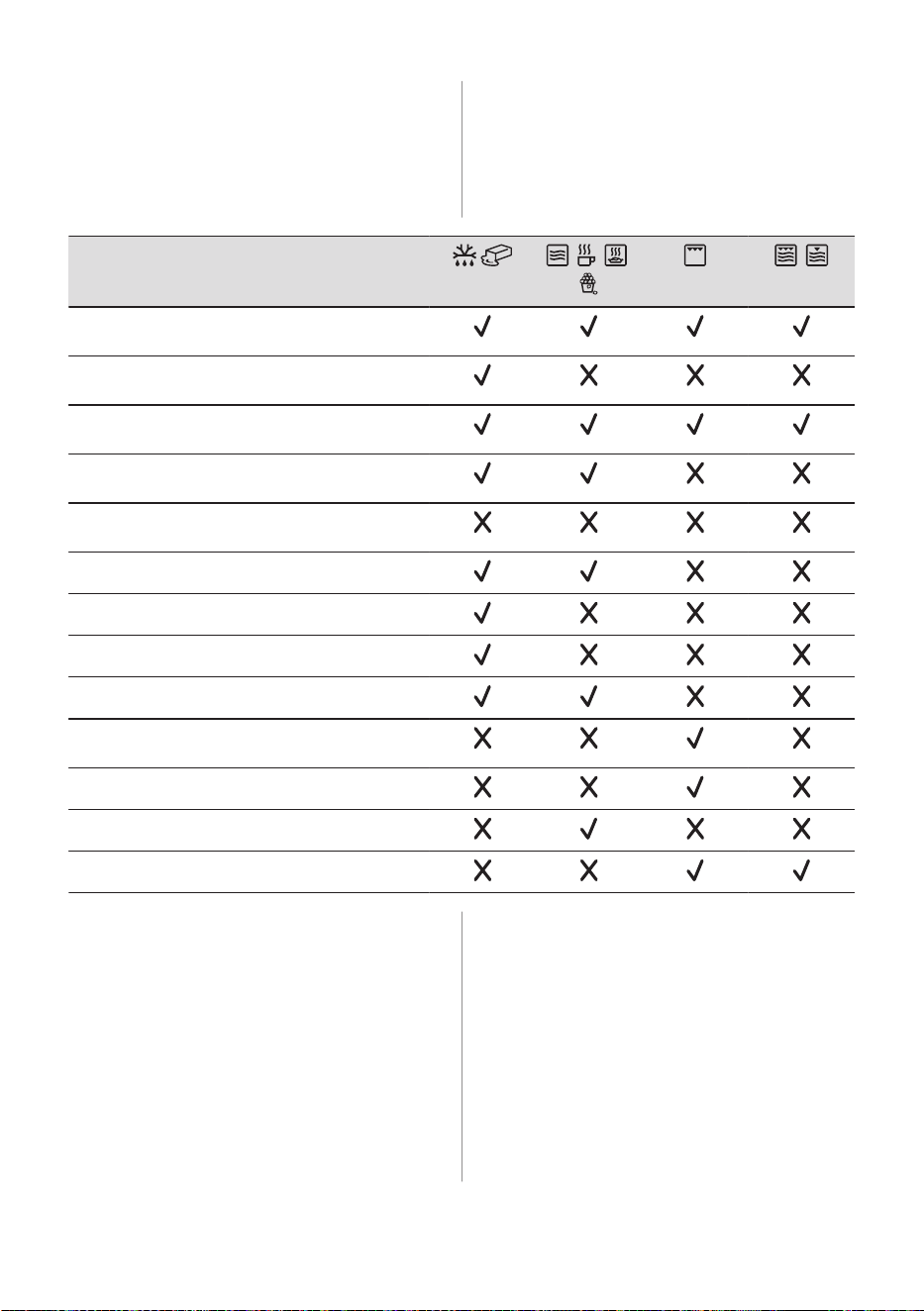
10.4 Microwave suitable cookware
and materials
For the microwave use only suitable
cookware and materials. Use below table as
a reference.
Check the cookware / material specification
before use.
Cookware / Material
Ovenproof glass and porcelain with no metal com‐
ponents, e.g. heat-proof glass
Non-ovenproof glass and porcelain without any sil‐
ver, gold, platinum or other metal decorations
Glass and glass ceramic made of ovenproof /
frost-proof material
Ceramic and earthenware without any quartz or
metal components and glazes which contain metal
Ceramic, porcelain and earthenware with unglazed
bottom or with small holes, e.g. on handles
Heat-resistant plastic up to 200 °C
Cardboard, paper
Microwave clingfilm
Roasting film with microwave safe closure
Roasting dishes made of metal, e.g. enamel, cast
iron
Baking tins, black lacquer or silicon-coated
Cookware for microwave use, e.g. crisp pan
Grill rack set
10.5 Power settings
Below data is for guidance only.
900 - 1000 W
• Searing at the start of the cooking process
• Heating up liquids
800 W
• Simmering rice
• Popcorn
500 - 700 W
• Cooking vegetables
• Heating one-plate meals
• Simmering stews
• Defrosting and heating ready frozen meals
300 - 400 W
• Cooking / Heating delicate food
• Continuing cooking
• Heating baby food
100 - 200 W
• Defrosting bread, fruit, cakes, pastries,
cheese, butter, meat and fish
• Melting chocolate and butter
ENGLISH 15
11. CARE AND CLEANING
WARNING!
Refer to Safety chapters.
11.1 Notes on cleaning
Cleaning Agents
• Clean the front of the appliance only with a
microfibre cloth with warm water and a
mild detergent.
• Use a cleaning solution to clean metal
surfaces.
• Clean stains with a mild detergent.
Everyday Use
• Clean the interior of the appliance after
each use. Fat accumulation or other
residue may cause fire.
• Clean the appliance ceiling carefully from
residue and fat.
• Do not store food in the appliance for
longer than 20 minutes. Dry the interior of
the appliance only with a microfibre cloth
after each use.
Accessories
• Clean all accessories after each use and
let them dry. Before cleaning, wait until the
turntable is cold. There is a risk that the
turntable can break. Keep the roller guide
clean to ensure smooth turning of the
turntable. Use only a microfibre cloth with
warm water and a mild detergent. Do not
clean the accessories in a dishwasher.
• Do not clean the non-stick accessories
using abrasive cleaner or sharp-edged
objects.
12. TROUBLESHOOTING
WARNING!
Refer to Safety chapters.
12.1 What to do if...
Problem Check if...
You cannot activate or operate the appliance. The appliance is correctly connected to an electrical
supply.
The appliance does not heat up. The automatic switch-off is deactivated.
The appliance does not heat up. The fuse is not blown.
The appliance does not heat up. Lock is deactivated.
The lamp does not work. The lamp is burnt out. Contact an Authorised Service
Centre.
The turntable set makes noise. There is food residue below the turntable set.
The display shows 00:00. There was a power cut. Set the time of day.
16 ENGLISH
If the display shows an error code that is
not in this table, turn the house fuse off
and on to restart the appliance. If the
error code recurs contact an Authorised
Service Centre.
12.2 Service data
If you cannot find a solution to the problem
yourself, contact your dealer or an Authorised
Service Centre.
The necessary data for the service centre is
on the rating plate. The rating plate is located
on the front frame of the appliance. It is
visible when you open the door. Do not
remove the rating plate from the appliance.
We recommend that you write the data
here:
Model (MOD.) :
Product number (PNC):
Serial number (S.N.):
13. ENERGY EFFICIENCY
13.1 Energy saving tips
Following tips below will help you save
energy when using your appliance.
Make sure that the appliance door is closed
when the appliance operates. Do not open
the appliance door too often during cooking.
Keep the door gasket clean and make sure it
is well fixed in its position.
Use metal cookware and dark, non-reflective
tins and containers to improve energy saving
(only when you use a non-microwave
function).
Do not preheat the appliance before cooking
unless specifically recommended.
Keep breaks between baking as short as
possible when you prepare a few dishes at
one time.
Cooking with the lamp off
Turn off the lamp during cooking. Turn it on
only when you need it.
14. ENVIRONMENTAL CONCERNS
Recycle materials with the symbol . Put the
packaging in relevant containers to recycle it.
Help protect the environment and human
health by recycling waste of electrical and
electronic appliances. Do not dispose of
appliances marked with the symbol with
the household waste. Return the product to
your local recycling facility or contact your
municipal office.
ENGLISH 17
*


867371341-C-032024
