1
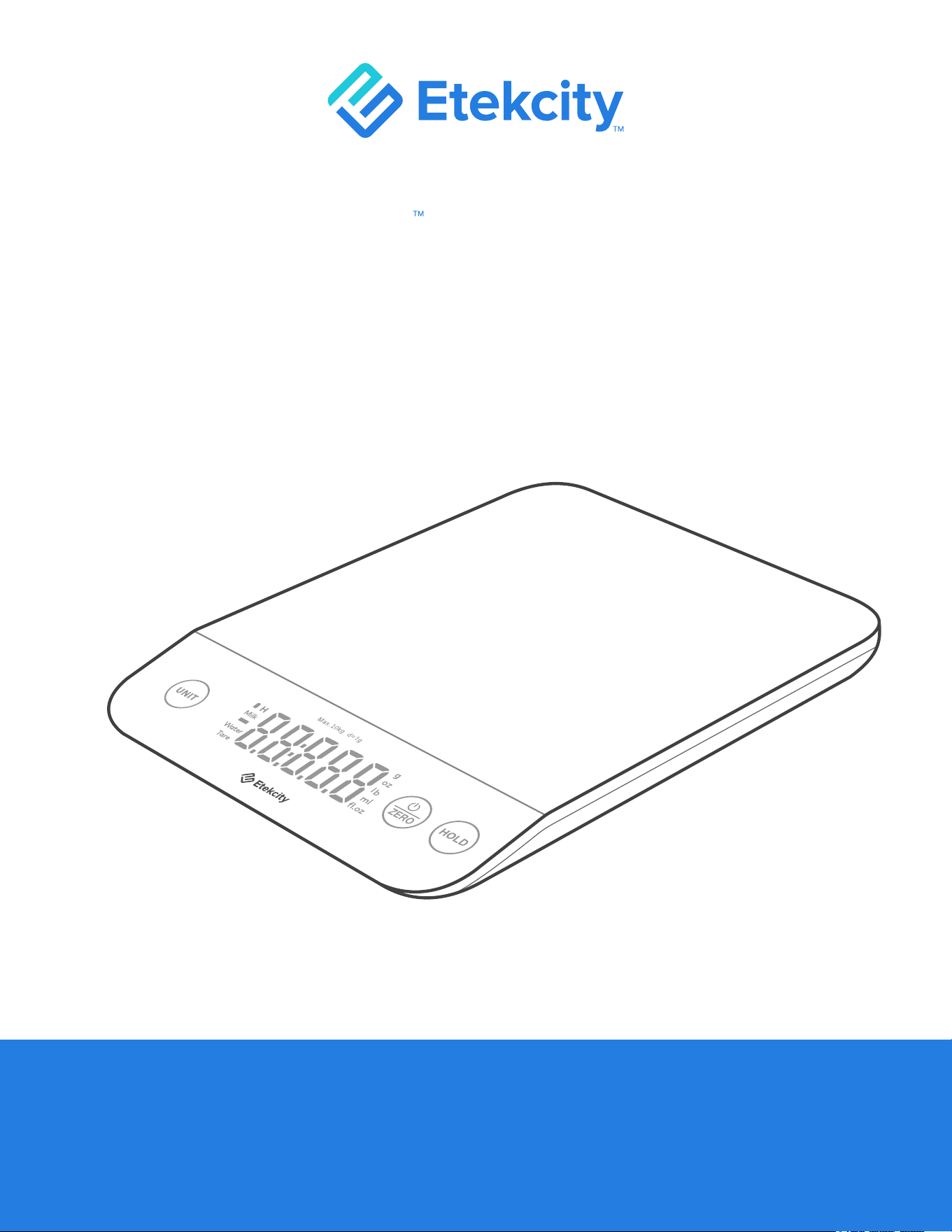
Luminary Kitchen Scale
User Manual
Questions or Concerns?
Mon–Fri, 9:00 am–5:00 pm PST/PDT
support@etekcity.com • (855) 686-3835

2
Thank you for purchasing the
Luminary™ Kitchen Scale by Etekcity.
If you have any questions or concerns, please reach out to our
helpful Customer Support Team at support@etekcity.com.
We hope you enjoy your new kitchen scale!

4
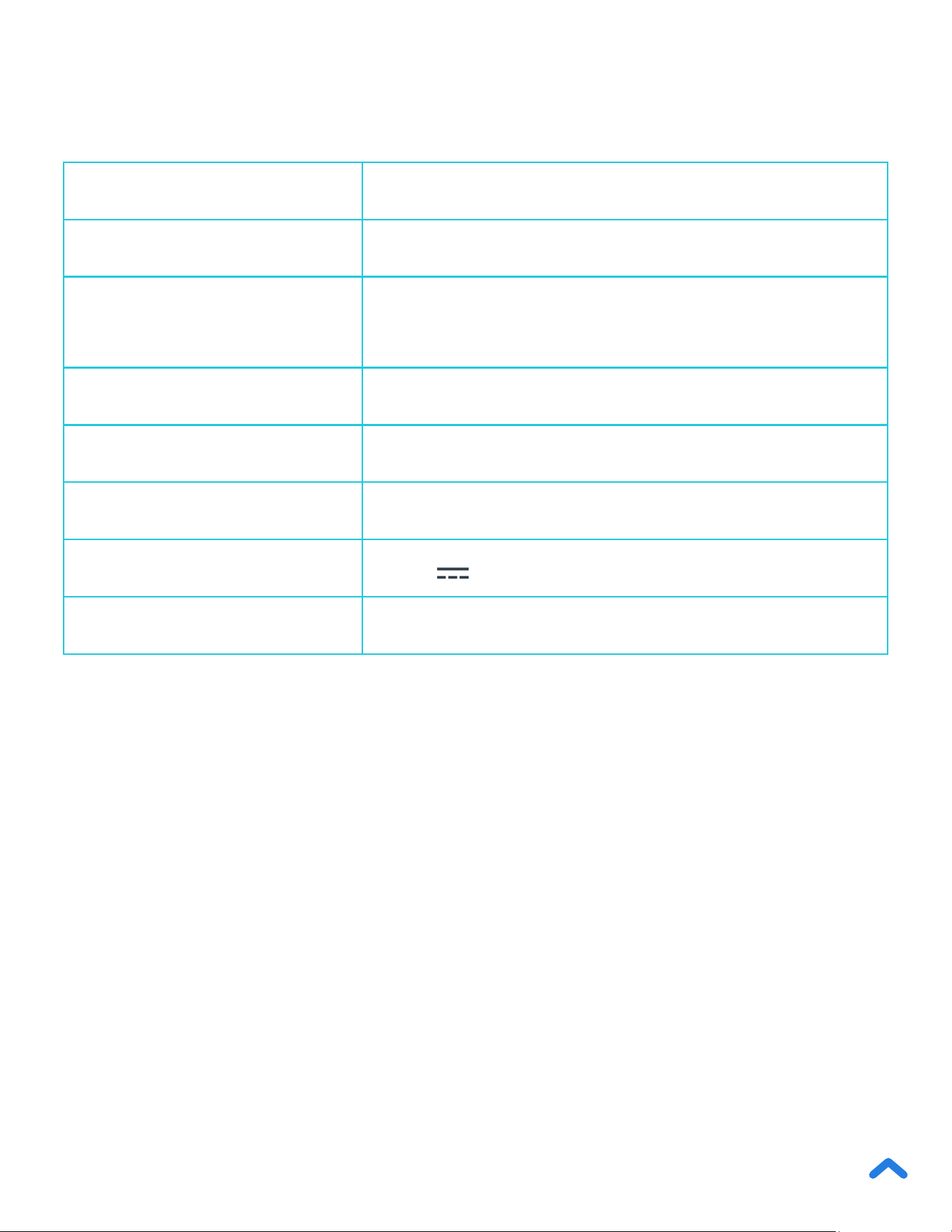
Specications
Models
EKS-L221-SUS, EKS-L221-BUSR
Weight Capacity 353 oz / 22 lb / 10 kg / 10000 mL
Units
oz / lb:oz / g / mL (water/milk) /
’oz (water/milk)
Increments 0.05 oz / 1 g
Auto-Off 180 seconds
Battery 300mAh Li-ion Battery
Input 5.0V
500mA (USB Type-C Charging)
Dimensions 9.1 x 6.7 x 1.1 in / 230 x 170 x 27 mm
Model Line: EKS-L221
Models: EKS-L221-SUS, EKS-L221-BUSR

5
Scale
Important Safety Information
• Do not exceed the 22 lb / 10 kg weight capacity, as it will damage the scale. An
error indicator will appear on the LED display if the limit is exceeded.
• Do not immerse the scale in water or any liquid. If liquid is spilled on the digital
display or buttons, immediately wipe the scale dry with a soft cloth to avoid
internal damage.
• The scale is IPX6 water resistant, which means it can withstand most liquid
spills without permanent damage. However, we still recommend wiping the
scale dry with a soft cloth after any spills to keep it in optimal condition.
• Handle with care. This scale is not intended for commercial or heavy-duty use.
• Keep the scale in a cool, dry place. Avoid exposure to damp environments or
extreme temperatures.
• Household use only.
Please read and follow all instructions and safety guidelines in this manual.
READ AND SAVE THESE INSTRUCTIONS
SAVE THESE INSTRUCTIONS
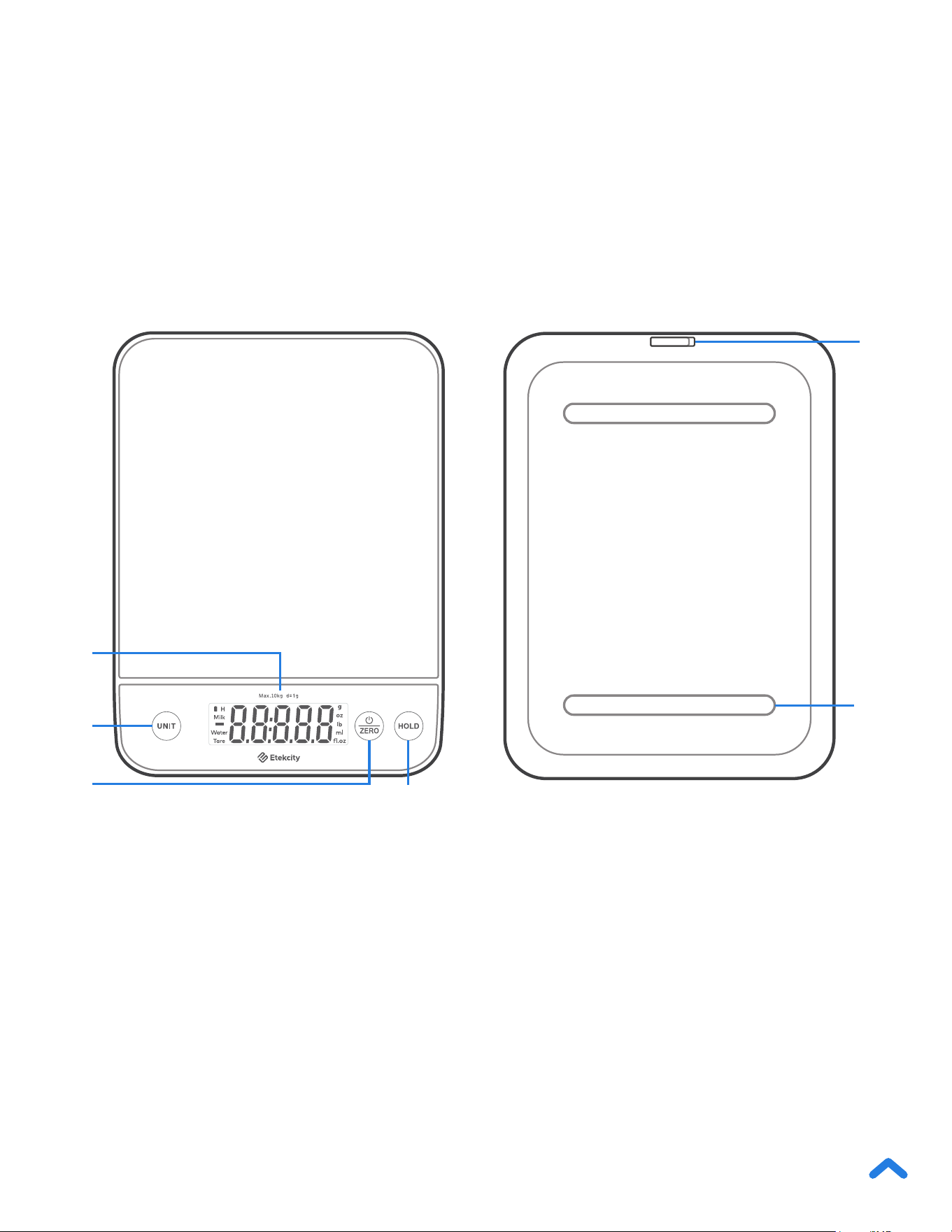
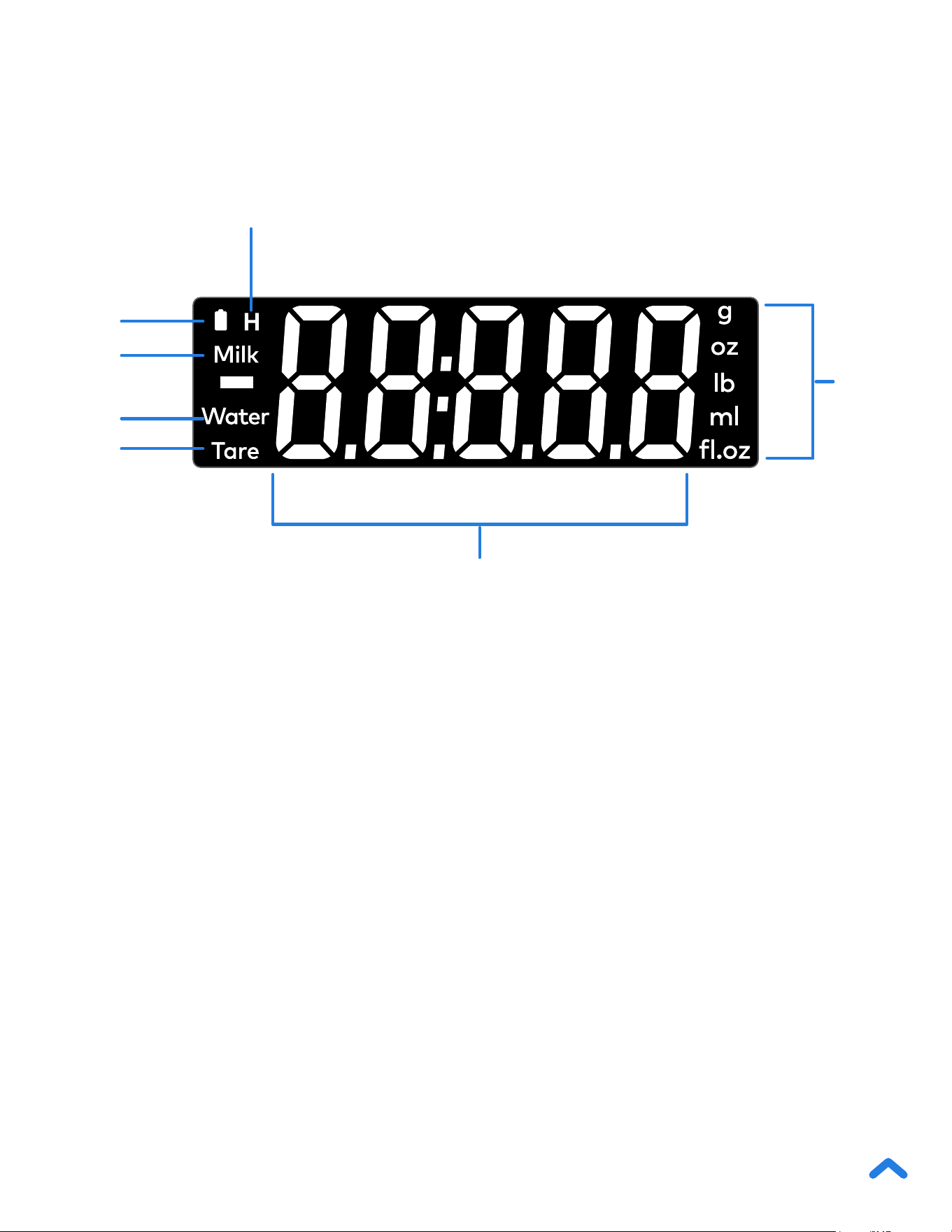

8
Using Your Scale
General Operation
1. Place the scale on a hard, at surface.
2. Tap
to turn on the scale. Make sure the display reads
“0.00”.
3. Tap UNIT to select your desired measuring unit, which will
show on the right of the display.
Note:
• For accurate results, always place the scale on a hard, at surface, and
keep the scale away from dirt, dust, vibrations, wind, air currents, and
electromagnetic interference.
• When you turn on the scale, choose units, or use the tare function, wait
for the display to read “0.00” before measuring.
Note: Optionally, press and hold
UNIT to quickly switch between units.
4. Place your item on the scale.
5. Wait for the reading on the display to show.
6. When you’re done, reset the scale by removing all items
from the scale. If the display doesn’t read “0.00”, press
to reset the weight to zero.

9
1. Tap to turn on the scale. Make sure the display reads
“0.00”. If the screen does not display “0.00” automatically, tap
to adjust to zero.
2. Place the container on the center of the scale.
3. Wait for the reading on the display to show the
container’s weight.
4. Tap
to tare the weight of the container. The screen will
now display “0.00”.
5. Place the liquid or items into the container. The scale will
measure the contents without including the weight of the
container.
6. When you’re done, reset the scale by removing all weight and
tapping
again.
Whenever you measure items inside a container, you can use
the tare function to remove the container’s weight from the nal
measurement.
Zero / Tare Function

10
Unit Conversion
Hold Function
Automatic Power Off
Manual Power Off
To change the unit of measurement, tap UNIT until the display
shows your desired unit of measurement.
Optionally, press and hold UNIT to quickly switch between units.
Tap HOLD to lock the measurement data on the display. Tap
HOLD again to unlock the display.
To save battery power, the scale will automatically power off after
180 seconds of inactivity.
Tap and hold
for 2 seconds to turn off the scale.
Note: In hold mode, will not work. You can still use UNIT to switch
between units.

11
Battery
Maintenance
While the scale is in use, will ash if the scale is running low
on battery. The scale’s display will show “Lo” when the battery
needs to be charged immediately. Follow the steps to recharge the
battery.
• Use a slightly damp cloth to clean the surface of the scale,
followed by a dry, soft cloth to wipe away the remaining
moisture.
• Use a dry, soft cloth to wipe dust off the scale.
• Do not wash the scale or immerse it in water or any other liquid.
1. Insert the USB charging cable into the USB charging socket.
2. Plug the USB charging cable into a DC 5V adapter and plug into
an outlet. You can also plug the cable into a powered USB outlet.
3. When charging,
will ash. Once the battery is fully charged,
will stop ashing.
Note:
• The scale can’t be used while charging, so it is recommended to charge
the battery when
ashes, indicating low battery.

12
Troubleshooting
If your problem is not listed, please contact Customer Support
(see page 16).
Problem Possible Solution
Scale does not turn on.
The scale may need to be charged. Plug in the USB
power cord to charge.
Reading is inaccurate.
Place scale on a level surface.
Keep scale away from dirt, dust, vibrations, wind, air
currents, and electromagnetic interference.
Make sure the screen displays “0.00” before measuring
(see Zero / Tare Function, page 9).
Display shows “Err”
Item is too heavy. Remove item from scale to protect
its weight sensor. Use a different scale with a higher
weight range.
Battery Indicator is
ashing
1. A ashing
while the scale is in use means the
battery is low. It is recommended to charge the battery.
2. A ashing
while charging means the scale is still
charging and will stop ashing when the battery is fully
charged.
Display shows “Lo”
The battery is out of power and needs to be charged
immediately. Plug in the USB power cord to charge the
scale (see Battery, page 11).

13
Federal Communication Commission
Interference Statement – Part 15
This device complies with Part 15 of the FCC Rules. Operation is subject to the following
two conditions:
1. This device may not cause harmful interference, and
2. This device must accept any interference received, including interference that
may cause undesired operation.
NOTE: This equipment has been tested and found to comply with the limits for a Class
B digital device, pursuant to Part 15 of the FCC Rules. These limits are designed to
provide reasonable protection against harmful interference in a residential installation.
This equipment generates, uses and can radiate radio frequency energy and, if not
installed and used in accordance with the instructions, may cause harmful interference
to radio communications. However, there is no guarantee that interference will not occur
in a particular installation. If this equipment does cause harmful interference to radio
or television reception, which can be determined by turning the equipment off and on,
the user is encouraged to try to correct the interference by one or more of the following
measures:
• Reorient or relocate the receiving antenna.
• Increase the separation between the equipment and receiver.
• Connect the equipment into an outlet on a circuit different from that to which the
receiver is connected.
• Consult the dealer or an experienced radio/TV technician for help.
FCC Caution: Any changes or modications not expressly approved by the party
responsible for compliance could void the user’s authority to operate this equipment.
FCC SDOC SUPPLIER’S DECLARATION OF CONFORMITY
Etekcity Corporation hereby declares that this equipment is in compliance with FCC
requirements. The declaration of conformity may be consulted in the support section of
our website, accessible from www.etekcity.com

14
Warranty Information
Product Luminary™ Kitchen Scale
Models EKS-L221-SUS, EKS-L221-BUSR
For your own reference, we strongly recommend that you record your order ID and
date of purchase.
Order ID
Date of Purchase
TERMS & POLICY
Etekcity Corporation (“Etekcity”) warrants this product to the original
purchaser to be free from defects in material and workmanship, under
normal use and conditions, for a period of 2 years from the date of original
purchase.
Etekcity agrees, at our option during the warranty period, to repair any
defect in material or workmanship or furnish an equal product in exchange
without charge, subject to verication of the defect or malfunction and
proof of the date of purchase.
There is no other express warranty. This warranty does not apply:
• If the product has been modied from its original condition;
• If the product has not been used in accordance with directions and
instructions in the user manual;
• To damages or defects caused by accident, abuse, misuse or
improper or inadequate maintenance;
• To damages or defects caused by service or repair of the product
performed by an unauthorized service provider or by anyone other
than Etekcity;
• To damages or defects occurring during commercial use, rental use,
or any use for which the product is not intended;

15
• To damages or defects exceeding the cost of the product.
Etekcity will not be liable for indirect, incidental, or consequential damages
in connection with the use of the product covered by this warranty.
This warranty extends only to the original consumer purchaser of the
product and is not transferable to any subsequent owner of the product
regardless of whether the product is transferred during the specied term
of the warranty.
This warranty does not extend to products purchased from unauthorized
sellers. Etekcity’s warranty extends only to products purchased from
authorized sellers that are subject to Etekcity’s quality controls and have
agreed to follow its quality controls.
All implied warranties are limited to the period of this limited warranty.
This warranty gives you specic legal rights and you may also have
other rights which vary from state to state. Some states do not allow the
exclusion or limitation of incidental or consequential damages, so the
above limitation or exclusion may not apply to you.
If you discover that your product is defective within the specied warranty
period, please contact Customer Support via support@etekcity.com.
DO NOT dispose of your product before contacting us. Once our Customer
Support Team has approved your request, please return the product with a
copy of the invoice and order ID.
Every Etekcity product automatically includes a 2-year warranty. To make
the customer support process quick and easy, register your product online
at www.etekcity.com/warranty.
This warranty is made by:
Etekcity Corporation
1202 N. Miller St., Suite A
Anaheim, CA 92806

16
Customer Support
If you have any questions or concerns about your new product,
please contact our helpful Customer Support Team.
Etekcity Corporation
1202 N. Miller St., Suite A
Anaheim, CA 92806
Email: support@etekcity.com
Toll-Free: (855) 686-3835
Support Hours
Mon–Fri, 9:00 am–5:00 pm PST/PDT
*Please have your order invoice and order ID ready before contacting
Customer Support.